control unit NISSAN NAVARA 2005 Repair Workshop Manual
[x] Cancel search | Manufacturer: NISSAN, Model Year: 2005, Model line: NAVARA, Model: NISSAN NAVARA 2005Pages: 3171, PDF Size: 49.59 MB
Page 1661 of 3171
CONTROL UNIT CONFIGURATION PROCEDURE
GI-39
C
D
E
F
G
H
I
J
K
L
MB
GI
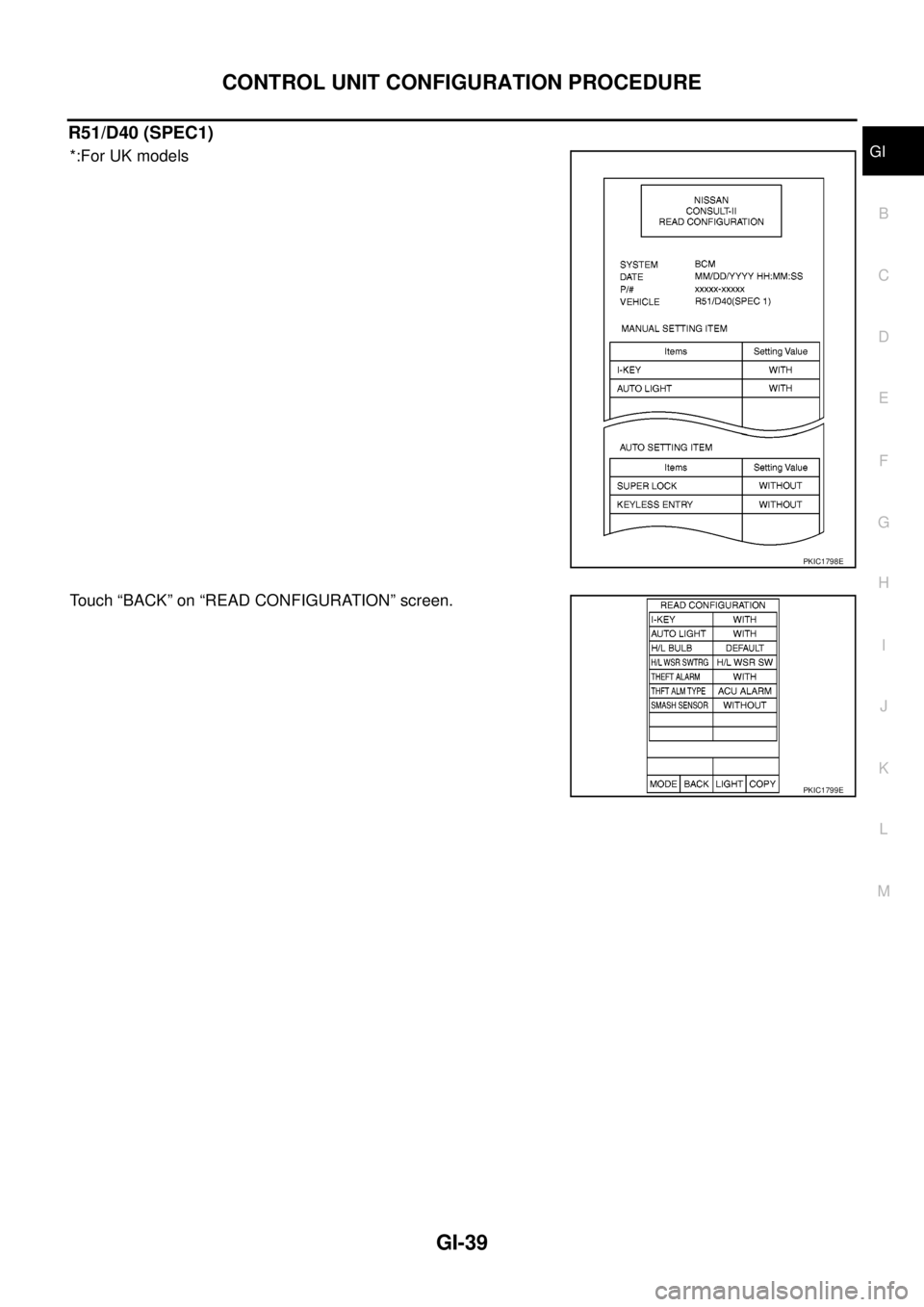
R51/D40 (SPEC1)
*:For UK models
Touch “BACK” on “READ CONFIGURATION” screen.
PKIC1798E
PKIC1799E
Page 1662 of 3171
GI-40
CONTROL UNIT CONFIGURATION PROCEDURE
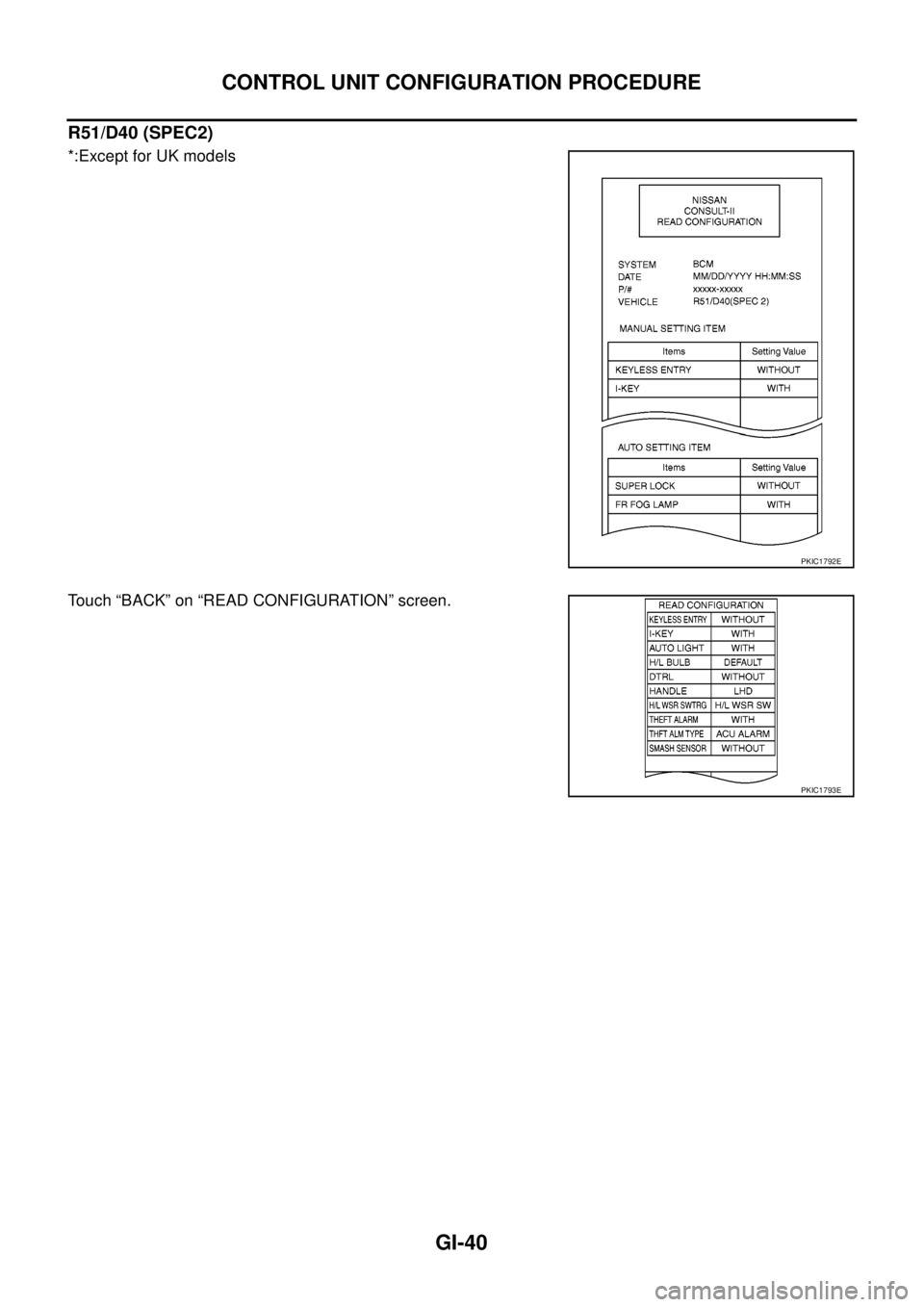
R51/D40 (SPEC2)
*:Except for UK models
Touch “BACK” on “READ CONFIGURATION” screen.
PKIC1792E
PKIC1793E
Page 1663 of 3171
CONTROL UNIT CONFIGURATION PROCEDURE
GI-41
C
D
E
F
G
H
I
J
K
L
MB
GI
WRITE CONFIGURATION PROCEDURE
CAUTION:
If CONSULT-II is used with no connection of CONSULT-II CONVERTER, malfunctions might be
detected in self-diagnosis depending on control unit which carry out CAN communication.
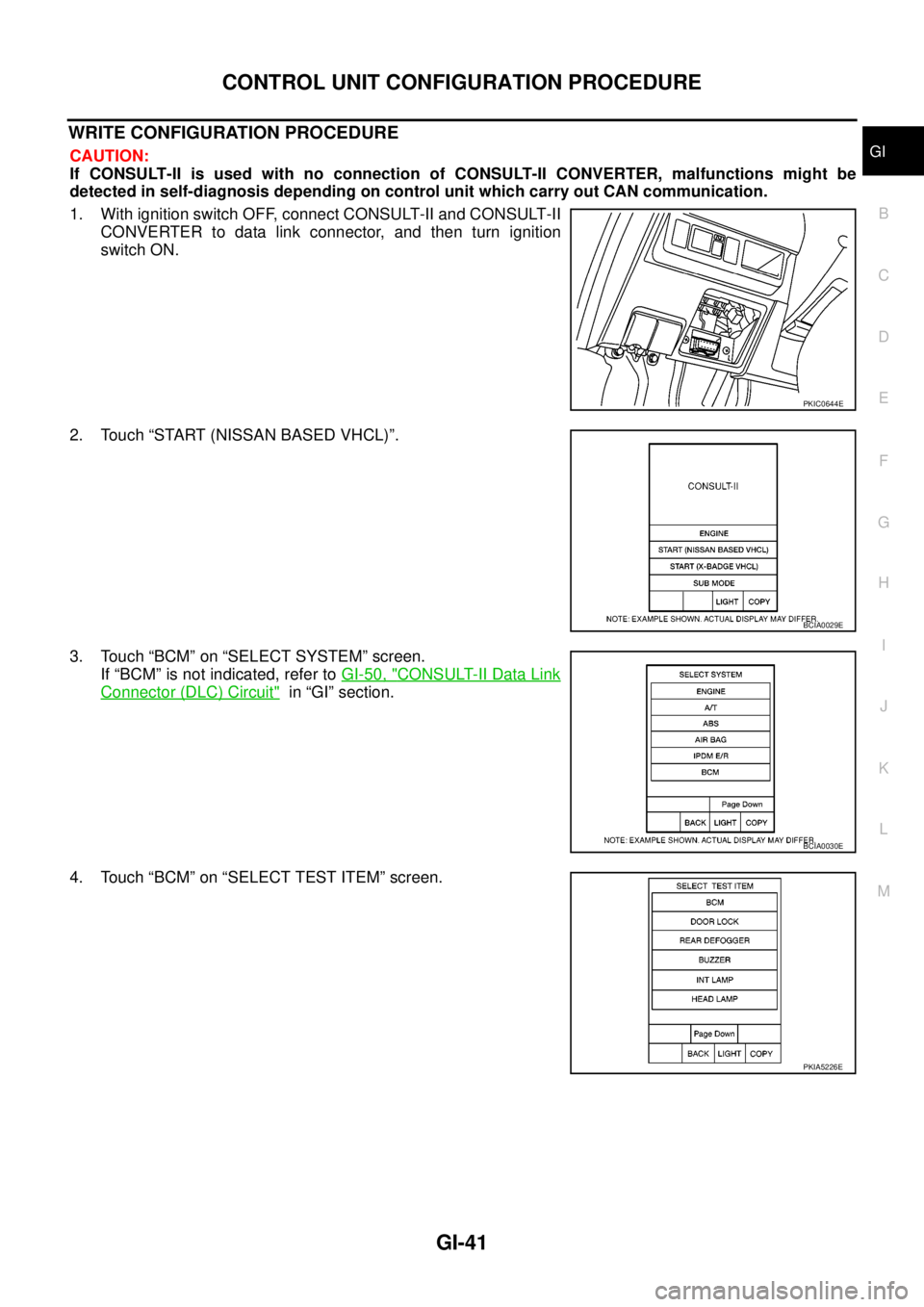
1. With ignition switch OFF, connect CONSULT-II and CONSULT-II
CONVERTER to data link connector, and then turn ignition
switch ON.
2. Touch “START (NISSAN BASED VHCL)”.
3. Touch “BCM” on “SELECT SYSTEM” screen.
If “BCM” is not indicated, refer toGI-50, "
CONSULT-II Data Link
Connector (DLC) Circuit"in “GI” section.
4. Touch “BCM” on “SELECT TEST ITEM” screen.
PKIC0644E
BCIA0029E
BCIA0030E
PKIA5226E
Page 1664 of 3171
GI-42
CONTROL UNIT CONFIGURATION PROCEDURE
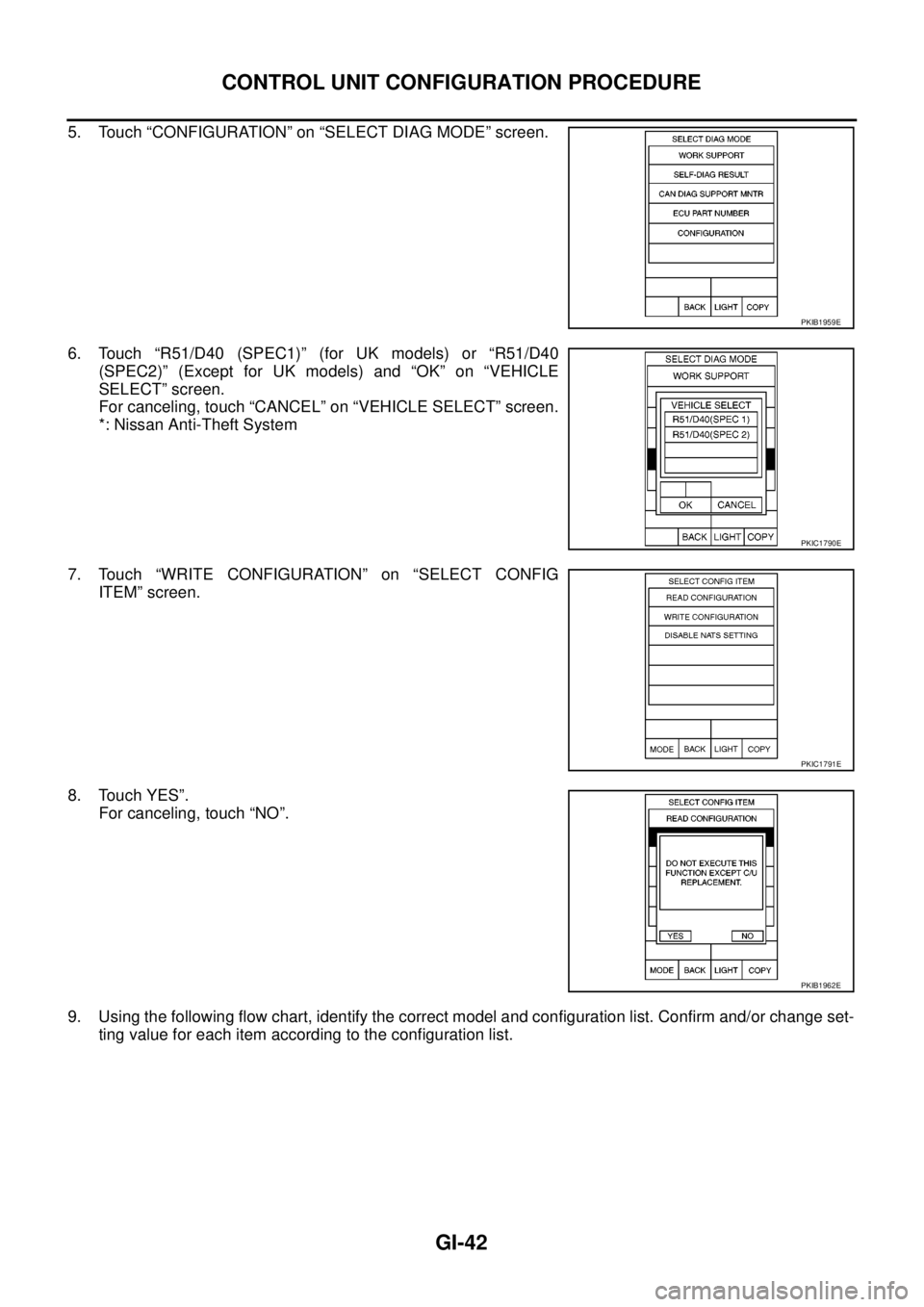
5. Touch “CONFIGURATION” on “SELECT DIAG MODE” screen.
6. Touch “R51/D40 (SPEC1)” (for UK models) or “R51/D40
(SPEC2)” (Except for UK models) and “OK” on “VEHICLE
SELECT” screen.
For canceling, touch “CANCEL” on “VEHICLE SELECT” screen.
*: Nissan Anti-Theft System
7. Touch “WRITE CONFIGURATION” on “SELECT CONFIG
ITEM” screen.
8. Touch YES”.
For canceling, touch “NO”.
9. Using the following flow chart, identify the correct model and configuration list. Confirm and/or change set-
ting value for each item according to the configuration list.
PKIB1959E
PKIC1790E
PKIC1791E
PKIB1962E
Page 1665 of 3171
CONTROL UNIT CONFIGURATION PROCEDURE
GI-43
C
D
E
F
G
H
I
J
K
L
MB
GI
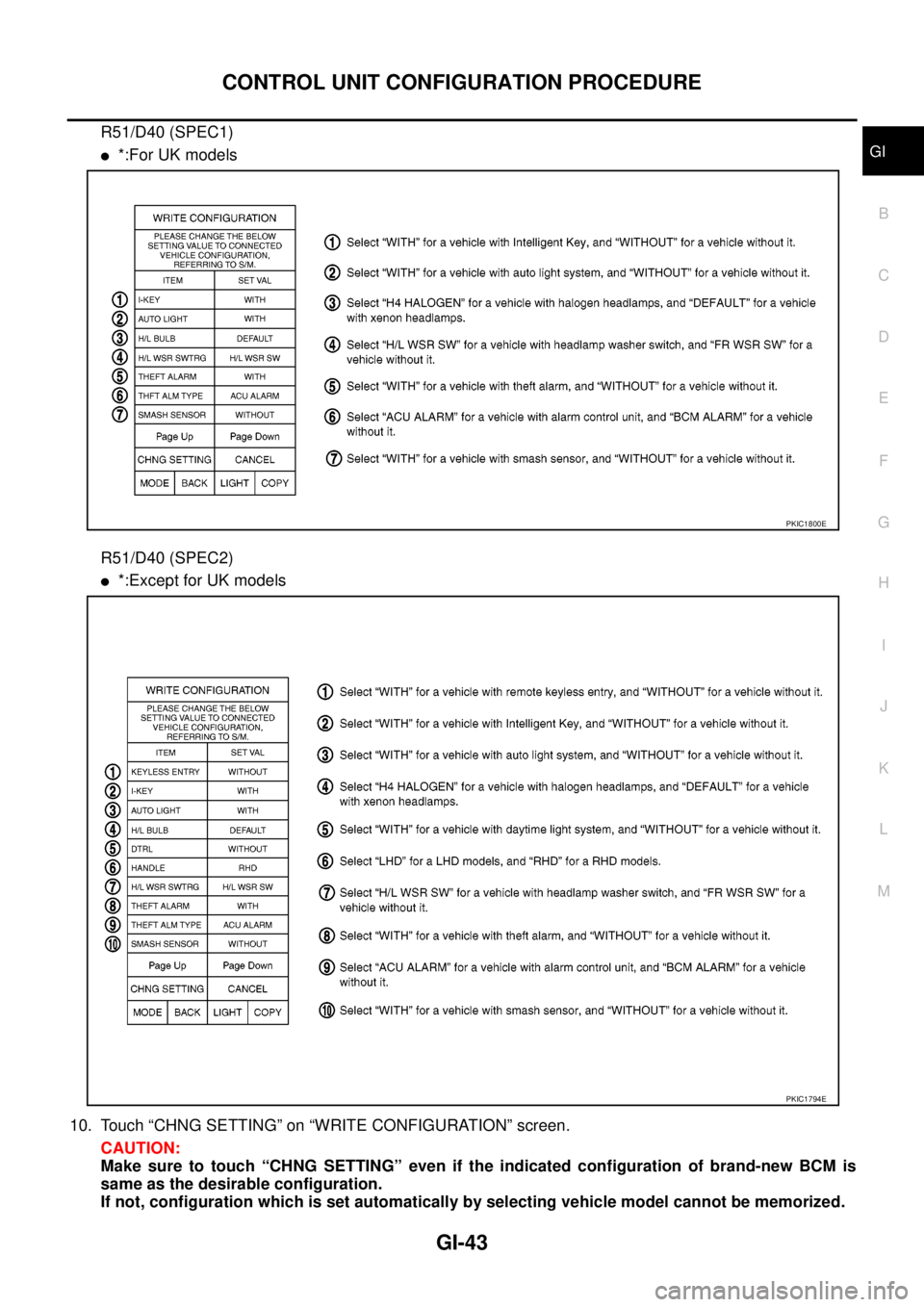
R51/D40 (SPEC1)
l*:For UK models
R51/D40 (SPEC2)
l*:Except for UK models
10. Touch “CHNG SETTING” on “WRITE CONFIGURATION” screen.
CAUTION:
Make sure to touch “CHNG SETTING” even if the indicated configuration of brand-new BCM is
same as the desirable configuration.
If not, configuration which is set automatically by selecting vehicle model cannot be memorized.
PKIC1800E
PKIC1794E
Page 1666 of 3171
GI-44
CONTROL UNIT CONFIGURATION PROCEDURE
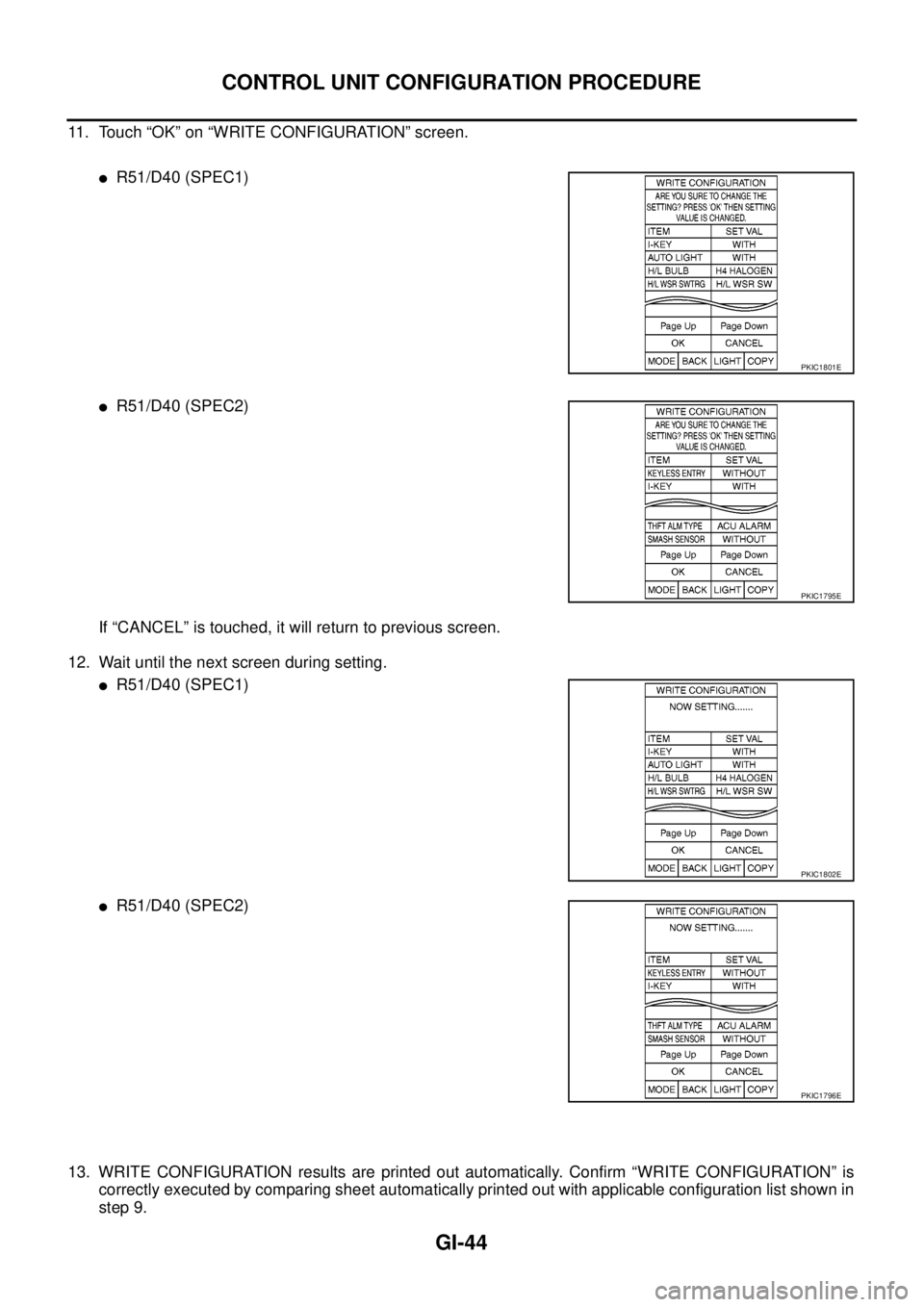
11. Touch “OK” on “WRITE CONFIGURATION” screen.
lR51/D40 (SPEC1)
lR51/D40 (SPEC2)
If “CANCEL” is touched, it will return to previous screen.
12. Wait until the next screen during setting.
lR51/D40 (SPEC1)
lR51/D40 (SPEC2)
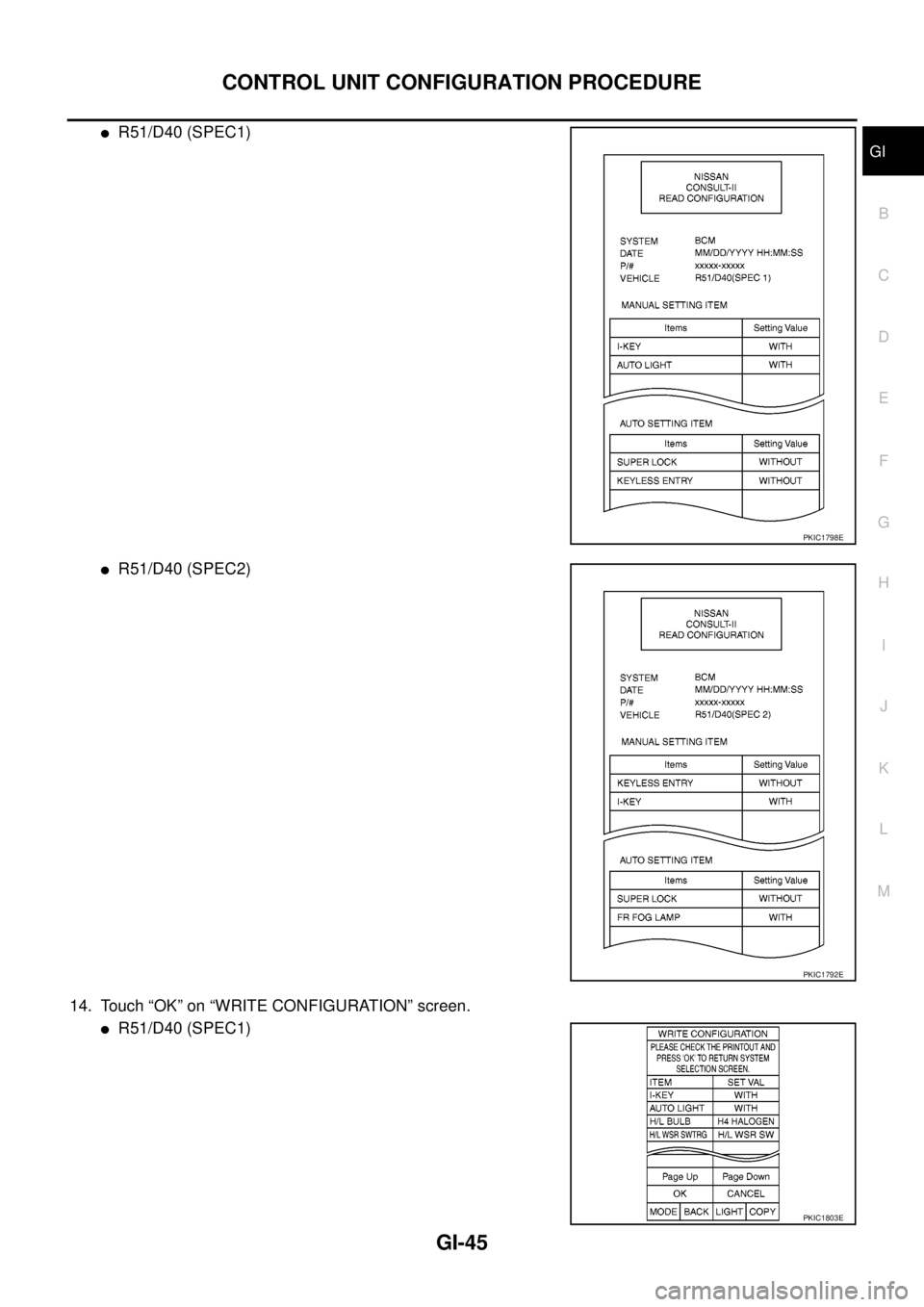
13. WRITE CONFIGURATION results are printed out automatically. Confirm “WRITE CONFIGURATION” is
correctly executed by comparing sheet automatically printed out with applicable configuration list shown in
step 9.
PKIC1801E
PKIC1795E
PKIC1802E
PKIC1796E
Page 1667 of 3171
CONTROL UNIT CONFIGURATION PROCEDURE
GI-45
C
D
E
F
G
H
I
J
K
L
MB
GI
lR51/D40 (SPEC1)
lR51/D40 (SPEC2)
14. Touch “OK” on “WRITE CONFIGURATION” screen.
lR51/D40 (SPEC1)
PKIC1798E
PKIC1792E
PKIC1803E
Page 1668 of 3171
GI-46
CONTROL UNIT CONFIGURATION PROCEDURE
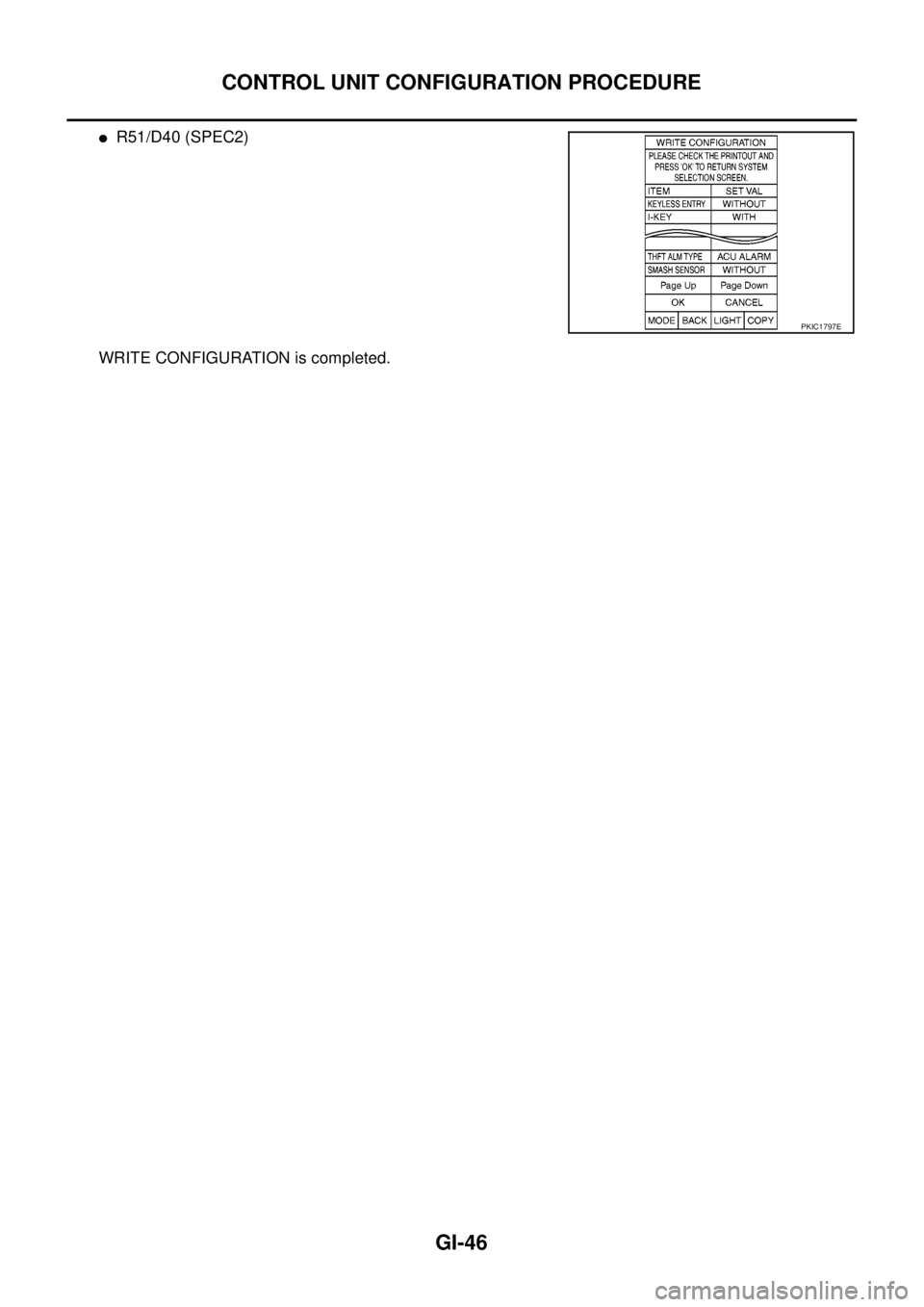
lR51/D40 (SPEC2)
WRITE CONFIGURATION is completed.
PKIC1797E
Page 1669 of 3171

CONSULT-II CHECKING SYSTEM
GI-47
C
D
E
F
G
H
I
J
K
L
MB
GI
CONSULT-II CHECKING SYSTEMPFP:00000
DescriptionEAS001H2
lCONSULT-II is a hand-held type tester. When it is connected with a diagnostic connector equipped on the
vehicle side, it will communicate with the control unit equipped in the vehicle and then enable various
kinds of diagnostic tests.
lRefer to “CONSULT-II Software Operation Manual” for more information.
Function and System ApplicationEAS001H3
x: Applicable
*: Nissan Anti-Theft SystemDiagnostic test
modeFunction
ENGINE
A/T
AIR BAG
ABS
ALL MODE AWD/4WD
BCM
IPDM E/R
MULTI AV
METER
NATS *
Work supportThis mode enables a technician to adjust some devices
faster and more accurately by following the indications
on CONSULT-II.x---´´--- -
Self-diagnostic
resultsSelf-diagnostic results can be read and erased quickly. x x x x x´´´´x
Trouble diagnostic
recordCurrent self-diagnostic results and all trouble diagnostic
records previously stored can be read.--x------ -
Data monitor Input/Output data in the ECU can be read. x x - x x´´´´-
CAN diagnosis
support monitorThe communication condition of CAN communication
line can be indicated.xx - xx´´´´-
Active testDiagnostic Test Mode in which CONSULT-II drives some
actuators apart from the ECU and also shifts some
parameters in a specified range.x- -x-´´-- -
DTC confirmationThe results of SRT (System Readiness Test) and the
self-diagnosis status/result can be confirmed.x----- - -- -
DTC work supportThe operating condition to confirm Diagnosis Trouble
Codes can be selected.-x------- -
ECM (ECU/TCM)
part numberECM (ECU/TCM) part number can be read. x x - x x´-´--
ECU discrimi-
nated No.Classification number of a replacement ECU can be read
to prevent an incorrect ECU from being installed.--x------ -
Function testThis mode can show results of self-diagnosis of ECU
with either “OK” or “NG”. For engines, more practical
tests regarding sensor/switches and/or actuators are
available.xxxx-- - - - -
Control unit initial-
izationAll registered ignition key IDs in NATS components can
be initialized and new IDs can be registered.------ - -- x
AV C O M M m o n i t o rIndicates the communication condition of AV communi-
cation.- ----- -´--
ConfigurationThe vehicle configuration can be read and written on
brand-new ECU- ----´--- -
Page 1671 of 3171
CONSULT-II CHECKING SYSTEM
GI-49
C
D
E
F
G
H
I
J
K
L
MB
GI
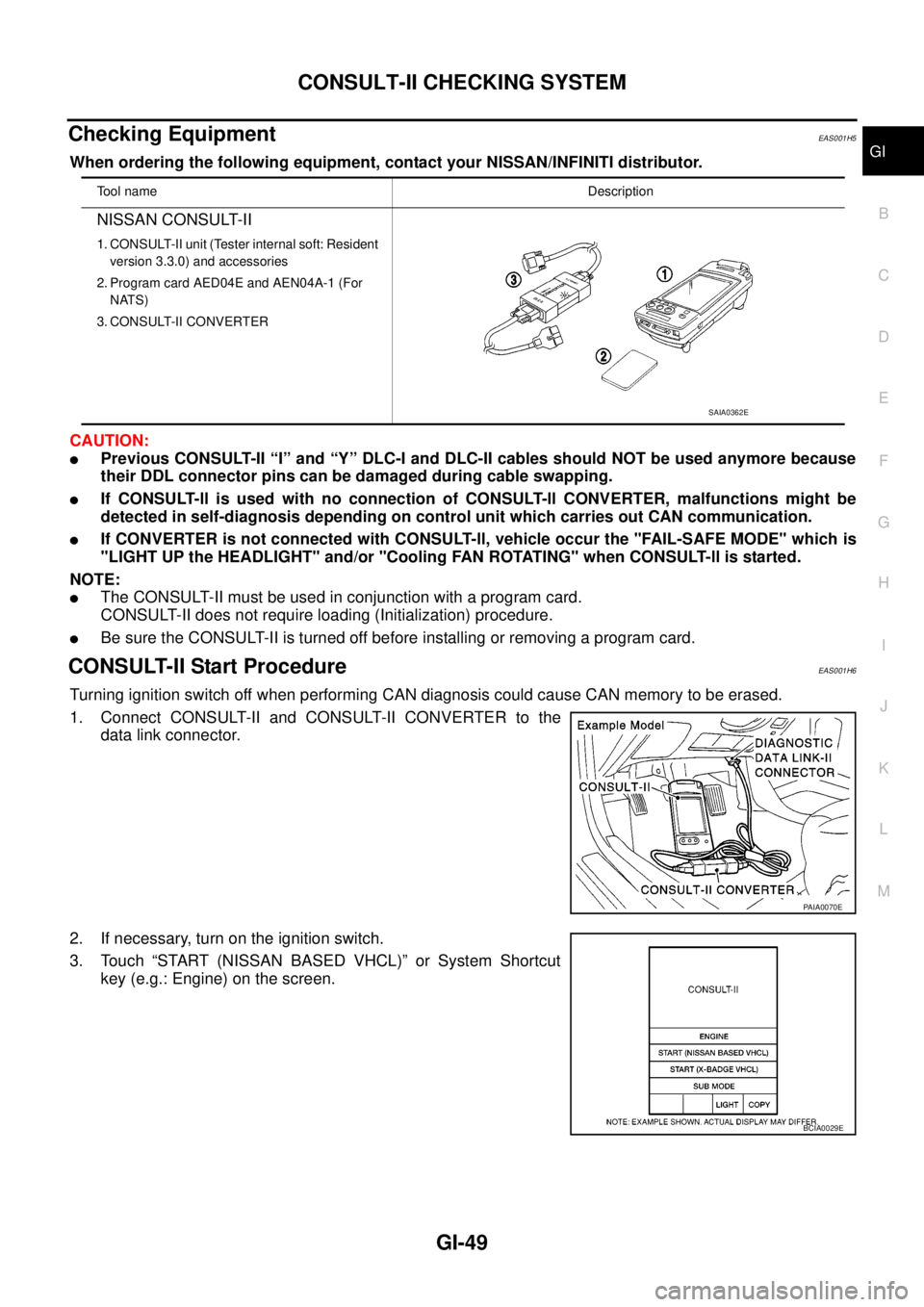
Checking EquipmentEAS001H5
When ordering the following equipment, contact your NISSAN/INFINITI distributor.
CAUTION:
lPrevious CONSULT-II “I” and “Y” DLC-I and DLC-II cables should NOT be used anymore because
their DDL connector pins can be damaged during cable swapping.
lIf CONSULT-ll is used with no connection of CONSULT-ll CONVERTER, malfunctions might be
detected in self-diagnosis depending on control unit which carries out CAN communication.
lIf CONVERTER is not connected with CONSULT-ll, vehicle occur the "FAIL-SAFE MODE" which is
"LIGHT UP the HEADLIGHT" and/or "Cooling FAN ROTATING" when CONSULT-ll is started.
NOTE:
lThe CONSULT-II must be used in conjunction with a program card.
CONSULT-II does not require loading (Initialization) procedure.
lBe sure the CONSULT-II is turned off before installing or removing a program card.
CONSULT-II Start ProcedureEAS001H6
Turning ignition switch off when performing CAN diagnosis could cause CAN memory to be erased.
1. Connect CONSULT-II and CONSULT-II CONVERTER to the
data link connector.
2. If necessary, turn on the ignition switch.
3. Touch “START (NISSAN BASED VHCL)” or System Shortcut
key (e.g.: Engine) on the screen.
Tool nameDescription
NISSAN CONSULT-II
1. CONSULT-II unit (Tester internal soft: Resident
version 3.3.0) and accessories
2. Program card AED04E and AEN04A-1 (For
NATS)
3. CONSULT-II CONVERTER
SAIA0362E
PAIA0070E
BCIA0029E