control unit NISSAN NAVARA 2005 Repair Workshop Manual
[x] Cancel search | Manufacturer: NISSAN, Model Year: 2005, Model line: NAVARA, Model: NISSAN NAVARA 2005Pages: 3171, PDF Size: 49.59 MB
Page 1673 of 3171
CONSULT-II CHECKING SYSTEM
GI-51
C
D
E
F
G
H
I
J
K
L
MB
GI
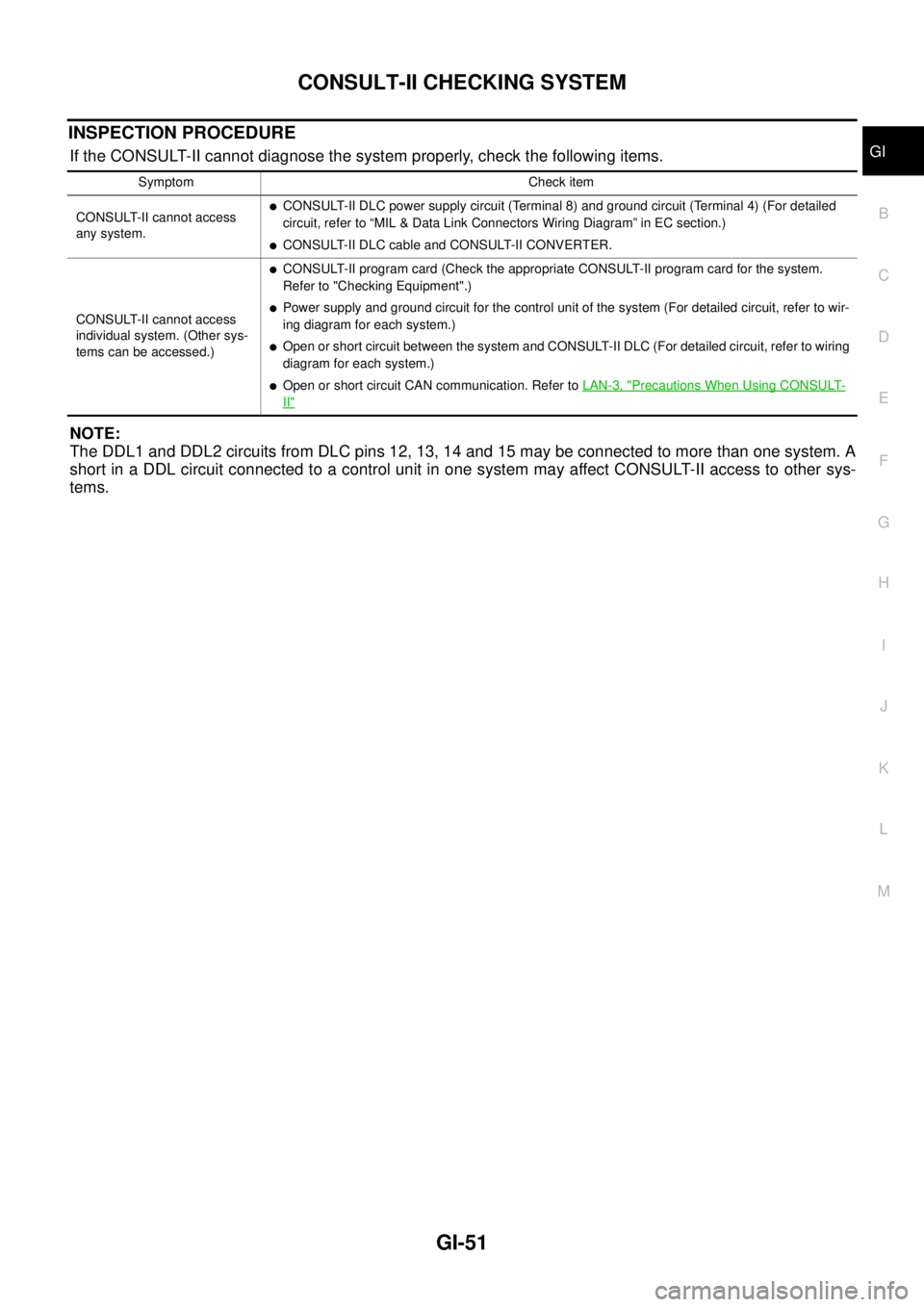
INSPECTION PROCEDURE
If the CONSULT-II cannot diagnose the system properly, check the following items.
NOTE:
The DDL1 and DDL2 circuits from DLC pins 12, 13, 14 and 15 may be connected to more than one system. A
short in a DDL circuit connected to a control unit in one system may affect CONSULT-II access to other sys-
tems.
Symptom Check item
CONSULT-II cannot access
any system.
lCONSULT-II DLC power supply circuit (Terminal 8) and ground circuit (Terminal 4) (For detailed
circuit, refer to “MIL & Data Link Connectors Wiring Diagram” in EC section.)
lCONSULT-II DLC cable and CONSULT-II CONVERTER.
CONSULT-II cannot access
individual system. (Other sys-
tems can be accessed.)
lCONSULT-II program card (Check the appropriate CONSULT-II program card for the system.
Refer to "Checking Equipment".)
lPower supply and ground circuit for the control unit of the system (For detailed circuit, refer to wir-
ing diagram for each system.)
lOpen or short circuit between the system and CONSULT-II DLC (For detailed circuit, refer to wiring
diagram for each system.)
lOpen or short circuit CAN communication. Refer toLAN-3, "Precautions When Using CONSULT-
II"
Page 1683 of 3171

TERMINOLOGY
GI-61
C
D
E
F
G
H
I
J
K
L
MB
GI
TERMINOLOGYPFP:00011
ISO 15031-2 Terminology ListEAS001H9
All emission related terms used in this publication in accordance with ISO 15031-2 are listed. Accordingly, new
terms, new acronyms/abbreviations and old terms are listed in the following chart.
NEW TERMNEW ACRONYM /
ABBREVIATIONOLD TERM
Air cleaner ACL Air cleaner
Barometric pressure BARO ***
Barometric pressure sensor-BCDD BAROS-BCDD BCDD
Camshaft position CMP ***
Camshaft position sensor CMPS Crank angle sensor
Canister *** Canister
Carburetor CARB Carburetor
Charge air cooler CAC Intercooler
Closed loop CL Closed loop
Closed throttle position switch CTP switch Idle switch
Clutch pedal position switch CPP switch Clutch switch
Continuous fuel injection system CFI system ***
Continuous trap oxidizer system CTOX system ***
Crankshaft position CKP ***
Crankshaft position sensor CKPS ***
Data link connector DLC ***
Data link connector for CONSULT-II DLC for CONSULT-II Diagnostic connector for CONSULT-II
Diagnostic test mode DTM Diagnostic mode
Diagnostic test mode selector DTM selector Diagnostic mode selector
Diagnostic test mode I DTM I Mode I
Diagnostic test mode II DTM II Mode II
Diagnostic trouble code DTC Malfunction code
Direct fuel injection system DFI system ***
Distributor ignition system DI system Ignition timing control
Early fuel evaporation-mixture heater EFE-mixture heater Mixture heater
Early fuel evaporation system EFE system Mixture heater control
Electrically erasable programmable read
only memoryEEPROM ***
Electronic ignition system EI system Ignition timing control
Engine control EC ***
Engine control module ECM ECCS control unit
Engine coolant temperature ECT Engine temperature
Engine coolant temperature sensor ECTS Engine temperature sensor
Engine modification EM ***
Engine speed RPM Engine speed
Erasable programmable read only memory EPROM ***
Evaporative emission canister EVAP canister Canister
Evaporative emission system EVAP system Canister control solenoid valve
Exhaust gas recirculation valve EGR valve EGR valve
Page 1686 of 3171

GI-64
TERMINOLOGY
***: Not applicableTransmission control module TCM A/T control unit
Turbocharger TC Turbocharger
Vehicle speed sensor VSS Vehicle speed sensor
Volume air flow sensor VAFS Air flow meter
Warm up oxidation catalyst WU-OC Catalyst
Warm up oxidation catalytic converter sys-
temWU-OC system ***
Warm up three way catalyst WU-TWC Catalyst
Warm up three way catalytic converter sys-
temWU-TWC system ***
Wide open throttle position switch WOTP switch Full switchNEW TERMNEW ACRONYM /
ABBREVIATIONOLD TERM
Page 1693 of 3171
SQUEAK AND RATTLE TROUBLE DIAGNOSES
GW-7
C
D
E
F
G
H
J
K
L
MA
B
GW
FELT CLOTHTAPE
Used to insulate where movement does not occur. Ideal for instrument panel applications.
68370-4B000: 15´25 mm (0.59´0.98 in) pad/68239-13E00: 5 mm (0.20 in) wide tape roll
The following materials, not available through NISSAN Parts Department, can also be used to repair squeaks
and rattles.
UHMW(TEFLON) TAPE
Insulates where slight movement is present. Ideal for instrument panel applications.
SILICONE GREASE
Used in place of UHMW tape that will be visible or not fit.
Note: Will only last a few months.
SILICONE SPRAY
Use when grease cannot be applied.
DUCT TAPE
Usetoeliminatemovement.
CONFIRM THE REPAIR
Confirm that the cause of a noise is repaired by test driving the vehicle. Operate the vehicle under the same
conditions as when the noise originally occurred. Refer to the notes on the Diagnostic Worksheet.
Generic Squeak and Rattle TroubleshootingEIS00C03
Refer to Table of Contents for specific component removal and installation information.
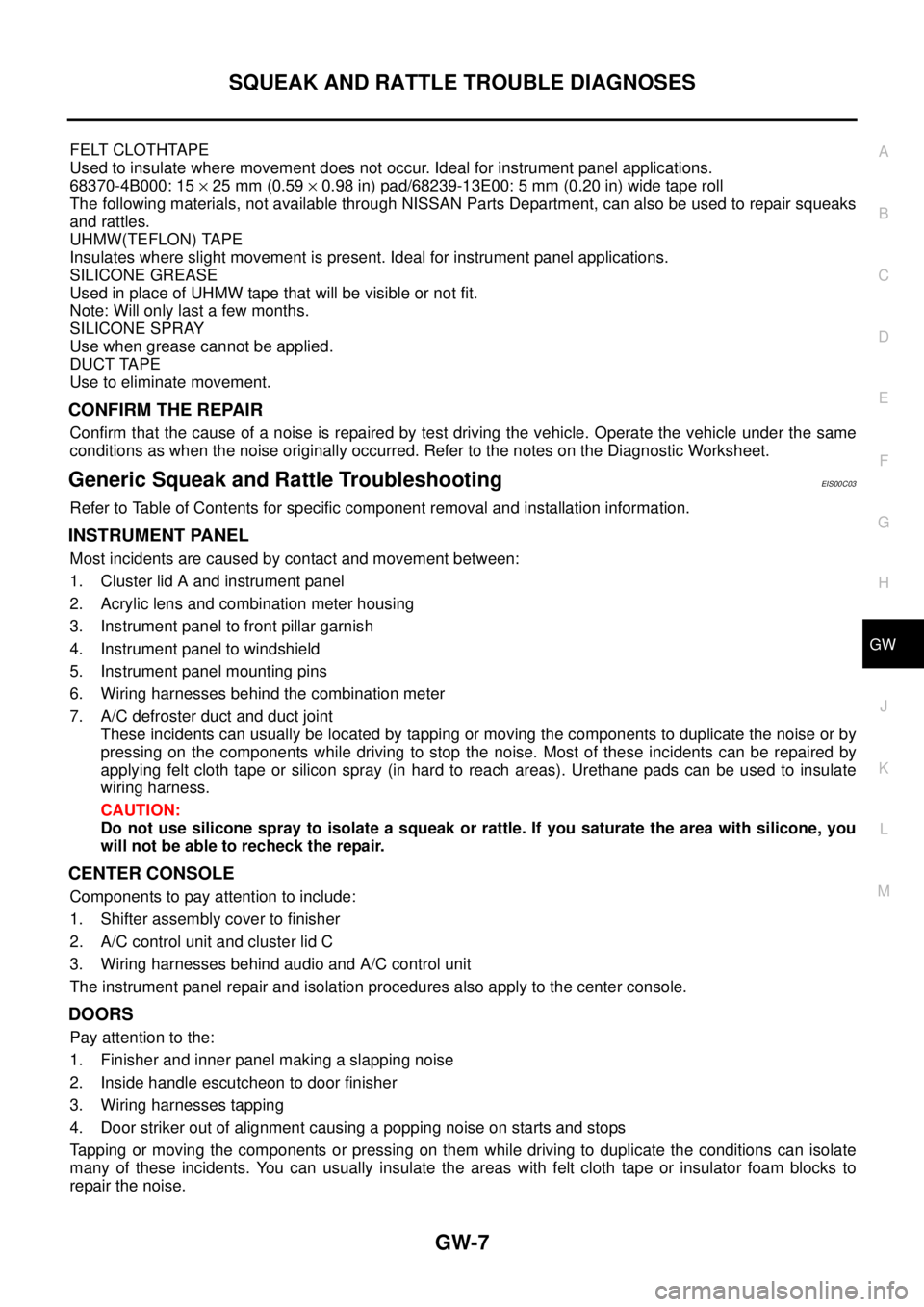
INSTRUMENT PANEL
Most incidents are caused by contact and movement between:
1. Cluster lid A and instrument panel
2. Acrylic lens and combination meter housing
3. Instrument panel to front pillar garnish
4. Instrument panel to windshield
5. Instrument panel mounting pins
6. Wiring harnesses behind the combination meter
7. A/C defroster duct and duct joint
These incidents can usually be located by tapping or moving the components to duplicate the noise or by
pressing on the components while driving to stop the noise. Most of these incidents can be repaired by
applying felt cloth tape or silicon spray (in hard to reach areas). Urethane pads can be used to insulate
wiring harness.
CAUTION:
Do not use silicone spray to isolate a squeak or rattle. If you saturate the area with silicone, you
will not be able to recheck the repair.
CENTER CONSOLE
Components to pay attention to include:
1. Shifter assembly cover to finisher
2. A/C control unit and cluster lid C
3. Wiring harnesses behind audio and A/C control unit
The instrument panel repair and isolation procedures also apply to the center console.
DOORS
Pay attention to the:
1. Finisher and inner panel making a slapping noise
2. Inside handle escutcheon to door finisher
3. Wiring harnesses tapping
4. Door striker out of alignment causing a popping noise on starts and stops
Tapping or moving the components or pressing on them while driving to duplicate the conditions can isolate
many of these incidents. You can usually insulate the areas with felt cloth tape or insulator foam blocks to
repair the noise.
Page 1701 of 3171
POWER WINDOW SYSTEM
GW-15
C
D
E
F
G
H
J
K
L
MA
B
GW
POWER WINDOW SYSTEMPFP:25401
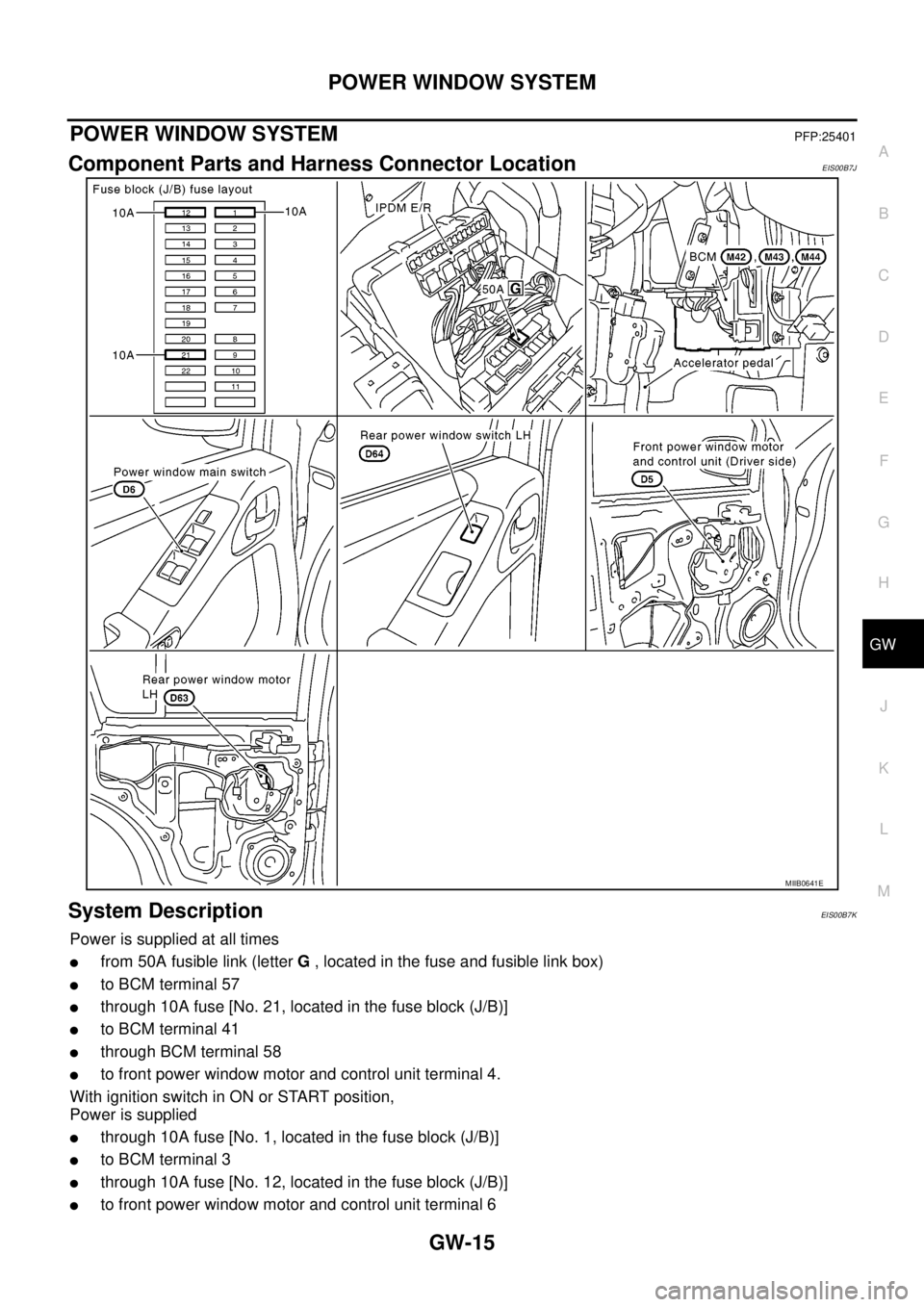
Component Parts and Harness Connector LocationEIS00B7J
System DescriptionEIS00B7K
Power is supplied at all times
lfrom 50A fusible link (letterG, located in the fuse and fusible link box)
lto BCM terminal 57
lthrough 10A fuse [No. 21, located in the fuse block (J/B)]
lto BCM terminal 41
lthrough BCM terminal 58
lto front power window motor and control unit terminal 4.
With ignition switch in ON or START position,
Power is supplied
lthrough 10A fuse [No. 1, located in the fuse block (J/B)]
lto BCM terminal 3
lthrough 10A fuse [No. 12, located in the fuse block (J/B)]
lto front power window motor and control unit terminal 6
MIIB0641E
Page 1702 of 3171

GW-16
POWER WINDOW SYSTEM
lthrough BCM terminal 53
lto power window main switch terminal 2
lto ftont power window switch (passenger side) terminal 1
lto rear power window switches LH and RH terminal 1 (with rear power window).
Ground is supplied
lto BCM terminal 55
lto front power window motor and control unit terminal 3
lto power window main switch terminal 3
lthrough body grounds M21, M80 and M83.
MANUAL OPERATION
Front Driver Side Door
WINDOW UP
When the driver side switch in the power window main switch is pressed in the up position,
Ground is supplied
lto front power window motor and control unit terminal 2
lthrough power window main switch terminal 4
lthrough power window main switch terminal 3
Then, the motor raises the window until the switch is released.
WINDOW DOWN
When the driver side switch in the power window main switch is pressed in the down position
Ground is supplied
lto front power window motor and control unit terminal 1
lthrough power window main switch terminal 5
lthrough power window main switch terminal 3
Then, the motor lowers the window until the switch is released.
Front Passenger Side Door
FRONT POWER WINDOW SWITCH (PASSENGER SIDE) OPERATION
WINDOW UP
When the front power window switch (passenger side) is operated in the up position
Power is supplied
lthrough front power window switch (passenger side) terminal 1 and 5
lto front power window motor (passenger side) terminal 2.
Ground is supplied
lto front power window motor (passenger side) terminal 1
lthrough front power window switch (passenger side) terminal 4 and 3
lthrough power window main switch terminal 7
Then, the motor raises the window until the switch is released.
WINDOW DOWN
When the front power window switch (passenger side) is opeataed in the down position
Power is supplied
lthrough front power window switch (passenger side) terminal 1 and 4
lto front power window motor (passenger side) terminal 1.
Ground is supplied
lto front power window motor (passenger side) terminal 2
lthrough front power window switch (passenger side) terminal 5 and 2
lthrough power window main switch terminal 6
Then, the motor lowers the window until the switch is released.
POWER WINDOW MAIN SWITCH OPERATION
WINDOW UP
When the passenger side switch in power window main switch is operated in the up position
Power is supplied
Page 1711 of 3171
POWER WINDOW SYSTEM
GW-25
C
D
E
F
G
H
J
K
L
MA
B
GW
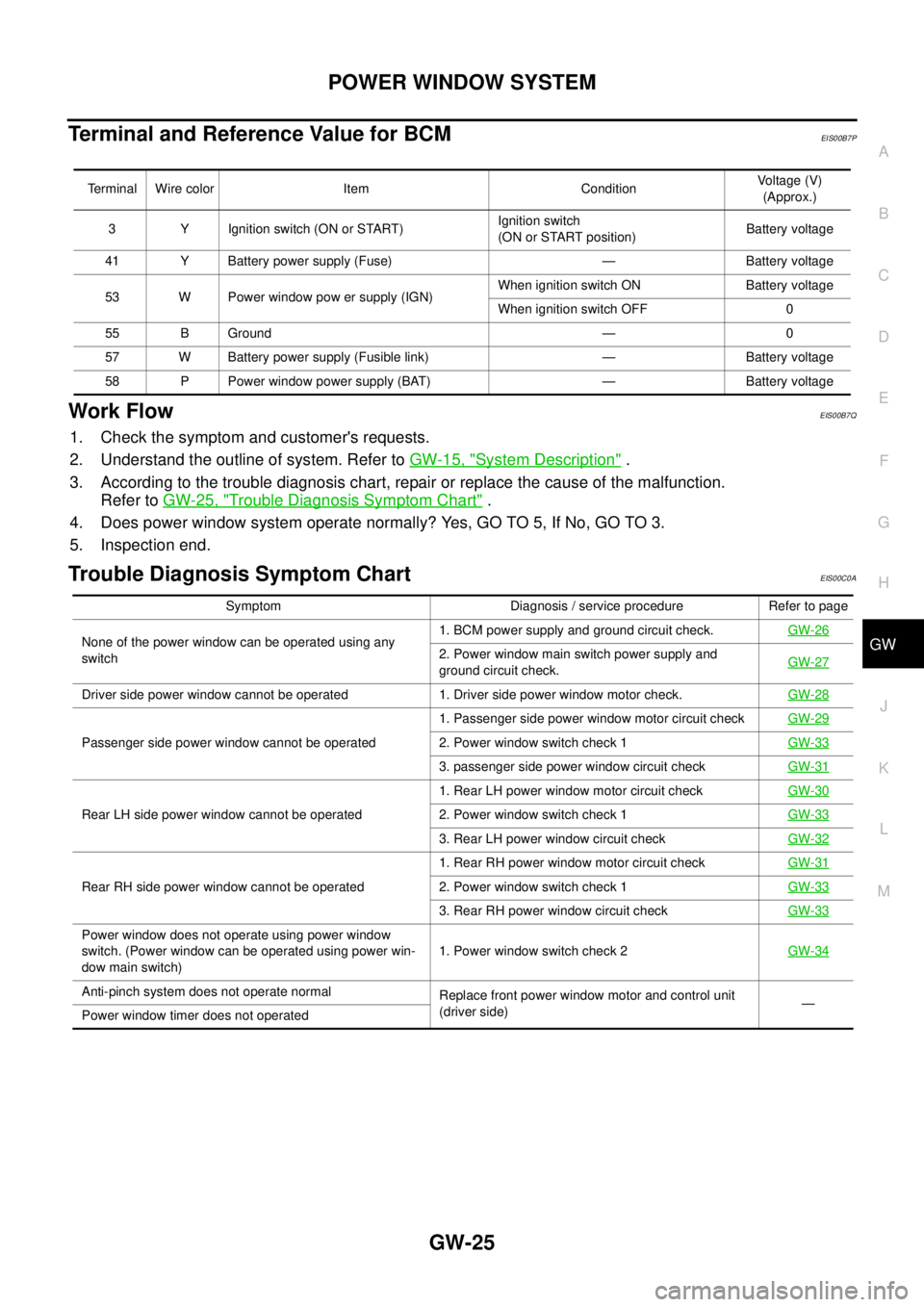
Terminal and Reference Value for BCMEIS00B7P
Work FlowEIS00B7Q
1. Check the symptom and customer's requests.
2. Understand the outline of system. Refer toGW-15, "
System Description".
3. According to the trouble diagnosis chart, repair or replace the cause of the malfunction.
Refer toGW-25, "
Trouble Diagnosis Symptom Chart".
4. Does power window system operate normally? Yes, GO TO 5, If No, GO TO 3.
5. Inspection end.
Trouble Diagnosis Symptom ChartEIS00C0A
Terminal Wire color Item ConditionVoltage (V)
(Approx.)
3 Y Ignition switch (ON or START)Ignition switch
(ON or START position)Battery voltage
41 Y Battery power supply (Fuse) — Battery voltage
53 W Power window pow er supply (IGN)When ignition switch ON Battery voltage
When ignition switch OFF 0
55 B Ground — 0
57 W Battery power supply (Fusible link) — Battery voltage
58 P Power window power supply (BAT) — Battery voltage
Symptom Diagnosis / service procedure Refer to page
None of the power window can be operated using any
switch1. BCM power supply and ground circuit check.GW-26
2. Power window main switch power supply and
ground circuit check.GW-27
Driver side power window cannot be operated 1. Driver side power window motor check.GW-28
Passenger side power window cannot be operated1. Passenger side power window motor circuit checkGW-292. Power window switch check 1GW-33
3. passenger side power window circuit checkGW-31
Rear LH side power window cannot be operated1. Rear LH power window motor circuit checkGW-302. Power window switch check 1GW-33
3. Rear LH power window circuit checkGW-32
Rear RH side power window cannot be operated1. Rear RH power window motor circuit checkGW-312. Power window switch check 1GW-33
3. Rear RH power window circuit checkGW-33
Power window does not operate using power window
switch. (Power window can be operated using power win-
dow main switch)1. Power window switch check 2GW-34
Anti-pinch system does not operate normal
Replace front power window motor and control unit
(driver side)—
Power window timer does not operated
Page 1714 of 3171
GW-28
POWER WINDOW SYSTEM
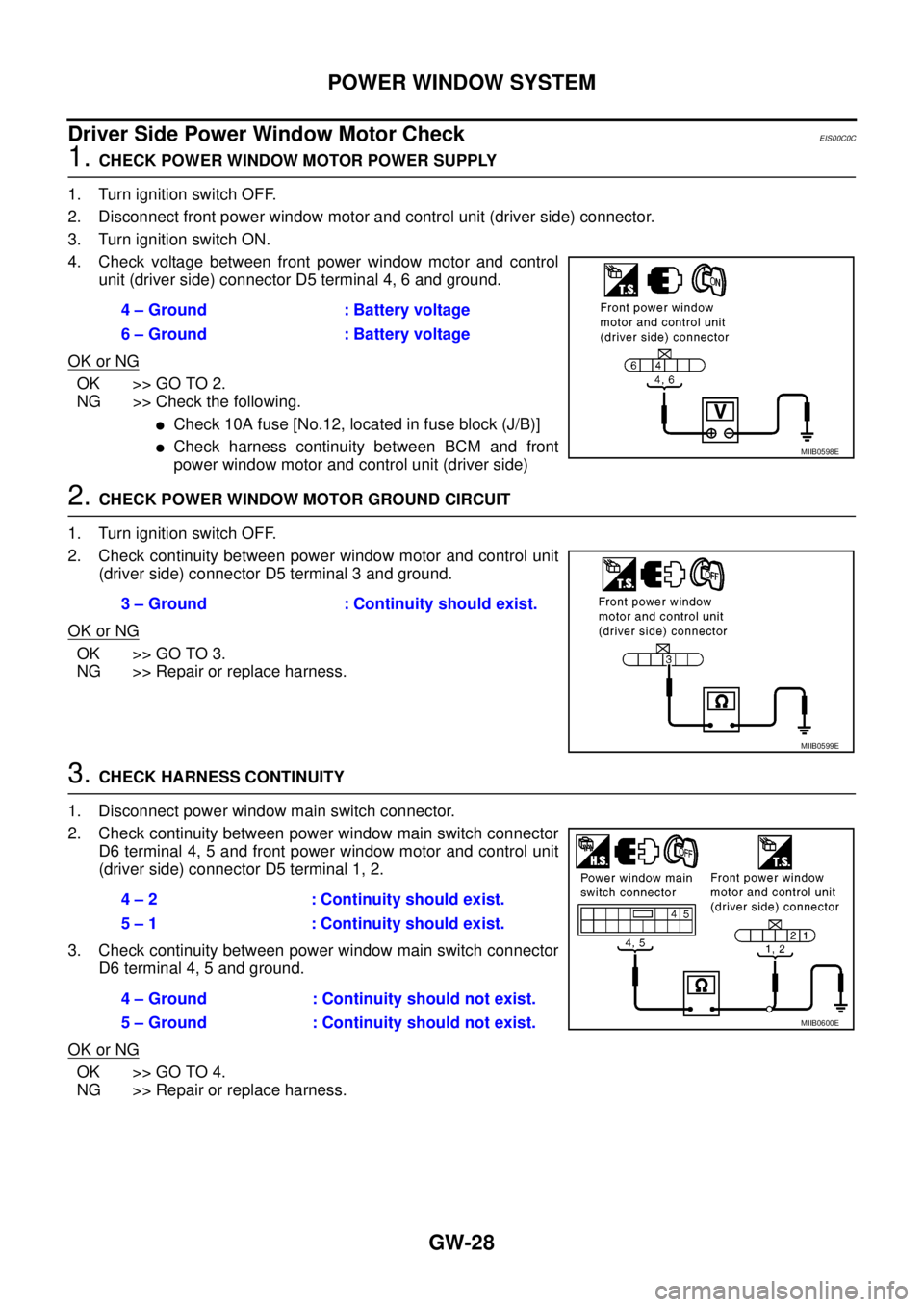
Driver Side Power Window Motor Check
EIS00C0C
1.CHECK POWER WINDOW MOTOR POWER SUPPLY
1. Turn ignition switch OFF.
2. Disconnect front power window motor and control unit (driver side) connector.
3. Turn ignition switch ON.
4. Check voltage between front power window motor and control
unit (driver side) connector D5 terminal 4, 6 and ground.
OK or NG
OK >> GO TO 2.
NG >> Check the following.
lCheck 10A fuse [No.12, located in fuse block (J/B)]
lCheck harness continuity between BCM and front
power window motor and control unit (driver side)
2.CHECK POWER WINDOW MOTOR GROUND CIRCUIT
1. Turn ignition switch OFF.
2. Check continuity between power window motor and control unit
(driver side) connector D5 terminal 3 and ground.
OK or NG
OK >> GO TO 3.
NG >> Repair or replace harness.
3.CHECK HARNESS CONTINUITY
1. Disconnect power window main switch connector.
2. Check continuity between power window main switch connector
D6 terminal 4, 5 and front power window motor and control unit
(driver side) connector D5 terminal 1, 2.
3. Check continuity between power window main switch connector
D6 terminal 4, 5 and ground.
OK or NG
OK >> GO TO 4.
NG >> Repair or replace harness.4 – Ground : Battery voltage
6 – Ground : Battery voltage
MIIB0598E
3 – Ground : Continuity should exist.
MIIB0599E
4 – 2 : Continuity should exist.
5 – 1 : Continuity should exist.
4 – Ground : Continuity should not exist.
5 – Ground : Continuity should not exist.
MIIB0600E
Page 1715 of 3171
POWER WINDOW SYSTEM
GW-29
C
D
E
F
G
H
J
K
L
MA
B
GW
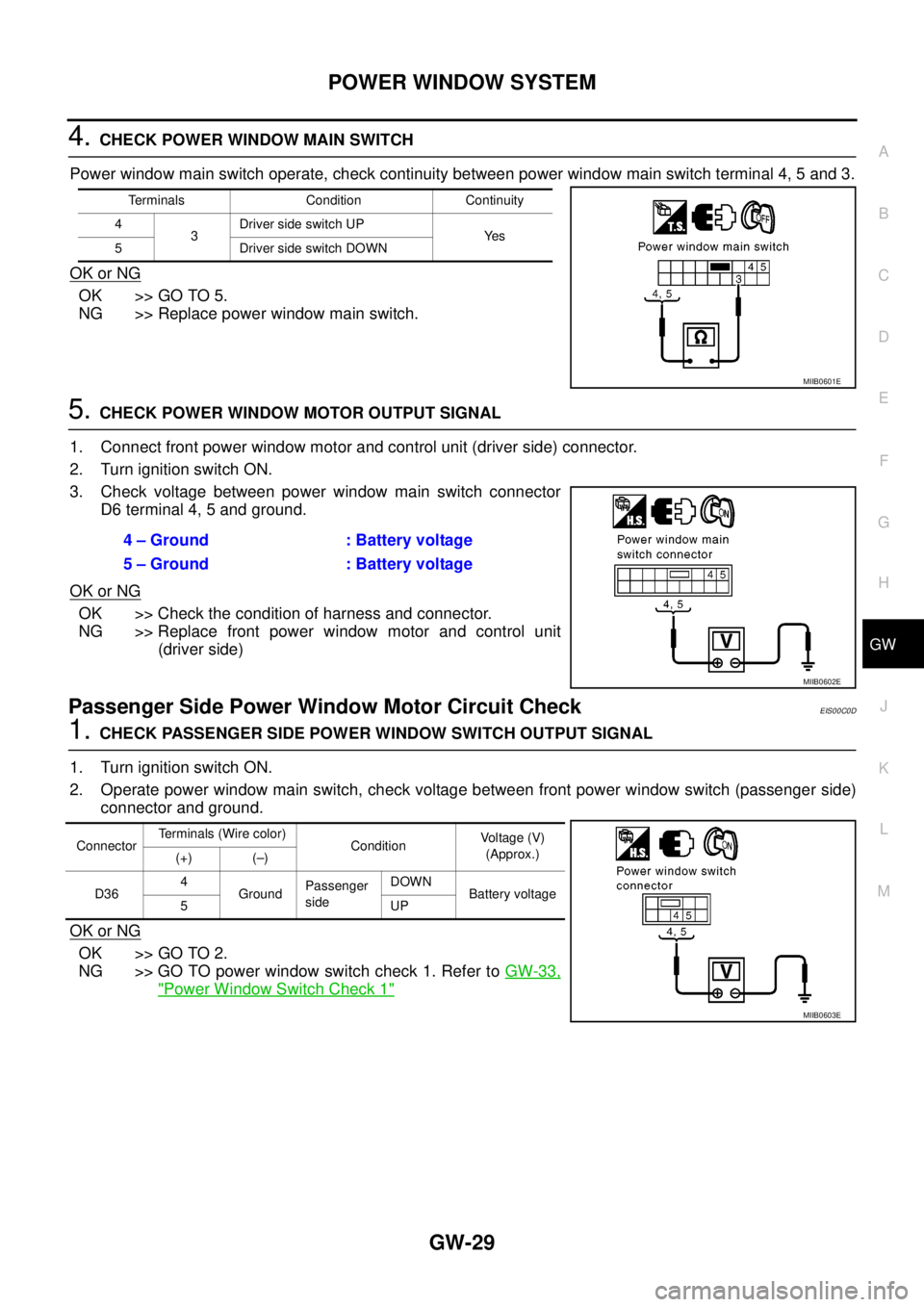
4.CHECK POWER WINDOW MAIN SWITCH
Power window main switch operate, check continuity between power window main switch terminal 4, 5 and 3.
OK or NG
OK >> GO TO 5.
NG >> Replace power window main switch.
5.CHECK POWER WINDOW MOTOR OUTPUT SIGNAL
1. Connect front power window motor and control unit (driver side) connector.
2. Turn ignition switch ON.
3. Check voltage between power window main switch connector
D6 terminal 4, 5 and ground.
OK or NG
OK >> Check the condition of harness and connector.
NG >> Replace front power window motor and control unit
(driver side)
Passenger Side Power Window Motor Circuit CheckEIS00C0D
1.CHECK PASSENGER SIDE POWER WINDOW SWITCH OUTPUT SIGNAL
1. Turn ignition switch ON.
2. Operate power window main switch, check voltage between front power window switch (passenger side)
connector and ground.
OK or NG
OK >> GO TO 2.
NG >> GO TO power window switch check 1. Refer toGW-33,
"Power Window Switch Check 1"
Terminals Condition Continuity
4
3Driver side switch UP
Ye s
5 DriversideswitchDOWN
MIIB0601E
4 – Ground : Battery voltage
5 – Ground : Battery voltage
MIIB0602E
ConnectorTerminals (Wire color)
ConditionVo l ta g e (V )
(Approx.)
(+) (–)
D364
GroundPassenger
sideDOWN
Battery voltage
5UP
MIIB0603E
Page 1740 of 3171
GW-54
REAR WINDOW DEFOGGER
CONSULT-II Function (BCM)
EIS00B8M
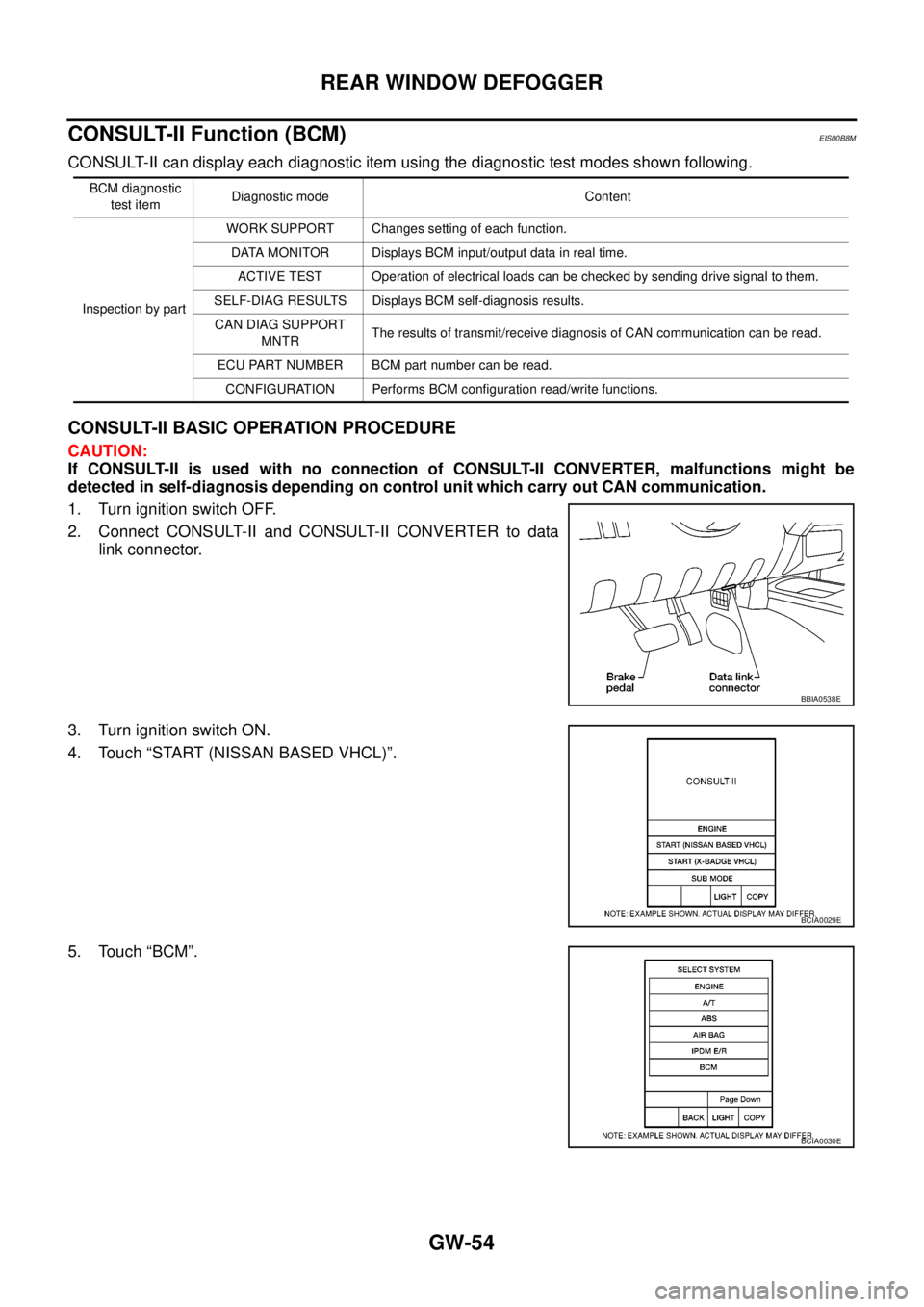
CONSULT-II can display each diagnostic item using the diagnostic test modes shown following.
CONSULT-II BASIC OPERATION PROCEDURE
CAUTION:
If CONSULT-II is used with no connection of CONSULT-II CONVERTER, malfunctions might be
detected in self-diagnosis depending on control unit which carry out CAN communication.
1. Turn ignition switch OFF.
2. Connect CONSULT-II and CONSULT-II CONVERTER to data
link connector.
3. Turn ignition switch ON.
4. Touch “START (NISSAN BASED VHCL)”.
5. Touch “BCM”.
BCM diagnostic
test itemDiagnostic mode Content
Inspection by partWORK SUPPORT Changes setting of each function.
DATA MONITOR Displays BCM input/output data in real time.
ACTIVE TEST Operation of electrical loads can be checked by sending drive signal to them.
SELF-DIAG RESULTS Displays BCM self-diagnosis results.
CAN DIAG SUPPORT
MNTRThe results of transmit/receive diagnosis of CAN communication can be read.
ECU PART NUMBER BCM part number can be read.
CONFIGURATION Performs BCM configuration read/write functions.
BBIA0538E
BCIA0029E
BCIA0030E