audio NISSAN NAVARA 2005 Repair User Guide
[x] Cancel search | Manufacturer: NISSAN, Model Year: 2005, Model line: NAVARA, Model: NISSAN NAVARA 2005Pages: 3171, PDF Size: 49.59 MB
Page 505 of 3171
SYSTEM DESCRIPTION
AV-17
C
D
E
F
G
H
I
J
L
MA
B
AV
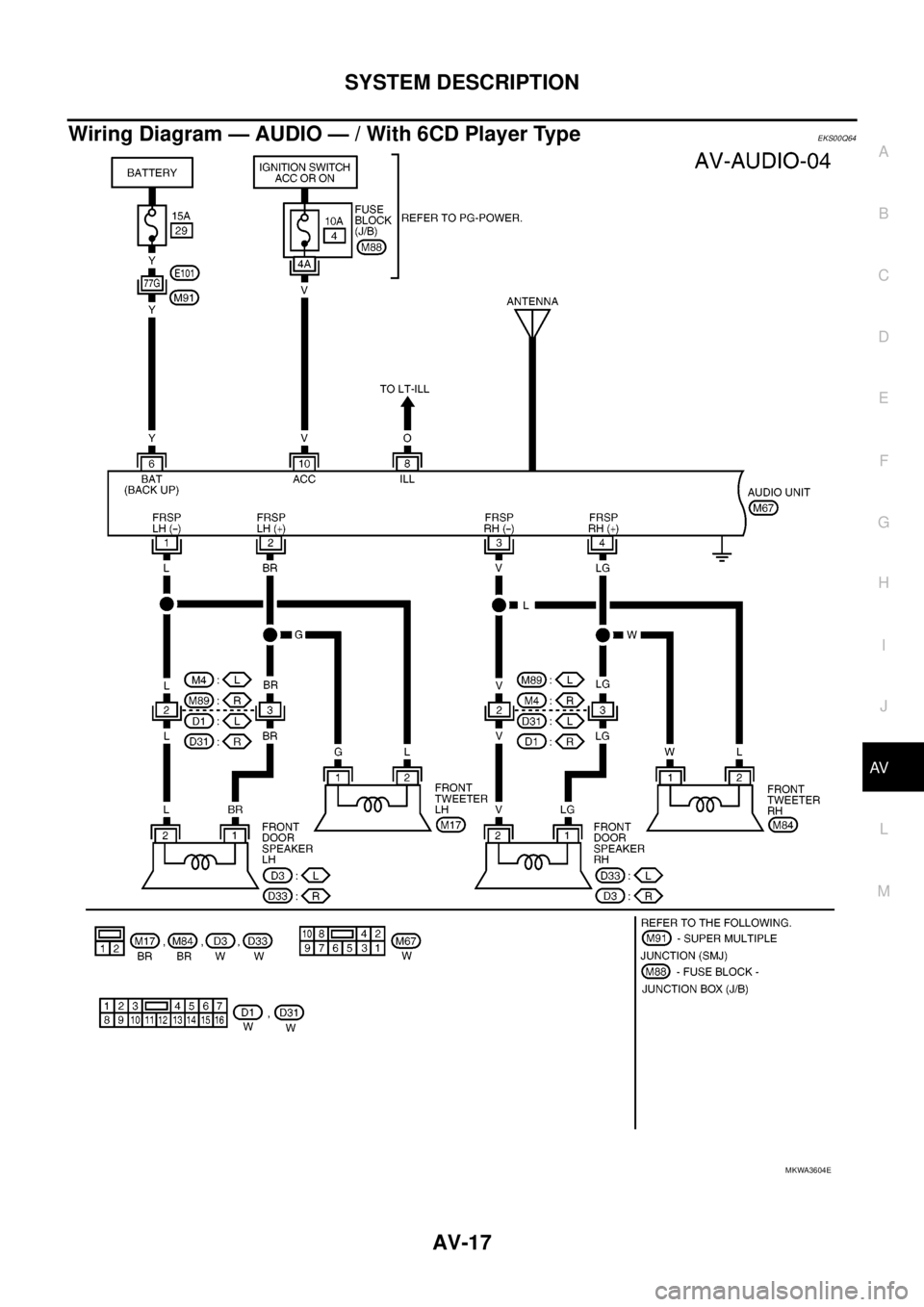
Wiring Diagram — AUDIO — / With 6CD Player TypeEKS00Q64
MKWA3604E
Page 522 of 3171
AV-34
TERMINALS AND REFERENCE VALUE FOR CONTROL UNIT
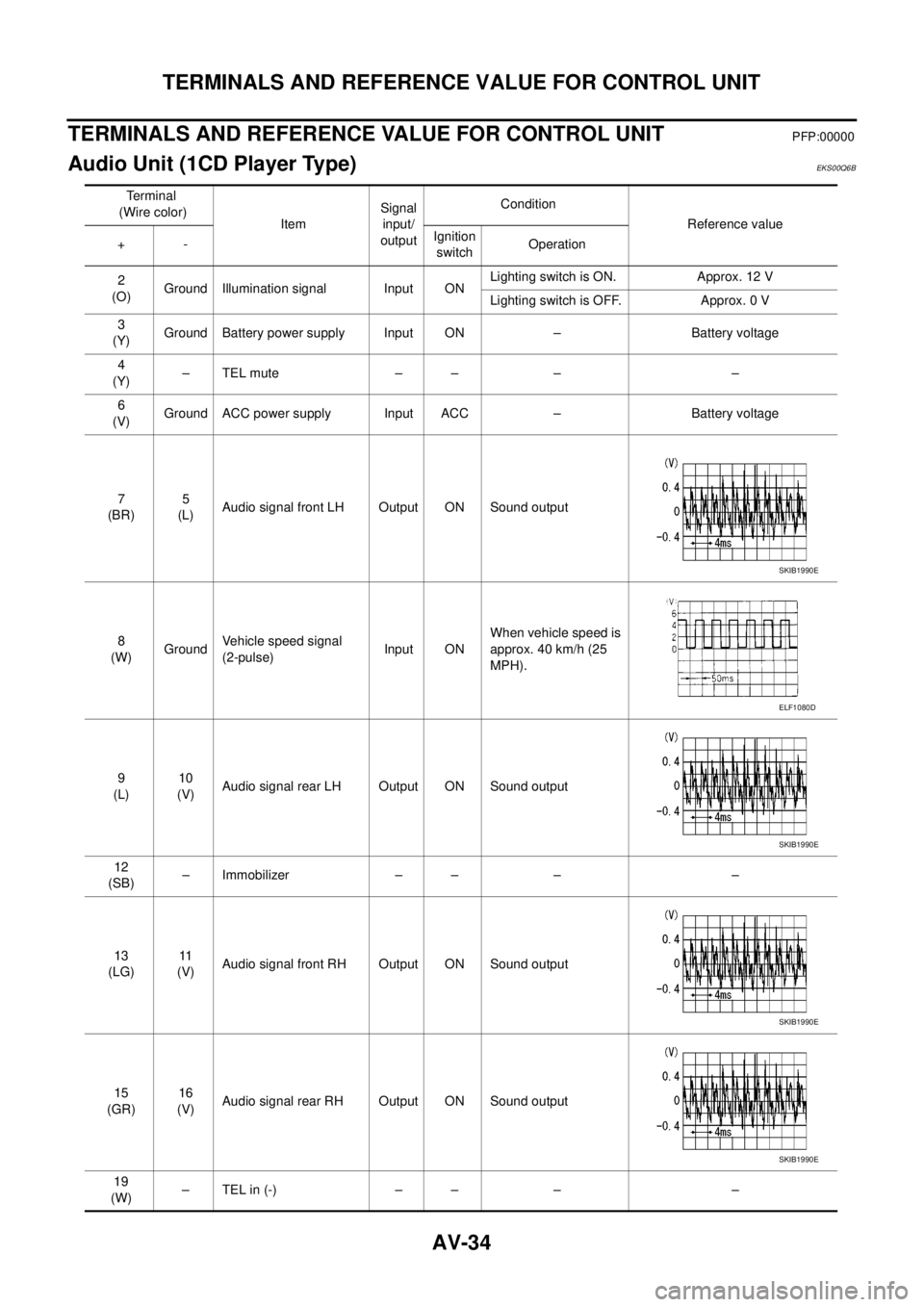
TERMINALS AND REFERENCE VALUE FOR CONTROL UNIT
PFP:00000
Audio Unit (1CD Player Type)EKS00Q6B
Te r m i n a l
(Wire color)
ItemSignal
input/
outputCondition
Reference value
+-Ignition
switchOperation
2
(O)Ground Illumination signal Input ONLighting switch is ON. Approx. 12 V
Lighting switch is OFF. Approx. 0 V
3
(Y)Ground Battery power supply Input ON – Battery voltage
4
(Y)–TELmute – – – –
6
(V)Ground ACC power supply Input ACC – Battery voltage
7
(BR)5
(L)Audio signal front LH Output ON Sound output
8
(W)GroundVehicle speed signal
(2-pulse)Input ONWhen vehicle speed is
approx. 40 km/h (25
MPH).
9
(L)10
(V)Audio signal rear LH Output ON Sound output
12
(SB)– Immobilizer – – – –
13
(LG)11
(V)Audio signal front RH Output ON Sound output
15
(GR)16
(V)Audio signal rear RH Output ON Sound output
19
(W)–TELin(-) – – – –
SKIB1990E
ELF1080D
SKIB1990E
SKIB1990E
SKIB1990E
Page 523 of 3171
TERMINALS AND REFERENCE VALUE FOR CONTROL UNIT
AV-35
C
D
E
F
G
H
I
J
L
MA
B
AV
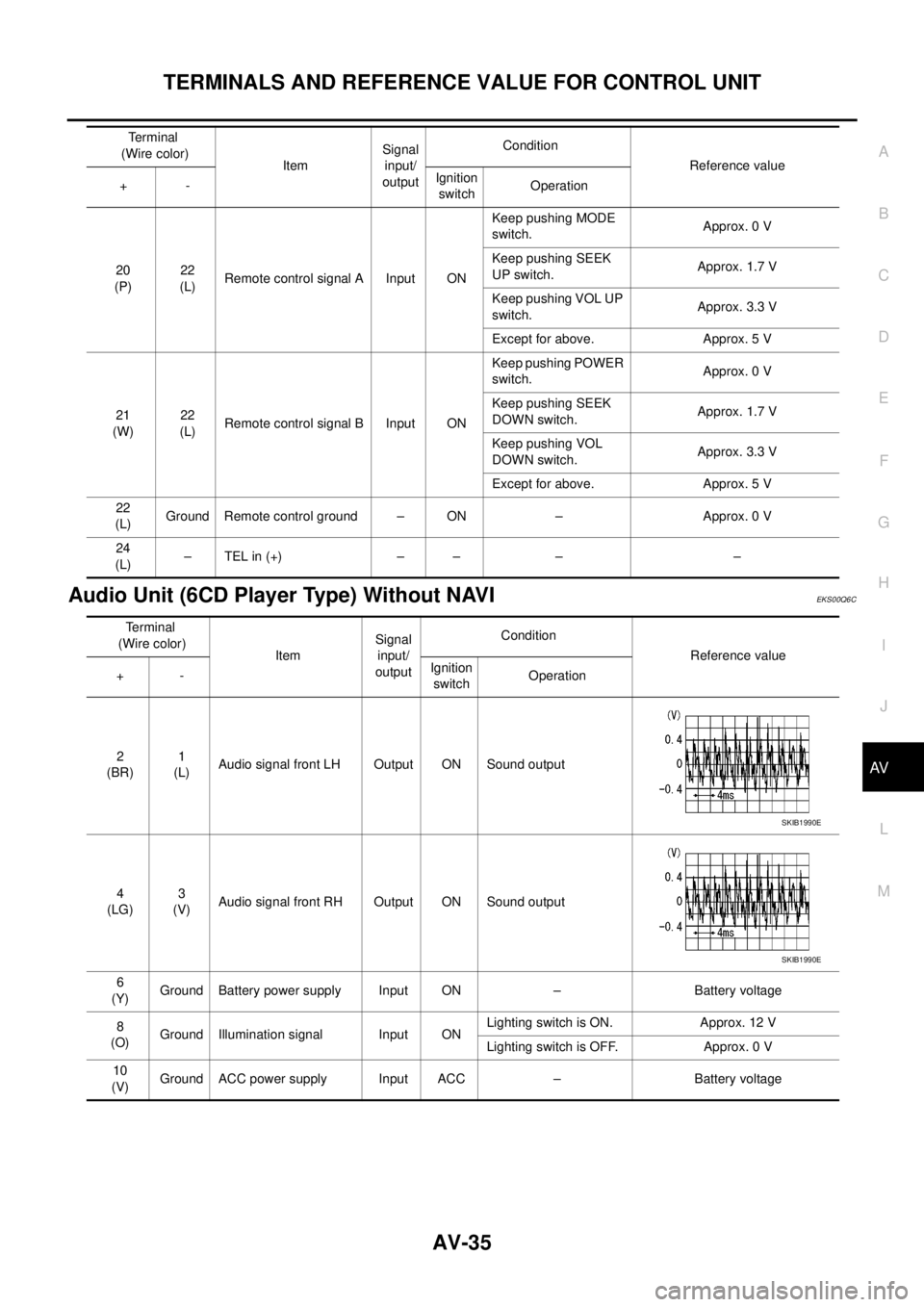
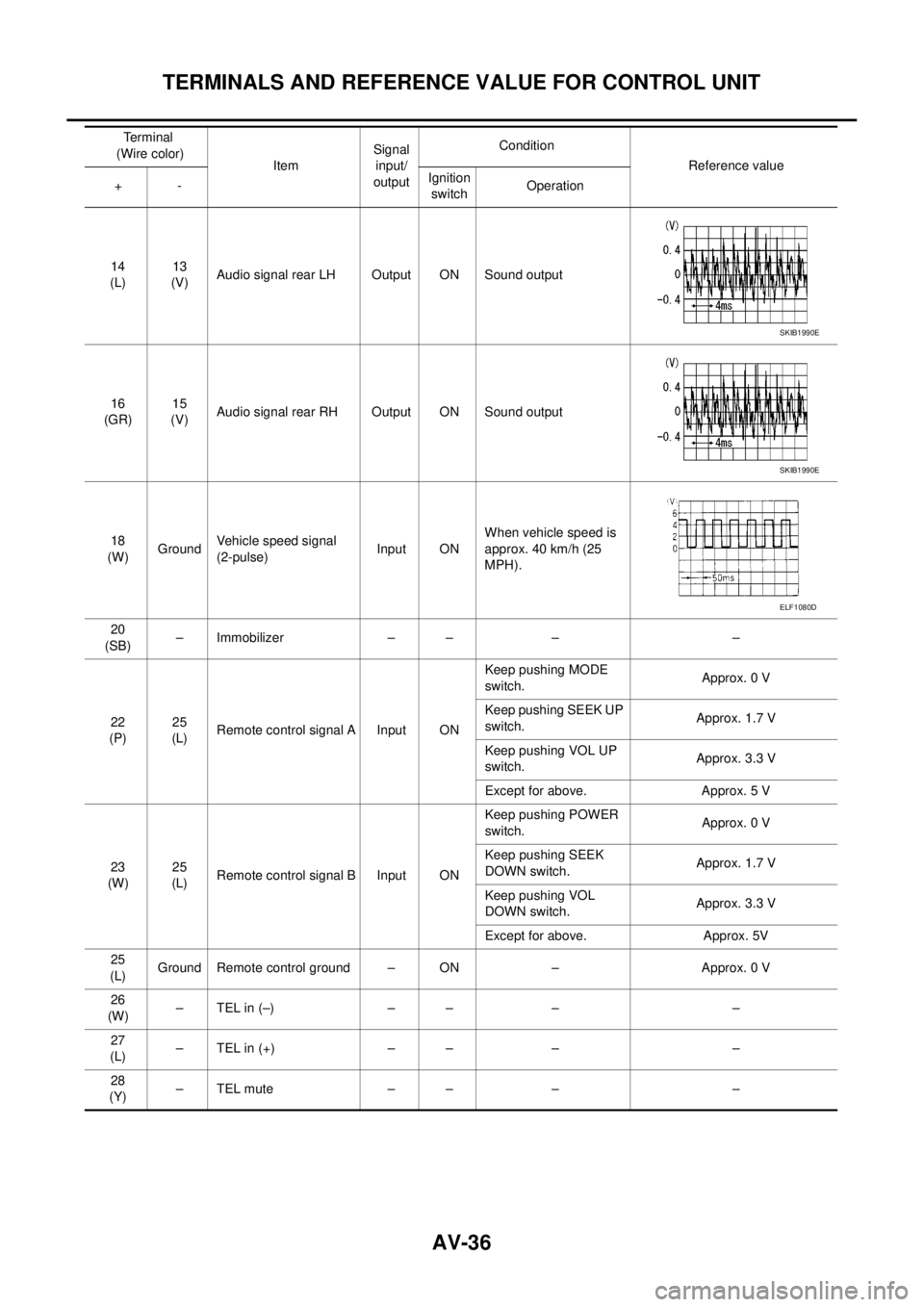
Audio Unit (6CD Player Type) Without NAVIEKS00Q6C
20
(P)22
(L)Remote control signal A Input ONKeep pushing MODE
switch.Approx. 0 V
Keep pushing SEEK
UP switch.Approx. 1.7 V
Keep pushing VOL UP
switch.Approx. 3.3 V
Except for above. Approx. 5 V
21
(W)22
(L)Remote control signal B Input ONKeep pushing POWER
switch.Approx. 0 V
Keep pushing SEEK
DOWN switch.Approx. 1.7 V
Keep pushing VOL
DOWN switch.Approx. 3.3 V
Except for above. Approx. 5 V
22
(L)Ground Remote control ground – ON – Approx. 0 V
24
(L)–TELin(+) – – – – Terminal
(Wire color)
ItemSignal
input/
outputCondition
Reference value
+-Ignition
switchOperation
Terminal
(Wire color)
ItemSignal
input/
outputCondition
Reference value
+-Ignition
switchOperation
2
(BR)1
(L)Audio signal front LH Output ON Sound output
4
(LG)3
(V)Audio signal front RH Output ON Sound output
6
(Y)Ground Battery power supply Input ON – Battery voltage
8
(O)Ground Illumination signal Input ONLighting switch is ON. Approx. 12 V
Lighting switch is OFF. Approx. 0 V
10
(V)Ground ACC power supply Input ACC – Battery voltage
SKIB1990E
SKIB1990E
Page 524 of 3171
AV-36
TERMINALS AND REFERENCE VALUE FOR CONTROL UNIT
14
(L)13
(V)Audio signal rear LH Output ON Sound output
16
(GR)15
(V)Audio signal rear RH Output ON Sound output
18
(W)GroundVehicle speed signal
(2-pulse)Input ONWhen vehicle speed is
approx. 40 km/h (25
MPH).
20
(SB)– Immobilizer – – – –
22
(P)25
(L)Remote control signal A Input ONKeep pushing MODE
switch.Approx. 0 V
Keep pushing SEEK UP
switch.Approx. 1.7 V
Keep pushing VOL UP
switch.Approx. 3.3 V
Except for above. Approx. 5 V
23
(W)25
(L)Remote control signal B Input ONKeep pushing POWER
switch.Approx. 0 V
Keep pushing SEEK
DOWN switch.Approx. 1.7 V
Keep pushing VOL
DOWN switch.Approx. 3.3 V
Except for above. Approx. 5V
25
(L)Ground Remote control ground – ON – Approx. 0 V
26
(W)–TELin(–) – – – –
27
(L)–TELin(+) – – – –
28
(Y)–TELmute – – – – Terminal
(Wire color)
ItemSignal
input/
outputCondition
Reference value
+-Ignition
switchOperation
SKIB1990E
SKIB1990E
ELF1080D
Page 525 of 3171
TERMINALS AND REFERENCE VALUE FOR CONTROL UNIT
AV-37
C
D
E
F
G
H
I
J
L
MA
B
AV
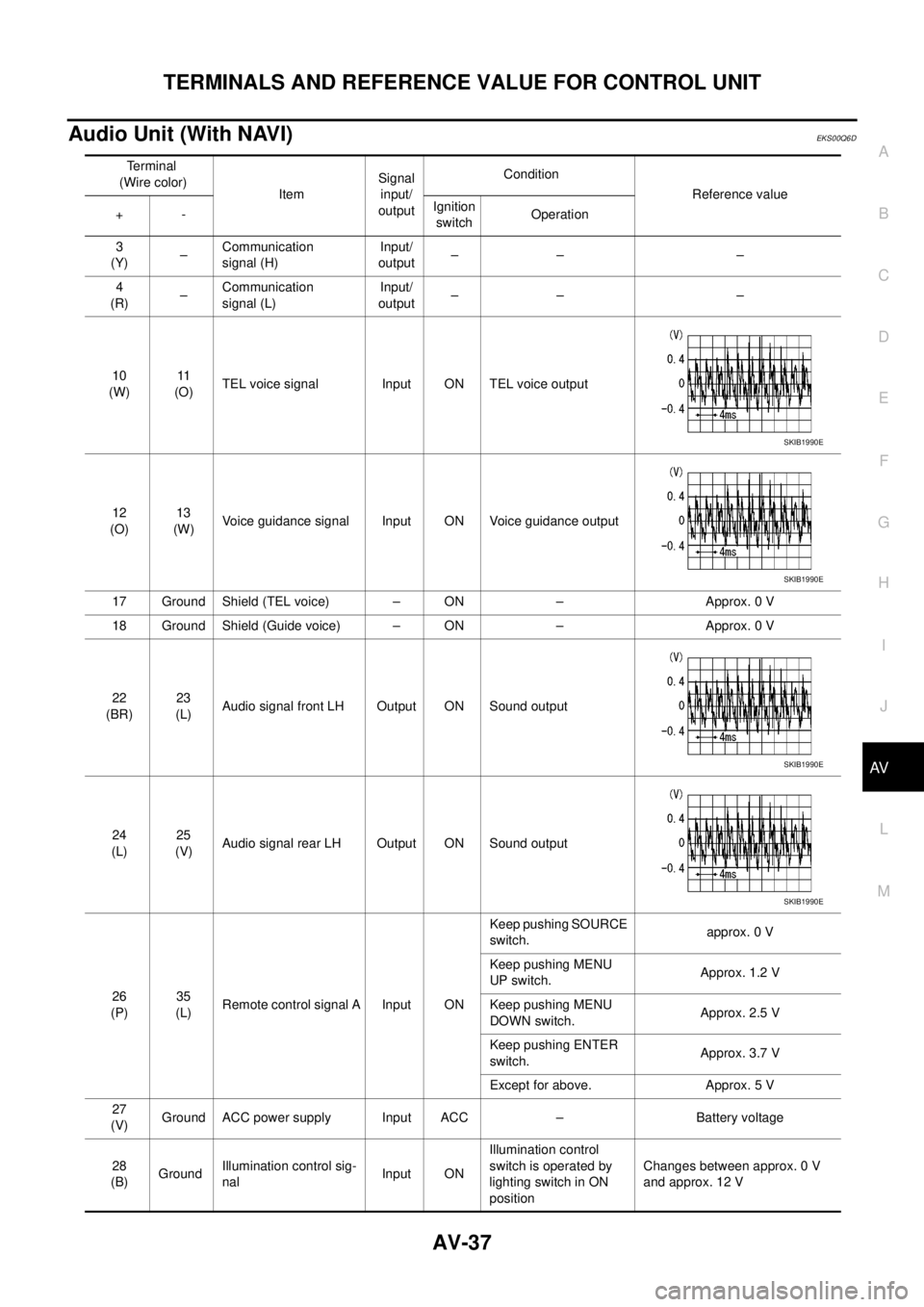
Audio Unit (With NAVI)EKS00Q6D
Terminal
(Wire color)
ItemSignal
input/
outputCondition
Reference value
+-Ignition
switchOperation
3
(Y)–Communication
signal (H)Input/
output–– –
4
(R)–Communication
signal (L)Input/
output–– –
10
(W)11
(O)TEL voice signal Input ON TEL voice output
12
(O)13
(W)Voice guidance signal Input ON Voice guidance output
17 Ground Shield (TEL voice) – ON – Approx. 0 V
18 Ground Shield (Guide voice) – ON – Approx. 0 V
22
(BR)23
(L)Audio signal front LH Output ON Sound output
24
(L)25
(V)Audio signal rear LH Output ON Sound output
26
(P)35
(L)Remote control signal A Input ONKeep pushing SOURCE
switch.approx. 0 V
Keep pushing MENU
UP switch.Approx. 1.2 V
Keep pushing MENU
DOWN switch.Approx. 2.5 V
Keep pushing ENTER
switch.Approx. 3.7 V
Except for above. Approx. 5 V
27
(V)Ground ACC power supply Input ACC – Battery voltage
28
(B)GroundIllumination control sig-
nalInput ONIllumination control
switch is operated by
lighting switch in ON
positionChanges between approx. 0 V
and approx. 12 V
SKIB1990E
SKIB1990E
SKIB1990E
SKIB1990E
Page 526 of 3171
AV-38
TERMINALS AND REFERENCE VALUE FOR CONTROL UNIT
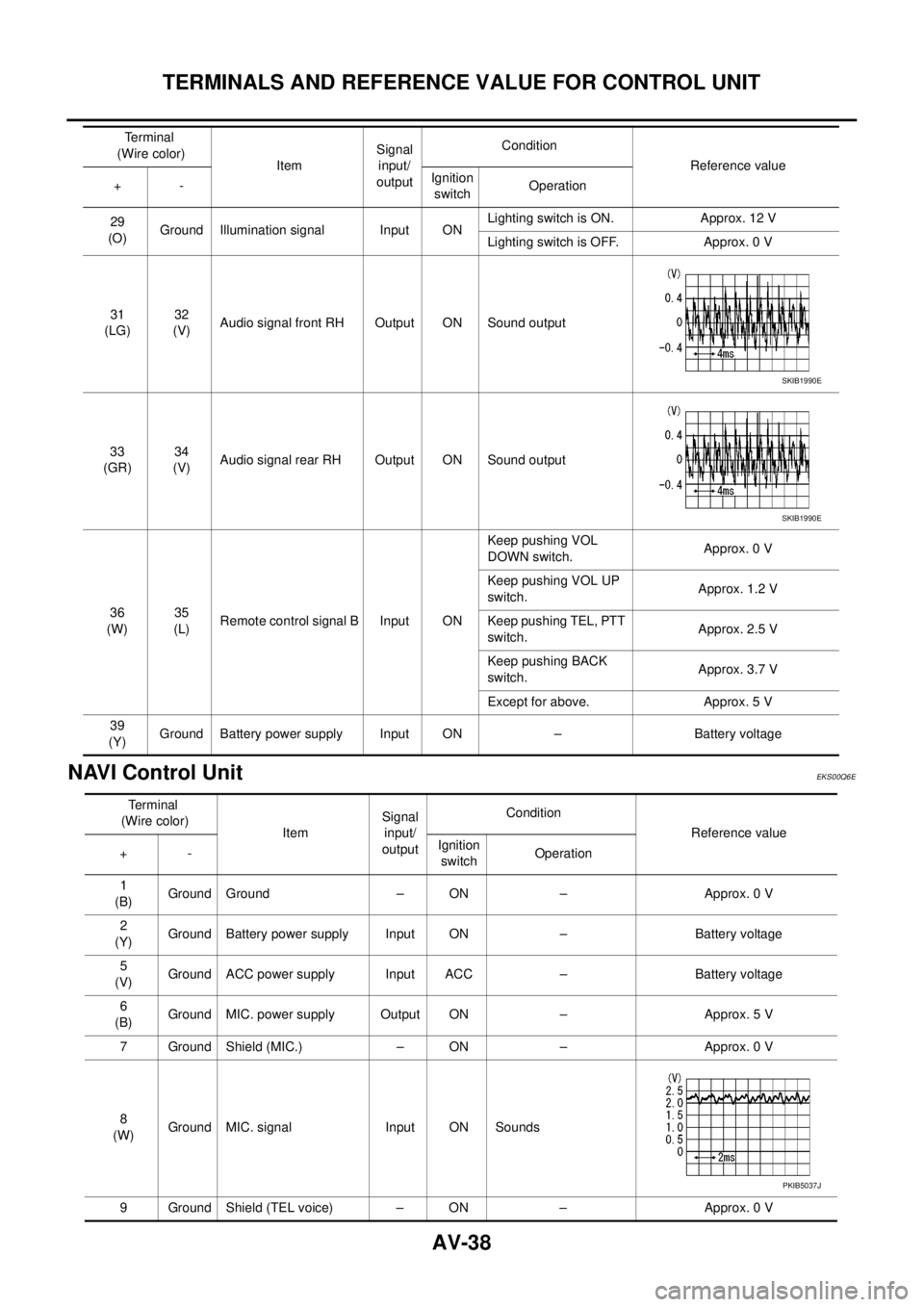
NAVI Control Unit
EKS00Q6E
29
(O)Ground Illumination signal Input ONLighting switch is ON. Approx. 12 V
Lighting switch is OFF. Approx. 0 V
31
(LG)32
(V)Audio signal front RH Output ON Sound output
33
(GR)34
(V)Audio signal rear RH Output ON Sound output
36
(W)35
(L)Remote control signal B Input ONKeep pushing VOL
DOWN switch.Approx. 0 V
Keep pushing VOL UP
switch.Approx. 1.2 V
Keep pushing TEL, PTT
switch.Approx. 2.5 V
Keep pushing BACK
switch.Approx. 3.7 V
Except for above. Approx. 5 V
39
(Y)Ground Battery power supply Input ON – Battery voltage Terminal
(Wire color)
ItemSignal
input/
outputCondition
Reference value
+-Ignition
switchOperation
SKIB1990E
SKIB1990E
Terminal
(Wire color)
ItemSignal
input/
outputCondition
Reference value
+-Ignition
switchOperation
1
(B)Ground Ground – ON – Approx. 0 V
2
(Y)Ground Battery power supply Input ON – Battery voltage
5
(V)Ground ACC power supply Input ACC – Battery voltage
6
(B)Ground MIC. power supply Output ON – Approx. 5 V
7 Ground Shield (MIC.) – ON – Approx. 0 V
8
(W)Ground MIC. signal Input ON Sounds
9 Ground Shield (TEL voice) – ON – Approx. 0 V
PKIB5037J
Page 533 of 3171
DIAGNOSIS SYSTEM
AV-45
C
D
E
F
G
H
I
J
L
MA
B
AV
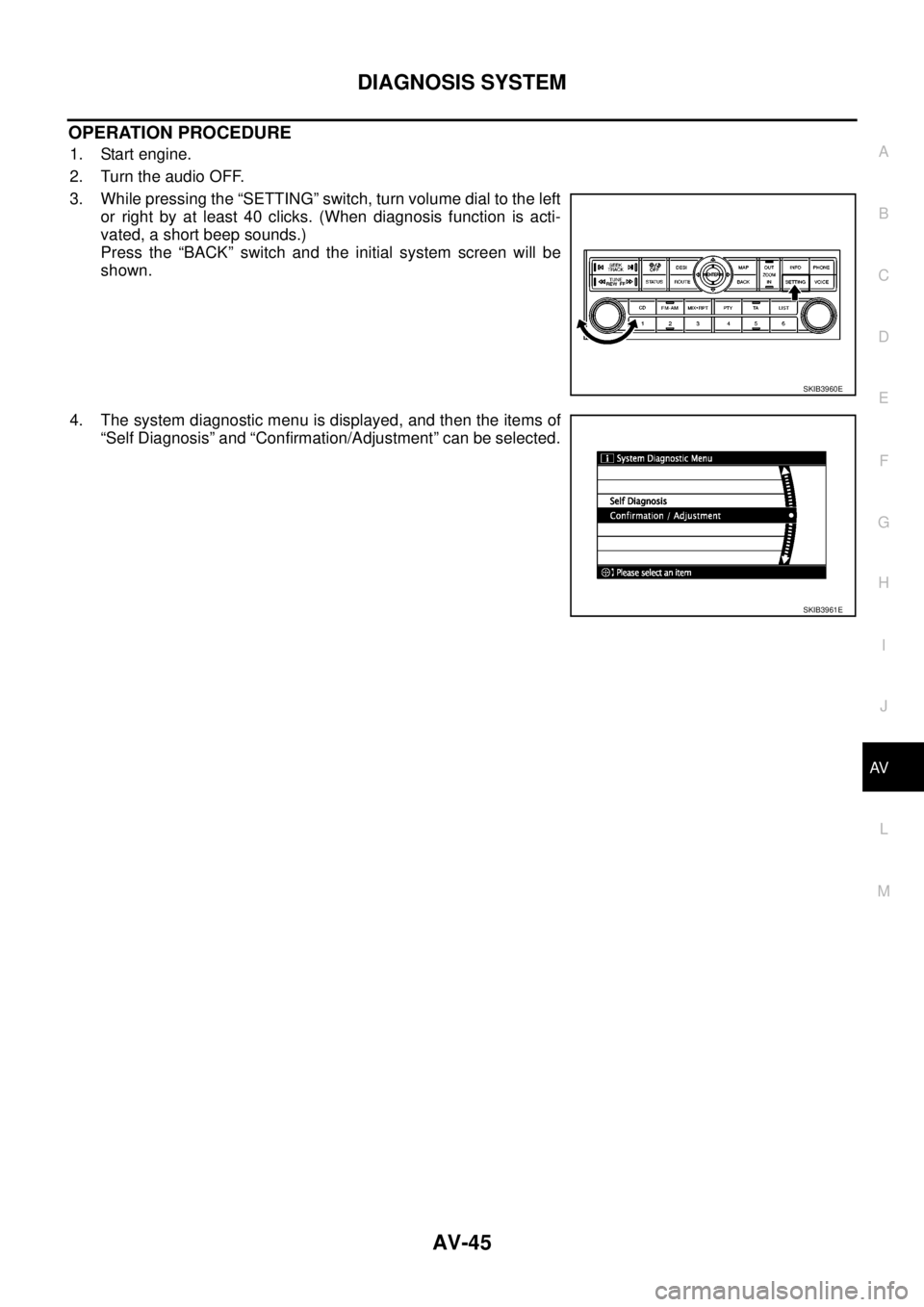
OPERATION PROCEDURE
1. Start engine.
2. Turn the audio OFF.
3. While pressing the “SETTING” switch, turn volume dial to the left
or right by at least 40 clicks. (When diagnosis function is acti-
vated, a short beep sounds.)
Press the “BACK” switch and the initial system screen will be
shown.
4. The system diagnostic menu is displayed, and then the items of
“Self Diagnosis” and “Confirmation/Adjustment” can be selected.
SKIB3960E
SKIB3961E
Page 534 of 3171
AV-46
DIAGNOSIS SYSTEM
Self Diagnosis Mode
EKS00Q6J
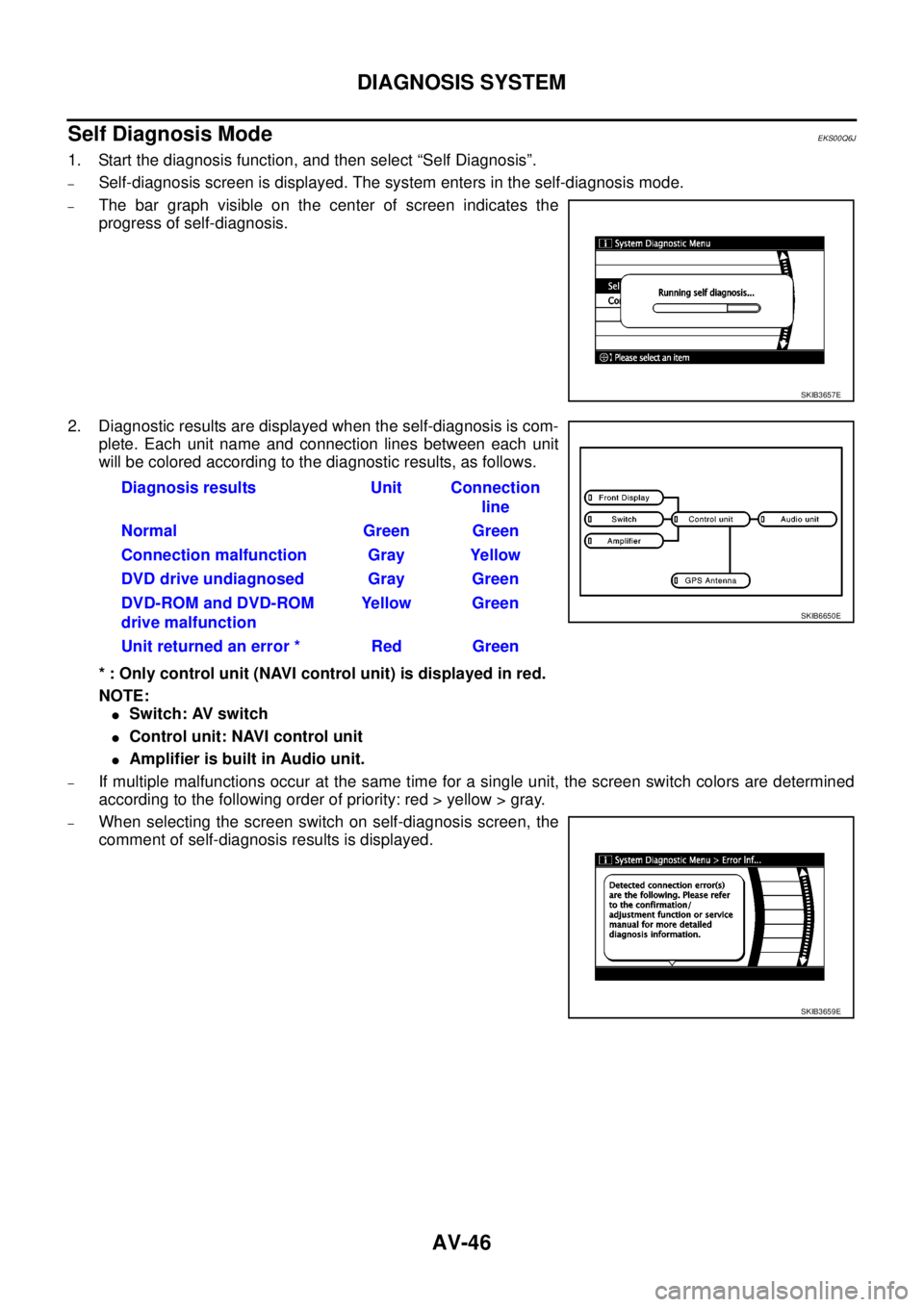
1. Start the diagnosis function, and then select “Self Diagnosis”.
–Self-diagnosis screen is displayed. The system enters in the self-diagnosis mode.
–The bar graph visible on the center of screen indicates the
progress of self-diagnosis.
2. Diagnostic results are displayed when the self-diagnosis is com-
plete. Each unit name and connection lines between each unit
will be colored according to the diagnostic results, as follows.
* : Only control unit (NAVI control unit) is displayed in red.
NOTE:
lSwitch: AV switch
lControl unit: NAVI control unit
lAmplifier is built in Audio unit.
–If multiple malfunctions occur at the same time for a single unit, the screen switch colors are determined
according to the following order of priority: red > yellow > gray.
–When selecting the screen switch on self-diagnosis screen, the
comment of self-diagnosis results is displayed.
SKIB3657E
Diagnosis results Unit Connection
line
Normal Green Green
Connection malfunction Gray Yellow
DVD drive undiagnosed Gray Green
DVD-ROM and DVD-ROM
drive malfunctionYellow Green
Unit returned an error * Red Green
SKIB6650E
SKIB3659E
Page 535 of 3171
DIAGNOSIS SYSTEM
AV-47
C
D
E
F
G
H
I
J
L
MA
B
AV
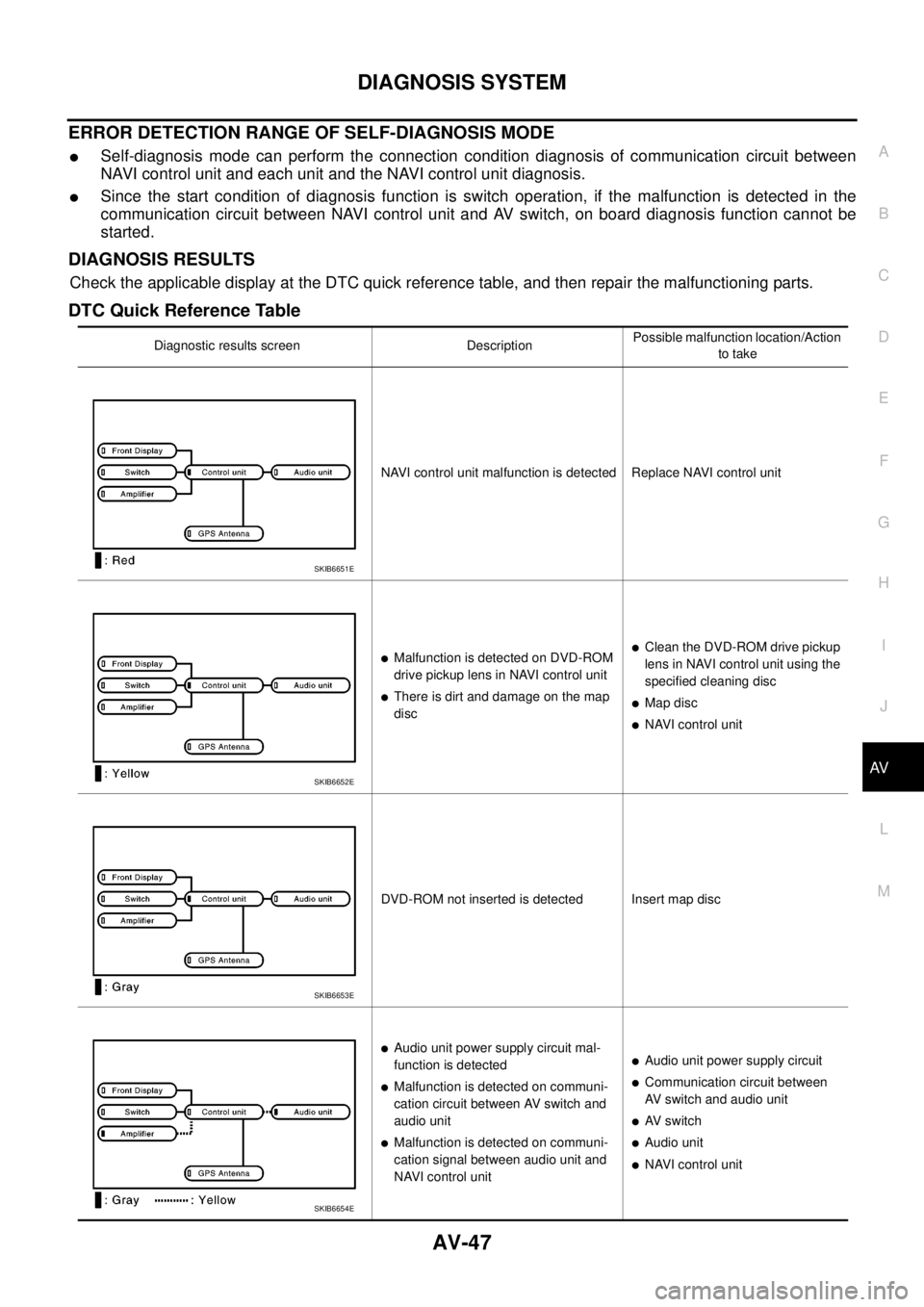
ERROR DETECTION RANGE OF SELF-DIAGNOSIS MODE
lSelf-diagnosis mode can perform the connection condition diagnosis of communication circuit between
NAVI control unit and each unit and the NAVI control unit diagnosis.
lSince the start condition of diagnosis function is switch operation, if the malfunction is detected in the
communication circuit between NAVI control unit and AV switch, on board diagnosis function cannot be
started.
DIAGNOSIS RESULTS
Check the applicable display at the DTC quick reference table, and then repair the malfunctioning parts.
DTC Quick Reference Table
Diagnostic results screen DescriptionPossible malfunction location/Action
to take
NAVI control unit malfunction is detected Replace NAVI control unit
lMalfunction is detected on DVD-ROM
drive pickup lens in NAVI control unit
lThere is dirt and damage on the map
disc
lClean the DVD-ROM drive pickup
lens in NAVI control unit using the
specified cleaning disc
lMap disc
lNAVI control unit
DVD-ROM not inserted is detected Insert map disc
lAudio unit power supply circuit mal-
function is detected
lMalfunction is detected on communi-
cation circuit between AV switch and
audio unit
lMalfunction is detected on communi-
cation signal between audio unit and
NAVI control unit
lAudio unit power supply circuit
lCommunication circuit between
AV switch and audio unit
lAV s w i t c h
lAudio unit
lNAVI control unit
SKIB6651E
SKIB6652E
SKIB6653E
SKIB6654E
Page 540 of 3171

AV-52
DIAGNOSIS SYSTEM
Error History Display Item
Some error items may be displayed simultaneously according to the cause. If some error items are displayed
simultaneously, the detection of the cause can be performed by the combination of display items
Display Item DescriptionPossible malfunction location/Action to
take
CAN_COMM_CIRCUITCAN communication malfunction is
detectedPerform the diagnosis using CONSULT-
II, and then repair the malfunctioning
parts by diagnostic results.
Refer toAV-47, "
DIAGNOSIS
RESULTS".
CONTROL UNIT (CAN)CAN initial diagnosis malfunction is
detectedReplace NAVI control unit
CONTROL UNIT (AV)AV communication circuit initial diagno-
sis malfunction is detectedReplace NAVI control unit
lCAN_COMM_CIRCUIT (AV)
lAudio Unit Connection Error
lAmplifier Connection Error
lRDS-TMC Error
lAudio unit power supply and ground
circuit malfunction is detected
lMalfunctionisdetectedoncommuni-
cation circuit between AV switch and
audio unit
lMalfunctionisdetectedoncommuni-
cation signal between audio unit and
NAVI control unit
lAudio unit power supply and ground
circuit
lCommunication circuit between AV
switch and audio unit
lAV switch
lAudio unit
lNAVI control unit
lCAN_COMM_CIRCUIT (AV)
lSwitches Connection Error
lAV switch power supply and ground
circuit malfunction is detected
lMalfunctioning is detected on com-
munication circuit AV switch and
NAVI control unit
lAV switch power supply and ground
circuit
lAV switch
lNAVI control unit
Front Display Connection Error
lDisplay unit power supply and ground
circuit malfunction is detected
lMalfunctionisdetectedoncommuni-
cation circuit between Display unit
and NAVI control unit
lMalfunctionisdetectedoncommuni-
cation signal between Display unit
and NAVI control unit
lDisplay unit power supply and ground
circuit
lCommunication circuit between Dis-
play unit and NAVI control unit
lDisplay unit
lNAVI control unit
GPS Antenna ErrorGPS antenna connection malfunction is
detected
lGPS antenna connection line condi-
tion
lGPS antenna
lGPS antenna feeder
lNAVI control unit
lCAN_COMM_CIRCUIT (AV)
lSwitches Connection Error
lAudio Unit Connection Error
lAmplifier Connection Error
lRDS-TMC Error
lMalfunctionisdetectedoncommuni-
cation circuit between NAVI control
unit and AV switch
lMalfunctionisdetectedoncommuni-
cation signal between NAVI control
unit and AV switch
lCommunication circuit between NAVI
control unit and AV switch
lNAVI control unit
lAV switch
FLASH-ROM Error Of Control Unit
NAVI control unit malfunction is
detectedReplace NAVI control unit
Connection Of Gyro
GPS Communication Error
GPS malfunction is detectedIf the symptom such as the GPS receiv-
ing malfunction occurs, intermittent mal-
function caused by strong radio
interference may be detected. If the
malfunction always occurs, replace
NAVI control unit. GPS ROM Error
GPS RAM Error
GPS RTC Error