cooling NISSAN NAVARA 2005 Repair User Guide
[x] Cancel search | Manufacturer: NISSAN, Model Year: 2005, Model line: NAVARA, Model: NISSAN NAVARA 2005Pages: 3171, PDF Size: 49.59 MB
Page 392 of 3171
ATC-58
TROUBLE DIAGNOSIS
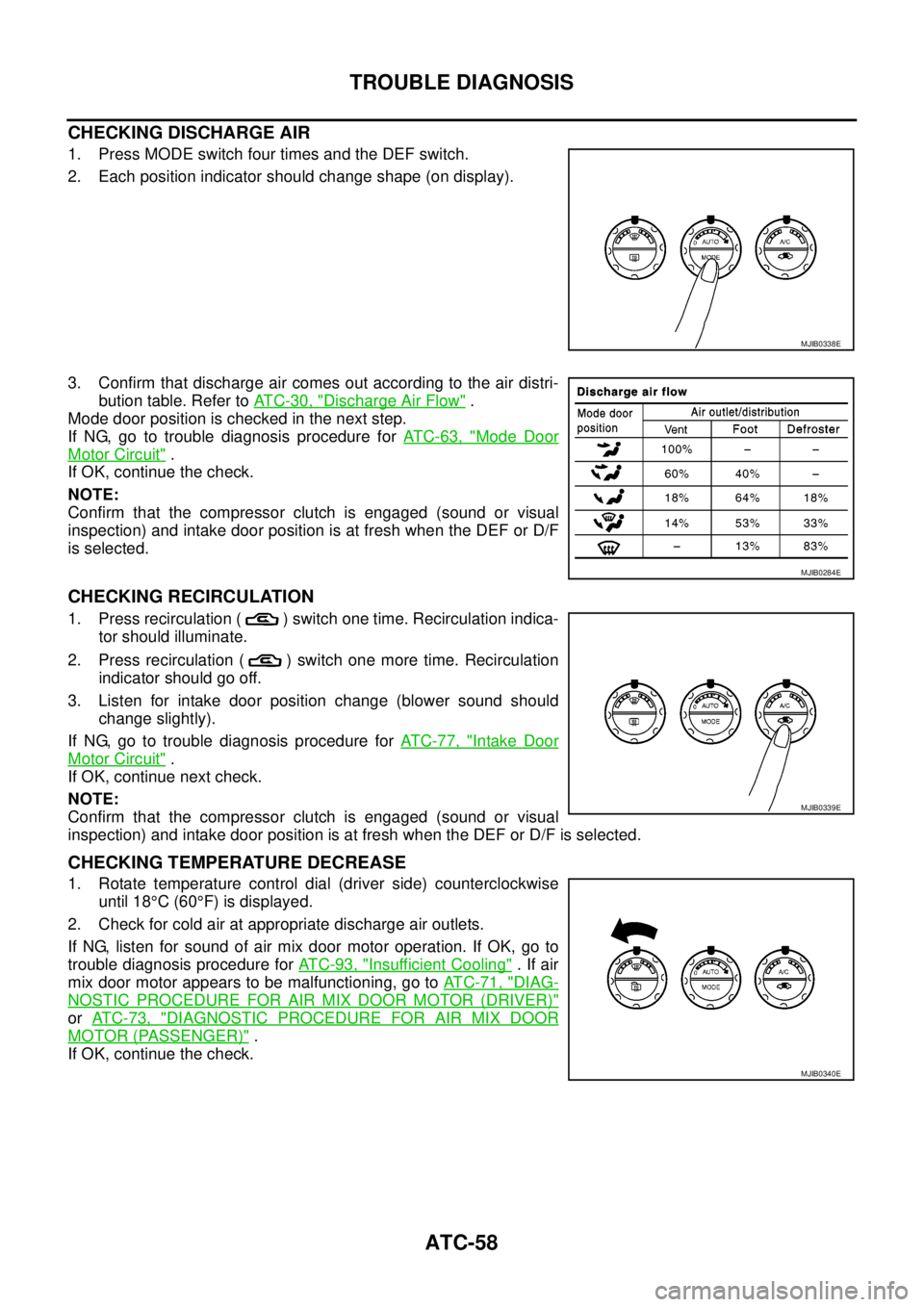
CHECKING DISCHARGE AIR
1. Press MODE switch four times and the DEF switch.
2. Each position indicator should change shape (on display).
3. Confirm that discharge air comes out according to the air distri-
bution table. Refer toAT C - 3 0 , "
Discharge Air Flow".
Mode door position is checked in the next step.
If NG, go to trouble diagnosis procedure forAT C - 6 3 , "
Mode Door
Motor Circuit".
If OK, continue the check.
NOTE:
Confirm that the compressor clutch is engaged (sound or visual
inspection) and intake door position is at fresh when the DEF or D/F
is selected.
CHECKING RECIRCULATION
1. Press recirculation ( ) switch one time. Recirculation indica-
tor should illuminate.
2. Press recirculation ( ) switch one more time. Recirculation
indicator should go off.
3. Listen for intake door position change (blower sound should
change slightly).
If NG, go to trouble diagnosis procedure forAT C - 7 7 , "
Intake Door
Motor Circuit".
If OK, continue next check.
NOTE:
Confirm that the compressor clutch is engaged (sound or visual
inspection) and intake door position is at fresh when the DEF or D/F is selected.
CHECKING TEMPERATURE DECREASE
1. Rotate temperature control dial (driver side) counterclockwise
until 18°C(60°F) is displayed.
2. Check for cold air at appropriate discharge air outlets.
If NG, listen for sound of air mix door motor operation. If OK, go to
trouble diagnosis procedure forAT C - 9 3 , "
Insufficient Cooling".Ifair
mix door motor appears to be malfunctioning, go toAT C - 7 1 , "
DIAG-
NOSTIC PROCEDURE FOR AIR MIX DOOR MOTOR (DRIVER)"
orAT C - 7 3 , "DIAGNOSTIC PROCEDURE FOR AIR MIX DOOR
MOTOR (PASSENGER)".
If OK, continue the check.
MJIB0338E
MJIB0284E
MJIB0339E
MJIB0340E
Page 399 of 3171
TROUBLE DIAGNOSIS
ATC-65
C
D
E
F
G
H
I
K
L
MA
B
AT C
COMPONENT DESCRIPTION
Mode Door Motor
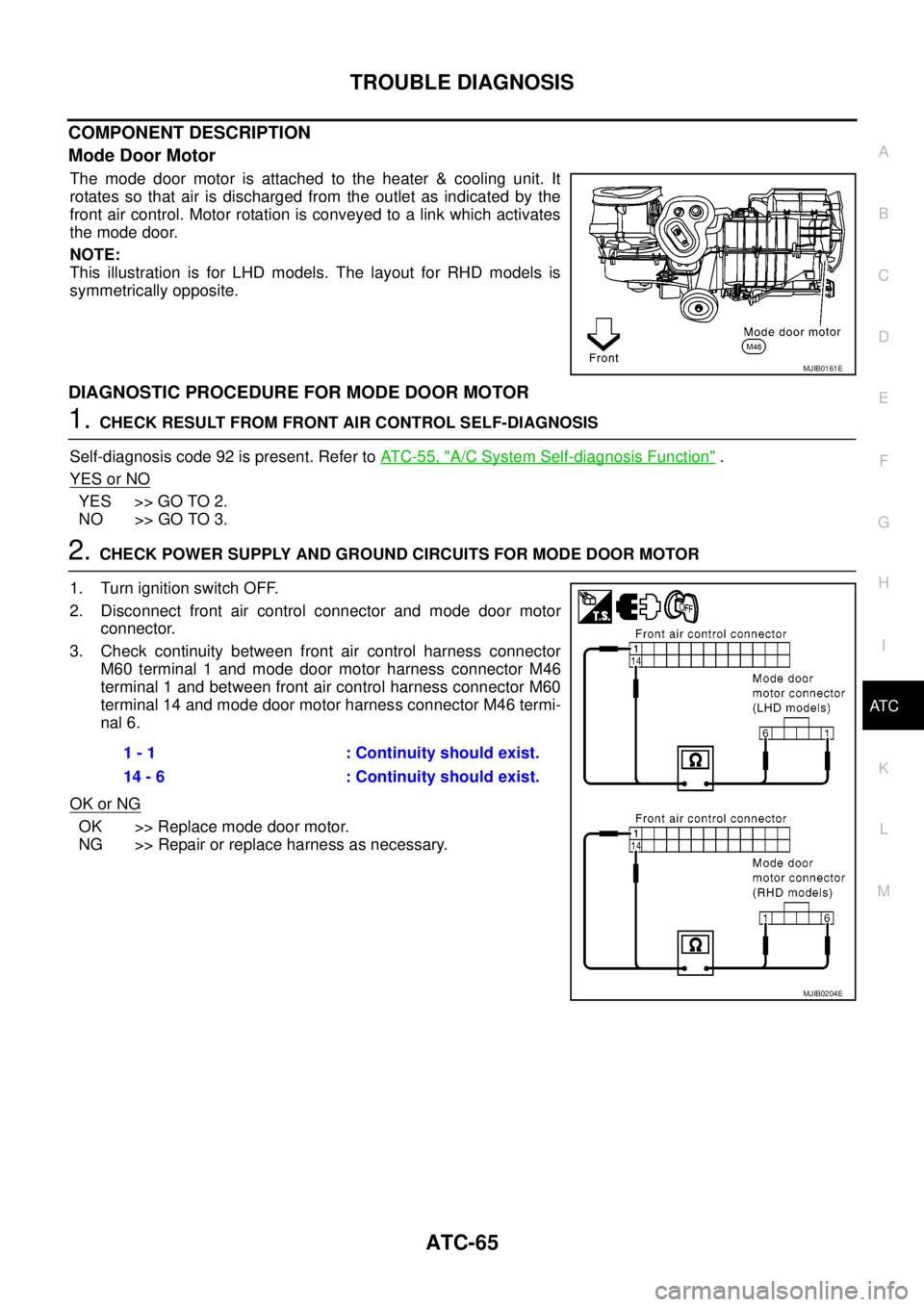
The mode door motor is attached to the heater & cooling unit. It
rotates so that air is discharged from the outlet as indicated by the
front air control. Motor rotation is conveyed to a link which activates
themodedoor.
NOTE:
This illustration is for LHD models. The layout for RHD models is
symmetrically opposite.
DIAGNOSTIC PROCEDURE FOR MODE DOOR MOTOR
1.CHECK RESULT FROM FRONT AIR CONTROL SELF-DIAGNOSIS
Self-diagnosis code 92 is present. Refer toAT C - 5 5 , "
A/C System Self-diagnosis Function".
YES or NO
YES >> GO TO 2.
NO >> GO TO 3.
2.CHECK POWER SUPPLY AND GROUND CIRCUITS FOR MODE DOOR MOTOR
1. Turn ignition switch OFF.
2. Disconnect front air control connector and mode door motor
connector.
3. Check continuity between front air control harness connector
M60 terminal 1 and mode door motor harness connector M46
terminal 1 and between front air control harness connector M60
terminal 14 and mode door motor harness connector M46 termi-
nal 6.
OK or NG
OK >> Replace mode door motor.
NG >> Repair or replace harness as necessary.
MJIB0161E
1 - 1 : Continuity should exist.
14 - 6 : Continuity should exist.
MJIB0204E
Page 404 of 3171
ATC-70
TROUBLE DIAGNOSIS
COMPONENT DESCRIPTION
Air Mix Door Motors
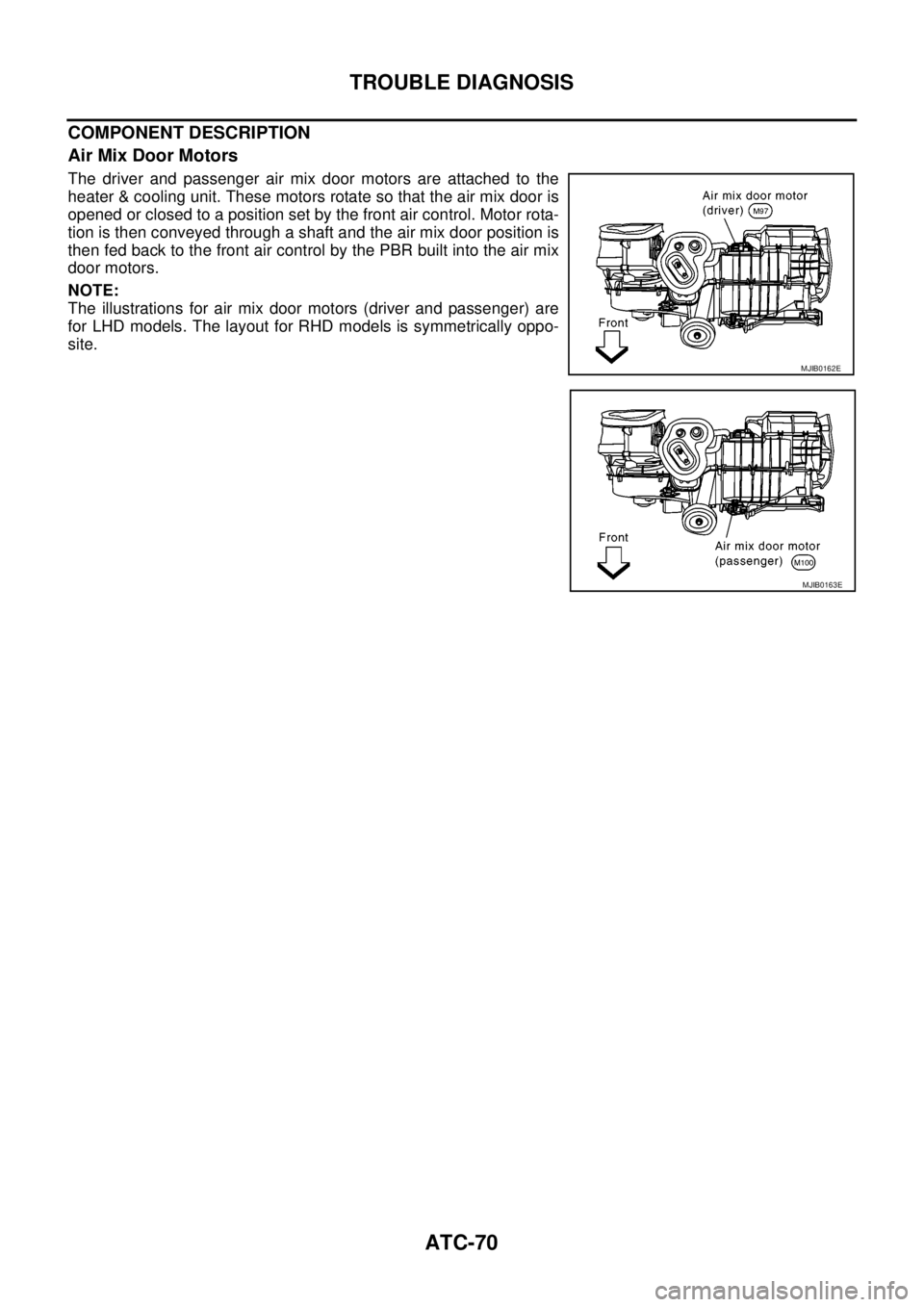
The driver and passenger air mix door motors are attached to the
heater & cooling unit. These motors rotate so that the air mix door is
opened or closed to a position set by the front air control. Motor rota-
tion is then conveyed through a shaft and the air mix door position is
then fed back to the front air control by the PBR built into the air mix
door motors.
NOTE:
The illustrations for air mix door motors (driver and passenger) are
for LHD models. The layout for RHD models is symmetrically oppo-
site.
MJIB0162E
MJIB0163E
Page 416 of 3171
ATC-82
TROUBLE DIAGNOSIS
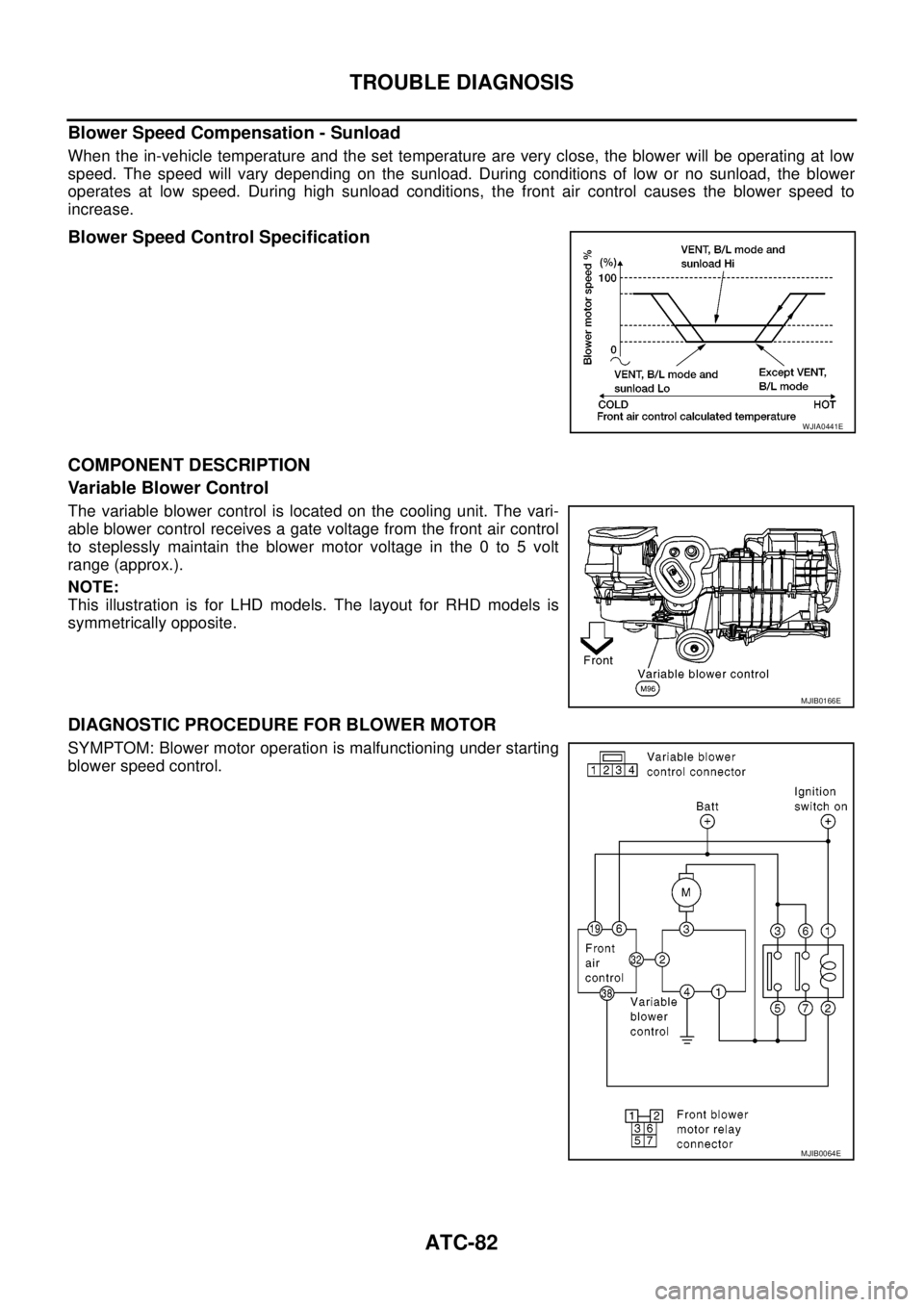
Blower Speed Compensation - Sunload
When the in-vehicle temperature and the set temperature are very close, the blower will be operating at low
speed. The speed will vary depending on the sunload. During conditions of low or no sunload, the blower
operates at low speed. During high sunload conditions, the front air control causes the blower speed to
increase.
Blower Speed Control Specification
COMPONENT DESCRIPTION
Variable Blower Control
The variable blower control is located on the cooling unit. The vari-
able blower control receives a gate voltage from the front air control
to steplessly maintain the blower motor voltage in the 0 to 5 volt
range (approx.).
NOTE:
This illustration is for LHD models. The layout for RHD models is
symmetrically opposite.
DIAGNOSTIC PROCEDURE FOR BLOWER MOTOR
SYMPTOM: Blower motor operation is malfunctioning under starting
blower speed control.
WJIA0441E
MJIB0166E
MJIB0064E
Page 427 of 3171
TROUBLE DIAGNOSIS
ATC-93
C
D
E
F
G
H
I
K
L
MA
B
AT C
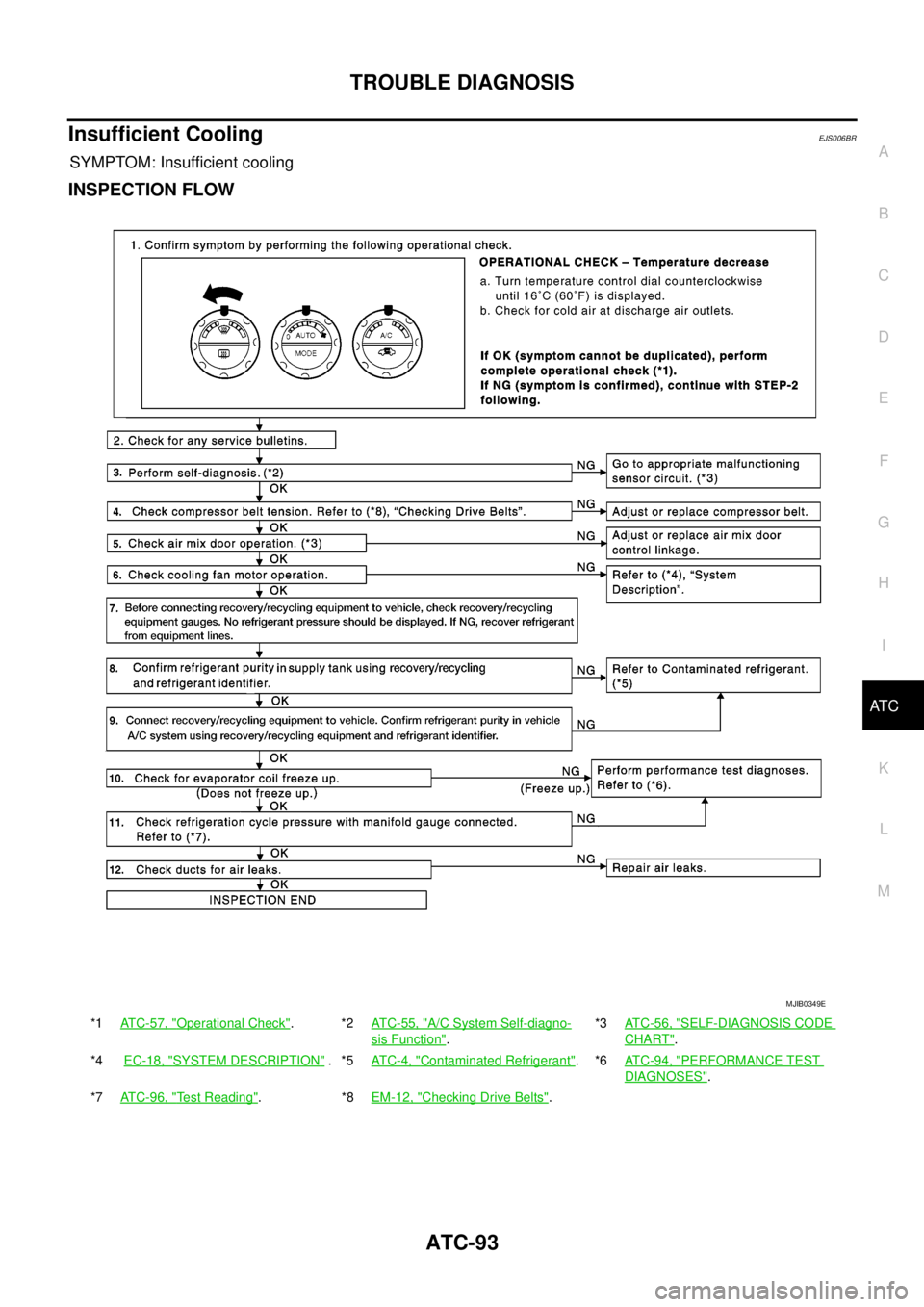
Insufficient CoolingEJS006BR
SYMPTOM: Insufficient cooling
INSPECTION FLOW
*1ATC-57, "Operational Check".*2ATC-55, "A/C System Self-diagno-
sis Function".*3AT C - 5 6 , "
SELF-DIAGNOSIS CODE
CHART".
*4EC-18, "
SYSTEM DESCRIPTION".*5AT C - 4 , "Contaminated Refrigerant".*6AT C - 9 4 , "PERFORMANCE TEST
DIAGNOSES".
*7ATC-96, "
Test Reading".*8EM-12, "Checking Drive Belts".
MJIB0349E
Page 431 of 3171
TROUBLE DIAGNOSIS
ATC-97
C
D
E
F
G
H
I
K
L
MA
B
AT C
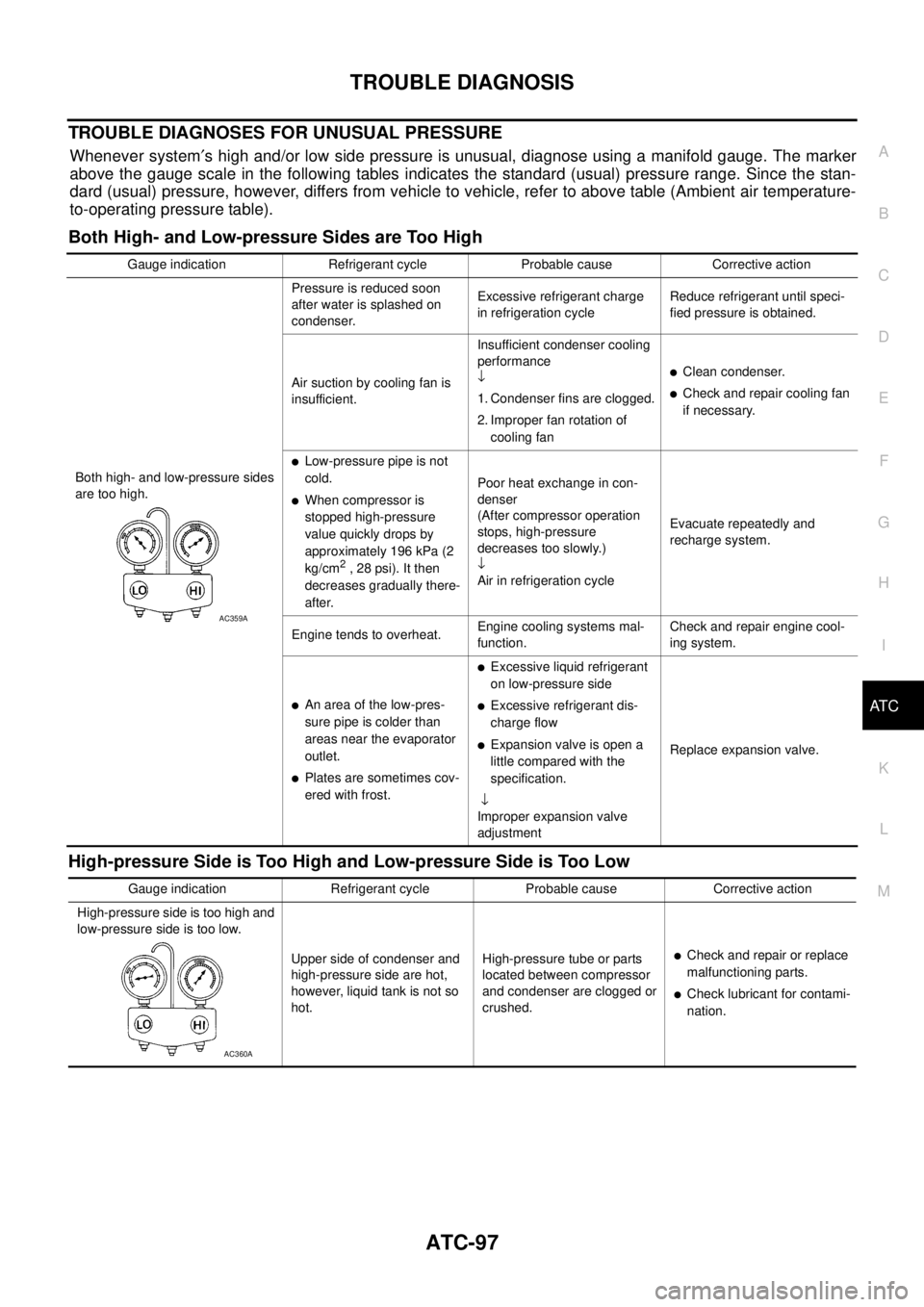
TROUBLE DIAGNOSES FOR UNUSUAL PRESSURE
Whenever system¢s high and/or low side pressure is unusual, diagnose using a manifold gauge. The marker
above the gauge scale in the following tables indicates the standard (usual) pressure range. Since the stan-
dard (usual) pressure, however, differs from vehicle to vehicle, refer to above table (Ambient air temperature-
to-operating pressure table).
Both High- and Low-pressure Sides are Too High
High-pressure Side is Too High and Low-pressure Side is Too Low
Gauge indication Refrigerant cycle Probable cause Corrective action
Both high- and low-pressure sides
are too high.Pressure is reduced soon
after water is splashed on
condenser.Excessive refrigerant charge
in refrigeration cycleReduce refrigerant until speci-
fied pressure is obtained.
Air suction by cooling fan is
insufficient.Insufficient condenser cooling
performance
¯
1. Condenser fins are clogged.
2. Improper fan rotation of
cooling fan
lClean condenser.
lCheck and repair cooling fan
if necessary.
lLow-pressure pipe is not
cold.
lWhen compressor is
stopped high-pressure
value quickly drops by
approximately 196 kPa (2
kg/cm
2, 28 psi). It then
decreases gradually there-
after.Poor heat exchange in con-
denser
(After compressor operation
stops, high-pressure
decreases too slowly.)
¯
Air in refrigeration cycleEvacuate repeatedly and
recharge system.
Engine tends to overheat.Engine cooling systems mal-
function.Check and repair engine cool-
ing system.
lAn area of the low-pres-
sure pipe is colder than
areas near the evaporator
outlet.
lPlates are sometimes cov-
ered with frost.
lExcessive liquid refrigerant
on low-pressure side
lExcessive refrigerant dis-
charge flow
lExpansion valve is open a
little compared with the
specification.
¯
Improper expansion valve
adjustmentReplace expansion valve.
AC359A
Gauge indication Refrigerant cycle Probable cause Corrective action
High-pressure side is too high and
low-pressure side is too low.
Upper side of condenser and
high-pressure side are hot,
however, liquid tank is not so
hot.High-pressure tube or parts
located between compressor
and condenser are clogged or
crushed.
lCheck and repair or replace
malfunctioning parts.
lCheck lubricant for contami-
nation.
AC360A
Page 433 of 3171

TROUBLE DIAGNOSIS
ATC-99
C
D
E
F
G
H
I
K
L
MA
B
AT C
Low-pressure Side Sometimes Becomes Negative
Low-pressure Side Becomes Negative
Gauge indication Refrigerant cycle Probable cause Corrective action
Low-pressure side sometimes
becomes negative.
lAir conditioning system
does not function and does
not cyclically cool the com-
partment air.
lThe system constantly func-
tions for a certain period of
time after compressor is
stopped and restarted.Refrigerant does not dis-
charge cyclically.
¯
Moisture is frozen at expan-
sion valve outlet and inlet.
¯
Water is mixed with refriger-
ant.
lDrain water from refrigerant
or replace refrigerant.
lReplace liquid tank.
AC354A
Gauge indication Refrigerant cycle Probable cause Corrective action
Low-pressure side becomes nega-
tive.
Liquid tank or front/rear side of
expansion valve¢spipeis
frosted or dewed.High-pressure side is closed
and refrigerant does not flow.
¯
Expansion valve or liquid tank
is frosted.Leave the system at rest until
no frost is present. Start it
again to check whether or not
the malfunction is caused by
water or foreign particles.
lIf water is the cause, initially
cooling is okay. Then the
water freezes causing a
blockage. Drain water from
refrigerant or replace refrig-
erant.
lIf due to foreign particles,
remove expansion valve
and remove the particles
with dry and compressed air
(not shop air).
lIf either of the above meth-
ods cannot correct the mal-
function, replace expansion
valve.
lReplace liquid tank.
lCheck lubricant for contami-
nation.
AC362A
Page 448 of 3171
ATC-114
TROUBLE DIAGNOSIS
Intake Sensor Circuit
EJS006BZ
COMPONENT DESCRIPTION
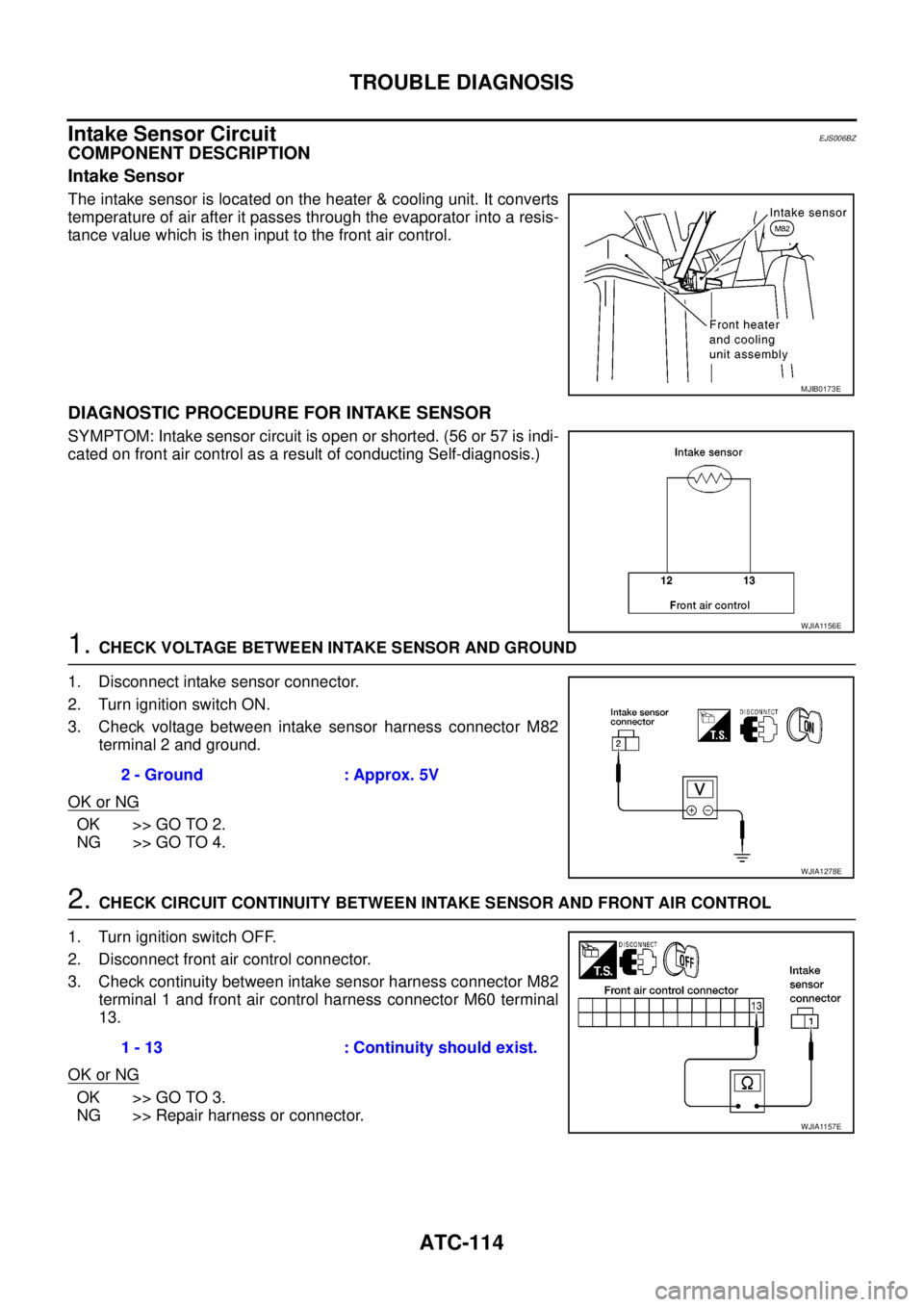
Intake Sensor
The intake sensor is located on the heater & cooling unit. It converts
temperature of air after it passes through the evaporator into a resis-
tance value which is then input to the front air control.
DIAGNOSTIC PROCEDURE FOR INTAKE SENSOR
SYMPTOM: Intake sensor circuit is open or shorted. (56 or 57 is indi-
cated on front air control as a result of conducting Self-diagnosis.)
1.CHECK VOLTAGE BETWEEN INTAKE SENSOR AND GROUND
1. Disconnect intake sensor connector.
2. Turn ignition switch ON.
3. Check voltage between intake sensor harness connector M82
terminal 2 and ground.
OK or NG
OK >> GO TO 2.
NG >> GO TO 4.
2.CHECK CIRCUIT CONTINUITY BETWEEN INTAKE SENSOR AND FRONT AIR CONTROL
1. Turn ignition switch OFF.
2. Disconnect front air control connector.
3. Check continuity between intake sensor harness connector M82
terminal 1 and front air control harness connector M60 terminal
13.
OK or NG
OK >> GO TO 3.
NG >> Repair harness or connector.
MJIB0173E
WJIA1156E
2 - Ground : Approx. 5V
WJIA1278E
1 - 13 : Continuity should exist.
WJIA1157E
Page 454 of 3171
ATC-120
INTAKE SENSOR
INTAKE SENSOR
PFP:27723
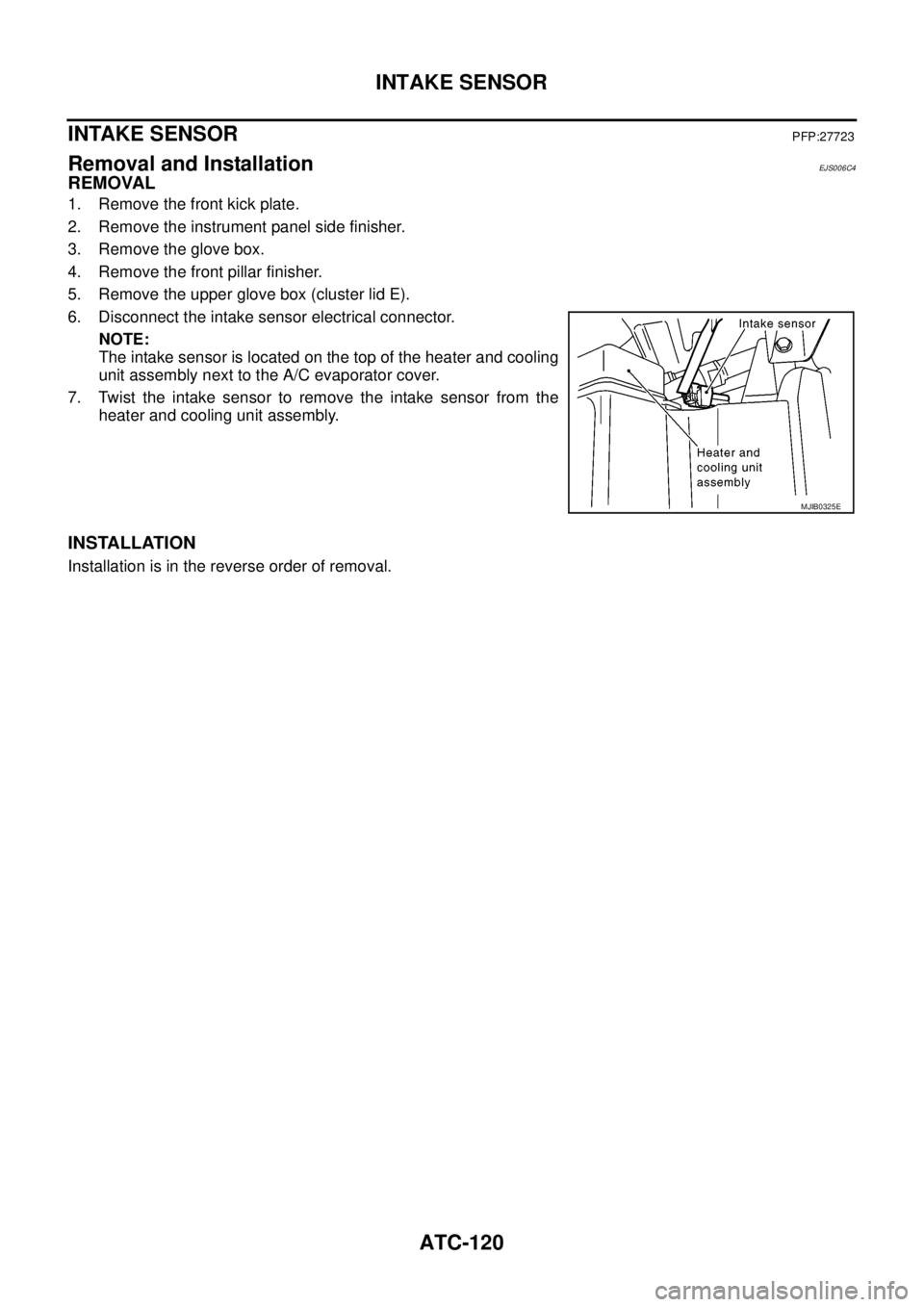
Removal and InstallationEJS006C4
REMOVAL
1. Remove the front kick plate.
2. Remove the instrument panel side finisher.
3. Remove the glove box.
4. Remove the front pillar finisher.
5. Remove the upper glove box (cluster lid E).
6. Disconnect the intake sensor electrical connector.
NOTE:
The intake sensor is located on the top of the heater and cooling
unit assembly next to the A/C evaporator cover.
7. Twist the intake sensor to remove the intake sensor from the
heater and cooling unit assembly.
INSTALLATION
Installation is in the reverse order of removal.
MJIB0325E
Page 455 of 3171
BLOWER MOTOR
ATC-121
C
D
E
F
G
H
I
K
L
MA
B
AT C
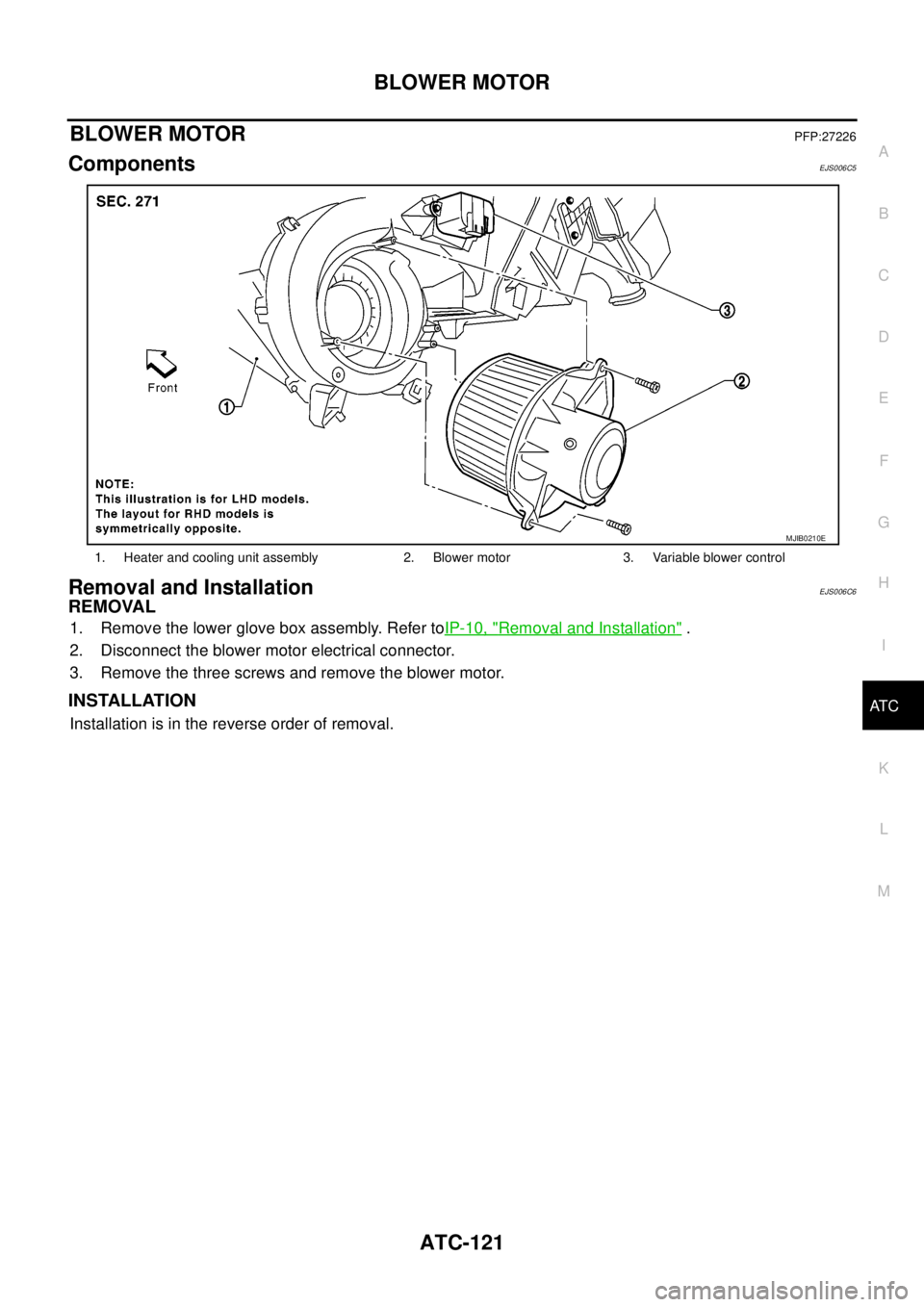
BLOWER MOTORPFP:27226
ComponentsEJS006C5
Removal and InstallationEJS006C6
REMOVAL
1. Remove the lower glove box assembly. Refer toIP-10, "Removal and Installation".
2. Disconnect the blower motor electrical connector.
3. Remove the three screws and remove the blower motor.
INSTALLATION
Installation is in the reverse order of removal.
1. Heater and cooling unit assembly 2. Blower motor 3. Variable blower control
MJIB0210E