key fob NISSAN NAVARA 2005 Repair User Guide
[x] Cancel search | Manufacturer: NISSAN, Model Year: 2005, Model line: NAVARA, Model: NISSAN NAVARA 2005Pages: 3171, PDF Size: 49.59 MB
Page 676 of 3171

BL-92
MULTI-REMOTE CONTROL SYSTEM
Auto Re-lock Function
The BCM is equipped with an auto re-lock function, when no further user action occurs after an full or partial
unlock, the doors will automatically re-lock after 2 minutes (default value).
The auto re-lock function will not be activated under the following state.
lKeyswitchisOn
lMechanical key is inserted
lAny door is opened
NOTE:
The 2 minutes timer of auto re-lock will be reset if unlock button from the key fob is pressed.
Auto relock function can be changed using “WORK SUPPORT” mode in “AUTO LOCK SET”.
Refer toBL-104, "
Work Support".
Room Lamp Operation
When the following conditions are met:
lcondition of room lamp switch is DOOR position;
ldoor switch OFF (when all the doors are closed);
With input of UNLOCK signal from keyfob multi-remote control system turns on interior lamp (for 30 seconds).
CAN Communication System DescriptionEIS00DBF
Refer toLAN-23, "CAN COMMUNICATION".
Page 687 of 3171
MULTI-REMOTE CONTROL SYSTEM
BL-103
C
D
E
F
G
H
J
K
L
MA
B
BL
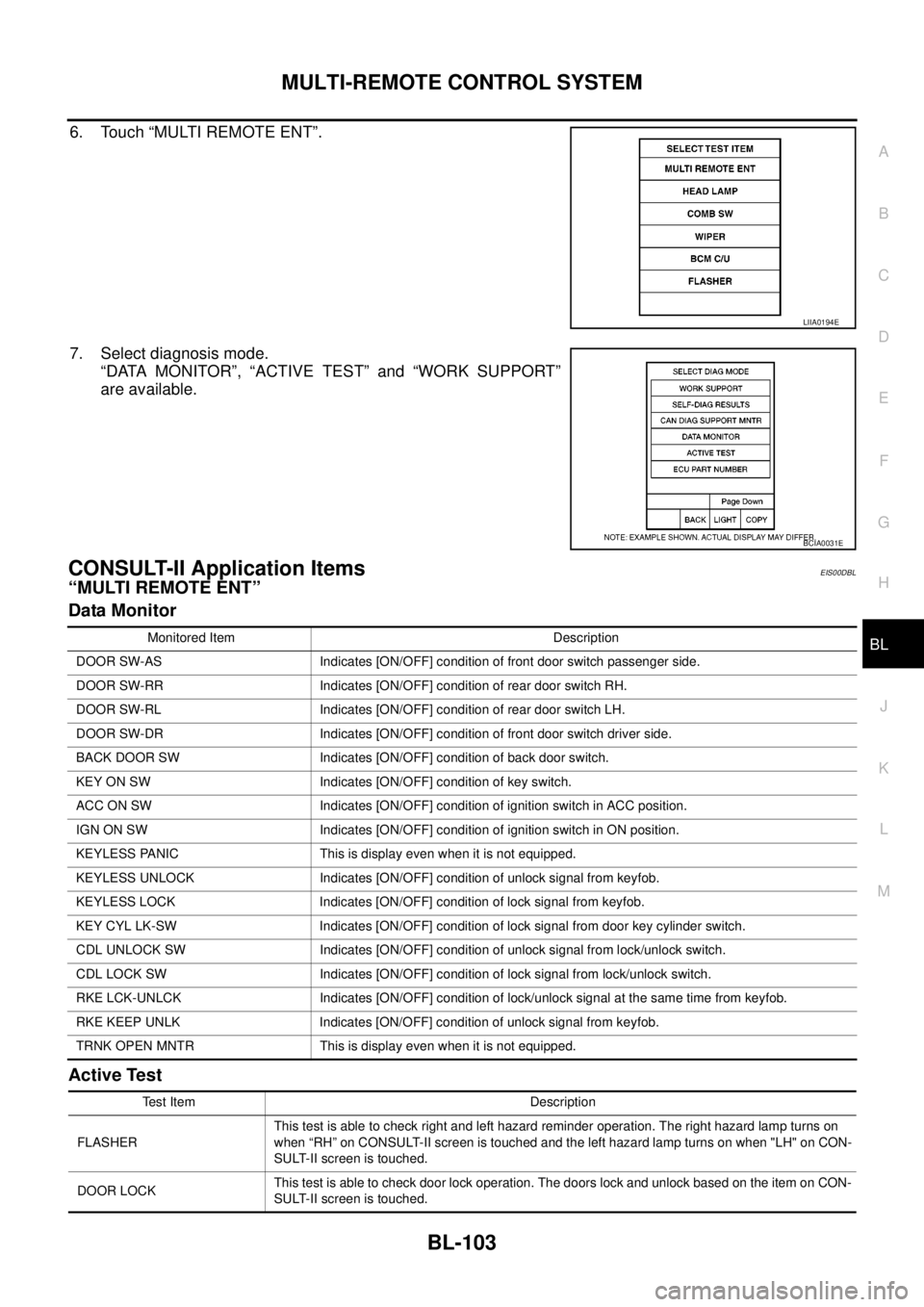
6. Touch “MULTI REMOTE ENT”.
7. Select diagnosis mode.
“DATA MONITOR”, “ACTIVE TEST” and “WORK SUPPORT”
are available.
CONSULT-II Application ItemsEIS00DBL
“MULTI REMOTE ENT”
Data Monitor
Active Test
LIIA0194E
BCIA0031E
Monitored Item Description
DOOR SW-AS Indicates [ON/OFF] condition of front door switch passenger side.
DOOR SW-RR Indicates [ON/OFF] condition of rear door switch RH.
DOOR SW-RL Indicates [ON/OFF] condition of rear door switch LH.
DOOR SW-DR Indicates [ON/OFF] condition of front door switch driver side.
BACK DOOR SW Indicates [ON/OFF] condition of back door switch.
KEY ON SW Indicates [ON/OFF] condition of key switch.
ACC ON SW Indicates [ON/OFF] condition of ignition switch in ACC position.
IGN ON SW Indicates [ON/OFF] condition of ignition switch in ON position.
KEYLESS PANIC This is display even when it is not equipped.
KEYLESS UNLOCK Indicates [ON/OFF] condition of unlock signal from keyfob.
KEYLESS LOCK Indicates [ON/OFF] condition of lock signal from keyfob.
KEY CYL LK-SW Indicates [ON/OFF] condition of lock signal from door key cylinder switch.
CDL UNLOCK SW Indicates [ON/OFF] condition of unlock signal from lock/unlock switch.
CDL LOCK SW Indicates [ON/OFF] condition of lock signal from lock/unlock switch.
RKE LCK-UNLCK Indicates [ON/OFF] condition of lock/unlock signal at the same time from keyfob.
RKE KEEP UNLK Indicates [ON/OFF] condition of unlock signal from keyfob.
TRNK OPEN MNTR This is display even when it is not equipped.
Test Item Description
FLASHERThis test is able to check right and left hazard reminder operation. The right hazard lamp turns on
when “RH” on CONSULT-II screen is touched and the left hazard lamp turns on when "LH" on CON-
SULT-II screen is touched.
DOOR LOCKThis test is able to check door lock operation. The doors lock and unlock based on the item on CON-
SULT-II screen is touched.
Page 688 of 3171
BL-104
MULTI-REMOTE CONTROL SYSTEM
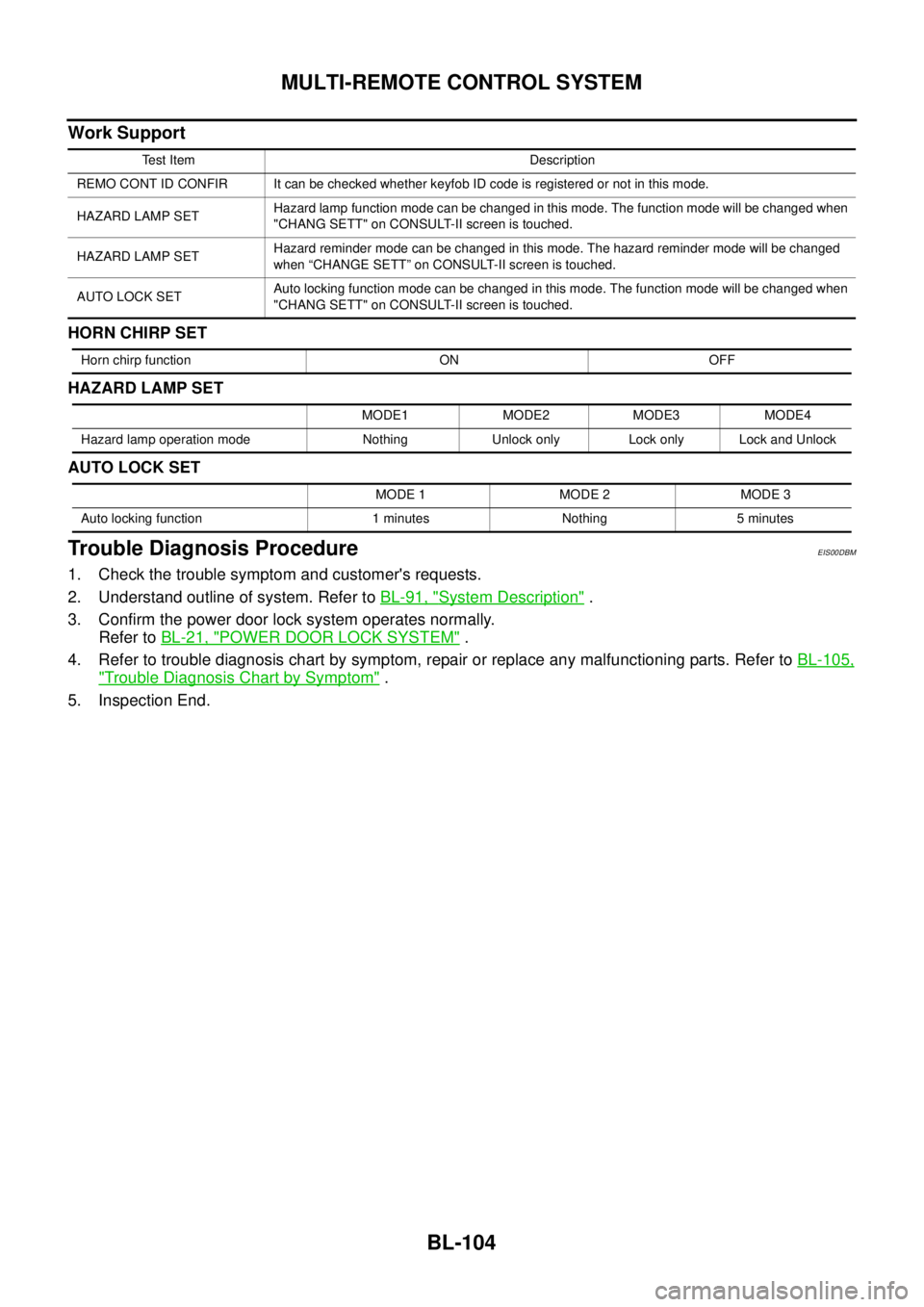
Work Support
HORN CHIRP SET
HAZARD LAMP SET
AUTO LOCK SET
Trouble Diagnosis ProcedureEIS00DBM
1. Check the trouble symptom and customer's requests.
2. Understand outline of system. Refer toBL-91, "
System Description".
3. Confirm the power door lock system operates normally.
Refer toBL-21, "
POWER DOOR LOCK SYSTEM".
4. Refer to trouble diagnosis chart by symptom, repair or replace any malfunctioning parts. Refer toBL-105,
"Trouble Diagnosis Chart by Symptom".
5. Inspection End.
Test Item Description
REMO CONT ID CONFIR It can be checked whether keyfob ID code is registered or not in this mode.
HAZARD LAMP SETHazard lamp function mode can be changed in this mode. The function mode will be changed when
"CHANG SETT" on CONSULT-II screen is touched.
HAZARD LAMP SETHazard reminder mode can be changed in this mode. The hazard reminder mode will be changed
when “CHANGE SETT” on CONSULT-II screen is touched.
AUTO LOCK SETAuto locking function mode can be changed in this mode. The function mode will be changed when
"CHANG SETT" on CONSULT-II screen is touched.
Horn chirp function ON OFF
MODE1 MODE2 MODE3 MODE4
Hazard lamp operation mode Nothing Unlock only Lock only Lock and Unlock
MODE 1 MODE 2 MODE 3
Auto locking function 1 minutes Nothing 5 minutes
Page 689 of 3171
MULTI-REMOTE CONTROL SYSTEM
BL-105
C
D
E
F
G
H
J
K
L
MA
B
BL
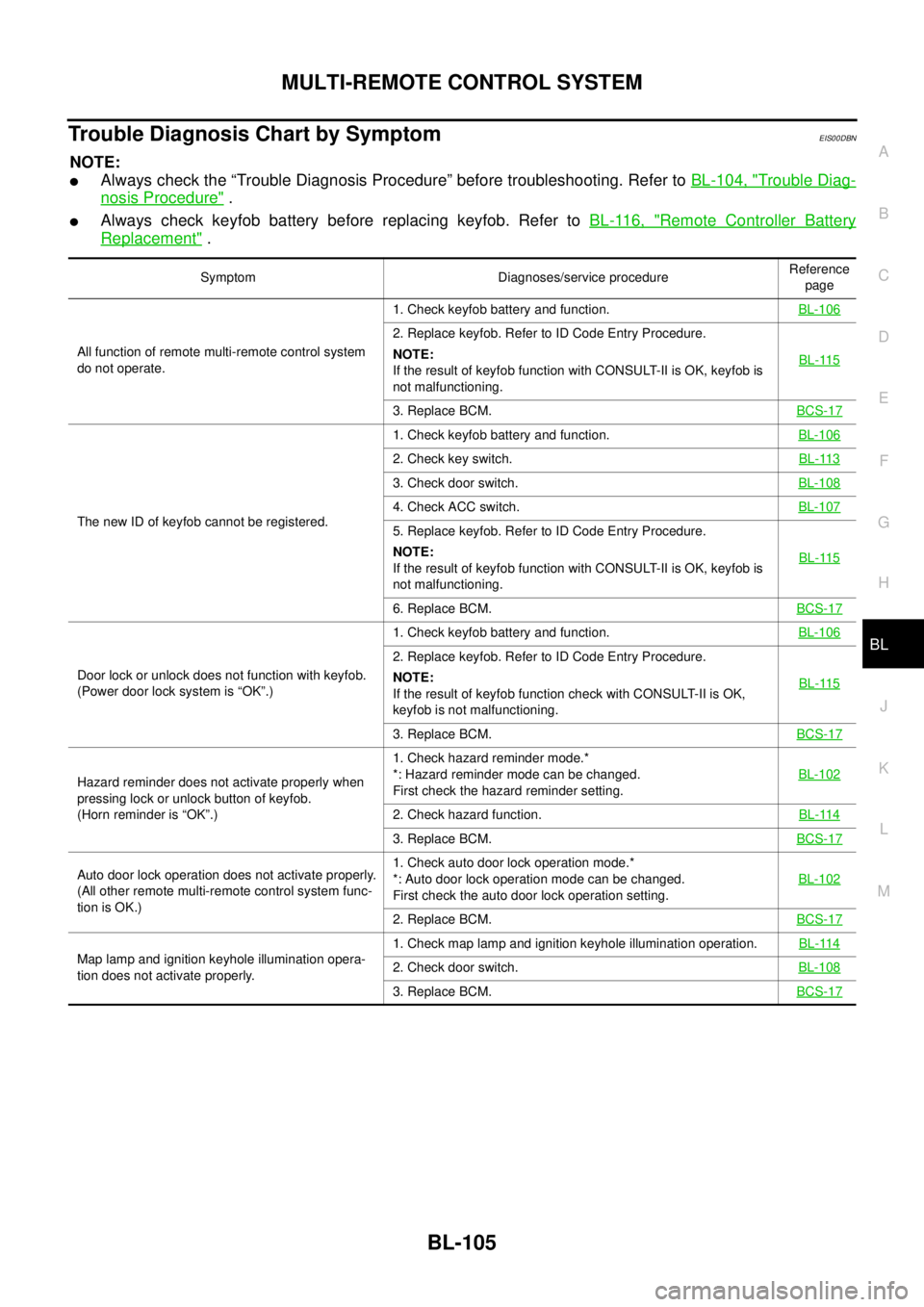
Trouble Diagnosis Chart by SymptomEIS00DBN
NOTE:
lAlways check the “Trouble Diagnosis Procedure” before troubleshooting. Refer toBL-104, "Trouble Diag-
nosis Procedure".
lAlways check keyfob battery before replacing keyfob. Refer toBL-116, "Remote Controller Battery
Replacement".
Symptom Diagnoses/service procedureReference
page
All function of remote multi-remote control system
do not operate.1. Check keyfob battery and function.BL-106
2. Replace keyfob. Refer to ID Code Entry Procedure.
NOTE:
If the result of keyfob function with CONSULT-II is OK, keyfob is
not malfunctioning.BL-115
3. Replace BCM.BCS-17
The new ID of keyfob cannot be registered.1. Check keyfob battery and function.BL-106
2. Check key switch.BL-113
3. Check door switch.BL-108
4. Check ACC switch.BL-107
5. Replace keyfob. Refer to ID Code Entry Procedure.
NOTE:
If the result of keyfob function with CONSULT-II is OK, keyfob is
not malfunctioning.BL-115
6. Replace BCM.BCS-17
Door lock or unlock does not function with keyfob.
(Power door lock system is “OK”.)1. Check keyfob battery and function.BL-106
2. Replace keyfob. Refer to ID Code Entry Procedure.
NOTE:
If the result of keyfob function check with CONSULT-II is OK,
keyfob is not malfunctioning.BL-115
3. Replace BCM.BCS-17
Hazard reminder does not activate properly when
pressing lock or unlock button of keyfob.
(Horn reminder is “OK”.)1. Check hazard reminder mode.*
*: Hazard reminder mode can be changed.
First check the hazard reminder setting.BL-102
2. Check hazard function.BL-114
3. Replace BCM.BCS-17
Auto door lock operation does not activate properly.
(All other remote multi-remote control system func-
tion is OK.)1. Check auto door lock operation mode.*
*: Auto door lock operation mode can be changed.
First check the auto door lock operation setting.BL-102
2. Replace BCM.BCS-17
Map lamp and ignition keyhole illumination opera-
tion does not activate properly.1. Check map lamp and ignition keyhole illumination operation.BL-1142. Check door switch.BL-108
3. Replace BCM.BCS-17
Page 690 of 3171
BL-106
MULTI-REMOTE CONTROL SYSTEM
Check Keyfob Battery and Function
EIS00DBO
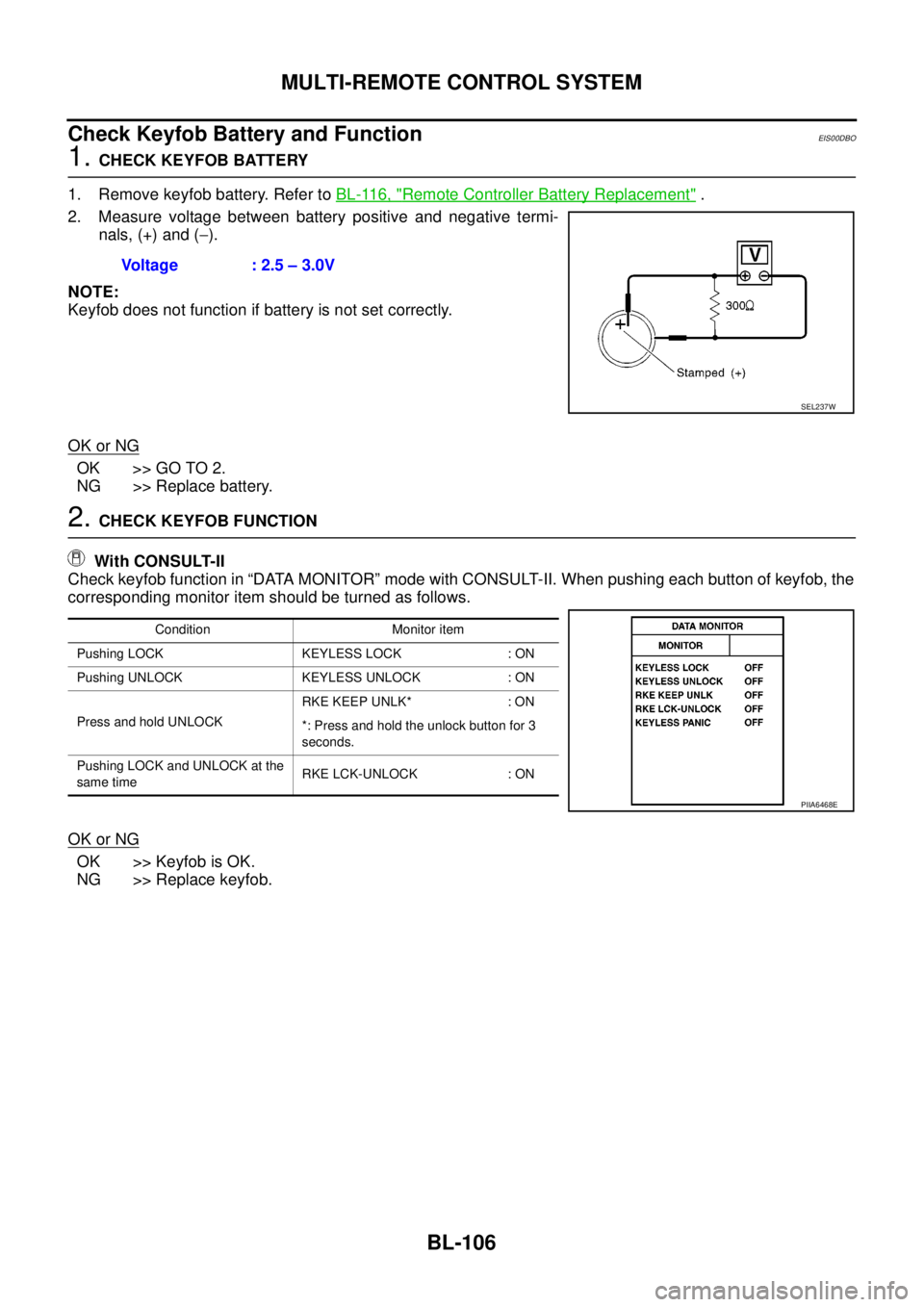
1.CHECK KEYFOB BATTERY
1. Remove keyfob battery. Refer toBL-116, "
Remote Controller Battery Replacement".
2. Measure voltage between battery positive and negative termi-
nals, (+) and (-).
NOTE:
Keyfob does not function if battery is not set correctly.
OK or NG
OK >> GO TO 2.
NG >> Replace battery.
2.CHECK KEYFOB FUNCTION
With CONSULT-II
Check keyfob function in “DATA MONITOR” mode with CONSULT-II. When pushing each button of keyfob, the
corresponding monitor item should be turned as follows.
OK or NG
OK >> Keyfob is OK.
NG >> Replace keyfob.Voltage : 2.5 – 3.0V
SEL237W
Condition Monitor item
Pushing LOCK KEYLESS LOCK : ON
Pushing UNLOCK KEYLESS UNLOCK : ON
Press and hold UNLOCKRKE KEEP UNLK* : ON
*: Press and hold the unlock button for 3
seconds.
Pushing LOCK and UNLOCK at the
same timeRKE LCK-UNLOCK : ON
PIIA6468E
Page 699 of 3171

MULTI-REMOTE CONTROL SYSTEM
BL-115
C
D
E
F
G
H
J
K
L
MA
B
BL
ID Code Entry ProcedureEIS00DBU
KEYFOB ID SET UP
NOTE:
Keyfob ID setup procedure is same as ignition key registration (NATS initialization) procedure.
When the registration of the ignition key (NATS initialization) is performed with a NATS program card,
the registration of keyfob ID is done at the same time.
Regarding the procedures of NATS initialization and ignition key ID registration, refer to CONSULT-II
operation manual, NATS.
If additional key or key replacement is demanded, request all registed key fobs to be brought to the
dealer.
During the NATS initialization process, all registered key IDs will be deleted, thus, it is necessary to re-
register all keys.
CONSULT-II INSPECTION PROCEDURE
1. Turn ignition switch OFF.
2. Insert NATS program card into CONSULT-II.
3. Connect CONSULT-II and CONSULT-II CONVERTER to data
link connector.
4. Turn ignition switch ON.
5. Touch “START”.
6. Touch “OTHER”.Program card : NATS (AEN04A-1)
BBIA0538E
PBR455D
PIIB0900E
Page 724 of 3171
BL-140
THEFT WARNING SYSTEM
System Description
EIS00DBX
DESCRIPTION
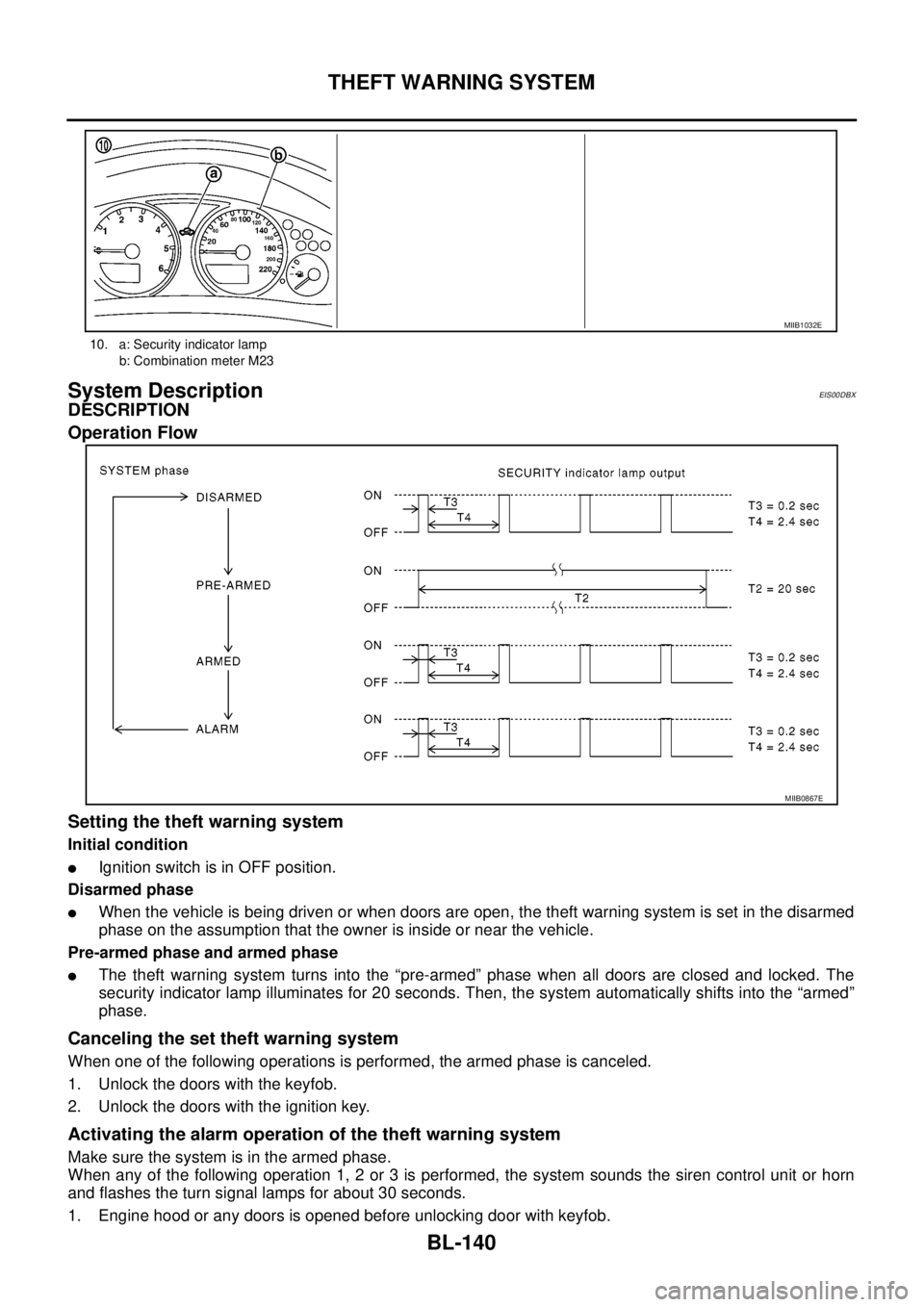
Operation Flow
Setting the theft warning system
Initial condition
lIgnition switch is in OFF position.
Disarmed phase
lWhen the vehicle is being driven or when doors are open, the theft warning system is set in the disarmed
phase on the assumption that the owner is inside or near the vehicle.
Pre-armed phase and armed phase
lThe theft warning system turns into the “pre-armed” phase when all doors are closed and locked. The
security indicator lamp illuminates for 20 seconds. Then, the system automatically shifts into the “armed”
phase.
Canceling the set theft warning system
When one of the following operations is performed, the armed phase is canceled.
1. Unlock the doors with the keyfob.
2. Unlock the doors with the ignition key.
Activating the alarm operation of the theft warning system
Make sure the system is in the armed phase.
When any of the following operation 1, 2 or 3 is performed, the system sounds the siren control unit or horn
and flashes the turn signal lamps for about 30 seconds.
1. Engine hood or any doors is opened before unlocking door with keyfob.
10. a: Security indicator lamp
b: Combination meter M23
MIIB1032E
MIIB0867E
Page 725 of 3171

THEFT WARNING SYSTEM
BL-141
C
D
E
F
G
H
J
K
L
MA
B
BL
2. A door is unlocked without using the keyfob.
3. Disconnect and connecting the battery connector before canceling armed phase.
POWER SUPPLY AND GROUND CIRCUIT
Power is supplied at all times
lthrough 10A fuse [No.19, located in the fuse block (J/B)]
lto combination meter (security indicator lamp) terminal 3
lthrough 50A fusible link (letterG, located in the fuse and fusible link box)
lto BCM terminal 57
lthrough 10A fuse [No. 21, located in the fuse block (J/B)]
lto BCM terminal 41
lthrough 15A fuse (No. 30, located in the fuse and fusible link box)
lto horn relay terminal 2
lthrough 20A fuse (No. 52, located in the IPDM E/R)
lthrough 20A fuse (No. 53, located in the IPDM E/R),
lto IPDM E/R internal CPU.
With the ignition switch in the ACC or ON position, power is supplied
lthrough 10A fuse [No. 4, located in the fuse block (J/B)]
lto BCM terminal 4.
Ground is supplied
lto BCM terminal 55
lthrough body grounds M21, M80 and M83
lto IPDM E/R terminals 38 and 59
lthrough body ground E21, E41 and E61.
INITIAL CONDITION TO ACTIVATE THE SYSTEM
The operation of the theft warning system is controlled by the engine hood and doors.
To activate the theft warning system, BCM must receive signals indicating the doors are closed and locked.
When a door is open, BCM terminal 12, 14, 15 or 16 receives a ground signal from each door switch.
When the engine hood is open, IPDM E/R terminal 41 receives a ground signal
THEFT WARNING SYSTEM ALARM OPERATION
The vehicle security system is triggered by
lopening a door
lopening the hood
ldetecting battery disconnect/connection.
The vehicle security system will be triggered once the system is in armed phase,
when BCM receives a ground signal at terminals 12, 14, 15, 16 (door switch) or IPDM E/R receives a ground
signal at terminal 41 (hood switch).
When the vehicle security system is triggered, siren control unit or horn is activate.
The alarm automatically turns off after 30 seconds, but will reactivate if the vehicle is tampered with again.
THEFT WARNING SYSTEM DEACTIVATION
To deactivate the theft warning system, a door must be unlocked with keyfob.
When the BCM receives either one of these signals or unlock signal from keyfob the theft warning system is
deactivated. (Disarmed phase)
CAN Communication System DescriptionEIS00DBY
Refer toLAN-23, "CAN COMMUNICATION".
Page 740 of 3171
BL-156
THEFT WARNING SYSTEM
TerminalsandReferenceValueforIPDME/R
EIS00DC3
*: When horn reminder is ON.
CONSULT-II Function (BCM)EIS00DC4
CONSULT-II can display each diagnostic item using the diagnostic test modes shown following.
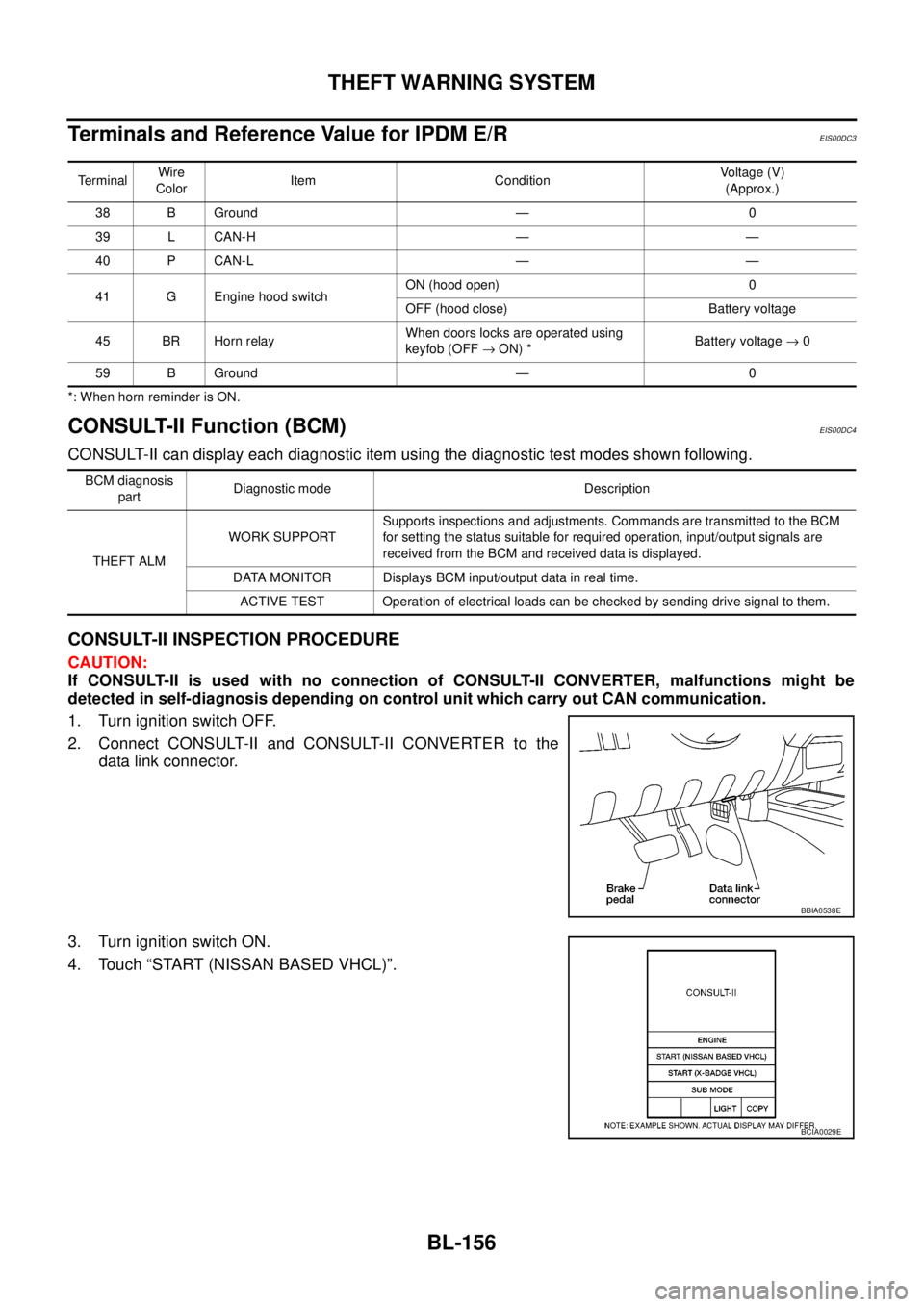
CONSULT-II INSPECTION PROCEDURE
CAUTION:
If CONSULT-II is used with no connection of CONSULT-II CONVERTER, malfunctions might be
detected in self-diagnosis depending on control unit which carry out CAN communication.
1. Turn ignition switch OFF.
2. Connect CONSULT-II and CONSULT-II CONVERTER to the
data link connector.
3. Turn ignition switch ON.
4. Touch “START (NISSAN BASED VHCL)”.
TerminalWire
ColorItem ConditionVoltage (V)
(Approx.)
38 B Ground — 0
39 L CAN-H — —
40 P CAN-L — —
41 G Engine hood switchON (hood open) 0
OFF (hood close) Battery voltage
45 BR Horn relayWhen doors locks are operated using
keyfob (OFF®ON) *Battery voltage®0
59 B Ground — 0
BCM diagnosis
partDiagnostic mode Description
THEFT ALMWORK SUPPORTSupports inspections and adjustments. Commands are transmitted to the BCM
for setting the status suitable for required operation, input/output signals are
received from the BCM and received data is displayed.
DATA MONITOR Displays BCM input/output data in real time.
ACTIVE TEST Operation of electrical loads can be checked by sending drive signal to them.
BBIA0538E
BCIA0029E
Page 741 of 3171
THEFT WARNING SYSTEM
BL-157
C
D
E
F
G
H
J
K
L
MA
B
BL
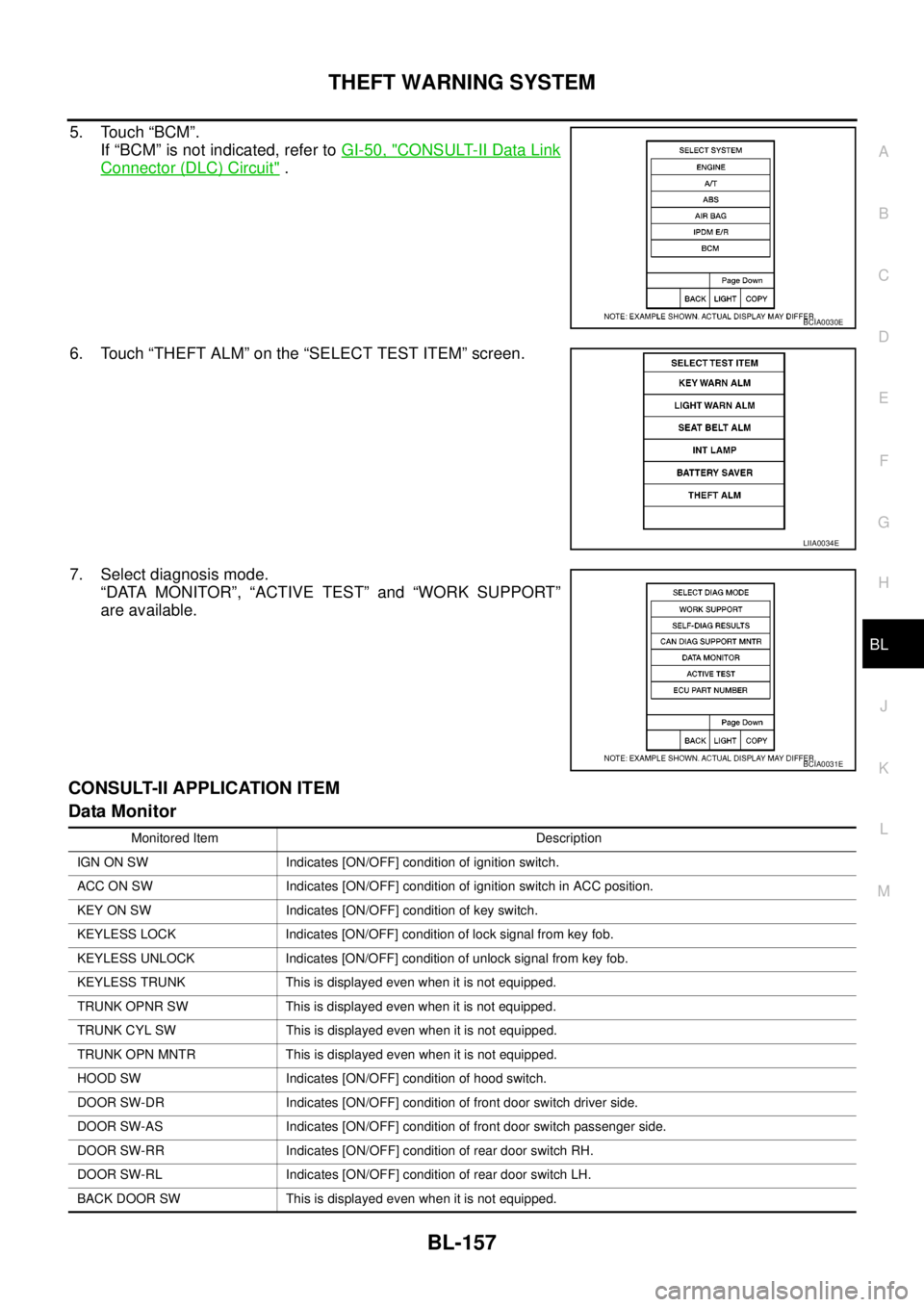
5. Touch “BCM”.
If “BCM” is not indicated, refer toGI-50, "
CONSULT-II Data Link
Connector (DLC) Circuit".
6. Touch “THEFT ALM” on the “SELECT TEST ITEM” screen.
7. Select diagnosis mode.
“DATA MONITOR”, “ACTIVE TEST” and “WORK SUPPORT”
are available.
CONSULT-II APPLICATION ITEM
Data Monitor
BCIA0030E
LIIA0034E
BCIA0031E
Monitored Item Description
IGN ON SW Indicates [ON/OFF] condition of ignition switch.
ACC ON SW Indicates [ON/OFF] condition of ignition switch in ACC position.
KEY ON SW Indicates [ON/OFF] condition of key switch.
KEYLESS LOCK Indicates [ON/OFF] condition of lock signal from key fob.
KEYLESS UNLOCK Indicates [ON/OFF] condition of unlock signal from key fob.
KEYLESS TRUNK This is displayed even when it is not equipped.
TRUNK OPNR SW This is displayed even when it is not equipped.
TRUNK CYL SW This is displayed even when it is not equipped.
TRUNK OPN MNTR This is displayed even when it is not equipped.
HOOD SW Indicates [ON/OFF] condition of hood switch.
DOOR SW-DR Indicates [ON/OFF] condition of front door switch driver side.
DOOR SW-AS Indicates [ON/OFF] condition of front door switch passenger side.
DOOR SW-RR Indicates [ON/OFF] condition of rear door switch RH.
DOOR SW-RL Indicates [ON/OFF] condition of rear door switch LH.
BACK DOOR SW This is displayed even when it is not equipped.