light NISSAN NAVARA 2005 Repair Workshop Manual
[x] Cancel search | Manufacturer: NISSAN, Model Year: 2005, Model line: NAVARA, Model: NISSAN NAVARA 2005Pages: 3171, PDF Size: 49.59 MB
Page 2147 of 3171
LT-64
AUTO LIGHT SYSTEM
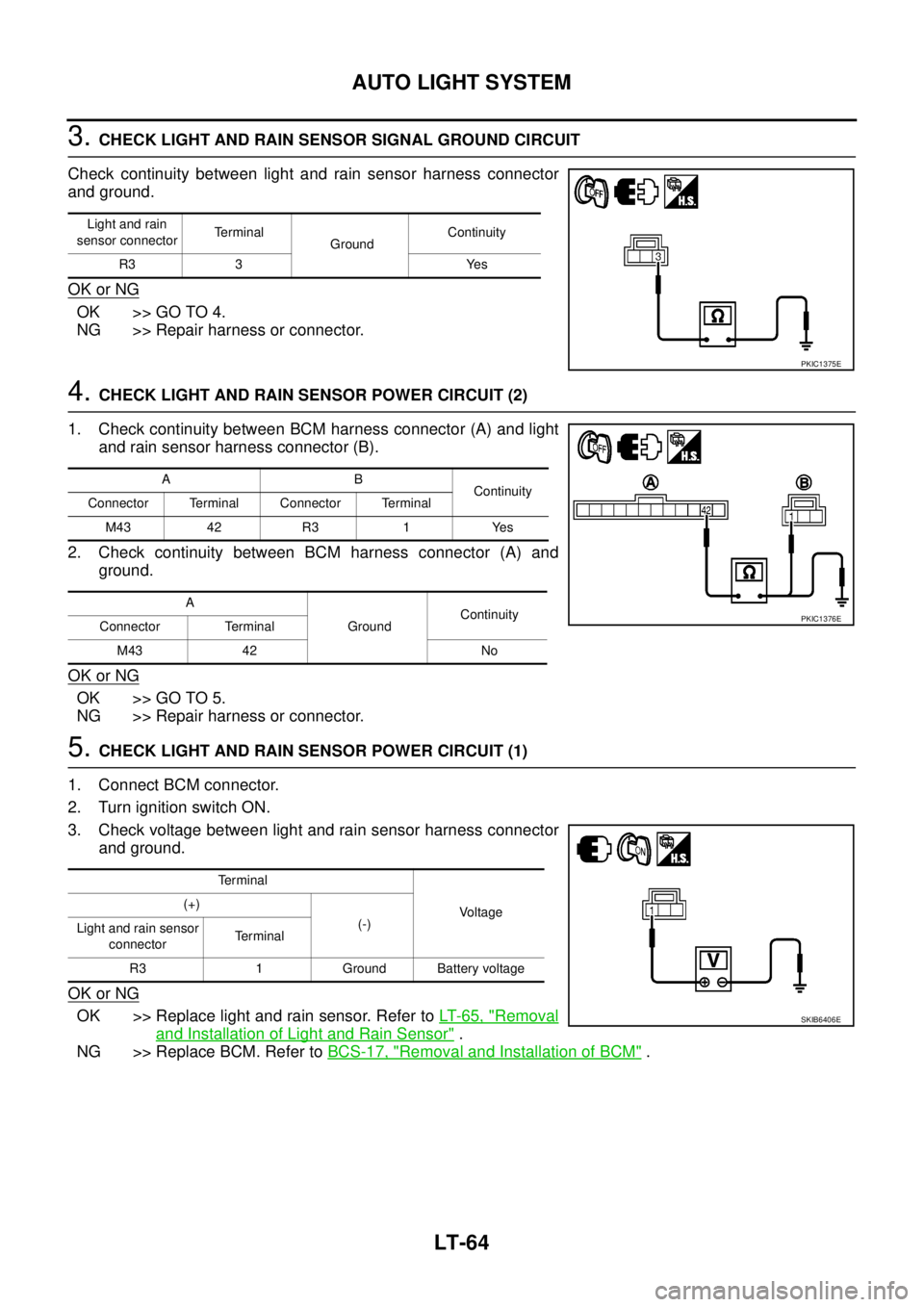
3.CHECK LIGHT AND RAIN SENSOR SIGNAL GROUND CIRCUIT
Check continuity between light and rain sensor harness connector
and ground.
OK or NG
OK >> GO TO 4.
NG >> Repair harness or connector.
4.CHECK LIGHT AND RAIN SENSOR POWER CIRCUIT (2)
1. Check continuity between BCM harness connector (A) and light
and rain sensor harness connector (B).
2. Check continuity between BCM harness connector (A) and
ground.
OK or NG
OK >> GO TO 5.
NG >> Repair harness or connector.
5.CHECK LIGHT AND RAIN SENSOR POWER CIRCUIT (1)
1. Connect BCM connector.
2. Turn ignition switch ON.
3. Check voltage between light and rain sensor harness connector
and ground.
OK or NG
OK >> Replace light and rain sensor. Refer toLT-65, "Removal
and Installation of Light and Rain Sensor".
NG >> Replace BCM. Refer toBCS-17, "
Removal and Installation of BCM".
Light and rain
sensor connectorTerminal
GroundContinuity
R3 3 Yes
PKIC1375E
AB
Continuity
Connector Terminal Connector Terminal
M43 42 R3 1 Yes
A
GroundContinuity
Connector Terminal
M43 42 No
PKIC1376E
Terminal
Voltage (+)
(-)
Light and rain sensor
connectorTe r m i n a l
R3 1 Ground Battery voltage
SKIB6406E
Page 2148 of 3171
AUTO LIGHT SYSTEM
LT-65
C
D
E
F
G
H
I
J
L
MA
B
LT
Removal and Installation of Light and Rain SensorEKS00Q89
CAUTION:
When light and rain sensor is removed from windscreen, gel/adhesive part of housing should not be
re-used.
REMOVAL
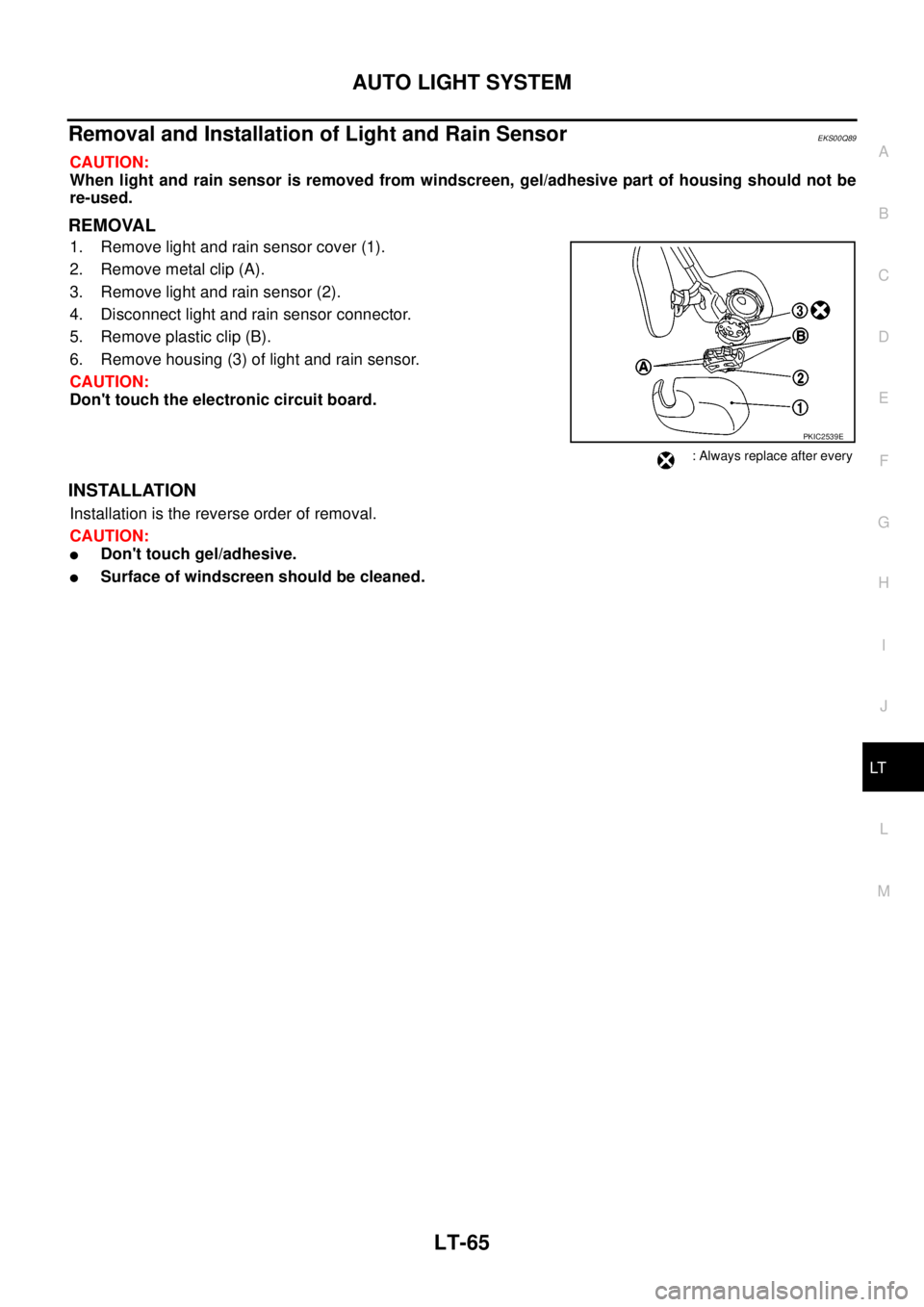
1. Remove light and rain sensor cover (1).
2. Remove metal clip (A).
3. Remove light and rain sensor (2).
4. Disconnect light and rain sensor connector.
5. Remove plastic clip (B).
6. Remove housing (3) of light and rain sensor.
CAUTION:
Don't touch the electronic circuit board.
INSTALLATION
Installation is the reverse order of removal.
CAUTION:
lDon't touch gel/adhesive.
lSurface of windscreen should be cleaned.
PKIC2539E
: Always replace after every
Page 2154 of 3171
FRONT FOG LAMP
LT-71
C
D
E
F
G
H
I
J
L
MA
B
LT
FRONT FOG LAMPPFP:26150
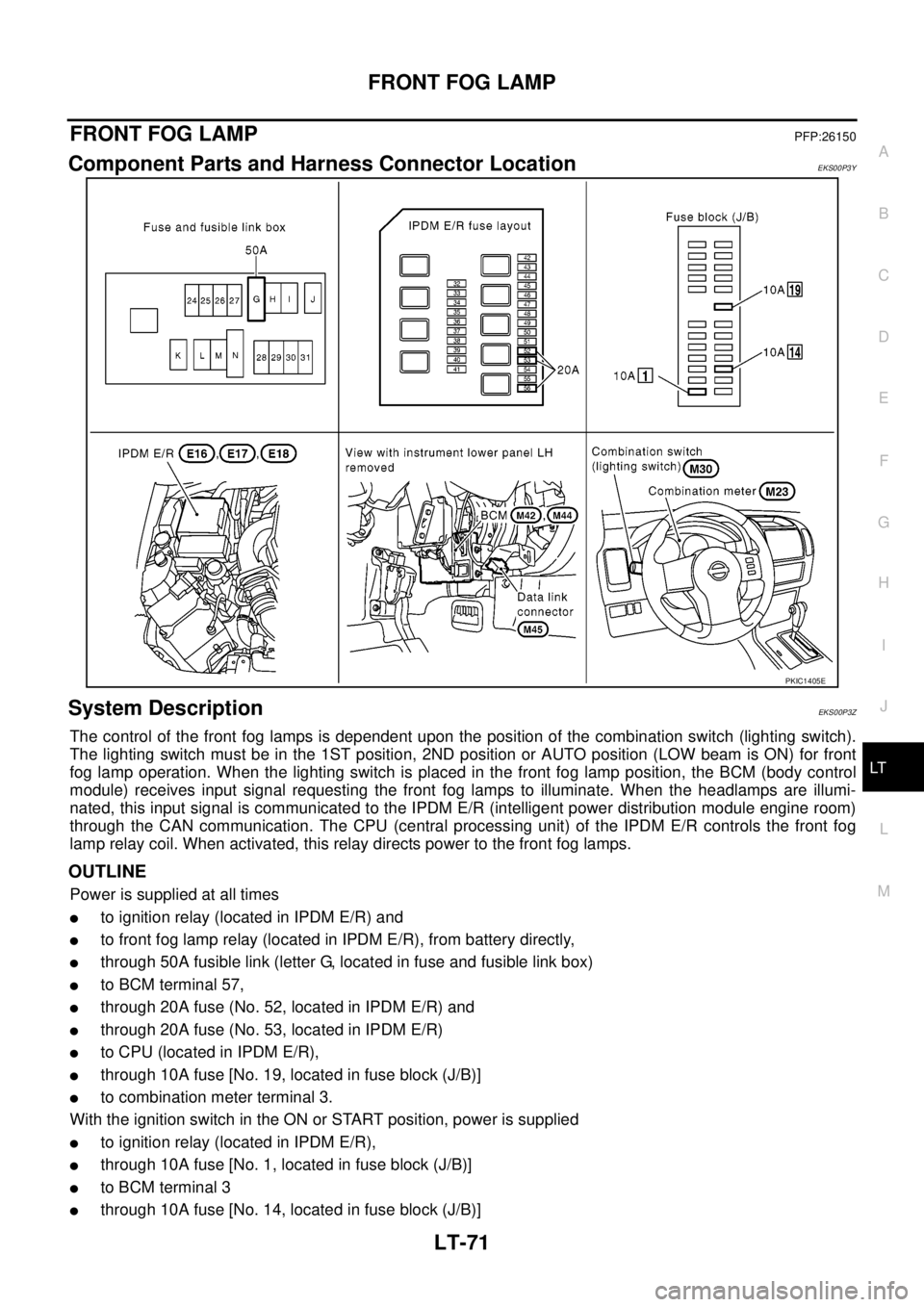
Component Parts and Harness Connector LocationEKS00P3Y
System DescriptionEKS00P3Z
The control of the front fog lamps is dependent upon the position of the combination switch (lighting switch).
The lighting switch must be in the 1ST position, 2ND position or AUTO position (LOW beam is ON) for front
fog lamp operation. When the lighting switch is placed in the front fog lamp position, the BCM (body control
module) receives input signal requesting the front fog lamps to illuminate. When the headlamps are illumi-
nated, this input signal is communicated to the IPDM E/R (intelligent power distribution module engine room)
through the CAN communication. The CPU (central processing unit) of the IPDM E/R controls the front fog
lamp relay coil. When activated, this relay directs power to the front fog lamps.
OUTLINE
Power is supplied at all times
lto ignition relay (located in IPDM E/R) and
lto front fog lamp relay (located in IPDM E/R), from battery directly,
lthrough 50A fusible link (letter G, located in fuse and fusible link box)
lto BCM terminal 57,
lthrough 20A fuse (No. 52, located in IPDM E/R) and
lthrough 20A fuse (No. 53, located in IPDM E/R)
lto CPU (located in IPDM E/R),
lthrough 10A fuse [No. 19, located in fuse block (J/B)]
lto combination meter terminal 3.
With the ignition switch in the ON or START position, power is supplied
lto ignition relay (located in IPDM E/R),
lthrough 10A fuse [No. 1, located in fuse block (J/B)]
lto BCM terminal 3
lthrough 10A fuse [No. 14, located in fuse block (J/B)]
PKIC1405E
Page 2155 of 3171

LT-72
FRONT FOG LAMP
lto combination meter terminal 16.
Ground is supplied
lto BCM terminal 55 and
lto combination meter terminal 23
lthrough grounds M21, M80 and M83,
lto IPDM E/R terminals 38 and 59
lthrough grounds E21, E41 and E61.
FOG LAMP OPERATION
The front fog lamp switch is built into the combination switch. The lighting switch must be in the 1ST position,
2ND position or AUTO position (LOW beam is ON) and the front fog lamp switch must be ON for front fog lamp
operation.
With the front fog lamp switch in the ON position, the CPU of the IPDM E/R grounds the coil side of the front
fog lamp relay. The front fog lamp relay then directs power
lthrough 20A fuse (No. 56, located in IPDM E/R)
lthrough IPDM E/R terminal 50
lto front fog lamp LH terminal 1 and
lthrough IPDM E/R terminal 51
lto front fog lamp RH terminal 1.
Ground is supplied at all times
lto front fog lamp RH and LH terminal 2
lthrough grounds E21, E41 and E61.
With power and ground supplied, the front fog lamps illuminate.
COMBINATION SWITCH READING FUNCTION
Refer toBCS-3, "COMBINATION SWITCH READING FUNCTION".
CAN Communication System DescriptionEKS00P40
Refer toLAN-23, "CAN COMMUNICATION".
Page 2160 of 3171
FRONT FOG LAMP
LT-77
C
D
E
F
G
H
I
J
L
MA
B
LT
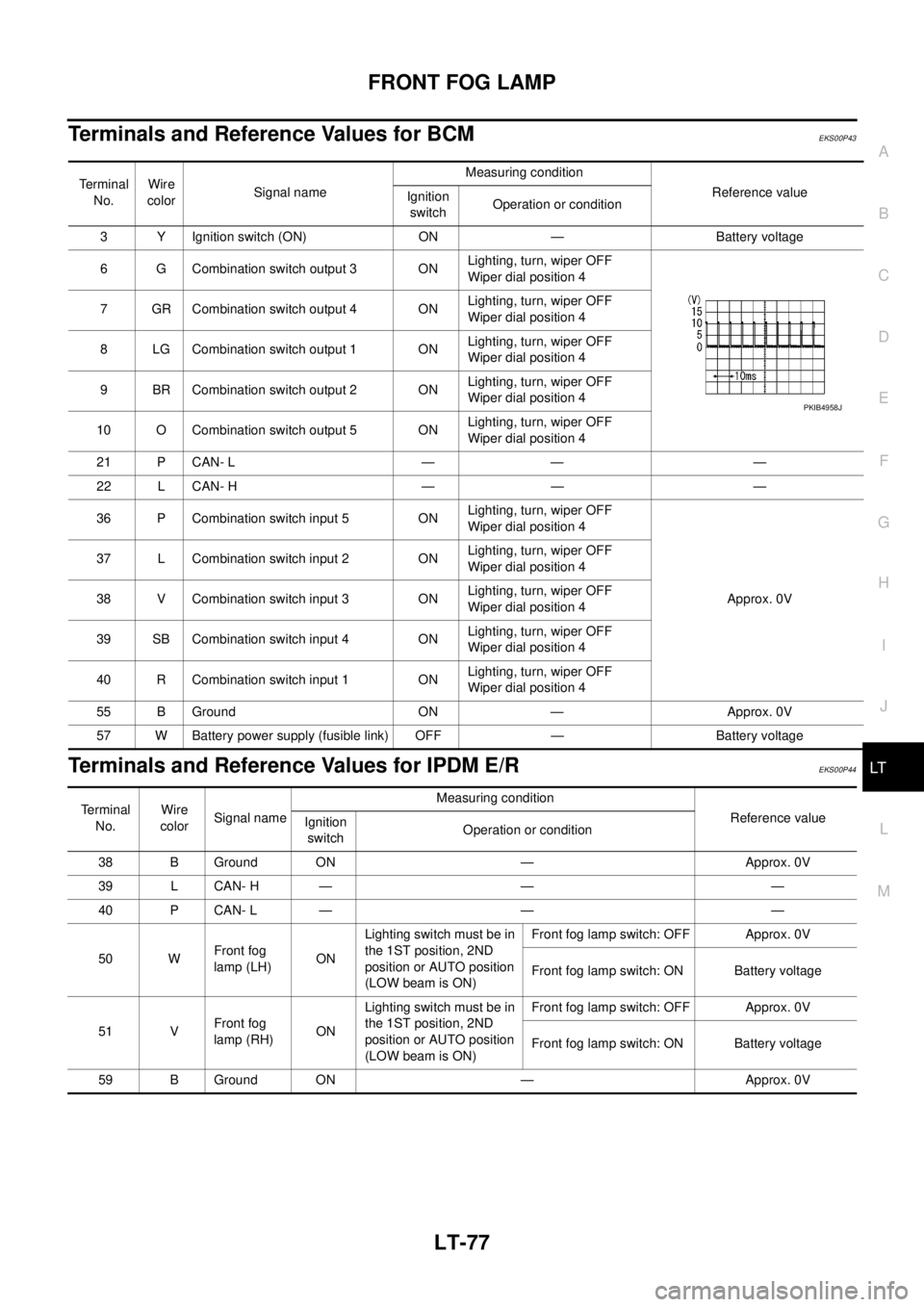
Terminals and Reference Values for BCMEKS00P43
Terminals and Reference Values for IPDM E/REKS00P44
Te r m i n a l
No.Wire
colorSignal nameMeasuring condition
Reference value
Ignition
switchOperation or condition
3 Y Ignition switch (ON) ON — Battery voltage
6 G Combination switch output 3 ONLighting, turn, wiper OFF
Wiper dial position 4
7 GR Combination switch output 4 ONLighting, turn, wiper OFF
Wiper dial position 4
8 LG Combination switch output 1 ONLighting, turn, wiper OFF
Wiper dial position 4
9 BR Combination switch output 2 ONLighting, turn, wiper OFF
Wiper dial position 4
10 O Combination switch output 5 ONLighting, turn, wiper OFF
Wiper dial position 4
21 P CAN- L — — —
22 L CAN- H — — —
36 P Combination switch input 5 ONLighting, turn, wiper OFF
Wiper dial position 4
Approx. 0V 37 L Combination switch input 2 ONLighting, turn, wiper OFF
Wiper dial position 4
38 V Combination switch input 3 ONLighting, turn, wiper OFF
Wiper dial position 4
39 SB Combination switch input 4 ONLighting, turn, wiper OFF
Wiper dial position 4
40 R Combination switch input 1 ONLighting, turn, wiper OFF
Wiper dial position 4
55 B Ground ON — Approx. 0V
57 W Battery power supply (fusible link) OFF — Battery voltage
PKIB4958J
Terminal
No.Wire
colorSignal nameMeasuring condition
Reference value
Ignition
switchOperation or condition
38 B Ground ON — Approx. 0V
39 L CAN- H — — —
40 P CAN- L — — —
50 WFront fog
lamp (LH)ONLighting switch must be in
the 1ST position, 2ND
position or AUTO position
(LOW beam is ON)Front fog lamp switch: OFF Approx. 0V
Front fog lamp switch: ON Battery voltage
51 VFront fog
lamp (RH)ONLighting switch must be in
the 1ST position, 2ND
position or AUTO position
(LOW beam is ON)Front fog lamp switch: OFF Approx. 0V
Front fog lamp switch: ON Battery voltage
59 B Ground ON — Approx. 0V
Page 2163 of 3171
LT-80
FRONT FOG LAMP
Front Fog Lamps Do Not Illuminate (Both Sides)
EKS00P49
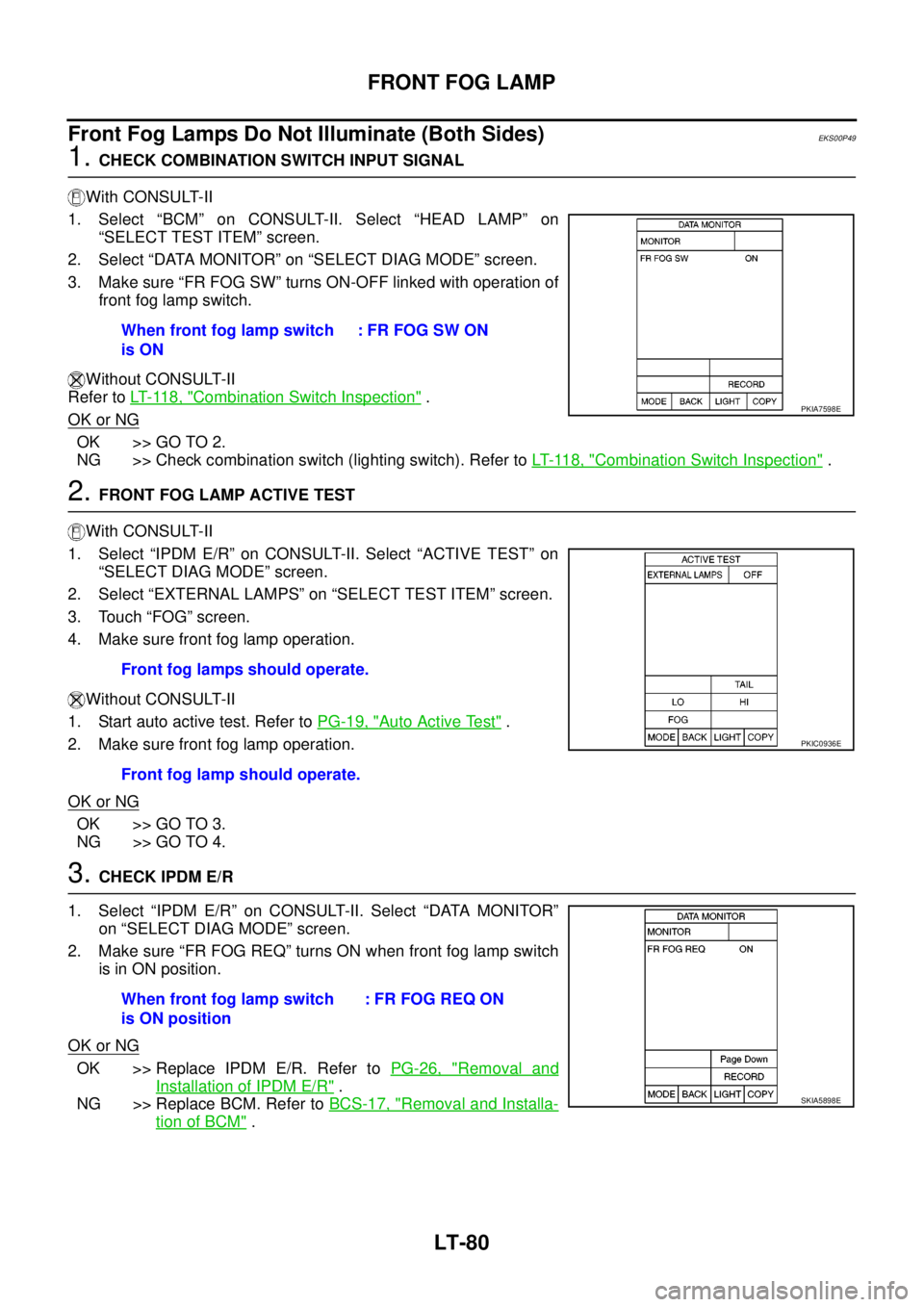
1.CHECK COMBINATION SWITCH INPUT SIGNAL
With CONSULT-II
1. Select “BCM” on CONSULT-II. Select “HEAD LAMP” on
“SELECT TEST ITEM” screen.
2. Select “DATA MONITOR” on “SELECT DIAG MODE” screen.
3. Make sure “FR FOG SW” turns ON-OFF linked with operation of
front fog lamp switch.
Without CONSULT-II
Refer toLT- 11 8 , "
Combination Switch Inspection".
OK or NG
OK >> GO TO 2.
NG >> Check combination switch (lighting switch). Refer toLT- 11 8 , "
Combination Switch Inspection".
2.FRONT FOG LAMP ACTIVE TEST
With CONSULT-II
1. Select “IPDM E/R” on CONSULT-II. Select “ACTIVE TEST” on
“SELECT DIAG MODE” screen.
2. Select “EXTERNAL LAMPS” on “SELECT TEST ITEM” screen.
3. Touch “FOG” screen.
4. Make sure front fog lamp operation.
Without CONSULT-II
1. Start auto active test. Refer toPG-19, "
Auto Active Test".
2. Make sure front fog lamp operation.
OK or NG
OK >> GO TO 3.
NG >> GO TO 4.
3.CHECK IPDM E/R
1. Select “IPDM E/R” on CONSULT-II. Select “DATA MONITOR”
on “SELECT DIAG MODE” screen.
2. Make sure “FR FOG REQ” turns ON when front fog lamp switch
is in ON position.
OK or NG
OK >> Replace IPDM E/R. Refer toPG-26, "Removal and
Installation of IPDM E/R".
NG >> Replace BCM. Refer toBCS-17, "
Removal and Installa-
tion of BCM". When front fog lamp switch
is ON: FR FOG SW ON
PKIA7598E
Front fog lamps should operate.
Front fog lamp should operate.
PKIC0936E
When front fog lamp switch
is ON position:FRFOGREQON
SKIA5898E
Page 2167 of 3171
LT-84
FRONT FOG LAMP
Front Fog Lamps Do Not Turn OFF
EKS00P4C
1.CHECK FRONT FOG LAMP TURN OFF
Make sure that lighting switch is OFF. And make sure front fog lamp turns off when ignition switch is turned
OFF.
OK or NG
OK >> GO TO 3.
NG >> GO TO 2.
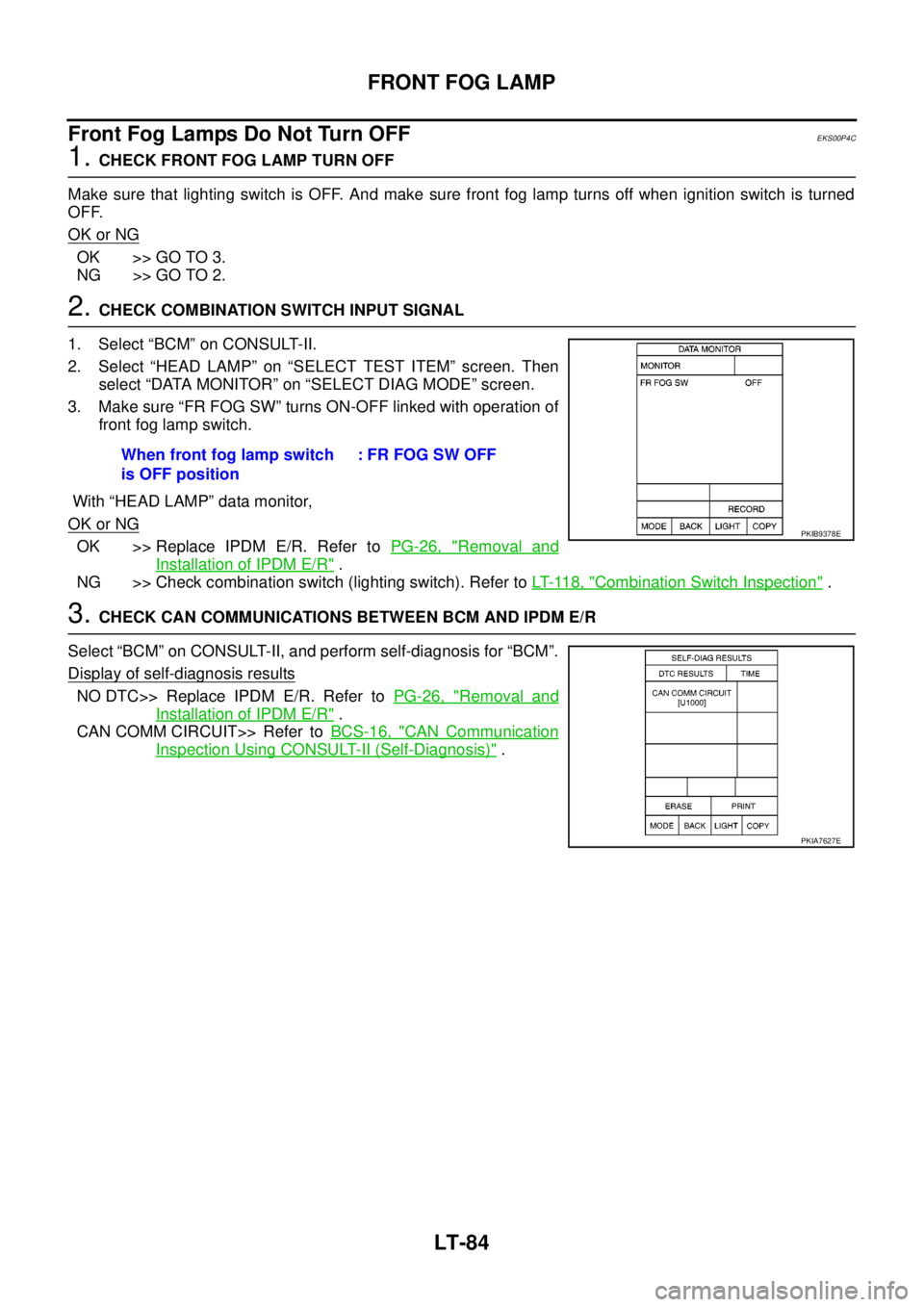
2.CHECK COMBINATION SWITCH INPUT SIGNAL
1. Select “BCM” on CONSULT-II.
2. Select “HEAD LAMP” on “SELECT TEST ITEM” screen. Then
select “DATA MONITOR” on “SELECT DIAG MODE” screen.
3. Make sure “FR FOG SW” turns ON-OFF linked with operation of
front fog lamp switch.
With “HEAD LAMP” data monitor,
OK or NG
OK >> Replace IPDM E/R. Refer toPG-26, "Removal and
Installation of IPDM E/R".
NG >> Check combination switch (lighting switch). Refer toLT- 11 8 , "
Combination Switch Inspection".
3.CHECK CAN COMMUNICATIONS BETWEEN BCM AND IPDM E/R
Select “BCM” on CONSULT-II, and perform self-diagnosis for “BCM”.
Display of self-diagnosis results
NO DTC>> Replace IPDM E/R. Refer toPG-26, "Removal and
Installation of IPDM E/R".
CAN COMM CIRCUIT>> Refer toBCS-16, "
CAN Communication
Inspection Using CONSULT-II (Self-Diagnosis)". When front fog lamp switch
is OFF position: FR FOG SW OFF
PKIB9378E
PKIA7627E
Page 2170 of 3171
REAR FOG LAMP
LT-87
C
D
E
F
G
H
I
J
L
MA
B
LT
REAR FOG LAMPPFP:26550
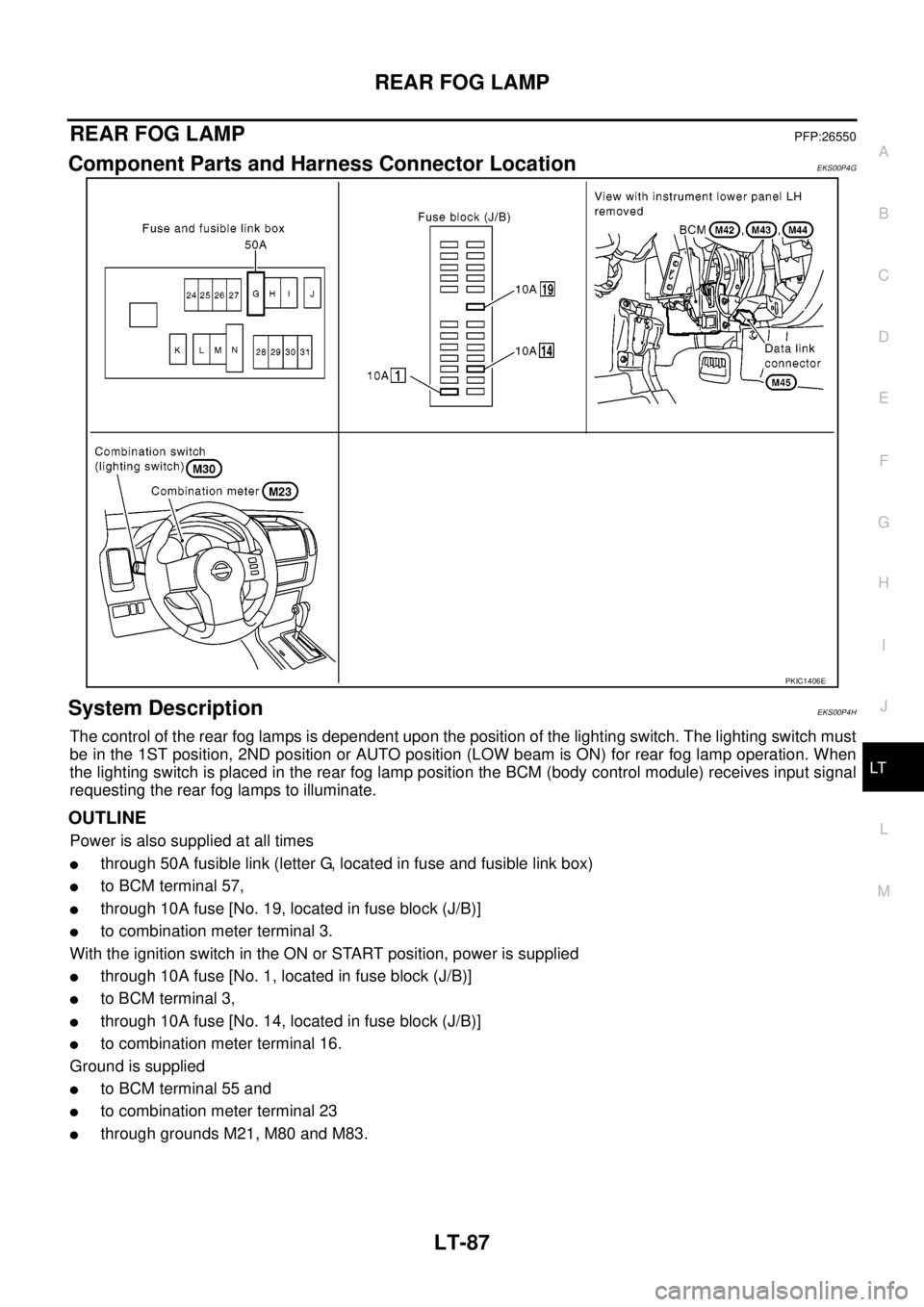
Component Parts and Harness Connector LocationEKS00P4G
System DescriptionEKS00P4H
The control of the rear fog lamps is dependent upon the position of the lighting switch. The lighting switch must
be in the 1ST position, 2ND position or AUTO position (LOW beam is ON) for rear fog lamp operation. When
the lighting switch is placed in the rear fog lamp position the BCM (body control module) receives input signal
requesting the rear fog lamps to illuminate.
OUTLINE
Power is also supplied at all times
lthrough 50A fusible link (letter G, located in fuse and fusible link box)
lto BCM terminal 57,
lthrough 10A fuse [No. 19, located in fuse block (J/B)]
lto combination meter terminal 3.
With the ignition switch in the ON or START position, power is supplied
lthrough 10A fuse [No. 1, located in fuse block (J/B)]
lto BCM terminal 3,
lthrough 10A fuse [No. 14, located in fuse block (J/B)]
lto combination meter terminal 16.
Ground is supplied
lto BCM terminal 55 and
lto combination meter terminal 23
lthrough grounds M21, M80 and M83.
PKIC1406E
Page 2171 of 3171

LT-88
REAR FOG LAMP
REAR FOG LAMP OPERATION
The lighting switch must be in the 1ST position, 2ND position or AUTO position (LOW beam is ON) for rear fog
lamp operation.
With the rear fog lamp switch in the ON position, the BCM directs power
lthrough BCM terminal 49
lto rear combination lamp LH terminal 6 (LHD models)
lto rear combination lamp RH terminal 6 (RHD models).
Ground is supplied
lto rear combination lamp RH and LH terminals 3
lthrough grounds E21, E41 and E61.
With power and ground supplied, the rear fog lamps illuminate.
COMBINATION SWITCH READING FUNCTION
Refer toBCS-3, "COMBINATION SWITCH READING FUNCTION".
CAN Communication System DescriptionEKS00P4I
Refer toLAN-23, "CAN COMMUNICATION".
CAN Communication UnitEKS00P4J
Refer toLAN-30, "CAN Communication Unit".
Page 2174 of 3171
REAR FOG LAMP
LT-91
C
D
E
F
G
H
I
J
L
MA
B
LT
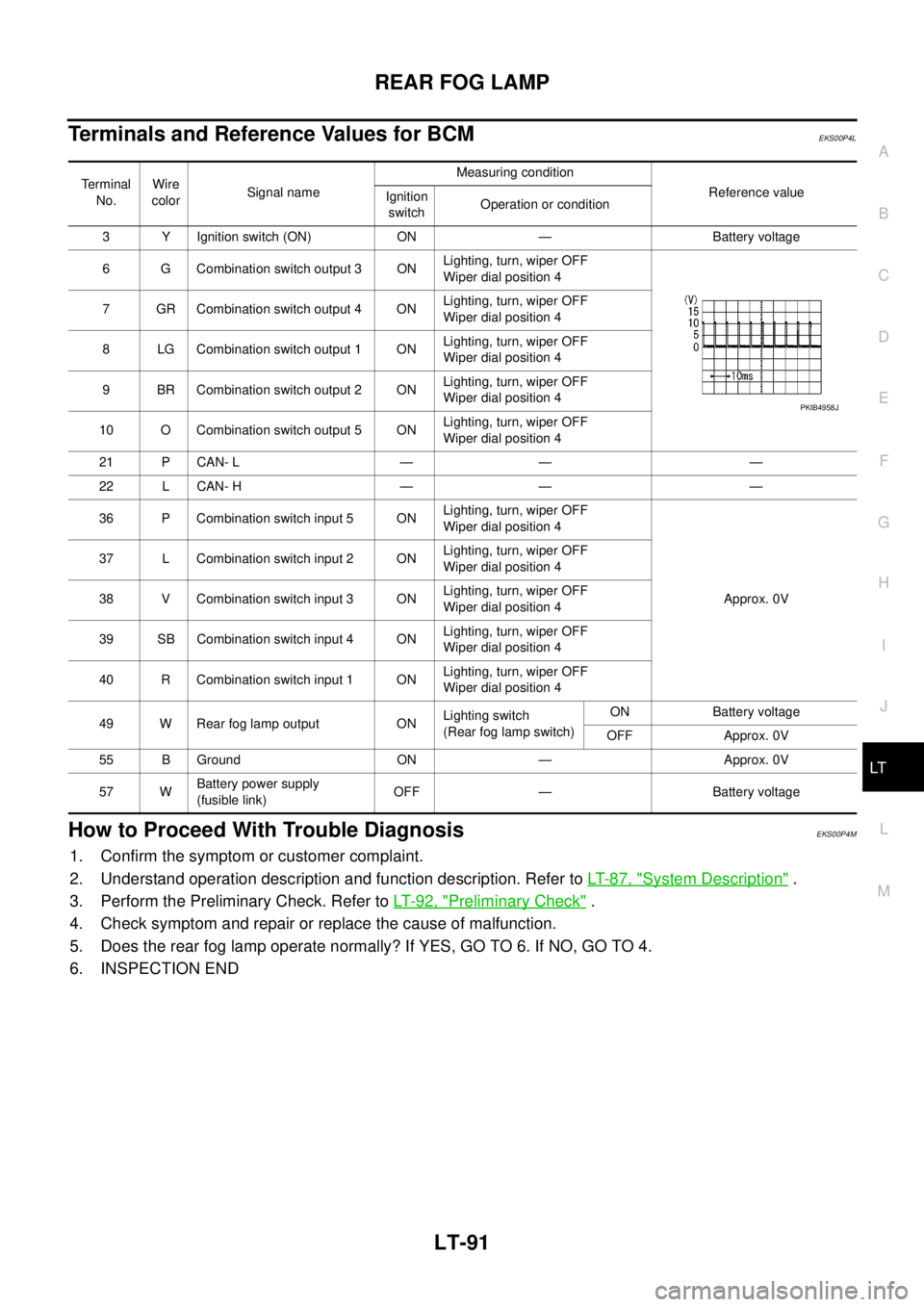
Terminals and Reference Values for BCMEKS00P4L
How to Proceed With Trouble DiagnosisEKS00P4M
1. Confirm the symptom or customer complaint.
2. Understand operation description and function description. Refer toLT-87, "
System Description".
3. Perform the Preliminary Check. Refer toLT-92, "
Preliminary Check".
4. Check symptom and repair or replace the cause of malfunction.
5. Does the rear fog lamp operate normally? If YES, GO TO 6. If NO, GO TO 4.
6. INSPECTION END
Terminal
No.Wire
colorSignal nameMeasuring condition
Reference value
Ignition
switchOperation or condition
3 Y Ignition switch (ON) ON — Battery voltage
6 G Combination switch output 3 ONLighting, turn, wiper OFF
Wiper dial position 4
7 GR Combination switch output 4 ONLighting, turn, wiper OFF
Wiper dial position 4
8 LG Combination switch output 1 ONLighting, turn, wiper OFF
Wiper dial position 4
9 BR Combination switch output 2 ONLighting, turn, wiper OFF
Wiper dial position 4
10 O Combination switch output 5 ONLighting, turn, wiper OFF
Wiper dial position 4
21 P CAN- L — — —
22 L CAN- H — — —
36 P Combination switch input 5 ONLighting, turn, wiper OFF
Wiper dial position 4
Approx. 0V 37 L Combination switch input 2 ONLighting, turn, wiper OFF
Wiper dial position 4
38 V Combination switch input 3 ONLighting, turn, wiper OFF
Wiper dial position 4
39 SB Combination switch input 4 ONLighting, turn, wiper OFF
Wiper dial position 4
40 R Combination switch input 1 ONLighting, turn, wiper OFF
Wiper dial position 4
49 W Rear fog lamp output ONLighting switch
(Rear fog lamp switch)ON Battery voltage
OFF Approx. 0V
55 B Ground ON — Approx. 0V
57 WBattery power supply
(fusible link)OFF — Battery voltage
PKIB4958J