NISSAN NAVARA 2005 Repair Owner's Manual
NAVARA 2005
NISSAN
NISSAN
https://www.carmanualsonline.info/img/5/57362/w960_57362-0.png
NISSAN NAVARA 2005 Repair Owner's Manual
Page 639 of 3171
POWER DOOR LOCK — SUPER LOCK —
BL-55
C
D
E
F
G
H
J
K
L
MA
B
BL
POWER DOOR LOCK — SUPER LOCK —PFP:24814
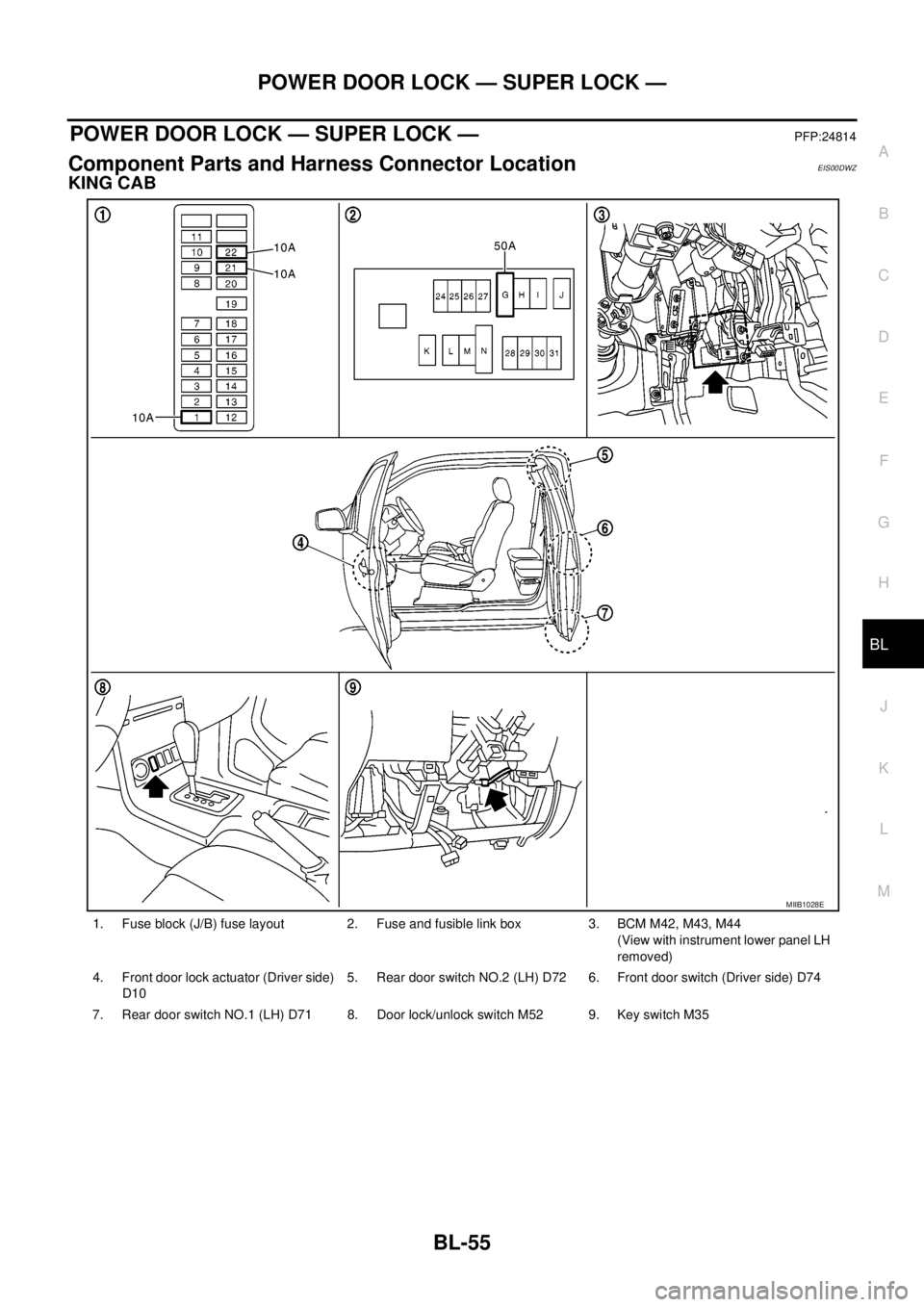
Component Parts and Harness Connector LocationEIS00DWZ
KING CAB
1. Fuse block (J/B) fuse layout 2. Fuse and fusible link box 3. BCM M42, M43, M44
(View with instrument lower panel LH
removed)
4. Front door lock actuator (Driver side)
D105. Rear door switch NO.2 (LH) D72 6. Front door switch (Driver side) D74
7. Rear door switch NO.1 (LH) D71 8. Door lock/unlock switch M52 9. Key switch M35
MIIB1028E
Page 640 of 3171
BL-56
POWER DOOR LOCK — SUPER LOCK —
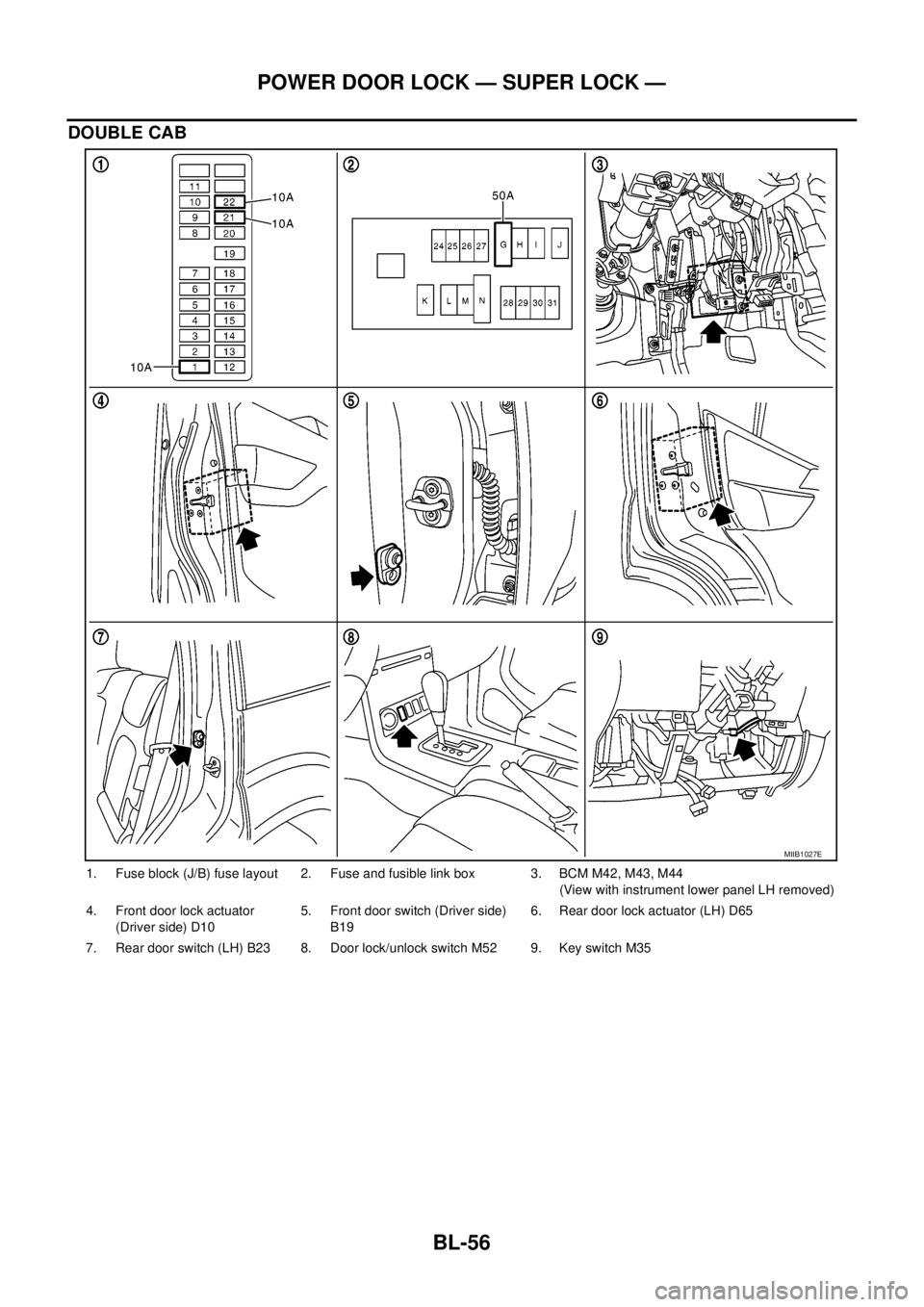
DOUBLE CAB
1. Fuse block (J/B) fuse layout 2. Fuse and fusible link box 3. BCM M42, M43, M44
(View with instrument lower panel LH removed)
4. Front door lock actuator
(Driver side) D105. Front door switch (Driver side)
B196. Rear door lock actuator (LH) D65
7. Rear door switch (LH) B23 8. Door lock/unlock switch M52 9. Key switch M35
MIIB1027E
Page 673 of 3171
MULTI-REMOTE CONTROL SYSTEM
BL-89
C
D
E
F
G
H
J
K
L
MA
B
BL
MULTI-REMOTE CONTROL SYSTEMPFP:25362
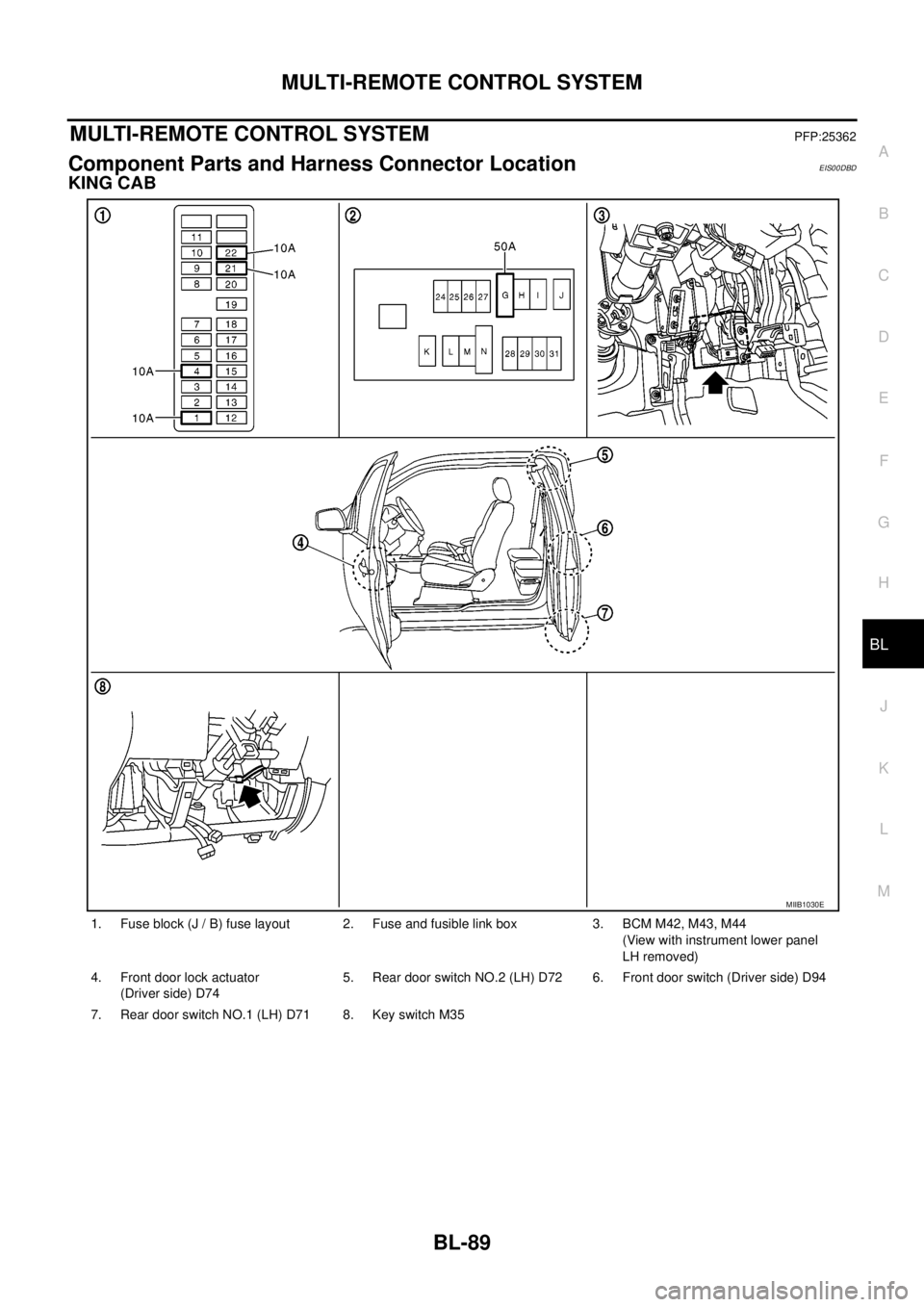
Component Parts and Harness Connector LocationEIS00DBD
KING CAB
1. Fuse block (J / B) fuse layout 2. Fuse and fusible link box 3. BCM M42, M43, M44
(View with instrument lower panel
LH removed)
4. Front door lock actuator
(Driver side) D745. Rear door switch NO.2 (LH) D72 6. Front door switch (Driver side) D94
7. Rear door switch NO.1 (LH) D71 8. Key switch M35
MIIB1030E
Page 674 of 3171
BL-90
MULTI-REMOTE CONTROL SYSTEM
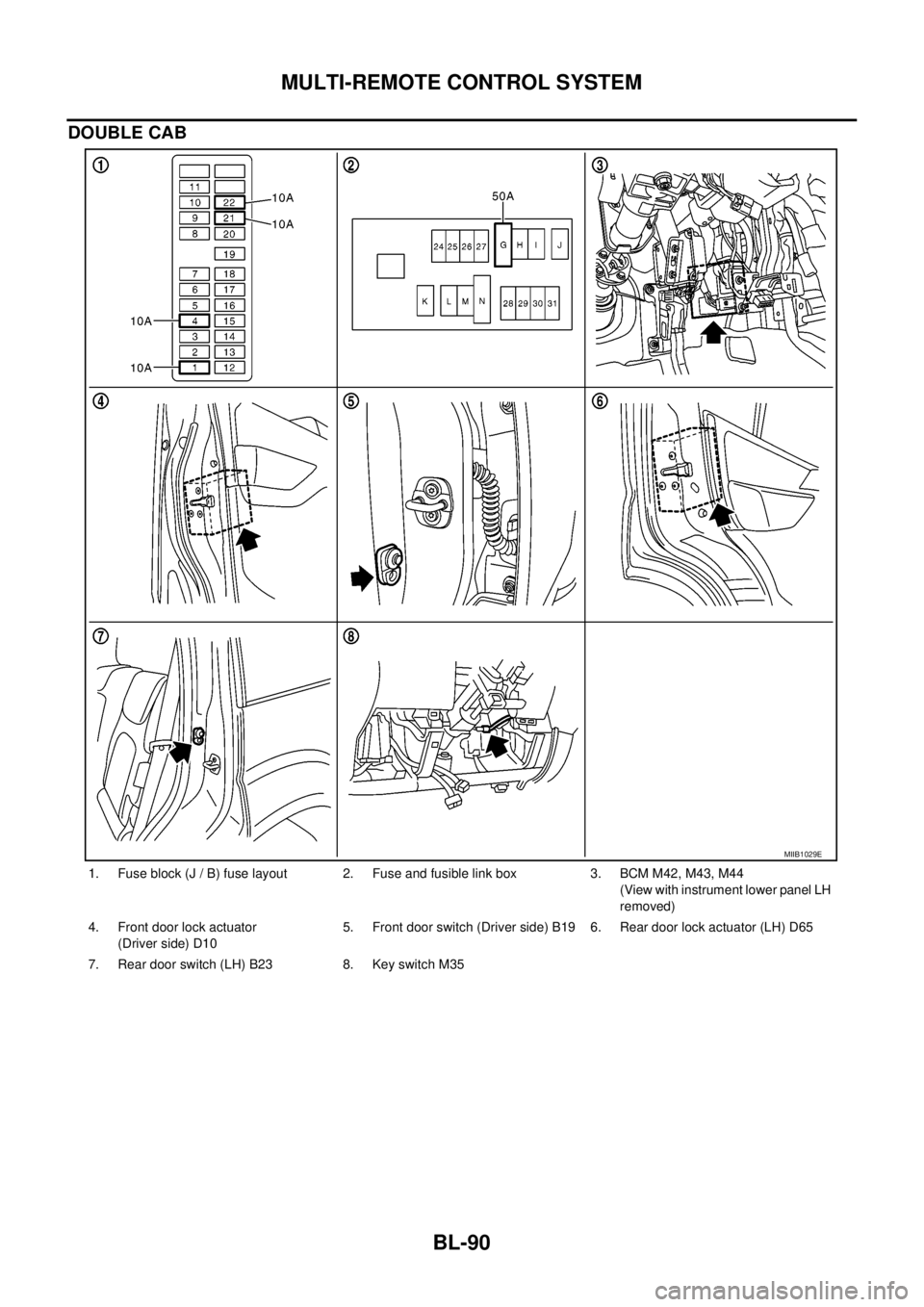
DOUBLE CAB
1. Fuse block (J / B) fuse layout 2. Fuse and fusible link box 3. BCM M42, M43, M44
(View with instrument lower panel LH
removed)
4. Front door lock actuator
(Driver side) D105. Front door switch (Driver side) B19 6. Rear door lock actuator (LH) D65
7. Rear door switch (LH) B23 8. Key switch M35
MIIB1029E
Page 722 of 3171
BL-138
THEFT WARNING SYSTEM
THEFT WARNING SYSTEM
PFP:28590
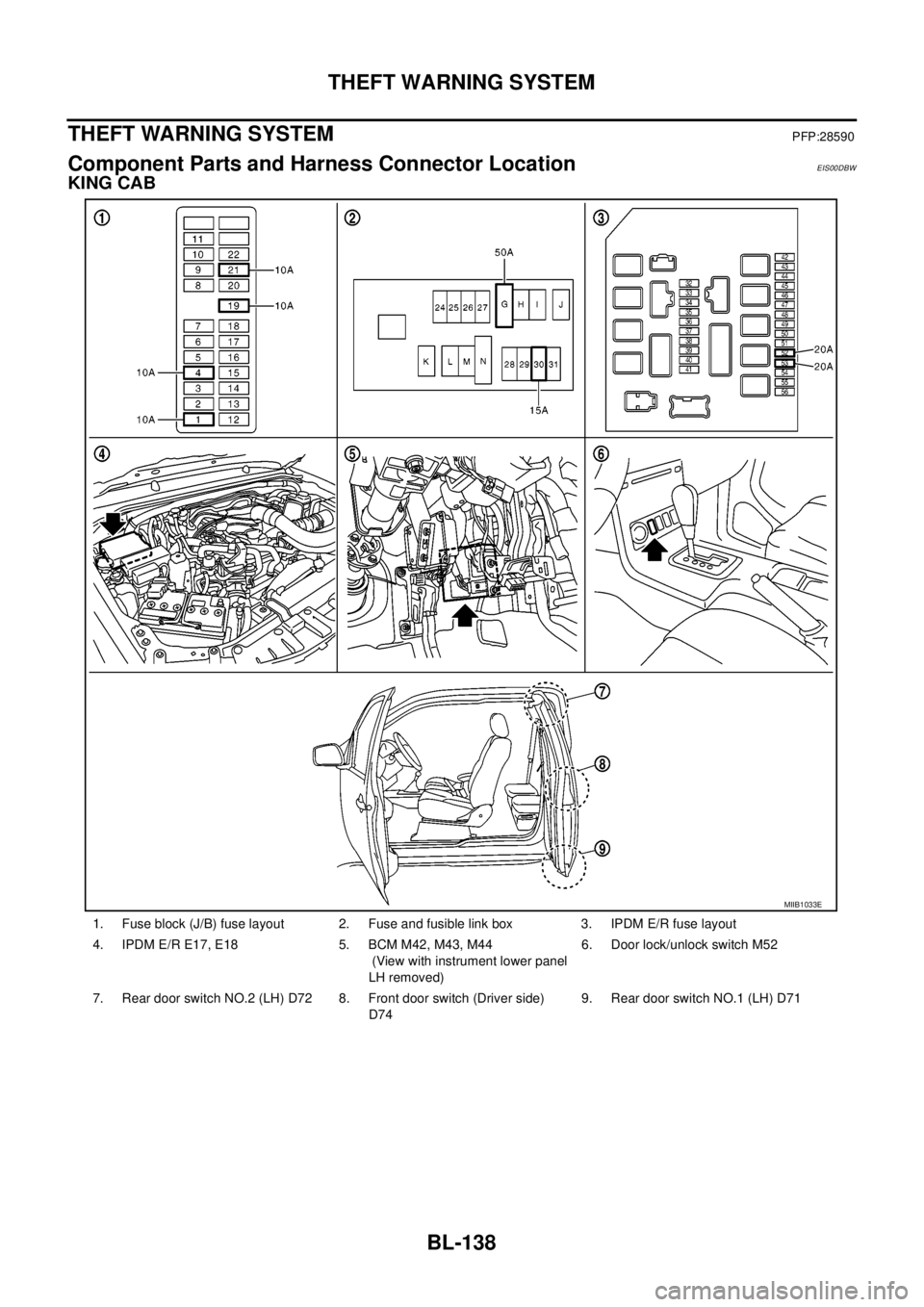
Component Parts and Harness Connector LocationEIS00DBW
KING CAB
1. Fuse block (J/B) fuse layout 2. Fuse and fusible link box 3. IPDM E/R fuse layout
4. IPDM E/R E17, E18 5. BCM M42, M43, M44
(View with instrument lower panel
LH removed)6. Door lock/unlock switch M52
7. Rear door switch NO.2 (LH) D72 8. Front door switch (Driver side)
D749. Rear door switch NO.1 (LH) D71
MIIB1033E
Page 723 of 3171
THEFT WARNING SYSTEM
BL-139
C
D
E
F
G
H
J
K
L
MA
B
BL
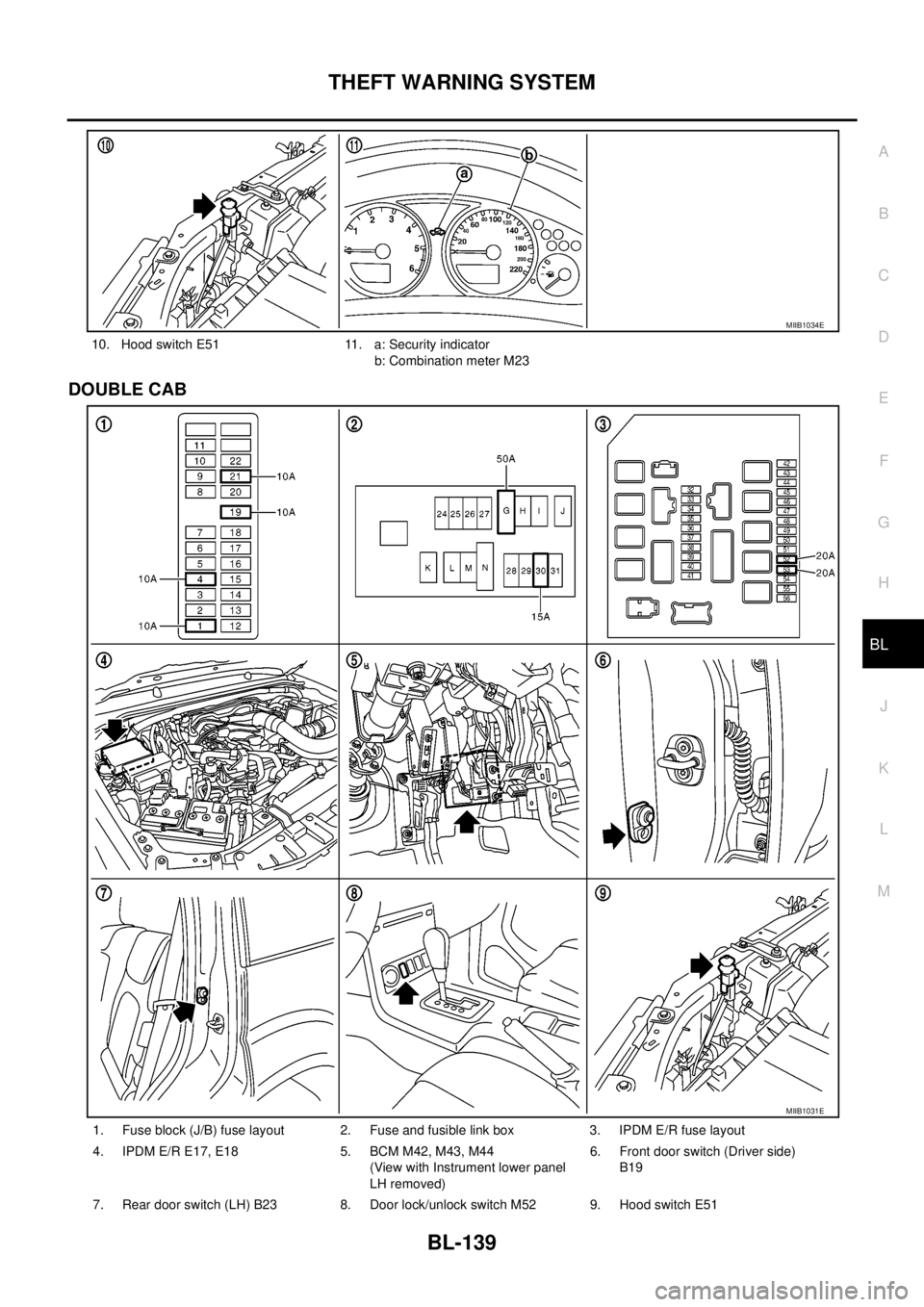
DOUBLE CAB
10. Hood switch E51 11. a: Security indicator
b: Combination meter M23
MIIB1034E
1. Fuse block (J/B) fuse layout 2. Fuse and fusible link box 3. IPDM E/R fuse layout
4. IPDM E/R E17, E18 5. BCM M42, M43, M44
(View with Instrument lower panel
LH removed)6. Front door switch (Driver side)
B19
7. Rear door switch (LH) B23 8. Door lock/unlock switch M52 9. Hood switch E51
MIIB1031E
Page 754 of 3171
BL-170
NATS(NISSAN ANTI-THEFT SYSTEM)
NATS(NISSAN ANTI-THEFT SYSTEM)
PFP:28591
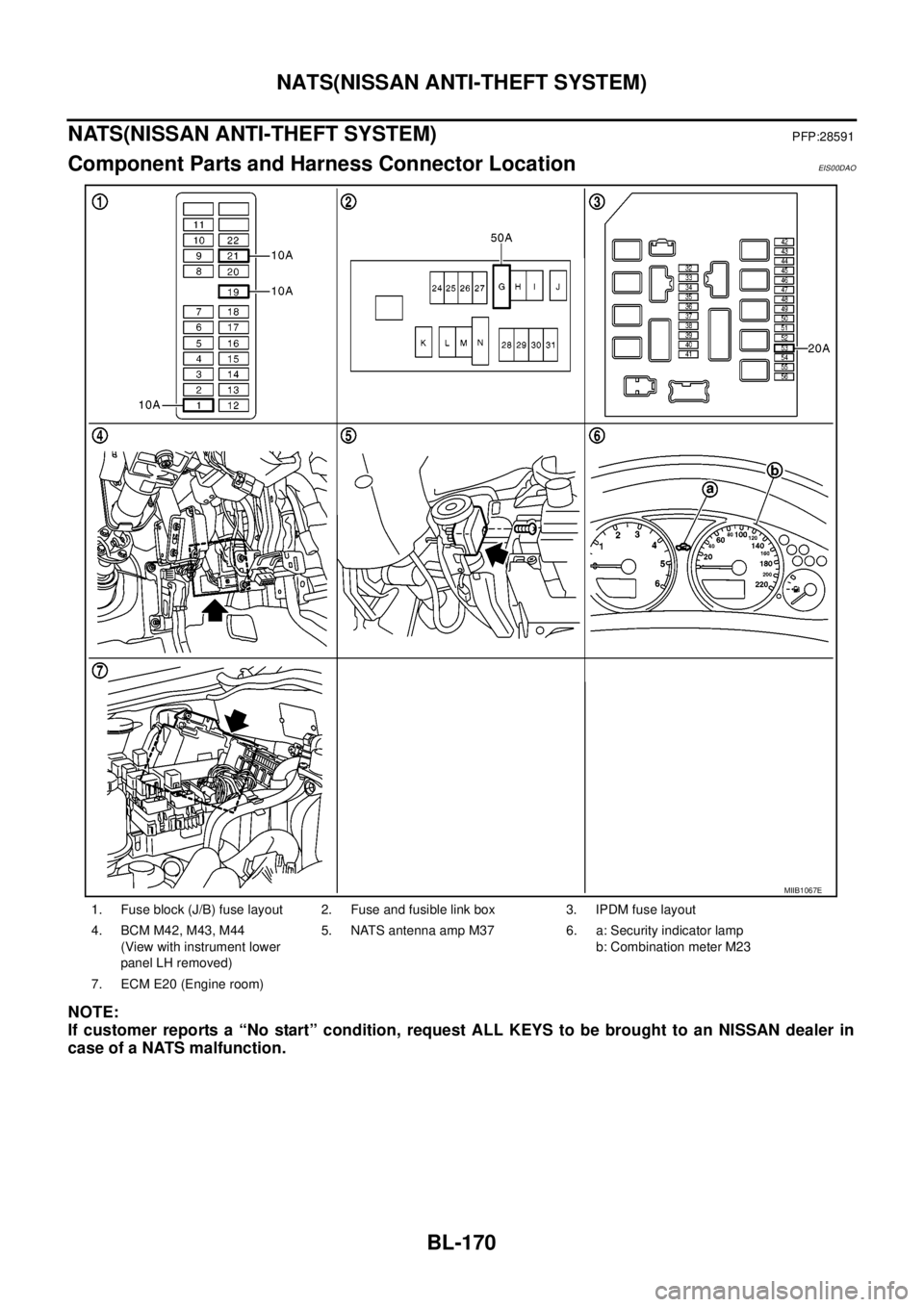
Component Parts and Harness Connector LocationEIS00DAO
NOTE:
If customer reports a “No start” condition, request ALL KEYS to be brought to an NISSAN dealer in
case of a NATS malfunction.
1. Fuse block (J/B) fuse layout 2. Fuse and fusible link box 3. IPDM fuse layout
4. BCM M42, M43, M44
(View with instrument lower
panel LH removed)5. NATS antenna amp M37 6. a: Security indicator lamp
b: Combination meter M23
7. ECM E20 (Engine room)
MIIB1067E
Page 772 of 3171
BL-188
NATS(NISSAN ANTI-THEFT SYSTEM)
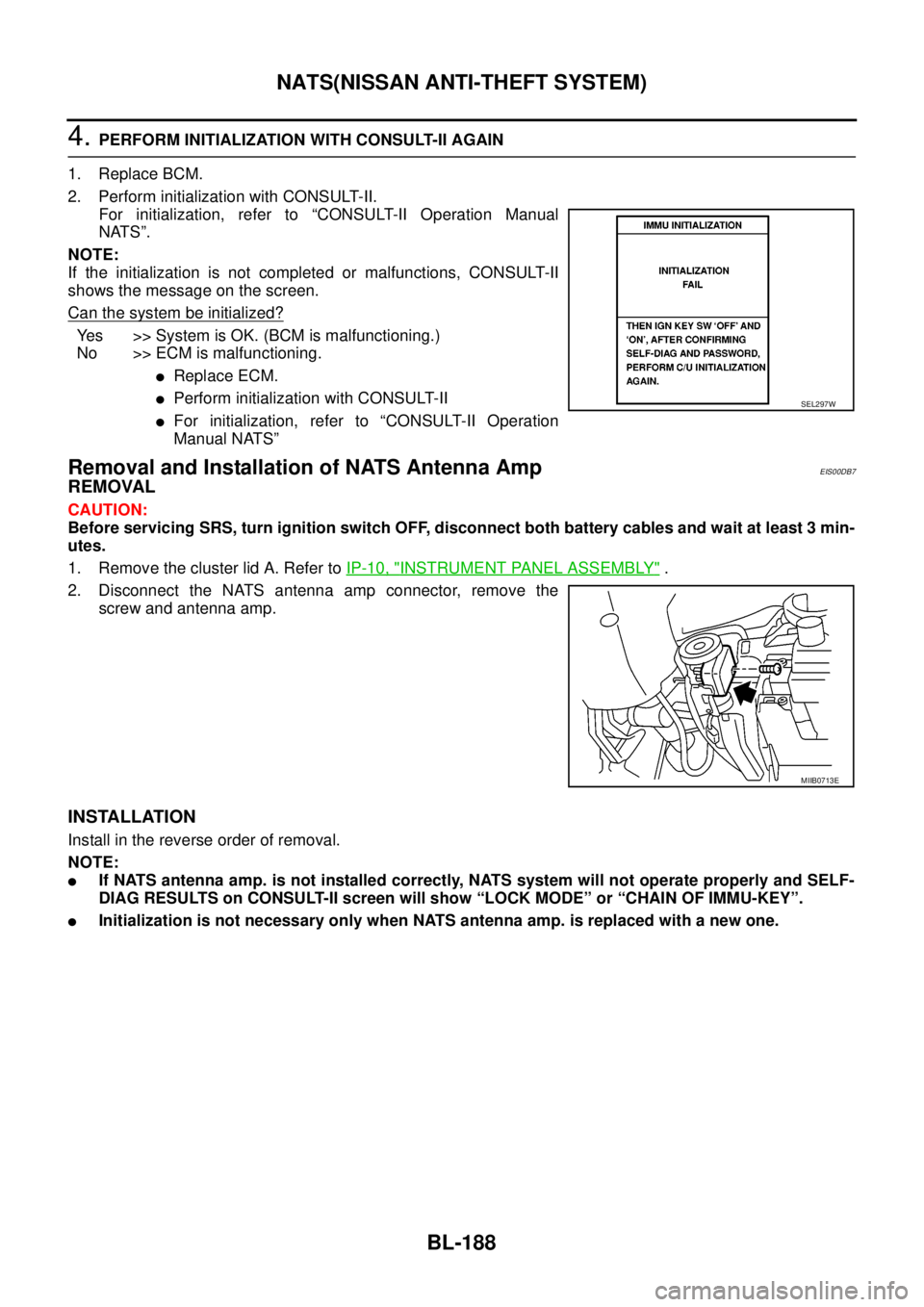
4.PERFORM INITIALIZATION WITH CONSULT-II AGAIN
1. Replace BCM.
2. Perform initialization with CONSULT-II.
For initialization, refer to “CONSULT-II Operation Manual
NATS”.
NOTE:
If the initialization is not completed or malfunctions, CONSULT-II
shows the message on the screen.
Can the system be initialized?
Yes >>SystemisOK.(BCMismalfunctioning.)
No >> ECM is malfunctioning.
lReplace ECM.
lPerform initialization with CONSULT-II
lFor initialization, refer to “CONSULT-II Operation
Manual NATS”
Removal and Installation of NATS Antenna AmpEIS00DB7
REMOVAL
CAUTION:
Before servicing SRS, turn ignition switch OFF, disconnect both battery cables and wait at least 3 min-
utes.
1. Remove the cluster lid A. Refer toIP-10, "
INSTRUMENT PANEL ASSEMBLY".
2. Disconnect the NATS antenna amp connector, remove the
screw and antenna amp.
INSTALLATION
Install in the reverse order of removal.
NOTE:
lIf NATS antenna amp. is not installed correctly, NATS system will not operate properly and SELF-
DIAG RESULTS on CONSULT-II screen will show “LOCK MODE” or “CHAIN OF IMMU-KEY”.
lInitialization is not necessary only when NATS antenna amp. is replaced with a new one.
SEL297W
MIIB0713E
Page 794 of 3171
BR-8
BRAKE PEDAL
Removal and Installation
EFS005SH
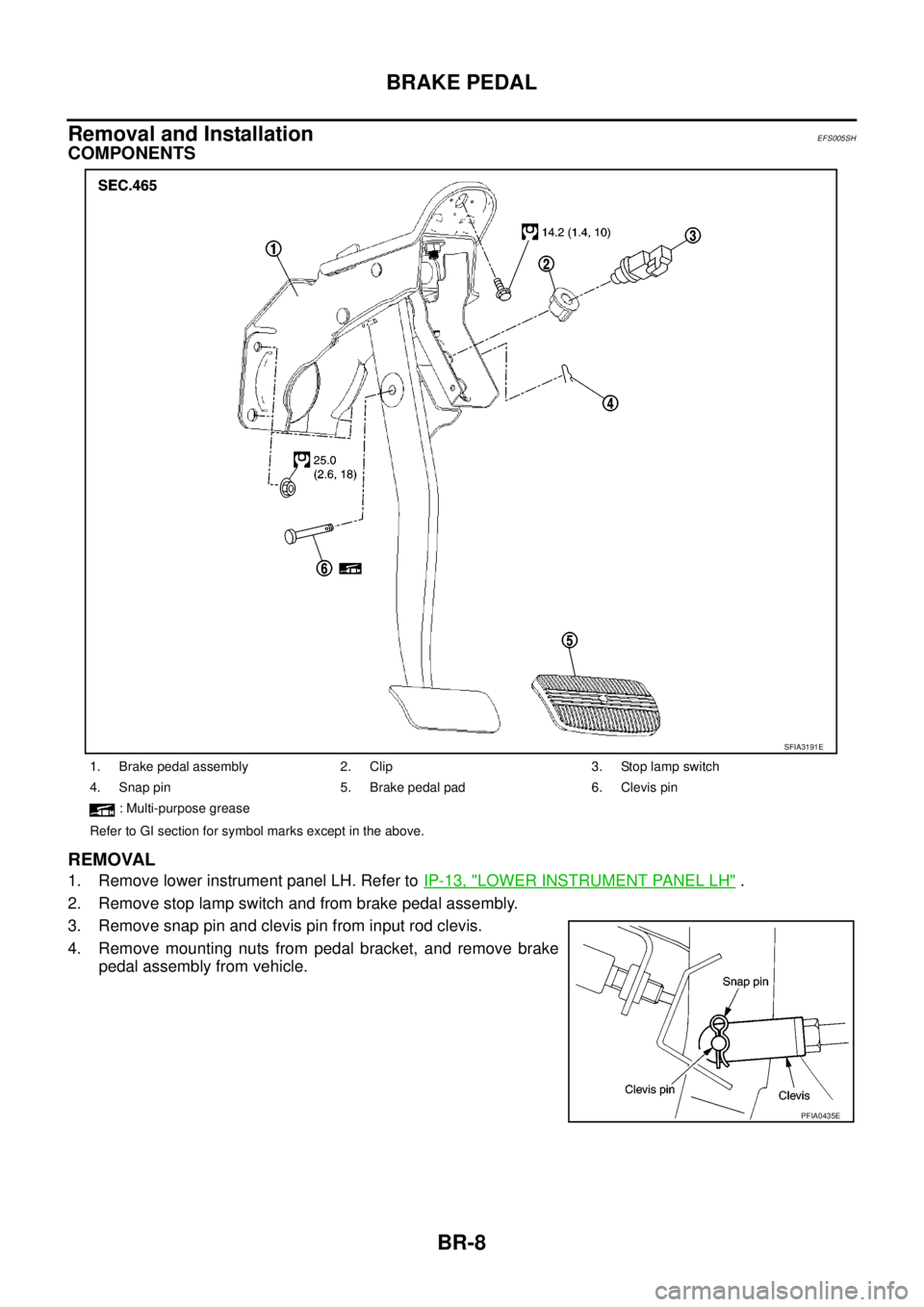
COMPONENTS
REMOVAL
1. Remove lower instrument panel LH. Refer toIP-13, "LOWER INSTRUMENT PANEL LH".
2. Remove stop lamp switch and from brake pedal assembly.
3. Remove snap pin and clevis pin from input rod clevis.
4. Remove mounting nuts from pedal bracket, and remove brake
pedal assembly from vehicle.
1. Brake pedal assembly 2. Clip 3. Stop lamp switch
4. Snap pin 5. Brake pedal pad 6. Clevis pin
: Multi-purpose grease
Refer to GI section for symbol marks except in the above.
SFIA3191E
PFIA0435E
Page 937 of 3171
COMBINATION METERS
DI-27
C
D
E
F
G
H
I
J
L
MA
B
DI
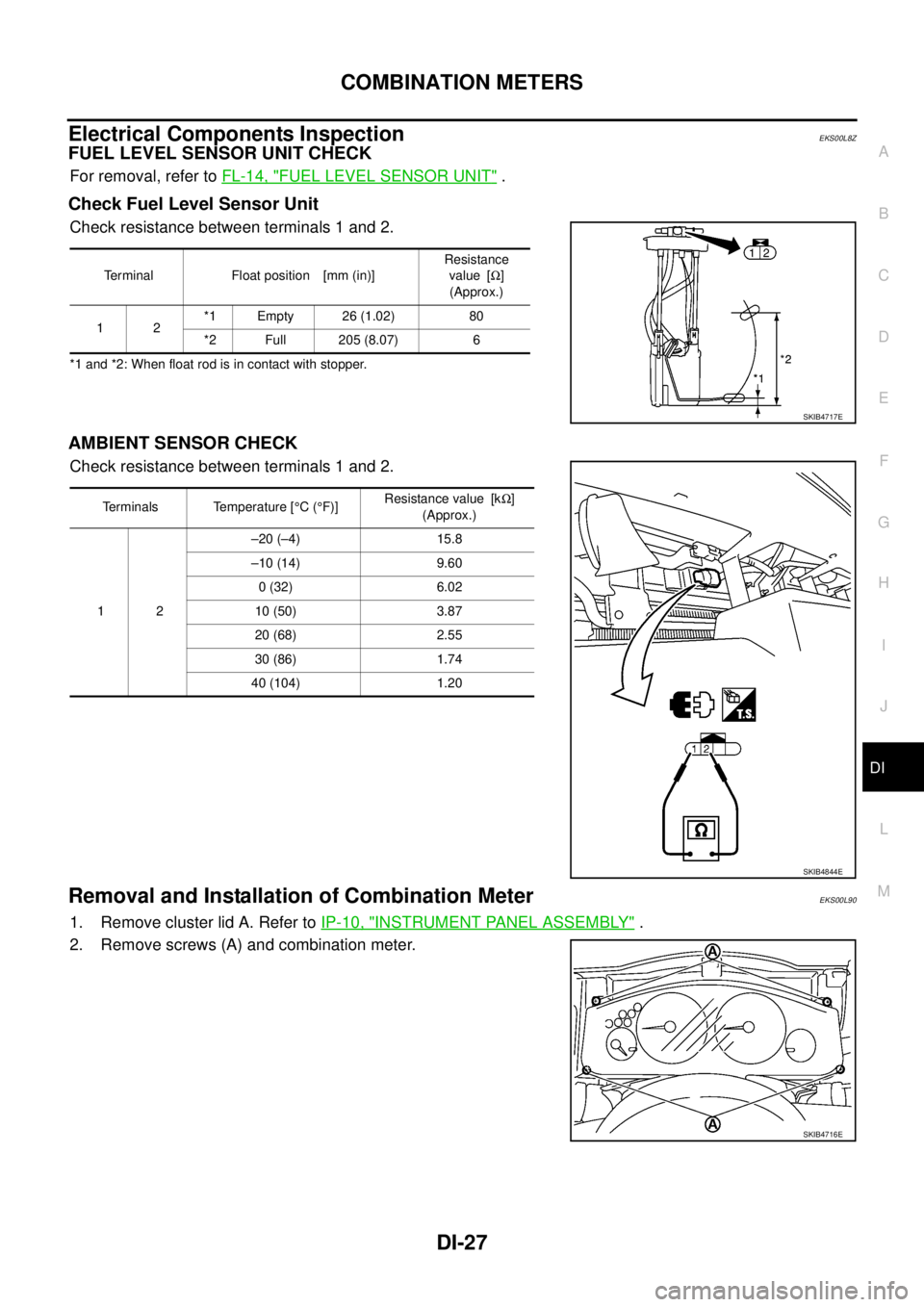
Electrical Components InspectionEKS00L8Z
FUEL LEVEL SENSOR UNIT CHECK
For removal, refer toFL-14, "FUEL LEVEL SENSOR UNIT".
Check Fuel Level Sensor Unit
Check resistance between terminals 1 and 2.
*1 and *2: When float rod is in contact with stopper.
AMBIENT SENSOR CHECK
Check resistance between terminals 1 and 2.
Removal and Installation of Combination MeterEKS00L90
1. Remove cluster lid A. Refer toIP-10, "INSTRUMENT PANEL ASSEMBLY".
2. Remove screws (A) and combination meter.
Terminal Float position [mm (in)]Resistance
value [W]
(Approx.)
12*1 Empty 26 (1.02) 80
*2 Full 205 (8.07) 6
SKIB4717E
Terminals Temperature [°C(°F)]Resistance value [kW]
(Approx.)
12–20 (–4) 15.8
–10 (14) 9.60
0 (32) 6.02
10 (50) 3.87
20 (68) 2.55
30 (86) 1.74
40 (104) 1.20
SKIB4844E
SKIB4716E