control unit NISSAN NAVARA 2005 Repair Workshop Manual
[x] Cancel search | Manufacturer: NISSAN, Model Year: 2005, Model line: NAVARA, Model: NISSAN NAVARA 2005Pages: 3171, PDF Size: 49.59 MB
Page 2080 of 3171
![NISSAN NAVARA 2005 Repair Workshop Manual TROUBLE DIAGNOSIS FOR SYSTEM
LAN-303
[CAN]
C
D
E
F
G
H
I
J
L
MA
B
LAN
IPDM E/R Circuit InspectionEKS00O5A
1.CHECK CONNECTOR
1. Turn ignition switch OFF.
2. Disconnect the battery cable from the negati](/img/5/57362/w960_57362-2079.png "NISSAN NAVARA 2005 Repair Workshop Manual TROUBLE DIAGNOSIS FOR SYSTEM
LAN-303
[CAN]
C
D
E
F
G
H
I
J
L
MA
B
LAN
IPDM E/R Circuit InspectionEKS00O5A
1.CHECK CONNECTOR
1. Turn ignition switch OFF.
2. Disconnect the battery cable from the negati")
TROUBLE DIAGNOSIS FOR SYSTEM
LAN-303
[CAN]
C
D
E
F
G
H
I
J
L
MA
B
LAN
IPDM E/R Circuit InspectionEKS00O5A
1.CHECK CONNECTOR
1. Turn ignition switch OFF.
2. Disconnect the battery cable from the negative terminal.
3. Check terminals and connector of IPDM E/R for damage, bend and loose connection (control module side
and harness side).
OK or NG
OK >> GO TO 2.
NG >> Repair terminal or connector.
2.CHECK HARNESS FOR OPEN CIRCUIT
1. Disconnect IPDM E/R connector.
2. Check resistance between IPDM E/R harness connector E17
terminals 39 and 40.
OK or NG
OK >> Replace IPDM E/R.
NG >> Repair harness between IPDM E/R and harness con-
nector E112.
CAN Communication Circuit InspectionEKS00O5B
1.CHECK CONNECTOR
1. Turn ignition switch OFF.
2. Disconnect the battery cable from the negative terminal.
3. Disconnect the harness connector for each unit on the CAN network and check terminals for deformation,
disconnection, looseness or damage.
OK or NG
OK >> GO TO 2.
NG >> Repair terminal or connector as necessary.
2.CHECK HARNESS FOR SHORT CIRCUIT
With all module and control unit connectors disconnected, check
continuity between data link connector M45 terminals 6 and 14.
OK or NG
OK >> GO TO 3.
NG >>
lRepair harness.
lChange harness if shielded lines are used for the har-
ness. 39 – 40 : Approx. 108 – 132W
PKIA8141E
6 – 14 : Continuity should not exist.
SKIA6868E
Page 2084 of 3171
LT-1
LIGHTING SYSTEM
K ELECTRICAL
CONTENTS
C
D
E
F
G
H
I
J
L
M
SECTIONLT
A
B
LT
LIGHTING SYSTEM
PRECAUTIONS .......................................................... 4
Precautions for Supplemental Restraint System
(SRS)“AIRBAG”and“SEATBELTPRE-TEN-
SIONER” .................................................................. 4
General Precautions for Service Operations ............ 4
Wiring Diagrams and Trouble Diagnosis .................. 4
HEADLAMP -CONVENTIONAL TYPE- ..................... 5
Component Parts and Harness Connector Location..... 5
System Description .................................................. 5
OUTLINE ............................................................... 5
FRIENDLY LIGHTING FUNCTION ....................... 6
CAN Communication System Description ................ 6
Schematic ................................................................ 7
Wiring Diagram - H/LAMP - ...................................... 8
Terminals and Reference Value for BCM ............... 12
Terminals and Reference Values for IPDM E/R ..... 12
How to Proceed With Trouble Diagnosis ................ 13
Preliminary Check .................................................. 13
CHECK POWER SUPPLY AND GROUND CIR-
CUIT .................................................................... 13
CONSULT-II Functions (BCM) ............................... 15
CONSULT-II BASIC OPERATION ....................... 15
WORK SUPPORT ............................................... 16
DATA MONITOR ................................................. 16
ACTIVE TEST ..................................................... 17
CONSULT-II Functions (IPDM E/R) ....................... 18
CONSULT-II BASIC OPERATION ....................... 18
DATA MONITOR ................................................. 19
ACTIVE TEST ..................................................... 19
Headlamp High Beam Does Not Illuminate (Both
Sides) ..................................................................... 20
Headlamp HI Beam Does Not Illuminate (One Side)... 22
High Beam Indicator Lamp Does Not Illuminate .... 23
Headlamp LO Beam Does Not Illuminate (Both
Sides) ..................................................................... 23
Headlamp LO Beam Does Not Illuminate (One Side)
... 25
Headlamps Do Not Turn OFF ................................ 26
Aiming Adjustment ................................................. 28
LOW BEAM AND HIGH BEAM ........................... 28Bulb Replacement .................................................. 29
HEADLAMP HIGH/LOW BEAM .......................... 29
FRONT TURN SIGNAL LAMP ............................ 29
CLEARANCE LAMP ............................................ 29
Removal and Installation ........................................ 30
REMOVAL ........................................................... 30
INSTALLATION ................................................... 30
Disassembly and Assembly .................................... 30
DISASSEMBLY ................................................... 30
HEADLAMP - DAYTIME LIGHT SYSTEM - ............. 31
Component Parts and Harness Connector Location... 31
System Description ................................................. 31
OUTLINE ............................................................. 32
DAYTIME LIGHT OPERATION ........................... 32
COMBINATION SWITCH READING FUNCTION... 33
AUTO LIGHT OPERATION ................................. 33
CAN Communication System Description .............. 33
CAN Communication Unit ....................................... 33
Schematic ............................................................... 34
Wiring Diagram — DTRL — ................................... 35
Terminals and Reference Values for BCM .............. 39
Terminals and Reference Values for IPDM E/R ...... 39
How to Proceed With Trouble Diagnosis ................ 40
Preliminary Check .................................................. 40
CHECK POWER SUPPLY AND GROUND CIR-
CUIT .................................................................... 40
CONSULT-II Functions (BCM) ................................ 42
CONSULT-II BASIC OPERATION ....................... 42
DATA MONITOR ................................................. 43
ACTIVE TEST ..................................................... 44
CONSULT-II Functions (IPDM E/R) ........................ 45
CONSULT-II BASIC OPERATION ....................... 45
DATA MONITOR ................................................. 46
ACTIVE TEST ..................................................... 46
Daytime Light Control Does Not Operate Properly
(Normal Headlamps Operate Properly) .................. 47
Aiming Adjustment .................................................. 48
Bulb Replacement .................................................. 48
Removal and Installation ........................................ 48
Disassembly and Assembly .................................... 48
Page 2085 of 3171

LT-2
AUTO LIGHT SYSTEM ............................................. 49
Component Parts and Harness Connector Location... 49
System Description ................................................. 49
OUTLINE ............................................................. 49
COMBINATION SWITCH READING FUNCTION... 50
CAN Communication System Description .............. 50
Major Components and Functions .......................... 50
Schematic ............................................................... 51
Wiring Diagram — AUTO/L — ................................ 52
Terminals and Reference Values for BCM .............. 56
Terminals and Reference Values for IPDM E/R ...... 57
How to Proceed With Trouble Diagnosis ................ 57
Preliminary Check .................................................. 58
SETTING CHANGE FUNCTIONS ....................... 58
CHECK POWER SUPPLY AND GROUND CIR-
CUIT .................................................................... 58
CONSULT-II Function (BCM) .................................. 59
CONSULT-II OPERATION ................................... 59
WORK SUPPORT ............................................... 60
DATA MONITOR .................................................. 60
ACTIVE TEST ..................................................... 61
Trouble Diagnosis Chart by Symptom .................... 62
Lighting Switch Inspection ...................................... 62
Light and Rain Sensor System Inspection .............. 63
Removal and Installation of Light and Rain Sensor... 65
REMOVAL ........................................................... 65
INSTALLATION .................................................... 65
HEADLAMP AIMING CONTROL (MANUAL) ........... 66
Schematic ............................................................... 66
Wiring Diagram — H/AIM — ................................... 67
Removal and Installation ........................................ 70
Switch Circuit Inspection ........................................ 70
FRONT FOG LAMP .................................................. 71
Component Parts and Harness Connector Location... 71
System Description ................................................. 71
OUTLINE ............................................................. 71
COMBINATION SWITCH READING FUNCTION... 72
CAN Communication System Description .............. 72
Schematic ............................................................... 73
Wiring Diagram — F/FOG — .................................. 74
Terminals and Reference Values for BCM .............. 77
Terminals and Reference Values for IPDM E/R ...... 77
How to Proceed With Trouble Diagnosis ................ 78
Preliminary Check .................................................. 78
CHECK POWER SUPPLY AND GROUND CIR-
CUIT .................................................................... 78
CONSULT-II Functions (BCM) ................................ 79
CONSULT-II Functions (IPDM E/R) ........................ 79
Front Fog Lamps Do Not Illuminate (Both Sides) ... 80
Front Fog Lamp Does Not Illuminate (One Side) ... 82
Front Fog Lamp Indicator Lamp Does Not Illuminate... 83
Front Fog Lamps Do Not Turn OFF ........................ 84
Aiming Adjustment .................................................. 85
Bulb Replacement .................................................. 86
Removal and Installation of Front Fog Lamp .......... 86
REMOVAL ........................................................... 86
INSTALLATION .................................................... 86
REAR FOG LAMP ..................................................... 87
Component Parts and Harness Connector Location... 87System Description ................................................. 87
OUTLINE ............................................................. 87
COMBINATION SWITCH READING FUNCTION... 88
CAN Communication System Description .............. 88
CAN Communication Unit ....................................... 88
Wiring Diagram — R/FOG — .................................. 89
Terminals and Reference Values for BCM .............. 91
How to Proceed With Trouble Diagnosis ................ 91
Preliminary Check ................................................... 92
CHECK POWER SUPPLY AND GROUND CIR-
CUIT ..................................................................... 92
CONSULT-II Functions (BCM) ................................ 93
Rear Fog Lamp Does Not Operate ......................... 93
Rear Fog Lamp Indicator Lamp Does Not Illuminate... 95
Rear Fog Lamp Does Not Turn OFF ....................... 96
Bulb Replacement ................................................... 96
Removal and Installation ......................................... 96
TURN SIGNAL AND HAZARD WARNING LAMPS... 97
Component Parts and Harness Connector Location... 97
System Description ................................................. 97
OUTLINE ............................................................. 97
TURN SIGNAL OPERATION ............................... 97
HAZARD LAMP OPERATION ............................. 98
REMOTE KEYLESS ENTRY SYSTEM OPERA-
TION .................................................................... 99
COMBINATION SWITCH READING FUNCTION... 99
CAN Communication System Description .............. 99
Wiring Diagram — TURN — .................................100
Terminals and Reference Values for BCM ............102
How to Proceed With Trouble Diagnosis ..............103
Preliminary Check .................................................103
CHECK POWER SUPPLY AND GROUND CIR-
CUIT ...................................................................103
CONSULT-II Function (BCM) ................................105
CONSULT-II OPERATION .................................105
DATA MONITOR ................................................106
ACTIVE TEST ....................................................106
Turn Signal Lamp Does Not Operate ....................107
Hazard Warning Lamp Does Not Operate But Turn
Signal Lamps Operate ..........................................109
Turn Signal Indicator Lamp Does Not Operate .....110
Bulb Replacement (Front Turn Signal Lamp) ........ 111
Bulb Replacement (Rear Turn Signal Lamp) ........ 111
Bulb Replacement (Side Turn Signal Lamp) ......... 111
Removal and Installation of Front Turn Signal Lamp. 111
Removal and Installation of Rear Turn Signal Lamp. 111
Removal and Installation of Side Turn Signal Lamp. 111
REMOVAL .......................................................... 111
INSTALLATION .................................................. 111
LIGHTING AND TURN SIGNAL SWITCH ..............112
Removal and Installation .......................................112
REMOVAL ..........................................................112
INSTALLATION ..................................................112
HAZARD SWITCH ...................................................113
Removal and Installation .......................................113
REMOVAL ..........................................................113
INSTALLATION ..................................................113
COMBINATION SWITCH ........................................114
Wiring Diagram — COMBSW — ..........................114
Page 2086 of 3171
LT-3
C
D
E
F
G
H
I
J
L
MA
B
LT Combination Switch Reading Function ................. 115
CONSULT-II Function (BCM) ................................ 115
CONSULT-II OPERATION ................................. 115
DATA MONITOR ................................................ 116
Combination Switch Inspection ............................. 118
Removal and Installation ...................................... 120
Switch Circuit Inspection ...................................... 120
STOP LAMP ........................................................... 121
Wiring Diagram — STOP/L — .............................. 121
Bulb Replacement ................................................ 122
Removal and Installation ...................................... 122
BACK-UP LAMP .................................................... 123
Wiring Diagram — BACK/L — ............................. 123
Bulb Replacement ................................................ 124
Removal and Installation ...................................... 124
PARKING, LICENSE PLATE AND TAIL LAMPS ... 125
Component Parts and Harness Connector Location. 125
System Description .............................................. 125
OUTLINE ........................................................... 125
OPERATION BY LIGHTING SWITCH .............. 126
COMBINATION SWITCH READING FUNCTION. 126
CAN Communication System Description ............ 126
Schematic ............................................................ 127
WITHOUT DAYTIME LIGHT SYSTEM ............. 127
Wiring Diagram — TAIL/L — ................................ 128
WITHOUT DAYTIME LIGHT SYSTEM ............. 128
Schematic ............................................................ 131
WITH DAYTIME LIGHT SYSTEM ..................... 131
Wiring Diagram — TAIL/L — ................................ 132
WITH DAYTIME LIGHT SYSTEM ..................... 132
Terminals and Reference Values for BCM ........... 135
Terminals and Reference Values for IPDM E/R ... 135
How to Proceed With Trouble Diagnosis .............. 136
Preliminary Check ................................................ 136
CHECK POWER SUPPLY AND GROUND CIR-
CUIT .................................................................. 136
CONSULT-II Functions (BCM) ............................. 137
CONSULT-II Functions (IPDM E/R) ..................... 137
Clarence, License Plate and Tail Lamps Do Not Illu-
minate .................................................................. 138
Clearance, License Plate and Tail Lamps Do Not
Turn OFF (After Approx. 10 Minutes) ................... 141
Front Clearance Lamp ......................................... 142BULB REPLACEMENT .....................................142
Tail Lamp ..............................................................142
BULB REPLACEMENT .....................................142
REAR COMBINATION LAMP .................................143
Bulb Replacement ................................................143
REMOVAL .........................................................143
INSTALLATION .................................................143
Removal and Installation ......................................144
REMOVAL .........................................................144
INSTALLATION .................................................144
INTERIOR ROOM LAMP ........................................145
Component Parts and Harness Connector Location.145
System Description ...............................................145
POWER SUPPLY AND GROUND ....................145
SWITCH OPERATION ......................................147
ROOM LAMP TIMER OPERATION ..................147
INTERIOR LAMP BATTERY SAVER CONTROL.147
Schematic .............................................................148
Wiring Diagram — INT/L — ..................................149
Terminals and Reference Values for BCM ............154
How to Proceed With Trouble Diagnosis ..............155
Preliminary Check ................................................155
INSPECTION FOR POWER SUPPLY AND
GROUND CIRCUIT ...........................................155
CONSULT-II Function ...........................................157
CONSULT-II OPERATION .................................157
WORK SUPPORT .............................................158
DATA MONITOR ...............................................158
ACTIVE TEST ...................................................159
Map Lamp Control Does Not Operate ..................160
All Interior Room Lamps Do Not Operate .............161
ILLUMINATION .......................................................162
System Description ...............................................162
ILLUMINATION OPERATION BY LIGHTING
SWITCH ............................................................162
CAN Communication System Description ............163
CAN Communication Unit .....................................163
Schematic .............................................................164
Wiring Diagram — ILL — ......................................166
BULB SPECIFICATIONS ........................................173
Headlamp .............................................................173
Exterior Lamp .......................................................173
Interior Lamp/Illumination .....................................173
Page 2088 of 3171
HEADLAMP -CONVENTIONAL TYPE-
LT-5
C
D
E
F
G
H
I
J
L
MA
B
LT
HEADLAMP -CONVENTIONAL TYPE-PFP:26010
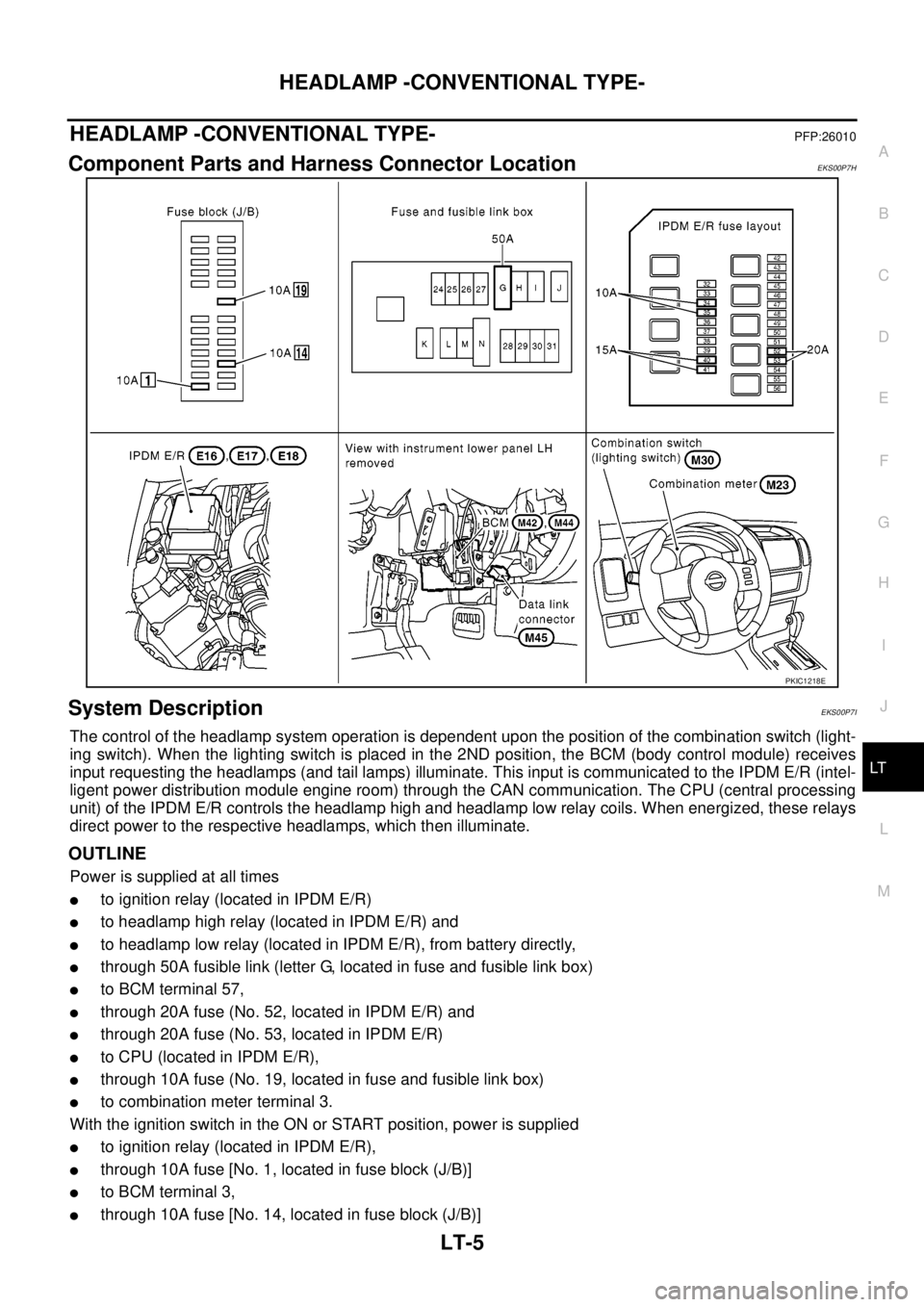
Component Parts and Harness Connector LocationEKS00P7H
System DescriptionEKS00P7I
The control of the headlamp system operation is dependent upon the position of the combination switch (light-
ing switch). When the lighting switch is placed in the 2ND position, the BCM (body control module) receives
input requesting the headlamps (and tail lamps) illuminate. This input is communicated to the IPDM E/R (intel-
ligent power distribution module engine room) through the CAN communication. The CPU (central processing
unit) of the IPDM E/R controls the headlamp high and headlamp low relay coils. When energized, these relays
direct power to the respective headlamps, which then illuminate.
OUTLINE
Power is supplied at all times
lto ignition relay (located in IPDM E/R)
lto headlamp high relay (located in IPDM E/R) and
lto headlamp low relay (located in IPDM E/R), from battery directly,
lthrough 50A fusible link (letter G, located in fuse and fusible link box)
lto BCM terminal 57,
lthrough 20A fuse (No. 52, located in IPDM E/R) and
lthrough 20A fuse (No. 53, located in IPDM E/R)
lto CPU (located in IPDM E/R),
lthrough 10A fuse (No. 19, located in fuse and fusible link box)
lto combination meter terminal 3.
With the ignition switch in the ON or START position, power is supplied
lto ignition relay (located in IPDM E/R),
lthrough 10A fuse [No. 1, located in fuse block (J/B)]
lto BCM terminal 3,
lthrough 10A fuse [No. 14, located in fuse block (J/B)]
PKIC1218E
Page 2098 of 3171
HEADLAMP -CONVENTIONAL TYPE-
LT-15
C
D
E
F
G
H
I
J
L
MA
B
LT
CONSULT-II Functions (BCM)EKS00P7Q
CONSULT-II can display each diagnostic item using the diagnostic test modes shown following.
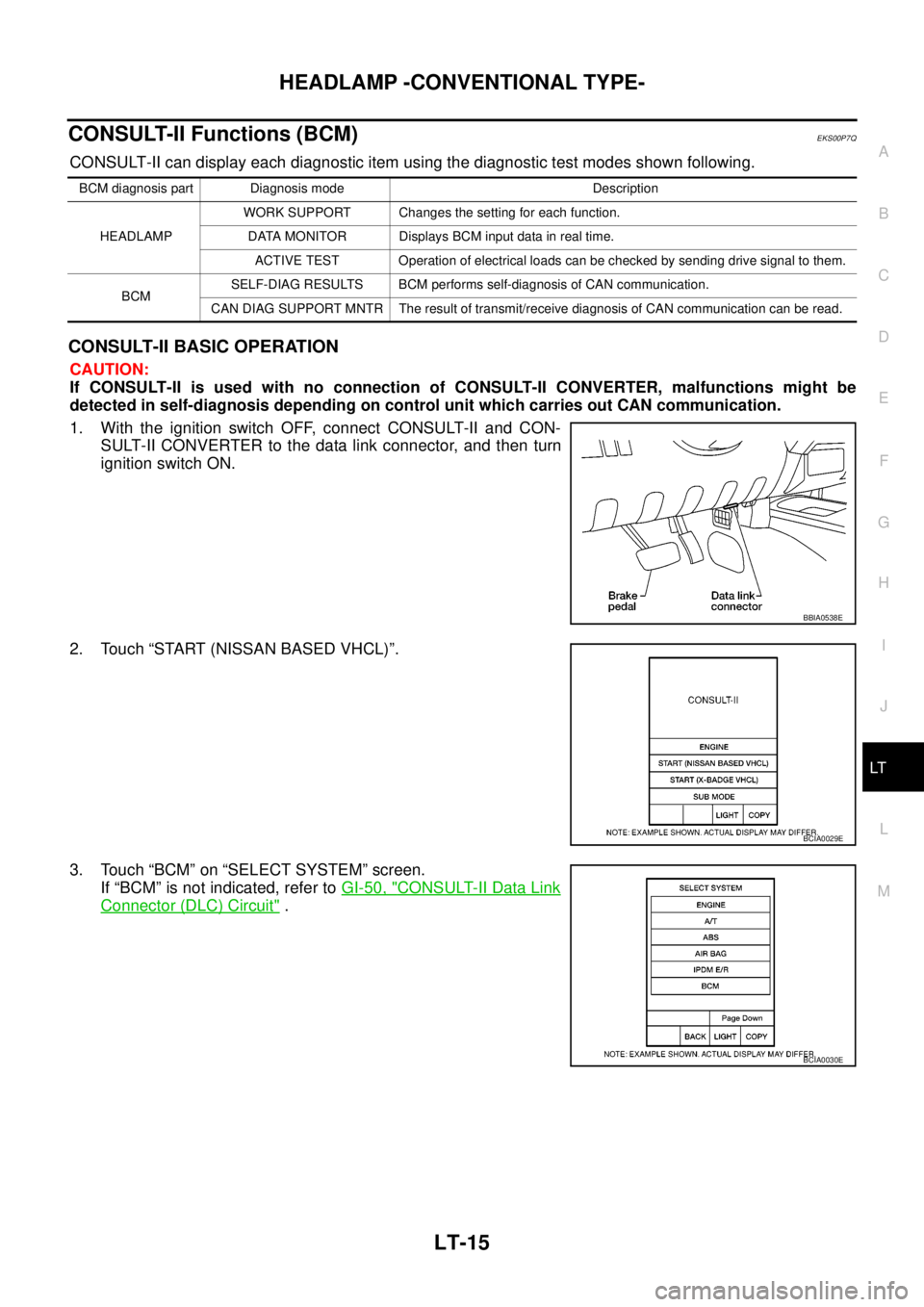
CONSULT-II BASIC OPERATION
CAUTION:
If CONSULT-II is used with no connection of CONSULT-II CONVERTER, malfunctions might be
detected in self-diagnosis depending on control unit which carries out CAN communication.
1. With the ignition switch OFF, connect CONSULT-II and CON-
SULT-II CONVERTER to the data link connector, and then turn
ignition switch ON.
2. Touch “START (NISSAN BASED VHCL)”.
3. Touch “BCM” on “SELECT SYSTEM” screen.
If “BCM” is not indicated, refer toGI-50, "
CONSULT-II Data Link
Connector (DLC) Circuit".
BCM diagnosis part Diagnosis mode Description
HEADLAMPWORK SUPPORT Changes the setting for each function.
DATA MONITOR Displays BCM input data in real time.
ACTIVE TEST Operation of electrical loads can be checked by sending drive signal to them.
BCMSELF-DIAG RESULTS BCM performs self-diagnosis of CAN communication.
CAN DIAG SUPPORT MNTR The result of transmit/receive diagnosis of CAN communication can be read.
BBIA0538E
BCIA0029E
BCIA0030E
Page 2101 of 3171
LT-18
HEADLAMP -CONVENTIONAL TYPE-
CONSULT-II Functions (IPDM E/R)
EKS00P7R
CONSULT-II can display each diagnostic item using the diagnostic test modes shown following.
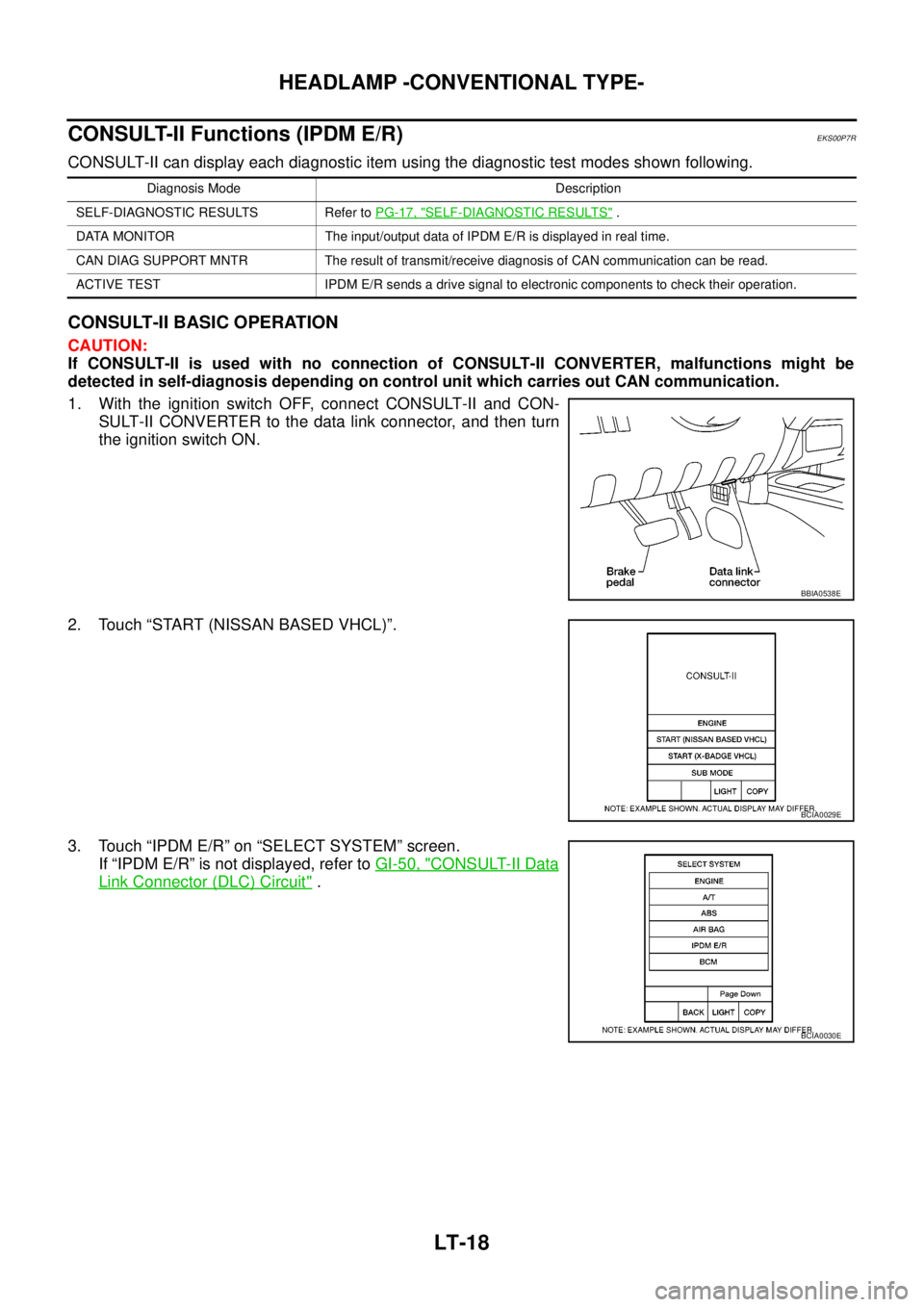
CONSULT-II BASIC OPERATION
CAUTION:
If CONSULT-II is used with no connection of CONSULT-II CONVERTER, malfunctions might be
detected in self-diagnosis depending on control unit which carries out CAN communication.
1. With the ignition switch OFF, connect CONSULT-II and CON-
SULT-II CONVERTER to the data link connector, and then turn
the ignition switch ON.
2. Touch “START (NISSAN BASED VHCL)”.
3. Touch “IPDM E/R” on “SELECT SYSTEM” screen.
If “IPDM E/R” is not displayed, refer toGI-50, "
CONSULT-II Data
Link Connector (DLC) Circuit".
Diagnosis Mode Description
SELF-DIAGNOSTIC RESULTS Refer toPG-17, "
SELF-DIAGNOSTIC RESULTS".
DATA MONITOR The input/output data of IPDM E/R is displayed in real time.
CAN DIAG SUPPORT MNTR The result of transmit/receive diagnosis of CAN communication can be read.
ACTIVE TEST IPDM E/R sends a drive signal to electronic components to check their operation.
BBIA0538E
BCIA0029E
BCIA0030E
Page 2114 of 3171
HEADLAMP - DAYTIME LIGHT SYSTEM -
LT-31
C
D
E
F
G
H
I
J
L
MA
B
LT
HEADLAMP - DAYTIME LIGHT SYSTEM -PFP:26010
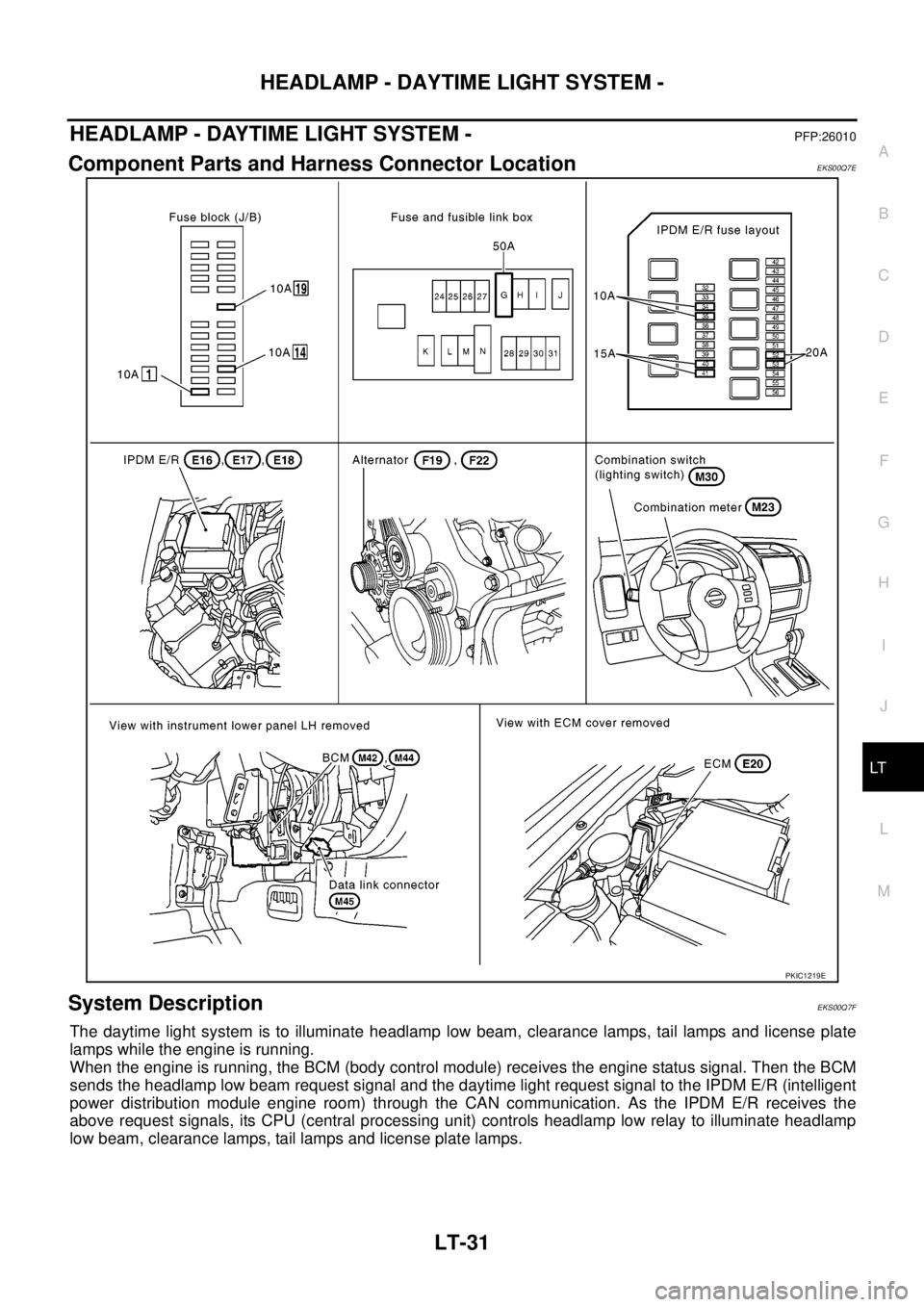
Component Parts and Harness Connector LocationEKS00Q7E
System DescriptionEKS00Q7F
The daytime light system is to illuminate headlamp low beam, clearance lamps, tail lamps and license plate
lamps while the engine is running.
When the engine is running, the BCM (body control module) receives the engine status signal. Then the BCM
sends the headlamp low beam request signal and the daytime light request signal to the IPDM E/R (intelligent
power distribution module engine room) through the CAN communication. As the IPDM E/R receives the
above request signals, its CPU (central processing unit) controls headlamp low relay to illuminate headlamp
low beam, clearance lamps, tail lamps and license plate lamps.
PKIC1219E
Page 2125 of 3171
LT-42
HEADLAMP - DAYTIME LIGHT SYSTEM -
CONSULT-II Functions (BCM)
EKS00Q7O
CONSULT-II can display each diagnostic item using the diagnostic test mode shown following.
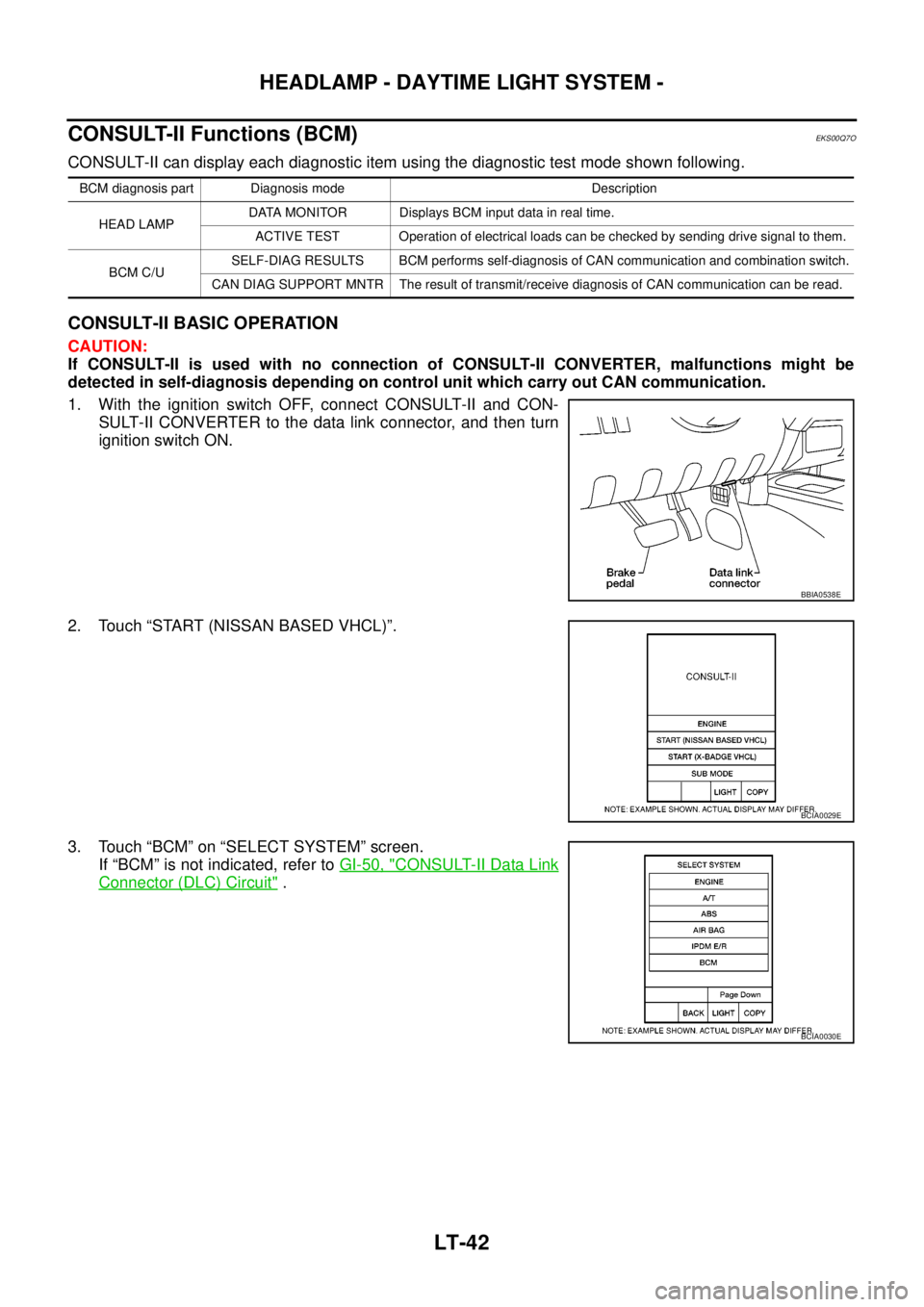
CONSULT-II BASIC OPERATION
CAUTION:
If CONSULT-II is used with no connection of CONSULT-II CONVERTER, malfunctions might be
detected in self-diagnosis depending on control unit which carry out CAN communication.
1. With the ignition switch OFF, connect CONSULT-II and CON-
SULT-II CONVERTER to the data link connector, and then turn
ignition switch ON.
2. Touch “START (NISSAN BASED VHCL)”.
3. Touch “BCM” on “SELECT SYSTEM” screen.
If “BCM” is not indicated, refer toGI-50, "
CONSULT-II Data Link
Connector (DLC) Circuit".
BCM diagnosis part Diagnosis mode Description
HEAD LAMPDATA MONITOR Displays BCM input data in real time.
ACTIVE TEST Operation of electrical loads can be checked by sending drive signal to them.
BCM C/USELF-DIAG RESULTS BCM performs self-diagnosis of CAN communication and combination switch.
CAN DIAG SUPPORT MNTR The result of transmit/receive diagnosis of CAN communication can be read.
BBIA0538E
BCIA0029E
BCIA0030E
Page 2128 of 3171
HEADLAMP - DAYTIME LIGHT SYSTEM -
LT-45
C
D
E
F
G
H
I
J
L
MA
B
LT
CONSULT-II Functions (IPDM E/R)EKS00Q7P
CONSULT-II can display each diagnostic item using the diagnostic test mode shown following.
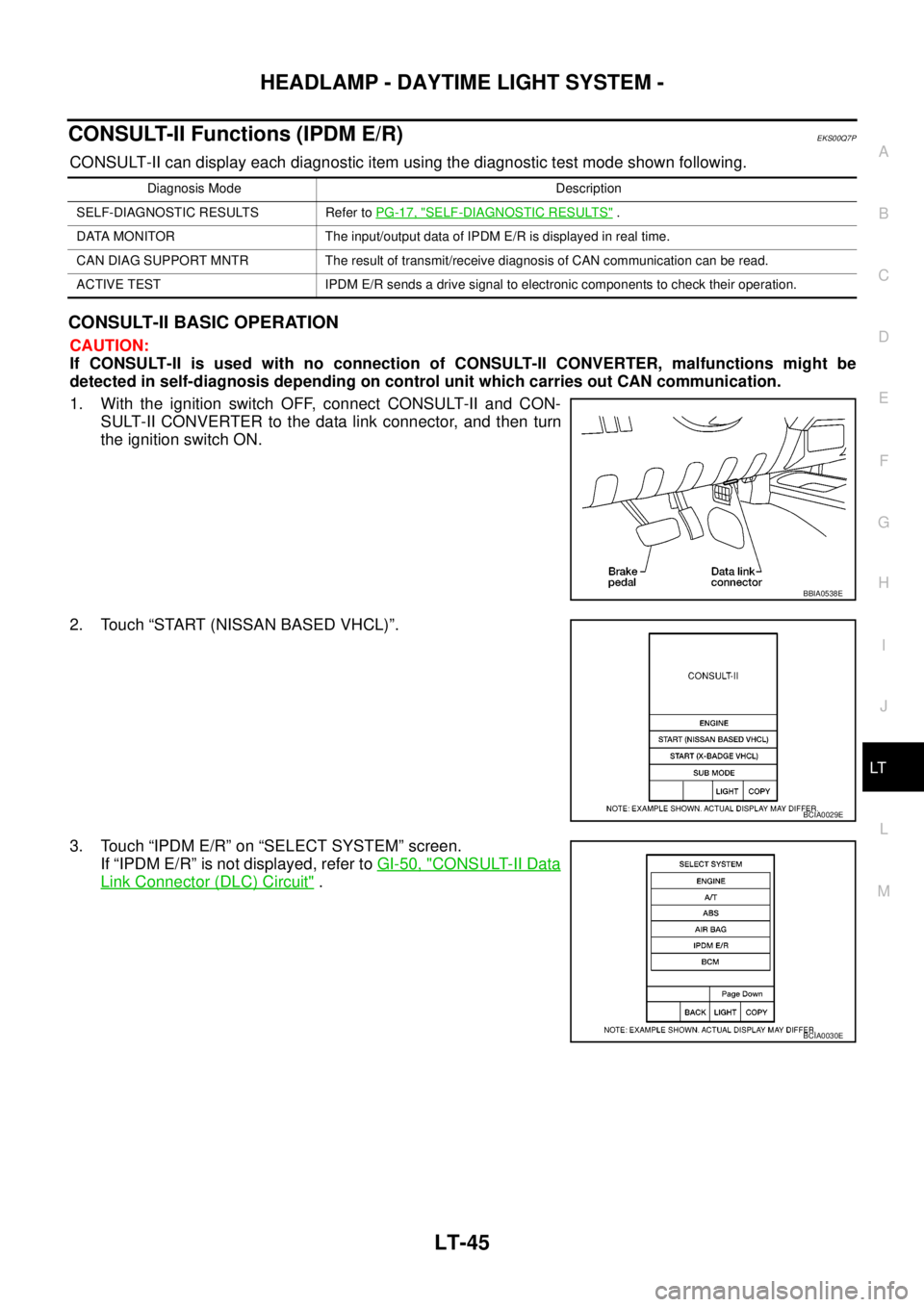
CONSULT-II BASIC OPERATION
CAUTION:
If CONSULT-II is used with no connection of CONSULT-II CONVERTER, malfunctions might be
detected in self-diagnosis depending on control unit which carries out CAN communication.
1. With the ignition switch OFF, connect CONSULT-II and CON-
SULT-II CONVERTER to the data link connector, and then turn
theignitionswitchON.
2. Touch “START (NISSAN BASED VHCL)”.
3. Touch “IPDM E/R” on “SELECT SYSTEM” screen.
If “IPDM E/R” is not displayed, refer toGI-50, "
CONSULT-II Data
Link Connector (DLC) Circuit".
Diagnosis Mode Description
SELF-DIAGNOSTIC RESULTS Refer toPG-17, "
SELF-DIAGNOSTIC RESULTS".
DATA MONITOR The input/output data of IPDM E/R is displayed in real time.
CAN DIAG SUPPORT MNTR The result of transmit/receive diagnosis of CAN communication can be read.
ACTIVE TEST IPDM E/R sends a drive signal to electronic components to check their operation.
BBIA0538E
BCIA0029E
BCIA0030E