ignition NISSAN NAVARA 2005 Repair Workshop Manual
[x] Cancel search | Manufacturer: NISSAN, Model Year: 2005, Model line: NAVARA, Model: NISSAN NAVARA 2005Pages: 3171, PDF Size: 49.59 MB
Page 1739 of 3171
REAR WINDOW DEFOGGER
GW-53
C
D
E
F
G
H
J
K
L
MA
B
GW
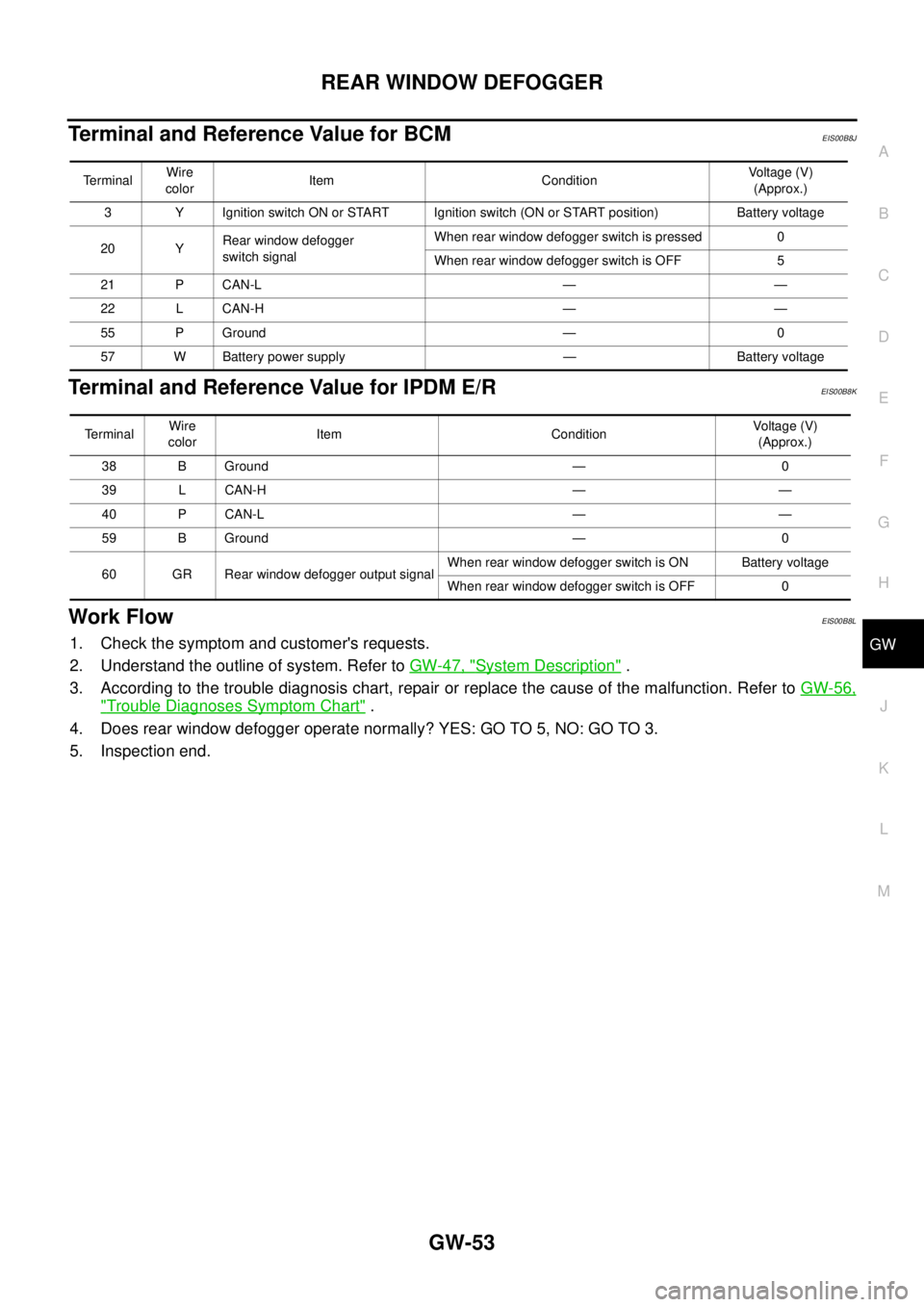
Terminal and Reference Value for BCMEIS00B8J
Terminal and Reference Value for IPDM E/REIS00B8K
Work FlowEIS00B8L
1. Check the symptom and customer's requests.
2. Understand the outline of system. Refer toGW-47, "
System Description".
3. According to the trouble diagnosis chart, repair or replace the cause of the malfunction. Refer toGW-56,
"Trouble Diagnoses Symptom Chart".
4. Does rear window defogger operate normally? YES: GO TO 5, NO: GO TO 3.
5. Inspection end.
TerminalWire
colorItem ConditionVoltage (V)
(Approx.)
3 Y Ignition switch ON or START Ignition switch (ON or START position) Battery voltage
20 YRear window defogger
switch signalWhen rear window defogger switch is pressed 0
When rear window defogger switch is OFF 5
21 P CAN-L — —
22 L CAN-H — —
55 P Ground — 0
57 W Battery power supply — Battery voltage
Te r m i n a lWire
colorItem ConditionVoltag e (V)
(Approx.)
38 B Ground — 0
39 L CAN-H — —
40 P CAN-L — —
59 B Ground — 0
60 GR Rear window defogger output signalWhen rear window defogger switch is ON Battery voltage
When rear window defogger switch is OFF 0
Page 1740 of 3171
GW-54
REAR WINDOW DEFOGGER
CONSULT-II Function (BCM)
EIS00B8M
CONSULT-II can display each diagnostic item using the diagnostic test modes shown following.
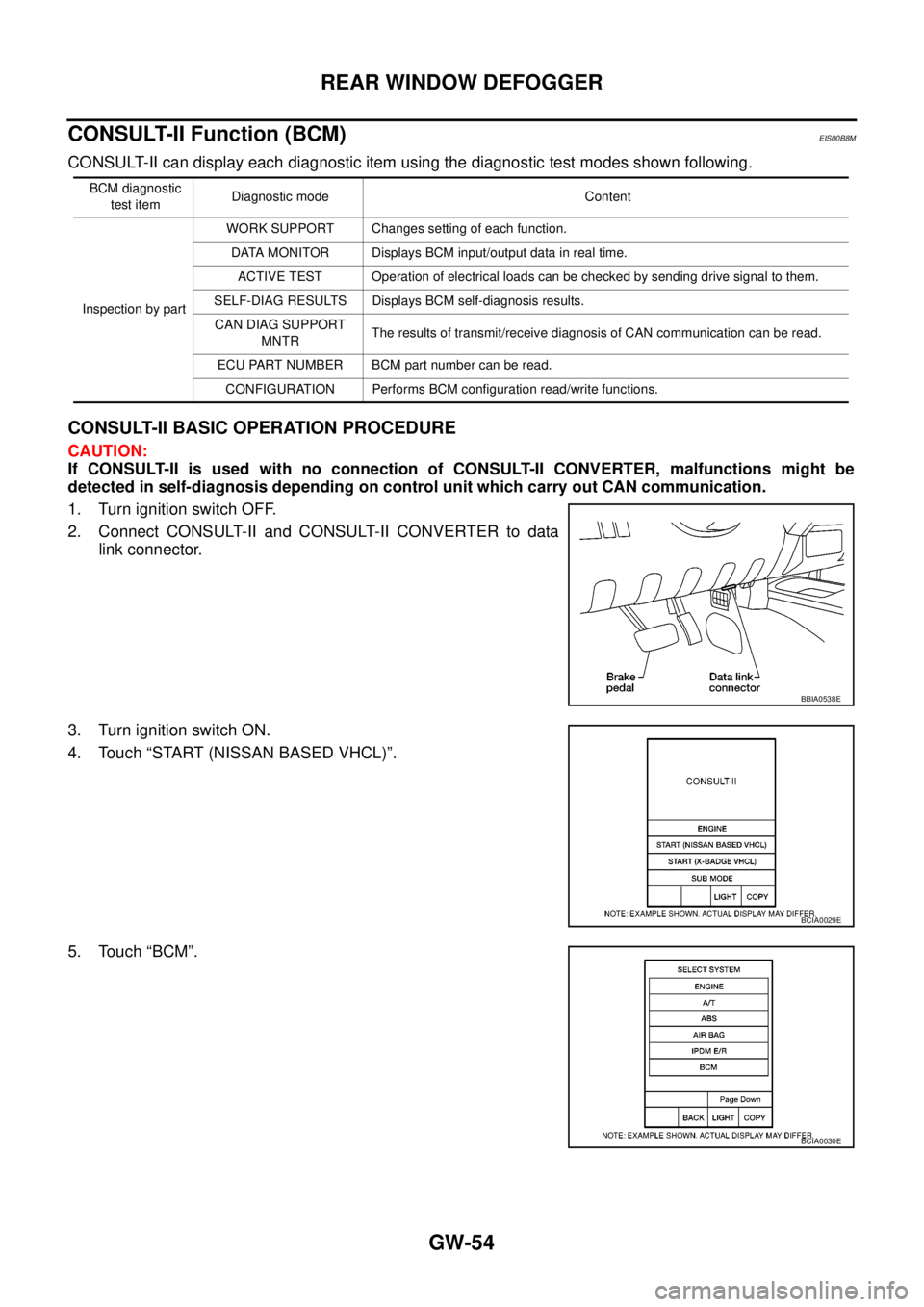
CONSULT-II BASIC OPERATION PROCEDURE
CAUTION:
If CONSULT-II is used with no connection of CONSULT-II CONVERTER, malfunctions might be
detected in self-diagnosis depending on control unit which carry out CAN communication.
1. Turn ignition switch OFF.
2. Connect CONSULT-II and CONSULT-II CONVERTER to data
link connector.
3. Turn ignition switch ON.
4. Touch “START (NISSAN BASED VHCL)”.
5. Touch “BCM”.
BCM diagnostic
test itemDiagnostic mode Content
Inspection by partWORK SUPPORT Changes setting of each function.
DATA MONITOR Displays BCM input/output data in real time.
ACTIVE TEST Operation of electrical loads can be checked by sending drive signal to them.
SELF-DIAG RESULTS Displays BCM self-diagnosis results.
CAN DIAG SUPPORT
MNTRThe results of transmit/receive diagnosis of CAN communication can be read.
ECU PART NUMBER BCM part number can be read.
CONFIGURATION Performs BCM configuration read/write functions.
BBIA0538E
BCIA0029E
BCIA0030E
Page 1741 of 3171
REAR WINDOW DEFOGGER
GW-55
C
D
E
F
G
H
J
K
L
MA
B
GW
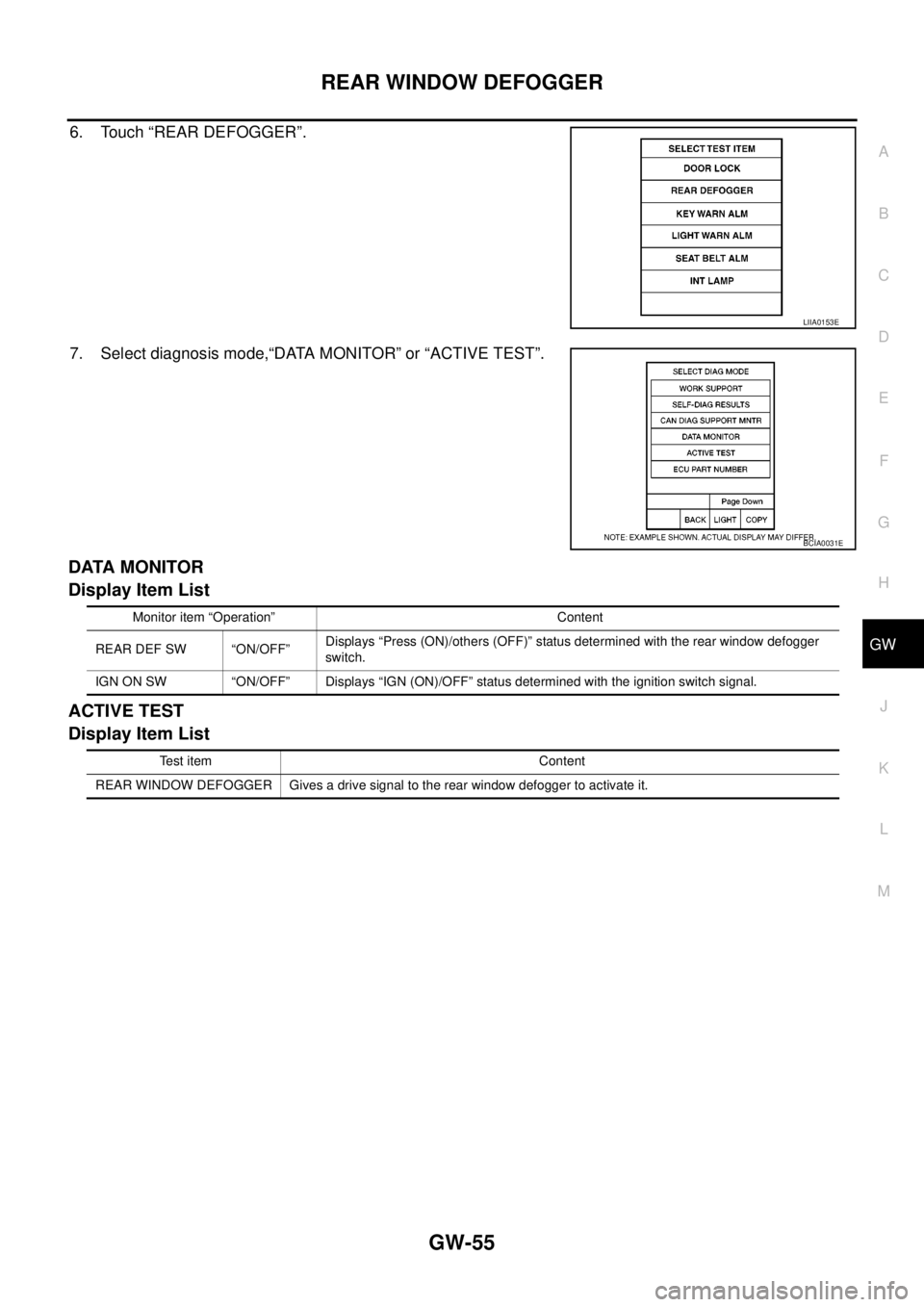
6. Touch “REAR DEFOGGER”.
7. Select diagnosis mode,“DATA MONITOR” or “ACTIVE TEST”.
DATA MONITOR
Display Item List
ACTIVE TEST
Display Item List
LIIA0153E
BCIA0031E
Monitor item “Operation” Content
REAR DEF SW “ON/OFF”Displays “Press (ON)/others (OFF)” status determined with the rear window defogger
switch.
IGN ON SW “ON/OFF” Displays “IGN (ON)/OFF” status determined with the ignition switch signal.
Test item Content
REAR WINDOW DEFOGGER Gives a drive signal to the rear window defogger to activate it.
Page 1742 of 3171
GW-56
REAR WINDOW DEFOGGER
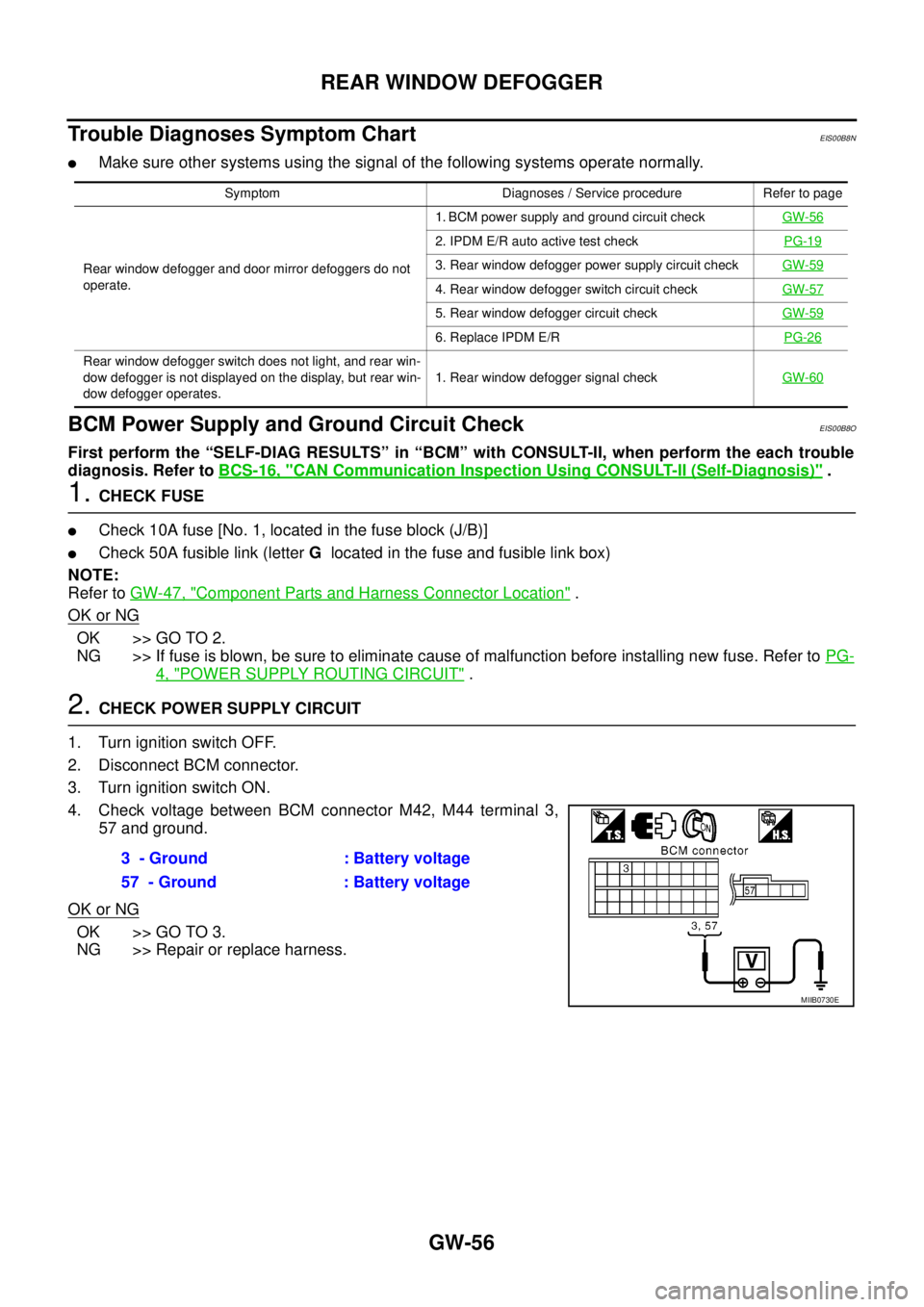
Trouble Diagnoses Symptom Chart
EIS00B8N
lMake sure other systems using the signal of the following systems operate normally.
BCM Power Supply and Ground Circuit CheckEIS00B8O
First perform the “SELF-DIAG RESULTS” in “BCM” with CONSULT-II, when perform the each trouble
diagnosis. Refer toBCS-16, "
CAN Communication Inspection Using CONSULT-II (Self-Diagnosis)".
1.CHECK FUSE
lCheck 10A fuse [No. 1, located in the fuse block (J/B)]
lCheck 50A fusible link (letterGlocated in the fuse and fusible link box)
NOTE:
Refer toGW-47, "
Component Parts and Harness Connector Location".
OK or NG
OK >> GO TO 2.
NG >> If fuse is blown, be sure to eliminate cause of malfunction before installing new fuse. Refer toPG-
4, "POWER SUPPLY ROUTING CIRCUIT".
2.CHECK POWER SUPPLY CIRCUIT
1. Turn ignition switch OFF.
2. Disconnect BCM connector.
3. Turn ignition switch ON.
4. Check voltage between BCM connector M42, M44 terminal 3,
57 and ground.
OK or NG
OK >> GO TO 3.
NG >> Repair or replace harness.
Symptom Diagnoses / Service procedure Refer to page
Rear window defogger and door mirror defoggers do not
operate.1. BCM power supply and ground circuit checkGW-56
2. IPDM E/R auto active test checkPG-19
3. Rear window defogger power supply circuit checkGW-59
4. Rear window defogger switch circuit checkGW-57
5. Rear window defogger circuit checkGW-59
6. Replace IPDM E/RPG-26
Rear window defogger switch does not light, and rear win-
dow defogger is not displayed on the display, but rear win-
dow defogger operates.1. Rear window defogger signal checkGW-60
3 - Ground : Battery voltage
57 - Ground : Battery voltage
MIIB0730E
Page 1743 of 3171
REAR WINDOW DEFOGGER
GW-57
C
D
E
F
G
H
J
K
L
MA
B
GW
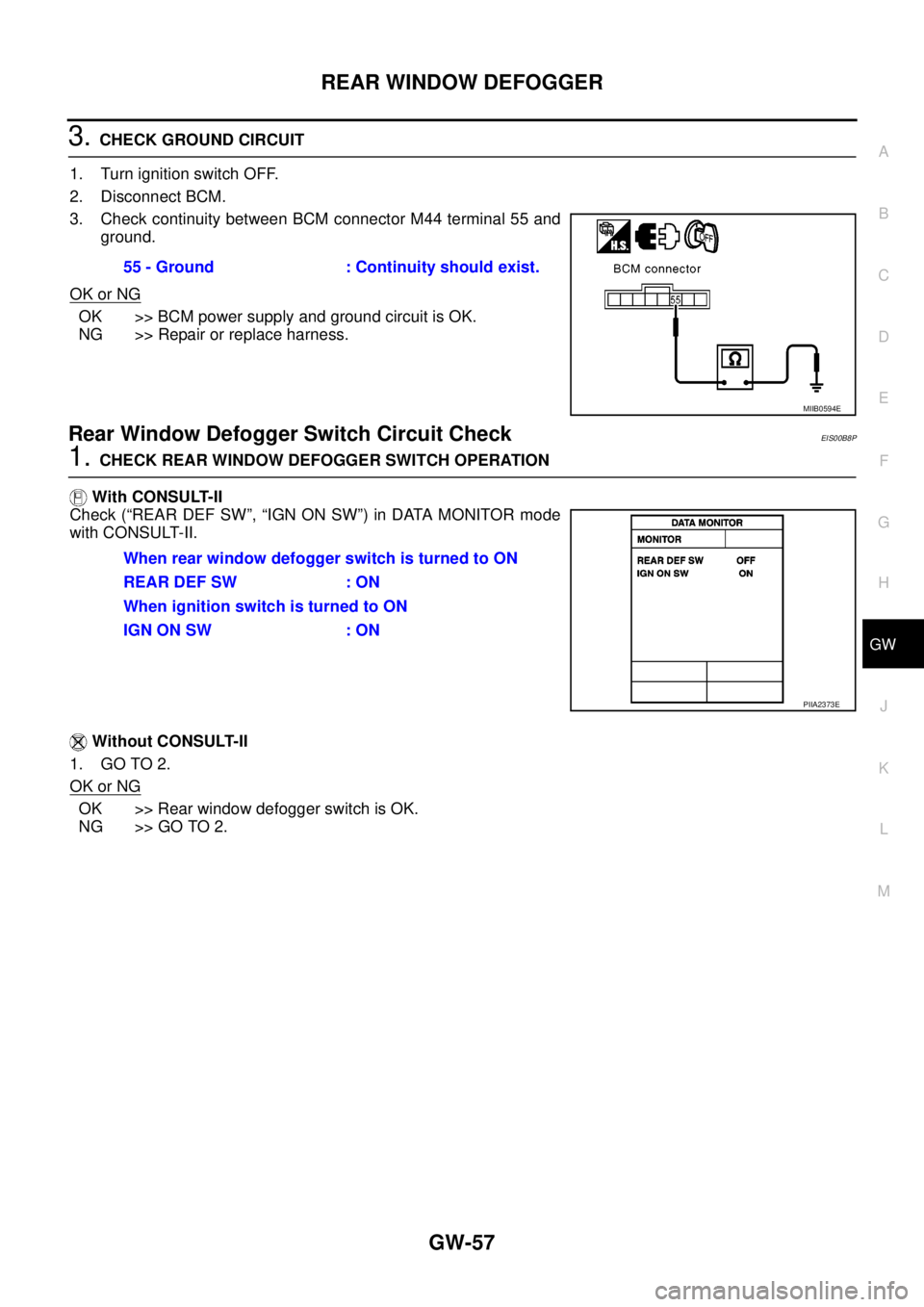
3.CHECK GROUND CIRCUIT
1. Turn ignition switch OFF.
2. Disconnect BCM.
3. Check continuity between BCM connector M44 terminal 55 and
ground.
OK or NG
OK >> BCM power supply and ground circuit is OK.
NG >> Repair or replace harness.
Rear Window Defogger Switch Circuit CheckEIS00B8P
1.CHECK REAR WINDOW DEFOGGER SWITCH OPERATION
With CONSULT-II
Check (“REAR DEF SW”, “IGN ON SW”) in DATA MONITOR mode
with CONSULT-II.
Without CONSULT-II
1. GO TO 2.
OK or NG
OK >> Rear window defogger switch is OK.
NG >> GO TO 2.55 - Ground : Continuity should exist.
MIIB0594E
When rear window defogger switch is turned to ON
REAR DEF SW : ON
When ignition switch is turned to ON
IGNONSW :ON
PIIA2373E
Page 1744 of 3171
GW-58
REAR WINDOW DEFOGGER
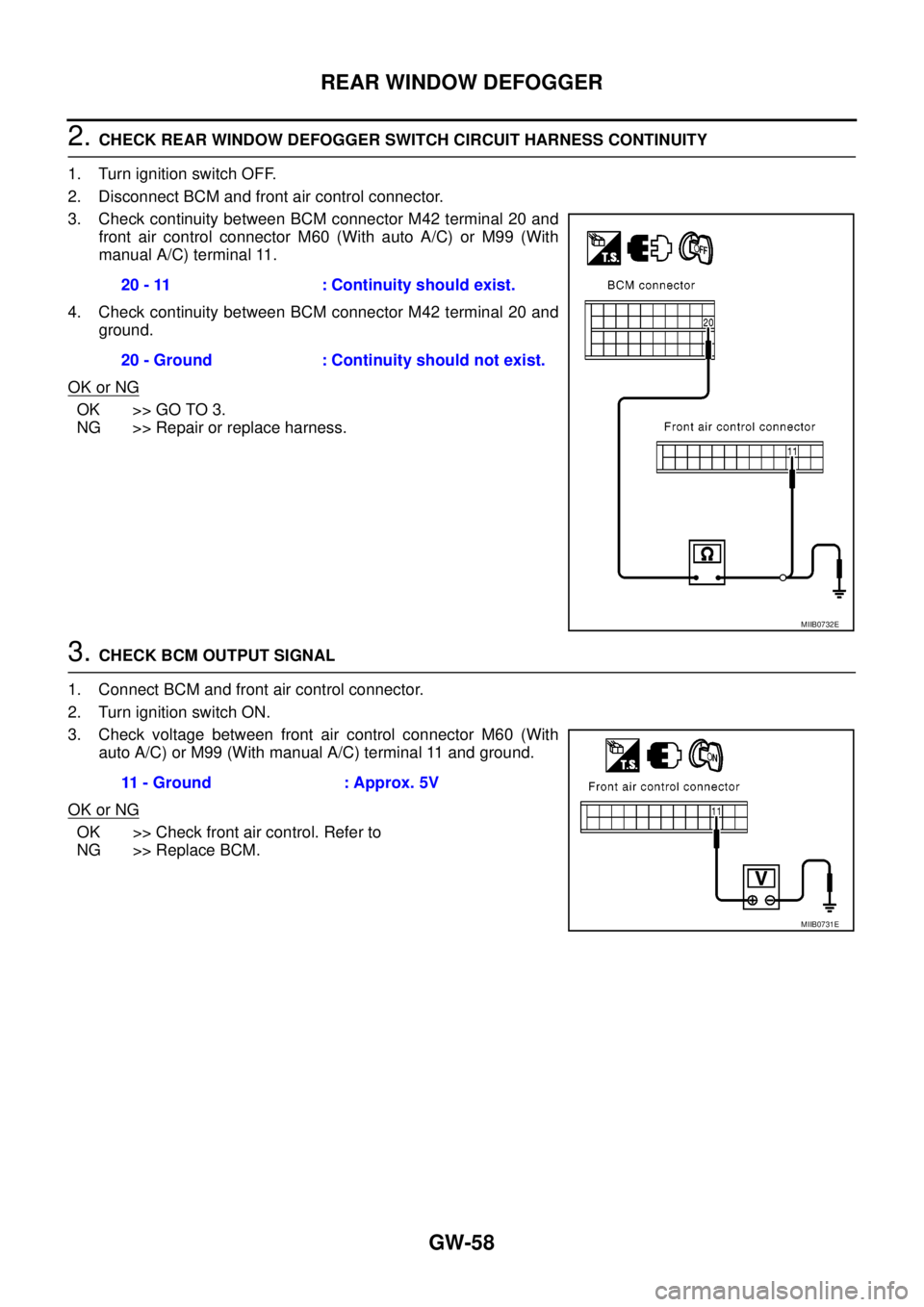
2.CHECK REAR WINDOW DEFOGGER SWITCH CIRCUIT HARNESS CONTINUITY
1. Turn ignition switch OFF.
2. Disconnect BCM and front air control connector.
3. Check continuity between BCM connector M42 terminal 20 and
front air control connector M60 (With auto A/C) or M99 (With
manual A/C) terminal 11.
4. Check continuity between BCM connector M42 terminal 20 and
ground.
OK or NG
OK >> GO TO 3.
NG >> Repair or replace harness.
3.CHECK BCM OUTPUT SIGNAL
1. Connect BCM and front air control connector.
2. Turn ignition switch ON.
3. Check voltage between front air control connector M60 (With
auto A/C) or M99 (With manual A/C) terminal 11 and ground.
OK or NG
OK >> Check front air control. Refer to
NG >> Replace BCM.20 - 11 : Continuity should exist.
20 - Ground : Continuity should not exist.
MIIB0732E
11 - Ground : Approx. 5V
MIIB0731E
Page 1745 of 3171
REAR WINDOW DEFOGGER
GW-59
C
D
E
F
G
H
J
K
L
MA
B
GW
Rear Window Defogger Power Supply Circuit CheckEIS00B8Q
1.CHECK FUSE
lCheck 15A fuse (No.46, 47, located in the IPDM E/R)
NOTE:
Refer toGW-47, "
Component Parts and Harness Connector Location".
OK or NG
OK >> GO TO 2.
NG >> If fuse is blown, be sure to eliminate cause of malfunction before installing new fuse, refer toPG-
4, "POWER SUPPLY ROUTING CIRCUIT".
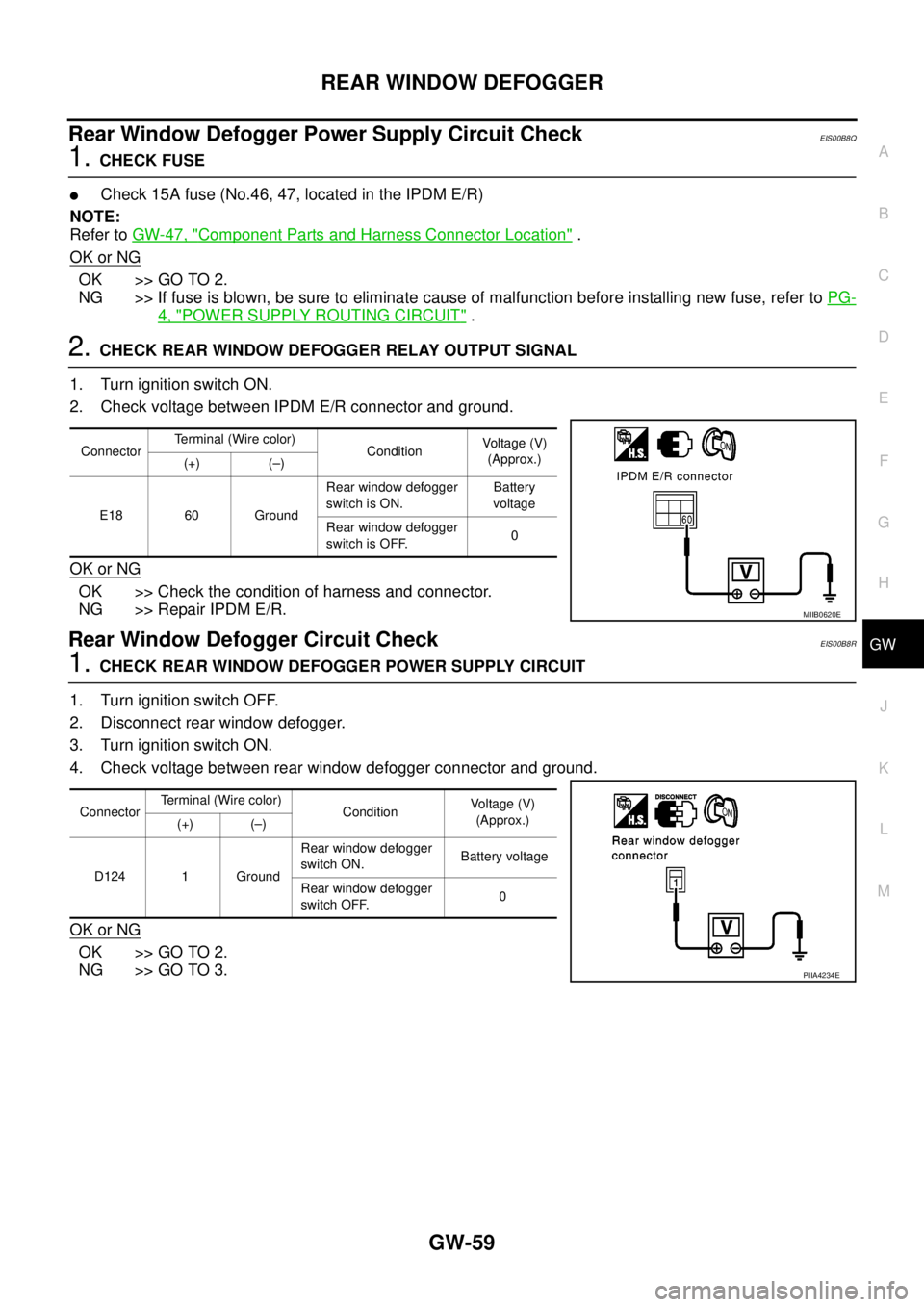
2.CHECK REAR WINDOW DEFOGGER RELAY OUTPUT SIGNAL
1. Turn ignition switch ON.
2. Check voltage between IPDM E/R connector and ground.
OK or NG
OK >> Check the condition of harness and connector.
NG >> Repair IPDM E/R.
Rear Window Defogger Circuit CheckEIS00B8R
1.CHECK REAR WINDOW DEFOGGER POWER SUPPLY CIRCUIT
1. Turn ignition switch OFF.
2. Disconnect rear window defogger.
3. Turn ignition switch ON.
4. Check voltage between rear window defogger connector and ground.
OK or NG
OK >> GO TO 2.
NG >> GO TO 3.
ConnectorTerminal (Wire color)
ConditionVoltag e (V)
(Approx.)
(+) (–)
E18 60 GroundRear window defogger
switch is ON.Battery
voltage
Rear window defogger
switch is OFF.0
MIIB0620E
ConnectorTerminal (Wire color)
ConditionVo l ta g e (V )
(Approx.)
(+) (–)
D124 1 GroundRear window defogger
switch ON.Battery voltage
Rear window defogger
switch OFF.0
PIIA4234E
Page 1746 of 3171
GW-60
REAR WINDOW DEFOGGER
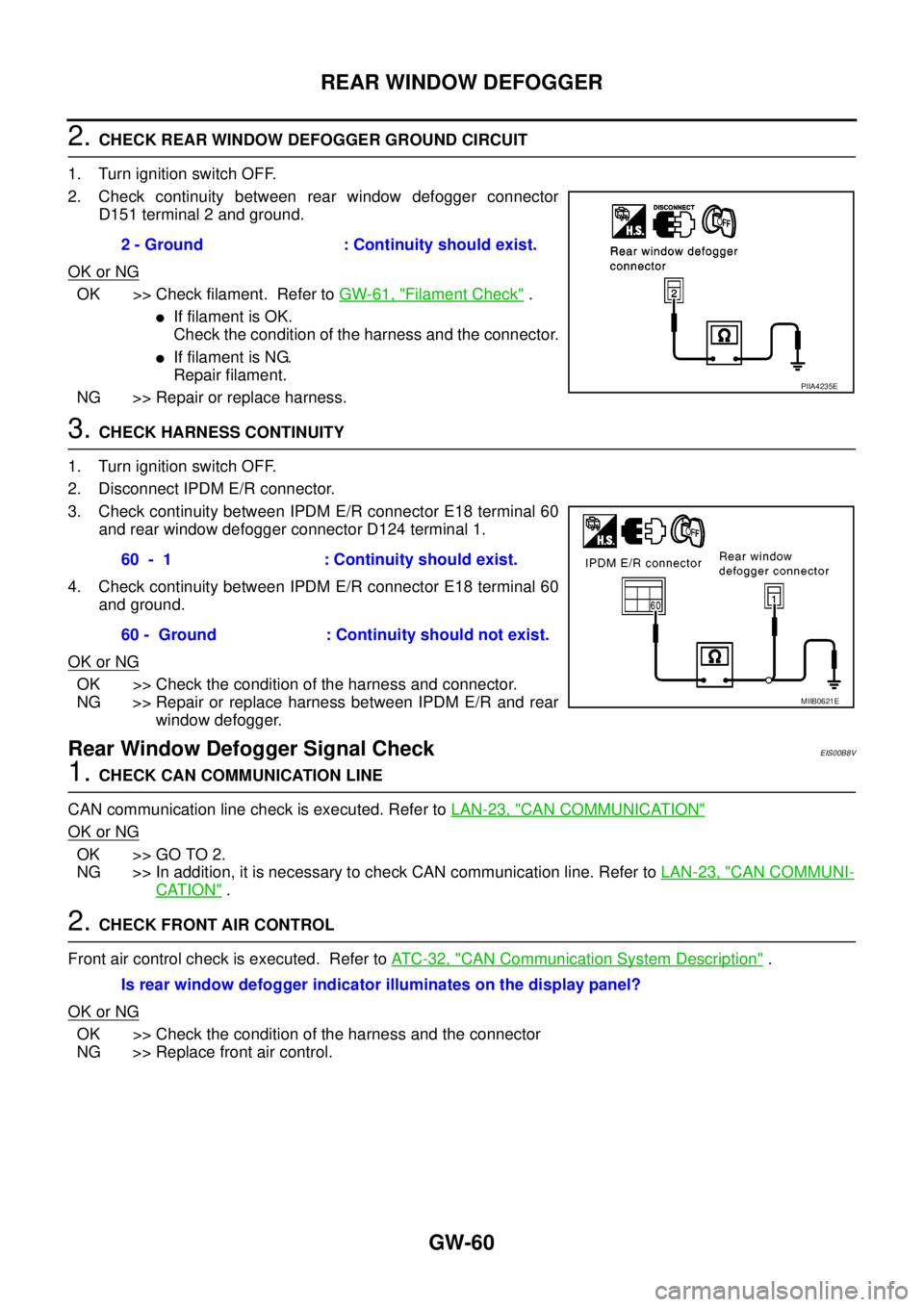
2.CHECK REAR WINDOW DEFOGGER GROUND CIRCUIT
1. Turn ignition switch OFF.
2. Check continuity between rear window defogger connector
D151 terminal 2 and ground.
OK or NG
OK >> Check filament. Refer toGW-61, "Filament Check".
lIf filament is OK.
Check the condition of the harness and the connector.
lIf filament is NG.
Repair filament.
NG >> Repair or replace harness.
3.CHECK HARNESS CONTINUITY
1. Turn ignition switch OFF.
2. Disconnect IPDM E/R connector.
3. Check continuity between IPDM E/R connector E18 terminal 60
and rear window defogger connector D124 terminal 1.
4. Check continuity between IPDM E/R connector E18 terminal 60
and ground.
OK or NG
OK >> Check the condition of the harness and connector.
NG >> Repair or replace harness between IPDM E/R and rear
window defogger.
Rear Window Defogger Signal CheckEIS00B8V
1.CHECK CAN COMMUNICATION LINE
CAN communication line check is executed. Refer toLAN-23, "
CAN COMMUNICATION"
OK or NG
OK >> GO TO 2.
NG >> In addition, it is necessary to check CAN communication line. Refer toLAN-23, "
CAN COMMUNI-
CATION".
2.CHECK FRONT AIR CONTROL
Front air control check is executed. Refer toAT C - 3 2 , "
CAN Communication System Description".
OK or NG
OK >> Check the condition of the harness and the connector
NG >> Replace front air control.2 - Ground : Continuity should exist.
PIIA4235E
60 - 1 : Continuity should exist.
60 - Ground : Continuity should not exist.
MIIB0621E
Is rear window defogger indicator illuminates on the display panel?
Page 1757 of 3171
IDX-5
A
C
D
E
F
G
H
I
J
K
L B
IDX
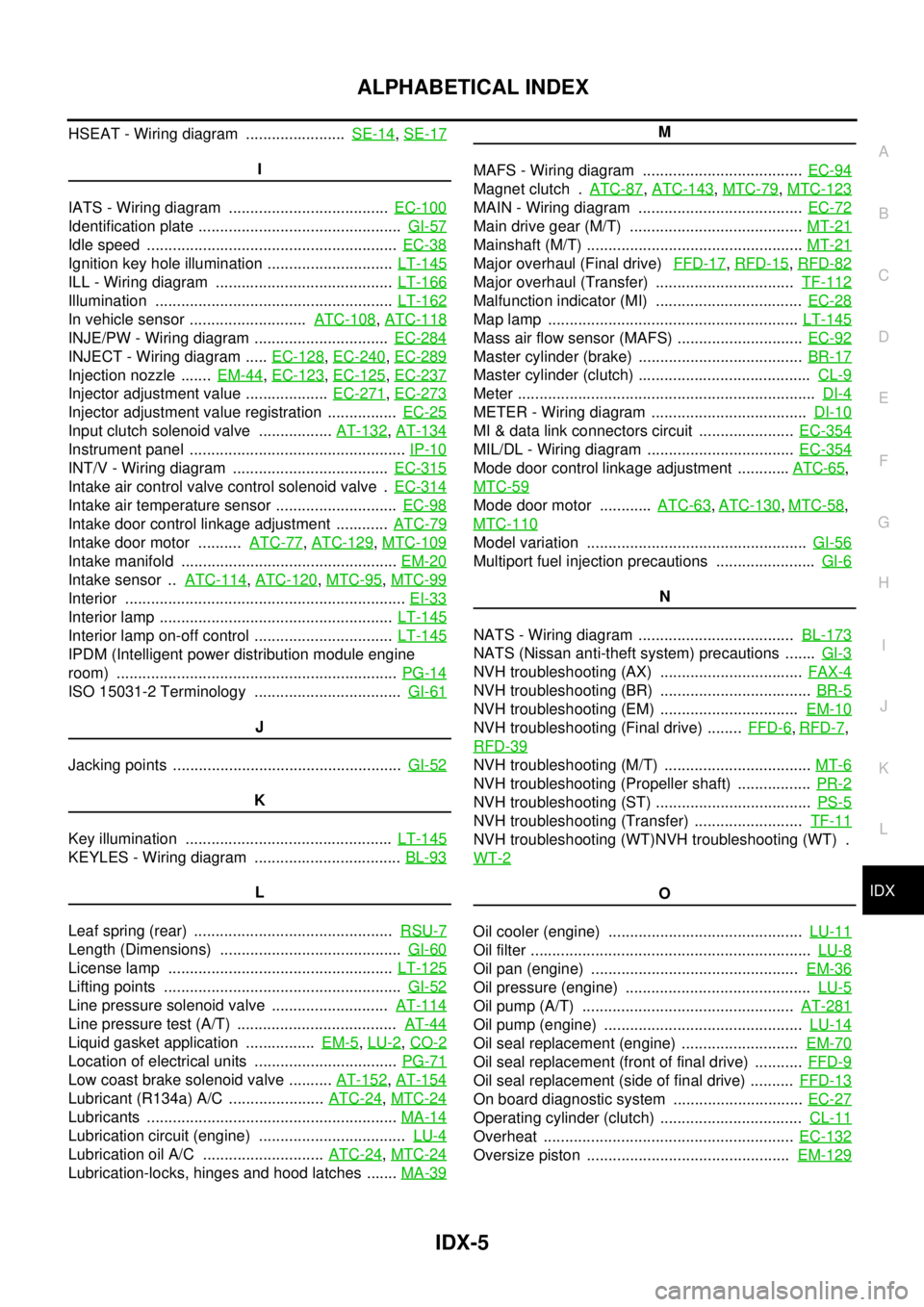
ALPHABETICAL INDEX
HSEAT - Wiring diagram .......................SE-14,SE-17
I
IATS - Wiring diagram .....................................EC-100
Identification plate ...............................................GI-57
Idle speed ..........................................................EC-38
Ignition key hole illumination .............................LT-145
ILL - Wiring diagram .........................................LT-166
Illumination .......................................................LT-162
In vehicle sensor ...........................ATC-108,ATC-118
INJE/PW - Wiring diagram ...............................EC-284
INJECT - Wiring diagram .....EC-128,EC-240,EC-289
Injection nozzle .......EM-44,EC-123,EC-125,EC-237
Injector adjustment value ...................EC-271,EC-273
Injector adjustment value registration ................EC-25
Input clutch solenoid valve .................AT-132,AT-134
Instrument panel ..................................................IP-10
INT/V - Wiring diagram ....................................EC-315
Intake air control valve control solenoid valve .EC-314
Intake air temperature sensor ............................EC-98
Intake door control linkage adjustment ............ATC-79
Intake door motor ..........ATC-77,ATC-129,MTC-109
Intake manifold ..................................................EM-20
Intake sensor ..ATC-114,ATC-120,MTC-95,MTC-99
Interior .................................................................EI-33
Interior lamp ......................................................LT-145
Interior lamp on-off control ................................LT-145
IPDM (Intelligent power distribution module engine
room) .................................................................PG-14
ISO 15031-2 Terminology ..................................GI-61
J
Jacking points .....................................................GI-52
K
Key illumination ................................................LT-145
KEYLES - Wiring diagram ..................................BL-93
L
Leaf spring (rear) ..............................................RSU-7
Length (Dimensions) ..........................................GI-60
License lamp ....................................................LT-125
Lifting points .......................................................GI-52
Line pressure solenoid valve ...........................AT-114
Line pressure test (A/T) .....................................AT-44
Liquid gasket application ................EM-5,LU-2,CO-2
Location of electrical units .................................PG-71
Low coast brake solenoid valve ..........AT-152,AT-154
Lubricant (R134a) A/C ......................ATC-24,MTC-24
Lubricants ..........................................................MA-14
Lubrication circuit (engine) ..................................LU-4
Lubrication oil A/C ............................ATC-24,MTC-24
Lubrication-locks, hinges and hood latches .......MA-39
M
MAFS - Wiring diagram .....................................EC-94
Magnet clutch .ATC-87,ATC-143,MTC-79,MTC-123
MAIN - Wiring diagram ......................................EC-72
Main drive gear (M/T) ........................................MT-21
Mainshaft (M/T) ..................................................MT-21
Major overhaul (Final drive)FFD-17,RFD-15,RFD-82
Major overhaul (Transfer) ................................TF-112
Malfunction indicator (MI) ..................................EC-28
Map lamp ..........................................................LT-145
Mass air flow sensor (MAFS) .............................EC-92
Master cylinder (brake) ......................................BR-17
Master cylinder (clutch) ........................................CL-9
Meter .....................................................................DI-4
METER - Wiring diagram ....................................DI-10
MI & data link connectors circuit ......................EC-354
MIL/DL - Wiring diagram ..................................EC-354
Mode door control linkage adjustment ............ATC-65,
MTC-59
Mode door motor ............ATC-63,ATC-130,MTC-58,
MTC-110
Model variation ...................................................GI-56
Multiport fuel injection precautions .......................GI-6
N
NATS - Wiring diagram ....................................BL-173
NATS (Nissan anti-theft system) precautions .......GI-3
NVH troubleshooting (AX) .................................FAX-4
NVH troubleshooting (BR) ...................................BR-5
NVH troubleshooting (EM) ................................EM-10
NVH troubleshooting (Final drive) ........FFD-6,RFD-7,
RFD-39
NVH troubleshooting (M/T) ..................................MT-6
NVH troubleshooting (Propeller shaft) .................PR-2
NVH troubleshooting (ST) ....................................PS-5
NVH troubleshooting (Transfer) .........................TF-11
NVH troubleshooting (WT)NVH troubleshooting (WT) .
WT-2
O
Oil cooler (engine) .............................................LU-11
Oil filter .................................................................LU-8
Oil pan (engine) ................................................EM-36
Oil pressure (engine) ...........................................LU-5
Oil pump (A/T) .................................................AT-281
Oil pump (engine) ..............................................LU-14
Oil seal replacement (engine) ...........................EM-70
Oil seal replacement (front of final drive) ...........FFD-9
Oil seal replacement (side of final drive) ..........FFD-13
On board diagnostic system ..............................EC-27
Operating cylinder (clutch) .................................CL-11
Overheat ..........................................................EC-132
Oversize piston ...............................................EM-129
Page 1761 of 3171

IP-2
PRECAUTIONS
PRECAUTIONS
PFP:00001
Precautions for Supplemental Restraint System (SRS) “AIR BAG” and “SEAT
BELT PRE-TENSIONER”
EIS00DZ8
The Supplemental Restraint System such as “AIR BAG” and “SEAT BELT PRE-TENSIONER”, used along
with a front seat belt, helps to reduce the risk or severity of injury to the driver and front passenger for certain
types of collision. Information necessary to service the system safely is included in the SRS and SB section of
this Service Manual.
WARNING:
lTo avoid rendering the SRS inoperative, which could increase the risk of personal injury or death
in the event of a collision which would result in air bag inflation, all maintenance must be per-
formed by an authorized NISSAN/INFINITI dealer.
lImproper maintenance, including incorrect removal and installation of the SRS, can lead to per-
sonal injury caused by unintentional activation of the system. For removal of Spiral Cable and Air
Bag Module, see the SRS section.
lDo not use electrical test equipment on any circuit related to the SRS unless instructed to in this
Service Manual. SRS wiring harnesses can be identified by yellow and/or orange harnesses or
harness connectors.
Precautions for SRS “AIR BAG” and “SEAT BELT PRE-TENSIONER” ServiceEIS00DZ4
lDo not use electrical test equipment to check SRS circuits unless instructed to in this Service Manual.
lBefore servicing the SRS, turn ignition switch OFF, disconnect both battery cables and wait at least 3 min-
utes.
For approximately 3 minutes after the cables are removed, it is still possible for the air bag and seat belt
pre-tensioner to deploy. Therefore, do not work on any SRS connectors or wires until at least 3 minutes
have passed.
lThe air bag diagnosis sensor unit must always be installed with the arrow marks “Ü” pointing toward the
front of the vehicle for proper operation. Also check the air bag diagnosis sensor unit for cracks, deformi-
ties or rust before installation and replace as required.
lThe spiral cable must be aligned with the neutral position since its rotations are limited. Do not attempt to
turn steering wheel or column after removal of steering gear.
lHandle air bag module carefully. Always place driver and front passenger air bag modules with the pad
side facing upward and seat mounted front side air bag module standing with the stud bolt side facing
down.
lConduct self-diagnosis to check entire SRS for proper function after replacing any components.
lAfter air bag inflates, the front instrument panel assembly should be replaced if damaged.