steering wheel NISSAN NAVARA 2005 Repair Repair Manual
[x] Cancel search | Manufacturer: NISSAN, Model Year: 2005, Model line: NAVARA, Model: NISSAN NAVARA 2005Pages: 3171, PDF Size: 49.59 MB
Page 2635 of 3171
PS-8
STEERING WHEEL
STEERING WHEEL
PFP:48430
On-Vehicle Inspection and ServiceEGS001LG
CHECKING CONDITION OF INSTALLATION
lCheck installation conditions of steering gear assembly, front suspension assembly, axle and steering col-
umn assembly.
lCheck if movement exists when steering wheel is moved up and down, to the left and right and to the axial
direction.
lCheck steering gear assembly mounting bolts and nuts for looseness. Refer toPS-14, "COMPONENT".
CHECKING STEERING WHEEL PLAY
lTurn steering wheel so that front wheels come to the straight-ahead position. Start engine and lightly turn
steering wheel to the left and right until front wheels start to move. Measure steering wheel movement on
the outer circumference.
lWhen the measurement value is outside the standard value, check backlash for each joint of steering col-
umn assembly and installation condition of steering gear assembly.
CHECKING NEUTRAL POSITION STEERING WHEEL
lMake sure that steering gear assembly, steering column assembly and steering wheel are installed in the
correct position.
lPerform neutral position inspection after wheel alignment. Refer toFSU-7, "Front Wheel Alignment".
lSet vehicle to the straight-ahead position and confirm steering wheel is in the neutral position.
lLoosen outer socket lock nut and turn inner socket to left and right equally to make fine adjustment if
steering wheel is not in the neutral position.
CHECKING STEERING WHEEL TURNING FORCE
1. Park vehicle on a level and dry surface, set parking brake.
2. Start engine.
3. Bring power steering fluid up to adequate operating temperature. [Make sure temperature of fluid is
approximately 50 to 80°C(122to176°F).]
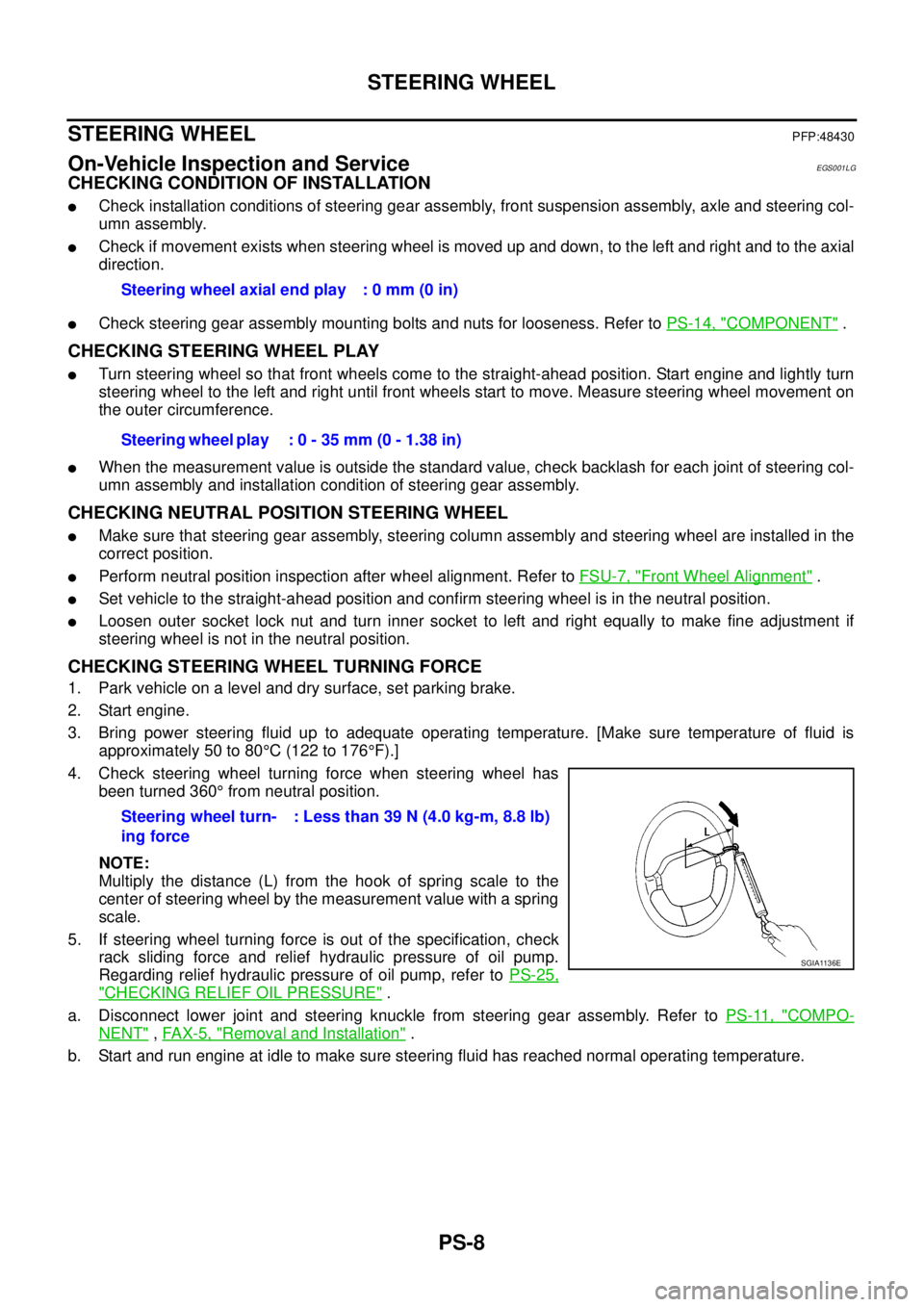
4. Check steering wheel turning force when steering wheel has
been turned 360°from neutral position.
NOTE:
Multiply the distance (L) from the hook of spring scale to the
center of steering wheel by the measurement value with a spring
scale.
5. If steering wheel turning force is out of the specification, check
rack sliding force and relief hydraulic pressure of oil pump.
Regarding relief hydraulic pressure of oil pump, refer toPS-25,
"CHECKING RELIEF OIL PRESSURE".
a. Disconnect lower joint and steering knuckle from steering gear assembly. Refer toPS-11, "
COMPO-
NENT",FAX-5, "Removal and Installation".
b. Start and run engine at idle to make sure steering fluid has reached normal operating temperature.Steering wheel axial end play : 0 mm (0 in)
Steering wheel play : 0 - 35 mm (0 - 1.38 in)
Steering wheel turn-
ing force: Less than 39 N (4.0 kg-m, 8.8 lb)
SGIA1136E
Page 2636 of 3171
STEERING WHEEL
PS-9
C
D
E
F
H
I
J
K
L
MA
B
PS
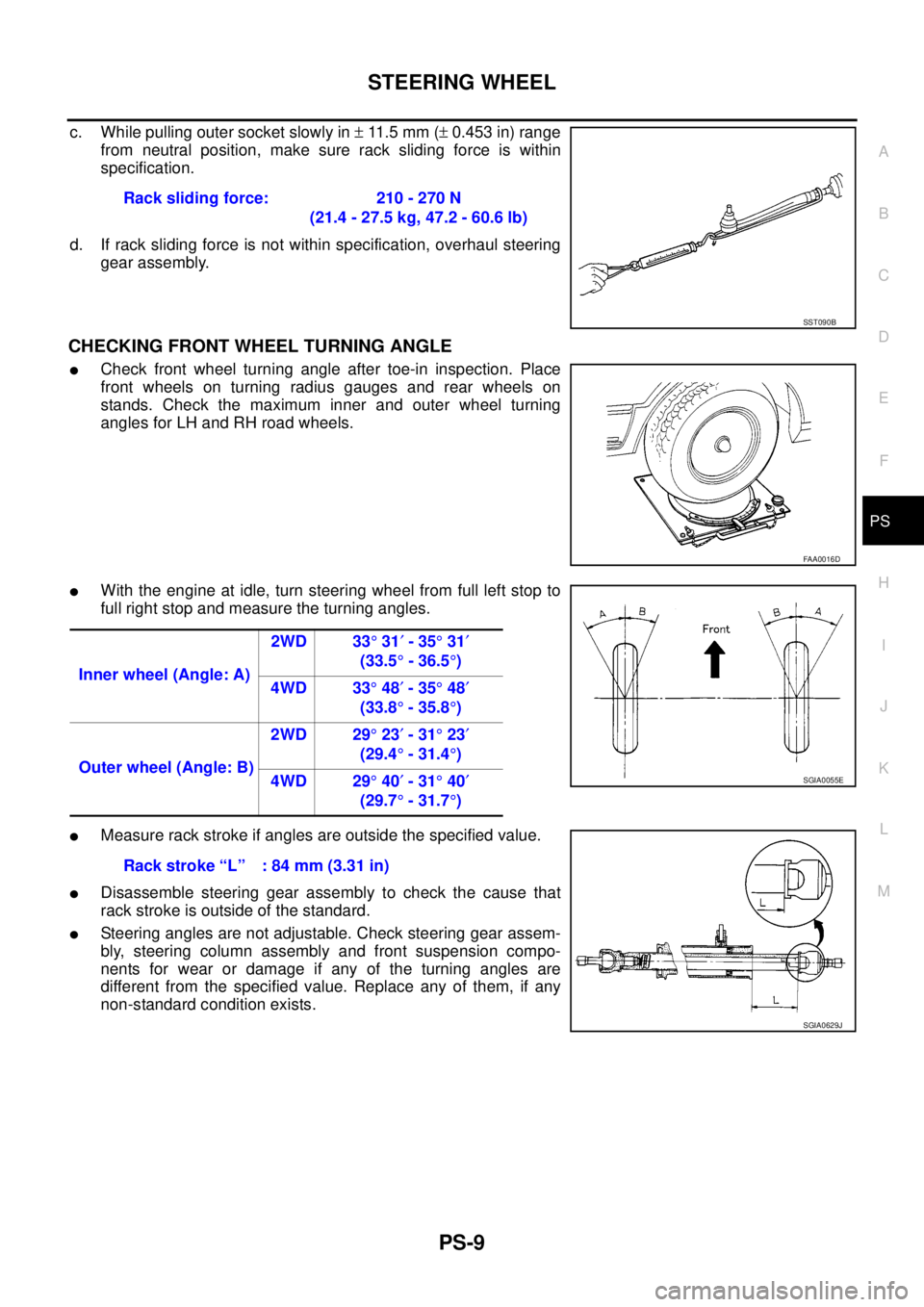
c. While pulling outer socket slowly in±11 . 5 m m (±0.453 in) range
from neutral position, make sure rack sliding force is within
specification.
d. If rack sliding force is not within specification, overhaul steering
gear assembly.
CHECKING FRONT WHEEL TURNING ANGLE
lCheck front wheel turning angle after toe-in inspection. Place
front wheels on turning radius gauges and rear wheels on
stands. Check the maximum inner and outer wheel turning
angles for LH and RH road wheels.
lWith the engine at idle, turn steering wheel from full left stop to
full right stop and measure the turning angles.
lMeasure rack stroke if angles are outside the specified value.
lDisassemble steering gear assembly to check the cause that
rack stroke is outside of the standard.
lSteering angles are not adjustable. Check steering gear assem-
bly, steering column assembly and front suspension compo-
nents for wear or damage if any of the turning angles are
different from the specified value. Replace any of them, if any
non-standard condition exists.Rack sliding force: 210 - 270 N
(21.4 - 27.5 kg, 47.2 - 60.6 lb)
SST090B
FAA0016D
Inner wheel (Angle: A)2WD 33°31¢-35°31¢
(33.5°-36.5°)
4WD 33°48¢-35°48¢
(33.8°-35.8°)
Outer wheel (Angle: B)2WD 29°23¢-31°23¢
(29.4°-31.4°)
4WD 29°40¢-31°40¢
(29.7°-31.7°)
SGIA0055E
Rack stroke “L” : 84 mm (3.31 in)
SGIA0629J
Page 2637 of 3171
PS-10
STEERING WHEEL
Removal and Installation
EGS001LH
REMOVAL
NOTE:
When reconnecting spiral cable, fix cable with a tape so that fixing case and rotating part keep aligned. This
will omit neutral position alignment procedure during spiral installation.
1. Set vehicle to the straight-ahead position.
2. Remove driver air bag module. Refer toSRS-36, "
DRIVER AIR BAG MODULE".
3. Remove steering wheel lock nut after steering is locked.
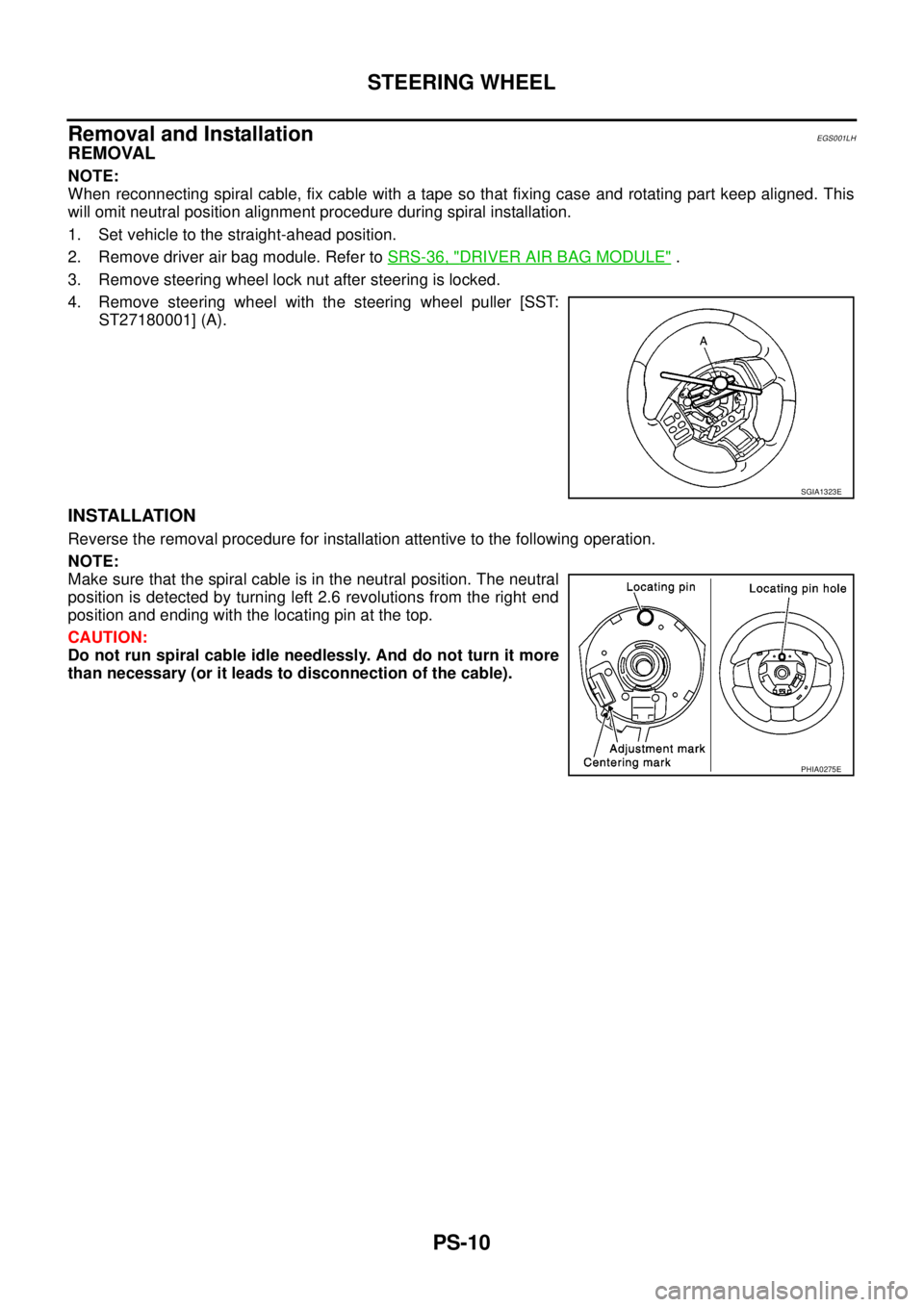
4. Remove steering wheel with the steering wheel puller [SST:
ST27180001] (A).
INSTALLATION
Reverse the removal procedure for installation attentive to the following operation.
NOTE:
Make sure that the spiral cable is in the neutral position. The neutral
position is detected by turning left 2.6 revolutions from the right end
position and ending with the locating pin at the top.
CAUTION:
Do not run spiral cable idle needlessly. And do not turn it more
than necessary (or it leads to disconnection of the cable).
SGIA1323E
PHIA0275E
Page 2638 of 3171
STEERING COLUMN
PS-11
C
D
E
F
H
I
J
K
L
MA
B
PS
STEERING COLUMNPFP:48810
Removal and InstallationEGS001LI
COMPONENT
CAUTION:
lDo not give axial impact to steering column assembly during removal and installation.
lDo not move steering gear assembly when removing steering column assembly.
REMOVAL
1. Set vehicle to the straight ahead-position.
2. Remove driver air bag module. Refer toSRS-36, "
DRIVER AIR BAG MODULE".
3. Remove steering wheel. Refer toPS-10, "
Removal and Installation".
4. Remove steering column cover (upper and lower). Refer toIP-10, "
INSTRUMENT PANEL ASSEMBLY".
5. Remove combination switch & spiral cable. Refer toSRS-38, "
SPIRAL CABLE".
6. Remove lower instrument panel LH. Refer toIP-10, "
INSTRUMENT PANEL ASSEMBLY".
7. Disconnect each switch connectors installed to steering column assembly, and then disconnect harness
from steering column assembly.
8. Remove fixing bolt of upper joint (steering column assembly side), and then remove upper joint from
steering column assembly.
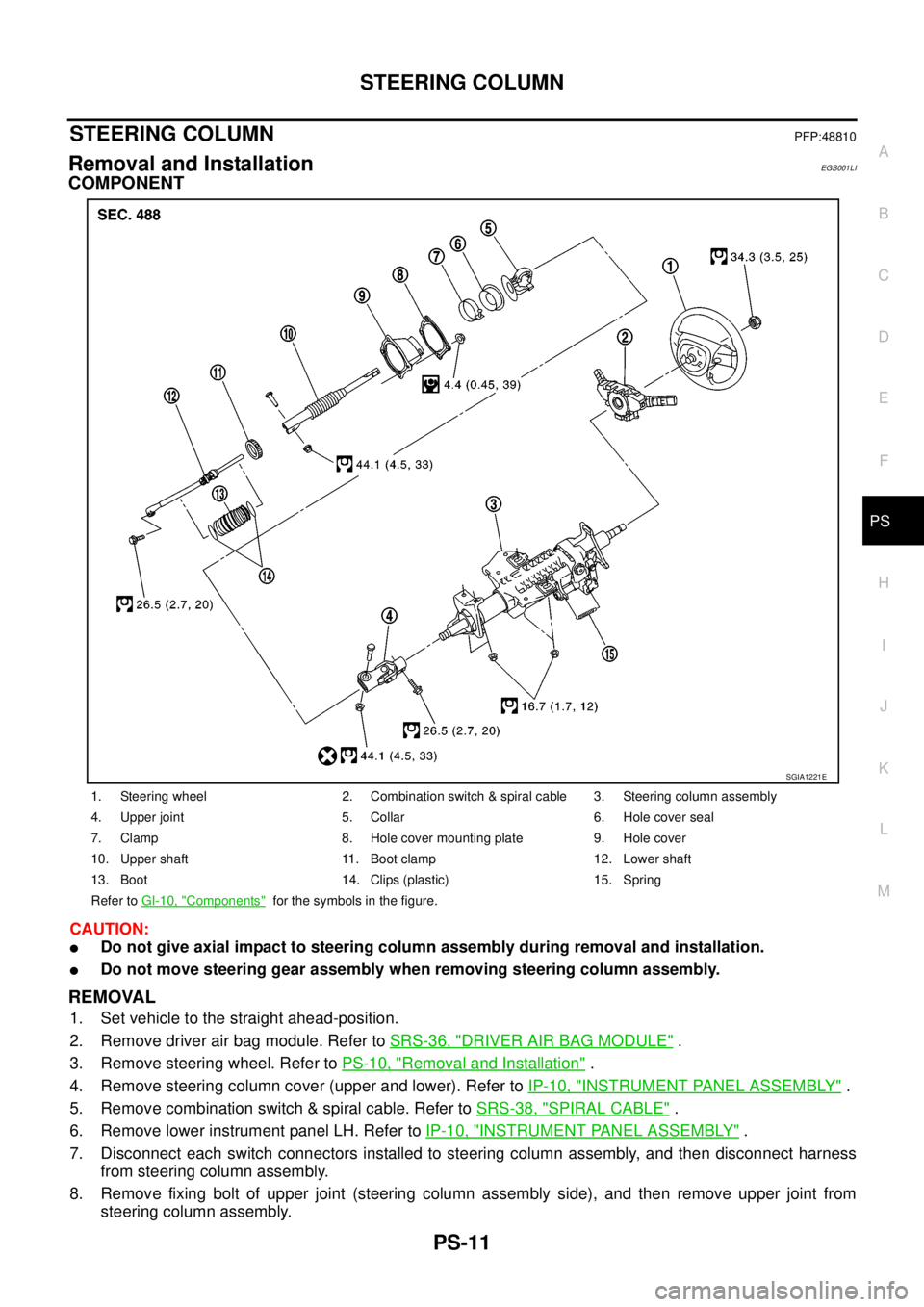
1. Steering wheel 2. Combination switch & spiral cable 3. Steering column assembly
4. Upper joint 5. Collar 6. Hole cover seal
7. Clamp 8. Hole cover mounting plate 9. Hole cover
10. Upper shaft 11. Boot clamp 12. Lower shaft
13. Boot 14. Clips (plastic) 15. Spring
Refer toGI-10, "
Components"for the symbols in the figure.
SGIA1221E
Page 2640 of 3171
STEERING COLUMN
PS-13
C
D
E
F
H
I
J
K
L
MA
B
PS
INSPECTION AFTER INSTALLATION
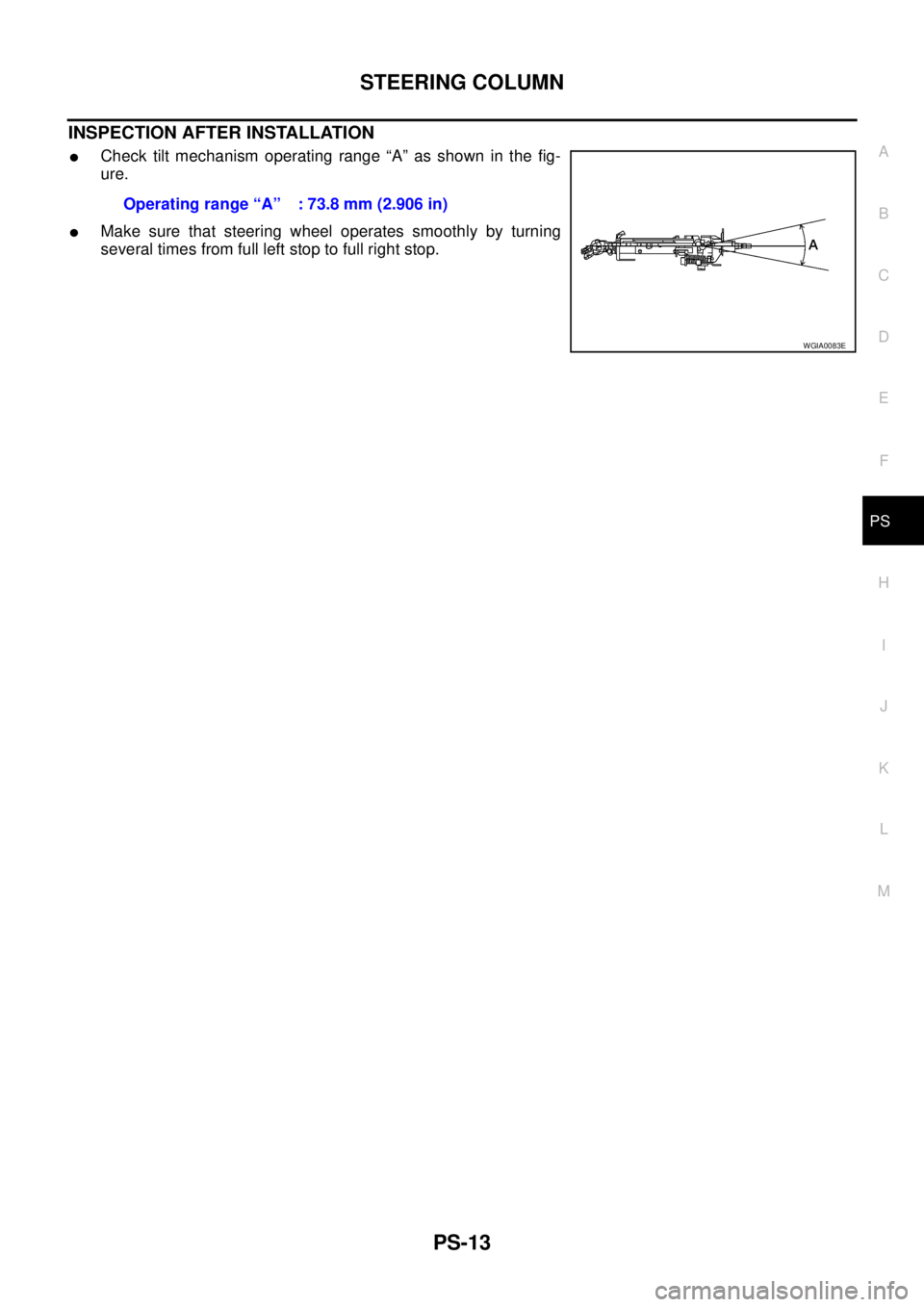
lCheck tilt mechanism operating range “A” as shown in the fig-
ure.
lMake sure that steering wheel operates smoothly by turning
several times from full left stop to full right stop.Operatingrange“A” :73.8mm(2.906in)
WGIA0083E
Page 2641 of 3171
PS-14
POWER STEERING GEAR AND LINKAGE
POWER STEERING GEAR AND LINKAGE
PFP:49001
Removal and InstallationEGS001LJ
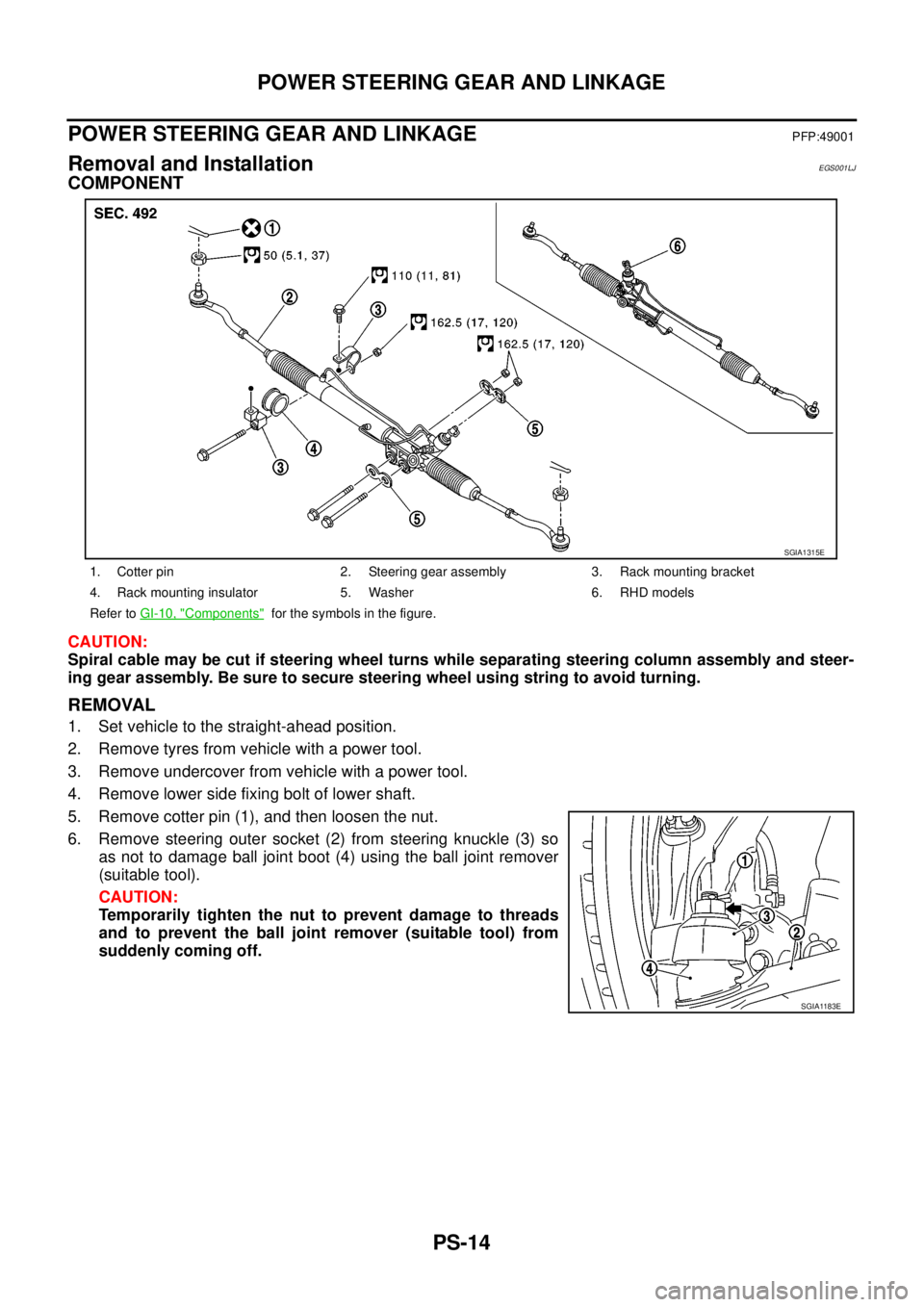
COMPONENT
CAUTION:
Spiral cable may be cut if steering wheel turns while separating steering column assembly and steer-
ing gear assembly. Be sure to secure steering wheel using string to avoid turning.
REMOVAL
1. Set vehicle to the straight-ahead position.
2. Remove tyres from vehicle with a power tool.
3. Remove undercover from vehicle with a power tool.
4. Remove lower side fixing bolt of lower shaft.
5. Remove cotter pin (1), and then loosen the nut.
6. Remove steering outer socket (2) from steering knuckle (3) so
as not to damage ball joint boot (4) using the ball joint remover
(suitable tool).
CAUTION:
Temporarily tighten the nut to prevent damage to threads
and to prevent the ball joint remover (suitable tool) from
suddenly coming off.
1. Cotter pin 2. Steering gear assembly 3. Rack mounting bracket
4. Rack mounting insulator 5. Washer 6. RHD models
Refer toGI-10, "
Components"for the symbols in the figure.
SGIA1315E
SGIA1183E
Page 2642 of 3171
POWER STEERING GEAR AND LINKAGE
PS-15
C
D
E
F
H
I
J
K
L
MA
B
PS
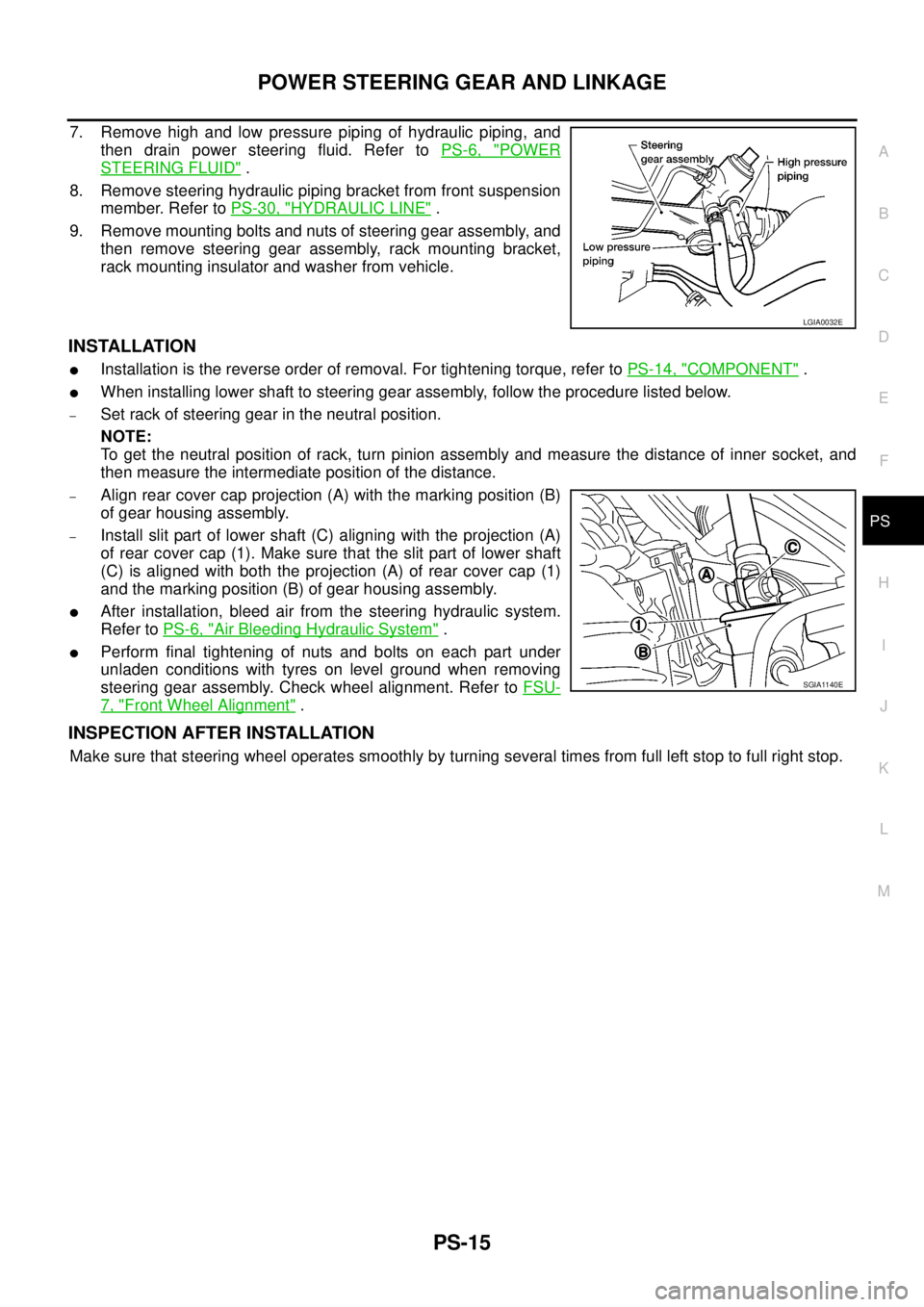
7. Remove high and low pressure piping of hydraulic piping, and
then drain power steering fluid. Refer toPS-6, "
POWER
STEERING FLUID".
8. Remove steering hydraulic piping bracket from front suspension
member. Refer toPS-30, "
HYDRAULIC LINE".
9. Remove mounting bolts and nuts of steering gear assembly, and
then remove steering gear assembly, rack mounting bracket,
rack mounting insulator and washer from vehicle.
INSTALLATION
lInstallation is the reverse order of removal. For tightening torque, refer toPS-14, "COMPONENT".
lWhen installing lower shaft to steering gear assembly, follow the procedure listed below.
–Set rack of steering gear in the neutral position.
NOTE:
To get the neutral position of rack, turn pinion assembly and measure the distance of inner socket, and
then measure the intermediate position of the distance.
–Align rear cover cap projection (A) with the marking position (B)
of gear housing assembly.
–Install slit part of lower shaft (C) aligning with the projection (A)
of rear cover cap (1). Make sure that the slit part of lower shaft
(C) is aligned with both the projection (A) of rear cover cap (1)
and the marking position (B) of gear housing assembly.
lAfter installation, bleed air from the steering hydraulic system.
Refer toPS-6, "
Air Bleeding Hydraulic System".
lPerform final tightening of nuts and bolts on each part under
unladen conditions with tyres on level ground when removing
steering gear assembly. Check wheel alignment. Refer toFSU-
7, "Front Wheel Alignment".
INSPECTION AFTER INSTALLATION
Make sure that steering wheel operates smoothly by turning several times from full left stop to full right stop.
LGIA0032E
SGIA1140E
Page 2661 of 3171
PS-34
SERVICE DATA AND SPECIFICATIONS (SDS)
SERVICE DATA AND SPECIFICATIONS (SDS)
PFP:00030
Steering WheelEGS001LR
Steering AngleEGS001LS
Steering ColumnEGS001LT
Steering Outer Socket and Inner SocketEGS001LU
Steering wheel axial end play 0 mm (0 in)
Steering wheel play 0 - 35 mm (0 - 1.38 in)
Inner wheel
Degree minute (Decimal degree)2WD 33°31¢-35°31¢(33.5°- 36.5°)
4WD 33°48¢-35°48¢(33.8°- 35.8°)
Outer wheel
Degree minute (Decimal degree)2WD 29°23¢-31°23¢(29.4°- 31.4°)
4WD 29°40¢-31°40¢(29.7°- 31.7°)
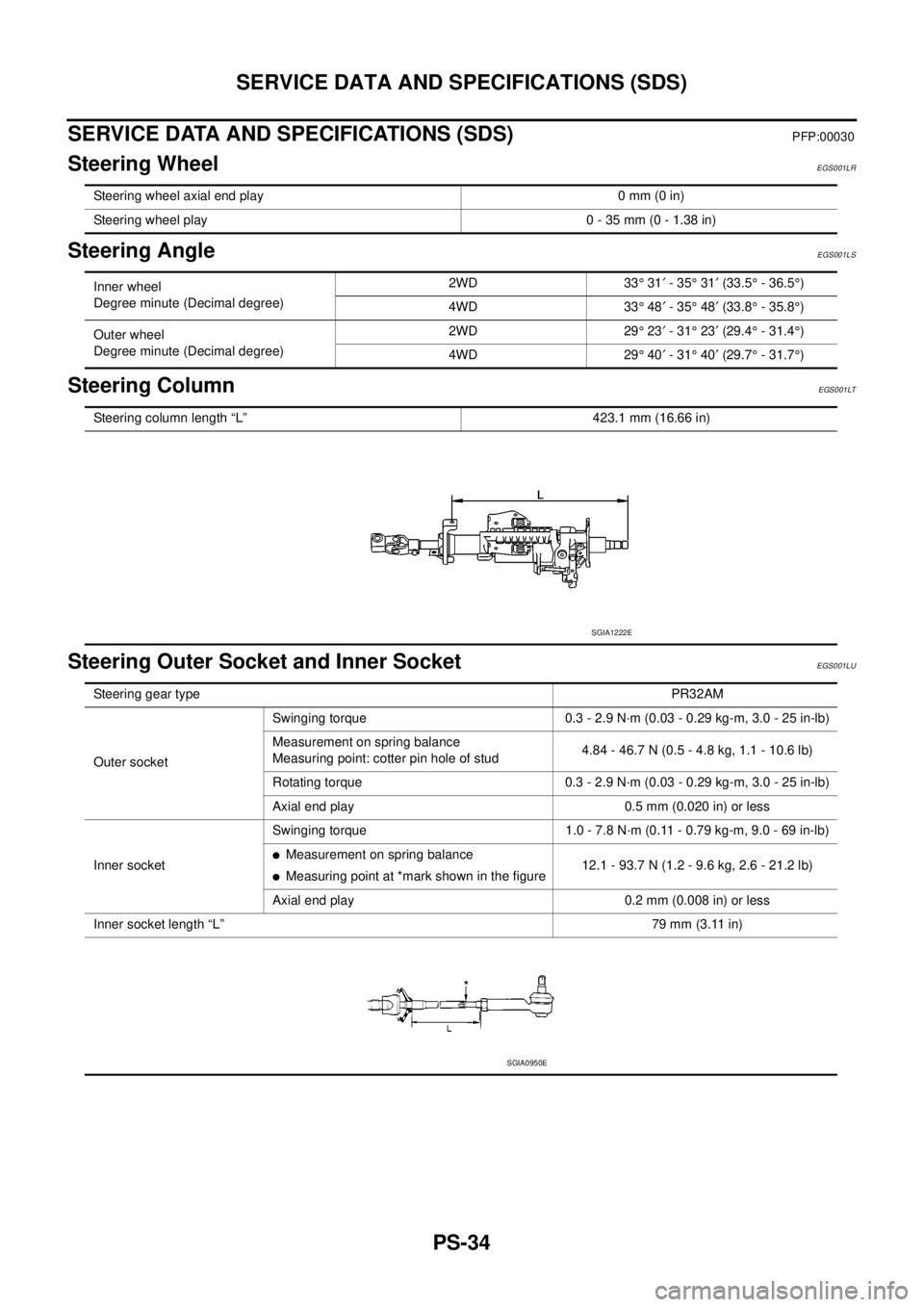
Steering column length “L” 423.1 mm (16.66 in)
SGIA1222E
Steering gear typePR32AM
Outer socketSwinging torque 0.3 - 2.9 N·m (0.03 - 0.29 kg-m, 3.0 - 25 in-lb)
Measurement on spring balance
Measuring point: cotter pin hole of stud4.84 - 46.7 N (0.5 - 4.8 kg, 1.1 - 10.6 lb)
Rotating torque 0.3 - 2.9 N·m (0.03 - 0.29 kg-m, 3.0 - 25 in-lb)
Axial end play 0.5 mm (0.020 in) or less
Inner socketSwinging torque 1.0 - 7.8 N·m (0.11 - 0.79 kg-m, 9.0 - 69 in-lb)
lMeasurement on spring balance
lMeasuring point at *mark shown in the figure12.1 - 93.7 N (1.2 - 9.6 kg, 2.6 - 21.2 lb)
Axial end play 0.2 mm (0.008 in) or less
Inner socket length “L”79 mm (3.11 in)
SGIA0950E
Page 2710 of 3171
![NISSAN NAVARA 2005 Repair Repair Manual NOISE, VIBRATION, AND HARSHNESS (NVH) TROUBLESHOOTING
RFD-7
[WITH LIMITED SLIP DIFFERENTIAL]
C
E
F
G
H
I
J
K
L
MA
B
RFD
NOISE, VIBRATION, AND HARSHNESS (NVH) TROUBLESHOOTINGPFP:00003
NVH Troubleshooti](/img/5/57362/w960_57362-2709.png "NISSAN NAVARA 2005 Repair Repair Manual NOISE, VIBRATION, AND HARSHNESS (NVH) TROUBLESHOOTING
RFD-7
[WITH LIMITED SLIP DIFFERENTIAL]
C
E
F
G
H
I
J
K
L
MA
B
RFD
NOISE, VIBRATION, AND HARSHNESS (NVH) TROUBLESHOOTINGPFP:00003
NVH Troubleshooti")
NOISE, VIBRATION, AND HARSHNESS (NVH) TROUBLESHOOTING
RFD-7
[WITH LIMITED SLIP DIFFERENTIAL]
C
E
F
G
H
I
J
K
L
MA
B
RFD
NOISE, VIBRATION, AND HARSHNESS (NVH) TROUBLESHOOTINGPFP:00003
NVH Troubleshooting ChartEDS00392
Use the chart below to help you find the cause of the symptom. If necessary, repair or replace these parts.
´: ApplicableReference page
RFD-22, "
INSPECTION AFTER DISASSEMBLY
"
RFD-16, "
Tooth Contact
"
RFD-22, "
INSPECTION AFTER DISASSEMBLY
"
RFD-17, "
Backlash
"
RFD-18, "
Companion Flange Runout
"
RFD-9, "
Checking Differential Gear Oil
"
PR-2, "
NVH Troubleshooting Chart
"
RAX-5, "
NVH Troubleshooting Chart
",RSU-3, "
NVH Troubleshooting Chart
"
WT-2, "
NVH Troubleshooting Chart
"
RAX-5, "
NVH Troubleshooting Chart
"
BR-5, "
NVH Troubleshooting Chart
"
PS-5, "
NVH Troubleshooting Chart
"
Possible cause and SUSPECTED PARTS
Gear tooth rough
Gear contact improper
Tooth surfaces worn
Backlash incorrect
Companion flange excessive runout
Gear oil improper
PROPELLER SHAFT
AXLE AND SUSPENSION
TIRES
ROAD WHEEL
AXLE SHAFT
BRAKES
STEERING
Symptom Noise´´´´´´´´´´´´´
Page 2742 of 3171
![NISSAN NAVARA 2005 Repair Repair Manual NOISE, VIBRATION AND HARSHNESS (NVH) TROUBLESHOOTING
RFD-39
[WITH ELECTRONIC LOCKING DIFFERENTIAL]
C
E
F
G
H
I
J
K
L
MA
B
RFD
NOISE, VIBRATION AND HARSHNESS (NVH) TROUBLESHOOTINGPFP:00003
NVH Troubles](/img/5/57362/w960_57362-2741.png "NISSAN NAVARA 2005 Repair Repair Manual NOISE, VIBRATION AND HARSHNESS (NVH) TROUBLESHOOTING
RFD-39
[WITH ELECTRONIC LOCKING DIFFERENTIAL]
C
E
F
G
H
I
J
K
L
MA
B
RFD
NOISE, VIBRATION AND HARSHNESS (NVH) TROUBLESHOOTINGPFP:00003
NVH Troubles")
NOISE, VIBRATION AND HARSHNESS (NVH) TROUBLESHOOTING
RFD-39
[WITH ELECTRONIC LOCKING DIFFERENTIAL]
C
E
F
G
H
I
J
K
L
MA
B
RFD
NOISE, VIBRATION AND HARSHNESS (NVH) TROUBLESHOOTINGPFP:00003
NVH Troubleshooting ChartEDS003AM
Use the chart below to help you find the cause of the symptom. If necessary, repair or replace these parts.
´: ApplicableReference page
RFD-90, "
INSPECTION AFTER DISASSEMBLY
"
RFD-83, "
Tooth Contact
"
RFD-90, "
INSPECTION AFTER DISASSEMBLY
"
RFD-84, "
Backlash
"
RFD-85, "
Companion Flange Runout
"
RFD-40, "
Checking Differential Gear Oil
"
PR-2, "
NVH Troubleshooting Chart
"
RAX-5, "
NVH Troubleshooting Chart
",RSU-3, "
NVH Troubleshooting Chart
"
WT-2, "
NVH Troubleshooting Chart
"
RAX-5, "
NVH Troubleshooting Chart
"
BR-5, "
NVH Troubleshooting Chart
"
PS-5, "
NVH Troubleshooting Chart
"
Possible cause and SUSPECTED PARTS
Gear tooth rough
Gear contact improper
Tooth surfaces worn
Backlash incorrect
Companion flange excessive runout
Gear oil improper
PROPELLER SHAFT
AXLE AND SUSPENSION
TIRES
ROAD WHEEL
AXLE SHAFT
BRAKES
STEERING
Symptom Noise´´´´´´´´´´´´´