battery NISSAN NAVARA 2005 Repair Repair Manual
[x] Cancel search | Manufacturer: NISSAN, Model Year: 2005, Model line: NAVARA, Model: NISSAN NAVARA 2005Pages: 3171, PDF Size: 49.59 MB
Page 694 of 3171
BL-110
MULTI-REMOTE CONTROL SYSTEM
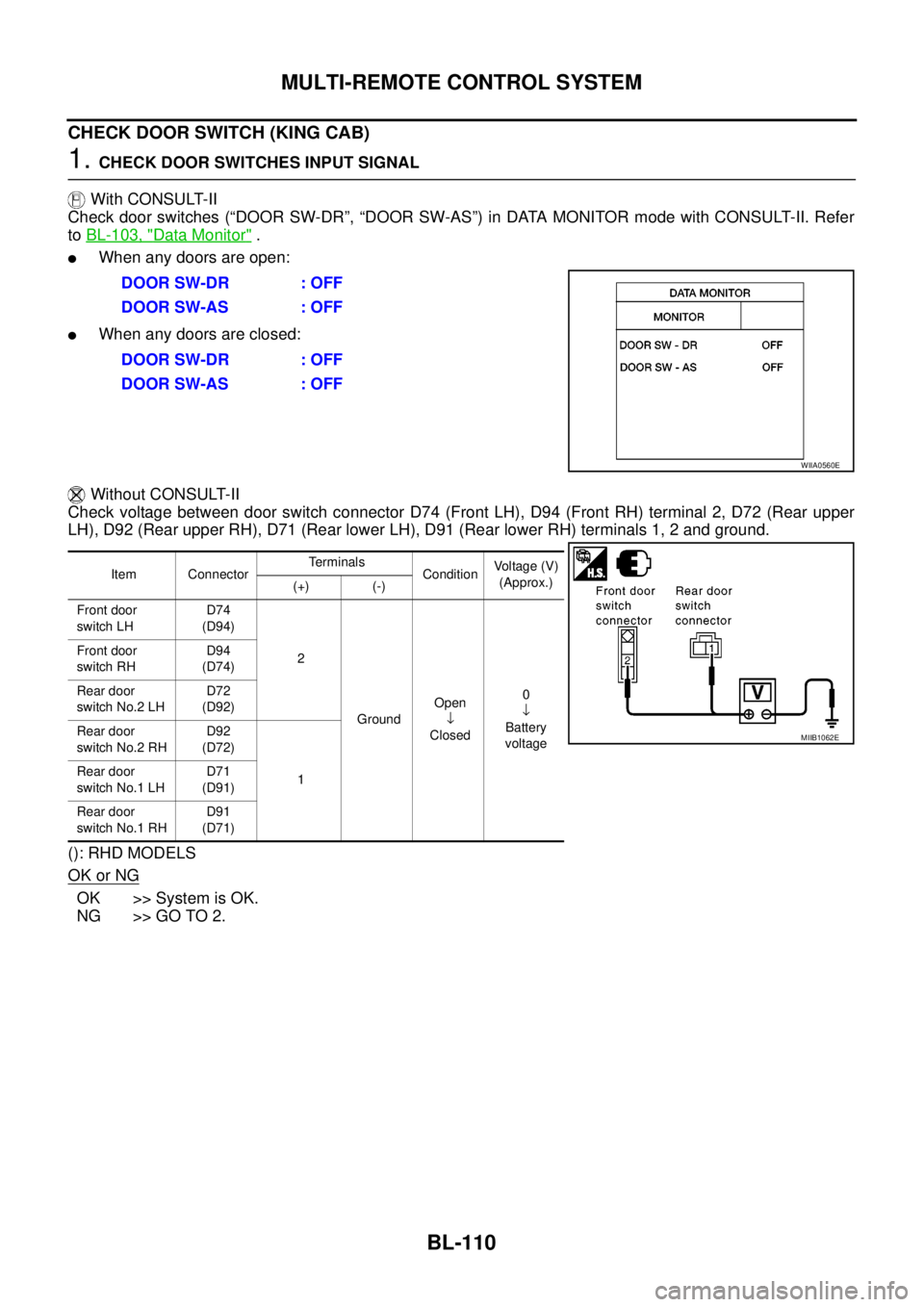
CHECK DOOR SWITCH (KING CAB)
1.CHECK DOOR SWITCHES INPUT SIGNAL
With CONSULT-II
Check door switches (“DOOR SW-DR”, “DOOR SW-AS”) in DATA MONITOR mode with CONSULT-II. Refer
toBL-103, "
Data Monitor".
lWhen any doors are open:
lWhen any doors are closed:
Without CONSULT-II
Check voltage between door switch connector D74 (Front LH), D94 (Front RH) terminal 2, D72 (Rear upper
LH), D92 (Rear upper RH), D71 (Rear lower LH), D91 (Rear lower RH) terminals 1, 2 and ground.
(): RHD MODELS
OK or NG
OK >> System is OK.
NG >> GO TO 2.DOOR SW-DR : OFF
DOOR SW-AS : OFF
DOOR SW-DR : OFF
DOOR SW-AS : OFF
WIIA0560E
Item ConnectorTerminals
ConditionVoltage (V)
(Approx.)
(+) (-)
Front door
switch LHD74
(D94)
2
GroundOpen
¯
Closed0
¯
Battery
voltage Front door
switch RHD94
(D74)
Rear door
switch No.2 LHD72
(D92)
Rear door
switch No.2 RHD92
(D72)
1 Rear door
switch No.1 LHD71
(D91)
Rear door
switch No.1 RHD91
(D71)
MIIB1062E
Page 697 of 3171
MULTI-REMOTE CONTROL SYSTEM
BL-113
C
D
E
F
G
H
J
K
L
MA
B
BL
Check Key SwitchEIS00DBR
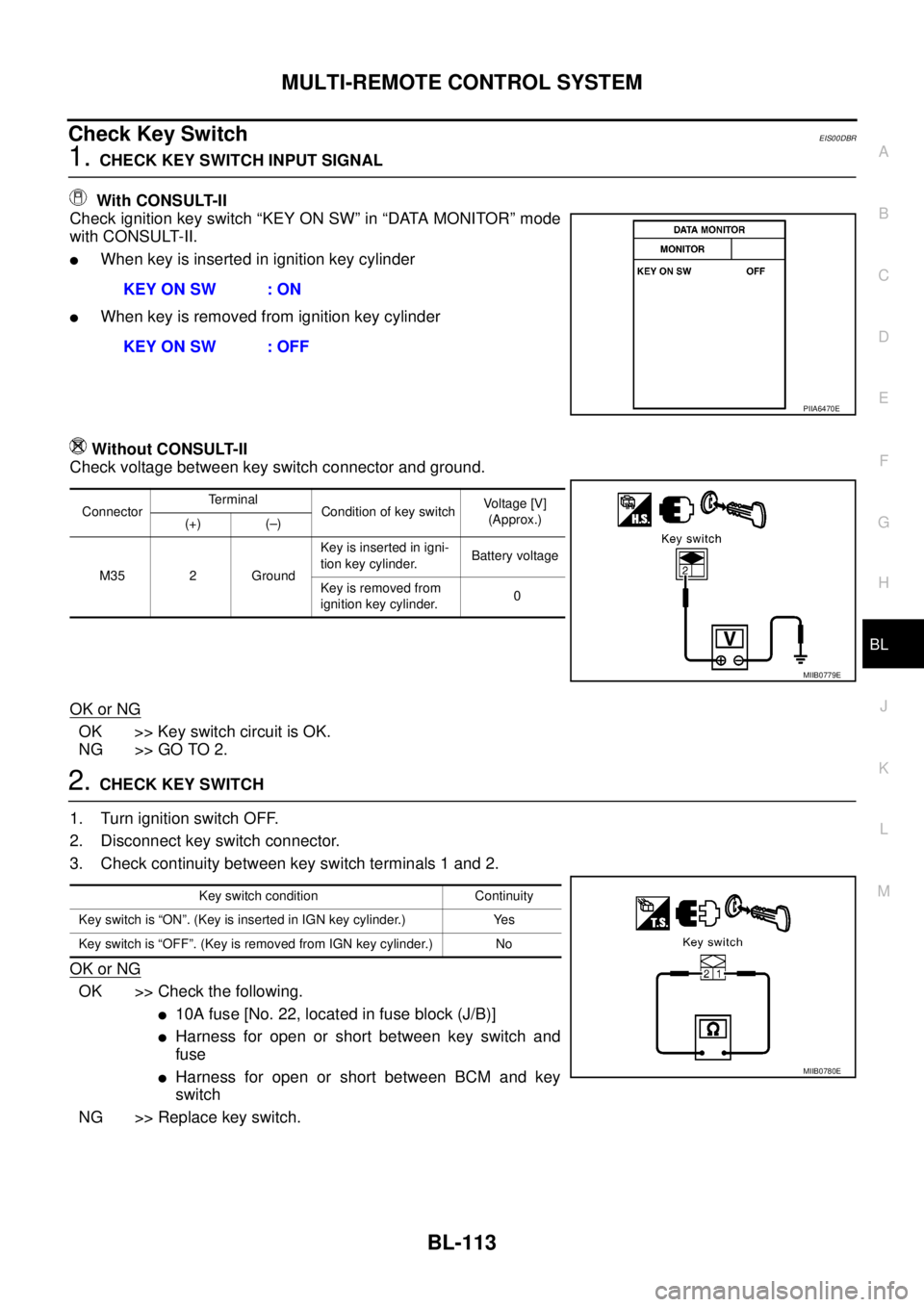
1.CHECK KEY SWITCH INPUT SIGNAL
With CONSULT-II
Check ignition key switch “KEY ON SW” in “DATA MONITOR” mode
with CONSULT-II.
lWhen key is inserted in ignition key cylinder
lWhen key is removed from ignition key cylinder
Without CONSULT-II
Check voltage between key switch connector and ground.
OK or NG
OK >> Key switch circuit is OK.
NG >> GO TO 2.
2.CHECK KEY SWITCH
1. Turn ignition switch OFF.
2. Disconnect key switch connector.
3. Check continuity between key switch terminals 1 and 2.
OK or NG
OK >> Check the following.
l10Afuse[No.22,locatedinfuseblock(J/B)]
lHarness for open or short between key switch and
fuse
lHarness for open or short between BCM and key
switch
NG >> Replace key switch.KEY ON SW : ON
KEY ON SW : OFF
PIIA6470E
ConnectorTerminal
Condition of key switchVo l ta g e [V ]
(Approx.)
(+) (–)
M35 2 GroundKey is inserted in igni-
tion key cylinder.Battery voltage
Key is removed from
ignition key cylinder.0
MIIB0779E
Key switch condition Continuity
Key switch is “ON”. (Key is inserted in IGN key cylinder.) Yes
Key switch is “OFF”. (Key is removed from IGN key cylinder.) No
MIIB0780E
Page 700 of 3171
BL-116
MULTI-REMOTE CONTROL SYSTEM
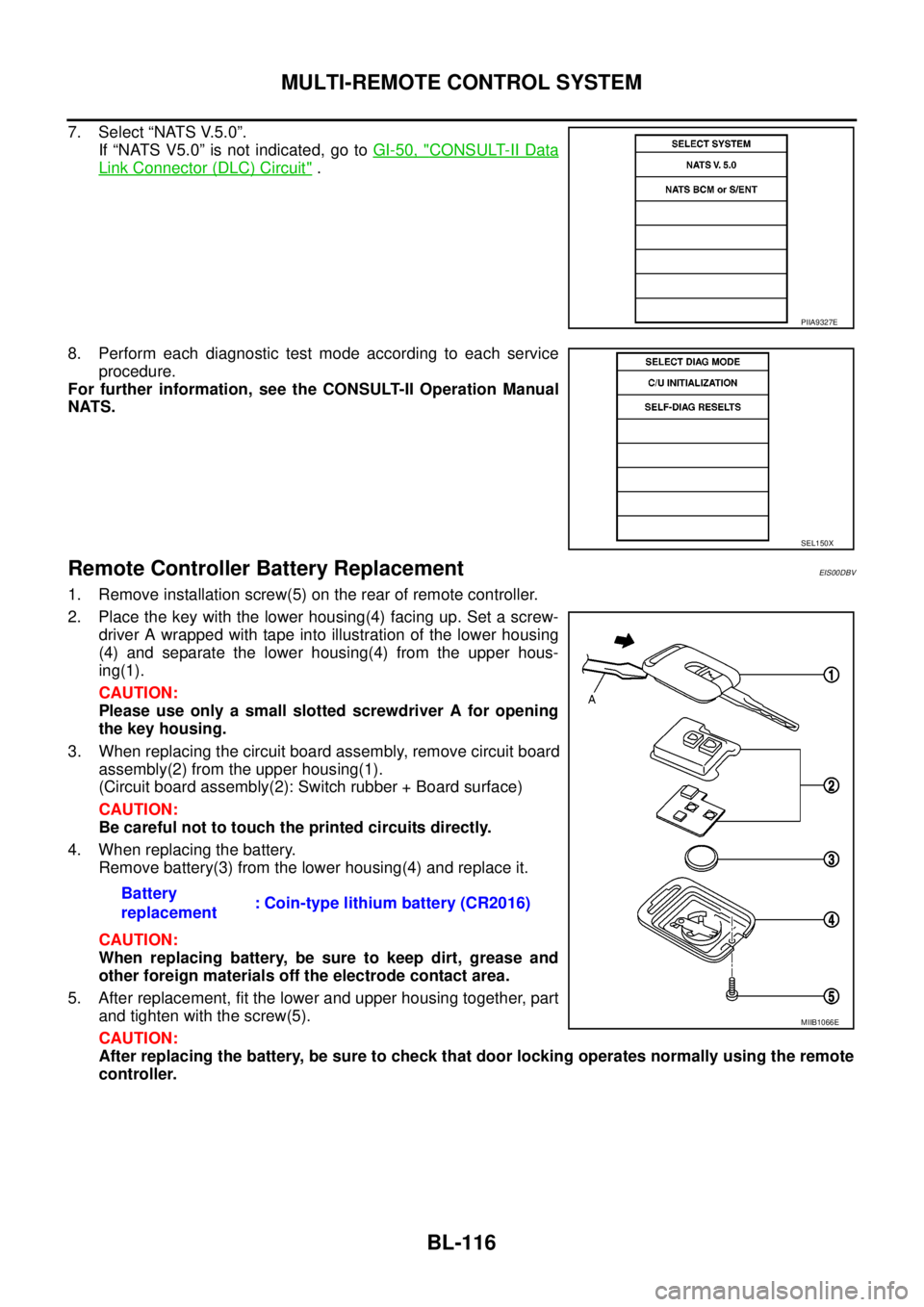
7. Select “NATS V.5.0”.
If “NATS V5.0” is not indicated, go toGI-50, "
CONSULT-II Data
Link Connector (DLC) Circuit".
8. Perform each diagnostic test mode according to each service
procedure.
For further information, see the CONSULT-II Operation Manual
NATS.
Remote Controller Battery ReplacementEIS00DBV
1. Remove installation screw(5) on the rear of remote controller.
2. Place the key with the lower housing(4) facing up. Set a screw-
driver A wrapped with tape into illustration of the lower housing
(4) and separate the lower housing(4) from the upper hous-
ing(1).
CAUTION:
Please use only a small slotted screwdriver A for opening
the key housing.
3. When replacing the circuit board assembly, remove circuit board
assembly(2) from the upper housing(1).
(Circuit board assembly(2): Switch rubber + Board surface)
CAUTION:
Be careful not to touch the printed circuits directly.
4. When replacing the battery.
Remove battery(3) from the lower housing(4) and replace it.
CAUTION:
When replacing battery, be sure to keep dirt, grease and
other foreign materials off the electrode contact area.
5. After replacement, fit the lower and upper housing together, part
and tighten with the screw(5).
CAUTION:
After replacing the battery, be sure to check that door locking operates normally using the remote
controller.
PIIA9327E
SEL150X
Battery
replacement: Coin-type lithium battery (CR2016)
MIIB1066E
Page 725 of 3171

THEFT WARNING SYSTEM
BL-141
C
D
E
F
G
H
J
K
L
MA
B
BL
2. A door is unlocked without using the keyfob.
3. Disconnect and connecting the battery connector before canceling armed phase.
POWER SUPPLY AND GROUND CIRCUIT
Power is supplied at all times
lthrough 10A fuse [No.19, located in the fuse block (J/B)]
lto combination meter (security indicator lamp) terminal 3
lthrough 50A fusible link (letterG, located in the fuse and fusible link box)
lto BCM terminal 57
lthrough 10A fuse [No. 21, located in the fuse block (J/B)]
lto BCM terminal 41
lthrough 15A fuse (No. 30, located in the fuse and fusible link box)
lto horn relay terminal 2
lthrough 20A fuse (No. 52, located in the IPDM E/R)
lthrough 20A fuse (No. 53, located in the IPDM E/R),
lto IPDM E/R internal CPU.
With the ignition switch in the ACC or ON position, power is supplied
lthrough 10A fuse [No. 4, located in the fuse block (J/B)]
lto BCM terminal 4.
Ground is supplied
lto BCM terminal 55
lthrough body grounds M21, M80 and M83
lto IPDM E/R terminals 38 and 59
lthrough body ground E21, E41 and E61.
INITIAL CONDITION TO ACTIVATE THE SYSTEM
The operation of the theft warning system is controlled by the engine hood and doors.
To activate the theft warning system, BCM must receive signals indicating the doors are closed and locked.
When a door is open, BCM terminal 12, 14, 15 or 16 receives a ground signal from each door switch.
When the engine hood is open, IPDM E/R terminal 41 receives a ground signal
THEFT WARNING SYSTEM ALARM OPERATION
The vehicle security system is triggered by
lopening a door
lopening the hood
ldetecting battery disconnect/connection.
The vehicle security system will be triggered once the system is in armed phase,
when BCM receives a ground signal at terminals 12, 14, 15, 16 (door switch) or IPDM E/R receives a ground
signal at terminal 41 (hood switch).
When the vehicle security system is triggered, siren control unit or horn is activate.
The alarm automatically turns off after 30 seconds, but will reactivate if the vehicle is tampered with again.
THEFT WARNING SYSTEM DEACTIVATION
To deactivate the theft warning system, a door must be unlocked with keyfob.
When the BCM receives either one of these signals or unlock signal from keyfob the theft warning system is
deactivated. (Disarmed phase)
CAN Communication System DescriptionEIS00DBY
Refer toLAN-23, "CAN COMMUNICATION".
Page 739 of 3171

THEFT WARNING SYSTEM
BL-155
C
D
E
F
G
H
J
K
L
MA
B
BL
Terminals and Reference Value for BCMEIS00DC2
*: Double cabTerminalWire
ColorItem ConditionVoltage (V)
(Approx.)
3 Y IGN ON Ignition switch ON or START Battery voltage
4 V IGN ACC Ignition switch ACC or ON Battery voltage
12* L Rear door switch RHON (door open) 0
OFF (door closed) Battery voltage
14 LGFront door switch
(Passenger side)ON (door open) 0
OFF (door closed) Battery voltage
15 SBFront door switch
(Driver side)ON (door open) 0
OFF (door closed) Battery voltage
16* P Rear door switch LHON (door open) 0
OFF (door closed) Battery voltage
17 W Door lock/unlock indicator All door closedLock operation
(illuminates)Battery voltage
Other than
above0
21 P CAN L — —
22 L CAN H — —
23 G Security indicator lampGoes OFF®illuminates (Every 2.6 sec-
onds)Battery voltage®0
31 B Ground — 0
32 GR Door lock/unlock switch All door closedUnlock 0
Other than
above5
34 O Door lock/unlock switch All door closedLock 0
Other than
above5
41 Y Power source (Fuse) — Battery voltage
55 B Ground — 0
57 W Power source (Fusible link) — Battery voltage
Page 740 of 3171
BL-156
THEFT WARNING SYSTEM
TerminalsandReferenceValueforIPDME/R
EIS00DC3
*: When horn reminder is ON.
CONSULT-II Function (BCM)EIS00DC4
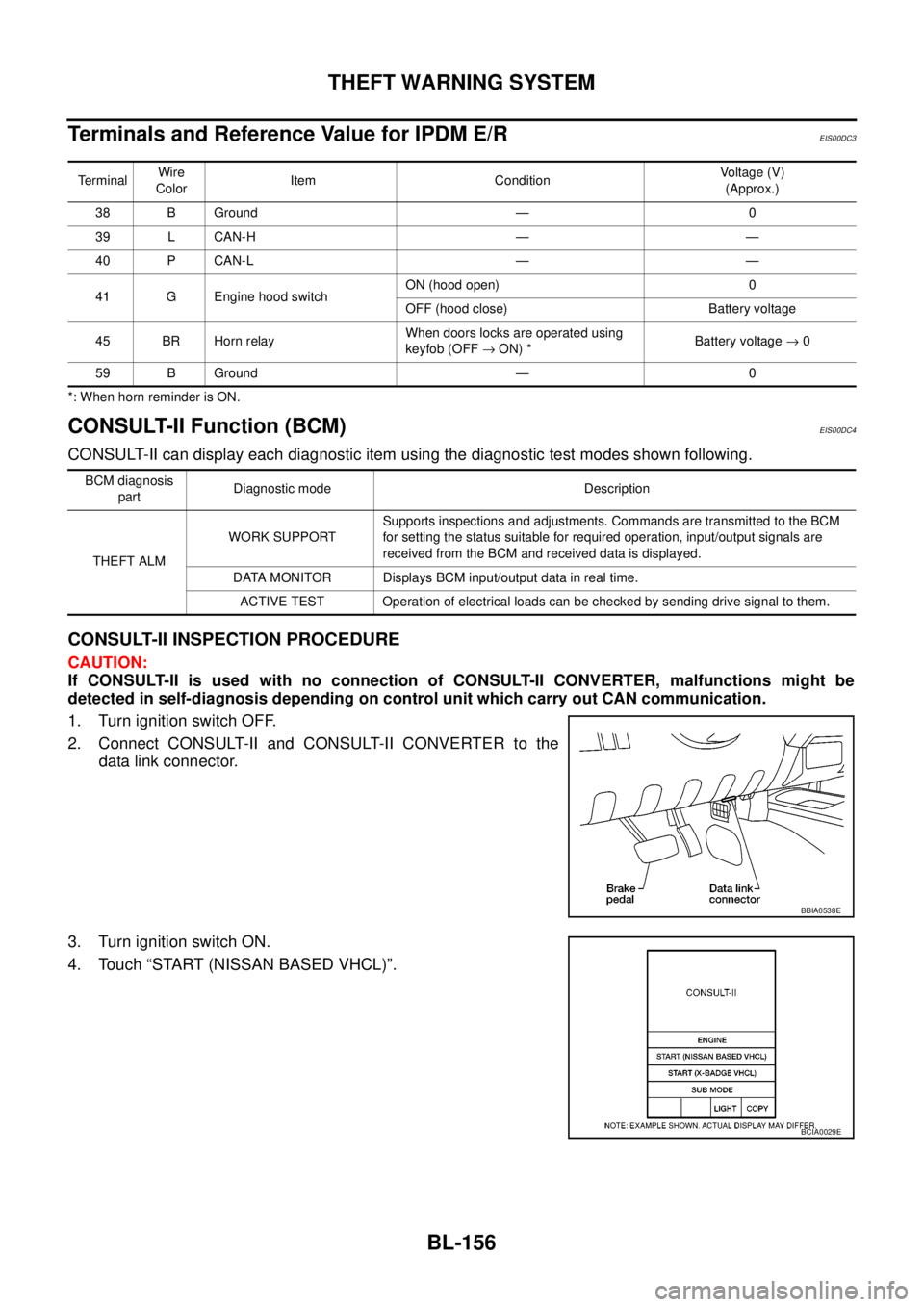
CONSULT-II can display each diagnostic item using the diagnostic test modes shown following.
CONSULT-II INSPECTION PROCEDURE
CAUTION:
If CONSULT-II is used with no connection of CONSULT-II CONVERTER, malfunctions might be
detected in self-diagnosis depending on control unit which carry out CAN communication.
1. Turn ignition switch OFF.
2. Connect CONSULT-II and CONSULT-II CONVERTER to the
data link connector.
3. Turn ignition switch ON.
4. Touch “START (NISSAN BASED VHCL)”.
TerminalWire
ColorItem ConditionVoltage (V)
(Approx.)
38 B Ground — 0
39 L CAN-H — —
40 P CAN-L — —
41 G Engine hood switchON (hood open) 0
OFF (hood close) Battery voltage
45 BR Horn relayWhen doors locks are operated using
keyfob (OFF®ON) *Battery voltage®0
59 B Ground — 0
BCM diagnosis
partDiagnostic mode Description
THEFT ALMWORK SUPPORTSupports inspections and adjustments. Commands are transmitted to the BCM
for setting the status suitable for required operation, input/output signals are
received from the BCM and received data is displayed.
DATA MONITOR Displays BCM input/output data in real time.
ACTIVE TEST Operation of electrical loads can be checked by sending drive signal to them.
BBIA0538E
BCIA0029E
Page 746 of 3171
BL-162
THEFT WARNING SYSTEM
Diagnostic Procedure 1
EIS00DC8
CHECK DOOR SWITCH (DOUBLE CAB)
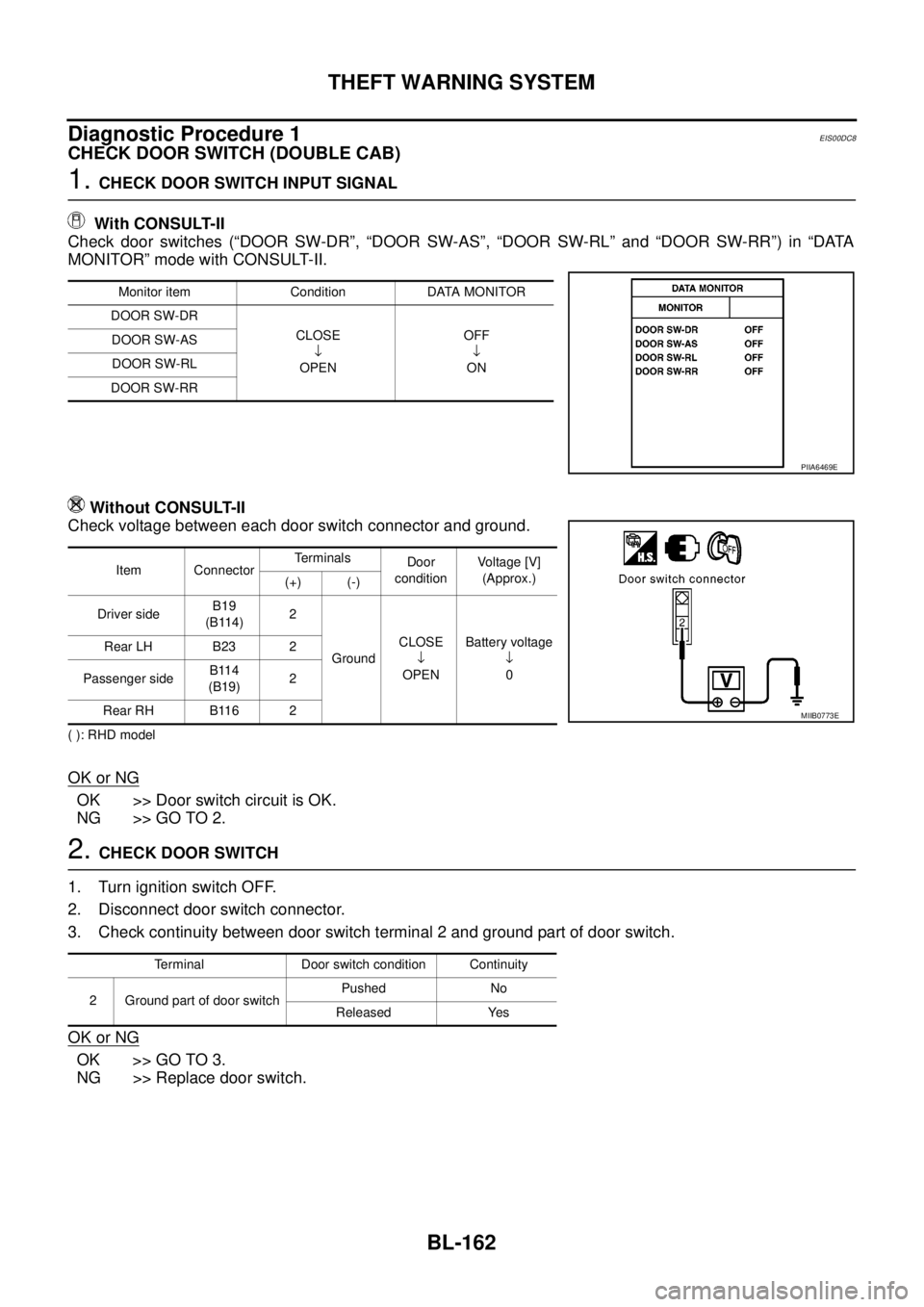
1.CHECK DOOR SWITCH INPUT SIGNAL
With CONSULT-II
Check door switches (“DOOR SW-DR”, “DOOR SW-AS”, “DOOR SW-RL” and “DOOR SW-RR”) in “DATA
MONITOR” mode with CONSULT-II.
Without CONSULT-II
Check voltage between each door switch connector and ground.
( ): RHD model
OK or NG
OK >> Door switch circuit is OK.
NG >> GO TO 2.
2.CHECK DOOR SWITCH
1. Turn ignition switch OFF.
2. Disconnect door switch connector.
3. Check continuity between door switch terminal 2 and ground part of door switch.
OK or NG
OK >> GO TO 3.
NG >> Replace door switch.
Monitor item Condition DATA MONITOR
DOOR SW-DR
CLOSE
¯
OPENOFF
¯
ON DOOR SW-AS
DOOR SW-RL
DOOR SW-RR
PIIA6469E
Item ConnectorTerminals
Door
conditionVoltage [V]
(Approx.)
(+) (-)
Driver sideB19
(B114)2
GroundCLOSE
¯
OPENBattery voltage
¯
0 Rear LH B23 2
Passenger sideB114
(B19)2
Rear RH B116 2
MIIB0773E
Terminal Door switch condition Continuity
2 Ground part of door switchPushed No
Released Yes
Page 747 of 3171
THEFT WARNING SYSTEM
BL-163
C
D
E
F
G
H
J
K
L
MA
B
BL
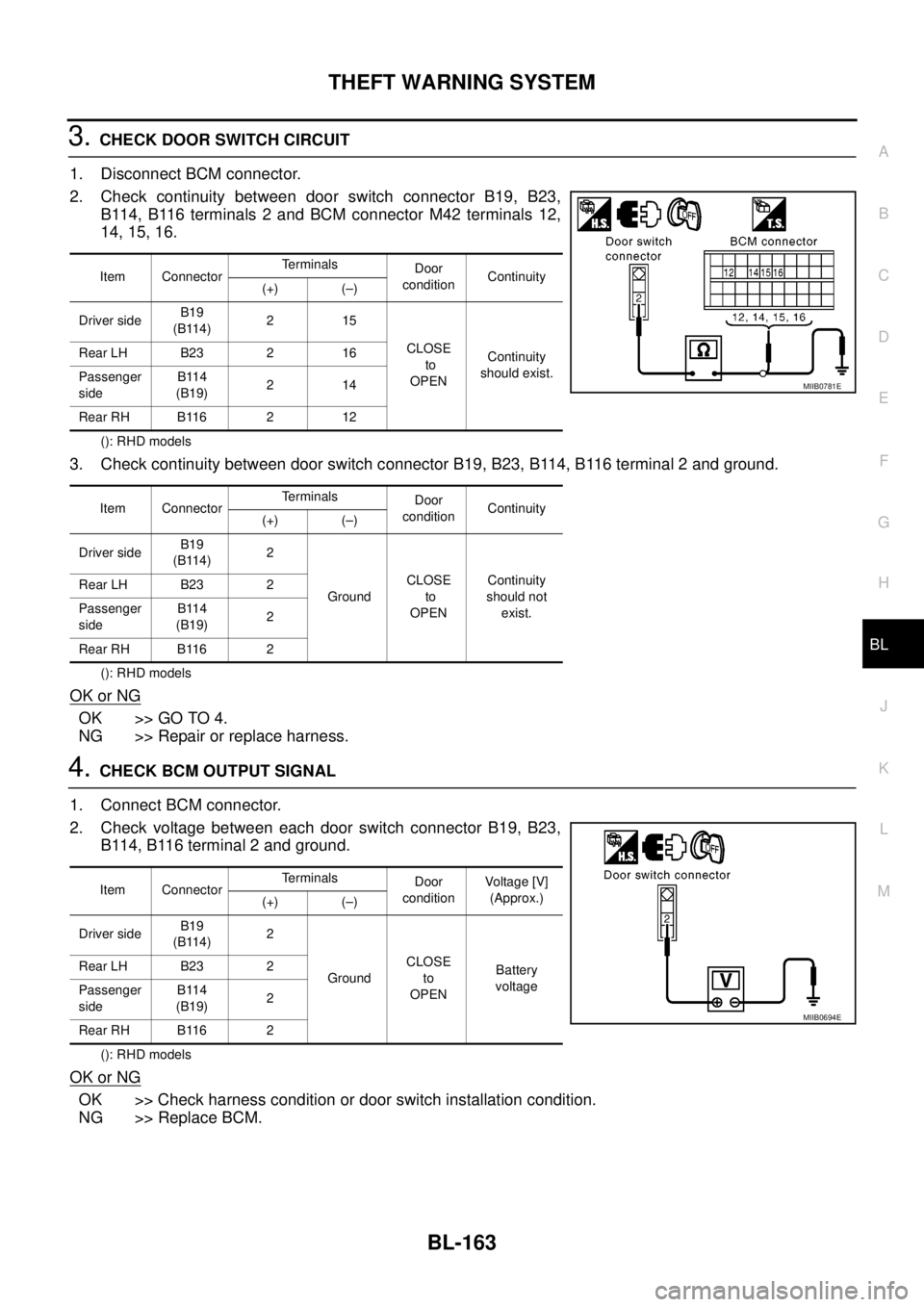
3.CHECK DOOR SWITCH CIRCUIT
1. Disconnect BCM connector.
2. Check continuity between door switch connector B19, B23,
B114, B116 terminals 2 and BCM connector M42 terminals 12,
14, 15, 16.
(): RHD models
3. Check continuity between door switch connector B19, B23, B114, B116 terminal 2 and ground.
(): RHD models
OK or NG
OK >> GO TO 4.
NG >> Repair or replace harness.
4.CHECK BCM OUTPUT SIGNAL
1. Connect BCM connector.
2. Check voltage between each door switch connector B19, B23,
B114, B116 terminal 2 and ground.
(): RHD models
OK or NG
OK >> Check harness condition or door switch installation condition.
NG >> Replace BCM.
Item ConnectorTerminals
Door
conditionContinuity
(+) (–)
Driver sideB19
(B114)215
CLOSE
to
OPENContinuity
should exist. Rear LH B23 2 16
Passenger
sideB114
(B19)214
Rear RH B116 2 12
Item ConnectorTerminals
Door
conditionContinuity
(+) (–)
Driver sideB19
(B114)2
GroundCLOSE
to
OPENContinuity
should not
exist. Rear LH B23 2
Passenger
sideB114
(B19)2
Rear RH B116 2
MIIB0781E
Item ConnectorTerminals
Door
conditionVoltag e [V]
(Approx.)
(+) (–)
Driver sideB19
(B114)2
GroundCLOSE
to
OPENBattery
voltage Rear LH B23 2
Passenger
sideB114
(B19)2
Rear RH B116 2
MIIB0694E
Page 748 of 3171
BL-164
THEFT WARNING SYSTEM
CHECK DOOR SWITCH (KING CAB)
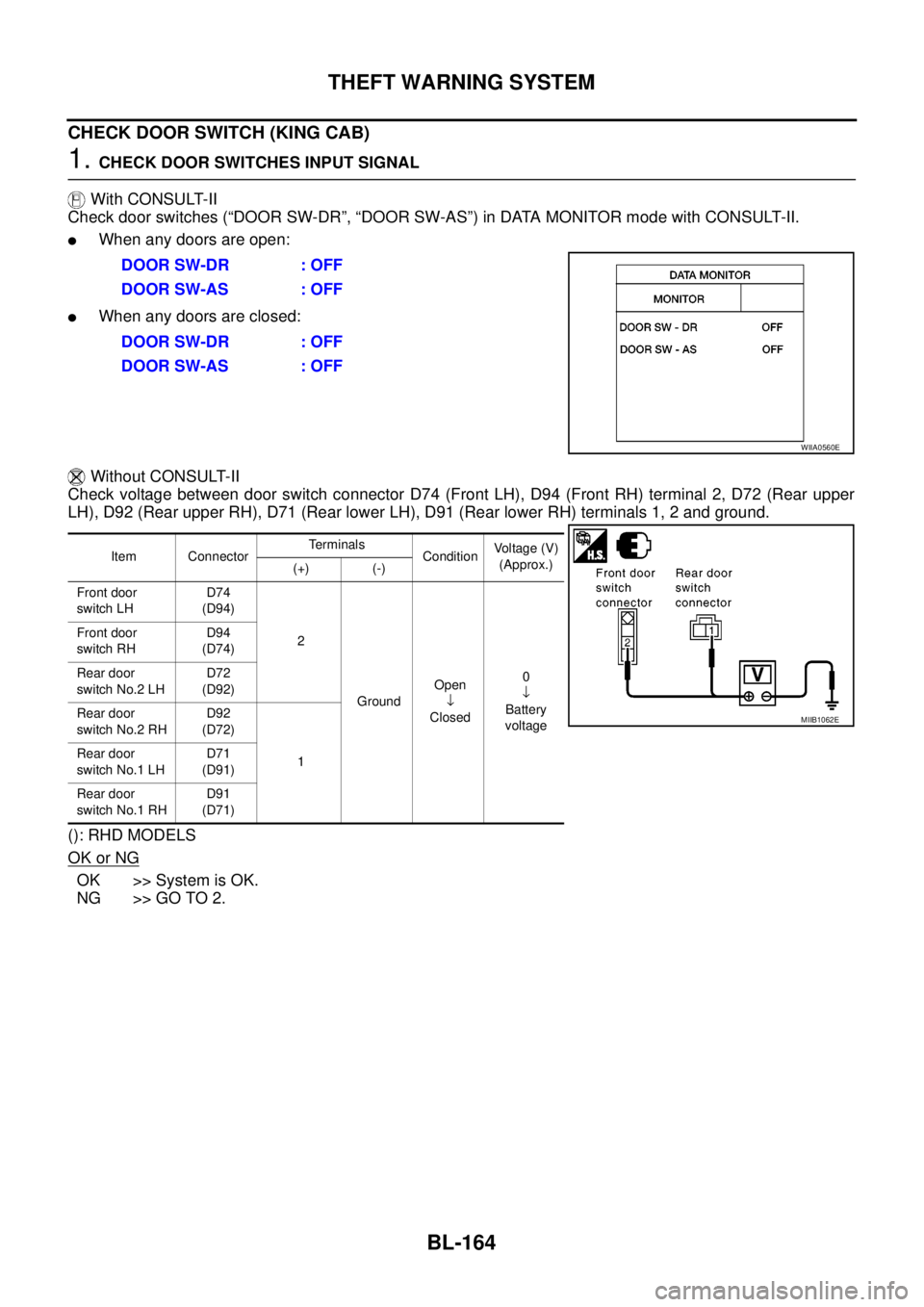
1.CHECK DOOR SWITCHES INPUT SIGNAL
With CONSULT-II
Check door switches (“DOOR SW-DR”, “DOOR SW-AS”) in DATA MONITOR mode with CONSULT-II.
lWhen any doors are open:
lWhen any doors are closed:
Without CONSULT-II
Check voltage between door switch connector D74 (Front LH), D94 (Front RH) terminal 2, D72 (Rear upper
LH), D92 (Rear upper RH), D71 (Rear lower LH), D91 (Rear lower RH) terminals 1, 2 and ground.
(): RHD MODELS
OK or NG
OK >> System is OK.
NG >> GO TO 2.DOOR SW-DR : OFF
DOOR SW-AS : OFF
DOOR SW-DR : OFF
DOOR SW-AS : OFF
WIIA0560E
Item ConnectorTerminals
ConditionVoltage (V)
(Approx.)
(+) (-)
Front door
switch LHD74
(D94)
2
GroundOpen
¯
Closed0
¯
Battery
voltage Front door
switch RHD94
(D74)
Rear door
switch No.2 LHD72
(D92)
Rear door
switch No.2 RHD92
(D72)
1 Rear door
switch No.1 LHD71
(D91)
Rear door
switch No.1 RHD91
(D71)
MIIB1062E
Page 750 of 3171
BL-166
THEFT WARNING SYSTEM
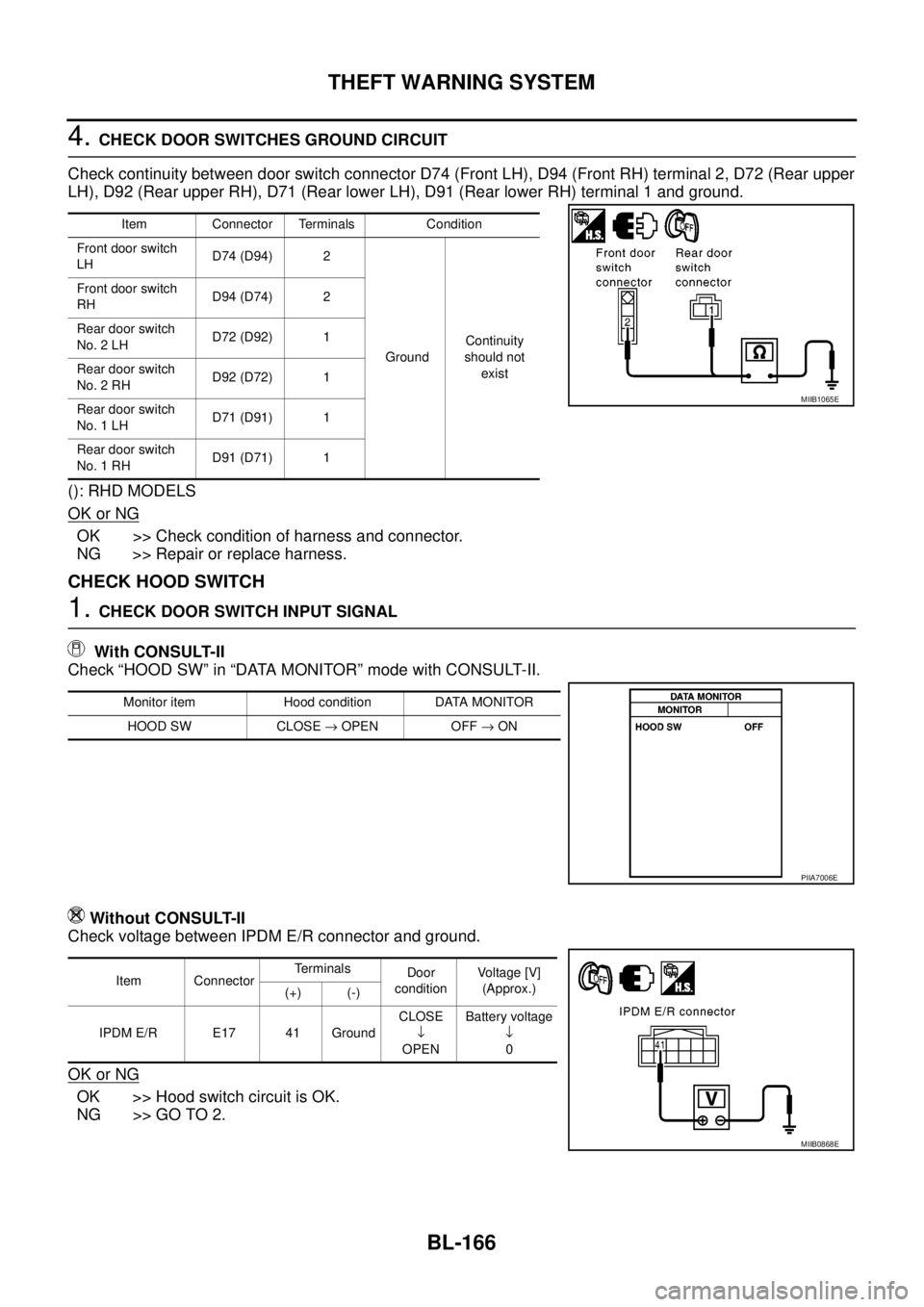
4.CHECK DOOR SWITCHES GROUND CIRCUIT
Check continuity between door switch connector D74 (Front LH), D94 (Front RH) terminal 2, D72 (Rear upper
LH), D92 (Rear upper RH), D71 (Rear lower LH), D91 (Rear lower RH) terminal 1 and ground.
(): RHD MODELS
OK or NG
OK >> Check condition of harness and connector.
NG >> Repair or replace harness.
CHECK HOOD SWITCH
1.CHECK DOOR SWITCH INPUT SIGNAL
With CONSULT-II
Check “HOOD SW” in “DATA MONITOR” mode with CONSULT-II.
Without CONSULT-II
Check voltage between IPDM E/R connector and ground.
OK or NG
OK >> Hood switch circuit is OK.
NG >> GO TO 2.
Item Connector Terminals Condition
Front door switch
LHD74 (D94) 2
GroundContinuity
should not
exist Front door switch
RHD94 (D74) 2
Rear door switch
No. 2 LHD72 (D92) 1
Rear door switch
No. 2 RHD92 (D72) 1
Rear door switch
No. 1 LHD71 (D91) 1
Rear door switch
No. 1 RHD91 (D71) 1
MIIB1065E
Monitor item Hood condition DATA MONITOR
HOOD SW CLOSE®OPEN OFF®ON
PIIA7006E
Item ConnectorTerminals
Door
conditionVoltage [V]
(Approx.)
(+) (-)
IPDM E/R E17 41 GroundCLOSE
¯
OPENBattery voltage
¯
0
MIIB0868E