Time NISSAN NOTE 2008 Owner's Guide
[x] Cancel search | Manufacturer: NISSAN, Model Year: 2008, Model line: NOTE, Model: NISSAN NOTE 2008Pages: 235, PDF Size: 2.29 MB
Page 102 of 235
2) Press and hold buttons 1 and 4 simultaneously.
3) Press the power (
) button and the radio will
switch on.
4) Release all the buttons and the display will show
LANGUAGE.
5) Press the
orbutton and the lan-
guage setting display will change as follows:
ENGLISH⇔FRENCH⇔GERMAN⇔ITALIAN
⇔DUTCH⇔SPANISH⇔POLISH⇔ENGLISH
Once the language has been set, switch off and
switch on again the audio unit by pressing the power
button. For details, contact your NISSAN dealer or
qualified workshop.
Source selector
This button selects the listening source between the
radio, CD and AUX (where fitted). Each time the
button is pressed, the respective mode will change
as follows:
Type A
Radio→CD→Radio
Type B (where fitted)
Radio→CD→AUX *→Radio
*: This mode is only available when a compatible
device is plugged into the AUX audio jack socket.
For details, see “Audio jack socket (AUX) (where
fitted)” later in this section.
If no CD is inserted, the display shows NO CD.
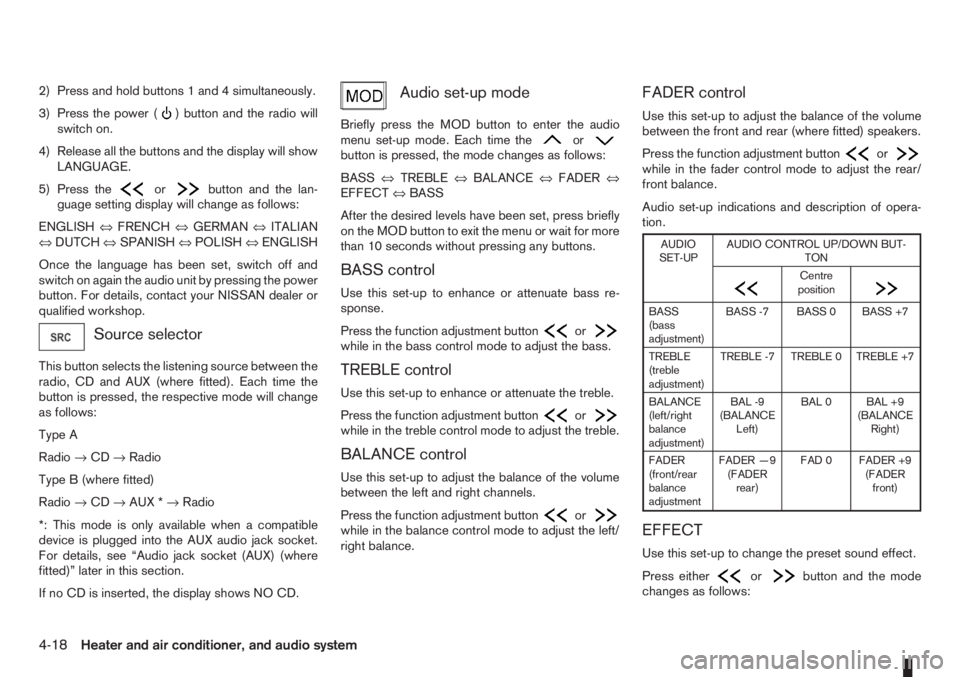
Audio set-up mode
Briefly press the MOD button to enter the audio
menu set-up mode. Each time theorbutton is pressed, the mode changes as follows:
BASS⇔TREBLE⇔BALANCE⇔FADER⇔
EFFECT⇔BASS
After the desired levels have been set, press briefly
on the MOD button to exit the menu or wait for more
than 10 seconds without pressing any buttons.
BASS control
Use this set-up to enhance or attenuate bass re-
sponse.
Press the function adjustment button
orwhile in the bass control mode to adjust the bass.
TREBLE control
Use this set-up to enhance or attenuate the treble.
Press the function adjustment button
orwhile in the treble control mode to adjust the treble.
BALANCE control
Use this set-up to adjust the balance of the volume
between the left and right channels.
Press the function adjustment button
orwhile in the balance control mode to adjust the left/
right balance.
FADER control
Use this set-up to adjust the balance of the volume
between the front and rear (where fitted) speakers.
Press the function adjustment button
orwhile in the fader control mode to adjust the rear/
front balance.
Audio set-up indications and description of opera-
tion.
AUDIO
SET-UPAUDIO CONTROL UP/DOWN BUT-
TON
m
Centre
position
m
BASS
(bass
adjustment)BASS -7 BASS 0 BASS +7
TREBLE
(treble
adjustment)TREBLE -7 TREBLE 0 TREBLE +7
BALANCE
(left/right
balance
adjustment)BAL -9
(BALANCE
Left)BAL 0 BAL +9
(BALANCE
Right)
FADER
(front/rear
balance
adjustmentFADER —9
(FADER
rear)FAD 0 FADER +9
(FADER
front)
EFFECT
Use this set-up to change the preset sound effect.
Press either
orbutton and the mode
changes as follows:
4-18Heater and air conditioner, and audio system
Page 105 of 235
When the news mode is activated and the radio
receives a news code from a FM broadcasting sta-
tion, the actual playing mode will be interrupted.
Once the news broadcast has finished, the audio
unit will return to the previous source. During the
interruption, the display alternates between NEWS
and the broadcasting station name.
1. NEWS standby mode
•The news standby mode can be activated while
in FM (radio) or CD mode (if FM was previously
selected in the radio mode).
•Pressing thebutton, the news standby
mode will switch off and the NEWS icon will dis-
appear from the display.
2. NEWS interruption mode
•A news interruption will be announced and
NEWS will be displayed when the radio detects
the news code from the tuned station or EON
stations. The audio system will change to the
interrupting station and the name of the interrupt-
ing station will be displayed.
•Pressing thebutton during a news inter-
ruption will cause the audio unit to return to the
previous source. However, news standby mode
remains active.
•When the CD button is pressed during a news
interruption mode, the radio will change to CD
mode and news stand-by mode is not cancelled.
If the radio wave band changes to the MW or LW,
then the news standby mode will be switched off.
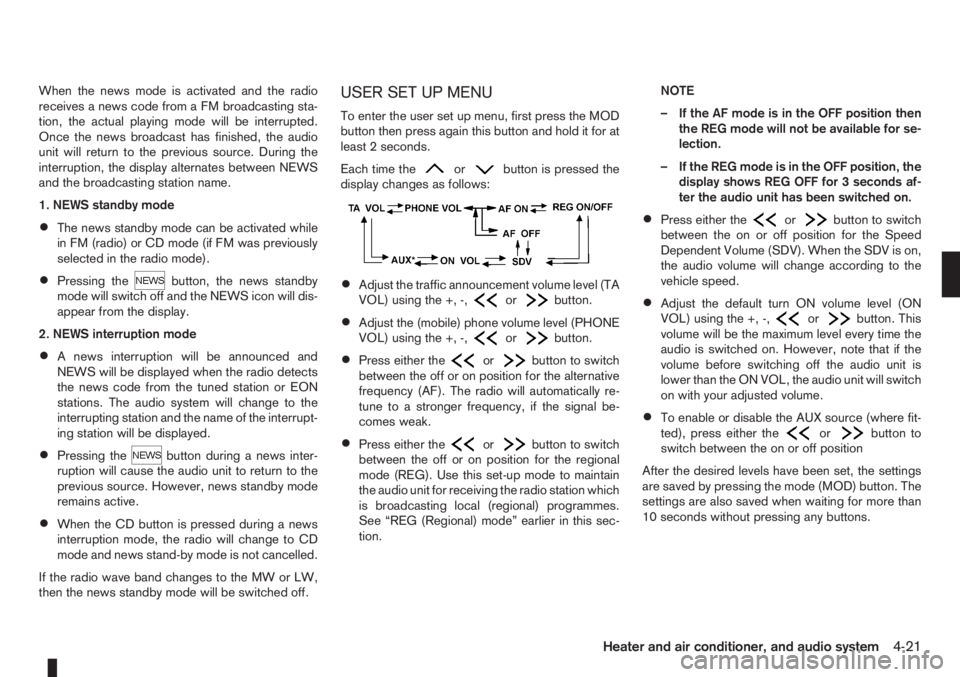
USER SET UP MENU
To enter the user set up menu, first press the MOD
button then press again this button and hold it for at
least 2 seconds.
Each time the
orbutton is pressed the
display changes as follows:
•Adjust the traffic announcement volume level (TA
VOL) using the +, -,orbutton.
•Adjust the (mobile) phone volume level (PHONE
VOL) using the +, -,orbutton.
•Press either theorbutton to switch
between the off or on position for the alternative
frequency (AF). The radio will automatically re-
tune to a stronger frequency, if the signal be-
comes weak.
•Press either theorbutton to switch
between the off or on position for the regional
mode (REG). Use this set-up mode to maintain
the audio unit for receiving the radio station which
is broadcasting local (regional) programmes.
See “REG (Regional) mode” earlier in this sec-
tion.NOTE
– If the AF mode is in the OFF position then
the REG mode will not be available for se-
lection.
– If the REG mode is in the OFF position, the
display shows REG OFF for 3 seconds af-
ter the audio unit has been switched on.
•Press either theorbutton to switch
between the on or off position for the Speed
Dependent Volume (SDV). When the SDV is on,
the audio volume will change according to the
vehicle speed.
•Adjust the default turn ON volume level (ON
VOL) using the +, -,orbutton. This
volume will be the maximum level every time the
audio is switched on. However, note that if the
volume before switching off the audio unit is
lower than the ON VOL, the audio unit will switch
on with your adjusted volume.
•To enable or disable the AUX source (where fit-
ted), press either theorbutton to
switch between the on or off position
After the desired levels have been set, the settings
are saved by pressing the mode (MOD) button. The
settings are also saved when waiting for more than
10 seconds without pressing any buttons.
Heater and air conditioner, and audio system4-21
Page 106 of 235
COMPACT DISC (CD) PLAYER
OPERATION
Turn the ignition switch to the Acc or ON position,
and insert the CD into the slot with the label side
facing up. The CD will be guided automatically into
the slot and will start playing.
After loading the CD and the track number will ap-
pear on the display.
If the radio is already operating, it will automatically
turn off and the CD player will start playing.
CAUTION
•Do not force the compact disc into the slot.
This could damage the player.
•Do not use 8 cm (3.1 in) discs.
REW (Rewind), FF
(Fast Forward)
When the(rewind) or(fast forward)
button is pressed for more than 0.5 seconds, while
the CD is being played, the CD will play while fast
forwarding or rewinding. When the button is re-
leased, the CD will return to normal playing speed.
Track up/down
When thebutton is pressed, the track being
played returns to its beginning. Press several times
to skip back through tracks. The CD will go back
the number of times the button is pressed.
When the
button is pressed while the CD is
being played, the track next to the present one willstart to play from its beginning. Press several times
to skip through tracks. The CD will advance the
number of times the button is pressed. (When the
last track on the CD is skipped through, the first
track will be played.)
RPT (Repeat track) ON/OFF
To repeat the currently playing track, press the RPT
button and RPT TRCK is displayed for 3 seconds
while the RPT indicator remains on. To cancel this
mode, press again the RPT button.
mMIX ON/OFF
To play all the tracks in a random order, press the
MIX button and MIX DISC is displayed for 3 sec-
onds while the MIX indicator remains on. To cancel
this mode, press the MIX button again.
CD eject button
Press the eject button () to eject the compact
disc.
If the CD comes out and is not removed within 10
seconds it will be pulled back into the slot to protect
it from damage.
When the ignition switch is in either the “OFF” or
LOCK position or the audio unit is off, it is possible
to eject the CD. However the audio unit will not be
activated.
If the following message appears on the display,
press the EJECT button:“CD ERROR” and “EJECT CD” appear alternately
– Eject the disc, and insert another CD or check
whether the CD is inserted upside-down.
4-22Heater and air conditioner, and audio system
Page 108 of 235
![NISSAN NOTE 2008 Owners Guide Unlocking the unit
If the battery supply to the vehicle is interrupted, the
audio unit will lock.
When the power is restored and the unit switched
on, the display will show [Radio Code:] and it will b](/img/5/56795/w960_56795-107.png "NISSAN NOTE 2008 Owners Guide Unlocking the unit
If the battery supply to the vehicle is interrupted, the
audio unit will lock.
When the power is restored and the unit switched
on, the display will show [Radio Code:] and it will b")
Unlocking the unit
If the battery supply to the vehicle is interrupted, the
audio unit will lock.
When the power is restored and the unit switched
on, the display will show [Radio Code:] and it will be
unlocked when the codes have been entered cor-
rectly.
Unlocking procedure:
Read this section very carefully. It is important
that the instructions are followed precisely.
To unlock the audio unit, proceed as follows:
1. Turn the ignition switch to the Acc or ON posi-
tion.
2. [Radio Code:] is displayed along with four nu-
merical zero digits.
3. Press preset button <
j1 > the number of times
corresponding with the first digit of the radio
code.For example, if the radio code is 5169: for the
first digit, “5”, press the preset button <
j1 > five
times.
4. The second, third, and fourth digits of the radio
code must be entered, in the same way, only
now using preset buttons <
j2>,
For example, press <
j2 > once,
and
5. Press with a long press preset button <
j6>to
confirm the code. If you entered the code cor-
rectly the unit will switch on.
6. If the code is entered incorrectly a notification
message ([INCORRECT PIN]) and the number
of attempts left ([REMAINING TRIES: XX]) will
be shown.
After reading the message, press the
button to return to the entry screen and enter the
correct radio code.
– If the wrong code is entered after the third
attempt, the audio unit will lock for 60 min-
utes. The display will show a count down timer
from 60 to 0 (minutes). After 60 minutes enter
the correct radio code.
– If the wrong code is entered after eight sets
of three entries, the audio unit will lock per-
manently. Contact a NISSAN dealer for fur-
ther details.
AUDIO MAIN OPERATION
The audio unit operates when the ignition switch is
in Acc or ON position.
mPower ON/OFF button
Press the<>button to switch on the audio unit.
If the audio unit was switched off using the ignition
switch, it can also be switched on with the ignition
switch. The source that was playing immediately
before the unit was switched off will resume playing
and the volume will be set to the previous volume
level.
The audio unit can be switched off by pressing
<
>, or by turning the ignition switch to the “OFF”
or LOCK position.
mVolume (VOL) level control
Turn the
adjust the volume level.
The audio unit is equipped with a speed control vol-
ume function, this means that the audio system au-
tomatically adjusts the volume level in relation to
vehicle speed. For details, see “SPD VOL (Speed
volume) control” later in this section.
Mute button
Press the<>button to mute the sound and
[MUTE] appears in the display. To cancel the mode,
use any of the following options:
– Press<
>again.
NAA1192
4-24Heater and air conditioner, and audio system
Page 110 of 235
TA Traffic announcement
This function operates in FM (Radio), CD or AUX
mode.
•Pressing the
The TA indicator is displayed while TA mode is
on.
•When
switched off and the TA indicator will disappear
from the display.
Traffic announcement interrupt function:
When a traffic announcement is received, the an-
nouncement is tuned in and the display shows a
notification message with the radio station name e.g.
[TA: Radio 1].
Once the traffic announcement has finished, the unit
returns to the source that was active before the traf-
fic announcement started.
If
the traffic announcement interrupt mode is can-
celled. The TA mode returns to the standby mode
and the audio unit returns to the previous source.
SETUP BUTTON
To configure Audio, Clock, Bluetooth, Language or
Scroll direction settings, perform the following pro-
cedure:
1. Press the
2. Press the
clockwise, the display will appear in the following
order:
[Audio]⇔[Clock]⇔[Bluetooth]⇔[Language]
⇔[Scroll Direction]
After the desired levels have been set, press either
the <
> (Back) button repeatedly, the
pressing any buttons to exit the menu screen.
Display brightness (Day/Night mode)
Press the
switch the display brightness between the daytime
and nighttime mode.
Audio adjustments
Press the
screen then select [Audio].
Each time the
will change as follows:
[Bass]→[Treble]→[Balance]→[Fade]→[AUX
VOL]→[SPD VOL]→setup menu screen [Audio]
→[Bass]
Bass control:
Use this control to enhance or attenuate bass re-
sponse sound.
Turn the
clockwise to adjust the bass settings then press
Use this control to enhance or attenuate the treble.
Turn the
clockwise to adjust the treble settings then press
Balance control:
Use this control to adjust the balance of the volume
between the left and right speakers.
Turn the
clockwise to adjust the left/right balance then press
Fade (Fader) control:
Use this control to adjust the balance of the volume
between the front and rear (where fitted) speakers.
Turn the
clockwise to adjust the front/rear balance then press
AUX VOL (Auxiliary volume) control:
Use this control to adjust the volume output from the
auxiliary source.
Turn the
clockwise to select [LO], [MID], or [HI] mode then
press
4-26Heater and air conditioner, and audio system
Page 111 of 235
![NISSAN NOTE 2008 Owners Guide SPD VOL (Speed volume) control:
This mode controls the volume output from the
speakers automatically in relation to vehicle speed.
When [SPD VOL] is displayed, turn the<TUNE/
MENU>dial clockwise or an](/img/5/56795/w960_56795-110.png "NISSAN NOTE 2008 Owners Guide SPD VOL (Speed volume) control:
This mode controls the volume output from the
speakers automatically in relation to vehicle speed.
When [SPD VOL] is displayed, turn the<TUNE/
MENU>dial clockwise or an")
SPD VOL (Speed volume) control:
This mode controls the volume output from the
speakers automatically in relation to vehicle speed.
When [SPD VOL] is displayed, turn the
the volume level.
Adjusting the setting to 0 (zero) turns off the speed
volume feature. Increasing the speed volume setting
results in the audio volume increasing more rapidly
with vehicle speed. Once chosen, press
to save the setting.
Clock setting
The [Clock] set up screen will appear when select-
ing the [Clock] item from the set up menu.
[Set Time]:
Select [Set Time] then adjust the clock as follows:
1. The hour display will start flashing. Turn the
2. Press the
will start flashing.
3. Turn the
minute.
4. Press
[On/Off]:
Set the clock display between on or off when the
audio unit is turned off.
If set in the [ON] position, the clock will be dis-
played when the audio unit is turned off either bypressing the<
>button or when the ignition
switch is placed in the “OFF” position.
[Clock Format):
Set the clock display between 24-hour mode and
12-hour clock mode.
Bluetooth®
For activation or deactivation details, see “BLUE-
TOOTH® settings” later in this section
Language
Select the appropriate language and press the
automatically adapt the language setting.
•[French]
•[English]
•[German]
•[Spanish]
•[Portuguese]
•[Italian]
•[Dutch]
•[Turkish]
•[Russian]
Scroll direction
Sets the scroll direction of the
For example, to change the way in which you turn
the dial (anticlockwise or clockwise) in order to scroll
up or down a list.
COMPACT DISC (CD) OPERATION
The CD player can play a music CD or an encoded
MP3/WMA CD and while listening to those CD’s
certain text might be able to be displayed (when CD
encoded with text is being used).
Press the
start to play.
When
mode is already operating, it will automatically turn
off the playing source and the CD play mode will
start.
However, if the CD disc is not loaded, then a notifi-
cation message will be displayed and the audio unit
remains in radio or AUX source mode.
CAUTION
•Do not force the CD into the slot. This could
damage the player.
•Do not use 8 cm (3.1 in) discs.
CD insert (CD player)
Insert the CD disc into the slot with the label side
facing up. The disc will be guided automatically into
the slot and will start playing. After loading the disc,
track information will be displayed.
NOTE
•The CD player accepts normal audio CD or
CD recorded with MP3/WMA files.
Heater and air conditioner, and audio system4-27
Page 112 of 235
![NISSAN NOTE 2008 Owners Guide •Inserting a CD recorded with MP3/WMA files,
the audio unit will automatically detect and
[MP3CD] will be indicated.
•An error notification message will be
displayed when inserting a wrong disc ty](/img/5/56795/w960_56795-111.png "NISSAN NOTE 2008 Owners Guide •Inserting a CD recorded with MP3/WMA files,
the audio unit will automatically detect and
[MP3CD] will be indicated.
•An error notification message will be
displayed when inserting a wrong disc ty")
•Inserting a CD recorded with MP3/WMA files,
the audio unit will automatically detect and
[MP3CD] will be indicated.
•An error notification message will be
displayed when inserting a wrong disc type
(e.g. DVD), or the player cannot read the CD
disc. Eject the disc and insert another disc.
CD button
Press the
CD. Playing starts from the track that was being
played when the CD play mode was switched off.
Audio main operation
List view:
While the track is being played, press either the
>button to display the available
tracks in a listed view mode. To select a track from
the list, or a track to start listening from, turn the
Quick search:
In the list view mode, quick search can be per-
formed to find a track from the list.
Push the
of the track title then press
a list of the available tracks will be displayed. Select,
and press
Fast Forward (Cue), Fast
Reverse (Review) buttons:
When the<
>(Cue) or<>(Review) button
is pressed continuously, the track will be played at
high speed. When the button is released, the track
will be played at normal playing speed.
Track up/down buttons:
Pressing the <
>or<> button once, the
track will be skipped forward to the next track or
backward to the beginning of the current played
track. Press the<
>or<>button more than
once to skip through the tracks.
Folder browsing:
If the recorded media contains folders with music
files, pressing the<
>or<>button will play
in sequence the tracks of each folder.
To select a preferred folder:
1. Press the
>button and a list
of tracks in the current folder is displayed.
2. Press the<
>button.
3. Turn the
folder.
4. Press
turn the
If the current selected folder contains sub folders,
press
folders will be displayed. Turn the
lect. Select the [Root] folder item when songs are
recorded additionally in the root folder.
To return to the previous folder screen, press
<
>.
Repeat button:
Push the<
/j1>button and the current track
will be played continuously.
button:
Push the<
/j2>button and all the tracks will
be played in a random order.
<
/j5 > button:
While a CD with recorded music information tags
(CD-text/ID3–text tags) is being played, the title of
the played track is displayed. If the title information
is not provided then [Track] is displayed.
When the<
/j5>button is pressed repeat-
edly, further information about the track can be dis-
played along with the track title as follows:
CD:
Track time→Artist name→Track title→Album
title→Track time
CD with MP3/WMA:
Track time→Artist name→Album title→Folder
name→Track time
4-28Heater and air conditioner, and audio system
Page 114 of 235
Audio main operation
The following operations are identical to the audio
main operation of the Compact Disc (CD) opera-
tion. For details, see “Audio main operation” earlier
in this section.
•List view
•Quick search
•,
•MIX (Random play)
•RPT (Repeat track)
•Folder browsing
button
While a track with recorded music information tags
(ID3–tags) is being played, the title of the played
track is displayed. If the tags are not provided then
a notification message is displayed.
When the<
/j5>button is pressed repeat-
edly, further information about the track can be dis-
played along with the track title as follows:
Track time→Artist name→Album title→Folder
name→Track time
Track details:
A long press on the<
/j5>button will turn the
display into a detailed overview and after a few sec-
onds it returns to the main display, or press
<
/j5>briefly.
iPod® PLAYER OPERATION
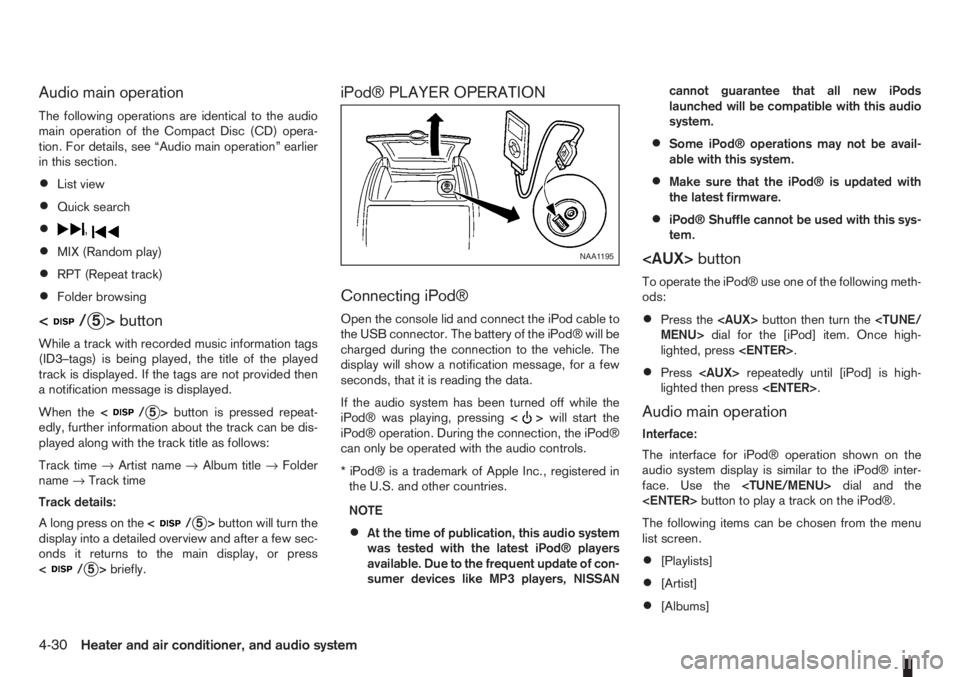
Connecting iPod®
Open the console lid and connect the iPod cable to
the USB connector. The battery of the iPod® will be
charged during the connection to the vehicle. The
display will show a notification message, for a few
seconds, that it is reading the data.
If the audio system has been turned off while the
iPod® was playing, pressing<
>will start the
iPod® operation. During the connection, the iPod®
can only be operated with the audio controls.
* iPod® is a trademark of Apple Inc., registered in
the U.S. and other countries.
NOTE
•At the time of publication, this audio system
was tested with the latest iPod® players
available. Due to the frequent update of con-
sumer devices like MP3 players, NISSANcannot guarantee that all new iPods
launched will be compatible with this audio
system.
•Some iPod® operations may not be avail-
able with this system.
•Make sure that the iPod® is updated with
the latest firmware.
•iPod® Shuffle cannot be used with this sys-
tem.
To operate the iPod® use one of the following meth-
ods:
•Press the
lighted, press
•Press
lighted then press
Audio main operation
Interface:
The interface for iPod® operation shown on the
audio system display is similar to the iPod® inter-
face. Use the
The following items can be chosen from the menu
list screen.
•[Playlists]
•[Artist]
•[Albums]
NAA1195
4-30Heater and air conditioner, and audio system
Page 115 of 235
![NISSAN NOTE 2008 Owners Guide •[Songs]
For further information about each item, see the
iPod® owner’s manual.
The following operations are identical to the audio
main operation of the Compact Disc (CD) opera-
tion. For detail](/img/5/56795/w960_56795-114.png "NISSAN NOTE 2008 Owners Guide •[Songs]
For further information about each item, see the
iPod® owner’s manual.
The following operations are identical to the audio
main operation of the Compact Disc (CD) opera-
tion. For detail")
•[Songs]
For further information about each item, see the
iPod® owner’s manual.
The following operations are identical to the audio
main operation of the Compact Disc (CD) opera-
tion. For details, see “Audio main operation” earlier
in this section.
•List view
•Quick search
•,
•MIX (Random play)
•RPT (Repeat track)
•Folder browsing
button
While a track with recorded music information tags
(ID3–tags) is being played, the title of the played
track is displayed. If the tags are not provided then
a notification message is displayed.
When the<
/j5>button is pressed repeat-
edly, further information about the track can be dis-
played along with the track title as follows:
Track time→Artist name→Album title→Track
time
Track details:
A long press on the<
/j5>button, the screen
displays the song title, artist name, and album title.
After a few seconds it returns to the main display or
press<
/j5>briefly.
BLUETOOTH® OPERATION
Regulatory information
m
Bluetooth® is a trademark
owned by Bluetooth SIG, Inc.
CE statement
Hereby DAEWOO IS Corp. declares that this sys-
tem is in compliance with the essential requirements
and other relevant provisions of Directive 1999/5/
EC.
m
NOTE
The audio system only supports Bluetooth® de-
vices with AVRCP (Audio Video Remote Control
Profile) version 1.3, or 1.0 or earlier.
BLUETOOTH® settings
To set up the Bluetooth system with your preferred
device, push the
tooth], then push the
tively, press the<
>button. The following items
are available:
•[Pair Device]
Bluetooth devices can be paired with the sys-
tem. A maximum of 5 Bluetooth devices can be
registered.
•[Select Device]
Paired Bluetooth devices are listed and can be
selected for connection.
•[Delete Device]
A registered Bluetooth device can be deleted.
•[On/Off]
If this setting is turned off, the connection be-
tween the Bluetooth devices and the in-vehicle
Bluetooth module will be cancelled.
NAA1204
Heater and air conditioner, and audio system4-31
Page 116 of 235
![NISSAN NOTE 2008 Owners Guide [Pair Device]:
1. Press the<SETUP>button. Select the [Blue-
tooth] key using the<TUNE/MENU>dial. Then
press the<ENTER>button.
You can register up to 5 different Bluetooth mo-
bile phones. However, you](/img/5/56795/w960_56795-115.png "NISSAN NOTE 2008 Owners Guide [Pair Device]:
1. Press the<SETUP>button. Select the [Blue-
tooth] key using the<TUNE/MENU>dial. Then
press the<ENTER>button.
You can register up to 5 different Bluetooth mo-
bile phones. However, you")
[Pair Device]:
1. Press the
tooth] key using the
press the
You can register up to 5 different Bluetooth mo-
bile phones. However, you can only use one de-
vice at a time. If you have 5 different Bluetooth
registered devices, a new device can only re-
place one of the 5 existing paired devices. Use
[Delete Device] key to delete one of the existing
paired devices. For details, see “[Delete Device]”
later in this section.
2. Select the [Pair Device] key.
The pairing procedure depends on the
connected device:
•Mobile phone:
The message [Ready to Pair Pin:1234] will
be displayed.
•Audio device without PIN code:
The Bluetooth connection will be automati-
cally connected without any further input.
•Audio device with PIN code:
A new screen will appear. Assign the 4 digit
PIN code by turning the
to each code and press the
to confirm. Then select [Validate] and press
made.
The 4–digit PIN code is provided with the
audio device, see the owner’s manual of the
audio device.
3. On Bluetooth® audio/mobile phone devices.
1) Switch on the Bluetooth® connection, if not
already switched on.
2) Switch on the search mode for Bluetooth®
devices. If the search mode finds a device it
will be shown on the device display.
3) When a device is found use the
to select [My Car].
4) Enter the number code shown on the relevant
device with the device’s own keypad, and
press the confirmation key on the device it-
self. Refer to the relevant Bluetooth® device
owner’s manual for further details.
When successfully paired a notification message
will be displayed, then the audio system displaywill return to the current audio source display.
During connection the following status icons will
be displayed (top left of the display): Signal
strength (), Battery status* () and Blue-
tooth “ON” ().
*: If the low battery message comes on, the
Bluetooth® device must be recharged soon.
The pairing procedure and operation may vary ac-
cording to device type and compatibility. See the
Bluetooth® owner’s manual for further details.
NOTE
•For device details, see your audio/mobile
phone Owner’s Manual.
•For assistance with the Bluetooth® audio/
mobile phone integration, please visit your lo-
cal NISSAN dealer.
[Select Device]:
The paired device list shows which Bluetooth® au-
dio or mobile phone devices have been paired or
registered with the Bluetooth® audio system. If the
list contains devices then select the appropriate de-
vice to connect to the Bluetooth® audio system.
The following symbols (where fitted) indicate the
capability of the registered device:
•: Mobile phone integration
•: Audio streaming (A2DP- Advanced Audio
Distribution Profile)
NAA1202
4-32Heater and air conditioner, and audio system