Time NISSAN NOTE 2008 User Guide
[x] Cancel search | Manufacturer: NISSAN, Model Year: 2008, Model line: NOTE, Model: NISSAN NOTE 2008Pages: 235, PDF Size: 2.29 MB
Page 54 of 235
Diesel particulate filter warning
light (where fitted)
When the warning light illuminates, it indicates that
particulate matter has accumulated to the specified
amount of the limit in the diesel particulate filter.
Drive the vehicle at more than approximately 60 km/h
(37.5 MPH) as soon as safely possible until the
warning light turns off. Always conform to local regu-
lations. Particulate matter collected in the filter can-
not be burned under low speed driving conditions.
After having burned the particulate matter com-
pletely, the warning light will turn off.
See “Diesel particulate filter (where fitted)” in the
“5. Starting and driving” section for further details.
Glow plug indicator light (Diesel
engine)
This light comes on when the ignition switch is in the
ON position, and goes out when the glow plugs
have been pre-heated. When the engine is cold, the
glow plug warm-up time will be longer.
CAUTION
If the light remains on, this may indicate a prob-
lem in the glow system. Have the system checked
at a NISSAN dealer or qualified workshop.
Overdrive off indicator light
(automatic transmission)
The overdrive off indicator light illuminates when the
overdrive is turned OFF. See “Driving with auto-
matic transmission” in the “5. Starting and driving”
section.If the vehicle is driven under extreme conditions,
such as excessive wheel spinning and subse-
quent hard braking, the Fail-safe system may be
activated. This will occur even if all electrical cir-
cuits are functioning properly. In this case, turn
the ignition key to the “OFF” position and wait for
3 seconds. Then turn the key back to the ON
position. The vehicle should return to its normal
operating condition. If it does not return to its
normal operating condition have a NISSAN dealer
or qualified workshop check the transmission
and repair if necessary.
Rear fog light indicator light
The light comes on when the rear fog light switch is
turned on.
SLIP indicator light
(where fitted)
This indicator will blink when the ESP system is
operating, thus alerting the driver to the fact that the
road surface is slippery and the vehicle is nearing its
traction limits.
You may feel or hear the system working, this is nor-
mal.
The light will blink for a few seconds after the ESP
system stops limiting wheel spin.
The
indicator light also comes on when you
turn the ignition switch to the ON position. The light
will turn off after approximately 2 seconds if the sys-tem is operational. If the light does not come on
have the system checked by a NISSAN dealer or
qualified workshop.
Front fog light indicator light
(where fitted)
The light comes on when the front fog lights are
switched on.
Side light and headlight indicator
light
The side light and headlight indicator light illumi-
nates when the side light or headlight position is
selected. See “Headlight and turn signal switch”
later in this section for further details.
Turn signal/hazard indicator
lights
The light flashes when the turn signal switch lever or
hazard switch is turned on.
High beam indicator light
This light comes on when the headlight high beam
is on, and goes out when the low beam is selected.
AUDIBLE REMINDERS
Light reminder chime
A chime will sound when the driver’s side door is
opened if the headlight switch is turned on (ignition
switch in the “OFF” or LOCK position). Turn the
headlight switch to OFF or AUTO (where fitted),
2-12Instruments and controls
Page 56 of 235
Wiper operation
The windscreen wiper and washer can be operated
when the ignition switch is in the ON position.
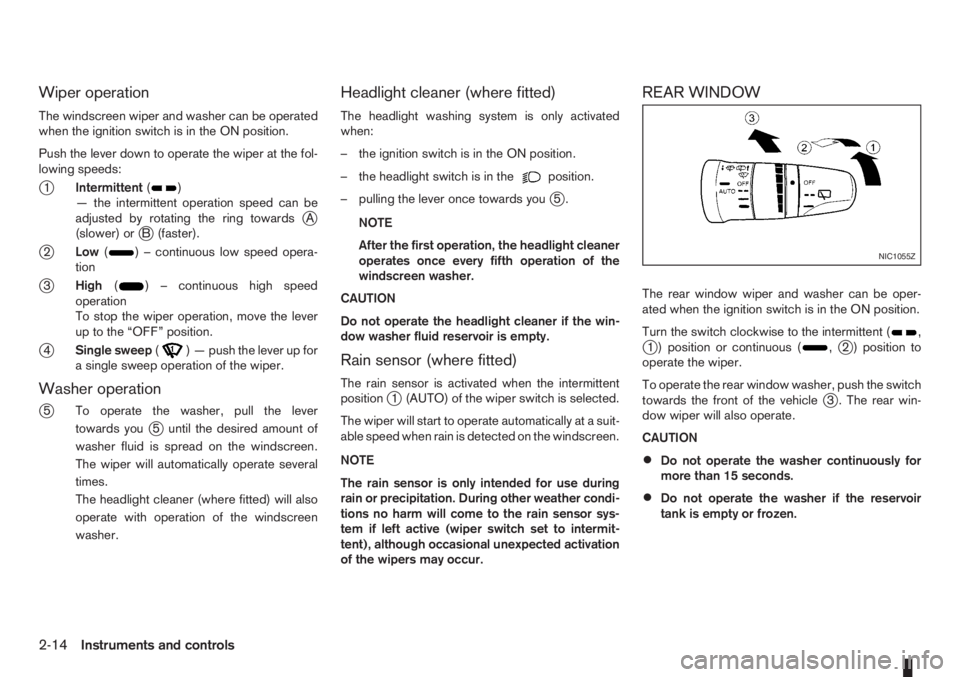
Push the lever down to operate the wiper at the fol-
lowing speeds:
j1Intermittent()
— the intermittent operation speed can be
adjusted by rotating the ring towards
jA
(slower) orjB (faster).
j2Low() – continuous low speed opera-
tion
j3High() – continuous high speed
operation
To stop the wiper operation, move the lever
up to the “OFF” position.
j4Single sweep() — push the lever up for
a single sweep operation of the wiper.
Washer operation
j
5 To operate the washer, pull the lever
towards you
j5 until the desired amount of
washer fluid is spread on the windscreen.
The wiper will automatically operate several
times.
The headlight cleaner (where fitted) will also
operate with operation of the windscreen
washer.
Headlight cleaner (where fitted)
The headlight washing system is only activated
when:
– the ignition switch is in the ON position.
– the headlight switch is in the
position.
– pulling the lever once towards you
j5.
NOTE
After the first operation, the headlight cleaner
operates once every fifth operation of the
windscreen washer.
CAUTION
Do not operate the headlight cleaner if the win-
dow washer fluid reservoir is empty.
Rain sensor (where fitted)
The rain sensor is activated when the intermittent
positionj1 (AUTO) of the wiper switch is selected.
The wiper will start to operate automatically at a suit-
able speed when rain is detected on the windscreen.
NOTE
The rain sensor is only intended for use during
rain or precipitation. During other weather condi-
tions no harm will come to the rain sensor sys-
tem if left active (wiper switch set to intermit-
tent), although occasional unexpected activation
of the wipers may occur.
REAR WINDOW
The rear window wiper and washer can be oper-
ated when the ignition switch is in the ON position.
Turn the switch clockwise to the intermittent (
,j1 ) position or continuous (,j2 ) position to
operate the wiper.
To operate the rear window washer, push the switch
towards the front of the vehicle
j3 . The rear win-
dow wiper will also operate.
CAUTION
•Do not operate the washer continuously for
more than 15 seconds.
•Do not operate the washer if the reservoir
tank is empty or frozen.
NIC1055Z
2-14Instruments and controls
Page 57 of 235
WARNING
In freezing temperatures the washer solution
may freeze on the rear window and obscure your
vision. Warm the rear window with the rear win-
dow defogger before you wash the rear window.
NOTE
When the windscreen wiper switch is in the inter-
mittent, low or high speed position and the vehi-
cle’s gear lever is set in Reverse, the rear window
wiper comes on (where fitted).REAR WINDOW DEFOGGER
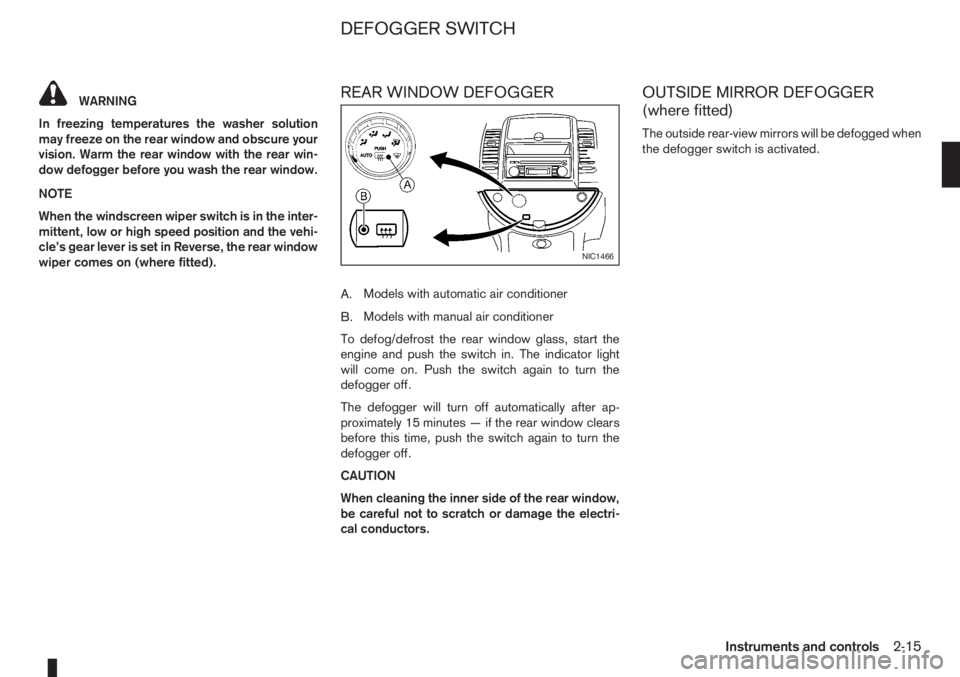
A.Models with automatic air conditioner
B.Models with manual air conditioner
To defog/defrost the rear window glass, start the
engine and push the switch in. The indicator light
will come on. Push the switch again to turn the
defogger off.
The defogger will turn off automatically after ap-
proximately 15 minutes — if the rear window clears
before this time, push the switch again to turn the
defogger off.
CAUTION
When cleaning the inner side of the rear window,
be careful not to scratch or damage the electri-
cal conductors.
OUTSIDE MIRROR DEFOGGER
(where fitted)
The outside rear-view mirrors will be defogged when
the defogger switch is activated.
NIC1466
DEFOGGER SWITCH
Instruments and controls2-15
Page 58 of 235
NISSAN recommends you to consult the local regu-
lations concerning the use of lights.
HEADLIGHT SWITCH
Lighting
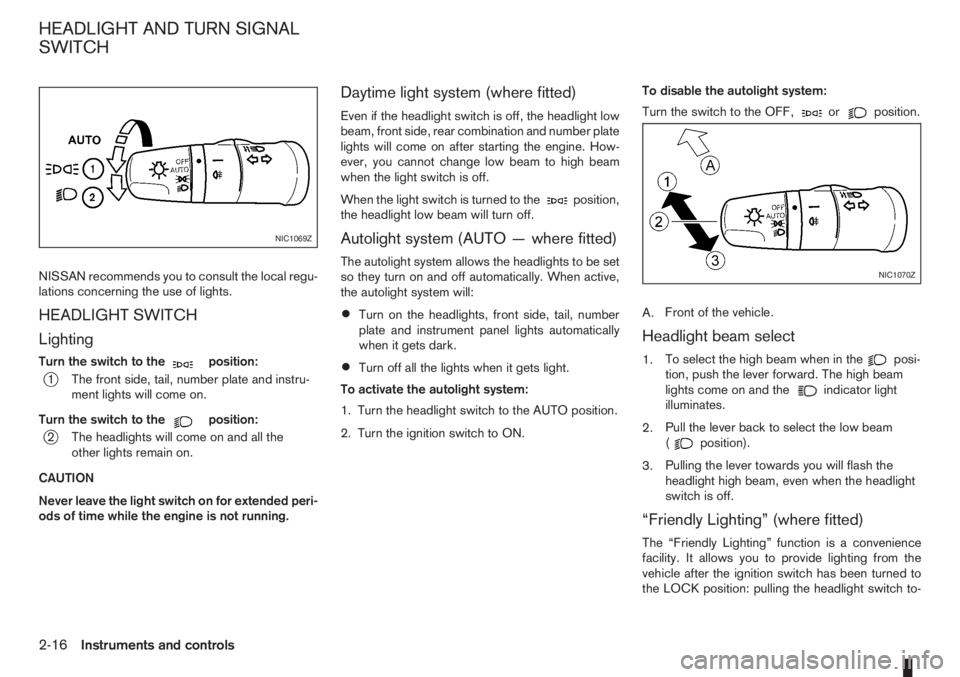
Turn the switch to themposition:
j1 The front side, tail, number plate and instru-
ment lights will come on.
Turn the switch to the
mposition:
j2 The headlights will come on and all the
other lights remain on.
CAUTION
Never leave the light switch on for extended peri-
ods of time while the engine is not running.
Daytime light system (where fitted)
Even if the headlight switch is off, the headlight low
beam, front side, rear combination and number plate
lights will come on after starting the engine. How-
ever, you cannot change low beam to high beam
when the light switch is off.
When the light switch is turned to the
position,
the headlight low beam will turn off.
Autolight system (AUTO — where fitted)
The autolight system allows the headlights to be set
so they turn on and off automatically. When active,
the autolight system will:
•Turn on the headlights, front side, tail, number
plate and instrument panel lights automatically
when it gets dark.
•Turn off all the lights when it gets light.
To activate the autolight system:
1. Turn the headlight switch to the AUTO position.
2. Turn the ignition switch to ON.To disable the autolight system:
Turn the switch to the OFF,
orposition.
A.Front of the vehicle.
Headlight beam select
1.To select the high beam when in theposi-
tion, push the lever forward. The high beam
lights come on and the
indicator light
illuminates.
2.Pull the lever back to select the low beam
(
position).
3.Pulling the lever towards you will flash the
headlight high beam, even when the headlight
switch is off.
“Friendly Lighting” (where fitted)
The “Friendly Lighting” function is a convenience
facility. It allows you to provide lighting from the
vehicle after the ignition switch has been turned to
the LOCK position: pulling the headlight switch to-
NIC1069Z
NIC1070Z
HEADLIGHT AND TURN SIGNAL
SWITCH
2-16Instruments and controls
Page 59 of 235
ward you once will activate the headlight for ap-
proximately 30 seconds. After that period of time, it
will automatically switch off.
It is possible to pull the headlight switch up to four
times to increase the lighting period up to 2 minutes.
NOTE
The “Friendly Lighting” function can be cancelled
by switching the ignition switch to the Acc or ON
position again.
Battery save function
The battery save feature prevents your vehicle from
discharging the battery after you have left the exter-
nal lights, map lamps or room lamps on (combina-
tion switch in the
orposition) when exiting
the vehicle. This occurs when the ignition switch or
ignition knob is in the “OFF” or LOCK position.
NOTE
The next time the engine is started the external
lights, map lamps or room lamp will come on
again
Battery save function for external lights:
If the ignition switch is turned to the “OFF” position
but the external lights are accidentally left on, the
external lights will automatically be switched off as
soon as the driver’s door is opened.
It is possible to leave the external lights on perma-
nently by switching them back on using the head-
light switch while the ignition switch is still in theLOCK or “OFF” position. In this case, the light re-
minder chime will sound when the driver’s door is
opened.
Battery save function for interior light:
The interior light will automatically be switched off
after approximately 15 minutes if it has been acci-
dentally left on.
TURN SIGNAL SWITCH
Lane change signal
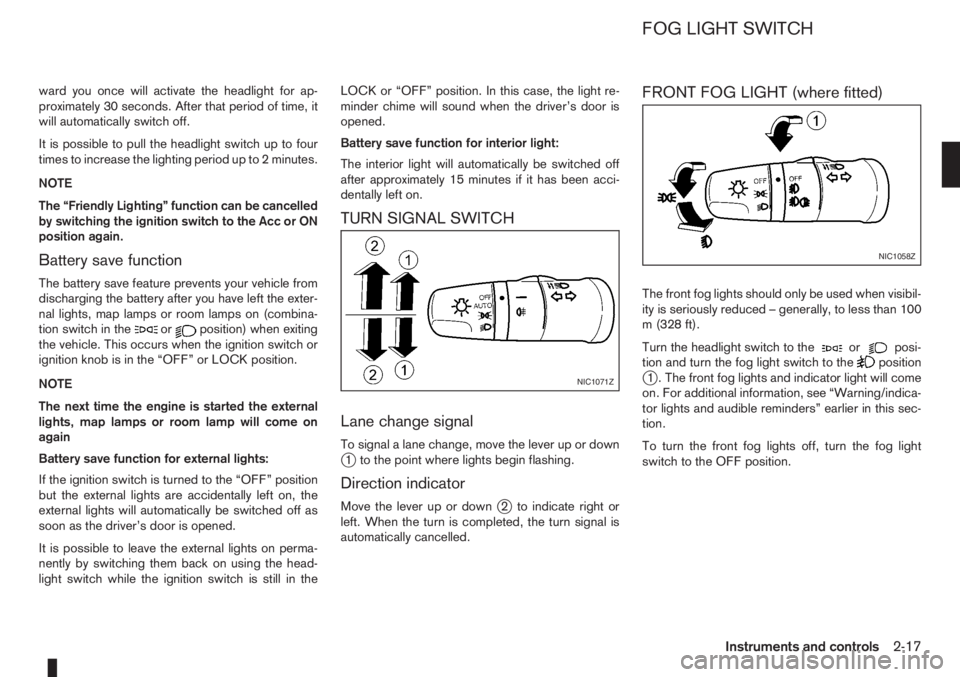
To signal a lane change, move the lever up or downj1 to the point where lights begin flashing.
Direction indicator
Move the lever up or downj2 to indicate right or
left. When the turn is completed, the turn signal is
automatically cancelled.
FRONT FOG LIGHT (where fitted)
The front fog lights should only be used when visibil-
ity is seriously reduced – generally, to less than 100
m (328 ft).
Turn the headlight switch to the
orposi-
tion and turn the fog light switch to thepositionj1 . The front fog lights and indicator light will come
on. For additional information, see “Warning/indica-
tor lights and audible reminders” earlier in this sec-
tion.
To turn the front fog lights off, turn the fog light
switch to the OFF position.NIC1071Z
NIC1058Z
FOG LIGHT SWITCH
Instruments and controls2-17
Page 62 of 235
5. When the vehicle’s interior has warmed-up, or
before you leave the vehicle, be sure to turn the
seat heater system off.
CAUTION
•Do not use the seat heater system for a long
period of time when the engine is not running,
otherwise the battery could run down.
•Do not put anything on the seat that insulates
the heat, such as a blanket, cushion, seat
cover, etc. Otherwise, the seat may overheat.
•Do not place anything hard or heavy on the
seat or pierce it with a pin or similar object.
This may damage the heater.
•Any liquid spilled on a heated seat should be
removed immediately with a dry cloth.
•When cleaning the seat, never use benzine,
thinner or any similar materials.
•If any abnormalities are found or the heating
does not operate, turn off the switch and have
the system checked by a NISSAN dealer or
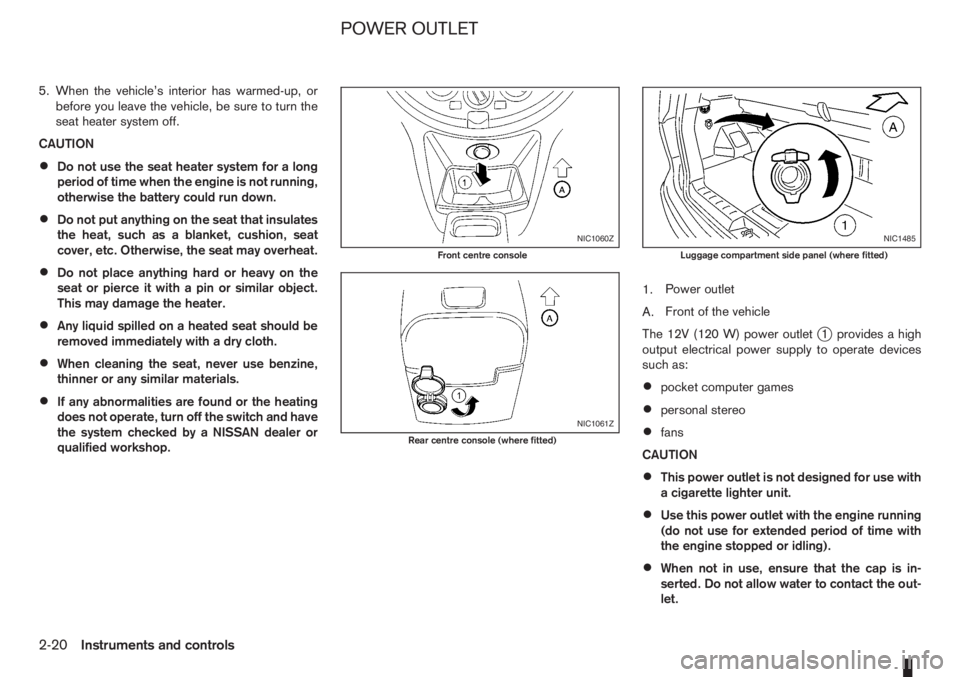
qualified workshop.1.Power outlet
A.Front of the vehicle
The 12V (120 W) power outlet
j1 provides a high
output electrical power supply to operate devices
such as:
•pocket computer games
•personal stereo
•fans
CAUTION
•This power outlet is not designed for use with
a cigarette lighter unit.
•Use this power outlet with the engine running
(do not use for extended period of time with
the engine stopped or idling).
•When not in use, ensure that the cap is in-
serted. Do not allow water to contact the out-
let.
NIC1060Z
Front centre console
NIC1061Z
Rear centre console (where fitted)
NIC1485
Luggage compartment side panel (where fitted)
POWER OUTLET
2-20Instruments and controls
Page 68 of 235
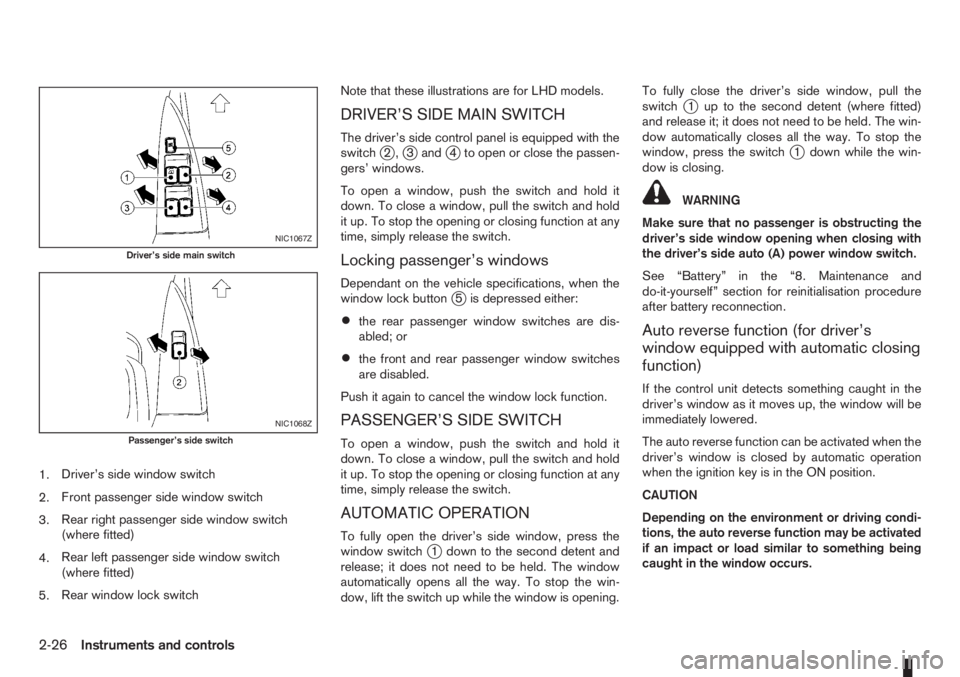
1.Driver’s side window switch
2.Front passenger side window switch
3.Rear right passenger side window switch
(where fitted)
4.Rear left passenger side window switch
(where fitted)
5.Rear window lock switchNote that these illustrations are for LHD models.
DRIVER’S SIDE MAIN SWITCH
The driver’s side control panel is equipped with the
switchj2,j3andj4 to open or close the passen-
gers’ windows.
To open a window, push the switch and hold it
down. To close a window, pull the switch and hold
it up. To stop the opening or closing function at any
time, simply release the switch.
Locking passenger’s windows
Dependant on the vehicle specifications, when the
window lock buttonj5 is depressed either:
•the rear passenger window switches are dis-
abled; or
•the front and rear passenger window switches
are disabled.
Push it again to cancel the window lock function.
PASSENGER’S SIDE SWITCH
To open a window, push the switch and hold it
down. To close a window, pull the switch and hold
it up. To stop the opening or closing function at any
time, simply release the switch.
AUTOMATIC OPERATION
To fully open the driver’s side window, press the
window switchj1 down to the second detent and
release; it does not need to be held. The window
automatically opens all the way. To stop the win-
dow, lift the switch up while the window is opening.To fully close the driver’s side window, pull the
switch
j1 up to the second detent (where fitted)
and release it; it does not need to be held. The win-
dow automatically closes all the way. To stop the
window, press the switch
j1 down while the win-
dow is closing.
WARNING
Make sure that no passenger is obstructing the
driver’s side window opening when closing with
the driver’s side auto (A) power window switch.
See “Battery” in the “8. Maintenance and
do-it-yourself” section for reinitialisation procedure
after battery reconnection.
Auto reverse function (for driver’s
window equipped with automatic closing
function)
If the control unit detects something caught in the
driver’s window as it moves up, the window will be
immediately lowered.
The auto reverse function can be activated when the
driver’s window is closed by automatic operation
when the ignition key is in the ON position.
CAUTION
Depending on the environment or driving condi-
tions, the auto reverse function may be activated
if an impact or load similar to something being
caught in the window occurs.
NIC1067Z
Driver’s side main switch
NIC1068Z
Passenger’s side switch
2-26Instruments and controls
Page 69 of 235
WARNING
There are some areas immediately before the
closed position where squeezing cannot be de-
tected. Be careful not to pinch your fingers.CAUTION
Do not use for extended periods of time with the
engine stopped. This could discharge the bat-
tery.
NOTE
The interior lights will go off after approximately
15 minutes unless the ignition switch is in the
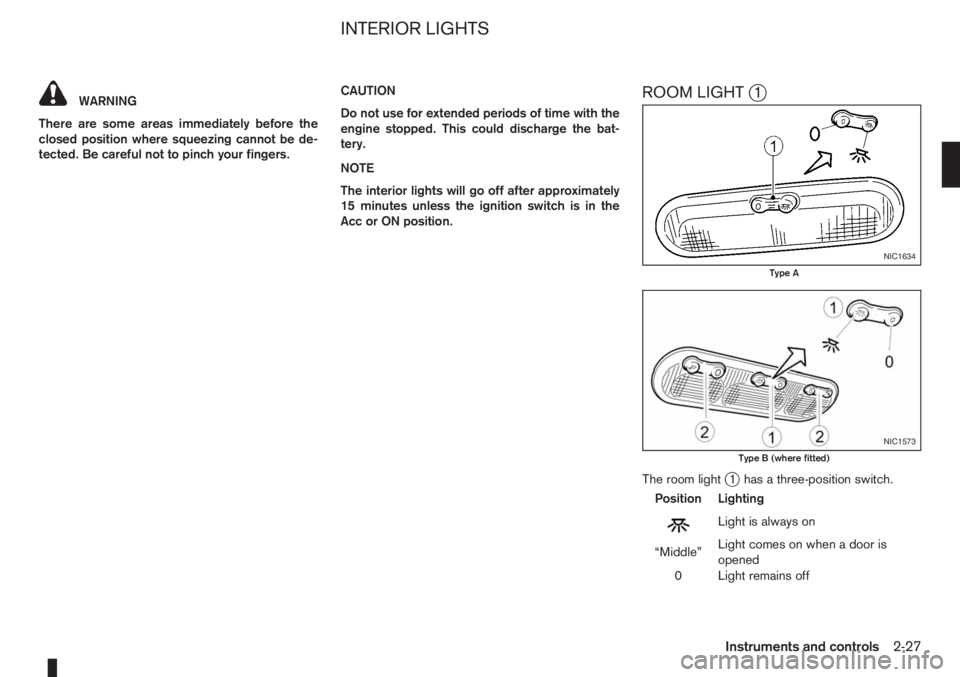
Acc or ON position.ROOM LIGHTj1
The room lightj1 has a three-position switch.
Position Lighting
mLightisalwayson
“Middle”Light comes on when a door is
opened
0 Light remains off
NIC1634
Type A
NIC1573
Type B (where fitted)
INTERIOR LIGHTS
Instruments and controls2-27
Page 70 of 235
Room light timer
The room light will stay on for approximately 30 sec-
onds when:
•The ignition is switched off.
•The doors are unlocked.
•Any door (except back door) is opened and then
closed.
The timer is cancelled, and the interior light will turn
off when:
•The doors are locked.
•The ignition switch is turned to the ON position.
MAP LIGHT (where fitted)j2
To switch on the map light, press eitherorof
the switchesj2.
LUGGAGE COMPARTMENT LIGHT
The light comes on when the back door is opened.
2-28Instruments and controls
Page 72 of 235
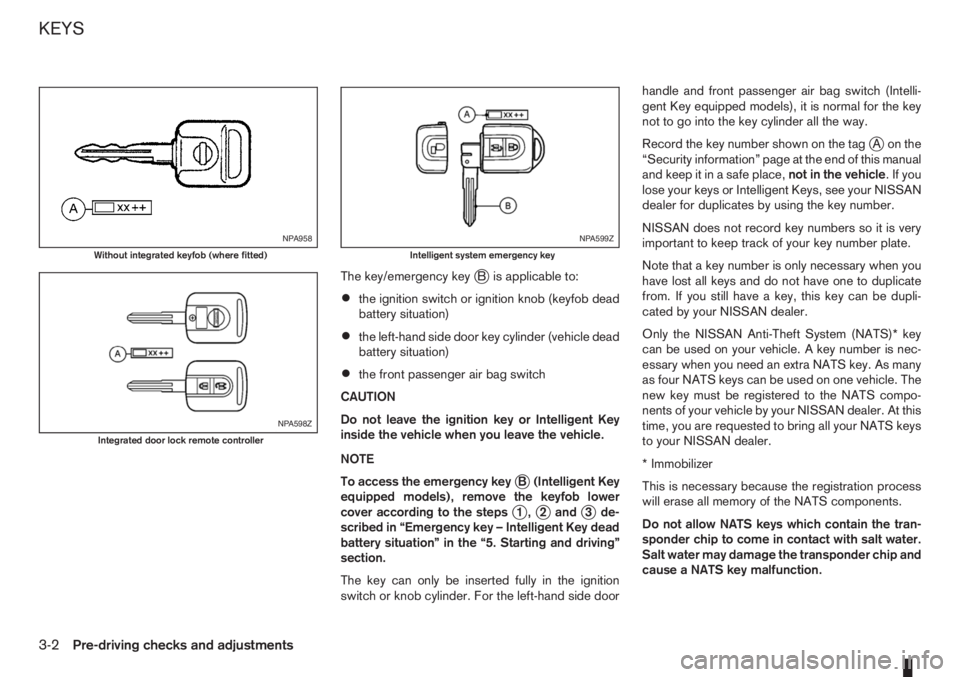
The key/emergency keyjB is applicable to:
•the ignition switch or ignition knob (keyfob dead
battery situation)
•the left-hand side door key cylinder (vehicle dead
battery situation)
•the front passenger air bag switch
CAUTION
Do not leave the ignition key or Intelligent Key
inside the vehicle when you leave the vehicle.
NOTE
To access the emergency key
jB (Intelligent Key
equipped models), remove the keyfob lower
cover according to the steps
j1,j2andj3 de-
scribed in “Emergency key – Intelligent Key dead
battery situation” in the “5. Starting and driving”
section.
The key can only be inserted fully in the ignition
switch or knob cylinder. For the left-hand side doorhandle and front passenger air bag switch (Intelli-
gent Key equipped models), it is normal for the key
not to go into the key cylinder all the way.
Record the key number shown on the tag
jA on the
“Security information” page at the end of this manual
and keep it in a safe place,not in the vehicle.Ifyou
lose your keys or Intelligent Keys, see your NISSAN
dealer for duplicates by using the key number.
NISSAN does not record key numbers so it is very
important to keep track of your key number plate.
Note that a key number is only necessary when you
have lost all keys and do not have one to duplicate
from. If you still have a key, this key can be dupli-
cated by your NISSAN dealer.
Only the NISSAN Anti-Theft System (NATS)* key
can be used on your vehicle. A key number is nec-
essary when you need an extra NATS key. As many
as four NATS keys can be used on one vehicle. The
new key must be registered to the NATS compo-
nents of your vehicle by your NISSAN dealer. At this
time, you are requested to bring all your NATS keys
to your NISSAN dealer.
* Immobilizer
This is necessary because the registration process
will erase all memory of the NATS components.
Do not allow NATS keys which contain the tran-
sponder chip to come in contact with salt water.
Salt water may damage the transponder chip and
cause a NATS key malfunction.
NPA958
Without integrated keyfob (where fitted)
NPA598Z
Integrated door lock remote controller
NPA599Z
Intelligent system emergency key
KEYS
3-2Pre-driving checks and adjustments