Time NISSAN NOTE 2008 Owners Manual
[x] Cancel search | Manufacturer: NISSAN, Model Year: 2008, Model line: NOTE, Model: NISSAN NOTE 2008Pages: 235, PDF Size: 2.29 MB
Page 2 of 235
Foreword
Welcome to the growing family of new NISSAN owners. This vehicle has been delivered to you with confidence. It has been produced using the latest techniques
and strict quality control.
This manual was prepared to help you understand the operation and maintenance of your vehicle so that you may enjoy many kilometres (miles) of driving pleasure.
Please read through this manual before operating your vehicle.
A separate Warranty Information & Maintenance Booklet explains in detail the warranty coverage that applies to your vehicle.
Your NISSAN dealer knows your vehicle best. When you require any service or have any questions, your NISSAN dealer will be glad to assist you with the extensive
resources available for you.
IMPORTANT SAFETY INFORMATION
REMINDERS FOR SAFETY!
Follow these important driving rules to help ensure a safe and complete trip for
you and your passengers!
•NEVER drive under the influence of alcohol or drugs.
•ALWAYS observe posted speed limits and never drive too fast for condi-
tions.
•ALWAYS use your seat belts and appropriate child restraint systems.
Preteen children should be seated in the rear seat.
•ALWAYS provide information about the proper use of vehicle safety fea-
tures to all occupants of the vehicle.
•ALWAYS review this Owner’s Manual for important safety information.
WHEN READING THE MANUAL
This manual includes information for all options available on this model. There-
fore, you may find some information that does not apply to your vehicle.
All information, specifications and illustrations in this manual are those in effect
at the time of printing. NISSAN reserves the right to change specifications or
designs at any time without notice and without obligation.
MODIFICATION OF YOUR VEHICLE
This vehicle should not be modified. Modifications could affect its performance,
safety or durability, and may even violate governmental regulations. In addition,
damage or performance problems resulting from modifications may not be cov-
ered under NISSAN warranties.
READ FIRST — THEN DRIVE SAFELY
Before driving your vehicle, read this Owner’s Manual carefully. This will ensure
familiarity with controls and maintenance requirements, assisting you in the safe
operation of your vehicle.
Throughout this manual the following symbols and words are used:
WARNING
Indicates the presence of a hazard that could cause death or serious per-
sonal injury. To avoid or reduce the risk, the procedures described must be
followed precisely.
CAUTION
Indicates the presence of a hazard that could cause minor or moderate per-
sonal injury, or damage to your vehicle. To avoid or reduce the risk, the pro-
cedures described must be followed carefully.
NOTE
Indicates additional helpful information.
Page 20 of 235
FRONT SEATS
Manual seat adjustment
WARNING
•Do not adjust the driver’s seat while driving.
The seat may move suddenly and could cause
loss of control of the vehicle.
•After adjustment, gently rock in the seat to
make sure it is securely locked.
•The seatback should not be reclined any more
than needed for comfort. Seat belts are most
effective when the passenger sits well back
and upright in the seat. If the seatback is re-
clined, the risk of sliding under the lap belt
and being injured is increased.
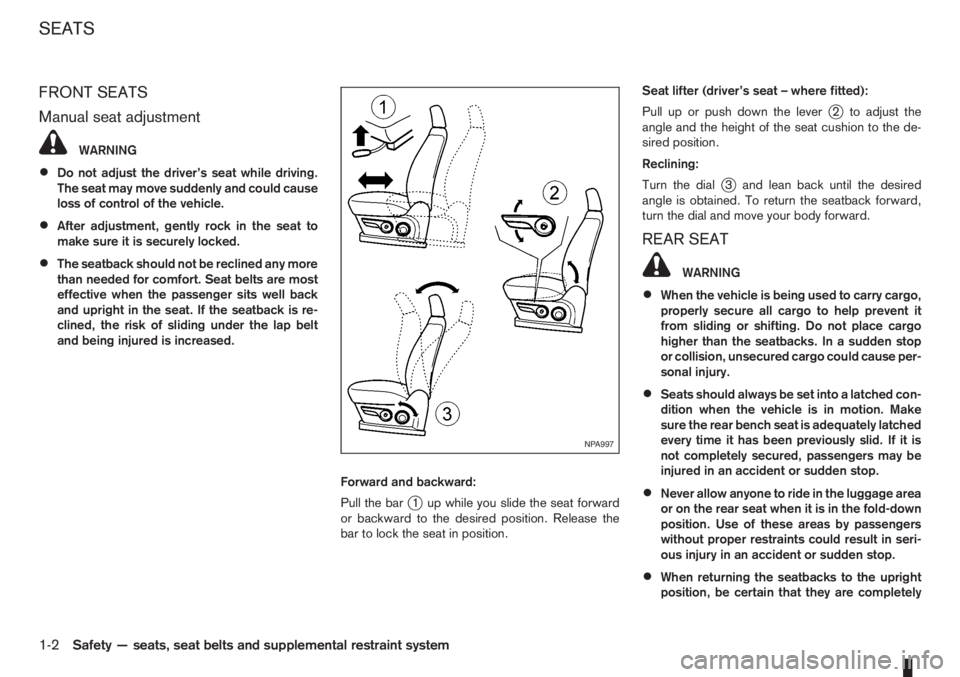
Forward and backward:
Pull the bar
j1 up while you slide the seat forward
or backward to the desired position. Release the
bar to lock the seat in position.Seat lifter (driver’s seat – where fitted):
Pull up or push down the lever
j2 to adjust the
angle and the height of the seat cushion to the de-
sired position.
Reclining:
Turn the dial
j3 and lean back until the desired
angle is obtained. To return the seatback forward,
turn the dial and move your body forward.
REAR SEAT
WARNING
•When the vehicle is being used to carry cargo,
properly secure all cargo to help prevent it
from sliding or shifting. Do not place cargo
higher than the seatbacks. In a sudden stop
or collision, unsecured cargo could cause per-
sonal injury.
•Seats should always be set into a latched con-
dition when the vehicle is in motion. Make
sure the rear bench seat is adequately latched
every time it has been previously slid. If it is
not completely secured, passengers may be
injured in an accident or sudden stop.
•Never allow anyone to ride in the luggage area
or on the rear seat when it is in the fold-down
position. Use of these areas by passengers
without proper restraints could result in seri-
ous injury in an accident or sudden stop.
•When returning the seatbacks to the upright
position, be certain that they are completely
NPA997
SEATS
1-2Safety — seats, seat belts and supplemental restraint system
Page 24 of 235
NOTE
The front passenger seat belt warning will not
light up if the seat is unoccupied.
PRECAUTIONS ON SEAT BELT
USAGE
Your chances of being injured in an accident and/or
the severity of injury may be greatly reduced if you
are wearing your seat belt and it is properly ad-
justed. NISSAN strongly encourages you and all of
your passengers to buckle up every time you drive,
even if your seating position is equipped with an air
bag.
WARNING
Be sure to observe the following warnings when
using seat belts. Failure to do so could increase
the chance and/or severity of injury in an acci-
dent.
•Seat belts are designed to bear upon the bony
structure of the body, and should be worn low
across the front of the pelvis or the pelvis,
chest and shoulders, as applicable; wearing
the lap section of the belt across the abdomi-
nal area must be avoided. Serious injury can
occur if the seat belt is not worn properly.
•No modifications or additions should be made
by the user which will either prevent the seat
belt adjusting devices from operating to re-
move slack, or prevent the seat belt assembly
from being adjusted to remove slack.
•Seat belts should be adjusted as firmly as
possible, consistent with comfort to provide
the protection for which they have been de-
signed. A slack belt will greatly reduce the
protection afforded to the wearer.
•Care should be taken to avoid contamination
of the webbing with polishes, oils and chemi-
cals, and particularly battery acid. Cleaning
may safely be carried out using mild soap and
water. The belt should be replaced if webbing
becomes frayed, contaminated or damaged.
•It is essential to replace the entire assembly
after it has been worn in a severe impact even
if damage to the assembly is not obvious.
•Belts should not be worn with straps twisted.
•Each seat belt assembly must only be used by
one occupant; it is dangerous to put a belt
around a child being carried on the occupant’s
lap.
•Every occupant in this vehicle should wear a
seat belt at all times.
•Your vehicle has seating positions and seat
belts for five (5) occupants; two (2) in the front
seats and three (3) in the rear. Never carry
more people in the vehicle than there are seat
belts.
•All seat belt assemblies, including retractors
and attaching hardware, should be inspected
by a NISSAN dealer or qualified workshop af-
ter any collision. NISSAN recommends that
all seat belt assemblies in use during a colli-sion should be replaced unless the collision
was minor and the belts show no damage and
continue to operate properly. Seat belt assem-
blies not in use during a collision should also
be inspected and replaced if either damage
or improper operation is noted.
•Once the pre-tensioner seat belt has been ac-
tivated, it cannot be re-used. It must be re-
placed together with the retractor. See a
NISSAN dealer or qualified workshop.
•Removal and installation of the pre-tensioner
seat belt system components should be done
by a NISSAN dealer or qualified workshop
ONLY.
•If the seat belt warning light glows continu-
ously while the ignition switch is in the ON
position, all doors are closed and seat belts
is/are fastened, it may indicate a malfunction
in the system. Have the system checked by a
NISSAN dealer or qualified workshop.
•Always route the shoulder belt over your
shoulder and across your chest. Never run
the belt under your arm. Serious injury can
occur if the seat belt is not worn properly.
•Position the lap belt as low as possible
AROUND THE HIPS, NOT THE WAIST.
1-6Safety — seats, seat belts and supplemental restraint system
Page 25 of 235
CHILD SAFETY
Infants or small children
NISSAN recommends that infants or small children
should be seated in a child restraint on the rear
seats if available. According to accident statistics,
children are safer when properly restrained in the
rear seat than in the front seat, see “Child restraints”
later in this section.You should choose a child
restraint system which fits your vehicle and al-
ways follow the manufacturer’s instructions for
installation and use.
Children
Children who are too large for child restraints should
be seated and restrained by the seat belts that are
provided.
The use of a booster seat (commercially available)
may help to avoid the shoulder belt coming across
the face or neck area of a child’s seating position.
The booster seat should raise the child so that the
shoulder belt is properly positioned across the top,middle portion of the shoulder and the lap belt is low
on the hips. The booster seat should fit the vehicle’s
seat. Once the child has grown so the shoulder belt
is no longer on or near the face and neck, use the
shoulder belt without the booster seat.
WARNING
Never let a child stand or kneel on any seat and
do not allow a child in the cargo areas while the
vehicle is moving.
PREGNANT WOMEN
NISSAN recommends that pregnant women use
seat belts. Contact your doctor for specific recom-
mendations. The seat belt should be worn snug,
always position the lap belt as low as possible
around the hips, place the shoulder belt over your
shoulder and across your chest. Never run the lap/
shoulder belt over your abdominal area.
INJURED PERSONS
NISSAN recommends that injured persons use seat
belts, depending on the injury. Check with your doc-
tor for specific recommendations.
THREE-POINT TYPE SEAT BELTS
Every person who drives or rides in this vehicle
should wear a seat belt at all times.
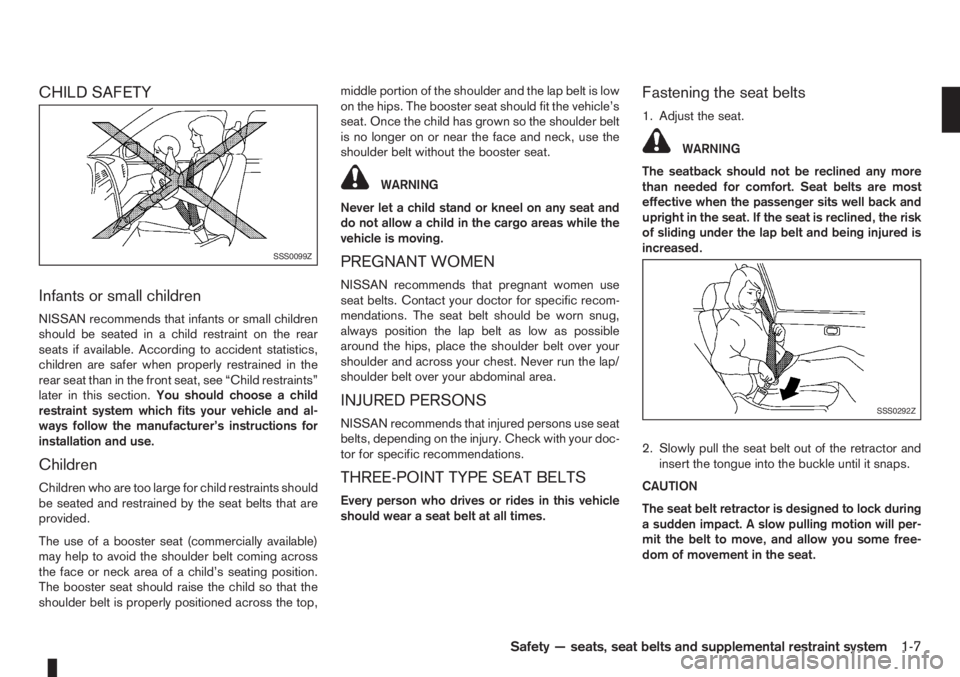
Fastening the seat belts
1. Adjust the seat.
WARNING
The seatback should not be reclined any more
than needed for comfort. Seat belts are most
effective when the passenger sits well back and
upright in the seat. If the seat is reclined, the risk
of sliding under the lap belt and being injured is
increased.
2. Slowly pull the seat belt out of the retractor and
insert the tongue into the buckle until it snaps.
CAUTION
The seat belt retractor is designed to lock during
a sudden impact. A slow pulling motion will per-
mit the belt to move, and allow you some free-
dom of movement in the seat.
SSS0099Z
SSS0292Z
Safety — seats, seat belts and supplemental restraint system1-7
Page 32 of 235
monitored by the SRS air bag warning light are: all
sensors, air bag modules and all related wiring, and
the pre-tensioner seat belt.
After turning the ignition switch to the ON or
START position, the supplemental air bag warn-
ing light illuminates. The air bag warning light will
turn off after approximately 7 seconds if the sys-
tem is operational.
If any of the following conditions occurs, the front air
bag, side and curtain air bag systems (where fitted)
and pre-tensioner seat belt need servicing and
should be taken to the nearest NISSAN dealer or
qualified workshop:
•The SRS air bag warning light remains on after
approximately 7 seconds.
•The SRS air bag warning light flashes intermit-
tently.
•The SRS air bag warning light does not come on
at all.
Under these conditions, the front air bags, side and
curtain air bags (where fitted) and/or pre-tensioner
seat belt will not operate properly. They must be
checked and repaired.
Repair and replacement procedure
The front air bags, side air bags (where fitted), cur-
tain air bags (where fitted) and pre-tensioner seat
belt are designed to activate on a one-time-only ba-
sis. As a reminder, unless it is damaged, the air bag
warning light will remain illuminated after inflationhas occurred. Repair and replacement of the air bag
system should be done only by a NISSAN dealer or
qualified workshop.
When maintenance work is required on the vehicle,
the air bag systems, related parts and pre-tensioner
seat belt should be pointed out to the person con-
ducting the maintenance. The ignition switch should
always be in the LOCK position when working un-
der the bonnet or inside the vehicle.
WARNING
•Once the air bag has inflated or the pre-ten-
sioner seat belt has been activated, the air
bag module and pre-tensioner seat belt will
not function again and must be replaced. The
air bag module should be replaced by a
NISSAN dealer or qualified workshop. The air
bag module cannot be repaired.
•All air bag systems should be inspected by a
NISSAN dealer or qualified workshop if there
is any damage to the front end portion of the
vehicle.
•When selling your vehicle, we request that you
inform the buyer about the air bag system and
guide the buyer to the appropriate sections in
this Owner’s Manual.
•If you need to dispose of an air bag or scrap
the vehicle, contact a NISSAN dealer or quali-
fied workshop. Correct air bag disposal pro-
cedures are set forth in the appropriate
NISSAN Service Manual. Incorrect disposal
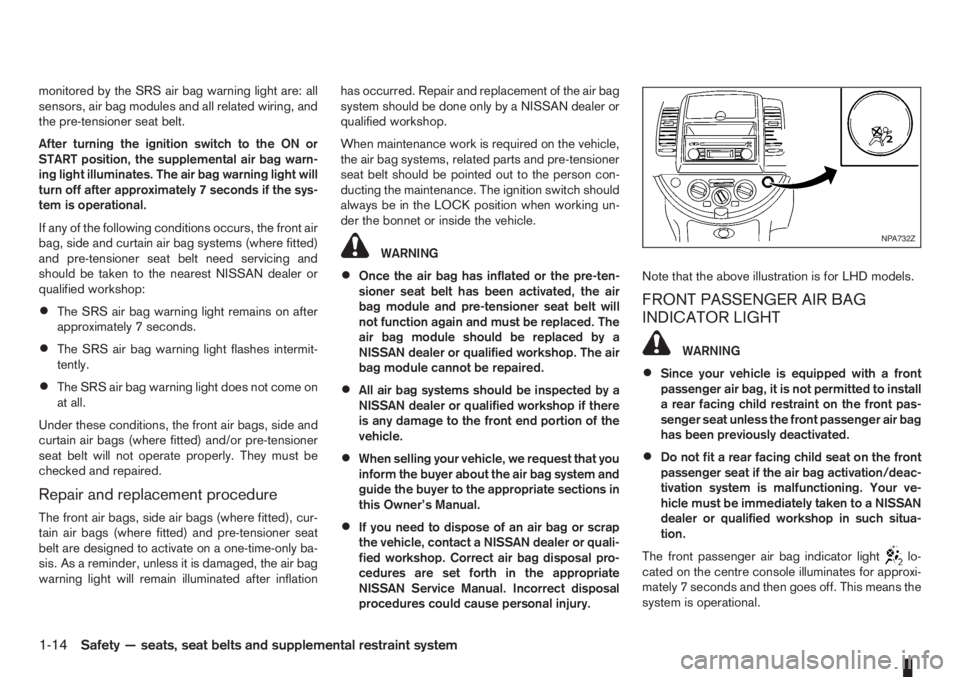
procedures could cause personal injury.Note that the above illustration is for LHD models.
FRONT PASSENGER AIR BAG
INDICATOR LIGHT
WARNING
•Since your vehicle is equipped with a front
passenger air bag, it is not permitted to install
a rear facing child restraint on the front pas-
senger seat unless the front passenger air bag
has been previously deactivated.
•Do not fit a rear facing child seat on the front
passenger seat if the air bag activation/deac-
tivation system is malfunctioning. Your ve-
hicle must be immediately taken to a NISSAN
dealer or qualified workshop in such situa-
tion.
The front passenger air bag indicator light
lo-
cated on the centre console illuminates for approxi-
mately 7 seconds and then goes off. This means the
system is operational.
NPA732Z
1-14Safety — seats, seat belts and supplemental restraint system
Page 44 of 235
For an overview of the instruments of the instru-
ments and controls, see “Instrument and control
layout” in the “0. Illustrated table of contents” sec-
tion.
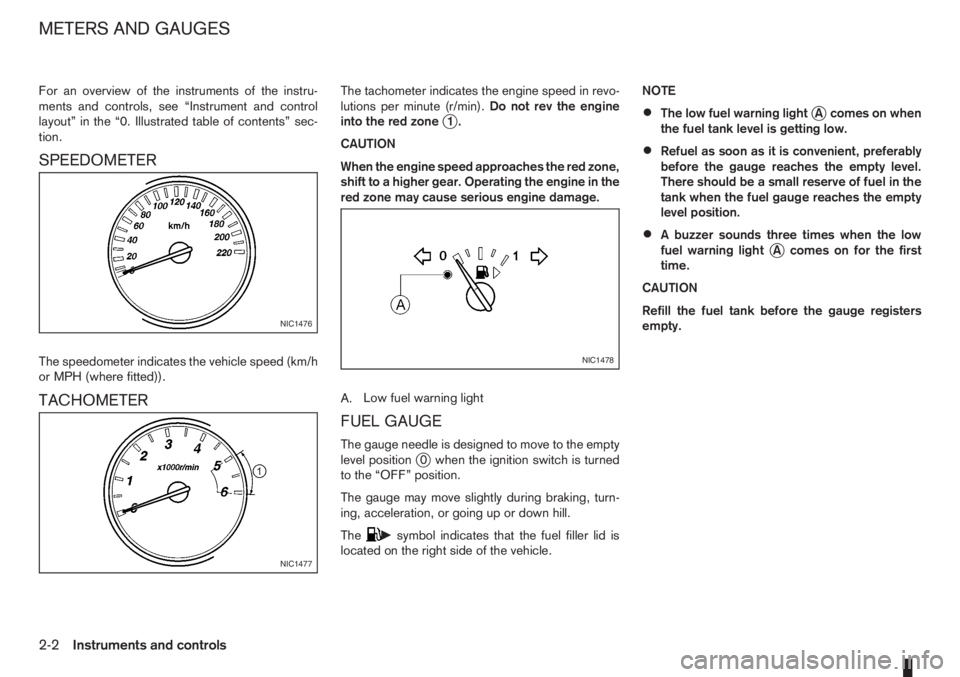
SPEEDOMETER
The speedometer indicates the vehicle speed (km/h
or MPH (where fitted)).
TACHOMETER
The tachometer indicates the engine speed in revo-
lutions per minute (r/min).Do not rev the engine
into the red zone
j1.
CAUTION
When the engine speed approaches the red zone,
shift to a higher gear. Operating the engine in the
red zone may cause serious engine damage.
A.Low fuel warning light
FUEL GAUGE
The gauge needle is designed to move to the empty
level positionj0 when the ignition switch is turned
to the “OFF” position.
The gauge may move slightly during braking, turn-
ing, acceleration, or going up or down hill.
The
csymbol indicates that the fuel filler lid is
located on the right side of the vehicle.NOTE
•The low fuel warning lightjA comes on when
the fuel tank level is getting low.
•Refuel as soon as it is convenient, preferably
before the gauge reaches the empty level.
There should be a small reserve of fuel in the
tank when the fuel gauge reaches the empty
level position.
•A buzzer sounds three times when the low
fuel warning lightjA comes on for the first
time.
CAUTION
Refill the fuel tank before the gauge registers
empty.
NIC1476
NIC1477
NIC1478
METERS AND GAUGES
2-2Instruments and controls
Page 45 of 235
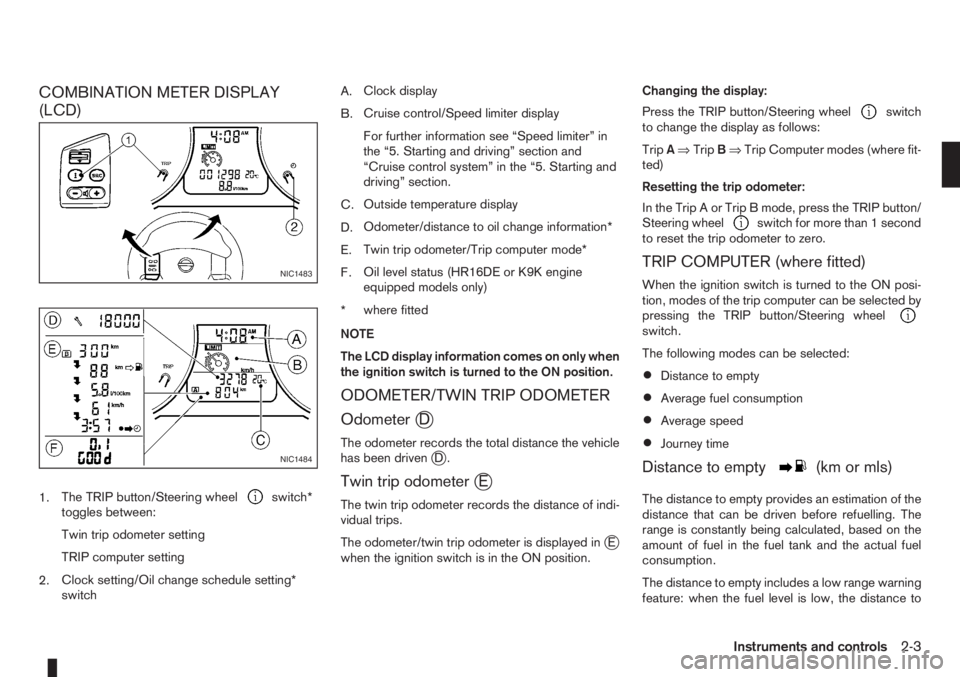
COMBINATION METER DISPLAY
(LCD)
1.The TRIP button/Steering wheelswitch*
toggles between:
Twin trip odometer setting
TRIP computer setting
2.Clock setting/Oil change schedule setting*
switchA.Clock display
B.Cruise control/Speed limiter display
For further information see “Speed limiter” in
the “5. Starting and driving” section and
“Cruise control system” in the “5. Starting and
driving” section.
C.Outside temperature display
D.Odometer/distance to oil change information*
E.Twin trip odometer/Trip computer mode*
F.Oil level status (HR16DE or K9K engine
equipped models only)
*where fitted
NOTE
The LCD display information comes on only when
the ignition switch is turned to the ON position.
ODOMETER/TWIN TRIP ODOMETER
Odometer
jD
The odometer records the total distance the vehicle
has been drivenjD.
Twin trip odometerjE
The twin trip odometer records the distance of indi-
vidual trips.
The odometer/twin trip odometer is displayed in
jE
when the ignition switch is in the ON position.Changing the display:
Press the TRIP button/Steering wheel
switch
to change the display as follows:
TripA⇒TripB⇒Trip Computer modes (where fit-
ted)
Resetting the trip odometer:
In the Trip A or Trip B mode, press the TRIP button/
Steering wheel
switch for more than 1 second
to reset the trip odometer to zero.
TRIP COMPUTER (where fitted)
When the ignition switch is turned to the ON posi-
tion, modes of the trip computer can be selected by
pressing the TRIP button/Steering wheel
switch.
The following modes can be selected:
•Distance to empty
•Average fuel consumption
•Average speed
•Journey time
Distance to emptym(km or mls)
The distance to empty provides an estimation of the
distance that can be driven before refuelling. The
range is constantly being calculated, based on the
amount of fuel in the fuel tank and the actual fuel
consumption.
The distance to empty includes a low range warning
feature: when the fuel level is low, the distance to
NIC1483
NIC1484
Instruments and controls2-3
Page 46 of 235
empty is automatically selected and the digits blink
in order to draw the driver’s attention. Press the
TRIP button/Steering wheel
switch if you wish
to return to the mode that was selected before the
warning occurred.
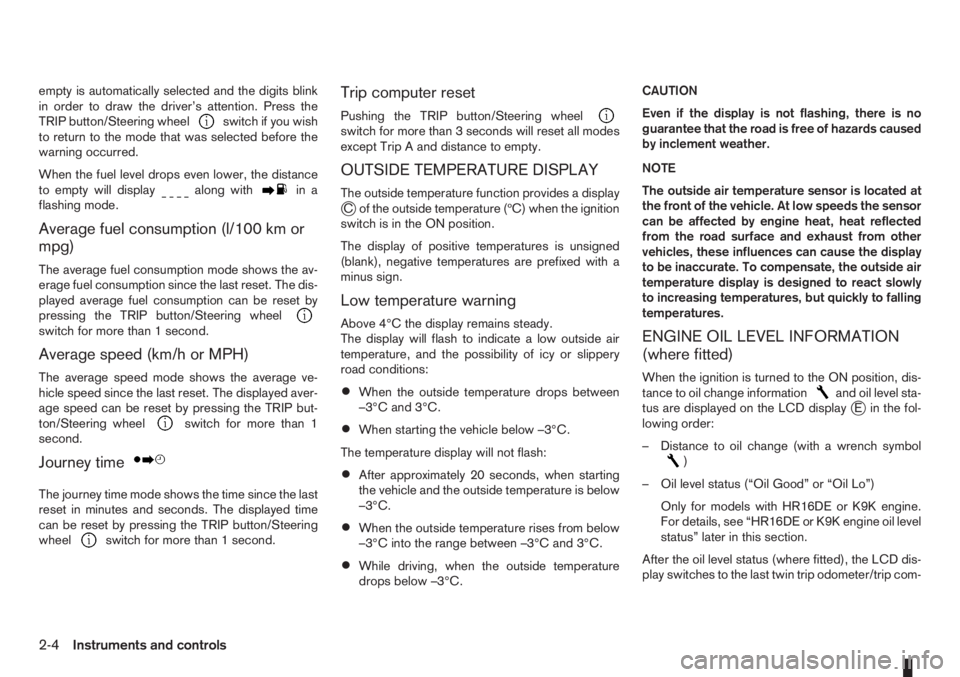
When the fuel level drops even lower, the distance
to empty will display
along within a
flashing mode.
Average fuel consumption (l/100 km or
mpg)
The average fuel consumption mode shows the av-
erage fuel consumption since the last reset. The dis-
played average fuel consumption can be reset by
pressing the TRIP button/Steering wheel
switch for more than 1 second.
Average speed (km/h or MPH)
The average speed mode shows the average ve-
hicle speed since the last reset. The displayed aver-
age speed can be reset by pressing the TRIP but-
ton/Steering wheel
switch for more than 1
second.
Journey timem
The journey time mode shows the time since the last
reset in minutes and seconds. The displayed time
can be reset by pressing the TRIP button/Steering
wheel
switch for more than 1 second.
Trip computer reset
Pushing the TRIP button/Steering wheelswitch for more than 3 seconds will reset all modes
except Trip A and distance to empty.
OUTSIDE TEMPERATURE DISPLAY
The outside temperature function provides a displayjC of the outside temperature (ºC) when the ignition
switch is in the ON position.
The display of positive temperatures is unsigned
(blank), negative temperatures are prefixed with a
minus sign.
Low temperature warning
Above 4°C the display remains steady.
The display will flash to indicate a low outside air
temperature, and the possibility of icy or slippery
road conditions:
•When the outside temperature drops between
–3°C and 3°C.
•When starting the vehicle below –3°C.
The temperature display will not flash:
•After approximately 20 seconds, when starting
the vehicle and the outside temperature is below
–3°C.
•When the outside temperature rises from below
–3°C into the range between –3°C and 3°C.
•While driving, when the outside temperature
drops below –3°C.CAUTION
Even if the display is not flashing, there is no
guarantee that the road is free of hazards caused
by inclement weather.
NOTE
The outside air temperature sensor is located at
the front of the vehicle. At low speeds the sensor
can be affected by engine heat, heat reflected
from the road surface and exhaust from other
vehicles, these influences can cause the display
to be inaccurate. To compensate, the outside air
temperature display is designed to react slowly
to increasing temperatures, but quickly to falling
temperatures.
ENGINE OIL LEVEL INFORMATION
(where fitted)
When the ignition is turned to the ON position, dis-
tance to oil change informationand oil level sta-
tus are displayed on the LCD displayjE in the fol-
lowing order:
– Distance to oil change (with a wrench symbol
)
– Oil level status (“Oil Good” or “Oil Lo”)
Only for models with HR16DE or K9K engine.
For details, see “HR16DE or K9K engine oil level
status” later in this section.
After the oil level status (where fitted), the LCD dis-
play switches to the last twin trip odometer/trip com-
2-4Instruments and controls
Page 47 of 235
puter (where fitted) mode that was displayed before
the ignition switch was turned to the Acc, “OFF” or
LOCK position.
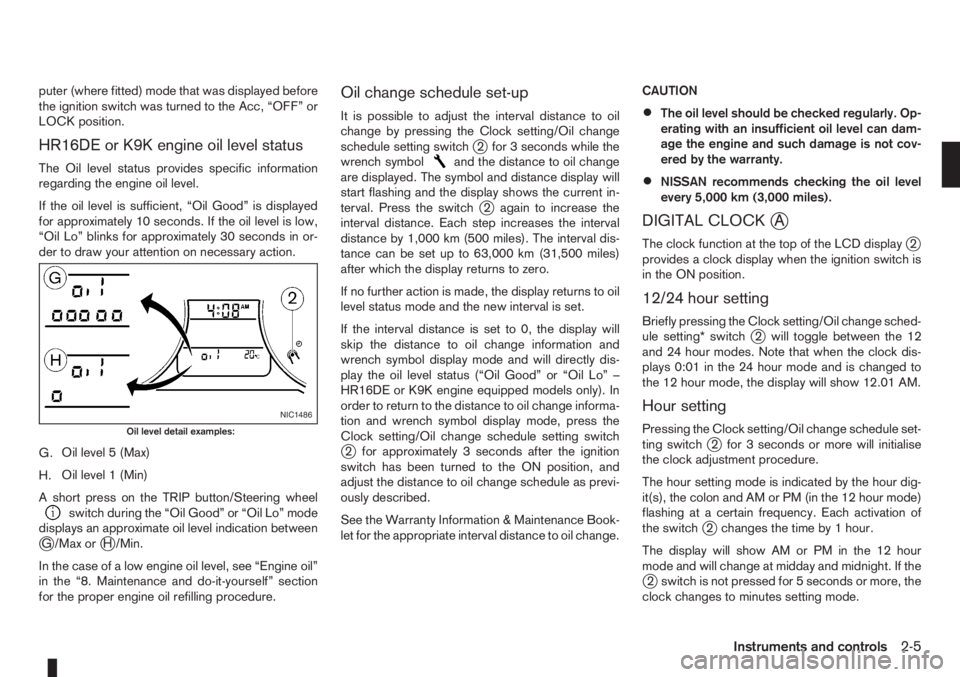
HR16DE or K9K engine oil level status
The Oil level status provides specific information
regarding the engine oil level.
If the oil level is sufficient, “Oil Good” is displayed
for approximately 10 seconds. If the oil level is low,
“Oil Lo” blinks for approximately 30 seconds in or-
der to draw your attention on necessary action.
G.Oil level 5 (Max)
H.Oil level 1 (Min)
A short press on the TRIP button/Steering wheel
switch during the “Oil Good” or “Oil Lo” mode
displays an approximate oil level indication between
jG /Max orjH /Min.
In the case of a low engine oil level, see “Engine oil”
in the “8. Maintenance and do-it-yourself” section
for the proper engine oil refilling procedure.
Oil change schedule set-up
It is possible to adjust the interval distance to oil
change by pressing the Clock setting/Oil change
schedule setting switch
j2 for 3 seconds while the
wrench symboland the distance to oil change
are displayed. The symbol and distance display will
start flashing and the display shows the current in-
terval. Press the switch
j2 again to increase the
interval distance. Each step increases the interval
distance by 1,000 km (500 miles). The interval dis-
tance can be set up to 63,000 km (31,500 miles)
after which the display returns to zero.
If no further action is made, the display returns to oil
level status mode and the new interval is set.
If the interval distance is set to 0, the display will
skip the distance to oil change information and
wrench symbol display mode and will directly dis-
play the oil level status (“Oil Good” or “Oil Lo” –
HR16DE or K9K engine equipped models only). In
order to return to the distance to oil change informa-
tion and wrench symbol display mode, press the
Clock setting/Oil change schedule setting switch
j2 for approximately 3 seconds after the ignition
switch has been turned to the ON position, and
adjust the distance to oil change schedule as previ-
ously described.
See the Warranty Information & Maintenance Book-
let for the appropriate interval distance to oil change.CAUTION
•The oil level should be checked regularly. Op-
erating with an insufficient oil level can dam-
age the engine and such damage is not cov-
ered by the warranty.
•NISSAN recommends checking the oil level
every 5,000 km (3,000 miles).
DIGITAL CLOCKjA
The clock function at the top of the LCD displayj2
provides a clock display when the ignition switch is
in the ON position.
12/24 hour setting
Briefly pressing the Clock setting/Oil change sched-
ule setting* switchj2 will toggle between the 12
and 24 hour modes. Note that when the clock dis-
plays 0:01 in the 24 hour mode and is changed to
the 12 hour mode, the display will show 12.01 AM.
Hour setting
Pressing the Clock setting/Oil change schedule set-
ting switchj2 for 3 seconds or more will initialise
the clock adjustment procedure.
The hour setting mode is indicated by the hour dig-
it(s), the colon and AM or PM (in the 12 hour mode)
flashing at a certain frequency. Each activation of
the switch
j2 changes the time by 1 hour.
The display will show AM or PM in the 12 hour
mode and will change at midday and midnight. If the
j2 switch is not pressed for 5 seconds or more, the
clock changes to minutes setting mode.
NIC1486
Oil level detail examples:
Instruments and controls2-5
Page 48 of 235
Minutes setting
The minutes setting mode is indicated by the minute
digits and the colon flashing at a certain frequency.
Each activation of the Clock setting/Oil change
schedule setting switch
j2 for 1 second or less
changes the time by 1 minute. Pressingj2 for more
than 1 second will cause the minute to change at a
rate of 4 digits per second. Pressing the switch
j2
for more than 3 seconds will cause the minute to
change at a rate of 8 digits per second.
If the switch
j2 is not pressed for 5 seconds or
more, the clock changes to seconds zero setting
mode.
Seconds (zero) setting
Pressing the Clock setting/Oil change schedule set-
ting switchj2 will reset the seconds counter (colon
flashing) to zero and the clock returns to normal
operation.
If the switch
j2 is not activated for 60 seconds, the
clock advances by one minute and resumes normal
operation.
2-6Instruments and controls