cooling NISSAN NOTE 2016 Service Repair Manual
[x] Cancel search | Manufacturer: NISSAN, Model Year: 2016, Model line: NOTE, Model: NISSAN NOTE 2016Pages: 3641, PDF Size: 28.72 MB
Page 3514 of 3641
VTL-8
< REMOVAL AND INSTALLATION >
DUCT AND GRILLE
Removal
1. Remove instrument panel assembly. Refer to IP-15, "Removal and Installation".
2. Remove screws and foot duct (LH/RH) from heating and cooling unit assembly.
Installation
Installation is in the reverse order of removal.
REAR FLOOR DUCT
REAR FLOOR DUCT : Remo val and InstallationINFOID:0000000012430557
REMOVAL
1. Remove driver seat (if necessary). Refer to SE-20, "DRIVER SIDE : Removal and Installation".
2. Remove passenger seat (if necessary). Refer to SE-22, "
PASSENGER SIDE : Removal and Installation".
3. Remove rear seat cushion. Refer to SE-26, "
SEAT CUSHION : Removal and Installation".
4. Remove dash side finisher (LH/RH). Refer to INT-24, "
DASH SIDE FINISHER : Removal and Installation".
5. Remove center pillar lower finisher (LH/RH). Refer to INT-25, "
CENTER PILLAR LOWER FINISHER :
Removal and Installation".
6. Remove center console lower. Refer to IP-20, "
Removal and Installation"
7. Position floor trim and floor insulators aside.
8. Release and remove rear floor ducts.
INSTALLATION
Install in the reverse order of removal.
Revision: August 2015 2016 Versa Note
cardiagn.com
Page 3515 of 3641
FRONT BLOWER MOTORVTL-9
< REMOVAL AND INSTALLATION >
C
DE
F
G H
J
K L
M A
B
VTL
N
O P
FRONT BLOWER MOTOR
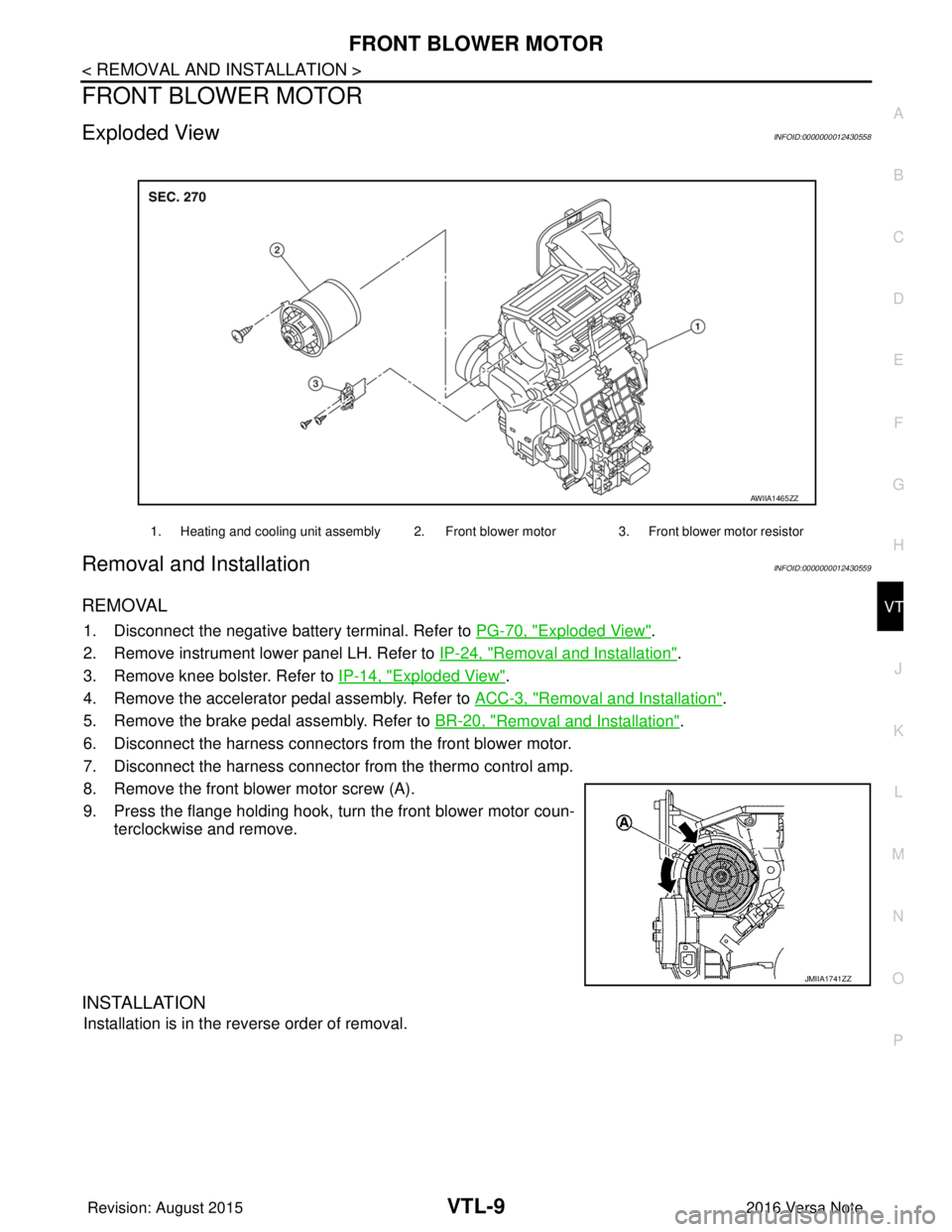
Exploded ViewINFOID:0000000012430558
Removal and InstallationINFOID:0000000012430559
REMOVAL
1. Disconnect the negative battery terminal. Refer to PG-70, "Exploded View".
2. Remove instrument lower panel LH. Refer to IP-24, "
Removal and Installation".
3. Remove knee bolster. Refer to IP-14, "
Exploded View".
4. Remove the accelerator pedal assembly. Refer to ACC-3, "
Removal and Installation".
5. Remove the brake pedal assembly. Refer to BR-20, "
Removal and Installation".
6. Disconnect the harness connectors from the front blower motor.
7. Disconnect the harness connector from the thermo control amp.
8. Remove the front blower motor screw (A).
9. Press the flange holding hook, turn the front blower motor coun- terclockwise and remove.
INSTALLATION
Installation is in the reverse order of removal.
1. Heating and cooling unit assembly 2. Front blower motor 3. Front blower motor resistor
AWIIA1465ZZ
JMIIA1741ZZ
Revision: August 2015 2016 Versa Note
cardiagn.com
Page 3582 of 3641
DIAGNOSIS SYSTEM (IPDM E/R)WW-17
< SYSTEM DESCRIPTION >
C
DE
F
G H
I
J
K
M A
B
WW
N
O P
DIAGNOSIS SYSTEM (IPDM E/R)
Diagnosis DescriptionINFOID:0000000012542540
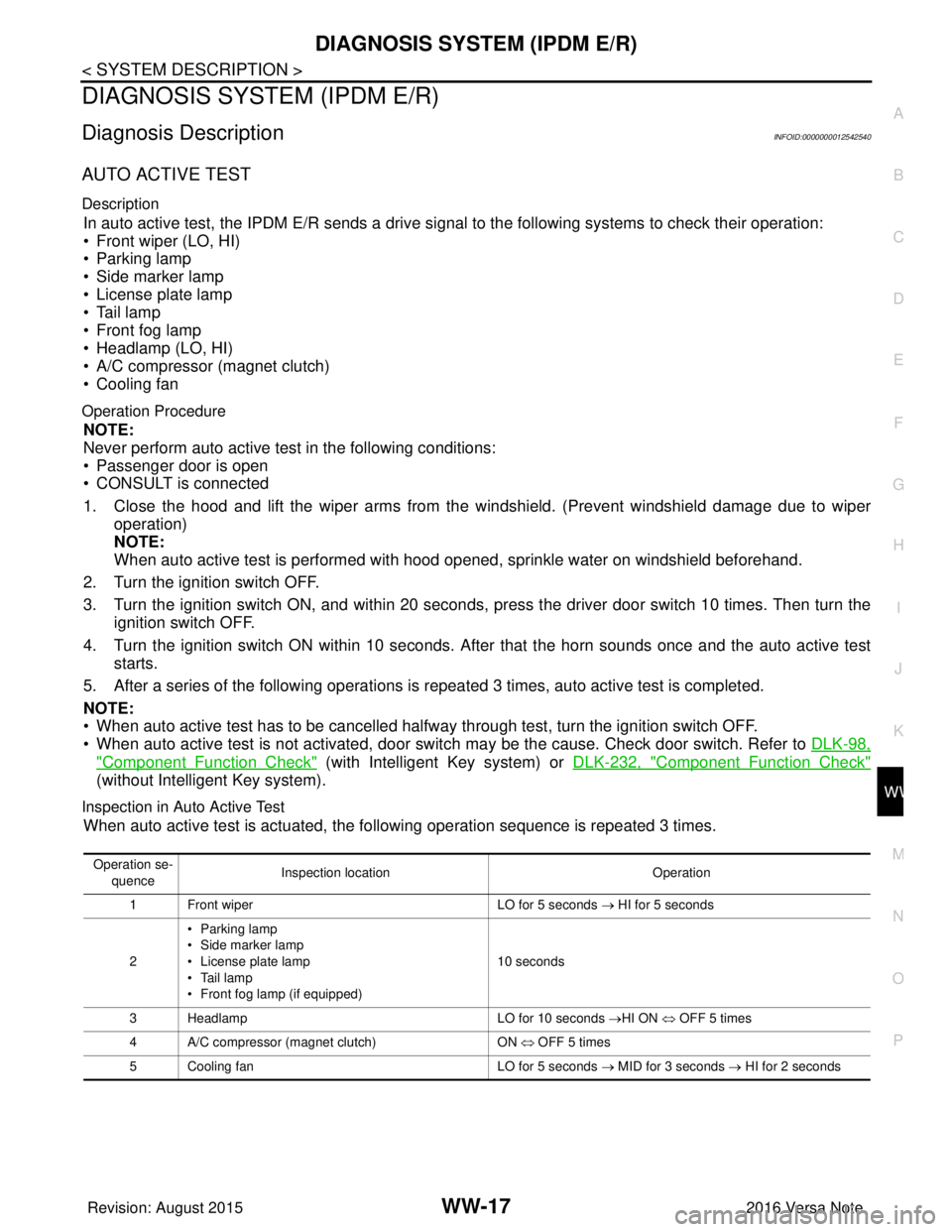
AUTO ACTIVE TEST
Description
In auto active test, the IPDM E/R sends a drive signal to the following systems to check their operation:
• Front wiper (LO, HI)
• Parking lamp
• Side marker lamp
• License plate lamp
• Tail lamp
• Front fog lamp
• Headlamp (LO, HI)
• A/C compressor (magnet clutch)
• Cooling fan
Operation Procedure
NOTE:
Never perform auto active test in the following conditions:
• Passenger door is open
• CONSULT is connected
1. Close the hood and lift the wiper arms from the windshield. (Prevent windshield damage due to wiper
operation)
NOTE:
When auto active test is performed with hood opened, sprinkle water on windshield beforehand.
2. Turn the ignition switch OFF.
3. Turn the ignition switch ON, and within 20 seconds, pr ess the driver door switch 10 times. Then turn the
ignition switch OFF.
4. Turn the ignition switch ON within 10 seconds. Af ter that the horn sounds once and the auto active test
starts.
5. After a series of the following operations is repeated 3 times, auto active test is completed.
NOTE:
• When auto active test has to be cancelled halfw ay through test, turn the ignition switch OFF.
• When auto active test is not activated, door swit ch may be the cause. Check door switch. Refer to DLK-98,
"ComponentFunctionCheck" (with Intelligent Key system) or DLK-232, "ComponentFunctionCheck"
(without Intelligent Key system).
Inspection in Auto Active Test
When auto active test is actuated, the following operation sequence is repeated 3 times.
Operation se-
quence Inspection location
Operation
1 Front wiper LO for 5 seconds → HI for 5 seconds
2 •Parking lamp
• Side marker lamp
• License plate lamp
• Tail lamp
• Front fog lamp (if equipped) 10 seconds
3 Headlamp LO for 10 seconds →HI ON ⇔ OFF 5 times
4 A/C compressor (magnet clutch) ON ⇔ OFF 5 times
5 Cooling fan LO for 5 seconds → MID for 3 seconds → HI for 2 seconds
Revision: August 2015 2016 Versa Note
cardiagn.com
Page 3583 of 3641
WW-18
< SYSTEM DESCRIPTION >
DIAGNOSIS SYSTEM (IPDM E/R)
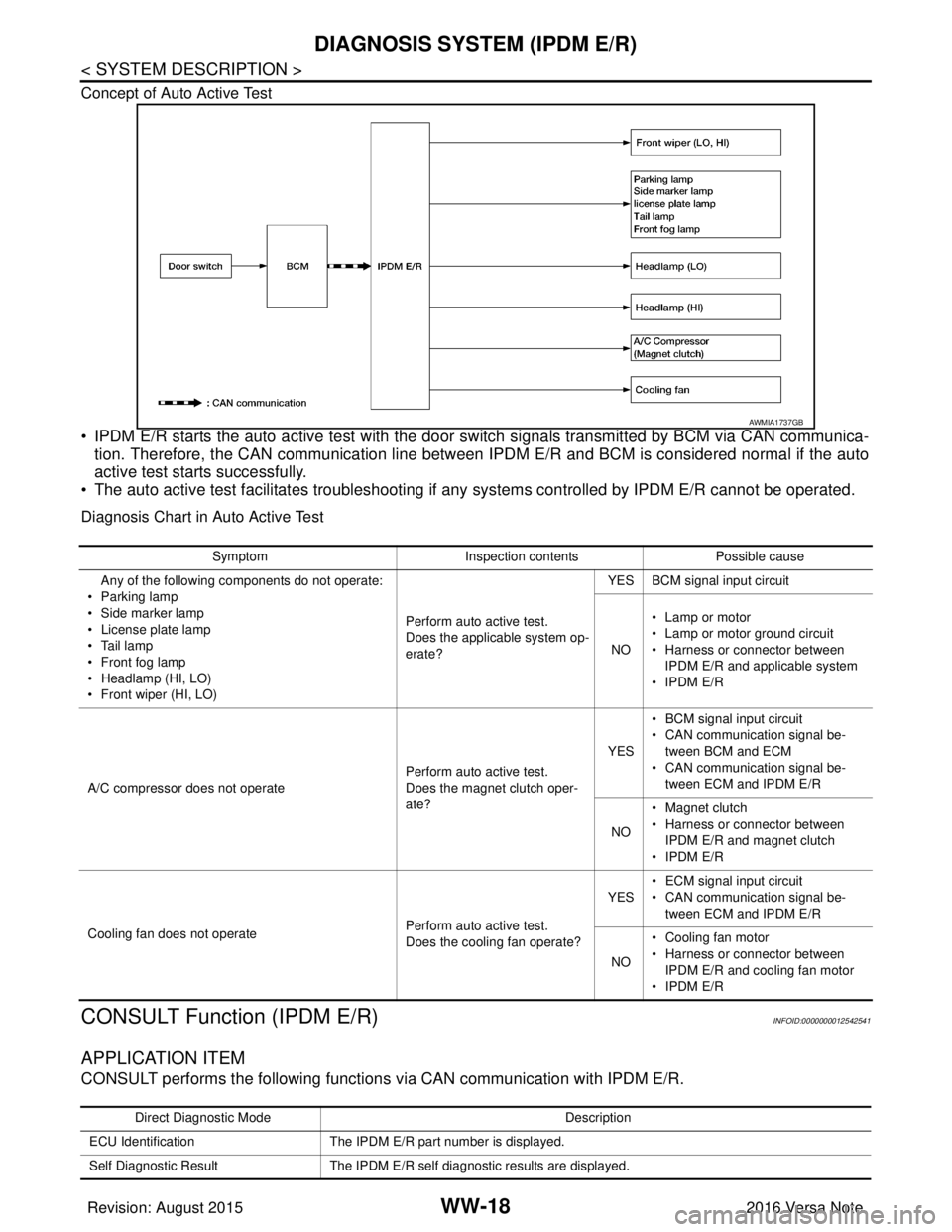
Concept of Auto Active Test
• IPDM E/R starts the auto active test with the door switch signals transmitted by BCM via CAN communica-
tion. Therefore, the CAN communication line between IPDM E/R and BCM is considered normal if the auto
active test starts successfully.
• The auto active test facilitates troubleshooting if any systems controlled by IPDM E/R cannot be operated.
Diagnosis Chart in Auto Active Test
CONSULT Function (IPDM E/R)INFOID:0000000012542541
APPLICATION ITEM
CONSULT performs the following functions via CAN communication with IPDM E/R.
AWMIA1737GB
Symptom Inspection contentsPossible cause
Any of the following components do not operate:
•Parking lamp
• Side marker lamp
• License plate lamp
•Tail lamp
• Front fog lamp
• Headlamp (HI, LO)
• Front wiper (HI, LO) Perform auto active test.
Does the applicable system op-
erate?YES BCM signal input circuit
NO • Lamp or motor
• Lamp or motor ground circuit
• Harness or connector between
IPDM E/R and applicable system
• IPDM E/R
A/C compressor does not operate Perform auto active test.
Does the magnet clutch oper-
ate?YES
• BCM signal input circuit
• CAN communication signal be-
tween BCM and ECM
• CAN communication signal be-
tween ECM and IPDM E/R
NO • Magnet clutch
• Harness or connector between
IPDM E/R and magnet clutch
• IPDM E/R
Cooling fan does not operate Perform auto active test.
Does the cooling fan operate?YES
• ECM signal input circuit
• CAN communication signal be-
tween ECM and IPDM E/R
NO • Cooling fan motor
• Harness or connector between
IPDM E/R and cooling fan motor
• IPDM E/R
Direct Diagnostic Mode Description
ECU Identification The IPDM E/R part number is displayed.
Self Diagnostic Result The IPDM E/R self diagnostic results are displayed.
Revision: August 2015 2016 Versa Note
cardiagn.com
Page 3584 of 3641
DIAGNOSIS SYSTEM (IPDM E/R)WW-19
< SYSTEM DESCRIPTION >
C
DE
F
G H
I
J
K
M A
B
WW
N
O P
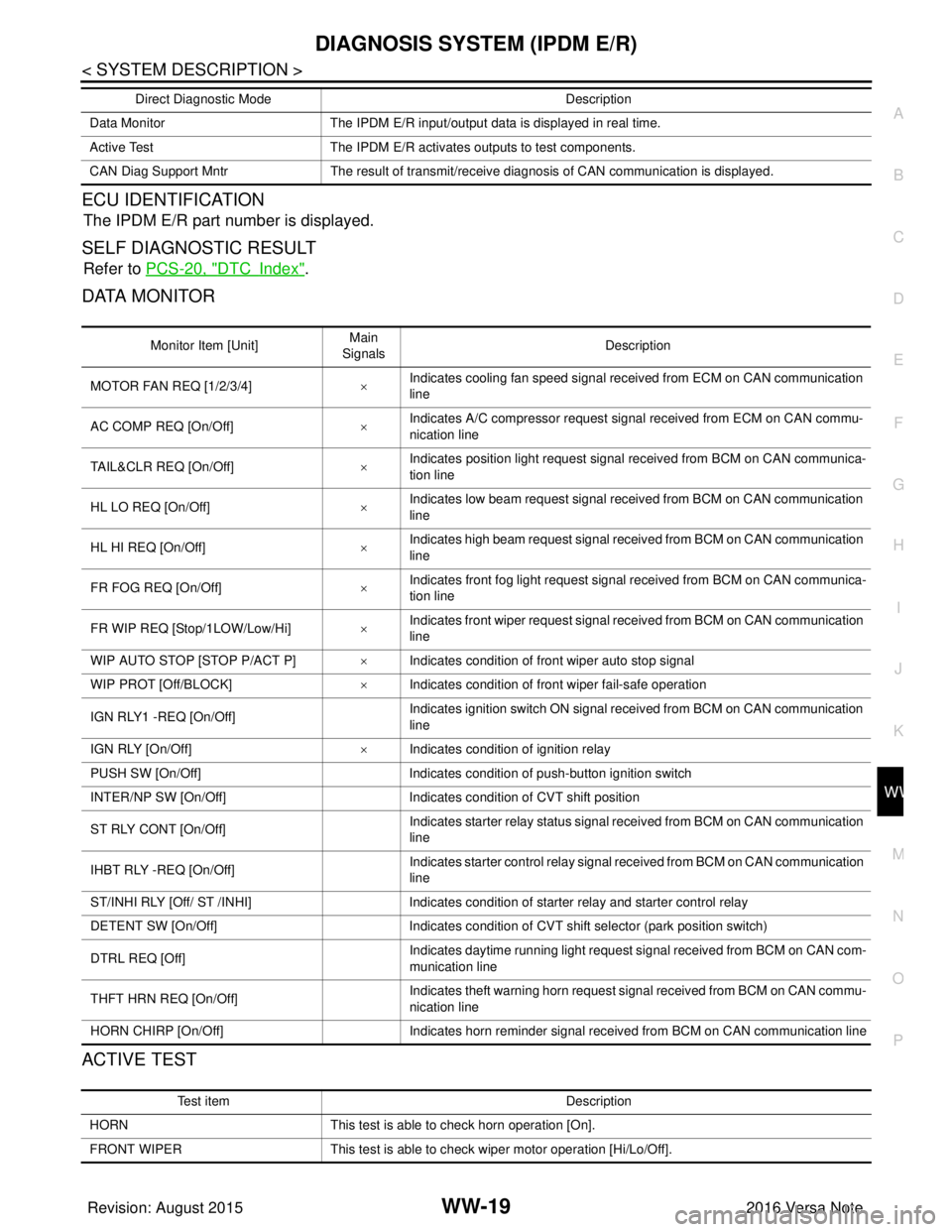
ECU IDENTIFICATION
The IPDM E/R part number is displayed.
SELF DIAGNOSTIC RESULT
Refer to PCS-20, "DTCIndex".
DATA MONITOR
ACTIVE TEST
Data Monitor The IPDM E/R input/output data is displayed in real time.
Active Test The IPDM E/R activates outputs to test components.
CAN Diag Support Mntr The result of transmit/receive diagnosis of CAN communication is displayed.
Direct Diagnostic Mode
Description
Monitor Item [Unit]Main
Signals Description
MOTOR FAN REQ [1/2/3/4] ×Indicates cooling fan speed signal received from ECM on CAN communication
line
AC COMP REQ [On/Off] ×Indicates A/C compressor request signal received from ECM on CAN commu-
nication line
TAIL&CLR REQ [On/Off] ×Indicates position light request signal
received from BCM on CAN communica-
tion line
HL LO REQ [On/Off] ×Indicates low beam request signal received from BCM on CAN communication
line
HL HI REQ [On/Off] ×Indicates high beam request signal received from BCM on CAN communication
line
FR FOG REQ [On/Off] ×Indicates front fog light request signal received from BCM on CAN communica-
tion line
FR WIP REQ [Stop/1LOW/Low/Hi] ×Indicates front wiper request signal received from BCM on CAN communication
line
WIP AUTO STOP [STOP P/ACT P] ×Indicates condition of front wiper auto stop signal
WIP PROT [Off/BLOCK] ×Indicates condition of front wiper fail-safe operation
IGN RLY1 -REQ [On/Off] Indicates ignition switch ON signal received from BCM on CAN communication
line
IGN RLY [On/Off] ×Indicates condition of ignition relay
PUSH SW [On/Off] Indicates condition of push-button ignition switch
INTER/NP SW [On/Off] Indicates condition of CVT shift position
ST RLY CONT [On/Off] Indicates starter relay status signal received from BCM on CAN communication
line
IHBT RLY -REQ [On/Off] Indicates starter control relay signal received from BCM on CAN communication
line
ST/INHI RLY [Off/ ST /INHI] Indicates condition of starter relay and starter control relay
DETENT SW [On/Off] Indicates condition of CVT shift selector (park position switch)
DTRL REQ [Off] Indicates daytime running light request signal received from BCM on CAN com-
munication line
THFT HRN REQ [On/Off] Indicates theft warning horn request signal received from BCM on CAN commu-
nication line
HORN CHIRP [On/Off] Indicates horn reminder signal received from BCM on CAN communication line
Test item Description
HORN This test is able to check horn operation [On].
FRONT WIPER This test is able to check wiper motor operation [Hi/Lo/Off].
Revision: August 2015 2016 Versa Note
cardiagn.com
Page 3585 of 3641
![NISSAN NOTE 2016 Service Repair Manual WW-20
< SYSTEM DESCRIPTION >
DIAGNOSIS SYSTEM (IPDM E/R)
CAN DIAG SUPPORT MNTR
Refer to LAN-13, "CAN Diagnostic Support Monitor".
MOTOR FAN This test is able to check cooling fan operation [4/3/2/1].](/img/5/57363/w960_57363-3584.png "NISSAN NOTE 2016 Service Repair Manual WW-20
< SYSTEM DESCRIPTION >
DIAGNOSIS SYSTEM (IPDM E/R)
CAN DIAG SUPPORT MNTR
Refer to LAN-13, \"CAN Diagnostic Support Monitor\".
MOTOR FAN This test is able to check cooling fan operation [4/3/2/1].")
WW-20
< SYSTEM DESCRIPTION >
DIAGNOSIS SYSTEM (IPDM E/R)
CAN DIAG SUPPORT MNTR
Refer to LAN-13, "CAN Diagnostic Support Monitor".
MOTOR FAN This test is able to check cooling fan operation [4/3/2/1].
EXTERNAL LAMPS This test is able to check external lamp operation [Fog/Hi/Lo/TAIL/Off].
Te s t i t e m
D e s c r i p t i o n
Revision: August 2015 2016 Versa Note
cardiagn.com