light NISSAN NOTE 2016 Service Repair Manual
[x] Cancel search | Manufacturer: NISSAN, Model Year: 2016, Model line: NOTE, Model: NISSAN NOTE 2016Pages: 3641, PDF Size: 28.72 MB
Page 1747 of 3641
PARKING, LICENSE PLATE AND TAIL LAMPS ARE NOT TURNED ON
EXL-95
< SYMPTOM DIAGNOSIS >
C
D E
F
G H
I
J
K
M A
B
EXL
N
O P
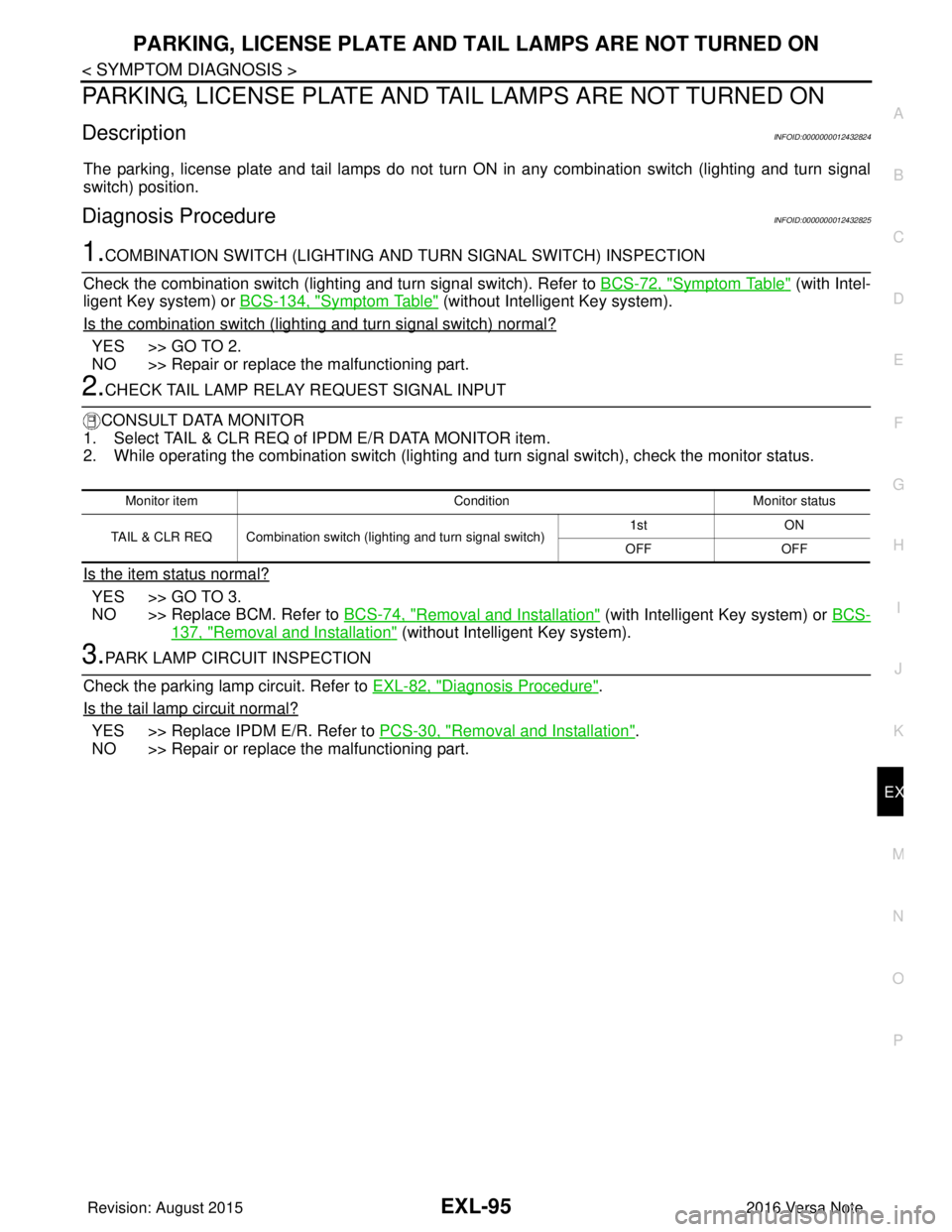
PARKING, LICENSE PLATE AND TA IL LAMPS ARE NOT TURNED ON
DescriptionINFOID:0000000012432824
The parking, license plate and tail lamps do not turn ON in any combination switch (lighting and turn signal
switch) position.
Diagnosis ProcedureINFOID:0000000012432825
1.COMBINATION SWITCH (LIGHTING AND TURN SIGNAL SWITCH) INSPECTION
Check the combination switch (lighti ng and turn signal switch). Refer to BCS-72, "
Symptom Table" (with Intel-
ligent Key system) or BCS-134, "
Symptom Table" (without Intelligent Key system).
Is the combination switch (lighting and turn signal switch) normal?
YES >> GO TO 2.
NO >> Repair or replace the malfunctioning part.
2.CHECK TAIL LAMP RELAY REQUEST SIGNAL INPUT
CONSULT DATA MONITOR
1. Select TAIL & CLR REQ of IPDM E/R DATA MONITOR item.
2. While operating the combination switch (lighting and turn signal switch), check the monitor status.
Is the item status normal?
YES >> GO TO 3.
NO >> Replace BCM. Refer to BCS-74, "
Removal and Installation" (with Intelligent Key system) or BCS-
137, "Removal and Installation" (without Intelligent Key system).
3.PARK LAMP CIRCUIT INSPECTION
Check the parking lamp circuit. Refer to EXL-82, "
Diagnosis Procedure".
Is the tail lamp circuit normal?
YES >> Replace IPDM E/R. Refer to PCS-30, "Removal and Installation".
NO >> Repair or replace the malfunctioning part.
Monitor item ConditionMonitor status
TAIL & CLR REQ Combination switch (lighting and turn signal switch) 1st
ON
OFF OFF
Revision: August 2015 2016 Versa Note
cardiagn.com
Page 1748 of 3641
EXL-96
< SYMPTOM DIAGNOSIS >
BOTH SIDE FRONT FOG LAMPS ARE NOT TURNED ON
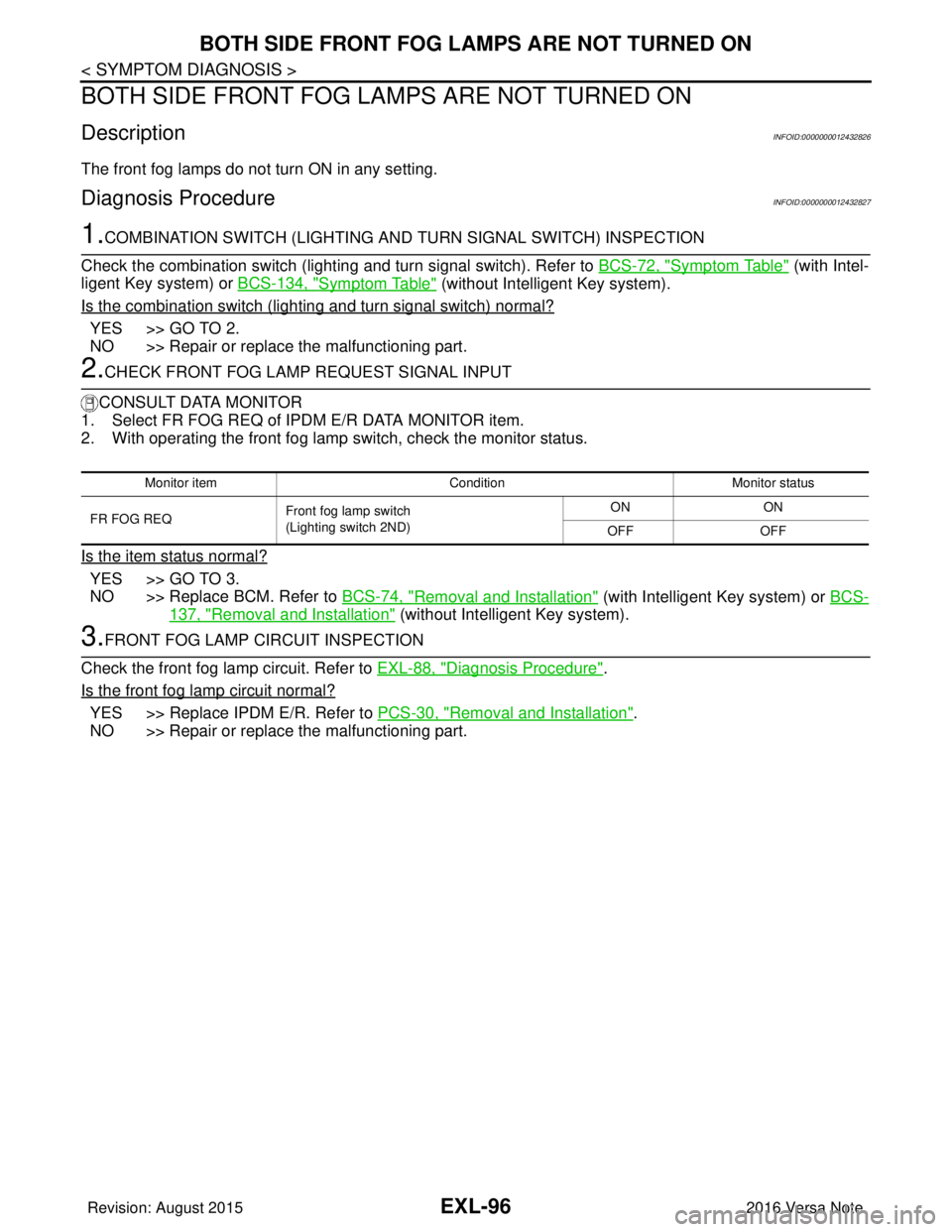
BOTH SIDE FRONT FOG LA MPS ARE NOT TURNED ON
DescriptionINFOID:0000000012432826
The front fog lamps do not turn ON in any setting.
Diagnosis ProcedureINFOID:0000000012432827
1.COMBINATION SWITCH (LIGHTING AND TURN SIGNAL SWITCH) INSPECTION
Check the combination switch (lighting and turn signal switch). Refer to BCS-72, "
Symptom Table" (with Intel-
ligent Key system) or BCS-134, "
Symptom Table" (without Intelligent Key system).
Is the combination switch (lighting and turn signal switch) normal?
YES >> GO TO 2.
NO >> Repair or replace the malfunctioning part.
2.CHECK FRONT FOG LAMP REQUEST SIGNAL INPUT
CONSULT DATA MONITOR
1. Select FR FOG REQ of IPDM E/R DATA MONITOR item.
2. With operating the front fog lamp switch, check the monitor status.
Is the item status normal?
YES >> GO TO 3.
NO >> Replace BCM. Refer to BCS-74, "
Removal and Installation" (with Intelligent Key system) or BCS-
137, "Removal and Installation" (without Intelligent Key system).
3.FRONT FOG LAMP CIRCUIT INSPECTION
Check the front fog lamp circuit. Refer to EXL-88, "
Diagnosis Procedure".
Is the front fog lamp circuit normal?
YES >> Replace IPDM E/R. Refer to PCS-30, "Removal and Installation".
NO >> Repair or replace the malfunctioning part.
Monitor item ConditionMonitor status
FR FOG REQ Front fog lamp switch
(Lighting switch 2ND) ON
ON
OFF OFF
Revision: August 2015 2016 Versa Note
cardiagn.com
Page 1753 of 3641
FRONT FOG LAMP AIMING ADJUSTMENTEXL-101
< PERIODIC MAINTENANCE >
C
DE
F
G H
I
J
K
M A
B
EXL
N
O P
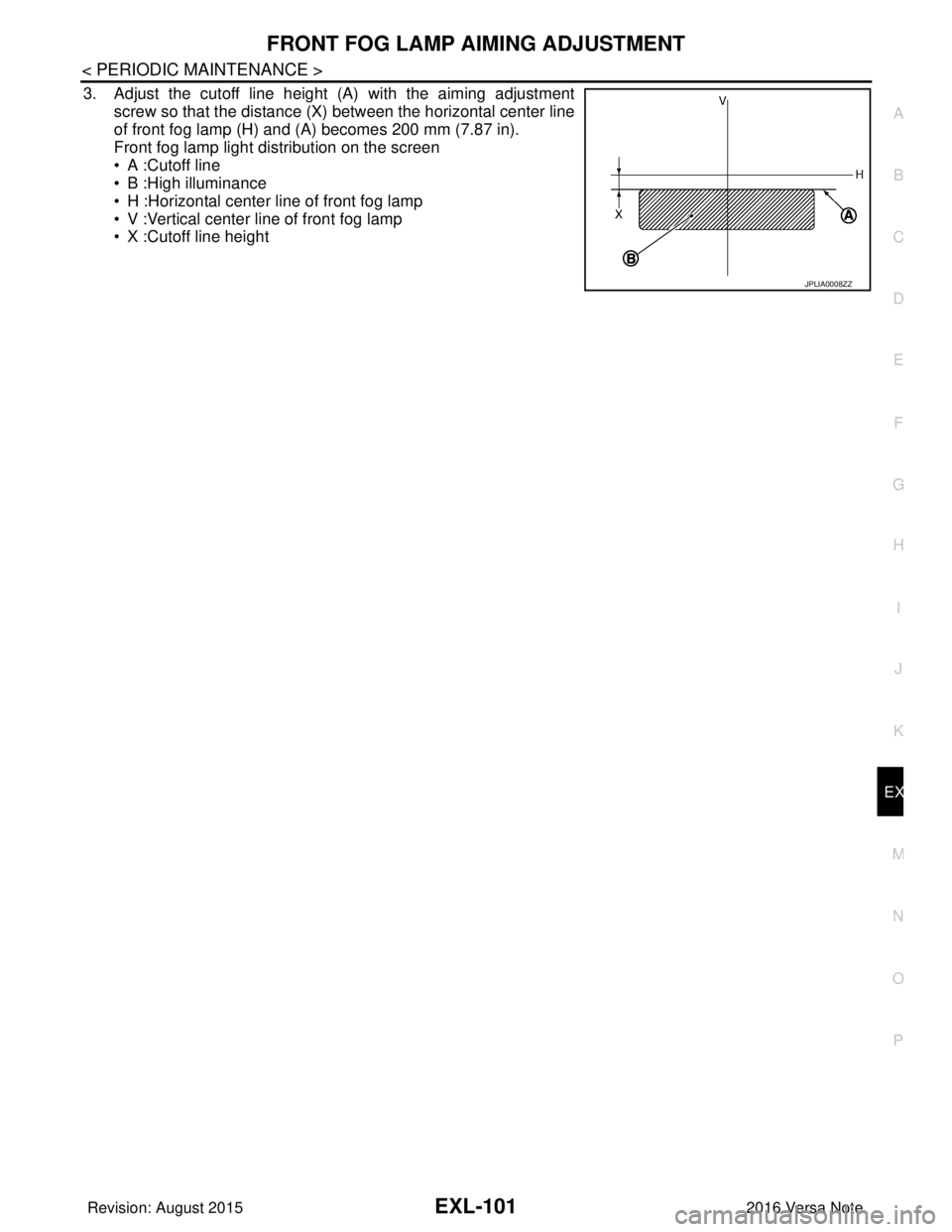
3. Adjust the cutoff line height (A) with the aiming adjustment screw so that the distance (X) between the horizontal center line
of front fog lamp (H) and (A) becomes 200 mm (7.87 in).
Front fog lamp light distribution on the screen
• A :Cutoff line
• B :High illuminance
• H :Horizontal center line of front fog lamp
• V :Vertical center line of front fog lamp
• X :Cutoff line height
JPLIA0008ZZ
Revision: August 2015 2016 Versa Note
cardiagn.com
Page 1784 of 3641
SQUEAK AND RATTLE TROUBLE DIAGNOSESEXT-17
< SYMPTOM DIAGNOSIS >
C
DE
F
G H
I
J
L
M A
B
EXT
N
O P
SYMPTOM DIAGNOSIS
SQUEAK AND RATTLE TROUBLE DIAGNOSES
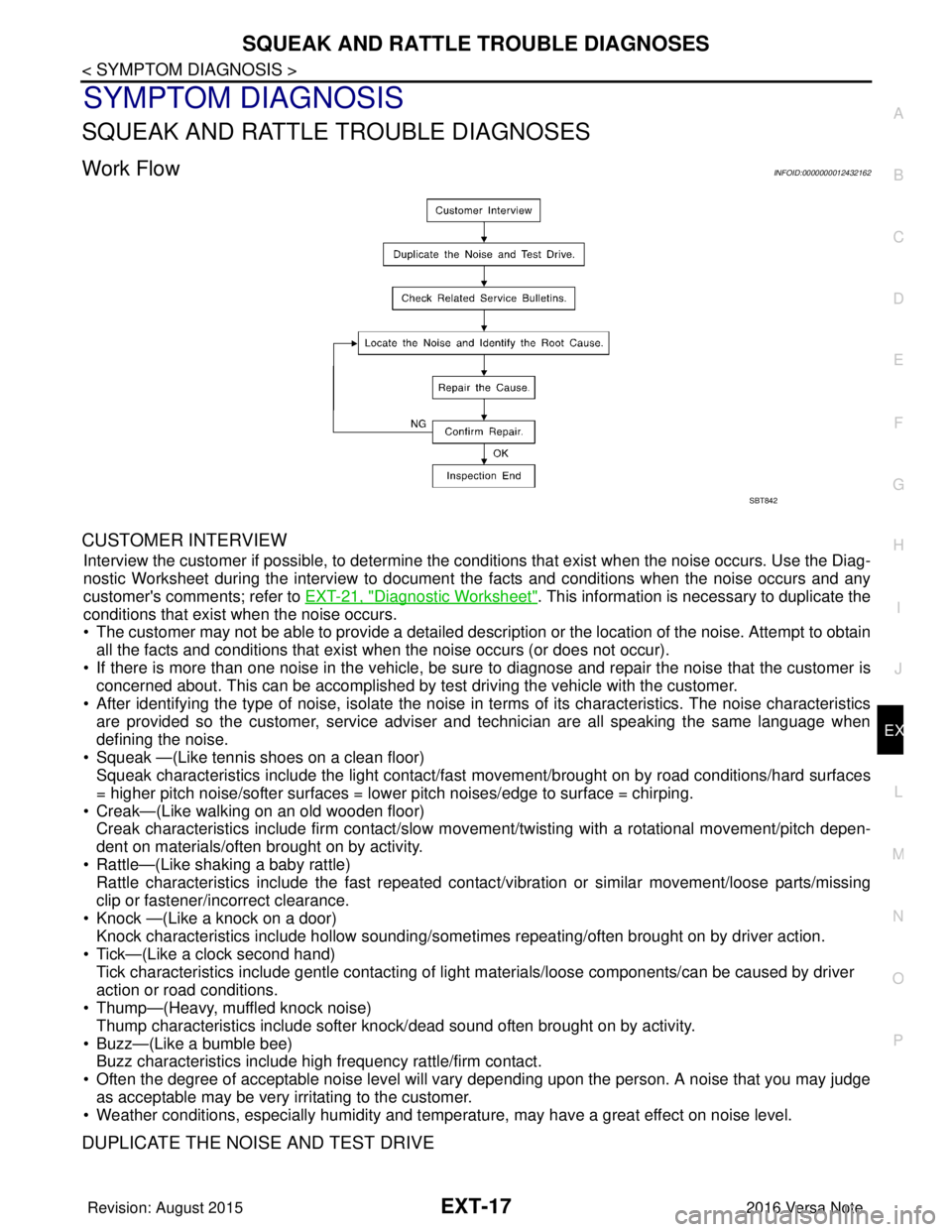
Work FlowINFOID:0000000012432162
CUSTOMER INTERVIEW
Interview the customer if possible, to determine the conditions that exist when the noise occurs. Use the Diag-
nostic Worksheet during the interv iew to document the facts and conditions when the noise occurs and any
customer's comments; refer to EXT-21, "
Diagnostic Worksheet". This information is necessary to duplicate the
conditions that exist when the noise occurs.
• The customer may not be able to provide a detailed descr iption or the location of the noise. Attempt to obtain
all the facts and conditions that exist when the noise occurs (or does not occur).
• If there is more than one noise in the vehicle, be sure to diagnose and repair the noise that the customer is
concerned about. This can be accomplished by test driving the vehicle with the customer.
• After identifying the type of noise, isolate the noise in terms of its characteristics. The noise characteristics are provided so the customer, service adviser and technician are all speaking the same language when
defining the noise.
• Squeak —(Like tennis shoes on a clean floor) Squeak characteristics include the light contact/fast movement/brought on by road conditions/hard surfaces
= higher pitch noise/softer surfaces = lower pitch noises/edge to surface = chirping.
• Creak—(Like walking on an old wooden floor) Creak characteristics include firm contact/slow mo vement/twisting with a rotational movement/pitch depen-
dent on materials/often brought on by activity.
• Rattle—(Like shaking a baby rattle) Rattle characteristics include the fast repeated contac t/vibration or similar movement/loose parts/missing
clip or fastener/incorrect clearance.
• Knock —(Like a knock on a door) Knock characteristics include hollow sounding/someti mes repeating/often brought on by driver action.
• Tick—(Like a clock second hand) Tick characteristics include gentle contacting of li ght materials/loose components/can be caused by driver
action or road conditions.
• Thump—(Heavy, muffled knock noise)
Thump characteristics include softer k nock/dead sound often brought on by activity.
• Buzz—(Like a bumble bee) Buzz characteristics include high frequency rattle/firm contact.
• Often the degree of acceptable noise level will vary depending upon the person. A noise that you may judge as acceptable may be very irritating to the customer.
• Weather conditions, especially humidity and temperature, may have a great effect on noise level.
DUPLICATE THE NOISE AND TEST DRIVE
SBT842
Revision: August 2015 2016 Versa Note
cardiagn.com
Page 1786 of 3641
SQUEAK AND RATTLE TROUBLE DIAGNOSESEXT-19
< SYMPTOM DIAGNOSIS >
C
DE
F
G H
I
J
L
M A
B
EXT
N
O P
INSTRUMENT PANEL
Most incidents are caused by contact and movement between:
1. Cluster lid A and the instrument panel
2. Acrylic lens and combination meter housing
3. Instrument panel to front pillar finisher
4. Instrument panel to windshield
5. Instrument panel pins
6. Wiring harnesses behind the combination meter
7. A/C defroster duct and duct joint
These incidents can usually be located by tapping or moving the components to duplicate the noise or by
pressing on the components while driving to stop the noi se. Most of these incidents can be repaired by apply-
ing felt cloth tape or silicone spray (in hard to reach areas). Urethane pads can be used to insulate wiring har-
ness.
CAUTION:
Do not use silicone spray to isolate a squeak or ra ttle. If you saturate the area with silicone, you will
not be able to recheck the repair.
CENTER CONSOLE
Components to pay attention to include:
1. Shift selector assembly cover to finisher
2. A/C control unit and cluster lid C
3. Wiring harnesses behind audio and A/C control unit
The instrument panel repair and isolation pr ocedures also apply to the center console.
DOORS
Pay attention to the:
1. Finisher and inner panel making a slapping noise
2. Inside handle escutcheon to door finisher
3. Wiring harnesses tapping
4. Door striker out of alignment causing a popping noise on starts and stops
Tapping or moving the components or pressing on them while driving to duplicate the conditions can isolate
many of these incidents. You can usually insulate the ar eas with felt cloth tape or insulator foam blocks from
the NISSAN Squeak and Rattle Kit (J-50397) to repair the noise.
TRUNK
Trunk noises are often caused by a loose jack or loose items put into the trunk by the owner.
In addition look for:
1. Trunk lid bumpers out of adjustment
2. Trunk lid striker out of adjustment
3. The trunk lid torsion bars knocking together
4. A loose license plate or bracket
Most of these incidents can be repaired by adjusting, se curing or insulating the item(s) or component(s) caus-
ing the noise.
SUNROOF/HEADLINING
Noises in the sunroof/headlining area can often be traced to one of the following:
1. Sunroof lid, rail, linkage or seals making a rattle or light knocking noise
2. Sun visor shaft shaking in the holder
3. Front or rear windshield touching headlining and squeaking
Again, pressing on the components to stop the noise while duplicating the conditions can isolate most of these
incidents. Repairs usually consist of insulating with felt cloth tape.
OVERHEAD CONSOLE (FRONT AND REAR)
Overhead console noises are often caused by the cons ole panel clips not being engaged correctly. Most of
these incidents are repaired by pushing up on the c onsole at the clip locations until the clips engage.
In addition look for:
Revision: August 2015 2016 Versa Note
cardiagn.com
Page 1806 of 3641
UNDER COVEREXT-39
< REMOVAL AND INSTALLATION >
C
DE
F
G H
I
J
L
M A
B
EXT
N
O P
UNDER COVER
FRONT UNDER COVER
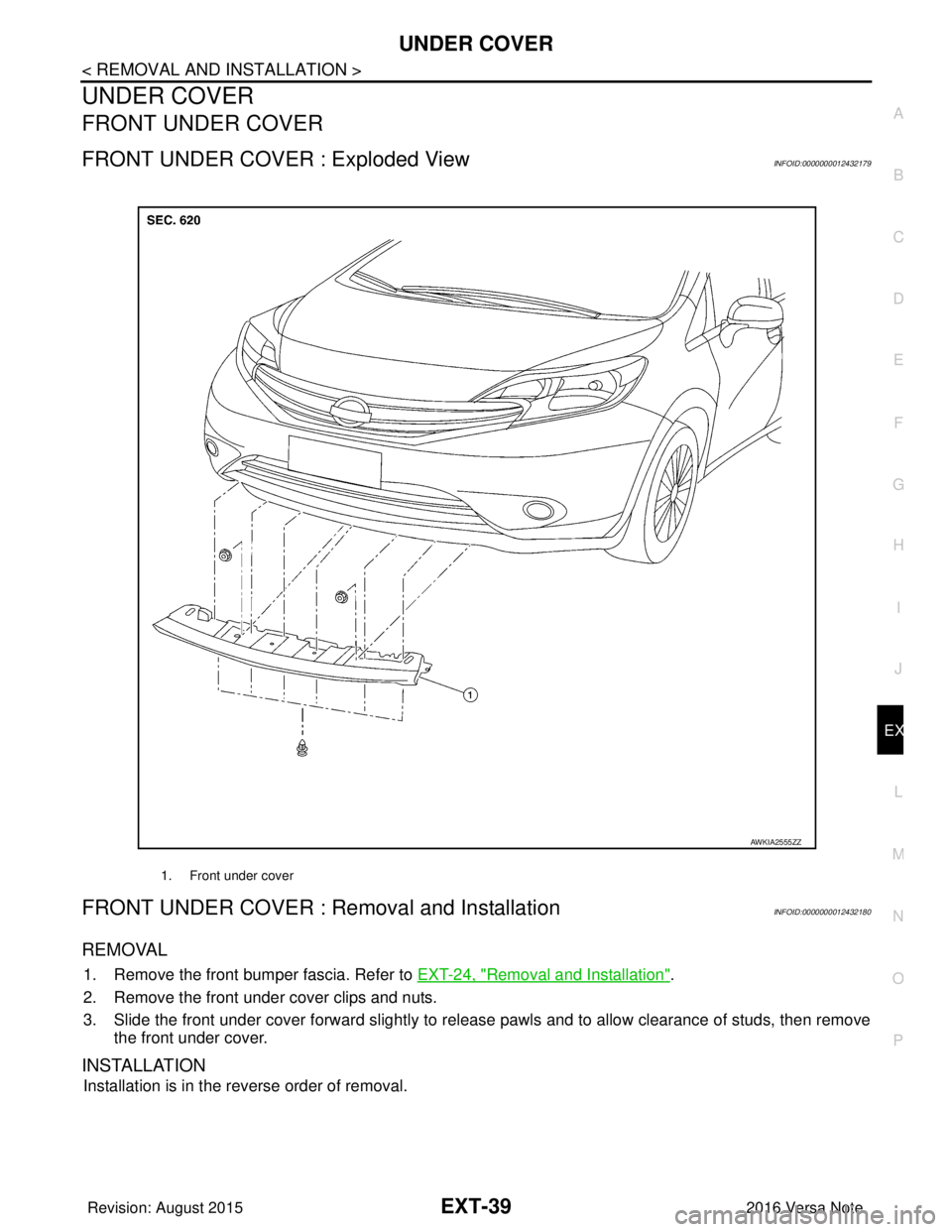
FRONT UNDER COVER : Exploded ViewINFOID:0000000012432179
FRONT UNDER COVER : Removal and InstallationINFOID:0000000012432180
REMOVAL
1. Remove the front bumper fascia. Refer to EXT-24, "Removal and Installation".
2. Remove the front under cover clips and nuts.
3. Slide the front under cover forward slightly to release pawls and to allow clearance of studs, then remove the front under cover.
INSTALLATION
Installation is in the reverse order of removal.
1. Front under cover
AWKIA2555ZZ
Revision: August 2015 2016 Versa Note
cardiagn.com
Page 1812 of 3641
DOOR SASH TAPEEXT-45
< REMOVAL AND INSTALLATION >
C
DE
F
G H
I
J
L
M A
B
EXT
N
O P
Removal and InstallationINFOID:0000000012432187
REMOVAL
Heat door sash tape surface using a suitable tool and remove door sash tape.
CAUTION:
Use care not to damage body paint.
INSTALLATION
CAUTION:
• Degrease door assembly surface for sash tape.
• Grit or dust on surface of sash tape may spoil exterior appearance if not removed. Clean the surface
and check that no grit or dust rema ins before starting the operation.
• Do not reuse blackout tape.
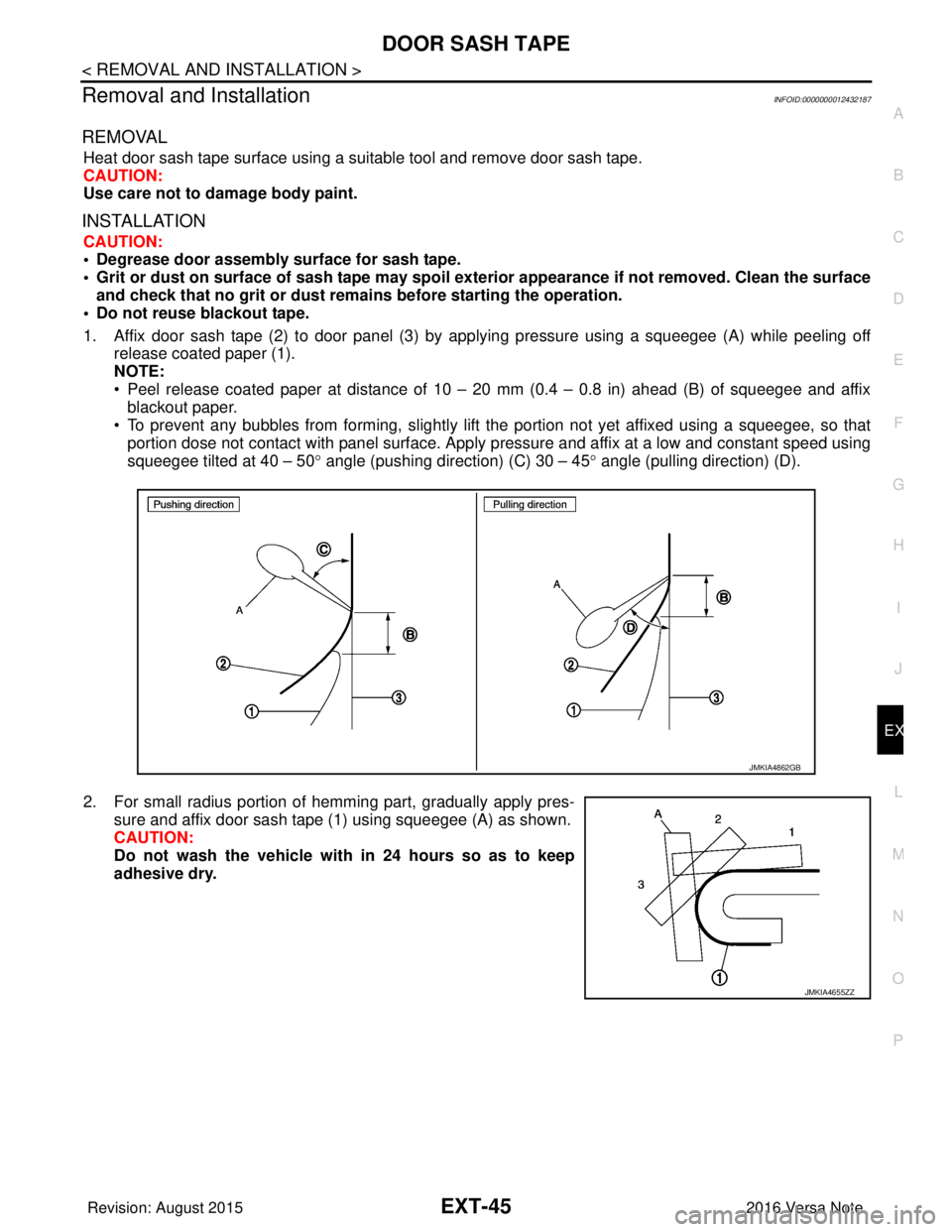
1. Affix door sash tape (2) to door panel (3) by applying pressure using a squeegee (A) while peeling off release coated paper (1).
NOTE:
• Peel release coated paper at distance of 10 – 20 mm (0.4 – 0.8 in) ahead (B) of squeegee and affixblackout paper.
• To prevent any bubbles from forming, slightly lift the portion not yet affixed using a squeegee, so that
portion dose not contact with panel surface. Apply pressure and affix at a low and constant speed using
squeegee tilted at 40 – 50 ° angle (pushing direction) (C) 30 – 45° angle (pulling direction) (D).
2. For small radius portion of hemming part, gradually apply pres- sure and affix door sash tape (1) using squeegee (A) as shown.
CAUTION:
Do not wash the vehicle with in 24 hours so as to keep
adhesive dry.
JMKIA4862GB
JMKIA4655ZZ
Revision: August 2015 2016 Versa Note
cardiagn.com
Page 1827 of 3641
FAX-10
< REMOVAL AND INSTALLATION >
FRONT WHEEL HUB AND KNUCKLE
6. Separate the drive shaft from the wheel hub by lightly tapping the end of the drive shaft using a suitable
tool and a wood block.
NOTE:
Use suitable puller if wheel hub and drive shaft cannot be separated after performing the above proce-
dure.
7. Remove wheel hub lock nut.
8. Remove the nut and separate the steering out er socket from steering knuckle. Refer to ST-14, "
Exploded
View".
9. Remove the nuts and bolts, then separate the steering knuckle from strut. Refer to FA X - 9 , "
Removal and
Installation".
10. Suspend the drive shaft with suitable wire. CAUTION:
• Do not place drive shaft joint at an extreme angle. Also be careful not to overextend slide joint.
• Do not allow drive shaft to hang down withou t support for joint sub-assembly, shaft and the
other parts.
11. Remove transverse link outer nut and bolt. Remove steering knuckle from transverse link.
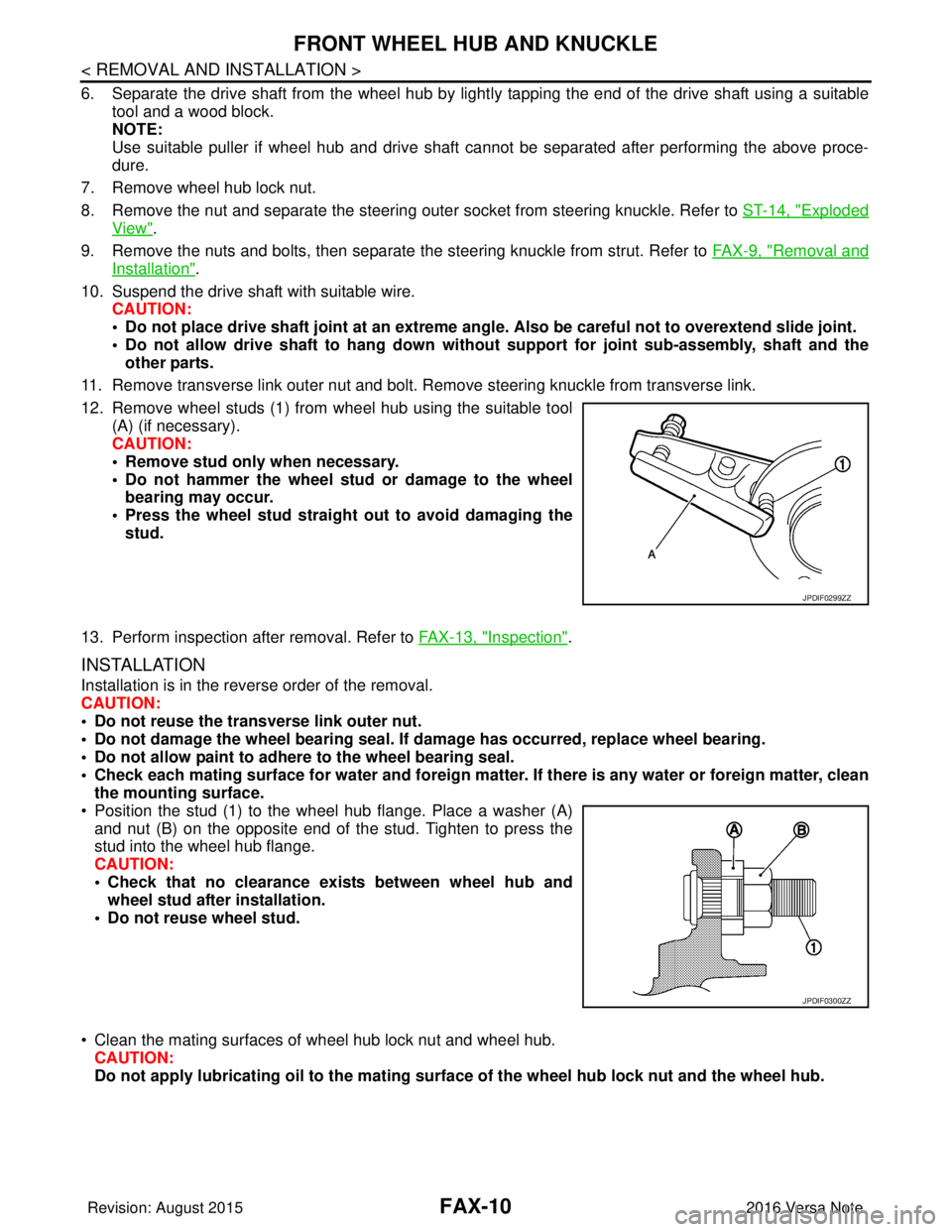
12. Remove wheel studs (1) from wheel hub using the suitable tool (A) (if necessary).
CAUTION:
• Remove stud only when necessary.
• Do not hammer the wheel stud or damage to the wheelbearing may occur.
• Press the wheel stud straight out to avoid damaging the stud.
13. Perform inspection after removal. Refer to FAX-13, "
Inspection".
INSTALLATION
Installation is in the reverse order of the removal.
CAUTION:
• Do not reuse the transverse link outer nut.
• Do not damage the wheel bearing seal. If damage has occurred, replace wheel bearing.
• Do not allow paint to adhere to the wheel bearing seal.
• Check each mating surface for water and foreign matter. If there is any water or foreign matter, clean
the mounting surface.
• Position the stud (1) to the wheel hub flange. Place a washer (A) and nut (B) on the opposite end of the stud. Tighten to press the
stud into the wheel hub flange.
CAUTION:
• Check that no clearance exists between wheel hub andwheel stud after installation.
• Do not reuse wheel stud.
• Clean the mating surfaces of wheel hub lock nut and wheel hub. CAUTION:
Do not apply lubricatin g oil to the mating surface of the wh eel hub lock nut and the wheel hub.
JPDIF0299ZZ
JPDIF0300ZZ
Revision: August 2015 2016 Versa Note
cardiagn.com
Page 1836 of 3641
FRONT DRIVE SHAFTFAX-19
< REMOVAL AND INSTALLATION >
CEF
G H
I
J
K L
M A
B
FA X
N
O P
FRONT DRIVE SHAFT
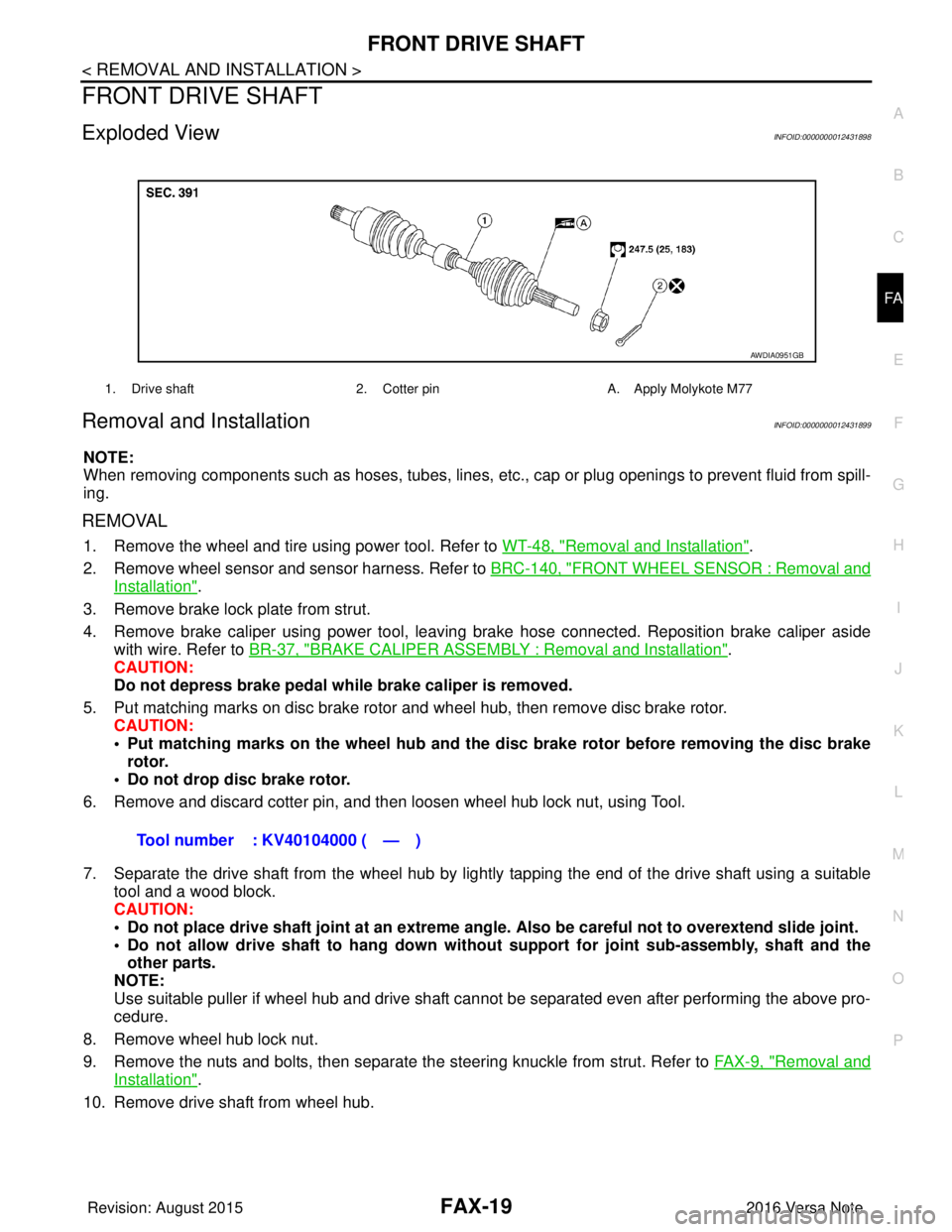
Exploded ViewINFOID:0000000012431898
Removal and InstallationINFOID:0000000012431899
NOTE:
When removing components such as hoses, tubes, lines, etc. , cap or plug openings to prevent fluid from spill-
ing.
REMOVAL
1. Remove the wheel and tire using power tool. Refer to WT-48, "Removal and Installation".
2. Remove wheel sensor and sensor harness. Refer to BRC-140, "
FRONT WHEEL SENSOR : Removal and
Installation".
3. Remove brake lock plate from strut.
4. Remove brake caliper using power tool, leaving brake hose connected. Reposition brake caliper aside with wire. Refer to BR-37, "
BRAKE CALIPER ASSEMBLY : Removal and Installation".
CAUTION:
Do not depress brake pedal while brake caliper is removed.
5. Put matching marks on disc brake rotor and wheel hub, then remove disc brake rotor. CAUTION:
• Put matching marks on the wheel hub and the disc brake rotor before removing the disc brake
rotor.
• Do not drop disc brake rotor.
6. Remove and discard cotter pin, and then loosen wheel hub lock nut, using Tool.
7. Separate the drive shaft from the wheel hub by lightly tapping the end of the drive shaft using a suitable tool and a wood block.
CAUTION:
• Do not place drive shaft joint at an extreme angle. Also be careful not to overextend slide joint.
• Do not allow drive shaft to ha ng down without support for joint sub-assembly, shaft and the
other parts.
NOTE:
Use suitable puller if wheel hub and drive shaft cannot be separated even after performing the above pro-
cedure.
8. Remove wheel hub lock nut.
9. Remove the nuts and bolts, then separate the steering knuckle from strut. Refer to FA X - 9 , "
Removal and
Installation".
10. Remove drive shaft from wheel hub.
1. Drive shaft 2. Cotter pinA. Apply Molykote M77
AWDIA0951GB
Tool number : KV40104000 ( — )
Revision: August 2015 2016 Versa Note
cardiagn.com
Page 1861 of 3641
FSU-16
< UNIT DISASSEMBLY AND ASSEMBLY >
FRONT COIL SPRING AND STRUT
UNIT DISASSEMBLY AND ASSEMBLY
FRONT COIL SPRING AND STRUT
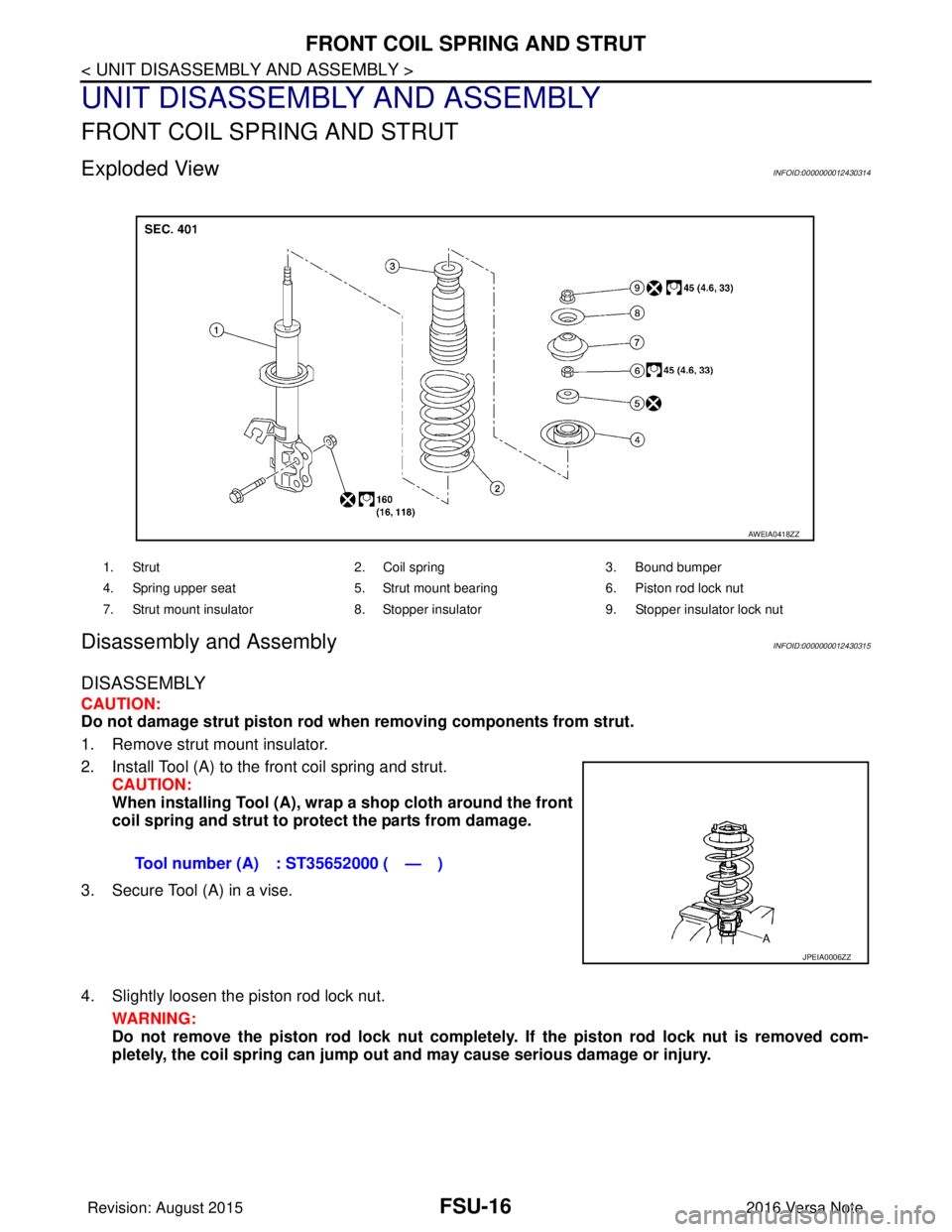
Exploded ViewINFOID:0000000012430314
Disassembly and AssemblyINFOID:0000000012430315
DISASSEMBLY
CAUTION:
Do not damage strut piston rod when removing components from strut.
1. Remove strut mount insulator.
2. Install Tool (A) to the front coil spring and strut. CAUTION:
When installing Tool (A), wrap a shop cloth around the front
coil spring and strut to protect the parts from damage.
3. Secure Tool (A) in a vise.
4. Slightly loosen the piston rod lock nut. WARNING:
Do not remove the piston rod lock nut completely. If the piston rod lock nut is removed com-
pletely, the coil spring can jump out and may cause serious damage or injury.
1. Strut 2. Coil spring3. Bound bumper
4. Spring upper seat 5. Strut mount bearing 6. Piston rod lock nut
7. Strut mount insulator 8. Stopper insulator 9. Stopper insulator lock nut
AWEIA0418ZZ
Tool number (A) : ST35652000 ( — )
JPEIA0006ZZ
Revision: August 2015 2016 Versa Note
cardiagn.com