ECO mode NISSAN NOTE 2016 Service Repair Manual
[x] Cancel search | Manufacturer: NISSAN, Model Year: 2016, Model line: NOTE, Model: NISSAN NOTE 2016Pages: 3641, PDF Size: 28.72 MB
Page 3031 of 3641

SRC-14
< SYSTEM DESCRIPTION >
DIAGNOSIS SYSTEM (AIR BAG)
DIAGNOSIS SYSTEM (AIR BAG)
DescriptionINFOID:0000000012430604
CAUTION:
• Never use electrical test equipment on any circuit related to the SRS unless instructed in this Ser-
vice Manual. SRS wiring harnesses can be identifi ed by yellow and/or orange harnesses or harness
connectors.
• Never repair, splice or modify the SRS wiring harn ess. If the harness is damaged, replace it with a
new one.
• Keep ground portion clean.
DIAGNOSIS FUNCTION
• The SRS self-diagnostic results can be read with air bag warning lamp and/or CONSULT.
• The user mode is exclusively prepared for the customer (driver). This mode warns the driver of a system
malfunction through the operation of the air bag warning lamp.
• The diagnosis mode allows the technician to locate and inspect the malfunctioning part.
• The mode applications for the air bag warning lamp and CONSULT are as per the following items.
× : Application, —: Not application
On Board Diagn osis FunctionINFOID:0000000012430605
ON-BOARD DIAGNOSIS
There are two self diagnosis functions with air bag warning lamp per the following items.
•USER MODE
• DIAGNOSIS MODE
METHOD OF STARTING
• Diagnosis mode changes from user mode to diagnosis mode when changing operation is performed.
• In user mode, when SRS air bag warning lamp is not turning ON, changing to diagnosis mode by ignition
switch operation is not possible.
• In diagnosis mode, when repair is complete and system is normal, the mode changes to user mode when
ignition switch is turned from OFF to ON.
Procedure to Change Diagnosis Mode
1. Turn ignition switch from OFF to ON.
2. SRS air bag lamp turns ON for 7 seconds and turns OFF, then turn ignition switch OFF within 2 seconds after the lamp turns OFF.
NOTE:
When in Diagnosis Mode, the air bag warning lamp may illuminate for more than 7 seconds after the igni-
tion switch is turned ON. If this is the case, the i gnition switch must still be cycled OFF after 7 seconds.
3. After turning ignition switch OFF, wait for 3 seconds or more.
4. Repeat operation 1 to 3 for 2 times so that operation 1 to 3 is repeated for 3 times in total.
5. Turn ignition switch from OFF to ON. Diagnosis mode changes.
USER MODE
In USER MODE, air bag warning lamp on combination meter turns ON when a malfunction is detected and
warns the customer (driver).
How to Read Air Bag Warning Lamp
1. Turn the ignition switch from OFF to ON, and check that the air bag warning lamp turns ON.
2. Compare the air bag warning lamp operation pattern with the examples.
Air Bag Warning Lamp Examples:
Diagnosis tool User modeDiagnosis mode
Air bag warning lamp ××
CONSULT –×
Revision: August 2015 2016 Versa Note
cardiagn.com
Page 3032 of 3641
DIAGNOSIS SYSTEM (AIR BAG)SRC-15
< SYSTEM DESCRIPTION >
C
DE
F
G
I
J
K L
M A
B
SRC
N
O P
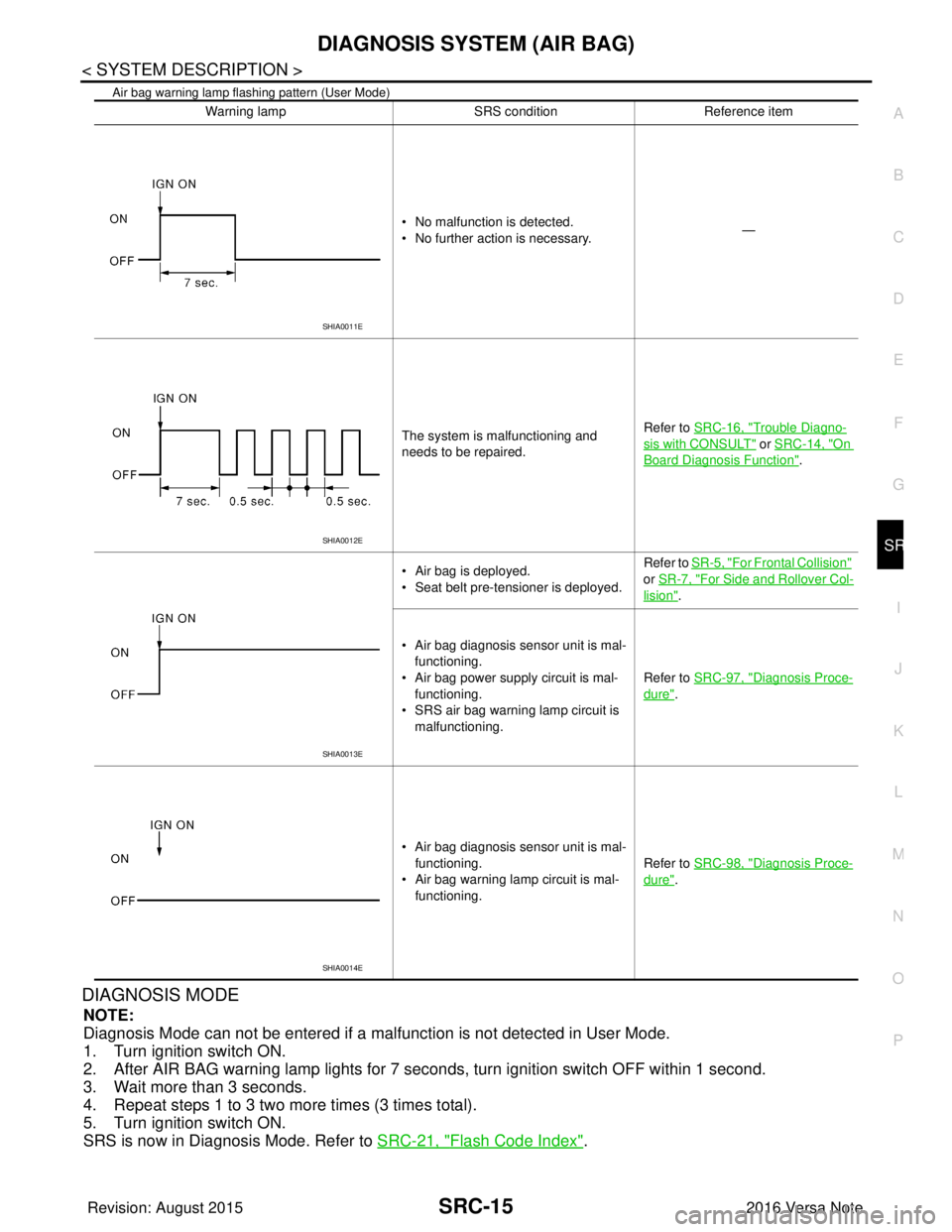
Air bag warning lamp flashing pattern (User Mode)
DIAGNOSIS MODE
NOTE:
Diagnosis Mode can not be entered if a malfunction is not detected in User Mode.
1. Turn ignition switch ON.
2. After AIR BAG warning lamp lights for 7 seconds, turn ignition switch OFF within 1 second.
3. Wait more than 3 seconds.
4. Repeat steps 1 to 3 two more times (3 times total).
5. Turn ignition switch ON.
SRS is now in Diagnosis Mode. Refer to SRC-21, "
Flash Code Index".
Warning lamp SRS conditionReference item
• No malfunction is detected.
• No further action is necessary. —
The system is malfunctioning and
needs to be repaired. Refer to SRC-16, "
Trouble Diagno-
sis with CONSULT" or SRC-14, "On
Board Diagnosis Function".
• Air bag is deployed.
• Seat belt pre-tensioner is deployed. Refer to
SR-5, "
For Frontal Collision"
or SR-7, "
For Side and Rollover Col-
lision".
• Air bag diagnosis sensor unit is mal- functioning.
• Air bag power supply circuit is mal- functioning.
• SRS air bag warning lamp circuit is
malfunctioning. Refer to SRC-97, "
Diagnosis Proce-
dure".
• Air bag diagnosis sensor unit is mal- functioning.
• Air bag warning lamp circuit is mal- functioning. Refer to SRC-98, "
Diagnosis Proce-
dure".
SHIA0011E
SHIA0012E
SHIA0013E
SHIA0014E
Revision: August 2015
2016 Versa Note
cardiagn.com
Page 3033 of 3641
SRC-16
< SYSTEM DESCRIPTION >
DIAGNOSIS SYSTEM (AIR BAG)
Trouble Diagnosis with CONSULT
INFOID:0000000012430606
1. Connect CONSULT.
2. DTC is displayed on SELF-DIAG RESULTS.
NOTE:
If a malfunction is not detected on “SELF-DIAG RESULTS [CURRENT]”, but a malfunction is detected during
SRS Operation Check, the following cases may exist:
• “SELF-DIAG [PAST]” memory might not be erased. Refer to SRC-14, "
On Board Diagnosis Function".
• SRS system malfunctions intermittently. Refer to SRC-41, "
InspectionProcedure".
DIAGNOSIS MODE
1. Connect CONSULT.
2. Confirm that zero point reset of OCS is complete.
3. If no DTCs are detected on “SELF-DIAG RESULTS [CURRE NT]”, repair of SRS is completed. Go to step
4.
If any DTCs are detected on “SELF-DIAG RESULT S [CURRENT]”, the malfunction has not been repaired
completely or another malfunction is being detected. Perform SRS Operation Check again. Refer to SRC-
14, "On Board Diagnosis Function".
4. Touch “ERASE”. NOTE:
Touching “ERASE” will clear the SRS memory of the malfunction (“SELF-DIAG [PAST]”). If “SELF-
DIAG [PAST]” is not erased, User Mode may sh ow the previous system malfunction even if the
malfunction has been repaired completely.
5. Check that no malfunction is det ected in “SELF-DIAG [PAST]”.
6. Exit Diagnosis Mode and disconnect the CONSULT.
7. Perform SRS Operation Check. Refer to SRC-14, "
On Board Diagnosis Function".
SRS HISTORY CHECK
1. Check repair history of the SRS. If no repairs have been made, perform SRC-14, "On Board Diagnosis
Function". If repairs have been made, GO TO step 2.
2. Erase ”SELF-DIAG [PAST]” after repair. Refer to SRC-14, "
On Board Diagnosis Function".
CONSULT Function (AIR BAG)INFOID:0000000012430607
CONSULT can display each diagnostic item using the diagnostic test modes shown following.
Diagnostic Test ModeDiagnostic Item Description
Self Diagnostic Result SEL F-DIAG RESULT [CURRENT]A current Self-diagnosis result (also indicated by the number of
warning lamp flashes in the Diagnosis mode) is displayed on the
CONSULT screen in real time. This refers to a malfunctioning part
requiring repairs.
Data Monitor DATA MONITOR Displays air bag diagnosis sensor unit input/output data in real time.
ECU Identification ECU DISCRIMINATED NO. Air bag diagnosis sensor unit ECU discriminated number (identifica-
tion number) or part number is displayed. Air bag diagnosis sensor
unit has individual ECU discriminated number (identification num-
ber) or part number based on model and equipment.
Trouble Diagnostic Record TR OUBLE DIAG RECORD [PAST] With TROUBLE DIAG RECORD, diagnosis results previously
erased by a reset operation can be displayed on the CONSULT
screen.
Revision: August 2015
2016 Versa Note
cardiagn.com
Page 3039 of 3641
SRC-22
< ECU DIAGNOSIS INFORMATION >
DIAGNOSIS SENSOR UNIT
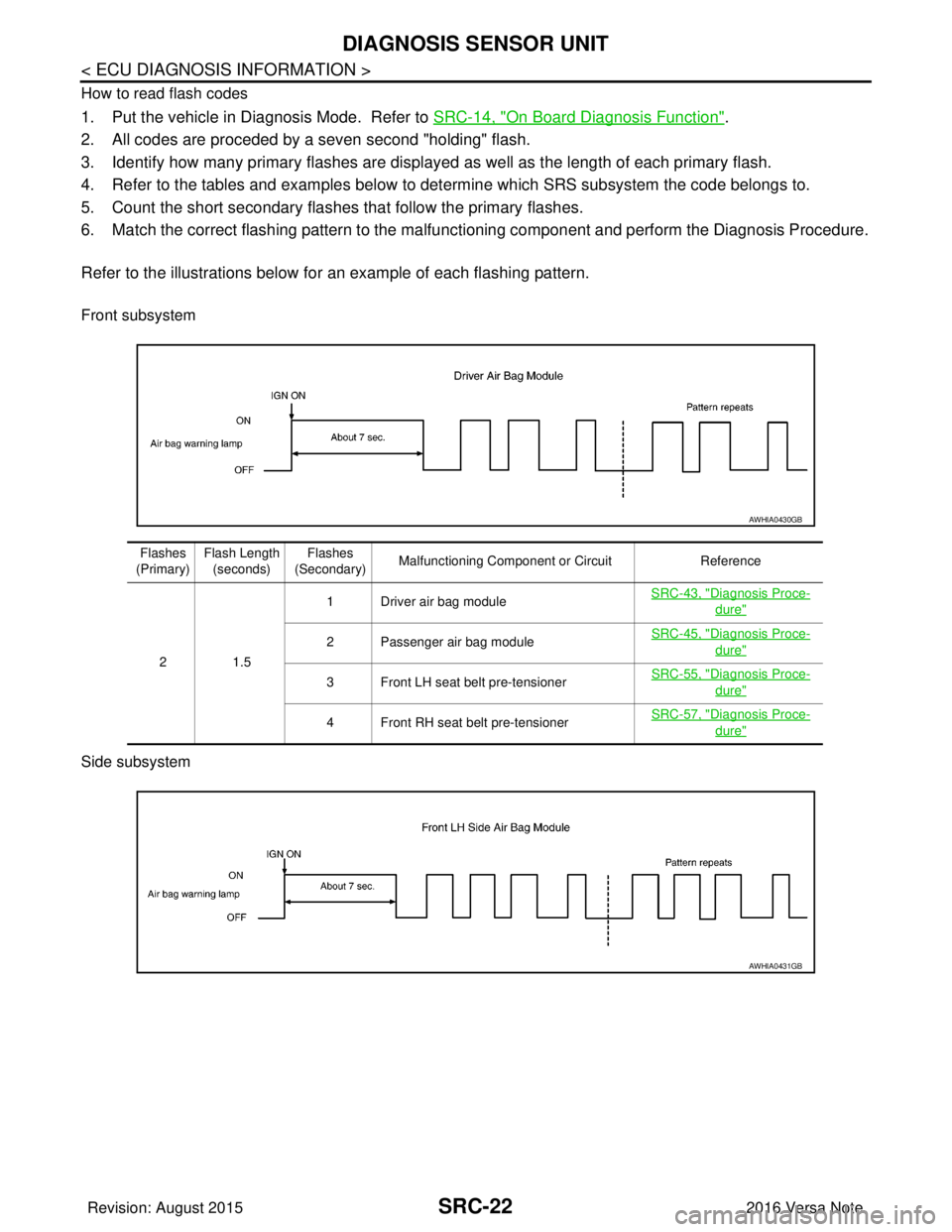
How to read flash codes
1. Put the vehicle in Diagnosis Mode. Refer to SRC-14, "On Board Diagnosis Function".
2. All codes are proceded by a seven second "holding" flash.
3. Identify how many primary flashes are display ed as well as the length of each primary flash.
4. Refer to the tables and examples below to determine which SRS subsystem the code belongs to.
5. Count the short secondary flashes that follow the primary flashes.
6. Match the correct flashing pattern to the malfunctioning component and perform the Diagnosis Procedure.
Refer to the illustrations below fo r an example of each flashing pattern.
Front subsystem
Side subsystem
AWHIA0430GB
Flashes
(Primary) Flash Length
(seconds) Flashes
(Secondary) Malfunctioning Component or Circuit
Reference
21 .5 1 Driver air bag module
SRC-43, "
Diagnosis Proce-
dure"
2 Passenger air bag moduleSRC-45, "Diagnosis Proce-
dure"
3 Front LH seat belt pre-tensioner
SRC-55, "Diagnosis Proce-
dure"
4 Front RH seat belt pre-tensionerSRC-57, "Diagnosis Proce-
dure"
AWHIA0431GB
Revision: August 2015
2016 Versa Note
cardiagn.com
Page 3054 of 3641
DIAGNOSIS AND REPAIR WORK FLOWSRC-37
< BASIC INSPECTION >
C
DE
F
G
I
J
K L
M A
B
SRC
N
O P
1.INTERVIEW THE CUSTOMER FOR THE SYMPTOM
Interview the customer for the symptom (the condi tion and the environment when the incident/malfunction
occurs).
>> GO TO 2.
2.CHECK SYMPTOM
Check the symptom from the customer information.
>> GO TO 3.
3.CHECK WARNING LAMP OPERATION
Check air bag warning lamp operation in the user mode.
Are any malfunction detected?
YES >> GO TO 5.
NO >> GO TO 4.
4.CHECK LOW VOLTAGE
Check low voltage with CONSULT.
Are any malfunction detected?
YES >> GO TO 9.
NO >> Check intermittent incident. Refer to GI-42, "
Intermittent Incident".
5.CHECK SELF DIAGNOSTIC RESULTS
Check self diagnostic result with CONSULT or diagnosis mode.
If it is impossible to switch to diagnosis mode, follow the same procedure that DTC is not detected.
NOTE:
Perform the following procedure if DTC is detected.
• Record DTC (Print them out with CONSULT.)
• Erase self diagnostic result.
• Study the relationship between the malfunction that DTC or air bag warning lamp indicates and the symptom that the customer describes.
• Check related service bulletins for information.
Is DTC detected?
YES >> GO TO 6.
NO >> GO TO 7.
6.PERFORM DTC CONFIRMATION PROCEDURE
Perform DTC CONFIRMATION PROCEDURE for the DTC.
>> GO TO 8.
7.PERFORM DIAGNOSIS ACCORDING TO WARNING LAMP OPERATION
1. Check air bag warning lamp operation in the user mode.
2. Perform Diagnosis Procedure for the air bag warning lamp operation.
>> GO TO 9.
8.DETECT MALFUNCTIONING PA RT BY DIAGNOSTIC PROCEDURE
Inspect according to Diagnostic Procedure of the DTC.
>> GO TO 9.
9.REPAIR OR REPLACE THE MALFUNCTION PART
Repair or replace the malfunctioning part.
Revision: August 2015 2016 Versa Note
cardiagn.com
Page 3057 of 3641

SRC-40
< BASIC INSPECTION >
INSPECTION AND ADJUSTMENT
2. Select start on “Zero point reset function” screen from, WORK SUPPORT of CONSULT “OCCUPANT
DETECTION”.
3. “Zero point reset” starts.
>> GO TO 2.
2.CONFIRMATION OF SETTING
1. Proceed to “Zero point reset function” screen from work support of CONSULT “OCCUPANT DETEC-
TION”.
2. Check that “Complete” or “Incomplete” is displayed on “Zero point reset status”.
CAUTION:
• “Complete” is displayed on “zero point reset current status” if the seat is reinstalled by seat removal
and installation, or “zero point reset” is already performed.
• “Zero point reset current status” displays “Incompl ete” if a new seat is installed. When turning key
switch ON without performing zero point reset , front passenger air bag OFF indicator turns ON.
When zero point reset is performed, front passenger air bag OFF indicator turns OFF.
• Air bag warning lamp blinks in user mode only.
• Air bag sensor unit does not record whethe r or not zero point reset is performed.
Is condition
“ALREADY PERFORMED”?
YES >> Print out “ZERO POINT RESET CURRENT STATUS” screen, and inspection end.
NO >> Check condition as per the following, and perform zero point reset again. • Passenger seat is occupied by an object.
• Excessive vibration is applied while performing zero point reset.
• Occupant detection system is malfunctioning.NOTE:
If “Incomplete” is displayed on “zero point reset cu rrent status”, zero point reset is not completed
normally. Check the condition as per the following and perform zero point reset again.
• Passenger seat is occupied by an object.
• Excessive vibration is applied while performing zero point reset.
• Occupant detection system is malfunctioning.
Revision: August 2015 2016 Versa Note
cardiagn.com
Page 3101 of 3641

SRC-84
< DTC/CIRCUIT DIAGNOSIS >
B00A0 OCS SYSTEM
SRS will not enter diagnosis mode if no malfunction is detected in user mode.
Is the DTC detected?
YES >> Refer to SRC-84, "Diagnosis Procedure".
NO >> Inspection End.
Diagnosis ProcedureINFOID:0000000012430663
Recheck SRS after each corrective action.
1.HARNESS CONNECTOR
Visually inspect all applicable harness connectors for the following:
• Visible damage to connector or terminal
• Loose terminal
• Poor connection NOTE:
All harness connectors should be inspected from t he air bag diagnosis sensor unit to the end component
(including any in-line connectors).
Is the inspection result normal?
YES >> GO TO 2.
NO >> Perform one of the following repairs: • Visible damage: Replace the harness.
• Loose terminal: Secure the terminal.
• Poor connection: Secure the connection.
2.CONFIRM DTC
1. Reconnect all harness connectors.
2. Turn ignition switch ON.
3. Check for DTC using CONSULT.
Is DTC still current?
YES >> GO TO 3.
NO >> Refer to GI-42, "
Intermittent Incident".
3.WIRING HARNESS
Check the wiring harness for visible damage.
NOTE:
The entire wiring harness should be in spected from the air bag diagnosis sensor unit to the end component
(including any in-line connectors).
Is the inspection result normal?
YES >> GO TO 4.
NO >> Replace the harness.
4.CONFIRM DTC
1. Reconnect all harness connectors.
2. Turn ignition switch ON.
3. Check for DTC using CONSULT.
Is DTC still current?
YES >> GO TO 5.
NO >> Refer to GI-42, "
Intermittent Incident".
5.REPLACE OCCUPANT DETECTION SYSTEM CONTROL UNIT
1. Replace the occupant detection system control unit. Refer to SR-32, "
Removal and Installation".
2. Turn ignition switch ON.
3. Check for DTC using CONSULT.
Is DTC still current?
YES >> GO TO 6.
NO >> Clear DTC. Inspection End.
6.AIR BAG DIAGNOSIS SENSOR UNIT
1. Replace the air bag diagnosis sensor unit. Refer to SR-30, "
Removal and Installation".
Revision: August 2015 2016 Versa Note
cardiagn.com
Page 3190 of 3641

STC-6
< SYSTEM DESCRIPTION >
DIAGNOSIS SYSTEM (EPS CONTROL UNIT)
DIAGNOSIS SYSTEM (EPS CONTROL UNIT)
CONSULT FunctionINFOID:0000000012431944
FUNCTION
CONSULT can display each diagnostic item usi ng the diagnostic test modes shown following:
*: The following diagnosis information is cleared by erasing:
•DTC
• Freeze frame data (FFD)
ECU IDENTIFICATION
Displays the part number stored in the control unit.
SELF DIAGNOSTIC RESULT MODE
Refer to STC-10, "DTC Index".
When “CRNT” is displayed on “Self Diagnostic Result”.
• The system is presently malfunctioning.
When “PAST” is displayed on “Self Diagnostic Result”.• System malfunction in the past is detect ed, but the system is presently normal.
FREEZE FRAME DATA (FFD)
The following vehicle status is recorded when DTC is detected and is displayed on CONSULT:
DATA MONITOR MODE
*1: Almost in accordance with the value of “MOTOR S IG”. It is not a malfunction though these values are not
accorded when steering quickly.
Diagnostic test mode Function
ECU Identification The part number stored in the control unit can be read.
Self Diagnostic Result Self-diagnostic results and freeze frame data can be read and erased quickly.
*
Data MonitorInput/Output data in the EPS control unit can be read.
Item name Display item
IGN COUNTER
(0-39) The number of times that ignition switch is tu
rned ON after the DTC is detected is displayed.
• When “0” is displayed: It indicates that the system is presently malfunctioning.
• When except “0” is displayed: It indicates that system malfunction in the past is detected, but the system is pres-
ently normal.
NOTE:
Each time when ignition switch is turned OFF to ON, numerical number increases in 1 →2→3...38 →39.
When the operation number of times exceeds 39, the number does not increase and “39” is displayed until self-
diagnosis is erased.
Monitor item (Unit) Remarks
BATTERY VOLT (V) Displays the power supply voltage for EPS control unit.
TORQUE SENSOR (Nm) Displays steering wheel turning force detected by torque sensor.
MOTOR CURRENT (A) Displays the current value consumed by EPS motor.
*1
MOTOR SIG (A) Displays the current commanded value to EPS motor.
ASSIST TORQUE (Nm) Displays assist torque being output by the electric power steering.
C/U TEMP ( °C or °F) Displays the temperature of the EPS control unit.
ASSIST LEVEL (%) Normally displays 100%. In case of an excessive stationary steering, the assist
curvature gradually falls. However, it return to 100% when left standing.
*2
VEHICLE SPEED (km/h or MPH)
Vehicle speed is displayed from vehicle speed signal via CAN communication.*3
WARNING LAMP (On/Off)EPS warning lamp control status is displayed.
ENGINE STATUS (Stop/Run) Engine speed is displayed from engine status signal via CAN communication.
Revision: August 2015 2016 Versa Note
cardiagn.com
Page 3318 of 3641
![NISSAN NOTE 2016 Service Repair Manual SYSTEMTM-77
< SYSTEM DESCRIPTION > [CVT: RE0F11A]
C
EF
G H
I
J
K L
M A
B
TM
N
O P
INPUT/OUTPUT SIGNAL TABLE
SYSTEM DESCRIPTION
• CVT detects the vehicle driving status from switc hes, sensors and si](/img/5/57363/w960_57363-3317.png "NISSAN NOTE 2016 Service Repair Manual SYSTEMTM-77
< SYSTEM DESCRIPTION > [CVT: RE0F11A]
C
EF
G H
I
J
K L
M A
B
TM
N
O P
INPUT/OUTPUT SIGNAL TABLE
SYSTEM DESCRIPTION
• CVT detects the vehicle driving status from switc hes, sensors and si")
SYSTEMTM-77
< SYSTEM DESCRIPTION > [CVT: RE0F11A]
C
EF
G H
I
J
K L
M A
B
TM
N
O P
INPUT/OUTPUT SIGNAL TABLE
SYSTEM DESCRIPTION
• CVT detects the vehicle driving status from switc hes, sensors and signals, and controls the vehicle so that
the optimum shift position and shift timing may always be achieved. It also controls the vehicle to reduce
shift and lockup shock, etc.
• Receives input signals from switches and sensors.
• Sends the output signal necessary for operation of solenoid valves, and evaluates the line pressure, shift timing, lockup operation, engine brake performance, etc.
• If a malfunction occurs on the electric system, activate the fail-safe mode only to drive the vehicle.
LIST OF CONTROL ITEMS AND INPUT/OUTPUT
Sensor (or signal)
⇒TCM function
⇒Actuator
• Engine and CVT integrated control signal
• Engine speed signal
• Accelerator pedal position signal
• Closed throttle position signal
• Stop lamp switch signal
• Secondary pressure sensor
• CVT fluid temperature sensor
• Primary speed sensor
• Secondary speed sensor
• Output speed sensor
• Transmission range switch signal
• Overdrive control switch signal
• Vehicle speed signal (ABS)
• ABS operation signal
• A/C compressor feedback signal
• G sensor
• N idle instruction signal
• Turn indicator signal • Line pressure control (
TM-82, "
LINE
PRESSURE CONTROL : System Descrip-
tion")
• Shift control ( TM-83, "
SHIFT CONTROL :
System Description")
• Select control ( TM-85, "
SELECT CON-
TROL : System Description")
• Lock-up control ( TM-86, "
LOCK-UP CON-
TROL : System Description")
• Idle neutral control ( TM-87, "
IDLE NEU-
TRAL CONTROL : System Description")
• Fail-safe mode ( TM-106, "
Fail-safe")
• Self-diagnosis function ( TM-93, "
CON-
SULT Function")
• Communication function with CONSULT
(TM-93, "
CONSULT Function")
• CAN communication control ( TM-141,
"Description") • Line pressure solenoid valve
• Primary pressure
solenoid valve
• Torque converter clutch solenoid
valve
• High clutch & reverse brake sole- noid valve
• Low brake solenoid valve
• OD OFF indicator lamp
• Shift position indicator
Control Item Shift controlLine pressure
control Select control
Lock-up con-
trol Fail-safe func-
tion *
Input Engine torque signal
(CAN communication)
×××××
Engine speed signal
(CAN communication) ×××××
Accelerator pedal position signal
(CAN communication) ×××××
Closed throttle position signal
(CAN communication) ××
×
Stop lamp switch signal
(CAN communication) ××××
Secondary pressure sensor ××× ×
CVT fluid temperature sensor ××××
Primary speed sensor ×× ××
Secondary speed sensor ×××××
Output speed sensor ×××××
Transmission range switch ×××××
Overdrive control switch
(CAN communication) ×
Revision: August 2015
2016 Versa Note
cardiagn.com
Page 3329 of 3641
![NISSAN NOTE 2016 Service Repair Manual TM-88
< SYSTEM DESCRIPTION >[CVT: RE0F11A]
SYSTEM
Provides idle neutral control when st
op/start operation is not performed.
Idle Neutral Control Start Condition
Idle neutral control is started when](/img/5/57363/w960_57363-3328.png "NISSAN NOTE 2016 Service Repair Manual TM-88
< SYSTEM DESCRIPTION >[CVT: RE0F11A]
SYSTEM
Provides idle neutral control when st
op/start operation is not performed.
Idle Neutral Control Start Condition
Idle neutral control is started when")
TM-88
< SYSTEM DESCRIPTION >[CVT: RE0F11A]
SYSTEM
Provides idle neutral control when st
op/start operation is not performed.
Idle Neutral Control Start Condition
Idle neutral control is started when all of the following conditions are fulfilled. However, during idle neutral con-
trol, idle neutral control is stopped when any of the following conditions is not met or idle neutral control contin-
ues 30 seconds.
NOTE:
Stops or prohibits the idle neutral control when the TC M and ECM detect that the vehicle is in one of the fol-
lowing conditions.
• Engine coolant temperature and CVT fluid temperature are the specified temperature or more, or the speci-
fied temperature or less.
• When a transaxle malfunction occurs.
• When the vehicle detects DTC and is in the fail-safe mode.
• When idle speed increases due to heavy electric load*. *: When any one of rear window defogger switch, A/C s witch, headlamp, fog lamp is turned ON. In addition,
when the steering wheel is operated.
JPDIA1215GB
Driving environment : Flat road or road with mild gradient
Selector lever position : “D” position
Vehicle speed : 0 km/h (0 MPH)
Accelerator pedal position : 0.0/8
Brake pedal : Depressed
Engine speed : Idle speed
Turn signal lamp/hazard signal lamp : Not activated
Revision: August 2015 2016 Versa Note
cardiagn.com