ECO mode NISSAN NOTE 2016 Service Repair Manual
[x] Cancel search | Manufacturer: NISSAN, Model Year: 2016, Model line: NOTE, Model: NISSAN NOTE 2016Pages: 3641, PDF Size: 28.72 MB
Page 2511 of 3641
![NISSAN NOTE 2016 Service Repair Manual PCS-8
< SYSTEM DESCRIPTION >[IPDM E/R]
SYSTEM
POWER CONSUMPTION CONTROL SY STEM : System Description
INFOID:0000000012433270
SYSTEM DIAGRAM
DESCRIPTION
Outline
• IPDM E/R incorporates a power consum](/img/5/57363/w960_57363-2510.png "NISSAN NOTE 2016 Service Repair Manual PCS-8
< SYSTEM DESCRIPTION >[IPDM E/R]
SYSTEM
POWER CONSUMPTION CONTROL SY STEM : System Description
INFOID:0000000012433270
SYSTEM DIAGRAM
DESCRIPTION
Outline
• IPDM E/R incorporates a power consum")
PCS-8
< SYSTEM DESCRIPTION >[IPDM E/R]
SYSTEM
POWER CONSUMPTION CONTROL SY STEM : System Description
INFOID:0000000012433270
SYSTEM DIAGRAM
DESCRIPTION
Outline
• IPDM E/R incorporates a power consumption control function that reduces the power consumption accord-
ing to the vehicle status.
• IPDM E/R changes its status (control mode) with the sleep wake up signal received from BCM via CAN com- munication.
Normal mode (wake-up)- CAN communication is normally performed with other control units.
- Individual unit control by IPDM E/R is normally performed.
Low power consumption mode (sleep)- Low power consumption control is active.
- CAN transmission is stopped.
Sleep Mode Activation
• IPDM E/R judges that the sleep-ready conditions are fulfilled when the ignition switch is OFF and none of theconditions below are present. Then it transmits a sleep-ready signal (ready) to BCM via CAN communica-
tion:
- Outputting signals to actuators
- Switches or relays operating
- Output requests are being received from control units via CAN communication.
• IPDM E/R stops CAN communication and enters the low power consumption mode when it receives a sleep
wake up signal (sleep) from BCM and the sleep-ready conditions are fulfilled.
Wake-up Operation
• IPDM E/R changes from the low power consumption mode to the normal mode when it receives a sleep
wake-up signal (wake up) from BCM or any of the following conditions is fulfilled. In addition, it transmits a
sleep-ready signal (not-ready) to BCM via CAN communication to report the CAN communication start:
- Ignition switch ON
- An output request is received from a control unit via CAN communication.
AWMIA1529GB
Revision: August 2015 2016 Versa Note
cardiagn.com
Page 2517 of 3641
![NISSAN NOTE 2016 Service Repair Manual PCS-14
< ECU DIAGNOSIS INFORMATION >[IPDM E/R]
IPDM E/R (INTELLIGENT POWER DI
STRIBUTION MODULE ENGINE ROOM)
IHBT RLY -REQIgnition switch ON
Off
At engine cranking On
ST/INHI RLY Ignition switch ON
Of](/img/5/57363/w960_57363-2516.png "NISSAN NOTE 2016 Service Repair Manual PCS-14
< ECU DIAGNOSIS INFORMATION >[IPDM E/R]
IPDM E/R (INTELLIGENT POWER DI
STRIBUTION MODULE ENGINE ROOM)
IHBT RLY -REQIgnition switch ON
Off
At engine cranking On
ST/INHI RLY Ignition switch ON
Of")
PCS-14
< ECU DIAGNOSIS INFORMATION >[IPDM E/R]
IPDM E/R (INTELLIGENT POWER DI
STRIBUTION MODULE ENGINE ROOM)
IHBT RLY -REQIgnition switch ON
Off
At engine cranking On
ST/INHI RLY Ignition switch ON
Off
At engine cranking INHI ON → ST ON
The status of starter relay or starter control relay cannot be recognized by
the battery voltage malfunction, etc. when the starter relay is ON and the
starter control relay is OFF. UNKWN
DETENT SW Ignition switch ON • Press the selector button with se-
lector lever in P position.
• Selector lever in any position oth-
er than P. Off
Release the selector button with selector lever in P position. On
DTRL REQ Daytime running lamps OFF
Off
Daytime running lamps ON On
THFT HRN REQ Not operation
Off
• Panic alarm is activated
• Theft warning alarm is activated On
HORN CHIRP Not operated
Off
Door locking with key fob (horn chirp mode) On
Monitor Item
ConditionValue/Status
Revision: August 2015 2016 Versa Note
cardiagn.com
Page 2522 of 3641
![NISSAN NOTE 2016 Service Repair Manual PCS
IPDM E/R (INTELLIGENT POWER DISTRIBUTION MODULE ENGINE ROOM)
PCS-19
< ECU DIAGNOSIS INFORMATION > [IPDM E/R]
C
D
E
F
G H
I
J
K L
B A
O P
N
1: With Intelligent Key system
2: Without Intelligent Key](/img/5/57363/w960_57363-2521.png "NISSAN NOTE 2016 Service Repair Manual PCS
IPDM E/R (INTELLIGENT POWER DISTRIBUTION MODULE ENGINE ROOM)
PCS-19
< ECU DIAGNOSIS INFORMATION > [IPDM E/R]
C
D
E
F
G H
I
J
K L
B A
O P
N
1: With Intelligent Key system
2: Without Intelligent Key")
PCS
IPDM E/R (INTELLIGENT POWER DISTRIBUTION MODULE ENGINE ROOM)
PCS-19
< ECU DIAGNOSIS INFORMATION > [IPDM E/R]
C
D
E
F
G H
I
J
K L
B A
O P
N
1: With Intelligent Key system
2: Without Intelligent Key system
3: With M/T
4: With CVT
5: With daytime running light system
6: With front fog lamps
Fail-safeINFOID:0000000012433274
CAN COMMUNICATION CONTROL
When CAN communication with ECM and BCM is impossible, IPDM E/R performs fail-s
afe control. After CAN
communication recovers normally, it also returns to normal control.
If No CAN Communication Is Available With ECM
If No CAN Communication Is Available With BCM
IGNITION RELAY MALFUNCTION DETECTION FUNCTION
• IPDM E/R monitors the voltage at the contact circuit and excitation coil circuit of the ignition relay inside it.
• IPDM E/R judges the ignition relay error if the voltage differs between the contact circuit and the excitation
coil circuit.
• If the ignition relay cannot turn OFF due to contact seizure, it activates the tail lamp relay for 10 minutes to alert the user to the ignition relay malfunction when the ignition switch is turned OFF.
901L Ignition relay power
supply Input ONIgnition switch OFF or ACC
Battery voltage
Ignition switch ON 0V
Te r m i n a l
Wire
color Circuit Input/
Output Ignition
switch Condition
Value
Control part Fail-safe operation
Cooling fan • The cooling fan relay turn ON when the ignition switch is turned ON (Cooling fan HI operation)
• The cooling fan relay turn OFF when the ignition switch is turned OFF
A/C compressor A/C relay OFF
Generator Outputs the power generation command signal (PWM signal) 0%
Control part Fail-safe operation
Headlamp • Turns ON the headlamp low relay when the ignition switch is turned ON
• Turns OFF the headlamp low relay when the ignition switch is turned OFF
• Headlamp high relay OFF
•Parking lamp
• Side marker lamp
• License plate lamp
• Illumination
• Tail lamp • Turns ON the tail lamp relay when the ignition switch is turned ON
• Turns OFF the tail lamp relay when the ignition switch is turned OFF
Front wiper motor • The status just before activation of fail-safe control is maintained until the ignition switch is
turned OFF while the front wiper is operating at LO or HI speed.
• The wiper is operated at LO speed until the ignition switch is turned OFF if the fail-safe control
is activated while the front wiper is set in the INT mode and the front wiper motor is operating.
• Returns automatically wiper to stop position when ignition switch is turned ON if fail-safe control is activated while front wiper motor is operated and wiper stop in the other position than stop
position.
Front fog lamp Front fog lamp relay OFF
Horn Horn OFF
Ignition relay The status just before activation of fail-safe is maintained.
Starter motor Starter control relay OFF
Revision: August 2015 2016 Versa Note
cardiagn.com
Page 2676 of 3641

POWER WINDOW MAIN SWITCHPWC-15
< ECU DIAGNOSIS INFORMATION >
C
DE
F
G H
I
J
L
M A
B
PWC
N
O P
Fail SafeINFOID:0000000012431805
FAIL-SAFE CONTROL
Switches to fail-safe control when malfunction is detected in the CPU signal that detects up/down speed and
direction of door glass. Switches to fail-safe cont rol when error beyond regulation value is detected between
the fully closed position and the actual position of the glass.
It changes to condition before initialization and the fo llowing functions do not operate when switched to fail-
safe control.
• Auto operation
• Retained power function
Perform initial operation to recover when switched to fail- safe mode. However, it switches back to fail-safe
control when malfunction is found in main power wi ndow and door lock/unlock switch or front power window
motor LH.
Error Error condition
Pulse sensor malfunction When only one side of pulse signal is being detected for more than the specified value.
Both pulse sensors mal-
function When both pulse signals have not been detected for more than the specified value during glass
open/close operation.
Pulse direction malfunc-
tion When the pulse signal that is detected during glass open/close operation detects the opposite con-
dition of power window motor operating direction.
Glass recognition position
malfunction 1 When it detects the error between glass fully closed position in power window switch memory and
actual fully closed position during glass open/close operation is more than the specified value.
Glass recognition position
malfunction 2 When it detects pulse count more than the value of glass full stroke during glass open/close opera-
tion.
Revision: August 2015
2016 Versa Note
cardiagn.com
Page 2766 of 3641
ID REGISTRATION PROCEDUREWT-23
< BASIC INSPECTION >
C
DF
G H
I
J
K L
M A
B
WT
N
O P
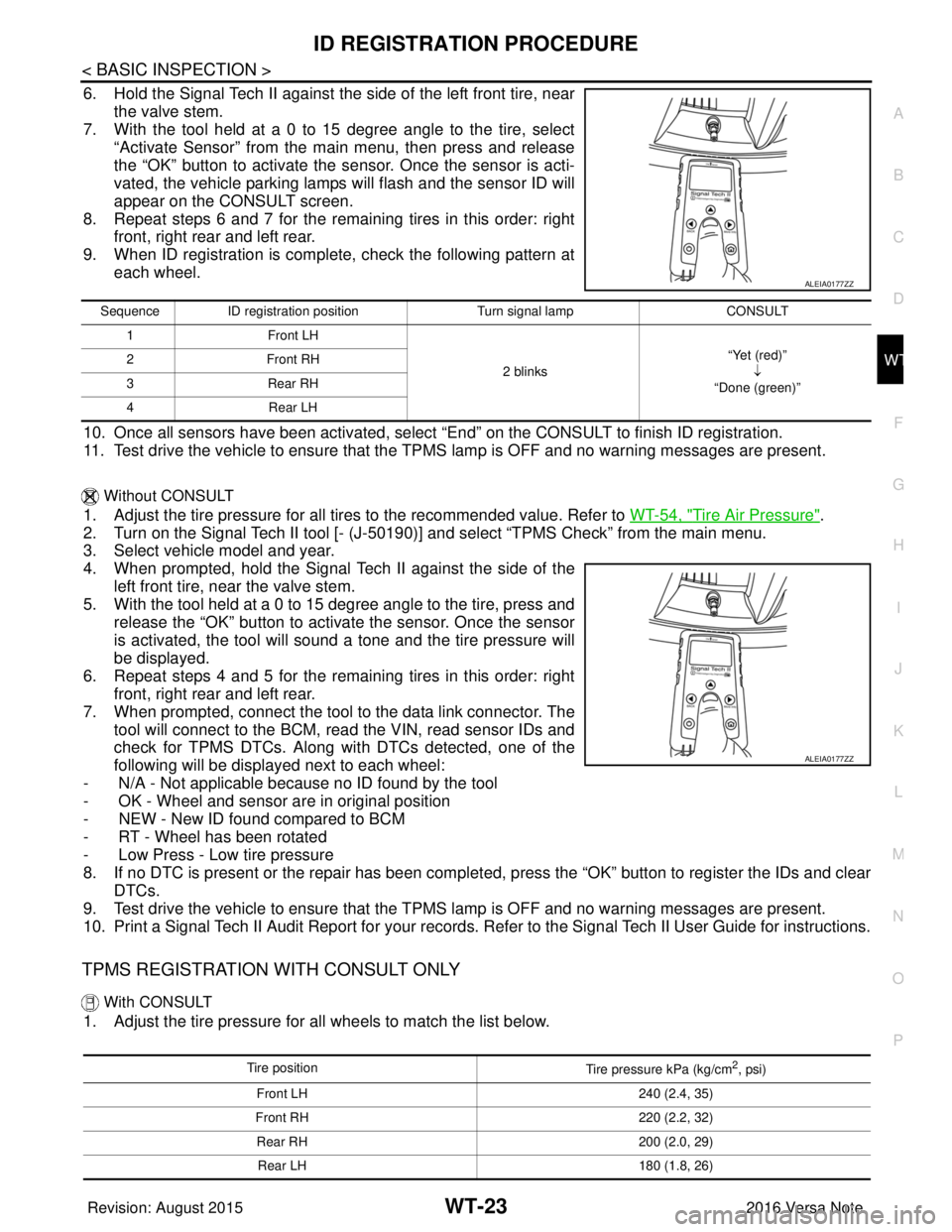
6. Hold the Signal Tech II against the side of the left front tire, near the valve stem.
7. With the tool held at a 0 to 15 degree angle to the tire, select
“Activate Sensor” from the main menu, then press and release
the “OK” button to activate the s ensor. Once the sensor is acti-
vated, the vehicle parking lamps will flash and the sensor ID will
appear on the CONSULT screen.
8. Repeat steps 6 and 7 for the remaining tires in this order: right front, right rear and left rear.
9. When ID registration is complete, check the following pattern at each wheel.
10. Once all sensors have been activated, select “End” on the CONSULT to finish ID registration.
11. Test drive the vehicle to ensure that the TPMS lamp is OFF and no warning messages are present.
Without CONSULT
1. Adjust the tire pressure for all tires to the recommended value. Refer to WT-54, "Tire Air Pressure".
2. Turn on the Signal Tech II tool [- (J-50190) ] and select “TPMS Check” from the main menu.
3. Select vehicle model and year.
4. When prompted, hold the Signal Te ch II against the side of the
left front tire, near the valve stem.
5. With the tool held at a 0 to 15 degree angle to the tire, press and release the “OK” button to activate the sensor. Once the sensor
is activated, the tool will sound a tone and the tire pressure will
be displayed.
6. Repeat steps 4 and 5 for the remaining tires in this order: right front, right rear and left rear.
7. When prompted, connect the tool to the data link connector. The tool will connect to the BCM, read the VIN, read sensor IDs and
check for TPMS DTCs. Along wit h DTCs detected, one of the
following will be displayed next to each wheel:
- N/A - Not applicable because no ID found by the tool
- OK - Wheel and sensor ar e in original position
- NEW - New ID found compared to BCM
- RT - Wheel has been rotated
- Low Press - Low tire pressure
8. If no DTC is present or the repair has been complet ed, press the “OK” button to register the IDs and clear
DTCs.
9. Test drive the vehicle to ensure that the TPMS lamp is OFF and no warning messages are present.
10. Print a Signal Tech II Audit Report for your records. Refer to the Signal Tech II User Guide for instructions.
TPMS REGISTRATION WITH CONSULT ONLY
With CONSULT
1. Adjust the tire pressure for all wheels to match the list below.
ALEIA0177ZZ
Sequence ID registration position Turn signal lamp CONSULT
1 Front LH
2 blinks“Yet (red)”
↓
“Done (green)”
2F
ro nt R H
3 Rear RH
4 Rear LH
ALEIA0177ZZ
Tire position
Tire pressure kPa (kg/cm2, psi)
Front LH 240 (2.4, 35)
Front RH 220 (2.2, 32)
Rear RH 200 (2.0, 29)
Rear LH 180 (1.8, 26)
Revision: August 2015 2016 Versa Note
cardiagn.com
Page 2870 of 3641
![NISSAN NOTE 2016 Service Repair Manual SYSTEMSEC-13
< SYSTEM DESCRIPTION > [WITH INTELLIGENT KEY SYSTEM]
C
D
E
F
G H
I
J
L
M A
B
SEC
N
O P
Refer to SEC-15, "NISSAN ANTI-THEFT SYSTEM : System Description" for any functions other than engin](/img/5/57363/w960_57363-2869.png "NISSAN NOTE 2016 Service Repair Manual SYSTEMSEC-13
< SYSTEM DESCRIPTION > [WITH INTELLIGENT KEY SYSTEM]
C
D
E
F
G H
I
J
L
M A
B
SEC
N
O P
Refer to SEC-15, \"NISSAN ANTI-THEFT SYSTEM : System Description\" for any functions other than engin")
SYSTEMSEC-13
< SYSTEM DESCRIPTION > [WITH INTELLIGENT KEY SYSTEM]
C
D
E
F
G H
I
J
L
M A
B
SEC
N
O P
Refer to SEC-15, "NISSAN ANTI-THEFT SYSTEM : System Description" for any functions other than engine
start function of Intelligent Key system.
PRECAUTIONS FOR INTELLIGENT KEY SYSTEM
The transponder (the chip for NATS ID verification) is integrated into the Intelligent Key. (For the con-
ventional models, it is integrated into the mechanical key.) Therefore, ID verification cannot be per-
formed by mechanical key only.
In that case, NATS ID verification can be perfor med when Intelligent Key backside is contacted to
push-button ignition switch while brake pedal is depressed. If verification result is OK, engine can be
started.
OPERATION WHEN INTELLIGENT KEY IS CARRIED
1. When the push-button ignition switch is pressed, the BCM activates the inside key antenna and transmits the request signal to the Intelligent Key.
2. The Intelligent Key receives the request signal and transmits the Intelligent Key ID signal to the BCM.
3. BCM receives the Intelligent Key ID signal via remote keyless entry receiver and verifies it with the regis-
tered ID.
4. BCM turns ACC relay ON and transmits the i gnition power supply ON signal to IPDM E/R.
5. IPDM E/R turns the ignition relay ON and starts the ignition power supply.
6. IPDM E/R turns the starter control relay ON for engine starting in advance.
7. BCM detects the selector lever position and brake pedal operation condition.
8. BCM transmits the starter request signal to IPDM E/R and turns the starter relay ON if BCM judges that the engine start condition* is satisfied.
9. Power supply is supplied through the starter relay and the starter control relay to operate the starter motor. CAUTION:
If a malfunction is detected in the Intelligent Key system, the “KEY” warning lamp on the combina-
tion meter illuminates. At that time, the engine cannot be started.
10. When BCM receives feedback signal from ECM indicating that the engine is started, the BCM transmits a stop signal to IPDM E/R and stops cranking by turning OFF the starter motor relay. (If engine start is
unsuccessful, cranking stops aut omatically within 5 seconds.)
CAUTION:
When the Intelligent Key is carried outside of th e vehicle (inside key antenna detection area) while
the power supply is in the ACC or ON position, even if the engine start condition* is satisfied, the
engine cannot be started.
*: For the engine start condition, refer to “IGNIT ION SWITCH POSITION CHANGE TABLE BY PUSH-BUT-
TON IGNITION SWITCH OPERATION”.
OPERATION RANGE
Engine can be started when Intelligent Key is inside the vehicle. However, sometimes engine may not start
when Intelligent Key is on instrument panel or in glove box.
ENGINE START OPERATION WHEN INTELLIGENT KEY IS CONTACTED TO PUSH-BUTTON IG-
NITION SWITCH
When Intelligent Key battery is discharged, NATS ID verification between transponder in Intelligent Key and
BCM is performed when Intelligent Key backside is cont acted to push-button ignition switch while brake pedal
is depressed. If the verification result is OK, engine can be started.
IGNITION SWITCH POSITION CHANGE TABLE BY PUSH-BUTTON IGNITION SWITCH OPERA-
TION
The ignition switch position can be changed by the following operations:
NOTE:
• When an Intelligent Key is within the detection area of inside key antenna or when Intelligent Key backside is contacted to push-button ignition switch, it is equivalent to the operations below:
• When starting the engine, the BCM monitors under the engine start conditions:
- Brake pedal operation condition
- Selector lever position
- Vehicle speed
Vehicle speed: less than 4 km/h (2.5 MPH)
Revision: August 2015 2016 Versa Note
cardiagn.com
Page 2908 of 3641
![NISSAN NOTE 2016 Service Repair Manual P1610 LOCK MODESEC-51
< DTC/CIRCUIT DIAGNOSIS > [WITH INTELLIGENT KEY SYSTEM]
C
D
E
F
G H
I
J
L
M A
B
SEC
N
O P
DTC/CIRCUIT DIAGNOSIS
P1610 LOCK MODE
DescriptionINFOID:0000000012430355
ECM forcibly sw](/img/5/57363/w960_57363-2907.png "NISSAN NOTE 2016 Service Repair Manual P1610 LOCK MODESEC-51
< DTC/CIRCUIT DIAGNOSIS > [WITH INTELLIGENT KEY SYSTEM]
C
D
E
F
G H
I
J
L
M A
B
SEC
N
O P
DTC/CIRCUIT DIAGNOSIS
P1610 LOCK MODE
DescriptionINFOID:0000000012430355
ECM forcibly sw")
P1610 LOCK MODESEC-51
< DTC/CIRCUIT DIAGNOSIS > [WITH INTELLIGENT KEY SYSTEM]
C
D
E
F
G H
I
J
L
M A
B
SEC
N
O P
DTC/CIRCUIT DIAGNOSIS
P1610 LOCK MODE
DescriptionINFOID:0000000012430355
ECM forcibly switches to the mode that inhibits engi ne start, when engine start operation is performed 5 times
or more while communication between ECM and BCM is not normal.
DTC LogicINFOID:0000000012430356
DTC DETECTION LOGIC
NOTE:
If DTC P1610 is displayed with other DTC (for BCM or ENGINE), first perform the trouble diagnosis for other
DTC.
DTC CONFIRMATION PROCEDURE
1.PERFORM DTC CONFIRMATION PROCEDURE
1. Turn ignition switch ON.
2. Check DTC in “Self Diagnostic Result” of “ENGINE” using CONSULT.
Is DTC detected?
YES >> Go to SEC-51, "Diagnosis Procedure".
NO >> Inspection End.
Diagnosis ProcedureINFOID:0000000012430357
1.CHECK ENGINE START FUNCTION
1. Check that DTC except fo r DTC P1610 is not detected.
If detected, erase the DTC after fixing.
2. Turn ignition switch OFF.
3. Depress brake pedal and contact the registered Intelligent Key backside to push-button ignition switch,
then wait 5 seconds.
4. Turn ignition switch ON.
5. Turn ignition switch OFF and wait 5 seconds.
6. Repeat steps 3 and 5 twice (a total of 3 times).
7. Check that engine can start.
>> Inspection End.
DTC No. Trouble diagnosis name DTC detecting conditionPossible cause
P1610 LOCK MODE When ECM detects a communication malfunction between
ECM and BCM 5 times or more.
—
Revision: August 2015
2016 Versa Note
cardiagn.com
Page 2999 of 3641
![NISSAN NOTE 2016 Service Repair Manual SEC-142
< BASIC INSPECTION >[WITHOUT INTELLIGENT KEY SYSTEM]
INSPECTION AND ADJUSTMENT
INSPECTION AND ADJUSTMENT
ECM RE-COMMUNICATING FUNCTION
ECM RE-COMMUNICATING FUNCTION : DescriptionINFOID:0000000](/img/5/57363/w960_57363-2998.png "NISSAN NOTE 2016 Service Repair Manual SEC-142
< BASIC INSPECTION >[WITHOUT INTELLIGENT KEY SYSTEM]
INSPECTION AND ADJUSTMENT
INSPECTION AND ADJUSTMENT
ECM RE-COMMUNICATING FUNCTION
ECM RE-COMMUNICATING FUNCTION : DescriptionINFOID:0000000")
SEC-142
< BASIC INSPECTION >[WITHOUT INTELLIGENT KEY SYSTEM]
INSPECTION AND ADJUSTMENT
INSPECTION AND ADJUSTMENT
ECM RE-COMMUNICATING FUNCTION
ECM RE-COMMUNICATING FUNCTION : DescriptionINFOID:0000000012430463
Performing following procedure can automatically per
form re-communication of ECM and BCM, but only when
the ECM has been replaced with a new one (*1).
*1: New one means an ECM which has never been energized on-board.
(In this step, initialization procedure by CONSULT is not necessary)
NOTE:
• When registering new Key IDs or replacing the ECM that is not brand new, refer to CONSULT Immo-
bilizer mode and follow th e on-screen instructions.
• If multiple keys are attached to the key holder, separate them before work.
• Distinguish keys with unregistered key ID from those with registered ID.
ECM RE-COMMUNICATING FUNCTION : Special Repair RequirementINFOID:0000000012430464
1.PERFORM ECM RE-COMMUNICATING FUNCTION
1. Install ECM.
2. Using a registered key (*2), turn ignition switch to “ON”. *2: To perform this step, use the key that has been used before performing ECM replacement.
3. Maintain ignition switch in “ON” position for at least 5 seconds.
4. Turn ignition switch to “OFF”.
5. Start engine.
Can engine be started?
YES >> Procedure is completed.
NO >> Initialize control unit. Refer to CONSULT Immobilizer mode and follow the on-screen instructions.
Revision: August 2015 2016 Versa Note
cardiagn.com
Page 3002 of 3641
![NISSAN NOTE 2016 Service Repair Manual B2190, P1614 NATS ANTENNA AMP.SEC-145
< DTC/CIRCUIT DIAGNOSIS > [WITHOUT INTELLIGENT KEY SYSTEM]
C
D
E
F
G H
I
J
L
M A
B
SEC
N
O P
Is the inspection result normal?
YES >> GO TO 4.
NO >> Repair or repl](/img/5/57363/w960_57363-3001.png "NISSAN NOTE 2016 Service Repair Manual B2190, P1614 NATS ANTENNA AMP.SEC-145
< DTC/CIRCUIT DIAGNOSIS > [WITHOUT INTELLIGENT KEY SYSTEM]
C
D
E
F
G H
I
J
L
M A
B
SEC
N
O P
Is the inspection result normal?
YES >> GO TO 4.
NO >> Repair or repl")
B2190, P1614 NATS ANTENNA AMP.SEC-145
< DTC/CIRCUIT DIAGNOSIS > [WITHOUT INTELLIGENT KEY SYSTEM]
C
D
E
F
G H
I
J
L
M A
B
SEC
N
O P
Is the inspection result normal?
YES >> GO TO 4.
NO >> Repair or replace fuse or harness.
4.CHECK NATS ANTENNA AMP. GROUND LINE CIRCUIT
1. Turn ignition switch OFF.
2. Disconnect NATS antenna amp. connector.
3. Check continuity between NATS antenna amp. connector M21 terminal 3 and ground.
Is the inspection result normal?
YES >> GO TO 5.
NO >> • Repair or replace harness. NOTE:
If harness is OK, replace BCM BCS-137, "
Removal and Installation". Perform initialization with
CONSULT. For initialization, refer to CO NSULT Immobilizer mode and follow the on-screen
instructions.
5.CHECK NATS ANTENNA AMP. SIGNAL LINE- 1
1. Connect NATS antenna amp. connector.
2. Turn ignition switch ON.
3. Check voltage between NATS antenna amp. connec tor M21 terminal 2 and ground with analog tester.
Is the inspection result normal?
YES >> GO TO 6.
NO >> • Repair or replace harness. NOTE:
If harness is OK, replace BCM BCS-137, "
Removal and Installation". Perform initialization with
CONSULT. For initialization, refer to CO NSULT Immobilizer mode and follow the on-screen
instructions.
6.CHECK NATS ANTENNA AMP. SIGNAL LINE- 2
Check voltage between NATS antenna amp. connecto r M21 terminal 4 and ground with analog tester.
NATS antenna amp.
GroundVol tag e
(Approx.)
Connector Terminal
M21 1 Battery voltage
NATS antenna amp. GroundContinuity
Connector Terminal
M21 3 Yes
Te r m i n a l s
Position of ignition key cylinder Voltage (V)
(Approx.)
( + ) ( - )
2G ro u nd Before inserting ignition key
Battery voltage
After inserting ignition key Pointer of tester should move for approx. 30 seconds,
then return to battery voltage
Just after turning ignition switch ON Pointer of tester should move for approx. 1 second, then
return to battery voltage
Revision: August 2015 2016 Versa Note
cardiagn.com
Page 3003 of 3641
![NISSAN NOTE 2016 Service Repair Manual SEC-146
< DTC/CIRCUIT DIAGNOSIS >[WITHOUT INTELLIGENT KEY SYSTEM]
B2190, P1614 NATS ANTENNA AMP.
Is the inspection result normal?
YES >> NATS antenna amp. is malfunctioning. Replace NATS antenna amp.](/img/5/57363/w960_57363-3002.png "NISSAN NOTE 2016 Service Repair Manual SEC-146
< DTC/CIRCUIT DIAGNOSIS >[WITHOUT INTELLIGENT KEY SYSTEM]
B2190, P1614 NATS ANTENNA AMP.
Is the inspection result normal?
YES >> NATS antenna amp. is malfunctioning. Replace NATS antenna amp.")
SEC-146
< DTC/CIRCUIT DIAGNOSIS >[WITHOUT INTELLIGENT KEY SYSTEM]
B2190, P1614 NATS ANTENNA AMP.
Is the inspection result normal?
YES >> NATS antenna amp. is malfunctioning. Replace NATS antenna amp. Refer to
SEC-159, "Removal
and Installation".
NO >> • Repair or replace harness.
NOTE:
If harness is OK, replace BCM, refer to BCS-137, "
Removal and Installation". Perform initializa-
tion with CONSULT. For initialization, refer to CONSULT Immobilizer mode and follow the on-
screen instructions.
Te r m i n a l s Position of ignition key cylinder Voltage (V)
(Approx.)
( + ) ( - )
4G ro un d Before inserting ignition key
Battery voltage
After inserting ignition key Pointer of tester should move for approx. 30 seconds,
then return to battery voltage
Just after turning ignition switch ON Pointer of tester should move for approx. 1 second, then
return to battery voltage
Revision: August 2015 2016 Versa Note
cardiagn.com