stop start NISSAN NOTE 2016 Service Repair Manual
[x] Cancel search | Manufacturer: NISSAN, Model Year: 2016, Model line: NOTE, Model: NISSAN NOTE 2016Pages: 3641, PDF Size: 28.72 MB
Page 2343 of 3641
MA-28
< PERIODIC MAINTENANCE >
CHASSIS AND BODY MAINTENANCE
29. When the flow of CVT fluid slows to a drip, tighten the drain plug to the specified torque. TM-242,
"Removal and Installation".
CAUTION:
Never reuse drain plug gasket.
30. Lift down the vehicle.
31. Select “Work Support” in “TRANSMISSION” using CONSULT.
32. Select “CONFORM CVTF DETERIORTN”.
33. Select “Erase”.
34. Stop the engine.
CVT FLUID : AdjustmentINFOID:0000000012432269
CAUTION:
• Use only Genuine NISSAN CVT Fluid NS-3. Using transmission fluid other than Genuine NISSAN
CVT Fluid NS-3 will damage the CVT, which is not covered by the (NISSAN new vehicle limited) war-
ranty.
• During adjustment of the CVT fluid level, check CO NSULT so that the oil temperature may be main-
tained from 35 to 45 °C (95 to 113 °F).
• Use caution when looking into the drain hole as th ere is a risk of dripping fluid entering the eye.
1. Check that the selector lever is in the “P ” position, then completely engage the parking brake.
2. Start the engine.
3. Adjust the CVT fluid temperature to be approximately 40 °C (104° F).
NOTE:
The CVT fluid is largely affected by temperature. Therefore be sure to use CONSULT and check the
“FLUID TEMP” under “TRANSMISSION” in “Data Monitor” while adjusting.
4. While depressing the brake pedal, shift the selector lever to the entire position from “P” to “L”, and shift it to the “P” position.
NOTE:
Hold the lever at each position for 5 seconds.
5. Lift up the vehicle.
6. Check that there is no CVT fluid leakage.
7. Remove the drain plug. Refer to TM-242, "
Removal and Installation".
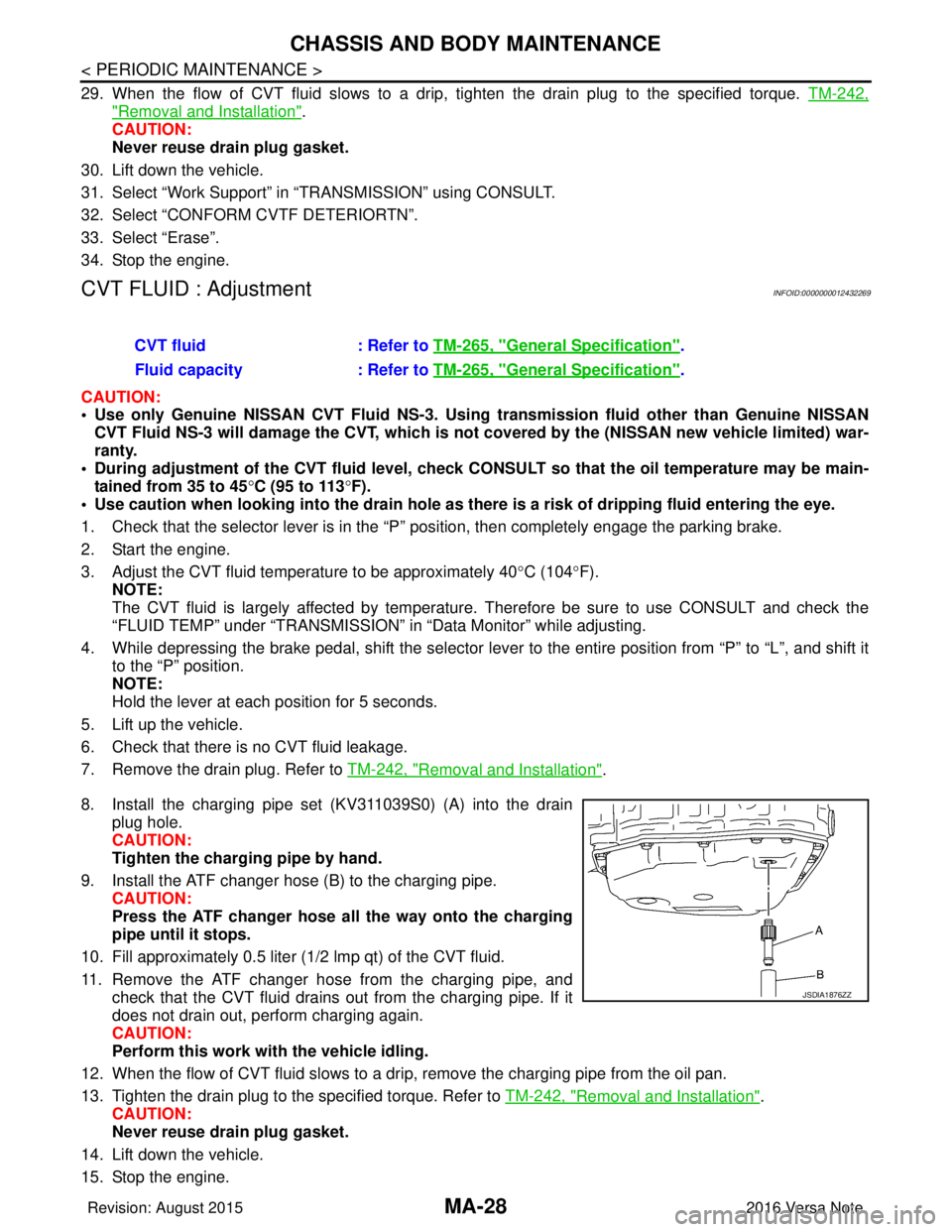
8. Install the charging pipe set (KV311039S0) (A) into the drain plug hole.
CAUTION:
Tighten the charging pipe by hand.
9. Install the ATF changer hose (B) to the charging pipe. CAUTION:
Press the ATF changer hose all the way onto the charging
pipe until it stops.
10. Fill approximately 0.5 liter (1/2 lmp qt) of the CVT fluid.
11. Remove the ATF changer hose from the charging pipe, and check that the CVT fluid drains out from the charging pipe. If it
does not drain out, perform charging again.
CAUTION:
Perform this work with the vehicle idling.
12. When the flow of CVT fluid slows to a drip, remove the charging pipe from the oil pan.
13. Tighten the drain plug to the specified torque. Refer to TM-242, "
Removal and Installation".
CAUTION:
Never reuse drain plug gasket.
14. Lift down the vehicle.
15. Stop the engine. CVT fluid
: Refer to TM-265, "
General Specification".
Fluid capacity : Refer to TM-265, "
General Specification".
JSDIA1876ZZ
Revision: August 2015 2016 Versa Note
cardiagn.com
Page 2346 of 3641
CHASSIS AND BODY MAINTENANCEMA-31
< PERIODIC MAINTENANCE >
C
DE
F
G H
I
J
K L
M B
MA
N
O A
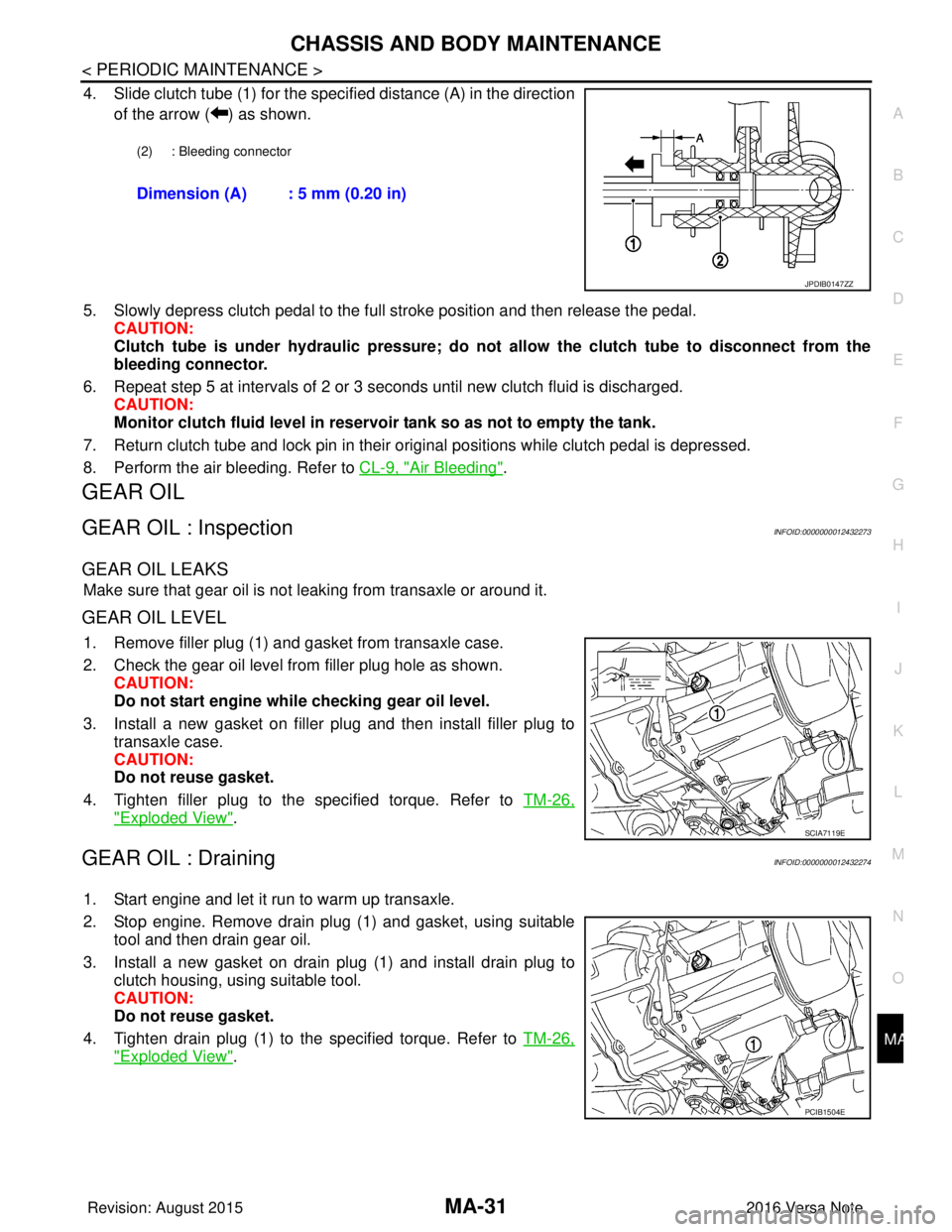
4. Slide clutch tube (1) for the specified distance (A) in the direction
of the arrow ( ) as shown.
5. Slowly depress clutch pedal to the full stroke position and then release the pedal. CAUTION:
Clutch tube is under hydraulic pressure; do not allow the clutch tube to disconnect from the
bleeding connector.
6. Repeat step 5 at intervals of 2 or 3 seconds until new clutch fluid is discharged. CAUTION:
Monitor clutch fluid level in reservoir tank so as not to empty the tank.
7. Return clutch tube and lock pin in their original positions while clutch pedal is depressed.
8. Perform the air bleeding. Refer to CL-9, "
Air Bleeding".
GEAR OIL
GEAR OIL : InspectionINFOID:0000000012432273
GEAR OIL LEAKS
Make sure that gear oil is not leaking from transaxle or around it.
GEAR OIL LEVEL
1. Remove filler plug (1) and gasket from transaxle case.
2. Check the gear oil level from filler plug hole as shown.
CAUTION:
Do not start engine whil e checking gear oil level.
3. Install a new gasket on filler plug and then install filler plug to transaxle case.
CAUTION:
Do not reuse gasket.
4. Tighten filler plug to the specified torque. Refer to TM-26,
"Exploded View".
GEAR OIL : DrainingINFOID:0000000012432274
1. Start engine and let it run to warm up transaxle.
2. Stop engine. Remove drain plug (1) and gasket, using suitable
tool and then drain gear oil.
3. Install a new gasket on drain plug (1) and install drain plug to clutch housing, using suitable tool.
CAUTION:
Do not reuse gasket.
4. Tighten drain plug (1) to the specified torque. Refer to TM-26,
"Exploded View".
(2) : Bleeding connector
Dimension (A) : 5 mm (0.20 in)
JPDIB0147ZZ
SCIA7119E
PCIB1504E
Revision: August 2015 2016 Versa Note
cardiagn.com
Page 2484 of 3641

MIR-10
< SYMPTOM DIAGNOSIS >
SQUEAK AND RATTLE TROUBLE DIAGNOSES
INSTRUMENT PANEL
Most incidents are caused by contact and movement between:
1. Cluster lid A and the instrument panel
2. Acrylic lens and combination meter housing
3. Instrument panel to front pillar finisher
4. Instrument panel to windshield
5. Instrument panel pins
6. Wiring harnesses behind the combination meter
7. A/C defroster duct and duct joint
These incidents can usually be located by tapping or moving the components to duplicate the noise or by
pressing on the components while driving to stop the noise. Most of these incidents can be repaired by apply-
ing felt cloth tape or silicone spray (in hard to reach areas). Urethane pads can be used to insulate wiring har-
ness.
CAUTION:
Do not use silicone spray to isolate a squeak or rattle. If you saturate the ar ea with silicone, you will
not be able to recheck the repair.
CENTER CONSOLE
Components to pay attention to include:
1. Shift selector assembly cover to finisher
2. A/C control unit and cluster lid C
3. Wiring harnesses behind audio and A/C control unit
The instrument panel repair and isolation pr ocedures also apply to the center console.
DOORS
Pay attention to the:
1. Finisher and inner panel making a slapping noise
2. Inside handle escutcheon to door finisher
3. Wiring harnesses tapping
4. Door striker out of alignment causing a popping noise on starts and stops
Tapping or moving the components or pressing on them wh ile driving to duplicate the conditions can isolate
many of these incidents. You can usually insulate the areas with felt cloth tape or insulator foam blocks from
the NISSAN Squeak and Rattle Kit (J-50397) to repair the noise.
TRUNK
Trunk noises are often caused by a loose jack or loose items put into the trunk by the owner.
In addition look for:
1. Trunk lid bumpers out of adjustment
2. Trunk lid striker out of adjustment
3. The trunk lid torsion bars knocking together
4. A loose license plate or bracket
Most of these incidents can be repaired by adjusting, se curing or insulating the item(s) or component(s) caus-
ing the noise.
SUNROOF/HEADLINING
Noises in the sunroof/headlining area c an often be traced to one of the following:
1. Sunroof lid, rail, linkage or seals making a rattle or light knocking noise
2. Sun visor shaft shaking in the holder
3. Front or rear windshield touching headlining and squeaking
Again, pressing on the components to stop the noise while duplicating the conditions can isolate most of these
incidents. Repairs usually consist of insulating with felt cloth tape.
OVERHEAD CONSOLE (FRONT AND REAR)
Overhead console noises are often caused by the c onsole panel clips not being engaged correctly. Most of
these incidents are repaired by pushing up on the c onsole at the clip locations until the clips engage.
In addition look for:
Revision: August 2015 2016 Versa Note
cardiagn.com
Page 2509 of 3641
![NISSAN NOTE 2016 Service Repair Manual PCS-6
< SYSTEM DESCRIPTION >[IPDM E/R]
SYSTEM
RELAY CONTROL SYSTEM : Fail-safe
INFOID:0000000012433269
CAN COMMUNICATION CONTROL
When CAN communication with ECM and BCM is impossible, IPDM E/R perform](/img/5/57363/w960_57363-2508.png "NISSAN NOTE 2016 Service Repair Manual PCS-6
< SYSTEM DESCRIPTION >[IPDM E/R]
SYSTEM
RELAY CONTROL SYSTEM : Fail-safe
INFOID:0000000012433269
CAN COMMUNICATION CONTROL
When CAN communication with ECM and BCM is impossible, IPDM E/R perform")
PCS-6
< SYSTEM DESCRIPTION >[IPDM E/R]
SYSTEM
RELAY CONTROL SYSTEM : Fail-safe
INFOID:0000000012433269
CAN COMMUNICATION CONTROL
When CAN communication with ECM and BCM is impossible, IPDM E/R performs fail-safe control. After CAN
communication recovers normally, it also returns to normal control.
If No CAN Communication Is Available With ECM
If No CAN Communication Is Available With BCM
Control relay Input/outputTransmit unit Control part Reference page
• Headlamp low relay
• Headlamp high relay • Low beam request signal
• High beam request signal
BCM (CAN)
• Headlamp LO
• Headlamp HI EXL-8
Tail lamp relay
Position light request signal BCM (CAN) •Parking lamp
• Side marker lamp
• License plate lamp
• Tail lamp
EXL-11
Illuminations
INL-9
• Front wiper relay
• Front wiper high relayFront wiper request signal BCM (CAN)
Front wiper motorWW-8Front wiper stop position sig-
nal Front wiper motor
Starter control relay Starter control relay signal BCM (CAN)
Starter motorSTR-8
(without Intelli-
gent Key)
STR-9
(with Intelligent
Key)
Transmission range switch
signal (CVT models)
Transmission range
switch
Clutch interlock switch signal
(M/T models) Clutch interlock switch
• Cooling fan low relay
• Cooling fan high relay Cooling fan speed request sig-
nal
ECM (CAN)
Cooling fan EC-38
A/C relayA/C compressor request sig-
nal
ECM (CAN)A/C compressor
(Magnet clutch)
HAC-11
Ignition relay-1Ignition switch ON signal BCM (CAN)
Each control unit,
sensor, actuator and
relay (Ignition power
supply) EC-35Vehicle speed signal (Meter)
Combination meter
(CAN)
Push-button ignition switch
signal Push-button ignition
switch
Control part
Fail-safe operation
Cooling fan • The cooling fan relay turn ON when the ignition switch is turned ON (Cooling fan HI operation)
• The cooling fan relay turn OFF when the ignition switch is turned OFF
A/C compressor A/C relay OFF
Generator Outputs the power generation command signal (PWM signal) 0%
Control part Fail-safe operation
Headlamp • Turns ON the headlamp low relay when the ignition switch is turned ON
• Turns OFF the headlamp low relay when the ignition switch is turned OFF
• Headlamp high relay OFF
•Parking lamp
• Side marker lamp
• License plate lamp
• Illumination
• Tail lamp • Turns ON the tail lamp relay when the ignition switch is turned ON
• Turns OFF the tail lamp relay when the ignition switch is turned OFF
Revision: August 2015
2016 Versa Note
cardiagn.com
Page 2510 of 3641
![NISSAN NOTE 2016 Service Repair Manual PCS
SYSTEMPCS-7
< SYSTEM DESCRIPTION > [IPDM E/R]
C
D
E
F
G H
I
J
K L
B A
O P
N
IGNITION RELAY MALFUNCTION DETECTION FUNCTION
• IPDM E/R monitors the voltage at the contact circuit and excitation co](/img/5/57363/w960_57363-2509.png "NISSAN NOTE 2016 Service Repair Manual PCS
SYSTEMPCS-7
< SYSTEM DESCRIPTION > [IPDM E/R]
C
D
E
F
G H
I
J
K L
B A
O P
N
IGNITION RELAY MALFUNCTION DETECTION FUNCTION
• IPDM E/R monitors the voltage at the contact circuit and excitation co")
PCS
SYSTEMPCS-7
< SYSTEM DESCRIPTION > [IPDM E/R]
C
D
E
F
G H
I
J
K L
B A
O P
N
IGNITION RELAY MALFUNCTION DETECTION FUNCTION
• IPDM E/R monitors the voltage at the contact circuit and excitation coil circuit of the ignition relay inside it.
• IPDM E/R judges the ignition relay error if the voltage differs between the contact circuit and the excitation
coil circuit.
• If the ignition relay cannot turn OFF due to contact seizure, it activates the tail lamp relay for 10 minutes to
alert the user to the ignition relay malfunction when the ignition switch is turned OFF.
NOTE:
The tail lamp turns OFF when the ignition switch is turned ON.
FRONT WIPER CONTROL
IPDM E/R detects front wiper stop posit ion by a front wiper auto stop signal.
When a front wiper auto stop signal is in the conditions listed below, IPDM E/R stops power supply to wiper
after repeating a front wiper 10 second activation and 20 second stop five times.
NOTE:
This operation status can be confirmed on the IPDM E/ R “Data Monitor” that displays “BLOCK” for the item
“WIP PROT” while the wiper is stopped.
STARTER MOTOR PROTECTION FUNCTION
IPDM E/R turns OFF the starter control relay to protect the starter motor when the starter control relay remains
active for 90 seconds.
POWER CONSUMPTIO N CONTROL SYSTEM
Front wiper motor • The status just before activation of fail-safe control is maintained until the ignition switch is
turned OFF while the front wiper is operating at LO or HI speed.
• The wiper is operated at LO speed until the ignition switch is turned OFF if the fail-safe control is activated while the front wiper is set in the INT mode and the front wiper motor is operating.
• Returns automatically wiper to stop position when ignition switch is turned ON if fail-safe control
is activated while front wiper motor is operated and wiper stop in the other position than stop
position.
Front fog lamp (if equipped) Front fog lamp relay OFF
Horn Horn OFF
Ignition relay The status just before activation of fail-safe is maintained.
Starter motor Starter control relay OFF
Control part
Fail-safe operation
DTCIgnition switch Ignition relayTail lamp relay
—O NON—
—O FFO FF—
B2098: IGN RELAY ON OFFONON (10 minutes)
B2099: IGN RELAY OFF ONOFF —
Ignition switch Front wiper switch Auto stop signal
ON OFF
Front wiper stop position signal cannot be
input 10 seconds.
ON The signal does not change for 10 seconds.
Revision: August 2015 2016 Versa Note
cardiagn.com
Page 2511 of 3641
![NISSAN NOTE 2016 Service Repair Manual PCS-8
< SYSTEM DESCRIPTION >[IPDM E/R]
SYSTEM
POWER CONSUMPTION CONTROL SY STEM : System Description
INFOID:0000000012433270
SYSTEM DIAGRAM
DESCRIPTION
Outline
• IPDM E/R incorporates a power consum](/img/5/57363/w960_57363-2510.png "NISSAN NOTE 2016 Service Repair Manual PCS-8
< SYSTEM DESCRIPTION >[IPDM E/R]
SYSTEM
POWER CONSUMPTION CONTROL SY STEM : System Description
INFOID:0000000012433270
SYSTEM DIAGRAM
DESCRIPTION
Outline
• IPDM E/R incorporates a power consum")
PCS-8
< SYSTEM DESCRIPTION >[IPDM E/R]
SYSTEM
POWER CONSUMPTION CONTROL SY STEM : System Description
INFOID:0000000012433270
SYSTEM DIAGRAM
DESCRIPTION
Outline
• IPDM E/R incorporates a power consumption control function that reduces the power consumption accord-
ing to the vehicle status.
• IPDM E/R changes its status (control mode) with the sleep wake up signal received from BCM via CAN com- munication.
Normal mode (wake-up)- CAN communication is normally performed with other control units.
- Individual unit control by IPDM E/R is normally performed.
Low power consumption mode (sleep)- Low power consumption control is active.
- CAN transmission is stopped.
Sleep Mode Activation
• IPDM E/R judges that the sleep-ready conditions are fulfilled when the ignition switch is OFF and none of theconditions below are present. Then it transmits a sleep-ready signal (ready) to BCM via CAN communica-
tion:
- Outputting signals to actuators
- Switches or relays operating
- Output requests are being received from control units via CAN communication.
• IPDM E/R stops CAN communication and enters the low power consumption mode when it receives a sleep
wake up signal (sleep) from BCM and the sleep-ready conditions are fulfilled.
Wake-up Operation
• IPDM E/R changes from the low power consumption mode to the normal mode when it receives a sleep
wake-up signal (wake up) from BCM or any of the following conditions is fulfilled. In addition, it transmits a
sleep-ready signal (not-ready) to BCM via CAN communication to report the CAN communication start:
- Ignition switch ON
- An output request is received from a control unit via CAN communication.
AWMIA1529GB
Revision: August 2015 2016 Versa Note
cardiagn.com
Page 2514 of 3641
![NISSAN NOTE 2016 Service Repair Manual PCS
DIAGNOSIS SYSTEM (IPDM E/R)PCS-11
< SYSTEM DESCRIPTION > [IPDM E/R]
C
D
E
F
G H
I
J
K L
B A
O P
N
ECU IDENTIFICATION
The IPDM E/R part number is displayed.
SELF DIAGNOSTIC RESULT
Refer to
PCS-20,](/img/5/57363/w960_57363-2513.png "NISSAN NOTE 2016 Service Repair Manual PCS
DIAGNOSIS SYSTEM (IPDM E/R)PCS-11
< SYSTEM DESCRIPTION > [IPDM E/R]
C
D
E
F
G H
I
J
K L
B A
O P
N
ECU IDENTIFICATION
The IPDM E/R part number is displayed.
SELF DIAGNOSTIC RESULT
Refer to
PCS-20,")
PCS
DIAGNOSIS SYSTEM (IPDM E/R)PCS-11
< SYSTEM DESCRIPTION > [IPDM E/R]
C
D
E
F
G H
I
J
K L
B A
O P
N
ECU IDENTIFICATION
The IPDM E/R part number is displayed.
SELF DIAGNOSTIC RESULT
Refer to
PCS-20, "DTCIndex".
DATA MONITOR
ACTIVE TEST
Data Monitor The IPDM E/R input/output data is displayed in real time.
Active Test The IPDM E/R activates outputs to test components.
CAN Diag Support Mntr The result of transmit/receive diagnosis of CAN communication is displayed.
Direct Diagnostic Mode
Description
Monitor Item [Unit]Main
Signals Description
MOTOR FAN REQ [1/2/3/4] ×Indicates cooling fan speed signal received from ECM on CAN communication
line
AC COMP REQ [On/Off] ×Indicates A/C compressor request signal received from ECM on CAN commu-
nication line
TAIL&CLR REQ [On/Off] ×Indicates position light request signal
received from BCM on CAN communica-
tion line
HL LO REQ [On/Off] ×Indicates low beam request signal received from BCM on CAN communication
line
HL HI REQ [On/Off] ×Indicates high beam request signal received from BCM on CAN communication
line
FR FOG REQ [On/Off] ×Indicates front fog light request signal received from BCM on CAN communica-
tion line
FR WIP REQ [Stop/1LOW/Low/Hi] ×Indicates front wiper request signal received from BCM on CAN communication
line
WIP AUTO STOP [STOP P/ACT P] ×Indicates condition of front wiper auto stop signal
WIP PROT [Off/BLOCK] ×Indicates condition of front wiper fail-safe operation
IGN RLY1 -REQ [On/Off] Indicates ignition switch ON signal received from BCM on CAN communication
line
IGN RLY [On/Off] ×Indicates condition of ignition relay
PUSH SW [On/Off] Indicates condition of push-button ignition switch
INTER/NP SW [On/Off] Indicates condition of CVT shift position
ST RLY CONT [On/Off] Indicates starter relay status signal received from BCM on CAN communication
line
IHBT RLY -REQ [On/Off] Indicates starter control relay signal received from BCM on CAN communication
line
ST/INHI RLY [Off/ ST /INHI] Indicates condition of starter relay and starter control relay
DETENT SW [On/Off] Indicates condition of CVT shift selector (park position switch)
DTRL REQ [Off] Indicates daytime running light request signal received from BCM on CAN com-
munication line
THFT HRN REQ [On/Off] Indicates theft warning horn request signal received from BCM on CAN commu-
nication line
HORN CHIRP [On/Off] Indicates horn reminder signal received from BCM on CAN communication line
Test item Description
HORN This test is able to check horn operation [On].
FRONT WIPER This test is able to check wiper motor operation [Hi/Lo/Off].
Revision: August 2015 2016 Versa Note
cardiagn.com
Page 2522 of 3641
![NISSAN NOTE 2016 Service Repair Manual PCS
IPDM E/R (INTELLIGENT POWER DISTRIBUTION MODULE ENGINE ROOM)
PCS-19
< ECU DIAGNOSIS INFORMATION > [IPDM E/R]
C
D
E
F
G H
I
J
K L
B A
O P
N
1: With Intelligent Key system
2: Without Intelligent Key](/img/5/57363/w960_57363-2521.png "NISSAN NOTE 2016 Service Repair Manual PCS
IPDM E/R (INTELLIGENT POWER DISTRIBUTION MODULE ENGINE ROOM)
PCS-19
< ECU DIAGNOSIS INFORMATION > [IPDM E/R]
C
D
E
F
G H
I
J
K L
B A
O P
N
1: With Intelligent Key system
2: Without Intelligent Key")
PCS
IPDM E/R (INTELLIGENT POWER DISTRIBUTION MODULE ENGINE ROOM)
PCS-19
< ECU DIAGNOSIS INFORMATION > [IPDM E/R]
C
D
E
F
G H
I
J
K L
B A
O P
N
1: With Intelligent Key system
2: Without Intelligent Key system
3: With M/T
4: With CVT
5: With daytime running light system
6: With front fog lamps
Fail-safeINFOID:0000000012433274
CAN COMMUNICATION CONTROL
When CAN communication with ECM and BCM is impossible, IPDM E/R performs fail-s
afe control. After CAN
communication recovers normally, it also returns to normal control.
If No CAN Communication Is Available With ECM
If No CAN Communication Is Available With BCM
IGNITION RELAY MALFUNCTION DETECTION FUNCTION
• IPDM E/R monitors the voltage at the contact circuit and excitation coil circuit of the ignition relay inside it.
• IPDM E/R judges the ignition relay error if the voltage differs between the contact circuit and the excitation
coil circuit.
• If the ignition relay cannot turn OFF due to contact seizure, it activates the tail lamp relay for 10 minutes to alert the user to the ignition relay malfunction when the ignition switch is turned OFF.
901L Ignition relay power
supply Input ONIgnition switch OFF or ACC
Battery voltage
Ignition switch ON 0V
Te r m i n a l
Wire
color Circuit Input/
Output Ignition
switch Condition
Value
Control part Fail-safe operation
Cooling fan • The cooling fan relay turn ON when the ignition switch is turned ON (Cooling fan HI operation)
• The cooling fan relay turn OFF when the ignition switch is turned OFF
A/C compressor A/C relay OFF
Generator Outputs the power generation command signal (PWM signal) 0%
Control part Fail-safe operation
Headlamp • Turns ON the headlamp low relay when the ignition switch is turned ON
• Turns OFF the headlamp low relay when the ignition switch is turned OFF
• Headlamp high relay OFF
•Parking lamp
• Side marker lamp
• License plate lamp
• Illumination
• Tail lamp • Turns ON the tail lamp relay when the ignition switch is turned ON
• Turns OFF the tail lamp relay when the ignition switch is turned OFF
Front wiper motor • The status just before activation of fail-safe control is maintained until the ignition switch is
turned OFF while the front wiper is operating at LO or HI speed.
• The wiper is operated at LO speed until the ignition switch is turned OFF if the fail-safe control
is activated while the front wiper is set in the INT mode and the front wiper motor is operating.
• Returns automatically wiper to stop position when ignition switch is turned ON if fail-safe control is activated while front wiper motor is operated and wiper stop in the other position than stop
position.
Front fog lamp Front fog lamp relay OFF
Horn Horn OFF
Ignition relay The status just before activation of fail-safe is maintained.
Starter motor Starter control relay OFF
Revision: August 2015 2016 Versa Note
cardiagn.com
Page 2523 of 3641
![NISSAN NOTE 2016 Service Repair Manual PCS-20
< ECU DIAGNOSIS INFORMATION >[IPDM E/R]
IPDM E/R (INTELLIGENT POWER DI
STRIBUTION MODULE ENGINE ROOM)
NOTE:
The tail lamp turns OFF when the ignition switch is turned ON.
FRONT WIPER CONTROL
IP](/img/5/57363/w960_57363-2522.png "NISSAN NOTE 2016 Service Repair Manual PCS-20
< ECU DIAGNOSIS INFORMATION >[IPDM E/R]
IPDM E/R (INTELLIGENT POWER DI
STRIBUTION MODULE ENGINE ROOM)
NOTE:
The tail lamp turns OFF when the ignition switch is turned ON.
FRONT WIPER CONTROL
IP")
PCS-20
< ECU DIAGNOSIS INFORMATION >[IPDM E/R]
IPDM E/R (INTELLIGENT POWER DI
STRIBUTION MODULE ENGINE ROOM)
NOTE:
The tail lamp turns OFF when the ignition switch is turned ON.
FRONT WIPER CONTROL
IPDM E/R detects front wiper stop posit ion by a front wiper auto stop signal.
When a front wiper auto stop signal is in the conditions listed below, IPDM E/R stops power supply to wiper
after repeating a front wiper 10 second activation and 20 second stop five times.
NOTE:
This operation status can be confirmed on the IPDM E/ R “Data Monitor” that displays “BLOCK” for the item
“WIP PROT” while the wiper is stopped.
STARTER MOTOR PROTECTION FUNCTION
IPDM E/R turns OFF the starter control relay to protect the starter motor when the starter control relay remains
active for 90 seconds.
DTC IndexINFOID:0000000012433275
NOTE:
The details of TIME display are as follows.
• CRNT: The malfunctions that are detected now
• 1 - 39: The number is indicated when it is normal at present and a malfunction was detected in the past. It
increases like 0 → 1 → 2 · · · 38 → 39 after returning to the normal condition whenever IGN OFF → ON. It is
fixed to 39 until the self-diagnosis results are erased if it is over 39. It returns to 0 when a malfunction is
detected again in the process.
DTC Ignition switch Ignition relayTail lamp relay
—O NON—
—O FFO FF—
B2098: IGN RELAY ON OFFONON (10 minutes)
B2099: IGN RELAY OFF ONOFF —
Ignition switch Front wiper switch Auto stop signal
ON OFF
Front wiper stop position signal cannot be
input 10 seconds.
ON The signal does not change for 10 seconds.
CONSULT display Fail-safe
TIMENOTERefer to
No DTC is detected. Further testing may be required. ——— —
U1000: CAN COMM CIRCUIT ×CRNT 1 – 39 PCS-26
B2098: IGN RELAY ON ×CRNT 1 – 39 PCS-27
B2099: IGN RELAY OFF —CRNT 1 – 39 PCS-28
B210B: PNP RELAY ON stuck failure —CRNT 1 – 39 SEC-99
B210C: PNP RELAY OFF stuck failure —CRNT 1 – 39 SEC-100
B210D: STARTER relay ON stuck failure —CRNT 1 – 39 SEC-102
B210E: STARTER relay OFF stuck failure —CRNT 1 – 39 SEC-104
B210F: Interlock/NP switch ON stuck failure —CRNT 1 – 39 SEC-106
B2110: Interlock/NP switch OFF stuck failure —CRNT 1 – 39 SEC-108
Revision: August 2015 2016 Versa Note
cardiagn.com
Page 2538 of 3641
![NISSAN NOTE 2016 Service Repair Manual PCS
SYSTEMPCS-35
< SYSTEM DESCRIPTION > [POWER DISTRIBUTION SYSTEM]
C
D
E
F
G H
I
J
K L
B A
O P
N
TION
The power supply position changing operation can be performed with the following operations.
NOTE](/img/5/57363/w960_57363-2537.png "NISSAN NOTE 2016 Service Repair Manual PCS
SYSTEMPCS-35
< SYSTEM DESCRIPTION > [POWER DISTRIBUTION SYSTEM]
C
D
E
F
G H
I
J
K L
B A
O P
N
TION
The power supply position changing operation can be performed with the following operations.
NOTE")
PCS
SYSTEMPCS-35
< SYSTEM DESCRIPTION > [POWER DISTRIBUTION SYSTEM]
C
D
E
F
G H
I
J
K L
B A
O P
N
TION
The power supply position changing operation can be performed with the following operations.
NOTE:
• When an Intelligent Key is within the detection area of inside key antenna and when Intelligent Key backside
is contacted to push-button ignition switch, it is equivalent to the operations below.
• When starting the engine, the BCM monitors under the engine start conditions:
- Brake pedal operating condition
- Selector lever position
- Vehicle speed
Vehicle speed: less than 4 km/h (2.5 MPH)
Vehicle speed: 4 km/h (2.5 MPH) or more
Emergency stop operation
• Press and hold the push-button ignition switch for 2 seconds or more.
• Press the push-button ignition switch 3 times or more within 1.5 seconds.
Fail-safeINFOID:0000000012567363
BCM performs fail-safe control when the following DTCs are detected.
Power supply position Engine start/stop condition
Push-button
ignition switch
operation frequency
With CVT
With M/T
Selector lever position Brake pedal condition Clutch pedal condition
OFF → ACC —Released Released 1
OFF → ACC → ON —Released Released 2
OFF → ACC → ON →
OFF —
Released Released 3
OFF → START
ACC → START
ON → START P (Park) or N (Neutral) Depressed
Depressed1
Engine is running → OFF ——— 1
Power supply position Engine start/stop condition
Push-button
ignition switch
operation frequency
With CVT
With M/T
Selector lever position Brake pedal condition Clutch pedal condition
Engine is running →
ACC ———
Emergency stop
operation
Engine stall return opera-
tion while driving N (Neutral)
ReleasedDepressed 1
CONSULT Display Fail-safe Cancellation
B2192: ID DISCORD BCM-ECM Inhibit engine cranking Erase DTC
B2193: CHAIN OF BCM-ECM Inhibit engine cranking Erase DTC
B2195: ANTI SCANNING Inhibit engine cranking Ignition switch ON → OFF
B2196: DONGLE NG Inhibit engine cranking Erase DTC
B2198: NATS ANTENNA AMP Inhibit engine cranking Erase DTC
B2557: VEHICLE SPEED —When the following CAN signal status (vehicle speed signal) becomes
consistent
• Vehicle spee
d signal (ABS)
• Vehicle speed signal (Meter)
B2601: SHIFT P SIGNAL —500 ms after the following signal reception status becomes consistent
• Park position switch signal
• P range signal (CAN)
Revision: August 2015
2016 Versa Note
cardiagn.com