ABS NISSAN NOTE 2016 Service Repair Manual
[x] Cancel search | Manufacturer: NISSAN, Model Year: 2016, Model line: NOTE, Model: NISSAN NOTE 2016Pages: 3641, PDF Size: 28.72 MB
Page 590 of 3641
![NISSAN NOTE 2016 Service Repair Manual BRC-142
< REMOVAL AND INSTALLATION >[VDC/TCS/ABS]
WHEEL SENSOR
1. Remove bolts (A) and support bracket (1) (LH side only).
2. Disconnect the harness connector fr
om the rear wheel sensor.
3. Release](/img/5/57363/w960_57363-589.png "NISSAN NOTE 2016 Service Repair Manual BRC-142
< REMOVAL AND INSTALLATION >[VDC/TCS/ABS]
WHEEL SENSOR
1. Remove bolts (A) and support bracket (1) (LH side only).
2. Disconnect the harness connector fr
om the rear wheel sensor.
3. Release")
BRC-142
< REMOVAL AND INSTALLATION >[VDC/TCS/ABS]
WHEEL SENSOR
1. Remove bolts (A) and support bracket (1) (LH side only).
2. Disconnect the harness connector fr
om the rear wheel sensor.
3. Release rear wheel sensor harness clips from the vehicle.
4. Remove bolts and rear wheel sensor from back plate.
INSTALLATION
Installation is in the reverse order of removal.
CAUTION:
Do not twist rear wheel sensor harness when installing rear
wheel sensor. Check that grommet (2) is fully inserted to
bracket (1). Check that rear wheel sensor harness is not twisted
after installation.
ALFIA0391ZZ
JPFIC0209ZZ
Revision: August 2015 2016 Versa Note
cardiagn.com
Page 591 of 3641
![NISSAN NOTE 2016 Service Repair Manual SENSOR ROTORBRC-143
< REMOVAL AND INSTALLATION > [VDC/TCS/ABS]
C
D
E
G H
I
J
K L
M A
B
BRC
N
O P
SENSOR ROTOR
FRONT SENSOR ROTOR
FRONT SENSOR ROTOR : Removal and InstallationINFOID:0000000012430929
RE](/img/5/57363/w960_57363-590.png "NISSAN NOTE 2016 Service Repair Manual SENSOR ROTORBRC-143
< REMOVAL AND INSTALLATION > [VDC/TCS/ABS]
C
D
E
G H
I
J
K L
M A
B
BRC
N
O P
SENSOR ROTOR
FRONT SENSOR ROTOR
FRONT SENSOR ROTOR : Removal and InstallationINFOID:0000000012430929
RE")
SENSOR ROTORBRC-143
< REMOVAL AND INSTALLATION > [VDC/TCS/ABS]
C
D
E
G H
I
J
K L
M A
B
BRC
N
O P
SENSOR ROTOR
FRONT SENSOR ROTOR
FRONT SENSOR ROTOR : Removal and InstallationINFOID:0000000012430929
REMOVAL
Remove sensor rotor from steering knuckle. Refer to FA X - 9 , "Exploded View".
INSTALLATION
Installation is in the reverse order of removal.
REAR SENSOR ROTOR
REAR SENSOR ROTOR : Removal and InstallationINFOID:0000000012430930
REMOVAL
Remove sensor rotor from brake drum. Refer to RAX-6, "Exploded View".
CAUTION:
Do not reuse rear sensor rotor.
INSTALLATION
Installation is in the reverse order of removal.
Revision: August 2015 2016 Versa Note
cardiagn.com
Page 592 of 3641
![NISSAN NOTE 2016 Service Repair Manual BRC-144
< REMOVAL AND INSTALLATION >[VDC/TCS/ABS]
ABS ACTUATOR AND ELECTRIC UNIT (CONTROL UNIT)
ABS ACTUATOR AND ELECTRIC
UNIT (CONTROL UNIT)
Exploded ViewINFOID:0000000012430931
Removal and Installa](/img/5/57363/w960_57363-591.png "NISSAN NOTE 2016 Service Repair Manual BRC-144
< REMOVAL AND INSTALLATION >[VDC/TCS/ABS]
ABS ACTUATOR AND ELECTRIC UNIT (CONTROL UNIT)
ABS ACTUATOR AND ELECTRIC
UNIT (CONTROL UNIT)
Exploded ViewINFOID:0000000012430931
Removal and Installa")
BRC-144
< REMOVAL AND INSTALLATION >[VDC/TCS/ABS]
ABS ACTUATOR AND ELECTRIC UNIT (CONTROL UNIT)
ABS ACTUATOR AND ELECTRIC
UNIT (CONTROL UNIT)
Exploded ViewINFOID:0000000012430931
Removal and InstallationINFOID:0000000012430932
REMOVAL
CAUTION:
• Before servicing, disconnect the ba ttery cable from negative terminal.
• Do not remove actuator by holding harness.
NOTE:
When removing components such as hoses, tubes/lines, etc. , cap or plug openings to prevent fluid from spill-
ing.
1. Disconnect negative battery cable. Refer to PG-70, "
Removal and Installation (Battery)".
2. Disconnect vacuum hose from intake manifold. Refer to BR-33, "
Exploded View".
1. ABS actuator and electric unit (con-
trol unit) 2. ABS actuator and electric unit (con-
trol unit) harness connector 3. Bracket
4. Bushing 5. Insulating clip6. Bolt
A. To master cylinder secondary side B. To rear brake tube (RH) C. To front brake tube (LH)
D. To front brake tube (RH) E. To rear brake tube (LH)F. To master cylinder primary side
AWFIA1105ZZ
Revision: August 2015 2016 Versa Note
cardiagn.com
Page 593 of 3641
![NISSAN NOTE 2016 Service Repair Manual ABS ACTUATOR AND ELECTRIC UNIT (CONTROL UNIT)BRC-145
< REMOVAL AND INSTALLATION > [VDC/TCS/ABS]
C
D
E
G H
I
J
K L
M A
B
BRC
N
O P
3. Remove ground harness bolt (A) and ground harness from radi- ator c](/img/5/57363/w960_57363-592.png "NISSAN NOTE 2016 Service Repair Manual ABS ACTUATOR AND ELECTRIC UNIT (CONTROL UNIT)BRC-145
< REMOVAL AND INSTALLATION > [VDC/TCS/ABS]
C
D
E
G H
I
J
K L
M A
B
BRC
N
O P
3. Remove ground harness bolt (A) and ground harness from radi- ator c")
ABS ACTUATOR AND ELECTRIC UNIT (CONTROL UNIT)BRC-145
< REMOVAL AND INSTALLATION > [VDC/TCS/ABS]
C
D
E
G H
I
J
K L
M A
B
BRC
N
O P
3. Remove ground harness bolt (A) and ground harness from radi- ator core support.
4. Disconnect high-pressure pipe from expansion valve. Refer to HA-28, "
Exploded View".
CAUTION:
Cap or wrap the joint of the A/C piping and expan sion valve with suitable material such as vinyl
tape to avoid the entry of air.
5. Remove low-pressure flexible hose. Refer to HA-28, "
LOW-PRESSURE FLEXIBLE HOSE : Removal and
Installation".
6. Loosen flare nut from brake tubes using a flare nut wrench, then remove brake tubes from ABS actuator
and electric unit (control unit). Refer to BR-22, "
FRONT : Exploded View".
7. Disconnect the harness connector from the ABS actuator and electric unit (control unit).
8. Remove ABS actuator and electric unit (control unit) bracket bolts.
9. Remove the ABS actuator and electric uni t (control unit) and bracket as an assembly.
10. Remove bracket and bushing from ABS ac tuator and electric unit (if necessary).
INSTALLATION
Installation is in the reverse order of removal.
• Bleed the brake system. Refer to BR-13, "
Bleeding Brake System".
• Adjust the neutral position of steering angle sensor. Refer to BRC-55, "
ADJUSTMENT OF STEERING
ANGLE SENSOR NEUTRAL POSITION : Special Repair Requirement".
CAUTION:
• Replace the ABS actuator electric unit (control unit) if it has been dropped or sustained an impact.
• Do not install actuator by holding harness.
• After installing harness connector in the ABS acu tator and electric until (control unit), make sure
harness connector is securely locked.
ALKIA3174ZZ
Revision: August 2015 2016 Versa Note
cardiagn.com
Page 594 of 3641
![NISSAN NOTE 2016 Service Repair Manual BRC-146
< REMOVAL AND INSTALLATION >[VDC/TCS/ABS]
VDC OFF SWITCH
VDC OFF SWITCH
Removal and InstallationINFOID:0000000012430933
REMOVAL
1. Remove the instrument lower panel LH. Refer to
IP-24, "Remov](/img/5/57363/w960_57363-593.png "NISSAN NOTE 2016 Service Repair Manual BRC-146
< REMOVAL AND INSTALLATION >[VDC/TCS/ABS]
VDC OFF SWITCH
VDC OFF SWITCH
Removal and InstallationINFOID:0000000012430933
REMOVAL
1. Remove the instrument lower panel LH. Refer to
IP-24, \"Remov")
BRC-146
< REMOVAL AND INSTALLATION >[VDC/TCS/ABS]
VDC OFF SWITCH
VDC OFF SWITCH
Removal and InstallationINFOID:0000000012430933
REMOVAL
1. Remove the instrument lower panel LH. Refer to
IP-24, "Removal and Installation".
2. Release pawls (A) using suitable tool and remove the VDC OFF switch.
INSTALLATION
Installation is in the reverse order of removal.
ALFIA0211ZZ
Revision: August 2015 2016 Versa Note
cardiagn.com
Page 595 of 3641
![NISSAN NOTE 2016 Service Repair Manual STEERING ANGLE SENSORBRC-147
< REMOVAL AND INSTALLATION > [VDC/TCS/ABS]
C
D
E
G H
I
J
K L
M A
B
BRC
N
O P
STEERING ANGLE SENSOR
Exploded ViewINFOID:0000000012430934
Removal and InstallationINFOID:0000](/img/5/57363/w960_57363-594.png "NISSAN NOTE 2016 Service Repair Manual STEERING ANGLE SENSORBRC-147
< REMOVAL AND INSTALLATION > [VDC/TCS/ABS]
C
D
E
G H
I
J
K L
M A
B
BRC
N
O P
STEERING ANGLE SENSOR
Exploded ViewINFOID:0000000012430934
Removal and InstallationINFOID:0000")
STEERING ANGLE SENSORBRC-147
< REMOVAL AND INSTALLATION > [VDC/TCS/ABS]
C
D
E
G H
I
J
K L
M A
B
BRC
N
O P
STEERING ANGLE SENSOR
Exploded ViewINFOID:0000000012430934
Removal and InstallationINFOID:0000000012430935
REMOVAL
1. Remove the spiral cable. Refer to SR-16, "Removal and Installation".
2. Remove the screws (A), then release the pawls (B) and remove the steering angle sensor (2) from the spiral cable (1).
INSTALLATION
Installation is in the reverse order of removal.
Adjust the neutral position of the steering angle sensor. Refer to BRC-55, "
ADJUSTMENT OF STEERING
ANGLE SENSOR NEUTRAL POSITION : Description".
CAUTION:
Do not reuse steering angle sensor.
1. Steering angle sensor A. Screw Do not reuse
Front
ALFIA0235ZZ
ALHIA0271ZZ
Revision: August 2015 2016 Versa Note
cardiagn.com
Page 630 of 3641
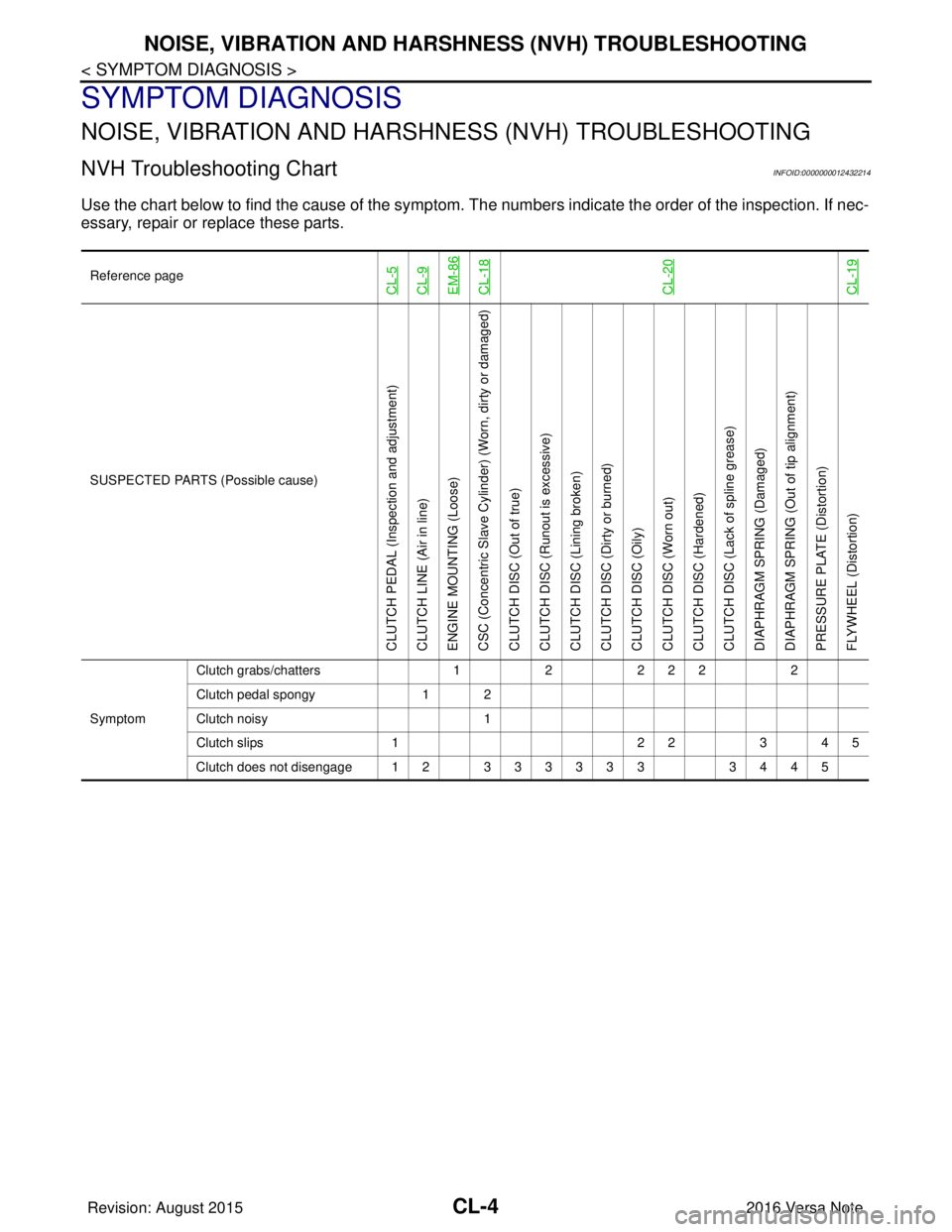
CL-4
< SYMPTOM DIAGNOSIS >
NOISE, VIBRATION AND HARSHNESS (NVH) TROUBLESHOOTING
SYMPTOM DIAGNOSIS
NOISE, VIBRATION AND HARSHNESS (NVH) TROUBLESHOOTING
NVH Troubleshooting ChartINFOID:0000000012432214
Use the chart below to find the cause of the symptom. T he numbers indicate the order of the inspection. If nec-
essary, repair or replace these parts.
Reference pageCL-5CL-9EM-86CL-18CL-20CL-19
SUSPECTED PARTS (Possible cause)
CLUTCH PEDAL (Inspection and adjustment)
CLUTCH LINE (Air in line)
ENGINE MOUNTING (Loose)
CSC (Concentric Slave Cylinder) (Worn, dirty or damaged)
CLUTCH DISC (Out of true)
CLUTCH DISC (Ru nout is excessive)
CLUTCH DISC (Lining broken)
CLUTCH DISC (Dirty or burned)
CLUTCH DISC (Oily)
CLUTCH DISC (Worn out)
CLUTCH DISC (Hardened)
CLUTCH DISC (Lack of spline grease)
DIAPHRAGM SPRING (Damaged)
DIAPHRAGM SPRING (Out of tip alignment)
PRESSURE PLATE (Distortion)
FLYWHEEL (Distortion)
Symptom Clutch grabs/chatters
122 2 2 2
Clutch pedal spongy 1 2
Clutch noisy 1
Clutch slips 1 2 23 4 5
Clutch does not disengage 12 333333 3445
Revision: August 2015 2016 Versa Note
cardiagn.com
Page 703 of 3641
![NISSAN NOTE 2016 Service Repair Manual DLK-14
< SYSTEM DESCRIPTION >[WITH INTELLIGENT KEY SYSTEM]
COMPONENT PARTS
A. View with instrument panel assembly
removed B. View with glove box door removed C. View with front grille removed
D. View](/img/5/57363/w960_57363-702.png "NISSAN NOTE 2016 Service Repair Manual DLK-14
< SYSTEM DESCRIPTION >[WITH INTELLIGENT KEY SYSTEM]
COMPONENT PARTS
A. View with instrument panel assembly
removed B. View with glove box door removed C. View with front grille removed
D. View")
DLK-14
< SYSTEM DESCRIPTION >[WITH INTELLIGENT KEY SYSTEM]
COMPONENT PARTS
A. View with instrument panel assembly
removed B. View with glove box door removed C. View with front grille removed
D. View of LH door (RH similar) E. View of LH door switch (RH similar) F. View with rear bumper cover re- moved
G. View from rear of vehicle H. View with rear seat cushion removed I. View with center console removed
No. Component Function
1. Combination meter Combination meter transmits the vehicle speed sig-
nal to BCM via CAN communication.
BCM also receives the vehicle speed signal from
ABS actuator and electric uni
t (control unit) via CAN
communication. BCM compares both signals to de-
tect the vehicle speed.
Security indicator lamp is located on combination
meter.
Security indicator lamp blinks when ignition switch
is in any position other than ON to warn that NIS-
SAN VEHICLE IMMOBILIZER SYSTEM-NATS
[NVIS (NATS)] is on board.
Refer to MWI-59, "
METER SYSTEM : Combination
Meter".
2. Push-button ignition switch Push-button ignition switch has push switch inside
which detects that push-button ignition switch is
pressed, and then transmits ON/OFF signal to
BCM. BCM changes the ignition switch position with
the operation of push-button ignition switch. BCM
maintains the ignition switch position status while
push-button ignition switch is not operated.
3. BCM BCM controls INTELLIGENT KEY SYSTEM (EN-
GINE START FUNCTION), NISSAN VEHICLE IM-
MOBILIZER SYSTEM-NATS [NVIS (NATS)] and
VEHICLE SECURITY SYSTEM.
BCM performs the ID verification between BCM and
Intelligent Key when the Intelligent Key is carried
into the detection area of inside key antenna, and
push-button ignition switch is pressed. If the ID ver-
ification result is OK, ignition switch operation is
available.
Then, when the ignition switch is turned ON, BCM
performs ID verification between BCM and ECM. If
the ID verification result is OK, ECM can start en-
gine.
Refer to BCS-6, "
BODY CONTROL SYSTEM :
Component Parts Location" for detailed installation
location.
4. Main power window and door lock/unlock switch Door lock and unlock switch is integrated into the
main power window and door lock/unlock switch.
Door lock and unlock switch transmits door lock/un-
lock operation signal to BCM.
Refer to PWC-7, "
Main Power Window And Door
Lock/Unlock Switch".
5. Front door lock assembly LH Door key cylinder switch is integrated into front door
lock assembly (driver side).
Door key cylinder switch detects door LOCK/UN-
LOCK operation using mechanical key, and then
transmits the operation signal to BCM.
Refer to DLK-17, "
INTELLIGENT KEY SYSTEM :
Front Door Lock Asse
mbly (Driver Side)".
6. Rear door lock actuator LH Rear door lock actuator locks/unlocks the rear door
latch assembly.
Revision: August 2015
2016 Versa Note
cardiagn.com
Page 721 of 3641
![NISSAN NOTE 2016 Service Repair Manual DLK-32
< SYSTEM DESCRIPTION >[WITH INTELLIGENT KEY SYSTEM]
DIAGNOSIS SYSTEM (BCM)
DATA MONITOR
ACTIVE TEST
Monitor Item [Unit]
Main Description
REQ SW -DR [On/Off] ×Indicates condition of door reques](/img/5/57363/w960_57363-720.png "NISSAN NOTE 2016 Service Repair Manual DLK-32
< SYSTEM DESCRIPTION >[WITH INTELLIGENT KEY SYSTEM]
DIAGNOSIS SYSTEM (BCM)
DATA MONITOR
ACTIVE TEST
Monitor Item [Unit]
Main Description
REQ SW -DR [On/Off] ×Indicates condition of door reques")
DLK-32
< SYSTEM DESCRIPTION >[WITH INTELLIGENT KEY SYSTEM]
DIAGNOSIS SYSTEM (BCM)
DATA MONITOR
ACTIVE TEST
Monitor Item [Unit]
Main Description
REQ SW -DR [On/Off] ×Indicates condition of door request switch LH.
REQ SW -AS [On/Off] ×Indicates condition of door request switch RH.
REQ SW -BD/TR [On/Off] ×Indicates condition of back door request switch.
PUSH SW [On/Off] Indicates condition of push-button ignition switch.
CLUCH SW [On/Off] ×Indicates condition of clutch interlock switch.
BRAKE SW 1 [On/Off] ×Indicates condition of brake switch.
BRAKE SW 2 [On/Off] Indicates condition of brake switch.
DETE/CANCL SW [On/Off] ×Indicates condition of P (park) position.
SFT PN/N SW [On/Off] ×Indicates condition of P (park) or N (neutral) position.
UNLK SEN -DR [On/Off] ×Indicates condition of door unlock sensor.
PUSH SW -IPDM [On/Off] Indicates condition of push-button ignition switch received from IPDM E/R on
CAN communication line.
IGN RLY1 -F/B [On/Off] Indicates condition of ignition relay 1 received from IPDM E/R on CAN commu-
nication line.
DETE SW -IPDM [On/Off] Indicates condition of detent switch received from TCM on CAN communication
line.
SFT PN -IPDM [On/Off] Indicates condition of P (park) or N (neutral) position from TCM on CAN com-
munication line.
SFT P -MET [On/Off] Indicates condition of P (park) position from TCM on CAN communication line.
SFT N -MET [On/Off] Indicates condition of N (neutral) position from IPDM E/R on CAN communica-
tion line.
ENGINE STATE [Stop/Start/Crank/Run] ×Indicates condition of engine state from ECM on CAN communication line.
VEH SPEED 1 [mph/km/h] ×Indicates condition of ve
hicle speed signal receiv ed from ABS on CAN commu-
nication line.
VEH SPEED 2 [mph/km/h] ×Indicates condition of vehicle speed signal received from combination meter on
CAN communication line.
DOOR STAT -DR [LOCK/READY/UNLK] ×Indicates condition of driver side door status.
DOOR STAT -AS [LOCK/READY/UNLK] ×Indicates condition of passenger side door status.
ID OK FLAG [Set/Reset] Indicates condition of Intelligent Key ID.
PRMT ENG STRT [Set/Reset] Indicates condition of engine start possibility.
RKE OPE COUN1 [0-19] ×When remote keyless entry receiver receives the signal transmitted while oper-
ating on Intelligent Key, the numerical value start changing.
RKE OPE COUN2 [0-19] ×When remote keyless entry receiver receives the signal transmitted while oper-
ating on Intelligent Key, the numerical value start changing.
RKE-LOCK [On/Off] Indicates condition of lock signal from Intelligent Key.
RKE-UNLOCK [On/Off] Indicates condition of unlock signal from Intelligent Key.
RKE-PANIC [On/Off] Indicates condition of panic signal from Intelligent Key.
RKE-MODE CHG [On/Off] Indicates condition of mode change signal from Intelligent Key.
Test Item Description
INSIDE BUZZER This test is able to check combination meter warning chime operation [Take Out/Knob/Key/
Off].
LCD This test is able to check combination meter display in
formation [Off/LK WN/OUTKEY/NO
KY/BATT/INSRT/SFT P/ROTAT/ID NG/B&P I/B&P N].
BATTERY SAVER This test is able to check battery saver operation [On/Off].
Revision: August 2015 2016 Versa Note
cardiagn.com
Page 882 of 3641
![NISSAN NOTE 2016 Service Repair Manual COMPONENT PARTSDLK-193
< SYSTEM DESCRIPTION > [WITHOUT INTELLIGENT KEY SYSTEM]
C
D
E
F
G H
I
J
L
M A
B
DLK
N
O P
SYSTEM DESCRIPTION
COMPONENT PARTS
REMOTE KEYLESS ENTRY SYSTEM
REMOTE KEYLESS EN TRY SY](/img/5/57363/w960_57363-881.png "NISSAN NOTE 2016 Service Repair Manual COMPONENT PARTSDLK-193
< SYSTEM DESCRIPTION > [WITHOUT INTELLIGENT KEY SYSTEM]
C
D
E
F
G H
I
J
L
M A
B
DLK
N
O P
SYSTEM DESCRIPTION
COMPONENT PARTS
REMOTE KEYLESS ENTRY SYSTEM
REMOTE KEYLESS EN TRY SY")
COMPONENT PARTSDLK-193
< SYSTEM DESCRIPTION > [WITHOUT INTELLIGENT KEY SYSTEM]
C
D
E
F
G H
I
J
L
M A
B
DLK
N
O P
SYSTEM DESCRIPTION
COMPONENT PARTS
REMOTE KEYLESS ENTRY SYSTEM
REMOTE KEYLESS EN TRY SYSTEM : Component Parts LocationINFOID:0000000012430155
A. View with glove box door removed B. View of LH door switch (RH similar)
No. Component Function
1. Combination meter Combination meter transmits the vehicle speed sig-
nal to BCM via CAN communication.
BCM also receives the vehicle speed signal from
ABS actuator and electric unit (control unit) via CAN
communication. BCM compares both signals to de-
tect the vehicle speed.
Security indicator lamp is located on combination
meter.
Security indicator lamp blinks when ignition switch
is in any position other than ON to warn that NIS-
SAN VEHICLE IMMOBILIZER SYSTEM-NATS
[NVIS (NATS)] is on board.
Refer to
MWI-9, "
METER SYSTEM : Combination
Meter" (Type A) or MWI-59, "METER SYSTEM :
Combination Meter" (Type B).
2. Ignition switch Ignition switch transmits ON/OFF signal to BCM.
BCM maintains the ignition switch position status.
ALKIA3211ZZ
Revision: August 2015
2016 Versa Note
cardiagn.com