torque NISSAN NOTE 2016 Service User Guide
[x] Cancel search | Manufacturer: NISSAN, Model Year: 2016, Model line: NOTE, Model: NISSAN NOTE 2016Pages: 3641, PDF Size: 28.72 MB
Page 513 of 3641
![NISSAN NOTE 2016 Service User Guide C1105, C1106, C1107, C1108 WHEEL SENSOR
BRC-65
< DTC/CIRCUIT DIAGNOSIS > [VDC/TCS/ABS]
C
D
E
G H
I
J
K L
M A
B
BRC
N
O P
Note the difference at 50 km/h (31 MPH) between t he wheel speed detected by th](/img/5/57363/w960_57363-512.png "NISSAN NOTE 2016 Service User Guide C1105, C1106, C1107, C1108 WHEEL SENSOR
BRC-65
< DTC/CIRCUIT DIAGNOSIS > [VDC/TCS/ABS]
C
D
E
G H
I
J
K L
M A
B
BRC
N
O P
Note the difference at 50 km/h (31 MPH) between t he wheel speed detected by th")
C1105, C1106, C1107, C1108 WHEEL SENSOR
BRC-65
< DTC/CIRCUIT DIAGNOSIS > [VDC/TCS/ABS]
C
D
E
G H
I
J
K L
M A
B
BRC
N
O P
Note the difference at 50 km/h (31 MPH) between t he wheel speed detected by the malfunctioning wheel sen-
sor and the maximum/minimum wheel speed detected by the normal wheel sensors, is the difference within
5%, respectively?
YES >> GO TO 5.
NO >> GO TO 6.
5.PERFORM SELF-DIAGNOSIS (1)
With CONSULT
1. Stop the vehicle.
2. Turn the ignition switch OFF. NOTE:
Wait at least 10 seconds after turning ignition switch OFF.
3. Start the engine. NOTE:
Wait at least 10 seconds after start the engine.
4. Perform “Self Diagnostic Result” of “ABS”.
Is DTC
“C1105”, “C1106”, “C1107” or “C1108” detected?
YES >> GO TO 6.
NO >> Inspection End.
6.CHECK WHEEL SENSOR AND SENSOR ROTOR
1. Turn the ignition switch OFF.
2. Disconnect wheel sensor harness connector.
3. Remove dust and foreign matter adhered to the wheel sensor and sensor rotor with a vacuum dust collec- tor through the wheel sensor mounting hole.
CAUTION:
Install wheel sensor with no backl ash and float, and tighten the mounting bolt to the specified
torque.
• Front: Refer to BRC-140, "
FRONT WHEEL SENSOR : Exploded View".
• Rear: Refer to BRC-141, "
REAR WHEEL SENSOR : Exploded View".
>> GO TO 7.
7.CHECK WHEEL SENSOR
Check the wheel sensor for damage.
Is the inspection result normal?
YES >> GO TO 8.
NO >> GO TO 9.
8.CHECK WHEEL SENSOR OUTPUT SIGNAL
1. Disconnect ABS actuator and electric unit (control unit) harness connector.
2. Connect ABS active wheel sensor tester (SST: J-45741-A) to wheel sensor using appropriate adapter.
3. Turn the ABS active wheel sensor tester power switch ON. NOTE:
The green POWER indicator should illuminate. If the POWER indicator does not illuminate, replace the
battery in the ABS active wheel sensor tester before proceeding.
4. Spin the wheel of the vehicle by hand and observe the red SENSOR indicator on the ABS active wheel
sensor tester. The red SENSOR indicator should flash ON and OFF to indicate an output signal.
NOTE:
If the red SENSOR indicator illuminates but does not flash, reverse the polarity of the tester leads and
retest.
Does the ABS active wheel s ensor tester detect a signal?
YES >> GO TO 12.
NO >> GO TO 9.
9.REPLACE WHEEL SENSOR (1)
With CONSULT
1. Replace the wheel sensor.
- Front: Refer to BRC-140, "
FRONT WHEEL SENSOR : Removal and Installation".
Revision: August 2015 2016 Versa Note
cardiagn.com
Page 526 of 3641
![NISSAN NOTE 2016 Service User Guide BRC-78
< DTC/CIRCUIT DIAGNOSIS >[VDC/TCS/ABS]
C1115 WHEEL SENSOR
1.CHECK TIRE
Check the tire air pressure, wear and size. Refer to WT-54, "
Tire Air Pressure".
Is the inspection result normal?
YES >>](/img/5/57363/w960_57363-525.png "NISSAN NOTE 2016 Service User Guide BRC-78
< DTC/CIRCUIT DIAGNOSIS >[VDC/TCS/ABS]
C1115 WHEEL SENSOR
1.CHECK TIRE
Check the tire air pressure, wear and size. Refer to WT-54, \"
Tire Air Pressure\".
Is the inspection result normal?
YES >>")
BRC-78
< DTC/CIRCUIT DIAGNOSIS >[VDC/TCS/ABS]
C1115 WHEEL SENSOR
1.CHECK TIRE
Check the tire air pressure, wear and size. Refer to WT-54, "
Tire Air Pressure".
Is the inspection result normal?
YES >> GO TO 4.
NO >> Adjust air pressure or replace tire and GO TO 2.
2.CHECK DATA MONITOR (1)
With CONSULT
1. Erase “Self Diagnostic Result” of “ABS”
2. Turn the ignition switch OFF → ON → OFF.
NOTE:
Wait at least 10 seconds after turning ignition switch OFF or ON.
3. Start the engine.
4. Select “DATA MONITOR” of “ABS”, check “FR LH SENSOR”, “FR RH SENSOR”, “RR LH SENSOR” and
“RR RH SENSOR”.
NOTE:
Set the “DATA MONITOR” recording speed to “10 msec”.
5. Read the values (wheel speed) of both the norma l wheel sensors and malfunctioning wheel sensor.
NOTE:
Vehicle must be driven after repair or replacement to erase the previous DTCs.
Note the difference at 50 km/h (31 MPH) between the wheel speed detected by the malfunctioning wheel sen-
sor and the maximum/minimum wheel speed detected by t he normal wheel sensors, is the difference within
5%, respectively?
YES >> GO TO 3.
NO >> GO TO 4.
3.PERFORM SELF-DIAGNOSIS (1)
With CONSULT
1. Stop the vehicle.
2. Turn the ignition switch OFF. NOTE:
Wait at least 10 seconds after turning ignition switch OFF.
3. Start the engine. NOTE:
Wait at least 10 seconds after starting the engine.
4. Perform “Self Diagnostic Result” of “ABS”.
Is DTC
“C1115” detected?
YES >> GO TO 4.
NO >> Inspection End.
4.CHECK ABS ACTUATOR AND ELECTRIC UNIT (CONTROL UNIT) POWER SUPPLY AND GROUND CIR-
CUIT
Check the ABS actuator and electric unit (contro l unit) power supply and ground circuits. Refer to BRC-121,
"Diagnosis Procedure".
Is the inspection result normal?
YES >> GO TO 5.
NO >> Repair / replace harness, connector, fuse, or fusible link.
5.CHECK WHEEL SENSOR AND SENSOR ROTOR
1. Turn the ignition switch OFF.
2. Disconnect wheel sensor harness connector.
3. Remove dust and foreign matter adhered to the wheel sensor and sensor rotor with a vacuum dust collec- tor through the wheel sensor mounting hole.
CAUTION:
Install wheel sensor with no backlash and float, and tighten the mounting bolt to the specified
torque.
• Front: Refer to BRC-140, "
FRONT WHEEL SENSOR : Exploded View".
•Rear: Refer to BRC-141, "
REAR WHEEL SENSOR : Exploded View".
Revision: August 2015 2016 Versa Note
cardiagn.com
Page 643 of 3641
CSC (CONCENTRIC SLAVE CYLINDER)CL-17
< UNIT REMOVAL AND INSTALLATION >
CEF
G H
I
J
K L
M A
B
CL
N
O P
UNIT REMOVAL AND INSTALLATION
CSC (CONCENTRIC SLAVE CYLINDER)
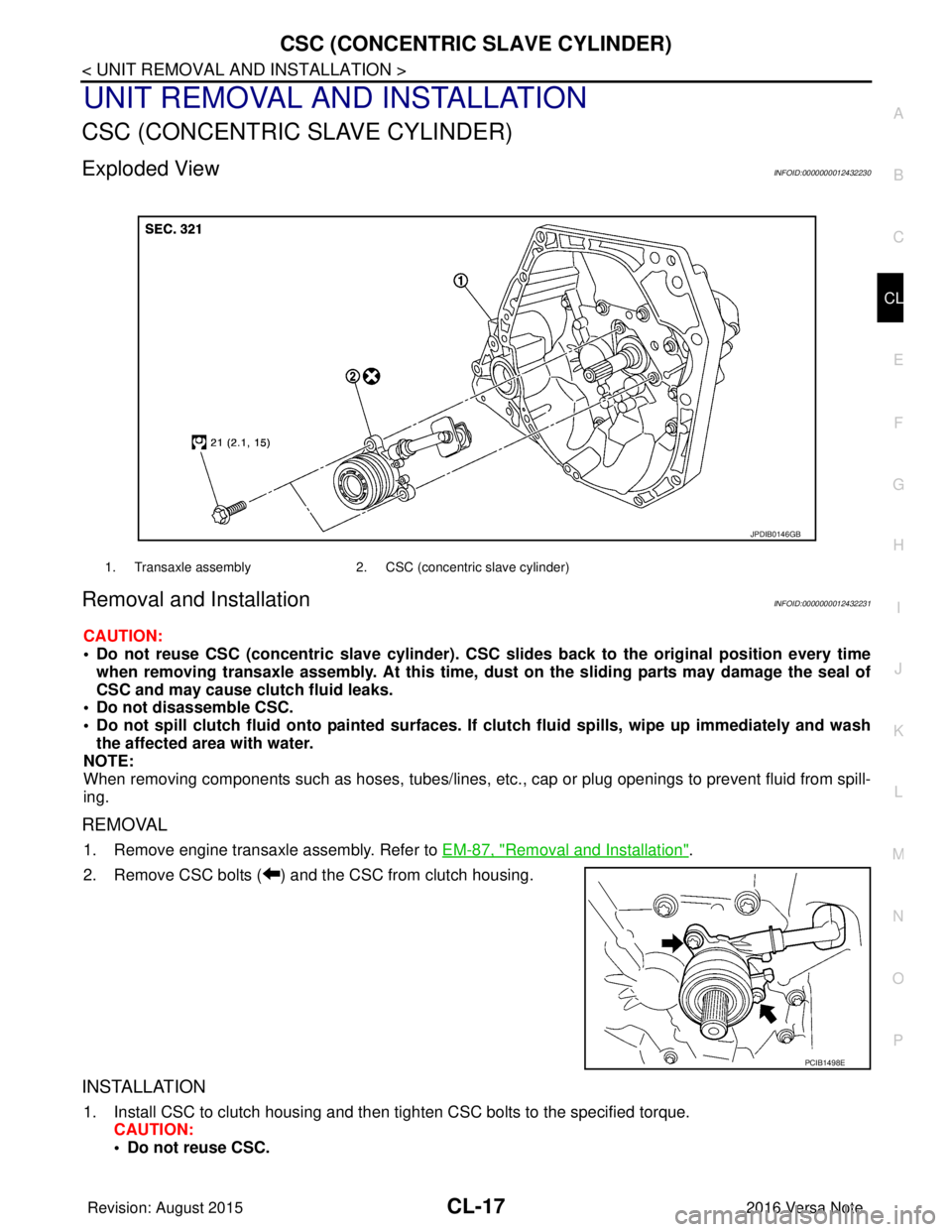
Exploded ViewINFOID:0000000012432230
Removal and InstallationINFOID:0000000012432231
CAUTION:
• Do not reuse CSC (concentric slave cylinder). CSC slides back to the original position every time
when removing transaxle assembly. At this time, du st on the sliding parts may damage the seal of
CSC and may cause clutch fluid leaks.
• Do not disassemble CSC.
• Do not spill clutch fluid onto pa inted surfaces. If clutch fluid spills, wipe up immediately and wash
the affected area with water.
NOTE:
When removing components such as hoses, tubes/lines, etc. , cap or plug openings to prevent fluid from spill-
ing.
REMOVAL
1. Remove engine transaxle assembly. Refer to EM-87, "Removal and Installation".
2. Remove CSC bolts ( ) and the CSC from clutch housing.
INSTALLATION
1. Install CSC to clutch housing and then tighten CSC bolts to the specified torque. CAUTION:
• Do not reuse CSC.
1. Transaxle assembly 2. CSC (concentric slave cylinder)
JPDIB0146GB
PCIB1498E
Revision: August 2015 2016 Versa Note
cardiagn.com
Page 646 of 3641
CL-20
< UNIT REMOVAL AND INSTALLATION >
CLUTCH DISC AND CLUTCH COVER
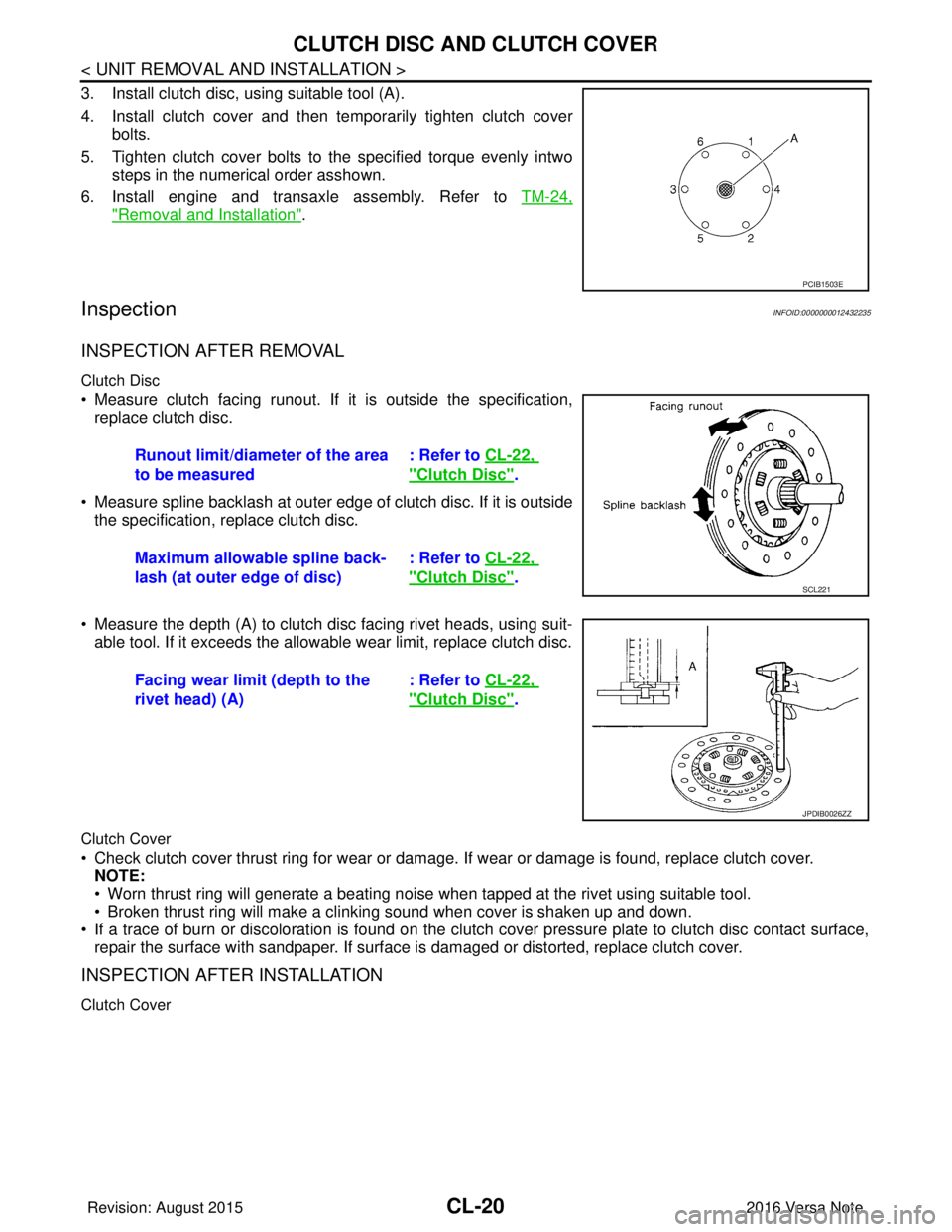
3. Install clutch disc, using suitable tool (A).
4. Install clutch cover and then temporarily tighten clutch coverbolts.
5. Tighten clutch cover bolts to the specified torque evenly intwo steps in the numerical order asshown.
6. Install engine and transaxle assembly. Refer to TM-24,
"Removal and Installation".
InspectionINFOID:0000000012432235
INSPECTION AFTER REMOVAL
Clutch Disc
• Measure clutch facing runout. If it is outside the specification,
replace clutch disc.
• Measure spline backlash at outer edge of clutch disc. If it is outside the specification, replace clutch disc.
• Measure the depth (A) to clutch disc facing rivet heads, using suit- able tool. If it exceeds the allowable wear limit, replace clutch disc.
Clutch Cover
• Check clutch cover thrust ring for wear or damage. If wear or damage is found, replace clutch cover.
NOTE:
• Worn thrust ring will generate a beating noise when tapped at the rivet using suitable tool.
• Broken thrust ring will make a clinking sound when cover is shaken up and down.
• If a trace of burn or discoloration is found on the clutch cover pressure plate to clutch disc contact surface,
repair the surface with sandpaper. If surface is damaged or distorted, replace clutch cover.
INSPECTION AFTER INSTALLATION
Clutch Cover
PCIB1503E
Runout limit/diameter of the area
to be measured : Refer to
CL-22,
"Clutch Disc".
Maximum allowable spline back-
lash (at outer edge of disc) : Refer to
CL-22,
"Clutch Disc".SCL221
Facing wear limit (depth to the
rivet head) (A) : Refer to
CL-22,
"Clutch Disc".
JPDIB0026ZZ
Revision: August 2015 2016 Versa Note
cardiagn.com
Page 699 of 3641
![NISSAN NOTE 2016 Service User Guide DLK-10
< PRECAUTION >[WITH INTELLIGENT KEY SYSTEM]
PRECAUTIONS
• Be sure to tighten bolts and nuts securely to the specified torque.
• After installation is complete, be sure
to check that each p](/img/5/57363/w960_57363-698.png "NISSAN NOTE 2016 Service User Guide DLK-10
< PRECAUTION >[WITH INTELLIGENT KEY SYSTEM]
PRECAUTIONS
• Be sure to tighten bolts and nuts securely to the specified torque.
• After installation is complete, be sure
to check that each p")
DLK-10
< PRECAUTION >[WITH INTELLIGENT KEY SYSTEM]
PRECAUTIONS
• Be sure to tighten bolts and nuts securely to the specified torque.
• After installation is complete, be sure
to check that each part works properly.
• Follow the steps below to clean components:
- Water soluble dirt:
• Dip a soft cloth into lukewarm water, wring the water out of the cloth and wipe the dirty area.
• Then rub with a soft, dry cloth.
- Oily dirt:
• Dip a soft cloth into lukewarm water with mild detergent (concentration: within 2 to 3%) and wipe the dirty area.
• Then dip a cloth into fresh water, wring the water out of the cloth and wipe the detergent off.
• Then rub with a soft, dry cloth.
- Do not use organic solvent such as thinner, benzene, alcohol or gasoline.
- For genuine leather seats, use a genuine leather seat cleaner.
Precaution for WorkINFOID:0000000012918340
• When removing or disassembling each component, be careful not to damage or deform it. If a component may be subject to interference, be sure to protect it with a shop cloth.
• When removing (disengaging) components with a screwdriver or similar tool, be sure to wrap the component with a shop cloth or vinyl tape to protect it.
• Protect the removed parts with a shop cloth and prevent them from being dropped.
• Replace a deformed or damaged clip.
• If a part is specified as a non-reusable part, always replace it with a new one.
• Be sure to tighten bolts and nuts securely to the specified torque.
• After installation is complete, be sure to check that each part works properly.
• Follow the steps below to clean components:
- Water soluble dirt:
• Dip a soft cloth into lukewarm water, wring the water out of the cloth and wipe the dirty area.
• Then rub with a soft, dry cloth.
- Oily dirt:
• Dip a soft cloth into lukewarm water with mild detergent (concentration: within 2 to 3%) and wipe the dirty area.
• Then dip a cloth into fresh water, wring the water out of the cloth and wipe the detergent off.
• Then rub with a soft, dry cloth.
- Do not use organic solvent such as thinner, benzene, alcohol or gasoline.
- For genuine leather seats, use a genuine leather seat cleaner.
Revision: August 2015 2016 Versa Note
cardiagn.com
Page 831 of 3641
![NISSAN NOTE 2016 Service User Guide DLK-142
< REMOVAL AND INSTALLATION >[WITH INTELLIGENT KEY SYSTEM]
HOOD
CLEARANCE ADJUSTMENT
1. Loosen hood hinge nuts and bolts.
2. Loosen hood lock assembly bolts.
3. Adjust the hood lock assembly so](/img/5/57363/w960_57363-830.png "NISSAN NOTE 2016 Service User Guide DLK-142
< REMOVAL AND INSTALLATION >[WITH INTELLIGENT KEY SYSTEM]
HOOD
CLEARANCE ADJUSTMENT
1. Loosen hood hinge nuts and bolts.
2. Loosen hood lock assembly bolts.
3. Adjust the hood lock assembly so")
DLK-142
< REMOVAL AND INSTALLATION >[WITH INTELLIGENT KEY SYSTEM]
HOOD
CLEARANCE ADJUSTMENT
1. Loosen hood hinge nuts and bolts.
2. Loosen hood lock assembly bolts.
3. Adjust the hood lock assembly so the clearance m
easurements are within the specifications provided.
4. Tighten hood hinge nuts and bolts to specified torque.
5. Tighten hood lock assembly bolts to specified torque.
HEIGHT ADJUSTMENT
1. Loosen hood lock assembly bolts.
2. Adjust the surface height of hood assembly to front upper grille, front fender and front combination lamp to
the specified values by rotating hood bumper rubber.
3. Temporarily tighten hood lock assembly bolts.
4. Adjust (A) as shown to the following value with hood’s own weight by dropping it from approximately 200 mm (7.87 in) height or by pressing hood lightly [approximately 29 N (3.0 kg, 6.5 lb)].
5. After adjustment, tighten hood lock assembly bolts to specified torque.
HOOD HINGE
HOOD HINGE : Removal and InstallationINFOID:0000000012430088
REMOVAL
1. Remove hood assembly. Refer to DLK-140, "HOOD ASSEMBLY : Removal and Installation".
2. Remove front fender. Refer to DLK-147, "
Removal and Installation".
3. Remove cowl top side cover. Refer to EXT-36, "
Exploded View".
4. Remove hood hinge bolts and hood hinge.
INSTALLATION
Installation is in the reverse order of removal.
CAUTION:
• Before installing the hood hinge, apply anticorrosive agent onto the surface of the vehicle.
C – CH Clearance 3.5
± 1.0 (0.14 ± 0.04) 1.5 (0.06) 1.5 (0.06)
J Surface height 0.0 ± 1.5 (0.0 ± 0.06) 1.5 (0.06) 1.5 (0.06)
Section Item Measurement
StandardParallelism Equality
1. Hood striker 2. Secondary latch3. Primary latch
A. 20.0 mm (0.79 in)
ALKIA3162ZZ
Revision: August 2015 2016 Versa Note
cardiagn.com
Page 840 of 3641
![NISSAN NOTE 2016 Service User Guide FRONT DOORDLK-151
< REMOVAL AND INSTALLATION > [WITH INTELLIGENT KEY SYSTEM]
C
D
E
F
G H
I
J
L
M A
B
DLK
N
O P
Check the clearance and surface height between front door and each part by visual inspect](/img/5/57363/w960_57363-839.png "NISSAN NOTE 2016 Service User Guide FRONT DOORDLK-151
< REMOVAL AND INSTALLATION > [WITH INTELLIGENT KEY SYSTEM]
C
D
E
F
G H
I
J
L
M A
B
DLK
N
O P
Check the clearance and surface height between front door and each part by visual inspect")
FRONT DOORDLK-151
< REMOVAL AND INSTALLATION > [WITH INTELLIGENT KEY SYSTEM]
C
D
E
F
G H
I
J
L
M A
B
DLK
N
O P
Check the clearance and surface height between front door and each part by visual inspection and tactile feel.
If the clearance and the surface height are out of specific ation, adjust them according to the adjustment proce-
dure.
Unit: mm (in)
1. Remove front fender. Refer to DLK-147, "Removal and Installation".
2. Loosen front door hinge nuts (door side).
3. Adjust the surface height of front door according to the specifications provided.
4. Temporarily tighten front door hinge nuts (door side).
5. Loosen front door hinge bolts (body side).
6. Raise or lower the front door at rear end to adjust clearance of the front door according to the specifica-
tions provided.
7. After adjustment tighten bolts and nuts to the specified torque. CAUTION:
Check door hinge rotating po int for poor lubrication. If necessary, apply a suitable multi-purpose
grease.
8. Install front fender. Refer to refer to DLK-147, "
Removal and Installation".
DOOR STRIKER
DOOR STRIKER : Removal and InstallationINFOID:0000000012430098
REMOVAL
Remove bolts and door striker.
INSTALLATION
Installation is in the reverse order of removal.
CAUTION:
• Do not reuse door striker bolts.
• Tighten bolts to specification. Refer to DLK-149, "
Exploded View".
• After installation, check front door open/close operation. If necessary, perform the door striker
adjustment procedure. Refer to DLK-151, "
DOOR STRIKER : Adjustment".
DOOR STRIKER : AdjustmentINFOID:0000000012430099
DOOR STRIKER ADJUSTMENT
1. Loosen door striker bolts
4. Body side outer 5. Door striker 6. Striker bolt
7. Front door hinge 8. Rear door upper hinge9. Rear door lower hinge
Section Measurement Standard
A – A Clearance
4.6 ± 1.0 (0.18 ± 0.04)
Surface height 0.0 ± 1.0 (0.0 ± 0.04)
B – B Clearance
4.6 ± 2.0 (0.18 ± 0.08)
Surface height 0.0 ± 1.5 (0.0 ± 0.06)
C – C Clearance
4.6 ± 1.0 (0.18 ± 0.04)
Surface height 0.0 ± 1.0 (0.0 ± 0.04)
Revision: August 2015 2016 Versa Note
cardiagn.com
Page 846 of 3641
![NISSAN NOTE 2016 Service User Guide REAR DOORDLK-157
< REMOVAL AND INSTALLATION > [WITH INTELLIGENT KEY SYSTEM]
C
D
E
F
G H
I
J
L
M A
B
DLK
N
O P
2. Loosen door hinge nuts (door side).
3. Adjust the surface height of rear door accordin](/img/5/57363/w960_57363-845.png "NISSAN NOTE 2016 Service User Guide REAR DOORDLK-157
< REMOVAL AND INSTALLATION > [WITH INTELLIGENT KEY SYSTEM]
C
D
E
F
G H
I
J
L
M A
B
DLK
N
O P
2. Loosen door hinge nuts (door side).
3. Adjust the surface height of rear door accordin")
REAR DOORDLK-157
< REMOVAL AND INSTALLATION > [WITH INTELLIGENT KEY SYSTEM]
C
D
E
F
G H
I
J
L
M A
B
DLK
N
O P
2. Loosen door hinge nuts (door side).
3. Adjust the surface height of rear door according to the specifications provided.
4. Temporarily tighten door hinge nuts (door side).
5. Loosen door hinge nuts and bolts (body side).
6. Raise rear door at rear end to adjust clearance of rear door according to the specifications provided.
7. After adjustment tighten bolts and nuts to the specified torque. CAUTION:
• Apply touch-up paint (body color) to the head of hinge bolts and nuts.
• Check door hinge rotating point for poor lubricat ion. If necessary, apply a suitable multi-purpose
grease.
8. Install center pillar lower finisher. Refer to INT-25, "
CENTER PILLAR LOWER FINISHER : Removal and
Installation".
DOOR STRIKER
DOOR STRIKER : Removal and InstallationINFOID:0000000012430105
REMOVAL
Remove bolts and rear door striker.
INSTALLATION
Installation is in the reverse order of removal.
CAUTION:
• Do not reuse door striker bolts.
• Tighten door striker bolts to specification. Refer to DLK-154, "
Exploded View".
• After installation, check front do or open/close operation. If necessary, adjust the door striker. Refer
to DLK-157, "
DOOR STRIKER : Adjustment".
DOOR STRIKER : AdjustmentINFOID:0000000012430106
DOOR STRIKER ADJUSTMENT
1. Loosen door striker bolts.
2. Adjust door striker so that it becomes parallel with rear door lock
insertion direction.
3. Tighten door striker bolts to specification. Refer to DLK-154, "
Exploded View".
DOOR HINGE
DOOR HINGE : Removal and InstallationINFOID:0000000012430107
REMOVAL
CAUTION:
• Use two people when removing or inst alling front door due to its heavy weight
• When removing and installing front door assembl y, support the door using a suitable tool.
• Use shops cloths to protect surro unding components from damage during removal and installation
of front door assembly.
1. Remove rear door assembly. Refer to DLK-154, "
DOOR ASSEMBLY : Removal and Installation".
2. Remove center pillar lower finisher. Refer to INT-25, "
CENTER PILLAR LOWER FINISHER : Removal
and Installation".
PIIB2804J
Revision: August 2015 2016 Versa Note
cardiagn.com
Page 851 of 3641
![NISSAN NOTE 2016 Service User Guide DLK-162
< REMOVAL AND INSTALLATION >[WITH INTELLIGENT KEY SYSTEM]
BACK DOOR
Check the clearance and the surface height between back
door and each part by visual inspection and tactile
feel. If the cl](/img/5/57363/w960_57363-850.png "NISSAN NOTE 2016 Service User Guide DLK-162
< REMOVAL AND INSTALLATION >[WITH INTELLIGENT KEY SYSTEM]
BACK DOOR
Check the clearance and the surface height between back
door and each part by visual inspection and tactile
feel. If the cl")
DLK-162
< REMOVAL AND INSTALLATION >[WITH INTELLIGENT KEY SYSTEM]
BACK DOOR
Check the clearance and the surface height between back
door and each part by visual inspection and tactile
feel. If the clearance and the surface height are out of specification, adjust them according to the adjustment
procedure.
Unit: mm (in)
1. Loosen back door hinge nuts (door side).
2. Lift up back door approximately 100 – 150 mm (3.94 – 5. 91 in) height then close it lightly and check that it
is engaged firmly with back door closed.
3. Check the clearance and surface height and adjust back door as necessary.
4. Tighten back door hinge nuts to specified torque.
CAUTION:
• After installation, check back door open/close, lock/ unlock operation.
• Check back door hinge rotating point for poor lubrication. If necessary, appl y a suitable multi-pur-
pose grease.
• After adjusting, apply touch-up paint (body color) to the head of rear door hinge bolts and nuts.
BACK DOOR STRIKER
BACK DOOR STRIKER : Removal and InstallationINFOID:0000000012430112
REMOVAL
1. Remove back door kicking plate using a suitable tool.
2. Remove bolts and back door striker.
INSTALLATION
Installation is in the reverse order of removal.
CAUTION:
• Do not reuse back door striker bolts.
• After installation, check back door open/close, lock/ unlock operation.
• After installation, perform the back door assembly adjustment procedure. Refer to DLK-161, "
BACK
DOOR ASSEMBLY : Adjustment".
BACK DOOR STRIKER : AdjustmentINFOID:0000000012430113
DOOR STRIKER ADJUSTMENT
1. Loosen door striker bolts.
2. Adjust door striker so that it becomes parallel with back door
lock insertion direction.
3. Tighten door striker bolts to specification. Refer to DLK-159, "
Exploded View".
PortionSection Item Measurement Standard
Back door panel – Roof panel A – A H
Clearance 6.0 ± 1.0 (0.24 ± 0.04)
I Surface height 0.0 +0.5, -1.5 (0.00 +0.02, -0.06)
Rear combination lamp – Back door panel B – B J
Clearance 5.0 ± 2.0 (0.20 ± 0.08)
K Surface height -2.0 ± 2.0 (-0.08 ± 0.08)
Rear bumper fascia – Back-door panel C – CL C
le a ra n ce 5 .0 ± 2.0 (0.20 ± 0.08)
M Surface height 0.0 +0.5, -2.0 (0.0 +0.02, -0.08)
D – D M Clearance7.0 ± 2.0 (0.28 ± 0.08)
PIIB2804J
Revision: August 2015 2016 Versa Note
cardiagn.com
Page 879 of 3641
![NISSAN NOTE 2016 Service User Guide DLK-190
< PRECAUTION >[WITHOUT INTELLIGENT KEY SYSTEM]
PRECAUTIONS
• Be sure to tighten bolts and nuts securely to the specified torque.
• After installation is complete, be sure
to check that ea](/img/5/57363/w960_57363-878.png "NISSAN NOTE 2016 Service User Guide DLK-190
< PRECAUTION >[WITHOUT INTELLIGENT KEY SYSTEM]
PRECAUTIONS
• Be sure to tighten bolts and nuts securely to the specified torque.
• After installation is complete, be sure
to check that ea")
DLK-190
< PRECAUTION >[WITHOUT INTELLIGENT KEY SYSTEM]
PRECAUTIONS
• Be sure to tighten bolts and nuts securely to the specified torque.
• After installation is complete, be sure
to check that each part works properly.
• Follow the steps below to clean components:
- Water soluble dirt:
• Dip a soft cloth into lukewarm water, wring the water out of the cloth and wipe the dirty area.
• Then rub with a soft, dry cloth.
- Oily dirt:
• Dip a soft cloth into lukewarm water with mild detergent (concentration: within 2 to 3%) and wipe the dirty area.
• Then dip a cloth into fresh water, wring the water out of the cloth and wipe the detergent off.
• Then rub with a soft, dry cloth.
- Do not use organic solvent such as thinner, benzene, alcohol or gasoline.
- For genuine leather seats, use a genuine leather seat cleaner.
Precaution for WorkINFOID:0000000012918341
• When removing or disassembling each component, be careful not to damage or deform it. If a component may be subject to interference, be sure to protect it with a shop cloth.
• When removing (disengaging) components with a screwdriver or similar tool, be sure to wrap the component with a shop cloth or vinyl tape to protect it.
• Protect the removed parts with a shop cloth and prevent them from being dropped.
• Replace a deformed or damaged clip.
• If a part is specified as a non-reusable part, always replace it with a new one.
• Be sure to tighten bolts and nuts securely to the specified torque.
• After installation is complete, be sure to check that each part works properly.
• Follow the steps below to clean components:
- Water soluble dirt:
• Dip a soft cloth into lukewarm water, wring the water out of the cloth and wipe the dirty area.
• Then rub with a soft, dry cloth.
- Oily dirt:
• Dip a soft cloth into lukewarm water with mild detergent (concentration: within 2 to 3%) and wipe the dirty area.
• Then dip a cloth into fresh water, wring the water out of the cloth and wipe the detergent off.
• Then rub with a soft, dry cloth.
- Do not use organic solvent such as thinner, benzene, alcohol or gasoline.
- For genuine leather seats, use a genuine leather seat cleaner.
Revision: August 2015 2016 Versa Note
cardiagn.com