star stop NISSAN NOTE 2016 Service Repair Manual
[x] Cancel search | Manufacturer: NISSAN, Model Year: 2016, Model line: NOTE, Model: NISSAN NOTE 2016Pages: 3641, PDF Size: 28.72 MB
Page 3470 of 3641
![NISSAN NOTE 2016 Service Repair Manual CVT FLUIDTM-229
< PERIODIC MAINTENANCE > [CVT: RE0F11A]
C
EF
G H
I
J
K L
M A
B
TM
N
O P
Hold the lever at each position for 5 seconds.
13. Check that the CONSULT “Data monitor” in “FLUID TEMPâ€](/img/5/57363/w960_57363-3469.png "NISSAN NOTE 2016 Service Repair Manual CVT FLUIDTM-229
< PERIODIC MAINTENANCE > [CVT: RE0F11A]
C
EF
G H
I
J
K L
M A
B
TM
N
O P
Hold the lever at each position for 5 seconds.
13. Check that the CONSULT “Data monitor” in “FLUID TEMPâ€")
CVT FLUIDTM-229
< PERIODIC MAINTENANCE > [CVT: RE0F11A]
C
EF
G H
I
J
K L
M A
B
TM
N
O P
Hold the lever at each position for 5 seconds.
13. Check that the CONSULT “Data monitor” in “FLUID TEMP” is 35°C (95°F) to 45 °C (113 °F).
14. Stop the engine.
15. Lift up the vehicle.
16. Remove the drain plug, and then drain CVT fluid from oil pan.
17. Repeat steps 6 to 16 (one time).
18. Install the overflow tube. Refer to TM-242, "
Removal and Installation".
CAUTION:
Be sure to tighten to the specified torque. If it is not tightened to the specified torque, the tube may
be damaged.
19. Install the charging pipe set (KV311039S0) (A) into the drain hole.
CAUTION:
Tighten the charging pipe by hand.
20. Install the ATF changer hose (B) to the charging pipe. CAUTION:
Press the ATF changer hose all the way onto the charging
pipe until it stops.
21. Fill approximately 3 liter (2-5 /8 lmp qt) of the CVT fluid.
22. Remove the ATF changer hose and charging pipe, then install the drain plug.
NOTE:
Perform this work quickly because CVT fluid leaks.
23. Lift down the vehicle.
24. Start the engine.
25. While depressing the brake pedal, shift the selector leve r to the entire position from “P” to “L”, and shift it
to the “P” position.
NOTE:
Hold the lever at each position for 5 seconds.
26. Check that the CONSULT “Data monitor” in “FLUID TEMP” is 35°C (95°F) to 45 °C (113 °F).
27. Lift up the vehicle.
28. Remove the drain plug and confirm that the CV T fluid is drained from the overflow tube.
CAUTION:
Perform this work with the vehicle idling.
NOTE:
If the CVT fluid is not drained, refer to “Adjustment” and refill with the CVT fluid.
29. When the flow of CVT fluid slows to a drip, tighten the drain plug to the specified torque. TM-242,
"Removal and Installation".
CAUTION:
Never reuse drain plug gasket.
30. Lift down the vehicle.
31. Select “Work Support” in “T RANSMISSION” using CONSULT.
32. Select “CONFORM CVTF DETERIORTN”.
33. Select “Erase”.
34. Stop the engine.
AdjustmentINFOID:0000000012431174
CAUTION:
• Use only Genuine NISSAN CVT Fluid NS-3. Using transmission fluid other than Genuine NISSAN CVT Fluid NS-3 will damage the CVT, which is not covered by the (NISSAN new vehicle limited) war-
ranty.
JSDIA1876ZZ
CVT fluid : Refer to TM-265, "General Specification".
Fluid capacity : Refer to TM-265, "
General Specification".
Revision: August 2015 2016 Versa Note
cardiagn.com
Page 3471 of 3641
![NISSAN NOTE 2016 Service Repair Manual TM-230
< PERIODIC MAINTENANCE >[CVT: RE0F11A]
CVT FLUID
• During adjustment of the CVT fluid level, check CO
NSULT so that the oil temperature may be main-
tained from 35 to 45 °C (95 to 113 °F).](/img/5/57363/w960_57363-3470.png "NISSAN NOTE 2016 Service Repair Manual TM-230
< PERIODIC MAINTENANCE >[CVT: RE0F11A]
CVT FLUID
• During adjustment of the CVT fluid level, check CO
NSULT so that the oil temperature may be main-
tained from 35 to 45 °C (95 to 113 °F).")
TM-230
< PERIODIC MAINTENANCE >[CVT: RE0F11A]
CVT FLUID
• During adjustment of the CVT fluid level, check CO
NSULT so that the oil temperature may be main-
tained from 35 to 45 °C (95 to 113 °F).
• Use caution when looking into the drain hole as th ere is a risk of dripping fluid entering the eye.
1. Check that the selector lever is in the “P ” position, then completely engage the parking brake.
2. Start the engine.
3. Adjust the CVT fluid temperature to be approximately 40 °C (104° F).
NOTE:
The CVT fluid is largely affected by temperature. Therefore be sure to use CONSULT and check the
“FLUID TEMP” under “TRANSMISSION” in “Data Monitor” while adjusting.
4. While depressing the brake pedal, shift the selector lever to the entire position from “P” to “L”, and shift it to the “P” position.
NOTE:
Hold the lever at each position for 5 seconds.
5. Lift up the vehicle.
6. Check that there is no CVT fluid leakage.
7. Remove the drain plug. Refer to TM-242, "
Removal and Installation".
8. Install the charging pipe set (KV311039S0) (A) into the drain plug hole.
CAUTION:
Tighten the charging pipe by hand.
9. Install the ATF changer hose (B) to the charging pipe. CAUTION:
Press the ATF changer hose all the way onto the charging
pipe until it stops.
10. Fill approximately 0.5 liter (1/2 lmp qt) of the CVT fluid.
11. Remove the ATF changer hose from the charging pipe, and check that the CVT fluid drains out from the charging pipe. If it
does not drain out, perform charging again.
CAUTION:
Perform this work with the vehicle idling.
12. When the flow of CVT fluid slows to a drip, remove the charging pipe from the oil pan.
13. Tighten the drain plug to the specified torque. Refer to TM-242, "
Removal and Installation".
CAUTION:
Never reuse drain plug gasket.
14. Lift down the vehicle.
15. Stop the engine.
JSDIA1876ZZ
Revision: August 2015 2016 Versa Note
cardiagn.com
Page 3503 of 3641
![NISSAN NOTE 2016 Service Repair Manual TM-262
< UNIT REMOVAL AND INSTALLATION >[CVT: RE0F11A]
TRANSMISSION ASSEMBLY
INSPECTION AFTER INSTALLATION
Check the following items:
• For CVT position, refer to
TM-232, "
Inspection".
• Before](/img/5/57363/w960_57363-3502.png "NISSAN NOTE 2016 Service Repair Manual TM-262
< UNIT REMOVAL AND INSTALLATION >[CVT: RE0F11A]
TRANSMISSION ASSEMBLY
INSPECTION AFTER INSTALLATION
Check the following items:
• For CVT position, refer to
TM-232, \"
Inspection\".
• Before")
TM-262
< UNIT REMOVAL AND INSTALLATION >[CVT: RE0F11A]
TRANSMISSION ASSEMBLY
INSPECTION AFTER INSTALLATION
Check the following items:
• For CVT position, refer to
TM-232, "
Inspection".
• Before starting engine, check oil/fluid levels incl uding engine coolant and engine oil. If less than required
quantity, fill to the specified level. Refer to MA-11, "
Fluids and Lubricants".
• Use procedure below to check for fuel leakage.
• Turn ignition switch ON (with engine stopped). With fuel pressure applied to fuel piping, check for fuel leak-
age at connection points.
• Start engine. With engine speed increased, che ck again for fuel leakage at connection points.
• Run engine to check for unusual noise and vibration. NOTE:
If hydraulic pressure inside timing chain tensioner drops after removal and installation, slack in the guide
may generate a pounding noise during and just after engine start. However, this is normal. Noise will stop
after hydraulic pressure rises.
• Warm up engine thoroughly to make sure there is no leakage of fuel, exhaust gas, or any oils/fluids including engine oil and engine coolant.
• Bleed air from passages in lines and hoses, such as in cooling system.
• After cooling down engine, again check oil/fluid levels including engine oil and engine coolant. Refill to spec- ified level, if necessary.
• Summary of the inspection items:
*Power steering fluid, brake fluid, etc.
ADJUSTMENT AFTER INSTALLATION
• Adjust the CVT fluid level. TM-229, "Adjustment".
• Perform "ADDITIONAL SERVICE WHEN REPL ACING TRANSAXLE ASSEMBLY". Refer to TM-127,
"Description".
ItemBefore starting engine Engine runningAfter engine stopped
Engine coolant LevelLeakage Level
Engine oil LevelLeakage Level
Transmission/
transaxle fluid A/T and CVT Models
LeakageLevel/Leakage Leakage
M/T Models Level/Leakage LeakageLevel/Leakage
Other oils and fluids* LevelLeakage Level
Fuel LeakageLeakageLeakage
Exhaust gas —Leakage —
Revision: August 2015 2016 Versa Note
cardiagn.com
Page 3575 of 3641
WW-10
< SYSTEM DESCRIPTION >
SYSTEM
2. Front washer switch ON.
3. The front washer switch provides ground for the front and rear washer motor.
4. BCM reads the combination switch position and transmi ts the front wiper request signal (LO) to IPDM E/R
using CAN communication.
5. BCM transmits the front wiper request signal (LO) to IPDM E/R using CAN communication.
6. IPDM E/R turns ON the front wiper relay.
7. The front wiper operates.
NOTE:
BCM transmits the front wiper request signal (LO) so t hat the front wiper operates approximately 3 times after
front washer switch OFF is detected.
FRONT WIPER AND WASHER SYSTEM : Fail-SafeINFOID:0000000012433200
FA I L −SAFE OPERATION
IPDM E/R performs the fail-safe function when the front wiper auto stop circuit is malfunctioning. Refer to
PCS-19, "
Fail-safe".
REAR WIPER AND WASHER SYSTEM
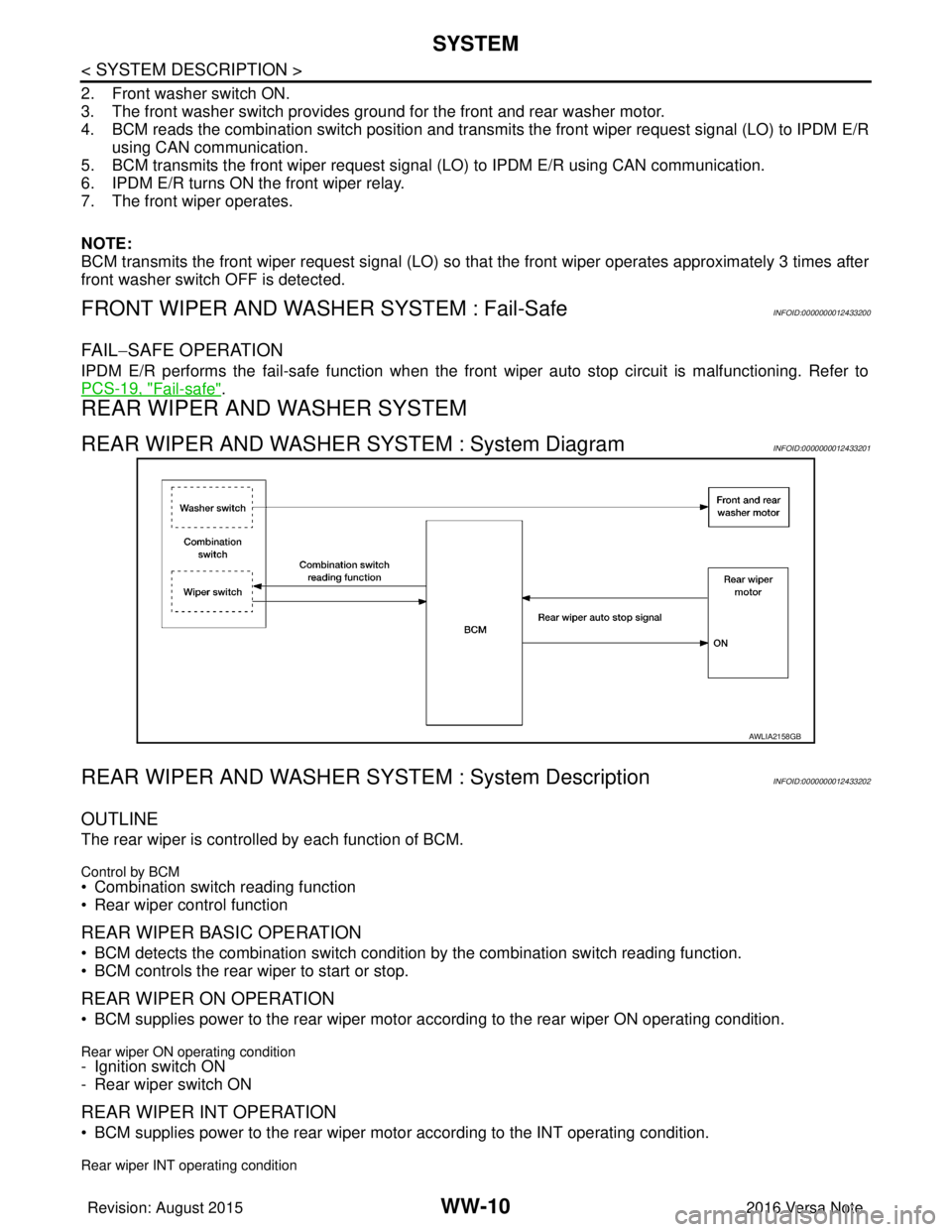
REAR WIPER AND WASHER SYSTEM : System DiagramINFOID:0000000012433201
REAR WIPER AND WASHER SY STEM : System DescriptionINFOID:0000000012433202
OUTLINE
The rear wiper is controlled by each function of BCM.
Control by BCM
• Combination switch reading function
• Rear wiper control function
REAR WIPER BASIC OPERATION
• BCM detects the combination switch conditi on by the combination switch reading function.
• BCM controls the rear wiper to start or stop.
REAR WIPER ON OPERATION
• BCM supplies power to the rear wiper motor ac cording to the rear wiper ON operating condition.
Rear wiper ON operating condition- Ignition switch ON
- Rear wiper switch ON
REAR WIPER INT OPERATION
• BCM supplies power to the rear wiper motor according to the INT operating condition.
Rear wiper INT operating condition
AWLIA2158GB
Revision: August 2015 2016 Versa Note
cardiagn.com
Page 3584 of 3641
DIAGNOSIS SYSTEM (IPDM E/R)WW-19
< SYSTEM DESCRIPTION >
C
DE
F
G H
I
J
K
M A
B
WW
N
O P
ECU IDENTIFICATION
The IPDM E/R part number is displayed.
SELF DIAGNOSTIC RESULT
Refer to PCS-20, "DTCIndex".
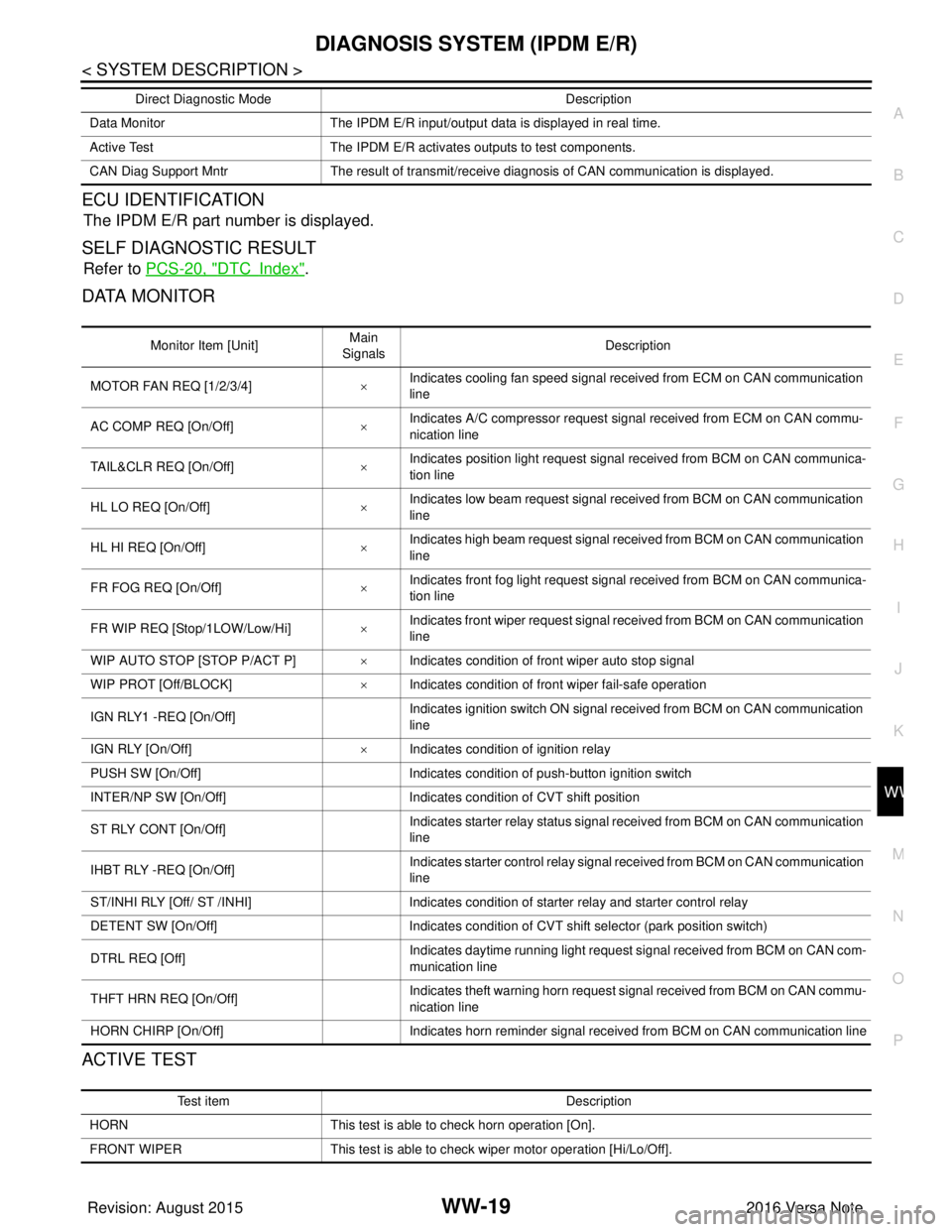
DATA MONITOR
ACTIVE TEST
Data Monitor The IPDM E/R input/output data is displayed in real time.
Active Test The IPDM E/R activates outputs to test components.
CAN Diag Support Mntr The result of transmit/receive diagnosis of CAN communication is displayed.
Direct Diagnostic Mode
Description
Monitor Item [Unit]Main
Signals Description
MOTOR FAN REQ [1/2/3/4] ×Indicates cooling fan speed signal received from ECM on CAN communication
line
AC COMP REQ [On/Off] ×Indicates A/C compressor request signal received from ECM on CAN commu-
nication line
TAIL&CLR REQ [On/Off] ×Indicates position light request signal
received from BCM on CAN communica-
tion line
HL LO REQ [On/Off] ×Indicates low beam request signal received from BCM on CAN communication
line
HL HI REQ [On/Off] ×Indicates high beam request signal received from BCM on CAN communication
line
FR FOG REQ [On/Off] ×Indicates front fog light request signal received from BCM on CAN communica-
tion line
FR WIP REQ [Stop/1LOW/Low/Hi] ×Indicates front wiper request signal received from BCM on CAN communication
line
WIP AUTO STOP [STOP P/ACT P] ×Indicates condition of front wiper auto stop signal
WIP PROT [Off/BLOCK] ×Indicates condition of front wiper fail-safe operation
IGN RLY1 -REQ [On/Off] Indicates ignition switch ON signal received from BCM on CAN communication
line
IGN RLY [On/Off] ×Indicates condition of ignition relay
PUSH SW [On/Off] Indicates condition of push-button ignition switch
INTER/NP SW [On/Off] Indicates condition of CVT shift position
ST RLY CONT [On/Off] Indicates starter relay status signal received from BCM on CAN communication
line
IHBT RLY -REQ [On/Off] Indicates starter control relay signal received from BCM on CAN communication
line
ST/INHI RLY [Off/ ST /INHI] Indicates condition of starter relay and starter control relay
DETENT SW [On/Off] Indicates condition of CVT shift selector (park position switch)
DTRL REQ [Off] Indicates daytime running light request signal received from BCM on CAN com-
munication line
THFT HRN REQ [On/Off] Indicates theft warning horn request signal received from BCM on CAN commu-
nication line
HORN CHIRP [On/Off] Indicates horn reminder signal received from BCM on CAN communication line
Test item Description
HORN This test is able to check horn operation [On].
FRONT WIPER This test is able to check wiper motor operation [Hi/Lo/Off].
Revision: August 2015 2016 Versa Note
cardiagn.com
Page 3618 of 3641
FRONT WIPER DOES NOT OPERATEWW-53
< SYMPTOM DIAGNOSIS >
C
DE
F
G H
I
J
K
M A
B
WW
N
O P
FRONT WIPER DO ES NOT OPERATE
DescriptionINFOID:0000000012433230
The front wiper does not operate under any operation conditions.
Diagnosis ProcedureINFOID:0000000012433231
Regarding Wiring Diagram information, refer to WW-22, "Wiring Diagram".
1. CHECK WIPER RELAY OPERATION
IPDM E/R AUTO ACTIVE TEST
1. Start IPDM E/R auto active test. Refer to PCS-9, "
Diagnosis Description".
2. Check that the front wiper operates on LO and HI operation.
CONSULT ACTIVE TEST
1. Select FR WIPER of BCM (WIPER) active test item.
2. Check front wiper operation.
Is the inspection result normal?
YES >> GO TO 5.
NO >> GO TO 2.
2. CHECK FRONT WIPER MOTOR FUSE
Refer to WW-35, "
Diagnosis Procedure".
Is the fuse blown?
YES >> Replace the fuse after repairing the affected circuit.
NO >> GO TO 3.
3. CHECK FRONT WIPER MOTOR GROUND CIRCUIT
Refer to WW-42, "
Diagnosis Procedure".
Is the inspection result normal?
YES >> GO TO 4.
NO >> Repair or replace harness.
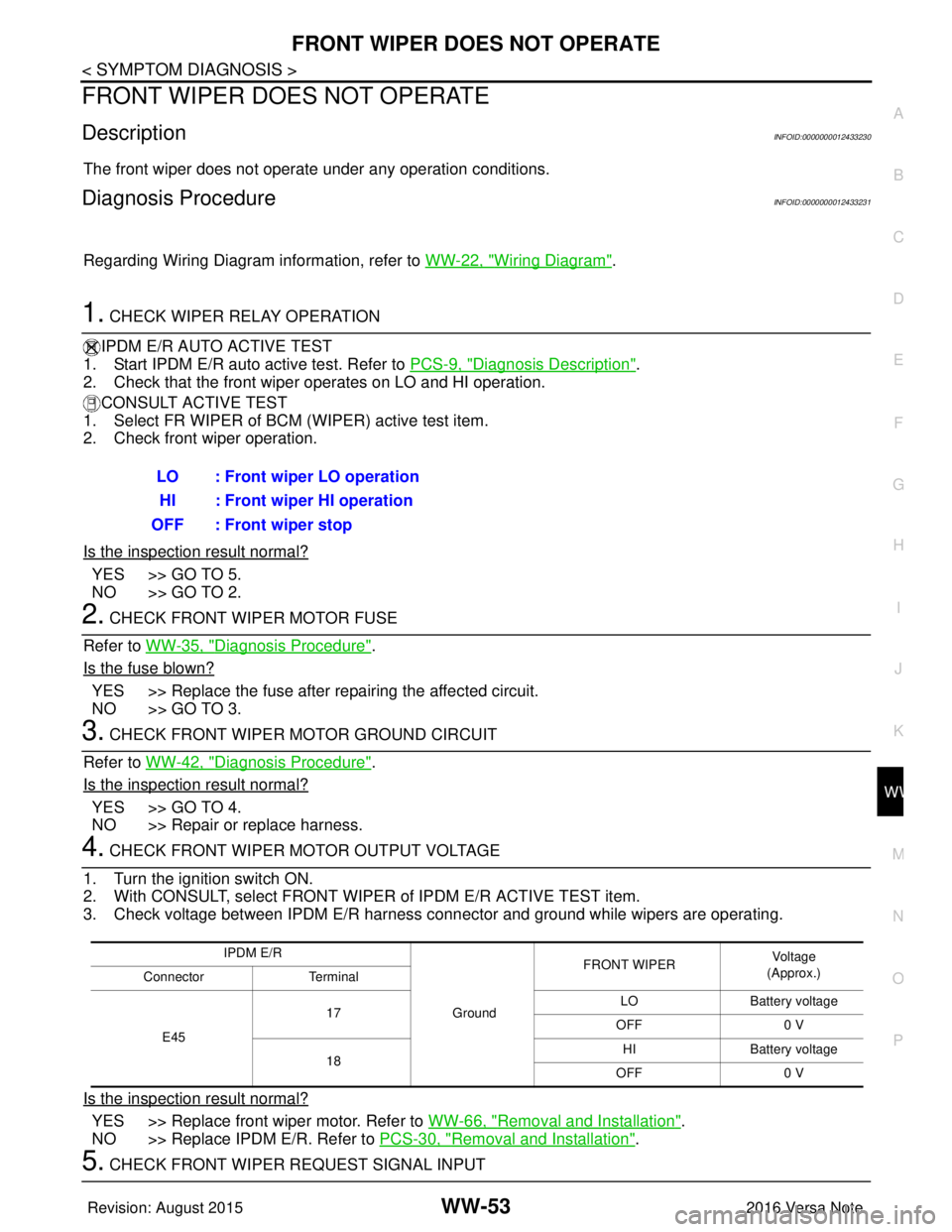
4. CHECK FRONT WIPER MOTOR OUTPUT VOLTAGE
1. Turn the ignition switch ON.
2. With CONSULT, select FRONT WIPER of IPDM E/R ACTIVE TEST item.
3. Check voltage between IPDM E/R harness connector and ground while wipers are operating.
Is the inspection result normal?
YES >> Replace front wiper motor. Refer to WW-66, "Removal and Installation".
NO >> Replace IPDM E/R. Refer to PCS-30, "
Removal and Installation".
5. CHECK FRONT WIPER REQUEST SIGNAL INPUTLO : Front wiper LO operation
HI : Front wiper HI operation
OFF : Front wiper stop
IPDM E/R
GroundFRONT WIPER
Vo l ta g e
(Approx.)
Connector Terminal
E45 17
LO
Battery voltage
OFF 0 V
18 HI
Battery voltage
OFF 0 V
Revision: August 2015 2016 Versa Note
cardiagn.com