bulb NISSAN NOTE 2016 Service Owner's Manual
[x] Cancel search | Manufacturer: NISSAN, Model Year: 2016, Model line: NOTE, Model: NISSAN NOTE 2016Pages: 3641, PDF Size: 28.72 MB
Page 1765 of 3641
FRONT COMBINATION LAMPEXL-113
< UNIT DISASSEMBLY AND ASSEMBLY >
C
DE
F
G H
I
J
K
M A
B
EXL
N
O P
UNIT DISASSEMBLY AND ASSEMBLY
FRONT COMBINATION LAMP
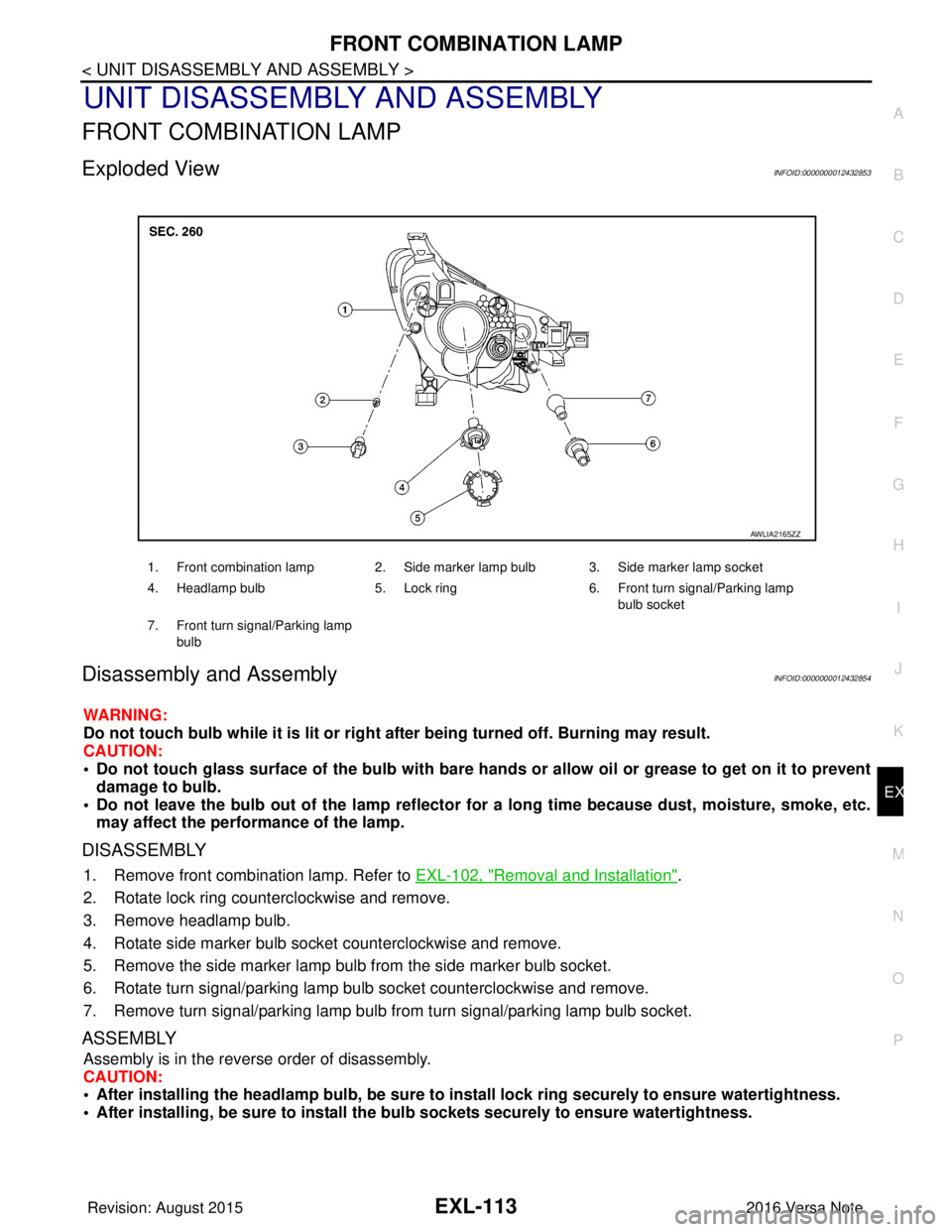
Exploded ViewINFOID:0000000012432853
Disassembly and AssemblyINFOID:0000000012432854
WARNING:
Do not touch bulb while it is lit or right after being turned off. Burning may result.
CAUTION:
• Do not touch glass surface of the bulb with bare hands or allow oil or grease to get on it to prevent damage to bulb.
• Do not leave the bulb out of the lamp reflector for a long time because dust , moisture, smoke, etc.
may affect the performance of the lamp.
DISASSEMBLY
1. Remove front combination lamp. Refer to EXL-102, "Removal and Installation".
2. Rotate lock ring counterclockwise and remove.
3. Remove headlamp bulb.
4. Rotate side marker bulb socket counterclockwise and remove.
5. Remove the side marker lamp bulb from the side marker bulb socket.
6. Rotate turn signal/parking lamp bulb socket counterclockwise and remove.
7. Remove turn signal/parking lamp bulb from turn signal/parking lamp bulb socket.
ASSEMBLY
Assembly is in the reverse order of disassembly.
CAUTION:
• After installing the headlamp bulb, be sure to install lock ring securely to ensure watertightness.
• After installing, be sure to install the bulb sockets securely to ensure watertightness.
1. Front combination lamp 2. Side marker lamp bulb 3. Side marker lamp socket
4. Headlamp bulb 5. Lock ring 6. Front turn signal/Parking lamp
bulb socket
7. Front turn signal/Parking lamp bulb
AWLIA2165ZZ
Revision: August 2015 2016 Versa Note
cardiagn.com
Page 1766 of 3641
EXL-114
< UNIT DISASSEMBLY AND ASSEMBLY >
REAR COMBINATION LAMP
REAR COMBINATION LAMP
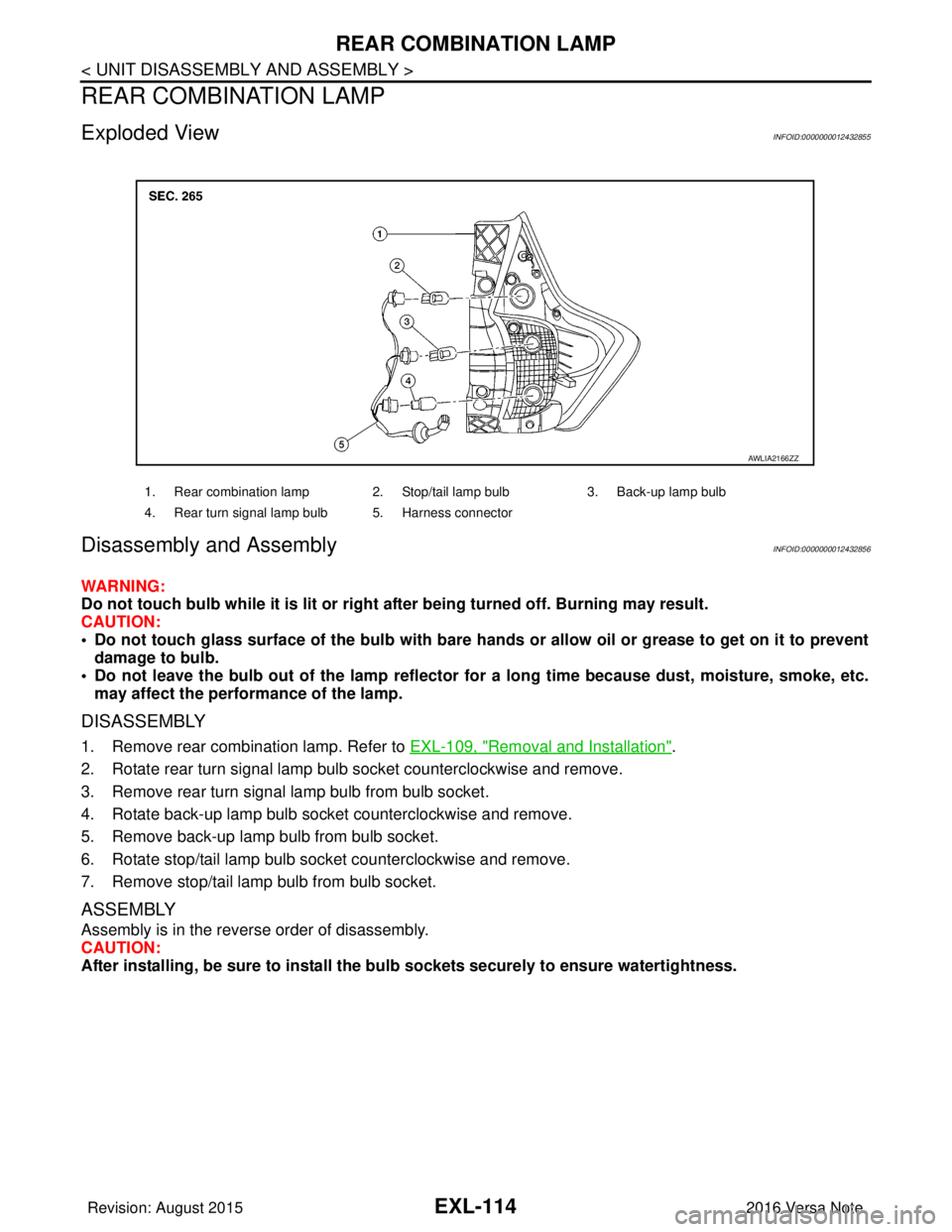
Exploded ViewINFOID:0000000012432855
Disassembly and Assembly INFOID:0000000012432856
WARNING:
Do not touch bulb while it is lit or right after being turned off. Burning may result.
CAUTION:
• Do not touch glass surface of the bulb with bare hands or allow oil or grease to get on it to preventdamage to bulb.
• Do not leave the bulb out of the lamp reflector fo r a long time because dust, moisture, smoke, etc.
may affect the performance of the lamp.
DISASSEMBLY
1. Remove rear combination lamp. Refer to EXL-109, "Removal and Installation".
2. Rotate rear turn signal lamp bulb socket counterclockwise and remove.
3. Remove rear turn signal lamp bulb from bulb socket.
4. Rotate back-up lamp bulb socket counterclockwise and remove.
5. Remove back-up lamp bulb from bulb socket.
6. Rotate stop/tail lamp bulb socket counterclockwise and remove.
7. Remove stop/tail lamp bulb from bulb socket.
ASSEMBLY
Assembly is in the reverse order of disassembly.
CAUTION:
After installing, be sure to install the bu lb sockets securely to ensure watertightness.
1. Rear combination lamp 2. Stop/tail lamp bulb 3. Back-up lamp bulb
4. Rear turn signal lamp bulb 5. Harness connector
AWLIA2166ZZ
Revision: August 2015 2016 Versa Note
cardiagn.com
Page 1767 of 3641
SERVICE DATA AND SPECIFICATIONS (SDS)EXL-115
< SERVICE DATA AND SPECIFICATIONS (SDS)
C
DE
F
G H
I
J
K
M A
B
EXL
N
O P
SERVICE DATA AND SPECIFICATIONS (SDS)
SERVICE DATA AND SPECIFICATIONS (SDS)
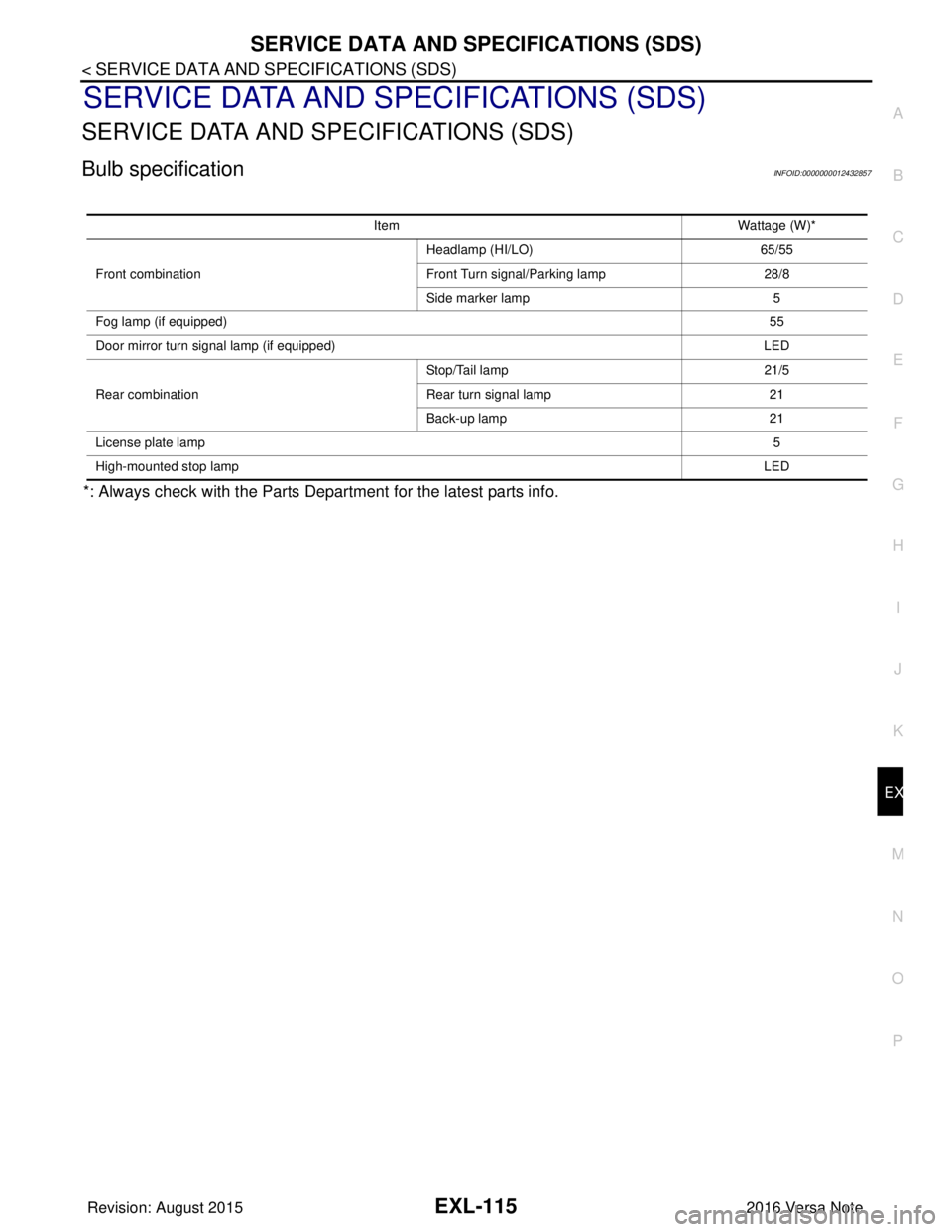
Bulb specificationINFOID:0000000012432857
*: Always check with the Parts Department for the latest parts info.
Item Wattage (W)*
Front combination Headlamp (HI/LO)
65/55
Front Turn signal/Parking lamp 28/8
Side marker lamp 5
Fog lamp (if equipped) 55
Door mirror turn signal lamp (if equipped) LED
Rear combination Stop/Tail lamp
21/5
Rear turn signal lamp 21
Back-up lamp 21
License plate lamp 5
High-mounted stop lamp LED
Revision: August 20152016 Versa Note
cardiagn.com
Page 1935 of 3641
SERVICE INFORMATION FOR ELECTRICAL INCIDENTGI-47
< BASIC INSPECTION >
C
DE
F
G H
I
J
K L
M B
GI
N
O P
• For detailed ground distribution information, refer to “Ground Distribution” in PG section.
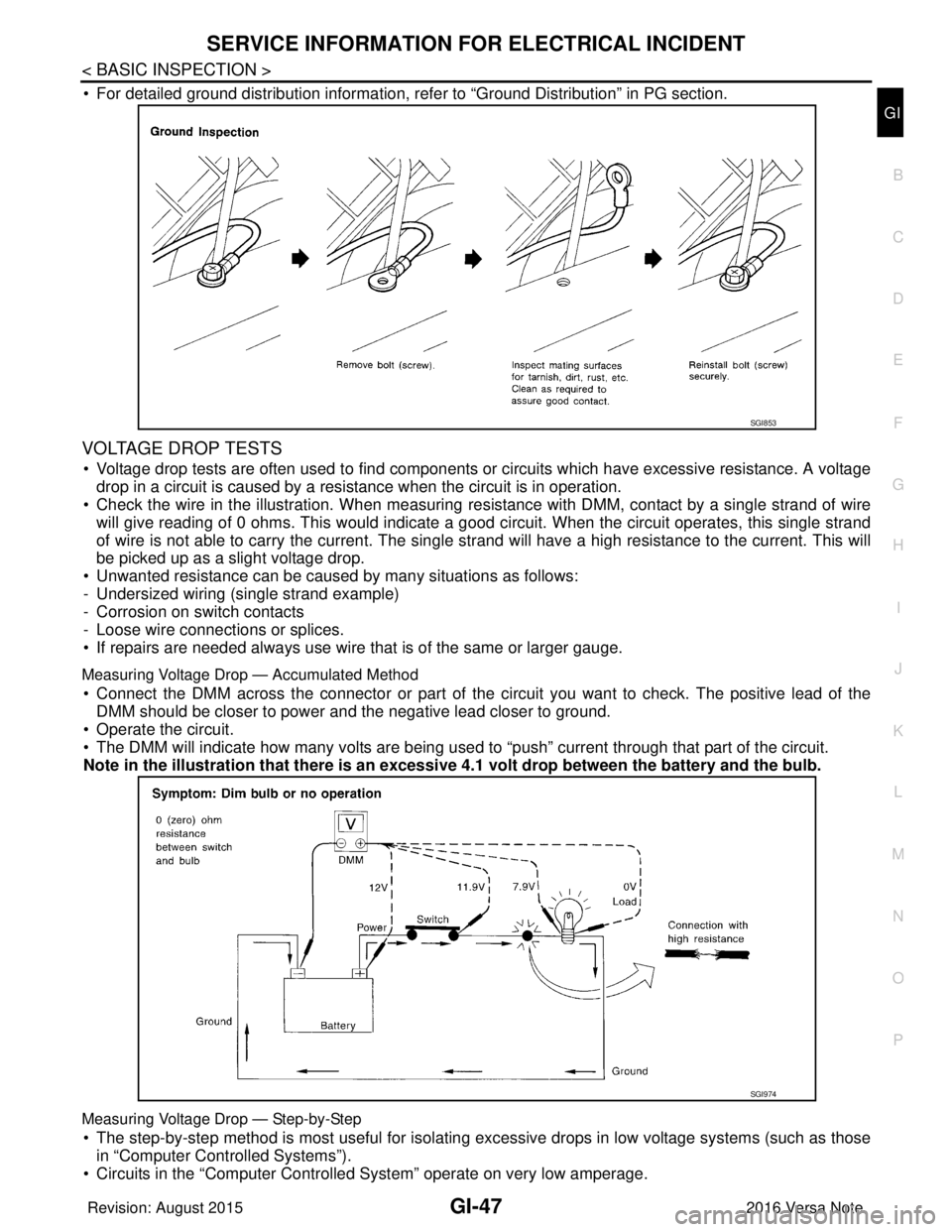
VOLTAGE DROP TESTS
• Voltage drop tests are often used to find components or circuits which have excessive resistance. A voltage drop in a circuit is caused by a resistance when the circuit is in operation.
• Check the wire in the illustration. When measuring re sistance with DMM, contact by a single strand of wire
will give reading of 0 ohms. This would indicate a good circuit. When the circuit operates, this single strand
of wire is not able to carry the current. The single strand will have a high resistance to the current. This will
be picked up as a slight voltage drop.
• Unwanted resistance can be caused by many situations as follows:
- Undersized wiring (single strand example)
- Corrosion on switch contacts
- Loose wire connections or splices.
• If repairs are needed always use wire that is of the same or larger gauge.
Measuring Voltage Drop — Accumulated Method
• Connect the DMM across the connector or part of the ci rcuit you want to check. The positive lead of the
DMM should be closer to power and the negative lead closer to ground.
• Operate the circuit.
• The DMM will indicate how many volts are being used to “push” current through that part of the circuit.
Note in the illustration that there is an excessi ve 4.1 volt drop between the battery and the bulb.
Measuring Voltage Drop — Step-by-Step
• The step-by-step method is most useful for isolating excessive drops in low voltage systems (such as those
in “Computer Controlled Systems”).
• Circuits in the “Computer Controll ed System” operate on very low amperage.
SGI853
SGI974
Revision: August 2015 2016 Versa Note
cardiagn.com
Page 2096 of 3641

INL-2
DTC/CIRCUIT DIAGNOSIS ...................... ...39
POWER SUPPLY AND GROUND CIRCUIT .. ...39
BCM (BODY CONTROL SYSTEM) (WITH INTEL-
LIGENT KEY SYSTEM) ..... .......................................
39
BCM (BODY CONTROL S YSTEM) (WITH INTEL-
LIGENT KEY SYSTEM) : Dia gnosis Procedure .....
39
BCM (BODY CONTROL SYST EM) (WITHOUT IN-
TELLIGENT KEY SYSTEM) . ....................................
39
BCM (BODY CONTROL SYSTEM) (WITHOUT
INTELLIGENT KEY SYSTEM) : Diagnosis Proce-
dure ..................................................................... ...
39
BATTERY SAVER OUTPUT/POWER SUP-
PLY CIRCUIT .....................................................
41
Description ........................................................... ...41
Component Function Check ...................................41
Diagnosis Procedure ..............................................41
INTERIOR ROOM LAMP CONTROL CIRCUIT
...
43
Description ........................................................... ...43
Component Function Check ...................................43
Diagnosis Procedure ..............................................43
CARGO LAMP CONTROL CIRCUIT ................46
Description ........................................................... ...46
Component Function Check ...................................46
Diagnosis Procedure ..............................................46
PUSH-BUTTON IGNITION SWITCH ILLUMI-
NATION CIRCUIT ..............................................
48
Description ........................................................... ...48
Component Function Check ...................................48
Diagnosis Procedure ............................................ ...48
SYMPTOM DIAGNOSIS ............................50
INTERIOR LIGHTING SYSTEM SYMPTOMS ...50
Symptom Table .................................................... ...50
REMOVAL AND INSTALLATION ..............51
MAP LAMP ........................................................51
Exploded View ..................................................... ...51
Removal and Installation .........................................51
Bulb Replacement ................................................ ...51
INTERIOR ROOM LAMP ...................................53
Exploded View ..................................................... ...53
Removal and Installation .........................................53
Bulb Replacement ................................................ ...53
CARGO ROOM LAMP ......................................54
Exploded View ..................................................... ...54
Removal and Installation .........................................54
Bulb Replacement ................................................ ...54
SHIFT SELECTOR LAMP .................................55
Bulb Replacement ...................................................55
ILLUMINATION CONTROL SWITCH ...............56
Removal and Installation .........................................56
SERVICE DATA AND SPECIFICATIONS
(SDS) .......... ................................. ...............
57
SERVICE DATA AND SPECIFICATIONS
(SDS) .............................................................. ...
57
Bulb Specifications ............................................... ...57
Revision: August 2015 2016 Versa Note
cardiagn.com
Page 2099 of 3641
COMPONENT PARTSINL-5
< SYSTEM DESCRIPTION >
C
DE
F
G H
I
J
K
M A
B
INL
N
O P
SYSTEM DESCRIPTION
COMPONENT PARTS
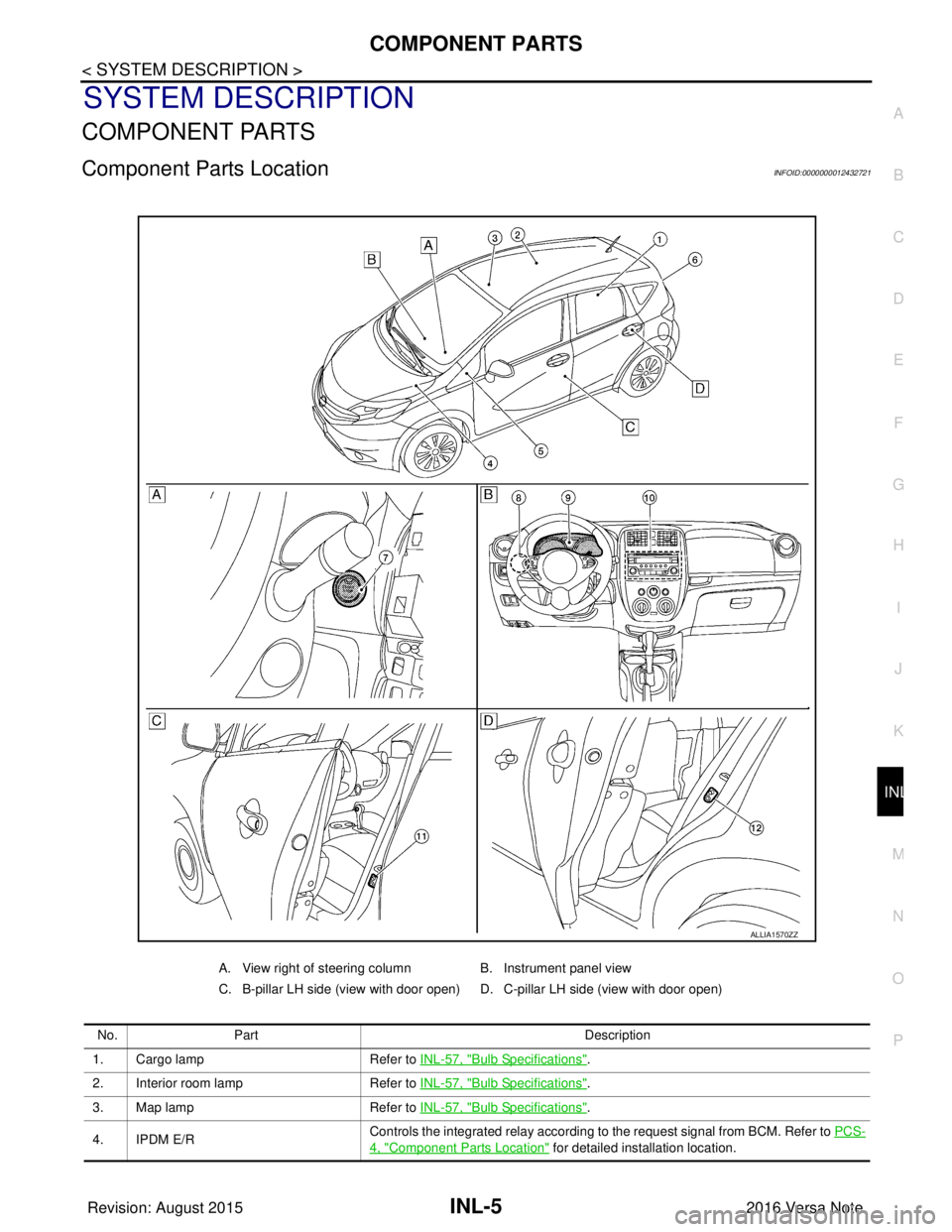
Component Parts LocationINFOID:0000000012432721
A. View right of steering column B. Instrument panel view
C. B-pillar LH side (view with door open) D. C-pillar LH side (view with door open)
No. Part Description
1. Cargo lamp Refer to INL-57, "
Bulb Specifications".
2. Interior room lamp Refer to INL-57, "
Bulb Specifications".
3. Map lamp Refer to INL-57, "
Bulb Specifications".
4. IPDM E/R Controls the integrated relay according to the request signal from BCM. Refer to
PCS-
4, "Component Parts Location" for detailed installation location.
ALLIA1570ZZ
Revision: August 2015 2016 Versa Note
cardiagn.com
Page 2137 of 3641
INTERIOR ROOM LAMP CONTROL CIRCUITINL-43
< DTC/CIRCUIT DIAGNOSIS >
C
DE
F
G H
I
J
K
M A
B
INL
N
O P
INTERIOR ROOM LAMP CONTROL CIRCUIT
DescriptionINFOID:0000000012432742
Controls each interior room lamp (ground side) by PWM signal.
NOTE:
PWM signal control period is approximately 250 Hz (in the gradual brightening/dimming).
Component Function CheckINFOID:0000000012432743
CAUTION:
Before performing the diagnosis, check that the following are normal.
• Interior room lamp power supply
• Map lamp bulb
• Room lamp bulb
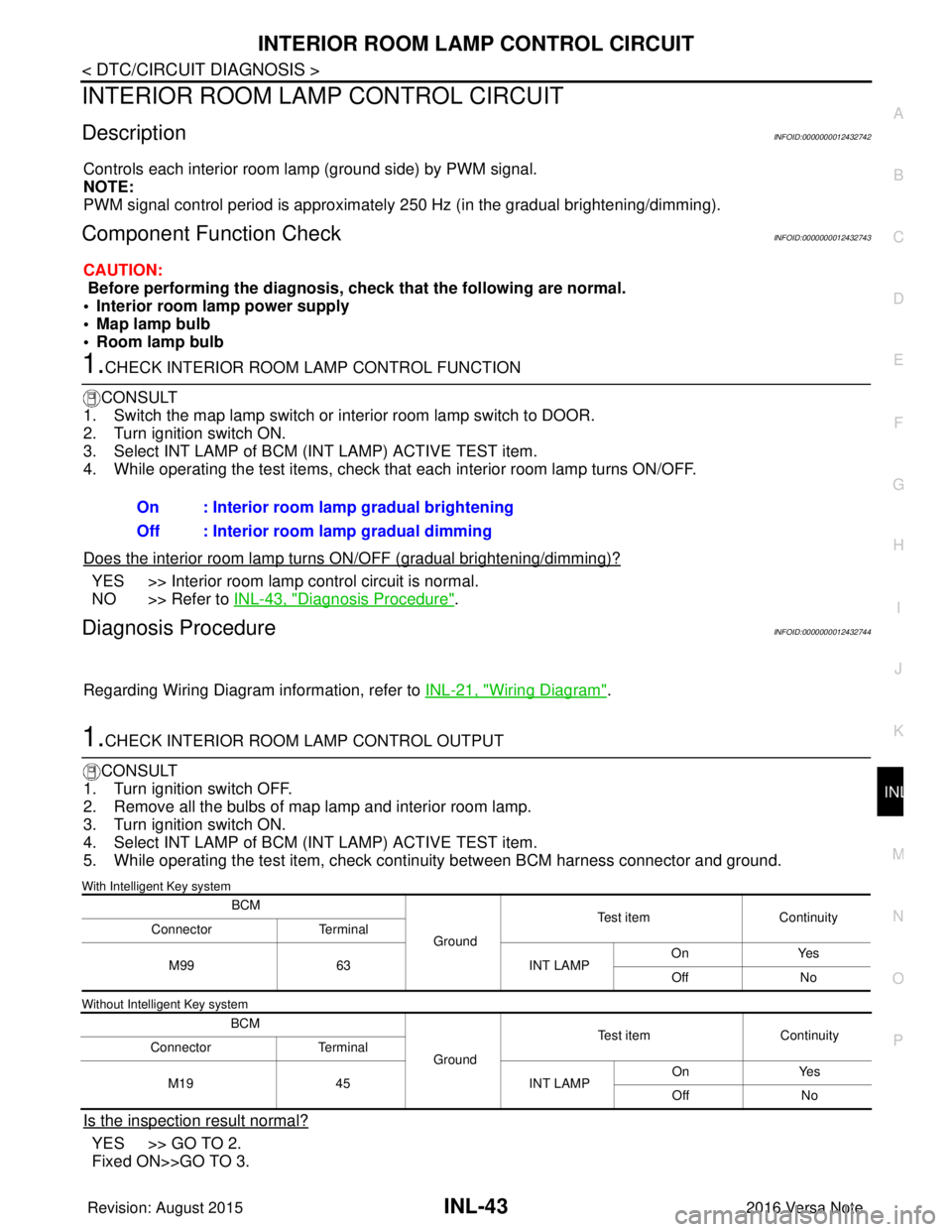
1.CHECK INTERIOR ROOM LAMP CONTROL FUNCTION
CONSULT
1. Switch the map lamp switch or interior room lamp switch to DOOR.
2. Turn ignition switch ON.
3. Select INT LAMP of BCM (INT LAMP) ACTIVE TEST item.
4. While operating the test items, check that each interior room lamp turns ON/OFF.
Does the interior room lamp turn s ON/OFF (gradual brightening/dimming)?
YES >> Interior room lamp control circuit is normal.
NO >> Refer to INL-43, "
Diagnosis Procedure".
Diagnosis ProcedureINFOID:0000000012432744
Regarding Wiring Diagram information, refer to INL-21, "Wiring Diagram".
1.CHECK INTERIOR ROOM LAMP CONTROL OUTPUT
CONSULT
1. Turn ignition switch OFF.
2. Remove all the bulbs of map lamp and interior room lamp.
3. Turn ignition switch ON.
4. Select INT LAMP of BCM (INT LAMP) ACTIVE TEST item.
5. While operating the test item, check c ontinuity between BCM harness connector and ground.
With Intelligent Key system
Without Intelligent Key system
Is the inspection result normal?
YES >> GO TO 2.
Fixed ON>>GO TO 3.On : Interior room lamp gradual brightening
Off : Interior room lamp gradual dimming
BCM
GroundTest item
Continuity
Connector Terminal
M99 63 INT LAMPOn
Yes
Off No
BCM GroundTest item
Continuity
Connector Terminal
M19 45 INT LAMPOn
Yes
Off No
Revision: August 2015 2016 Versa Note
cardiagn.com
Page 2140 of 3641
INL-46
< DTC/CIRCUIT DIAGNOSIS >
CARGO LAMP CONTROL CIRCUIT
CARGO LAMP CONTROL CIRCUIT
DescriptionINFOID:0000000012432745
Controls the cargo lamp (ground side) to turn the cargo lamp ON and OFF.
Component Function CheckINFOID:0000000012432746
CAUTION:
Before performing the diagnosis, check that the following is normal.
• Battery saver output/power supply
• Cargo lamp bulb
Diagnosis ProcedureINFOID:0000000012432747
Regarding Wiring Diagram information, refer to INL-21, "Wiring Diagram".
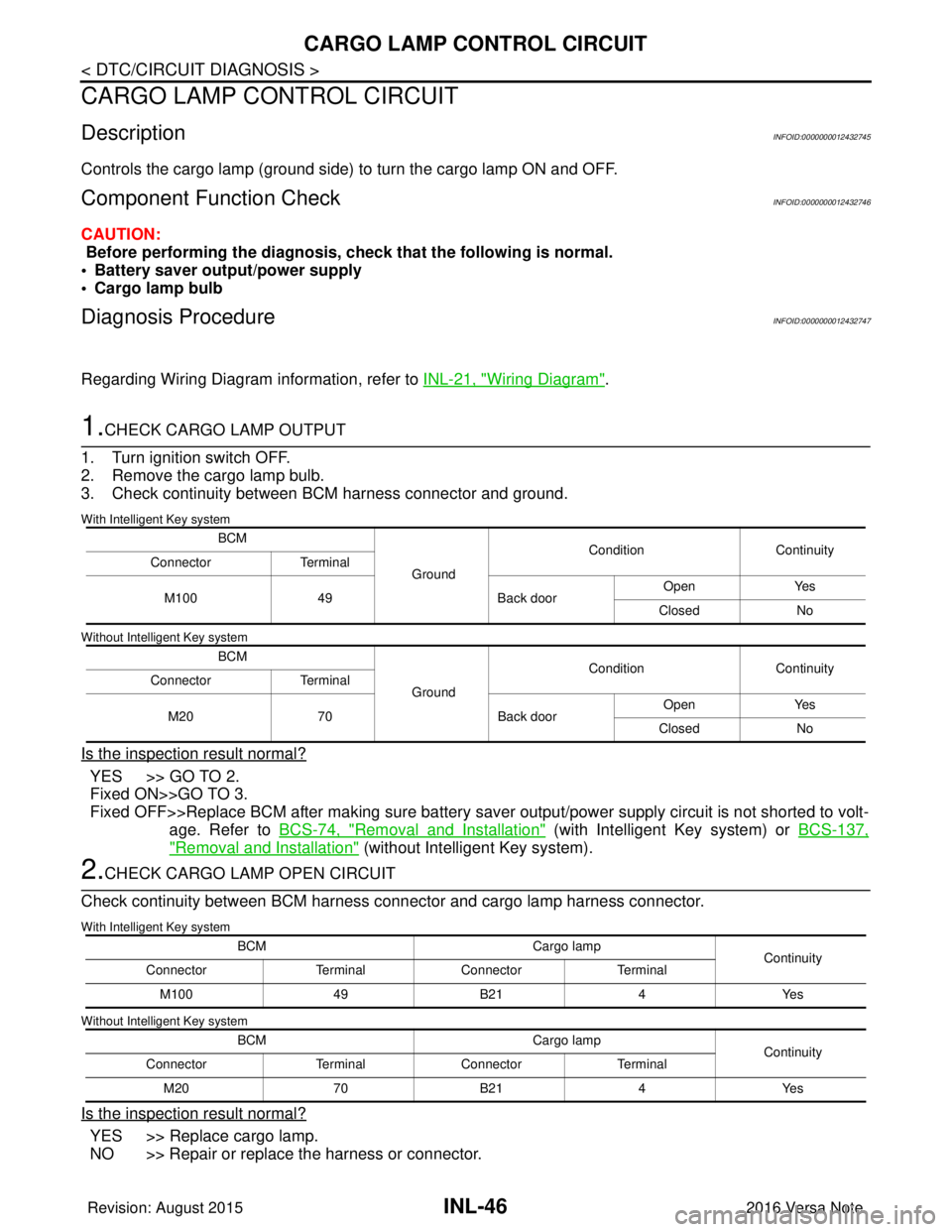
1.CHECK CARGO LAMP OUTPUT
1. Turn ignition switch OFF.
2. Remove the cargo lamp bulb.
3. Check continuity between BCM harness connector and ground.
With Intelligent Key system
Without Intelligent Key system
Is the inspection result normal?
YES >> GO TO 2.
Fixed ON>>GO TO 3.
Fixed OFF>>Replace BCM after making sure battery saver output/power supply circuit is not shorted to volt- age. Refer to BCS-74, "
Removal and Installation" (with Intelligent Key system) or BCS-137,
"Removal and Installation" (without Intelligent Key system).
2.CHECK CARGO LAMP OPEN CIRCUIT
Check continuity between BCM harness connector and cargo lamp harness connector.
With Intelligent Key system
Without Intelligent Key system
Is the inspection result normal?
YES >> Replace cargo lamp.
NO >> Repair or replace the harness or connector.
BCM
GroundCondition
Continuity
Connector Terminal
M100 49 Back doorOpen
Yes
Closed No
BCM GroundCondition
Continuity
Connector Terminal
M20 70 Back doorOpen
Yes
Closed No
BCM Cargo lamp
Continuity
Connector TerminalConnector Terminal
M100 49B21 4Yes
BCM Cargo lamp
Continuity
Connector TerminalConnector Terminal
M20 70B21 4Yes
Revision: August 2015 2016 Versa Note
cardiagn.com
Page 2145 of 3641
MAP LAMPINL-51
< REMOVAL AND INSTALLATION >
C
DE
F
G H
I
J
K
M A
B
INL
N
O P
REMOVAL AND INSTALLATION
MAP LAMP
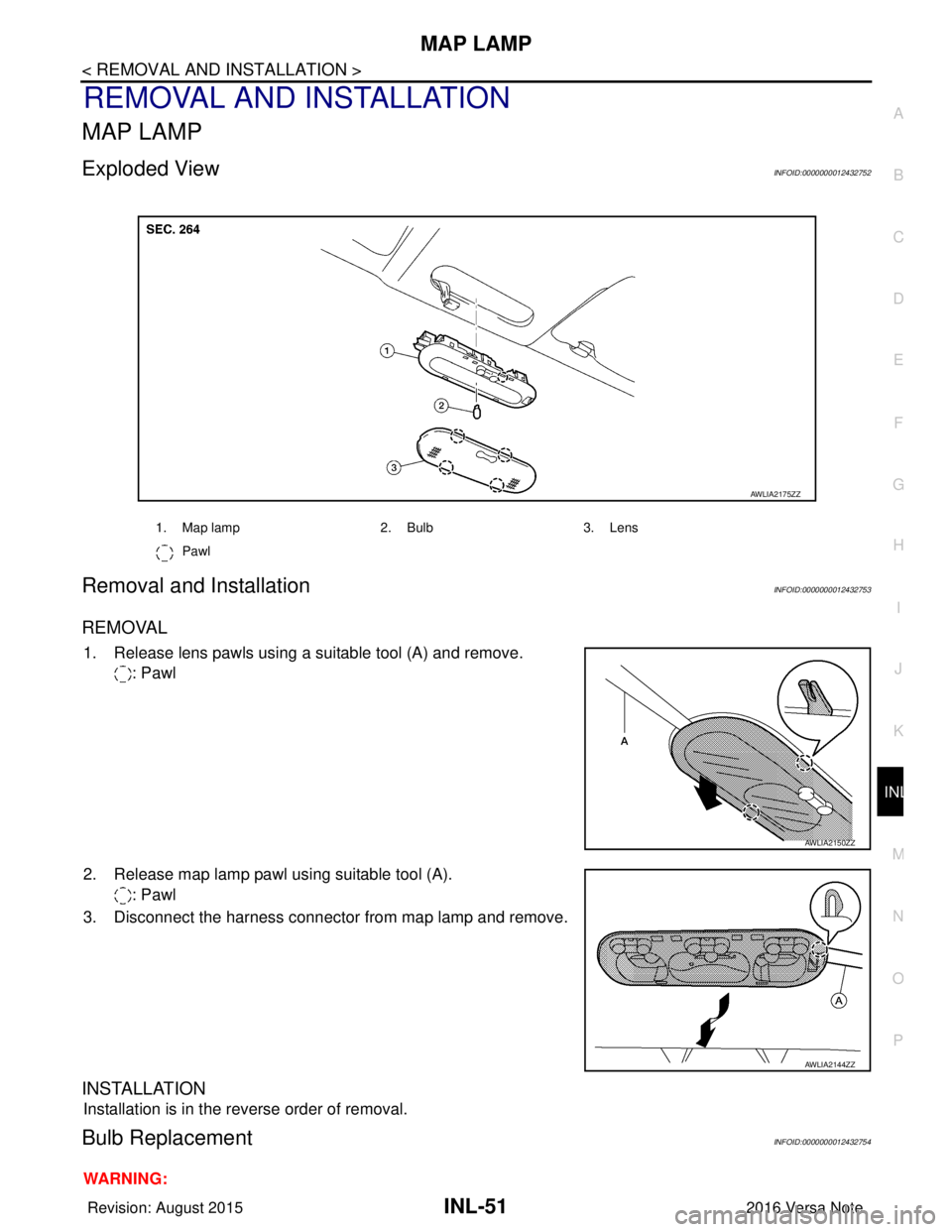
Exploded ViewINFOID:0000000012432752
Removal and InstallationINFOID:0000000012432753
REMOVAL
1. Release lens pawls using a suitable tool (A) and remove. : Pawl
2. Release map lamp pawl using suitable tool (A). : Pawl
3. Disconnect the harness connector from map lamp and remove.
INSTALLATION
Installation is in the reverse order of removal.
Bulb ReplacementINFOID:0000000012432754
WARNING:
1. Map lamp 2. Bulb3. Lens
Pawl
AWLIA2175ZZ
AWLIA2150ZZ
AWLIA2144ZZ
Revision: August 2015 2016 Versa Note
cardiagn.com
Page 2146 of 3641
INL-52
< REMOVAL AND INSTALLATION >
MAP LAMP
Do not touch bulb while it is lit or right after being turned OFF. Burning may result.
CAUTION:
• Do not touch the glass surface of the bulb with bare hands or allow oil or grease to get on it to pre-vent damage to bulb.
• Do not leave bulb out of lamp reflector for a long time because dust, moisture smoke, etc. may affect
the performance of lamp.
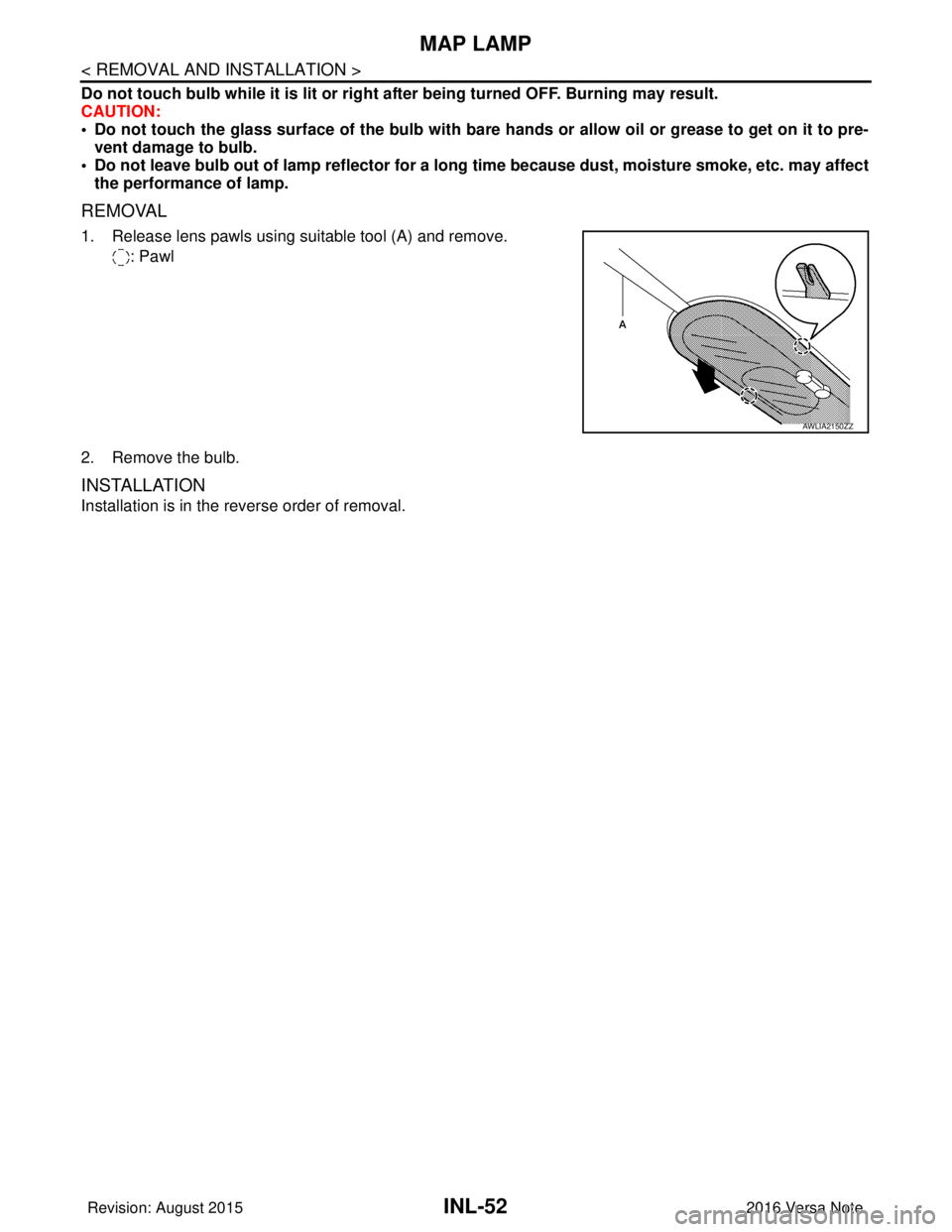
REMOVAL
1. Release lens pawls using suitable tool (A) and remove.
: Pawl
2. Remove the bulb.
INSTALLATION
Installation is in the reverse order of removal.
AWLIA2150ZZ
Revision: August 2015 2016 Versa Note
cardiagn.com