trans NISSAN NOTE 2016 Service Repair Manual
[x] Cancel search | Manufacturer: NISSAN, Model Year: 2016, Model line: NOTE, Model: NISSAN NOTE 2016Pages: 3641, PDF Size: 28.72 MB
Page 2748 of 3641
PREPARATIONWT-5
< PREPARATION >
C
DF
G H
I
J
K L
M A
B
WT
N
O P
PREPARATION
PREPARATION
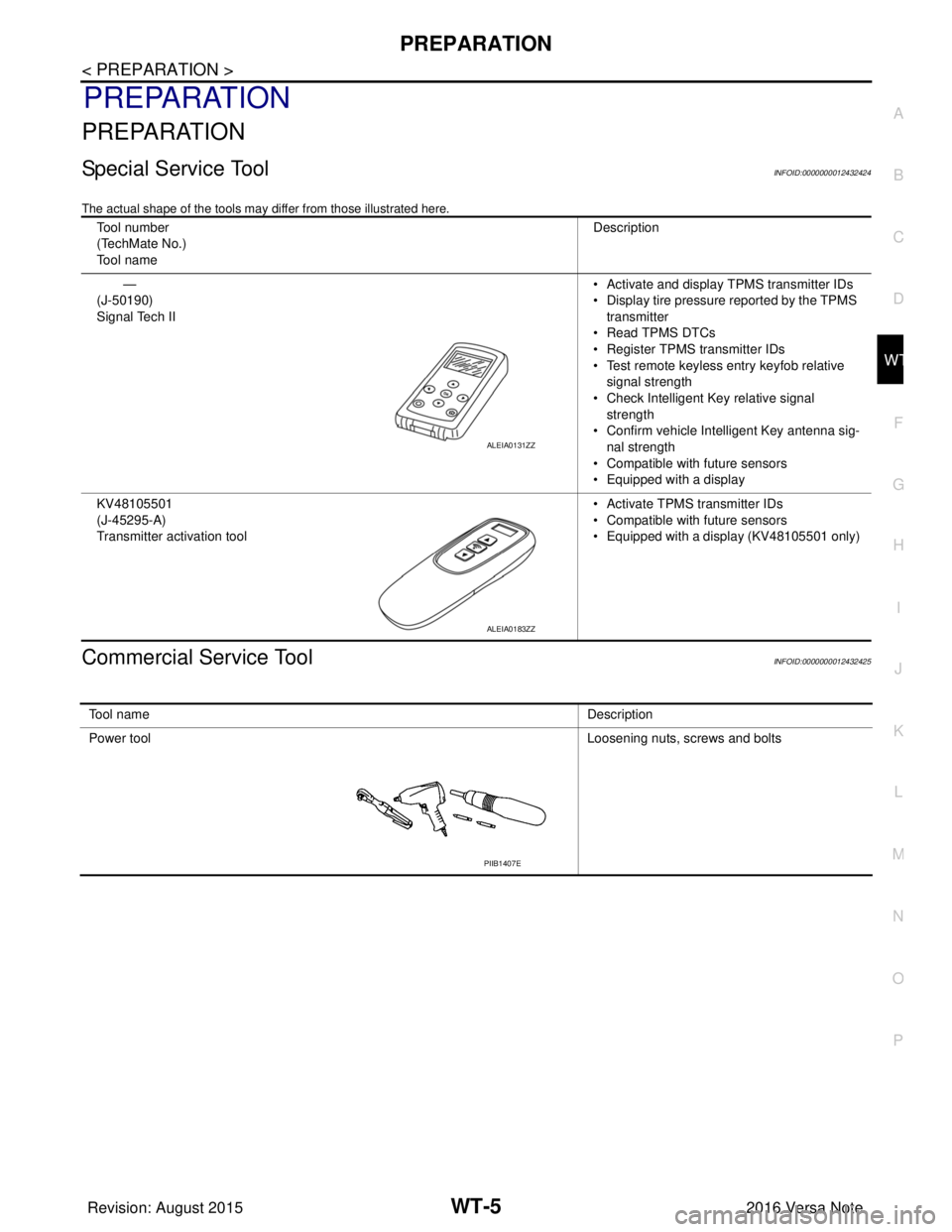
Special Service ToolINFOID:0000000012432424
The actual shape of the tools may di ffer from those illustrated here.
Commercial Service ToolINFOID:0000000012432425
Tool number
(TechMate No.)
Tool name Description
—
(J-50190)
Signal Tech II • Activate and display TPMS transmitter IDs
• Display tire pressure reported by the TPMS
transmitter
• Read TPMS DTCs
• Register TPMS transmitter IDs
• Test remote keyless entry keyfob relative signal strength
• Check Intelligent Key relative signal strength
• Confirm vehicle Intelligent Key antenna sig-
nal strength
• Compatible with future sensors
• Equipped with a display
KV48105501
(J-45295-A)
Transmitter activation tool • Activate TPMS transmitter IDs
• Compatible with future sensors
• Equipped with a display (KV48105501 only)
ALEIA0131ZZ
ALEIA0183ZZ
To o l n a m e
Description
Power tool Loosening nuts, screws and bolts
PIIB1407E
Revision: August 2015 2016 Versa Note
cardiagn.com
Page 2749 of 3641
WT-6
< SYSTEM DESCRIPTION >
COMPONENT PARTS
SYSTEM DESCRIPTION
COMPONENT PARTS
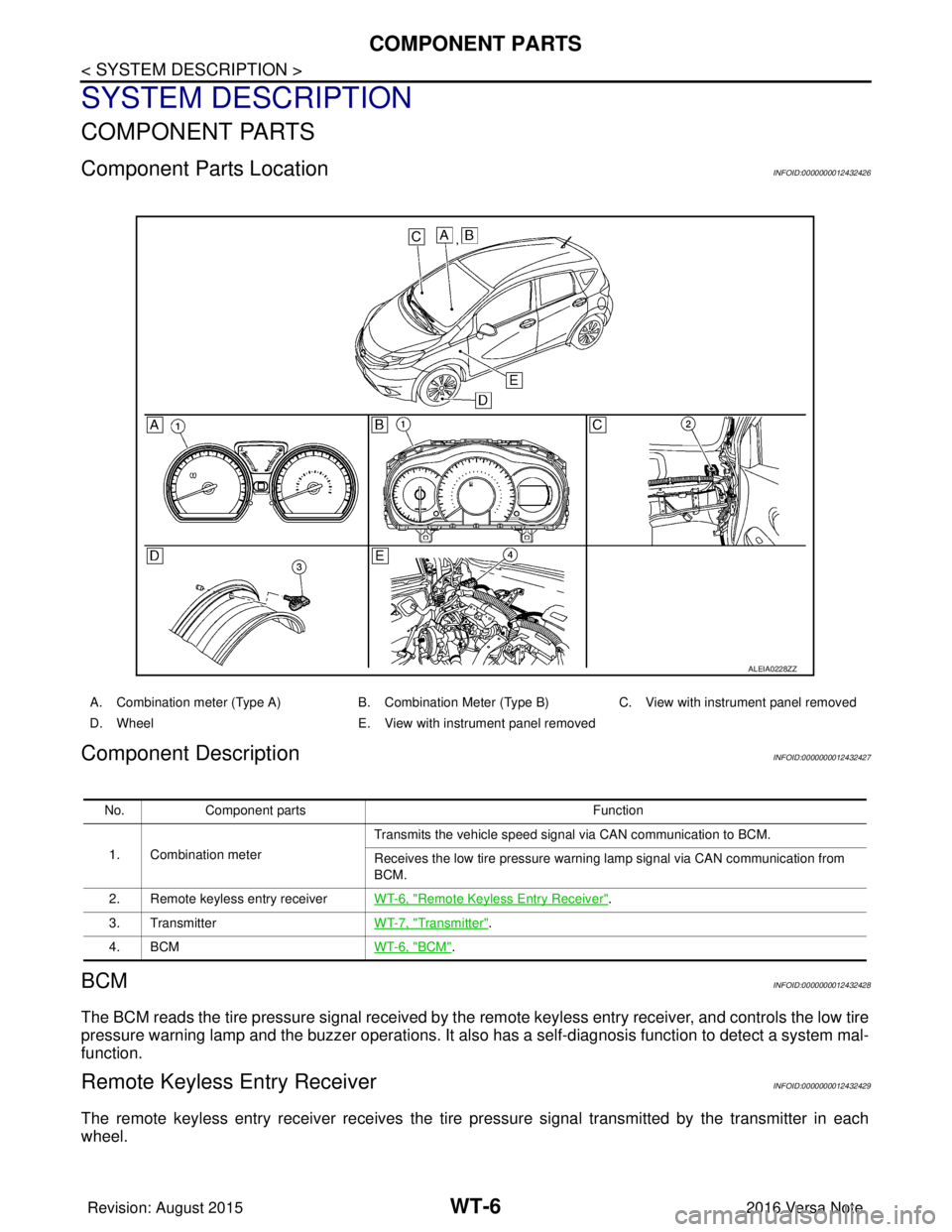
Component Parts LocationINFOID:0000000012432426
Component DescriptionINFOID:0000000012432427
BCMINFOID:0000000012432428
The BCM reads the tire pressure signal received by the remote keyless entry receiver, and controls the low tire
pressure warning lamp and the buzzer operations. It also has a self-diagnosis function to detect a system mal-
function.
Remote Keyless Entry ReceiverINFOID:0000000012432429
The remote keyless entry receiver receives the tire pressure signal transmitted by the transmitter in each
wheel.
ALEIA0228ZZ
A. Combination meter (Type A) B. Combination Meter (Type B)C. View with instrument panel removed
D. Wheel E. View with instrument panel removed
No. Component parts Function
1. Combination meter Transmits the vehicle speed signal via CAN communication to BCM.
Receives the low tire pressure warning lamp signal via CAN communication from
BCM.
2. Remote keyless entry receiver WT-6, "
Remote Keyless Entry Receiver".
3. Transmitter WT-7, "
Transmitter".
4. BCM WT-6, "
BCM".
Revision: August 2015 2016 Versa Note
cardiagn.com
Page 2750 of 3641

COMPONENT PARTSWT-7
< SYSTEM DESCRIPTION >
C
DF
G H
I
J
K L
M A
B
WT
N
O P
TransmitterINFOID:0000000012432430
A sensor-transmitter integrated with a valve is installed in each wheel, and transmits a detected tire pressure
signal in the form of a radio wave. The radio signal is received by the remote keyless entry receiver.
Low Tire Pressure Warning LampINFOID:0000000012432431
The combination meter receives tire pressure status from the BCM using CAN communication. When a low
tire pressure condition is sensed by the BCM, the combi nation meter low tire pressure warning lamp is acti-
vated.
Revision: August 2015 2016 Versa Note
cardiagn.com
Page 2751 of 3641
WT-8
< SYSTEM DESCRIPTION >
SYSTEM
SYSTEM
TIRE PRESSURE MONITORING SYSTEM
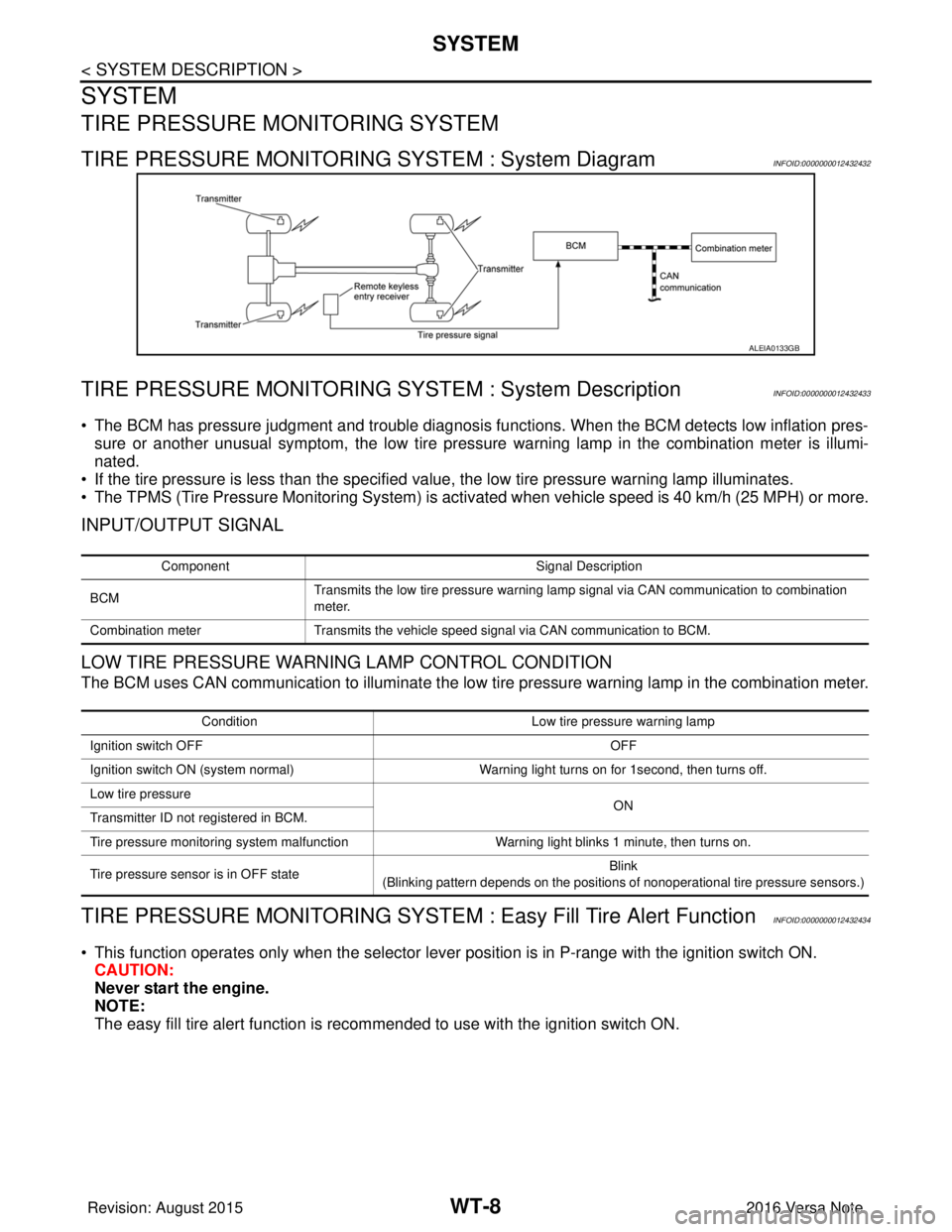
TIRE PRESSURE MONITORING SYSTEM : System DiagramINFOID:0000000012432432
TIRE PRESSURE MONITORING SY STEM : System DescriptionINFOID:0000000012432433
• The BCM has pressure judgment and trouble diagnosis functions. When the BCM detects low inflation pres-
sure or another unusual symptom, the low tire pressure warning lamp in the combination meter is illumi-
nated.
• If the tire pressure is less than the specified value, the low tire pressure warning lamp illuminates.
• The TPMS (Tire Pressure Monitoring System) is activated when vehicle s peed is 40 km/h (25 MPH) or more.
INPUT/OUTPUT SIGNAL
LOW TIRE PRESSURE WARNING LAMP CONTROL CONDITION
The BCM uses CAN communication to illuminate the low tire pressure warning lamp in the combination meter.
TIRE PRESSURE MONITORING SYSTEM : Easy Fill Tire Alert FunctionINFOID:0000000012432434
• This function operates only when the selector lever position is in P-range with the ignition switch ON.
CAUTION:
Never start the engine.
NOTE:
The easy fill tire alert function is reco mmended to use with the ignition switch ON.
ALEIA0133GB
Component Signal Description
BCM Transmits the low tire pressure warning lamp signal via CAN communication to combination
meter.
Combination meter Transmits the vehicle speed signal via CAN communication to BCM.
Condition Low tire pressure warning lamp
Ignition switch OFF OFF
Ignition switch ON (system normal) Warning light turns on for 1second, then turns off.
Low tire pressure ON
Transmitter ID not registered in BCM.
Tire pressure monitoring system malfunction Warning light blinks 1 minute, then turns on.
Tire pressure sensor is in OFF state Blink
(Blinking pattern depends on the positions of nonoperational tire pressure sensors.)
Revision: August 2015 2016 Versa Note
cardiagn.com
Page 2753 of 3641

WT-10
< SYSTEM DESCRIPTION >
DIAGNOSIS SYSTEM (BCM)
DIAGNOSIS SYSTEM (BCM)
WITH INTELLIGENT KEY
WITH INTELLIGENT KEY : CONSULT Function (BCM - COMMON ITEM)INFOID:0000000012542957
APPLICATION ITEM
CONSULT performs the following functions via CAN communication with BCM.
SYSTEM APPLICATION
BCM can perform the following functions.
Direct Diagnostic Mode Description
ECU Identification The BCM part number is displayed.
Self Diagnostic Result The BCM self diagnostic results are displayed.
Data Monitor The BCM input/output data is displayed in real time.
Active Test The BCM activates outputs to test components.
Work support The settings for BCM functions can be changed.
Configuration • The vehicle specification can be read and saved.
• The vehicle specification can be written when replacing BCM.
CAN DIAG SUPPORT MNTR The result of transmit/receive diagnosis of CAN communication is displayed.
System Sub System Direct Diagnostic Mode
ECU Identification
Self Diagnostic Result
Data Monitor
Active Test
Work support
Configuration
CAN DIAG SUPPORT MNTR
Door lock
DOOR LOCK ×××
Rear window defogger REAR DEFOGGER ××
Warning chime BUZZER ××
Interior room lamp timer INT LAMP ×××
Exterior lamp HEAD LAMP ×××
Wiper and washer WIPER ×××
Turn signal and hazard warning lamps FLASHER ×××
Air conditioner AIR CONDITIONER ×
Intelligent Key system INTELLIGENT KEY ××××
Combination switch COMB SW ×
BCM BCM× × ×××
Immobilizer IMMU ××××
Interior room lamp battery saver BATTERY SAVER ×××
Vehicle security system THEFT ALM ××
RAP system RETAINED PWR ×
Signal buffer system SIGNAL BUFFER ×
TPMS AIR PRESSURE MONITOR ××××
Panic alarm system PANIC ALARM ×
Revision: August 2015 2016 Versa Note
cardiagn.com
Page 2754 of 3641

DIAGNOSIS SYSTEM (BCM)WT-11
< SYSTEM DESCRIPTION >
C
DF
G H
I
J
K L
M A
B
WT
N
O P
WITH INTELLIGENT KEY : CONSULT Func tion (BCM - AIR PRESSURE MONITOR)
INFOID:0000000012542958
NOTE:
The Signal Tech II Tool [– (J-50190)] can be used to perform the following functions. Refer to the Signal Tech
II User Guide for additional information.
• Activate and display TPMS transmitter IDs
• Display tire pressure reported by the TPMS transmitter
• Read TPMS DTCs
• Register TPMS transmitter IDs
• Check Intelligent Key relative signal strength
• Confirm vehicle Intelligent Key antenna signal strength
SELF DIAGNOSTIC RESULT
NOTE:
Before performing self diagnostic result, be sure to register the ID, or else the actual malfunction may be differ-
ent from that displayed on CONSULT.
Refer to BCS-50, "
DTCIndex".
DATA MONITOR
ACTIVE TEST
WORK SUPPORT
WITHOUT INTELLIGENT KEY
WITHOUT INTELLIGENT KEY : CONSUL T Function (BCM - COMMON ITEM)
INFOID:0000000012542960
APPLICATION ITEM
CONSULT performs the following functions via CAN communication with BCM.
Monitor Item [Unit] Description
AIR PRESS FL [kPa, kg/cm
2 or Psi] Indicates air pressure of front LH tire.
AIR PRESS FR [kPa, kg/cm
2 or Psi] Indicates air pressure of front RH tire.
AIR PRESS RR [kPa, kg/cm
2 or Psi] Indicates air pressure of rear RH tire.
AIR PRESS RL [kPa, kg/cm
2 or Psi] Indicates air pressure of rear LH tire.
ID REGST FL1 [Done/Yet] Indicates ID registration status of front LH transmitter.
ID REGST FR1 [Done/Yet] Indicates ID registration status of front RH transmitter.
ID REGST RR1 [Done/Yet] Indicates ID registration status of rear RH transmitter.
ID REGST RL1 [Done/Yet] Indicates ID registration status of rear LH transmitter.
WARNING LAMP [Off/On] Indicates condition of low tire pressure warning lamp in combination meter.
BUZZER [Off/On] Indicates condition of buzzer in combination meter.
Test Item Description
HORN This test is able to check horn operation [On].
FLASHER This test is able to check turn signal lamp operation [Off/LH/RH].
ID REGIST WARNING This test is able to check ID registration warning chime operation [On/Off].
WARNING LAMP This test is able to check tire pressure warning lamp operation [On/Off].
Support Item Description
ID READ The registered ID number is displayed.
ID REGIST Refer to WT-22, "
Description".
Revision: August 2015 2016 Versa Note
cardiagn.com
Page 2755 of 3641

WT-12
< SYSTEM DESCRIPTION >
DIAGNOSIS SYSTEM (BCM)
SYSTEM APPLICATION
BCM can perform the following functions.
WITHOUT INTELLIGENT KEY : CONSULT Function (BCM - AIR PRESSURE MONI-
TOR)
INFOID:0000000012542959
NOTE:
The Signal Tech II Tool [– (J-50190)] can be used to perform the following functions. Refer to the Signal Tech
II User Guide for additional information.
• Activate and display TPMS transmitter IDs
• Display tire pressure reported by the TPMS transmitter
Direct Diagnostic ModeDescription
ECU Identification The BCM part number is displayed.
Self Diagnostic Result The BCM self diagnostic results are displayed.
Data Monitor The BCM input/output data is displayed in real time.
Active Test The BCM activates outputs to test components.
Work support The settings for BCM functions can be changed.
Configuration • The vehicle specification can be read and saved.
• The vehicle specification can be written when replacing BCM.
CAN DIAG SUPPORT MNTR The result of transmit/receive diagnosis of CAN communication is displayed.
System Sub System Direct Diagnostic Mode
ECU Identification
Self Diagnostic Result
Data Monitor
Active Test
Work support
Configuration
CAN DIAG SUPPORT MNTR
Door lock
DOOR LOCK ×××
Rear window defogger REAR DEFOGGER ××
Warning chime BUZZER ××
Interior room lamp timer INT LAMP ×××
Remote keyless entry system MULTI REMOTE ENT ×××
Exterior lamp HEAD LAMP ×××
Wiper and washer WIPER ×××
Turn signal and hazard warning lamps FLASHER ××
Air conditioner AIR CONDITIONER ×
Combination switch COMB SW ×
BCM BCM× × ×××
Immobilizer IMMU ×××
Interior room lamp battery saver BATTERY SAVER ×××
Vehicle security system THEFT ALM ××
RAP system RETAINED PWR ××
Signal buffer system SIGNAL BUFFER ×
TPMS AIR PRESSURE MONITOR ××××
Panic alarm system PANIC ALARM ×
Revision: August 2015 2016 Versa Note
cardiagn.com
Page 2756 of 3641

DIAGNOSIS SYSTEM (BCM)WT-13
< SYSTEM DESCRIPTION >
C
DF
G H
I
J
K L
M A
B
WT
N
O P
• Read TPMS DTCs
• Register TPMS transmitter IDs
• Test remote keyless entry keyfob relative signal strength
SELF DIAGNOSTIC RESULT
NOTE:
Before performing self diagnostic result, be sure to register the ID, or else the actual malfunction may be differ-
ent from that displayed on CONSULT.
Refer to BCS-115, "
DTCIndex".
DATA MONITOR
ACTIVE TEST
WORK SUPPORT
Monitor Item [Unit] Description
AIR PRESS FL [kPa, kg/cm
2 or Psi] Indicates air pressure of front LH tire.
AIR PRESS FR [kPa, kg/cm
2 or Psi] Indicates air pressure of front RH tire.
AIR PRESS RR [kPa, kg/cm
2 or Psi] Indicates air pressure of rear RH tire.
AIR PRESS RL [kPa, kg/cm
2 or Psi] Indicates air pressure of rear LH tire.
ID REGST FL1 [Done/Yet] Indicates ID registration status of front LH transmitter.
ID REGST FR1 [Done/Yet] Indicates ID registration status of front RH transmitter.
ID REGST RR1 [Done/Yet] Indicates ID registration status of rear RH transmitter.
ID REGST RL1 [Done/Yet] Indicates ID registration status of rear LH transmitter.
WARNING LAMP [Off/On] Indicates condition of low tire pressure warning lamp in combination meter.
BUZZER [Off/On] Indicates condition of buzzer in combination meter.
Test Item Description
HORN This test is able to check horn operation [On].
WARNING LAMP This test is able to check tire pressure warning lamp operation [On/Off].
ID REGIST WARNING This test is able to check ID registration warning chime operation [On/Off].
FLASHER This test is able to check turn signal lamp operation [Off/LH/RH].
Support Item Description
ID READ The registered ID number is displayed.
ID REGIST Refer to WT-22, "
Description".
Revision: August 2015 2016 Versa Note
cardiagn.com
Page 2764 of 3641
DIAGNOSIS AND REPAIR WORK FLOWWT-21
< BASIC INSPECTION >
C
DF
G H
I
J
K L
M A
B
WT
N
O P
BASIC INSPECTION
DIAGNOSIS AND REPAIR WORK FLOW
Work Flow INFOID:0000000012432442
NOTE:
The Signal Tech II Tool [- (J-50190)] can be used to perform the following functions. Refer to the Signal Tech II
User Guide for additional information.
• Activate and display TPMS transmitter IDs
• Display tire pressure repor ted by the TPMS transmitter
• Read TPMS DTCs
• Register TPMS transmitter IDs
1.COLLECT INFORMATION FROM CUSTOMER
Get detailed information from the customer about t he symptom (the condition and the environment when the
incident/malfunction occurred).
>> GO TO 2.
2.TIRE PRESSURE INSPECTION
Check the tire pressure for all wheels. Refer to WT-54, "
Tire Air Pressure".
Is the inspection result normal?
YES >> GO TO 3.
NO >> Repair or replace tire(s) or wheel(s).
3.CHECK LOW TIRE PRE SSURE WARNING LAMP
Check that the low tire pressure warning lamp illumi nates for approximately 1 second after the ignition switch
is turned ON, then turns OFF.
Does the low tire pressure warning lamp turn OFF?
YES >> Inspection End.
NO >> GO TO 4.
4.PERFORM SELF DIAGNOSTIC RESULT
Perform “Self Diagnostic Result”. Refer to BCS-28, "
AIR PRESSURE MONITOR : CONSULT Function (BCM -
AIR PRESSURE MONITOR)" (with Intelligent Key system) or BCS-99, "AIR PRESSURE MONITOR : CON-
SULT Function (BCM - AIR PRESSURE MONITOR)" (without Intelligent Key system).
Are any DTCs displayed?
YES >> Refer to BCS-50, "DTCIndex" (with Intelligent Key system) or BCS-115, "DTCIndex" (without
Intelligent Key system). If two or more DTCs are displayed, refer to BCS-49,
"DTCInspectionPriorityChart" (with Intelligent Key system) or BCS-115,
"DTCInspectionPriorityChart" (without Intelligent Key system).
NO >> GO TO 5.
5.PERFORM DIAGNOSIS APPLICABLE TO THE SYMPTOM
Perform diagnosis applicable to the symptom. Refer to WT-36, "
Symptom Table".
>> GO TO 6.
6.FINAL CHECK
Perform “Self Diagnostic Result” again, and check that the malfunction is repaired. After checking, erase the
self diagnosis memory. Refer to BCS-28, "
AIR PRESSURE MONITOR : CONSULT Function (BCM - AIR
PRESSURE MONITOR)" (with Intelligent Key system) or BCS-99, "AIR PRESSURE MONITOR : CONSULT
Function (BCM - AIR PRESSURE MONITOR)" (without Intelligent Key system).
>> Inspection End.
Revision: August 2015 2016 Versa Note
cardiagn.com
Page 2765 of 3641
WT-22
< BASIC INSPECTION >
ID REGISTRATION PROCEDURE
ID REGISTRATION PROCEDURE
DescriptionINFOID:0000000012432443
This procedure must be performed after replacing wheels, transmitters or the BCM.
Work ProcedureINFOID:0000000012432444
TPMS ID registration can be performed using one of the following procedures:
• Transmitter Activation tool [KV48105501 (J-45295-A)] with CONSULT (preferred method)
• Signal Tech II tool [- (J- 50190)] with CONSULT (preferred method)
• Signal Tech II tool [- (J-50190)] without CONSULT
• CONSULT only
TPMS REGISTRATION WITH TRANSMITTER ACTIVATION TOOL [KV48105501 (J-45295-A)]
With CONSULT
1. Turn the ignition switch ON.
2. Using CONSULT, select “WORK SUPPORT” in “AIR PRESSURE MONITOR” of “BCM”. Then, select “ID
REGIST.”
3. Select “Start” on “ID REGIST” screen.
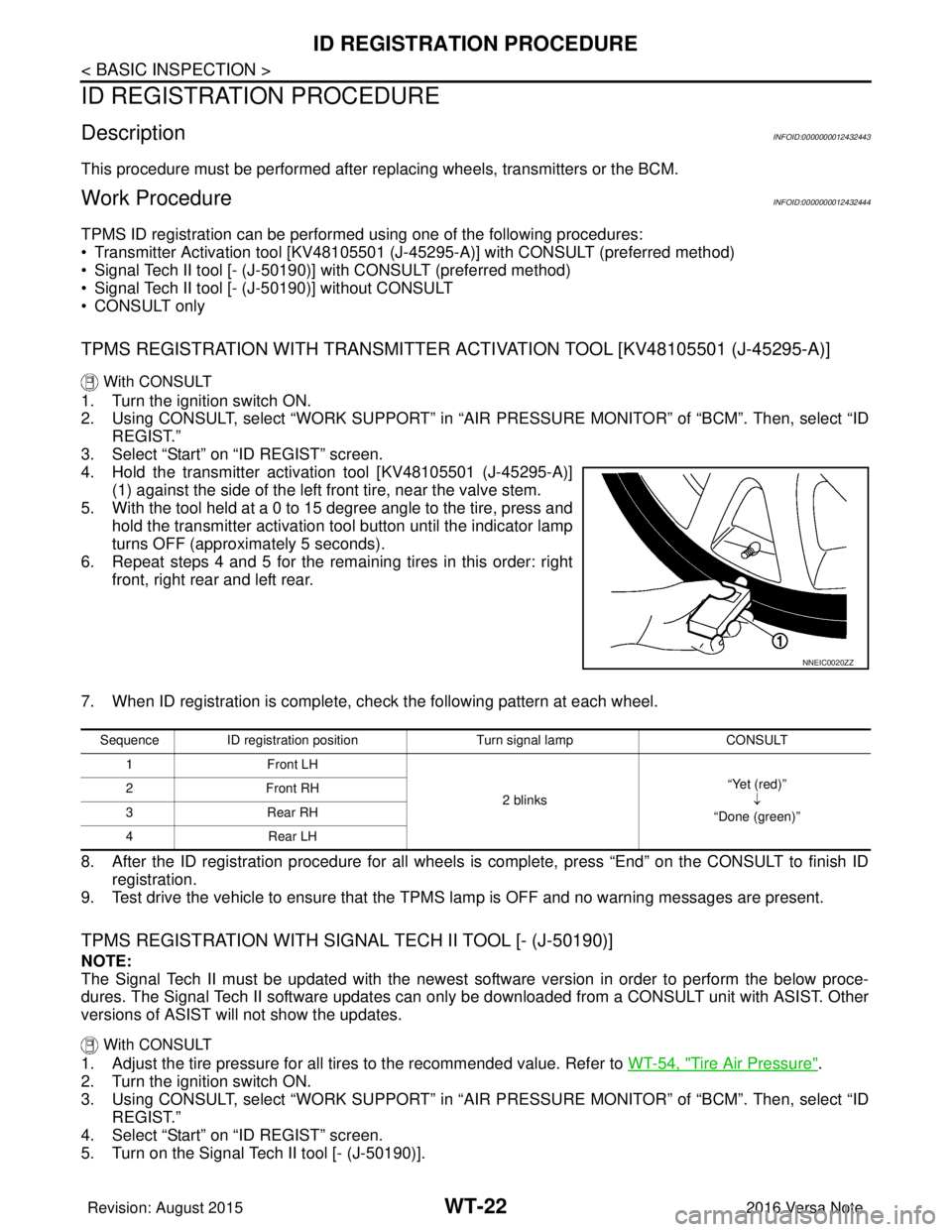
4. Hold the transmitter activation tool [KV48105501 (J-45295-A)] (1) against the side of the left front tire, near the valve stem.
5. With the tool held at a 0 to 15 degree angle to the tire, press and hold the transmitter activation tool button until the indicator lamp
turns OFF (approximately 5 seconds).
6. Repeat steps 4 and 5 for the remaining tires in this order: right front, right rear and left rear.
7. When ID registration is complete, check the following pattern at each wheel.
8. After the ID registration procedure for all wheels is complete, press “End” on the CONSULT to finish ID registration.
9. Test drive the vehicle to ensure that the TPMS lamp is OFF and no warning messages are present.
TPMS REGISTRATION WITH SIGNAL TECH II TOOL [- (J-50190)]
NOTE:
The Signal Tech II must be updated with the newest software version in order to perform the below proce-
dures. The Signal Tech II software updates can onl y be downloaded from a CONSULT unit with ASIST. Other
versions of ASIST wil l not show the updates.
With CONSULT
1. Adjust the tire pressure for all tires to the recommended value. Refer to WT-54, "Tire Air Pressure".
2. Turn the ignition switch ON.
3. Using CONSULT, select “WORK SUPPORT” in “AIR PRESSURE MONITOR” of “BCM”. Then, select “ID
REGIST.”
4. Select “Start” on “ID REGIST” screen.
5. Turn on the Signal Tech II tool [- (J-50190)].
NNEIC0020ZZ
Sequence ID registration position Turn signal lamp CONSULT
1F ro nt L H
2 blinks “Yet (red)”
↓
“Done (green)”
2F
ro nt R H
3R ea r R H
4R ear L H
Revision: August 2015 2016 Versa Note
cardiagn.com