low beam NISSAN NOTE 2016 Service Owner's Guide
[x] Cancel search | Manufacturer: NISSAN, Model Year: 2016, Model line: NOTE, Model: NISSAN NOTE 2016Pages: 3641, PDF Size: 28.72 MB
Page 2514 of 3641
![NISSAN NOTE 2016 Service Owners Guide PCS
DIAGNOSIS SYSTEM (IPDM E/R)PCS-11
< SYSTEM DESCRIPTION > [IPDM E/R]
C
D
E
F
G H
I
J
K L
B A
O P
N
ECU IDENTIFICATION
The IPDM E/R part number is displayed.
SELF DIAGNOSTIC RESULT
Refer to
PCS-20,](/img/5/57363/w960_57363-2513.png "NISSAN NOTE 2016 Service Owners Guide PCS
DIAGNOSIS SYSTEM (IPDM E/R)PCS-11
< SYSTEM DESCRIPTION > [IPDM E/R]
C
D
E
F
G H
I
J
K L
B A
O P
N
ECU IDENTIFICATION
The IPDM E/R part number is displayed.
SELF DIAGNOSTIC RESULT
Refer to
PCS-20,")
PCS
DIAGNOSIS SYSTEM (IPDM E/R)PCS-11
< SYSTEM DESCRIPTION > [IPDM E/R]
C
D
E
F
G H
I
J
K L
B A
O P
N
ECU IDENTIFICATION
The IPDM E/R part number is displayed.
SELF DIAGNOSTIC RESULT
Refer to
PCS-20, "DTCIndex".
DATA MONITOR
ACTIVE TEST
Data Monitor The IPDM E/R input/output data is displayed in real time.
Active Test The IPDM E/R activates outputs to test components.
CAN Diag Support Mntr The result of transmit/receive diagnosis of CAN communication is displayed.
Direct Diagnostic Mode
Description
Monitor Item [Unit]Main
Signals Description
MOTOR FAN REQ [1/2/3/4] ×Indicates cooling fan speed signal received from ECM on CAN communication
line
AC COMP REQ [On/Off] ×Indicates A/C compressor request signal received from ECM on CAN commu-
nication line
TAIL&CLR REQ [On/Off] ×Indicates position light request signal
received from BCM on CAN communica-
tion line
HL LO REQ [On/Off] ×Indicates low beam request signal received from BCM on CAN communication
line
HL HI REQ [On/Off] ×Indicates high beam request signal received from BCM on CAN communication
line
FR FOG REQ [On/Off] ×Indicates front fog light request signal received from BCM on CAN communica-
tion line
FR WIP REQ [Stop/1LOW/Low/Hi] ×Indicates front wiper request signal received from BCM on CAN communication
line
WIP AUTO STOP [STOP P/ACT P] ×Indicates condition of front wiper auto stop signal
WIP PROT [Off/BLOCK] ×Indicates condition of front wiper fail-safe operation
IGN RLY1 -REQ [On/Off] Indicates ignition switch ON signal received from BCM on CAN communication
line
IGN RLY [On/Off] ×Indicates condition of ignition relay
PUSH SW [On/Off] Indicates condition of push-button ignition switch
INTER/NP SW [On/Off] Indicates condition of CVT shift position
ST RLY CONT [On/Off] Indicates starter relay status signal received from BCM on CAN communication
line
IHBT RLY -REQ [On/Off] Indicates starter control relay signal received from BCM on CAN communication
line
ST/INHI RLY [Off/ ST /INHI] Indicates condition of starter relay and starter control relay
DETENT SW [On/Off] Indicates condition of CVT shift selector (park position switch)
DTRL REQ [Off] Indicates daytime running light request signal received from BCM on CAN com-
munication line
THFT HRN REQ [On/Off] Indicates theft warning horn request signal received from BCM on CAN commu-
nication line
HORN CHIRP [On/Off] Indicates horn reminder signal received from BCM on CAN communication line
Test item Description
HORN This test is able to check horn operation [On].
FRONT WIPER This test is able to check wiper motor operation [Hi/Lo/Off].
Revision: August 2015 2016 Versa Note
cardiagn.com
Page 2730 of 3641

RSU-2
< PRECAUTION >
PRECAUTIONS
PRECAUTION
PRECAUTIONS
Precaution for Supplemental Restraint System (SRS) "AIR BAG" and "SEAT BELT
PRE-TENSIONER"
INFOID:0000000012431916
The Supplemental Restraint System such as “A IR BAG” and “SEAT BELT PRE-TENSIONER”, used along
with a front seat belt, helps to reduce the risk or severity of injury to the driver and front passenger for certain
types of collision. Information necessary to service the system safely is included in the SR and SB section of
this Service Manual.
WARNING:
• To avoid rendering the SRS inopera tive, which could increase the risk of personal injury or death in
the event of a collision which would result in air bag inflation, all maintenance must be performed by
an authorized NISSAN/INFINITI dealer.
• Improper maintenance, including in correct removal and installation of the SRS, can lead to personal
injury caused by unintent ional activation of the system. For re moval of Spiral Cable and Air Bag
Module, see the SR section.
• Do not use electrical test equipmen t on any circuit related to the SRS unless instructed to in this
Service Manual. SRS wiring harn esses can be identified by yellow and/or orange harnesses or har-
ness connectors.
PRECAUTIONS WHEN USING POWER TOOLS (AIR OR ELECTRIC) AND HAMMERS
WARNING:
• When working near the Airbag Diagnosis Sensor Unit or other Airbag System sensors with the Igni-
tion ON or engine running, DO NOT use air or electri c power tools or strike near the sensor(s) with a
hammer. Heavy vibration could activate the sensor( s) and deploy the air bag(s), possibly causing
serious injury.
• When using air or electric power tools or hammers , always switch the Ignition OFF, disconnect the
battery and wait at least three minutes before performing any service.
Precaution for SuspensionINFOID:0000000012431917
• When installing rubber bushings, the final tightening mu st be carried out under unladen conditions with tires
on ground. Spilled oil might shorten the life of rubber bushings. Be sure to wipe off any spilled oil.
- Unladen conditions mean that fuel, engine coolant and lubricant are full. Spare tire, jack, hand tools and mats are in designated positions.
• After servicing suspension parts, be sure to check wheel alignment.
• Self-lock nuts are not reusable. Always use new ones when installing. Since new self-lock nuts are pre-oiled,
tighten as they are.
• The tightening surface must be kept free of oil/grease.
• When jacking up the vehicle with a floor jack, do not hang the jack on the suspension beam.
Revision: August 2015 2016 Versa Note
cardiagn.com
Page 2734 of 3641

RSU-6
< PERIODIC MAINTENANCE >
WHEEL ALIGNMENT
WHEEL ALIGNMENT
InspectionINFOID:0000000012431922
DESCRIPTION
Measure the wheel alignment under unladen conditions.
NOTE:
“Unladen conditions” means that fuel, engine coolant, and lubricants are full. Spare tire, jack, hand tools and
mats are in designated positions.
PRELIMINARY
Check the following:
1. Tires for improper air pressure and wear.
2. Road wheels for runout. Refer to WT-44, "
Inspection".
3. Wheel bearing axial end play. Refer to RAX-10, "
Wheel Bearing".
4. Shock absorber operation.
5. Each mounting part of suspension for looseness and deformation.
6. Rear suspension beam for cracks, deformation, and other damage.
7. Vehicle height (posture).
GENERAL INFORMATION AND RECOMMENDATIONS
1. A Four-Wheel Thrust Alignment should be performed. • This type of alignment is recommended for any NISSAN/INFINITI vehicle.
• The four-wheel “thrust” process helps ensure that the vehicle is properly aligned and the steering wheel
is centered.
• The alignment machine itself should be capabl e of accepting any NISSAN/INFINITI vehicle.
• The alignment machine should be checked to ensure that it is level.
2. Make sure the alignment machine is properly calibrated. • Your alignment machine should be regularly calibrated in order to give correct information.
• Check with the manufacturer of your specific al ignment machine for their recommended Service/Cali-
bration Schedule.
THE ALIGNMENT PROCESS
IMPORTANT: Use only the alignment specifications listed in this Service Manual. Refer to RSU-15, "Wheel
Alignment (Unladen*1)".
1. When displaying the alignment settings, many alignment machines use “indicators”: (Green/red, plus or minus, Go/No Go). Do NOT use these indicators.
• The alignment specifications programmed into your alignment machine that operate these indicators may not be correct.
• This may result in an ERROR.
2. Most camera-type alignment machines are equipped with both "Rolling Compensation" method and optional "Jacking Compensation" method to "com pensate" the alignment targets or head units.
"Rolling Compensation" is the preferred method.
• If using the "Rolling Compensation" method, after installing the alignment targets or head units, push or pull on the rear wheel to move the vehicle. Do not push or pull the vehicle body.
• If using the "Jacking Compensation" method, after in stalling the alignment targets or head units, raise
the vehicle and rotate the wheels 1/2 turn both ways.
NOTE:
Do not use the "rolling compensation" if you are using sensor-type alignment equipment.
• Follow all instructions for the alignment machine you're using for more information.
CAMBER INSPECTION
• Measure camber of both right and left wheels with a suitable alignment gauge.
• If it is out of the specificati on value, inspect and replace any damaged or worn rear suspension parts.
Camber : Refer to RSU-15, "
Wheel Alignment
(Unladen*1)".
Revision: August 2015
2016 Versa Note
cardiagn.com
Page 2736 of 3641
RSU-8
< REMOVAL AND INSTALLATION >
REAR SHOCK ABSORBER
REMOVAL AND INSTALLATION
REAR SHOCK ABSORBER
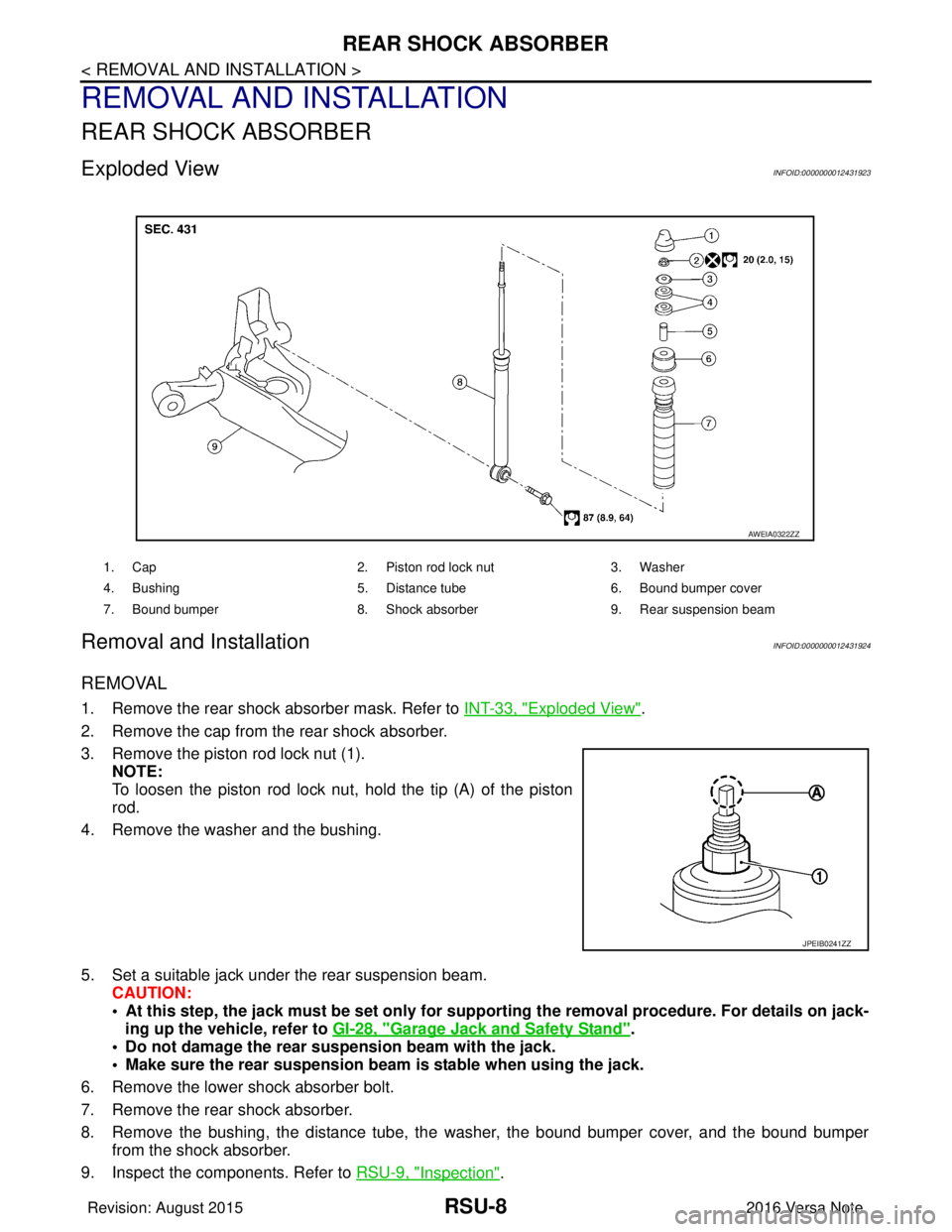
Exploded ViewINFOID:0000000012431923
Removal and InstallationINFOID:0000000012431924
REMOVAL
1. Remove the rear shock absorber mask. Refer to INT-33, "Exploded View".
2. Remove the cap from the rear shock absorber.
3. Remove the piston rod lock nut (1). NOTE:
To loosen the piston rod lock nut, hold the tip (A) of the piston
rod.
4. Remove the washer and the bushing.
5. Set a suitable jack under the rear suspension beam. CAUTION:
• At this step, the jack must be set only for supp orting the removal procedure. For details on jack-
ing up the vehicle, refer to GI-28, "
Garage Jack and Safety Stand".
• Do not damage the rear suspension beam with the jack.
• Make sure the rear suspension beam is stable when using the jack.
6. Remove the lower shock absorber bolt.
7. Remove the rear shock absorber.
8. Remove the bushing, the distance tube, the washer, the bound bumper cover, and the bound bumper
from the shock absorber.
9. Inspect the components. Refer to RSU-9, "
Inspection".
1. Cap 2. Piston rod lock nut 3. Washer
4. Bushing 5. Distance tube6. Bound bumper cover
7. Bound bumper 8. Shock absorber 9. Rear suspension beam
AWEIA0322ZZ
JPEIB0241ZZ
Revision: August 2015 2016 Versa Note
cardiagn.com
Page 2739 of 3641
COIL SPRINGRSU-11
< REMOVAL AND INSTALLATION >
C
DF
G H
I
J
K L
M A
B
RSU
N
O P
COIL SPRING
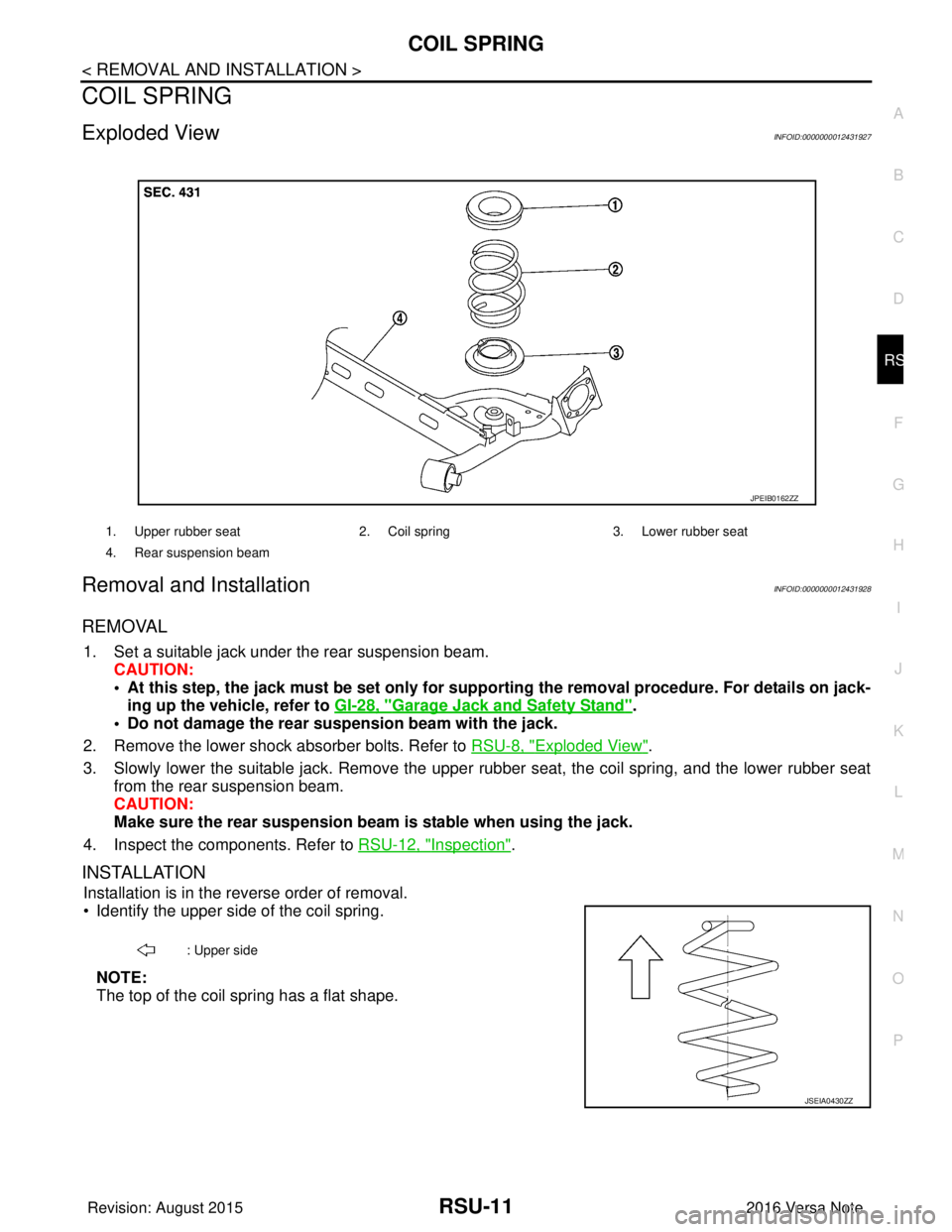
Exploded ViewINFOID:0000000012431927
Removal and InstallationINFOID:0000000012431928
REMOVAL
1. Set a suitable jack under the rear suspension beam. CAUTION:
• At this step, the jack must be set only for suppo rting the removal procedure. For details on jack-
ing up the vehicle, refer to GI-28, "
Garage Jack and Safety Stand".
• Do not damage the rear su spension beam with the jack.
2. Remove the lower shock absorber bolts. Refer to RSU-8, "
Exploded View".
3. Slowly lower the suitable jack. Remove the upper rubber seat, the coil spring, and the lower rubber seat
from the rear suspension beam.
CAUTION:
Make sure the rear susp ension beam is stable when using the jack.
4. Inspect the components. Refer to RSU-12, "
Inspection".
INSTALLATION
Installation is in the reverse order of removal.
• Identify the upper side of the coil spring.
NOTE:
The top of the coil spring has a flat shape.
1. Upper rubber seat 2. Coil spring3. Lower rubber seat
4. Rear suspension beam
JPEIB0162ZZ
: Upper side
JSEIA0430ZZ
Revision: August 2015 2016 Versa Note
cardiagn.com
Page 2740 of 3641
RSU-12
< REMOVAL AND INSTALLATION >
COIL SPRING
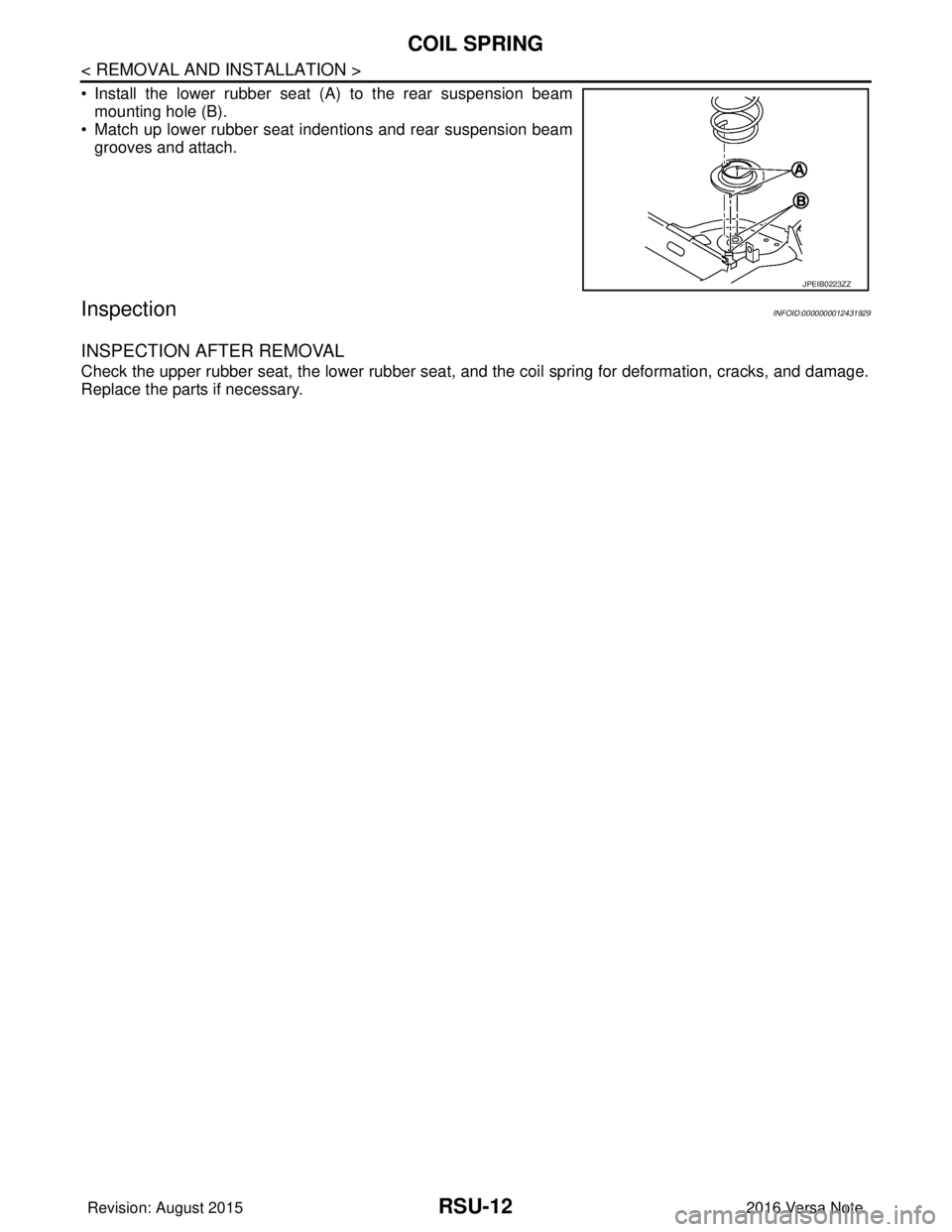
• Install the lower rubber seat (A) to the rear suspension beammounting hole (B).
• Match up lower rubber seat indentions and rear suspension beam
grooves and attach.
InspectionINFOID:0000000012431929
INSPECTION AFTER REMOVAL
Check the upper rubber seat, the lower rubber seat, and the coil spring for deformation, cracks, and damage.
Replace the parts if necessary.
JPEIB0223ZZ
Revision: August 2015 2016 Versa Note
cardiagn.com
Page 2741 of 3641
REAR SUSPENSION BEAMRSU-13
< REMOVAL AND INSTALLATION >
C
DF
G H
I
J
K L
M A
B
RSU
N
O P
REAR SUSPENSION BEAM
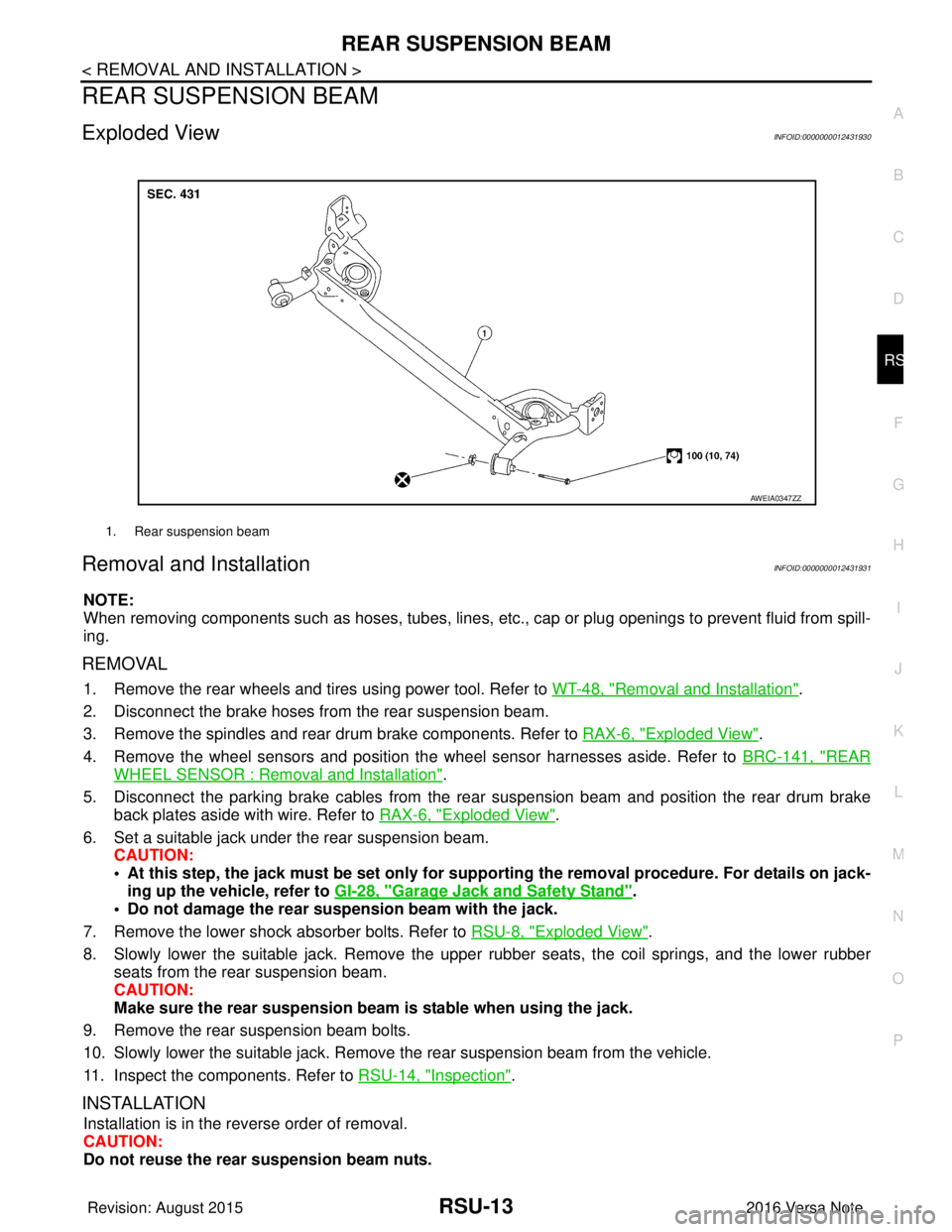
Exploded ViewINFOID:0000000012431930
Removal and InstallationINFOID:0000000012431931
NOTE:
When removing components such as hoses, tubes, lines, etc. , cap or plug openings to prevent fluid from spill-
ing.
REMOVAL
1. Remove the rear wheels and tires using power tool. Refer to WT-48, "Removal and Installation".
2. Disconnect the brake hoses from the rear suspension beam.
3. Remove the spindles and rear drum brake components. Refer to RAX-6, "
Exploded View".
4. Remove the wheel sensors and position the wheel sensor harnesses aside. Refer to BRC-141, "
REAR
WHEEL SENSOR : Removal and Installation".
5. Disconnect the parking brake cables from the rear suspension beam and position the rear drum brake
back plates aside with wire. Refer to RAX-6, "
Exploded View".
6. Set a suitable jack under the rear suspension beam. CAUTION:
• At this step, the jack must be set only for suppo rting the removal procedure. For details on jack-
ing up the vehicle, refer to GI-28, "
Garage Jack and Safety Stand".
• Do not damage the rear su spension beam with the jack.
7. Remove the lower shock absorber bolts. Refer to RSU-8, "
Exploded View".
8. Slowly lower the suitable jack. Remove the upper rubber seats, the coil springs, and the lower rubber seats from the rear suspension beam.
CAUTION:
Make sure the rear susp ension beam is stable when using the jack.
9. Remove the rear suspension beam bolts.
10. Slowly lower the suitable jack. Remove the rear suspension beam from the vehicle.
11. Inspect the components. Refer to RSU-14, "
Inspection".
INSTALLATION
Installation is in the reverse order of removal.
CAUTION:
Do not reuse the rear suspension beam nuts.
1. Rear suspension beam
AWEIA0347ZZ
Revision: August 2015 2016 Versa Note
cardiagn.com
Page 2986 of 3641
![NISSAN NOTE 2016 Service Owners Guide DIAGNOSIS SYSTEM (IPDM E/R)SEC-129
< SYSTEM DESCRIPTION > [WITHOUT INTELLIGENT KEY SYSTEM]
C
D
E
F
G H
I
J
L
M A
B
SEC
N
O P
ECU IDENTIFICATION
The IPDM E/R part number is displayed.
SELF DIAGNOSTIC R](/img/5/57363/w960_57363-2985.png "NISSAN NOTE 2016 Service Owners Guide DIAGNOSIS SYSTEM (IPDM E/R)SEC-129
< SYSTEM DESCRIPTION > [WITHOUT INTELLIGENT KEY SYSTEM]
C
D
E
F
G H
I
J
L
M A
B
SEC
N
O P
ECU IDENTIFICATION
The IPDM E/R part number is displayed.
SELF DIAGNOSTIC R")
DIAGNOSIS SYSTEM (IPDM E/R)SEC-129
< SYSTEM DESCRIPTION > [WITHOUT INTELLIGENT KEY SYSTEM]
C
D
E
F
G H
I
J
L
M A
B
SEC
N
O P
ECU IDENTIFICATION
The IPDM E/R part number is displayed.
SELF DIAGNOSTIC RESULT
Refer to PCS-20, "DTCIndex".
DATA MONITOR
ACTIVE TEST
Data Monitor The IPDM E/R input/output data is displayed in real time.
Active Test The IPDM E/R activates outputs to test components.
CAN Diag Support Mntr The result of transmit/receive diagnosis of CAN communication is displayed.
Direct Diagnostic Mode
Description
Monitor Item [Unit]Main
Signals Description
MOTOR FAN REQ [1/2/3/4] ×Indicates cooling fan speed signal received from ECM on CAN communication
line
AC COMP REQ [On/Off] ×Indicates A/C compressor request signal received from ECM on CAN commu-
nication line
TAIL&CLR REQ [On/Off] ×Indicates position light request signal
received from BCM on CAN communica-
tion line
HL LO REQ [On/Off] ×Indicates low beam request signal received from BCM on CAN communication
line
HL HI REQ [On/Off] ×Indicates high beam request signal received from BCM on CAN communication
line
FR FOG REQ [On/Off] ×Indicates front fog light request signal received from BCM on CAN communica-
tion line
FR WIP REQ [Stop/1LOW/Low/Hi] ×Indicates front wiper request signal received from BCM on CAN communication
line
WIP AUTO STOP [STOP P/ACT P] ×Indicates condition of front wiper auto stop signal
WIP PROT [Off/BLOCK] ×Indicates condition of front wiper fail-safe operation
IGN RLY1 -REQ [On/Off] Indicates ignition switch ON signal received from BCM on CAN communication
line
IGN RLY [On/Off] ×Indicates condition of ignition relay
PUSH SW [On/Off] Indicates condition of push-button ignition switch
INTER/NP SW [On/Off] Indicates condition of CVT shift position
ST RLY CONT [On/Off] Indicates starter relay status signal received from BCM on CAN communication
line
IHBT RLY -REQ [On/Off] Indicates starter control relay signal received from BCM on CAN communication
line
ST/INHI RLY [Off/ ST /INHI] Indicates condition of starter relay and starter control relay
DETENT SW [On/Off] Indicates condition of CVT shift selector (park position switch)
DTRL REQ [Off] Indicates daytime running light request signal received from BCM on CAN com-
munication line
THFT HRN REQ [On/Off] Indicates theft warning horn request signal received from BCM on CAN commu-
nication line
HORN CHIRP [On/Off] Indicates horn reminder signal received from BCM on CAN communication line
Test item Description
HORN This test is able to check horn operation [On].
FRONT WIPER This test is able to check wiper motor operation [Hi/Lo/Off].
Revision: August 2015 2016 Versa Note
cardiagn.com
Page 3530 of 3641
![NISSAN NOTE 2016 Service Owners Guide WCS
DIAGNOSIS SYSTEM (COMBINATION METER)WCS-15
< SYSTEM DESCRIPTION >
C
DE
F
G H
I
J
K L
M B A
O P
NOTE:
Some items are not available according to vehicle specification.
WORK SUPPORT
SLIP IND
[ON/OFF]](/img/5/57363/w960_57363-3529.png "NISSAN NOTE 2016 Service Owners Guide WCS
DIAGNOSIS SYSTEM (COMBINATION METER)WCS-15
< SYSTEM DESCRIPTION >
C
DE
F
G H
I
J
K L
M B A
O P
NOTE:
Some items are not available according to vehicle specification.
WORK SUPPORT
SLIP IND
[ON/OFF]")
WCS
DIAGNOSIS SYSTEM (COMBINATION METER)WCS-15
< SYSTEM DESCRIPTION >
C
DE
F
G H
I
J
K L
M B A
O P
NOTE:
Some items are not available according to vehicle specification.
WORK SUPPORT
SLIP IND
[ON/OFF] Displays [ON/OFF] condition of SLIP indicator lamp.
BRAKE W/L
[ON/OFF] Displays [ON/OFF] condition of brake warning indicator.
DOOR W/L
[ON/OFF] Displays [ON/OFF] condition of door warning indicator.
HI-BEAM IND
[ON/OFF] Displays [ON/OFF] condition of high beam indicator.
TURN IND
[ON/OFF] Displays [ON/OFF] condition of turn indicator.
LIGHT IND
[ON/OFF] Displays [ON/OFF] condition of light indicator.
OIL W/L
[ON/OFF] Displays [ON/OFF] condition of engine oil pressure warning indicator.
MIL
[ON/OFF] Displays [ON/OFF] condition of malfunction indicator.
CRUISE IND
[Off] Displays [ON/OFF]
condition of CRUISE indicator.
O/D OFF IND
[ON/OFF] Displays [ON/OFF] condition of O/D OFF indicator.
FUEL W/L
[ON/OFF] Displays [ON/OFF] condition of low-fuel warning indicator.
AIR PRES W/L
[ON/OFF] Displays [ON/OFF] condition of tire pressure warning lamp.
EPS W/L
[ON/OFF] Displays [ON/OFF] condition of EPS indicator.
CHG SIG
[On/Off] Displays [ON/OFF] condition of charge warning indicator.
PASS BUCKLE
SW
[ON/OFF] Status of seat belt buckle switch RH.
FUEL CAP W/L
[Off] Displays [ON/OFF] condition of loose fuel cap warning message.
PKB SW
[ON/OFF] Status of parking brake switch.
BUCKLE SW
[ON/OFF] Status of seat belt buckle switch LH.
BRAKE OIL SW
[ON/OFF] Status of brake fluid level switch.
DISTANCE
[M] or [Mi] Displays distance to empty.
FUEL LOW SIG
[ON/OFF] Displays [ON/OFF] condition
of low-fuel warning signal.
BUZZER
[ON/OFF] X Displays [ON/OFF] condition of buzzer.
TPMS PRESS L
[ON/OFF] Displays [ON/OFF] condition of check tire pressure warning message.
Display item [Unit]
MAIN
SIGNALS Description
Revision: August 2015
2016 Versa Note
cardiagn.com
Page 3534 of 3641
![NISSAN NOTE 2016 Service Owners Guide WCS
DIAGNOSIS SYSTEM (COMBINATION METER)WCS-19
< SYSTEM DESCRIPTION >
C
DE
F
G H
I
J
K L
M B A
O P
X: Applicable
Display item [Unit] MAIN
SIGNALS Description
SPEED METER
[mph] or [km/h] X Displays the](/img/5/57363/w960_57363-3533.png "NISSAN NOTE 2016 Service Owners Guide WCS
DIAGNOSIS SYSTEM (COMBINATION METER)WCS-19
< SYSTEM DESCRIPTION >
C
DE
F
G H
I
J
K L
M B A
O P
X: Applicable
Display item [Unit] MAIN
SIGNALS Description
SPEED METER
[mph] or [km/h] X Displays the")
WCS
DIAGNOSIS SYSTEM (COMBINATION METER)WCS-19
< SYSTEM DESCRIPTION >
C
DE
F
G H
I
J
K L
M B A
O P
X: Applicable
Display item [Unit] MAIN
SIGNALS Description
SPEED METER
[mph] or [km/h] X Displays the value of vehicle speed signal.
SPEED OUTPUT
[mph] or [km/h] X
Displays the value of vehicle speed signal, which is transmitted to each unit with
CAN communication.
ODO OUTPUT
[mph] or [km/h] Displays odometer signal value transmitted to other units via CAN communica-
tion.
TACHO METER
[rpm] X Displays the value of engine speed signal, which is input from ECM.
FUEL METER
[L] X Displays the fuel level.
W TEMP METER
[ ° C] or [ °F] X Displays the value of engine coolant temperature signal, which is input from ECM.
ABS W/L
[On/Off] Displays [ON/OFF] condition of ABS warning indicator
VDC/TCS IND
[ON/OFF] Displays [ON/OFF] condition of VDC OFF indicator lamp.
SLIP IND
[ON/OFF] Displays [ON/OFF] condition of SLIP indicator lamp.
BRAKE W/L
[On/Off] Displays [ON/OFF] condition of brake warning indicator.
DOOR W/L
[On/Off] Displays [ON/OFF] condition of door warning indicator.
HI-BEAM IND
[On/Off] Displays [ON/OFF] condition of high beam indicator.
TURN IND
[On/Off] Displays [ON/OFF] condition of turn indicator.
LIGHT IND
[On/Off] Displays [ON/OFF] condition of light indicator.
OIL W/L
[On/Off] Displays [ON/OFF] condition of engine oil pressure warning indicator.
MIL
[On/Off] Displays [ON/OFF] condition of malfunction indicator.
CRUISE IND
[Off] Displays [ON/OFF] cond
ition of CRUISE indicator.
O/D OFF IND
[On/Off] Displays [ON/OFF] condition of O/D OFF indicator.
FUEL W/L
[On/Off] Displays [ON/OFF] condition of low-fuel warning indicator.
PASS BUCKLE SW
[On/Off] Status of seat belt buckle switch RH.
AIR PRES W/L
[ON/OFF] Displays [ON/OFF] condition of tire pressure warning lamp.
KEY G/Y W/L
[ON/OFF] Displays [ON/OFF] condition of key warning lamp.
EPS W/L
[On/Off] Displays [ON/OFF] condition of EPS indicator.
FUEL CAP W/L
[Off] Displays [ON/OFF] condition of loose fuel cap warning message.
PKB SW
[On/Off] Status of parking brake switch.
Revision: August 2015
2016 Versa Note
cardiagn.com