low beam NISSAN NOTE 2016 Service User Guide
[x] Cancel search | Manufacturer: NISSAN, Model Year: 2016, Model line: NOTE, Model: NISSAN NOTE 2016Pages: 3641, PDF Size: 28.72 MB
Page 395 of 3641
![NISSAN NOTE 2016 Service User Guide BCS-134
< SYMPTOM DIAGNOSIS >[WITHOUT INTELLIGENT KEY SYSTEM]
COMBINATION SWITCH SYSTEM SYMPTOMS
SYMPTOM DIAGNOSIS
COMBINATION SWITCH SYSTEM SYMPTOMS
Symptom TableINFOID:0000000012432409
WITH VARIABLE](/img/5/57363/w960_57363-394.png "NISSAN NOTE 2016 Service User Guide BCS-134
< SYMPTOM DIAGNOSIS >[WITHOUT INTELLIGENT KEY SYSTEM]
COMBINATION SWITCH SYSTEM SYMPTOMS
SYMPTOM DIAGNOSIS
COMBINATION SWITCH SYSTEM SYMPTOMS
Symptom TableINFOID:0000000012432409
WITH VARIABLE")
BCS-134
< SYMPTOM DIAGNOSIS >[WITHOUT INTELLIGENT KEY SYSTEM]
COMBINATION SWITCH SYSTEM SYMPTOMS
SYMPTOM DIAGNOSIS
COMBINATION SWITCH SYSTEM SYMPTOMS
Symptom TableINFOID:0000000012432409
WITH VARIABLE INTERMITTENT FRONT WIPERS
1. Perform the data monitor of CONSULT
to check for any malfunctioning item.
2. Check the malfunction combinations.
Malfunction item: ×
3. Identify the malfunctioning part from the agreed combination and repair or replace the part.
WITHOUT VARIABLE INTERMITTENT FRONT WIPERS
1. Perform the data monitor of CONSULT to check for any malfunctioning item.
Malfunction combination Data monitor item
FR WIPER HI
FR WIPER LOW
FR WASHER SW FR WIPER INTINT VOLUME
RR WIPER ON
RR WIPER INT
RR WASHER SW TURN SIGNAL RTURN SIGNAL L TA I L L A M P S W HI BEAM SW
HEAD LAMP SW 1
HEAD LAMP SW 2 PA S S I N G S WFR FOG SW
A ×× ××
B ×× ××
C ×× ××
D ×××
E ×× ×
F ×× ×
G ××××
H ××
I ××××
J × ×××
K All Items
L If only one item is detected or the item is not applicable to the combinations A to K
Malfunction
combination Malfunctioning part
Repair or replace
A Combination switch INPUT 1 circuit
Inspect the combination switch input circuit applicable to the malfunctioning
part. Refer to BCS-130, "
Diagnosis Procedure".
B Combination switch INPUT 2 circuit
C Combination switch INPUT 3 circuit
D Combination switch INPUT 4 circuit E Combination switch INPUT 5 circuitF Combination switch OUTPUT 1 circuit
Inspect the combination switch output circuit applicable to the malfunction-
ing part. Refer to BCS-132, "
Diagnosis Procedure".
G Combination switch OUTPUT 2 circuit
H Combination switch OUTPUT 3 circuit I Combination switch OUTPUT 4 circuit
J Combination switch OUTPUT 5 circuit
K BCM Replace BCM. Refer to BCS-137, "
Removal and Installation".
L Combination switch Replace the combination switch. Refer to
BCS-138, "
Removal and Installa-
tion".
Revision: August 2015 2016 Versa Note
cardiagn.com
Page 396 of 3641
![NISSAN NOTE 2016 Service User Guide BCS
COMBINATION SWITCH SYSTEM SYMPTOMSBCS-135
< SYMPTOM DIAGNOSIS > [WITHOUT INTELLIGENT KEY SYSTEM]
C
D
E
F
G H
I
J
K L
B A
O P
N
2. Check the malfunction combinations.
Malfunction item:
×
3. Ident](/img/5/57363/w960_57363-395.png "NISSAN NOTE 2016 Service User Guide BCS
COMBINATION SWITCH SYSTEM SYMPTOMSBCS-135
< SYMPTOM DIAGNOSIS > [WITHOUT INTELLIGENT KEY SYSTEM]
C
D
E
F
G H
I
J
K L
B A
O P
N
2. Check the malfunction combinations.
Malfunction item:
×
3. Ident")
BCS
COMBINATION SWITCH SYSTEM SYMPTOMSBCS-135
< SYMPTOM DIAGNOSIS > [WITHOUT INTELLIGENT KEY SYSTEM]
C
D
E
F
G H
I
J
K L
B A
O P
N
2. Check the malfunction combinations.
Malfunction item:
×
3. Identify the malfunctioning part from the agreed combination and repair or replace the part.
Malfunction combination Data monitor item
FR WIPER HI
FR WIPER LOW
FR WASHER SW
FR WIPER INT
RR WIPER ON
RR WIPER INT
RR WASHER SW TURN SIGNAL R
TURN SIGNAL L TAIL LAMP SW HI BEAM SW
HEAD LAMP SW 1
HEAD LAMP SW 2 PASSING SW
A ×× ××
B ×× ××
C ×××
D ××
E ×
F ××
G ×××
H ××
I ×××
J ××××
K All Items
L If only one item is detected or the item is not applicable to the combinations A to K
Malfunction
combination Malfunctioning part
Repair or replace
A Combination switch INPUT 1 circuit
Inspect the combination switch input circuit applicable to the malfunctioning
part. Refer to BCS-130, "
Diagnosis Procedure".
B Combination switch INPUT 2 circuit
C Combination switch INPUT 3 circuit
D Combination switch INPUT 4 circuit E Combination switch INPUT 5 circuitF Combination switch OUTPUT 1 circuit
Inspect the combination switch output circuit applicable to the malfunction-
ing part. Refer to BCS-132, "
Diagnosis Procedure".
G Combination switch OUTPUT 2 circuit
H Combination switch OUTPUT 3 circuit I Combination switch OUTPUT 4 circuit
J Combination switch OUTPUT 5 circuit
K BCM Replace BCM. Refer to BCS-137, "
Removal and Installation".
L Combination switch Replace the combination switch. Refer to
BCS-138, "
Removal and Installa-
tion".
Revision: August 2015 2016 Versa Note
cardiagn.com
Page 1654 of 3641

EXL-2
FLASHER : CONSULT Function (BCM - FLASH-
ER) .........................................................................
17
COMB SW .............................................................. ...18
COMB SW : CONSULT Function (BCM - COMB
SW) .........................................................................
18
BATTERY SAVER ................................................. ...18
BATTERY SAVER : CONSULT Function (BCM -
BATTERY SAVER) .................................................
18
DIAGNOSIS SYSTEM (IPDM E/R) ................. ...20
Diagnosis Description .......................................... ...20
CONSULT Function (IPDM E/R) ............................21
ECU DIAGNOSIS INFORMATION ..............24
BCM, IPDM E/R .............................................. ...24
List of ECU Reference ......................................... ...24
WIRING DIAGRAM .....................................25
HEADLAMP .................................................... ...25
Wiring Diagram - For USA ................................... ...25
Wiring Diagram - For Canada .................................31
DAYTIME LIGHT SYSTEM ............................. ...37
Wiring Diagram .................................................... ...37
FRONT FOG LAMP ...........................................43
Wiring Diagram .................................................... ...43
TURN SIGNAL AND HAZARD WARNING
LAMP SYSTEM .............................................. ...
48
Wiring Diagram .................................................... ...48
PARKING, LICENSE PLATE AND TAIL
LAMPS SYSTEM ............................................ ...
55
Wiring Diagram .................................................... ...55
STOP LAMP ......................................................63
Wiring Diagram .................................................... ...63
BACK-UP LAMP ................................................67
Wiring Diagram .................................................... ...67
BASIC INSPECTION ...................................71
DIAGNOSIS AND REPAIR WORKFLOW ...... ...71
Work Flow ............................................................ ...71
DTC/CIRCUIT DIAGNOSIS ...................... ...74
POWER SUPPLY AND GROUND CIRCUIT .. ...74
BCM (BODY CONTROL SYSTEM) (WITH INTEL-
LIGENT KEY SYSTEM) ..... .......................................
74
BCM (BODY CONTROL S YSTEM) (WITH INTEL-
LIGENT KEY SYSTEM) : Dia gnosis Procedure .....
74
BCM (BODY CONTROL SYST EM) (WITHOUT IN-
TELLIGENT KEY SYSTEM) . ....................................
74
BCM (BODY CONTROL SYSTEM) (WITHOUT
INTELLIGENT KEY SYSTEM) : Diagnosis Proce-
dure ...................................................................... ...
74
IPDM E/R ................................................................ ...75
IPDM E/R : Diagnosis Procedure ............................75
HEADLAMP (HI) CIRCUIT ................................77
Description ........................................................... ...77
Component Function Check ...................................77
Diagnosis Procedure ...............................................77
HEADLAMP (LO) CIRCUIT ...............................79
Description ........................................................... ...79
Component Function Check ...................................79
Diagnosis Procedure ...............................................79
PARKING LAMP CIRCUIT ................................82
Description ........................................................... ...82
Component Function Check ...................................82
Diagnosis Procedure ...............................................82
TURN SIGNAL LAMP CIRCUIT ........................85
Description ........................................................... ...85
Component Function Check ...................................85
Diagnosis Procedure ...............................................85
FRONT FOG LAMP CIRCUIT ...........................88
Component Function Check ................................ ...88
Diagnosis Procedure ...............................................88
Component Inspection ............................................90
SYMPTOM DIAGNOSIS ............................91
EXTERIOR LIGHTING SYSTEM SYMPTOMS ...91
Symptom Table .................................................... ...91
BOTH SIDE HEADLAMPS DO NOT SWITCH
TO HIGH BEAM .................................................
93
Description ........................................................... ...93
Diagnosis Procedure ...............................................93
BOTH SIDE HEADLAMPS (LO) ARE NOT
TURNED ON ......................................................
94
Description ..............................................................94
Diagnosis Procedure ...............................................94
PARKING, LICENSE PLATE AND TAIL
LAMPS ARE NOT TURNED ON .......................
95
Description ........................................................... ...95
Diagnosis Procedure ...............................................95
BOTH SIDE FRONT FOG LAMPS ARE NOT
TURNED ON ......................................................
96
Description ..............................................................96
Diagnosis Procedure ...............................................96
PERIODIC MAINTENANCE .......................97
HEADLAMP AIMING ADJUSTMENT ............ ...97
Inspection ............................................................. ...97
Aiming Adjustment Procedure ................................98
Revision: August 2015 2016 Versa Note
cardiagn.com
Page 1660 of 3641
EXL-8
< SYSTEM DESCRIPTION >
SYSTEM
SYSTEM
HEADLAMP SYSTEM
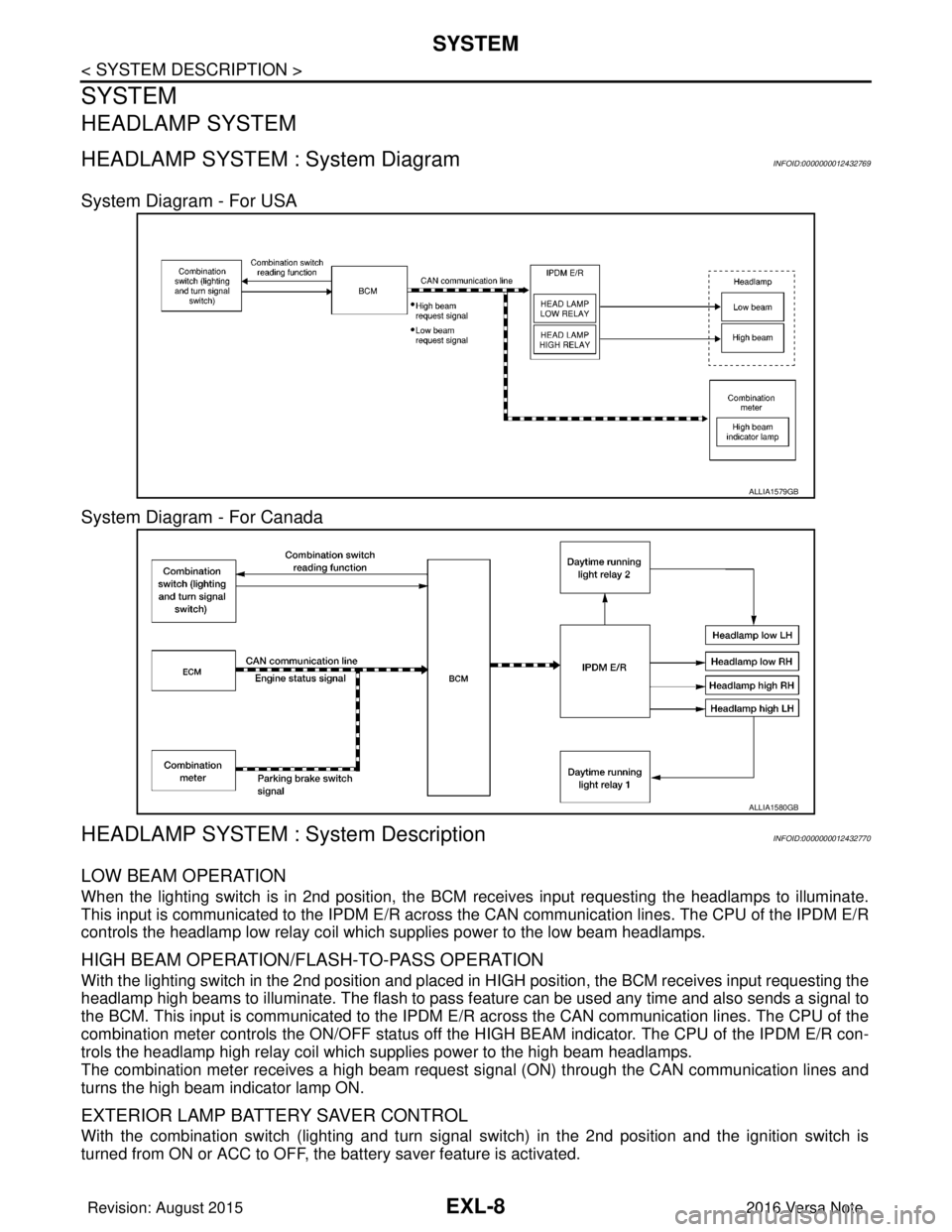
HEADLAMP SYSTEM : System Diagram INFOID:0000000012432769
System Diagram - For USA
System Diagram - For Canada
HEADLAMP SYSTEM : System DescriptionINFOID:0000000012432770
LOW BEAM OPERATION
When the lighting switch is in 2nd position, the BCM receives input requesting the headlamps to illuminate.
This input is communicated to the IPDM E/R across the CAN communication lines. The CPU of the IPDM E/R
controls the headlamp low relay coil which supplies power to the low beam headlamps.
HIGH BEAM OPERATION/FLASH-TO-PASS OPERATION
With the lighting switch in the 2nd position and placed in HIGH position, the BCM receives input requesting the
headlamp high beams to illuminate. The flash to pass f eature can be used any time and also sends a signal to
the BCM. This input is communicated to the IPDM E/R across the CAN communication lines. The CPU of the
combination meter controls the ON/OFF status off the HIGH BEAM indicator. The CPU of the IPDM E/R con-
trols the headlamp high relay coil which supplies power to the high beam headlamps.
The combination meter receives a high beam request signal (ON) through the CAN communication lines and
turns the high beam indicator lamp ON.
EXTERIOR LAMP BATTERY SAVER CONTROL
With the combination switch (lighting and turn signal switch) in the 2nd position and the ignition switch is
turned from ON or ACC to OFF, the battery saver feature is activated.
ALLIA1579GB
ALLIA1580GB
Revision: August 2015 2016 Versa Note
cardiagn.com
Page 1661 of 3641
SYSTEMEXL-9
< SYSTEM DESCRIPTION >
C
DE
F
G H
I
J
K
M A
B
EXL
N
O P
Under this condition, the headlamps remain illuminated for 45 seconds unless the lighting switch position is
changed. If the lighting switch position is changed, then the headlamps are turned off.
This setting can be changed by CONSULT. Refer to BCS-20, "
HEADLAMP : CONSULT Function (BCM -
HEAD LAMP)" (with Intelligent Key system) or BCS-93, "HEADLAMP : CONSULT Function (BCM - HEAD
LAMP)" (without Intelligent Key system).
DAYTIME RUNNING LIGHT SYSTEM
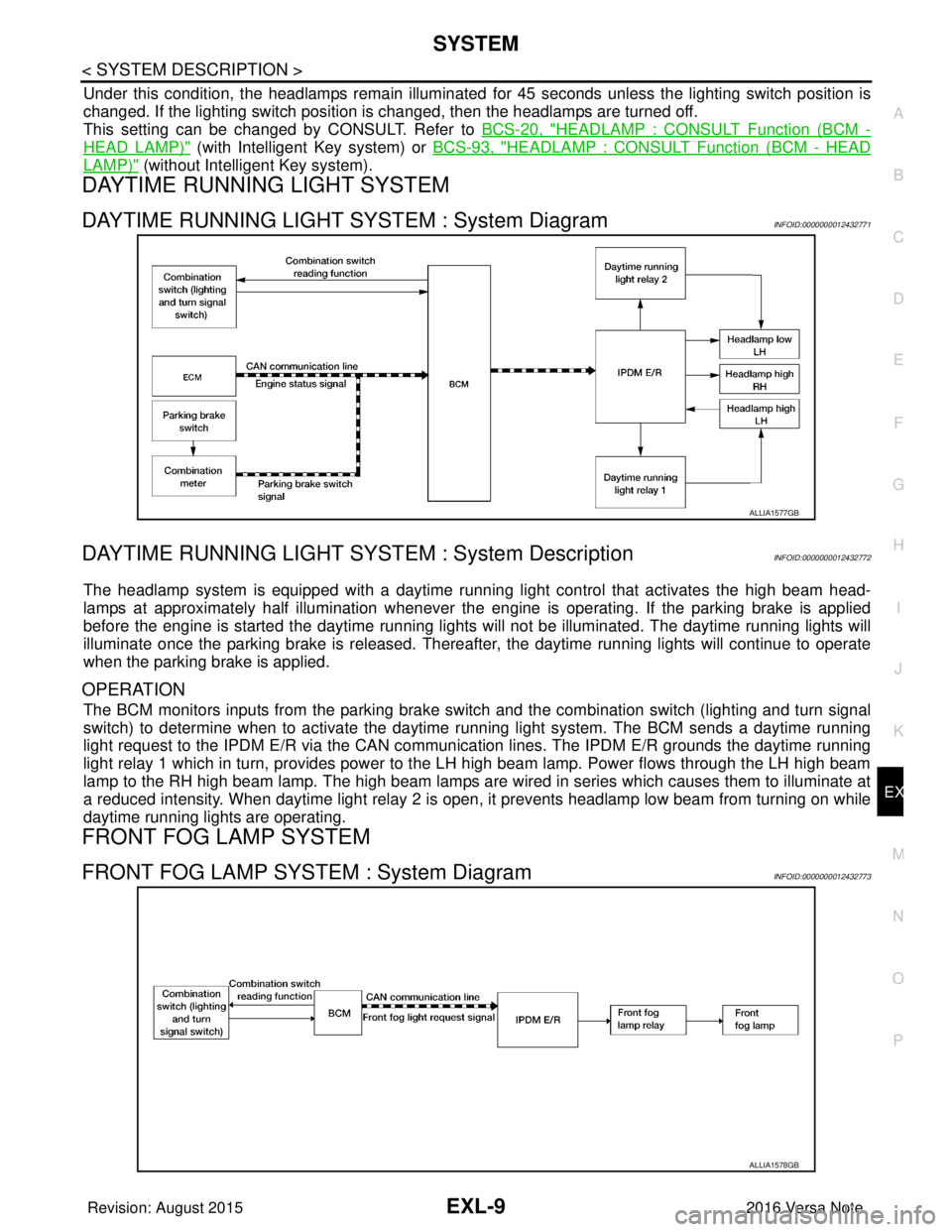
DAYTIME RUNNING LIGHT SYSTEM : System DiagramINFOID:0000000012432771
DAYTIME RUNNING LIGHT SYST EM : System DescriptionINFOID:0000000012432772
The headlamp system is equipped with a daytime running light control that activates the high beam head-
lamps at approximately half illumination whenever the e ngine is operating. If the parking brake is applied
before the engine is started the daytime running lights will not be illuminated. The daytime running lights will
illuminate once the parking brake is released. Thereaf ter, the daytime running lights will continue to operate
when the parking brake is applied.
OPERATION
The BCM monitors inputs from the parking brake swit ch and the combination switch (lighting and turn signal
switch) to determine when to activate the daytime running light system. The BCM sends a daytime running
light request to the IPDM E/R via the CAN communication lines. The IPDM E/R grounds the daytime running
light relay 1 which in turn, provides power to the LH high beam lamp. Power flows through the LH high beam
lamp to the RH high beam lamp. The high beam lamps are wired in series which causes them to illuminate at
a reduced intensity. When daytime light relay 2 is open, it prevents headlamp low beam from turning on while
daytime running lights are operating.
FRONT FOG LAMP SYSTEM
FRONT FOG LAMP SYSTEM : System DiagramINFOID:0000000012432773
ALLIA1577GB
ALLIA1578GB
Revision: August 2015 2016 Versa Note
cardiagn.com
Page 1665 of 3641
DIAGNOSIS SYSTEM (BCM) (WITH INTELLIGENT KEY SYSTEM)
EXL-13
< SYSTEM DESCRIPTION >
C
D E
F
G H
I
J
K
M A
B
EXL
N
O P
HEADLAMP
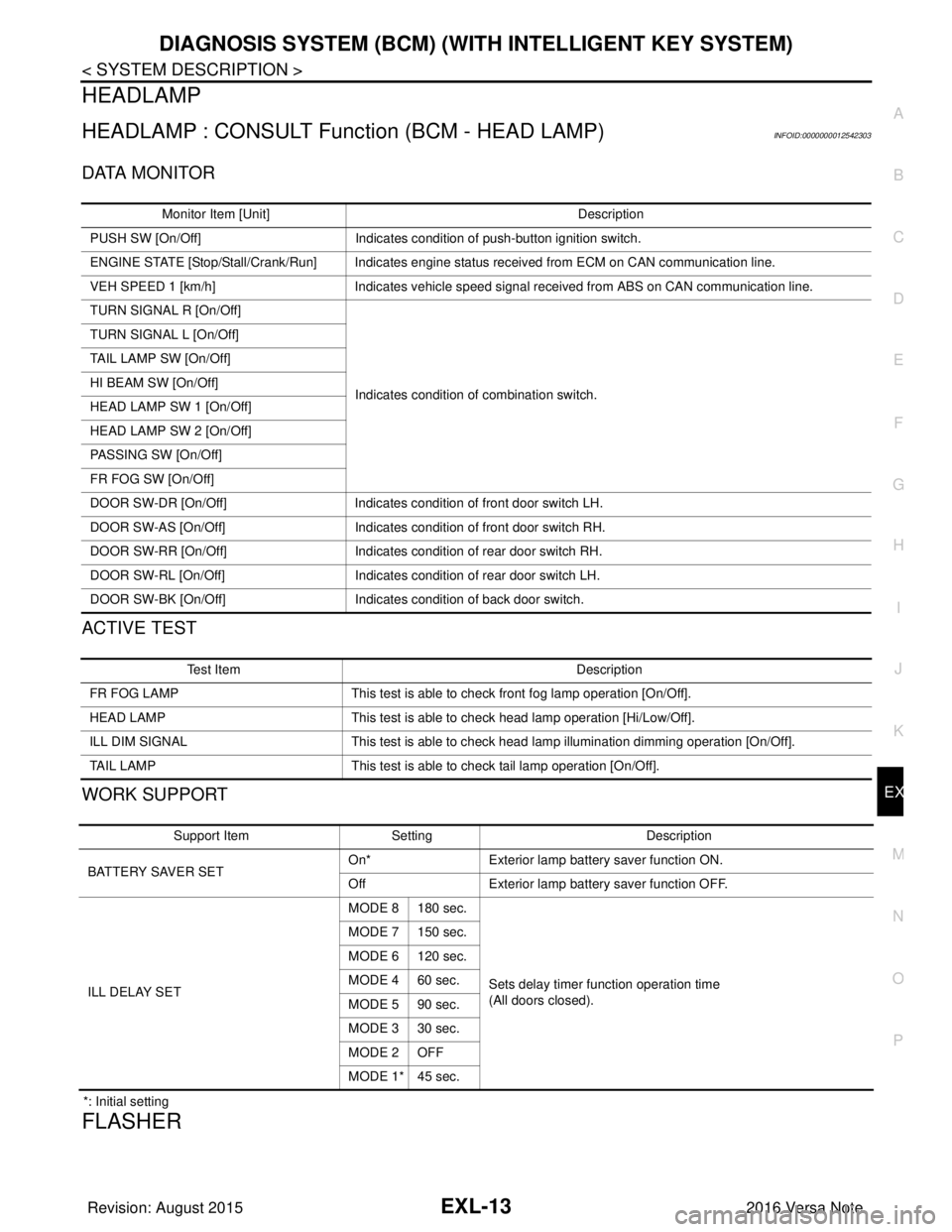
HEADLAMP : CONSULT Function (BCM - HEAD LAMP)INFOID:0000000012542303
DATA MONITOR
ACTIVE TEST
WORK SUPPORT
*: Initial setting
FLASHER
Monitor Item [Unit] Description
PUSH SW [On/Off] Indicates condition of push-button ignition switch.
ENGINE STATE [Stop/Stall/Crank/Run] Indicates engine status received from ECM on CAN communication line.
VEH SPEED 1 [km/h] Indicates vehicle speed signal received from ABS on CAN communication line.
TURN SIGNAL R [On/Off]
Indicates condition of combination switch.
TURN SIGNAL L [On/Off]
TAIL LAMP SW [On/Off]
HI BEAM SW [On/Off]
HEAD LAMP SW 1 [On/Off]
HEAD LAMP SW 2 [On/Off]
PASSING SW [On/Off]
FR FOG SW [On/Off]
DOOR SW-DR [On/Off]
Indicates condition of front door switch LH.
DOOR SW-AS [On/Off] Indicates condition of front door switch RH.
DOOR SW-RR [On/Off] Indicates condition of rear door switch RH.
DOOR SW-RL [On/Off] Indicates condition of rear door switch LH.
DOOR SW-BK [On/Off] Indicates condition of back door switch.
Test Item Description
FR FOG LAMP This test is able to check front fog lamp operation [On/Off].
HEAD LAMP This test is able to check head lamp operation [Hi/Low/Off].
ILL DIM SIGNAL This test is able to check head lamp illumination dimming operation [On/Off].
TAIL LAMP This test is able to check tail lamp operation [On/Off].
Support ItemSetting Description
BATTERY SAVER SET On*
Exterior lamp battery saver function ON.
Off Exterior lamp battery saver function OFF.
ILL DELAY SET MODE 8 180 sec.
Sets delay timer function operation time
(All doors closed).
MODE 7 150 sec.
MODE 6 120 sec.
MODE 4 60 sec.
MODE 5 90 sec.
MODE 3 30 sec.
MODE 2 OFF
MODE 1* 45 sec.
Revision: August 2015
2016 Versa Note
cardiagn.com
Page 1669 of 3641
DIAGNOSIS SYSTEM (BCM) (WITHOUT INTELLIGENT KEY SYSTEM)EXL-17
< SYSTEM DESCRIPTION >
C
DE
F
G H
I
J
K
M A
B
EXL
N
O P
HEADLAMP
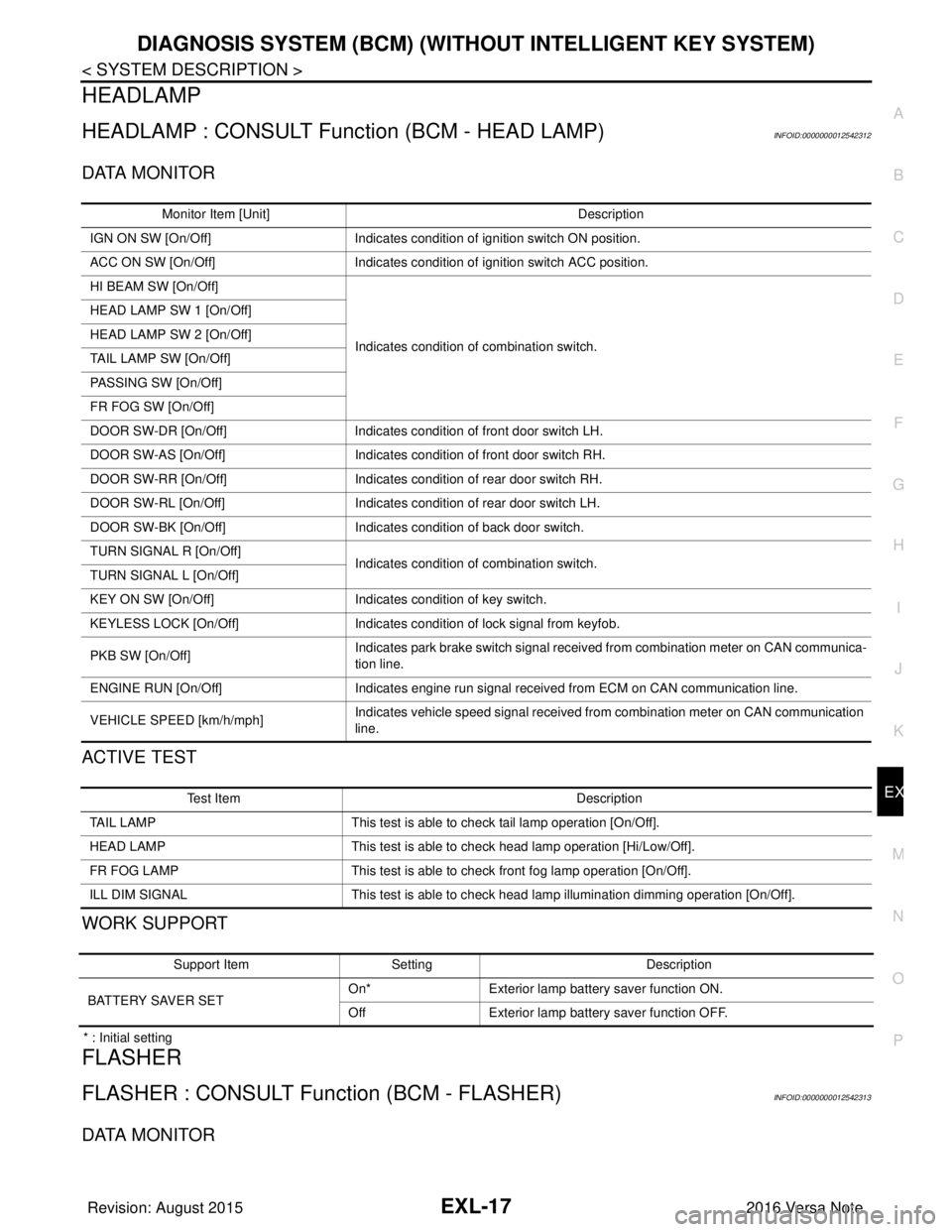
HEADLAMP : CONSULT Function (BCM - HEAD LAMP)INFOID:0000000012542312
DATA MONITOR
ACTIVE TEST
WORK SUPPORT
* : Initial setting
FLASHER
FLASHER : CONSULT Func tion (BCM - FLASHER)INFOID:0000000012542313
DATA MONITOR
Monitor Item [Unit] Description
IGN ON SW [On/Off] Indicates condition of ignition switch ON position.
ACC ON SW [On/Off] Indicates condition of ignition switch ACC position.
HI BEAM SW [On/Off]
Indicates condition of combination switch.
HEAD LAMP SW 1 [On/Off]
HEAD LAMP SW 2 [On/Off]
TAIL LAMP SW [On/Off]
PASSING SW [On/Off]
FR FOG SW [On/Off]
DOOR SW-DR [On/Off]
Indicates condition of front door switch LH.
DOOR SW-AS [On/Off] Indicates condition of front door switch RH.
DOOR SW-RR [On/Off] Indicates condition of rear door switch RH.
DOOR SW-RL [On/Off] Indicates condition of rear door switch LH.
DOOR SW-BK [On/Off] Indicates condition of back door switch.
TURN SIGNAL R [On/Off] Indicates condition of combination switch.
TURN SIGNAL L [On/Off]
KEY ON SW [On/Off] Indicates condition of key switch.
KEYLESS LOCK [On/Off] Indicates condition of lock signal from keyfob.
PKB SW [On/Off] Indicates park brake switch signal received from combination meter on CAN communica-
tion line.
ENGINE RUN [On/Off] Indicates engine run signal receiv ed from ECM on CAN communication line.
VEHICLE SPEED [km/h/mph] Indicates vehicle speed signal received from combination meter on CAN communication
line.
Test Item
Description
TAIL LAMP This test is able to check tail lamp operation [On/Off].
HEAD LAMP This test is able to check head lamp operation [Hi/Low/Off].
FR FOG LAMP This test is able to check front fog lamp operation [On/Off].
ILL DIM SIGNAL This test is able to check head lamp illumination dimming operation [On/Off].
Support ItemSetting Description
BATTERY SAVER SET On*
Exterior lamp battery saver function ON.
Off Exterior lamp battery saver function OFF.
Revision: August 2015 2016 Versa Note
cardiagn.com
Page 1670 of 3641

EXL-18
< SYSTEM DESCRIPTION >
DIAGNOSIS SYSTEM (BCM) (WITHOUT INTELLIGENT KEY SYSTEM)
ACTIVE TEST
COMB SW
COMB SW : CONSULT Function (BCM - COMB SW)INFOID:0000000012542314
DATA MONITOR
BATTERY SAVER
BATTERY SAVER : CONSULT Function (BCM - BATTERY SAVER)INFOID:0000000012542315
DATA MONITOR
Monitor Item [Unit]
Description
HAZARD SW [On/Off] Indicates condition of hazard switch.
TURN SIGNAL R [On/Off] Indicates condition of turn signal function of combination switch.
TURN SIGNAL L [On/Off]
Te s t I t e m D e s c r i p t i o n
FLASHER This test is able to check turn signal lamp operation [Off/LH/RH].
Monitor Item [Unit] Description
TURN SIGNAL R [On/Off] Indicates condition of right turn signal operation of combination switch.
TURN SIGNAL L [On/Off] Indicates condition of left turn signal operation of combination switch.
HI BEAM SW [On/Off] Indicates condition of Hi beam switch operation of combination switch.
HEAD LAMP SW 1 [On/Off] Indicates condition of head lamp switch 1 operation of combination switch.
HEAD LAMP SW 2 [On/Off] Indicates condition of head lamp switch 2 operation of combination switch.
TAIL LAMP SW [On/Off] Indicates condition of tail lamp switch operation of combination switch.
PASSING SW [On/Off] Indicates condition of passing switch operation of combination switch.
FR FOG SW [On/Off] Indicates condition of front fog lamp switch operation of combination switch.
FR WIPER HI [On/Off]
Indicates condition of front wiper operation of combination switch.
FR WIPER LOW [On/Off]
FR WIPER INT [On/Off]
FR WASHER SW [On/Off]
INT VOLUME [1 - 7]
Indicates condition of intermittent front wiper operation of combination switch.
RR WIPER ON [On/Off] Indicates condition of rear wiper operation of combination switch.
RR WIPER INT [On/Off]
RR WASHER SW [On/Off]
Monitor Item [Unit] Description
IGN ON SW [On/Off] Indicates condition of ignition switch ON position.
KEY ON SW [On/Off] Indicates condition of key switch.
DOOR SW-DR [On/Off] Indicates condition of front door switch LH.
DOOR SW-AS [On/Off] Indicates condition of front door switch RH.
DOOR SW-RR [On/Off] Indicates condition of rear door switch RH.
DOOR SW-RL [On/Off] Indicates condition of rear door switch LH.
DOOR SW-BK [On/Off] Indicates condition of back door switch.
CDL LOCK SW [On/Off] Indicates condition of lock signal from door lock and unlock switch.
Revision: August 2015 2016 Versa Note
cardiagn.com
Page 1674 of 3641

EXL-22
< SYSTEM DESCRIPTION >
DIAGNOSIS SYSTEM (IPDM E/R)
ECU IDENTIFICATION
The IPDM E/R part number is displayed.
SELF DIAGNOSTIC RESULT
Refer to PCS-20, "DTCIndex".
DATA MONITOR
ACTIVE TEST
Data Monitor The IPDM E/R input/output data is displayed in real time.
Active Test The IPDM E/R activates outputs to test components.
CAN Diag Support Mntr The result of transmit/receive diagnosis of CAN communication is displayed.
Direct Diagnostic Mode
Description
Monitor Item [Unit]Main
Signals Description
MOTOR FAN REQ [1/2/3/4] ×Indicates cooling fan speed signal received from ECM on CAN communication
line
AC COMP REQ [On/Off] ×Indicates A/C compressor request signal received from ECM on CAN commu-
nication line
TAIL&CLR REQ [On/Off] ×Indicates position light request signal received from BCM on CAN communica-
tion line
HL LO REQ [On/Off] ×Indicates low beam request signal received from BCM on CAN communication
line
HL HI REQ [On/Off] ×Indicates high beam request signal received from BCM on CAN communication
line
FR FOG REQ [On/Off] ×Indicates front fog light request signal received from BCM on CAN communica-
tion line
FR WIP REQ [Stop/1LOW/Low/Hi] ×Indicates front wiper request signal received from BCM on CAN communication
line
WIP AUTO STOP [STOP P/ACT P] ×Indicates condition of front wiper auto stop signal
WIP PROT [Off/BLOCK] ×Indicates condition of front wiper fail-safe operation
IGN RLY1 -REQ [On/Off] Indicates ignition switch ON signal received from BCM on CAN communication
line
IGN RLY [On/Off] ×Indicates condition of ignition relay
PUSH SW [On/Off] Indicates condition of push-button ignition switch
INTER/NP SW [On/Off] Indicates condition of CVT shift position
ST RLY CONT [On/Off] Indicates starter relay status signal received from BCM on CAN communication
line
IHBT RLY -REQ [On/Off] Indicates starter control relay signal received from BCM on CAN communication
line
ST/INHI RLY [Off/ ST /INHI] Indicates condition of starter relay and starter control relay
DETENT SW [On/Off] Indicates condition of CVT shift selector (park position switch)
DTRL REQ [Off] Indicates daytime running light request signal received from BCM on CAN com-
munication line
THFT HRN REQ [On/Off] Indicates theft warning horn request signal received from BCM on CAN commu-
nication line
HORN CHIRP [On/Off] Indicates horn reminder signal received from BCM on CAN communication line
Te s t i t e m D e s c r i p t i o n
HORN This test is able to check horn operation [On].
FRONT WIPER This test is able to check wiper motor operation [Hi/Lo/Off].
Revision: August 2015 2016 Versa Note
cardiagn.com
Page 1729 of 3641
HEADLAMP (HI) CIRCUITEXL-77
< DTC/CIRCUIT DIAGNOSIS >
C
DE
F
G H
I
J
K
M A
B
EXL
N
O P
HEADLAMP (HI) CIRCUIT
DescriptionINFOID:0000000012432804
The IPDM E/R (intelligent power distribution modul e engine room) controls the headlamp high relay based on
inputs from the BCM via the CAN communication lines. When the headlamp high relay is energized, power
flows through fuses 34 and 35, located in the IPDM E/R. Power then flows to the front combination lamp LH
and RH high beams.
Component Function CheckINFOID:0000000012432805
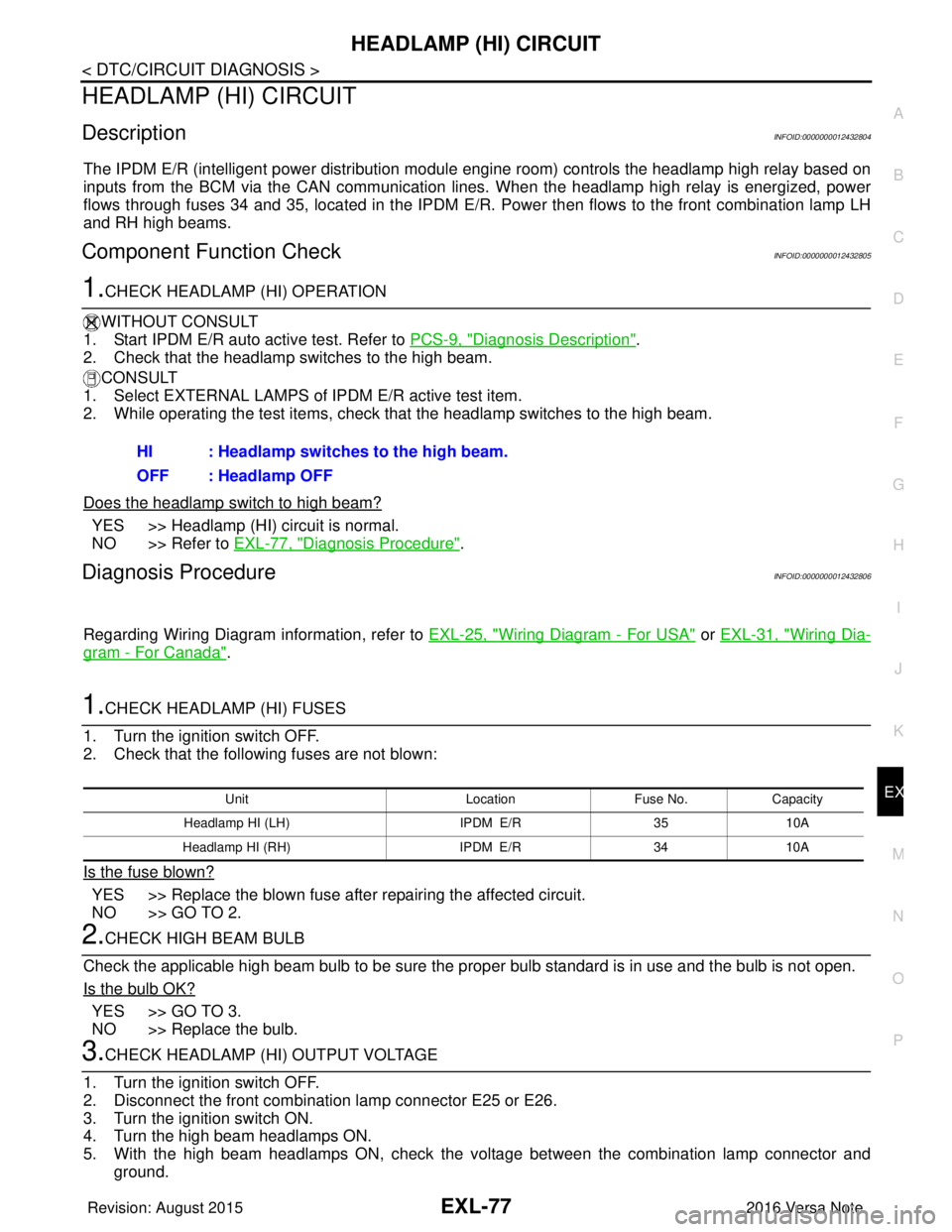
1.CHECK HEADLAMP (HI) OPERATION
WITHOUT CONSULT
1. Start IPDM E/R auto active test. Refer to PCS-9, "
Diagnosis Description".
2. Check that the headlamp switches to the high beam.
CONSULT
1. Select EXTERNAL LAMPS of IP DM E/R active test item.
2. While operating the test items, check that the headlamp switches to the high beam.
Does the headlamp switch to high beam?
YES >> Headlamp (HI) circuit is normal.
NO >> Refer to EXL-77, "
Diagnosis Procedure".
Diagnosis ProcedureINFOID:0000000012432806
Regarding Wiring Diagram information, refer to EXL-25, "Wiring Diagram - For USA" or EXL-31, "Wiring Dia-
gram - For Canada".
1.CHECK HEADLAMP (HI) FUSES
1. Turn the ignition switch OFF.
2. Check that the following fuses are not blown:
Is the fuse blown?
YES >> Replace the blown fuse after repairing the affected circuit.
NO >> GO TO 2.
2.CHECK HIGH BEAM BULB
Check the applicable high beam bulb to be sure the proper bulb standard is in use and the bulb is not open.
Is the bulb OK?
YES >> GO TO 3.
NO >> Replace the bulb.
3.CHECK HEADLAMP (HI) OUTPUT VOLTAGE
1. Turn the ignition switch OFF.
2. Disconnect the front combination lamp connector E25 or E26.
3. Turn the ignition switch ON.
4. Turn the high beam headlamps ON.
5. With the high beam headlamps ON, check the vo ltage between the combination lamp connector and
ground. HI : Headlamp switches to the high beam.
OFF : Headlamp OFF
Unit
LocationFuse No.Capacity
Headlamp HI (LH) IPDM E/R3510A
Headlamp HI (RH) IPDM E/R3410A
Revision: August 2015 2016 Versa Note
cardiagn.com