warning NISSAN NOTE 2016 Service Repair Manual
[x] Cancel search | Manufacturer: NISSAN, Model Year: 2016, Model line: NOTE, Model: NISSAN NOTE 2016Pages: 3641, PDF Size: 28.72 MB
Page 3144 of 3641

SR-28
< REMOVAL AND INSTALLATION >
SATELLITE SENSOR
5. Disconnect the slide double locking type harness connector from front side air bag satellite sensor, asshown.
INSTALLATION
Installation is in the reverse order of removal.
Position the front side air bag satellite sensor using t he locating pin before tightening the nut to specification.
CAUTION:
• Do not reuse the front side air bag satellite sensor nut.
• Do not damage the harness connector during installation.
• After the work is completed, perform self-diagnos is to check that no malfunction is detected. Refer
to SRC-14, "
Description".
Removal and Installation - Rear Side Air Bag Satellite SensorINFOID:0000000012430580
WARNING:
• Before servicing the SRS, turn ignition switch OFF, disconnect bot h battery terminals then wait at
least three minutes.
• Replace the rear side air bag satellite sensor if it has been dropped or sustained an impact.
• Replace the rear side air bag satellite sensor (LH/RH) if either the side air bag module or the side cur-
tain air bag module has been deployed.
• Do not strike the rear side air bag satellite sensor.
• Do not use air tools or el ectric tools for servicing.
REMOVAL
1. Disconnect negative and positive battery terminals, then wait at least three minutes. Refer to PG-70,
"Removal and Installation (Battery)".
2. Remove luggage side lower finisher. Refer to INT-34, "
LUGGAGE SIDE LOWER FINISHER : Removal
and Installation".
Revision: August 2015 2016 Versa Note
cardiagn.com
Page 3146 of 3641
SR-30
< REMOVAL AND INSTALLATION >
AIR BAG DIAGNOSIS SENSOR UNIT
AIR BAG DIAGNOSIS SENSOR UNIT
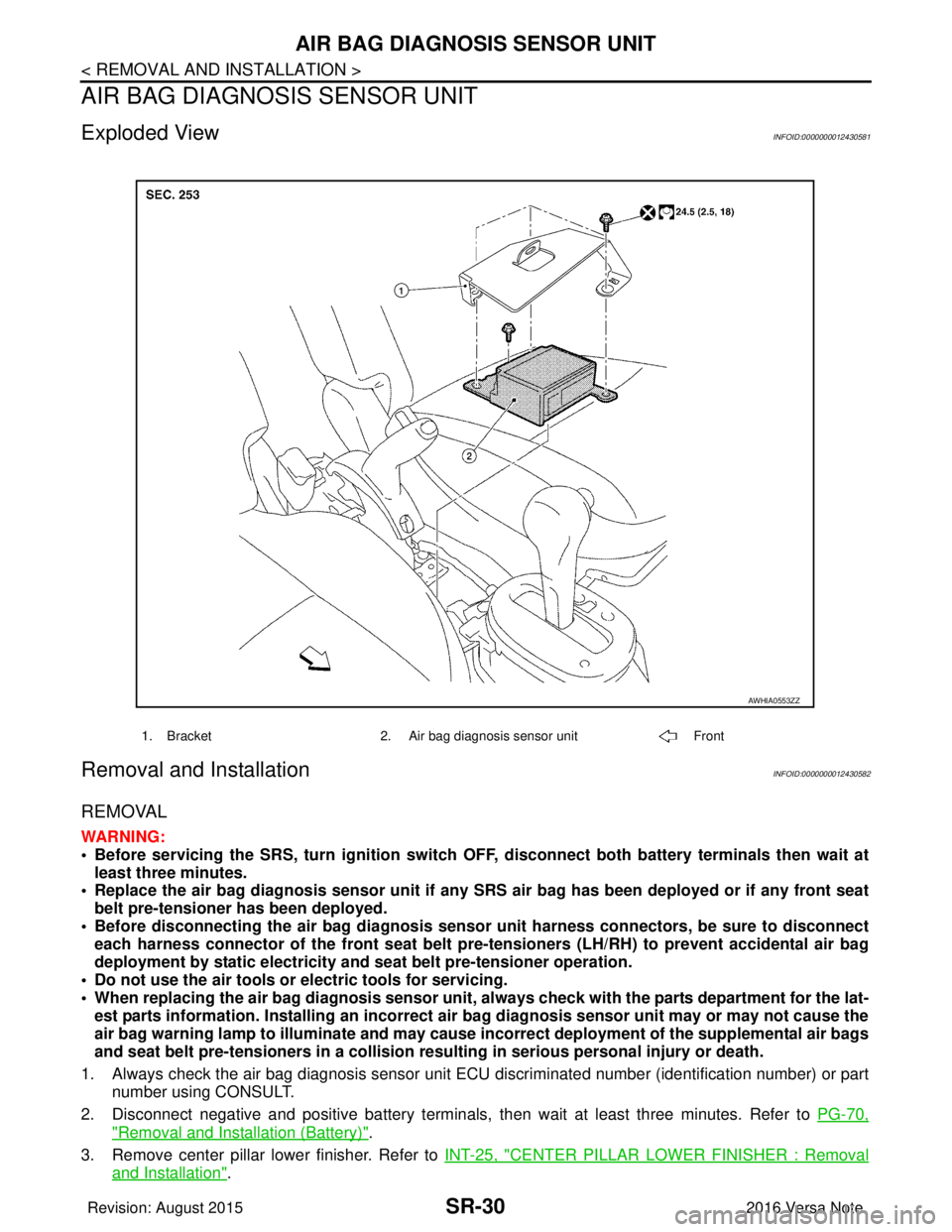
Exploded ViewINFOID:0000000012430581
Removal and InstallationINFOID:0000000012430582
REMOVAL
WARNING:
• Before servicing the SRS, turn ignition switch OFF, disconnect bot h battery terminals then wait at
least three minutes.
• Replace the air bag diagnosis senso r unit if any SRS air bag has been deployed or if any front seat
belt pre-tensioner has been deployed.
• Before disconnecting the air bag diagnosis sensor unit harness conn ectors, be sure to disconnect
each harness connector of the front seat belt pre-tensioners (LH/RH) to prevent accidental air bag
deployment by static electricity and seat belt pre-tensioner operation.
• Do not use the air tools or electric tools for servicing.
• When replacing the air bag diagno sis sensor unit, always check with th e parts department for the lat-
est parts information. Installing an incorrect air bag diagnosis sen sor unit may or may not cause the
air bag warning lamp to illuminate and may cause in correct deployment of the supplemental air bags
and seat belt pre-tensioners in a collision resulting in serious personal injury or death.
1. Always check the air bag diagnosis sensor unit ECU discriminated number (identification number) or part
number using CONSULT.
2. Disconnect negative and positive battery terminals, then wait at least three minutes. Refer to PG-70,
"Removal and Installation (Battery)".
3. Remove center pillar lower finisher. Refer to INT-25, "
CENTER PILLAR LOWER FINISHER : Removal
and Installation".
1. Bracket2. Air bag diagnosis sensor unit Front
AWHIA0553ZZ
Revision: August 2015 2016 Versa Note
cardiagn.com
Page 3148 of 3641
SR-32
< REMOVAL AND INSTALLATION >
OCCUPANT CLASSIFICATION SYSTEM CONTROL UNIT
OCCUPANT CLASSIFICATION SYSTEM CONTROL UNIT
Removal and InstallationINFOID:0000000012430583
OCCUPANT CLASSIFICATION SYSTEM CONTROL UNIT
WARNING:
• Before servicing the SRS, turn ignition switch OFF, disconnect bot h battery terminals then wait at
least three minutes.
• Do not use air tools or el ectric tools for servicing.
Removal
1. Slide front passenger seat to full forward position.
2. Disconnect negative and positive battery terminals, then wait at least three minutes. Refer to PG-70,
"Removal and Installation (Battery)".
3. Release front J-clips, then disconnect harness connector from occupant classification system control unit.
4. Remove screws and occupant classification system control unit. CAUTION:
• Replace the occupant classification control unit if it has been dropped or sustained an impact.
• Do not strike the occupant classification control unit.
Installation
Installation is in the reverse order of removal.
WARNING:
• Zero point reset must be performed every time the occupant classification system control unit is
removed/replaced. Refer to SRC-39, "
ZERO POINT RESET : Description".
CAUTION:
• Do not damage the harness connector during installation.
• After installation is complete, check that no syst em malfunction is detected causing the air bag
warning lamp to illuminate.
• If a malfunction is indicated by the air bag warnin g lamp after repair or replacement of the malfunc-
tioning parts, perform the diagnosis. Refer to SRC-16, "
Trouble Diagnosis with CONSULT".
OCCUPANT CLASSIFICATION SYSTEM SENSORS
WARNING:
• Before servicing the SRS, turn ignition switch OFF, disconnect bot h battery terminals then wait at
least three minutes.
• Do not use air tools or el ectric tools for servicing.
Removal
1. Disconnect negative and positive battery terminals, then wait at least three minutes. Refer to PG-70,
"Removal and Installation (Battery)".
2. Remove front passenger seat. Refer to SE-22, "
PASSENGER SIDE : Removal and Installation".
3. Disconnect harness connectors from occu pant classification system sensors.
4. Remove nuts (LH/RH) and remove seat frame from seat tracks.
5. Remove nuts from occupant classification sensor and remove.
Installation
1. Install occupant classification system sensor to seat track using nuts. CAUTION:
• Do not reuse nuts. Replace with new part during installation.
• Tighten nuts to specification.
2. Install seat frame to seat track using nuts and washer. CAUTION:
Do not reuse nuts or washer. Replace with new part during installation.
Occupant classification
sensor nuts
:22 N·m (2.2 kg-m, 16 ft-lb)
Revision: August 2015
2016 Versa Note
cardiagn.com
Page 3149 of 3641
OCCUPANT CLASSIFICATION SYSTEM CONTROL UNITSR-33
< REMOVAL AND INSTALLATION >
C
DE
F
G
I
J
K L
M A
B
SR
N
O P
NOTE:
Tighten front nuts by hand first, then tighten front nuts to specification, then tighten rear nuts to specifica-
tion.
3. Connect harness connectors to occupant classification sensors, then install front passenger seat. Refer to SE-22, "
PASSENGER SIDE : Removal and Installation".
CAUTION:
• Do not damage the harness conn ector during installation.
• After installation is complete, check that no syst em malfunction is detected causing the air bag
warning lamp to illuminate.
• If a malfunction is indicated by the air bag warnin g lamp after repair or replacement of the malfunc-
tioning parts, perform the diagnosis. Refer to SRC-16, "
Trouble Diagnosis with CONSULT".
Seat track nuts :45 N·m (4.6 kg-m, 33 ft-lb)
Revision: August 2015
2016 Versa Note
cardiagn.com
Page 3154 of 3641

STR-2
< PRECAUTION >
PRECAUTIONS
PRECAUTION
PRECAUTIONS
Precaution for Supplemental Restraint System (SRS) "AIR BAG" and "SEAT BELT
PRE-TENSIONER"
INFOID:0000000012432057
The Supplemental Restraint System such as “A IR BAG” and “SEAT BELT PRE-TENSIONER”, used along
with a front seat belt, helps to reduce the risk or severity of injury to the driver and front passenger for certain
types of collision. Information necessary to service the system safely is included in the SR and SB section of
this Service Manual.
WARNING:
• To avoid rendering the SRS inopera tive, which could increase the risk of personal injury or death in
the event of a collision which would result in air bag inflation, all maintenance must be performed by
an authorized NISSAN/INFINITI dealer.
• Improper maintenance, including in correct removal and installation of the SRS, can lead to personal
injury caused by unintent ional activation of the system. For re moval of Spiral Cable and Air Bag
Module, see the SR section.
• Do not use electrical test equipmen t on any circuit related to the SRS unless instructed to in this
Service Manual. SRS wiring harn esses can be identified by yellow and/or orange harnesses or har-
ness connectors.
PRECAUTIONS WHEN USING POWER TOOLS (AIR OR ELECTRIC) AND HAMMERS
WARNING:
• When working near the Airbag Diagnosis Sensor Unit or other Airbag System sensors with the Igni-
tion ON or engine running, DO NOT use air or electri c power tools or strike near the sensor(s) with a
hammer. Heavy vibration could activate the sensor( s) and deploy the air bag(s), possibly causing
serious injury.
• When using air or electric power tools or hammers , always switch the Ignition OFF, disconnect the
battery and wait at least three minutes before performing any service.
Revision: August 2015 2016 Versa Note
cardiagn.com
Page 3185 of 3641

STC-1
STEERING
C
DE
F
H I
J
K L
M
SECTION STC
A
B
STC
N
O P
CONTENTS
STEERING CONTROL SYSTEM
PRECAUTION ....... ........................................3
PRECAUTIONS .............................................. .....3
Precaution for Supplemental Restraint System
(SRS) "AIR BAG" and "SEAT BELT PRE-TEN-
SIONER" ............................................................. ......
3
Service Notice and Precautions for EPS System ......3
SYSTEM DESCRIPTION ..............................4
COMPONENT PARTS ................................... .....4
Component Parts Location .................................. ......4
EPS Control Unit .......................................................5
EPS Motor, Torque Sensor, Reduction Gear ............5
DIAGNOSIS SYSTEM (EPS CONTROL UNIT)
.....
6
CONSULT Function ............................................ ......6
ECU DIAGNOSIS INFORMATION ...............8
EPS CONTROL UNIT ..................................... .....8
Reference Value ................................................. ......8
Fail-Safe ....................................................................9
Protection Function .................................................10
DTC Inspection Priority Chart ............................. ....10
DTC Index ........................................................... ....10
WIRING DIAGRAM ......................................11
EPS SYSTEM ... .............................................. ....11
Wiring Diagram ................................................... ....11
BASIC INSPECTION ...................................15
DIAGNOSIS AND REPAIR WORKFLOW ..... ....15
Work Flow ........................................................... ....15
Diagnostic Work Sheet ............................................16
DTC/CIRCUIT DIAGNOSIS .........................18
C1601 BATTERY POWER SUPPLY .................18
DTC Logic ........................................................... ....18
Diagnosis Procedure ........................................... ....18
C1604 TORQUE SENSOR ................................21
DTC Logic ................................................................21
Diagnosis Procedure ...............................................21
C1606 EPS MOTOR ..........................................23
DTC Logic ................................................................23
Diagnosis Procedure ...............................................23
Component Inspection .............................................23
C1607, C1608 EPS CONTROL UNIT ...............25
DTC Logic ................................................................25
Diagnosis Procedure ...............................................25
C1609 VEHICLE SPEED SIGNAL ....................26
Description ...............................................................26
DTC Logic ................................................................26
Diagnosis Procedure ...............................................26
C1610 ENGINE STATUS SIGNAL ...................27
Description ...............................................................27
DTC Logic ................................................................27
Diagnosis Procedure ...............................................27
U1000 CAN COMM CIRCUIT ...........................28
Description ...............................................................28
DTC Logic ................................................................28
Diagnosis Procedure ...............................................28
EPS WARNING LAMP ......................................29
Component Function Check ....................................29
Diagnosis Procedure ...............................................29
SYMPTOM DIAGNOSIS ..............................30
EPS WARNING LAMP DOES NOT TURN ON ...30
Description ........................................................... ....30
Diagnosis Procedure ...............................................30
EPS WARNING LAMP DOES NOT TURN
OFF ....................................................................
31
Description ...............................................................31
Revision: August 2015 2016 Versa Note
cardiagn.com
Page 3187 of 3641

PRECAUTIONSSTC-3
< PRECAUTION >
C
DE
F
H I
J
K L
M A
B
STC
N
O P
PRECAUTION
PRECAUTIONS
Precaution for Supplemental Restraint System (SRS) "AIR BAG" and "SEAT BELT
PRE-TENSIONER"
INFOID:0000000012431939
The Supplemental Restraint System such as “AIR BAG” and “SEAT BELT PRE-TENSIONER”, used along
with a front seat belt, helps to reduce the risk or severi ty of injury to the driver and front passenger for certain
types of collision. Information necessary to service the system safely is included in the SR and SB section of
this Service Manual.
WARNING:
• To avoid rendering the SRS inoper ative, which could increase the risk of personal injury or death in
the event of a collision which would result in air bag inflation, all maintenance must be performed by
an authorized NISSAN/INFINITI dealer.
• Improper maintenance, including in correct removal and installation of the SRS, can lead to personal
injury caused by unintentional act ivation of the system. For removal of Spiral Cable and Air Bag
Module, see the SR section.
• Do not use electrical test equipm ent on any circuit related to the SRS unless instructed to in this
Service Manual. SRS wiring harnesses can be identi fied by yellow and/or orange harnesses or har-
ness connectors.
PRECAUTIONS WHEN USING POWER TOOLS (AIR OR ELECTRIC) AND HAMMERS
WARNING:
• When working near the Airbag Diagnosis Sensor Un it or other Airbag System sensors with the Igni-
tion ON or engine running, DO NOT use air or el ectric power tools or strike near the sensor(s) with a
hammer. Heavy vibration could activate the sensor( s) and deploy the air bag(s), possibly causing
serious injury.
• When using air or electric power tools or hammers, always switch the Ignition OFF, disconnect the
battery and wait at least three mi nutes before performing any service.
Service Notice and Precautions for EPS SystemINFOID:0000000012431940
• Check the following item when performing the trouble diagnosis:
- Check for possible causes of the malfunction by inte rviewing the customer as to what conditions were
present when the symptom occurred.
- Check if the steering wheel and the EPS control unit are genuine parts.
- Check if the air pressure and size of each tire is correct.
- Check if the installation of the links and suspension components are correct.
- Check if the tires are worn evenly, indicating the wheel alignment is correct.
- Check if the installation of the steering column and t he steering gear are correct. Check for loose bolts, dam-
aged links, cracked boots and leaking grease, etc.
- Check for damage or modification to suspension or body resulting in increased weight or altered ground clearance.
- Check if the battery voltage is proper.
- Check the EPS control unit harness to be sure the harness connectors are fully seated.
• Before connecting or disconnecting the EPS control uni t harness connector, turn ignition switch “OFF” and
disconnect the battery cable from the negative terminal. Battery voltage is applied to the EPS control unit
even if ignition switch is turned “OFF”.
Revision: August 2015 2016 Versa Note
cardiagn.com
Page 3188 of 3641
STC-4
< SYSTEM DESCRIPTION >
COMPONENT PARTS
SYSTEM DESCRIPTION
COMPONENT PARTS
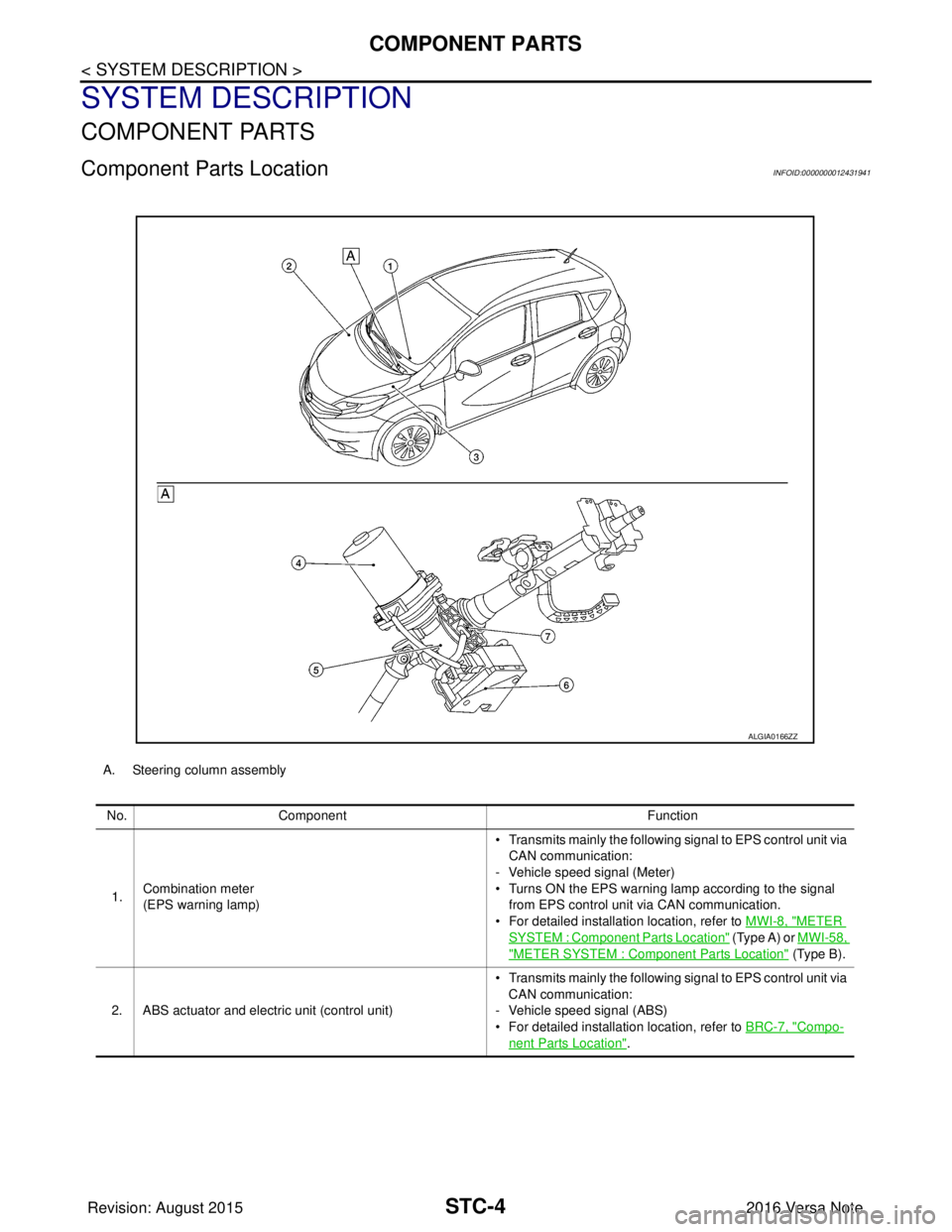
Component Parts LocationINFOID:0000000012431941
A. Steering column assemblyNo. Component Function
1. Combination meter
(EPS warning lamp) • Transmits mainly th
e following signal to EPS control unit via
CAN communication:
- Vehicle speed signal (Meter)
• Turns ON the EPS warning lamp according to the signal from EPS control unit via CAN communication.
• For detailed installation location, refer to MWI-8, "
METER
SYSTEM : Component Parts Location" (Type A) or MWI-58,
"METER SYSTEM : Component Parts Location" (Type B).
2. ABS actuator and electric unit (control unit) • Transmits mainly th
e following signal to EPS control unit via
CAN communication:
- Vehicle speed signal (ABS)
• For detailed installation location, refer to BRC-7, "
Compo-
nent Parts Location".
ALGIA0166ZZ
Revision: August 2015 2016 Versa Note
cardiagn.com
Page 3190 of 3641

STC-6
< SYSTEM DESCRIPTION >
DIAGNOSIS SYSTEM (EPS CONTROL UNIT)
DIAGNOSIS SYSTEM (EPS CONTROL UNIT)
CONSULT FunctionINFOID:0000000012431944
FUNCTION
CONSULT can display each diagnostic item usi ng the diagnostic test modes shown following:
*: The following diagnosis information is cleared by erasing:
•DTC
• Freeze frame data (FFD)
ECU IDENTIFICATION
Displays the part number stored in the control unit.
SELF DIAGNOSTIC RESULT MODE
Refer to STC-10, "DTC Index".
When “CRNT” is displayed on “Self Diagnostic Result”.
• The system is presently malfunctioning.
When “PAST” is displayed on “Self Diagnostic Result”.• System malfunction in the past is detect ed, but the system is presently normal.
FREEZE FRAME DATA (FFD)
The following vehicle status is recorded when DTC is detected and is displayed on CONSULT:
DATA MONITOR MODE
*1: Almost in accordance with the value of “MOTOR S IG”. It is not a malfunction though these values are not
accorded when steering quickly.
Diagnostic test mode Function
ECU Identification The part number stored in the control unit can be read.
Self Diagnostic Result Self-diagnostic results and freeze frame data can be read and erased quickly.
*
Data MonitorInput/Output data in the EPS control unit can be read.
Item name Display item
IGN COUNTER
(0-39) The number of times that ignition switch is tu
rned ON after the DTC is detected is displayed.
• When “0” is displayed: It indicates that the system is presently malfunctioning.
• When except “0” is displayed: It indicates that system malfunction in the past is detected, but the system is pres-
ently normal.
NOTE:
Each time when ignition switch is turned OFF to ON, numerical number increases in 1 →2→3...38 →39.
When the operation number of times exceeds 39, the number does not increase and “39” is displayed until self-
diagnosis is erased.
Monitor item (Unit) Remarks
BATTERY VOLT (V) Displays the power supply voltage for EPS control unit.
TORQUE SENSOR (Nm) Displays steering wheel turning force detected by torque sensor.
MOTOR CURRENT (A) Displays the current value consumed by EPS motor.
*1
MOTOR SIG (A) Displays the current commanded value to EPS motor.
ASSIST TORQUE (Nm) Displays assist torque being output by the electric power steering.
C/U TEMP ( °C or °F) Displays the temperature of the EPS control unit.
ASSIST LEVEL (%) Normally displays 100%. In case of an excessive stationary steering, the assist
curvature gradually falls. However, it return to 100% when left standing.
*2
VEHICLE SPEED (km/h or MPH)
Vehicle speed is displayed from vehicle speed signal via CAN communication.*3
WARNING LAMP (On/Off)EPS warning lamp control status is displayed.
ENGINE STATUS (Stop/Run) Engine speed is displayed from engine status signal via CAN communication.
Revision: August 2015 2016 Versa Note
cardiagn.com
Page 3192 of 3641

STC-8
< ECU DIAGNOSIS INFORMATION >
EPS CONTROL UNIT
ECU DIAGNOSIS INFORMATION
EPS CONTROL UNIT
Reference ValueINFOID:0000000012431945
VALUES ON THE DIAGNOSIS TOOL
CAUTION:
The output signal indicates the EPS control unit calculation data. The normal values will be displayed
even in the event that the output circuit (harness) is open.
*1: Almost in accordance with the value of “MOTOR S IG”. It is not a malfunction though these values are not
accorded when steering quickly.
*2: A fixed value is indicated regardless of steering turning.
*3: Normally displays 100%. In case of an excessive stat ionary steering, the assist curvature gradually falls.
However, it returns to 100% when left standing.
*4: It is not a malfunction, though it might not be co rresponding just after ignition switch in turned ON.
Monitor item Data monitor
Condition Display value
BATTERY VOLT Ignition switch: ON Battery voltage
TORQUE SENSOR Engine running Steering wheel: Not
steering (There is
no steering force) Approx. 0 Nm
Steering wheel: Right turn Positive value (Nm)
Steering wheel: Left turn Negative value (Nm)
MOTOR CURRENT Engine running Steering wheel: Not
steering (There is
no steering force) Approx. 0 A
Steering wheel: Right or left turn Displays consumption current of
EPS motor (A)
*1
MOTOR SIG
Engine runningSteering wheel: Not
steering (There is
no steering force) Approx. 0 A
Steering wheel: Right turn Positive value (A)
Steering wheel: Left turn Negative value (A)
ASSIST TORQUE Engine running Approx. 0 Nm
*2
C/U TEMPIgnition switch ON or engine running Displays temperature of inside of
EPS control unit (
°C or °F)
ASSIST LEVEL Engine running
100 %
*3
VEHICLE SPEEDVehicle stopped
0 km/h or mph
While driving Approximately equal to the indication
on speedometer*4
(inside of ±
10%)
WARNING LAMP EPS warning lamp: ON
On
EPS warning lamp: OFF Off
ENGINE STATUS Engine not running
Stop
Engine running Run
Revision: August 2015 2016 Versa Note
cardiagn.com