sensor NISSAN NOTE 2016 Service Repair Manual
[x] Cancel search | Manufacturer: NISSAN, Model Year: 2016, Model line: NOTE, Model: NISSAN NOTE 2016Pages: 3641, PDF Size: 28.72 MB
Page 1903 of 3641

ABBREVIATIONSGI-15
< HOW TO USE THIS MANUAL >
C
DE
F
G H
I
J
K L
M B
GI
N
O P
E
F
G
H
DLC Data link connector
DTC Diagnostic trouble code
ABBREVIATION DESCRIPTION
E/T Exhaust temperature
EBD Electric brake force distribution
EC Engine control
ECL Engine coolant level
ECM Engine control module
ECT Engine coolant temperature
ECV Electrical control valve
EEPROM Electrically erasable programmable read only memory EFT Engine fuel temperature
EGR Exhaust gas recirculation
EGRT Exhaust gas recirculation temperature EGT Exhaust gas temperature
EOP Engine oil pressure
EP Exhaust pressure
EPR Exhaust pressure regulator
EPS Electronically controlled power steering
ESP Electronic stability program system
EVAP canister Evaporative emission canister EVSE Electric vehicle supply equipment
EXC Exhaust control
ABBREVIATION DESCRIPTION
FC Fan control
FCW Forward collision warning
FIC Fuel injector control
FP Fuel pump
FR Front
FRP Fuel rail pressure
FRT Fuel rail temperature
FTP Fuel tank pressure
FTT Fuel tank temperature
ABBREVIATION DESCRIPTION
GND Ground
GPS Global positioning system
GST Generic scan tool
ABBREVIATION DESCRIPTION
HBMC Hydraulic body-motion control system HDD Hard disk drive
HO2S Heated oxygen sensor
ABBREVIATION
DESCRIPTION
Revision: August 2015 2016 Versa Note
cardiagn.com
Page 1904 of 3641

GI-16
< HOW TO USE THIS MANUAL >
ABBREVIATIONS
I
K
L
M
N
HOCHeated oxidation catalyst
HPCM Hybrid power train control module
ABBREVIATION DESCRIPTION
I/M Inspection and maintenance
IA Intake air
IAC Idle air control
IAT Intake air temperature
IBA Intelligent brake assist
IC Ignition control
ICC Intelligent cruise control
ICM Ignition control module
IPDM E/R Intelligent power distribution module engine room ISC Idle speed control
ISS Input shaft speed
ITS Information technology suite
ABBREVIATION DESCRIPTION
KS Knock sensor
ABBREVIATION DESCRIPTION
LBC Li-ion battery controller
LCD Liquid crystal display
LCU Local control unit
LDP Lane departure prevention
LDW Lane departure warning
LED Light emitting diode
LH Left-hand
LHD Left-hand drive
LIN Local interconnect network
ABBREVIATION DESCRIPTION
M/T Manual transaxle/transmission
MAF Mass airflow
MAP Manifold absolute pressure
MDU Multi display unit
MI Malfunction indicator
MIL Malfunction indicator lamp
MOD Moving object detection
ABBREVIATION DESCRIPTION
NOX Nitrogen oxides
ABBREVIATION
DESCRIPTION
Revision: August 2015 2016 Versa Note
cardiagn.com
Page 1905 of 3641

ABBREVIATIONSGI-17
< HOW TO USE THIS MANUAL >
C
DE
F
G H
I
J
K L
M B
GI
N
O P
O
P
R
S
T
ABBREVIATION DESCRIPTION
O2 Oxygen
O2S Oxygen sensor
OBD On board diagnostic
OC Oxidation catalytic converter
OD Overdrive
OL Open loop
OSS Output shaft speed
ABBREVIATION DESCRIPTION
P/S Power steering
PBR Potentio balance resistor
PCV Positive crankcase ventilation
PNP Park/Neutral position
PSP Power steering pressure
PTC Positive temperature coefficient
PTO Power takeoff
PWM Pulse width modulation
ABBREVIATION DESCRIPTION
RAM Random access memory
RAS Rear active steer
RH Right-hand
RHD Right-hand drive
ROM Read only memory
RPM Engine speed
RR Rear
ABBREVIATION DESCRIPTION
SAE Society of Automoti ve Engineers, Inc.
SCK Serial clock
SDS Service Data and Specifications
SRT System readiness test
SST Special Service Tools
ABBREVIATION DESCRIPTION
TC Turbocharger
TCM Transmission control module
TCS Traction control system
TCU Telematics communication unit
TP Throttle position
TPMS Tire pressure monitoring system TSS Turbine shaft speed
TWC Three way catalytic converter
Revision: August 2015 2016 Versa Note
cardiagn.com
Page 1906 of 3641

GI-18
< HOW TO USE THIS MANUAL >
ABBREVIATIONS
U
V
W
1
2
3
4
5
6
7
ABBREVIATIONDESCRIPTION
USS Uphill start support
ABBREVIATION DESCRIPTION
VCM Vehicle control module
VDC Vehicle dynamics control system
VIN Vehicle identification number
VSS Vehicle speed sensor
ABBREVIATION DESCRIPTION
WOT Wide open throttle
ABBREVIATION DESCRIPTION
1
11st range first gear
1
21st range second gear
1GR First gear
ABBREVIATION DESCRIPTION
2
12nd range first gear
2
22nd range second gear
2GR Second gear
2WD 2-wheel drive
ABBREVIATION DESCRIPTION
3GR Third gear
ABBREVIATION DESCRIPTION
4GR Fourth gear
4WAS Four wheel active steer 4WD Four wheel drive
ABBREVIATION DESCRIPTION
5GR Fifth gear
ABBREVIATION DESCRIPTION
6GR Sixth gear
ABBREVIATION DESCRIPTION
7GR Seventh gear
Revision: August 2015 2016 Versa Note
cardiagn.com
Page 1911 of 3641
PRECAUTIONSGI-23
< PRECAUTION >
C
DE
F
G H
I
J
K L
M B
GI
N
O PPRECAUTION
PRECAUTIONS
DescriptionINFOID:0000000012433158
Observe the following precautions to ensure safe and proper servicing. These precautions are not
described in each individual section.
Precaution for Supplemental Restraint System (SRS) "AIR BAG" and "SEAT BELT
PRE-TENSIONER"
INFOID:0000000012547328
The Supplemental Restraint System such as “AIR BAG” and “SEAT BELT PRE-TENSIONER”, used along
with a front seat belt, helps to reduce the risk or severi ty of injury to the driver and front passenger for certain
types of collision. Information necessary to service the system safely is included in the SR and SB section of
this Service Manual.
WARNING:
• To avoid rendering the SRS inoper ative, which could increase the risk of personal injury or death in
the event of a collision which would result in air bag inflation, all maintenance must be performed by
an authorized NISSAN/INFINITI dealer.
• Improper maintenance, including in correct removal and installation of the SRS, can lead to personal
injury caused by unintentional act ivation of the system. For removal of Spiral Cable and Air Bag
Module, see the SR section.
• Do not use electrical test equipm ent on any circuit related to the SRS unless instructed to in this
Service Manual. SRS wiring harnesses can be identi fied by yellow and/or orange harnesses or har-
ness connectors.
PRECAUTIONS WHEN USING POWER TOOLS (AIR OR ELECTRIC) AND HAMMERS
WARNING:
• When working near the Airbag Diagnosis Sensor Un it or other Airbag System sensors with the Igni-
tion ON or engine running, DO NOT use air or el ectric power tools or strike near the sensor(s) with a
hammer. Heavy vibration could activate the sensor( s) and deploy the air bag(s), possibly causing
serious injury.
• When using air or electric power tools or hammers, always switch the Ignition OFF, disconnect the battery and wait at least three mi nutes before performing any service.
Procedures without Cowl Top CoverINFOID:0000000012433160
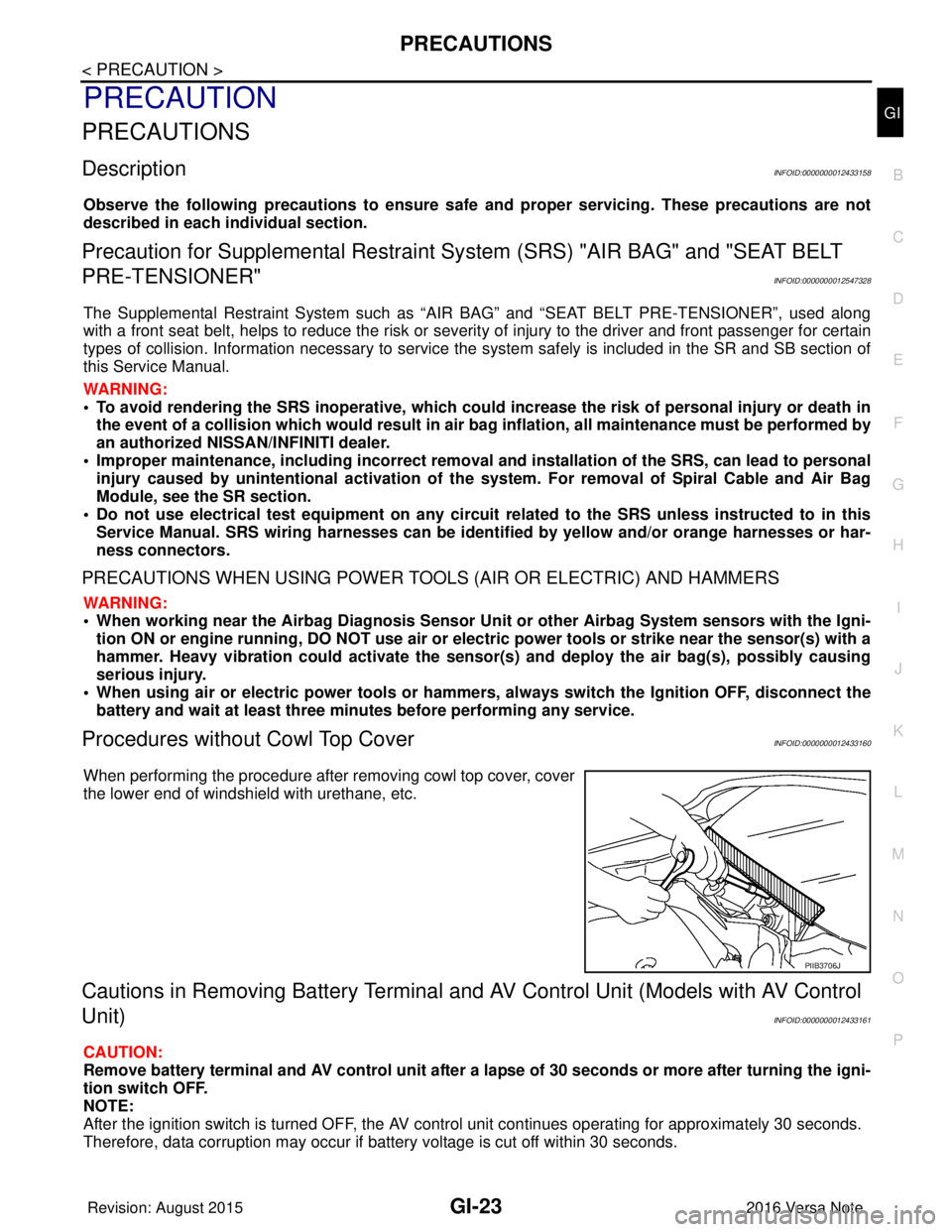
When performing the procedure after removing cowl top cover, cover
the lower end of windshield with urethane, etc.
Cautions in Removing Battery Terminal and AV Control Unit (Models with AV Control
Unit)
INFOID:0000000012433161
CAUTION:
Remove battery terminal and AV control unit after a lapse of 30 seconds or more after turning the igni-
tion switch OFF.
NOTE:
After the ignition switch is turned OFF, the AV cont rol unit continues operating for approximately 30 seconds.
Therefore, data corruption may occur if battery voltage is cut off within 30 seconds.
PIIB3706J
Revision: August 2015 2016 Versa Note
cardiagn.com
Page 1914 of 3641
GI-26
< PRECAUTION >
PRECAUTIONS
• U.S. government regulations require ethanol dispensing pumps to be identified by a small, square,
orange and black label with the common abbreviation or the appropriate percentage for that region.
Multiport Fuel Injection System or Engine Control SystemINFOID:0000000012433165
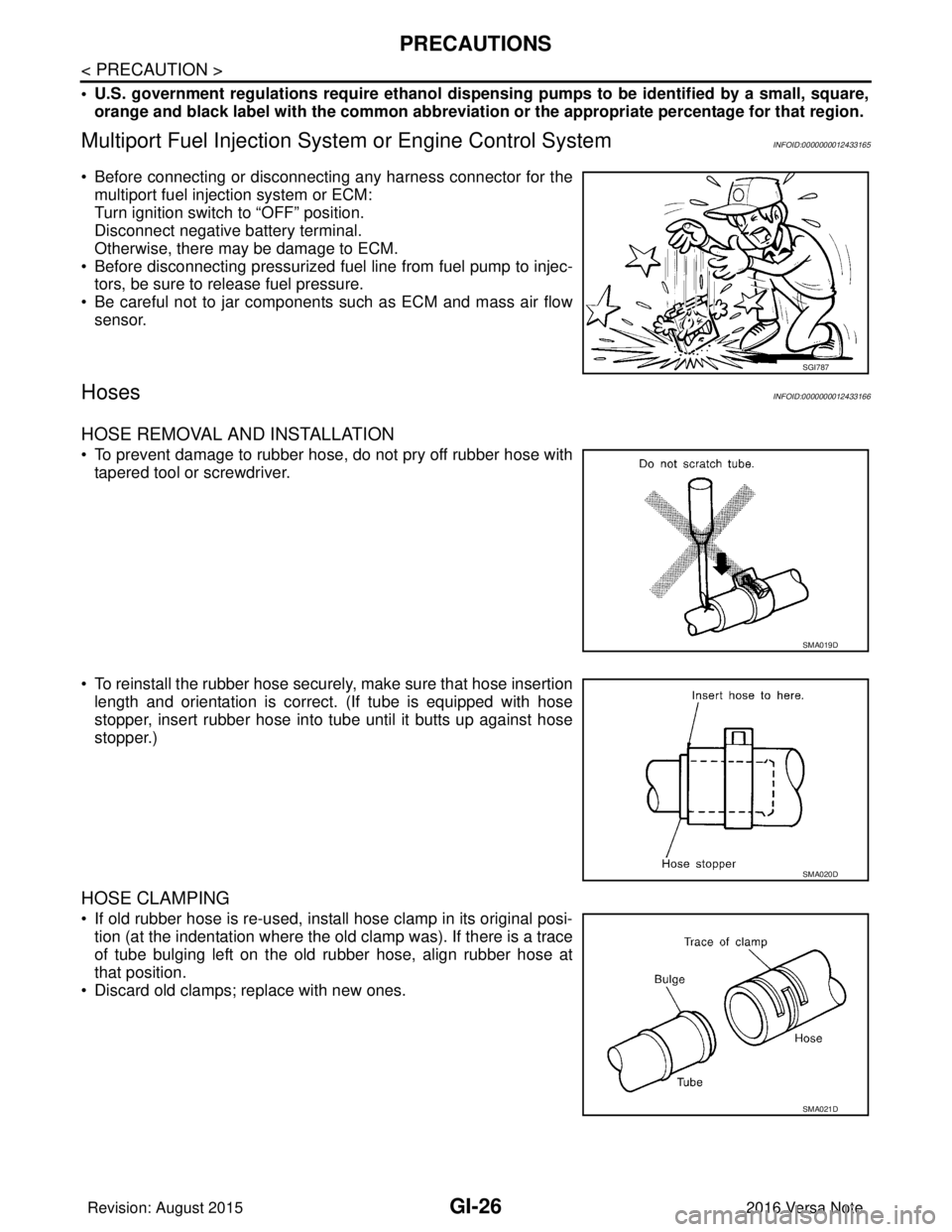
• Before connecting or disconnecting any harness connector for the
multiport fuel injection system or ECM:
Turn ignition switch to “OFF” position.
Disconnect negative battery terminal.
Otherwise, there may be damage to ECM.
• Before disconnecting pressurized fuel line from fuel pump to injec- tors, be sure to release fuel pressure.
• Be careful not to jar components such as ECM and mass air flow sensor.
HosesINFOID:0000000012433166
HOSE REMOVAL AND INSTALLATION
• To prevent damage to rubber hose, do not pry off rubber hose withtapered tool or screwdriver.
• To reinstall the rubber hose securely, make sure that hose insertion length and orientation is correct. (If tube is equipped with hose
stopper, insert rubber hose into tube until it butts up against hose
stopper.)
HOSE CLAMPING
• If old rubber hose is re-used, install hose clamp in its original posi-tion (at the indentation where the old clamp was). If there is a trace
of tube bulging left on the old rubber hose, align rubber hose at
that position.
• Discard old clamps; replace with new ones.
SGI787
SMA019D
SMA020D
SMA021D
Revision: August 2015 2016 Versa Note
cardiagn.com
Page 1930 of 3641
GI-42
< BASIC INSPECTION >
SERVICE INFORMATION FOR ELECTRICAL INCIDENT
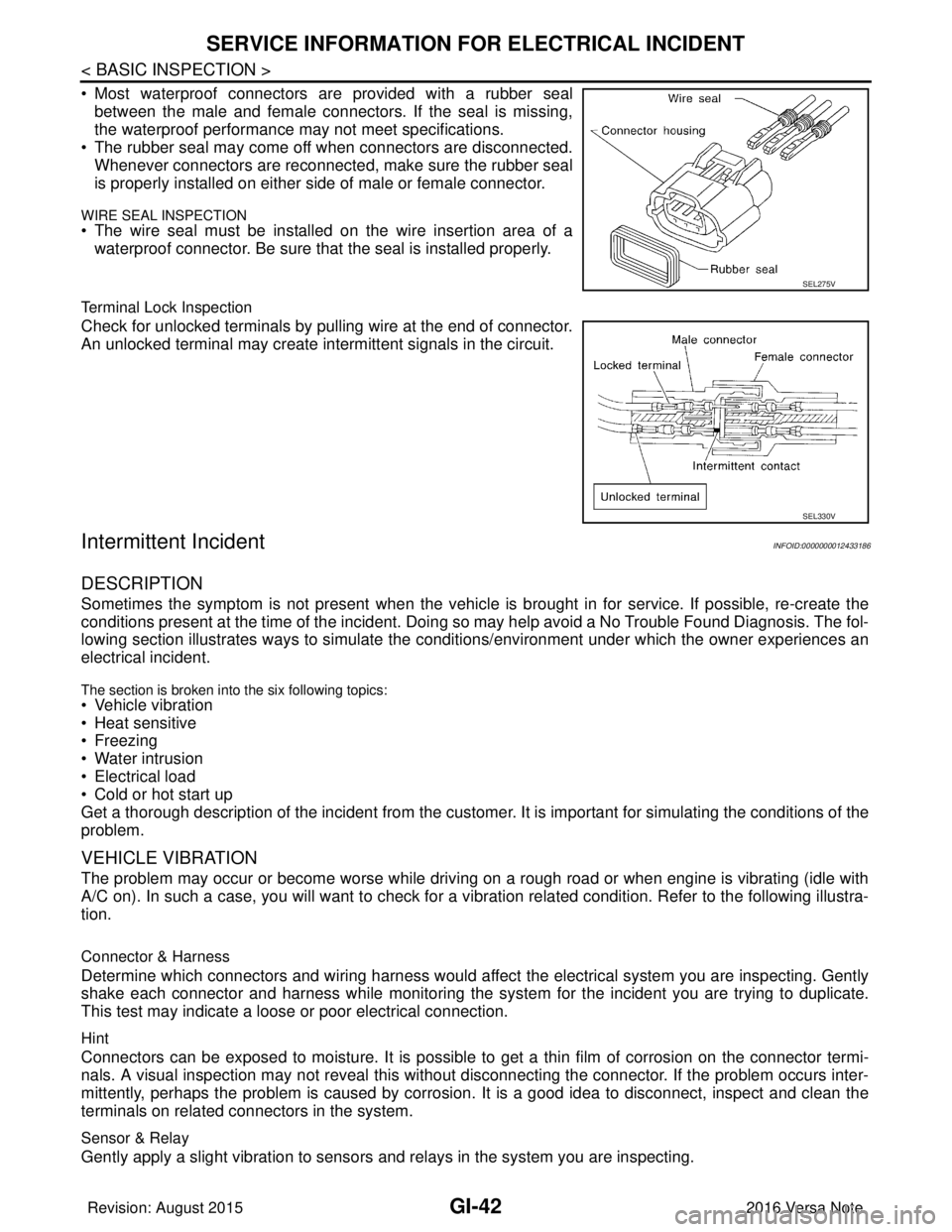
• Most waterproof connectors are provided with a rubber sealbetween the male and female connectors. If the seal is missing,
the waterproof performance may not meet specifications.
• The rubber seal may come off when connectors are disconnected. Whenever connectors are reconnected, make sure the rubber seal
is properly installed on either side of male or female connector.
WIRE SEAL INSPECTION
• The wire seal must be installed on the wire insertion area of awaterproof connector. Be sure that the seal is installed properly.
Terminal Lock Inspection
Check for unlocked terminals by pulling wire at the end of connector.
An unlocked terminal may create intermittent signals in the circuit.
Intermittent IncidentINFOID:0000000012433186
DESCRIPTION
Sometimes the symptom is not present when the vehicle is brought in for service. If possible, re-create the
conditions present at the time of the incident. Doi ng so may help avoid a No Trouble Found Diagnosis. The fol-
lowing section illustrates ways to simulate the condi tions/environment under which the owner experiences an
electrical incident.
The section is broken into the six following topics:
• Vehicle vibration
• Heat sensitive
• Freezing
• Water intrusion
• Electrical load
• Cold or hot start up
Get a thorough description of the incident from the customer. It is important for simulating the conditions of the
problem.
VEHICLE VIBRATION
The problem may occur or become worse while driving on a rough road or when engine is vibrating (idle with
A/C on). In such a case, you will want to check for a vi bration related condition. Refer to the following illustra-
tion.
Connector & Harness
Determine which connectors and wiring harness would affect the electrical system you are inspecting. Gently
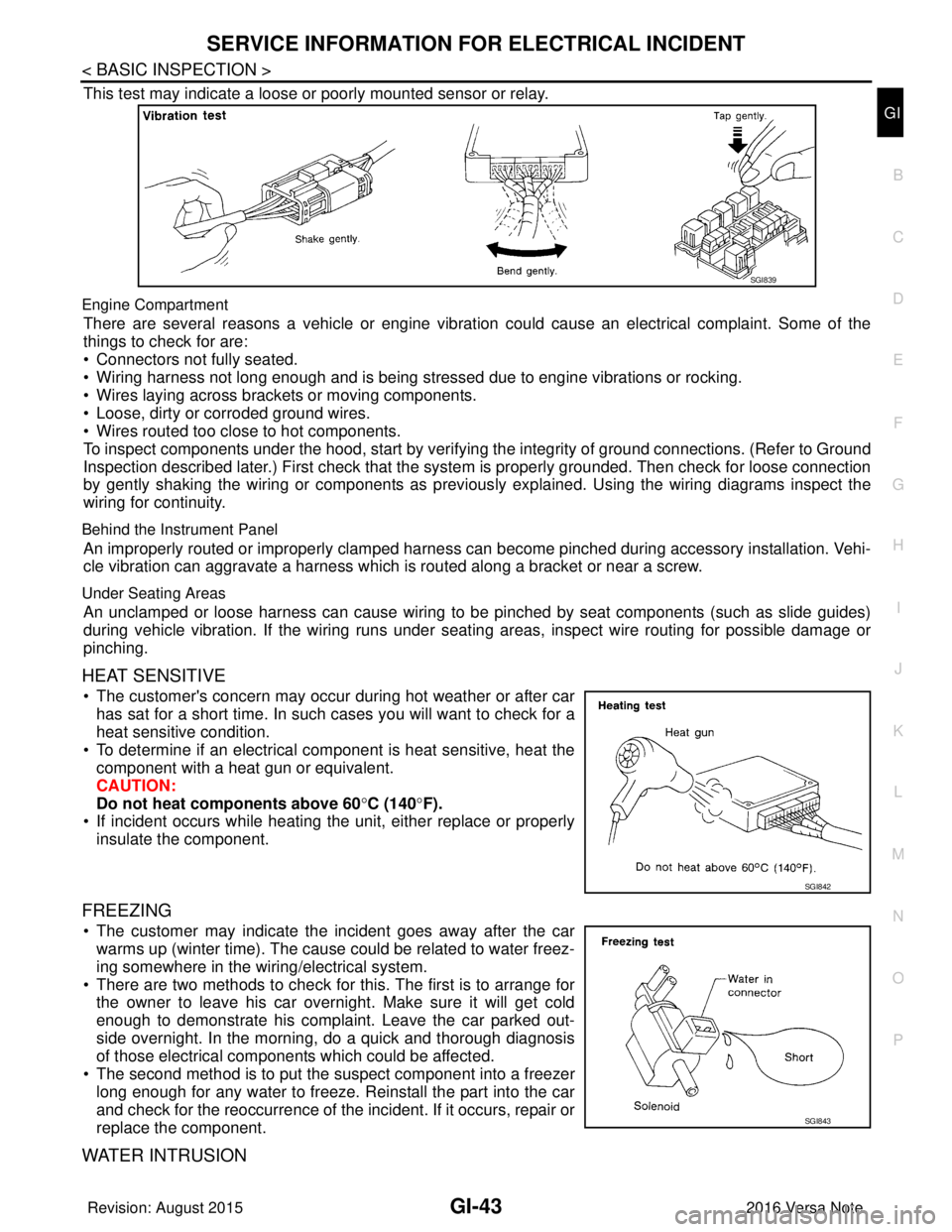
shake each connector and harness while monitoring the sy stem for the incident you are trying to duplicate.
This test may indicate a loose or poor electrical connection.
Hint
Connectors can be exposed to moisture. It is possible to get a thin film of corrosion on the connector termi-
nals. A visual inspection may not reveal this without disconnecting the connector. If the problem occurs inter-
mittently, perhaps the problem is caused by corrosion. It is a good idea to disconnect, inspect and clean the
terminals on related connectors in the system.
Sensor & Relay
Gently apply a slight vibration to sensors and relays in the system you are inspecting.
SEL275V
SEL330V
Revision: August 2015 2016 Versa Note
cardiagn.com
Page 1931 of 3641
SERVICE INFORMATION FOR ELECTRICAL INCIDENTGI-43
< BASIC INSPECTION >
C
DE
F
G H
I
J
K L
M B
GI
N
O P
This test may indicate a loose or poorly mounted sensor or relay.
Engine Compartment
There are several reasons a vehicle or engine vibration could cause an electrical complaint. Some of the
things to check for are:
• Connectors not fully seated.
• Wiring harness not long enough and is being stressed due to engine vibrations or rocking.
• Wires laying across brackets or moving components.
• Loose, dirty or corroded ground wires.
• Wires routed too close to hot components.
To inspect components under the hood, start by verifyi ng the integrity of ground connections. (Refer to Ground
Inspection described later.) First check that the system is properly grounded. Then check for loose connection
by gently shaking the wiring or components as previous ly explained. Using the wiring diagrams inspect the
wiring for continuity.
Behind the Instrument Panel
An improperly routed or improperly clamped harness can become pinched during accessory installation. Vehi-
cle vibration can aggravate a harness which is routed along a bracket or near a screw.
Under Seating Areas
An unclamped or loose harness can cause wiring to be pinched by seat components (such as slide guides)
during vehicle vibration. If the wiring runs under s eating areas, inspect wire routing for possible damage or
pinching.
HEAT SENSITIVE
• The customer's concern may occur during hot weather or after car has sat for a short time. In such cases you will want to check for a
heat sensitive condition.
• To determine if an electrical component is heat sensitive, heat the component with a heat gun or equivalent.
CAUTION:
Do not heat components above 60 °C (140° F).
• If incident occurs while heating t he unit, either replace or properly
insulate the component.
FREEZING
• The customer may indicate the incident goes away after the car warms up (winter time). The cause could be related to water freez-
ing somewhere in the wiring/electrical system.
• There are two methods to check for this. The first is to arrange for the owner to leave his car overnight. Make sure it will get cold
enough to demonstrate his complaint. Leave the car parked out-
side overnight. In the morning, do a quick and thorough diagnosis
of those electrical components which could be affected.
• The second method is to put the suspect component into a freezer long enough for any water to freeze. Reinstall the part into the car
and check for the reoccurrence of the incident. If it occurs, repair or
replace the component.
WATER INTRUSION
SGI839
SGI842
SGI843
Revision: August 2015 2016 Versa Note
cardiagn.com
Page 1942 of 3641

GW-2
< PRECAUTION >
PRECAUTIONS
PRECAUTION
PRECAUTIONS
Precaution for Supplemental Restraint System (SRS) "AIR BAG" and "SEAT BELT
PRE-TENSIONER"
INFOID:0000000012430522
The Supplemental Restraint System such as “A IR BAG” and “SEAT BELT PRE-TENSIONER”, used along
with a front seat belt, helps to reduce the risk or severity of injury to the driver and front passenger for certain
types of collision. Information necessary to service the system safely is included in the SR and SB section of
this Service Manual.
WARNING:
• To avoid rendering the SRS inopera tive, which could increase the risk of personal injury or death in
the event of a collision which would result in air bag inflation, all maintenance must be performed by
an authorized NISSAN/INFINITI dealer.
• Improper maintenance, including in correct removal and installation of the SRS, can lead to personal
injury caused by unintent ional activation of the system. For re moval of Spiral Cable and Air Bag
Module, see the SR section.
• Do not use electrical test equipmen t on any circuit related to the SRS unless instructed to in this
Service Manual. SRS wiring harn esses can be identified by yellow and/or orange harnesses or har-
ness connectors.
PRECAUTIONS WHEN USING POWER TOOLS (AIR OR ELECTRIC) AND HAMMERS
WARNING:
• When working near the Airbag Diagnosis Sensor Unit or other Airbag System sensors with the Igni-
tion ON or engine running, DO NOT use air or electri c power tools or strike near the sensor(s) with a
hammer. Heavy vibration could activate the sensor( s) and deploy the air bag(s), possibly causing
serious injury.
• When using air or electric power tools or hammers , always switch the Ignition OFF, disconnect the
battery and wait at least three minutes before performing any service.
Handling for Adhe sive and PrimerINFOID:0000000012430523
• Do not use an adhesive which is past its usable date. Shel f life of this product is limited to six months after
the date of manufacture. Carefully adhere to the expiration or manufacture date printed on the box.
• Keep primers and adhesive in a cool, dry place. Ideally, they should be stored in a refrigerator.
• Open the seal of the primer and adhesive just before application. Discard the remainder.
• Before application, be sure to shake the primer container to stir the contents. If any floating material is found,
do not use it.
• If any primer or adhesive contacts the skin, wipe it off with gasoline or equivalent and wash the skin with
soap.
• When using primer and adhesive, always observe the precautions in the instruction manual.
Precaution for WorkINFOID:0000000012430524
• When removing or disassembling each component, be careful not to damage or deform it. If a component
may be subject to interference, be sure to protect it with a shop cloth.
• When removing (disengaging) components with a screwdriver or similar tool, be sure to wrap the component with a shop cloth or vinyl tape to protect it.
• Protect the removed parts with a shop cloth and prevent them from being dropped.
• Replace a deformed or damaged clip.
• If a part is specified as a non-reusable part, always replace it with a new one.
• Be sure to tighten bolts and nuts securely to the specified torque.
• After installation is complete, be sure to check that each part works properly.
• Follow the steps below to clean components:
- Water soluble dirt:
• Dip a soft cloth into lukewarm water, wring the water out of the cloth and wipe the dirty area.
• Then rub with a soft, dry cloth.
- Oily dirt:
• Dip a soft cloth into lukewarm water with mild detergent (concentration: within 2 to 3%) and wipe the dirty area.
Revision: August 2015 2016 Versa Note
cardiagn.com
Page 1970 of 3641

HAC-2
Diagnosis Procedure ..............................................37
A/C INDICATOR ................................................39
Diagnosis Procedure ........................................... ...39
FRONT BLOWER MOTOR ................................41
Description ........................................................... ...41
Diagnosis Procedure ..............................................41
Component Inspection (Front Blower Motor) ..........43
Component Inspection (B lower Relay) ...................43
Component Inspection (Front Blower Motor Re-
sistor) ................................................................... ...
43
Component Inspection (Fan Switch) ......................43
MAGNET CLUTCH ............................................45
Description ........................................................... ...45
Component Function Check ...................................45
Diagnosis Procedure ..............................................45
SYMPTOM DIAGNOSIS .............................47
MANUAL AIR CONDITIONING SYSTEM ...... ...47
Symptom Table ................................................... ...47
INSUFFICIENT COOLING .................................48
Description ........................................................... ...48
Diagnosis Procedure ..............................................48
INSUFFICIENT HEATING .................................49
Description ........................................................... ...49
Diagnosis Procedure ..............................................49
COMPRESSOR DOES NOT OPERATE ...........50
Description ........................................................... ...50
Diagnosis Procedure ............................................ ...50
REMOVAL AND INSTALLATION ..............52
FRONT AIR CONTROL .................................. ...52
Exploded View ..................................................... ...52
Removal and Installation .........................................52
THERMO CONTROL AMPLIFIER ................. ...53
Removal and Installation .........................................53
REFRIGERANT PRESSURE SENSOR ......... ...54
Removal and Installation .........................................54
FRONT BLOWER MOTOR RESISTOR ......... ...55
Exploded View ..................................................... ...55
Removal and Installation .........................................55
DOOR CABLE ................................................ ...56
Exploded View ..................................................... ...56
INTAKE DOOR CABLE ......................................... ...56
INTAKE DOOR CABLE : Removal and Installation
...
56
INTAKE DOOR CABLE : Adjustment .................. ...56
MODE DOOR CABLE ............................................ ...57
MODE DOOR CABLE : Removal and Installation ...57
MODE DOOR CABLE : Adjustment ........................57
AIR MIX DOOR CABLE ......................................... ...57
AIR MIX DOOR CABLE : Removal and Installation
...
57
AIR MIX DOOR CABLE : Adjustment .................. ...57
Revision: August 2015 2016 Versa Note
cardiagn.com