tires NISSAN NOTE 2016 Service Service Manual
[x] Cancel search | Manufacturer: NISSAN, Model Year: 2016, Model line: NOTE, Model: NISSAN NOTE 2016Pages: 3641, PDF Size: 28.72 MB
Page 2789 of 3641
WT-46
< PERIODIC MAINTENANCE >
WHEEL AND TIRE
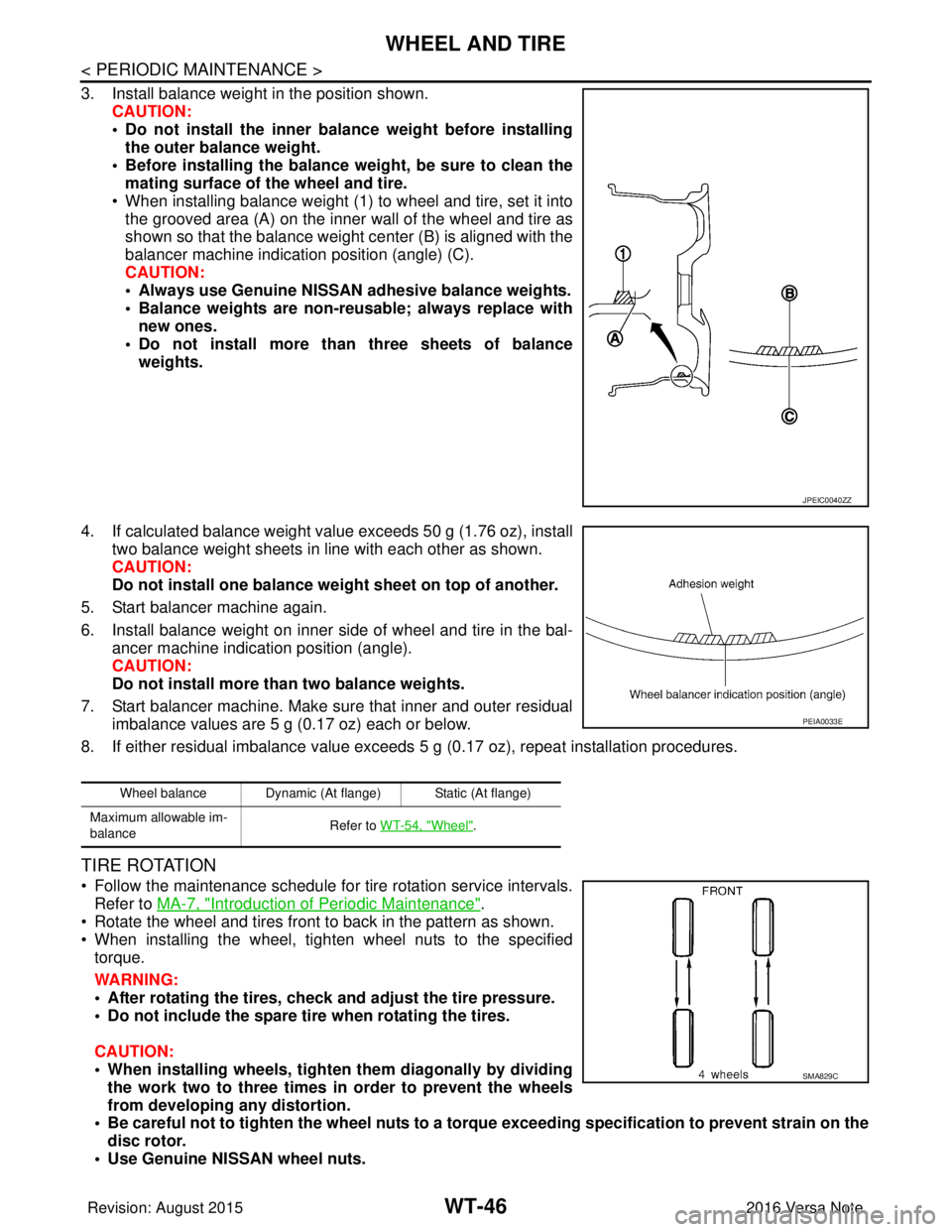
3. Install balance weight in the position shown.CAUTION:
• Do not install the inner bala nce weight before installing
the outer balance weight.
• Before installing the balance weight, be sure to clean the mating surface of the wheel and tire.
• When installing balance weight (1) to wheel and tire, set it into the grooved area (A) on the inner wall of the wheel and tire as
shown so that the balance weight center (B) is aligned with the
balancer machine indication position (angle) (C).
CAUTION:
• Always use Genuine NISSAN adhesive balance weights.
• Balance weights are non-reusable; always replace withnew ones.
• Do not install more than three sheets of balance weights.
4. If calculated balance weight value exceeds 50 g (1.76 oz), install two balance weight sheets in line with each other as shown.
CAUTION:
Do not install one balance weight sheet on top of another.
5. Start balancer machine again.
6. Install balance weight on inner side of wheel and tire in the bal- ancer machine indication position (angle).
CAUTION:
Do not install more than two balance weights.
7. Start balancer machine. Make sure that inner and outer residual imbalance values are 5 g (0.17 oz) each or below.
8. If either residual imbalance value exceeds 5 g (0.17 oz), repeat installation procedures.
TIRE ROTATION
• Follow the maintenance schedule for tire rotation service intervals.
Refer to MA-7, "
Introduction of Periodic Maintenance".
• Rotate the wheel and tires front to back in the pattern as shown.
• When installing the wheel, tighten wheel nuts to the specified torque.
WARNING:
• After rotating the tires, check and adjust the tire pressure.
• Do not include the spare tire when rotating the tires.
CAUTION:
• When installing wheels, tighten them diagonally by dividing
the work two to three times in order to prevent the wheels
from developing any distortion.
• Be careful not to tighten the wh eel nuts to a torque exceeding speci fication to prevent strain on the
disc rotor.
• Use Genuine NISSAN wheel nuts.
JPEIC0040ZZ
Wheel balance Dynamic (At flange) Static (At flange)
Maximum allowable im-
balance Refer to WT-54, "
Wheel".
PEIA0033E
SMA829C
Revision: August 2015
2016 Versa Note
cardiagn.com
Page 3187 of 3641

PRECAUTIONSSTC-3
< PRECAUTION >
C
DE
F
H I
J
K L
M A
B
STC
N
O P
PRECAUTION
PRECAUTIONS
Precaution for Supplemental Restraint System (SRS) "AIR BAG" and "SEAT BELT
PRE-TENSIONER"
INFOID:0000000012431939
The Supplemental Restraint System such as “AIR BAG” and “SEAT BELT PRE-TENSIONER”, used along
with a front seat belt, helps to reduce the risk or severi ty of injury to the driver and front passenger for certain
types of collision. Information necessary to service the system safely is included in the SR and SB section of
this Service Manual.
WARNING:
• To avoid rendering the SRS inoper ative, which could increase the risk of personal injury or death in
the event of a collision which would result in air bag inflation, all maintenance must be performed by
an authorized NISSAN/INFINITI dealer.
• Improper maintenance, including in correct removal and installation of the SRS, can lead to personal
injury caused by unintentional act ivation of the system. For removal of Spiral Cable and Air Bag
Module, see the SR section.
• Do not use electrical test equipm ent on any circuit related to the SRS unless instructed to in this
Service Manual. SRS wiring harnesses can be identi fied by yellow and/or orange harnesses or har-
ness connectors.
PRECAUTIONS WHEN USING POWER TOOLS (AIR OR ELECTRIC) AND HAMMERS
WARNING:
• When working near the Airbag Diagnosis Sensor Un it or other Airbag System sensors with the Igni-
tion ON or engine running, DO NOT use air or el ectric power tools or strike near the sensor(s) with a
hammer. Heavy vibration could activate the sensor( s) and deploy the air bag(s), possibly causing
serious injury.
• When using air or electric power tools or hammers, always switch the Ignition OFF, disconnect the
battery and wait at least three mi nutes before performing any service.
Service Notice and Precautions for EPS SystemINFOID:0000000012431940
• Check the following item when performing the trouble diagnosis:
- Check for possible causes of the malfunction by inte rviewing the customer as to what conditions were
present when the symptom occurred.
- Check if the steering wheel and the EPS control unit are genuine parts.
- Check if the air pressure and size of each tire is correct.
- Check if the installation of the links and suspension components are correct.
- Check if the tires are worn evenly, indicating the wheel alignment is correct.
- Check if the installation of the steering column and t he steering gear are correct. Check for loose bolts, dam-
aged links, cracked boots and leaking grease, etc.
- Check for damage or modification to suspension or body resulting in increased weight or altered ground clearance.
- Check if the battery voltage is proper.
- Check the EPS control unit harness to be sure the harness connectors are fully seated.
• Before connecting or disconnecting the EPS control uni t harness connector, turn ignition switch “OFF” and
disconnect the battery cable from the negative terminal. Battery voltage is applied to the EPS control unit
even if ignition switch is turned “OFF”.
Revision: August 2015 2016 Versa Note
cardiagn.com
Page 3226 of 3641
STEERING WHEELST-5
< BASIC INSPECTION >
C
DE
F
H I
J
K L
M A
B
ST
N
O P
BASIC INSPECTION
STEERING WHEEL
InspectionINFOID:0000000012430497
CONDITION OF INSTALLATION
• Check installation conditions of steering gear, front suspension, axle and steering column.
• Check if movement exists when steering wheel is mo ved up and down, to the left and right and to the axial
direction.
• Verify that the steering gear nuts are tightened to specification. Refer to ST-14, "
Exploded View".
STEERING WHEEL PLAY
1. Set the front wheels and tires in the straight-ahead position, start engine, then lightly turn steering wheel
to the left and right until the front wheels start to move. Measure steering wheel movement on the outer
circumference.
2. When the measurement value is outside the standard va lue, check backlash for each joint of steering col-
umn and installation condition of steering gear.
STEERING WHEEL NEUTRAL POSITION
Check steering wheel neutral position using the following procedure:
1. Confirm that front wheel alignment is correct. Refer to FSU-8, "
Adjustment".
2. Set the front wheels and tires in the straight-ahead posit ion, check if steering wheel is in the neutral posi-
tion.
3. If it is not in the neutral position, remo ve steering wheel and reinstall it correctly.
4. If the neutral position cannot be attained by repositi oning the steering wheel two teeth or less on steering
stem, loosen the steering gear outer socket lock nuts, then adjust the inner sockets by the same amount
in the opposite direction.
5. Re-check the front wheel alignment. Refer to FSU-8, "
Adjustment".
STEERING WHEEL TURNING FORCE
1. Park vehicle on a level and dry surface, set parking brake.
2. Tires need to be inflated normal pressure. Refer to WT-54, "
Tire Air Pressure".
3. Start engine.
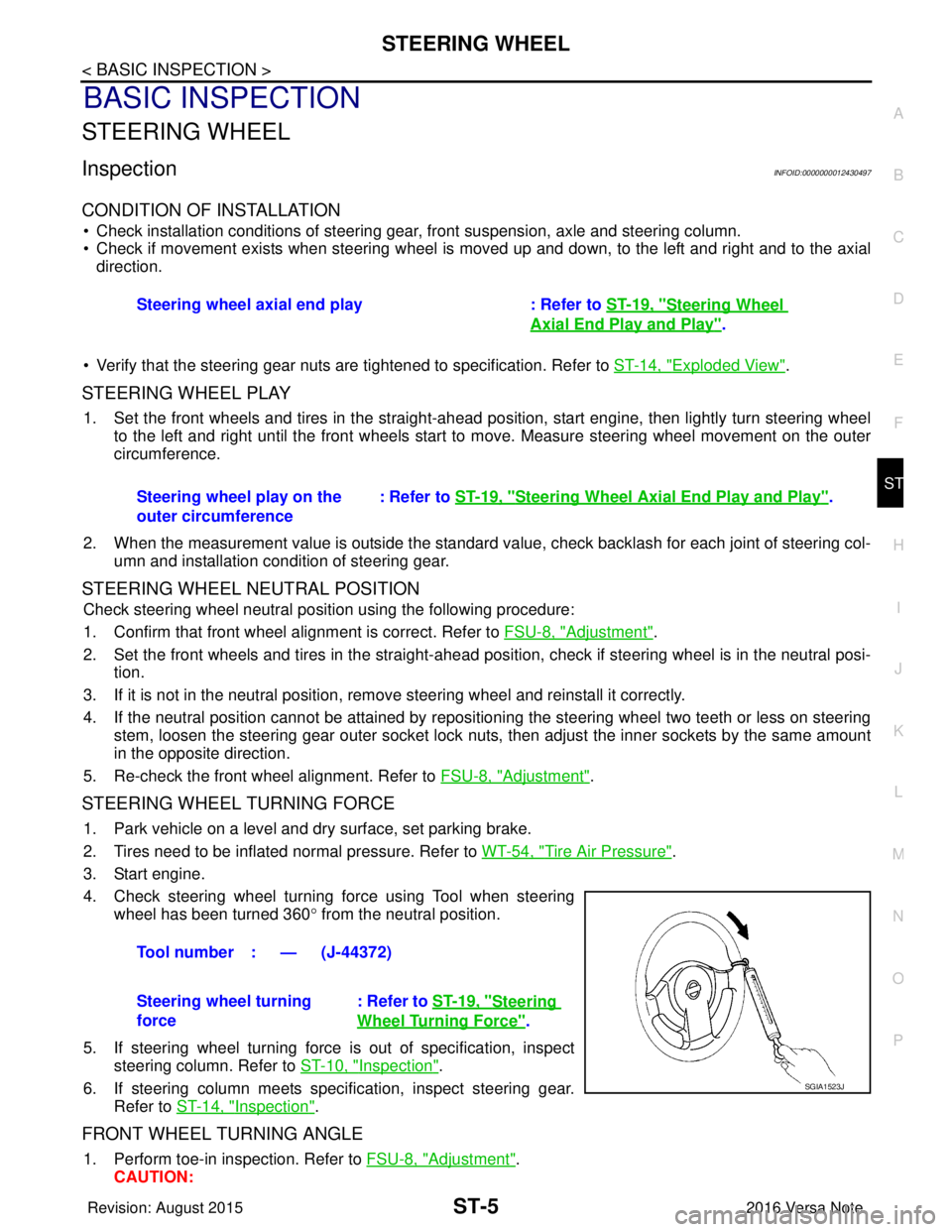
4. Check steering wheel turning force using Tool when steering wheel has been turned 360 ° from the neutral position.
5. If steering wheel turning force is out of specification, inspect steering column. Refer to ST-10, "
Inspection".
6. If steering column meets specification, inspect steering gear. Refer to ST-14, "
Inspection".
FRONT WHEEL TURNING ANGLE
1. Perform toe-in inspection. Refer to FSU-8, "Adjustment".
CAUTION: Steering wheel axial end play : Refer to
ST-19, "
Steering Wheel
Axial End Play and Play".
Steering wheel play on the
outer circumference : Refer to
ST-19, "
Steering Wheel Axia l End Play and Play".
Tool number : — (J-44372)
Steering wheel turning
force : Refer to
ST-19, "
Steering
Wheel Turning Force".
SGIA1523J
Revision: August 2015 2016 Versa Note
cardiagn.com
Page 3227 of 3641
ST-6
< BASIC INSPECTION >
STEERING WHEEL
Perform front wheel turning angle inspection, after toe-in inspection.
2. Place front wheels on turning radius gauges and rear wheels on stands, so that vehicle can be level.
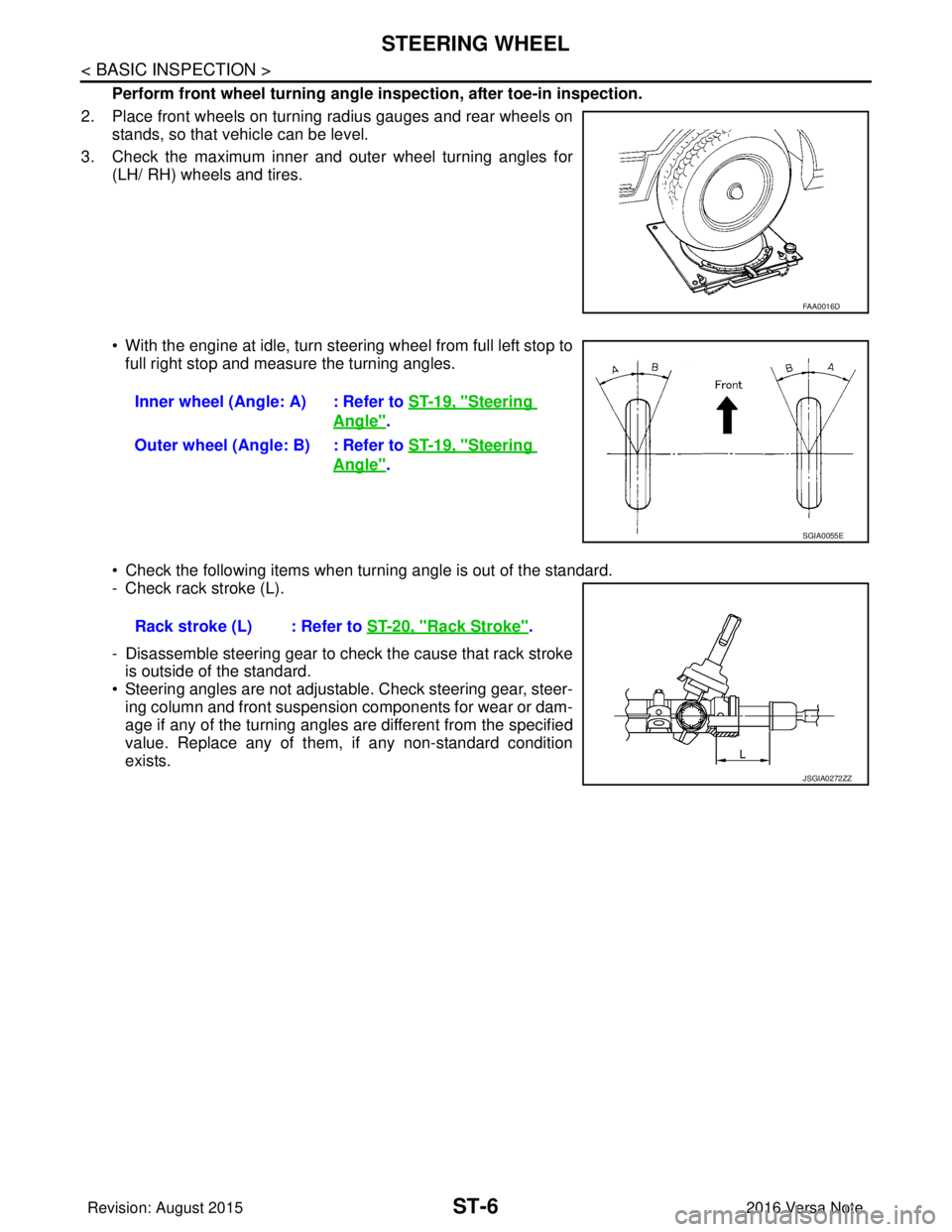
3. Check the maximum inner and outer wheel turning angles for (LH/ RH) wheels and tires.
• With the engine at idle, turn steering wheel from full left stop tofull right stop and measure the turning angles.
• Check the following items when turning angle is out of the standard.
- Check rack stroke (L).
- Disassemble steering gear to check the cause that rack stroke is outside of the standard.
• Steering angles are not adjustable. Check steering gear, steer- ing column and front suspension components for wear or dam-
age if any of the turning angles are different from the specified
value. Replace any of them, if any non-standard condition
exists.
FAA0016D
Inner wheel (Angle: A) : Refer to ST-19, "Steering
Angle".
Outer wheel (Angle: B) : Refer to ST-19, "
Steering
Angle".
SGIA0055E
Rack stroke (L) : Refer to ST-20, "Rack Stroke".
JSGIA0272ZZ
Revision: August 2015 2016 Versa Note
cardiagn.com
Page 3229 of 3641
ST-8
< REMOVAL AND INSTALLATION >
STEERING WHEEL
REMOVAL AND INSTALLATION
STEERING WHEEL
Exploded ViewINFOID:0000000012430499
Removal and InstallationINFOID:0000000012430500
REMOVAL
1. Set the front wheels and tires in the straight-ahead position.
2. Remove driver air bag module. Refer to SR-12, "
Removal and Installation".
3. Remove steering wheel lock nut.
4. Remove steering wheel using suitable tool. CAUTION:
Place a piece of tape across the spiral cable so it will not be rotated out of position.
5. Inspect steering wheel near the puller holes for damage. Replace as necessary.
INSTALLATION
Installation is in the reverse order of removal.
CAUTION:
Do not reuse steering wheel lock nut.
• Align spiral cable correctly before installing steering wheel . Make sure that the spiral cable is in the neutral
position. Refer to SR-16, "
Removal and Installation".
• Adjust the neutral position of the steering angle sensor. Refer to BRC-55, "
ADJUSTMENT OF STEERING
ANGLE SENSOR NEUTRAL POSITION : Description".
CAUTION:
• The spiral cable may snap due to steering operation if the cable is not installed in the correct posi-
tion.
• With the steering linkag e disconnected, the cable may snap by turning the steering wheel beyond
the limited number of turns.
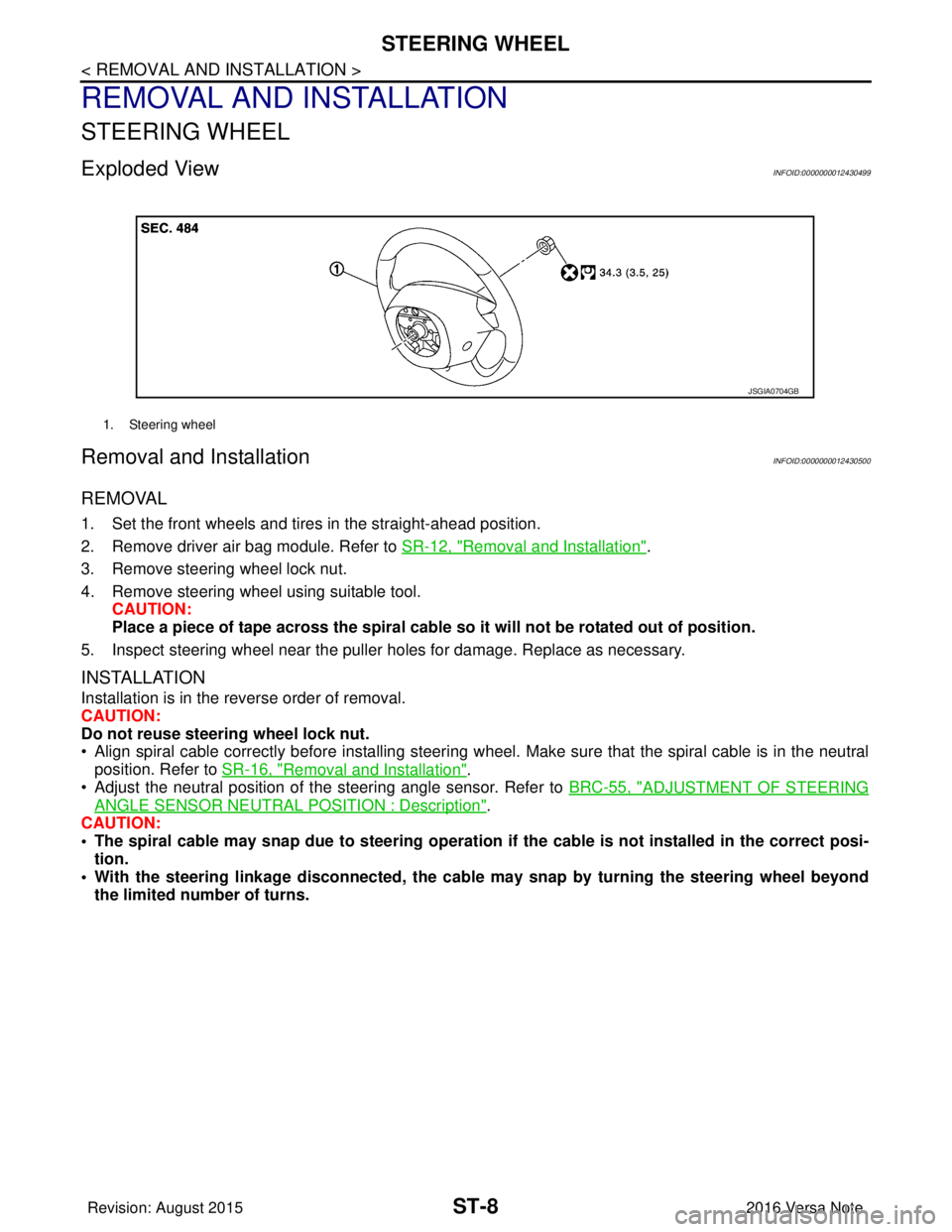
1. Steering wheel
JSGIA0704GB
Revision: August 2015 2016 Versa Note
cardiagn.com
Page 3230 of 3641
STEERING COLUMNST-9
< REMOVAL AND INSTALLATION >
C
DE
F
H I
J
K L
M A
B
ST
N
O P
STEERING COLUMN
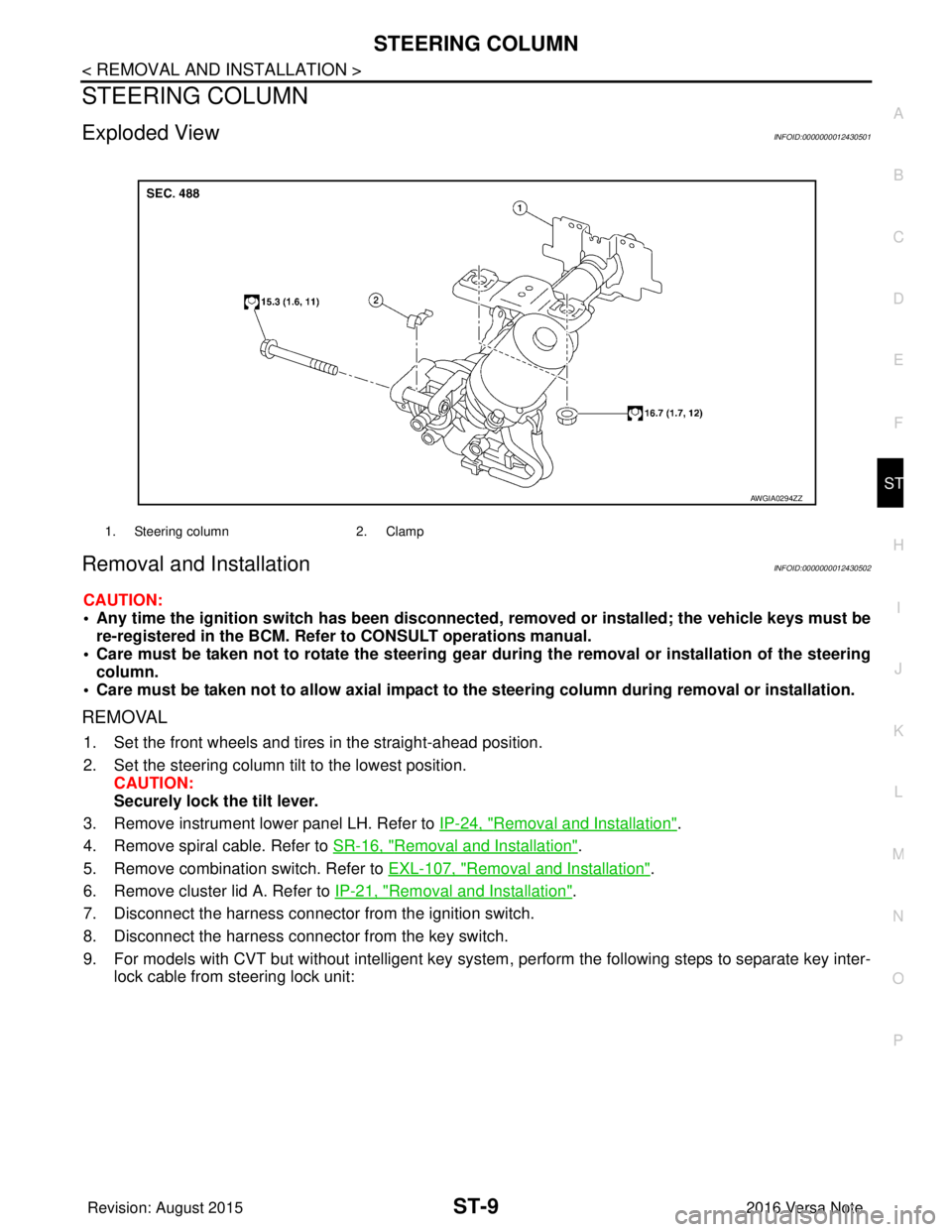
Exploded ViewINFOID:0000000012430501
Removal and InstallationINFOID:0000000012430502
CAUTION:
• Any time the ignition switch has been disconnected, removed or installed; the vehicle keys must be
re-registered in the BCM. Refer to CONSULT operations manual.
• Care must be taken not to rotate the steering gear during the removal or inst allation of the steering
column.
• Care must be taken not to allow axial impact to the steering column during removal or installation.
REMOVAL
1. Set the front wheels and tires in the straight-ahead position.
2. Set the steering column tilt to the lowest position.
CAUTION:
Securely lock the tilt lever.
3. Remove instrument lower panel LH. Refer to IP-24, "
Removal and Installation".
4. Remove spiral cable. Refer to SR-16, "
Removal and Installation".
5. Remove combination switch. Refer to EXL-107, "
Removal and Installation".
6. Remove cluster lid A. Refer to IP-21, "
Removal and Installation".
7. Disconnect the harness connector from the ignition switch.
8. Disconnect the harness connector from the key switch.
9. For models with CVT but without intelligent key system , perform the following steps to separate key inter-
lock cable from steering lock unit:
1. Steering column 2. Clamp
AWGIA0294ZZ
Revision: August 2015 2016 Versa Note
cardiagn.com
Page 3233 of 3641
ST-12
< REMOVAL AND INSTALLATION >
STEERING SHAFT
STEERING SHAFT
Exploded ViewINFOID:0000000012430504
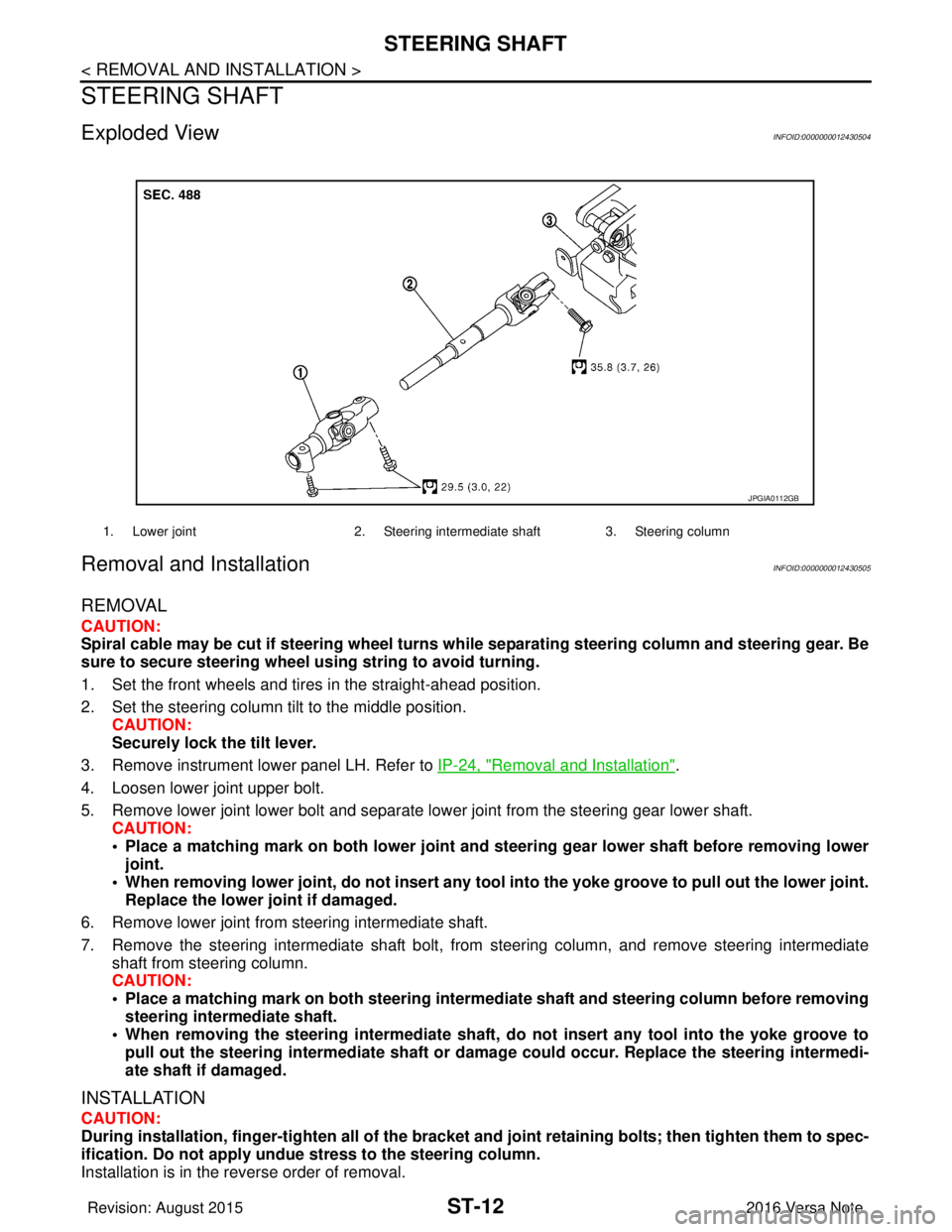
Removal and InstallationINFOID:0000000012430505
REMOVAL
CAUTION:
Spiral cable may be cut if steering wheel turns while separating steering column and steering gear. Be
sure to secure steering wheel us ing string to avoid turning.
1. Set the front wheels and tires in the straight-ahead position.
2. Set the steering column tilt to the middle position. CAUTION:
Securely lock the tilt lever.
3. Remove instrument lower panel LH. Refer to IP-24, "
Removal and Installation".
4. Loosen lower joint upper bolt.
5. Remove lower joint lower bolt and separate lower joint from the steering gear lower shaft. CAUTION:
• Place a matching mark on both lower joint and st eering gear lower shaft before removing lower
joint.
• When removing lower joint, do not insert any tool into the yoke groove to pull out the lower joint.
Replace the lower joint if damaged.
6. Remove lower joint from steering intermediate shaft.
7. Remove the steering intermediate shaft bolt, from steering column, and remove steering intermediate
shaft from steering column.
CAUTION:
• Place a matching mark on both steering interme diate shaft and steering column before removing
steering intermediate shaft.
• When removing the steering intermediate shaft, do not insert any tool into the yoke groove to pull out the steering intermediate shaft or dama ge could occur. Replace the steering intermedi-
ate shaft if damaged.
INSTALLATION
CAUTION:
During installation, finger-tighten all of the bracket and joint retainin g bolts; then tighten them to spec-
ification. Do not ap ply undue stress to the steering column.
Installation is in the reverse order of removal.
1. Lower joint 2. Steering intermediate shaft 3. Steering column
JPGIA0112GB
Revision: August 2015 2016 Versa Note
cardiagn.com
Page 3235 of 3641
ST-14
< REMOVAL AND INSTALLATION >
STEERING GEAR AND LINKAGE
STEERING GEAR AND LINKAGE
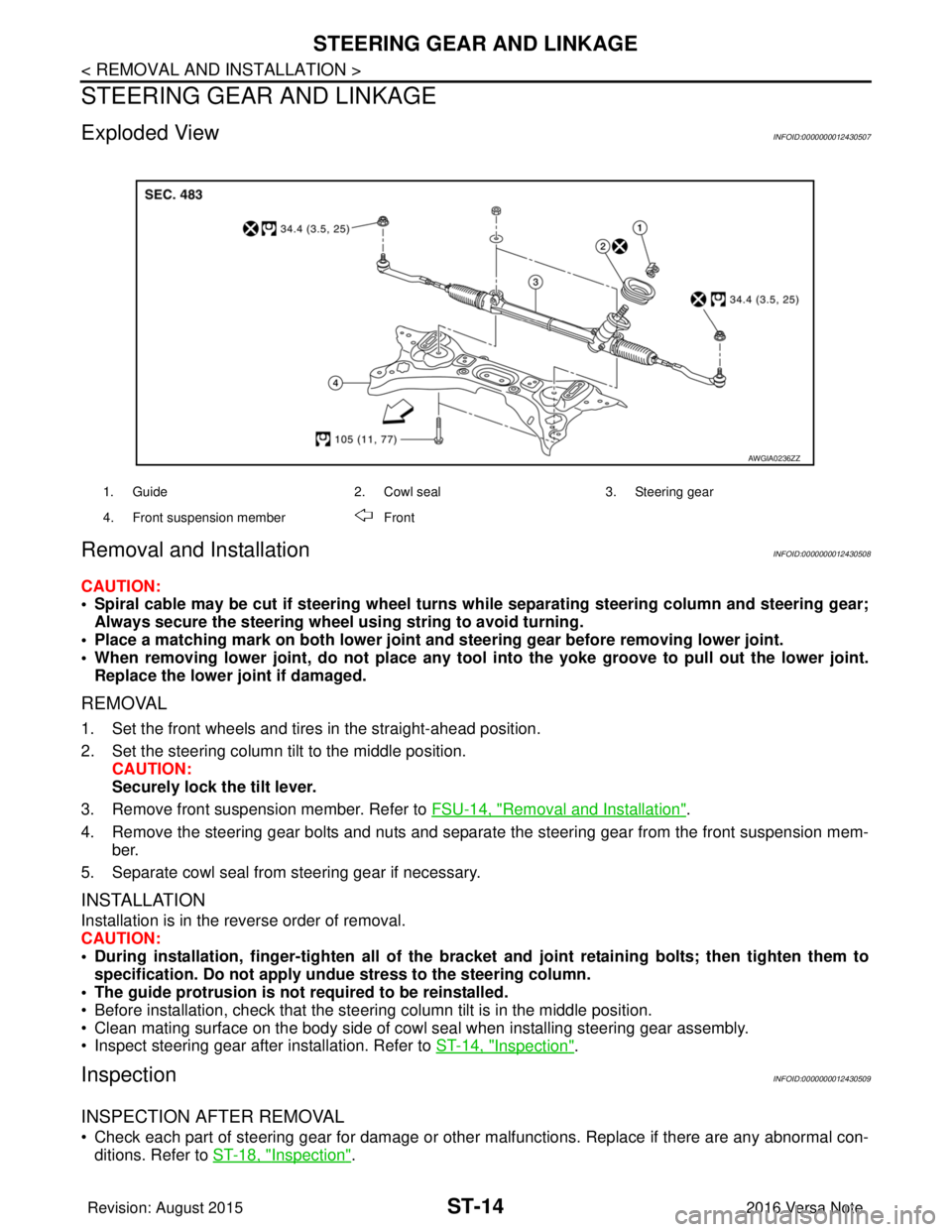
Exploded ViewINFOID:0000000012430507
Removal and InstallationINFOID:0000000012430508
CAUTION:
• Spiral cable may be cut if steering wheel turns while separating steering column and steering gear;Always secure the steering wheel using string to avoid turning.
• Place a matching mark on both lower joint and steering gear before removing lower joint.
• When removing lower joint, do no t place any tool into the yoke groove to pull out the lower joint.
Replace the lower joint if damaged.
REMOVAL
1. Set the front wheels and tires in the straight-ahead position.
2. Set the steering column tilt to the middle position. CAUTION:
Securely lock the tilt lever.
3. Remove front suspension member. Refer to FSU-14, "
Removal and Installation".
4. Remove the steering gear bolts and nuts and separate the steering gear from the front suspension mem- ber.
5. Separate cowl seal from steering gear if necessary.
INSTALLATION
Installation is in the reverse order of removal.
CAUTION:
• During installation, finger-tighten all of the bracket and joint retaining bolts; then tighten them to
specification. Do not apply undue stress to the steering column.
• The guide protrusion is not required to be reinstalled.
• Before installation, check that the steering column tilt is in the middle position.
• Clean mating surface on the body side of cowl seal when installing steering gear assembly.
• Inspect steering gear after installation. Refer to ST-14, "
Inspection".
InspectionINFOID:0000000012430509
INSPECTION AFTER REMOVAL
• Check each part of steering gear for damage or other malfunctions. Replace if there are any abnormal con-
ditions. Refer to ST-18, "
Inspection".
1. Guide 2. Cowl seal3. Steering gear
4. Front suspension member Front
AWGIA0236ZZ
Revision: August 2015 2016 Versa Note
cardiagn.com
Page 3371 of 3641
![NISSAN NOTE 2016 Service Service Manual TM-130
< BASIC INSPECTION >[CVT: RE0F11A]
CALIBRATION OF G SENSOR
CALIBRATION OF G SENSOR
DescriptionINFOID:0000000012431046
TCM stores calibration data (inherent characteristic value) of G sensor to](/img/5/57363/w960_57363-3370.png "NISSAN NOTE 2016 Service Service Manual TM-130
< BASIC INSPECTION >[CVT: RE0F11A]
CALIBRATION OF G SENSOR
CALIBRATION OF G SENSOR
DescriptionINFOID:0000000012431046
TCM stores calibration data (inherent characteristic value) of G sensor to")
TM-130
< BASIC INSPECTION >[CVT: RE0F11A]
CALIBRATION OF G SENSOR
CALIBRATION OF G SENSOR
DescriptionINFOID:0000000012431046
TCM stores calibration data (inherent characteristic value) of G sensor to provide accurate control. Therefore,
it is required to perform calibration of G sensor after t
he following work is performed. For work procedure, refer
to TM-130, "
Work Procedure".
• Removal/installation or replacement of G sensor
• Replacement of TCM
Work ProcedureINFOID:0000000012431047
1.PREPARATION BEFORE CALIBRATION PROCEDURE
1. Park the vehicle on a level surface.
2. Adjust air pressure of all tires to the specified pressure. WT-54, "
Tire Air Pressure".
>> GO TO 2.
2.PERFORM CALIBRATION
With CONSULT
1. Turn ignition switch ON. CAUTION:
Never start engine.
2. Select “Work Support” in “TRANSMISSION”.
3. Select “G SENSOR CALIBRATION”.
4. Touch “Start”. CAUTION:
Never swing the vehicle durin g “G sensor calibration”.
Is
“COMPLETED” displayed?
YES >> GO TO 3.
NO >> Perform steps 1 and 2 again.
3.PERFORM THE SELF-DIAGNOSIS
With CONSULT
1. Turn ignition switch OFF and wait for 10 seconds.
2. Turn ignition switch ON.
3. Select “Self Diagnostic Results” in “TRANSMISSION”.
Is
“P1586” or “P1588” detected?
YES >> Go to TM-110, "DTC Index".
NO >> Calibration end
Revision: August 2015 2016 Versa Note
cardiagn.com
Page 3372 of 3641
![NISSAN NOTE 2016 Service Service Manual STALL TESTTM-131
< BASIC INSPECTION > [CVT: RE0F11A]
C
EF
G H
I
J
K L
M A
B
TM
N
O P
STALL TEST
Work ProcedureINFOID:0000000012431048
INSPECTION
1. Check the engine oil level. Replenish if necessary.](/img/5/57363/w960_57363-3371.png "NISSAN NOTE 2016 Service Service Manual STALL TESTTM-131
< BASIC INSPECTION > [CVT: RE0F11A]
C
EF
G H
I
J
K L
M A
B
TM
N
O P
STALL TEST
Work ProcedureINFOID:0000000012431048
INSPECTION
1. Check the engine oil level. Replenish if necessary.")
STALL TESTTM-131
< BASIC INSPECTION > [CVT: RE0F11A]
C
EF
G H
I
J
K L
M A
B
TM
N
O P
STALL TEST
Work ProcedureINFOID:0000000012431048
INSPECTION
1. Check the engine oil level. Replenish if necessary.
2. Check for leak of the CVT fluid. Refer to TM-228, "
Inspection".
3. Drive for about 10 minutes to warm up the vehicle so that the CVT fluid temperature is 50 to 80°C (122 to
176° F).
4. Be sure to apply the parking brake and block the tires.
5. Start the engine, depress the brake pedal and put the selector lever to the D position.
6. While depressing the brake pedal, depress the accelerator pedal gradually.
7. Read the stall speed quickly. Then, release your foot from the accelerator pedal quickly. CAUTION:
Do not depress the accelerator pedal fo r 5 seconds or more during the test.
8. Place the selector lever in the N position.
9. Cool the CVT fluid. CAUTION:
Run the engine with the idle speed for at least 1 minute.
10. Put the selector lever to the R position and perform Step 6 to Step 9 again.
NARROWING-DOWN MALFUNCTIONING PARTS
O: Within the stall speed standard value
H: Stall speed is higher than the standard value.
L: Stall speed is lower than the standard value.
Stall speed : Refer to TM-265, "Stall Speed".
Selector lever position
Possible cause
DR
Sta ll sp ee d H
O • Low brake
O H • Reverse brake
LL •Engine
• Torque converter one way clutch
HH • Line pressure is low.
• Primary pulley
• Secondary pulley
• Steel belt
Revision: August 2015
2016 Versa Note
cardiagn.com