warning light NISSAN NOTE 2016 Service Workshop Manual
[x] Cancel search | Manufacturer: NISSAN, Model Year: 2016, Model line: NOTE, Model: NISSAN NOTE 2016Pages: 3641, PDF Size: 28.72 MB
Page 2467 of 3641
![NISSAN NOTE 2016 Service Workshop Manual MWI
THE OIL PRESSURE WARNING LAMP DOES NOT TURN OFFMWI-109
< SYMPTOM DIAGNOSIS > [TYPE B]
C
D
E
F
G H
I
J
K L
M B A
O P
THE OIL PRESSURE WARNING LAMP DOES NOT TURN OFF
DescriptionINFOID:0000000012432](/img/5/57363/w960_57363-2466.png "NISSAN NOTE 2016 Service Workshop Manual MWI
THE OIL PRESSURE WARNING LAMP DOES NOT TURN OFFMWI-109
< SYMPTOM DIAGNOSIS > [TYPE B]
C
D
E
F
G H
I
J
K L
M B A
O P
THE OIL PRESSURE WARNING LAMP DOES NOT TURN OFF
DescriptionINFOID:0000000012432")
MWI
THE OIL PRESSURE WARNING LAMP DOES NOT TURN OFFMWI-109
< SYMPTOM DIAGNOSIS > [TYPE B]
C
D
E
F
G H
I
J
K L
M B A
O P
THE OIL PRESSURE WARNING LAMP DOES NOT TURN OFF
DescriptionINFOID:0000000012432651
The engine oil pressure warning lamp remains on while the engine is running (normal oil pressure).
Diagnosis ProcedureINFOID:0000000012432652
1.CHECK COMBINATION METER INPUT SIGNAL
1. Start the engine and select METER/M&A on CONSULT.
2. Observe OIL W/L DATA MONITOR and the operation of the engine oil pressure warning lamp on the com- bination meter.
Is the inspection result normal?
YES >> Replace combination meter. Refer to MWI-115, "Removal and Installation".
NO >> Perform ECM self-diagnosis. Refer to EC-60, "
CONSULT Function".
ComponentConditionCONSULT
Engine oil pressure warning light Engine runningOFF
Revision: August 2015 2016 Versa Note
cardiagn.com
Page 2497 of 3641
PB-4
< PERIODIC MAINTENANCE >
PARKING BRAKE SYSTEM
PERIODIC MAINTENANCE
PARKING BRAKE SYSTEM
Inspection and AdjustmentINFOID:0000000012430688
INSPECTION
Parking Brake Control Stroke
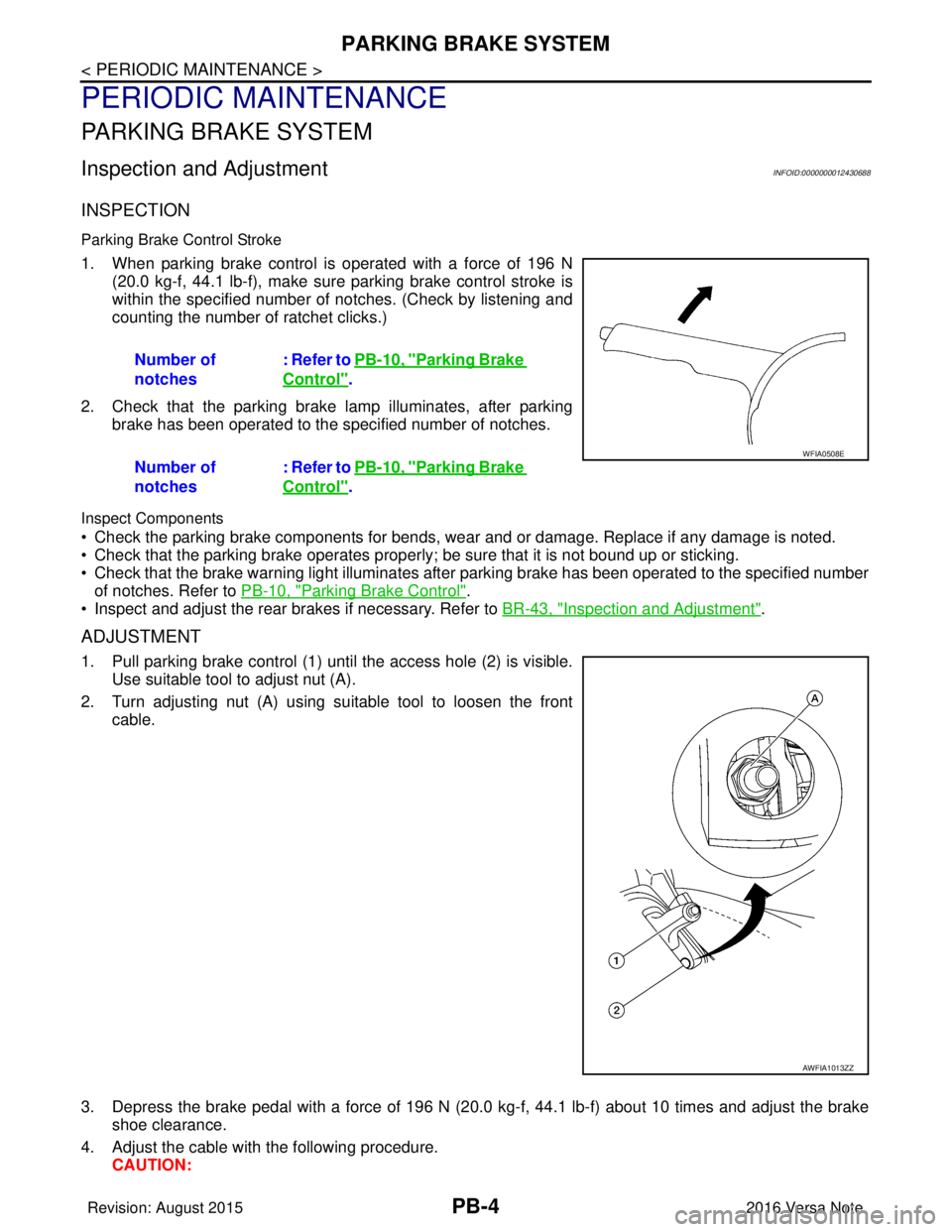
1. When parking brake control is operated with a force of 196 N(20.0 kg-f, 44.1 lb-f), make sure parking brake control stroke is
within the specified number of notches. (Check by listening and
counting the number of ratchet clicks.)
2. Check that the parking brake lamp illuminates, after parking brake has been operated to the specified number of notches.
Inspect Components
• Check the parking brake components for bends, wear and or damage. Replace if any damage is noted.
• Check that the parking brake operates properly ; be sure that it is not bound up or sticking.
• Check that the brake warning light illuminates afte r parking brake has been operated to the specified number
of notches. Refer to PB-10, "
Parking Brake Control".
• Inspect and adjust the rear brakes if necessary. Refer to BR-43, "
Inspection and Adjustment".
ADJUSTMENT
1. Pull parking brake control (1) until the access hole (2) is visible.
Use suitable tool to adjust nut (A).
2. Turn adjusting nut (A) using suitable tool to loosen the front cable.
3. Depress the brake pedal with a force of 196 N (20. 0 kg-f, 44.1 lb-f) about 10 times and adjust the brake
shoe clearance.
4. Adjust the cable with the following procedure. CAUTION:Number of
notches
: Refer to PB-10, "
Parking Brake
Control".
Number of
notches : Refer to PB-10, "
Parking Brake
Control".
WFIA0508E
AWFIA1013ZZ
Revision: August 2015
2016 Versa Note
cardiagn.com
Page 2503 of 3641
PB-10
< SERVICE DATA AND SPECIFICATIONS (SDS)
SERVICE DATA AND SPECIFICATIONS (SDS)
SERVICE DATA AND SPECIFICATIONS (SDS)
SERVICE DATA AND SPECIFICATIONS (SDS)
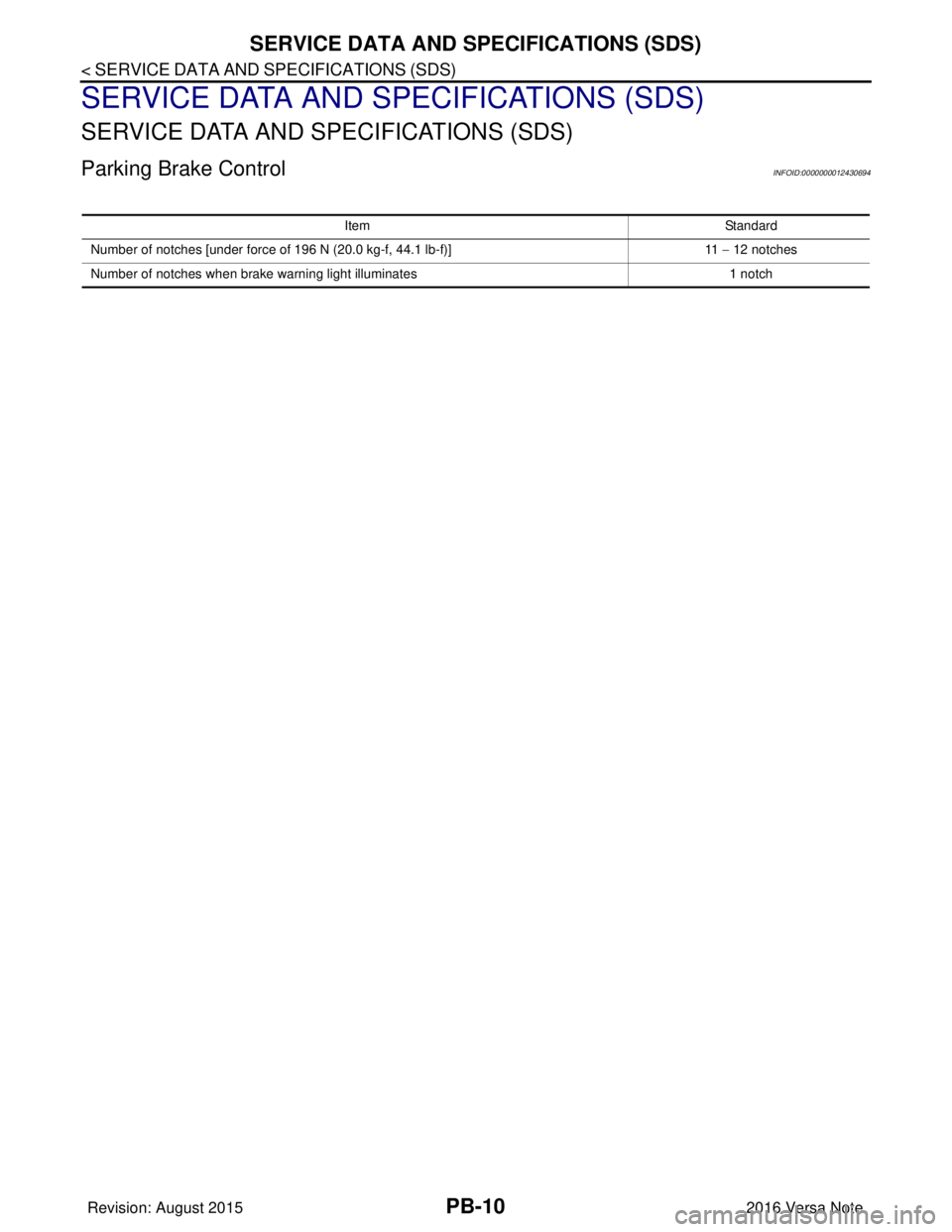
Parking Brake ControlINFOID:0000000012430694
ItemStandard
Number of notches [under force of 196 N (20.0 kg-f, 44.1 lb-f)] 11 − 12 notches
Number of notches when brake warning light illuminates 1 notch
Revision: August 20152016 Versa Note
cardiagn.com
Page 2514 of 3641
![NISSAN NOTE 2016 Service Workshop Manual PCS
DIAGNOSIS SYSTEM (IPDM E/R)PCS-11
< SYSTEM DESCRIPTION > [IPDM E/R]
C
D
E
F
G H
I
J
K L
B A
O P
N
ECU IDENTIFICATION
The IPDM E/R part number is displayed.
SELF DIAGNOSTIC RESULT
Refer to
PCS-20,](/img/5/57363/w960_57363-2513.png "NISSAN NOTE 2016 Service Workshop Manual PCS
DIAGNOSIS SYSTEM (IPDM E/R)PCS-11
< SYSTEM DESCRIPTION > [IPDM E/R]
C
D
E
F
G H
I
J
K L
B A
O P
N
ECU IDENTIFICATION
The IPDM E/R part number is displayed.
SELF DIAGNOSTIC RESULT
Refer to
PCS-20,")
PCS
DIAGNOSIS SYSTEM (IPDM E/R)PCS-11
< SYSTEM DESCRIPTION > [IPDM E/R]
C
D
E
F
G H
I
J
K L
B A
O P
N
ECU IDENTIFICATION
The IPDM E/R part number is displayed.
SELF DIAGNOSTIC RESULT
Refer to
PCS-20, "DTCIndex".
DATA MONITOR
ACTIVE TEST
Data Monitor The IPDM E/R input/output data is displayed in real time.
Active Test The IPDM E/R activates outputs to test components.
CAN Diag Support Mntr The result of transmit/receive diagnosis of CAN communication is displayed.
Direct Diagnostic Mode
Description
Monitor Item [Unit]Main
Signals Description
MOTOR FAN REQ [1/2/3/4] ×Indicates cooling fan speed signal received from ECM on CAN communication
line
AC COMP REQ [On/Off] ×Indicates A/C compressor request signal received from ECM on CAN commu-
nication line
TAIL&CLR REQ [On/Off] ×Indicates position light request signal
received from BCM on CAN communica-
tion line
HL LO REQ [On/Off] ×Indicates low beam request signal received from BCM on CAN communication
line
HL HI REQ [On/Off] ×Indicates high beam request signal received from BCM on CAN communication
line
FR FOG REQ [On/Off] ×Indicates front fog light request signal received from BCM on CAN communica-
tion line
FR WIP REQ [Stop/1LOW/Low/Hi] ×Indicates front wiper request signal received from BCM on CAN communication
line
WIP AUTO STOP [STOP P/ACT P] ×Indicates condition of front wiper auto stop signal
WIP PROT [Off/BLOCK] ×Indicates condition of front wiper fail-safe operation
IGN RLY1 -REQ [On/Off] Indicates ignition switch ON signal received from BCM on CAN communication
line
IGN RLY [On/Off] ×Indicates condition of ignition relay
PUSH SW [On/Off] Indicates condition of push-button ignition switch
INTER/NP SW [On/Off] Indicates condition of CVT shift position
ST RLY CONT [On/Off] Indicates starter relay status signal received from BCM on CAN communication
line
IHBT RLY -REQ [On/Off] Indicates starter control relay signal received from BCM on CAN communication
line
ST/INHI RLY [Off/ ST /INHI] Indicates condition of starter relay and starter control relay
DETENT SW [On/Off] Indicates condition of CVT shift selector (park position switch)
DTRL REQ [Off] Indicates daytime running light request signal received from BCM on CAN com-
munication line
THFT HRN REQ [On/Off] Indicates theft warning horn request signal received from BCM on CAN commu-
nication line
HORN CHIRP [On/Off] Indicates horn reminder signal received from BCM on CAN communication line
Test item Description
HORN This test is able to check horn operation [On].
FRONT WIPER This test is able to check wiper motor operation [Hi/Lo/Off].
Revision: August 2015 2016 Versa Note
cardiagn.com
Page 2751 of 3641
WT-8
< SYSTEM DESCRIPTION >
SYSTEM
SYSTEM
TIRE PRESSURE MONITORING SYSTEM
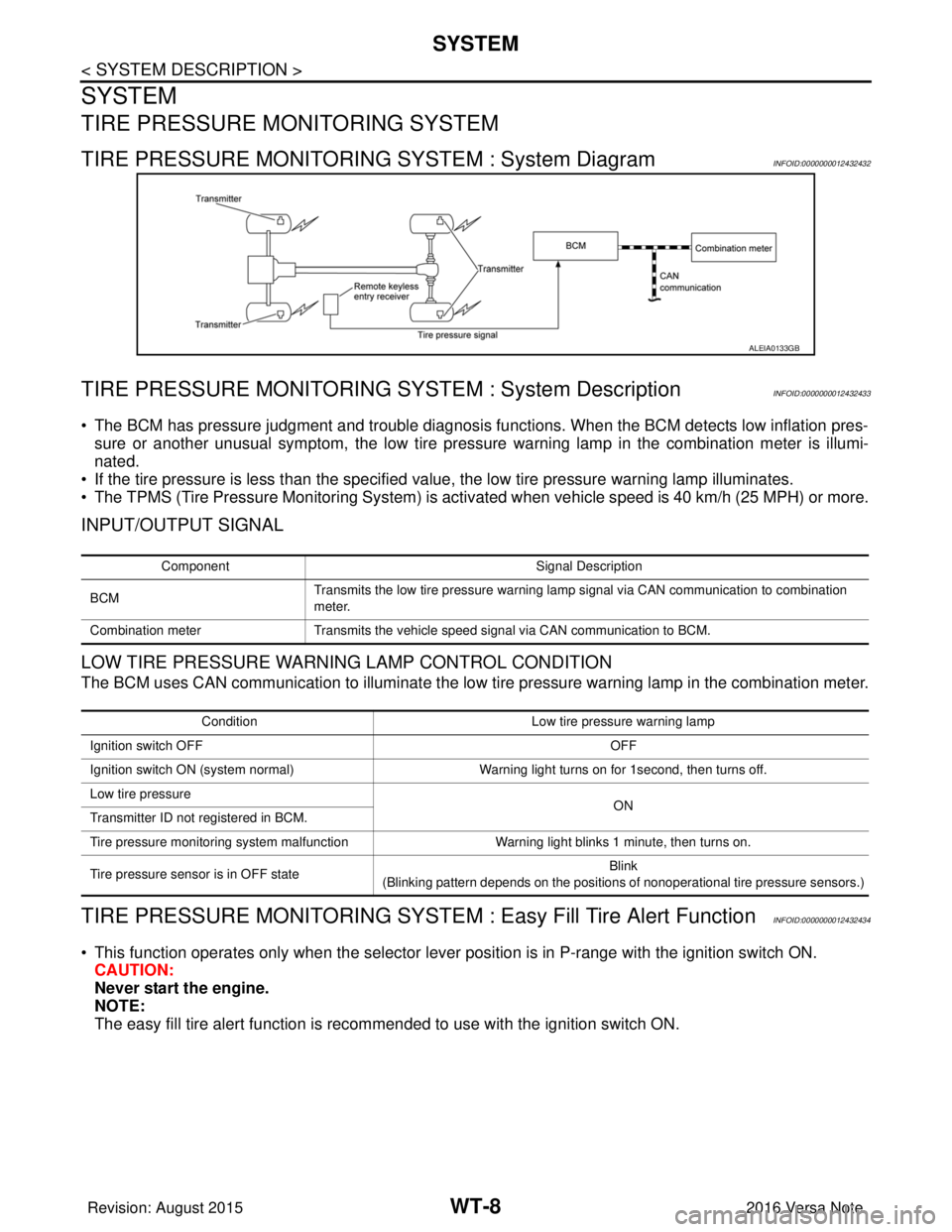
TIRE PRESSURE MONITORING SYSTEM : System DiagramINFOID:0000000012432432
TIRE PRESSURE MONITORING SY STEM : System DescriptionINFOID:0000000012432433
• The BCM has pressure judgment and trouble diagnosis functions. When the BCM detects low inflation pres-
sure or another unusual symptom, the low tire pressure warning lamp in the combination meter is illumi-
nated.
• If the tire pressure is less than the specified value, the low tire pressure warning lamp illuminates.
• The TPMS (Tire Pressure Monitoring System) is activated when vehicle s peed is 40 km/h (25 MPH) or more.
INPUT/OUTPUT SIGNAL
LOW TIRE PRESSURE WARNING LAMP CONTROL CONDITION
The BCM uses CAN communication to illuminate the low tire pressure warning lamp in the combination meter.
TIRE PRESSURE MONITORING SYSTEM : Easy Fill Tire Alert FunctionINFOID:0000000012432434
• This function operates only when the selector lever position is in P-range with the ignition switch ON.
CAUTION:
Never start the engine.
NOTE:
The easy fill tire alert function is reco mmended to use with the ignition switch ON.
ALEIA0133GB
Component Signal Description
BCM Transmits the low tire pressure warning lamp signal via CAN communication to combination
meter.
Combination meter Transmits the vehicle speed signal via CAN communication to BCM.
Condition Low tire pressure warning lamp
Ignition switch OFF OFF
Ignition switch ON (system normal) Warning light turns on for 1second, then turns off.
Low tire pressure ON
Transmitter ID not registered in BCM.
Tire pressure monitoring system malfunction Warning light blinks 1 minute, then turns on.
Tire pressure sensor is in OFF state Blink
(Blinking pattern depends on the positions of nonoperational tire pressure sensors.)
Revision: August 2015 2016 Versa Note
cardiagn.com
Page 2986 of 3641
![NISSAN NOTE 2016 Service Workshop Manual DIAGNOSIS SYSTEM (IPDM E/R)SEC-129
< SYSTEM DESCRIPTION > [WITHOUT INTELLIGENT KEY SYSTEM]
C
D
E
F
G H
I
J
L
M A
B
SEC
N
O P
ECU IDENTIFICATION
The IPDM E/R part number is displayed.
SELF DIAGNOSTIC R](/img/5/57363/w960_57363-2985.png "NISSAN NOTE 2016 Service Workshop Manual DIAGNOSIS SYSTEM (IPDM E/R)SEC-129
< SYSTEM DESCRIPTION > [WITHOUT INTELLIGENT KEY SYSTEM]
C
D
E
F
G H
I
J
L
M A
B
SEC
N
O P
ECU IDENTIFICATION
The IPDM E/R part number is displayed.
SELF DIAGNOSTIC R")
DIAGNOSIS SYSTEM (IPDM E/R)SEC-129
< SYSTEM DESCRIPTION > [WITHOUT INTELLIGENT KEY SYSTEM]
C
D
E
F
G H
I
J
L
M A
B
SEC
N
O P
ECU IDENTIFICATION
The IPDM E/R part number is displayed.
SELF DIAGNOSTIC RESULT
Refer to PCS-20, "DTCIndex".
DATA MONITOR
ACTIVE TEST
Data Monitor The IPDM E/R input/output data is displayed in real time.
Active Test The IPDM E/R activates outputs to test components.
CAN Diag Support Mntr The result of transmit/receive diagnosis of CAN communication is displayed.
Direct Diagnostic Mode
Description
Monitor Item [Unit]Main
Signals Description
MOTOR FAN REQ [1/2/3/4] ×Indicates cooling fan speed signal received from ECM on CAN communication
line
AC COMP REQ [On/Off] ×Indicates A/C compressor request signal received from ECM on CAN commu-
nication line
TAIL&CLR REQ [On/Off] ×Indicates position light request signal
received from BCM on CAN communica-
tion line
HL LO REQ [On/Off] ×Indicates low beam request signal received from BCM on CAN communication
line
HL HI REQ [On/Off] ×Indicates high beam request signal received from BCM on CAN communication
line
FR FOG REQ [On/Off] ×Indicates front fog light request signal received from BCM on CAN communica-
tion line
FR WIP REQ [Stop/1LOW/Low/Hi] ×Indicates front wiper request signal received from BCM on CAN communication
line
WIP AUTO STOP [STOP P/ACT P] ×Indicates condition of front wiper auto stop signal
WIP PROT [Off/BLOCK] ×Indicates condition of front wiper fail-safe operation
IGN RLY1 -REQ [On/Off] Indicates ignition switch ON signal received from BCM on CAN communication
line
IGN RLY [On/Off] ×Indicates condition of ignition relay
PUSH SW [On/Off] Indicates condition of push-button ignition switch
INTER/NP SW [On/Off] Indicates condition of CVT shift position
ST RLY CONT [On/Off] Indicates starter relay status signal received from BCM on CAN communication
line
IHBT RLY -REQ [On/Off] Indicates starter control relay signal received from BCM on CAN communication
line
ST/INHI RLY [Off/ ST /INHI] Indicates condition of starter relay and starter control relay
DETENT SW [On/Off] Indicates condition of CVT shift selector (park position switch)
DTRL REQ [Off] Indicates daytime running light request signal received from BCM on CAN com-
munication line
THFT HRN REQ [On/Off] Indicates theft warning horn request signal received from BCM on CAN commu-
nication line
HORN CHIRP [On/Off] Indicates horn reminder signal received from BCM on CAN communication line
Test item Description
HORN This test is able to check horn operation [On].
FRONT WIPER This test is able to check wiper motor operation [Hi/Lo/Off].
Revision: August 2015 2016 Versa Note
cardiagn.com
Page 3032 of 3641
DIAGNOSIS SYSTEM (AIR BAG)SRC-15
< SYSTEM DESCRIPTION >
C
DE
F
G
I
J
K L
M A
B
SRC
N
O P
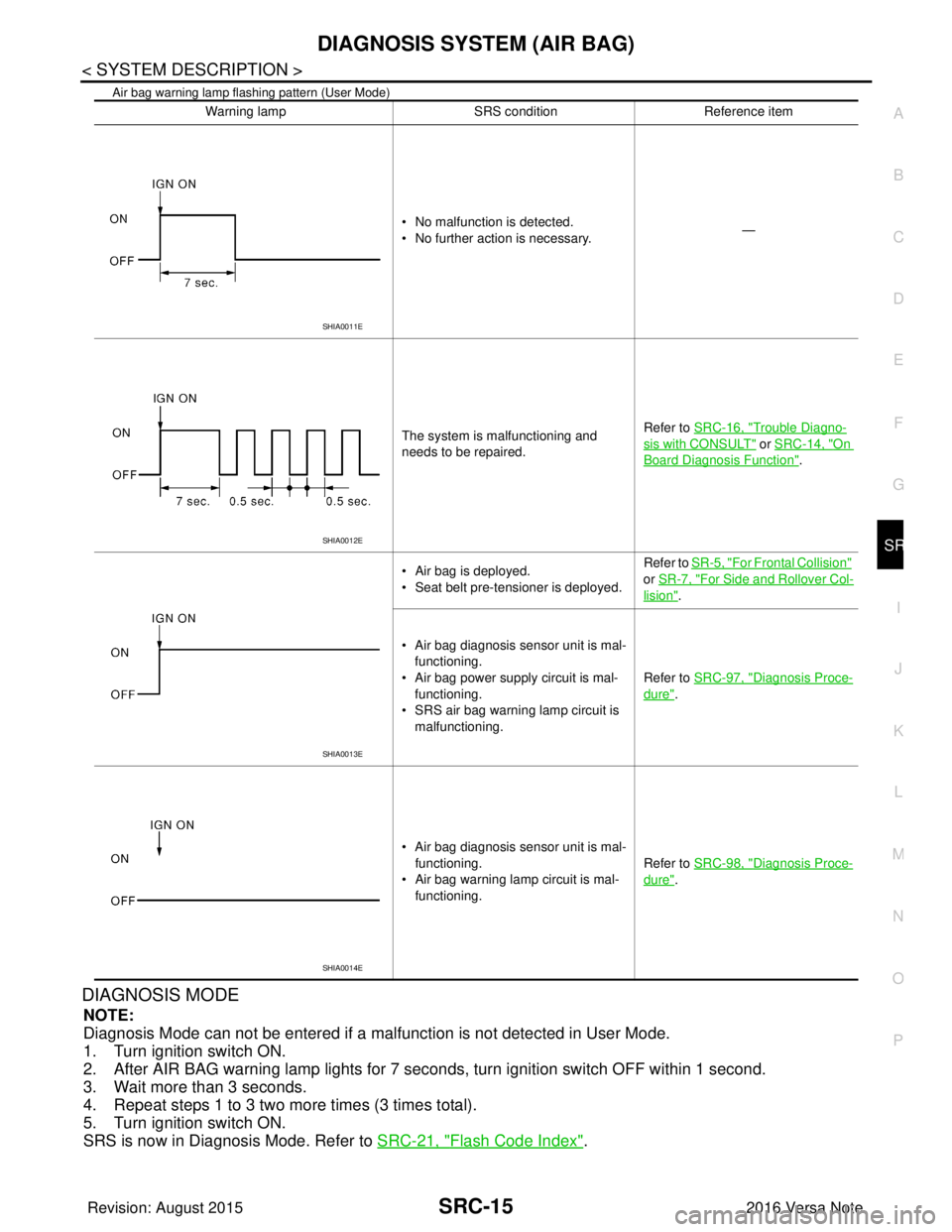
Air bag warning lamp flashing pattern (User Mode)
DIAGNOSIS MODE
NOTE:
Diagnosis Mode can not be entered if a malfunction is not detected in User Mode.
1. Turn ignition switch ON.
2. After AIR BAG warning lamp lights for 7 seconds, turn ignition switch OFF within 1 second.
3. Wait more than 3 seconds.
4. Repeat steps 1 to 3 two more times (3 times total).
5. Turn ignition switch ON.
SRS is now in Diagnosis Mode. Refer to SRC-21, "
Flash Code Index".
Warning lamp SRS conditionReference item
• No malfunction is detected.
• No further action is necessary. —
The system is malfunctioning and
needs to be repaired. Refer to SRC-16, "
Trouble Diagno-
sis with CONSULT" or SRC-14, "On
Board Diagnosis Function".
• Air bag is deployed.
• Seat belt pre-tensioner is deployed. Refer to
SR-5, "
For Frontal Collision"
or SR-7, "
For Side and Rollover Col-
lision".
• Air bag diagnosis sensor unit is mal- functioning.
• Air bag power supply circuit is mal- functioning.
• SRS air bag warning lamp circuit is
malfunctioning. Refer to SRC-97, "
Diagnosis Proce-
dure".
• Air bag diagnosis sensor unit is mal- functioning.
• Air bag warning lamp circuit is mal- functioning. Refer to SRC-98, "
Diagnosis Proce-
dure".
SHIA0011E
SHIA0012E
SHIA0013E
SHIA0014E
Revision: August 2015
2016 Versa Note
cardiagn.com
Page 3116 of 3641

SEAT BELT WARNING SYSTEMSRC-99
< SYMPTOM DIAGNOSIS >
C
DE
F
G
I
J
K L
M A
B
SRC
N
O P
SEAT BELT WARNING SYSTEM
Seat Belt Warning Syst em Does Not FunctionINFOID:0000000012430685
1.SEAT BELT WARNING LIGHT
Turn ignition switch ON.
Does the seat belt warning lamp come ON?
YES >> GO TO 2.
NO >> • Check 10A fuse [No. 8, loca ted in the fuse block (J/B)].
• Check seat belt buckle switch (driver seat).
• Check harness between combination meter and seat belt buckle switch (driver seat).
• Check combination meter. Refer to MWI-11, "
METER SYSTEM : Fail-safe" (type A) or MWI-62,
"METER SYSTEM : Fail-safe" (type B).
2.SEAT BELT BUCKLE (DRIVER SEAT)
Fasten the seat belt buckle (driver seat).
Does the seat belt warning lamp go OFF?
YES >> GO TO 3.
NO >> • Check seat belt buckle switch (driver seat). • Check harness between combination meter and seat belt buckle switch (driver seat).
3.OCCUPANT CLASSIFICATION SYSTEM
Have a helper sit in the passenger seat.
Does the seat belt warning lamp go ON?
YES >> GO TO 4.
NO >> • Check occupant classification system. Refer to SRC-11, "
OCCUPANT CLASSIFICATION SYS-
TEM : System Description".
• Check harness between occupant classification control unit and air bag diagnosis sensor unit.
4.SEAT BELT BUCKLE (PASSENGER SEAT)
Fasten the seat belt buckle (passenger seat).
Does the seat belt warning lamp go OFF?
YES >> System OK.
NO >> • Check seat belt buckle switch (passenger seat). • Check harness between seat belt buckle switch (passenger seat) and air bag diagnosis sensor
unit.
• Replace air bag diagnosis sensor unit. Refer to SR-30, "
Removal and Installation".
Revision: August 2015 2016 Versa Note
cardiagn.com
Page 3216 of 3641
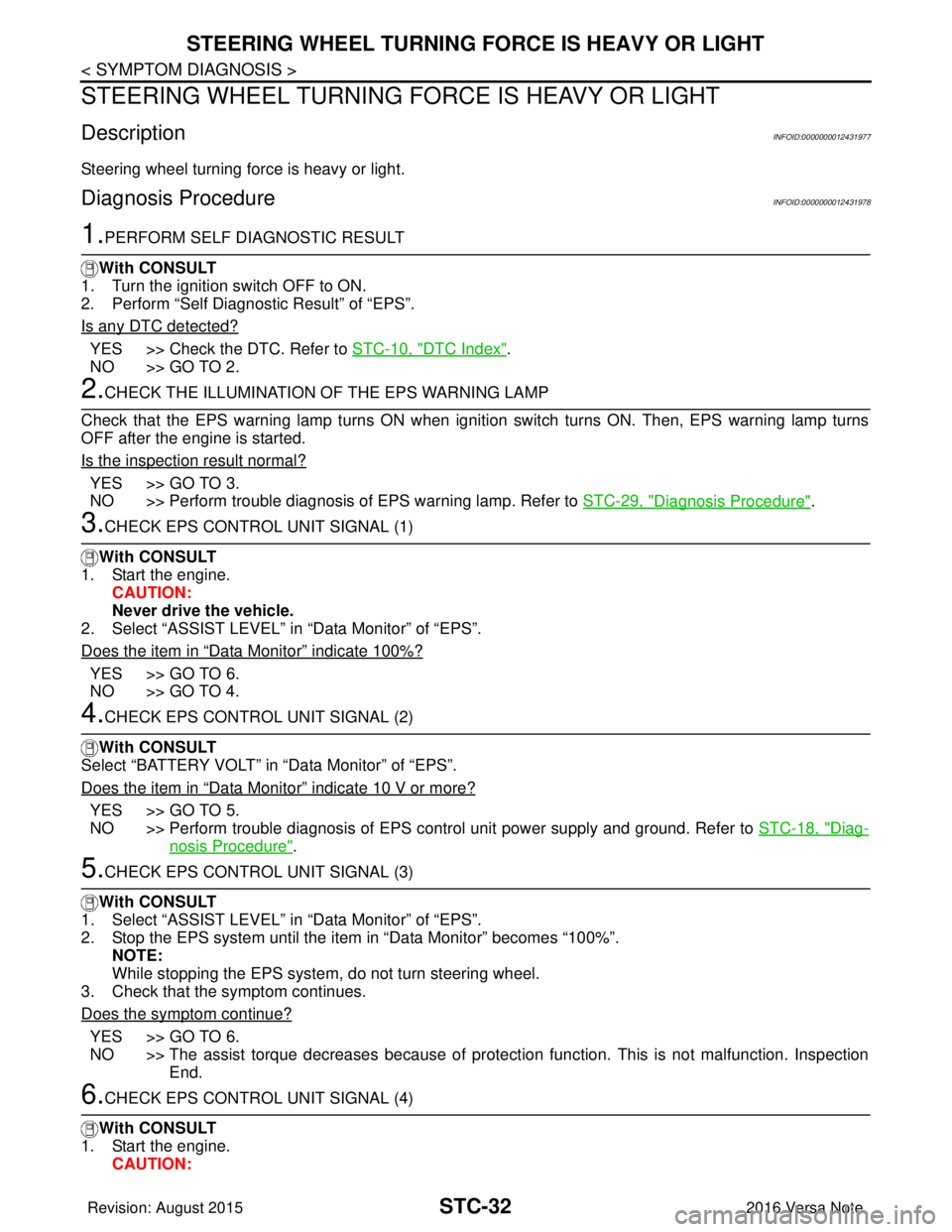
STC-32
< SYMPTOM DIAGNOSIS >
STEERING WHEEL TURNING FORCE IS HEAVY OR LIGHT
STEERING WHEEL TURNING FORCE IS HEAVY OR LIGHT
DescriptionINFOID:0000000012431977
Steering wheel turning force is heavy or light.
Diagnosis ProcedureINFOID:0000000012431978
1.PERFORM SELF DIAGNOSTIC RESULT
With CONSULT
1. Turn the ignition switch OFF to ON.
2. Perform “Self Diagnostic Result” of “EPS”.
Is any DTC detected?
YES >> Check the DTC. Refer to STC-10, "DTC Index".
NO >> GO TO 2.
2.CHECK THE ILLUMINATION OF THE EPS WARNING LAMP
Check that the EPS warning lamp turns ON when igni tion switch turns ON. Then, EPS warning lamp turns
OFF after the engine is started.
Is the inspection result normal?
YES >> GO TO 3.
NO >> Perform trouble diagnosis of EPS warning lamp. Refer to STC-29, "
Diagnosis Procedure".
3.CHECK EPS CONTROL UNIT SIGNAL (1)
With CONSULT
1. Start the engine. CAUTION:
Never drive the vehicle.
2. Select “ASSIST LEVEL” in “Data Monitor” of “EPS”.
Does the item in
“Data Monitor” indicate 100%?
YES >> GO TO 6.
NO >> GO TO 4.
4.CHECK EPS CONTROL UNIT SIGNAL (2)
With CONSULT
Select “BATTERY VOLT” in “Data Monitor” of “EPS”.
Does the item in
“Data Monitor” indicate 10 V or more?
YES >> GO TO 5.
NO >> Perform trouble diagnosis of EPS control unit power supply and ground. Refer to STC-18, "
Diag-
nosis Procedure".
5.CHECK EPS CONTROL UNIT SIGNAL (3)
With CONSULT
1. Select “ASSIST LEVEL” in “Data Monitor” of “EPS”.
2. Stop the EPS system until the item in “Data Monitor” becomes “100%”.
NOTE:
While stopping the EPS system, do not turn steering wheel.
3. Check that the symptom continues.
Does the symptom continue?
YES >> GO TO 6.
NO >> The assist torque decreases because of protection function. This is not malfunction. Inspection End.
6.CHECK EPS CONTROL UNIT SIGNAL (4)
With CONSULT
1. Start the engine. CAUTION:
Revision: August 2015 2016 Versa Note
cardiagn.com
Page 3332 of 3641
![NISSAN NOTE 2016 Service Workshop Manual DIAGNOSIS SYSTEM (TCM)TM-91
< SYSTEM DESCRIPTION > [CVT: RE0F11A]
C
EF
G H
I
J
K L
M A
B
TM
N
O P
DIAGNOSIS SYSTEM (TCM)
DIAGNOSIS DESCRIPTION
DIAGNOSIS DESCRIPTION : 1 Tr ip Detection Diagnosis and 2](/img/5/57363/w960_57363-3331.png "NISSAN NOTE 2016 Service Workshop Manual DIAGNOSIS SYSTEM (TCM)TM-91
< SYSTEM DESCRIPTION > [CVT: RE0F11A]
C
EF
G H
I
J
K L
M A
B
TM
N
O P
DIAGNOSIS SYSTEM (TCM)
DIAGNOSIS DESCRIPTION
DIAGNOSIS DESCRIPTION : 1 Tr ip Detection Diagnosis and 2")
DIAGNOSIS SYSTEM (TCM)TM-91
< SYSTEM DESCRIPTION > [CVT: RE0F11A]
C
EF
G H
I
J
K L
M A
B
TM
N
O P
DIAGNOSIS SYSTEM (TCM)
DIAGNOSIS DESCRIPTION
DIAGNOSIS DESCRIPTION : 1 Tr ip Detection Diagnosis and 2 Trip Detection Diagno-
sis
INFOID:0000000012431028
NOTE:
“Start the engine and turn OFF the ignition switch after warm-up.” This is defined as 1 trip.
1 TRIP DETECTION DIAGNOSIS
When initial malfunction is detected, TCM memorize s DTC. In these diagnoses, some illuminate MIL and
some do not. Refer to TM-110, "
DTC Index".
2 TRIP DETECTION DIAGNOSIS
When initial malfunction is detected, TCM memorizes DTC of the 1st trip. MIL does not light at this stage. <1
trip>
If the same malfunction is detected again in next drivi ng, TCM memorizes DTC. When DTC is memorized, MIL
lights. <2 trip>
“Trip” of the “2 trip detection diagnosis” indicates the driving mode that executes self-diagnosis during driving.
×: Check possible —: Check not possible
DIAGNOSIS DESCRIPTION : DTC and DTC of 1st TripINFOID:0000000012431029
2 TRIP DETECTION DIAGNOSIS THAT ILLUMINATES MIL
• The DTC number of the 1st trip is the same as the DTC number.
• When a malfunction is detected at the 1st trip, TCM memo rizes DTC of the 1st trip. MIL does not light at this
stage. If the same malfunction is not detected at t he 2nd trip (conforming to necessary driving conditions),
DTC at the 1st trip is erased from TCM. If the same malfunction is detected at the 2nd trip, TCM memorizes
DTC and MIL lights at the same time.
• The DTC of the 1st trip is specified in Service $01 of SAE J1979/ISO 15031-5. Since detection of DTC at the
1st trip does not illuminate MIL, warning for a problem is not given to a driver.
• For procedure to delete DTC and 1st trip DTC from TCM, refer to TM-93, "
CONSULT Function".
• If DTC of the 1st trip is detected, it is necessary to check the cause according to the “Diagnosis flow”. Refer to TM-122, "
Flowchart of Trouble Diagnosis".
DIAGNOSIS DESCRIPTION : Malfunction Indicator Lamp (MIL)INFOID:0000000012431030
• TCM not only detects DTC, but also sends the MI L signal to ECM through CAN communication. ECM sends
the MIL signal to the combination meter through CAN communication according to the signal, and illumi-
nates MIL.
• For malfunction indicator lamp (MIL) description, refer to EC-57, "
DIAGNOSIS DESCRIPTION : Malfunction
Indicator Lamp (MIL)".
DIAGNOSIS DESCRIPTION : Counter SystemINFOID:0000000012431031
RELATION BETWEEN DTC AT 1ST TRIP/DTC/MIL AND DRIVING CONDITIONS (FOR 2 TRIP DE-
TECTION DIAGNOSIS THAT ILLUMINATES MIL)
• When initial malfunction is detected, TCM memorizes DTC of the 1st trip. MIL does not light at this stage.
• If the same malfunction is detected at the 2nd trip, TCM memorizes DTC and MIL lights at the same time.
• Then, MIL goes after driving the vehicle for 3 tr ips under “Driving condition B” without malfunction.
• DTC is displayed until 40 trips of “Driving condition A” are satisfied without detecting the same malfunction.
DTC is erased when 40 trips are satisfied.
Item DTC at the 1st trip
DTCMIL
Display at the 1st trip Display at the
2nd trip Display at the
1st trip Display at the
2nd trip Illumination at
the 1st trip Illumination at
the 2nd trip
1 trip detection diagnosis
(Refer to TM-110, "
DTC Index")——
×— ×—
2 trip detection diagnosis
(Refer to TM-110, "
DTC Index") ×
—— ×— ×
Revision: August 2015 2016 Versa Note
cardiagn.com