diagram NISSAN NOTE 2016 Service Repair Manual
[x] Cancel search | Manufacturer: NISSAN, Model Year: 2016, Model line: NOTE, Model: NISSAN NOTE 2016Pages: 3641, PDF Size: 28.72 MB
Page 3551 of 3641
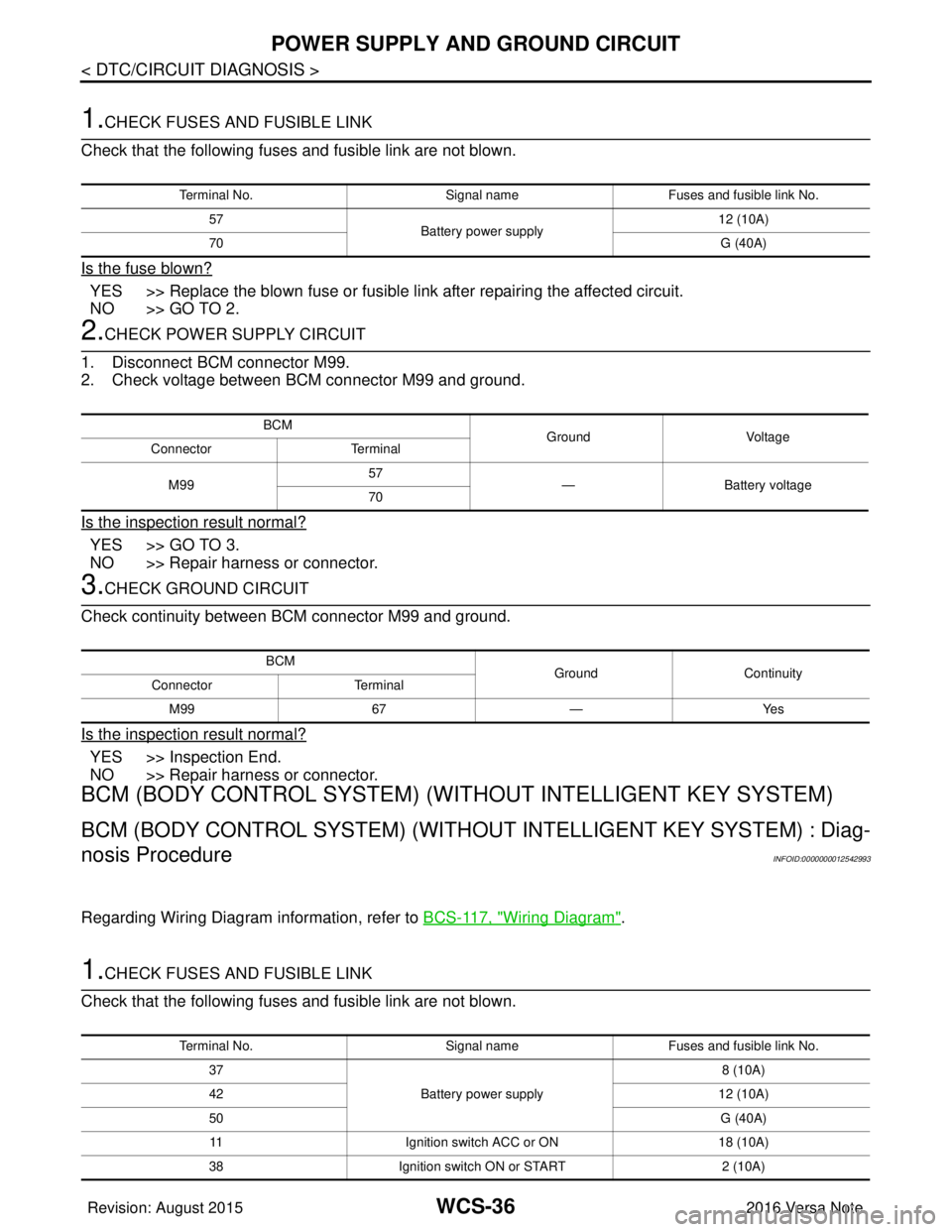
WCS-36
< DTC/CIRCUIT DIAGNOSIS >
POWER SUPPLY AND GROUND CIRCUIT
1.CHECK FUSES AND FUSIBLE LINK
Check that the following fuses and fusible link are not blown.
Is the fuse blown?
YES >> Replace the blown fuse or fusible link after repairing the affected circuit.
NO >> GO TO 2.
2.CHECK POWER SUPPLY CIRCUIT
1. Disconnect BCM connector M99.
2. Check voltage between BCM connector M99 and ground.
Is the inspection result normal?
YES >> GO TO 3.
NO >> Repair harness or connector.
3.CHECK GROUND CIRCUIT
Check continuity between BCM connector M99 and ground.
Is the inspection result normal?
YES >> Inspection End.
NO >> Repair harness or connector.
BCM (BODY CONTROL SYSTEM) (WIT HOUT INTELLIGENT KEY SYSTEM)
BCM (BODY CONTROL SYSTEM) (WITHOUT INTELLIGENT KEY SYSTEM) : Diag-
nosis Procedure
INFOID:0000000012542993
Regarding Wiring Diagram information, refer to BCS-117, "Wiring Diagram".
1.CHECK FUSES AND FUSIBLE LINK
Check that the following fuses and fusible link are not blown.
Terminal No. Signal nameFuses and fusible link No.
57 Battery power supply 12 (10A)
70 G (40A)
BCM
Ground Voltage
Connector Terminal
M99 57
— Battery voltage
70
BCM GroundContinuity
Connector Terminal
M99 67—Yes
Terminal No. Signal nameFuses and fusible link No.
37 Battery power supply 8 (10A)
42 12 (10A)
50 G (40A)
11 Ignition switch ACC or ON 18 (10A)
38 Ignition switch ON or START 2 (10A)
Revision: August 2015 2016 Versa Note
cardiagn.com
Page 3554 of 3641
WCS
SEAT BELT BUCKLE SWITCH SIGNAL CIRCUIT
WCS-39
< DTC/CIRCUIT DIAGNOSIS >
C
D E
F
G H
I
J
K L
M B A
O P
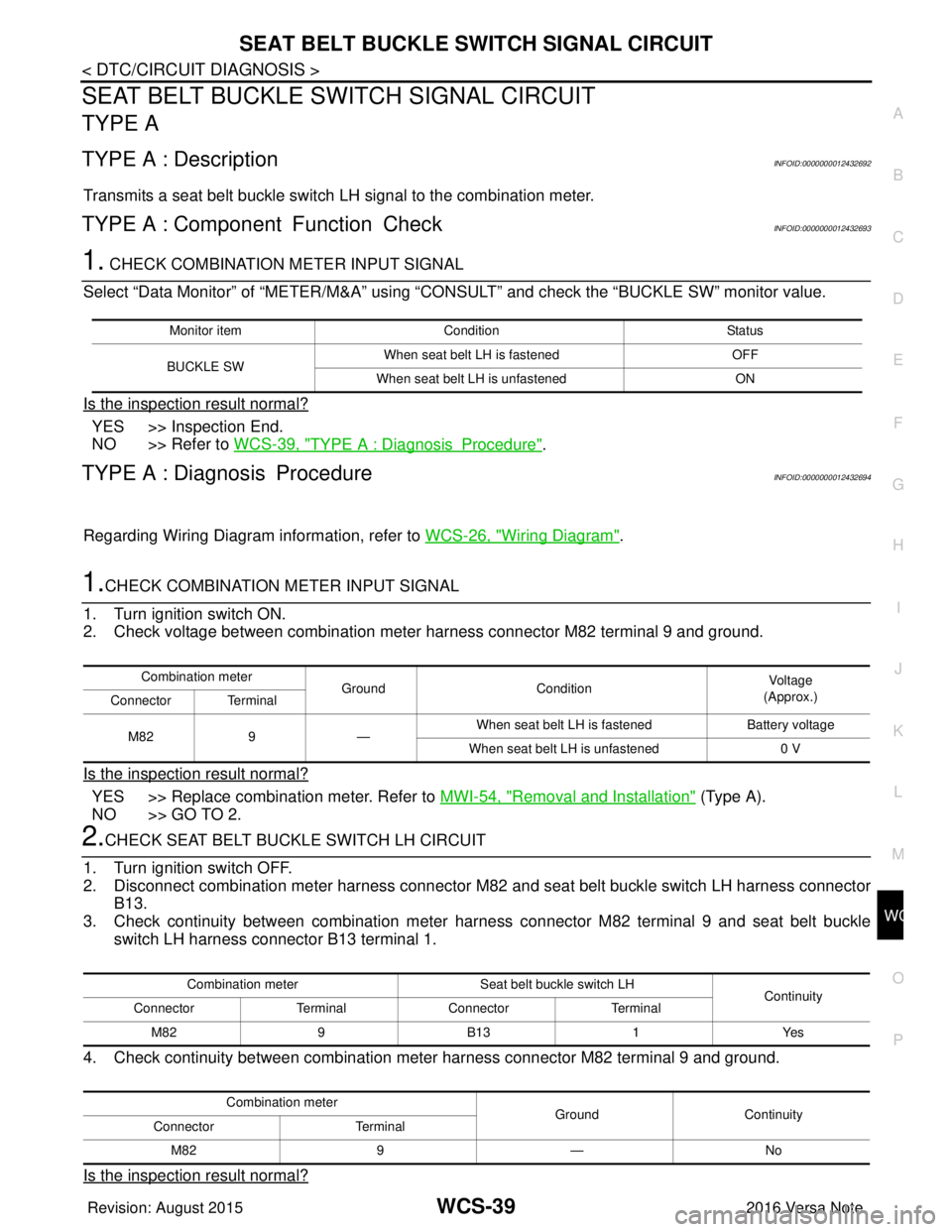
SEAT BELT BUCKLE SW ITCH SIGNAL CIRCUIT
TYPE A
TYPE A : DescriptionINFOID:0000000012432692
Transmits a seat belt buckle switch LH signal to the combination meter.
TYPE A : Component Function CheckINFOID:0000000012432693
1. CHECK COMBINATION METER INPUT SIGNAL
Select “Data Monitor” of “METER/M&A” using “C ONSULT” and check the “BUCKLE SW” monitor value.
Is the inspection result normal?
YES >> Inspection End.
NO >> Refer to WCS-39, "
TYPE A : DiagnosisProcedure".
TYPE A : Diagnosis ProcedureINFOID:0000000012432694
Regarding Wiring Diagram information, refer to WCS-26, "Wiring Diagram".
1.CHECK COMBINATION METER INPUT SIGNAL
1. Turn ignition switch ON.
2. Check voltage between combination meter harness connector M82 terminal 9 and ground.
Is the inspection result normal?
YES >> Replace combination meter. Refer to MWI-54, "Removal and Installation" (Type A).
NO >> GO TO 2.
2.CHECK SEAT BELT BUCKLE SWITCH LH CIRCUIT
1. Turn ignition switch OFF.
2. Disconnect combination meter harness connector M82 and seat belt buckle switch LH harness connector
B13.
3. Check continuity between combination meter har ness connector M82 terminal 9 and seat belt buckle
switch LH harness connector B13 terminal 1.
4. Check continuity between combination meter harness connector M82 terminal 9 and ground.
Is the inspection result normal?
Monitor item Condition Status
BUCKLE SW When seat belt LH is fastened
OFF
When seat belt LH is unfastened ON
Combination meter
GroundCondition Vo l ta g e
(Approx.)
Connector Terminal
M82 9— When seat belt LH is fastened
Battery voltage
When seat belt LH is unfastened 0 V
Combination meterSeat belt buckle switch LH
Continuity
Connector TerminalConnector Terminal
M82 9B13 1Yes
Combination meter GroundContinuity
Connector Terminal
M82 9— No
Revision: August 2015 2016 Versa Note
cardiagn.com
Page 3555 of 3641
WCS-40
< DTC/CIRCUIT DIAGNOSIS >
SEAT BELT BUCKLE SWITCH SIGNAL CIRCUIT
YES >> GO TO 3.
NO >> Repair or replace harness or connector.
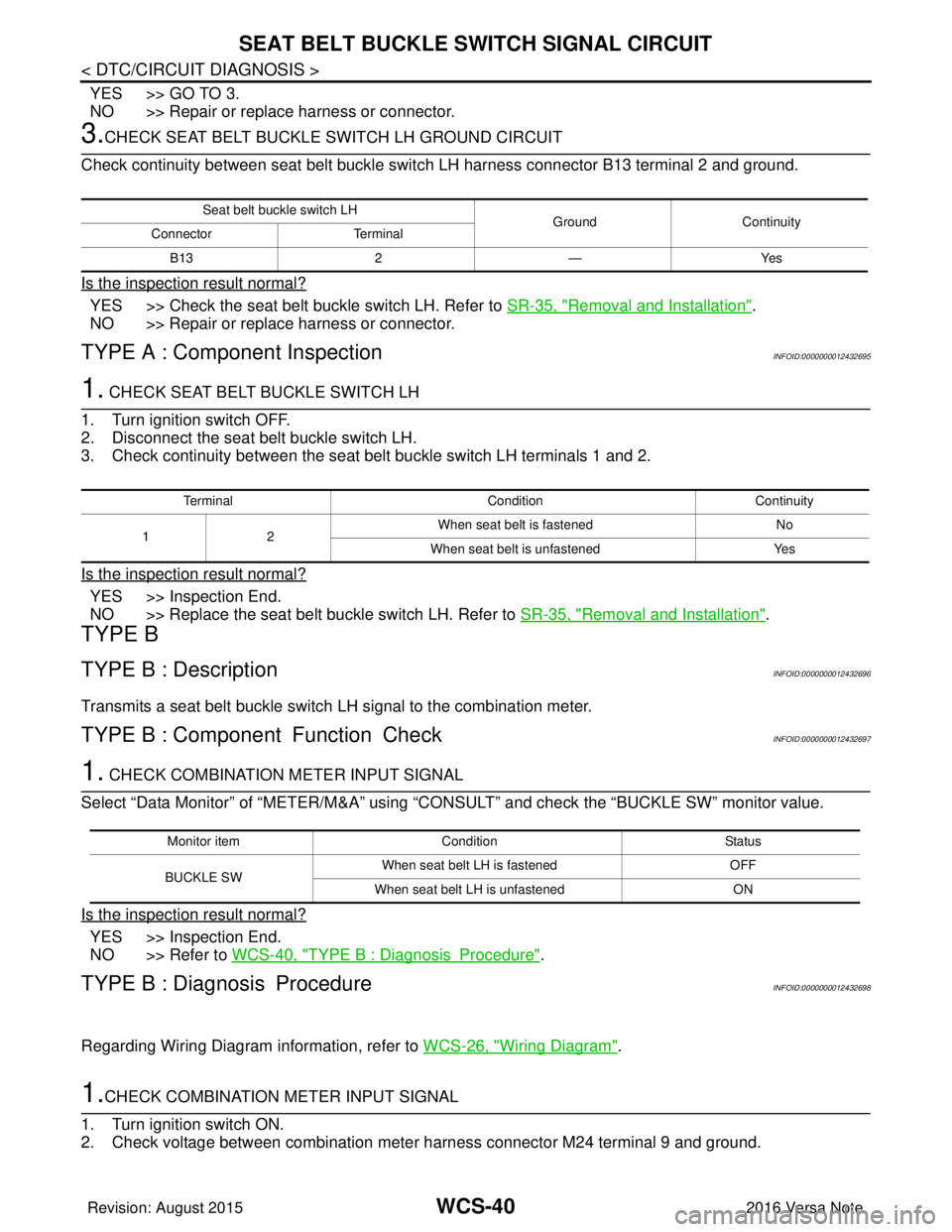
3.CHECK SEAT BELT BUCKLE SWITCH LH GROUND CIRCUIT
Check continuity between seat belt buckle swit ch LH harness connector B13 terminal 2 and ground.
Is the inspection result normal?
YES >> Check the seat belt buckle switch LH. Refer to SR-35, "Removal and Installation".
NO >> Repair or replace harness or connector.
TYPE A : Component InspectionINFOID:0000000012432695
1. CHECK SEAT BELT BUCKLE SWITCH LH
1. Turn ignition switch OFF.
2. Disconnect the seat belt buckle switch LH.
3. Check continuity between the seat belt buckle switch LH terminals 1 and 2.
Is the inspection result normal?
YES >> Inspection End.
NO >> Replace the seat belt buckle switch LH. Refer to SR-35, "
Removal and Installation".
TYPE B
TYPE B : DescriptionINFOID:0000000012432696
Transmits a seat belt buckle switch LH signal to the combination meter.
TYPE B : Component Function CheckINFOID:0000000012432697
1. CHECK COMBINATION METER INPUT SIGNAL
Select “Data Monitor” of “METER/M&A” using “C ONSULT” and check the “BUCKLE SW” monitor value.
Is the inspection result normal?
YES >> Inspection End.
NO >> Refer to WCS-40, "
TYPE B : DiagnosisProcedure".
TYPE B : Diagnosis ProcedureINFOID:0000000012432698
Regarding Wiring Diagram information, refer to WCS-26, "Wiring Diagram".
1.CHECK COMBINATION METER INPUT SIGNAL
1. Turn ignition switch ON.
2. Check voltage between combination meter harness connector M24 terminal 9 and ground.
Seat belt buckle switch LH GroundContinuity
Connector Terminal
B13 2—Yes
Terminal ConditionContinuity
12 When seat belt is fastened
No
When seat belt is unfastened Yes
Monitor itemCondition Status
BUCKLE SW When seat belt LH is fastened
OFF
When seat belt LH is unfastened ON
Revision: August 2015 2016 Versa Note
cardiagn.com
Page 3557 of 3641
WCS-42
< DTC/CIRCUIT DIAGNOSIS >
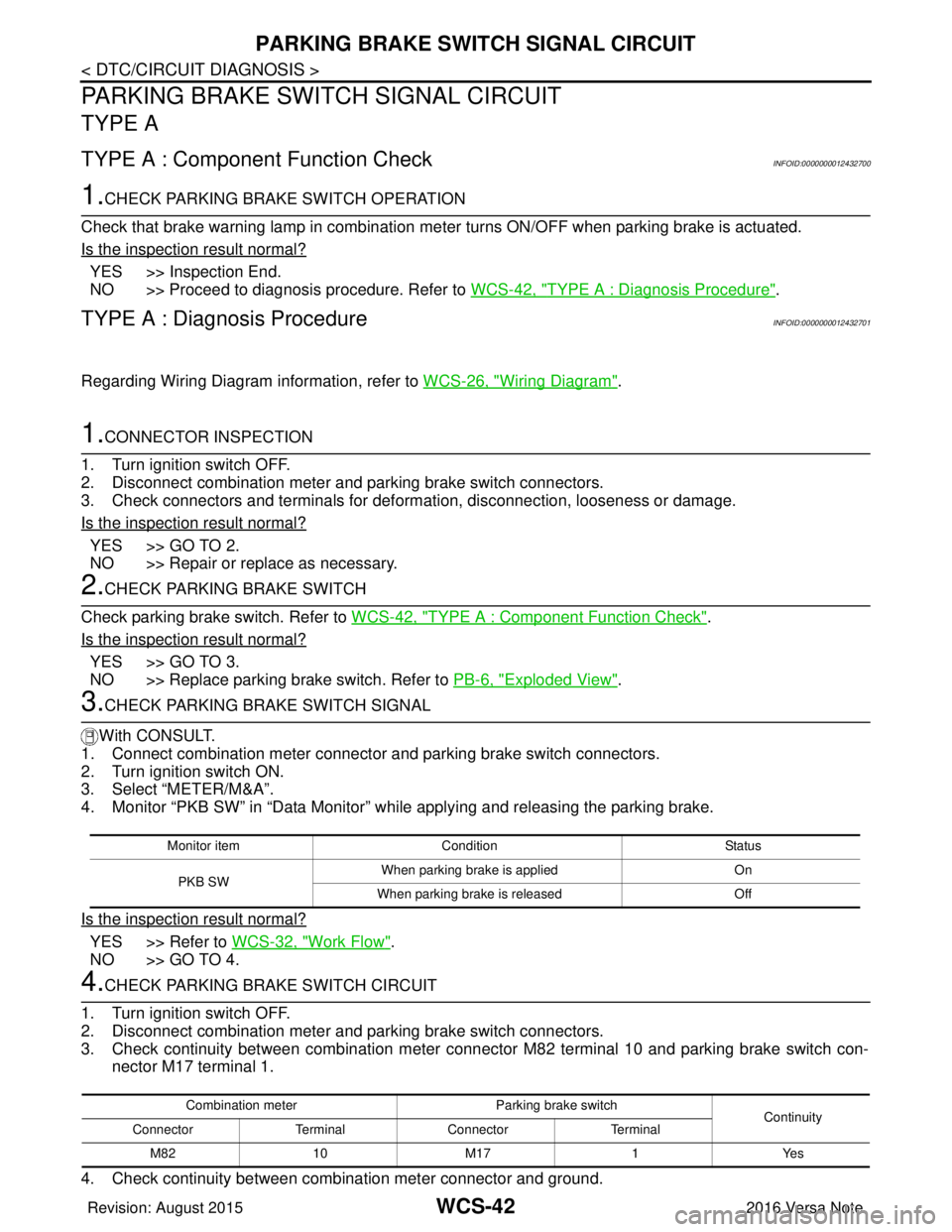
PARKING BRAKE SWITCH SIGNAL CIRCUIT
PARKING BRAKE SWITCH SIGNAL CIRCUIT
TYPE A
TYPE A : Component Function CheckINFOID:0000000012432700
1.CHECK PARKING BRAKE SWITCH OPERATION
Check that brake warning lamp in combination me ter turns ON/OFF when parking brake is actuated.
Is the inspection result normal?
YES >> Inspection End.
NO >> Proceed to diagnosis procedure. Refer to WCS-42, "
TYPE A : Diagnosis Procedure".
TYPE A : Diagnosis ProcedureINFOID:0000000012432701
Regarding Wiring Diagram information, refer to WCS-26, "Wiring Diagram".
1.CONNECTOR INSPECTION
1. Turn ignition switch OFF.
2. Disconnect combination meter and parking brake switch connectors.
3. Check connectors and terminals for deformation, disconnection, looseness or damage.
Is the inspection result normal?
YES >> GO TO 2.
NO >> Repair or replace as necessary.
2.CHECK PARKING BRAKE SWITCH
Check parking brake switch. Refer to WCS-42, "
TYPE A : Component Function Check".
Is the inspection result normal?
YES >> GO TO 3.
NO >> Replace parking brake switch. Refer to PB-6, "
Exploded View".
3.CHECK PARKING BRAKE SWITCH SIGNAL
With CONSULT.
1. Connect combination meter connector and parking brake switch connectors.
2. Turn ignition switch ON.
3. Select “METER/M&A”.
4. Monitor “PKB SW” in “Data Monitor” while applying and releasing the parking brake.
Is the inspection result normal?
YES >> Refer to WCS-32, "Work Flow".
NO >> GO TO 4.
4.CHECK PARKING BRAKE SWITCH CIRCUIT
1. Turn ignition switch OFF.
2. Disconnect combination meter and parking brake switch connectors.
3. Check continuity between combination meter connec tor M82 terminal 10 and parking brake switch con-
nector M17 terminal 1.
4. Check continuity between combination meter connector and ground.
Monitor item Condition Status
PKB SW When parking brake is applied
On
When parking brake is released Off
Combination meterParking brake switch
Continuity
Connector TerminalConnector Terminal
M82 10 M171Yes
Revision: August 2015 2016 Versa Note
cardiagn.com
Page 3558 of 3641
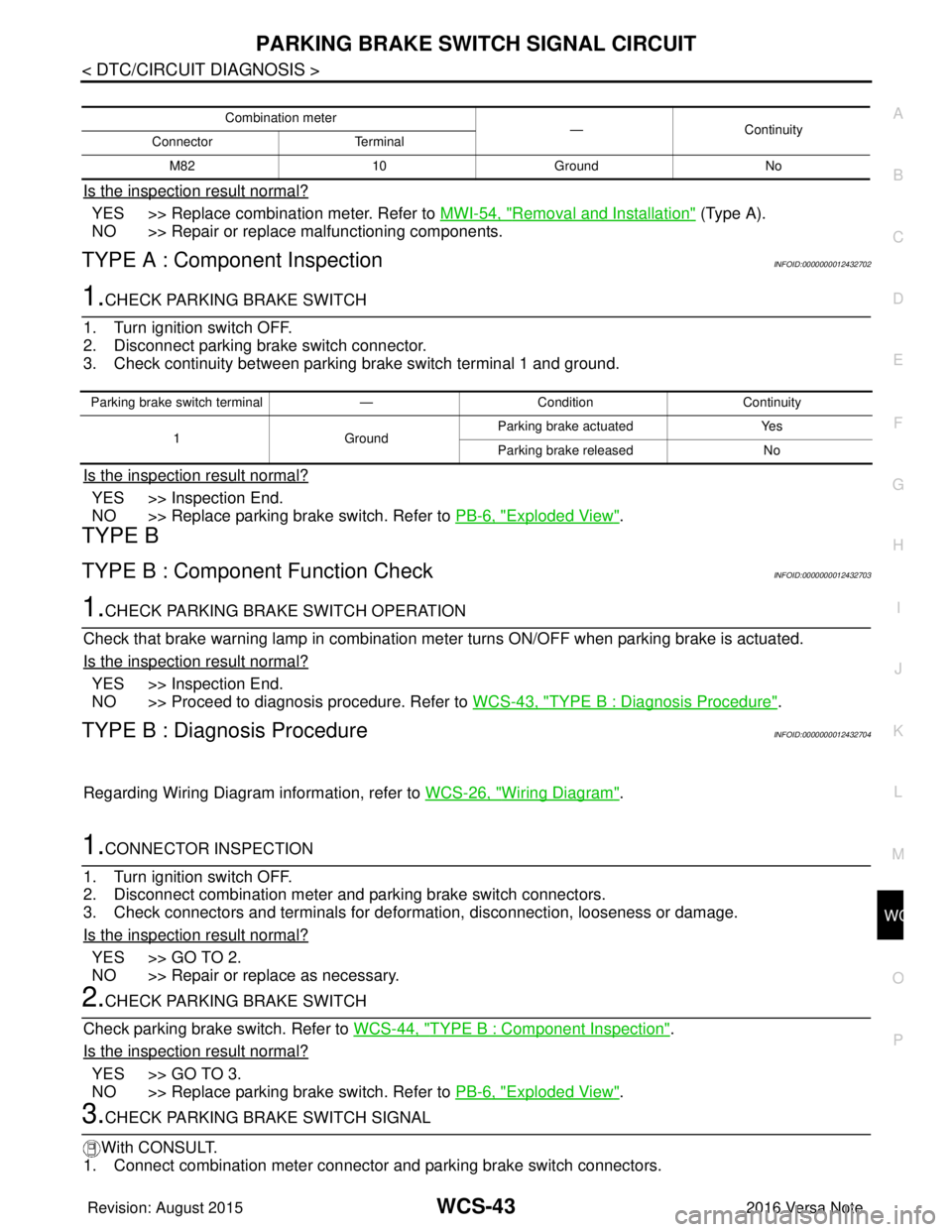
WCS
PARKING BRAKE SWITCH SIGNAL CIRCUITWCS-43
< DTC/CIRCUIT DIAGNOSIS >
C
DE
F
G H
I
J
K L
M B A
O P
Is the inspection result normal?
YES >> Replace combination meter. Refer to MWI-54, "Removal and Installation" (Type A).
NO >> Repair or replace malfunctioning components.
TYPE A : Component InspectionINFOID:0000000012432702
1.CHECK PARKING BRAKE SWITCH
1. Turn ignition switch OFF.
2. Disconnect parking brake switch connector.
3. Check continuity between parking brake switch terminal 1 and ground.
Is the inspection result normal?
YES >> Inspection End.
NO >> Replace parking brake switch. Refer to PB-6, "
Exploded View".
TYPE B
TYPE B : Component Function CheckINFOID:0000000012432703
1.CHECK PARKING BRA KE SWITCH OPERATION
Check that brake warning lamp in combination meter turns ON/OFF when parking brake is actuated.
Is the inspection result normal?
YES >> Inspection End.
NO >> Proceed to diagnosis procedure. Refer to WCS-43, "
TYPE B : Diagnosis Procedure".
TYPE B : Diagnosis ProcedureINFOID:0000000012432704
Regarding Wiring Diagram information, refer to WCS-26, "Wiring Diagram".
1.CONNECTOR INSPECTION
1. Turn ignition switch OFF.
2. Disconnect combination meter and parking brake switch connectors.
3. Check connectors and terminals for deformation, disconnection, looseness or damage.
Is the inspection result normal?
YES >> GO TO 2.
NO >> Repair or replace as necessary.
2.CHECK PARKING BRAKE SWITCH
Check parking brake switch. Refer to WCS-44, "
TYPE B : Component Inspection".
Is the inspection result normal?
YES >> GO TO 3.
NO >> Replace parking brake switch. Refer to PB-6, "
Exploded View".
3.CHECK PARKING BRAKE SWITCH SIGNAL
With CONSULT.
1. Connect combination meter connector and parking brake switch connectors.
Combination meter —Continuity
Connector Terminal
M82 10 Ground No
Parking brake switch terminal —Condition Continuity
1 GroundParking brake actuated
Yes
Parking brake released No
Revision: August 2015 2016 Versa Note
cardiagn.com
Page 3560 of 3641
WCS
KEY SWITCH SIGNAL CIRCUIT (WITHOUT INTELLIGENT KEY)
WCS-45
< DTC/CIRCUIT DIAGNOSIS >
C
D E
F
G H
I
J
K L
M B A
O P
KEY SWITCH SIGNAL CIRCUIT (WITHOUT INTELLIGENT KEY)
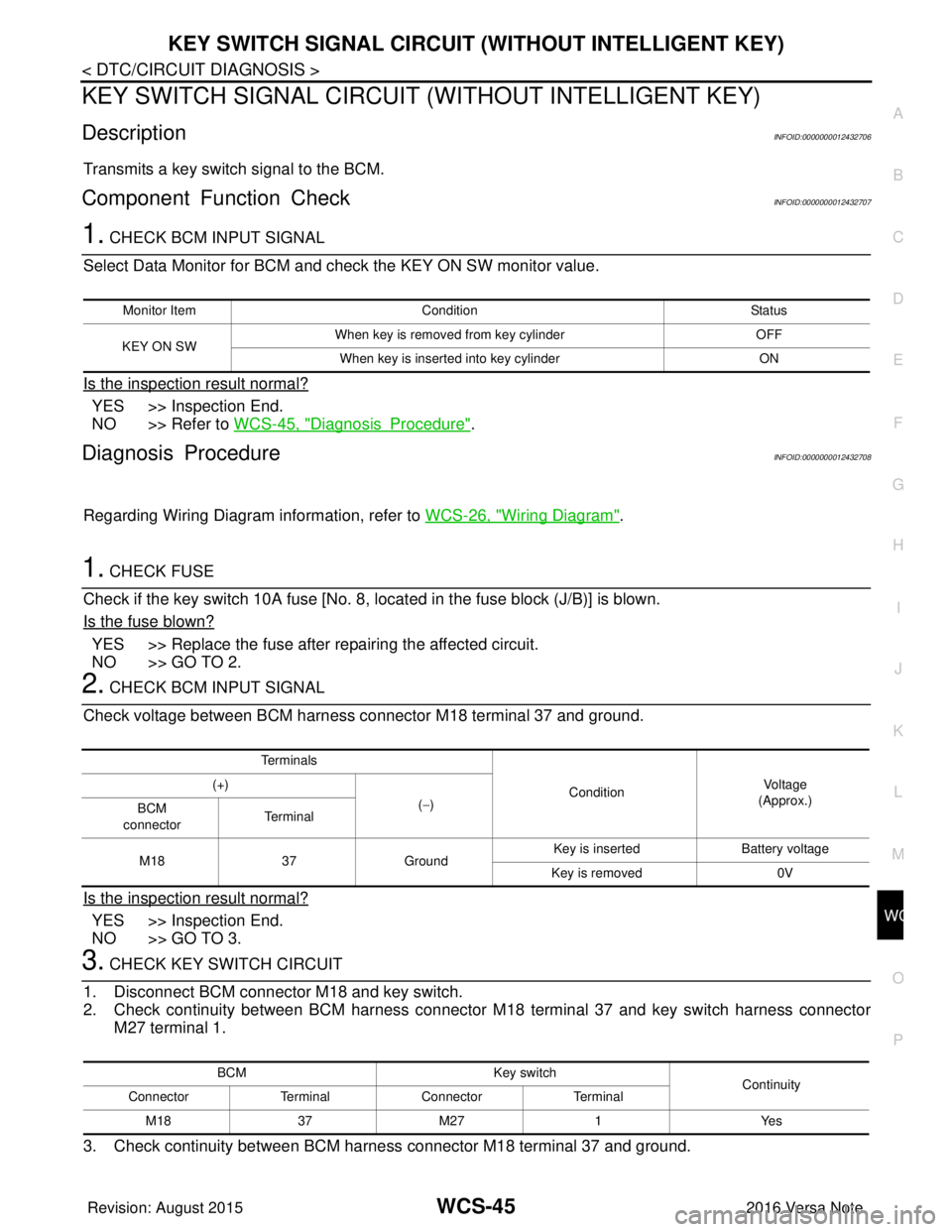
DescriptionINFOID:0000000012432706
Transmits a key switch signal to the BCM.
Component Function CheckINFOID:0000000012432707
1. CHECK BCM INPUT SIGNAL
Select Data Monitor for BCM and check the KEY ON SW monitor value.
Is the inspection result normal?
YES >> Inspection End.
NO >> Refer to WCS-45, "
DiagnosisProcedure".
Diagnosis ProcedureINFOID:0000000012432708
Regarding Wiring Diagram information, refer to WCS-26, "Wiring Diagram".
1. CHECK FUSE
Check if the key switch 10A fuse [No. 8, located in the fuse block (J/B)] is blown.
Is the fuse blown?
YES >> Replace the fuse after repairing the affected circuit.
NO >> GO TO 2.
2. CHECK BCM INPUT SIGNAL
Check voltage between BCM harness connector M18 terminal 37 and ground.
Is the inspection result normal?
YES >> Inspection End.
NO >> GO TO 3.
3. CHECK KEY SWITCH CIRCUIT
1. Disconnect BCM connector M18 and key switch.
2. Check continuity between BCM harness connector M18 terminal 37 and key switch harness connector M27 terminal 1.
3. Check continuity between BCM harness connector M18 terminal 37 and ground.
Monitor Item Condition Status
KEY ON SW When key is removed from key cylinder
OFF
When key is inserted into key cylinder ON
Te r m i n a l s
ConditionVol tag e
(Approx.)
(+)
(−)
BCM
connector Te r m i n a l
M18 37Ground Key is inserted
Battery voltage
Key is removed 0V
BCM Key switch
Continuity
Connector TerminalConnector Terminal
M 183 7M 27 1 Y es
Revision: August 2015 2016 Versa Note
cardiagn.com
Page 3566 of 3641

WW-1
DRIVER CONTROLS
C
DE
F
G H
I
J
K
M
SECTION WW
A
B
WW
N
O P
CONTENTS
WIPER & WASHER
PRECAUTION ....... ........................................3
PRECAUTIONS .............................................. .....3
Precaution for Supplemental Restraint System
(SRS) "AIR BAG" and "SEAT BELT PRE-TEN-
SIONER" ............................................................. ......
3
Procedure without Cowl Top Cover .......................3
Precaution for Work ..................................................3
PREPARATION ............................................5
PREPARATION .............................................. .....5
Special Service Tools .......................................... ......5
Commercial Service Tool ..........................................5
SYSTEM DESCRIPTION ..............................6
COMPONENT PARTS ................................... .....6
Component Parts Location .................................. ......6
SYSTEM ..............................................................8
FRONT WIPER AND WASHER SYSTEM ............. ......8
FRONT WIPER AND WASHER SYSTEM : Sys-
tem Diagram ..............................................................
8
FRONT WIPER AND WASHER SYSTEM : Sys-
tem Description .........................................................
8
FRONT WIPER AND WASHER SYSTEM : Fail-
Safe .........................................................................
10
REAR WIPER AND WASHER SYSTEM ............... ....10
REAR WIPER AND WASHER SYSTEM : System
Diagram ...................................................................
10
REAR WIPER AND WASHER SYSTEM : System
Description ..............................................................
10
DIAGNOSIS SYSTEM (BCM) (WITH INTELLI-
GENT KEY SYSTEM) .........................................
13
COMMON ITEM ..................................................... ....13
COMMON ITEM : CONSULT Function (BCM -
COMMON ITEM) .....................................................
13
WIPER .................................................................... ....14
WIPER : CONSULT Function (BCM - WIPER) .......14
DIAGNOSIS SYSTEM (BCM) (WITHOUT IN-
TELLIGENT KEY SYSTEM) .............................
15
COMMON ITEM ..................................................... ....15
COMMON ITEM : CONSULT Function (BCM -
COMMON ITEM) .....................................................
15
WIPER .................................................................... ....16
WIPER : CONSULT Function (BCM - WIPER) .......16
DIAGNOSIS SYSTEM (IPDM E/R) ...................17
Diagnosis Description ..............................................17
CONSULT Function (IPDM E/R) .............................18
ECU DIAGNOSIS INFORMATION ..............21
BCM, IPDM E/R .................................................21
List of ECU Reference ......................................... ....21
WIRING DIAGRAM ......................................22
FRONT WIPER AND WASHER SYSTEM ........22
Wiring Diagram .................................................... ....22
REAR WIPER AND WASHER SYSTEM ..........28
Wiring Diagram ........................................................28
BASIC INSPECTION ...................................33
DIAGNOSIS AND REPAIR WORKFLOW ........33
Work Flow ............................................................ ....33
DTC/CIRCUIT DIAGNOSIS .........................35
WIPER AND WASHER FUSE ...........................35
Description ........................................................... ....35
Diagnosis Procedure ...............................................35
FRONT WIPER MOTOR LO CIRCUIT ..............36
Component Function Check ....................................36
Diagnosis Procedure ...............................................36
Revision: August 2015 2016 Versa Note
cardiagn.com
Page 3573 of 3641
WW-8
< SYSTEM DESCRIPTION >
SYSTEM
SYSTEM
FRONT WIPER AND WASHER SYSTEM
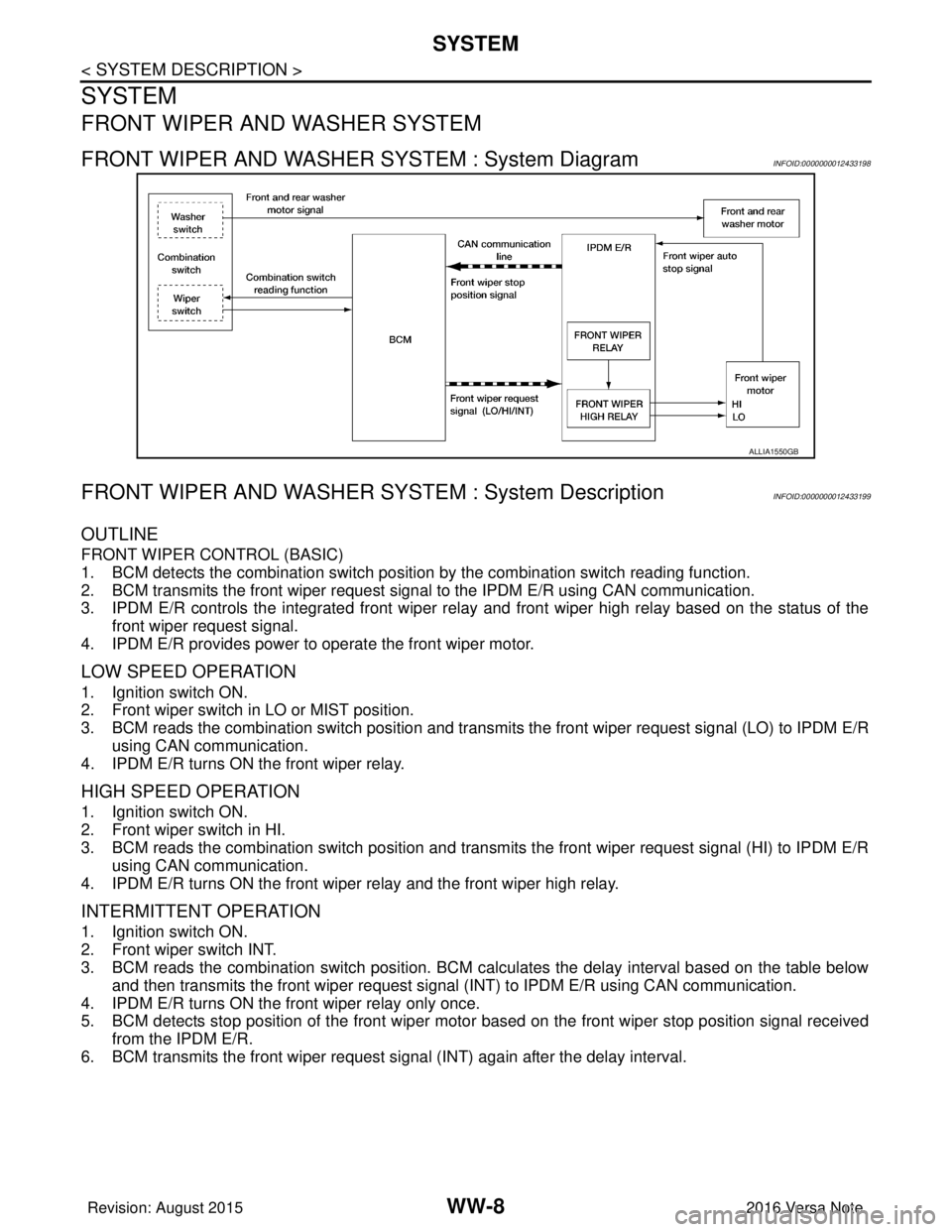
FRONT WIPER AND WASHER SYSTEM : System DiagramINFOID:0000000012433198
FRONT WIPER AND WASHER SYSTEM : System DescriptionINFOID:0000000012433199
OUTLINE
FRONT WIPER CONTROL (BASIC)
1. BCM detects the combination switch position by the combination switch reading function.
2. BCM transmits the front wiper request signal to the IPDM E/R using CAN communication.
3. IPDM E/R controls the integrated front wiper relay and front wiper high relay based on the status of the front wiper request signal.
4. IPDM E/R provides power to operate the front wiper motor.
LOW SPEED OPERATION
1. Ignition switch ON.
2. Front wiper switch in LO or MIST position.
3. BCM reads the combination switch position and transmi ts the front wiper request signal (LO) to IPDM E/R
using CAN communication.
4. IPDM E/R turns ON the front wiper relay.
HIGH SPEED OPERATION
1. Ignition switch ON.
2. Front wiper switch in HI.
3. BCM reads the combination switch position and transmits the front wiper request signal (HI) to IPDM E/R using CAN communication.
4. IPDM E/R turns ON the front wiper relay and the front wiper high relay.
INTERMITTENT OPERATION
1. Ignition switch ON.
2. Front wiper switch INT.
3. BCM reads the combination switch position. BCM ca lculates the delay interval based on the table below
and then transmits the front wiper request signal (INT) to IPDM E/R using CAN communication.
4. IPDM E/R turns ON the front wiper relay only once.
5. BCM detects stop position of the front wiper motor based on the front wiper stop position signal received from the IPDM E/R.
6. BCM transmits the front wiper request si gnal (INT) again after the delay interval.
ALLIA1550GB
Revision: August 2015 2016 Versa Note
cardiagn.com
Page 3575 of 3641
WW-10
< SYSTEM DESCRIPTION >
SYSTEM
2. Front washer switch ON.
3. The front washer switch provides ground for the front and rear washer motor.
4. BCM reads the combination switch position and transmi ts the front wiper request signal (LO) to IPDM E/R
using CAN communication.
5. BCM transmits the front wiper request signal (LO) to IPDM E/R using CAN communication.
6. IPDM E/R turns ON the front wiper relay.
7. The front wiper operates.
NOTE:
BCM transmits the front wiper request signal (LO) so t hat the front wiper operates approximately 3 times after
front washer switch OFF is detected.
FRONT WIPER AND WASHER SYSTEM : Fail-SafeINFOID:0000000012433200
FA I L −SAFE OPERATION
IPDM E/R performs the fail-safe function when the front wiper auto stop circuit is malfunctioning. Refer to
PCS-19, "
Fail-safe".
REAR WIPER AND WASHER SYSTEM
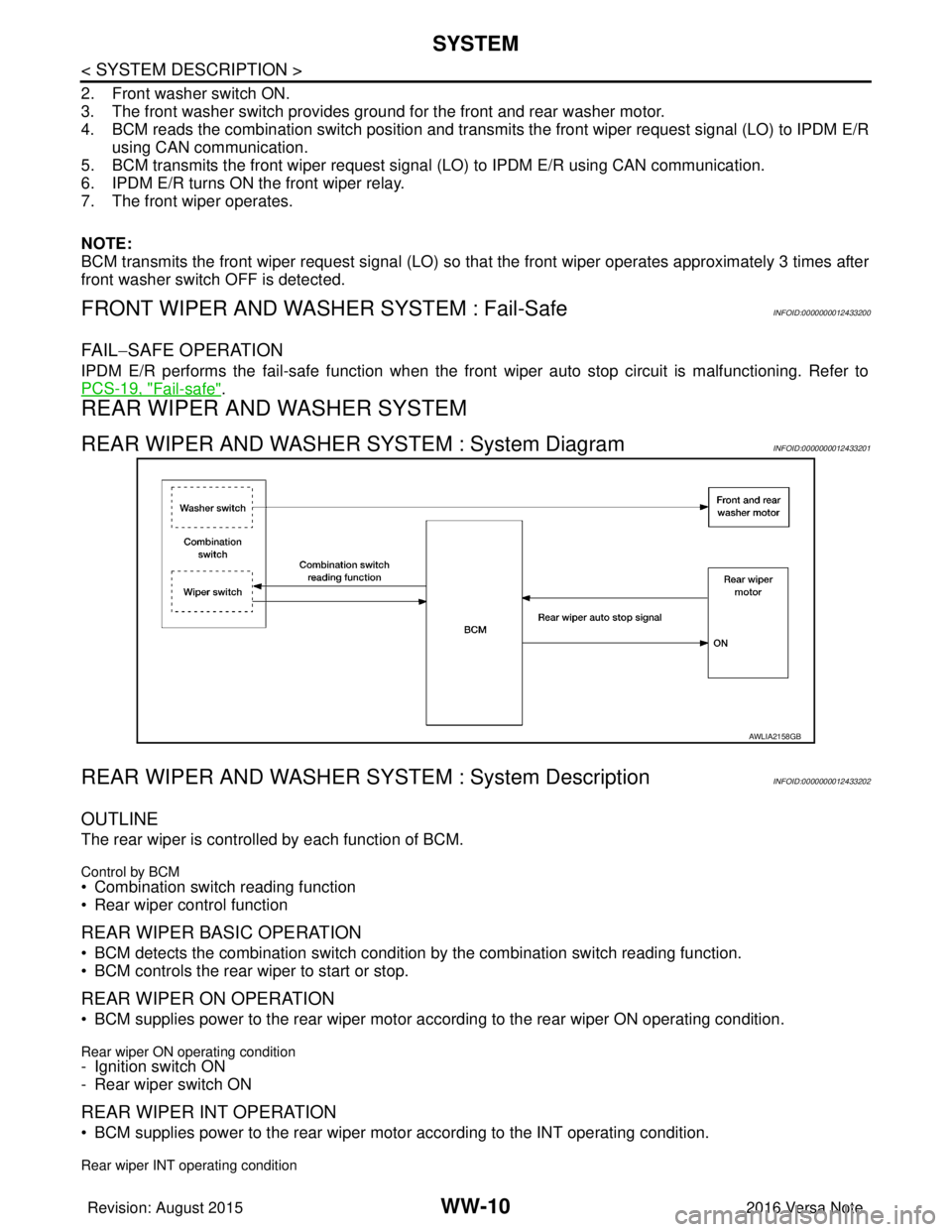
REAR WIPER AND WASHER SYSTEM : System DiagramINFOID:0000000012433201
REAR WIPER AND WASHER SY STEM : System DescriptionINFOID:0000000012433202
OUTLINE
The rear wiper is controlled by each function of BCM.
Control by BCM
• Combination switch reading function
• Rear wiper control function
REAR WIPER BASIC OPERATION
• BCM detects the combination switch conditi on by the combination switch reading function.
• BCM controls the rear wiper to start or stop.
REAR WIPER ON OPERATION
• BCM supplies power to the rear wiper motor ac cording to the rear wiper ON operating condition.
Rear wiper ON operating condition- Ignition switch ON
- Rear wiper switch ON
REAR WIPER INT OPERATION
• BCM supplies power to the rear wiper motor according to the INT operating condition.
Rear wiper INT operating condition
AWLIA2158GB
Revision: August 2015 2016 Versa Note
cardiagn.com
Page 3587 of 3641
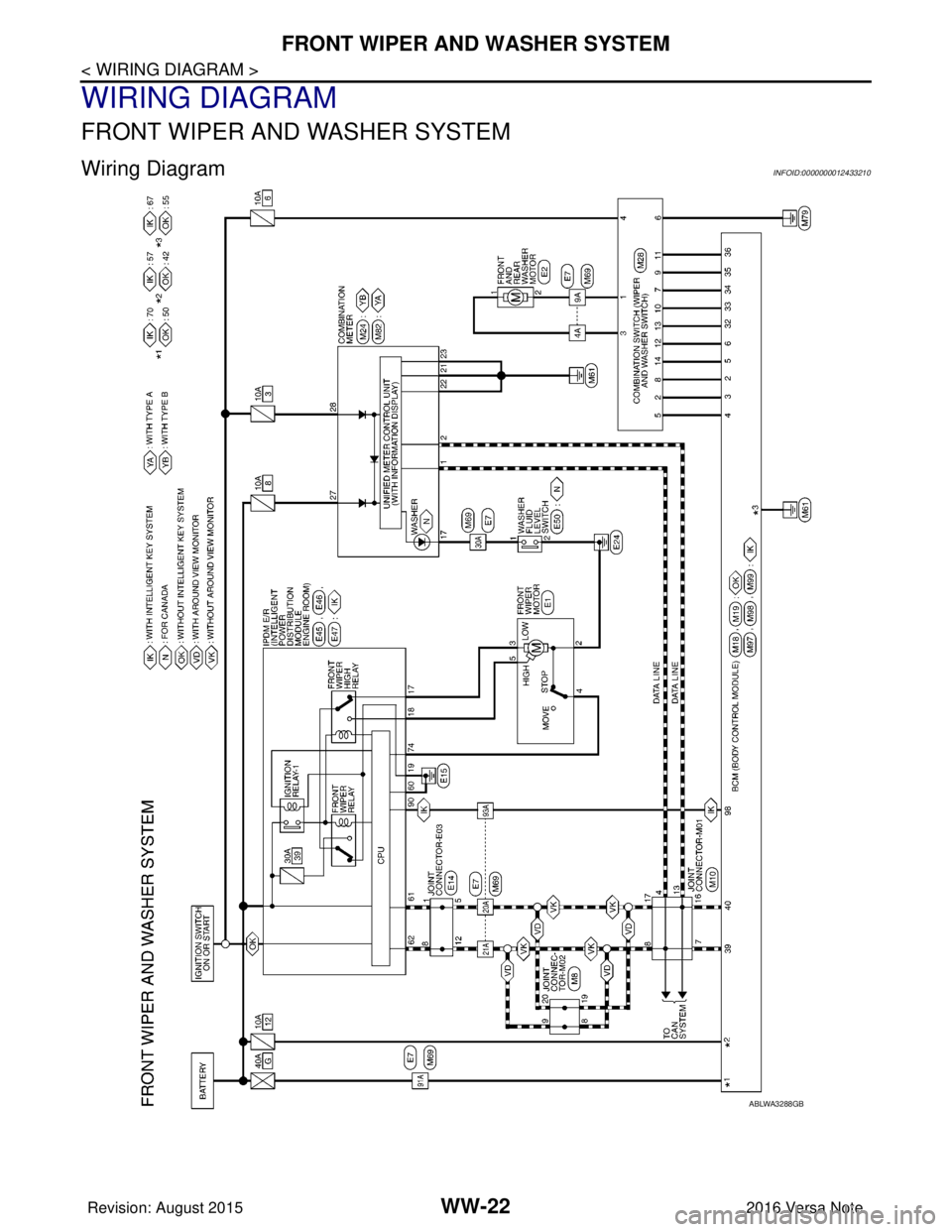
WW-22
< WIRING DIAGRAM >
FRONT WIPER AND WASHER SYSTEM
WIRING DIAGRAM
FRONT WIPER AND WASHER SYSTEM
Wiring DiagramINFOID:0000000012433210
ABLWA3288GB
Revision: August 20152016 Versa Note
cardiagn.com