ignition NISSAN NOTE 2016 Service Repair Manual
[x] Cancel search | Manufacturer: NISSAN, Model Year: 2016, Model line: NOTE, Model: NISSAN NOTE 2016Pages: 3641, PDF Size: 28.72 MB
Page 1914 of 3641
GI-26
< PRECAUTION >
PRECAUTIONS
• U.S. government regulations require ethanol dispensing pumps to be identified by a small, square,
orange and black label with the common abbreviation or the appropriate percentage for that region.
Multiport Fuel Injection System or Engine Control SystemINFOID:0000000012433165
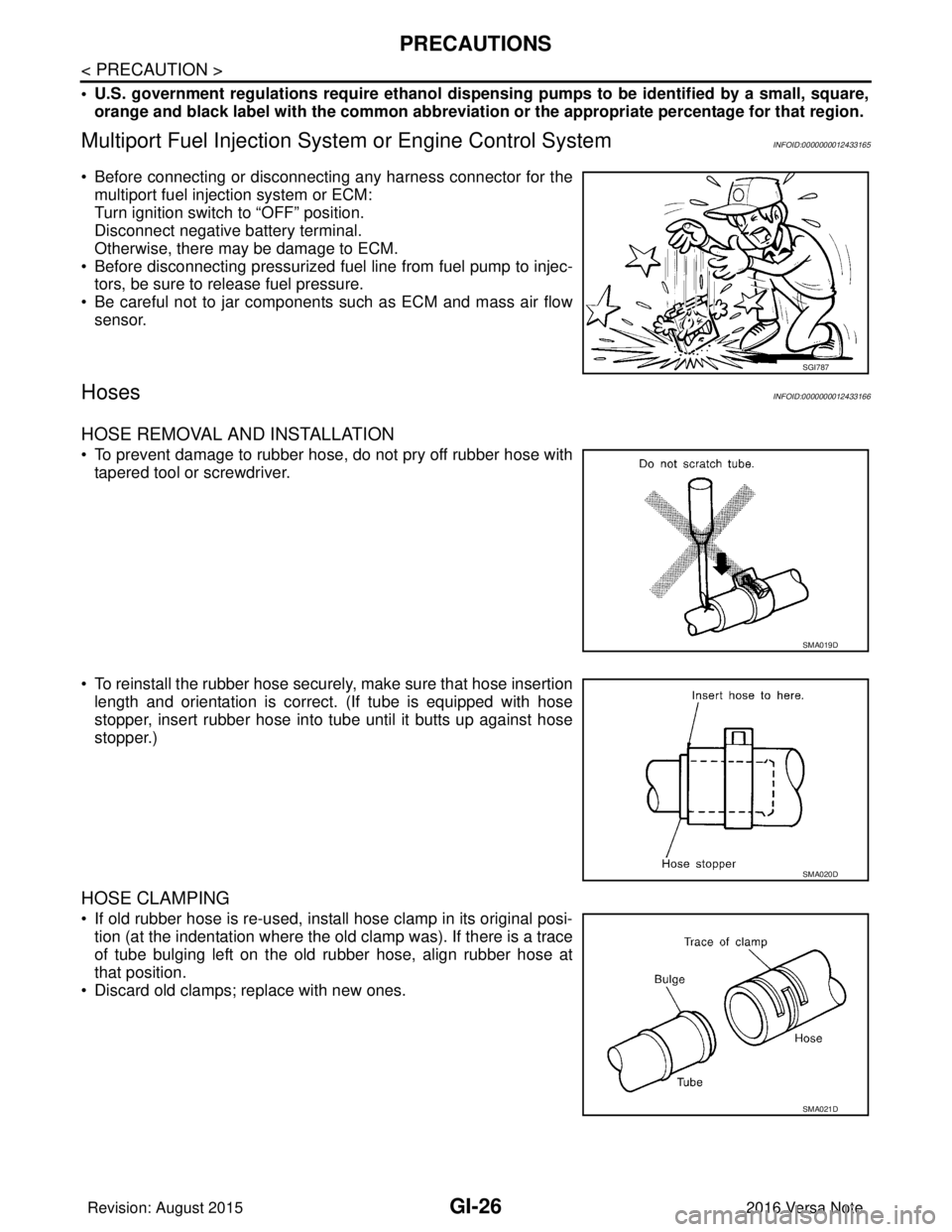
• Before connecting or disconnecting any harness connector for the
multiport fuel injection system or ECM:
Turn ignition switch to “OFF” position.
Disconnect negative battery terminal.
Otherwise, there may be damage to ECM.
• Before disconnecting pressurized fuel line from fuel pump to injec- tors, be sure to release fuel pressure.
• Be careful not to jar components such as ECM and mass air flow sensor.
HosesINFOID:0000000012433166
HOSE REMOVAL AND INSTALLATION
• To prevent damage to rubber hose, do not pry off rubber hose withtapered tool or screwdriver.
• To reinstall the rubber hose securely, make sure that hose insertion length and orientation is correct. (If tube is equipped with hose
stopper, insert rubber hose into tube until it butts up against hose
stopper.)
HOSE CLAMPING
• If old rubber hose is re-used, install hose clamp in its original posi-tion (at the indentation where the old clamp was). If there is a trace
of tube bulging left on the old rubber hose, align rubber hose at
that position.
• Discard old clamps; replace with new ones.
SGI787
SMA019D
SMA020D
SMA021D
Revision: August 2015 2016 Versa Note
cardiagn.com
Page 1919 of 3641
TOW TRUCK TOWINGGI-31
< PRECAUTION >
C
DE
F
G H
I
J
K L
M B
GI
N
O PTOW TRUCK TOWING
To w T r u c k To w i n gINFOID:0000000012433173
CAUTION:
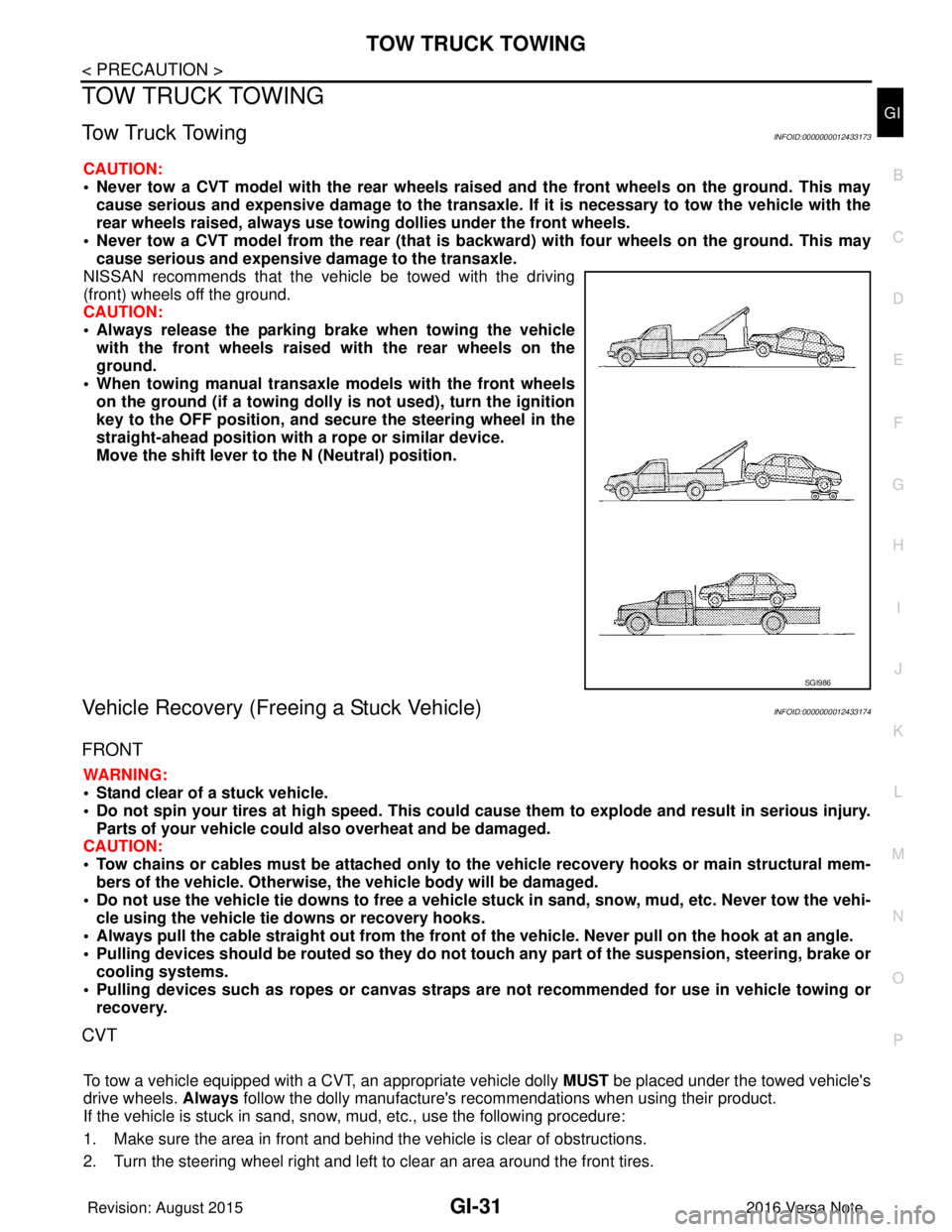
• Never tow a CVT model with the rear wheels raised and the front wheels on the ground. This may
cause serious and expensive damage to the transaxle. If it is necessary to tow the vehicle with the
rear wheels raised, always use towin g dollies under the front wheels.
• Never tow a CVT model from the rear (that is b ackward) with four wheels on the ground. This may
cause serious and expensive damage to the transaxle.
NISSAN recommends that the vehicle be towed with the driving
(front) wheels off the ground.
CAUTION:
• Always release the parking br ake when towing the vehicle
with the front wheels raised with the rear wheels on the
ground.
• When towing manual transaxle models with the front wheels on the ground (if a towing dolly is not used), turn the ignition
key to the OFF position, and secu re the steering wheel in the
straight-ahead position with a rope or similar device.
Move the shift lever to th e N (Neutral) position.
Vehicle Recovery (Freeing a Stuck Vehicle)INFOID:0000000012433174
FRONT
WARNING:
• Stand clear of a stuck vehicle.
• Do not spin your tires at high speed. This could cause them to explode and result in serious injury.
Parts of your vehicle could also overheat and be damaged.
CAUTION:
• Tow chains or cables must be attached only to the vehicle recovery hooks or main structural mem-
bers of the vehicle. Otherwise, the vehicle body will be damaged.
• Do not use the vehicle tie downs to free a vehicle stuck in sand, snow, mud, etc. Never tow the vehi-
cle using the vehicle tie downs or recovery hooks.
• Always pull the cable straight out from the front of the vehicle. Never pull on the hook at an angle.
• Pulling devices should be routed so they do not touch any part of the suspension, steering, brake or
cooling systems.
• Pulling devices such as ropes or canvas straps ar e not recommended for use in vehicle towing or
recovery.
CVT
To tow a vehicle equipped with a CVT, an appropriate vehicle dolly MUST be placed under the towed vehicle's
drive wheels. Always follow the dolly manufacture's re commendations when using their product.
If the vehicle is stuck in sand, snow , mud, etc., use the following procedure:
1. Make sure the area in front and behind the vehicle is clear of obstructions.
2. Turn the steering wheel right and left to clear an area around the front tires.
SGI986
Revision: August 2015 2016 Versa Note
cardiagn.com
Page 1934 of 3641

GI-46
< BASIC INSPECTION >
SERVICE INFORMATION FOR ELECTRICAL INCIDENT
Resistance Check Method
• Disconnect the battery negative cable and remove the blown fuse.
• Disconnect all loads (SW1 open, relay disconnected and solenoid disconnected) powered through the fuse.
• Connect one probe of the DMM to the load side of the fuse terminal. Connect the other probe to a knowngood ground.
• With SW1 open, check for continuity. continuity; short is between fuse terminal and SW1 (point A).
no continuity; short is further down the circuit than SW1.
• Close SW1 and disconnect the relay. Put probes at the load side of fuse terminal and a known good ground. Then, check for continuity.
continuity; short is between SW1 and the relay (point B).
no continuity; short is further down the circuit than the relay.
• Close SW1 and jump the relay contacts with jumper wire. Put probes at the load side of fuse terminal and a known good ground. Then, check for continuity.
continuity; short is between relay and solenoid (point C).
no continuity; check solenoid, retrace steps.
Voltage Check Method
• Remove the blown fuse and disconnect all loads (i.e. SW1 open, relay disconnected and solenoid discon-
nected) powered through the fuse.
• Turn the ignition key to the ON or START position. Verify battery voltage at the battery + side of the fuse ter- minal (one lead on the battery + terminal side of the fuse block and one lead on a known good ground).
• With SW1 open and the DMM leads across both fuse terminals, check for voltage. voltage; short is between fuse block and SW1 (point A).
no voltage; short is further down the circuit than SW1.
• With SW1 closed, relay and solenoid disconnected and the DMM leads across both fuse terminals, check for voltage.
voltage; short is between SW1 and the relay (point B).
no voltage; short is further down the circuit than the relay.
• With SW1 closed, relay contacts jumped with fused jumper wire check for voltage. voltage; short is down the circuit of the relay or between the relay and the disconnected solenoid (point C).
no voltage; retrace steps and check power to fuse block.
GROUND INSPECTION
• Ground connections are very important to the proper operation of electrical and electronic circuits. Ground
connections are often exposed to moisture, dirt and other corrosive elements. The corrosion (rust) can
become an unwanted resistance. This unwanted resistance can change the way a circuit works.
• Electronically controlled circuits are very sens itive to proper grounding. A loose or corroded ground can
drastically affect an electronically controlled circuit. A poor or corroded ground can easily affect the circuit.
Even when the ground connection looks clean, there c an be a thin film of rust on the surface.
• When inspecting a ground connection follow these rules:
- Remove the ground bolt or screw.
- Inspect all mating surfaces for tarnish, dirt, rust, etc.
- Clean as required to assure good contact.
- Reinstall bolt or screw securely.
- Inspect for “add-on” accessories which may be interfering with the ground circuit.
- If several wires are crimped into one ground eyelet terminal, check for proper crimps. Make sure all of the
wires are clean, securely fastened and providing a good ground path. If multiple wires are cased in one eye-
let make sure no ground wires have excess wire insulation.
Revision: August 2015 2016 Versa Note
cardiagn.com
Page 1942 of 3641

GW-2
< PRECAUTION >
PRECAUTIONS
PRECAUTION
PRECAUTIONS
Precaution for Supplemental Restraint System (SRS) "AIR BAG" and "SEAT BELT
PRE-TENSIONER"
INFOID:0000000012430522
The Supplemental Restraint System such as “A IR BAG” and “SEAT BELT PRE-TENSIONER”, used along
with a front seat belt, helps to reduce the risk or severity of injury to the driver and front passenger for certain
types of collision. Information necessary to service the system safely is included in the SR and SB section of
this Service Manual.
WARNING:
• To avoid rendering the SRS inopera tive, which could increase the risk of personal injury or death in
the event of a collision which would result in air bag inflation, all maintenance must be performed by
an authorized NISSAN/INFINITI dealer.
• Improper maintenance, including in correct removal and installation of the SRS, can lead to personal
injury caused by unintent ional activation of the system. For re moval of Spiral Cable and Air Bag
Module, see the SR section.
• Do not use electrical test equipmen t on any circuit related to the SRS unless instructed to in this
Service Manual. SRS wiring harn esses can be identified by yellow and/or orange harnesses or har-
ness connectors.
PRECAUTIONS WHEN USING POWER TOOLS (AIR OR ELECTRIC) AND HAMMERS
WARNING:
• When working near the Airbag Diagnosis Sensor Unit or other Airbag System sensors with the Igni-
tion ON or engine running, DO NOT use air or electri c power tools or strike near the sensor(s) with a
hammer. Heavy vibration could activate the sensor( s) and deploy the air bag(s), possibly causing
serious injury.
• When using air or electric power tools or hammers , always switch the Ignition OFF, disconnect the
battery and wait at least three minutes before performing any service.
Handling for Adhe sive and PrimerINFOID:0000000012430523
• Do not use an adhesive which is past its usable date. Shel f life of this product is limited to six months after
the date of manufacture. Carefully adhere to the expiration or manufacture date printed on the box.
• Keep primers and adhesive in a cool, dry place. Ideally, they should be stored in a refrigerator.
• Open the seal of the primer and adhesive just before application. Discard the remainder.
• Before application, be sure to shake the primer container to stir the contents. If any floating material is found,
do not use it.
• If any primer or adhesive contacts the skin, wipe it off with gasoline or equivalent and wash the skin with
soap.
• When using primer and adhesive, always observe the precautions in the instruction manual.
Precaution for WorkINFOID:0000000012430524
• When removing or disassembling each component, be careful not to damage or deform it. If a component
may be subject to interference, be sure to protect it with a shop cloth.
• When removing (disengaging) components with a screwdriver or similar tool, be sure to wrap the component with a shop cloth or vinyl tape to protect it.
• Protect the removed parts with a shop cloth and prevent them from being dropped.
• Replace a deformed or damaged clip.
• If a part is specified as a non-reusable part, always replace it with a new one.
• Be sure to tighten bolts and nuts securely to the specified torque.
• After installation is complete, be sure to check that each part works properly.
• Follow the steps below to clean components:
- Water soluble dirt:
• Dip a soft cloth into lukewarm water, wring the water out of the cloth and wipe the dirty area.
• Then rub with a soft, dry cloth.
- Oily dirt:
• Dip a soft cloth into lukewarm water with mild detergent (concentration: within 2 to 3%) and wipe the dirty area.
Revision: August 2015 2016 Versa Note
cardiagn.com
Page 1961 of 3641
FRONT DOOR GLASS AND REGULATORGW-21
< REMOVAL AND INSTALLATION >
C
DE
F
G H
I
J
L
M A
B
GW
N
O P
FRONT DOOR GLASS AND REGULATOR
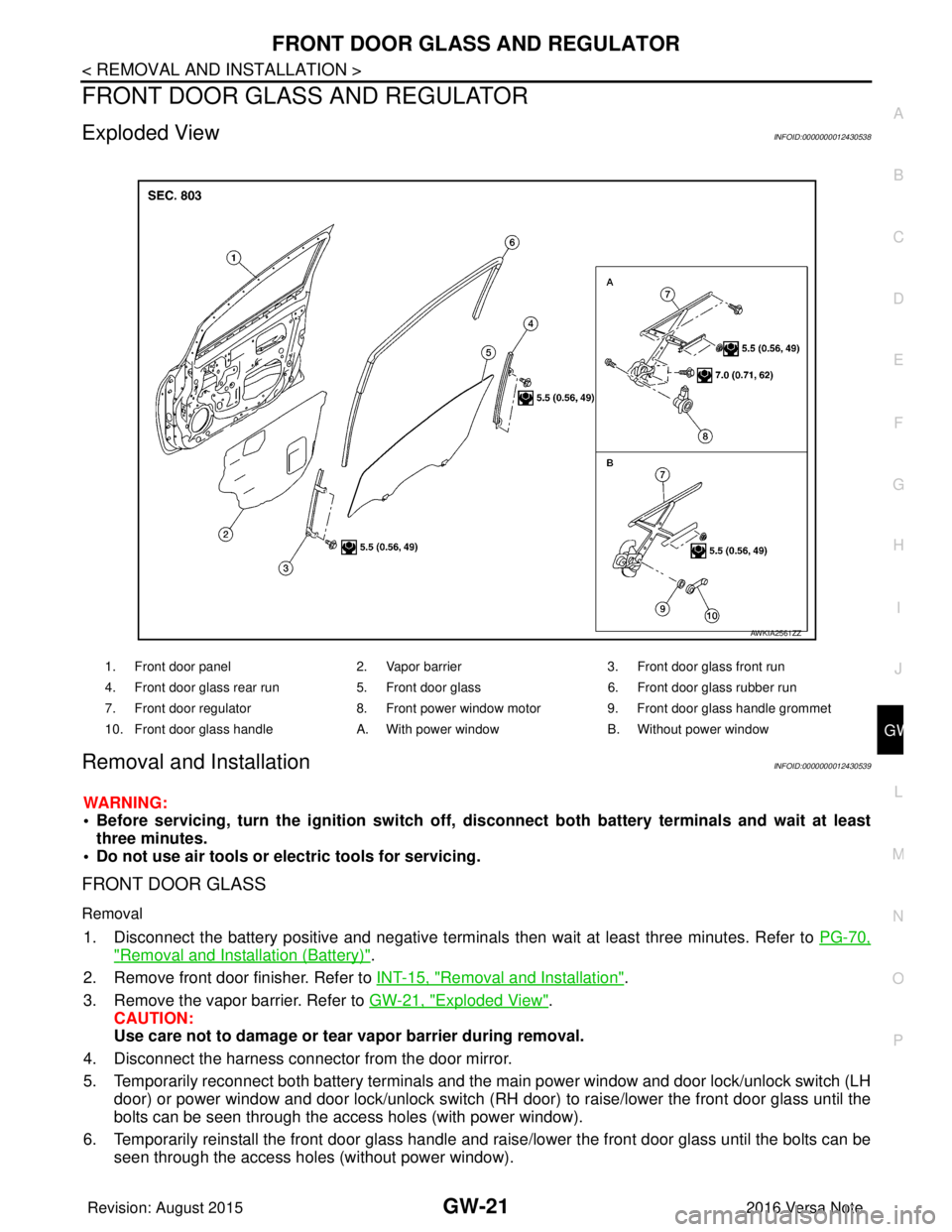
Exploded ViewINFOID:0000000012430538
Removal and InstallationINFOID:0000000012430539
WARNING:
• Before servicing, turn the ignition switch off, disconnect both battery terminals and wait at least
three minutes.
• Do not use air tools or electric tools for servicing.
FRONT DOOR GLASS
Removal
1. Disconnect the battery positive and negative terminals then wait at least three minutes. Refer to PG-70,
"Removal and Installation (Battery)".
2. Remove front door finisher. Refer to INT-15, "
Removal and Installation".
3. Remove the vapor barrier. Refer to GW-21, "
Exploded View".
CAUTION:
Use care not to damage or tear vapor barrier during removal.
4. Disconnect the harness connector from the door mirror.
5. Temporarily reconnect both battery terminals and the main power window and door lock/unlock switch (LH
door) or power window and door lock/unlock switch (RH door) to raise/lower the front door glass until the
bolts can be seen through the access holes (with power window).
6. Temporarily reinstall the front door glass handle and raise/lower the front door glass until the bolts can be seen through the access holes (without power window).
1. Front door panel 2. Vapor barrier3. Front door glass front run
4. Front door glass rear run 5. Front door glass6. Front door glass rubber run
7. Front door regulator 8. Front power window motor9. Front door glass handle grommet
10. Front door glass handle A. With power windowB. Without power window
AWKIA2561ZZ
Revision: August 2015 2016 Versa Note
cardiagn.com
Page 1971 of 3641
![NISSAN NOTE 2016 Service Repair Manual PRECAUTIONSHAC-3
< PRECAUTION > [MANUAL AIR CONDITIONING]
C
D
E
F
G H
J
K L
M A
B
HAC
N
O P
PRECAUTION
PRECAUTIONS
Precaution for Supplemental Restraint System (SRS) "AIR BAG" and "SEAT BELT
PRE-TEN](/img/5/57363/w960_57363-1970.png "NISSAN NOTE 2016 Service Repair Manual PRECAUTIONSHAC-3
< PRECAUTION > [MANUAL AIR CONDITIONING]
C
D
E
F
G H
J
K L
M A
B
HAC
N
O P
PRECAUTION
PRECAUTIONS
Precaution for Supplemental Restraint System (SRS) \"AIR BAG\" and \"SEAT BELT
PRE-TEN")
PRECAUTIONSHAC-3
< PRECAUTION > [MANUAL AIR CONDITIONING]
C
D
E
F
G H
J
K L
M A
B
HAC
N
O P
PRECAUTION
PRECAUTIONS
Precaution for Supplemental Restraint System (SRS) "AIR BAG" and "SEAT BELT
PRE-TENSIONER"
INFOID:0000000012430709
The Supplemental Restraint System such as “AIR BAG” and “SEAT BELT PRE-TENSIONER”, used along
with a front seat belt, helps to reduce the risk or severi ty of injury to the driver and front passenger for certain
types of collision. Information necessary to service the system safely is included in the SR and SB section of
this Service Manual.
WARNING:
• To avoid rendering the SRS inoper ative, which could increase the risk of personal injury or death in
the event of a collision which would result in air bag inflation, all maintenance must be performed by
an authorized NISSAN/INFINITI dealer.
• Improper maintenance, including in correct removal and installation of the SRS, can lead to personal
injury caused by unintentional act ivation of the system. For removal of Spiral Cable and Air Bag
Module, see the SR section.
• Do not use electrical test equipm ent on any circuit related to the SRS unless instructed to in this
Service Manual. SRS wiring harnesses can be identi fied by yellow and/or orange harnesses or har-
ness connectors.
PRECAUTIONS WHEN USING POWER TOOLS (AIR OR ELECTRIC) AND HAMMERS
WARNING:
• When working near the Airbag Diagnosis Sensor Un it or other Airbag System sensors with the Igni-
tion ON or engine running, DO NOT use air or el ectric power tools or strike near the sensor(s) with a
hammer. Heavy vibration could activate the sensor( s) and deploy the air bag(s), possibly causing
serious injury.
• When using air or electric power tools or hammers, always switch the Ignition OFF, disconnect the
battery and wait at least three mi nutes before performing any service.
Precaution for Procedure without Cowl Top CoverINFOID:0000000012430710
When performing the procedure after removing cowl top cover, cover
the lower end of windshield with urethane, etc to prevent damage to
windshield.
Precaution for WorkINFOID:0000000012430711
• When removing or disassembling each component, be ca reful not to damage or deform it. If a component
may be subject to interference, be sure to protect it with a shop cloth.
• When removing (disengaging) components with a screwdriver or similar tool, be sure to wrap the component with a shop cloth or vinyl tape to protect it.
• Protect the removed parts with a shop cloth and prevent them from being dropped.
• Replace a deformed or damaged clip.
• If a part is specified as a non-reusabl e part, always replace it with a new one.
• Be sure to tighten bolts and nuts securely to the specified torque.
• After installation is complete, be sure to check that each part works properly.
• Follow the steps below to clean components:
- Water soluble dirt:
• Dip a soft cloth into lukewarm water, wring the water out of the cloth and wipe the dirty area.
• Then rub with a soft, dry cloth.
-Oily dirt:
PIIB3706J
Revision: August 2015 2016 Versa Note
cardiagn.com
Page 1978 of 3641
![NISSAN NOTE 2016 Service Repair Manual HAC-10
< SYSTEM DESCRIPTION >[MANUAL AIR CONDITIONING]
COMPONENT PARTS
A. LH side of instrument panel B. Behind center of instrument panel C. Center of instrument panel
No. Component Description
1. BC](/img/5/57363/w960_57363-1977.png "NISSAN NOTE 2016 Service Repair Manual HAC-10
< SYSTEM DESCRIPTION >[MANUAL AIR CONDITIONING]
COMPONENT PARTS
A. LH side of instrument panel B. Behind center of instrument panel C. Center of instrument panel
No. Component Description
1. BC")
HAC-10
< SYSTEM DESCRIPTION >[MANUAL AIR CONDITIONING]
COMPONENT PARTS
A. LH side of instrument panel B. Behind center of instrument panel C. Center of instrument panel
No. Component Description
1. BCM The BCM receives the fan ON and A/C ON signals from the front air control and sends a com-
pressor ON request to the ECM.
2. Fuse Block (J/B) Located in the passenger compartment, behind the left lower IP, the Fuse Block (J/B) con-
tains the front blower motor relay and several fuses required for the air conditioner control
system.
3. Blower relay The blower relay controls the flow of current to fuse 20, 21 and 22 in the Fuse Block (J/B).
The relay is connected directly to ground, and is energized when the ignition switch is in the
ON or START position.
4. Front blower motor The front blower motor varies the speed at which the air flows through the ventilation system.
5. Front blower motor resistor Ground for the blower is supplied through blower resistor and the blower speed switch. As
the switch is moved from position 1 through 4, more current is allowed to flow through the
motor, for a higher speed. This is because less resistors are in the path as the switch is
moved to a higher position. When the switch is on the highest position, all resistors are by-
passed.
6. Thermo control amp. Thermo control amp. is composed of thermistor and amplifier. When the A/C switch signal is
received from the front air control, the thermo control amp. transmits the A/C ON signal to the
BCM according to evaporator fin temperature. When the thermistor detecting temperature of
the air that passes through evaporator is extremely low, the thermo control amp. sends the
A/C OFF signal to BCM, and stops the compressor.
7. Front air control The front air control controls the operation of the A/C and heating system.
AWIIA1862ZZ
Revision: August 2015 2016 Versa Note
cardiagn.com
Page 1988 of 3641
![NISSAN NOTE 2016 Service Repair Manual HAC-20
< SYSTEM DESCRIPTION >[MANUAL AIR CONDITIONING]
DIAGNOSIS SYSTEM (BCM) (WITHO
UT INTELLIGENT KEY SYSTEM)
AIR CONDITIONER
AIR CONDITIONER : CONSULT Function (BCM - AIR CONDITIONER)INFOID:0000000](/img/5/57363/w960_57363-1987.png "NISSAN NOTE 2016 Service Repair Manual HAC-20
< SYSTEM DESCRIPTION >[MANUAL AIR CONDITIONING]
DIAGNOSIS SYSTEM (BCM) (WITHO
UT INTELLIGENT KEY SYSTEM)
AIR CONDITIONER
AIR CONDITIONER : CONSULT Function (BCM - AIR CONDITIONER)INFOID:0000000")
HAC-20
< SYSTEM DESCRIPTION >[MANUAL AIR CONDITIONING]
DIAGNOSIS SYSTEM (BCM) (WITHO
UT INTELLIGENT KEY SYSTEM)
AIR CONDITIONER
AIR CONDITIONER : CONSULT Function (BCM - AIR CONDITIONER)INFOID:0000000012542300
DATA MONITOR
Monitor Item [Unit] Description
IGN ON SW [On/Off] Indicates condition of ignition switch ON position.
FAN ON SIG [On/Off] Indicates condition of fan switch.
AIR COND SW [On/Off] Indicates condition of A/C switch.
THERMO AMP [On/Off] Indicates condition of thermo amp.
FR DEF SW [On/Off] Indicates condition of front defrost switch.
Revision: August 2015 2016 Versa Note
cardiagn.com
Page 1997 of 3641
![NISSAN NOTE 2016 Service Repair Manual DIAGNOSIS AND REPAIR WORKFLOWHAC-29
< BASIC INSPECTION > [MANUAL AIR CONDITIONING]
C
D
E
F
G H
J
K L
M A
B
HAC
N
O P
>> GO TO 2.
2.SYMPTOM CHECK
Verify symptoms.
>> GO TO 3.
3.CHECK FOR DTCS
With CONS](/img/5/57363/w960_57363-1996.png "NISSAN NOTE 2016 Service Repair Manual DIAGNOSIS AND REPAIR WORKFLOWHAC-29
< BASIC INSPECTION > [MANUAL AIR CONDITIONING]
C
D
E
F
G H
J
K L
M A
B
HAC
N
O P
>> GO TO 2.
2.SYMPTOM CHECK
Verify symptoms.
>> GO TO 3.
3.CHECK FOR DTCS
With CONS")
DIAGNOSIS AND REPAIR WORKFLOWHAC-29
< BASIC INSPECTION > [MANUAL AIR CONDITIONING]
C
D
E
F
G H
J
K L
M A
B
HAC
N
O P
>> GO TO 2.
2.SYMPTOM CHECK
Verify symptoms.
>> GO TO 3.
3.CHECK FOR DTCS
With CONSULT
1. Turn ignition switch ON.
2. Select “Self Diagnostic Result” of “BCM”.
3. Check DTC.
Is any DTC detected?
YES >> GO TO 4.
NO >> GO TO 5.
4.PERFORM DTC DIAGNOSTIC PROCEDURE
Perform the diagnostic procedure fo r the detected DTC. Refer to BCS-49, "
DTCInspectionPriorityChart"
(with Intelligent Key system) or BCS-115, "DTCInspectionPriorityChart" (without Intelligent Key system).
>> GO TO 7.
5.OPERATION CHECK
Perform the operation check. Refer to HAC-30, "
Work Procedure".
>> GO TO 6.
6.SYMPTOM DIAGNOSIS
Check the symptom diagnosis table. Refer to HAC-47, "
Symptom Table".
>> GO TO 8.
7.VERIFY REPAIR.
With CONSULT
1. Turn ignition switch ON.
2. Select “Self Diagnostic Result” of “BCM”.
3. Check DTC.
Is any DTC detected?
YES >> GO TO 4.
NO >> GO TO 8.
8.PERFORM FINAL OPERATION CHECK
Perform the operation check. Refer to HAC-30, "
Work Procedure".
Does it operate normally?
YES >> Inspection End.
NO >> GO TO 2.
Revision: August 2015 2016 Versa Note
cardiagn.com
Page 2000 of 3641
![NISSAN NOTE 2016 Service Repair Manual HAC-32
< DTC/CIRCUIT DIAGNOSIS >[MANUAL AIR CONDITIONING]
A/C ON SIGNAL
DTC/CIRCUIT DIAGNOSIS
A/C ON SIGNAL
Component Function CheckINFOID:0000000012430729
1.CHECK A/C ON SIGNAL
With CONSULT
1. Turn i](/img/5/57363/w960_57363-1999.png "NISSAN NOTE 2016 Service Repair Manual HAC-32
< DTC/CIRCUIT DIAGNOSIS >[MANUAL AIR CONDITIONING]
A/C ON SIGNAL
DTC/CIRCUIT DIAGNOSIS
A/C ON SIGNAL
Component Function CheckINFOID:0000000012430729
1.CHECK A/C ON SIGNAL
With CONSULT
1. Turn i")
HAC-32
< DTC/CIRCUIT DIAGNOSIS >[MANUAL AIR CONDITIONING]
A/C ON SIGNAL
DTC/CIRCUIT DIAGNOSIS
A/C ON SIGNAL
Component Function CheckINFOID:0000000012430729
1.CHECK A/C ON SIGNAL
With CONSULT
1. Turn ignition switch ON.
2. Operate front blower motor.
3. Select “AIR CONDITIONER” of “BCM”.
4. Select “AIR COND SW” in “Data Monitor”, and check status under the following condition.
Is the inspection result normal?
YES >> Inspection End.
NO >> Refer to HAC-32, "
Diagnosis Procedure".
Diagnosis ProcedureINFOID:0000000012545183
Regarding Wiring Diagram information, refer to HAC-22, "Wiring Diagram".
1.CHECK FUSE
1. Turn ignition switch OFF.
2. Check 10A fuse (No. 21, located in fuse block (J/B)]. NOTE:
Refer to PG-58, "
Terminal Arrangement".
Is the inspection result normal?
YES >> GO TO 2.
NO >> Replace the blown fuse after repairing the affected circuit.
2.CHECK THERMO CONTROL AMP. POWER SUPPLY
1. Turn ignition switch OFF.
2. Disconnect thermo control amp. connector.
3. Turn ignition switch ON.
4. Check voltage between thermo control amp. harness connector and ground.
Is the inspection result normal?
YES >> GO TO 3.
NO >> Repair harness or connector between thermo control amp. and fuse.
3.CHECK THERMO CONTROL AM P. GROUND CIRCUIT FOR OPEN
1. Turn ignition switch OFF.
2. Check continuity between thermo c ontrol amp. harness connector and ground.
Monitor item Condition Status
AIR COND SW A/C switch ON
On
OFF Off
+
−Voltage (V)
(Approx.)
Thermo control amp.
Connector Terminal
M42 3GroundBattery voltage
Revision: August 2015 2016 Versa Note
cardiagn.com