ignition NISSAN NOTE 2016 Service Repair Manual
[x] Cancel search | Manufacturer: NISSAN, Model Year: 2016, Model line: NOTE, Model: NISSAN NOTE 2016Pages: 3641, PDF Size: 28.72 MB
Page 2140 of 3641
INL-46
< DTC/CIRCUIT DIAGNOSIS >
CARGO LAMP CONTROL CIRCUIT
CARGO LAMP CONTROL CIRCUIT
DescriptionINFOID:0000000012432745
Controls the cargo lamp (ground side) to turn the cargo lamp ON and OFF.
Component Function CheckINFOID:0000000012432746
CAUTION:
Before performing the diagnosis, check that the following is normal.
• Battery saver output/power supply
• Cargo lamp bulb
Diagnosis ProcedureINFOID:0000000012432747
Regarding Wiring Diagram information, refer to INL-21, "Wiring Diagram".
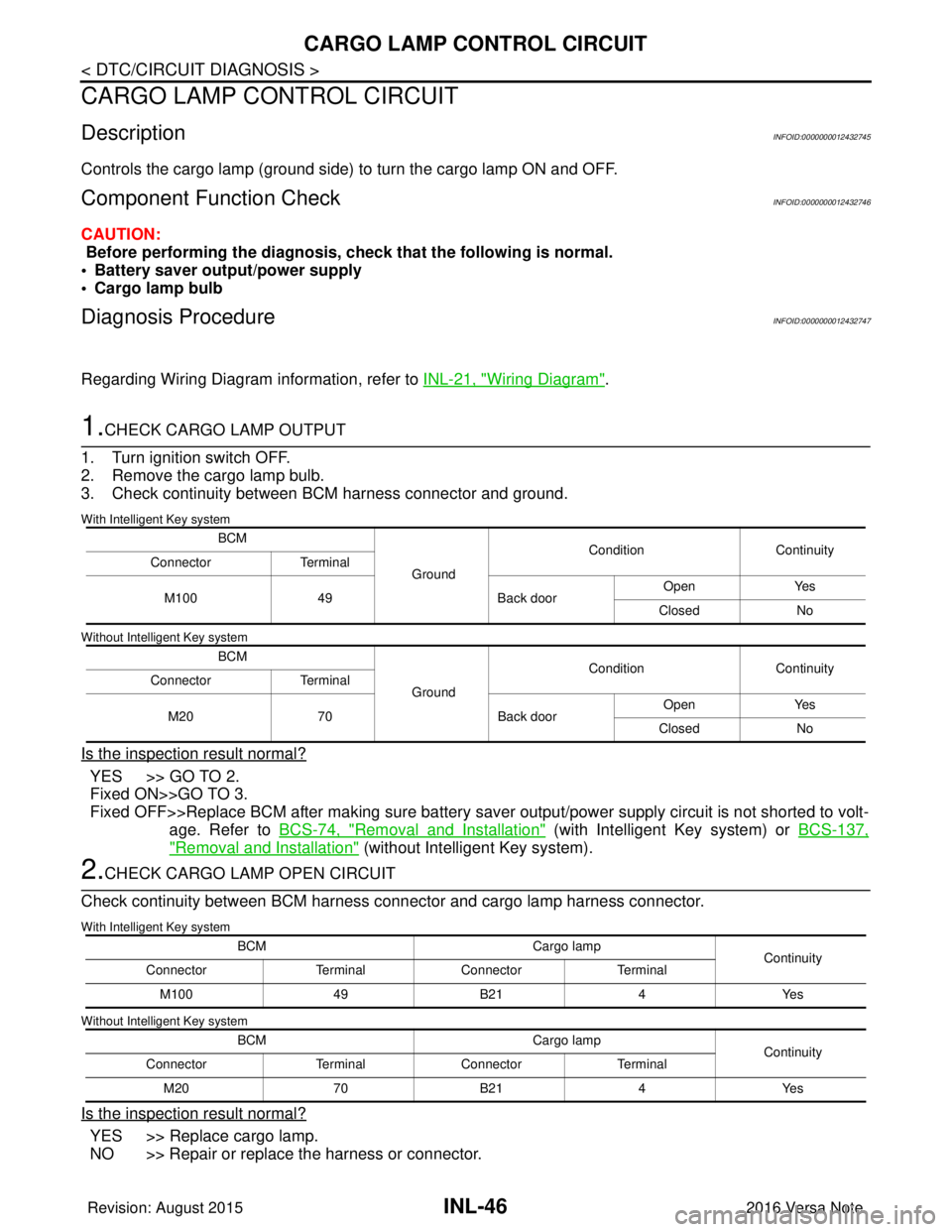
1.CHECK CARGO LAMP OUTPUT
1. Turn ignition switch OFF.
2. Remove the cargo lamp bulb.
3. Check continuity between BCM harness connector and ground.
With Intelligent Key system
Without Intelligent Key system
Is the inspection result normal?
YES >> GO TO 2.
Fixed ON>>GO TO 3.
Fixed OFF>>Replace BCM after making sure battery saver output/power supply circuit is not shorted to volt- age. Refer to BCS-74, "
Removal and Installation" (with Intelligent Key system) or BCS-137,
"Removal and Installation" (without Intelligent Key system).
2.CHECK CARGO LAMP OPEN CIRCUIT
Check continuity between BCM harness connector and cargo lamp harness connector.
With Intelligent Key system
Without Intelligent Key system
Is the inspection result normal?
YES >> Replace cargo lamp.
NO >> Repair or replace the harness or connector.
BCM
GroundCondition
Continuity
Connector Terminal
M100 49 Back doorOpen
Yes
Closed No
BCM GroundCondition
Continuity
Connector Terminal
M20 70 Back doorOpen
Yes
Closed No
BCM Cargo lamp
Continuity
Connector TerminalConnector Terminal
M100 49B21 4Yes
BCM Cargo lamp
Continuity
Connector TerminalConnector Terminal
M20 70B21 4Yes
Revision: August 2015 2016 Versa Note
cardiagn.com
Page 2142 of 3641
INL-48
< DTC/CIRCUIT DIAGNOSIS >
PUSH-BUTTON IGNITION SWITCH ILLUMINATION CIRCUIT
PUSH-BUTTON IGNITION SWITCH ILLUMINATION CIRCUIT
DescriptionINFOID:0000000012432748
Provides the power supply and the ground to control the push-button ignition switch illumination.
Component Function CheckINFOID:0000000012432749
1.CHECK PUSH-BUTTON IGNITION SWITCH ILLUMINATION OPERATION
CONSULT
1. Turn the ignition switch ON.
2. Select ENGINE SW ILLUMI of BCM (I NTELLGENT KEY) active test item.
3. While operating the test item, check that the push-button ignition switch illumination turns ON/OFF
Is the inspection result normal?
YES >> Push-button ignition switch illumination circuit is normal.
NO >> Refer to INL-48, "
Diagnosis Procedure".
Diagnosis ProcedureINFOID:0000000012432750
Regarding Wiring Diagram information, refer to INL-28, "Wiring Diagram".
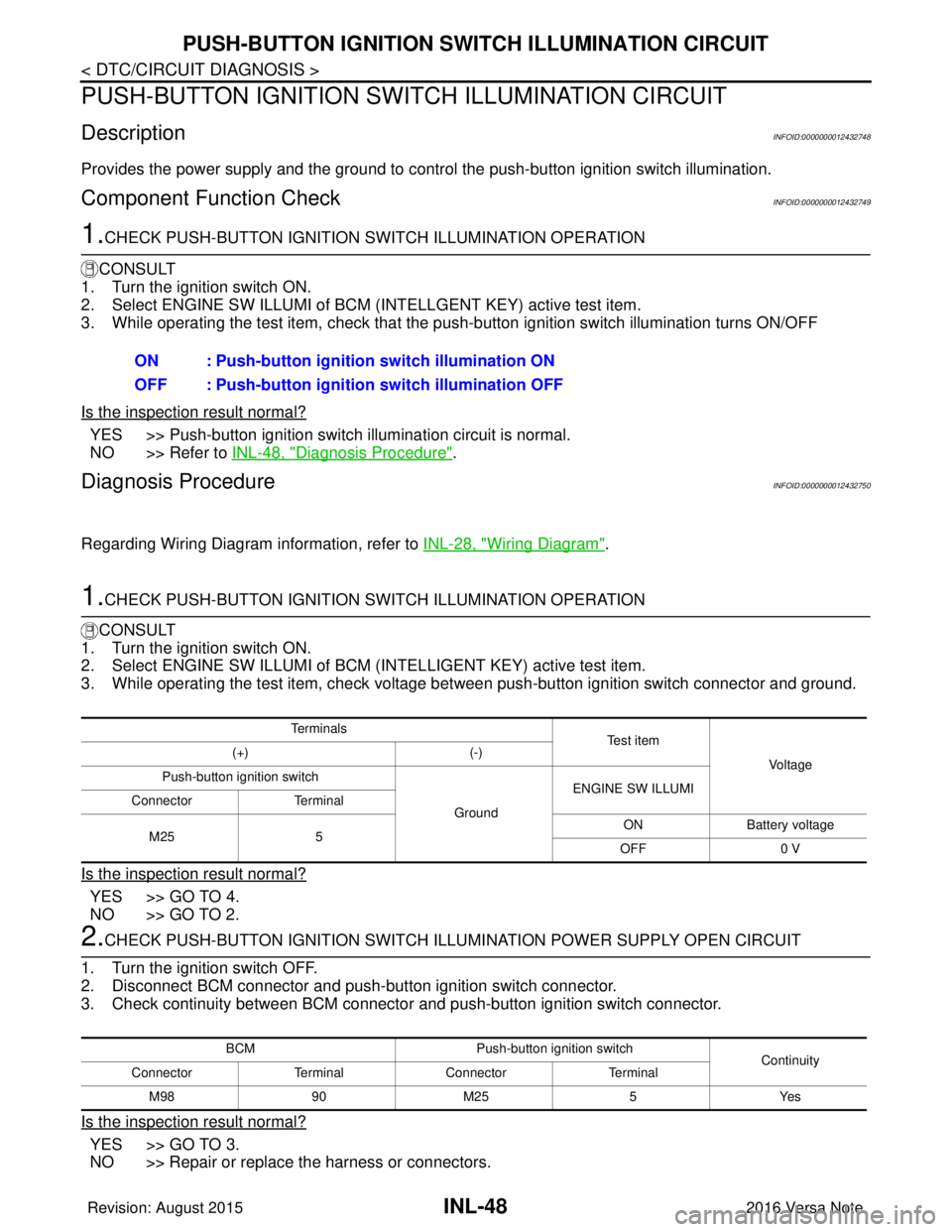
1.CHECK PUSH-BUTTON IGNITION SWITCH ILLUMINATION OPERATION
CONSULT
1. Turn the ignition switch ON.
2. Select ENGINE SW ILLUMI of BCM (INTELLIGENT KEY) active test item.
3. While operating the test item, check voltage bet ween push-button ignition switch connector and ground.
Is the inspection result normal?
YES >> GO TO 4.
NO >> GO TO 2.
2.CHECK PUSH-BUTTON IGNITION SWITCH ILLUMINATION POWER SUPPLY OPEN CIRCUIT
1. Turn the ignition switch OFF.
2. Disconnect BCM connector and push-button ignition switch connector.
3. Check continuity between BCM connector and push-button ignition switch connector.
Is the inspection result normal?
YES >> GO TO 3.
NO >> Repair or replace the harness or connectors. ON : Push-button ignition switch illumination ON
OFF : Push-button ignition
switch illumination OFF
Te r m i n a l s
Te s t i t e m
Vo l ta g e
(+)
(-)
Push-button ignition switch
GroundENGINE SW ILLUMI
Connector Terminal
M25 5 ON
Battery voltage
OFF 0 V
BCM Push-button ignition switch
Continuity
Connector TerminalConnector Terminal
M 989 0M 25 5 Y es
Revision: August 2015 2016 Versa Note
cardiagn.com
Page 2143 of 3641
PUSH-BUTTON IGNITION SWITCH ILLUMINATION CIRCUITINL-49
< DTC/CIRCUIT DIAGNOSIS >
C
DE
F
G H
I
J
K
M A
B
INL
N
O P
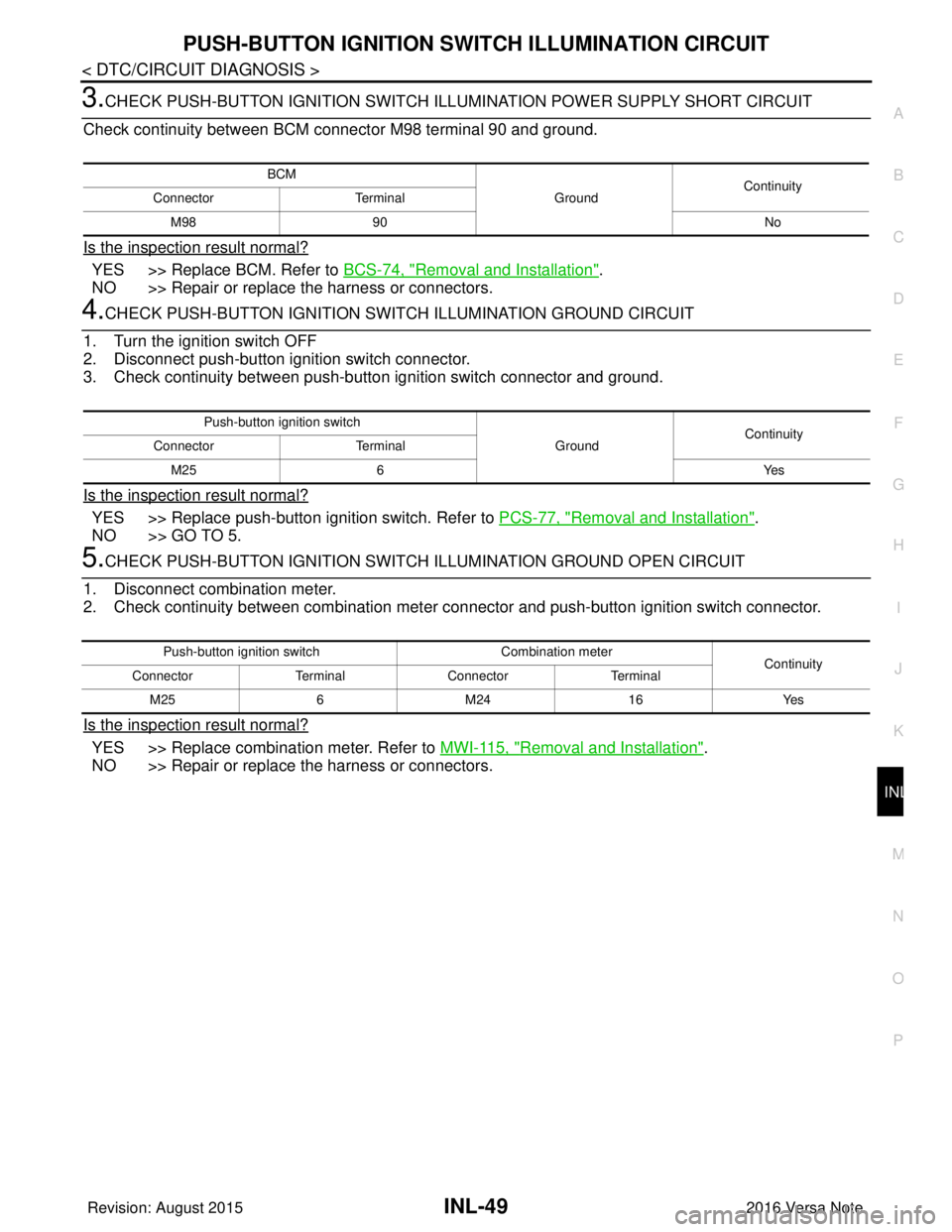
3.CHECK PUSH-BUTTON IGNITION SWITCH ILLUMINATION POWER SUPPLY SHORT CIRCUIT
Check continuity between BCM connector M98 terminal 90 and ground.
Is the inspection result normal?
YES >> Replace BCM. Refer to BCS-74, "Removal and Installation".
NO >> Repair or replace the harness or connectors.
4.CHECK PUSH-BUTTON IGNITION SWIT CH ILLUMINATION GROUND CIRCUIT
1. Turn the ignition switch OFF
2. Disconnect push-button ignition switch connector.
3. Check continuity between push-butt on ignition switch connector and ground.
Is the inspection result normal?
YES >> Replace push-button ignition switch. Refer to PCS-77, "Removal and Installation".
NO >> GO TO 5.
5.CHECK PUSH-BUTTON IGNITION SWITCH ILLUMINATION GROUND OPEN CIRCUIT
1. Disconnect combination meter.
2. Check continuity between combination meter connector and push-button ignition switch connector.
Is the inspection result normal?
YES >> Replace combination meter. Refer to MWI-115, "Removal and Installation".
NO >> Repair or replace the harness or connectors.
BCM
GroundContinuity
Connector Terminal
M98 90 No
Push-button ignition switch
GroundContinuity
Connector Terminal
M25 6 Yes
Push-button ignition switchCombination meter
Continuity
Connector TerminalConnector Terminal
M25 6M24 16 Yes
Revision: August 2015 2016 Versa Note
cardiagn.com
Page 2154 of 3641
PRECAUTIONSINT-3
< PRECAUTION >
C
DE
F
G H
I
K L
M A
B
INT
N
O P
PRECAUTION
PRECAUTIONS
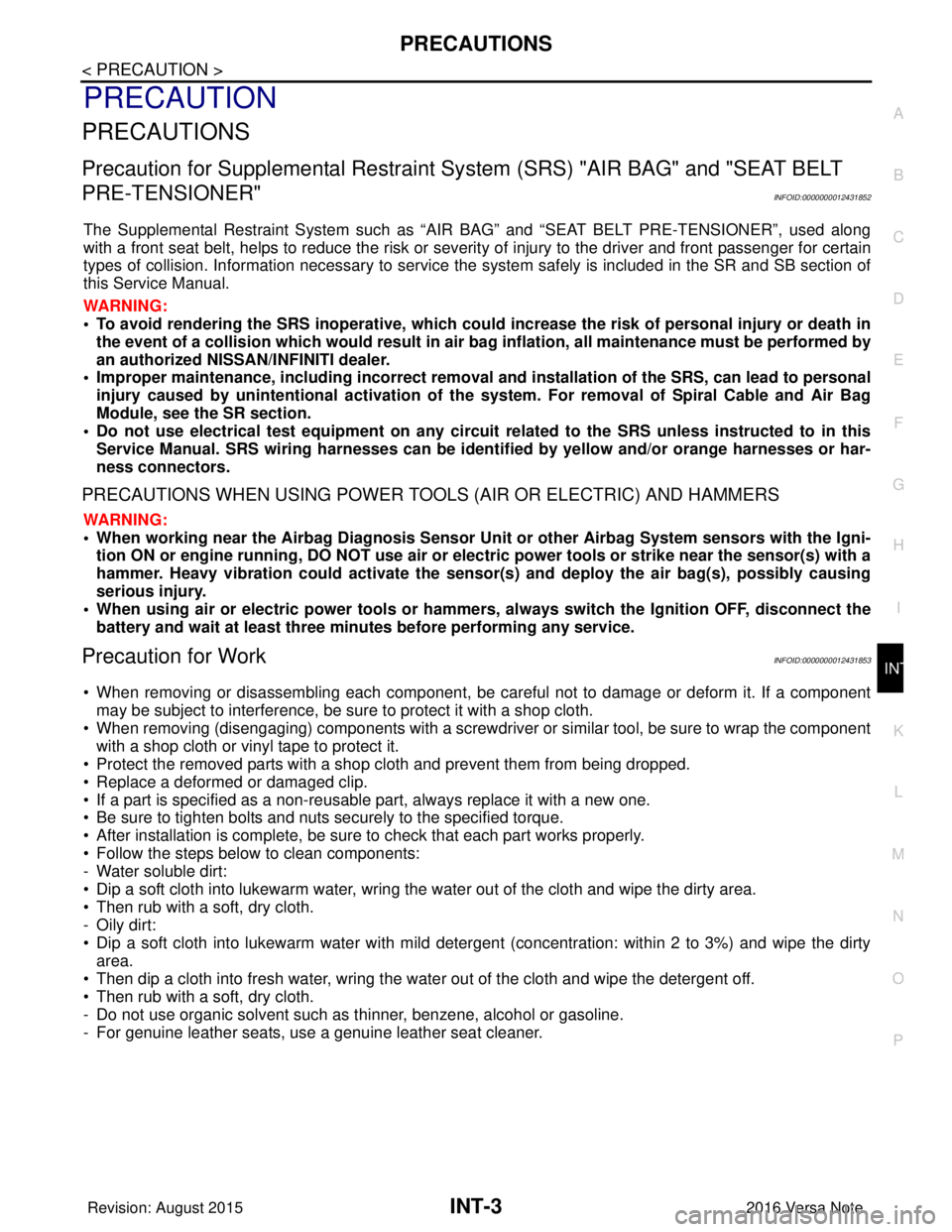
Precaution for Supplemental Restraint System (SRS) "AIR BAG" and "SEAT BELT
PRE-TENSIONER"
INFOID:0000000012431852
The Supplemental Restraint System such as “AIR BAG” and “SEAT BELT PRE-TENSIONER”, used along
with a front seat belt, helps to reduce the risk or severi ty of injury to the driver and front passenger for certain
types of collision. Information necessary to service the system safely is included in the SR and SB section of
this Service Manual.
WARNING:
• To avoid rendering the SRS inoper ative, which could increase the risk of personal injury or death in
the event of a collision which would result in air bag inflation, all maintenance must be performed by
an authorized NISSAN/INFINITI dealer.
• Improper maintenance, including in correct removal and installation of the SRS, can lead to personal
injury caused by unintentional act ivation of the system. For removal of Spiral Cable and Air Bag
Module, see the SR section.
• Do not use electrical test equipm ent on any circuit related to the SRS unless instructed to in this
Service Manual. SRS wiring harnesses can be identi fied by yellow and/or orange harnesses or har-
ness connectors.
PRECAUTIONS WHEN USING POWER TOOLS (AIR OR ELECTRIC) AND HAMMERS
WARNING:
• When working near the Airbag Diagnosis Sensor Un it or other Airbag System sensors with the Igni-
tion ON or engine running, DO NOT use air or el ectric power tools or strike near the sensor(s) with a
hammer. Heavy vibration could activate the sensor( s) and deploy the air bag(s), possibly causing
serious injury.
• When using air or electric power tools or hammers, always switch the Ignition OFF, disconnect the
battery and wait at least three mi nutes before performing any service.
Precaution for WorkINFOID:0000000012431853
• When removing or disassembling each component, be ca reful not to damage or deform it. If a component
may be subject to interference, be sure to protect it with a shop cloth.
• When removing (disengaging) components with a screwdriver or similar tool, be sure to wrap the component with a shop cloth or vinyl tape to protect it.
• Protect the removed parts with a shop cloth and prevent them from being dropped.
• Replace a deformed or damaged clip.
• If a part is specified as a non-reusabl e part, always replace it with a new one.
• Be sure to tighten bolts and nuts securely to the specified torque.
• After installation is complete, be sure to check that each part works properly.
• Follow the steps below to clean components:
- Water soluble dirt:
• Dip a soft cloth into lukewarm water, wring the water out of the cloth and wipe the dirty area.
• Then rub with a soft, dry cloth.
-Oily dirt:
• Dip a soft cloth into lukewarm water with mild detergent (concentration: within 2 to 3%) and wipe the dirty
area.
• Then dip a cloth into fresh water, wring the water out of the cloth and wipe the detergent off.
• Then rub with a soft, dry cloth.
- Do not use organic solvent such as thinner, benzene, alcohol or gasoline.
- For genuine leather seats, use a genuine leather seat cleaner.
Revision: August 2015 2016 Versa Note
cardiagn.com
Page 2178 of 3641
FLOOR TRIMINT-27
< REMOVAL AND INSTALLATION >
C
DE
F
G H
I
K L
M A
B
INT
N
O P
FLOOR TRIM
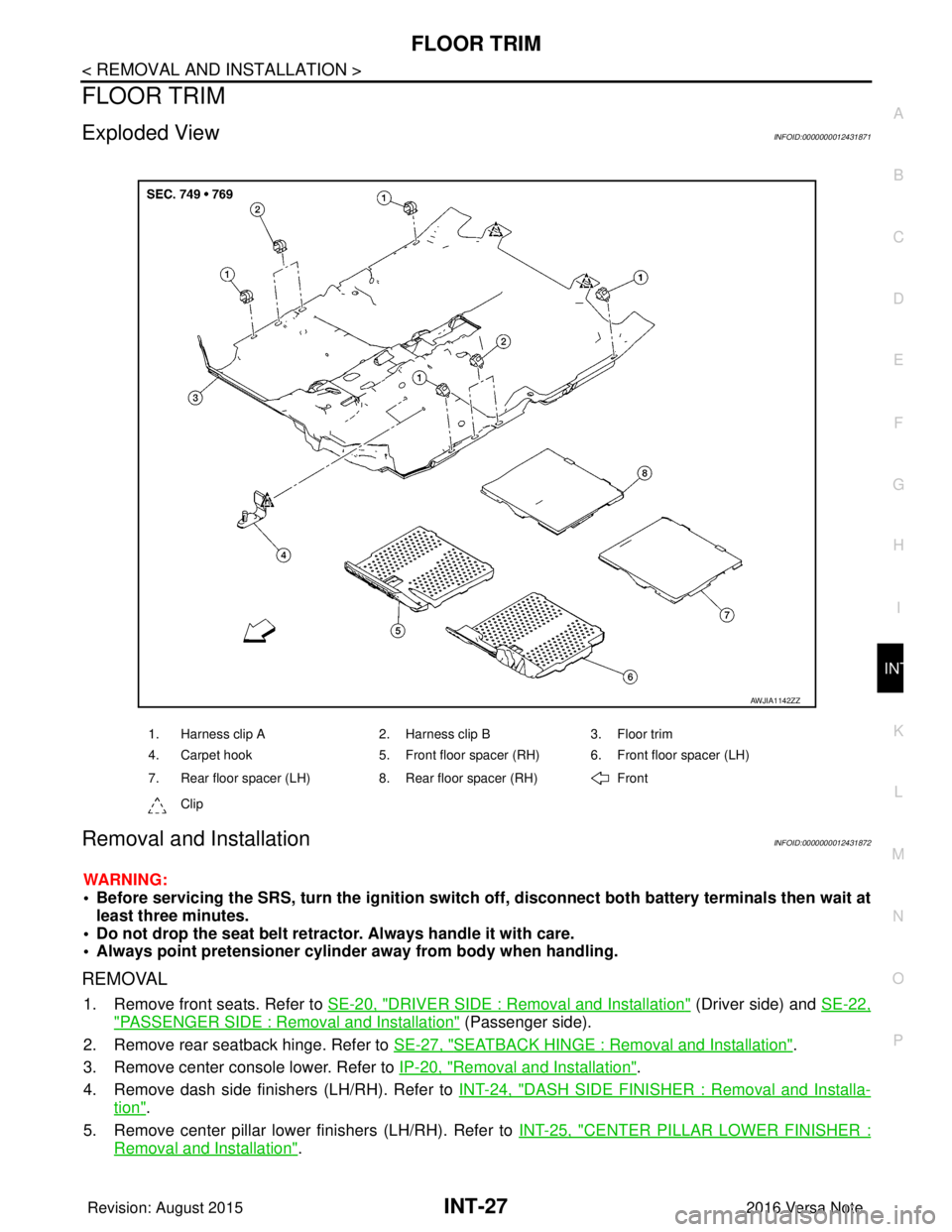
Exploded ViewINFOID:0000000012431871
Removal and InstallationINFOID:0000000012431872
WARNING:
• Before servicing the SRS, turn the ignition switch off, disconnect both battery terminals then wait at
least three minutes.
• Do not drop the seat belt retractor. Always handle it with care.
• Always point pretensioner cylinder away from body when handling.
REMOVAL
1. Remove front seats. Refer to SE-20, "DRIVER SIDE : Removal and Installation" (Driver side) and SE-22,
"PASSENGER SIDE : Removal and Installation" (Passenger side).
2. Remove rear seatback hinge. Refer to SE-27, "
SEATBACK HINGE : Removal and Installation".
3. Remove center console lower. Refer to IP-20, "
Removal and Installation".
4. Remove dash side finishers (LH/RH). Refer to INT-24, "
DASH SIDE FINISHER : Removal and Installa-
tion".
5. Remove center pillar lower finishers (LH/RH). Refer to INT-25, "
CENTER PILLAR LOWER FINISHER :
Removal and Installation".
1. Harness clip A2. Harness clip B3. Floor trim
4. Carpet hook 5. Front floor spacer (RH) 6. Front floor spacer (LH)
7. Rear floor spacer (LH) 8. Rear floor spacer (RH) Front
Clip
AWJIA1142ZZ
Revision: August 2015 2016 Versa Note
cardiagn.com
Page 2179 of 3641
INT-28
< REMOVAL AND INSTALLATION >
FLOOR TRIM
6. Disconnect negative and positive battery terminals, then wait at least three minutes. Refer to PG-70,
"Removal and Installation (Battery)".
WARNING:
Before servicing the SRS, turn th e ignition switch off, disconnect both battery terminals then wait
at least three minutes.
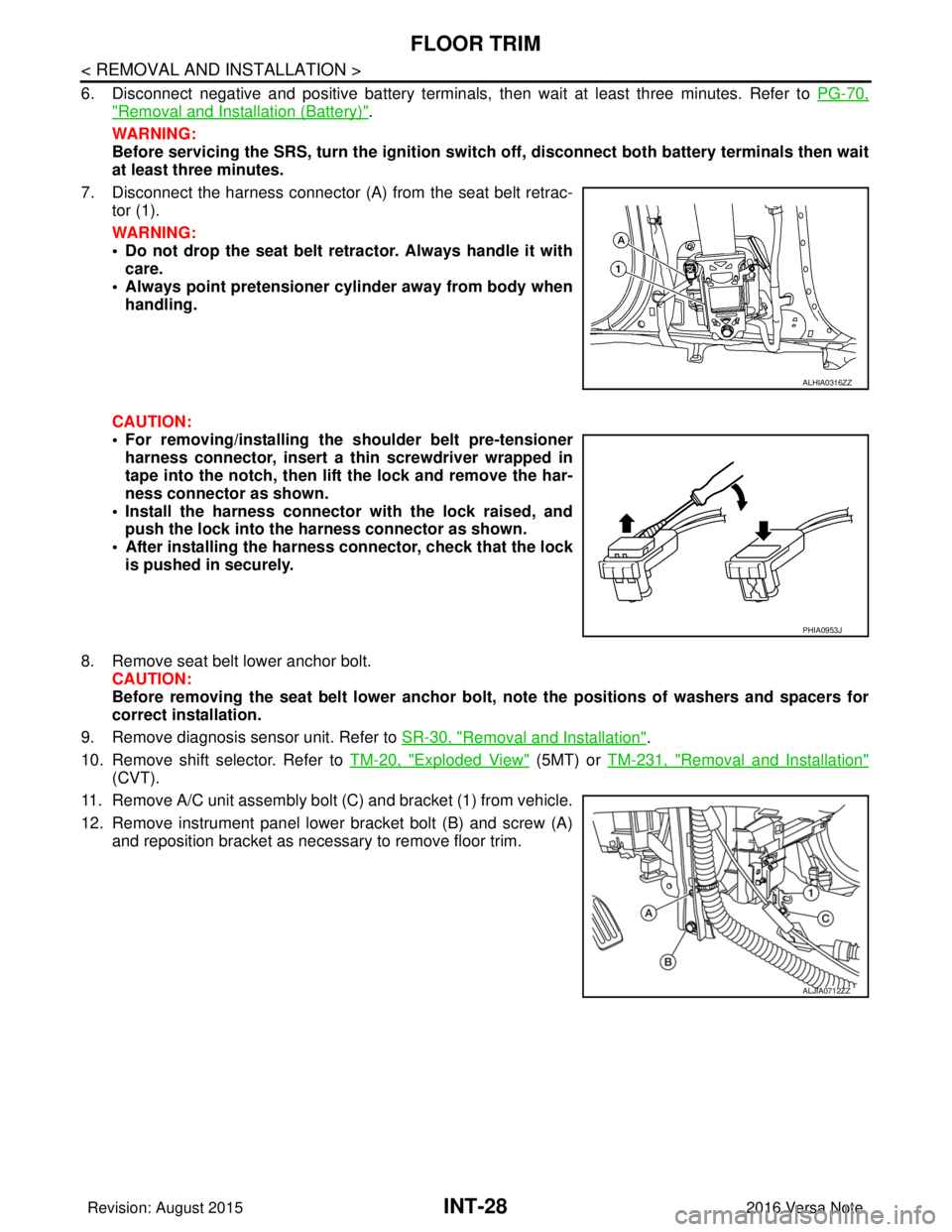
7. Disconnect the harness connector (A ) from the seat belt retrac-
tor (1).
WARNING:
• Do not drop the seat belt retractor. Always handle it with care.
• Always point pretensioner cylinder away from body when handling.
CAUTION:
• For removing/installing the shoulder belt pre-tensioner harness connector, insert a thin screwdriver wrapped in
tape into the notch, then lift the lock and remove the har-
ness connector as shown.
• Install the harness connector with the lock raised, and push the lock into the harness connector as shown.
• After installing the harness connector, check that the lock
is pushed in securely.
8. Remove seat belt lower anchor bolt. CAUTION:
Before removing the seat belt lower anchor bolt , note the positions of washers and spacers for
correct installation.
9. Remove diagnosis sensor unit. Refer to SR-30, "
Removal and Installation".
10. Remove shift selector. Refer to TM-20, "
Exploded View" (5MT) or TM-231, "Removal and Installation"
(CVT).
11. Remove A/C unit assembly bolt (C) and bracket (1) from vehicle.
12. Remove instrument panel lower bracket bolt (B) and screw (A) and reposition bracket as necessary to remove floor trim.
ALHIA0316ZZ
PHIA0953J
ALJIA0712ZZ
Revision: August 2015 2016 Versa Note
cardiagn.com
Page 2194 of 3641
![NISSAN NOTE 2016 Service Repair Manual LAN-6
< PRECAUTION >[CAN FUNDAMENTAL]
PRECAUTIONS
PRECAUTION
PRECAUTIONS
Precautions for Trouble DiagnosisINFOID:0000000012433328
CAUTION:
Follow the instructions listed below. Fail
ure to do this may](/img/5/57363/w960_57363-2193.png "NISSAN NOTE 2016 Service Repair Manual LAN-6
< PRECAUTION >[CAN FUNDAMENTAL]
PRECAUTIONS
PRECAUTION
PRECAUTIONS
Precautions for Trouble DiagnosisINFOID:0000000012433328
CAUTION:
Follow the instructions listed below. Fail
ure to do this may")
LAN-6
< PRECAUTION >[CAN FUNDAMENTAL]
PRECAUTIONS
PRECAUTION
PRECAUTIONS
Precautions for Trouble DiagnosisINFOID:0000000012433328
CAUTION:
Follow the instructions listed below. Fail
ure to do this may cause damage to parts:
• Never apply 7.0 V or more to the measurement terminal.
• Use a tester with open terminal voltage of 7.0 V or less.
• Turn the ignition switch OFF and disconnect th e battery cable from the negative terminal when
checking the harness.
Precautions for Harness RepairINFOID:0000000012433329
• Solder the repaired area and wrap tape around the soldered area. NOTE:
A fray of twisted lines must be within 110 mm (4.33 in).
• Bypass connection is never allowed at the repaired area. NOTE:
Bypass connection may cause CAN communication error. The
spliced wire becomes separated and the characteristics of twisted
line are lost.
• Replace the applicable harness as an assembly if error is detected on the shield lines of CAN communica- tion line.
SKIB8766E
SKIB8767E
Revision: August 2015 2016 Versa Note
cardiagn.com
Page 2197 of 3641
![NISSAN NOTE 2016 Service Repair Manual LAN
TROUBLE DIAGNOSISLAN-9
< SYSTEM DESCRIPTION > [CAN FUNDAMENTAL]
C
D
E
F
G H
I
J
K L
B A
O P
N
TROUBLE DIAGNOSIS
Component DescriptionINFOID:0000000012433332
Condition of Error DetectionINFOID:0000](/img/5/57363/w960_57363-2196.png "NISSAN NOTE 2016 Service Repair Manual LAN
TROUBLE DIAGNOSISLAN-9
< SYSTEM DESCRIPTION > [CAN FUNDAMENTAL]
C
D
E
F
G H
I
J
K L
B A
O P
N
TROUBLE DIAGNOSIS
Component DescriptionINFOID:0000000012433332
Condition of Error DetectionINFOID:0000")
LAN
TROUBLE DIAGNOSISLAN-9
< SYSTEM DESCRIPTION > [CAN FUNDAMENTAL]
C
D
E
F
G H
I
J
K L
B A
O P
N
TROUBLE DIAGNOSIS
Component DescriptionINFOID:0000000012433332
Condition of Error DetectionINFOID:0000000012433333
DTC (e.g. U1000 and U1001) of CAN communication is
indicated on SELF-DIAG RESULTS on CONSULT if a
CAN communication signal is not transmitted or received between units for 2 seconds or more.
CAN COMMUNICATION SYSTEM ERROR
• CAN communication line open (CAN-H, CAN-L, or both)
• CAN communication line short (ground, betw een CAN communication lines, other harnesses)
• Error of CAN communication control circuit of the unit connected to CAN communication line
WHEN DTC OF CAN COMMUNICATION IS INDICATED EVEN THOUGH CAN COMMUNICATION
SYSTEM IS NORMAL
• Removal/installation of parts: Error may be detec ted when removing and installing CAN communication unit
and related parts while turning the ignition switch ON. (A DTC except for CAN communication may be
detected.)
• Fuse blown out (removed): CAN communication of the unit may cease.
• Voltage drop: Error may be detected if voltage drops due to discharged battery when turning the ignition switch ON (Depending on the control unit which carries out CAN communication).
• Error may be detected if the power supply circuit of the control unit, which carries out CAN communication,
malfunctions (Depending on the control unit which carries out CAN communication).
• Error may be detected if reprogramming is not completed normally.
NOTE:
CAN communication system is normal if DTC of CAN communication is indicated on SELF-DIAG RESULTS of
CONSULT under the above conditions. Erase the memory of the self-diagnosis of each control unit.
JSMIA0527GB
Component Description
Main line CAN communication line between splices
Branch line CAN communication line between splice and a control unit
Splice A point connecting a branch line with a main line
Termination circuit Circuit connected across the CAN communication system. (Resistor)
Revision: August 2015 2016 Versa Note
cardiagn.com
Page 2198 of 3641
![NISSAN NOTE 2016 Service Repair Manual LAN-10
< SYSTEM DESCRIPTION >[CAN FUNDAMENTAL]
TROUBLE DIAGNOSIS
Symptom When Error Occurs in CAN Communication System
INFOID:0000000012433334
In CAN communication system, multiple control units mutu](/img/5/57363/w960_57363-2197.png "NISSAN NOTE 2016 Service Repair Manual LAN-10
< SYSTEM DESCRIPTION >[CAN FUNDAMENTAL]
TROUBLE DIAGNOSIS
Symptom When Error Occurs in CAN Communication System
INFOID:0000000012433334
In CAN communication system, multiple control units mutu")
LAN-10
< SYSTEM DESCRIPTION >[CAN FUNDAMENTAL]
TROUBLE DIAGNOSIS
Symptom When Error Occurs in CAN Communication System
INFOID:0000000012433334
In CAN communication system, multiple control units mutually transmit and receive signals. Each control unit
cannot transmit and receive signals if any error occurs on CAN communication line. Under this condition, mul-
tiple control units related to the root cause malfunction or go into fail-safe mode.
ERROR EXAMPLE
NOTE:
Each vehicle differs in symptom of each control unit under fail-safe mode and CAN communication line wiring.
Example: Main Line Between Data Link Connector and ABS Actuator and Electric Un it (Control Unit) Open Circuit
JSMIA0442GB
Unit name Major symptom
ECM Engine torque limiting is affected, and shift harshness increases.
BCM • Reverse warning buzzer does not sound.
• The front wiper moves under continuous operation mode even though the front wip-
er switch being in the intermittent position.
EPS control unit The steering effort increases.
Combination meter • The shift position indicator and OD OFF indicator turn OFF.
• The speedometer is inoperative.
• The odo/trip meter stops.
ABS actuator and electric unit (control unit) Normal operation.
TCM No impact on operation.
IPDM E/R When the ignition switch is ON,
• The headlamps (Lo) turn ON.
• The cooling fan continues to rotate.
Revision: August 2015
2016 Versa Note
cardiagn.com
Page 2200 of 3641
![NISSAN NOTE 2016 Service Repair Manual LAN-12
< SYSTEM DESCRIPTION >[CAN FUNDAMENTAL]
TROUBLE DIAGNOSIS
NOTE:
When data link connector branch line is open, transmiss
ion and reception of CAN communication signals are
not affected. Therefor](/img/5/57363/w960_57363-2199.png "NISSAN NOTE 2016 Service Repair Manual LAN-12
< SYSTEM DESCRIPTION >[CAN FUNDAMENTAL]
TROUBLE DIAGNOSIS
NOTE:
When data link connector branch line is open, transmiss
ion and reception of CAN communication signals are
not affected. Therefor")
LAN-12
< SYSTEM DESCRIPTION >[CAN FUNDAMENTAL]
TROUBLE DIAGNOSIS
NOTE:
When data link connector branch line is open, transmiss
ion and reception of CAN communication signals are
not affected. Therefore, no symptoms occur. However, be sure to repair malfunctioning circuit.
Example: CAN-H, CAN-L Harness Short Circuit
CAN Diagnosis with CONSULTINFOID:0000000012433335
CAN diagnosis on CONSULT extracts the root c ause by receiving the following information.
Unit name Major symptom
ECM
Normal operation.
BCM
EPS control unit
Combination meter
ABS actuator and electric unit (control unit)
TCM
IPDM E/R
JSMIA0445GB
Unit name
Major symptom
ECM • Engine torque limiting is affected, and shift harshness increases.
• Engine speed drops.
BCM • Reverse warning buzzer does not sound.
• The front wiper moves under continuous operation mode even though the front
wiper switch being in the intermittent position.
• The room lamp does not turn ON.
• The engine does not start (if an error or malfunction occurs while turning the igni- tion switch OFF.)
• The steering lock does not release (if an error or malfunction occurs while turning the ignition switch OFF.)
EPS control unit The steering effort increases.
Combination meter • The tachometer and the speedometer do not move.
• Warning lamps turn ON.
• Indicator lamps do not turn ON.
ABS actuator and electric unit (control unit) Normal operation.
TCM No impact on operation.
IPDM E/R When the ignition switch is ON,
• The headlamps (Lo) turn ON.
• The cooling fan continues to rotate.
Revision: August 2015
2016 Versa Note
cardiagn.com