display NISSAN PATHFINDER 2022 Owner´s Manual
[x] Cancel search | Manufacturer: NISSAN, Model Year: 2022, Model line: PATHFINDER, Model: NISSAN PATHFINDER 2022Pages: 647, PDF Size: 8.48 MB
Page 304 of 647
Synchronize climate settings
Press the SYNC button to synchronize cli-
mate settings. The sync indicator will turn
on.
When rear climate is off, pressing SYNC will
synchronize only driver's and front passen-
ger's climate settings. When rear climate is
on, pressing SYNC will synchronize driver,
front passenger, and rear temperature
mode and auto fan settings.
SYNC text will appear above the rear tem-
perature display when rear climate is syn-
chronized with the driver’s settings.
To change climate settings when SYNC is
active (the SYNC indicator is on):
• The driver's side temperature control dialwill control the driver, front passenger,
and rear (if rear climate is on)
temperatures.
• The fan speed control buttons will control the front and rear climate fan speeds.
• The front AUTO (automatic) climate con- trol ON-OFF button will activate the front
and rear climate automatic settings.
• The air flow control button will control the front and rear airflow direction. To exit SYNC:
• To remove the front passenger from
SYNC, turn the passenger's side tem-
perature control dial. The driver and rear
settings remain in SYNC until rear is re-
moved from SYNC.
• To remove the rear from SYNC, change any of the rear climate settings. The
driver and front passenger settings re-
main in SYNC until the front passenger is
removed from SYNC.
• To reactivate SYNC press the SYNC button.
To turn system off
Press the ON-OFF button to turn the sys-
tem off.
To turn system on
Press the ON-OFF button when the heater
or air conditioner is off. The system will turn
on with the settings that were used imme-
diately before the system was turned off.
Rear window and outside mirror
(if so equipped) defroster switch
For additional information, refer to “Rear
window and outside mirror (if so equipped)
defroster switch” (P. 2-77).
Heated seat switches (if so
equipped)
For additional information, see “Heated
seat switches (if so equipped)” (P. 2-86).
Heated steering wheel switch
(if so equipped)
For additional information, see “Heated
steering wheel switch (if so equipped)”
(P. 2-88).
Climate controlled seat switches
(if so equipped)
For additional information, see “Climate
controlled seat switches (if so equipped)”
(P. 2-85).
Monitor, climate, audio, phone and voice recognition systems4-35
Page 306 of 647
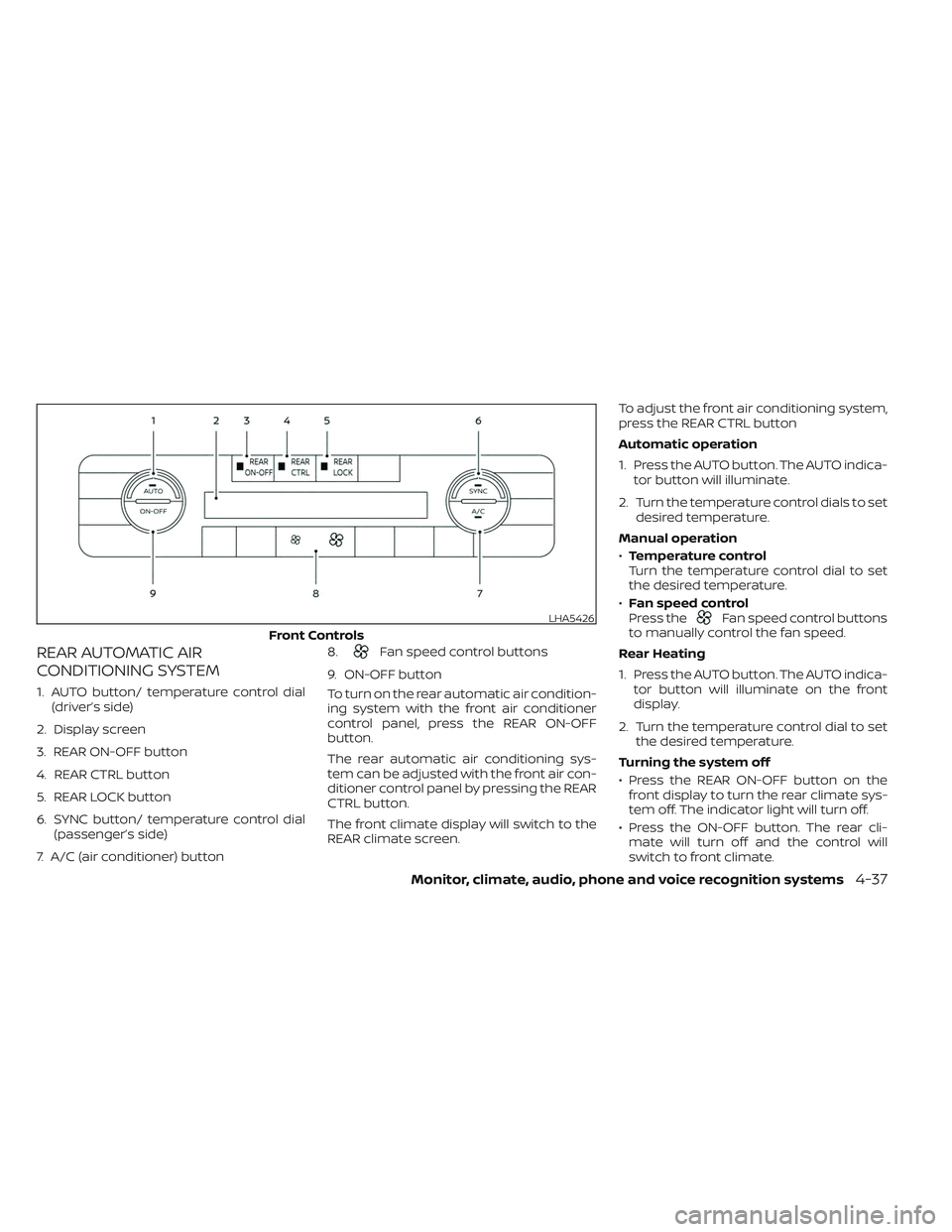
REAR AUTOMATIC AIR
CONDITIONING SYSTEM
1. AUTO button/ temperature control dial(driver’s side)
2. Display screen
3. REAR ON-OFF button
4. REAR CTRL button
5. REAR LOCK button
6. SYNC button/ temperature control dial (passenger’s side)
7. A/C (air conditioner) button 8.
Fan speed control buttons
9. ON-OFF button
To turn on the rear automatic air condition-
ing system with the front air conditioner
control panel, press the REAR ON-OFF
button.
The rear automatic air conditioning sys-
tem can be adjusted with the front air con-
ditioner control panel by pressing the REAR
CTRL button.
The front climate display will switch to the
REAR climate screen. To adjust the front air conditioning system,
press the REAR CTRL button
Automatic operation
1. Press the AUTO button. The AUTO indica-
tor button will illuminate.
2. Turn the temperature control dials to set desired temperature.
Manual operation
• Temperature control
Turn the temperature control dial to set
the desired temperature.
• Fan speed control
Press the
Fan speed control buttons
to manually control the fan speed.
Rear Heating
1. Press the AUTO button. The AUTO indica- tor button will illuminate on the front
display.
2. Turn the temperature control dial to set the desired temperature.
Turning the system off
• Press the REAR ON-OFF button on the front display to turn the rear climate sys-
tem off. The indicator light will turn off.
• Press the ON-OFF button. The rear cli- mate will turn off and the control will
switch to front climate.LHA5426
Front Controls
Monitor, climate, audio, phone and voice recognition systems4-37
Page 307 of 647
Locking the REAR controls
1. Press the REAR LOCK button on the frontclimate control panel. LOCK will be dis-
played on the rear climate display
screen.
2. The rear climate controls will be locked and can only be adjusted using the front
controls.
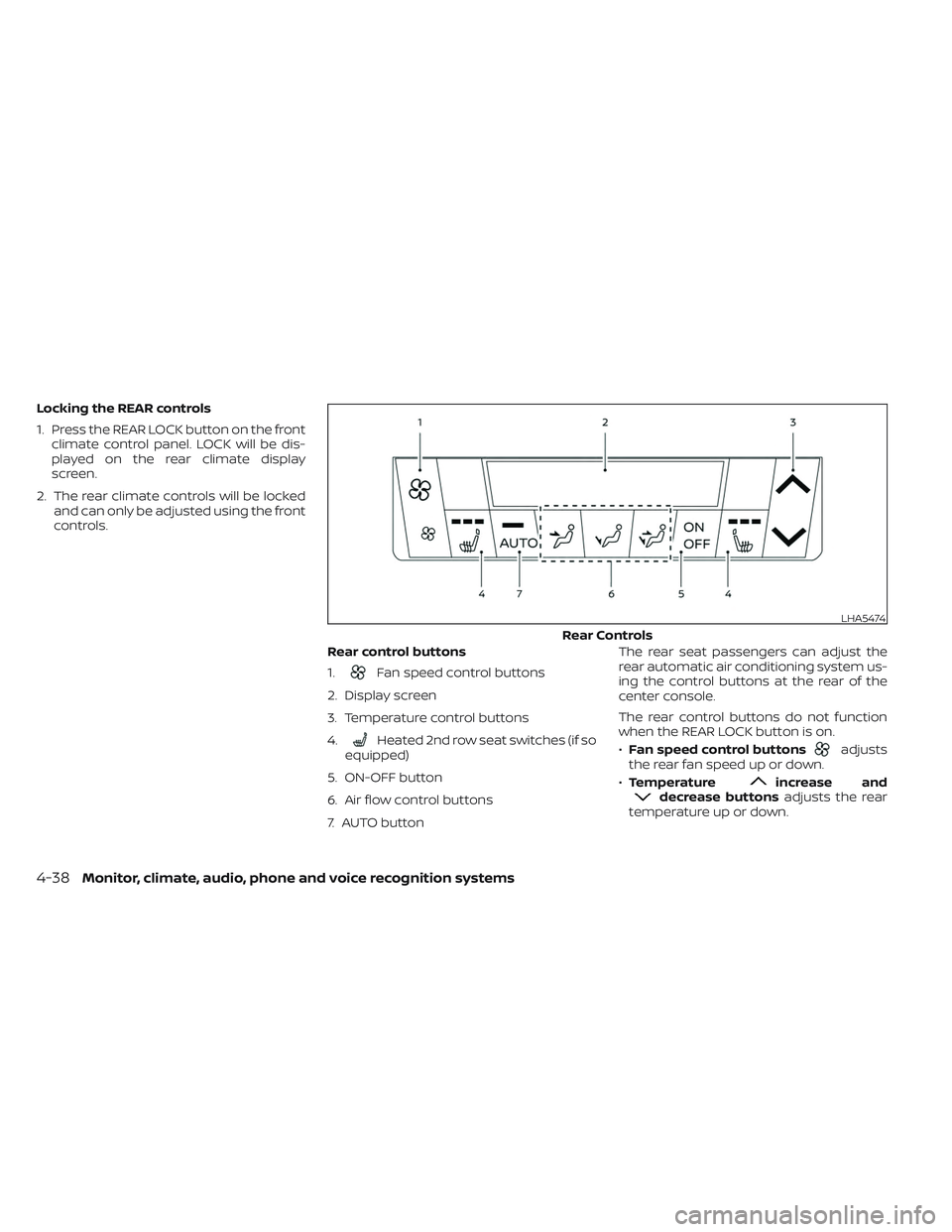
Rear control buttons
1.
Fan speed control buttons
2. Display screen
3. Temperature control buttons
4.
Heated 2nd row seat switches (if so
equipped)
5. ON-OFF button
6. Air flow control buttons
7. AUTO button The rear seat passengers can adjust the
rear automatic air conditioning system us-
ing the control buttons at the rear of the
center console.
The rear control buttons do not function
when the REAR LOCK button is on.
•
Fan speed control buttonsadjusts
the rear fan speed up or down.
• Temperature
increase anddecrease buttons adjusts the rear
temperature up or down.
LHA5474
Rear Controls
4-38Monitor, climate, audio, phone and voice recognition systems
Page 314 of 647
Active Ride Control (ARC)
(if so equipped)............................. 5-181
Hill descent control system (if so equipped) . . . 5-181
Hill start assist system ........................5-182
Front and Rear Sonar System
(if so equipped) ................................ 5-183
System operation .......................... 5-184
How to enable/disable the front and
rear sonar system .......................... 5-186
Sonar limitations ........................... 5-187
System temporarily unavailable ............5-188
System maintenance ......................5-188
Idling Stop System ............................ 5-189Retrograde movement control function
....5-191
Idling Stop System display ..................5-191
Idling Stop OFF switch ......................5-193
Cold weather driving .......................... 5-194
Freeing a frozen door lock ..................5-194
Antifreeze .................................. 5-194
Battery..................................... 5-194
Draining of coolant water ..................5-194
Tire equipment ............................. 5-194
Special winter equipment ..................5-195
Driving on snow or ice ......................5-195
Engine block heater (if so equipped) ........5-195
Page 317 of 647
Additional information:
• When using a wheel without the TPMSsuch as the spare tire, the TPMS does not
monitor the tire pressure of the spare tire.
• The TPMS will activate only when the ve- hicle is driven at speeds above 16 mph (25
km/h). Also, this system may not detect a
sudden drop in tire pressure (for example,
a flat tire while driving).
• The low tire pressure warning light does not automatically turn off when the tire
pressure is adjusted. Af ter the tire is in-
flated to the recommended pressure, the
vehicle must be driven at speeds above
16 mph (25 km/h) to activate the TPMS
and turn off the low tire pressure warning
light. Use a tire pressure gauge to check
the tire pressure.
• The “Tire Pressure Low - Add Air” warning appears in the vehicle information dis-
play when the low tire pressure warning
light is illuminated and low tire pressure is
detected. The “Tire Pressure Low - Add
Air” warning turns off when the low tire
pressure warning light turns off.
• The “Tire Pressure Low - Add Air” warning appears each time the ignition switch is
placed in the ON position as long as the
low tire pressure warning light remains
illuminated. • The “Tire Pressure Low - Add Air” warning
does not appear if the low tire pressure
warning light illuminates to indicate a
TPMS malfunction.
• Tire pressure rises and falls depending on the heat caused by the vehicle’s opera-
tion and the outside temperature. Do not
reduce the tire pressure af ter driving be-
cause the tire pressure rises af ter driving.
Low outside temperature can lower the
temperature of the air inside the tire
which can cause a lower tire inflation
pressure. This may cause the low tire
pressure warning light to illuminate. If the
warning light illuminates, check the tire
pressure for all four tires.
• The Tire and Loading Information label is located in the driver's door opening.
• You can also check the pressure of all tires (except the spare tire) on the vehicle
information display screen. The order of
the tire pressure figures displayed on the
screen corresponds with the actual order
of the tire position.
For additional information, see “Low tire
pressure warning light” (P. 2-18) and “Tire
Pressure Monitoring System (TPMS)” (P. 6-3).WARNING
• Radio waves could adversely affect
electric medical equipment. Those
who use a pacemaker should contact
the electric medical equipment
manufacturer for the possible influ-
ences before use.
• If the low tire pressure warning light
illuminates while driving, avoid sud-
den steering maneuvers or abrupt
braking, reduce vehicle speed, pull
off the road to a safe location and
stop the vehicle as soon as possible.
Driving with under-inflated tires may
permanently damage the tires and
increase the likelihood of tire failure.
Serious vehicle damage could occur
and may lead to an accident and
could result in serious personal in-
jury. Check the tire pressure for all
four tires. Adjust the tire pressure to
the recommended COLD tire pres-
sure shown on the Tire and Loading
Information label to turn the low tire
pressure warning light off. If you have
a flat tire, replace it with a spare tire
as soon as possible. For additional
information, see “Flat tire” (P. 6-3).
5-6Starting and driving
Page 322 of 647
Please observe the following precautions:
WARNING
• Spinning the front wheels on slippery
surfaces may cause the AWD warn-
ing message to display and the 4WD
system to automatically switch from
the 4WD to the 2WD mode. This could
reduce the traction. Be especially
careful when towing a trailer (4WD
models).
• Drive carefully when off the road and
avoid dangerous areas. Every person
who drives or rides in this vehicle
should be seated with their seat belt
fastened. This will keep you and your
passengers in position when driving
over rough terrain.
• Do not drive across steep slopes. In-
stead drive either straight up or
straight down the slopes. Off-road
vehicles can tip over sideways much
more easily than they can forward or
backward.
• Many hills are too steep for any ve-
hicle. If you drive up them, you may
stall. If you drive down them, you may
not be able to control your speed. If
you drive across them, you may roll
over. •
Do not shif t gears while driving on
downhill grades as this could cause
loss of control of the vehicle.
• Stay alert when driving to the top of a
hill. At the top there could be a drop-
off or other hazard that could cause
an accident.
• If your engine stalls or you cannot
make it to the top of a steep hill,
never attempt to turn around. Your
vehicle could tip or roll over. Always
back straight down in R (Reverse)
gear and apply brakes to control your
speed.
• Heavy braking going down a hill
could cause your brakes to overheat
and fade, resulting in loss of control
and an accident. Apply brakes lightly
and use a low gear to control your
speed.
• Unsecured cargo can be thrown
around when driving over rough ter-
rain. Properly secure all cargo so it
will not be thrown forward and cause
injury to you or your passengers. •
Secure heavy loads in the cargo area
as far forward and as low as possible.
Do not equip the vehicle with tires
larger than specified in this manual.
This could cause your vehicle to roll
over.
• Do not grip the inside or spokes of
the steering wheel when driving off-
road. The steering wheel could move
suddenly and injure your hands. In-
stead drive with your fingers and
thumbs on the outside of the rim.
• Before operating the vehicle, ensure
that the driver and all passengers
have their seat belts fastened.
• Always drive with the floor mats in
place as the floor may become hot.
• Lower your speed when encounter-
ing strong crosswinds. With a higher
center of gravity, your NISSAN is more
affected by strong side winds. Slower
speeds ensure better vehicle control.
• Do not drive beyond the perfor-
mance capability of the tires, even
with 4WD engaged.
Starting and driving5-11
Page 324 of 647
WARNING
Do not operate the push-button igni-
tion switch while driving the vehicle ex-
cept in an emergency. (The engine will
stop when the ignition switch is pushed
three consecutive times in quick suc-
cession or the ignition switch is pushed
and held for more than 2 seconds.) If
the engine stops while the vehicle is
being driven, this could lead to a crash
and serious injury.
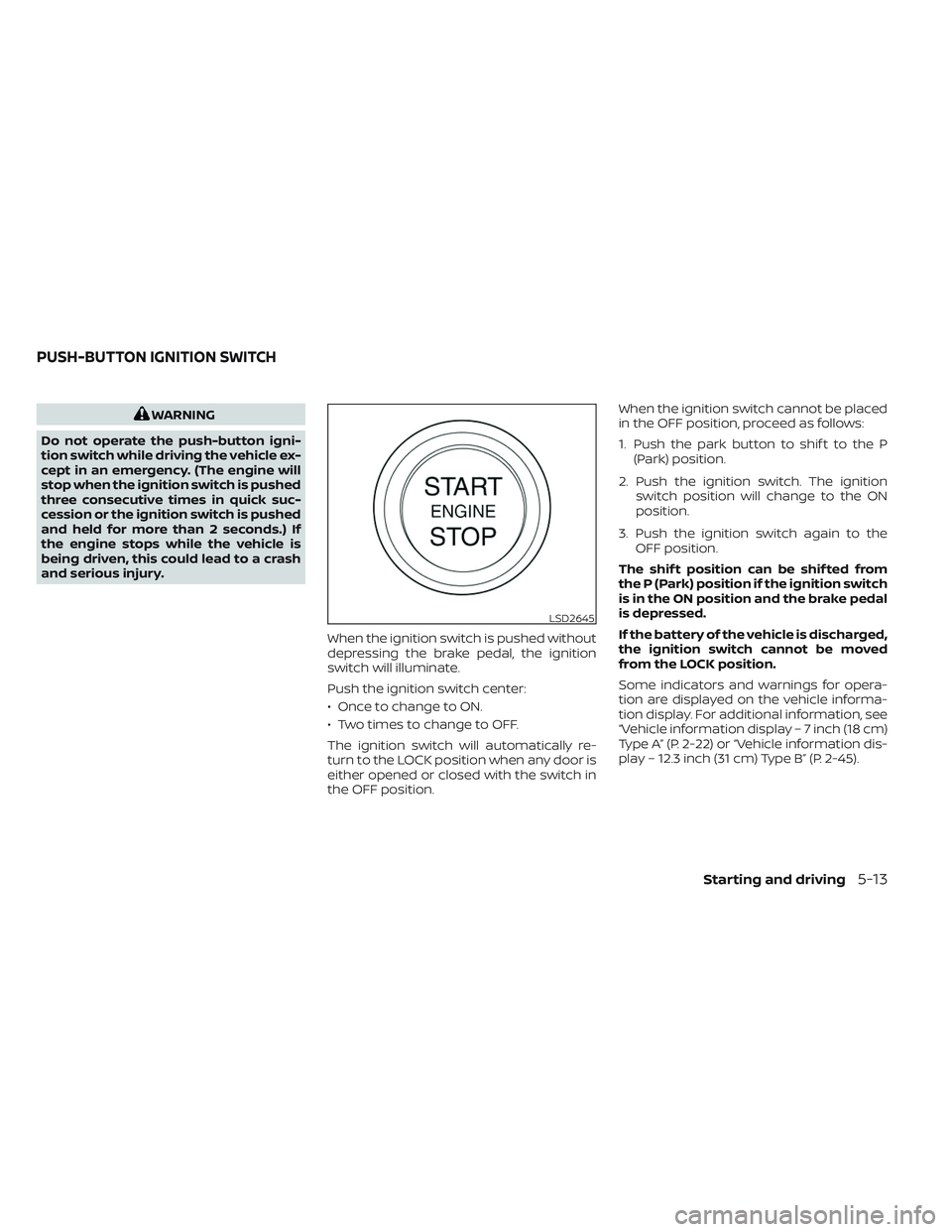
When the ignition switch is pushed without
depressing the brake pedal, the ignition
switch will illuminate.
Push the ignition switch center:
• Once to change to ON.
• Two times to change to OFF.
The ignition switch will automatically re-
turn to the LOCK position when any door is
either opened or closed with the switch in
the OFF position. When the ignition switch cannot be placed
in the OFF position, proceed as follows:
1. Push the park button to shif t to the P
(Park) position.
2. Push the ignition switch. The ignition switch position will change to the ON
position.
3. Push the ignition switch again to the OFF position.
The shif t position can be shif ted from
the P (Park) position if the ignition switch
is in the ON position and the brake pedal
is depressed.
If the battery of the vehicle is discharged,
the ignition switch cannot be moved
from the LOCK position.
Some indicators and warnings for opera-
tion are displayed on the vehicle informa-
tion display. For additional information, see
“Vehicle information display – 7 inch (18 cm)
Type A” (P. 2-22) or “Vehicle information dis-
play – 12.3 inch (31 cm) Type B” (P. 2-45).
LSD2645
PUSH-BUTTON IGNITION SWITCH
Starting and driving5-13
Page 331 of 647
and move the shif t lever from the P (Park)
position
O2to any of the desired shif t
positions.
Confirm that the vehicle is in the desired
shif t position by checking the shif t indica-
tor located on the shif t lever or in the ve-
hicle information display.
WARNING
Apply the electronic parking brake if
the shif t lever is in any position while
the engine is not running. Failure to do
so could cause the vehicle to move un-
expectedly or roll away and result in
serious personal injury or property
damage.
CAUTION
• Use the P (Park), R (Reverse) or D
(Drive) position only when the vehicle
is completely stopped.
• When switching to the desired shif t
position by operating the shif t lever,
check that the shif t lever returns to
the home position by releasing your
hand from the lever. Holding the shif t
lever in a mid-way position may also
damage the shif t control system. •
Do not operate the shif t lever while
the accelerator pedal is depressed.
This may cause a sudden start which
could result in an accident.
• The following operations are not al-
lowed because excessive force
would be applied to the transmission
and this may result in damage to the
vehicle:
– Moving the shif t lever to the R (Re- verse) position when driving
forward
– Moving the shif t lever to the D (Drive) position when reversing
If these operations are attempted, a
chime sounds and the vehicle shif ts to
the N (Neutral) position.P (Park)
CAUTION
• To prevent transmission damage,
use the P (Park) position only when
the vehicle is completely stopped.
• Do not slide the shif t lever while
pressing the park button. This may
damage the shif t control system. Use the P (Park) position when the vehicle is
parked or when starting the engine. Make
sure the vehicle is completely stopped be-
fore pressing the park button to engage
the P (Park) position. For maximum safety,
the brake pedal must be depressed before
engaging the P (Park) position. Use this po-
sition together with the electronic parking
brake. When parking on a hill, first depress
the brake pedal, apply the electronic park-
ing brake and then engage the P (Park)
position. The parking lock should not be
used as a brake when parking. In order to
secure the vehicle, always apply the elec-
tronic parking brake in addition to the park-
ing lock.
In the event of a malfunction of the vehi-
cle’s electronics, the transmission may lock
in the P (Park) position. Have the vehicle’s
electronics checked immediately. It is rec-
ommended that you visit a NISSAN dealer
for this service.
The P (Park) position is automatically en-
gaged if:
• You place the ignition switch in the OFF
position
5-20Starting and driving
Page 333 of 647
When canceling the manual shif t mode,
move the shif t lever to the D (Drive) position
again. The transmission returns to the nor-
mal driving mode.
When you pull the paddle shif ter while in
the D (Drive) position, the transmission will
shif t to the upper or lower range temporar-
ily. The transmission will automatically re-
turn to the D (Drive) position af ter a short
period of time. If you want to return to the D
(Drive) position manually, pull and hold the
paddle shif ter for about 1.5 seconds.
In the manual shif t mode, the shif t range is
displayed in the vehicle information
display.
Shif t ranges up or down one by one as
follows:
1M⇔2M⇔3M ⇔4M ⇔5M ⇔6M ⇔7M ⇔8M
⇔ 9M
9M (9th) and 8M (8th)
Use this position for all normal forward
driving at highway speeds.
7M (7th), 6M (6th) and 5M (5th)
Use these positions when driving up long
slopes, or for engine braking when driving
down long slopes.
4M (4th), 3M (3rd) and 2M (2nd)
Use these positions for hill climbing or en-
gine braking on downhill grades.
1M (1st)
Use this position when climbing steep hills
slowly or driving slowly through deep snow,
or for maximum engine braking on steep
downhill grades.
• Remember not to drive at high speeds for
extended periods of time in lower than
the 8th range. This reduces fuel economy.
• Pulling the same paddle shif ter twice will shif t the ranges in succession. However, if
this motion is rapidly done, the second
shif ting may not be completed properly.
• In the manual shif t mode, the trans-
mission may not shif t to the selected
gear. This helps maintain driving per-
formance and reduces the chance of
vehicle damage or loss of control.
• In the manual shif t mode, the trans-
mission may shif t up automatically to a
higher range than selected if the en-
gine speed is too high. When the ve-
hicle speed decreases, the transmis-
sion automatically shif ts down and
shif ts to 1st gear before the vehicle
comes to a stop.
Accelerator downshif t
— in D (Drive) position —
For passing or hill climbing, depress the
accelerator pedal to the floor. This shif ts
the transmission down into a lower gear,
depending on the vehicle speed.
High fluid temperature protection
mode
This transmission has a high fluid tem-
perature protection mode. If the fluid tem-
perature becomes too high (for example,
when climbing steep grades in high tem-
peratures with heavy loads, such as when
towing a trailer), engine power and, under
some conditions, vehicle speed will be de-
creased automatically to reduce the
chance of transmission damage. Vehicle
speed can be controlled with the accelera-
tor pedal, but the engine and vehicle speed
may be limited.
5-22Starting and driving
Page 336 of 647
NOTE:
• While the electronic parking brake isapplied or released, an operating
sound is heard from the lower side of
the rear seat. This is normal and does
not indicate a malfunction.
• When the electronic parking brake is frequently applied and released in a
short period of time, the parking brake
may not operate in order to prevent the
parking brake system from overheat-
ing. If this occurs, operate the elec-
tronic parking brake switch again af ter
waiting approximately 1 minute.
• If the electronic parking brake must be applied while driving in an emergency,
pull up and hold the parking brake
switch. When you release the parking
brake switch, the parking brake will be
released. • While pulling up the electronic parking
brake switch during driving, the park-
ing brake is applied and a chime
sounds. The electronic parking brake
indicator light in the meter and in the
parking brake switch illuminates. This
does not indicate a malfunction. The
electronic parking brake indicator light
in the meter and in the parking brake
switch turns off when the parking
brake is released.
• When pulling the electronic parking brake switch up with the ignition
switch in the OFF or AUTO ACC position,
the parking brake switch indicator
light will continue to illuminate for a
short period of time. The automatic brake hold function main-
tains the braking force without the driver
having to depress the brake pedal when
the vehicle is stopped at a traffic light or
intersection. As soon as the driver de-
presses the accelerator pedal again, the
automatic brake hold function is deacti-
vated and the braking force is released. The
operating status of the automatic brake
hold can be displayed on the vehicle infor-
mation display.
For additional information, see “Warning
lights, indicator lights and audible remind-
ers” (P. 2-12).
WARNING
• The automatic brake hold function is
not designed to hold the vehicle on a
steep hill or slippery road. Never use
the automatic brake hold when the
vehicle is stopped on a steep hill or
slippery road. Failure to do so may
cause the vehicle to move.
• The automatic brake hold warning
may appear in the vehicle informa-
tion display to request that the driver
retake control by depressing the
brake pedal.
AUTOMATIC BRAKE HOLD
Starting and driving5-25