warning lights NISSAN PATHFINDER 2023 Owner's Manual
[x] Cancel search | Manufacturer: NISSAN, Model Year: 2023, Model line: PATHFINDER, Model: NISSAN PATHFINDER 2023Pages: 665, PDF Size: 4.64 MB
Page 201 of 665
WARNING
• Never rely solely on the hill descent
control system to control vehicle
speed when driving on steep down-
hill grades. Always drive carefully
when using the hill descent control
system and decelerate the vehicle
speed by depressing the brake pedal
if necessary. Be especially careful
when driving on frozen, muddy or ex-
tremely steep downhill roads. Failure
to control vehicle speed may result in
a loss of control of the vehicle and
possible serious injury or death. •
The hill descent control may not con-
trol the vehicle speed on a hill under
all load or road conditions. Always be
prepared to depress the brake pedal
to control vehicle speed. Failure to do
so may result in a collision or serious
personal injury.
CAUTION
When the hill descent control system
operates continuously for a long time,
the temperature of the brake pads may
increase and the hill descent control
system may be temporarily disabled
(the indicator light will blink). If the indi-
cator light does not come on continu-
ously af ter blinking, stop using the
system.
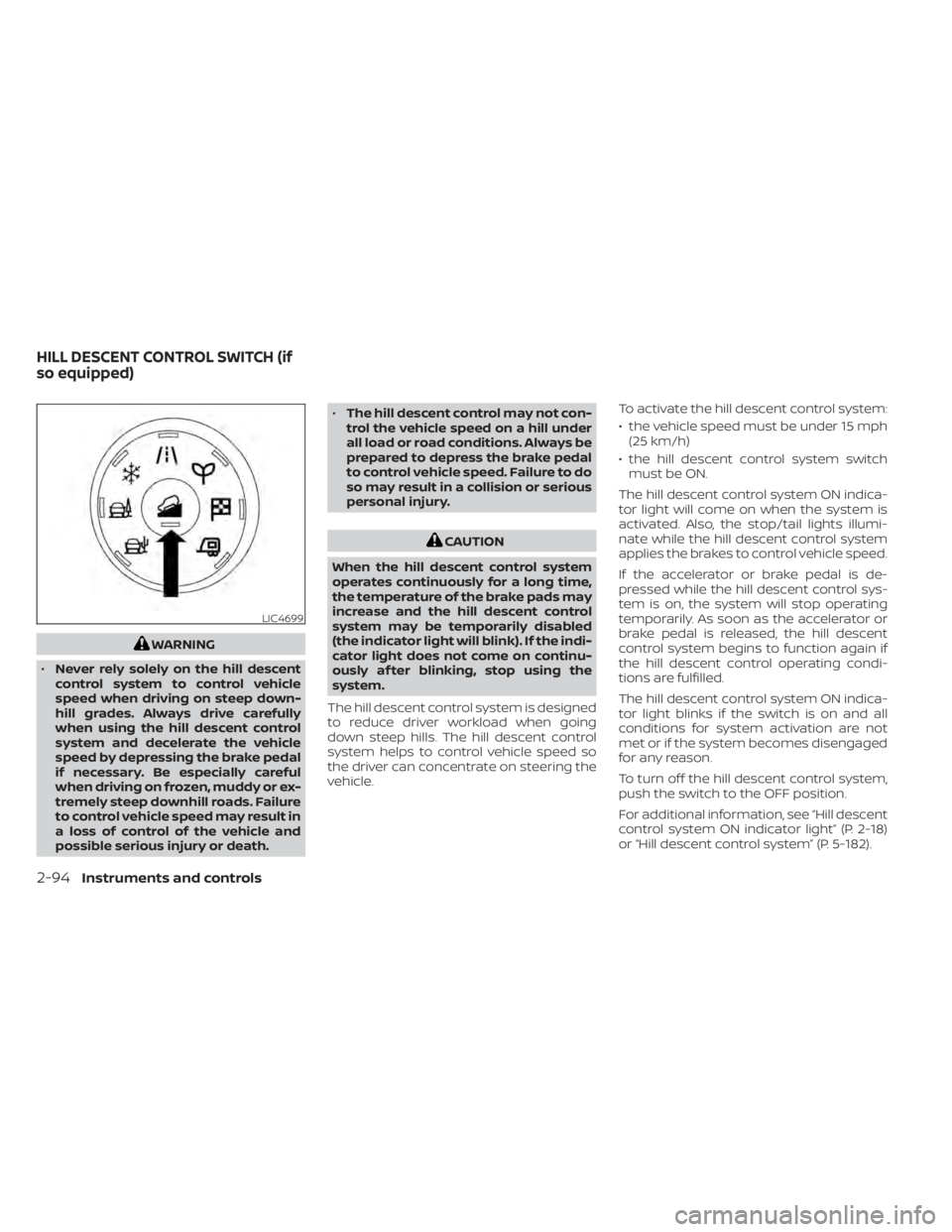
The hill descent control system is designed
to reduce driver workload when going
down steep hills. The hill descent control
system helps to control vehicle speed so
the driver can concentrate on steering the
vehicle. To activate the hill descent control system:
• the vehicle speed must be under 15 mph
(25 km/h)
• the hill descent control system switch must be ON.
The hill descent control system ON indica-
tor light will come on when the system is
activated. Also, the stop/tail lights illumi-
nate while the hill descent control system
applies the brakes to control vehicle speed.
If the accelerator or brake pedal is de-
pressed while the hill descent control sys-
tem is on, the system will stop operating
temporarily. As soon as the accelerator or
brake pedal is released, the hill descent
control system begins to function again if
the hill descent control operating condi-
tions are fulfilled.
The hill descent control system ON indica-
tor light blinks if the switch is on and all
conditions for system activation are not
met or if the system becomes disengaged
for any reason.
To turn off the hill descent control system,
push the switch to the OFF position.
For additional information, see “Hill descent
control system ON indicator light” (P. 2-18)
or “Hill descent control system” (P. 5-182).
LIC4699
HILL DESCENT CONTROL SWITCH (if
so equipped)
2-94Instruments and controls
Page 252 of 665
Locking doors
1. Place the ignition switch in the LOCKposition.
2. Close all doors.
3. Press the
button on the Intelli-
gent Key.
4. The hazard indicator lights flash twice and the horn beeps once.
5. All doors will be locked.
WARNING
Af ter locking the doors using the Intel-
ligent Key, be sure that the doors have
been securely locked by operating the
door handles. Failure to follow these in-
structions may result in inadvertently
unlocking the doors, which may de-
crease the safety and security of your
vehicle.
Unlocking doors
1. Press thebutton on the Intelligent
Key.
2. The hazard indicator lights flash once and the driver’s door will unlock. 3. Press the
button again within 1
minute to unlock all doors and lif tgate.
NOTE:
The Selective Unlock feature can be
changed using the “Vehicle Settings”
menu on the vehicle information display.
For additional information, see “Vehicle
information display 7 inch (18 cm) Type
A” (P. 2-23) or “Vehicle information dis-
play 12.3 inch (31 cm) Type B” (P. 2-48).
All doors will be locked automatically un-
less one of the following operations is per-
formed within 1 minute af ter pressing the
button:
• Opening any doors.
• Pushing the ignition switch.
Using the interior lights
The interior lights illuminate for a period of
time when a door is unlocked.
The lights can be turned off without waiting
by performing one of the following
operations:
• Placing the ignition switch in the ON position.
• Locking the doors with the Intelligent Key.
• Switching the interior light switch to the OFF position. • Switching the Auto Room Lamp feature
to the OFF position in the “Vehicle Set-
tings” menu on the vehicle information
display. For additional information, see
“Vehicle information display 7 inch (18 cm)
Type A” (P. 2-23) or “Vehicle information
display 12.3 inch (31 cm) Type B” (P. 2-48).
For additional information, see “Interior
lights” (P. 2-123).
Opening windows
The Intelligent Key allows you to simultane-
ously open windows equipped with auto-
matic operation.
All doors must be closed and the key must
be outside the vehicle.
To open the windows, press and hold the
button on the Intelligent Key for lon-
ger than 3 seconds af ter all doors are
unlocked.
The door windows will open while pressing
the
button on the Intelligent Key.
To interrupt opening of the windows, re-
lease the
button.
Pre-driving checks and adjustments3-15
Page 259 of 665
CONDITIONS THE REMOTE ENGINE
START WILL NOT WORK
The Remote Engine Start will not operate if
any of the following conditions are present:
• The ignition switch is placed in the ONposition.
• The hood is not securely closed.
• The hazard indicator lights are on.
• The engine is still running. The engine must be completely stopped. Wait at
least 6 seconds if the engine goes from
running to off. This is not applicable when
extending engine run time.
• The
button is not pressed and held
for at least 2 seconds.
• The
button is not pressed and held
within 5 seconds of pressing the lock
button.
• The brake is pressed.
• The doors are not closed and locked.
• The lif tgate is open.
• The Key System Error warning message appears in the vehicle information
display.
• The alarm sounds due to illegal entry into the vehicle. • Two Remote Engine Starts, or a single
Remote Engine Start with an extension,
have already been used.
• The vehicle is not in P (Park) position.
• There is a detected registered key already inside of the vehicle.
• The Remote Engine Start feature has been switched to the OFF position using
the “Vehicle Settings” menu on the vehicle
information display. For additional infor-
mation, see “Vehicle information display 7
inch (18 cm) Type A” (P. 2-23) or “Vehicle
information display 12.3 inch (31 cm) Type
B” (P. 2-48).
The Remote Engine Start may display a
warning or indicator in the vehicle informa-
tion display. For additional information, see
“Vehicle information display 7 inch (18 cm)
Type A” (P. 2-23) or “Vehicle information dis-
play 12.3 inch (31 cm) Type B” (P. 2-48).
3-22Pre-driving checks and adjustments
Page 274 of 665
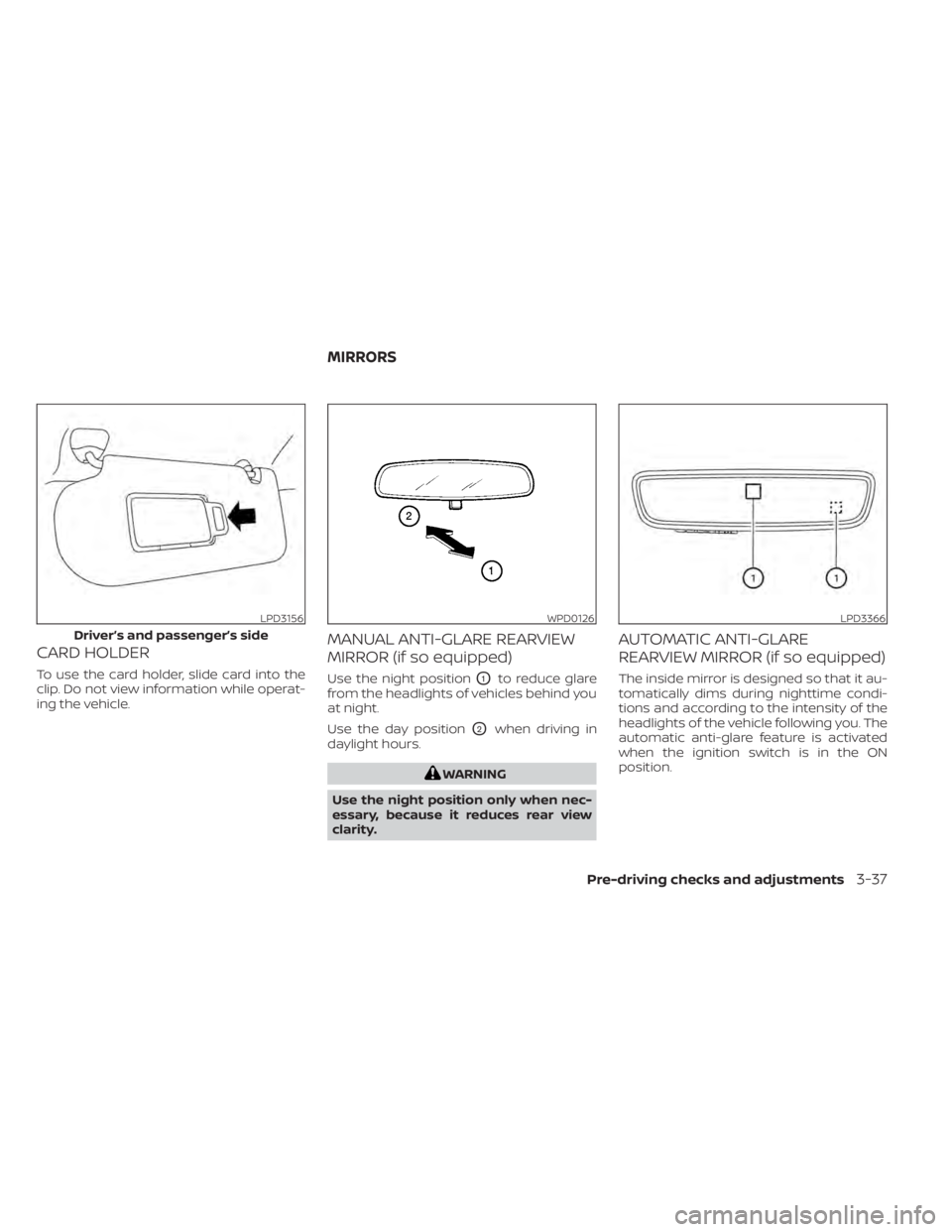
CARD HOLDER
To use the card holder, slide card into the
clip. Do not view information while operat-
ing the vehicle.
MANUAL ANTI-GLARE REARVIEW
MIRROR (if so equipped)
Use the night positionO1to reduce glare
from the headlights of vehicles behind you
at night.
Use the day position
O2when driving in
daylight hours.
WARNING
Use the night position only when nec-
essary, because it reduces rear view
clarity.
AUTOMATIC ANTI-GLARE
REARVIEW MIRROR (if so equipped)
The inside mirror is designed so that it au-
tomatically dims during nighttime condi-
tions and according to the intensity of the
headlights of the vehicle following you. The
automatic anti-glare feature is activated
when the ignition switch is in the ON
position.
LPD3156
Driver’s and passenger’s side
WPD0126LPD3366
MIRRORS
Pre-driving checks and adjustments3-37
Page 339 of 665
NISSAN VEHICLE IMMOBILIZER
SYSTEM
The NISSAN Vehicle Immobilizer System
will not allow the engine to start without
the use of the registered key.
If the engine fails to start using a registered
key (for example, when interference is
caused by another registered key, an auto-
mated toll road device or automatic pay-
ment device on the key ring), restart the
engine using the following procedure:
1. Leave the ignition switch in the ON posi-tion for approximately 5 seconds.
2. Place the ignition switch in the OFF or LOCK position, and wait approximately
10 seconds.
3. Repeat steps 1 and 2.
4. Restart the engine while holding the de- vice (which may have caused the inter-
ference) separate from the registered
key.
If the no start condition re-occurs, NISSAN
recommends placing the registered key on
a separate key ring to avoid interference
from other devices. • Make sure the area around the vehicle is
clear.
• Check fluid levels such as engine oil, cool- ant, brake fluid, and windshield-washer
fluid as frequently as possible, or at least
whenever you refuel.
• Check that all windows and lights are clean.
• Visually inspect tires for their appearance and condition. Also check tires for proper
inflation.
• Lock all doors.
• Position seat and adjust headrests/head restraints.
• Adjust inside and outside mirrors.
• Fasten seat belts and ask all passengers to do likewise.
• Check the operation of warning lights when the ignition switch is pushed to the
ON position. For additional information,
see “Warning lights, indicator lights and
audible reminders” (P. 2-12). 1. Apply the parking brake.
2. Confirm that the vehicle is in the P (Park)
position.
The Intelligent Key must be carried
when operating the ignition switch.
3. Push the ignition switch to the ON posi- tion. Depress the brake pedal and push
the ignition switch to start the engine.
To start the engine immediately, push
and release the ignition switch while de-
pressing the brake pedal with the igni-
tion switch in any position.
• If the engine is very hard to start in extremely cold weather or when re-
starting, depress the accelerator
pedal a little (approximately 1/3 to the
floor) and while holding, crank the en-
gine. Release the accelerator pedal
when the engine starts.
• If the engine is very hard to start be- cause it is flooded, depress the accel-
erator pedal all the way to the floor
and hold it. Push the ignition switch to
the ON position to start cranking the
engine. Af ter 5 or 6 seconds, stop
cranking by pushing the ignition
switch to the LOCK position. Af ter
cranking the engine, release the accel-
erator pedal. Crank the engine with
BEFORE STARTING THE ENGINE STARTING THE ENGINE
5-16Starting and driving
Page 350 of 665
WARNING
• Before leaving the vehicle, move the
shif t position to the P (Park) position
and check that the electronic parking
brake warning light is illuminated to
confirm that the electronic parking
brake is applied. The electronic park-
ing brake warning light will remain
on for a period of time af ter the driv-
er’s door is locked.
CAUTION
When parking in an area where the out-
side temperature is below 32°F (0°C),
the parking brake, if applied, may
freeze in place and may be difficult to
release.
For safe parking, it is recommended
that you place the shif t lever in the P
(Park) position and securely block the
wheels.
NOTE:
• To keep the electronic parking brake released af ter the engine is turned off,
place the ignition switch in the OFF po-
sition, depress the brake pedal and
push down the parking brake switch
before opening the driver’s door.
• If a malfunction occurs in the elec- tronic parking brake system (for ex-
ample, due to battery discharge), it is
recommended that you visit a NISSAN
dealer.
• Under the following conditions the electronic parking brake will automati-
cally be applied and the braking force
of the automatic brake hold will be
released:– The braking force is applied by the automatic brake hold function for 3
minutes or longer.
– The vehicle is in the P (Park) position.
– The electronic parking brake is ap- plied manually.
– The driver’s seat belt is unfastened.
– The driver’s door is opened.
– The ignition switch is placed in the OFF position.
– A malfunction occurs in the auto- matic brake hold function.
Manual operation
To apply: Pull the switch upO1. The indica-
tor light
OAwill illuminate.
To release: With the ignition switch in the
ON position, depress the brake pedal and
push the switch down
O2. The indicator
light
OAwill turn off.
Before driving, check that the electronic
parking brake indicator light (
or PARK)
goes out. For additional information, see
“Warning lights, indicator lights and audible
reminders” (P. 2-12).
NOTE:
• While the electronic parking brake is applied or released, an operating
sound is heard from the lower side of
the rear seat. This is normal and does
not indicate a malfunction.
• When the electronic parking brake is frequently applied and released in a
short period of time, the parking brake
may not operate in order to prevent the
parking brake system from overheat-
ing. If this occurs, operate the elec-
tronic parking brake switch again af ter
waiting approximately 1 minute.
Starting and driving5-27
Page 351 of 665
• If the electronic parking brake must beapplied while driving in an emergency,
pull up and hold the parking brake
switch. When you release the parking
brake switch, the parking brake will be
released.
• While pulling up the electronic parking brake switch during driving, the park-
ing brake is applied and a chime
sounds. The electronic parking brake
indicator light in the meter and in the
parking brake switch illuminates. This
does not indicate a malfunction. The
electronic parking brake indicator light
in the meter and in the parking brake
switch turns off when the parking
brake is released.
• When pulling the electronic parking brake switch up with the ignition
switch in the OFF or AUTO ACC position,
the parking brake switch indicator
light will continue to illuminate for a
short period of time. The automatic brake hold function main-
tains the braking force without the driver
having to depress the brake pedal when
the vehicle is stopped at a traffic light or
intersection. As soon as the driver de-
presses the accelerator pedal again, the
automatic brake hold function is deacti-
vated and the braking force is released. The
operating status of the automatic brake
hold can be displayed.
To use the automatic brake hold function,
the following conditions need to be met:
• The driver’s seat belt is fastened.
• The electronic parking brake is released.
• The vehicle is not in the P (Park) position.
• The vehicle is not parked on a steep hill.
For additional information, see “Warning
lights, indicator lights and audible remind-
ers” (P. 2-12).
WARNING
• The automatic brake hold function is
not designed to hold the vehicle on a
steep hill or slippery road. Never use
the automatic brake hold when the
vehicle is stopped on a steep hill or
slippery road. Failure to do so may
cause the vehicle to move. •
The automatic brake hold warning
may appear in the vehicle informa-
tion display to request that the driver
retake control by depressing the
brake pedal.
• When the automatic brake hold func-
tion is activated but fails to maintain
the vehicle at a standstill, depress the
brake pedal to stop the vehicle. If the
vehicle unexpectedly moves due to
outside conditions, the chime may
sound and automatic brake hold
warning may illuminate in the vehicle
information display.
• Be sure to deactivate the automatic
brake hold function when using a car
wash or towing your vehicle.
• Make sure to place the shif t lever in
the P (Park) position and apply the
parking brake when parking your ve-
hicle, entering or exiting the vehicle,
or loading luggage. Failure to do so
could cause the vehicle to move or
roll away unexpectedly and result in
serious personal injury or property
damage.
AUTOMATIC BRAKE HOLD
5-28Starting and driving
Page 447 of 665
–When driving on roads where
there are multiple lanes or unclear
lane markers due to road
construction
– When driving on roads where
there are sharply contrasting ob-
jects, such as shadows, snow, wa-
ter, wheel ruts, seams, or lines re-
maining af ter road repairs (the
Steering Assist could detect these
items as lane markers)
– When driving on roads where the
traveling lane merges or
separates
• Do not use the Steering Assist under
the following conditions because the
system may not properly detect lane
markers. Doing so could cause a loss
of vehicle control and result in an ac-
cident.
– During bad weather (rain, fog,
snow, dust, etc.)
– When rain, snow, sand, etc., is
thrown up by the wheels of other
vehicles
– When dirt, oil, ice, snow, water, or
another object adheres to the
camera unit –
When the lens of the camera unit
is foggy
– When strong light (for example,
sunlight or high beams from on-
coming vehicles) shines on the
camera
– When the headlights are not
bright due to dirt on the lens or
the headlights are off in tunnels or
darkness
– When a sudden change in bright-
ness occurs (for example, when
the vehicle enters or exits a tunnel
or is under a bridge)
– When driving on roads where the
traveling lane merges or sepa-
rates or where there are tempo-
rary lane markers because of road
construction
– When there is a lane closure due to
road repairs
– When driving on a bumpy road
surface, such as an uneven dirt
road
– When driving on sharp curves or
winding roads
– When driving on repeated uphill
and downhill roads •
Do not use the Steering Assist under
the following conditions because the
system will not operate properly:
– When driving with a tire that is not
within normal tire conditions (for
example, tire wear, abnormal tire
pressure, installation of a spare
tire, tire chains, nonstandard
wheels)
– When the vehicle is equipped with
non-original brake or suspension
parts
– When an object such as a sticker
or cargo obstructs the camera
– When excessively heavy baggage
is loaded in the rear seat or lug-
gage area of your vehicle
– When the vehicle load capacity is
exceeded
– When towing a trailer or other
vehicle
• Excessive noise will interfere with the
warning chime sound, and the beep
may not be heard.
5-124Starting and driving
Page 465 of 665
•The AEB with Pedestrian Detection
system does not detect the following
objects:
– Pedestrians that are small (for ex- ample, children), in a sitting posi-
tion, operating toys/skateboards,
on scooters or in wheelchairs, or
not in an upright standing or
walking position.
– Animals of any size.
– Obstacles (for example, cargo or debris) on the roadway or
roadside.
– Oncoming or crossing vehicles.
– Vehicles where the tires are diffi- cult to see or the shape of the rear
of the vehicle is unclear or
obstructed.
– Parked vehicles.
• The AEB with Pedestrian Detection
system has some performance limi-
tations.
– If a stationary vehicle is in the ve-
hicle’s path, the system will not
function when the vehicle ap-
proaches the stationary vehicle at
speeds over approximately 50
mph (80 km/h). –
Pedestrian and cyclist detection
will not function when the vehicle
is driven at speeds over approxi-
mately 37 mph (60 km/h) or below
approximately 6 mph (10km/h).
• For pedestrians, the AEB with Pedes-
trian Detection system will not issue
the first warning.
• The AEB with Pedestrian Detection
system may not function properly or
detect a vehicle, pedestrians or cy-
clists ahead in the following condi-
tions:
– In poor visibility conditions (such
as rain, snow, fog, dust storms,
sand storms, smoke, and road
spray from other vehicles).
– If dirt, ice, snow, fog or other ma-
terial is covering the radar sensor
area or camera area of
windshield.
– If a strong light (for example, sun-
light or high beams) enters the
front camera or a sudden change
in brightness occurs (for example,
entering a tunnel or driving in
lightning). –
In dark or dimly lit conditions,
such as at night or in tunnels, in-
cluding cases where your vehi-
cle’s headlights are off or dim, or
the tail lights of the vehicle ahead
are off.
– When the direction of the camera
is misaligned.
– When driving on a steep downhill
slope, on roads with sharp curves,
and/or bumpy or dirt roads.
– If there is interference by other ra-
dar sources.
– When your vehicle’s position or
movement is changed quickly or
significantly (for example, lane
change, turning vehicle, abrupt
steering, sudden acceleration or
deceleration).
– When your vehicle or the vehicle,
pedestrian or cyclist ahead moves
quickly or significantly such that
the system cannot detect and re-
act in time (for example, pedes-
trian moving quickly toward the
vehicle at close range, vehicle cut-
ting in, changing lanes, making a
turn, steering abruptly, sudden
acceleration or deceleration).
5-142Starting and driving
Page 497 of 665
•HEADED UPHILL OR DOWNHILL, NO
CURB
OC:
Turn the wheels toward the side of the
road so the vehicle will move away
from the center of the road if it moves.
4. Place the ignition switch in the LOCK position.
NOTE:
Use the Idling Stop System when the ve-
hicle is stopped for a period of time, for
example waiting at stop lights. Stop the
engine with the ignition switch when
parking, etc. for an extended period of
time.
WARNING
• If the engine is not running or is
turned off while driving, the power
assist for the steering will not work.
Steering will be harder to operate.
• When the electric power steering
warning light illuminates with the
engine running, there will be no
power assist for the steering. You will
still have control of the vehicle, but
the steering will be harder to operate.
Have the power steering system
checked. It is recommended that you
visit a NISSAN dealer for this service.
The power steering system is designed to
provide power assist while driving to oper-
ate the steering wheel with light force.
When the steering wheel is operated re-
peatedly or continuously while parking or
driving at a very low speed, the power as-
sist for the steering wheel will be reduced.
This is to prevent overheating of the power
steering system and protect it from getting
damaged. While the power assist is re-
duced, steering wheel operation will be-
come heavy. When the temperature of the
power steering system goes down, the
power assist level will return to normal.
Avoid repeating such steering wheel op- erations that could cause the power steer-
ing system to overheat.
You may hear a sound when the steering
wheel is operated quickly. However, this is
not a malfunction.
If the electric power steering warning light
illuminates while the engine is running, it
may indicate the power steering system is
not functioning properly and may need
servicing. Have the power steering system
checked. It is recommended that you visit a
NISSAN dealer for this service.
When the electric power steering warning
light illuminates with the engine running,
there will be no power assist for the steer-
ing, but you will still have control of the
vehicle. At this time, greater steering effort
is required to operate the steering wheel,
especially in sharp turns and at low speeds.
For additional information, see “Electric
Power steering warning light” (P. 2-17).
POWER STEERING
5-174Starting and driving