door NISSAN PATHFINDER 2023 Repair Manual
[x] Cancel search | Manufacturer: NISSAN, Model Year: 2023, Model line: PATHFINDER, Model: NISSAN PATHFINDER 2023Pages: 665, PDF Size: 4.64 MB
Page 260 of 665
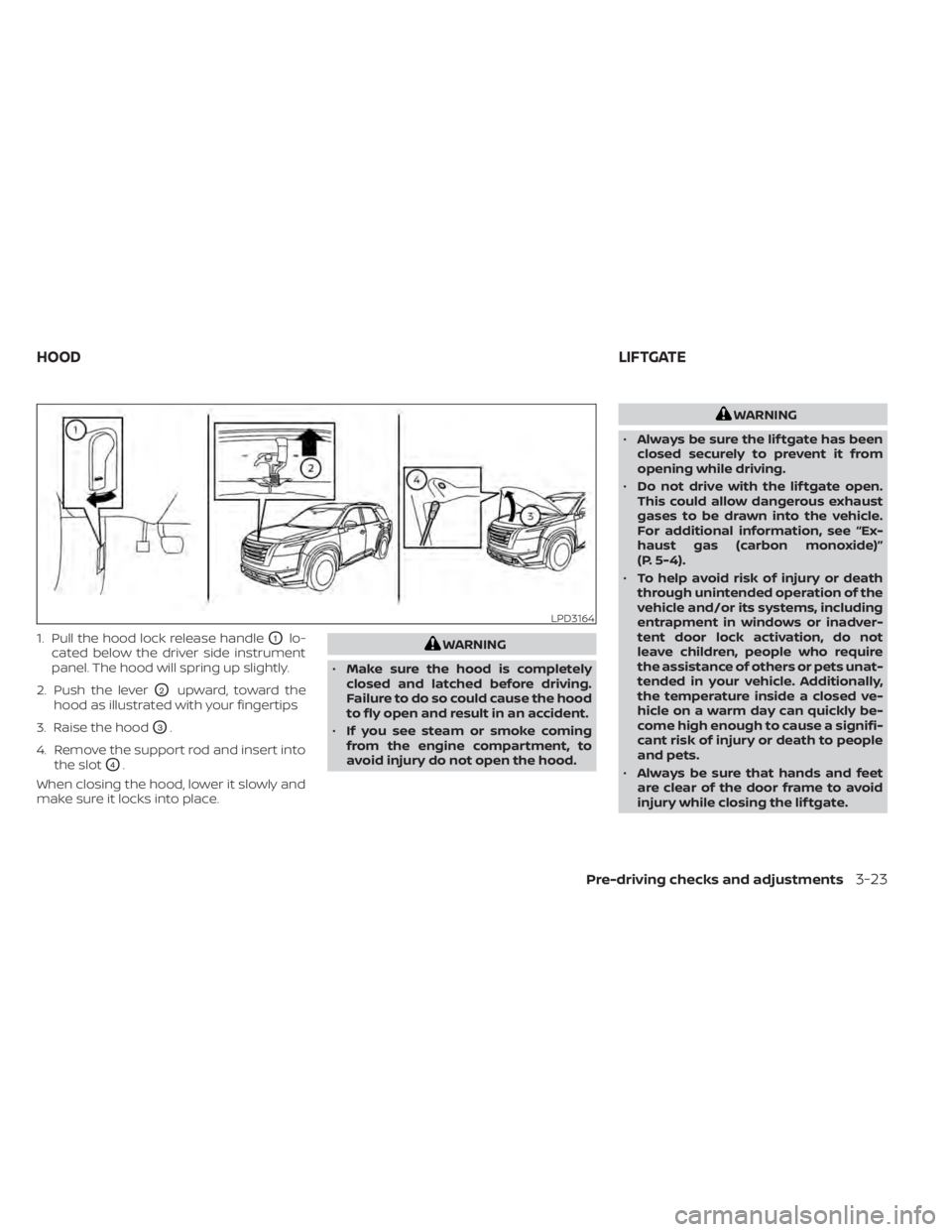
1. Pull the hood lock release handleO1lo-
cated below the driver side instrument
panel. The hood will spring up slightly.
2. Push the lever
O2upward, toward the
hood as illustrated with your fingertips
3. Raise the hood
O3.
4. Remove the support rod and insert into the slot
O4.
When closing the hood, lower it slowly and
make sure it locks into place.
WARNING
• Make sure the hood is completely
closed and latched before driving.
Failure to do so could cause the hood
to fly open and result in an accident.
• If you see steam or smoke coming
from the engine compartment, to
avoid injury do not open the hood.
WARNING
• Always be sure the lif tgate has been
closed securely to prevent it from
opening while driving.
• Do not drive with the lif tgate open.
This could allow dangerous exhaust
gases to be drawn into the vehicle.
For additional information, see “Ex-
haust gas (carbon monoxide)”
(P. 5-4).
• To help avoid risk of injury or death
through unintended operation of the
vehicle and/or its systems, including
entrapment in windows or inadver-
tent door lock activation, do not
leave children, people who require
the assistance of others or pets unat-
tended in your vehicle. Additionally,
the temperature inside a closed ve-
hicle on a warm day can quickly be-
come high enough to cause a signifi-
cant risk of injury or death to people
and pets.
• Always be sure that hands and feet
are clear of the door frame to avoid
injury while closing the lif tgate.
LPD3164
HOOD LIFTGATE
Pre-driving checks and adjustments3-23
Page 261 of 665
CAUTION
Do not use accessory carriers that at-
tach to the lif tgate. Doing so will cause
damage to the vehicle.
OPERATING THE MANUAL
LIFTGATE (if so equipped)
The power door lock system allows you to
lock or unlock all doors including the lif t-
gate simultaneously.
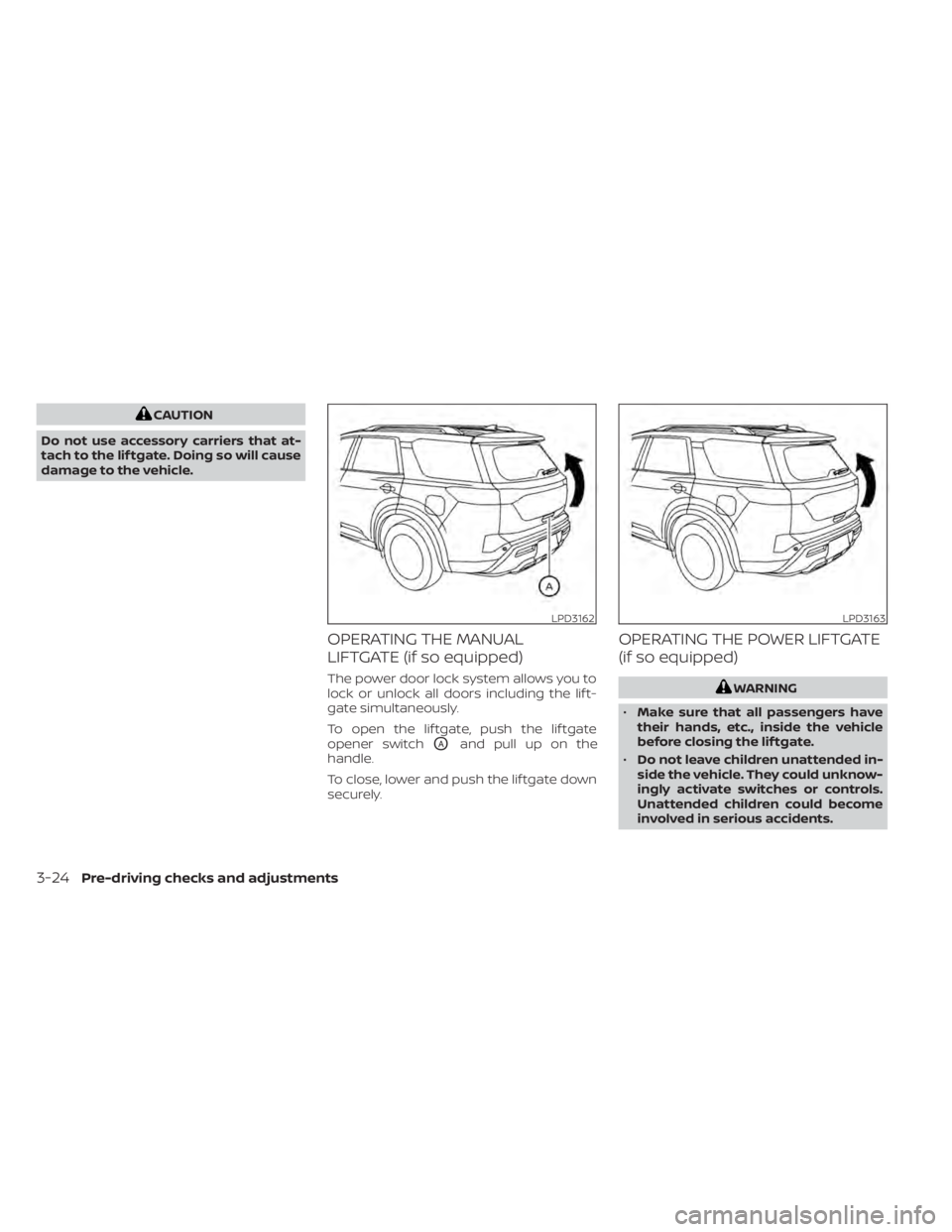
To open the lif tgate, push the lif tgate
opener switch
OAand pull up on the
handle.
To close, lower and push the lif tgate down
securely.
OPERATING THE POWER LIFTGATE
(if so equipped)
WARNING
• Make sure that all passengers have
their hands, etc., inside the vehicle
before closing the lif tgate.
• Do not leave children unattended in-
side the vehicle. They could unknow-
ingly activate switches or controls.
Unattended children could become
involved in serious accidents.
LPD3162LPD3163
3-24Pre-driving checks and adjustments
Page 263 of 665
• The Intelligent Key button (if so equipped)must be held for 1 second before the lif t-
gate opens.
• The lif tgate must be unlocked to open it with the lif tgate opener switch
OAand
without the Intelligent Key in lif tgate
range.
• The switch on the lif tgate
OAcan only be
used to open the lif tgate if the Power
Back Door feature is switched to ON us-
ing the “Vehicle Settings” menu in the ve-
hicle information display. For additional
information, see “Vehicle information dis-
play 7 inch (18 cm) Type A” (P. 2-23) or
“Vehicle information display 12.3 inch (31
cm) Type B” (P. 2-48).
A warning chime will sound if the shif t po-
sition is moved out of P (Park) position dur-
ing a power open operation. Power Close:
The power lif tgate automatically moves
from the fully open position to the second-
ary position. When the lif tgate reaches the
secondary position, the cinching motor en-
gages and pulls the lif tgate to its primary
latch position. Power close takes approxi-
matel
y7–10sec onds. The power close
feature can be activated by the button on
the Intelligent Key (if so equipped), the in-
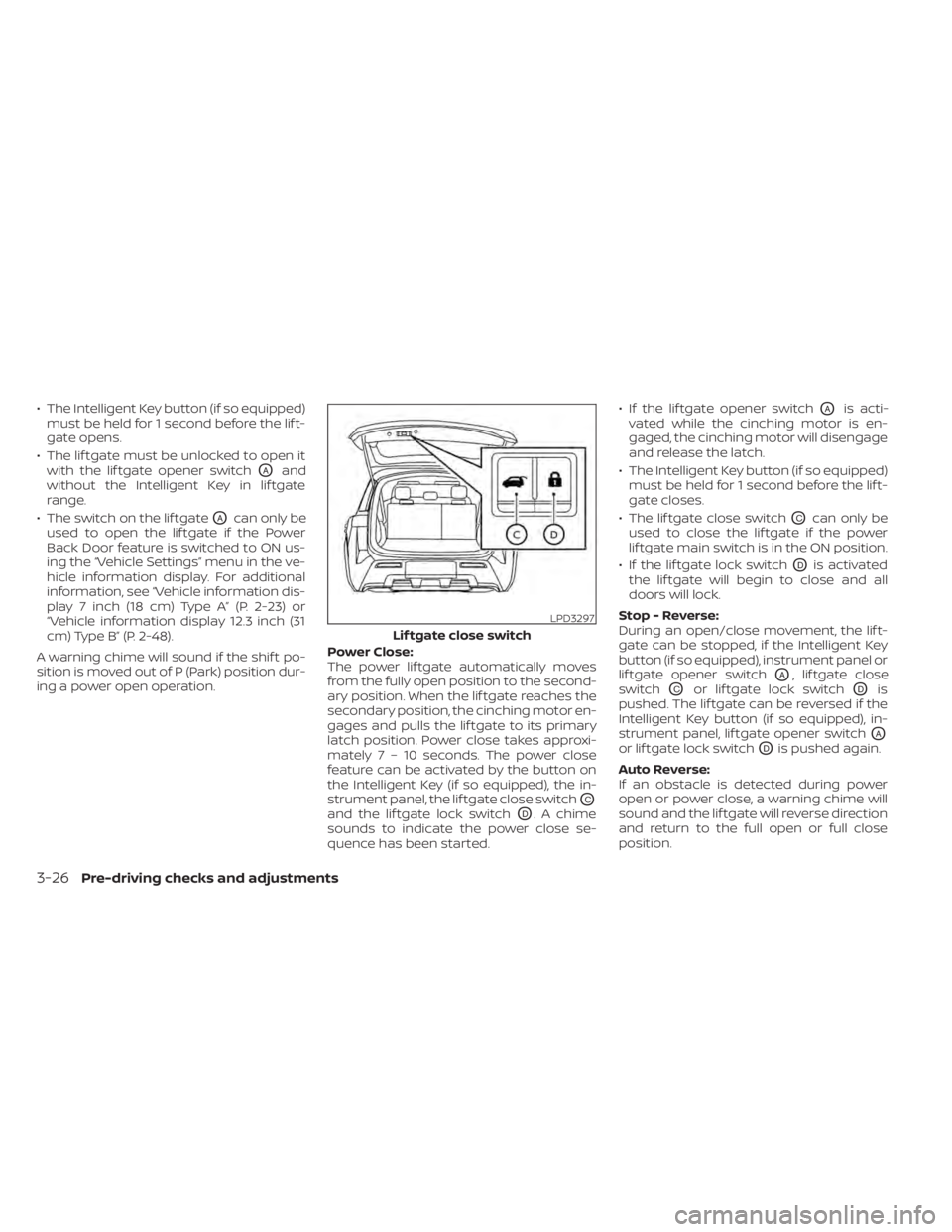
strument panel, the lif tgate close switch
OC
and the lif tgate lock switchOD. A chime
sounds to indicate the power close se-
quence has been started. • If the lif tgate opener switch
OAis acti-
vated while the cinching motor is en-
gaged, the cinching motor will disengage
and release the latch.
• The Intelligent Key button (if so equipped) must be held for 1 second before the lif t-
gate closes.
• The lif tgate close switch
OCcan only be
used to close the lif tgate if the power
lif tgate main switch is in the ON position.
• If the lif tgate lock switch
ODis activated
the lif tgate will begin to close and all
doors will lock.
Stop - Reverse:
During an open/close movement, the lif t-
gate can be stopped, if the Intelligent Key
button (if so equipped), instrument panel or
lif tgate opener switch
OA, lif tgate close
switch
OCor lif tgate lock switchODis
pushed. The lif tgate can be reversed if the
Intelligent Key button (if so equipped), in-
strument panel, lif tgate opener switch
OA
or lif tgate lock switchODis pushed again.
Auto Reverse:
If an obstacle is detected during power
open or power close, a warning chime will
sound and the lif tgate will reverse direction
and return to the full open or full close
position.
LPD3297
Lif tgate close switch
3-26Pre-driving checks and adjustments
Page 268 of 665
3. While holding the lif tgate in position,push and hold the lif tgate switch
OClo-
cated on the lif tgate for approximately 5
seconds or until two beeps are heard.
The lif tgate will open to the selected posi-
tion setting. To change the position of the
lif tgate, repeat steps 1-3 for setting the po-
sition of the lif tgate.
OPENING THE FUEL-FILLER DOOR
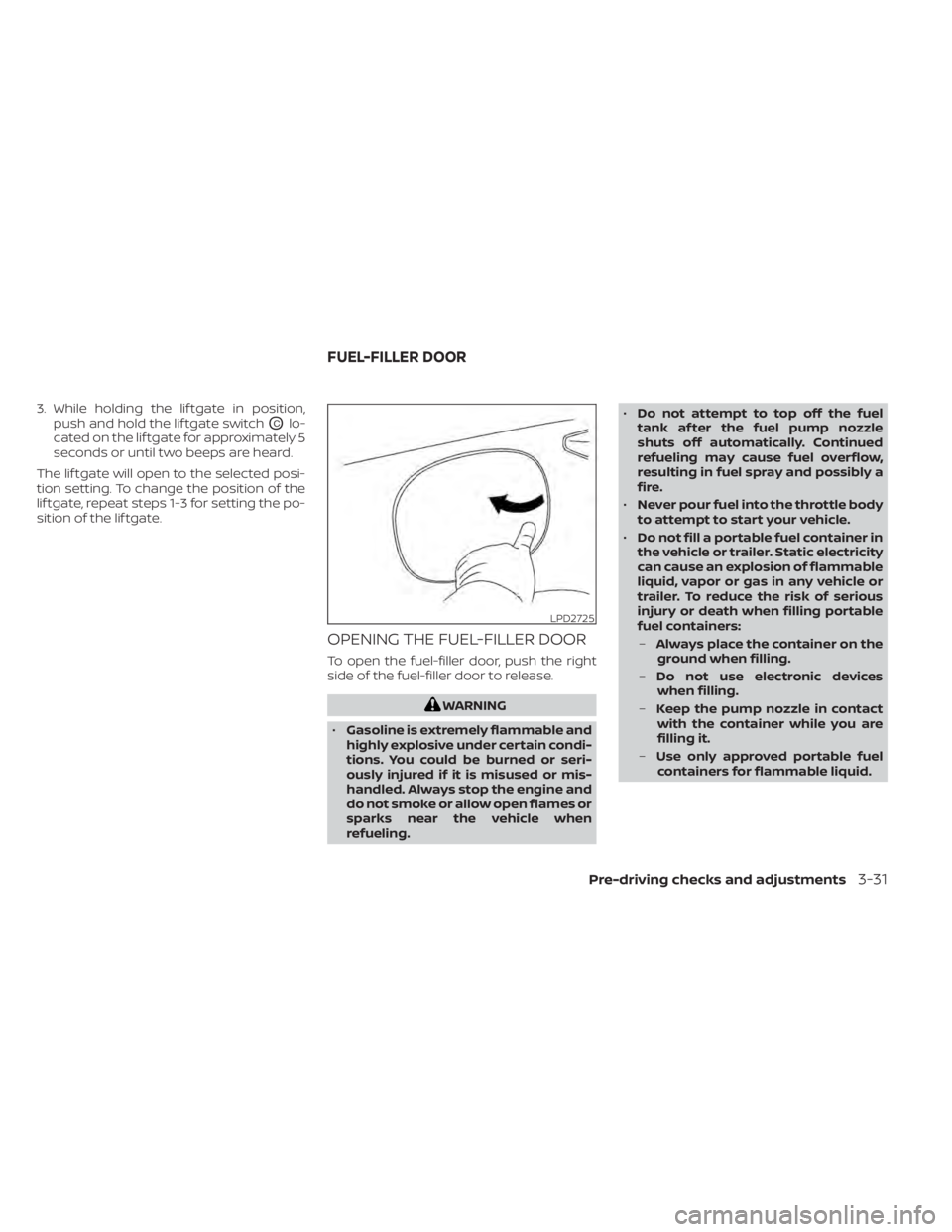
To open the fuel-filler door, push the right
side of the fuel-filler door to release.
WARNING
• Gasoline is extremely flammable and
highly explosive under certain condi-
tions. You could be burned or seri-
ously injured if it is misused or mis-
handled. Always stop the engine and
do not smoke or allow open flames or
sparks near the vehicle when
refueling. •
Do not attempt to top off the fuel
tank af ter the fuel pump nozzle
shuts off automatically. Continued
refueling may cause fuel overflow,
resulting in fuel spray and possibly a
fire.
• Never pour fuel into the throttle body
to attempt to start your vehicle.
• Do not fill a portable fuel container in
the vehicle or trailer. Static electricity
can cause an explosion of flammable
liquid, vapor or gas in any vehicle or
trailer. To reduce the risk of serious
injury or death when filling portable
fuel containers:
– Always place the container on the
ground when filling.
– Do not use electronic devices
when filling.
– Keep the pump nozzle in contact
with the container while you are
filling it.
– Use only approved portable fuel
containers for flammable liquid.
LPD2725
FUEL-FILLER DOOR
Pre-driving checks and adjustments3-31
Page 269 of 665
CAUTION
• Do not use a fuel containing more
than 15% ethanol in your vehicle. For
additional information, see “Fuel rec-
ommendation” (P. 10-4).
• For additional information, see “Mal-
function Indicator Light (MIL)”
(P. 2-20).
• If fuel is spilled on the vehicle body,
flush it away with water to avoid
paint damage.
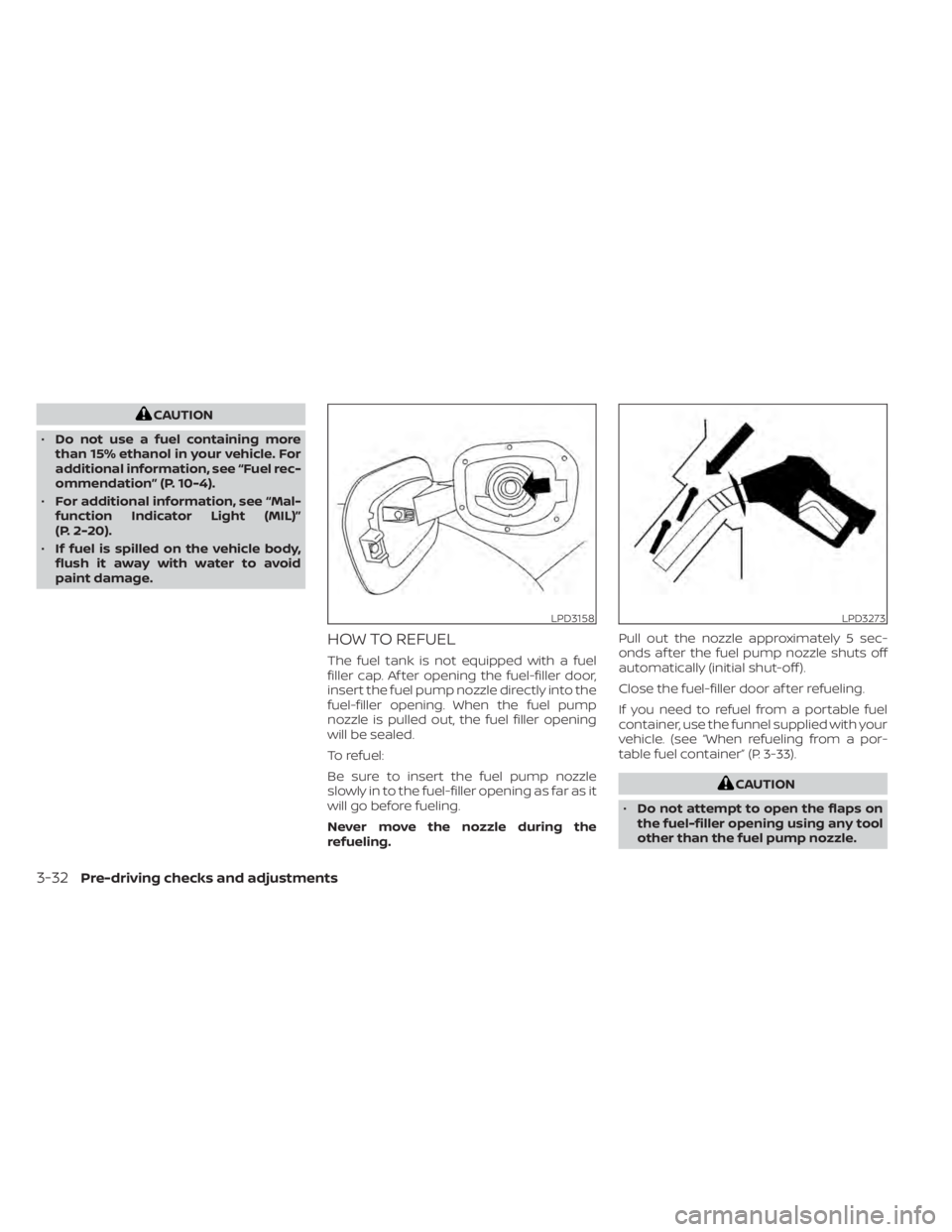
HOW TO REFUEL
The fuel tank is not equipped with a fuel
filler cap. Af ter opening the fuel-filler door,
insert the fuel pump nozzle directly into the
fuel-filler opening. When the fuel pump
nozzle is pulled out, the fuel filler opening
will be sealed.
To refuel:
Be sure to insert the fuel pump nozzle
slowly in to the fuel-filler opening as far as it
will go before fueling.
Never move the nozzle during the
refueling. Pull out the nozzle approximately 5 sec-
onds af ter the fuel pump nozzle shuts off
automatically (initial shut-off ).
Close the fuel-filler door af ter refueling.
If you need to refuel from a portable fuel
container, use the funnel supplied with your
vehicle. (see “When refueling from a por-
table fuel container” (P. 3-33).
CAUTION
• Do not attempt to open the flaps on
the fuel-filler opening using any tool
other than the fuel pump nozzle.
LPD3158LPD3273
3-32Pre-driving checks and adjustments
Page 272 of 665
AUTOMATIC OPERATION (if so
equipped)
Tilt and telescopic operation
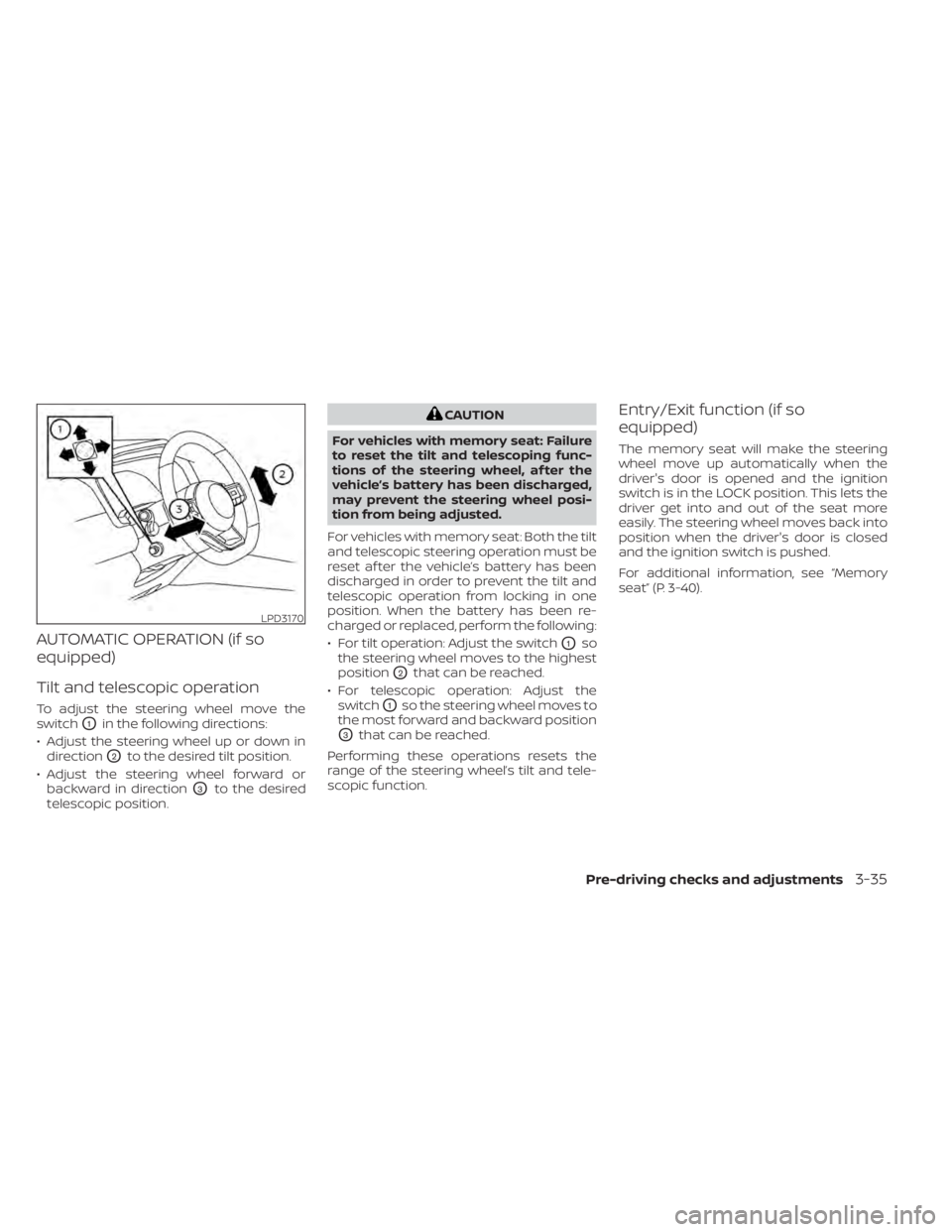
To adjust the steering wheel move the
switch
O1in the following directions:
• Adjust the steering wheel up or down in direction
O2to the desired tilt position.
• Adjust the steering wheel forward or backward in direction
O3to the desired
telescopic position.
CAUTION
For vehicles with memory seat: Failure
to reset the tilt and telescoping func-
tions of the steering wheel, af ter the
vehicle’s battery has been discharged,
may prevent the steering wheel posi-
tion from being adjusted.
For vehicles with memory seat: Both the tilt
and telescopic steering operation must be
reset af ter the vehicle’s battery has been
discharged in order to prevent the tilt and
telescopic operation from locking in one
position. When the battery has been re-
charged or replaced, perform the following:
• For tilt operation: Adjust the switch
O1so
the steering wheel moves to the highest
position
O2that can be reached.
• For telescopic operation: Adjust the switch
O1so the steering wheel moves to
the most forward and backward position
O3that can be reached.
Performing these operations resets the
range of the steering wheel’s tilt and tele-
scopic function.
Entry/Exit function (if so
equipped)
The memory seat will make the steering
wheel move up automatically when the
driver's door is opened and the ignition
switch is in the LOCK position. This lets the
driver get into and out of the seat more
easily. The steering wheel moves back into
position when the driver's door is closed
and the ignition switch is pushed.
For additional information, see “Memory
seat” (P. 3-40).
LPD3170
Pre-driving checks and adjustments3-35
Page 276 of 665
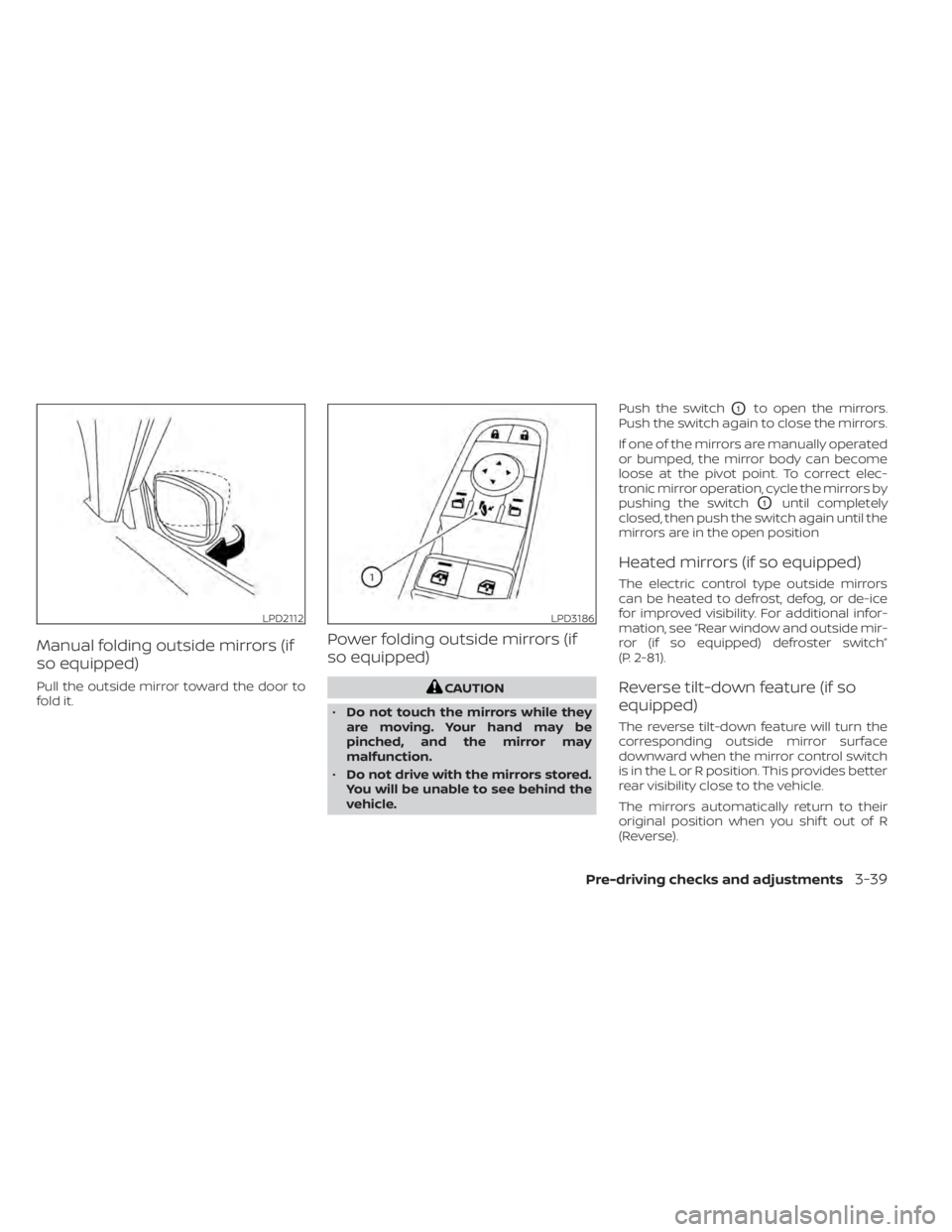
Manual folding outside mirrors (if
so equipped)
Pull the outside mirror toward the door to
fold it.
Power folding outside mirrors (if
so equipped)
CAUTION
• Do not touch the mirrors while they
are moving. Your hand may be
pinched, and the mirror may
malfunction.
• Do not drive with the mirrors stored.
You will be unable to see behind the
vehicle. Push the switch
O1to open the mirrors.
Push the switch again to close the mirrors.
If one of the mirrors are manually operated
or bumped, the mirror body can become
loose at the pivot point. To correct elec-
tronic mirror operation, cycle the mirrors by
pushing the switch
O1until completely
closed, then push the switch again until the
mirrors are in the open position
Heated mirrors (if so equipped)
The electric control type outside mirrors
can be heated to defrost, defog, or de-ice
for improved visibility. For additional infor-
mation, see “Rear window and outside mir-
ror (if so equipped) defroster switch”
(P. 2-81).
Reverse tilt-down feature (if so
equipped)
The reverse tilt-down feature will turn the
corresponding outside mirror surface
downward when the mirror control switch
is in the L or R position. This provides better
rear visibility close to the vehicle.
The mirrors automatically return to their
original position when you shif t out of R
(Reverse).
LPD2112LPD3186
Pre-driving checks and adjustments3-39
Page 277 of 665
The outside mirror surfaces will return to
their original position when one of the fol-
lowing conditions has occurred:
• The shif t lever is moved to any positionother than R (Reverse).
• The outside mirror control switch is set to the neutral or center position.
• The ignition switch is placed in the OFF position.
The reverse tilt position can be changed.
While in R (Reverse), adjust the glass posi-
tion to the desired location. The next time
the vehicle is shif ted into R (Reverse), the
glass position will go to the newly set posi-
tion. Additionally, the changed reverse tilt
position can be saved to a memory seat
position. Af ter the reverse tilt glass position
has been changed, vehicle is shif ted back
into park and glass has returned to the
original position, push the Set switch and
press the desired memory switch (1 or 2) to
assign the new reverse tilt position
memory.
NOTE:
If the outside mirror control switch is in
the center position, the mirror surface
will NOT turn downward when the shif t
lever is moved to R (Reverse). For additional information, see “Memory
seat” (P. 3-40).
The memory seat system has three
features:
• Memory storage function (Key-link)
• Memory storage function (Switch)
• Entry/exit function
Key-link, when enabled, automatically re-
tains the driver’s last seat, automatic steer-
ing wheel, and outside mirror positions for
that specific key when the ignition is posi-
tioned from ON to OFF.
Each memory switch button (1 or 2) on the
driver’s door can also store one additional
position which is independent of the key-
linked position.
MEMORY STORAGE FUNCTION
(key-link)
Use the following process to setup key-link:
1. Unlock the vehicle with the desired Intel-
ligent Key while the ignition is OFF.
2. Place the ignition in the ON position or start the engine.
3. Within the settings menu of the touch screen display, select “Edit User” and
then “Synch Profile with Intelligent Key”.
4. Turn “Synch Profile with Intelligent Key” ON. The ON button will light up.
MEMORY SEAT (if so equipped)
3-40Pre-driving checks and adjustments
Page 279 of 665
2. Adjust the driver's seat, steering wheeland outside mirrors to the desired posi-
tions by manually operating each ad-
justing switch. For additional informa-
tion, see “Seats” (P. 1-2), “Steering wheel”
(P. 3-34) and “Outside mirrors” (P. 3-38).
3. Push the SET switch and, within 5 sec- onds, push the memory switch (1 or 2).
4. The indicator light for the pushed memory switch will come on and stay
on for approximately 5 seconds.
5. The chime will sound if the memory has been stored.
NOTE:
If a new memory position is stored in the
same memory switch, the previous
memory position will be overwritten by
the new stored position.
Linking a key fob to a stored
memory position
Each key fob can be linked to a stored
memory position (memory switch 1 or 2)
with the following procedure.
1. Follow steps 1-3 in the “Memory storagefunction” section for storing the memory
position. 2. The indicator light for the pushed
memory switch will come on. While the
indicator light is on for 5 seconds, press
the
button on the key fob. The haz-
ard lights will flash once and memory
switch will click twice. Af ter the indictor
light goes off, the key fob is linked to that
memory setting.
Once it is linked, when the ignition switch is
in the OFF position, pressing the
but-
ton on the key fob will move the driver’s
seat, steering wheel and outside mirrors to
the linked memory switch position.
NOTE:
If a new memory position is stored in the
linked memory switch, then the key fob
will link the new position and overwrites
the previous position.
Confirming memory storage
• Push the SET switch.
• If a memory position has been stored in the switch (1 or 2) then the indicator light
for the respective switch will stay on for
approximately 5 seconds.
ENTRY/EXIT FUNCTION
This system is designed so that the driver's
seat and steering wheel will automatically
move when the shif t position is in the P
(Park) position. This allows the driver to
easily get in and out of the driver’s seat.
The driver’s seat will slide backward and
the steering wheel will move up:
• When the driver’s door is opened with theignition switch in the OFF position.
• When the ignition switch is changed from ACC to OFF with the driver’s door open.
The driver’s seat and steering wheel will
return to the previous position:
• When the ignition switch is changed from ACC or ON while the shif t position is in the
P (Park) position.
The entry/exit function can be adjusted or
canceled through “Vehicle Settings” in the
vehicle information display by performing
the following:
• Switch the Exit Seat Slide from on to off.
• Switch the Exit Steering UP from on to off.
3-42Pre-driving checks and adjustments
Page 280 of 665
Restarting the entry/exit function
If the battery cable is disconnected or if the
fuse opens, the stored memory positions
may be lost and some of the functions will
be restricted.
1. Drive the vehicle over 25 mph (40 km/h).
OR
2. Open and close the driver's door morethan two times with the ignition switch
in the OFF position.
The entry/exit function should now work
properly.
SETTING MEMORY FUNCTION
The position of the following settings can
be linked to the Intelligent Key and the
memorized settings can be available for
each Intelligent Key.
• Climate control system
• Audio system
To use the memory function, set the cli-
mate and audio systems to the driver's
preferred settings. Lock the doors with the
Intelligent Key. Each Intelligent Key may be
set with the driver's individual preferences.
When a new Intelligent Key is used, “Con-
nection with the key has been done” will be displayed on the vehicle information dis-
play and the memorized settings are
available.
To engage the memorized settings, per-
form the following:
1. Carry the Intelligent Key that is linked to
the memorized settings.
2. Unlock the doors by wrapping hand around the capacitive door handle or
the
button on the Intelligent Key.
3. Place the ignition switch in the ON posi- tion. The settings linked to the Intelligent
Key will start.
For additional information on using the cli-
mate control system, see “Heater and air
conditioner (automatic)” (P. 4-32).
SYSTEM OPERATION
The memory seat system will not work or
will stop operating under the following
conditions:
• When the vehicle speed is above 4 mph (7 km/h).
• When any of the memory switches are pushed while the memory seat is
operating. • When the switch for the driver’s seat and
steering wheel is pushed while the
memory seat is operating.
• When the seat has already been moved to the memorized position.
• When no seat position is stored in the memory switch.
• When the shif t position is moved from P (Park) position to any other position.
Pre-driving checks and adjustments3-43