power NISSAN QASHQAI 2014 Owner´s Manual
[x] Cancel search | Manufacturer: NISSAN, Model Year: 2014, Model line: QASHQAI, Model: NISSAN QASHQAI 2014Pages: 338, PDF Size: 4.87 MB
Page 121 of 338
–Intelligent Key models:If the Intelligent Key has
been left inside the vehicle, all doors will unlock
and an audible warning will sound.
Super Lock equipped models (RHD
models)
If the doors are locked using the integrated keyfob
lock button () or a request button (Intelligent Key
models), the Super Lock system will be activated.
The
indicator light in the centre console comes
on to indicate that all doors are locked, but it will not
be possible to use the
button of the power door
lock switch to unlock the doors.
Locking the doors with the power door lock switch
will not activate the Super Lock system.
CHILD SAFETY LOCK — REAR
DOORS
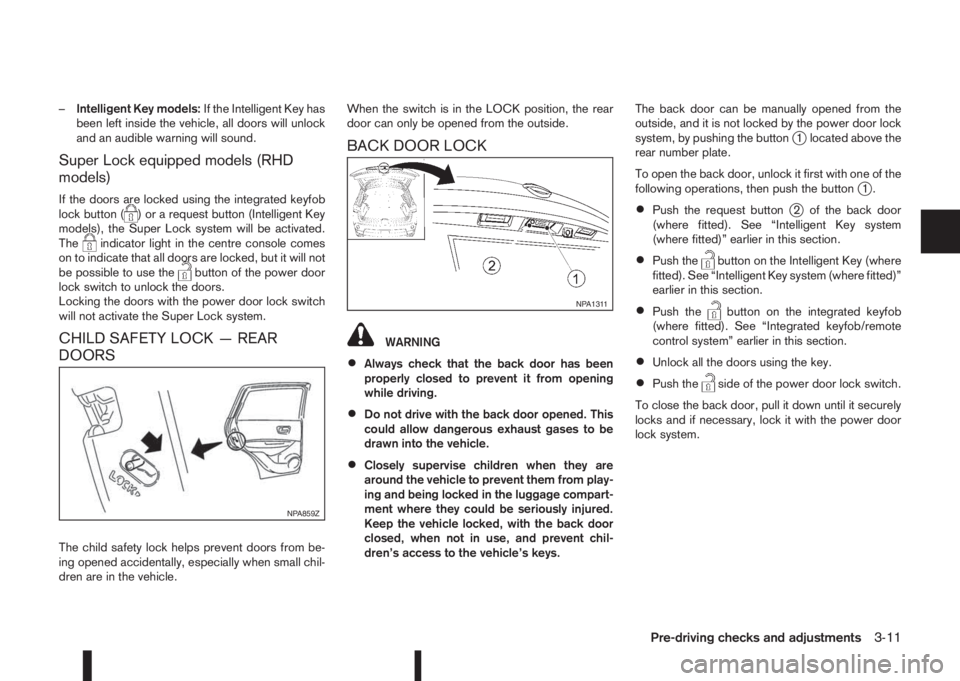
The child safety lock helps prevent doors from be-
ing opened accidentally, especially when small chil-
dren are in the vehicle.When the switch is in the LOCK position, the rear
door can only be opened from the outside.
BACK DOOR LOCK
WARNING
•Always check that the back door has been
properly closed to prevent it from opening
while driving.
•Do not drive with the back door opened. This
could allow dangerous exhaust gases to be
drawn into the vehicle.
•Closely supervise children when they are
around the vehicle to prevent them from play-
ing and being locked in the luggage compart-
ment where they could be seriously injured.
Keep the vehicle locked, with the back door
closed, when not in use, and prevent chil-
dren’s access to the vehicle’s keys.The back door can be manually opened from the
outside, and it is not locked by the power door lock
system, by pushing the button
j1 located above the
rear number plate.
To open the back door, unlock it first with one of the
following operations, then push the button
j1.
•Push the request buttonj2 of the back door
(where fitted). See “Intelligent Key system
(where fitted)” earlier in this section.
•Push thebutton on the Intelligent Key (where
fitted). See “Intelligent Key system (where fitted)”
earlier in this section.
•Push thebutton on the integrated keyfob
(where fitted). See “Integrated keyfob/remote
control system” earlier in this section.
•Unlock all the doors using the key.
•Push theside of the power door lock switch.
To close the back door, pull it down until it securely
locks and if necessary, lock it with the power door
lock system.
NPA859Z
NPA1311
Pre-driving checks and adjustments3-11
Page 127 of 338
•A buzzer will sound if the vehicle is driven
without releasing the parking brake. See “Au-
dible reminders” in the “2. Instruments and
controls” section.
•While the electric parking brake is applied or
released, an operating sound is heard from
the lower side of the rear seat. This is normal
and does not indicate a malfunction.
•When the electric parking brake is frequently
applied and released in a short period of time,
the parking brake may not operate in order to
prevent the parking brake system from over-
heating. If this occurs, operate the electric
parking brake switch again after waiting ap-
proximately 1 minute.
•The electric parking brake can only be re-
leased with the ignition switch in the ON posi-
tion.
•If the electric parking brake must be applied
while driving in an emergency, pull up and
hold the parking brake switch. When you re-
lease the parking brake switch, the parking
brake will be released.
•While pulling up the electric parking brake
switch while driving, the parking brake is ap-
plied and a chime sounds. The parking brake
indicator light in the meter and in the parking
brake switch illuminate. This does not indi-
cate a malfunction. The electric parking brake
indicator lights in the meter and in the parking
brake switch turn off when the parking brake
is released.
•Pull up the electric parking brake switch twice
so that the maximum electric parking brake
force is applied to the vehicle.
•When pulling the electric parking brake switch
up with the ignition switch in the OFF or ACC
position, the parking brake switch indicator
light will continue to illuminate for a short pe-
riod of time.
CAUTION
To park the vehicle in cold climates place the
shift lever in 1st (1) or Reverse (R) (or in Park (P)
for automatic (AT) vehicles), and place suitable
chocks at both the front and back of a wheel with
the electric parking brake released. If the electric
parking brake is applied in cold climates, the
brake may become frozen and cannot be re-
leased.
DRIVING AWAY WHEN TOWING A
TRAILER
Please note the following points to prevent the ve-
hicle from rolling back unintentionally on a gradient.
•Pull and hold the parking brake switch and press
the accelerator. The parking brake will remain
engaged and prevent any tendency to roll back
down the slope.
•You can release the parking brake switch as
soon as the engine is delivering enough power
to the wheels.
Depending on the weight of the vehicle and trailer
and the steepness of the slope, there may be a ten-dency to roll back downhill when driving away from
a standstill. You can prevent this by pulling up the
parking brake switch as you press the accelerator
(in the same way as with a conventional handbrake).
Pre-driving checks and adjustments3-17
Page 129 of 338
AUTOMATIC ANTI-DAZZLING INSIDE
MIRROR (where fitted)
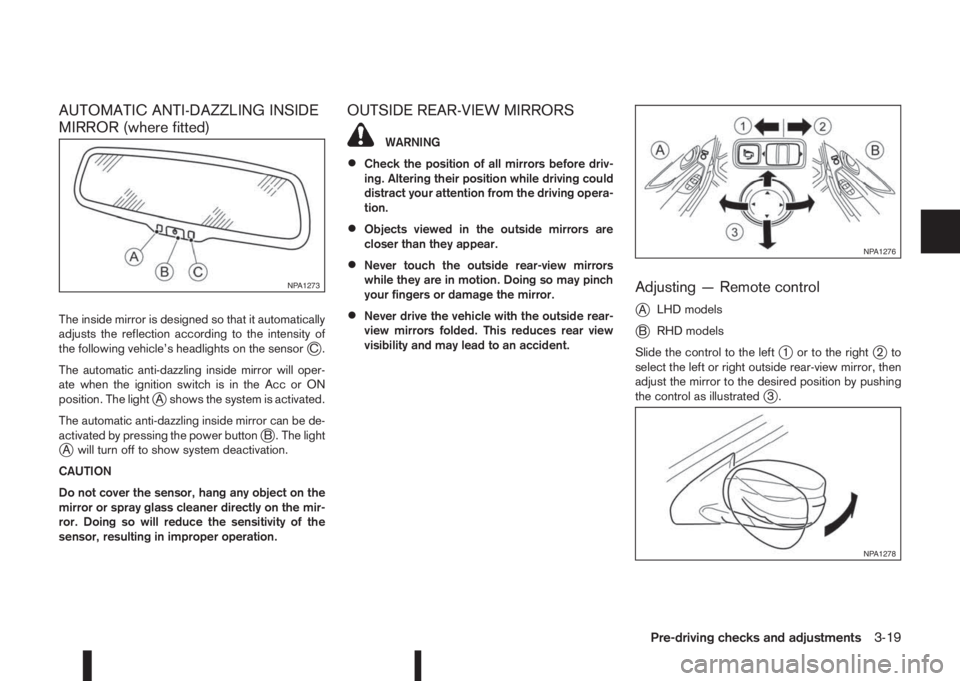
The inside mirror is designed so that it automatically
adjusts the reflection according to the intensity of
the following vehicle’s headlights on the sensor
jC.
The automatic anti-dazzling inside mirror will oper-
ate when the ignition switch is in the Acc or ON
position. The light
jA shows the system is activated.
The automatic anti-dazzling inside mirror can be de-
activated by pressing the power button
jB . The lightjA will turn off to show system deactivation.
CAUTION
Do not cover the sensor, hang any object on the
mirror or spray glass cleaner directly on the mir-
ror. Doing so will reduce the sensitivity of the
sensor, resulting in improper operation.
OUTSIDE REAR-VIEW MIRRORS
WARNING
•Check the position of all mirrors before driv-
ing. Altering their position while driving could
distract your attention from the driving opera-
tion.
•Objects viewed in the outside mirrors are
closer than they appear.
•Never touch the outside rear-view mirrors
while they are in motion. Doing so may pinch
your fingers or damage the mirror.
•Never drive the vehicle with the outside rear-
view mirrors folded. This reduces rear view
visibility and may lead to an accident.
Adjusting — Remote control
j
ALHD models
jBRHD models
Slide the control to the left
j1 or to the rightj2to
select the left or right outside rear-view mirror, then
adjust the mirror to the desired position by pushing
the control as illustrated
j3.
NPA1273
NPA1276
NPA1278
Pre-driving checks and adjustments3-19
Page 154 of 338
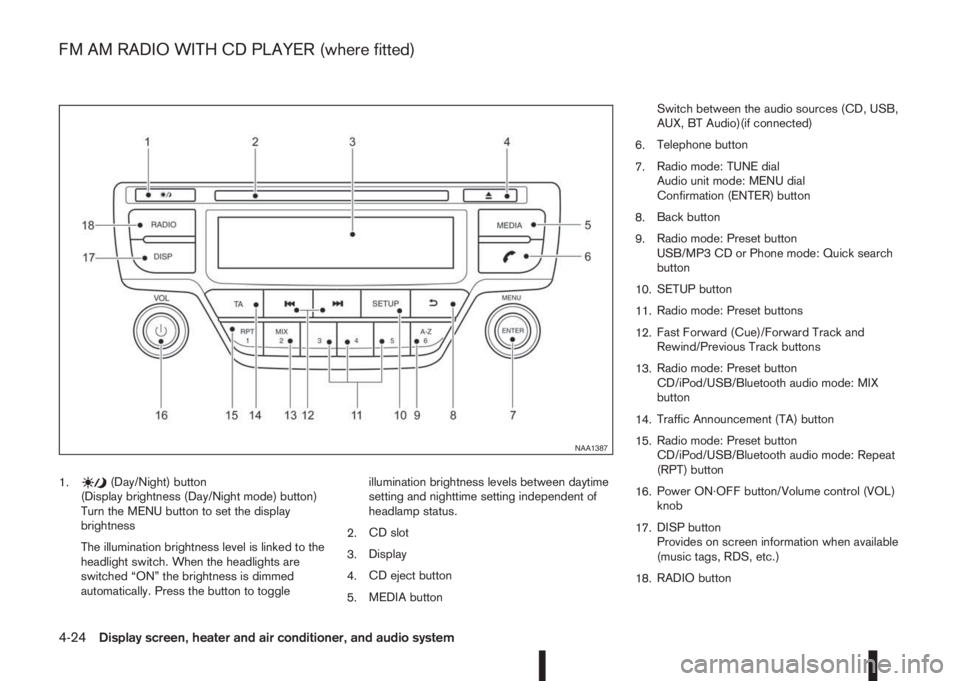
1.(Day/Night) button
(Display brightness (Day/Night mode) button)
Turn the MENU button to set the display
brightness
The illumination brightness level is linked to the
headlight switch. When the headlights are
switched “ON” the brightness is dimmed
automatically. Press the button to toggleillumination brightness levels between daytime
setting and nighttime setting independent of
headlamp status.
2.CD slot
3.Display
4.CD eject button
5.MEDIA buttonSwitch between the audio sources (CD, USB,
AUX, BT Audio)(if connected)
6.Telephone button
7.Radio mode: TUNE dial
Audio unit mode: MENU dial
Confirmation (ENTER) button
8.Back button
9.Radio mode: Preset button
USB/MP3 CD or Phone mode: Quick search
button
10.SETUP button
11.Radio mode: Preset buttons
12.Fast Forward (Cue)/Forward Track and
Rewind/Previous Track buttons
13.Radio mode: Preset button
CD/iPod/USB/Bluetooth audio mode: MIX
button
14.Traffic Announcement (TA) button
15.Radio mode: Preset button
CD/iPod/USB/Bluetooth audio mode: Repeat
(RPT) button
16.Power ON·OFF button/Volume control (VOL)
knob
17.DISP button
Provides on screen information when available
(music tags, RDS, etc.)
18.RADIO button
NAA1387
FM AM RADIO WITH CD PLAYER (where fitted)
4-24Display screen, heater and air conditioner, and audio system
Page 155 of 338
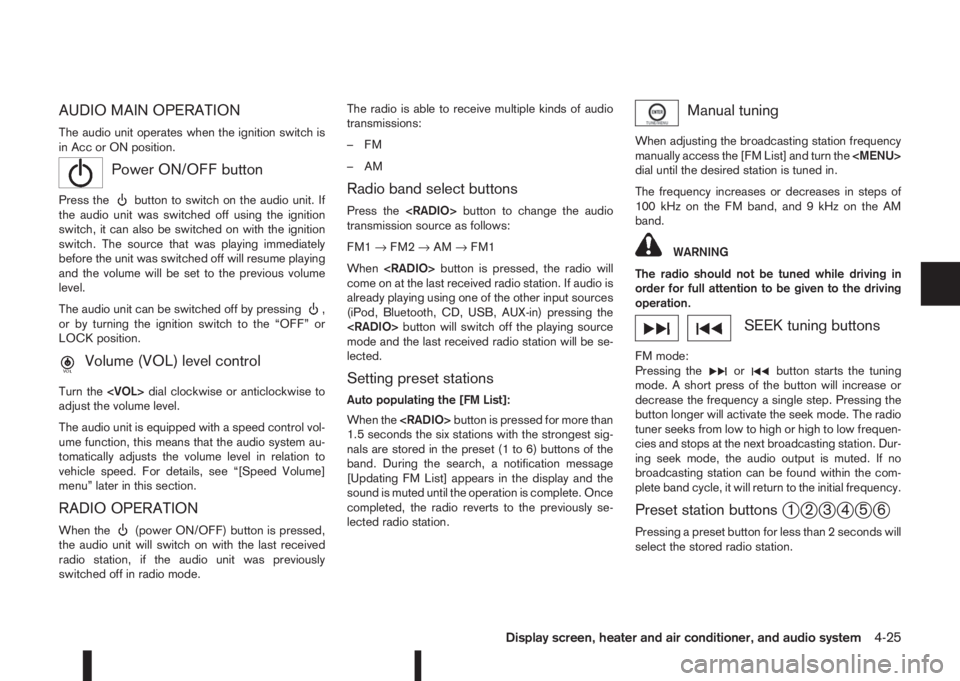
AUDIO MAIN OPERATION
The audio unit operates when the ignition switch is
in Acc or ON position.
mPower ON/OFF button
Press thebutton to switch on the audio unit. If
the audio unit was switched off using the ignition
switch, it can also be switched on with the ignition
switch. The source that was playing immediately
before the unit was switched off will resume playing
and the volume will be set to the previous volume
level.
The audio unit can be switched off by pressing
,
or by turning the ignition switch to the “OFF” or
LOCK position.
mVolume (VOL) level control
Turn the
adjust the volume level.
The audio unit is equipped with a speed control vol-
ume function, this means that the audio system au-
tomatically adjusts the volume level in relation to
vehicle speed. For details, see “[Speed Volume]
menu” later in this section.
RADIO OPERATION
When the(power ON/OFF) button is pressed,
the audio unit will switch on with the last received
radio station, if the audio unit was previously
switched off in radio mode.The radio is able to receive multiple kinds of audio
transmissions:
–FM
–AM
Radio band select buttons
Press the
transmission source as follows:
FM1→FM2→AM→FM1
When
come on at the last received radio station. If audio is
already playing using one of the other input sources
(iPod, Bluetooth, CD, USB, AUX-in) pressing the
mode and the last received radio station will be se-
lected.
Setting preset stations
Auto populating the [FM List]:
When the
1.5 seconds the six stations with the strongest sig-
nals are stored in the preset (1 to 6) buttons of the
band. During the search, a notification message
[Updating FM List] appears in the display and the
sound is muted until the operation is complete. Once
completed, the radio reverts to the previously se-
lected radio station.
Manual tuning
When adjusting the broadcasting station frequency
manually access the [FM List] and turn the
Page 168 of 338
For details, see the separately provided NissanCon-
nect Owner’s Manual.
MAIN OPERATION
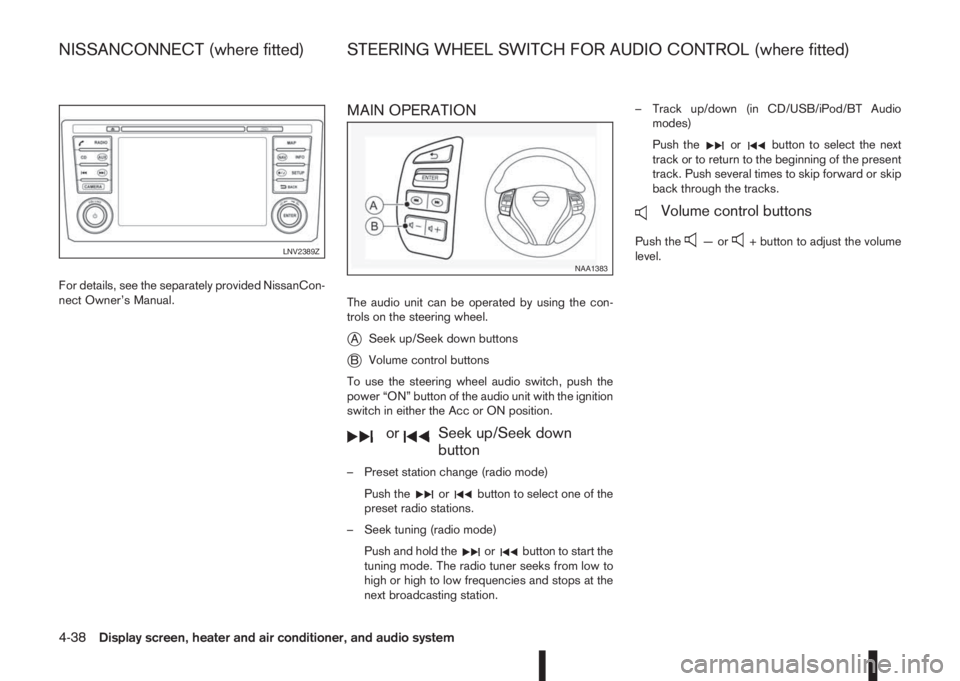
The audio unit can be operated by using the con-
trols on the steering wheel.
jASeek up/Seek down buttons
jBVolume control buttons
To use the steering wheel audio switch, push the
power “ON” button of the audio unit with the ignition
switch in either the Acc or ON position.
mormSeek up/Seek down
button
– Preset station change (radio mode)
Push the
orbutton to select one of the
preset radio stations.
– Seek tuning (radio mode)
Push and hold the
orbutton to start the
tuning mode. The radio tuner seeks from low to
high or high to low frequencies and stops at the
next broadcasting station.– Track up/down (in CD/USB/iPod/BT Audio
modes)
Push the
orbutton to select the next
track or to return to the beginning of the present
track. Push several times to skip forward or skip
back through the tracks.
mVolume control buttons
Push the—or+ button to adjust the volume
level.LNV2389Z
NAA1383
NISSANCONNECT (where fitted) STEERING WHEEL SWITCH FOR AUDIO CONTROL (where fitted)
4-38Display screen, heater and air conditioner, and audio system
Page 177 of 338
Lane Departure Warning (LDW) system (where
fitted) ....................................................................... 5-33
LDW system operation ....................................... 5-34
LDW temporary disabled status .......................... 5-35
LDW automatic deactivation ............................... 5-35
LDW malfunction ................................................ 5-35
Multi-sensing camera unit maintenance ............... 5-35
Cruise control (where fitted) .................................... 5-36
Precautions on cruise control .............................. 5-36
Cruise control system operations ........................ 5-37
Speed limiter (where fitted) ...................................... 5-38
Speed limiter operations ..................................... 5-39
Forward emergency braking system (where fitted) ... 5-40
System operation ................................................ 5-41
Parking .................................................................... 5-43
Ultrasonic Parking Sensors (where fitted)................. 5-45
Operation ........................................................... 5-45
Intelligent Parking Assist (IPA) (where fitted) ............ 5-46
Deactivation of the IPA system ............................ 5-47
Parking procedure using the IPA system ............. 5-48
Operating tips..................................................... 5-52
Trailer towing ........................................................... 5-54
Operating precautions ........................................ 5-54
Maximum load limits (for Australia) ...................... 5-55
Tyre pressure ..................................................... 5-55
Safety chains ...................................................... 5-55
Trailer brakes...................................................... 5-55
Trailer detection (where fitted) ............................ 5-56Installation of coupling device (except for
Australia) ............................................................ 5-56
Vehicle security........................................................ 5-57
Electric power steering system ................................ 5-57
Brake system ........................................................... 5-58
Brake precautions .............................................. 5-58
Anti-lock Braking System (ABS)............................... 5-59
Using system ...................................................... 5-59
Self-test feature .................................................. 5-59
Normal operation ................................................ 5-60
Electronic Stability Programme (ESP) system
(where fitted) ........................................................... 5-60
Electronic Stability Programme (ESP) OFF
switch................................................................. 5-61
Chassis control........................................................ 5-62
Active trace control ............................................. 5-62
Active engine brake (for XTRONIC (CVT)
models only) ....................................................... 5-63
Active ride control ............................................... 5-64
Hill Start Assist (HSA) system .................................. 5-64
ECO mode system (where fitted) ............................. 5-65
Cold weather driving................................................ 5-66
Battery ............................................................... 5-66
Engine coolant .................................................... 5-66
Tyre equipment ................................................... 5-66
Special winter equipment.................................... 5-67
Corrosion protection ........................................... 5-67
Page 182 of 338
Some devices and transmitters may tempo-
rarily interfere with the operation of the TPMS
and cause the TPMS indicator light to illumi-
nate. Some examples are:
– Facilities or electric devices using similar
radio frequencies are near the vehicle.
– If a transmitter set to similar frequencies is
being used in or near the vehicle.
– If a computer (or similar equipment) or a
DC/AC converter is being used in or near
the vehicle.
– If devices which transmit electrical noise
are connected to the vehicle’s 12V power
supply.
•When inflating the tyres and checking the tyre
pressure, never bend the valves.
•Special aluminium valves are fitted to mount
the TPMS sensors on the wheels. The TPMS
sensor is fixed at the wheels by a nut. The nut
needs to be correctly fitted at a torque setting
of 7.5 ± 0.5 N•m. If the TPMS sensor is tight-
ened exceeding the limit, there is a possibility
the sensor grommet will be damaged. If the
sensor is tightened under the limit, there is a
possibility of causing an air leak.
•Use Genuine NISSAN valve caps that comply
with the factory-fitted valve cap specifications.
•Do not use metal valve caps.
•Fit the valve caps properly. Without the valve
caps the valve and tyre pressure monitor sen-
sors could be damaged.
•Do not damage the valves and sensors when
storing the wheels or fitting different tyres.
•Replace the sensor grommet and washer dur-
ing a tyre change. Once they have been re-
moved, the sensor grommet and washer can-
not be reused and must be replaced. The
TPMS sensors can be used again.
•Use caution when using tyre inflation equip-
ment with a rigid air supply tube, as leverage
applied by the long nozzle can damage the
valve stem.
5-6Starting and driving
Page 190 of 338
If the battery of the vehicle is discharged, the push-
button ignition switch cannot be moved from the
LOCK position.
OFF position
The ignition switch is in the OFF position when the
engine is turned off using the ignition switch. No
lights will illuminate on the ignition switch.
ACC position
With the vehicle in the P (Park) position, the Intelli-
gent key with you and the ignition placed from ON
to OFF, the radio can still be used for a period of
time, or until the driver’s door is opened.
After a period of time, functions such as radio, navi-
gation, and Bluetooth® Hands-Free Phone System
may be restarted by pressing the “POWER button/
VOLUME control knob” (See “Monitor, climate, au-
dio, phone and voice recognition systems” in this
manual) or the keyfob unlock button up to a total of
30 minutes.
EMERGENCY ENGINE SHUT OFF
To shut off the engine in an emergency situation
while driving, perform the following procedure:
•Rapidly push the push-button ignition switch 3
consecutive times in less than 1.5 seconds, or
•Push and hold the push-button ignition switch
for more than 2 seconds.
STEERING LOCK
The ignition switch is equipped with an anti-theft
steering lock device.
To lock steering wheel
1. Push the ignition switch to the “OFF” position
where the ignition switch position indicator will
not illuminate.
2. Open or close the door. The ignition switch turns
to the “LOCK” position.
3. Turn the steering wheel 1/6 of a turn to the right
or left from the straight up position.
To unlock steering wheel
Push the ignition switch to “ACC”, and the steering
wheel will be automatically unlocked.
CAUTION
•If the battery of the vehicle is discharged, the
push-button ignition switch cannot be
switched from the “LOCK” position.
•If the ignition switch position does not change
from the “LOCK” position, push the ignition
switch again while rotating the steering wheel
slightly to the right and left.
INTELLIGENT KEY BATTERY
DISCHARGE
If the battery of the Intelligent Key is discharged, or
environmental conditions interfere with the Intelli-
gent Key operation, start the engine according to
the following procedure:
1. Move the shift lever to the P (Park) (XTRONIC
transmission models) or N (Neutral) (MT models)
position.
2. Firmly apply the footbrake.
3. Depress the clutch pedal to the floor (MT mod-
els)
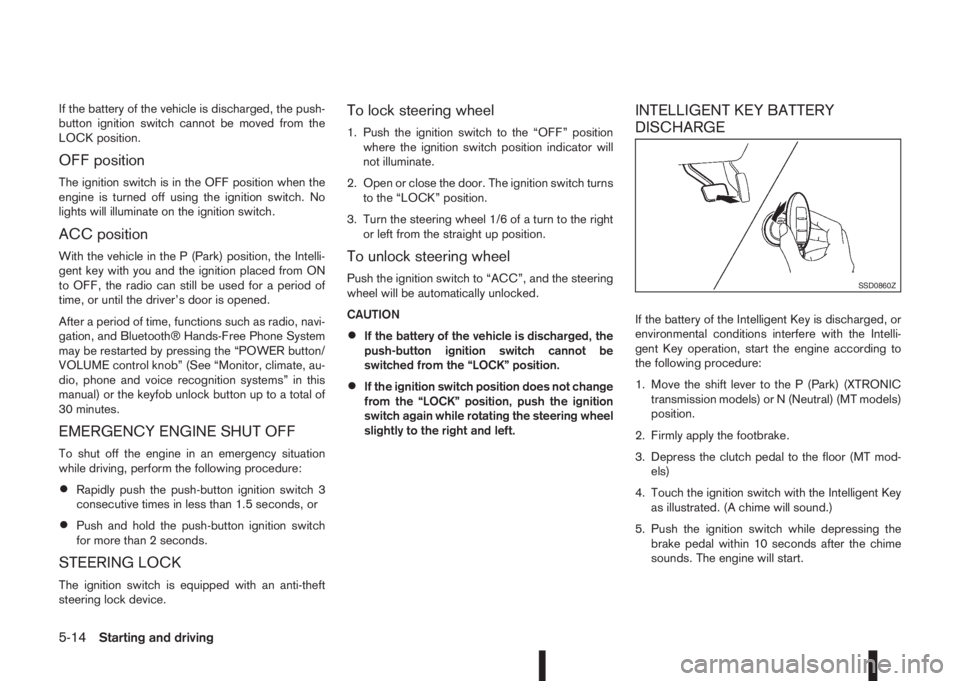
4. Touch the ignition switch with the Intelligent Key
as illustrated. (A chime will sound.)
5. Push the ignition switch while depressing the
brake pedal within 10 seconds after the chime
sounds. The engine will start.
SSD0860Z
5-14Starting and driving
Page 197 of 338
•If the engine is revving up to a hazardous
speed in manual shift mode, the transmission
may shift up automatically. When the vehicle
speed decreases, the transmission automati-
cally shifts down and shifts to 1st gear before
the vehicle comes to a stop.
Accelerator downshift – In the D (Drive)
and Ds (Drive Sport) position
For rapid passing or driving uphill, fully depress the
accelerator pedal to the floor. This shifts the trans-
mission down into a lower gear, depending on the
vehicle speed.
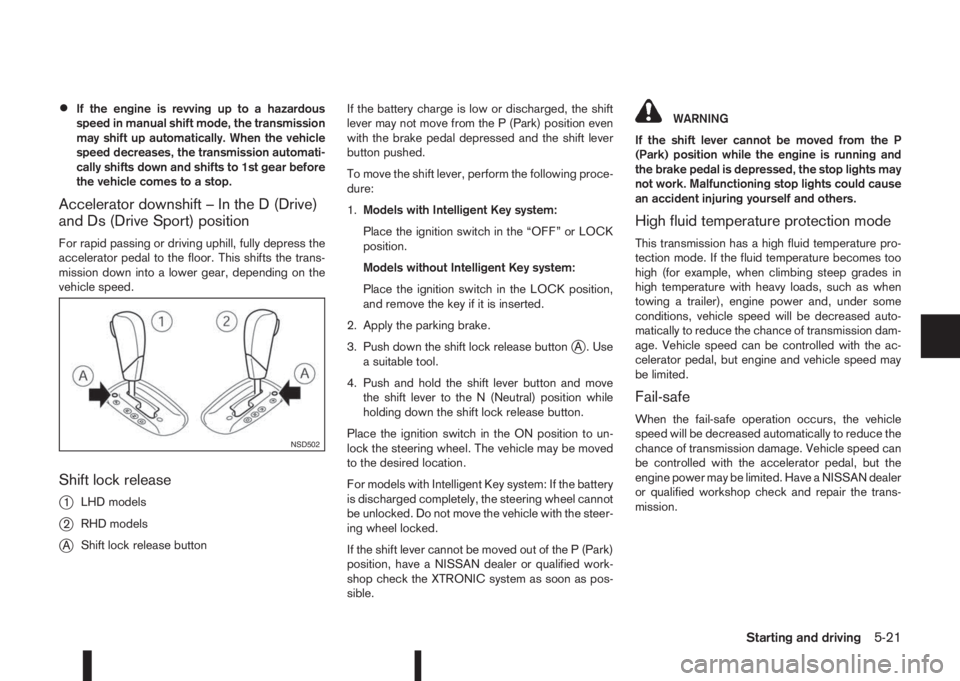
Shift lock release
j
1LHD models
j2RHD models
jAShift lock release buttonIf the battery charge is low or discharged, the shift
lever may not move from the P (Park) position even
with the brake pedal depressed and the shift lever
button pushed.
To move the shift lever, perform the following proce-
dure:
1.Models with Intelligent Key system:
Place the ignition switch in the “OFF” or LOCK
position.
Models without Intelligent Key system:
Place the ignition switch in the LOCK position,
and remove the key if it is inserted.
2. Apply the parking brake.
3. Push down the shift lock release button
jA . Use
a suitable tool.
4. Push and hold the shift lever button and move
the shift lever to the N (Neutral) position while
holding down the shift lock release button.
Place the ignition switch in the ON position to un-
lock the steering wheel. The vehicle may be moved
to the desired location.
For models with Intelligent Key system: If the battery
is discharged completely, the steering wheel cannot
be unlocked. Do not move the vehicle with the steer-
ing wheel locked.
If the shift lever cannot be moved out of the P (Park)
position, have a NISSAN dealer or qualified work-
shop check the XTRONIC system as soon as pos-
sible.
WARNING
If the shift lever cannot be moved from the P
(Park) position while the engine is running and
the brake pedal is depressed, the stop lights may
not work. Malfunctioning stop lights could cause
an accident injuring yourself and others.
High fluid temperature protection mode
This transmission has a high fluid temperature pro-
tection mode. If the fluid temperature becomes too
high (for example, when climbing steep grades in
high temperature with heavy loads, such as when
towing a trailer), engine power and, under some
conditions, vehicle speed will be decreased auto-
matically to reduce the chance of transmission dam-
age. Vehicle speed can be controlled with the ac-
celerator pedal, but engine and vehicle speed may
be limited.
Fail-safe
When the fail-safe operation occurs, the vehicle
speed will be decreased automatically to reduce the
chance of transmission damage. Vehicle speed can
be controlled with the accelerator pedal, but the
engine power may be limited. Have a NISSAN dealer
or qualified workshop check and repair the trans-
mission.
NSD502
Starting and driving5-21