power NISSAN QASHQAI 2014 Owner´s Manual
[x] Cancel search | Manufacturer: NISSAN, Model Year: 2014, Model line: QASHQAI, Model: NISSAN QASHQAI 2014Pages: 338, PDF Size: 4.87 MB
Page 70 of 338
•Avoid steep uphill grades.
•If possible, reduce the load being carried or
towed.
The Malfunction Indicator light may stop blinking
and come on steady.
Have the vehicle inspected by a NISSAN dealer or
qualified workshop. You do not need to have your
vehicle towed to the dealer.
CAUTION
Continued vehicle operation without having the
engine control system checked and repaired as
necessary could lead to poor driveability,
reduced fuel economy and possible damage to
the engine control system, which may affect your
warranty coverage.
Rear fog light indicator light
(where fitted)
The light comes on when the rear fog light is
switched on (see “Rear fog light (where fitted)” later
in this section).
Side light and headlight indicator
light
This light comes on when the side light or headlight
position is selected, see “Headlight and turn signal
switch” later in this section for further details.
SLIP indicator light
(where fitted)
The SLIP indicator blinks when the Electronic Sta-
bility Programme (ESP) system is operating, thus
alerting the driver to the fact that the road surface is
slippery and the vehicle is nearing its traction limits.
You may feel or hear the system working, this is nor-
mal.
The light will continue to blink for a few seconds
after the ESP system stops limiting wheel spin.
For additional information see “Electronic Stability
Programme (ESP) OFF indicator light (where
fitted)” earlier in this section and “Electronic Stabil-
ity Programme (ESP) system (where fitted)” in the
“5. Starting and driving” section.
Trailer direction indicator light
The light will light up whenever an additional electri-
cal load is detected by the direction indicator sys-
tem.
For additional information, see “Trailer towing” in
the “5. Starting and driving” section.
Turn signal/hazard indicator
lights
The direction indicator lights will flash when the turn
signal switch or hazard warning flasher switch is
turned on. See “Headlight and turn signal switch”
later in this section and see “Hazard warning flasher
switch” in the “6. In case of emergency” section for
further details.
AUDIBLE REMINDERS
Door open reminder chime
The chime will sound if any door other than the driv-
er’s door is left open and the power door lock switch
is held down.
Intelligent Key models:The external buzzer will
sound if the vehicle is being locked remotely or us-
ing an outside door lock switch and any door is
open.
Parking brake reminder buzzer
A buzzer will sound when driving away if the parking
brake has not been released. Stop the vehicle and
release the parking brake.
Light reminder chime
A chime will sound for 10 seconds if the driver’s
door is opened while the external lights are turned
on and the ignition switch is in the “OFF” or LOCK
position.
See “Headlight and turn signal switch” later in this
section for further details on the headlight operation.
Fog light reminder chime
A chime will sound if the ignition switch is in the
“OFF” or LOCK position and the headlight switch is
in the AUTO position (where fitted) and the fog lights
are left on.
See “Fog light switch” later in this section for further
details.
2-12Instruments and controls
Page 81 of 338
If this warning appears while the engine is stopped,
the engine cannot be started. If this warning ap-
pears while the engine is running, the vehicle can be
driven. However, contact a NISSAN dealer or quali-
fied workshop for repair as soon as possible.
5. [Key battery low] indicator
This indicator appears when the Intelligent Key bat-
tery is running out of power.
If this indicator appears, replace the battery with a
new one. (See “Integrated keyfob/Intelligent Key
battery replacement” in the “8. Maintenance and
do-it-yourself” section.)
6. [Key ID Incorrect] warning
This warning appears when the ignition switch is
pushed from the LOCK position and the Intelligent
Key cannot be recognised by the system. You can-
not start the engine with an unregistered key. Use
the registered Intelligent Key. See “Intelligent Key
system (where fitted)” in the “3. Pre-driving checks
and adjustments” section.
7. Engine start operation for Intelligent
Key system indicator
This indicator appears when the Intelligent Key bat-
tery is running out of power and the Intelligent Key
system and vehicle are not communicating normally.
If this indicator appears, touch the ignition switch
with the Intelligent Key while depressing the brake
pedal. (See “Push-button ignition switch (where
fitted)” in the “5. Starting and driving” section.)
8. [Release parking brake] warning
This warning appears when the vehicle speed is
above 7 km/h (4 MPH) and the parking brake is
applied. Stop the vehicle and release the parking
brake. This warning may a occur if the driver has
attempted to release the parking brake automati-
cally, but did not succeed.
9. Low fuel ([Range]) warning
This warning appears when the fuel level in the tank
is getting low. Refuel as soon as it is convenient,
preferably before the fuel gauge reaches the empty
(0) position.
There is a small reserve of fuel remaining in the
tank when the fuel gauge reaches the empty (0)
position.
10. [Low washer fluid] warning
This warning appears when the washer tank fluid is
at a low level. Add washer fluid as necessary. (See
“Window washer fluid/headlight cleaner fluid (where
fitted)” in the “8. Maintenance and do-it-yourself”
section.)
11. Door/boot open warning
This warning appears if any of the doors and/or the
boot lid are open or not closed securely. The vehicle
icon indicates which door or whether the boot lid is
open on the display.
12. [SHIFT to Park] warning (XTRONIC
transmission models)
This warning appears when the ignition switch is
pushed to stop the engine with the shift lever in any
position except the P (Park) position.
If this warning appears, move the shift lever to the P
(Park) position or place the ignition switch in the ON
position.
An inside warning chime will also sound. (See
“Push-button ignition switch (where fitted)” in the
“5. Starting and driving” section.)
13. [Loose Fuel Cap] warning
This warning appears when the fuel-filler cap is not
tightened correctly after the vehicle has been refu-
elled. See “Fuel filler lid” in the “3. Pre-driving
checks and adjustments” section section of this
manual.
14. [Battery Voltage Low Charge
Battery] warning
This warning appears when the battery voltage is
low and the battery needs to be charged.
15. [Press Brake Pedal] warning
This warning appears to remind you that you must
press the brake pedal before you can release the
parking brake. This warning may also be displayed
if the parking brake is activated, but the vehicle is
still rolling back.
Instruments and controls2-23
Page 82 of 338
![NISSAN QASHQAI 2014 Owner´s Manual 16. [Low Tyre Pressure] warning
This warning ([Low Tyre Pressure] and a vehicle
icon - where fitted) appears when the low tyre pres-
sure warning light in the meter illuminates and low
tyre pressure i](/img/5/40326/w960_40326-81.png "NISSAN QASHQAI 2014 Owner´s Manual 16. [Low Tyre Pressure] warning
This warning ([Low Tyre Pressure] and a vehicle
icon - where fitted) appears when the low tyre pres-
sure warning light in the meter illuminates and low
tyre pressure i")
16. [Low Tyre Pressure] warning
This warning ([Low Tyre Pressure] and a vehicle
icon - where fitted) appears when the low tyre pres-
sure warning light in the meter illuminates and low
tyre pressure is detected. The warning appears each
time the ignition switch is placed in the ON position
as long as the low tyre pressure warning light re-
mains illuminated. If this warning appears, stop the
vehicle and adjust the pressure to the recommended
COLD tyre pressure shown on the tyre placard.
(See “Low tyre pressure warning light (where fitted)”
earlier in this section and “Tyre Pressure Monitoring
System (TPMS)” in the “5. Starting and driving” sec-
tion.)
17. [Low oil pressure stop vehicle]
warning
This warning appears in message area of the ve-
hicle information display if low oil pressure is de-
tected. This gauge is not designed to indicate low
oil level. The low oil pressure warning is not de-
signed to indicate a low oil level. Use the dipstick to
check the oil level. See “Engine oil” in the “8. Main-
tenance and do-it-yourself” section.)
CAUTION
The oil level should be checked regularly using
the engine oil dipstick. Operating with an insuffi-
cient amount of oil can damage the engine and
such damage is not covered by the warranty.
18. [Oil Level Low] warning
This warning appears in message area of the ve-
hicle information display if the oil level is not suffi-
cient for driving. Park the vehicle at a safe location
as soon as possible and use the dipstick to check
the oil level. See “Engine oil” in the “8. Maintenance
and do-it-yourself” section If the oil level is not suf-
ficient for driving, top up the engine oil with the rec-
ommended engine oil. “Engine oil” in the “8. Main-
tenance and do-it-yourself” section.)
CAUTION
The oil level should be checked regularly using
the engine oil dipstick. Operating with an insuffi-
cient amount of oil can damage the engine and
such damage is not covered by the warranty.
19. [4WD System Fault] warning
This warning appears when the four wheel drive
(4WD) system is not functioning properly while the
engine is running.
20. [4WD high temp. stop vehicle]
warning
This warning may appear while trying to free a stuck
vehicle due to increased oil temperature. The driv-
ing mode may change to Two-Wheel Drive (2WD).
If this warning is displayed, stop the vehicle with the
engine idling, as soon as it is safe to do so. Then if
the warning turns off, you can continue driving.
21. [4WD tyre size incorrect] warning
This warning may appear if there is a large differ-
ence between the diameters of the front and rear
wheels and tyres. Pull off the road in a safe area,
with the engine idling. Check that all the tyre sizes
are the same, that tyre pressures are correct and
that the tyres are not excessively worn.
22. [Shipping mode on push storage
fuse] warning
This warning may appear if the extended storage
fuse switch is not pushed in (switched on). When
this warning appears, push in (switch on) the ex-
tended storage fuse switch to turn off the warning.
For more information, see “Fuses” in the “8. Main-
tenance and do-it-yourself” section.
23. [Power will turn off to save the
battery] warning
This warning appears after a period of time if the
shift lever has not moved from the P (Park) position
while the ignition is in the ON position for a certain
period of time.
24. [Power turned off to save the
battery] warning
This warning appears after the ignition switch is au-
tomatically turned OFF to save the battery.
2-24Instruments and controls
Page 100 of 338
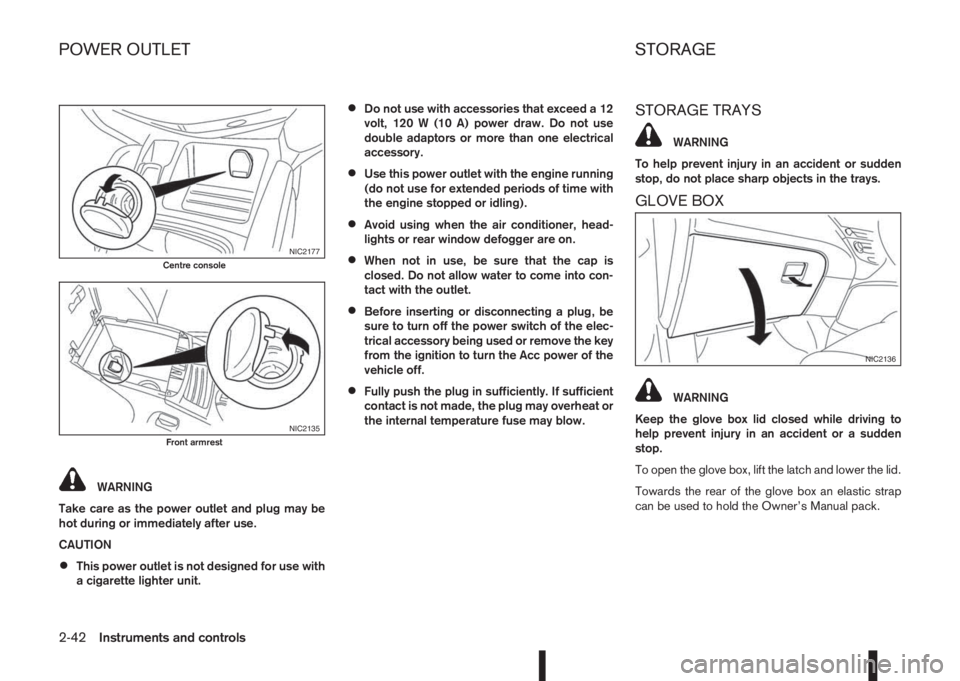
WARNING
Take care as the power outlet and plug may be
hot during or immediately after use.
CAUTION
•This power outlet is not designed for use with
a cigarette lighter unit.
•Do not use with accessories that exceed a 12
volt, 120 W (10 A) power draw. Do not use
double adaptors or more than one electrical
accessory.
•Use this power outlet with the engine running
(do not use for extended periods of time with
the engine stopped or idling).
•Avoid using when the air conditioner, head-
lights or rear window defogger are on.
•When not in use, be sure that the cap is
closed. Do not allow water to come into con-
tact with the outlet.
•Before inserting or disconnecting a plug, be
sure to turn off the power switch of the elec-
trical accessory being used or remove the key
from the ignition to turn the Acc power of the
vehicle off.
•Fully push the plug in sufficiently. If sufficient
contact is not made, the plug may overheat or
the internal temperature fuse may blow.
STORAGE TRAYS
WARNING
To help prevent injury in an accident or sudden
stop, do not place sharp objects in the trays.
GLOVE BOX
WARNING
Keep the glove box lid closed while driving to
help prevent injury in an accident or a sudden
stop.
To open the glove box, lift the latch and lower the lid.
Towards the rear of the glove box an elastic strap
can be used to hold the Owner’s Manual pack.
NIC2177Centre console
NIC2135Front armrest
NIC2136
POWER OUTLET STORAGE
2-42Instruments and controls
Page 101 of 338
Sunglasses holder (where fitted)
WARNING
The sunglasses holder should not be used while
driving so that full attention may be given to ve-
hicle operation.
The glove box contains a sunglasses storage area,
which is accessible when the glove box is open.
CONSOLE BOX
WARNING
The centre console box should not be used while
driving so that full attention may be given to ve-
hicle operation.
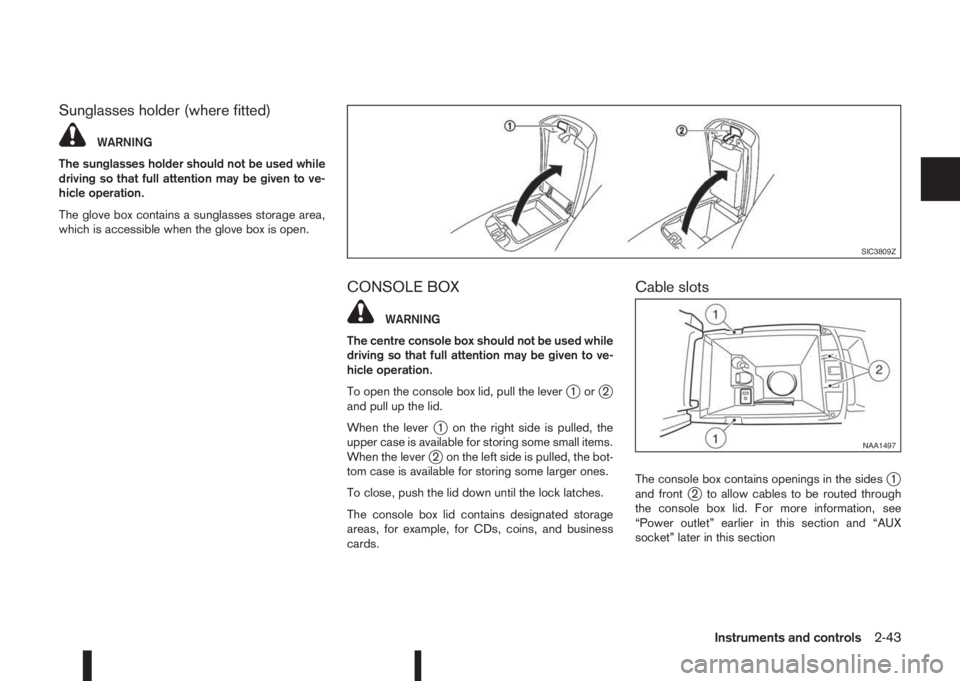
To open the console box lid, pull the lever
j1orj2
and pull up the lid.
When the lever
j1 on the right side is pulled, the
upper case is available for storing some small items.
When the lever
j2 on the left side is pulled, the bot-
tom case is available for storing some larger ones.
To close, push the lid down until the lock latches.
The console box lid contains designated storage
areas, for example, for CDs, coins, and business
cards.
Cable slots
The console box contains openings in the sidesj1
and frontj2 to allow cables to be routed through
the console box lid. For more information, see
“Power outlet” earlier in this section and “AUX
socket” later in this section
SIC3809Z
NAA1497
Instruments and controls2-43
Page 106 of 338
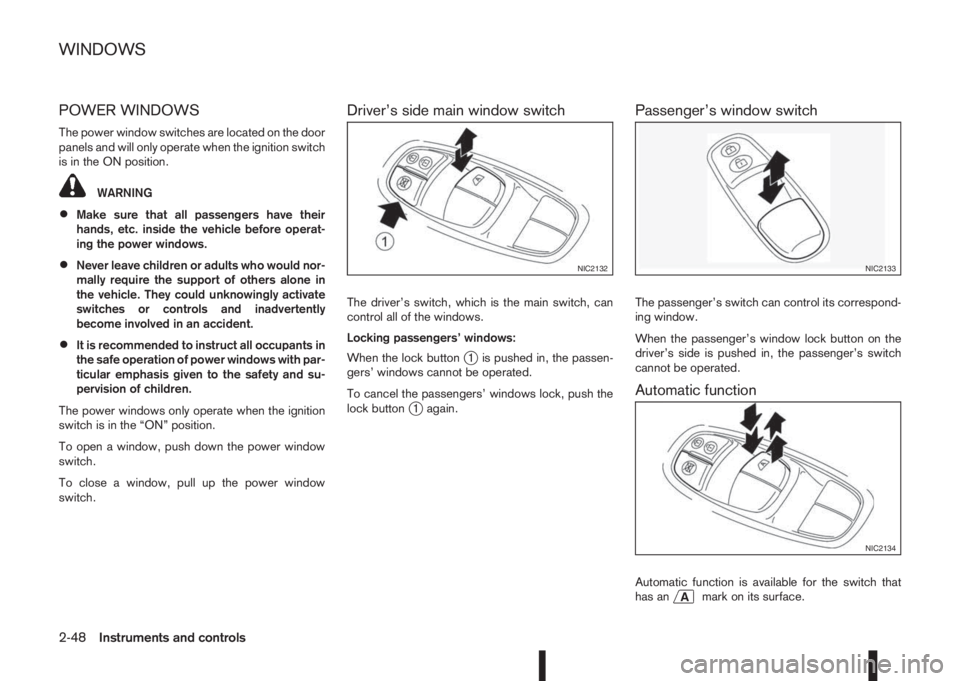
POWER WINDOWS
The power window switches are located on the door
panels and will only operate when the ignition switch
is in the ON position.
WARNING
•Make sure that all passengers have their
hands, etc. inside the vehicle before operat-
ing the power windows.
•Never leave children or adults who would nor-
mally require the support of others alone in
the vehicle. They could unknowingly activate
switches or controls and inadvertently
become involved in an accident.
•It is recommended to instruct all occupants in
the safe operation of power windows with par-
ticular emphasis given to the safety and su-
pervision of children.
The power windows only operate when the ignition
switch is in the “ON” position.
To open a window, push down the power window
switch.
To close a window, pull up the power window
switch.
Driver’s side main window switch
The driver’s switch, which is the main switch, can
control all of the windows.
Locking passengers’ windows:
When the lock button
j1 is pushed in, the passen-
gers’ windows cannot be operated.
To cancel the passengers’ windows lock, push the
lock button
j1 again.
Passenger’s window switch
The passenger’s switch can control its correspond-
ing window.
When the passenger’s window lock button on the
driver’s side is pushed in, the passenger’s switch
cannot be operated.
Automatic function
Automatic function is available for the switch that
has anmark on its surface.
NIC2132NIC2133
NIC2134
WINDOWS
2-48Instruments and controls
Page 107 of 338
The automatic function enables a window to fully
open or close without holding the switch down or
up.
To fully open the window, push the power window
switch down to the second detent and release the
switch. To fully close the window, pull the power
window switch up to the second detent and release
the switch. The switch does not have to be held dur-
ing window operation.
To stop the window open/close operation during
the automatic function, push down or pull up the
switch in opposite direction.
Auto-reverse function:
WARNING
•There is a small distance just before the
closed position which cannot be detected.
Make sure that all passengers have their
hands, etc. inside the vehicle before closing
the windows.
•The auto-reverse function does not work
when the window is closed manually (holding
the switch in the close position).
The auto-reverse function enables a window to au-
tomatically reverse when something is caught in the
window as it is closing by the automatic function.
When the control unit detects an obstacle, the win-
dow will be lowered immediately.Depending on the environment or driving conditions,
the auto-reverse function may activate if an impact
or load similar to something being caught in the win-
dow occurs.
Reinitialisation procedure after battery
reconnection
Some power window functions (automatic close
function, auto-reverse function) will not operate as
described after the battery cable is disconnected or
the electrical supply is interrupted. Perform the fol-
lowing procedure to initialise the power window
functions.
1. Place the ignition switch in the “ON” position.
2. If the driver’s window is closed, open it com-
pletely by operating the driver’s window switch.
3. Pull up and hold the driver’s window switch to
close the driver’s window. Hold the switch for
approximately 5 seconds after the window has
been fully closed, and then release it.
4. Check if the power window functions operate
properly.
If you open or close the power window continu-
ously, it may cause the power window not to oper-
ate properly. Perform the above procedure.
If the power window functions do not operate prop-
erly after performing the above procedure, repeat
the steps. See a NISSAN dealer or qualified work-
shop, if necessary, for checking the power window
system.
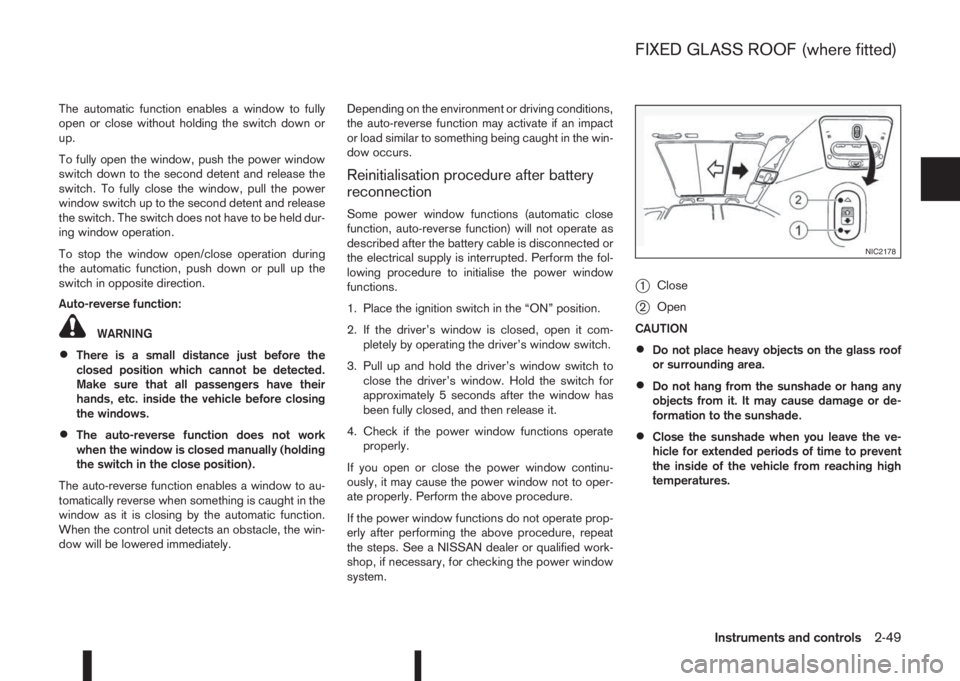
j1Close
j2Open
CAUTION
•Do not place heavy objects on the glass roof
or surrounding area.
•Do not hang from the sunshade or hang any
objects from it. It may cause damage or de-
formation to the sunshade.
•Close the sunshade when you leave the ve-
hicle for extended periods of time to prevent
the inside of the vehicle from reaching high
temperatures.
NIC2178
FIXED GLASS ROOF (where fitted)
Instruments and controls2-49
Page 111 of 338
3Pre-driving checks and adjustmentsPre-driving checks and adjustments
Keys ........................................................................ 3-2
NISSAN Anti-Theft System (NATS)* key ............. 3-2
Intelligent Key (where fitted)................................ 3-2
Key number ........................................................ 3-3
New keys ........................................................... 3-3
Emergency/mechanical key (Intelligent Key
models) .............................................................. 3-3
Integrated keyfob/remote control system .................. 3-4
Switching from Convenience mode to
Anti-hijack mode (where fitted) ............................ 3-5
Using the remote keyless entry system ................ 3-5
Locking the doors ............................................... 3-5
Unlocking the doors ............................................ 3-5
Keyfob operation failure ...................................... 3-5
Intelligent Key system (where fitted) ......................... 3-6
Intelligent Key operating range ............................ 3-6
Using Intelligent Key system................................ 3-6
Locking/unlocking .............................................. 3-7
Starting the engine with the Intelligent Key .......... 3-8
Door locks ............................................................... 3-8
Super Lock system (RHD models) ...................... 3-8
Locking/unlocking with the key (vehicle dead
battery) ............................................................... 3-9Inside door handle .............................................. 3-10
Power door lock switch ...................................... 3-10
Child safety lock — rear doors............................ 3-11
Back door lock ................................................... 3-11
Security system ....................................................... 3-12
Alarm system (where fitted) ................................ 3-12
NISSAN Anti-Theft System (NATS)..................... 3-13
Bonnet release ........................................................ 3-14
Fuel filler lid ............................................................. 3-15
Fuel filler lid opener lever .................................... 3-15
Fuel filler cap ...................................................... 3-15
Parking brake switch ............................................... 3-16
Driving away when towing a trailer ...................... 3-17
Steering wheel......................................................... 3-18
Sun visors ............................................................... 3-18
Mirrors..................................................................... 3-18
Inside rear-view mirror ........................................ 3-18
Automatic anti-dazzling inside mirror (where
fitted).................................................................. 3-19
Outside rear-view mirrors.................................... 3-19
Vanity mirror ....................................................... 3-20
Page 119 of 338
Emergency situations
If the Super Lock system is activated while you are
inside the vehicle, for example by a traffic accident
or other unexpected circumstances, follow the in-
structions below.
To release the Super Lock system:
– Insert the key into the ignition switch and turn it
to the ON position.
All doors can now be unlocked and opened from
inside the vehicle.
– Remove the key from the ignition switch and un-
lock the doors using the integrated keyfob “UN-
LOCK” button (
).
All doors can now be opened from inside the
vehicle.
To unlock and open the driver’s door from
inside the vehicle while the Super Lock system
is active:
1. Open or break the driver’s door window.
2. Insert the key into the outside door key cylinder
and turn it towards the rear of the vehicle.
3. The driver’s door will unlock and can now be
opened from inside the vehicle.
Locking without activating the Super
Lock system
WARNING
Do not leave the key inside the vehicle when leav-
ing the vehicle.
Locking the doors using the door key cylinder or
power door lock switch will not activate the Super
Lock system. See “Locking/unlocking with the key
(vehicle dead battery)” later in this section for fur-
ther information.
LOCKING/UNLOCKING WITH THE
KEY (vehicle dead battery)
WARNING
•When leaving the vehicle, do not leave the key
inside the vehicle.
•Never leave children unattended in a vehicle
and always be sure you have your keys withyou when leaving. If an emergency occurs it
may be more difficult to help them otherwise.
The driver’s door can be locked/unlocked from out-
side using the key/emergency key if the vehicle’s
battery is dead.
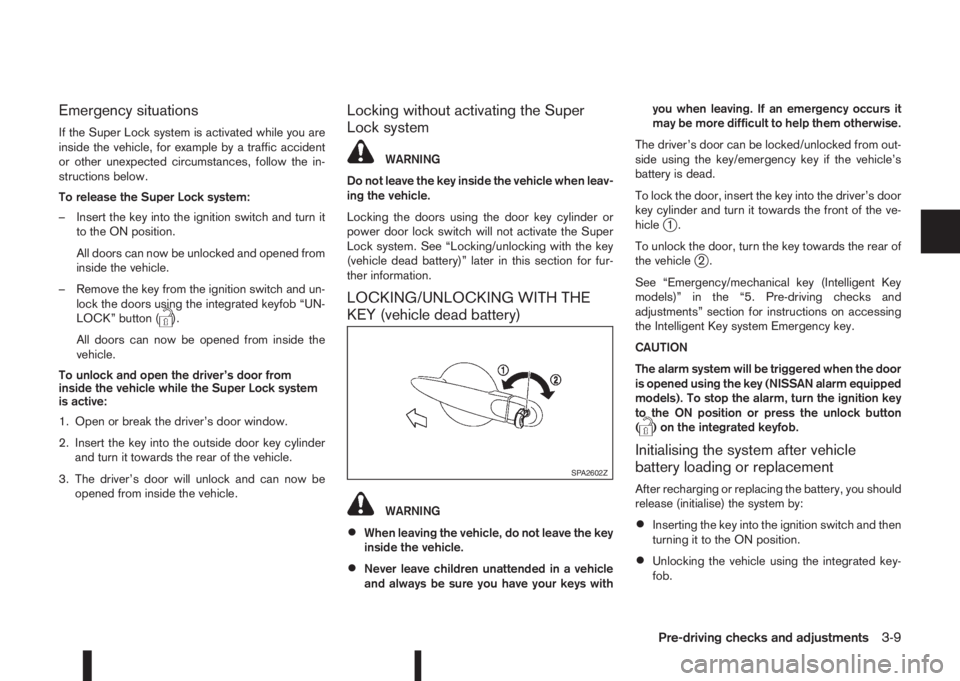
To lock the door, insert the key into the driver’s door
key cylinder and turn it towards the front of the ve-
hicle
j1.
To unlock the door, turn the key towards the rear of
the vehicle
j2.
See “Emergency/mechanical key (Intelligent Key
models)” in the “5. Pre-driving checks and
adjustments” section for instructions on accessing
the Intelligent Key system Emergency key.
CAUTION
The alarm system will be triggered when the door
is opened using the key (NISSAN alarm equipped
models). To stop the alarm, turn the ignition key
to the ON position or press the unlock button
(
) on the integrated keyfob.
Initialising the system after vehicle
battery loading or replacement
After recharging or replacing the battery, you should
release (initialise) the system by:
•Inserting the key into the ignition switch and then
turning it to the ON position.
•Unlocking the vehicle using the integrated key-
fob.
SPA2602Z
Pre-driving checks and adjustments3-9
Page 120 of 338
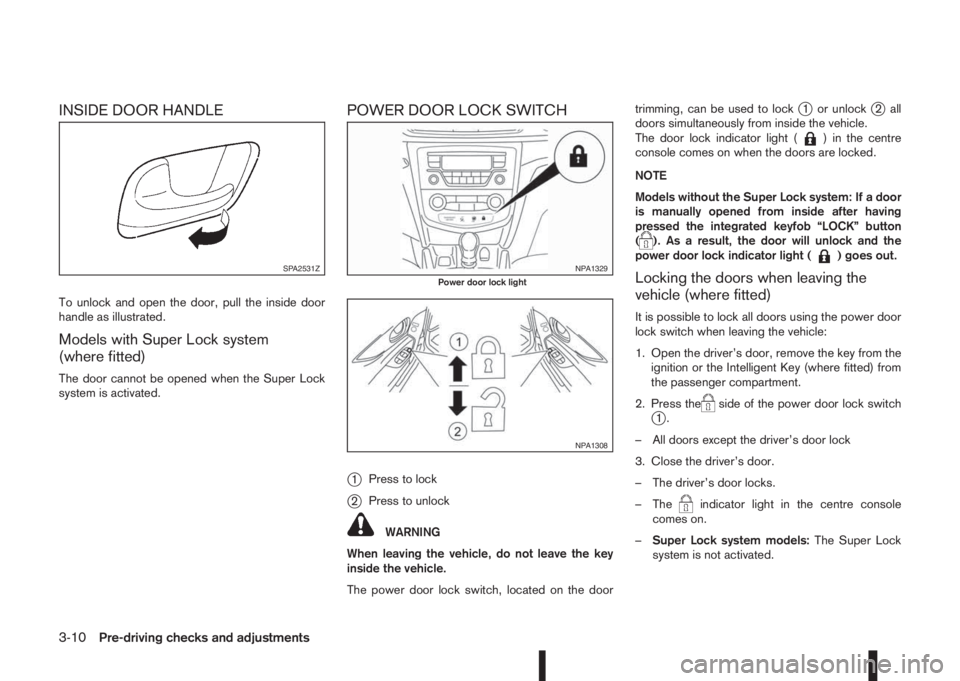
INSIDE DOOR HANDLE
To unlock and open the door, pull the inside door
handle as illustrated.
Models with Super Lock system
(where fitted)
The door cannot be opened when the Super Lock
system is activated.
POWER DOOR LOCK SWITCH
j
1Press to lock
j2Press to unlock
WARNING
When leaving the vehicle, do not leave the key
inside the vehicle.
The power door lock switch, located on the doortrimming, can be used to lock
j1 or unlockj2 all
doors simultaneously from inside the vehicle.
The door lock indicator light (
) in the centre
console comes on when the doors are locked.
NOTE
Models without the Super Lock system: If a door
is manually opened from inside after having
pressed the integrated keyfob “LOCK” button
(
). As a result, the door will unlock and the
power door lock indicator light () goes out.
Locking the doors when leaving the
vehicle (where fitted)
It is possible to lock all doors using the power door
lock switch when leaving the vehicle:
1. Open the driver’s door, remove the key from the
ignition or the Intelligent Key (where fitted) from
the passenger compartment.
2. Press the
side of the power door lock switchj1.
– All doors except the driver’s door lock
3. Close the driver’s door.
– The driver’s door locks.
– The
indicator light in the centre console
comes on.
–Super Lock system models:The Super Lock
system is not activated.
SPA2531ZNPA1329Power door lock light
NPA1308
3-10Pre-driving checks and adjustments