ad blue NISSAN QASHQAI 2016 Owner´s Manual
[x] Cancel search | Manufacturer: NISSAN, Model Year: 2016, Model line: QASHQAI, Model: NISSAN QASHQAI 2016Pages: 338, PDF Size: 4.87 MB
Page 190 of 338
If the battery of the vehicle is discharged, the push-
button ignition switch cannot be moved from the
LOCK position.
OFF position
The ignition switch is in the OFF position when the
engine is turned off using the ignition switch. No
lights will illuminate on the ignition switch.
ACC position
With the vehicle in the P (Park) position, the Intelli-
gent key with you and the ignition placed from ON
to OFF, the radio can still be used for a period of
time, or until the driver’s door is opened.
After a period of time, functions such as radio, navi-
gation, and Bluetooth® Hands-Free Phone System
may be restarted by pressing the “POWER button/
VOLUME control knob” (See “Monitor, climate, au-
dio, phone and voice recognition systems” in this
manual) or the keyfob unlock button up to a total of
30 minutes.
EMERGENCY ENGINE SHUT OFF
To shut off the engine in an emergency situation
while driving, perform the following procedure:
•Rapidly push the push-button ignition switch 3
consecutive times in less than 1.5 seconds, or
•Push and hold the push-button ignition switch
for more than 2 seconds.
STEERING LOCK
The ignition switch is equipped with an anti-theft
steering lock device.
To lock steering wheel
1. Push the ignition switch to the “OFF” position
where the ignition switch position indicator will
not illuminate.
2. Open or close the door. The ignition switch turns
to the “LOCK” position.
3. Turn the steering wheel 1/6 of a turn to the right
or left from the straight up position.
To unlock steering wheel
Push the ignition switch to “ACC”, and the steering
wheel will be automatically unlocked.
CAUTION
•If the battery of the vehicle is discharged, the
push-button ignition switch cannot be
switched from the “LOCK” position.
•If the ignition switch position does not change
from the “LOCK” position, push the ignition
switch again while rotating the steering wheel
slightly to the right and left.
INTELLIGENT KEY BATTERY
DISCHARGE
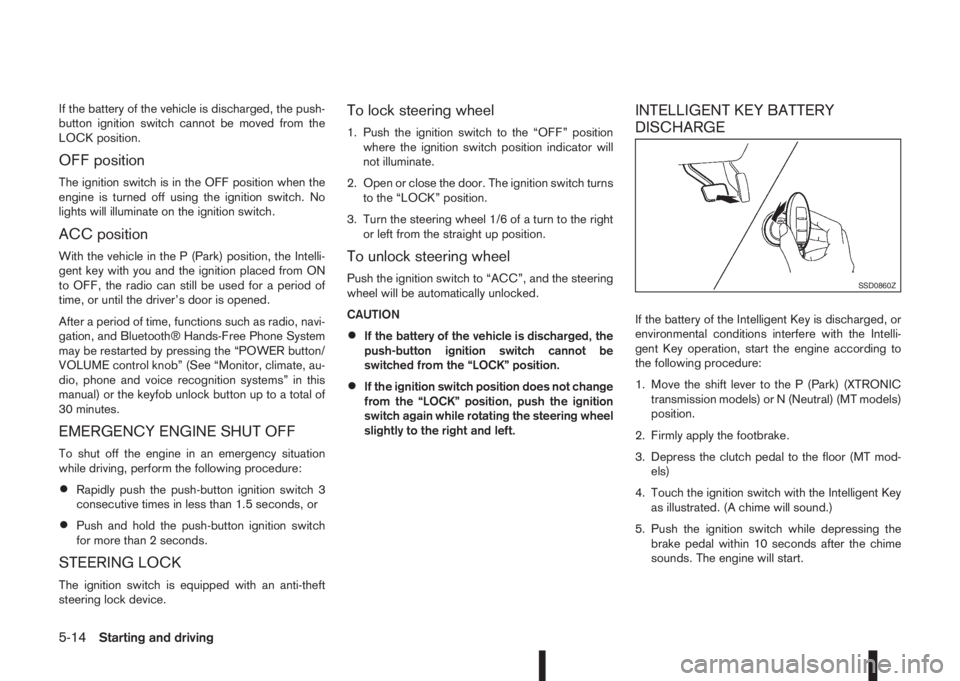
If the battery of the Intelligent Key is discharged, or
environmental conditions interfere with the Intelli-
gent Key operation, start the engine according to
the following procedure:
1. Move the shift lever to the P (Park) (XTRONIC
transmission models) or N (Neutral) (MT models)
position.
2. Firmly apply the footbrake.
3. Depress the clutch pedal to the floor (MT mod-
els)
4. Touch the ignition switch with the Intelligent Key
as illustrated. (A chime will sound.)
5. Push the ignition switch while depressing the
brake pedal within 10 seconds after the chime
sounds. The engine will start.
SSD0860Z
5-14Starting and driving
Page 226 of 338
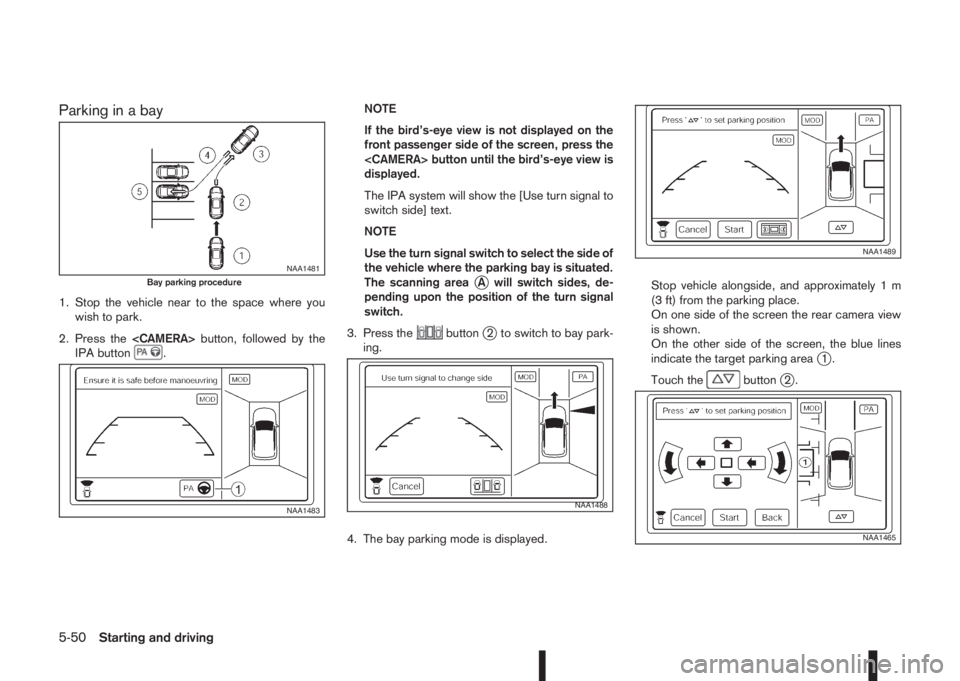
Parking in a bay
1. Stop the vehicle near to the space where you
wish to park.
2. Press the
IPA button
.NOTE
If the bird’s-eye view is not displayed on the
front passenger side of the screen, press the
displayed.
The IPA system will show the [Use turn signal to
switch side] text.
NOTE
Use the turn signal switch to select the side of
the vehicle where the parking bay is situated.
The scanning area
jA will switch sides, de-
pending upon the position of the turn signal
switch.
3. Press the
buttonj2 to switch to bay park-
ing.
4. The bay parking mode is displayed.Stop vehicle alongside, and approximately 1 m
(3 ft) from the parking place.
On one side of the screen the rear camera view
is shown.
On the other side of the screen, the blue lines
indicate the target parking area
j1.
Touch the
buttonj2.
NAA1481Bay parking procedure
NAA1483NAA1488
NAA1489
NAA1465
5-50Starting and driving
Page 227 of 338
![NISSAN QASHQAI 2016 Owner´s Manual Adjust the target parking rectanglej1 (blue) us-
ing the arrow keys on the screen so that the
clearance guidelines do not overlap any
obstacles around the vehicle.
CAUTION
After pressing [Start] the v](/img/5/40324/w960_40324-226.png "NISSAN QASHQAI 2016 Owner´s Manual Adjust the target parking rectanglej1 (blue) us-
ing the arrow keys on the screen so that the
clearance guidelines do not overlap any
obstacles around the vehicle.
CAUTION
After pressing [Start] the v")
Adjust the target parking rectanglej1 (blue) us-
ing the arrow keys on the screen so that the
clearance guidelines do not overlap any
obstacles around the vehicle.
CAUTION
After pressing [Start] the vehicle will park within
the blue area. Make sure this area is free of ob-
stacles.
5. Press [Start].
The vehicle starts the parking procedure. The
IPA operation can be started when the following
conditions are met:
•The vehicle is completely stopped.
•The steering wheel is in the straight-ahead
position.
•The shift lever is in the Drive (D) or a forward
shift position.
NOTE
If the vehicle deviates from the parking rect-
angle while following the parking procedure,
stop and adjust the position.
WARNING
If there is any doubt that the surroundings in the
path of the parking area and/or the parking area
itself are not free from obstacles immediately
stop the vehicle and check.6. Gently place hands on the steering wheel and
slowly move forward the vehicle to the correct
position indicated in green in preparation for re-
versing.
Bring the vehicle to a standstill
The steering wheel will operate itself towards the
reverse starting position rectangle (green).
Depress the brake and stop the vehicle when it
approaches another vehicle or object, or when
the vehicle reaches the reverse starting position.
7. Place the shift lever in the Reverse (R) position
Gently place hands on the steering wheel and
slowly back up to the parking space
Steering will be operated automatically.NOTE
•Only the steering operates automatically.
•Follow the instructions given by the sys-
tem.
•Carefully and slowly accelerate while
checking the surroundings.
•Use of the steering wheel will cancel the
IPA operation.
8. When the vehicle is in the target parking posi-
tion, check, then depress the brake pedal to stop
the vehicle.
When the vehicle reaches the approximate area
of the target parking space, a chime will sound,
“[Park assist finished]” will appear on the centre
display and the IPA operation will automatically
terminate.
Make any final adjustments that may be neces-
sary manually, after confirming the vehicle’s sur-
roundings.
NAA1490
NAA1491
Starting and driving5-51
Page 229 of 338
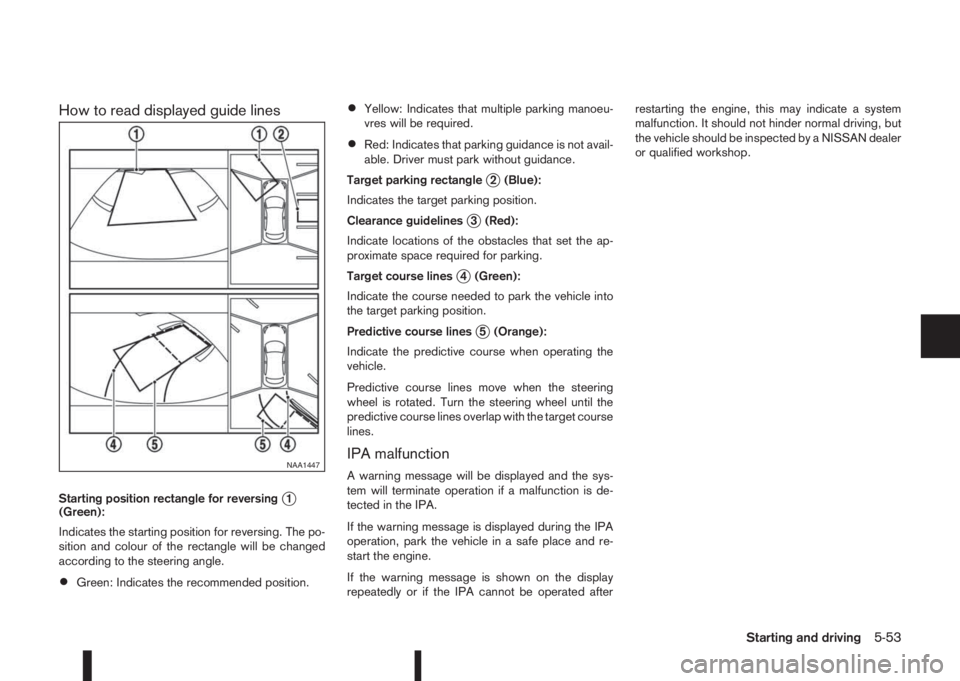
How to read displayed guide lines
Starting position rectangle for reversingj1
(Green):
Indicates the starting position for reversing. The po-
sition and colour of the rectangle will be changed
according to the steering angle.
•Green: Indicates the recommended position.
•Yellow: Indicates that multiple parking manoeu-
vres will be required.
•Red: Indicates that parking guidance is not avail-
able. Driver must park without guidance.
Target parking rectangle
j2 (Blue):
Indicates the target parking position.
Clearance guidelines
j3 (Red):
Indicate locations of the obstacles that set the ap-
proximate space required for parking.
Target course lines
j4 (Green):
Indicate the course needed to park the vehicle into
the target parking position.
Predictive course lines
j5 (Orange):
Indicate the predictive course when operating the
vehicle.
Predictive course lines move when the steering
wheel is rotated. Turn the steering wheel until the
predictive course lines overlap with the target course
lines.
IPA malfunction
A warning message will be displayed and the sys-
tem will terminate operation if a malfunction is de-
tected in the IPA.
If the warning message is displayed during the IPA
operation, park the vehicle in a safe place and re-
start the engine.
If the warning message is shown on the display
repeatedly or if the IPA cannot be operated afterrestarting the engine, this may indicate a system
malfunction. It should not hinder normal driving, but
the vehicle should be inspected by a NISSAN dealer
or qualified workshop.NAA1447
Starting and driving5-53
Page 273 of 338
•If you must run the engine in an enclosed
space such as a garage, be sure there is
proper ventilation for exhaust gases.
•DO NOT GET UNDER A VEHICLE THAT IS
SUPPORTED BY A JACK.
•Keep smoking materials, flame and sparks
away from fuel and battery.
•Never connect or disconnect either the bat-
tery or any transistorised component connec-
tor while the ignition switch is in the ON posi-
tion.
•Never leave the engine or transmission re-
lated component harness connector discon-
nected while the ignition switch is in the ON
position.
•On petrol engine models with the multiport
fuel injection (MFI) system, the fuel filter or
fuel lines should be serviced by a NISSAN
dealer or qualified workshop because the fuel
lines are under high pressure even when the
engine is off.
•Always wear eye protection whenever you
work on your vehicle.
•Failure to follow these or other common sense
guidelines may lead to serious injury or ve-
hicle damage.
NISSAN Blue Citizenship
Improperly disposed engine oil and/or other
vehicle fluids can pollute the environment. Al-
ways conform to local regulations for disposal
of vehicle fluid.
This section gives instructions regarding only those
items which are relatively easy for an owner to per-
form.
You should be aware that incomplete or improper
servicing may result in operating difficulties or ex-
cessive emissions, and could affect your warranty
coverage.If in doubt about any servicing, have it
done by your NISSAN dealer or qualified work-
shop.For an overview of the engine compartment, see
“Engine compartment” in the “0. Illustrated table
of contents” section.
ENGINE COMPARTMENT
Maintenance and do-it-yourself8-5
Page 274 of 338
WARNING
•Never remove the engine coolant reservoir
cap when the engine is hot. Serious burns
could be caused by high pressure fluid es-
caping from the engine coolant reservoir. Wait
until the engine and radiator have cooled
down.
•Engine coolant is poisonous and should be
stored carefully in marked containers out of
the reach of children.
The engine cooling system is filled at the factory
with a high-quality, year-round and extended life en-
gine coolant. The high quality engine coolant con-
tains the specific solutions effective for the anti-cor-
rosion and the anti-freeze function. Therefore, addi-
tional cooling system additives are not necessary.
CAUTION
•Never use any cooling system additives such
as radiator sealer. Additives may clog the
cooling system and cause damage to the en-
gine, transmission and/or cooling system.
•When adding or replacing engine coolant, be
sure to use Genuine NISSAN engine coolant
or equivalent.
•The use of other types of engine coolant may
damage the engine cooling system.
•The engine coolant reservoir tank is equipped
with a pressure cap, use a Genuine NISSAN
cap or its equivalent when replacement is re-
quired.
CHECKING ENGINE COOLANT
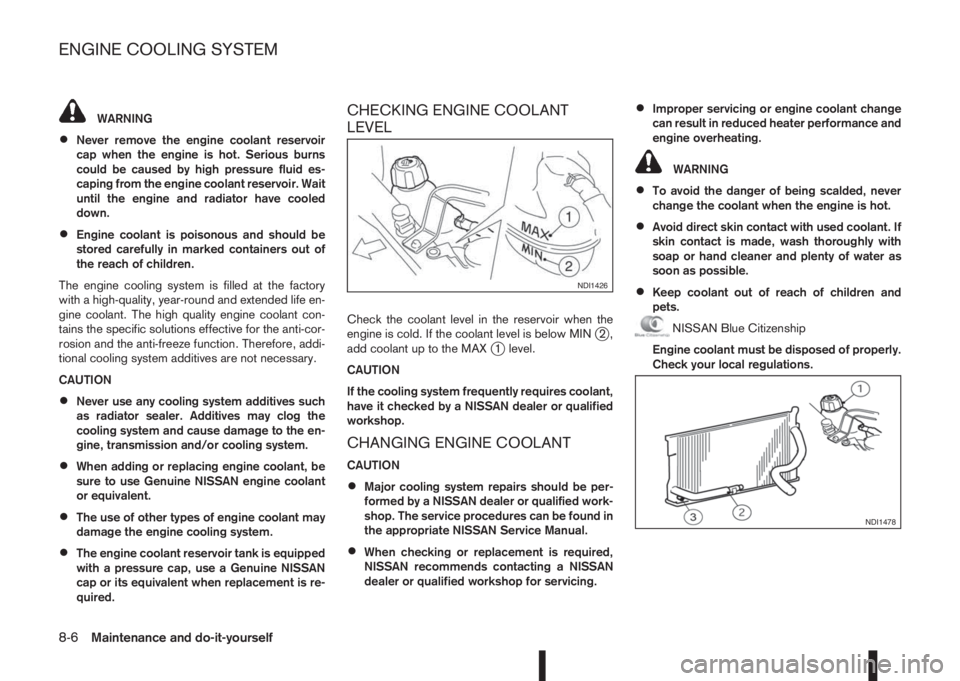
LEVEL
Check the coolant level in the reservoir when the
engine is cold. If the coolant level is below MINj2,
add coolant up to the MAXj1 level.
CAUTION
If the cooling system frequently requires coolant,
have it checked by a NISSAN dealer or qualified
workshop.
CHANGING ENGINE COOLANT
CAUTION
•Major cooling system repairs should be per-
formed by a NISSAN dealer or qualified work-
shop. The service procedures can be found in
the appropriate NISSAN Service Manual.
•When checking or replacement is required,
NISSAN recommends contacting a NISSAN
dealer or qualified workshop for servicing.
•Improper servicing or engine coolant change
can result in reduced heater performance and
engine overheating.
WARNING
•To avoid the danger of being scalded, never
change the coolant when the engine is hot.
•Avoid direct skin contact with used coolant. If
skin contact is made, wash thoroughly with
soap or hand cleaner and plenty of water as
soon as possible.
•Keep coolant out of reach of children and
pets.
NISSAN Blue Citizenship
Engine coolant must be disposed of properly.
Check your local regulations.
NDI1426
NDI1478
ENGINE COOLING SYSTEM
8-6Maintenance and do-it-yourself
Page 277 of 338
5. Open the bonnet. For details, see “Bonnet
release” in the “3. Pre-driving checks and
adjustments” section.
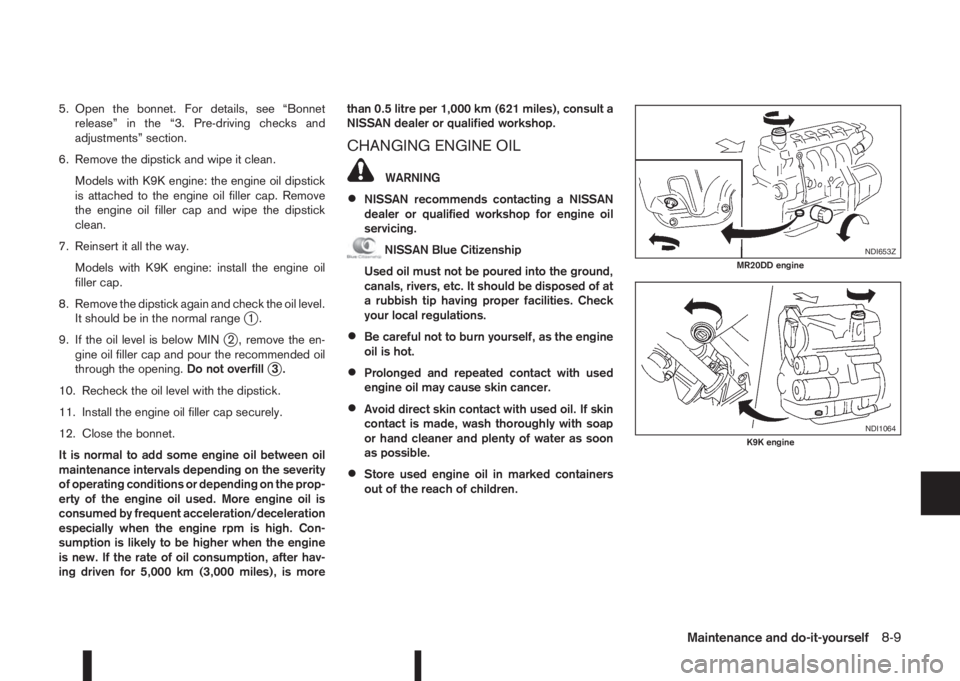
6. Remove the dipstick and wipe it clean.
Models with K9K engine: the engine oil dipstick
is attached to the engine oil filler cap. Remove
the engine oil filler cap and wipe the dipstick
clean.
7. Reinsert it all the way.
Models with K9K engine: install the engine oil
filler cap.
8. Remove the dipstick again and check the oil level.
It should be in the normal range
j1.
9. If the oil level is below MIN
j2 , remove the en-
gine oil filler cap and pour the recommended oil
through the opening.Do not overfill
j3.
10. Recheck the oil level with the dipstick.
11. Install the engine oil filler cap securely.
12. Close the bonnet.
It is normal to add some engine oil between oil
maintenance intervals depending on the severity
of operating conditions or depending on the prop-
erty of the engine oil used. More engine oil is
consumed by frequent acceleration/deceleration
especially when the engine rpm is high. Con-
sumption is likely to be higher when the engine
is new. If the rate of oil consumption, after hav-
ing driven for 5,000 km (3,000 miles), is morethan 0.5 litre per 1,000 km (621 miles), consult a
NISSAN dealer or qualified workshop.
CHANGING ENGINE OIL
WARNING
•NISSAN recommends contacting a NISSAN
dealer or qualified workshop for engine oil
servicing.
NISSAN Blue Citizenship
Used oil must not be poured into the ground,
canals, rivers, etc. It should be disposed of at
a rubbish tip having proper facilities. Check
your local regulations.
•Be careful not to burn yourself, as the engine
oil is hot.
•Prolonged and repeated contact with used
engine oil may cause skin cancer.
•Avoid direct skin contact with used oil. If skin
contact is made, wash thoroughly with soap
or hand cleaner and plenty of water as soon
as possible.
•Store used engine oil in marked containers
out of the reach of children.
NDI653ZMR20DD engine
NDI1064K9K engine
Maintenance and do-it-yourself8-9
Page 278 of 338
1. Park the vehicle on a level surface and apply the
parking brake.
2. Start the engine. If the engine is cold, start and
let the engine idle until the engine temperature
reaches the operational temperature.
3. Turn the engine off and wait at least 10 minutes
to let the engine oil drain back into the oil pan.4. Open the bonnet. For details, see “Bonnet
release” in the “3. Pre-driving checks and
adjustments” section.
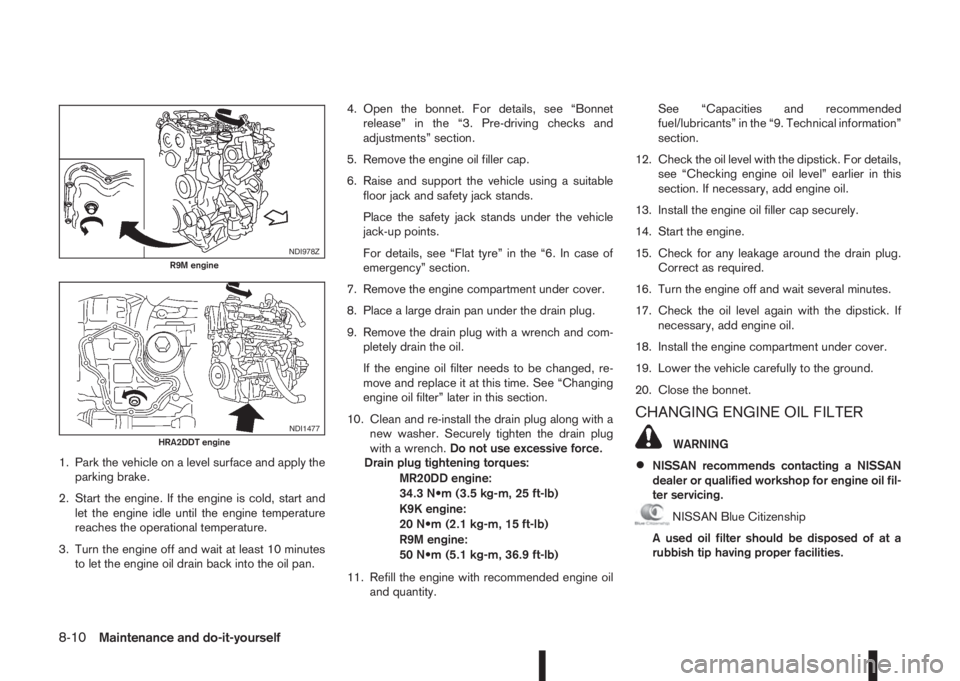
5. Remove the engine oil filler cap.
6. Raise and support the vehicle using a suitable
floor jack and safety jack stands.
Place the safety jack stands under the vehicle
jack-up points.
For details, see “Flat tyre” in the “6. In case of
emergency” section.
7. Remove the engine compartment under cover.
8. Place a large drain pan under the drain plug.
9. Remove the drain plug with a wrench and com-
pletely drain the oil.
If the engine oil filter needs to be changed, re-
move and replace it at this time. See “Changing
engine oil filter” later in this section.
10. Clean and re-install the drain plug along with a
new washer. Securely tighten the drain plug
with a wrench.Do not use excessive force.
Drain plug tightening torques:
MR20DD engine:
34.3 N•m (3.5 kg-m, 25 ft-lb)
K9K engine:
20 N•m (2.1 kg-m, 15 ft-lb)
R9M engine:
50 N•m (5.1 kg-m, 36.9 ft-lb)
11. Refill the engine with recommended engine oil
and quantity.See “Capacities and recommended
fuel/lubricants” in the “9. Technical information”
section.
12. Check the oil level with the dipstick. For details,
see “Checking engine oil level” earlier in this
section. If necessary, add engine oil.
13. Install the engine oil filler cap securely.
14. Start the engine.
15. Check for any leakage around the drain plug.
Correct as required.
16. Turn the engine off and wait several minutes.
17. Check the oil level again with the dipstick. If
necessary, add engine oil.
18. Install the engine compartment under cover.
19. Lower the vehicle carefully to the ground.
20. Close the bonnet.
CHANGING ENGINE OIL FILTER
WARNING
•NISSAN recommends contacting a NISSAN
dealer or qualified workshop for engine oil fil-
ter servicing.
NISSAN Blue Citizenship
A used oil filter should be disposed of at a
rubbish tip having proper facilities.
NDI978ZR9M engine
NDI1477HRA2DDT engine
8-10Maintenance and do-it-yourself
Page 280 of 338
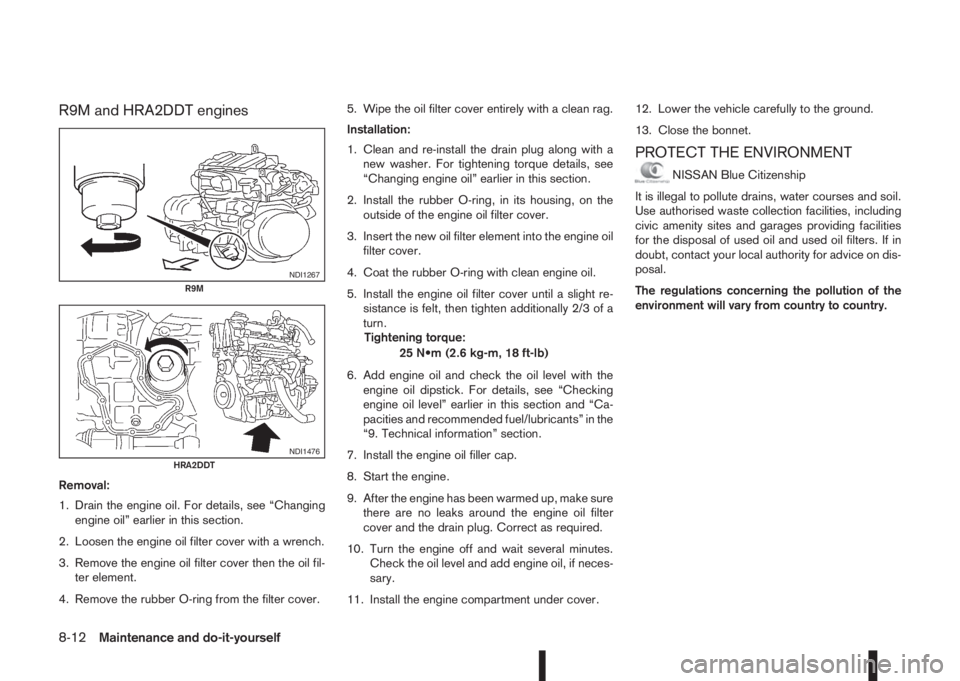
R9M and HRA2DDT engines
Removal:
1. Drain the engine oil. For details, see “Changing
engine oil” earlier in this section.
2. Loosen the engine oil filter cover with a wrench.
3. Remove the engine oil filter cover then the oil fil-
ter element.
4. Remove the rubber O-ring from the filter cover.5. Wipe the oil filter cover entirely with a clean rag.
Installation:
1. Clean and re-install the drain plug along with a
new washer. For tightening torque details, see
“Changing engine oil” earlier in this section.
2. Install the rubber O-ring, in its housing, on the
outside of the engine oil filter cover.
3. Insert the new oil filter element into the engine oil
filter cover.
4. Coat the rubber O-ring with clean engine oil.
5. Install the engine oil filter cover until a slight re-
sistance is felt, then tighten additionally 2/3 of a
turn.
Tightening torque:
25 N•m (2.6 kg-m, 18 ft-lb)
6. Add engine oil and check the oil level with the
engine oil dipstick. For details, see “Checking
engine oil level” earlier in this section and “Ca-
pacities and recommended fuel/lubricants” in the
“9. Technical information” section.
7. Install the engine oil filler cap.
8. Start the engine.
9. After the engine has been warmed up, make sure
there are no leaks around the engine oil filter
cover and the drain plug. Correct as required.
10. Turn the engine off and wait several minutes.
Check the oil level and add engine oil, if neces-
sary.
11. Install the engine compartment under cover.12. Lower the vehicle carefully to the ground.
13. Close the bonnet.
PROTECT THE ENVIRONMENT
NISSAN Blue Citizenship
It is illegal to pollute drains, water courses and soil.
Use authorised waste collection facilities, including
civic amenity sites and garages providing facilities
for the disposal of used oil and used oil filters. If in
doubt, contact your local authority for advice on dis-
posal.
The regulations concerning the pollution of the
environment will vary from country to country.
NDI1267R9M
NDI1476HRA2DDT
8-12Maintenance and do-it-yourself
Page 281 of 338
DRAINING WATER
Drain the water from the fuel filter. Contact a
NISSAN dealer or qualified workshop.:
BLEEDING THE FUEL SYSTEM
There is no need to perform any special operation to
bleed air from the system.
NISSAN Blue Citizenship
Fuel bled from the fuel filter must not be poured into
the ground, canals, rivers, etc. It should be disposed
of at a rubbish tip having proper facilities. Check
your local regulations.When checking or replacement is required, NISSAN
recommends contacting a NISSAN dealer or quali-
fied workshop for servicing.
CAUTION
•Use only Genuine NISSAN CVT Fluid NS3*. Do
not mix with other fluids.
•Using transmission fluid other than Genuine
NISSAN CVT Fluid NS3* will damage the
XTRONIC transmission, which is not covered
by the warranty.
*: For details, contact a NISSAN dealer or quali-
fied workshop.
CHECKING PARKING BRAKE
Periodically check the holding ability of the parking
brake by parking on a steep hill and restraining the
vehicle by using only the parking brake. If it does not
hold satisfactorily, see a NISSAN dealer or qualified
workshop.
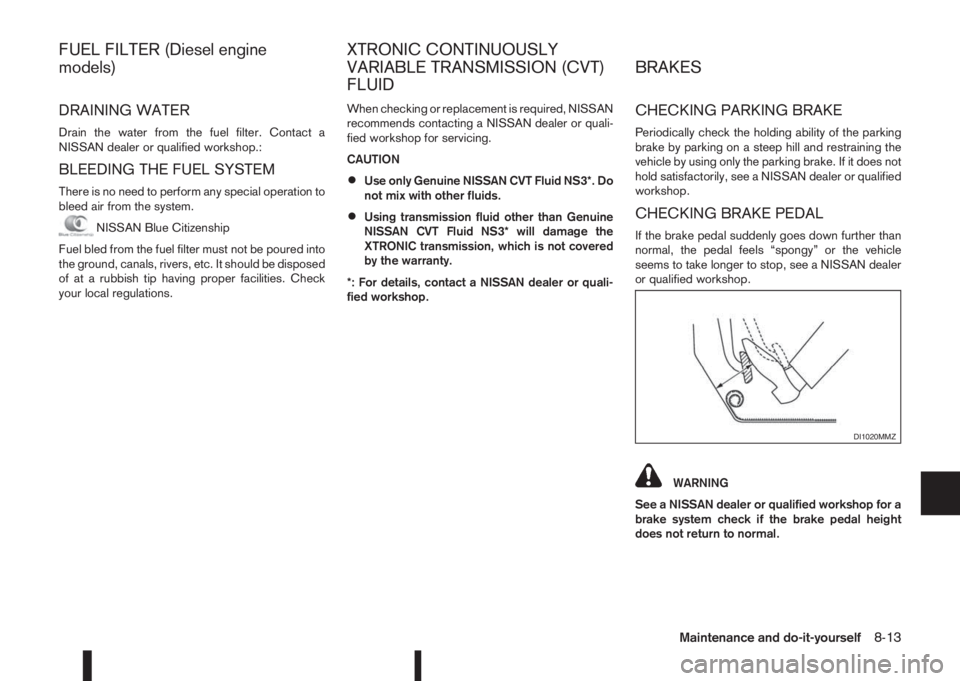
CHECKING BRAKE PEDAL
If the brake pedal suddenly goes down further than
normal, the pedal feels “spongy” or the vehicle
seems to take longer to stop, see a NISSAN dealer
or qualified workshop.
WARNING
See a NISSAN dealer or qualified workshop for a
brake system check if the brake pedal height
does not return to normal.
DI1020MMZ
FUEL FILTER (Diesel engine
models)XTRONIC CONTINUOUSLY
VARIABLE TRANSMISSION (CVT)
FLUIDBRAKES
Maintenance and do-it-yourself8-13