key NISSAN QASHQAI 2016 Owner´s Manual
[x] Cancel search | Manufacturer: NISSAN, Model Year: 2016, Model line: QASHQAI, Model: NISSAN QASHQAI 2016Pages: 338, PDF Size: 4.87 MB
Page 221 of 338
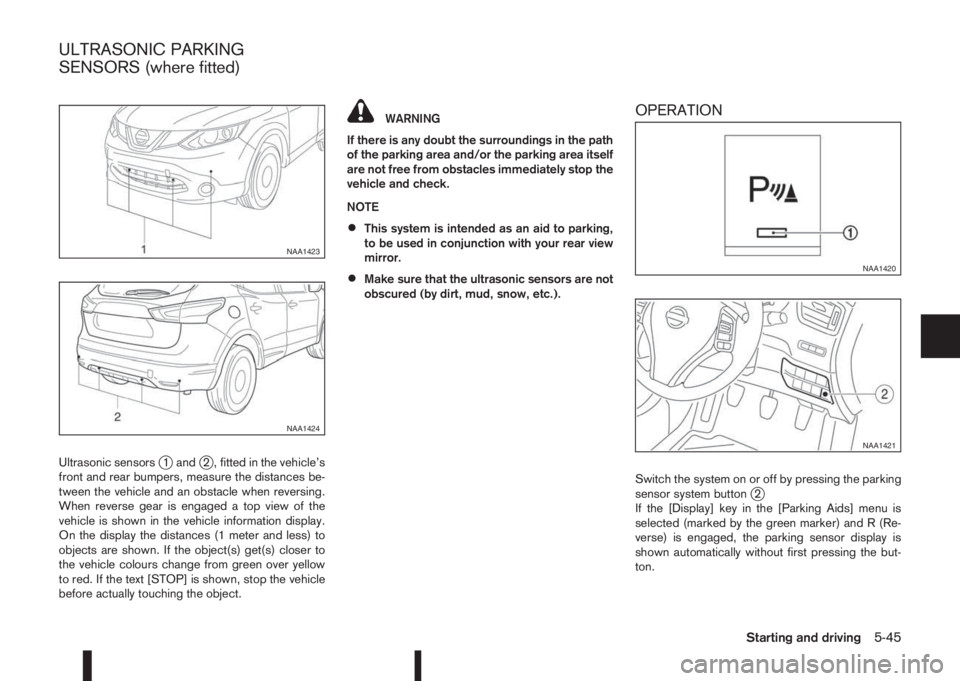
Ultrasonic sensorsj1 andj2 , fitted in the vehicle’s
front and rear bumpers, measure the distances be-
tween the vehicle and an obstacle when reversing.
When reverse gear is engaged a top view of the
vehicle is shown in the vehicle information display.
On the display the distances (1 meter and less) to
objects are shown. If the object(s) get(s) closer to
the vehicle colours change from green over yellow
to red. If the text [STOP] is shown, stop the vehicle
before actually touching the object.
WARNING
If there is any doubt the surroundings in the path
of the parking area and/or the parking area itself
are not free from obstacles immediately stop the
vehicle and check.
NOTE
•This system is intended as an aid to parking,
to be used in conjunction with your rear view
mirror.
•Make sure that the ultrasonic sensors are not
obscured (by dirt, mud, snow, etc.).
OPERATION
Switch the system on or off by pressing the parking
sensor system buttonj2
If the [Display] key in the [Parking Aids] menu is
selected (marked by the green marker) and R (Re-
verse) is engaged, the parking sensor display is
shown automatically without first pressing the but-
ton.
NAA1423
NAA1424
NAA1420
NAA1421
ULTRASONIC PARKING
SENSORS (where fitted)
Starting and driving5-45
Page 227 of 338
![NISSAN QASHQAI 2016 Owner´s Manual Adjust the target parking rectanglej1 (blue) us-
ing the arrow keys on the screen so that the
clearance guidelines do not overlap any
obstacles around the vehicle.
CAUTION
After pressing [Start] the v](/img/5/40324/w960_40324-226.png "NISSAN QASHQAI 2016 Owner´s Manual Adjust the target parking rectanglej1 (blue) us-
ing the arrow keys on the screen so that the
clearance guidelines do not overlap any
obstacles around the vehicle.
CAUTION
After pressing [Start] the v")
Adjust the target parking rectanglej1 (blue) us-
ing the arrow keys on the screen so that the
clearance guidelines do not overlap any
obstacles around the vehicle.
CAUTION
After pressing [Start] the vehicle will park within
the blue area. Make sure this area is free of ob-
stacles.
5. Press [Start].
The vehicle starts the parking procedure. The
IPA operation can be started when the following
conditions are met:
•The vehicle is completely stopped.
•The steering wheel is in the straight-ahead
position.
•The shift lever is in the Drive (D) or a forward
shift position.
NOTE
If the vehicle deviates from the parking rect-
angle while following the parking procedure,
stop and adjust the position.
WARNING
If there is any doubt that the surroundings in the
path of the parking area and/or the parking area
itself are not free from obstacles immediately
stop the vehicle and check.6. Gently place hands on the steering wheel and
slowly move forward the vehicle to the correct
position indicated in green in preparation for re-
versing.
Bring the vehicle to a standstill
The steering wheel will operate itself towards the
reverse starting position rectangle (green).
Depress the brake and stop the vehicle when it
approaches another vehicle or object, or when
the vehicle reaches the reverse starting position.
7. Place the shift lever in the Reverse (R) position
Gently place hands on the steering wheel and
slowly back up to the parking space
Steering will be operated automatically.NOTE
•Only the steering operates automatically.
•Follow the instructions given by the sys-
tem.
•Carefully and slowly accelerate while
checking the surroundings.
•Use of the steering wheel will cancel the
IPA operation.
8. When the vehicle is in the target parking posi-
tion, check, then depress the brake pedal to stop
the vehicle.
When the vehicle reaches the approximate area
of the target parking space, a chime will sound,
“[Park assist finished]” will appear on the centre
display and the IPA operation will automatically
terminate.
Make any final adjustments that may be neces-
sary manually, after confirming the vehicle’s sur-
roundings.
NAA1490
NAA1491
Starting and driving5-51
Page 233 of 338
When leaving your vehicle unoccupied:
•Always remove the ignition key and take it with
you – even in your own garage.
•Always remove the ignition key or Intelligent Key
(where fitted) and take it with you – even in your
own garage.
•Close all windows completely and lock all doors.
•Always park your vehicle where it can be seen.
At night, park in a well lit area.
•If the vehicle is equipped with an alarm or immo-
bilization device, use it – even for short periods.
•Do not leave children and pets in the vehicle
unattended.
•Do not leave valuables on view to tempt a thief.
Always take your valuables with you. If you must
leave something in your vehicle, lock it in the lug-
gage compartment or hide it out of sight.
•Do not leave the vehicle documents in your ve-
hicle. In the unfortunate event of your vehicle
being stolen, the documents will only help a thief
to sell the vehicle.
•Do not leave articles on a roof rack as they are
particularly vulnerable. If possible, remove them
from the rack and lock them inside the vehicle.
•Do not leave the spare key in the vehicle – keep
it in a safe place at home.
•Do not leave the spare key or Intelligent Key in
the vehicle – keep it in a safe place at home.
•Do not leave a note of your vehicle’s key number
in the vehicle. A thief may break into the vehicle,
note the key number and return with a new key
and drive the vehicle.WARNING
•If the engine is not running or is turned off
while driving, the power assistance for the
steering will not work. The steering will be
harder to operate.
•When the electric power steering warning light
illuminates with the engine running, the power
assistance for the steering will cease opera-
tion. You will still have control of the vehicle
but the steering will be harder to operate.
The electric power steering system is designed to
provide power assistance while driving to allow you
to operate the steering wheel with light force.
The steering effort can be set to [Normal] or [Sport]
in the vehicle information display under the heading
[Driver assistance]. (See “[Driver assistance]” in the
“2. Instruments and controls” section.)
NOTE
When the steering wheel is operated repeatedly
or continuously while parking or driving at a very
low speed, the power assistance for the steering
wheel will be reduced. This is to prevent over-
heating of the electric power steering system and
protect it from becoming damaged. While the
power assistance is reduced, steering wheel op-
eration will become heavy. When the tempera-
ture of the electric power steering system de-
creases, the power assistance level will return to
normal. Avoid repeating such steering wheel op-
erations that could cause the electric power
steering system to overheat.
VEHICLE SECURITY ELECTRIC POWER STEERING
SYSTEM
Starting and driving5-57
Page 249 of 338
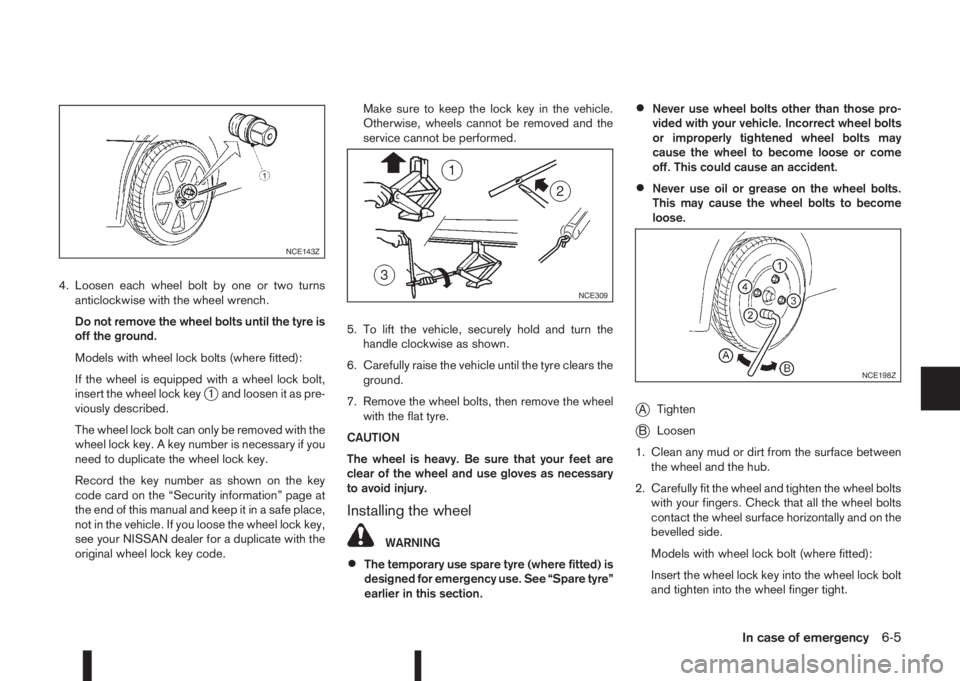
4. Loosen each wheel bolt by one or two turns
anticlockwise with the wheel wrench.
Do not remove the wheel bolts until the tyre is
off the ground.
Models with wheel lock bolts (where fitted):
If the wheel is equipped with a wheel lock bolt,
insert the wheel lock key
j1 and loosen it as pre-
viously described.
The wheel lock bolt can only be removed with the
wheel lock key. A key number is necessary if you
need to duplicate the wheel lock key.
Record the key number as shown on the key
code card on the “Security information” page at
the end of this manual and keep it in a safe place,
not in the vehicle. If you loose the wheel lock key,
see your NISSAN dealer for a duplicate with the
original wheel lock key code.Make sure to keep the lock key in the vehicle.
Otherwise, wheels cannot be removed and the
service cannot be performed.
5. To lift the vehicle, securely hold and turn the
handle clockwise as shown.
6. Carefully raise the vehicle until the tyre clears the
ground.
7. Remove the wheel bolts, then remove the wheel
with the flat tyre.
CAUTION
The wheel is heavy. Be sure that your feet are
clear of the wheel and use gloves as necessary
to avoid injury.
Installing the wheel
WARNING
•The temporary use spare tyre (where fitted) is
designed for emergency use. See “Spare tyre”
earlier in this section.
•Never use wheel bolts other than those pro-
vided with your vehicle. Incorrect wheel bolts
or improperly tightened wheel bolts may
cause the wheel to become loose or come
off. This could cause an accident.
•Never use oil or grease on the wheel bolts.
This may cause the wheel bolts to become
loose.
jATighten
jBLoosen
1. Clean any mud or dirt from the surface between
the wheel and the hub.
2. Carefully fit the wheel and tighten the wheel bolts
with your fingers. Check that all the wheel bolts
contact the wheel surface horizontally and on the
bevelled side.
Models with wheel lock bolt (where fitted):
Insert the wheel lock key into the wheel lock bolt
and tighten into the wheel finger tight.
NCE143Z
NCE309
NCE198Z
In case of emergency6-5
Page 250 of 338
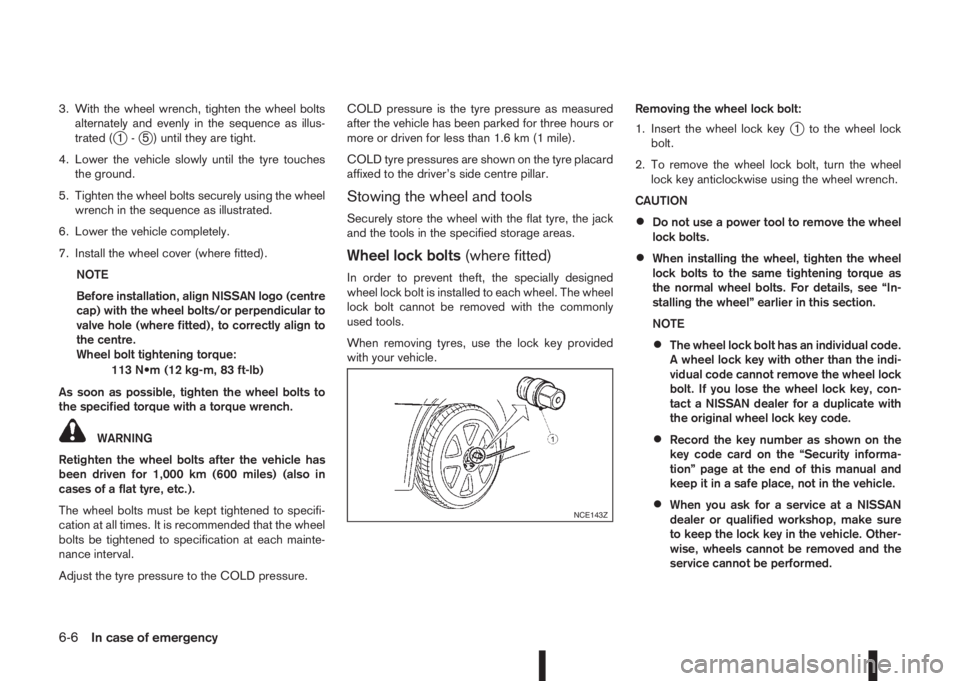
3. With the wheel wrench, tighten the wheel bolts
alternately and evenly in the sequence as illus-
trated (
j1-j5 ) until they are tight.
4. Lower the vehicle slowly until the tyre touches
the ground.
5. Tighten the wheel bolts securely using the wheel
wrench in the sequence as illustrated.
6. Lower the vehicle completely.
7. Install the wheel cover (where fitted).
NOTE
Before installation, align NISSAN logo (centre
cap) with the wheel bolts/or perpendicular to
valve hole (where fitted), to correctly align to
the centre.
Wheel bolt tightening torque:
113 N•m (12 kg-m, 83 ft-lb)
As soon as possible, tighten the wheel bolts to
the specified torque with a torque wrench.
WARNING
Retighten the wheel bolts after the vehicle has
been driven for 1,000 km (600 miles) (also in
cases of a flat tyre, etc.).
The wheel bolts must be kept tightened to specifi-
cation at all times. It is recommended that the wheel
bolts be tightened to specification at each mainte-
nance interval.
Adjust the tyre pressure to the COLD pressure.COLD pressure is the tyre pressure as measured
after the vehicle has been parked for three hours or
more or driven for less than 1.6 km (1 mile).
COLD tyre pressures are shown on the tyre placard
affixed to the driver’s side centre pillar.
Stowing the wheel and tools
Securely store the wheel with the flat tyre, the jack
and the tools in the specified storage areas.
Wheel lock bolts(where fitted)
In order to prevent theft, the specially designed
wheel lock bolt is installed to each wheel. The wheel
lock bolt cannot be removed with the commonly
used tools.
When removing tyres, use the lock key provided
with your vehicle.Removing the wheel lock bolt:
1. Insert the wheel lock key
j1 to the wheel lock
bolt.
2. To remove the wheel lock bolt, turn the wheel
lock key anticlockwise using the wheel wrench.
CAUTION
•Do not use a power tool to remove the wheel
lock bolts.
•When installing the wheel, tighten the wheel
lock bolts to the same tightening torque as
the normal wheel bolts. For details, see “In-
stalling the wheel” earlier in this section.
NOTE
•The wheel lock bolt has an individual code.
A wheel lock key with other than the indi-
vidual code cannot remove the wheel lock
bolt. If you lose the wheel lock key, con-
tact a NISSAN dealer for a duplicate with
the original wheel lock key code.
•Record the key number as shown on the
key code card on the “Security informa-
tion” page at the end of this manual and
keep it in a safe place, not in the vehicle.
•When you ask for a service at a NISSAN
dealer or qualified workshop, make sure
to keep the lock key in the vehicle. Other-
wise, wheels cannot be removed and the
service cannot be performed.NCE143Z
6-6In case of emergency
Page 268 of 338
8Maintenance and do-it-yourselfMaintenance and do-it-yourself
Maintenance requirements ....................................... 8-2
Scheduled maintenance...................................... 8-2
General maintenance .......................................... 8-2
Where to go for service ...................................... 8-2
General maintenance ............................................... 8-2
Explanation of general maintenance items ........... 8-2
Maintenance precautions ......................................... 8-4
Engine compartment ................................................ 8-5
Engine cooling system ............................................. 8-6
Checking engine coolant level............................. 8-6
Changing engine coolant .................................... 8-6
Engine oil................................................................. 8-8
Checking engine oil level .................................... 8-8
Changing engine oil ............................................ 8-9
Changing engine oil filter .................................... 8-10
Protect the environment ...................................... 8-12
Fuel filter (Diesel engine models) ............................. 8-13
Draining water .................................................... 8-13
Bleeding the fuel system ..................................... 8-13
XTRONIC Continuously variable transmission
(CVT) fluid ............................................................... 8-13
Brakes ..................................................................... 8-13
Checking parking brake ...................................... 8-13
Checking brake pedal......................................... 8-13
Brake booster ..................................................... 8-14
Brake and clutch fluid .............................................. 8-14
Window washer fluid/headlight cleaner fluid
(where fitted) ........................................................... 8-15
Battery..................................................................... 8-16
Vehicle battery .................................................... 8-16Jump-starting ...................................................... 8-18
Integrated keyfob/Intelligent Key battery
replacement........................................................ 8-18
Drive belts ............................................................... 8-20
Spark plugs (Petrol engine models).......................... 8-21
Air duct removal....................................................... 8-21
Air cleaner filter........................................................ 8-23
Viscous paper type ............................................. 8-23
Dry paper type (where fitted) .............................. 8-23
Wiper blades ........................................................... 8-24
Cleaning ............................................................. 8-24
Front window wiper replacement ........................ 8-24
Back door window wiper replacement ................ 8-24
Windscreen washer nozzle ................................. 8-25
Fuses ...................................................................... 8-25
Passenger compartment ..................................... 8-25
Engine compartment ........................................... 8-26
Lights ...................................................................... 8-27
Headlights .......................................................... 8-28
Exterior lights ...................................................... 8-29
Interior lights....................................................... 8-29
Light locations .................................................... 8-30
Wheels and tyres ..................................................... 8-33
Tyre inflation pressure......................................... 8-33
Types of tyres ..................................................... 8-33
Snow chains....................................................... 8-34
Tyre rotation ....................................................... 8-34
Tyre wear and damage ....................................... 8-35
Tyre age ............................................................. 8-35
Changing tyres and wheels................................. 8-35
Page 286 of 338
JUMP-STARTING
If jump-starting is necessary, see “Jump-starting” in
the “6. In case of emergency” section. If the engine
does not start by jump starting, the battery may have
to be replaced. Contact a NISSAN dealer or quali-
fied workshop.
INTEGRATED KEYFOB/INTELLIGENT
KEY BATTERY REPLACEMENT
CAUTION
•Be careful not to touch a circuit board or a
battery terminal.
NISSAN Blue Citizenship
An improperly disposed battery can harm the
environment. Always conform to local regula-
tions for battery disposal.
•The Integrated keyfob/Intelligent Key is wa-
ter-resistant; however, if it does get wet, im-
mediately wipe it until it gets completely dry.
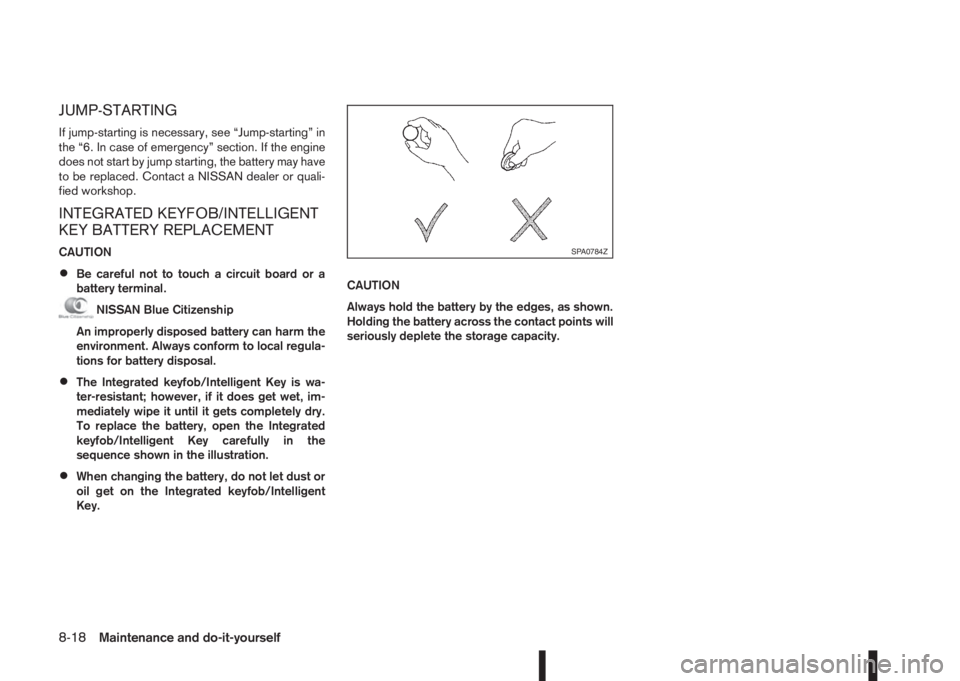
To replace the battery, open the Integrated
keyfob/Intelligent Key carefully in the
sequence shown in the illustration.
•When changing the battery, do not let dust or
oil get on the Integrated keyfob/Intelligent
Key.CAUTION
Always hold the battery by the edges, as shown.
Holding the battery across the contact points will
seriously deplete the storage capacity.
SPA0784Z
8-18Maintenance and do-it-yourself
Page 287 of 338
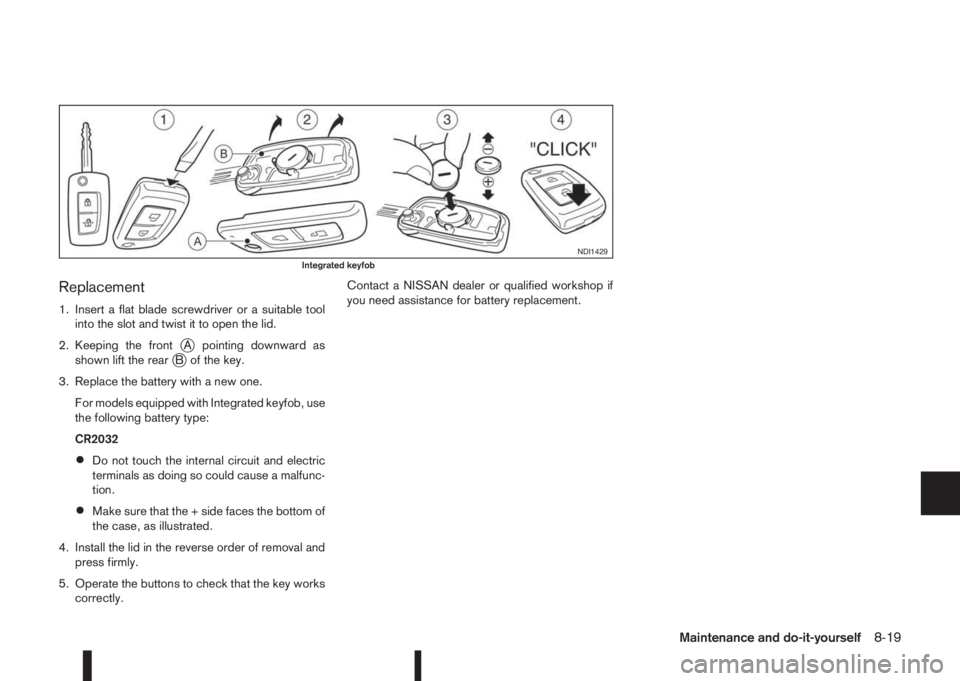
Replacement
1. Insert a flat blade screwdriver or a suitable tool
into the slot and twist it to open the lid.
2. Keeping the front
jA pointing downward as
shown lift the rearjB of the key.
3. Replace the battery with a new one.
For models equipped with Integrated keyfob, use
the following battery type:
CR2032
•Do not touch the internal circuit and electric
terminals as doing so could cause a malfunc-
tion.
•Make sure that the + side faces the bottom of
the case, as illustrated.
4. Install the lid in the reverse order of removal and
press firmly.
5. Operate the buttons to check that the key works
correctly.Contact a NISSAN dealer or qualified workshop if
you need assistance for battery replacement.
NDI1429Integrated keyfob
Maintenance and do-it-yourself8-19
Page 288 of 338
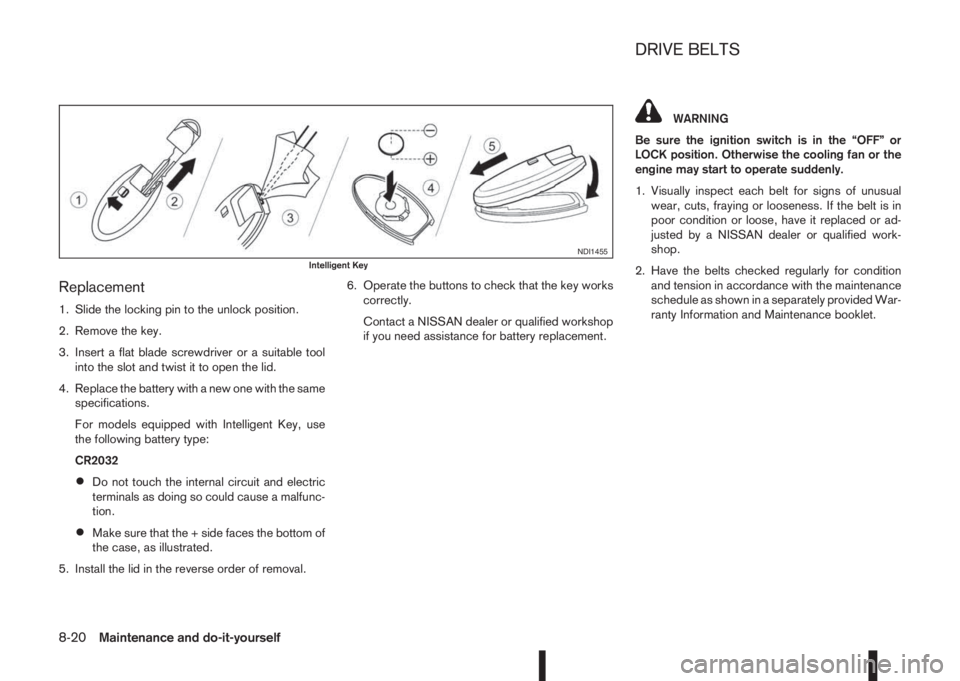
Replacement
1. Slide the locking pin to the unlock position.
2. Remove the key.
3. Insert a flat blade screwdriver or a suitable tool
into the slot and twist it to open the lid.
4. Replace the battery with a new one with the same
specifications.
For models equipped with Intelligent Key, use
the following battery type:
CR2032
•Do not touch the internal circuit and electric
terminals as doing so could cause a malfunc-
tion.
•Make sure that the + side faces the bottom of
the case, as illustrated.
5. Install the lid in the reverse order of removal.6. Operate the buttons to check that the key works
correctly.
Contact a NISSAN dealer or qualified workshop
if you need assistance for battery replacement.
WARNING
Be sure the ignition switch is in the “OFF” or
LOCK position. Otherwise the cooling fan or the
engine may start to operate suddenly.
1. Visually inspect each belt for signs of unusual
wear, cuts, fraying or looseness. If the belt is in
poor condition or loose, have it replaced or ad-
justed by a NISSAN dealer or qualified work-
shop.
2. Have the belts checked regularly for condition
and tension in accordance with the maintenance
schedule as shown in a separately provided War-
ranty Information and Maintenance booklet.
NDI1455Intelligent Key
DRIVE BELTS
8-20Maintenance and do-it-yourself
Page 305 of 338
9Technical informationTechnical information
Capacities and recommended fuel/lubricants ........... 9-2
Fuel information .................................................. 9-4
Recommended SAE viscosity number ................. 9-4
Engine ..................................................................... 9-5
Wheels and Tyres .................................................... 9-5
Dimensions .............................................................. 9-6
When travelling or transferring your registration to
another country........................................................ 9-6
Vehicle identification ................................................ 9-6
Vehicle identification plate ................................... 9-6
Vehicle identification number (VIN) (chassis
number).............................................................. 9-7Engine serial number .......................................... 9-7
Tyre placard ....................................................... 9-8
Air conditioner specification label (where
fitted).................................................................. 9-8
Approval numbers.................................................... 9-8
NISSAN Anti-Theft System (NATS), Intelligent
or remote keyless system.................................... 9-8
Tyre Pressure Monitoring System (TPMS)
(Transmitter) ....................................................... 9-9