display NISSAN QASHQAI 2017 Owner´s Manual
[x] Cancel search | Manufacturer: NISSAN, Model Year: 2017, Model line: QASHQAI, Model: NISSAN QASHQAI 2017Pages: 508, PDF Size: 2.68 MB
Page 316 of 508
JVS1083X
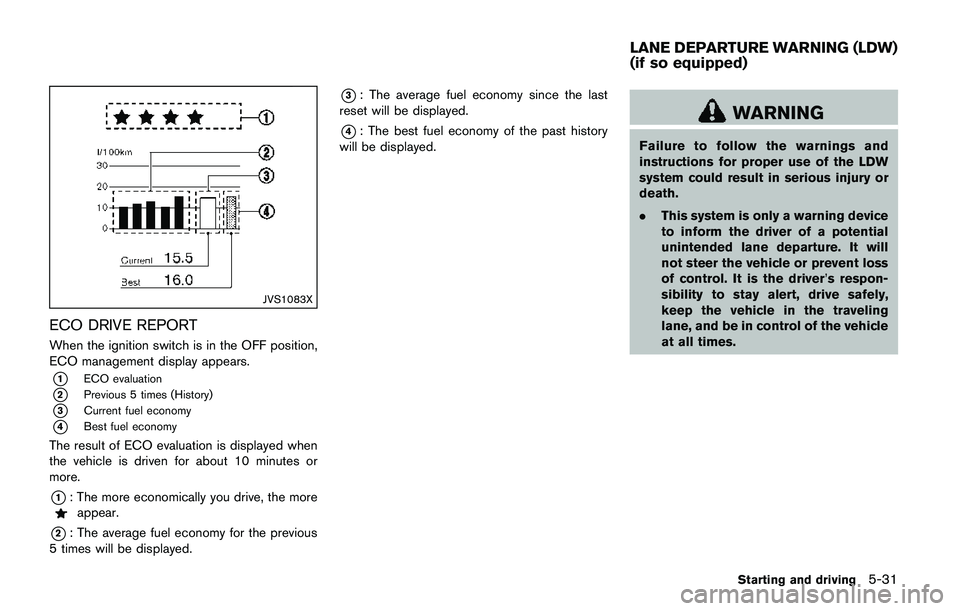
ECO DRIVE REPORT
When the ignition switch is in the OFF position,
ECO management display appears.
*1ECO evaluation
*2Previous 5 times (History)
*3Current fuel economy
*4Best fuel economy
The result of ECO evaluation is displayed when
the vehicle is driven for about 10 minutes or
more.
*1: The more economically you drive, the moreappear.
*2: The average fuel economy for the previous
5 times will be displayed.
*3: The average fuel economy since the last
reset will be displayed.
*4: The best fuel economy of the past history
will be displayed.WARNING
Failure to follow the warnings and
instructions for proper use of the LDW
system could result in serious injury or
death.
.This system is only a warning device
to inform the driver of a potential
unintended lane departure. It will
not steer the vehicle or prevent loss
of control. It is the driver’s respon-
sibility to stay alert, drive safely,
keep the vehicle in the traveling
lane, and be in control of the vehicle
at all times.
Starting and driving5-31
LANE DEPARTURE WARNING (LDW)
(if so equipped)
Page 317 of 508
5-32Starting and driving
JVS1079X
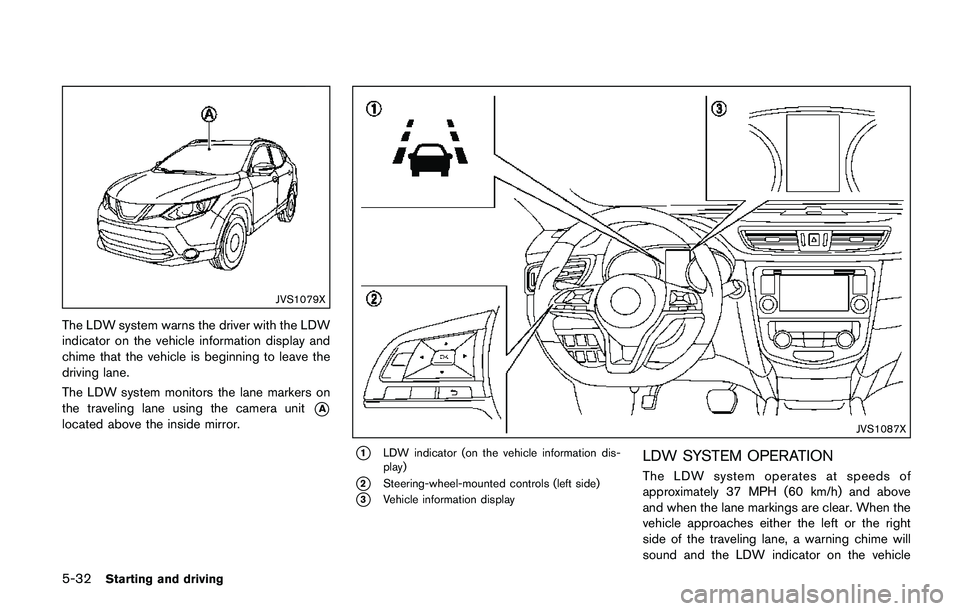
The LDW system warns the driver with the LDW
indicator on the vehicle information display and
chime that the vehicle is beginning to leave the
driving lane.
The LDW system monitors the lane markers on
the traveling lane using the camera unit
*A
located above the inside mirror.JVS1087X
*1LDW indicator (on the vehicle information dis-
play)
*2Steering-wheel-mounted controls (left side)
*3Vehicle information display
LDW SYSTEM OPERATION
The LDW system operates at speeds of
approximately 37 MPH (60 km/h) and above
and when the lane markings are clear. When the
vehicle approaches either the left or the right
side of the traveling lane, a warning chime will
sound and the LDW indicator on the vehicle
Page 318 of 508

information display will blink to alert the driver.
The warning function will stop when the vehicle
returns inside of the lane markers.
JVS1088X
*1Vehicle information display
*2Steering-wheel-mounted controls (left side)
HOW TO ENABLE/DISABLE THE LDW
SYSTEM
Perform the following steps to enable or disable
the LDW system.1. Press the
button until “Settings”
displays in the vehicle information display
and then press “OK” button. Use the
button to select “Driver Assistance”. Then
press the “OK” button.
2. Select “Driving Aids” and press the “OK”
button.
Starting and driving5-33
Page 320 of 508
detection range.
— When rain, snow, dirt or object
adheres to the windshield in
front of the lane camera unit.
— When the headlights are not
bright due to dirt on the lens or
if the aiming is not adjusted
properly.
— When strong light enters the
lane camera unit. (For example,
the light directly shines on the
front of the vehicle at sunrise or
sunset.)
— When a sudden change in
brightness occurs. (For example,
when the vehicle enters or exits
a tunnel or under a bridge.)
SYSTEM TEMPORARILY UNAVAIL-
ABLE
Condition A:
If the vehicle is parked in direct sunlight under
high temperature conditions (over approximately
1048F (408C)) and then started, the LDW
system may be deactivated automatically, the
LDW indicator will flash and the following
message will appear in the vehicle informationdisplay. - “Unavailable: High Cabin Tempera-
ture”
When the interior temperature is reduced, the
LDW system will resume operating automatically
and the LDW indicator will stop flashing.
Condition B:
The warning function of the LDW system is not
designed to work under the following condi-
tions:
.When you operate the lane change signal
and change traveling lanes in the direction of
the signal. (The LDW system will become
operable again approximately 2 seconds
after the lane change signal is turned off.)
.When the vehicle speed lowers to less than
approximately 37 MPH (60 km/h) .
Action to take:
After the above conditions have finished and the
necessary operating conditions are satisfied, the
LDW system will resume.SYSTEM MALFUNCTION
If the LDW system malfunctions, it will cancel
automatically and “Malfunction” will appear in
the vehicle information display. If “Malfunction”
appears in the vehicle information display, pull
off the road to a safe location and stop the
vehicle. Place the ignition switch in the OFF
position and restart the engine. If “Malfunction”continues to appear in the vehicle information
display, have the system checked. It is recom-
mended that you visit a NISSAN dealer for this
service.
Starting and driving5-35
Page 322 of 508
JVS1079X
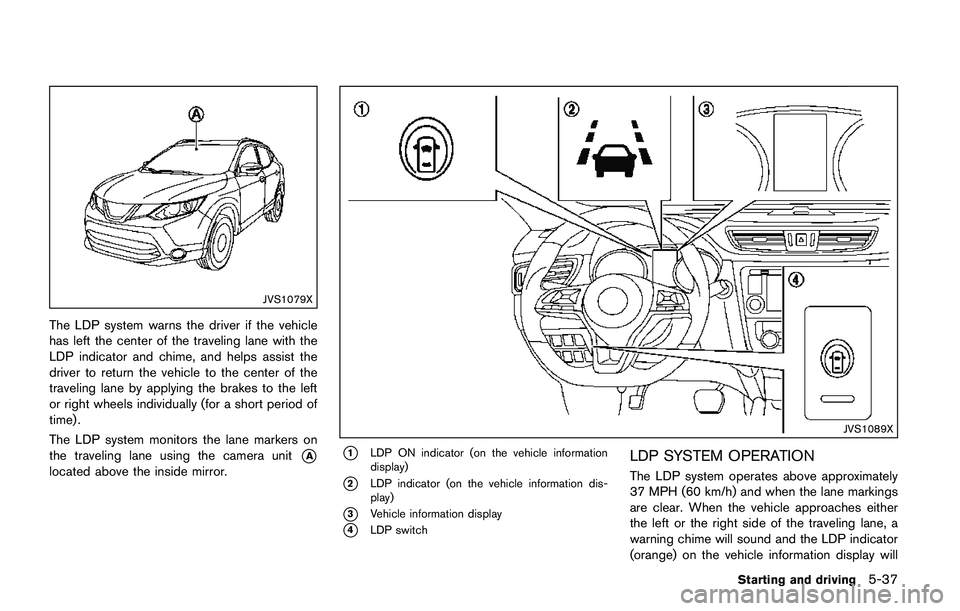
The LDP system warns the driver if the vehicle
has left the center of the traveling lane with the
LDP indicator and chime, and helps assist the
driver to return the vehicle to the center of the
traveling lane by applying the brakes to the left
or right wheels individually (for a short period of
time) .
The LDP system monitors the lane markers on
the traveling lane using the camera unit
*A
located above the inside mirror.
JVS1089X
*1LDP ON indicator (on the vehicle information
display)
*2LDP indicator (on the vehicle information dis-
play)
*3Vehicle information display
*4LDP switch
LDP SYSTEM OPERATION
The LDP system operates above approximately
37 MPH (60 km/h) and when the lane markings
are clear. When the vehicle approaches either
the left or the right side of the traveling lane, a
warning chime will sound and the LDP indicator
(orange) on the vehicle information display will
Starting and driving5-37
Page 323 of 508
5-38Starting and driving
blink to alert the driver. Then, the LDP system
will automatically apply the brakes for a short
period of time to help assist the driver to return
the vehicle to the center of the traveling lane.
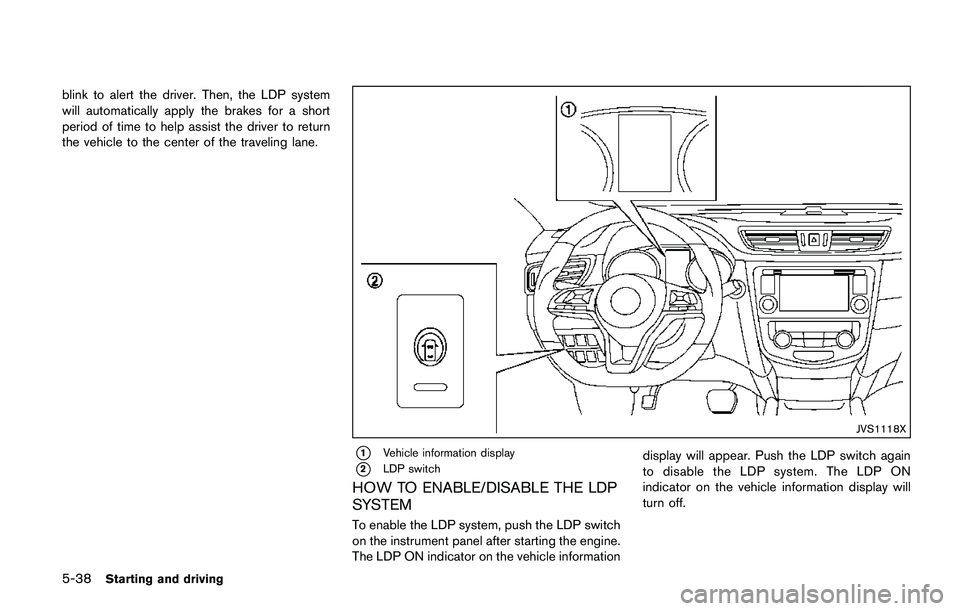
JVS1118X
*1Vehicle information display
*2LDP switch
HOW TO ENABLE/DISABLE THE LDP
SYSTEM
To enable the LDP system, push the LDP switch
on the instrument panel after starting the engine.
The LDP ON indicator on the vehicle informationdisplay will appear. Push the LDP switch again
to disable the LDP system. The LDP ON
indicator on the vehicle information display will
turn off.
Page 325 of 508
5-40Starting and driving
detection range.
— When rain, snow or dirt adheres
to the windshield in front of the
lane camera unit.
— When the headlights are not
bright due to dirt on the lens or
if the aiming is not adjusted
properly.
— When strong light enters the
lane camera unit. (For example,
the light directly shines on the
front of the vehicle at sunrise or
sunset.)
— When a sudden change in
brightness occurs. (For example,
when the vehicle enters or exits
a tunnel or under a bridge.)
.Excessive noise will interfere with
the warning chime sound, and the
chime may not be heard.
While the LDP system is operating, you
may hear a sound of brake operation.
This is normal and indicates that the
LDP system is operating properly.SYSTEM TEMPORARILY UNAVAIL-
ABLE
Condition A:
The warning and assist functions of the LDP
system are not designed to work under the
following conditions:
.When you operate the lane change signal
and change the traveling lanes in the
direction of the signal. (The LDP system will
be deactivated for approximately 2 seconds
after the lane change signal is turned off.)
.When the vehicle speed lowers to less than
approximately 37 MPH (60 km/h) .
Action to take:
After the above conditions have finished and the
necessary operating conditions are satisfied, the
warning and assist functions will resume.
Condition B:
The assist function of the LDP system is not
designed to work under the following conditions
(warning is still functional):
.When the brake pedal is depressed.
.When the steering wheel is turned as far as
necessary for the vehicle to change lanes.
.When the vehicle is accelerated during the
LDP system operation..When the Intelligent Cruise Control (ICC)
approach warning occurs (if so equipped) .
.When the hazard warning flashers are
operated.
.When driving on a curve at high speed.
Action to take:
After the above conditions have finished and the
necessary operating conditions are satisfied, the
LDP system application of the brakes will
resume.
Condition C:
If the following messages appear in the vehicle
information display, a chime will sound and the
LDP system will be turned off automatically.
.“Not available: Poor Road Conditions”:
When the VDC system (except Traction
Control System (TCS) function) or ABS
operates.
.“Currently unavailable”:
When the VDC system is turned off.
Action to take:
When the above conditions no longer exist, turn
off the LDP system. Push the LDP switch again
to turn the LDP system back on.
Page 326 of 508

Temporary disabled status at high tem-
perature:
If the vehicle is parked in direct sunlight under
high temperature conditions (over approximately
1048F (408C)) and then the LDP system is
turned on, the LDP system may be deactivated
automatically and the following message will
appear on the vehicle information display:
“Unavailable: High Cabin Temperature.” When
the interior temperature is reduced, the system
will resume operating automatically.
SYSTEM MALFUNCTION
If the LDP system malfunctions, it will cancel
automatically. The LDP indicator (orange) will
illuminate and the “Malfunction” warning mes-
sage appear in the display.
If the LDP indicator (orange) illuminates in the
display, pull off the road to a safe location. Turn
the engine off and restart the engine. If the LDP
indicator (orange) continues to illuminate, have
the LDP system checked. It is recommended
that you visit a NISSAN dealer for this service.JVS1079X
SYSTEM MAINTENANCE
The lane camera unit*Afor the LDP system is
located above the inside mirror. To keep the
proper operation of the LDP system and prevent
a system malfunction, be sure to observe the
following:
.Always keep the windshield clean.
.Do not attach a sticker (including transpar-
ent material) or install an accessory near the
camera unit.
.Do not place reflective materials, such as
white paper or a mirror, on the instrument
panel. The reflection of sunlight may ad-
versely affect the camera unit’s capability of
detecting the lane markers..Do not strike or damage the areas around
the camera unit. Do not touch the camera
lens or remove the screw located on the
camera unit. If the camera unit is damaged
due to an accident, it is recommended that
you visit a NISSAN dealer.
Starting and driving5-41
Page 328 of 508

JVS1091X
*1Side indicator light
*2Vehicle information display
*3Steering-wheel-mounted controls (left side)
*4Blind Spot Warning (BSW) switch (for models
without LDP system)
BSW SYSTEM OPERATION
The BSW system operates above approximately
20 MPH (32 km/h) .
If the radar sensors detect a vehicle in the
detection zone, the side indicator light
*1
illuminates.If the turn signal is then activated, the system
chimes (twice) and the side indicator light
flashes. The side indicator light continues to
flash until the detected vehicle leaves the
detection zone.
The side indicator light illuminates for a few
seconds when the ignition switch is placed in
the ON position.
The brightness of the side indicator light is
adjusted automatically depending on the bright-
ness of the ambient light.
If a vehicle comes into the detection zone after
the driver activates the turn signal, then only the
side indicator light flashes and no chime sounds.
For additional information, refer to “BSW driving
situations” (P.5-46).
Starting and driving5-43
Page 329 of 508

5-44Starting and driving
JVS1092X
*1Vehicle information display
*2Steering-wheel-mounted controls (left side)
*3Blind Spot Warning (BSW) switch (for models
without LDP system)
HOW TO ENABLE/DISABLE THE BSW
SYSTEM
Perform the following steps to enable or disablethe BSW system.
1. Press the
button until “Settings”
displays in the vehicle information display
and then press “OK” button. Use the
button to select “Driver Assistance”. Then
press the “OK” button.2. Select “Driving Aids” and press the “OK”
button.
3. Use the
buttons to navigate in the menu
and use the “OK” button to select or change
an item.
.Select “Blind Spot” and press the “OK”
button.
Use the “OK” button to check/uncheck
the box for “Warning.”
For models without LDP system:
To enable the BSW system, push the Blind Spot
Warning (BSW) switch on the instrument panel
after starting the engine.
The BSW ON indicator on the vehicle informa-
tion display will appear. Push the BSW switch
again to disable the BSW system. The BSW ON
indicator on the vehicle information display will
turn off.
NOTE:
The system will retain current settings in
the vehicle information display even if the
engine is restarted.