display NISSAN QASHQAI 2017 Owner´s Manual
[x] Cancel search | Manufacturer: NISSAN, Model Year: 2017, Model line: QASHQAI, Model: NISSAN QASHQAI 2017Pages: 508, PDF Size: 2.68 MB
Page 354 of 508
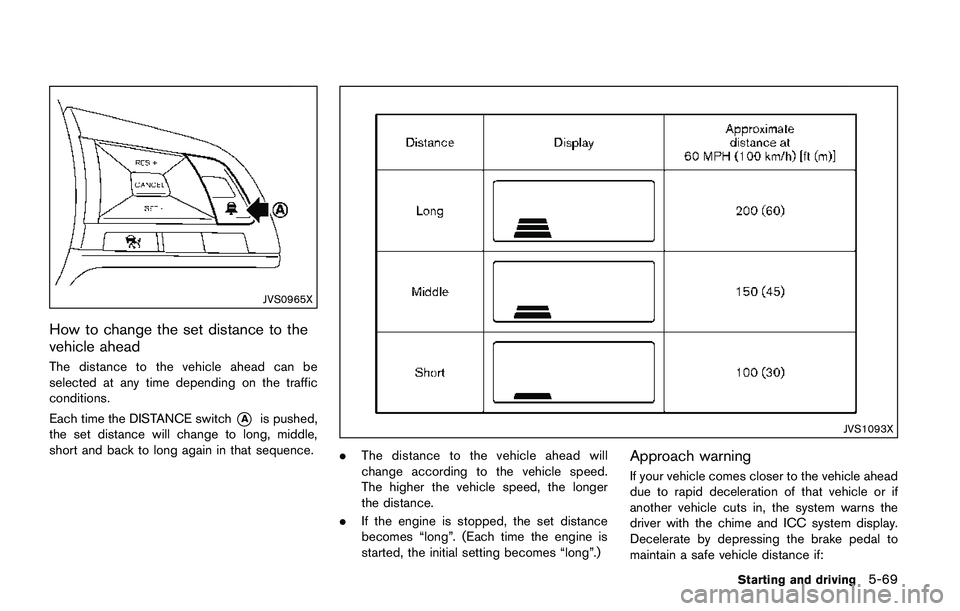
JVS0965X
How to change the set distance to the
vehicle ahead
The distance to the vehicle ahead can be
selected at any time depending on the traffic
conditions.
Each time the DISTANCE switch
*Ais pushed,
the set distance will change to long, middle,
short and back to long again in that sequence.JVS1093X
.The distance to the vehicle ahead will
change according to the vehicle speed.
The higher the vehicle speed, the longer
the distance.
.If the engine is stopped, the set distance
becomes “long”. (Each time the engine is
started, the initial setting becomes “long”.)Approach warning
If your vehicle comes closer to the vehicle ahead
due to rapid deceleration of that vehicle or if
another vehicle cuts in, the system warns the
driver with the chime and ICC system display.
Decelerate by depressing the brake pedal to
maintain a safe vehicle distance if:
Starting and driving5-69
Page 355 of 508
5-70Starting and driving
.The chime sounds.
.The vehicle ahead detection indicator blinks.
The warning chime may not sound in some
cases when there is a short distance between
vehicles. Some examples are:
.When the vehicles are traveling at the same
speed and the distance between vehicles is
not changing
.When the vehicle ahead is traveling faster
and the distance between vehicles is
increasing
.When a vehicle cuts in near your vehicle
The warning chime will not sound when:
.Your vehicle approaches other vehicles that
are parked or moving slowly.
.The accelerator pedal is depressed, over-
riding the system.
NOTE:
The approach warning chime may sound
and the system display may blink when the
radar sensor detects objects on the side of
the vehicle or on the side of the road. This
may cause the ICC system to decelerate or
accelerate the vehicle. The radar sensor
may detect these objects when the vehicle
is driven on winding roads, narrow roads,
hilly roads or when entering or exiting a
curve. In these cases you will have tomanually control the proper distance
ahead of your vehicle.
Also, the sensor sensitivity can be affected by
vehicle operation (steering maneuver or driving
position in the lane) or traffic or vehicle condition
(for example, if a vehicle is being driven with
some damage) .
Automatic cancellation
A chime sounds under the following conditions
and the control is automatically canceled.
.When the vehicle ahead is not detected and
your vehicle is traveling below the speed of
15 MPH (24 km/h)
.When the system judges the vehicle is at
standstill
.When the shift lever is not in the D (Drive)
position or manual shift mode
.When the parking brake is applied
.When the VDC system is turned off
.When VDC (including the traction control
system) operates
.When distance measurement becomes im-
paired due to adhesion of dirt or obstruction
to the sensor
.When a wheel slips
.When the radar signal is temporarily inter-
rupted
Vehicle-to-vehicle distance control mode
limitations
WARNING
Listed below are the system limitations
for the ICC system. Failure to operate
the vehicle in accordance with these
system limitations could result in ser-
ious injury or death.
.The system is primarily intended for
use on straight, dry, open roads with
light traffic. It is not advisable to use
the system in city traffic or con-
gested areas.
.This system will not adapt automa-
tically to road conditions. This sys-
tem should be used in evenly
flowing traffic. Do not use the
system on roads with sharp curves,
or on icy roads, in heavy rain or in
fog.
.As there is a performance limit to
the distance control function, never
rely solely on the ICC system. This
system does not correct careless,
inattentive or absent-minded driv-
ing, or overcome poor visibility in
Page 359 of 508
5-74Starting and driving
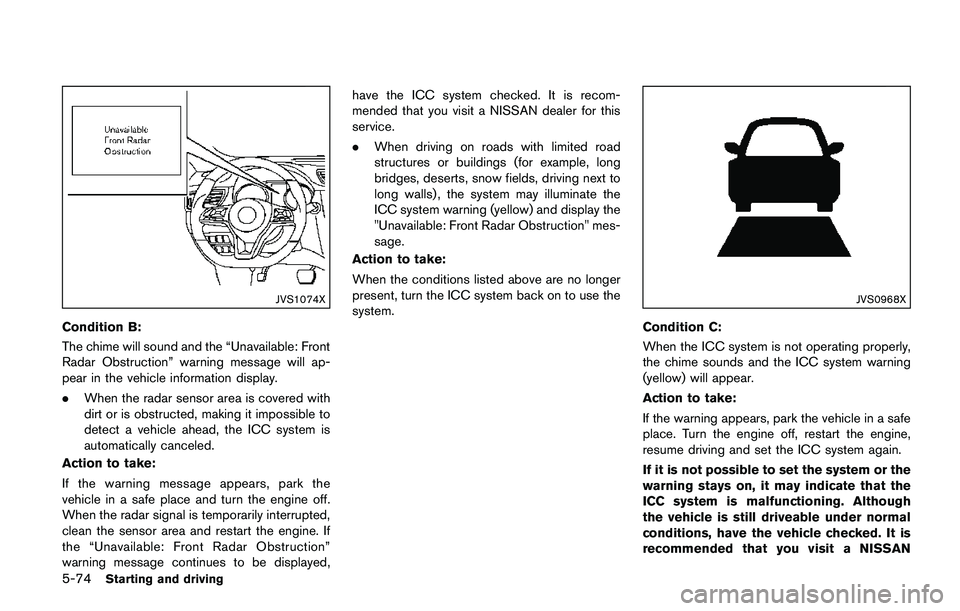
JVS1074X
Condition B:
The chime will sound and the “Unavailable: Front
Radar Obstruction” warning message will ap-
pear in the vehicle information display.
.When the radar sensor area is covered with
dirt or is obstructed, making it impossible to
detect a vehicle ahead, the ICC system is
automatically canceled.
Action to take:
If the warning message appears, park the
vehicle in a safe place and turn the engine off.
When the radar signal is temporarily interrupted,
clean the sensor area and restart the engine. If
the “Unavailable: Front Radar Obstruction”
warning message continues to be displayed,have the ICC system checked. It is recom-
mended that you visit a NISSAN dealer for this
service.
.When driving on roads with limited road
structures or buildings (for example, long
bridges, deserts, snow fields, driving next to
long walls) , the system may illuminate the
ICC system warning (yellow) and display the
"Unavailable: Front Radar Obstruction" mes-
sage.
Action to take:
When the conditions listed above are no longer
present, turn the ICC system back on to use the
system.
JVS0968X
Condition C:
When the ICC system is not operating properly,
the chime sounds and the ICC system warning
(yellow) will appear.
Action to take:
If the warning appears, park the vehicle in a safe
place. Turn the engine off, restart the engine,
resume driving and set the ICC system again.
If it is not possible to set the system or the
warning stays on, it may indicate that the
ICC system is malfunctioning. Although
the vehicle is still driveable under normal
conditions, have the vehicle checked. It is
recommended that you visit a NISSAN
Page 361 of 508
5-76Starting and driving
ence that may cause undesired operation
of the device.
Frequency bands: 24.05 – 24.25GHz
Output power: less than 20 milliwatts
CONVENTIONAL (fixed speed) CRUISE
CONTROL MODE
This mode allows driving at a speed between 25
to 90 MPH (40 km/h to 144 km/h) without
keeping your foot on the accelerator pedal.
WARNING
.In the conventional (fixed speed)
cruise control mode, a warning
chime does not sound to warn you
if you are too close to the vehicle
ahead, as neither the presence of
the vehicle ahead nor the vehicle-to-
vehicle distance is detected.
.Pay special attention to the distance
between your vehicle and the vehi-
cle ahead of you or a collision could
occur.
.Always confirm the setting in the
ICC system display.
.Do not use the conventional (fixed
speed) cruise control mode whendriving under the following condi-
tions:
— when it is not possible to keep
the vehicle at a set speed
— in heavy traffic or in traffic that
varies in speed
— on winding or hilly roads
— on slippery roads (rain, snow,
ice, etc.)
— in very windy areas
.Doing so could cause a loss of
vehicle control and result in an
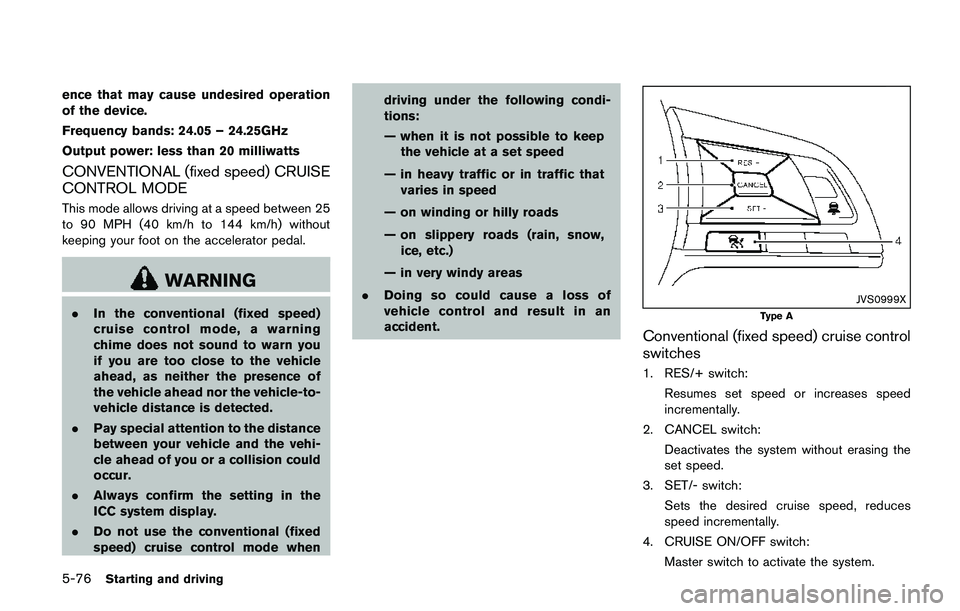
accident.JVS0999X
Type A
Conventional (fixed speed) cruise control
switches
1. RES/+ switch:
Resumes set speed or increases speed
incrementally.
2. CANCEL switch:
Deactivates the system without erasing the
set speed.
3. SET/- switch:
Sets the desired cruise speed, reduces
speed incrementally.
4. CRUISE ON/OFF switch:
Master switch to activate the system.
Page 362 of 508
JVS1075X
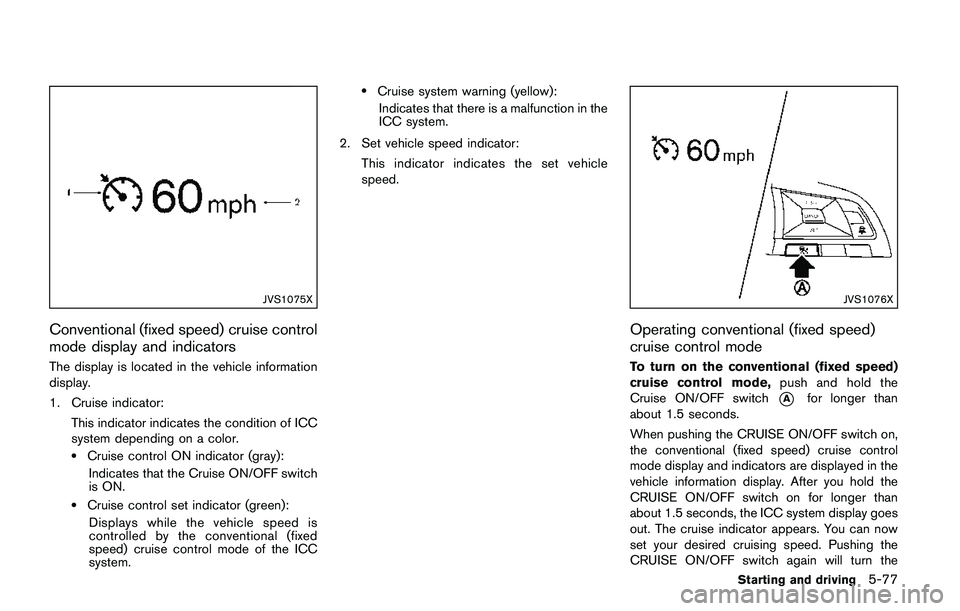
Conventional (fixed speed) cruise control
mode display and indicators
The display is located in the vehicle information
display.
1. Cruise indicator:
This indicator indicates the condition of ICC
system depending on a color.
.Cruise control ON indicator (gray):
Indicates that the Cruise ON/OFF switch
is ON.
.Cruise control set indicator (green):
Displays while the vehicle speed is
controlled by the conventional (fixed
speed) cruise control mode of the ICC
system.
.Cruise system warning (yellow):
Indicates that there is a malfunction in the
ICC system.
2. Set vehicle speed indicator:
This indicator indicates the set vehicle
speed.
JVS1076X
Operating conventional (fixed speed)
cruise control mode
To turn on the conventional (fixed speed)
cruise control mode,push and hold the
Cruise ON/OFF switch
*Afor longer than
about 1.5 seconds.
When pushing the CRUISE ON/OFF switch on,
the conventional (fixed speed) cruise control
mode display and indicators are displayed in the
vehicle information display. After you hold the
CRUISE ON/OFF switch on for longer than
about 1.5 seconds, the ICC system display goes
out. The cruise indicator appears. You can now
set your desired cruising speed. Pushing the
CRUISE ON/OFF switch again will turn the
Starting and driving5-77
Page 366 of 508
JVS1117X
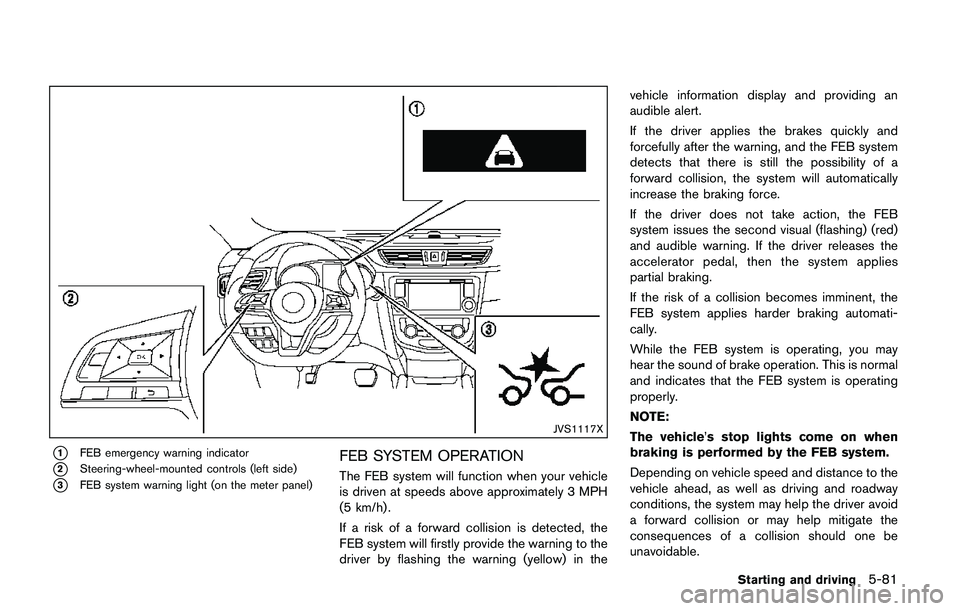
*1FEB emergency warning indicator
*2Steering-wheel-mounted controls (left side)
*3FEB system warning light (on the meter panel)
FEB SYSTEM OPERATION
The FEB system will function when your vehicle
is driven at speeds above approximately 3 MPH
(5 km/h) .
If a risk of a forward collision is detected, the
FEB system will firstly provide the warning to the
driver by flashing the warning (yellow) in thevehicle information display and providing an
audible alert.
If the driver applies the brakes quickly and
forcefully after the warning, and the FEB system
detects that there is still the possibility of a
forward collision, the system will automatically
increase the braking force.
If the driver does not take action, the FEB
system issues the second visual (flashing) (red)
and audible warning. If the driver releases the
accelerator pedal, then the system applies
partial braking.
If the risk of a collision becomes imminent, the
FEB system applies harder braking automati-
cally.
While the FEB system is operating, you may
hear the sound of brake operation. This is normal
and indicates that the FEB system is operating
properly.
NOTE:
The vehicle’s stop lights come on when
braking is performed by the FEB system.
Depending on vehicle speed and distance to the
vehicle ahead, as well as driving and roadway
conditions, the system may help the driver avoid
a forward collision or may help mitigate the
consequences of a collision should one be
unavoidable.
Starting and driving5-81
Page 367 of 508
5-82Starting and driving
If the driver is handling the steering wheel,
accelerating or braking, the FEB system will
function later or will not function.
The automatic braking will cease under the
following conditions:
.When the steering wheel is turned as far as
necessary to avoid a collision.
.When the accelerator pedal is depressed.
.When there is no longer a vehicle detected
ahead.
If the FEB system has stopped the vehicle, the
vehicle will remain at a standstill for approxi-
mately 2 seconds before the brakes are
released.
JVS0971X
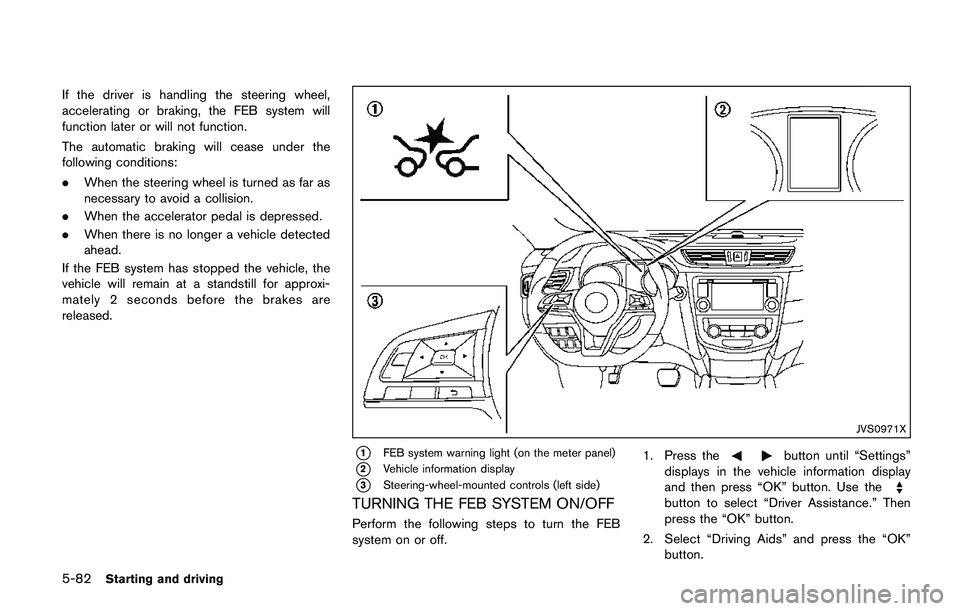
*1FEB system warning light (on the meter panel)
*2Vehicle information display
*3Steering-wheel-mounted controls (left side)
TURNING THE FEB SYSTEM ON/OFF
Perform the following steps to turn the FEB
system on or off.1. Press the
button until “Settings”
displays in the vehicle information display
and then press “OK” button. Use the
button to select “Driver Assistance.” Then
press the “OK” button.
2. Select “Driving Aids” and press the “OK”
button.
Page 370 of 508
warning light (orange) will illuminate and the
“Unavailable: Front Radar Obstruction” warning
message will appear in the vehicle information
display.
.The sensor area on the front of the vehicle is
covered with dirt or is obstructed.
Action to take
If the warning light (orange) comes on, stop the
vehicle in a safe place and turn the engine off.
Clean the radar cover on the front of the vehicle
with a soft cloth, and restart the engine. If the
warning light continues to illuminate, have the
FEB system checked. It is recommended that
you visit a NISSAN dealer for this service.
.When driving on roads with limited road
structures or buildings (for example, long
bridges, deserts, snow fields, driving next to
long walls) .
Action to take
When the above conditions no longer exist, the
FEB system will resume automatically.
Condition C
When the Vehicle Dynamic Control (VDC)
system is OFF, the FEB brake will not operate.
In this case only visible and audible warning
operates. The FEB system warning light (or-
ange) will illuminate.
Action to takeWhen the VDC system is ON, the FEB system
will resume automatically.
SYSTEM MALFUNCTION
If the FEB system malfunctions, it will be turned
off automatically, a chime will sound, the FEB
system warning light (orange) will illuminate and
the “Malfunction” warning message will appear
in the vehicle information display.
Action to take:
If the FEB system warning light (orange) comes
on, stop the vehicle in a safe location. Turn the
engine off and restart the engine. If the warning
light continues to illuminate, have the FEB
system checked. It is recommended that you
visit a NISSAN dealer for this service.
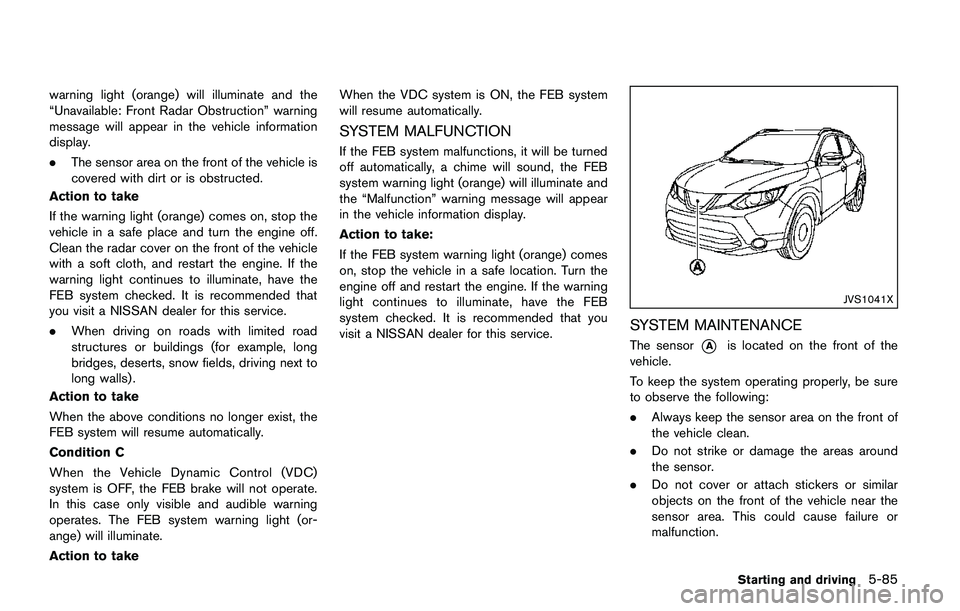
JVS1041X
SYSTEM MAINTENANCE
The sensor*Ais located on the front of the
vehicle.
To keep the system operating properly, be sure
to observe the following:
.Always keep the sensor area on the front of
the vehicle clean.
.Do not strike or damage the areas around
the sensor.
.Do not cover or attach stickers or similar
objects on the front of the vehicle near the
sensor area. This could cause failure or
malfunction.
Starting and driving5-85
Page 374 of 508
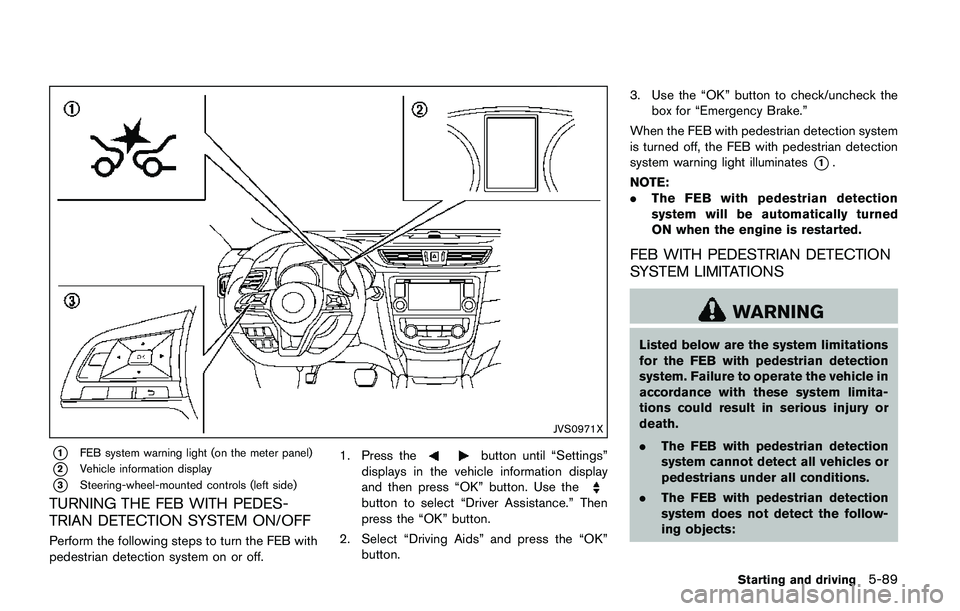
JVS0971X
*1FEB system warning light (on the meter panel)
*2Vehicle information display
*3Steering-wheel-mounted controls (left side)
TURNING THE FEB WITH PEDES-
TRIAN DETECTION SYSTEM ON/OFF
Perform the following steps to turn the FEB with
pedestrian detection system on or off.1. Press the
button until “Settings”
displays in the vehicle information display
and then press “OK” button. Use the
button to select “Driver Assistance.” Then
press the “OK” button.
2. Select “Driving Aids” and press the “OK”
button.3. Use the “OK” button to check/uncheck the
box for “Emergency Brake.”
When the FEB with pedestrian detection system
is turned off, the FEB with pedestrian detection
system warning light illuminates
*1.
NOTE:
.The FEB with pedestrian detection
system will be automatically turned
ON when the engine is restarted.
FEB WITH PEDESTRIAN DETECTION
SYSTEM LIMITATIONS
WARNING
Listed below are the system limitations
for the FEB with pedestrian detection
system. Failure to operate the vehicle in
accordance with these system limita-
tions could result in serious injury or
death.
.The FEB with pedestrian detection
system cannot detect all vehicles or
pedestrians under all conditions.
.The FEB with pedestrian detection
system does not detect the follow-
ing objects:
Starting and driving5-89
Page 378 of 508
.The camera area of windshield glass is
continuously covered with dirt, etc.
Action to take:
When the above conditions no longer exist, the
FEB with pedestrian detection system will
resume automatically.
NOTE:
When the inside of the windshield on
camera area is misted or frozen, it will
take a period of time to remove it after air
conditioner turns on. If dirt appears on this
area, it is recommended you visit a
NISSAN dealer.
Condition B
In the following condition, the FEB system
warning light (orange) will illuminate and the
“Unavailable: Front Radar Obstruction” warning
message will appear in the vehicle information
display.
.The sensor area of the front of the vehicle is
covered with dirt or is obstructed
Action to take:
If the warning light (orange) comes on, stop the
vehicle in a safe place and turn the engine off.
Clean the radar cover on the front of the vehicle
with a soft cloth, and restart the engine. If the
warning light continues to illuminate, have the
FEB with pedestrian detection system checked.It is recommended that you visit a NISSAN
dealer for this service.
.When driving on roads with limited road
structures or buildings (for example, long
bridges, deserts, snow fields, driving next to
long walls) .
Action to take:
When the above conditions no longer exist, the
FEB with pedestrian detection system will
resume automatically.
Condition C
When VDC system is OFF, the FEB brake will
not operate. In this case only visible and audible
warning operates. The FEB system warning light
(orange) will illuminate.
Action to take:
When VDC system is ON, the FEB with
pedestrian detection system will resume auto-
matically.
SYSTEM MALFUNCTION
If the FEB with pedestrian detection system
malfunctions, it will be turned off automatically, a
chime will sound, the FEB system warning light
will (orange) will illuminate and the warning
message “Malfunction” will appear in the vehicle
information display.Action to take:
If the warning light (orange) comes on, stop the
vehicle in a safe location. Turn the engine off and
restart the engine. If the warning light continues
to illuminate, have the FEB with pedestrian
detection system checked. It is recommended
that you visit a NISSAN dealer for this service.
Starting and driving5-93