display NISSAN QASHQAI 2017 Owner´s Manual
[x] Cancel search | Manufacturer: NISSAN, Model Year: 2017, Model line: QASHQAI, Model: NISSAN QASHQAI 2017Pages: 508, PDF Size: 2.68 MB
Page 334 of 508

JVS1090X
*1Vehicle information display
SYSTEM TEMPORARILY UNAVAIL-
ABLE
When radar blockage is detected, the BSW
system will be turned off automatically, a chime
will sound and the “Unavailable: Side Radar
Obstruction” warning message will appear in thevehicle information display
*1.
The system is not available until the conditions
no longer exist.
The radar sensors may be blocked by temporary
ambient conditions such as splashing water,
mist or fog. The blocked condition may also be
caused by objects such as ice, frost or dirtobstructing the radar sensors.
NOTE:
If the BSW system stops working, the
RCTA system will also stop working.
Action to take:
When the above conditions no longer exist, the
system will resume automatically.
If the “Unavailable: Side Radar Obstruction”
warning message continues to appear, have the
system checked. It is recommended that you
visit a NISSAN dealer for this service.
SYSTEM MALFUNCTION
When the BSW system malfunctions, it will be
turned off automatically and the system mal-
function warning message will appear in the
vehicle information display.
NOTE:
If the BSW system stops working, the
RCTA system will also stop working.
Action to take:
Stop the vehicle in a safe location, turn the
engine off and restart the engine. If the message
continues to appear, have the BSW system
checked. It is recommended that you visit a
NISSAN dealer for this service.
Starting and driving5-49
Page 336 of 508

WARNING
Failure to follow the warnings and
instructions for proper use of the RCTA
system could result in serious injury or
death.
.The RCTA system is not a replace-
ment for proper driving procedures
and is not designed to prevent
contact with vehicles or objects.
When backing out of a parking
space, always use the side and rear
mirrors and turn and look in the
direction your vehicle will move.
Never rely solely on the RCTA sys-
tem.
The RCTA system will assist you when backing
out from a parking space. When the vehicle is in
reverse, the system is designed to detect other
vehicles approaching from the right or left of the
vehicle. If the system detects cross traffic, it will
alert you.
JVS0953X
*1Side indicator light
*2Vehicle information display
*3Steering-wheel-mounted controls (left side)
RCTA SYSTEM OPERATION
The RCTA system can help alert the driver of an
approaching vehicle when the driver is backing
out of a parking space.
When the shift position is in R (Reverse) and the
vehicle speed is less than approximately 5 MPH
(8 km/h) , the RCTA system is operational.
Starting and driving5-51
REAR CROSS TRAFFIC ALERT
(RCTA) (if so equipped)
Page 338 of 508

JVS0942X
*1Vehicle information display
*2Steering-wheel-mounted controls (left side)
HOW TO ENABLE/DISABLE THE
RCTA SYSTEM
Perform the following steps to enable or disable
the RCTA system.1. Press the
button until “Settings”
displays in the vehicle information display
and then press “OK” button. Use the
button to select “Driver Assistance” Then
press the “OK” button.
2. Use the button to select “Parking Aids” then
press the OK button.3. Select “Cross Traffic” and press the “OK”
button.
4. Use the “OK” button to enable or disable the
system.
NOTE:
The system setting will be retained even if
the engine is restarted.
Starting and driving5-53
Page 341 of 508
5-56Starting and driving
JVS1090X
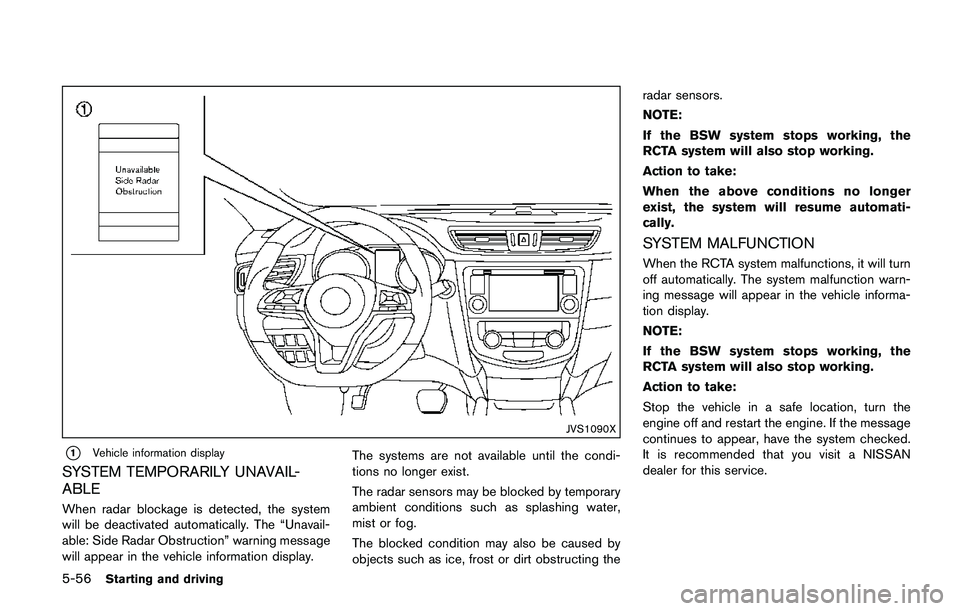
*1Vehicle information display
SYSTEM TEMPORARILY UNAVAIL-
ABLE
When radar blockage is detected, the system
will be deactivated automatically. The “Unavail-
able: Side Radar Obstruction” warning message
will appear in the vehicle information display.The systems are not available until the condi-
tions no longer exist.
The radar sensors may be blocked by temporary
ambient conditions such as splashing water,
mist or fog.
The blocked condition may also be caused by
objects such as ice, frost or dirt obstructing theradar sensors.
NOTE:
If the BSW system stops working, the
RCTA system will also stop working.
Action to take:
When the above conditions no longer
exist, the system will resume automati-
cally.
SYSTEM MALFUNCTION
When the RCTA system malfunctions, it will turn
off automatically. The system malfunction warn-
ing message will appear in the vehicle informa-
tion display.
NOTE:
If the BSW system stops working, the
RCTA system will also stop working.
Action to take:
Stop the vehicle in a safe location, turn the
engine off and restart the engine. If the message
continues to appear, have the system checked.
It is recommended that you visit a NISSAN
dealer for this service.
Page 343 of 508
5-58Starting and driving
JVS1005X
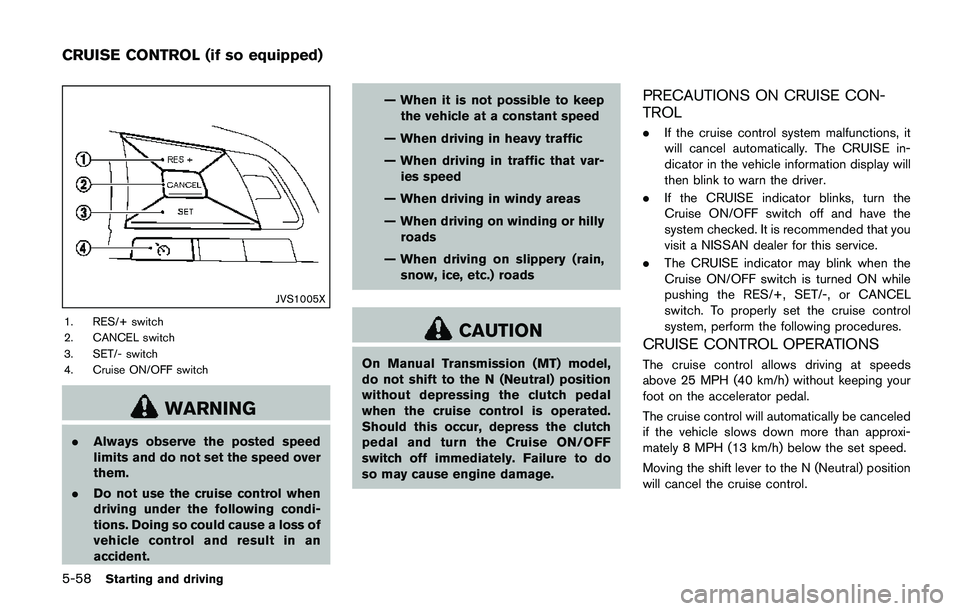
1. RES/+ switch
2. CANCEL switch
3. SET/- switch
4. Cruise ON/OFF switch
WARNING
.Always observe the posted speed
limits and do not set the speed over
them.
.Do not use the cruise control when
driving under the following condi-
tions. Doing so could cause a loss of
vehicle control and result in an
accident.— When it is not possible to keep
the vehicle at a constant speed
— When driving in heavy traffic
— When driving in traffic that var-
ies speed
— When driving in windy areas
— When driving on winding or hilly
roads
— When driving on slippery (rain,
snow, ice, etc.) roads
CAUTION
On Manual Transmission (MT) model,
do not shift to the N (Neutral) position
without depressing the clutch pedal
when the cruise control is operated.
Should this occur, depress the clutch
pedal and turn the Cruise ON/OFF
switch off immediately. Failure to do
so may cause engine damage.
PRECAUTIONS ON CRUISE CON-
TROL
.If the cruise control system malfunctions, it
will cancel automatically. The CRUISE in-
dicator in the vehicle information display will
then blink to warn the driver.
.If the CRUISE indicator blinks, turn the
Cruise ON/OFF switch off and have the
system checked. It is recommended that you
visit a NISSAN dealer for this service.
.The CRUISE indicator may blink when the
Cruise ON/OFF switch is turned ON while
pushing the RES/+, SET/-, or CANCEL
switch. To properly set the cruise control
system, perform the following procedures.
CRUISE CONTROL OPERATIONS
The cruise control allows driving at speeds
above 25 MPH (40 km/h) without keeping your
foot on the accelerator pedal.
The cruise control will automatically be canceled
if the vehicle slows down more than approxi-
mately 8 MPH (13 km/h) below the set speed.
Moving the shift lever to the N (Neutral) position
will cancel the cruise control.
CRUISE CONTROL (if so equipped)
Page 344 of 508
Turning on cruise control
Push the Cruise ON/OFF switch. The CRUISE
indicator in the vehicle information display will
appear.
Setting cruising speed
1. Accelerate to the desired speed.
2. Push the SET/- switch and release it.
3. Take your foot off the accelerator pedal.
The vehicle will maintain the set speed.
Passing another vehicle:
Depress the accelerator pedal to accelerate.
After releasing the accelerator pedal, the vehicle
will return to the previously set speed.
The vehicle may not maintain the set speed
when going up or down steep hills. In such
cases, drive without the cruise control.
Resetting to slower speed:
Use any one of the following methods to reset to
a slower speed.
.Lightly tap the foot brake pedal. When the
vehicle reaches the desired speed, push
and release the SET/- switch.
.Push and hold the SET/- switch. When the
vehicle reaches the desired speed, release
the SET- switch..Quickly push and release the SET/- switch.
This will reduce the vehicle speed by about
1 MPH (1.6 km/h) .
Resetting to faster speed:
Use any one of the following methods to reset to
a faster speed.
.Depress the accelerator pedal. When the
vehicle reaches the desired speed, push
and release the SET/- switch.
.Push and hold the RES/+switch. When the
vehicle reaches the desired speed, release
the RES/+ switch.
.Quickly push and release the RES/+ switch.
This will increase the vehicle speed by about
1 MPH (1.6 km/h) .
Resuming at preset speed:
Push and release the RES/+ switch.
The vehicle will resume the last set cruising
speed when the vehicle speed is over 25 MPH
(40 km/h) .
Cancelling cruising speed
Use any one of the following methods to cancel
the set speed.
.Push the CANCEL switch.
.Tap the foot brake pedal..Push the Cruise ON/OFF switch. The
CRUISE indicator will turn off.
Starting and driving5-59
Page 346 of 508
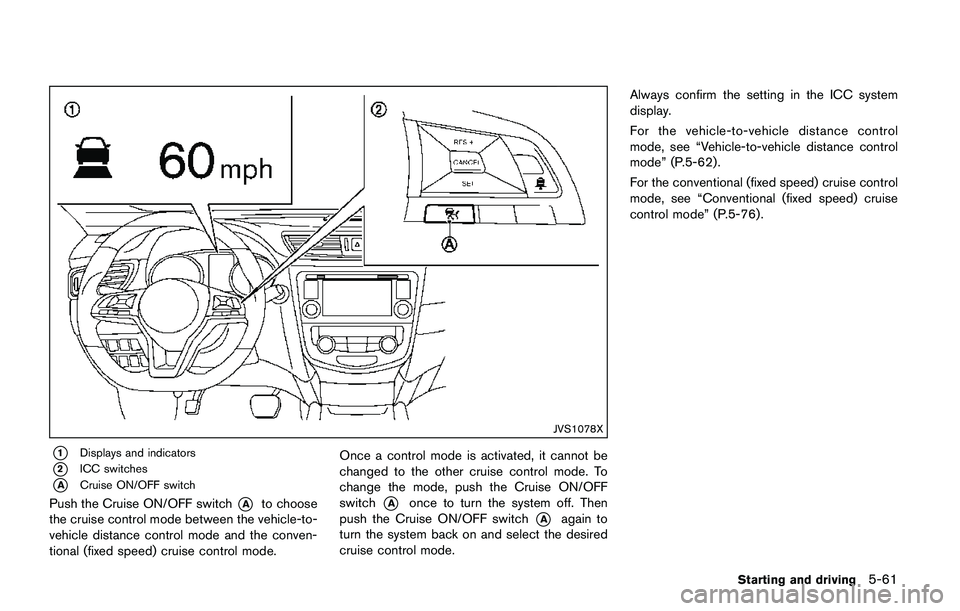
JVS1078X
*1Displays and indicators
*2ICC switches
*ACruise ON/OFF switch
Push the Cruise ON/OFF switch*Ato choose
the cruise control mode between the vehicle-to-
vehicle distance control mode and the conven-
tional (fixed speed) cruise control mode.Once a control mode is activated, it cannot be
changed to the other cruise control mode. To
change the mode, push the Cruise ON/OFF
switch*Aonce to turn the system off. Then
push the Cruise ON/OFF switch
*Aagain to
turn the system back on and select the desired
cruise control mode.Always confirm the setting in the ICC system
display.
For the vehicle-to-vehicle distance control
mode, see “Vehicle-to-vehicle distance control
mode” (P.5-62) .
For the conventional (fixed speed) cruise control
mode, see “Conventional (fixed speed) cruise
control mode” (P.5-76).
Starting and driving5-61
Page 348 of 508
Vehicle-to-vehicle distance control mode
operation
The vehicle-to-vehicle distance control mode is
designed to maintain a selected distance and
reduce the speed to match the slower vehicle
ahead. The system will decelerate the vehicle as
necessary and if the vehicle ahead comes to a
stop, the vehicle decelerates to a standstill.
However, the ICC system can only apply up to
approximately 40% of the vehicle’s total braking
power. This system should only be used when
traffic conditions allow vehicle speeds to remain
fairly constant or when vehicle speeds change
gradually. If a vehicle moves into the traveling
lane ahead or if a vehicle traveling ahead rapidly
decelerates, the distance between vehicles may
become closer because the ICC system cannot
decelerate the vehicle quickly enough. If this
occurs, the ICC system will sound a warning
chime and blink the system display to notify the
driver to take necessary action.
The system will cancel and a warning chime will
sound if the speed is below approximately 15
MPH (24 km/h) and a vehicle is not detected
ahead. The system will also disengage when the
vehicle goes above the maximum set speed.
See “Approach warning” (P.5-69).The following items are controlled in the vehicle-
to-vehicle distance control mode:
.When there are no vehicles traveling ahead,
the vehicle-to-vehicle distance control mode
maintains the speed set by the driver. The
set speed range is the following speed.
— 20 and 90 MPH (32 and 144 km/h)
.When there is a vehicle traveling ahead, the
vehicle-to-vehicle distance control mode
adjusts the speed to maintain the distance,
selected by driver, from the vehicle ahead.
The adjusting speed range is up to the set
speed. If the vehicle ahead comes to a stop,
the vehicle decelerates to a standstill within
the limitations of the system. The system will
cancel once it judges a standstill with a
warning chime.
.When the vehicle traveling ahead has
moved out from its lane of travel, the
vehicle-to-vehicle distance control mode
accelerates and maintains vehicle speed
up to the set speed.
The ICC system does not control vehicle speed
or warn you when you approach stationary and
slow moving vehicles. You must pay attention to
vehicle operation to maintain proper distance
from vehicles ahead when approaching toll
gates or traffic congestion.
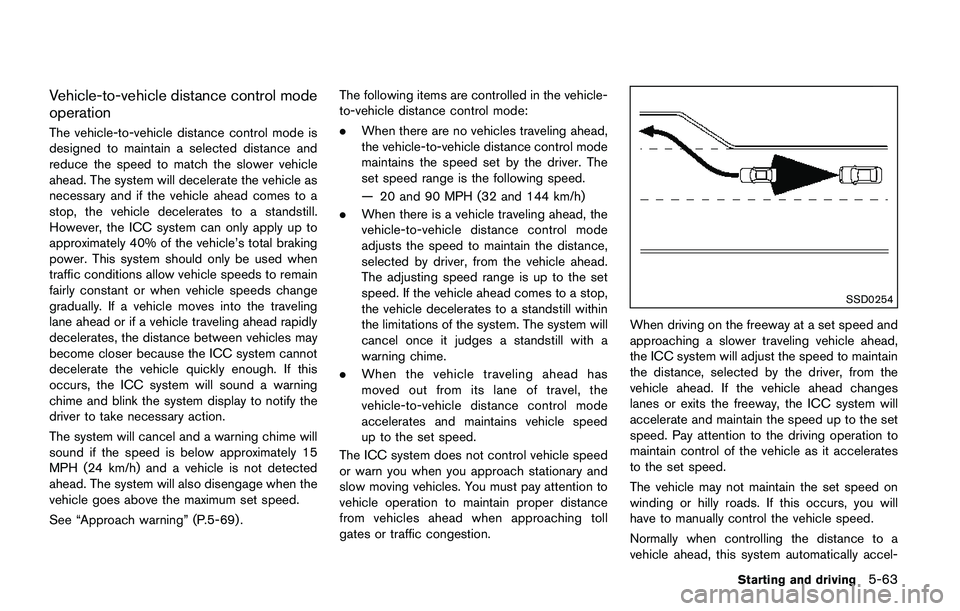
SSD0254
When driving on the freeway at a set speed and
approaching a slower traveling vehicle ahead,
the ICC system will adjust the speed to maintain
the distance, selected by the driver, from the
vehicle ahead. If the vehicle ahead changes
lanes or exits the freeway, the ICC system will
accelerate and maintain the speed up to the set
speed. Pay attention to the driving operation to
maintain control of the vehicle as it accelerates
to the set speed.
The vehicle may not maintain the set speed on
winding or hilly roads. If this occurs, you will
have to manually control the vehicle speed.
Normally when controlling the distance to a
vehicle ahead, this system automatically accel-
Starting and driving5-63
Page 350 of 508
JVS1069X
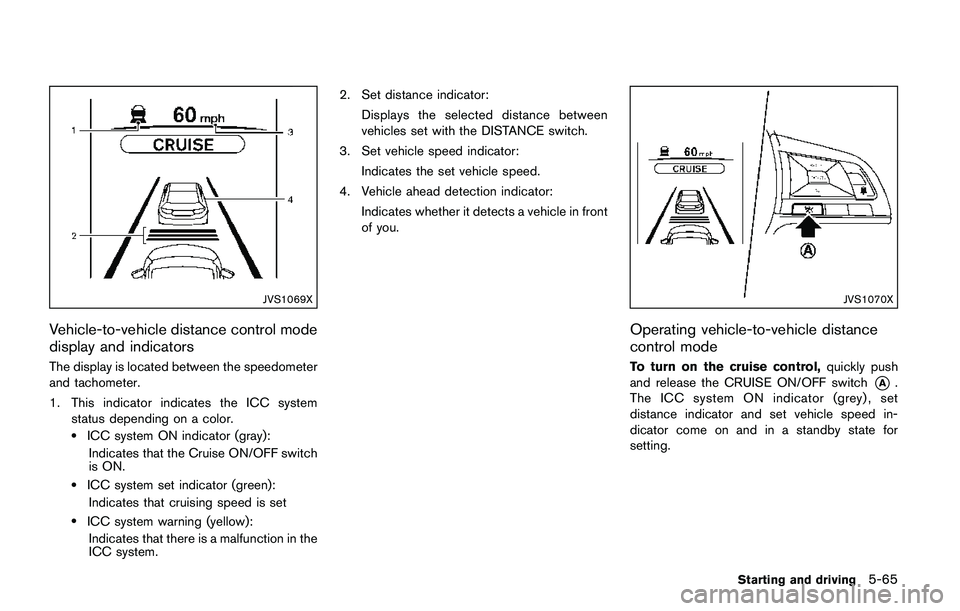
Vehicle-to-vehicle distance control mode
display and indicators
The display is located between the speedometer
and tachometer.
1. This indicator indicates the ICC system
status depending on a color.
.ICC system ON indicator (gray):
Indicates that the Cruise ON/OFF switch
is ON.
.ICC system set indicator (green):
Indicates that cruising speed is set
.ICC system warning (yellow):
Indicates that there is a malfunction in the
ICC system.2. Set distance indicator:
Displays the selected distance between
vehicles set with the DISTANCE switch.
3. Set vehicle speed indicator:
Indicates the set vehicle speed.
4. Vehicle ahead detection indicator:
Indicates whether it detects a vehicle in front
of you.
JVS1070X
Operating vehicle-to-vehicle distance
control mode
To turn on the cruise control,quickly push
and release the CRUISE ON/OFF switch
*A.
The ICC system ON indicator (grey) , set
distance indicator and set vehicle speed in-
dicator come on and in a standby state for
setting.
Starting and driving5-65
Page 352 of 508
JVS1072X
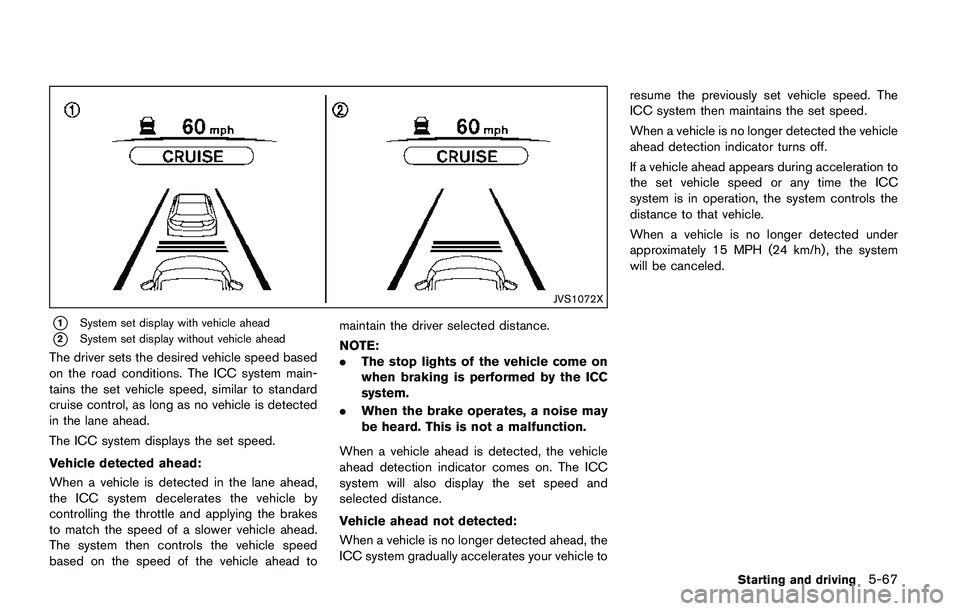
*1System set display with vehicle ahead
*2System set display without vehicle ahead
The driver sets the desired vehicle speed based
on the road conditions. The ICC system main-
tains the set vehicle speed, similar to standard
cruise control, as long as no vehicle is detected
in the lane ahead.
The ICC system displays the set speed.
Vehicle detected ahead:
When a vehicle is detected in the lane ahead,
the ICC system decelerates the vehicle by
controlling the throttle and applying the brakes
to match the speed of a slower vehicle ahead.
The system then controls the vehicle speed
based on the speed of the vehicle ahead tomaintain the driver selected distance.
NOTE:
.The stop lights of the vehicle come on
when braking is performed by the ICC
system.
.When the brake operates, a noise may
be heard. This is not a malfunction.
When a vehicle ahead is detected, the vehicle
ahead detection indicator comes on. The ICC
system will also display the set speed and
selected distance.
Vehicle ahead not detected:
When a vehicle is no longer detected ahead, the
ICC system gradually accelerates your vehicle toresume the previously set vehicle speed. The
ICC system then maintains the set speed.
When a vehicle is no longer detected the vehicle
ahead detection indicator turns off.
If a vehicle ahead appears during acceleration to
the set vehicle speed or any time the ICC
system is in operation, the system controls the
distance to that vehicle.
When a vehicle is no longer detected under
approximately 15 MPH (24 km/h) , the system
will be canceled.
Starting and driving5-67