Esp off NISSAN QASHQAI 2017 Owner´s Manual
[x] Cancel search | Manufacturer: NISSAN, Model Year: 2017, Model line: QASHQAI, Model: NISSAN QASHQAI 2017Pages: 508, PDF Size: 2.68 MB
Page 222 of 508
tentionally. Pulling the cable may
damage the port.
The vehicle is not equipped with a USB device.
USB devices should be purchased separately
as necessary.
This system cannot be used to format USB
devices. To format a USB device, use a personal
computer.
In some states/area, the USB device for the
front seats plays only sound without images for
regulatory reasons, even when the vehicle is
parked.
This system supports various USB memory
devices, USB hard drives and iPod
Šplayers.
Some USB devices may not be supported by
this system.
.Partitioned USB devices may not be played
correctly.
.Some characters used in other languages
(Chinese, Japanese, etc.) are not displayed
properly on display. Using English language
characters with a USB device is recom-
mended.
General notes for USB use:
Refer to your device manufacturer’s owner
information regarding the proper use and care
of the device.Notes for iPod
Šuse:
“Made for iPodŠ”, “Made for iPhoneŠ”, and
“Made for iPadŠ” mean that an electronic
accessory has been designed to connect
specifically to iPod
Š, iPhoneŠ, or iPadŠ, respec-
tively, and has been certified by the developer to
meet Apple performance standards.
Apple is not responsible for the operation of this
device or its compliance with safety and
regulatory standards.
Please note that the use of this accessory with
iPod
Š, iPhoneŠ, or iPadŠmay affect wireless
performance.
iPad
Š, iPhoneŠ,iPodŠ, iPod classicŠ,iPod
nanoŠ, iPod shuffleŠ, and iPod touchŠare
trademarks of Apple Inc., registered in the U.S.
and other countries. Lightning is a trademark of
Apple Inc.
.Improperly plugging in the iPod
Šmay cause
a checkmark to be displayed on and off
(flickering) . Always make sure that the iPod
Š
is connected properly.
.An iPod nanoŠ(1st Generation) may remain
in fast forward or rewind mode if it is
connected during a seek operation. In this
case, please manually reset the iPod
Š.
.An iPod nanoŠ(2nd Generation) will con-
tinue to fast-forward or rewind if it is
disconnected during a seek operation..An incorrect song title may appear when the
Play Mode is changed while using an iPod
nano
Š(2nd Generation)
.Audiobooks may not play in the same order
as they appear on an iPod
Š.
.Large video files cause slow responses in an
iPod
Š. The display may momentarily black
out, but will soon recover.
.If an iPod
Šautomatically selects large video
files while in the shuffle mode, the display
may momentarily black out, but will soon
recover.
Compressed Audio Files (MP3/WMA)
Explanation of terms:
.MP3 — MP3 is short for Moving Pictures
Experts Group Audio Layer 3. MP3 is the
most well known compressed digital audio
file format. This format allows for near “CD
quality” sound, but at a fraction of the size of
normal audio files. MP3 conversion of an
audio track can reduce the file size by
approximately a 10:1 ratio (Sampling: 44.1
kHz, Bit rate: 128 kbps) with virtually no
perceptible loss in quality. The compression
reduces certain parts of sound that seem
inaudible to most people.
.WMA — Windows Media Audio (WMA) is a
compressed audio format created by Micro-
Heater, air conditioner, audio and phone systems4-41
Page 231 of 508
4-50Heater, air conditioner, audio and phone systems
SETTING/TUNE·FOLDER dial and then
push the ENTER SETTING/TUNE·FOLDER
dial. Use the ENTER SETTING/
TUNE·FOLDER dial to select the preferred
language. Push the ENTER SETTING/
TUNE·FOLDER dial to apply the setting.
DISP button:
Display of the screen can be canceled by
pushing the
button. You can still listen to
music that is being played back even while the
screen display is turned off. If you want to
display the screen again, push the
button
once more. Pushing some of the audio source
buttons will also turn the screen back on and
display the screens of the corresponding
sources.
MEDIA button:
Pushing the
button will switch the audio
source as follows:
USB/iPod?Bluetooth Audio?AUX?USB/
iPod
FM-AM Radio operation
radio (FM·AM) band select:
Push the
button to change the band as
follows:
AM?FM1?FM2?AM
The FM stereo indicator (STEREO) is shown on
the screen during FM stereo reception. When
the stereo broadcast signal is weak, the radio
automatically changes from stereo to monaural
reception.
TUNE (Tuning):
Turn the ENTER SETTING/TUNE·FOLDER dial
for manual tuning.
Radio Data System (RDS):
RDS stands for Radio Data System, and is a
data information service transmitted by some
radio stations on the FM band (not AM band)
encoded within a regular radio broadcast.
Currently, most RDS stations are in large cities,
but many stations are now considering broad-
casting RDS data.
The station name, such as “The Groove”, is
displayed on the display.
SEEK tuning:
Push the
orbutton to tune from low tohigh or high to low frequencies and to stop at
the next broadcasting station.
SCAN tuning:
Push the
button to tune from low to high
frequencies and stop at each broadcasting
station for several seconds. Pushing the
button again during this several seconds period
will stop SCAN tuning and the radio will remain
tuned to that station.
If the
button is not pushed within this
period, SCAN tuning moves to the next station.
toStation memory operations:
Up to 12 stations can be set for the FM band (6
each for FM1 and FM2) and 6 stations can be
set for the AM band.
1. Choose the radio band using the
button.
2. Tune to the desired station.
3. Push and hold the desired station preset
button
tountil beep sounds.
4. The station indicator will then come on. The
station is now set to the button memory.
5. Other buttons can be set in the same
manner.
If the battery cable is disconnected, or if the fuse
opens, the station memory will be erased. In that
Page 238 of 508
ENTER SETTING/TUNE·SCROLL dial and
then push the ENTER SETTING/TUNE·SC-
ROLL dial. To change the Speed Sensitive
Volume (Speed Sensitive Vol.) level from off
(0) to 5, turn the ENTER SETTING/TU-
NE·SCROLL dial. Push the ENTER
SETTING/TUNE·SCROLL dial to apply the
setting.
.AUX Vol.
Controls the volume level of incoming sound
when an auxiliary device is connected to the
system. Select the “AUX Vol.” using the
ENTER SETTING/TUNE·SCROLL dial and
then push the ENTER SETTING/TUNE·SC-
ROLL dial. Choose a setting between +1
and +3 or choose 0 to disable the feature
entirely. Push the ENTER SETTING/TU-
NE·SCROLL dial to apply the setting.
.Language Select
The language settings can be changed.
Select “Language Select” using the ENTER
SETTING/TUNE·SCROLL dial and then
push the ENTER SETTING/TUNE·SCROLL
dial. Use the ENTER SETTING/TUNE·SC-
ROLL dial to select the preferred language.
Push the ENTER SETTING/TUNE·SCROLL
dial to apply the setting.DISP button:
Display of the screen can be canceled by
pushing the
button. You can still listen to
music that is being played back even while the
screen display is turned off. If you want to
display the screen again, push the
button
once more. Pushing some of the audio source
buttons will also turn the screen back on and
display the screens of the corresponding
sources.
MEDIA button:
Pushing the
button will switch the audio
source as follows:
CD?USB/iPod?Bluetooth Audio?AUX?
CD
FM-AM-SAT Radio operation
radio (FM·AM) band select:
Pushing the
button will change the band as
follows:
AM?FM1?FM2?AM
The FM stereo indicator (STEREO) is shown on
the screen during FM stereo reception. When
the stereo broadcast signal is weak, the radio
automatically changes from stereo to monaural
reception.
radio (SAT) band select:
Pushing the XM button will change the band as
follows:
XM1?XM2?XM3?XM1 (satellite, if so
equipped)
When the XM button is pushed while the ignition
switch is placed in the ACC or ON position, the
radio will come on at the channel last played.
The last channel played will also come on when
the Power/VOL dial is pushed to turn the audio
system power on.
The satellite radio is not available in Alaska,
Hawaii and Guam.
If another audio source is playing when the XM
button is pushed, the audio source will auto-
matically be turned off and the last radio channel
played will come on.
When the stereo broadcast signal is weak, the
radio will automatically change from stereo to
monaural reception.
TUNE (Tuning):
.For AM and FM radio
Turn the radio ENTER SETTING/TUNE·SC-
ROLL dial for manual tuning.
.For SiriusXM Satellite Radio (if so equipped)
Turn the radio ENTER SETTING/TUNE·SC-
ROLL dial to seek channels from all of the
Heater, air conditioner, audio and phone systems4-57
Page 269 of 508
4-88Heater, air conditioner, audio and phone systems
Making a call
To make a call from a phone connected to the
vehicle’s BluetoothŠHands-Free Phone Sys-
tem:
1. Push the
button.
2. The system will prompt you for a command.
Say “Call”.
3. Select one of the available voice commands
to continue:
.(A Name)
Speak the name of a phonebook entry to
place a call to that entry. The system will
respond with the name it interpreted from
your command and will prompt you to
confirm that the name is correct. Say
“Dial” to initiate the call or “Correction” to
return to the previous screen.
.List Names
Select this command to call a phone
number that is stored in the phonebook.
.Phone Number
Speak this command to place a call by
inputting numbers.
For 7- and 10-digit phone numbers,
speak the numbers. When finished, say
“Dial” to initiate the call. Say “Correction”
at any time in the process to correct a
misspoken or misinterpreted number.
For phone numbers with more digits or
special characters, say “Special Num-ber”, then speak the digits. Up to 24
digits can be entered. Available special
characters are “Star”, “Pound”, “Plus”
and “Pause”. When finished, say “Dial” to
initiate the call. Say “Correction” at any
time in the process to correct a mis-
spoken or misinterpreted number or
character.
.Redial
Speak this command to dial the number
of the last outgoing call. The system will
display “Redial”. The name of the phone-
book entry will be displayed if it is
available. Otherwise, the number being
redialed will be displayed.
.Call Back
Speak this command to dial the number
of the last incoming call. The system will
display “Call Back”. The name of the
phonebook entry will be displayed if it is
available. Otherwise, the number being
called back will be displayed.
Receiving a call
When a call is received by the phone connected
to the vehicle’s BluetoothŠHands-Free Phone
System, the call information is displayed on
either the vehicle information display or both the
vehicle information display and the color display.
Push the
button to accept the call. Push thebutton to reject the call.
During a call
While a call is active, push thebutton to
access additional options. Speak one of the
following commands:
.Send
Speak this command followed by the digits
to enter digits during the phone call.
.Mute On or Mute Off
Speak the command to mute or unmute the
system.
.Transfer Call
Speak this command to transfer the call to
the handset. To transfer the call back from
the handset to the Bluetooth
ŠHands-Free
Phone System, push thebutton and
confirm when prompted.
If supported by the phone, the Bluetooth
Š
Hands-Free Phone System allows for call wait-
ing functionality. If a call is received while
another call is already active, a message will
be displayed on the screen. Push the
button to hold the active call and switch to the
second call. Push thebutton to reject the
second call.
Page 280 of 508
cations shown in the vehicle information
display. Touch “Both” to have text notifica-
tions shown in both the vehicle information
display and the touch screen. Touch “OFF”
to turn off all text notifications.
.Auto Reply (if so equipped):
Touch to toggle the auto reply functionality
on or off.
.Auto Reply Message (if so equipped):
Touch to indicate preferred message to be
sent when “Auto Reply” function is acti-
vated.
.Use Vehicle’s Signature (if so equipped):
Touch to toggle on or off the addition of the
vehicle signature to outgoing messages
.Custom Text Messages (if so equipped):
Touch this option to select a custom
message to edit. There are several custom
message slots available.The NISSAN Voice Recognition system allows
hands-free operation of the systems equipped
on this vehicle, such as the phone and naviga-
tion systems.
To operate NISSAN Voice Recognition, push the
button located on the steering wheel.
When prompted, speak the command for the
system you wish to activate. The command given
is picked up by the microphone and performed
when it is properly recognized. NISSAN Voice
Recognition will provide a voice response as
well as a message in the touch screen to inform
you of the command results.
USING THE SYSTEM
Initialization
When the ignition switch is placed in the ACC
or ON position, NISSAN Voice Recognition is
initialized, which takes a few seconds. When
completed, the system is ready to accept voice
commands. If the
button is pushed before
the initialization completes, the system will
announce: “Voice Recognition System not
ready. Please wait.”
Heater, air conditioner, audio and phone systems4-99
NISSAN VOICE RECOGNITION
SYSTEM (models with navigation
system)
Page 294 of 508
cars any more than low-slung sports cars are
designed to perform satisfactorily under off-road
conditions. If at all possible, avoid sharp turns or
abrupt maneuvers, particularly at high speeds.
As with other vehicles of this type, failure to
operate this vehicle correctly may result in loss
of control or vehicle rollover. Seat belts help
reduce the risk of injury in collisions and
rollovers. In a rollover crash, an unbelted or
improperly belted person is significantly more
likely to be injured or killed than a person
properly wearing a seat belt.
Be sure to read “Driving safety precautions”
(P.5-10) .
OFF-ROAD RECOVERY
If the right side or left side wheels leave the road
surface, maintain control of the vehicle by
following the procedure below. Please note that
this procedure is only a general guide. The
vehicle must be driven as appropriate based on
the conditions of the vehicle, road and traffic.
1. Remain calm and do not overreact.
2. Do not apply the brakes.
3. Maintain a firm grip on the steering wheel
with both hands and try to hold a straight
course.
4. When appropriate, slowly release the accel-
erator pedal to gradually slow the vehicle.5. If there is nothing in the way, steer the
vehicle to follow the road while the vehicle
speed is reduced. Do not attempt to drive
the vehicle back onto the road surface until
vehicle speed is reduced.
6. When it is safe to do so, gradually turn the
steering wheel until both tires return to the
road surface. When all tires are on the road
surface, steer the vehicle to stay in the
appropriate driving lane.
.If you decide that it is not safe to return
the vehicle to the road surface based on
vehicle, road or traffic conditions, gradu-
ally slow the vehicle to a stop in a safe
place off the road.
RAPID AIR PRESSURE LOSS
Rapid air pressure loss or a “blow-out” can
occur if the tire is punctured or is damaged due
to hitting a curb or pothole. Rapid air pressure
loss can also be caused by driving on under-
inflated tires.
Rapid air pressure loss can affect the handling
and stability of the vehicle, especially at highway
speeds.
Help prevent rapid air pressure loss by main-
taining the correct air pressure and visually
inspect the tires for wear and damage. See
“Wheels and tires” (P.8-29) of this manual.If a tire rapidly loses air pressure or “blows-out”
while driving, maintain control of the vehicle by
following the procedure below. Please note that
this procedure is only a general guide. The
vehicle must be driven as appropriate based on
the conditions of the vehicle, road and traffic.
WARNING
The following actions can increase the
chance of losing control of the vehicle if
there is a sudden loss of tire air
pressure. Losing control of the vehicle
may cause a collision and result in
personal injury.
.The vehicle generally moves or pulls
in the direction of the flat tire.
.Do not rapidly apply the brakes.
.Do not rapidly release the accelera-
tor pedal.
.Do not rapidly turn the steering
wheel.
1. Remain calm and do not overreact.
2. Maintain a firm grip on the steering wheel
with both hands and try to hold a straight
course.
Starting and driving5-9
Page 303 of 508
5-18Starting and driving
erator pedal. Crank the enginewith your
foot off the accelerator pedalby
turning the ignition switch to START.
Release the ignition switch when the
engine starts. If the engine starts, but fails
to run, repeat the above procedure.
CAUTION
Do not operate the starter for more
than 15 seconds at a time. If the engine
does not start, turn the ignition switch
off and wait 10 seconds before cranking
again, otherwise the starter could be
damaged.
Do not turn the ignition switch to the
START position unless the engine and
starter have stopped moving. Attempt-
ing to start the engine while the engine
or starter is moving may cause damage.
4.Warm-up
Allow the engine to idle for at least 30
seconds after starting. Do not race the
engine while warming it up. Drive at
moderate speed for a short distance first,
especially in cold weather. In cold weather,
keep the engine running for a minimum of 2 -
3 minutes before shutting it off. Starting andstopping the engine over a short period of
time may make the vehicle more difficult to
start.
5. To stop the engine, shift the shift lever to the
P (Park) position (CVT model) or N (Neutral)
position (MT model) and turn the ignition
switch to the OFF position.
NOTE:
Care should be taken to avoid situations
that can lead to potential battery discharge
and potential no-start conditions such as:
1.Installation or extended use of electro-
nic accessories that consume battery
power when the engine is not running
(Phone chargers, GPS, DVD players,
etc.)
2.Vehicle is not driven regularly and/or
only driven short distances.
In these cases, the battery may need to be
charged to maintain battery health.1. Apply the parking brake.
2.Continuously Variable Transmission
(CVT) model:
Move the shift lever to the P (Park) or N
(Neutral) position. (P is recommended.)
The starter is designed not to operate unless
the shift lever is in either of the above
positions.
Manual Transmission (MT) model:
Move the shift lever to the N (Neutral)
position. Depress the clutch pedal fully to
the floor.
The starter is designed not to operate unless
the clutch pedal is fully depressed.
The Intelligent Key must be carried
when operating the ignition switch.
3. Push the ignition switch to the ON position.
Depress the brake pedal (CVT models) or
the clutch pedal (MT models) and push the
ignition switch to start the engine.
To start the engine immediately, push and
release the ignition switch while depressing
the brake pedal (CVT models) or the clutch
pedal (MT models) with the ignition switch in
any position.
.If the engine is very hard to start in
extremely cold weather or when restart-
ing, depress the accelerator pedal a little
STARTING THE ENGINE (model with
Intelligent Key system)
Page 304 of 508
(approximately 1/3 to the floor) and while
holding, crank the engine. Release the
accelerator pedal when the engine starts.
.If the engine is very hard to start because
it is flooded, depress the accelerator
pedal all the way to the floor and hold it.
Push the ignition switch to the ON
position to start cranking the engine.
After 5 or 6 seconds, stop cranking by
pushing the ignition switch to OFF. After
cranking the engine, release the accel-
erator pedal. Crank the enginewith your
foot off the accelerator pedalby
depressing the brake pedal and pushing
the push-button ignition switch to start
the engine. If the engine starts, but fails
to run, repeat the above procedure.
CAUTION
Do not operate the starter for more
than 15 seconds at a time. If the engine
does not start, push the ignition switch
to OFF and wait 10 seconds before
cranking again, otherwise the starter
could be damaged.
4.Warm-up
Allow the engine to idle for at least 30seconds after starting. Do not race the
engine while warming it up. Drive at
moderate speed for a short distance first,
especially in cold weather. In cold weather,
keep the engine running for a minimum of 2 -
3 minutes before shutting it off. Starting and
stopping the engine over a short period of
time may make the vehicle more difficult to
start.
When racing the engine up to 4,000 rpm or
more under no load condition, the engine
will enter the fuel cut mode.
5. To stop the engine, move the shift lever to
the P (Park) position (CVT models) or move
the shift lever to the N (Neutral) position (MT
models) , and push the ignition switch to the
OFF position.
NOTE:
Care should be taken to avoid situations
that can lead to potential battery discharge
and potential no-start conditions such as:
1.Installation or extended use of electro-
nic accessories that consume battery
power when the engine is not running
(Phone chargers, GPS, DVD players,
etc.)
2.Vehicle is not driven regularly and/or
only driven short distances.In these cases, the battery may need to be
charged to maintain battery health.
REMOTE ENGINE START (if so
equipped)
Vehicles started with the remote engine start
function require the ignition switch to be placed
in the ON position before the shift lever can be
moved from the P (Park) position. To place the
ignition switch in the ON position, perform the
following steps:
1. Make sure that the Intelligent Key is carried
with you.
2. Depress the brake pedal.
3. Push the ignition switch once to the ON
position.
For additional information about the remote
engine start function, see “Remote engine start”
(P.3-22) .
Starting and driving5-19
Page 308 of 508
High fluid temperature protection mode
This transmission has a high fluid temperature
protection mode. If the fluid temperature be-
comes too high (for example, when climbing
steep grades in high temperature with heavy
loads) , engine power and, under some condi-
tions, vehicle speed will be decreased auto-
matically to reduce the chance of transmission
damage. Vehicle speed can be controlled with
the accelerator pedal, but the engine and vehicle
speed may be limited.
Fail-safe
If the vehicle is driven under extreme
conditions, such as excessive wheel spin-
ning and subsequent hard braking, the
fail-safe system may be activated. The MIL
may illuminate to indicate the fail-safe
mode is activated. (See “Malfunction In-
dicator Light (MIL)” (P.2-16) .) This will
occur even if all electrical circuits are
functioning properly. In this case, place
the ignition switch in the OFF position and
wait for 10 seconds. Then turn the switch
back to the ON position. The vehicle
should return to its normal operating
condition. If it does not return to its normal
operating condition, have the transmission
checked and repaired, if necessary. It is
recommended you visit a NISSAN dealerfor this service.
WARNING
When the high fluid temperature pro-
tection mode or fail-safe operation
occurs, vehicle speed may be gradually
reduced. The reduced speed may be
lower than other traffic, which could
increase the chance of a collision. Be
especially careful when driving. If ne-
cessary, pull to the side of the road at a
safe place and allow the transmission
to return to normal operation, or have it
repaired if necessary.
Adaptive Shift Control (ASC)
The Adaptive Shift Control automatically oper-
ates when the transmission is in the “D” (Drive)
position and selects an appropriate gear de-
pending on the road conditions such as uphill or
downhill.
Control on uphill and curving roads:
A low gear is maintained that suits the degree of
the slope to allow smooth driving with a small
number of shifts.Control on downhill roads:
The Adaptive Shift Control shifts to a low gear
that suits the degree of the slope when the
accelerator pedal is depressed, and uses the
engine braking to help driving in the downhill.
Control on winding roads:
A low gear is maintained on continuous curves
that involve repeated acceleration and decelera-
tion, so that smooth acceleration is available
instantly when the accelerator pedal is de-
pressed.
NOTE:
.Adaptive Shift Control may not operate
when the transmission oil temperature
is low immediately after the start of
driving or when it is very hot.
.During some driving situations, hard
braking for example, the Adaptive Shift
Control may automatically operate. The
transmission may automatically shift to
a lower gear for engine braking. This
increases engine speed but not vehicle
speed. Vehicle speed is controlled by
the accelerator pedal when the vehicle
is in the Adaptive Shift Control mode.
.When the Adaptive Shift Control oper-
ates, the transmission sometimes
maintains a lower gear for a longer
period of time than when Adaptive
Starting and driving5-23
Page 316 of 508
JVS1083X
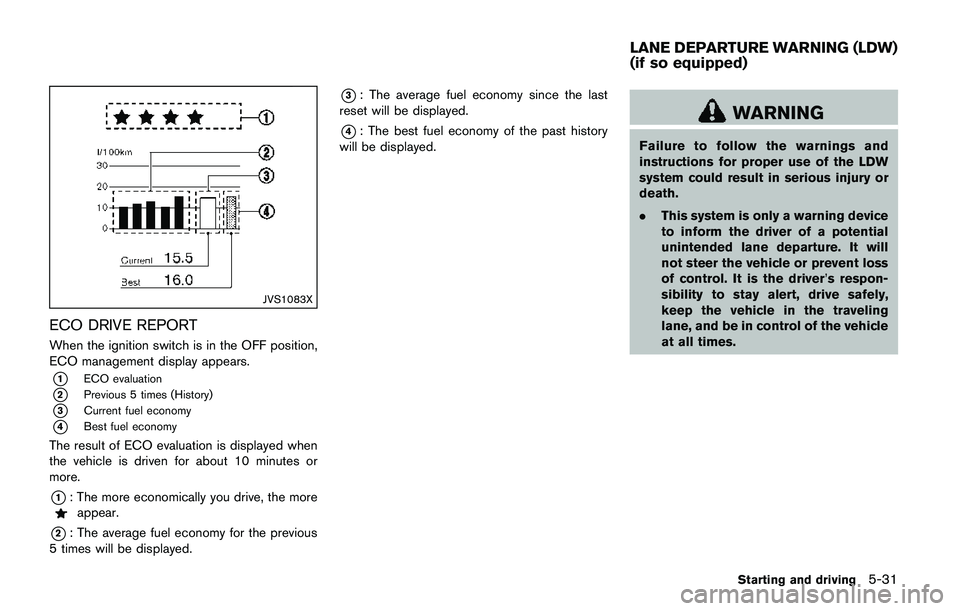
ECO DRIVE REPORT
When the ignition switch is in the OFF position,
ECO management display appears.
*1ECO evaluation
*2Previous 5 times (History)
*3Current fuel economy
*4Best fuel economy
The result of ECO evaluation is displayed when
the vehicle is driven for about 10 minutes or
more.
*1: The more economically you drive, the moreappear.
*2: The average fuel economy for the previous
5 times will be displayed.
*3: The average fuel economy since the last
reset will be displayed.
*4: The best fuel economy of the past history
will be displayed.WARNING
Failure to follow the warnings and
instructions for proper use of the LDW
system could result in serious injury or
death.
.This system is only a warning device
to inform the driver of a potential
unintended lane departure. It will
not steer the vehicle or prevent loss
of control. It is the driver’s respon-
sibility to stay alert, drive safely,
keep the vehicle in the traveling
lane, and be in control of the vehicle
at all times.
Starting and driving5-31
LANE DEPARTURE WARNING (LDW)
(if so equipped)