Esp off NISSAN QASHQAI 2017 Owner´s Manual
[x] Cancel search | Manufacturer: NISSAN, Model Year: 2017, Model line: QASHQAI, Model: NISSAN QASHQAI 2017Pages: 508, PDF Size: 2.68 MB
Page 36 of 508
WARNING
Do not allow children to play with the
seat belts. Most seating positions are
equipped with Automatic Locking Re-
tractor (ALR) mode seat belts. If the
seat belt becomes wrapped around a
child’s neck with the ALR mode acti-
vated, the child can be seriously injured
or killed if the seat belt retracts and
becomes tight. This can occur even if
the vehicle is parked. Unbuckle the seat
belt to release the child. If the seat belt
can not be unbuckled or is already
unbuckled, release the child by cutting
the seat belt with a suitable tool (such
as a knife or scissors) to release the
seat belt.
Children need adults to help protect them.
They need to be properly restrained.
In addition to the general information in this
manual, child safety information is available from
many other sources, including doctors, teachers,
government traffic safety offices, and community
organizations. Every child is different, so be sure
to learn the best way to transport your child.There are three basic types of child restraint
systems:
.Rear-facing child restraint
.Forward-facing child restraint
.Booster seat
The proper restraint depends on the child’s size.
Generally, infants up to about 1 year and less
than 20 lbs (9 kg) should be placed in rear-
facing child restraints. Forward-facing child
restraints are available for children who outgrow
rear-facing child restraints and are at least 1
year old. Booster seats are used to help position
a vehicle lap/shoulder belt on a child who can no
longer use a forward-facing child restraint.
WARNING
Infants and children need special pro-
tection. The vehicle’s seat belts may not
fit them properly. The shoulder belt may
come too close to the face or neck. The
lap belt may not fit over their small hip
bones. In an accident, an improperly
fitting seat belt could cause serious or
fatal injury. Always use appropriate
child restraints.
All U.S. states and Canadian provinces or
territories require the use of approved childrestraints for infants and small children. See
“Child restraints” (P.1-19) .
A child restraint may be secured in the vehicle
by using either the LATCH (Lower Anchors and
Tethers for CHildren) system or with the vehicle
seat belt. See “Child restraints” (P.1-19) for
more information.
NISSAN recommends that all pre-teens
and children be restrained in the rear seat.
Studies show that children are safer when
properly restrained in the rear seat than in
the front seat.
This is especially important because your
vehicle has a supplemental restraint sys-
tem (Air bag system) for the front passen-
ger. See “Supplemental Restraint System
(SRS)” (P.1-39) .INFANTS
Infants up to at least 1 year old should be placed
in a rear-facing child restraint. NISSAN recom-
mends that infants be placed in child restraints
that comply with Federal Motor Vehicle Safety
Standards or Canadian Motor Vehicle Safety
Standards. You should choose a child restraint
that fits your vehicle and always follow the
manufacturer’s instructions for installation and
use.
Safety — Seats, seat belts and supplemental restraint system1-17
CHILD SAFETY
Page 91 of 508
2-12Instruments and controls
Electric power steering warning
light
When the ignition switch is in the ON position,
the electric power steering warning light illumi-
nates. After starting the engine, the electric
power steering warning light turns off. This
indicates the electric power steering is opera-
tional.
If the electric power steering warning light
illuminates while the engine is running, it may
indicate the electric power steering is not
functioning properly and may need servicing.
Have the system checked. It is recommended
that you visit a NISSAN dealer for this service.
When the electric power steering warning light
illuminates with the engine running, the power
assist to the steering will cease operation but
you will still have control of the vehicle. At this
time, greater steering efforts are required to
operate the steering wheel, especially in sharp
turns and at low speeds.
(See “Electric power steering” (P.5-101) .)
Electronic parking brake system
warning light (yellow) (if so equipped)
The electronic parking brake system warning
light functions for the electronic parking brake
system. When the ignition switch is placed in
the ON position, the light illuminates for a few
seconds. If the warning light illuminates at any
other time, it may indicate that the electronic
parking brake system is not functioning properly.
Have the brake system checked, and, if neces-
sary, repaired. It is recommended that you visit a
NISSAN dealer for this service.
Electronic parking brake warning
light (if so equipped)
The electronic parking brake warning light
indicates that the electronic parking brake
system is operating.
When the ignition switch is placed in the ON
position, the electronic parking brake warning
light illuminates. When the engine is started and
the parking brake is released, the warning light
turns off.
If the parking brake is not fully released, the
electronic parking brake warning light remains
on. Be sure that the electronic parking brake
warning light has turned off before driving. (See
“Parking brake” (P.5-26).)If the electronic parking brake warning light
illuminates or flashes while the electronic park-
ing brake system warning light
(yellow)
illuminates, it may indicate that the electronic
parking brake system is not functioning properly.
Have the brake system checked, and if neces-
sary repaired. It is recommended you visit a
NISSAN dealer for this service.
Forward Emergency Braking (FEB)
system warning light (if so equipped)
When the ignition switch is in the ON position,
the FEB system warning light illuminates. After
starting the engine, the warning light turns off.
This light illuminates when the FEB system is set
to OFF on the vehicle information display.
If the light illuminates when the FEB system is
ON, it may indicate that the system is unavail-
able. See “Forward Emergency Braking (FEB)”
(P.5-80) or “Forward Emergency Braking (FEB)
with pedestrian detection system” (P.5-86) .
Page 102 of 508
.Selective Unlock
When this item is turned on, and the door
handle request switch on the driver’s or front
passenger’s side door is pushed, only the
corresponding door is unlocked. All the
doors can be unlocked if the door handle
request switch is pushed again within 1
minute. When this item is turned to off, all
the doors will be unlocked when the door
handle request switch is pushed once. From
the “Locking” menu, select “Selective Un-
lock”. Use the OK
*1to activate or
deactivate this function.
.Auto Door Unlock
The “Auto Door Unlock” feature allows the
customer to customize the auto door unlock
options.
— Ignition OFF
— Shift to Park (for Continuously Variable
Transmission (CVT) models)
— Off
.Answer Bk. Horn (if so equipped)
When the answer back horn is on, the horn
will chirp and the hazard indicators will flash
twice when locking the vehicle with the
Intelligent Key or remote keyless entry
function.Wipers:
.Speed Dependent
The “Speed Dependent” feature can be
activated or deactivated. From the “Wipers”
menu, select “Speed Dependent”. Use the
OK
*1to turn this feature ON or OFF.
.Reverse Link
The “Reverse Link” wiper feature can be set
to be ON or OFF. From the “Wipers” menu,
select “Reverse Link”. Use the OK
*1to
turn this feature ON or OFF.
.Drip wipe
The “Drip wipe” feature can be set to be ON
or OFF. From the “Wipers” menu, select
“Drip wipe”. Use the OK
*1to turn this
feature ON or OFF.
Remote start (if so equipped):
The “Remote start” feature allows user to turn
the remote engine start on or off. When turned
on, the engine can be restarted remotely. For
additional information, refer to “Remote engine
start” (P.3-22) .
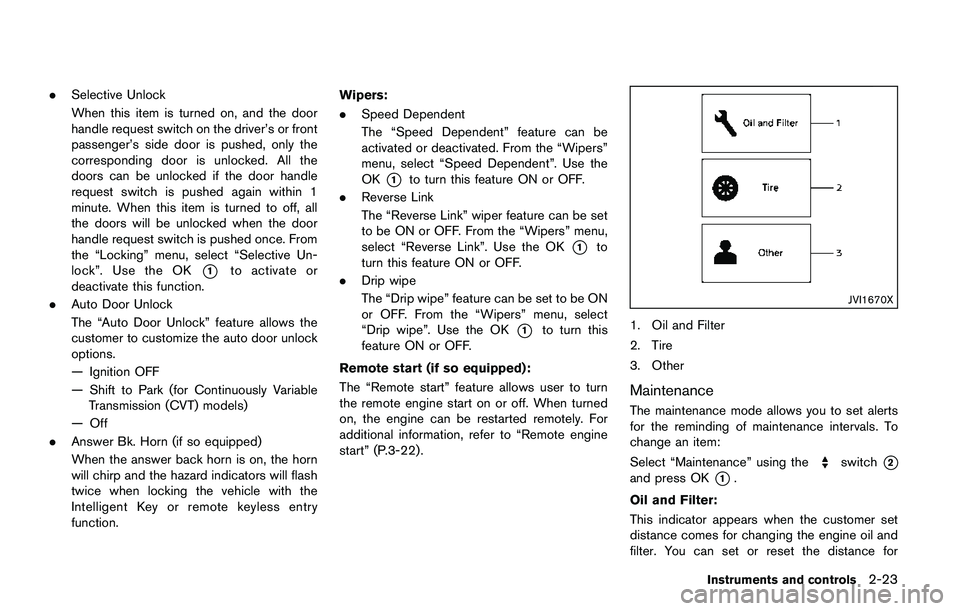
JVI1670X
1. Oil and Filter
2. Tire
3. Other
Maintenance
The maintenance mode allows you to set alerts
for the reminding of maintenance intervals. To
change an item:
Select “Maintenance” using the
switch*2
and press OK*1.
Oil and Filter:
This indicator appears when the customer set
distance comes for changing the engine oil and
filter. You can set or reset the distance for
Instruments and controls2-23
Page 117 of 508
2-38Instruments and controls
.opening any doors, the hood (if so
equipped) or liftgate without using the key
or Intelligent Key (even if the door is
unlocked by releasing the door inside lock
knob) .
How to stop an activated alarm
The alarm stops only by unlocking a door or the
liftgate with the mechanical key, pressing the
UNLOCK
button on the key fob (if so
equipped) or the Intelligent Key (if so equipped) ,
or pushing the request switch (if so equipped)
on the driver’s or passenger’s door in range of
the door handle.
NISSAN VEHICLE IMMOBILIZER SYS-
TEM
The NISSAN Vehicle Immobilizer System will not
allow the engine to start without the use of the
registered key.
If the engine fails to start using the registered
key, it may be due to interference caused by
another registered key, an automated toll road
device or automated payment device on the key
ring. Restart the engine using the following
procedures:
1. Leave the ignition switch in the ON position
for approximately 5 seconds.
2. Place the ignition switch in the OFF or
LOCK position and wait approximately 10seconds.
3. Repeat step 1 and 2 again.
4. Restart the engine while holding the device
(which may have caused the interference)
separate from the registered key.
If this procedure allows the engine to start,
NISSAN recommends placing the regis-
tered key on a separate key ring to avoid
interference from other devices.
Statement related to section 15 of FCC
rules for NISSAN Vehicle Immobilizer
System (CONT ASSY-BCM. ANT ASSY-
IMMOBILISER)
FCC Notice:
For USA:
This device complies with Part 15 of the
FCC Rules. Operation is subject to the
following two conditions: (1) This device
may not cause harmful interference, and
(2) this device must accept any interfer-
ence received, including interference that
may cause undesired operation.
Note: Changes or modifications not ex-
pressly approved by the party responsible
for compliance could void the user’s
authority to operate the equipment.For Canada:
This device complies with Industry Canada
licence-exempt RSS standard(s) . Opera-
tion is subject to the following two condi-
tions: (1) this device may not cause
interference, and (2) this device must
accept any interference, including interfer-
ence that may cause undesired operation
of the device.
Page 154 of 508
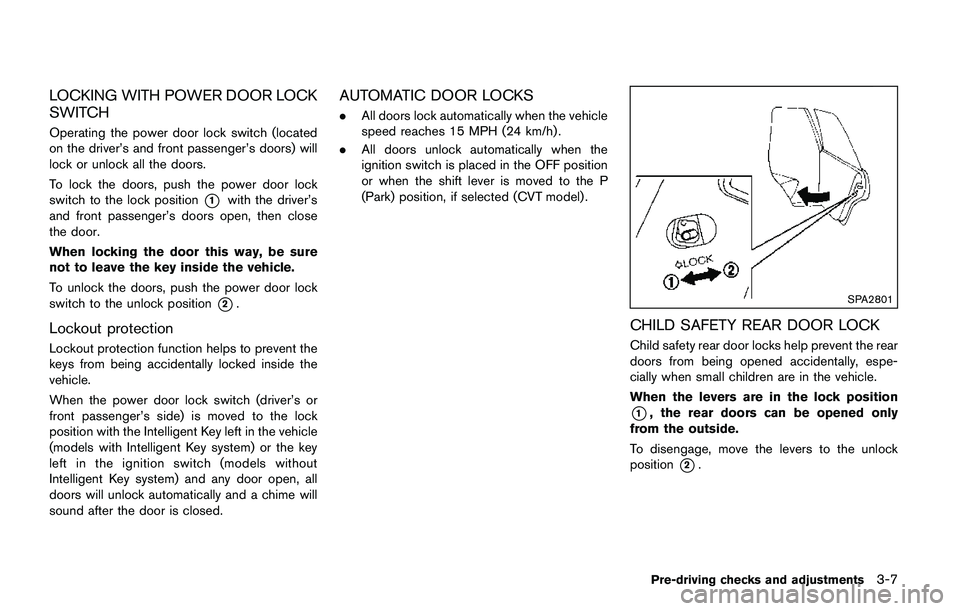
LOCKING WITH POWER DOOR LOCK
SWITCH
Operating the power door lock switch (located
on the driver’s and front passenger’s doors) will
lock or unlock all the doors.
To lock the doors, push the power door lock
switch to the lock position
*1with the driver’s
and front passenger’s doors open, then close
the door.
When locking the door this way, be sure
not to leave the key inside the vehicle.
To unlock the doors, push the power door lock
switch to the unlock position
*2.
Lockout protection
Lockout protection function helps to prevent the
keys from being accidentally locked inside the
vehicle.
When the power door lock switch (driver’s or
front passenger’s side) is moved to the lock
position with the Intelligent Key left in the vehicle
(models with Intelligent Key system) or the key
left in the ignition switch (models without
Intelligent Key system) and any door open, all
doors will unlock automatically and a chime will
sound after the door is closed.
AUTOMATIC DOOR LOCKS
.All doors lock automatically when the vehicle
speed reaches 15 MPH (24 km/h) .
.All doors unlock automatically when the
ignition switch is placed in the OFF position
or when the shift lever is moved to the P
(Park) position, if selected (CVT model) .
SPA2801
CHILD SAFETY REAR DOOR LOCK
Child safety rear door locks help prevent the rear
doors from being opened accidentally, espe-
cially when small children are in the vehicle.
When the levers are in the lock position
*1, the rear doors can be opened only
from the outside.
To disengage, move the levers to the unlock
position
*2.
Pre-driving checks and adjustments3-7
Page 162 of 508
Welcome light and farewell light function
When you lock or unlock the doors or the
liftgate, the daytime running lights, parking lights
and the tail lights will illuminate for a period of
time. The welcome light and farewell light
function can be disabled. For information about
disabling the welcome light and farewell light
function, see “Vehicle Settings” (P.2-22).
Locking doors
1. Move the shift lever to the P (Park) position
(Continuously Variable Transmission (CVT)
models) , or the shift lever in the N (Neutral)
position (Manual Transmission (MT) mod-
els) , place the ignition switch in the OFF
position and make sure you carry the
Intelligent Key with you.
2. Close all doors.
3. Push any door handle request switch while
carrying the Intelligent Key with you.
4. All doors and the liftgate will lock.
5. The hazard indicator lights flash twice and
the outside buzzer sounds twice.
NOTE:
.Request switches for all doors and the
liftgate can be deactivated when the I-
Key Door Lock setting is turned off in
the Vehicle Settings of the vehicle
information display. For additional in-formation, see“Vehicle Settings”(P.2-
22) .
.Doors lock with the door handle re-
quest switch while the ignition switch
is not in the LOCK position.
.Doors do not lock by pushing the door
handle request switch while any door is
open. However, doors lock with the
mechanical key even if any door is
open.
.Doors do not lock with the door handle
request switch with the Intelligent Key
inside the vehicle and a beep sounds to
warn you. However, when an Intelligent
Key is inside the vehicle, doors can be
locked with another Intelligent Key.
CAUTION
.After locking the doors using the
request switch, make sure that the
doors have been securely locked by
operating the door handles or the
liftgate opener switch.
.When locking the doors using the
request switch, make sure to have
the Intelligent Key in your posses-
sion before operating the request
switch to prevent the Intelligent Keyfrom being left in the vehicle.
.The request switch is operational
only when the Intelligent Key has
been detected by the Intelligent Key
system.
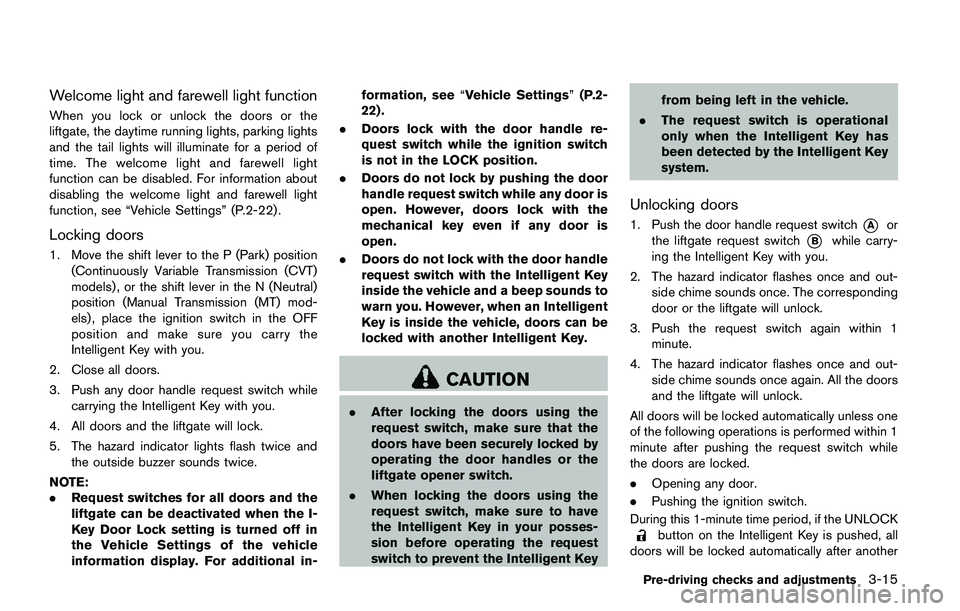
Unlocking doors
1. Push the door handle request switch*Aor
the liftgate request switch
*Bwhile carry-
ing the Intelligent Key with you.
2. The hazard indicator flashes once and out-
side chime sounds once. The corresponding
door or the liftgate will unlock.
3. Push the request switch again within 1
minute.
4. The hazard indicator flashes once and out-
side chime sounds once again. All the doors
and the liftgate will unlock.
All doors will be locked automatically unless one
of the following operations is performed within 1
minute after pushing the request switch while
the doors are locked.
.Opening any door.
.Pushing the ignition switch.
During this 1-minute time period, if the UNLOCK
button on the Intelligent Key is pushed, all
doors will be locked automatically after another
Pre-driving checks and adjustments3-15
Page 164 of 508
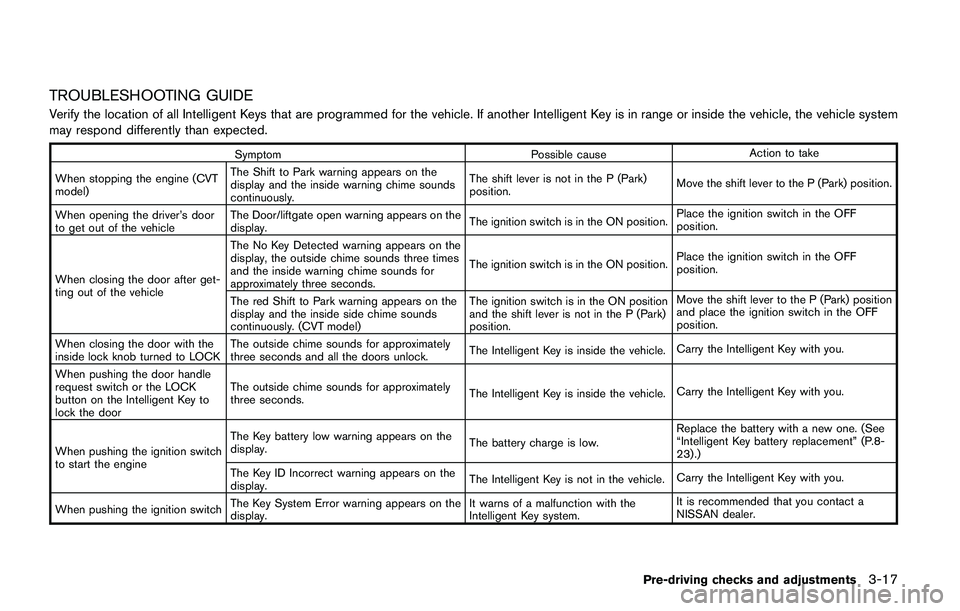
TROUBLESHOOTING GUIDE
Verify the location of all Intelligent Keys that are programmed for the vehicle. If another Intelligent Key is in range or inside the vehicle, the vehicle system
may respond differently than expected.
Symptom Possible causeAction to take
When stopping the engine (CVT
model)The Shift to Park warning appears on the
display and the inside warning chime sounds
continuously.The shift lever is not in the P (Park)
position.Move the shift lever to the P (Park) position.
When opening the driver’s door
to get out of the vehicleThe Door/liftgate open warning appears on the
display.The ignition switch is in the ON position.Place the ignition switch in the OFF
position.
When closing the door after get-
ting out of the vehicleThe No Key Detected warning appears on the
display, the outside chime sounds three times
and the inside warning chime sounds for
approximately three seconds.The ignition switch is in the ON position.Place the ignition switch in the OFF
position.
The red Shift to Park warning appears on the
display and the inside side chime sounds
continuously. (CVT model)The ignition switch is in the ON position
and the shift lever is not in the P (Park)
position.Move the shift lever to the P (Park) position
and place the ignition switch in the OFF
position.
When closing the door with the
inside lock knob turned to LOCKThe outside chime sounds for approximately
three seconds and all the doors unlock.The Intelligent Key is inside the vehicle.Carry the Intelligent Key with you.
When pushing the door handle
request switch or the LOCK
button on the Intelligent Key to
lock the doorThe outside chime sounds for approximately
three seconds.The Intelligent Key is inside the vehicle.Carry the Intelligent Key with you.
When pushing the ignition switch
to start the engineThe Key battery low warning appears on the
display.The battery charge is low.Replace the battery with a new one. (See
“Intelligent Key battery replacement” (P.8-
23) .)
The Key ID Incorrect warning appears on the
display.The Intelligent Key is not in the vehicle.Carry the Intelligent Key with you.
When pushing the ignition switchThe Key System Error warning appears on the
display.It warns of a malfunction with the
Intelligent Key system.It is recommended that you contact a
NISSAN dealer.
Pre-driving checks and adjustments3-17
Page 187 of 508
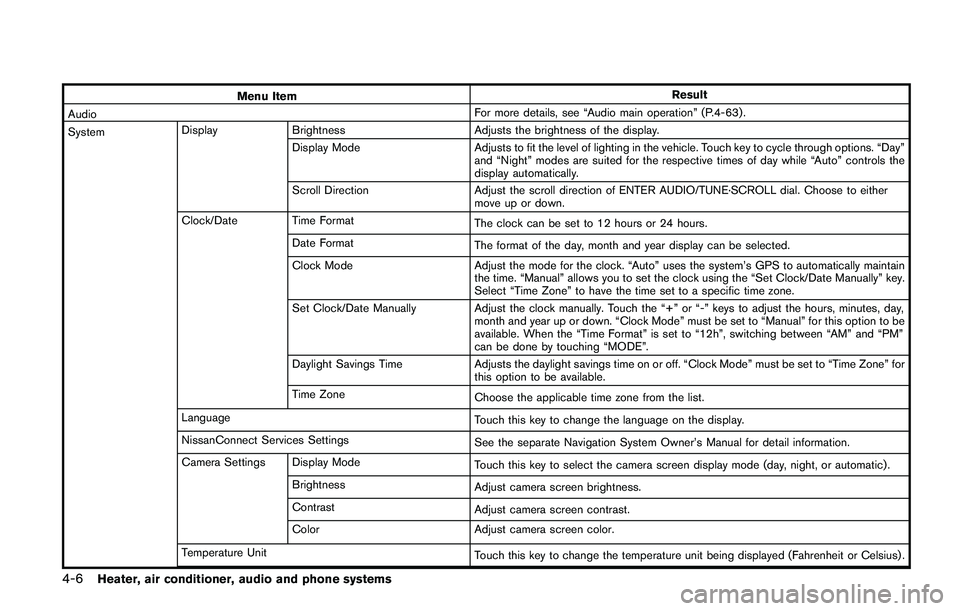
4-6Heater, air conditioner, audio and phone systems
Menu ItemResult
AudioFor more details, see “Audio main operation” (P.4-63) .
SystemDisplay Brightness Adjusts the brightness of the display.
Display Mode Adjusts to fit the level of lighting in the vehicle. Touch key to cycle through options. “Day”
and “Night” modes are suited for the respective times of day while “Auto” controls the
display automatically.
Scroll Direction Adjust the scroll direction of ENTER AUDIO/TUNE·SCROLL dial. Choose to either
move up or down.
Clock/Date Time Format
The clock can be set to 12 hours or 24 hours.
Date Format
The format of the day, month and year display can be selected.
Clock Mode Adjust the mode for the clock. “Auto” uses the system’s GPS to automatically maintain
the time. “Manual” allows you to set the clock using the “Set Clock/Date Manually” key.
Select “Time Zone” to have the time set to a specific time zone.
Set Clock/Date Manually Adjust the clock manually. Touch the “+” or “-” keys to adjust the hours, minutes, day,
month and year up or down. “Clock Mode” must be set to “Manual” for this option to be
available. When the “Time Format” is set to “12h”, switching between “AM” and “PM”
can be done by touching “MODE”.
Daylight Savings Time Adjusts the daylight savings time on or off. “Clock Mode” must be set to “Time Zone” for
this option to be available.
Time Zone
Choose the applicable time zone from the list.
Language
Touch this key to change the language on the display.
NissanConnect Services Settings
See the separate Navigation System Owner’s Manual for detail information.
Camera Settings Display Mode
Touch this key to select the camera screen display mode (day, night, or automatic) .
Brightness
Adjust camera screen brightness.
Contrast
Adjust camera screen contrast.
Color Adjust camera screen color.
Temperature Unit
Touch this key to change the temperature unit being displayed (Fahrenheit or Celsius) .
Page 216 of 508
.When the DUAL indicator light is not
illuminated, pushing the DUAL button
(the indicator light will turn on) allows the
user to independently change the driver
and passenger side temperatures with
the corresponding temperature control
dial.
.To cancel the separate temperature
setting, push the DUAL button (the
indicator light will turn off) and the
driver’s side temperature setting will be
applied to both the driver and passenger
sides.
The temperature of the passenger compart-
ment will be maintained automatically. Air
flow distribution and fan speed are also
controlled automatically.
A visible mist may be seen coming from the
ventilators in hot and humid conditions as
the air is cooled rapidly. This does not
indicate a malfunction.
Dehumidified defrosting/defogging:
1. Push the front defroster
button (The
indicator light on the front defroster
button will illuminate) .
2. Turn the temperature control dial to set the
desired temperature..To quickly remove frost from the outside
surface of the windshield, set the tempera-
ture and the fan speed to the maximum
levels.
.After the windshield is cleared, push the
AUTO button (the AUTO indicator light will
turn on).
.When the front defroster
button is
pushed, the air conditioner will turn on when
the outside air temperature is above ap-
proximately 368F(28C) to defog the wind-
shield. The air recirculation mode will
automatically turn off. The outside air circu-
lation mode will be selected to improve the
defogging performance.
Do not set the temperature too low when the
front defroster mode is on (the indicator light is
illuminated) , because doing so may fog up the
windshield.
Manual operation
The manual mode can be used to control the
heater and air conditioner to your desired
settings.
Fan speed control:
Push the fan speed control button (
side orside) to manually control the fan speed.
Push the AUTO button to change the fan speed
to the automatic mode.
Air flow control:
Push the MODE button to select the desired
mode:
— Air flows mainly from the center and side
ventilators.
— Air flows mainly from the center and side
ventilators and foot outlets.
— Air flows mainly from the foot outlet and
partly from the defroster.
— Air flows mainly from the front defroster
outlets and foot outlets.
Temperature control:
Turn the temperature control dial to set the
desired temperature.
.When the DUAL indicator light is not
illuminated, pushing the DUAL button (the
indicator light will turn on) allows the user to
independently change the driver and pas-
senger side temperatures with the corre-
Heater, air conditioner, audio and phone systems4-35
Page 220 of 508
Static and flutter: During signal interference from
buildings, large hills or due to antenna position,
usually in conjunction with increased distance
from the station transmitter, static or flutter can
be heard. This can be reduced by lowering the
treble setting to reduce the treble response.
Multipath reception: Because of the reflective
characteristics of FM signals, direct and re-
flected signals reach the receiver at the same
time. The signals may cancel each other,
resulting in momentary flutter or loss of sound.
AM radio reception:
AM signals, because of their low frequency, can
bend around objects and skip along the ground.
In addition, the signals can be bounced off the
ionosphere and bent back to earth. Because of
these characteristics. AM signals are also
subject to interference as they travel from
transmitter to receiver.
Fading: Occurs while the vehicle is passing
through freeway underpasses or in areas with
many tall buildings. It can also occur for several
seconds during ionospheric turbulence even in
areas where no obstacles exist.
Static: Caused by thunderstorms, electrical
power lines, electric signs and even traffic lights.Satellite radio reception (if so equipped):
When the satellite radio is used for the first time
or the battery has been replaced, the satellite
radio may not work properly. This is not a
malfunction. Wait more than 10 minutes with the
satellite radio ON and the vehicle away from any
metal or large buildings for the satellite radio to
receive all of the necessary data.
The satellite radio mode requires an active
SiriusXM Satellite Radio subscription. The sa-
tellite radio is not available in Alaska, Hawaii and
Guam.
Satellite radio performance may be affected if
cargo carried on the roof blocks the satellite
radio signal.
If possible, do not put cargo near the satellite
antenna.
A buildup of ice on the satellite radio antenna
can affect satellite radio performance. Remove
the ice to restore satellite radio reception.
SAA0480
Compact Disc (CD) player
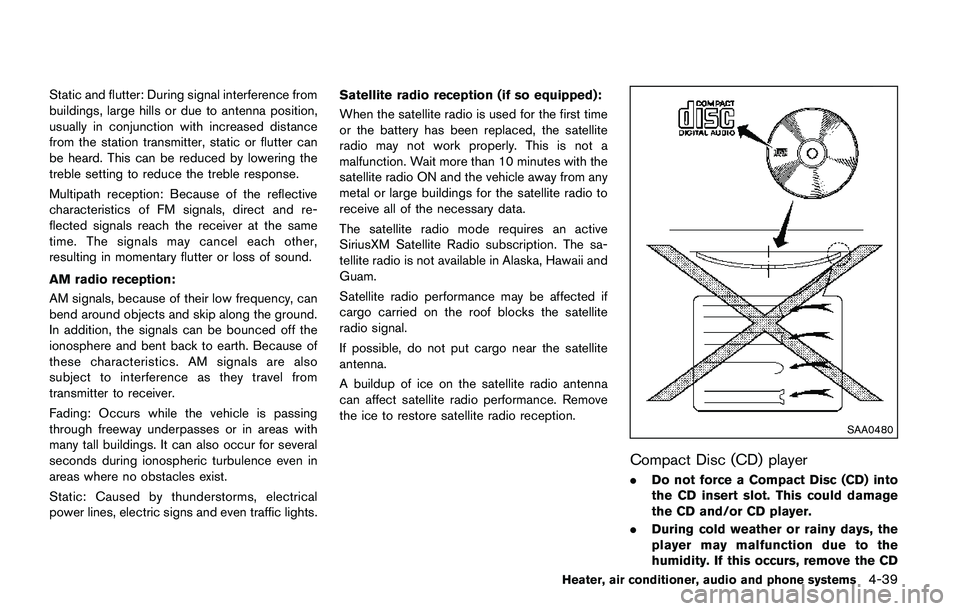
.Do not force a Compact Disc (CD) into
the CD insert slot. This could damage
the CD and/or CD player.
.During cold weather or rainy days, the
player may malfunction due to the
humidity. If this occurs, remove the CD
Heater, air conditioner, audio and phone systems4-39