change wheel NISSAN QASHQAI 2017 Owner´s Manual
[x] Cancel search | Manufacturer: NISSAN, Model Year: 2017, Model line: QASHQAI, Model: NISSAN QASHQAI 2017Pages: 508, PDF Size: 2.68 MB
Page 375 of 508
5-90Starting and driving
— Small pedestrians (including
small children) , animals and cy-
clists.
— Pedestrians in wheelchairs or
using mobile transport such as
scooters, child-operated toys, or
skateboards.
— Pedestrians who are seated or
otherwise not in a full upright
standing or walking position.
— Obstacles on the roadway
— Oncoming vehicles
— Crossing vehicles
— Obstacles on the roadside
.The FEB with pedestrian detection
system has some performance lim-
itations.
— If a stationary vehicle is in the
vehicle’s path, the FEB with
pedestrian detection system will
not function when the vehicle is
driven at speeds over approxi-
mately 50 MPH (80 km/h) .
— For pedestrian detection, the
FEB with pedestrian detection
system will not function whenthe vehicle is driven at speeds
over approximately 37 MPH (60
km/h) or below approximately 6
MPH (10 km/h) .
.The FEB with pedestrian detection
system may not function for pedes-
trians in darkness or in tunnels,
even if there is street lighting in
the area.
.For pedestrians, the FEB with pe-
destrian detection system will not
issue the first warning.
.The FEB with pedestrian detection
system may not function if the
vehicle ahead is narrow (for exam-
ple a motorcycle) .
.The FEB with pedestrian detection
system may not function if speed
difference between the two vehicles
is too small.
.The radar sensor may not function
properly or detect a vehicle ahead in
the following conditions:
— Poor visibility (conditions such
as rain, snow, fog, dust storms,
sandstorms, and road spray
from other vehicles)— Driving on a steep downhill
slope or roads with sharp
curves.
— Driving on a bumpy road sur-
face, such as an uneven dirt
road.
— If dirt, ice, snow or other materi-
al is covering the radar sensor
area.
— Interference by other radar
sources.
.The camera may not function prop-
erly or detect a vehicle ahead in the
following conditions:
— The camera area of windshield
is fogged up, or covered with
dirt, water drops, ice, snow, etc.
— Strong light (for example, sun-
light or high beams from on-
coming vehicles) enters the
front camera. Strong light
causes the area around the
pedestrian to be cast in a sha-
dow, making it difficult to see.
— A sudden change in brightness
occurs. (For example, when the
vehicle enters or exits a tunnel
Page 382 of 508
JVS1120X
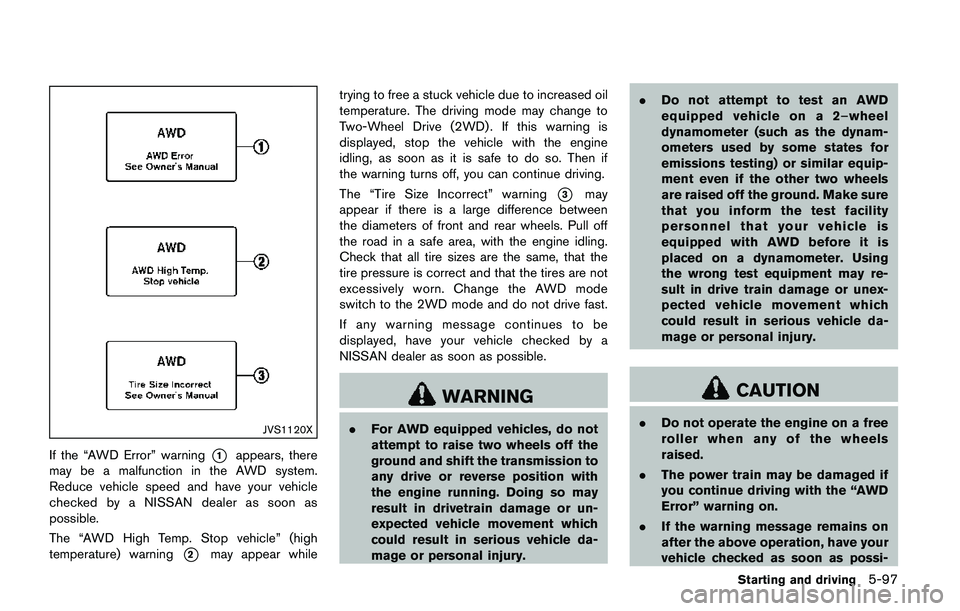
If the “AWD Error” warning*1appears, there
may be a malfunction in the AWD system.
Reduce vehicle speed and have your vehicle
checked by a NISSAN dealer as soon as
possible.
The “AWD High Temp. Stop vehicle” (high
temperature) warning
*2may appear whiletrying to free a stuck vehicle due to increased oil
temperature. The driving mode may change to
Two-Wheel Drive (2WD) . If this warning is
displayed, stop the vehicle with the engine
idling, as soon as it is safe to do so. Then if
the warning turns off, you can continue driving.
The “Tire Size Incorrect” warning
*3may
appear if there is a large difference between
the diameters of front and rear wheels. Pull off
the road in a safe area, with the engine idling.
Check that all tire sizes are the same, that the
tire pressure is correct and that the tires are not
excessively worn. Change the AWD mode
switch to the 2WD mode and do not drive fast.
If any warning message continues to be
displayed, have your vehicle checked by a
NISSAN dealer as soon as possible.
WARNING
.For AWD equipped vehicles, do not
attempt to raise two wheels off the
ground and shift the transmission to
any drive or reverse position with
the engine running. Doing so may
result in drivetrain damage or un-
expected vehicle movement which
could result in serious vehicle da-
mage or personal injury..Do not attempt to test an AWD
equipped vehicle on a 2–wheel
dynamometer (such as the dynam-
ometers used by some states for
emissions testing) or similar equip-
ment even if the other two wheels
are raised off the ground. Make sure
that you inform the test facility
personnel that your vehicle is
equipped with AWD before it is
placed on a dynamometer. Using
the wrong test equipment may re-
sult in drive train damage or unex-
pected vehicle movement which
could result in serious vehicle da-
mage or personal injury.
CAUTION
.Do not operate the engine on a free
roller when any of the wheels
raised.
.The power train may be damaged if
you continue driving with the “AWD
Error” warning on.
.If the warning message remains on
after the above operation, have your
vehicle checked as soon as possi-
Starting and driving5-97
Page 384 of 508
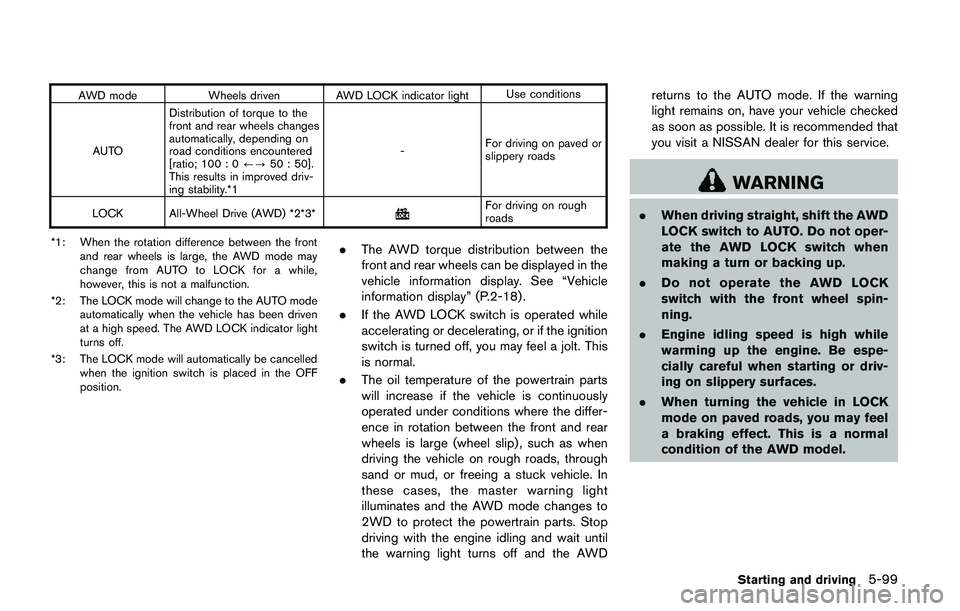
AWD mode Wheels driven AWD LOCK indicator lightUse conditions
AUTODistribution of torque to the
front and rear wheels changes
automatically, depending on
road conditions encountered
[ratio; 100 : 0/?50 : 50].
This results in improved driv-
ing stability.*1-For driving on paved or
slippery roads
LOCK All-Wheel Drive (AWD) *2*3*
For driving on rough
roads
*1: When the rotation difference between the front
and rear wheels is large, the AWD mode may
change from AUTO to LOCK for a while,
however, this is not a malfunction.
*2: The LOCK mode will change to the AUTO mode
automatically when the vehicle has been driven
at a high speed. The AWD LOCK indicator light
turns off.
*3: The LOCK mode will automatically be cancelled
when the ignition switch is placed in the OFF
position.
.The AWD torque distribution between the
front and rear wheels can be displayed in the
vehicle information display. See “Vehicle
information display” (P.2-18) .
.If the AWD LOCK switch is operated while
accelerating or decelerating, or if the ignition
switch is turned off, you may feel a jolt. This
is normal.
.The oil temperature of the powertrain parts
will increase if the vehicle is continuously
operated under conditions where the differ-
ence in rotation between the front and rear
wheels is large (wheel slip) , such as when
driving the vehicle on rough roads, through
sand or mud, or freeing a stuck vehicle. In
these cases, the master warning light
illuminates and the AWD mode changes to
2WD to protect the powertrain parts. Stop
driving with the engine idling and wait until
the warning light turns off and the AWDreturns to the AUTO mode. If the warning
light remains on, have your vehicle checked
as soon as possible. It is recommended that
you visit a NISSAN dealer for this service.
WARNING
.When driving straight, shift the AWD
LOCK switch to AUTO. Do not oper-
ate the AWD LOCK switch when
making a turn or backing up.
.Do not operate the AWD LOCK
switch with the front wheel spin-
ning.
.Engine idling speed is high while
warming up the engine. Be espe-
cially careful when starting or driv-
ing on slippery surfaces.
.When turning the vehicle in LOCK
mode on paved roads, you may feel
a braking effect. This is a normal
condition of the AWD model.
Starting and driving5-99
Page 386 of 508
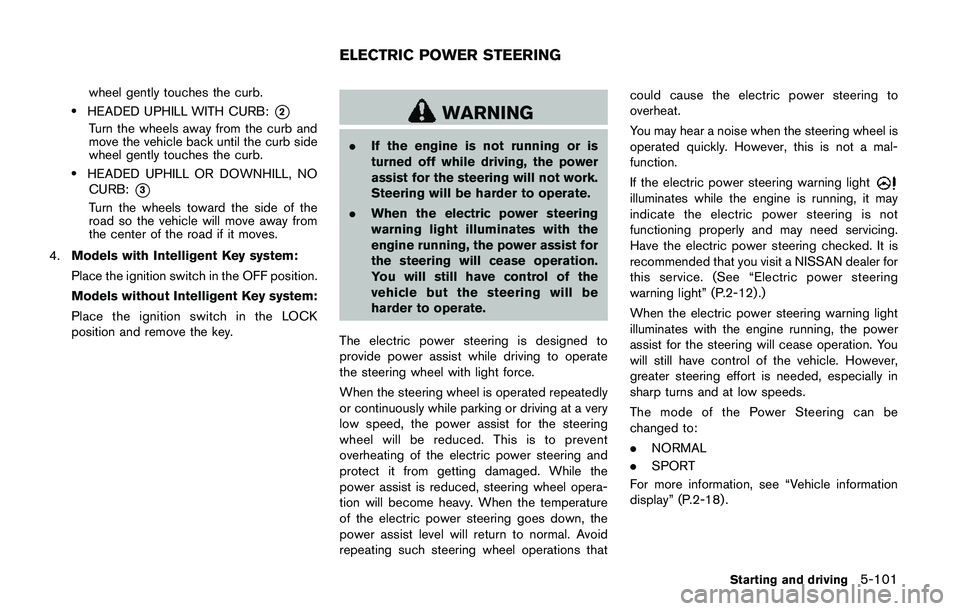
wheel gently touches the curb.
.HEADED UPHILL WITH CURB:*2
Turn the wheels away from the curb and
move the vehicle back until the curb side
wheel gently touches the curb.
.HEADED UPHILL OR DOWNHILL, NO
CURB:
*3
Turn the wheels toward the side of the
road so the vehicle will move away from
the center of the road if it moves.
4.Models with Intelligent Key system:
Place the ignition switch in the OFF position.
Models without Intelligent Key system:
Place the ignition switch in the LOCK
position and remove the key.
WARNING
.If the engine is not running or is
turned off while driving, the power
assist for the steering will not work.
Steering will be harder to operate.
.When the electric power steering
warning light illuminates with the
engine running, the power assist for
the steering will cease operation.
You will still have control of the
vehicle but the steering will be
harder to operate.
The electric power steering is designed to
provide power assist while driving to operate
the steering wheel with light force.
When the steering wheel is operated repeatedly
or continuously while parking or driving at a very
low speed, the power assist for the steering
wheel will be reduced. This is to prevent
overheating of the electric power steering and
protect it from getting damaged. While the
power assist is reduced, steering wheel opera-
tion will become heavy. When the temperature
of the electric power steering goes down, the
power assist level will return to normal. Avoid
repeating such steering wheel operations thatcould cause the electric power steering to
overheat.
You may hear a noise when the steering wheel is
operated quickly. However, this is not a mal-
function.
If the electric power steering warning light
illuminates while the engine is running, it may
indicate the electric power steering is not
functioning properly and may need servicing.
Have the electric power steering checked. It is
recommended that you visit a NISSAN dealer for
this service. (See “Electric power steering
warning light” (P.2-12).)
When the electric power steering warning light
illuminates with the engine running, the power
assist for the steering will cease operation. You
will still have control of the vehicle. However,
greater steering effort is needed, especially in
sharp turns and at low speeds.
The mode of the Power Steering can be
changed to:
.NORMAL
.SPORT
For more information, see “Vehicle information
display” (P.2-18) .
Starting and driving5-101
ELECTRIC POWER STEERING
Page 401 of 508
6-4In case of emergency
TPMS.
.Do not inject any tire liquid or
aerosol tire sealant into the tires,
as this may cause a malfunction of
the tire pressure sensors.
CHANGING A FLAT TIRE
If you have a flat tire, follow the instructions
below.
Stopping the vehicle
1. Safely move the vehicle off the road and
away from traffic.
2. Turn on the hazard warning flashers.
3. Park on a level surface and apply the parking
brake.
4.Continuously Variable Transmission
(CVT) models:
Move the shift lever to the P (Park) position.
Manual Transmission (MT) models:
Move the shift lever to the R (Reverse)
position.
5. Turn off the engine.
6. Raise the hood to warn other traffic, and to
signal professional road assistance person-
nel that you need assistance.7. Have all passengers get out of the vehicle
and stand in a safe place, away from traffic
and clear of the vehicle.
WARNING
.Make sure the parking brake is
securely applied and the Manual
Transmission is shifted into R (Re-
verse) , or the CVT into P (Park) .
.Never change tires when the vehicle
is on a slope, ice or slippery areas.
This is hazardous.
.Never change tires if oncoming
traffic is close to your vehicle. Wait
for professional road assistance.
MCE0001A
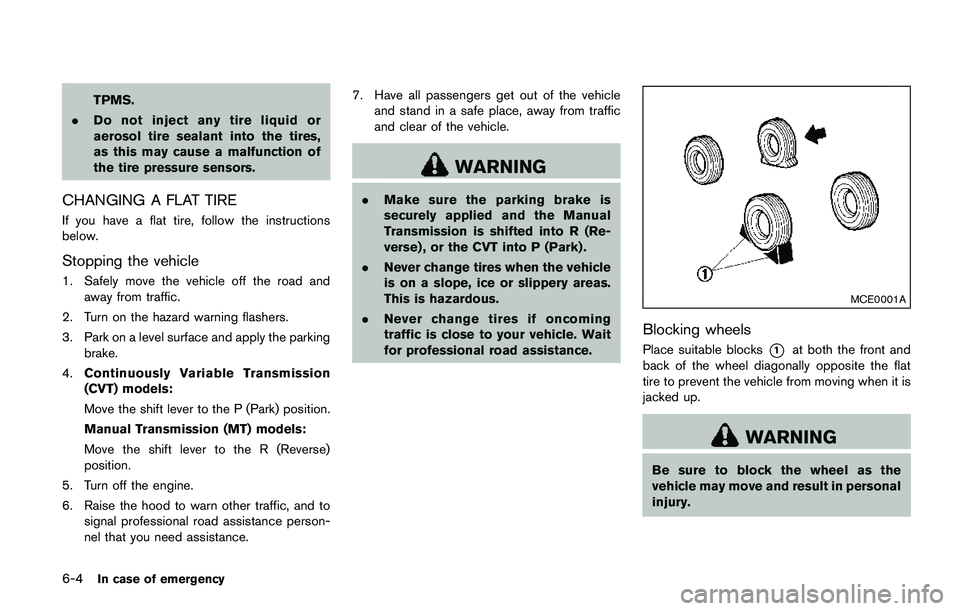
Blocking wheels
Place suitable blocks*1at both the front and
back of the wheel diagonally opposite the flat
tire to prevent the vehicle from moving when it is
jacked up.
WARNING
Be sure to block the wheel as the
vehicle may move and result in personal
injury.
Page 403 of 508
6-6In case of emergency
SCE0630
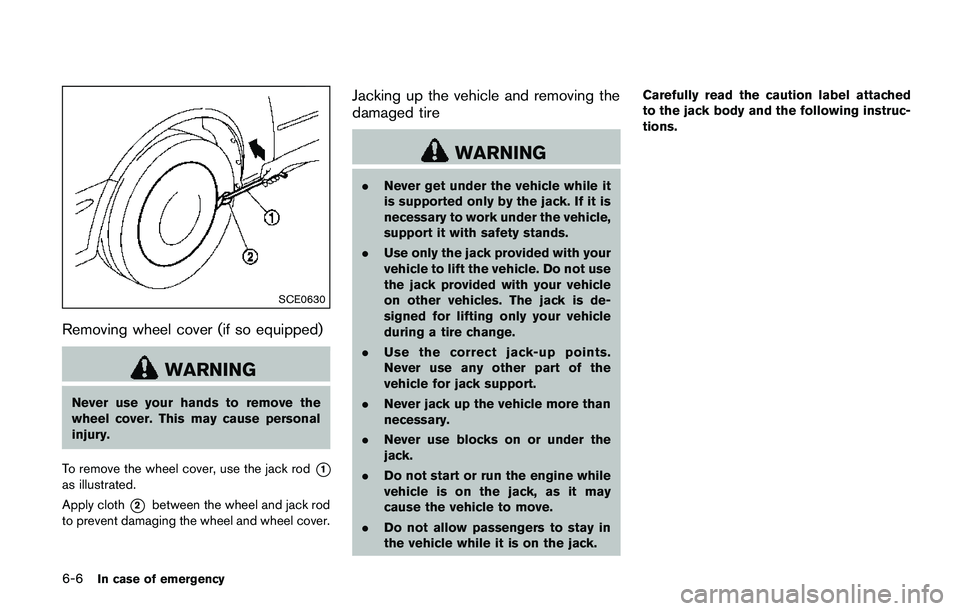
Removing wheel cover (if so equipped)
WARNING
Never use your hands to remove the
wheel cover. This may cause personal
injury.
To remove the wheel cover, use the jack rod
*1
as illustrated.
Apply cloth
*2between the wheel and jack rod
to prevent damaging the wheel and wheel cover.
Jacking up the vehicle and removing the
damaged tire
WARNING
.Never get under the vehicle while it
is supported only by the jack. If it is
necessary to work under the vehicle,
support it with safety stands.
.Use only the jack provided with your
vehicle to lift the vehicle. Do not use
the jack provided with your vehicle
on other vehicles. The jack is de-
signed for lifting only your vehicle
during a tire change.
.Use the correct jack-up points.
Never use any other part of the
vehicle for jack support.
.Never jack up the vehicle more than
necessary.
.Never use blocks on or under the
jack.
.Do not start or run the engine while
vehicle is on the jack, as it may
cause the vehicle to move.
.Do not allow passengers to stay in
the vehicle while it is on the jack.Carefully read the caution label attached
to the jack body and the following instruc-
tions.
Page 418 of 508
finish or leave swirl marks.
REMOVING SPOTS
Remove tar and oil spots, industrial dust,
insects, and tree sap as quickly as possible
from the paint surface to avoid lasting damage
or staining. Special cleaning products are
available at a NISSAN dealer or any automotive
accessory stores. It is recommended that you
visit a NISSAN dealer for these products.
UNDERBODY
In areas where road salt is used in winter, the
underbody must be cleaned regularly. This will
prevent dirt and salt from building up and
causing the acceleration of corrosion on the
underbody and suspension. Before the winter
period and again in the spring, the underseal
must be checked and, if necessary, re-treated.
GLASS
Use glass cleaner to remove smoke and dust
film from the glass surfaces. It is normal for glass
to become coated with a film after the vehicle is
parked in the hot sun. Glass cleaner and a soft
cloth will easily remove this film.
CAUTION
When cleaning the inside of the win-
dows, do not use sharp-edged tools,
abrasive cleaners or chlorine-based
disinfectant cleaners. They could da-
mage the electrical conductors, radio
antenna elements or rear window
defroster elements.
WHEELS
Wash the wheels when washing the vehicle to
maintain their appearance.
.Clean the inner side of the wheels when the
wheel is changed or the underside of the
vehicle is washed.
.Inspect wheel rims regularly for dents or
corrosion. Such damage may cause loss of
pressure or poor seal at the tire bead.
.NISSAN recommends that the road wheels
be waxed to protect against road salt in
areas where it is used during winter.
CAUTION
Do not use abrasive cleaners when
washing the wheels.
ALUMINUM ALLOY WHEELS
Wash regularly with a sponge dampened in a
mild soap solution, especially during winter
months in areas where road salt is used. Salt
could discolor the wheels if not removed.
CAUTION
Follow the directions below to avoid
staining or discoloring the wheels:
.Do not use a cleaner that uses
strong acid or alkali contents to
clean the wheels.
.Do not apply wheel cleaners to the
wheels when they are hot. The
wheel temperature should be the
same as ambient temperature.
.Rinse the wheel to completely re-
move the cleaner within 15 minutes
after the cleaner is applied.
CHROME PARTS
Clean chrome parts regularly with a non-
abrasive chrome polish to maintain the finish.
Appearance and care7-3
Page 462 of 508
loss of vehicle control in some
driving conditions and cause an
accident and personal injury.
.If the wheels are changed for any
reason, always replace with wheels
which have the same off-set dimen-
sion. Wheels of a different off-set
could cause premature tire wear,
degrade vehicle handling character-
istics and/or interference with the
brake discs/drums. Such interfer-
ence can lead to decreased braking
efficiency and/or early brake pad/
shoe wear. See“Wheels and tires”
(P.10-7) of this manual for wheel off-
set dimensions.
.Since the spare tire is not equipped
with the TPMS, when a spare tire is
mounted or a wheel is replaced, the
TPMS will not function and the low
tire pressure warning light will flash
for approximately 1 minute. The
light will remain on after 1 minute.
Have your tires replaced and/or
TPMS system reset as soon as
possible. It is recommended you
visit a NISSAN dealer for these
services..Replacing tires with those not ori-
ginally specified by NISSAN could
affect the proper operation of the
TPMS.
.The TPMS sensor may be damaged
if it is not handled correctly. Be
careful when handling the TPMS
sensor.
.When replacing the TPMS sensor,
the ID registration may be required.
It is recommended you visit a
NISSAN dealer for ID registration.
.Do not use a valve stem cap that is
not specified by NISSAN. The valve
stem cap may become stuck.
.Be sure that the valve stem caps are
correctly fitted. Otherwise the valve
may be clogged up with dirt and
cause a malfunction or loss of
pressure.
.Do not install a damaged or de-
formed wheel or tire even if it has
been repaired. Such wheels or tires
could have structural damage and
could fail without warning.
.The use of retread tire is not re-
commended..For additional information regard-
ing tires, refer to“Important Tire
Safety Information”(US) or“Tire
Safety Information”(Canada) in the
Warranty Information Booklet.
All-Wheel Drive (AWD) models
CAUTION
.Always use tires of the same size,
brand, construction (bias, bias-
belted or radial) , and tread pattern
on all four wheels. Failure to do so
may result in a circumference differ-
ence between tires on the front and
rear axles which will cause exces-
sive tire wear and may damage the
transmission, transfer case and rear
differential gears.
.Only use spare tires specified for
each AWD model.
If excessive tire wear is found, it is recom-
mended that all four tires be replaced with tires
of the same size, brand, construction and tread
pattern. The tire pressure and wheel alignment
should also be checked and corrected as
Do-it-yourself8-39
Page 466 of 508
Lights*:Clean the headlights on a regular basis.
Make sure that the headlights, stop lights, tail
lights, turn signal lights, and other lights are all
operating properly and installed securely. Also
check headlight aim.
Road wheel nuts (lug nuts)*:When checking
the tires, make sure no wheel nuts are missing,
and check for any loose wheel nuts. Tighten if
necessary.
Tire rotation*:Tires should be rotated every
5,000 miles (8,000 km) .
Tires*:Check the pressure with a gauge often
and always prior to long distance trips. If
necessary, adjust the pressure in all tires,
including the spare, to the pressure specified.
Check carefully for damage, cuts or excessive
wear.
Tire Pressure Monitoring System (TPMS)
transmitter components:Replace the TPMS
transmitter grommet seal, valve core and cap
when the tires are replaced due to wear or age.
Wheel alignment and balance:If the vehicle
should pull to either side while driving on a
straight and level road, or if you detect uneven or
abnormal tire wear, there may be a need for
wheel alignment.
If the steering wheel or seat vibrates at normal
highway speeds, wheel balancing may be
needed.For additional information regarding tires, refer
to “Important Tire Safety Information” (US) or
“Tire Safety Information” (Canada) in the
NISSAN Warranty Information Booklet.
Windshield:Clean the windshield on a regular
basis. Check the windshield at least every six
months for cracks or other damage. Have a
damaged windshield repaired by a qualified
repair facility.
Windshield wiper blades*:Check for cracks
or wear if they do not wipe properly.
Inside the vehicle
The maintenance items listed here should be
checked on a regular basis, such as when
performing scheduled maintenance, cleaning
the vehicle, etc.
Accelerator pedal:Check the pedal for
smooth operation and make sure the pedal
does not catch or require uneven effort. Keep
the floor mat away from the pedal.
Brake pedal:Check the pedal for smooth
operation. If the brake pedal suddenly goes
down further than normal, the pedal feels
spongy or the vehicle seems to take longer to
stop, have your vehicle checked immediately. It
is recommended you visit a NISSAN dealer for
this service. Keep the floor mat away from the
pedal.Brakes:Check that the brakes do not pull the
vehicle to one side when applied.
Continuously Variable Transmission (CVT)
P (Park) mechanism:On a fairly steep hill,
check that the vehicle is held securely with the
shift lever in the P (Park) position without
applying any brakes.
Parking brake:Check the parking brake
operation regularly. The vehicle should be
securely held on a fairly steep hill with only the
parking brake applied. If the parking brake needs
adjusted, it is recommended you visit a NISSAN
dealer for this service.
Seat belts:Check that all parts of the seat belt
system (for example, buckles, anchors, adjusters
and retractors) operate properly and smoothly,
and are installed securely. Check the belt
webbing for cuts, fraying, wear or damage.
Seats:Check seat position controls such as
seat adjusters, seatback recliners, etc. to ensure
they operate smoothly and that all latches lock
securely in every position. Check that the head
restraints move up and down smoothly and that
the locks (if so equipped) hold securely in all
latched positions.
Steering wheel:Check for changes in the
steering conditions, such as excessive free play,
hard steering or strange noises.
Maintenance and schedules9-3
Page 493 of 508
10-14Technical and consumer information
WARNING
.Properly secure all cargo with
ropes or straps to help prevent
it from sliding or shifting. Do
not place cargo higher than
the seatbacks. In a sudden
stop or collision, unsecured
cargo could cause personal
injury.
.Do not load your vehicle any
heavier than the GVWR or the
maximum front and rear
GAWRs. If you do, parts of
your vehicle can break, tire
damage could occur, or it can
change the way your vehicle
handles. This could result in
loss of control and cause per-
sonal injury.
.Overloading not only can
shorten the life of your vehicle
and the tire, but can cause
unsafe vehicle handling and
longer braking distances. Thismay cause a premature tire
failure, which could result in a
serious accident and personal
injury. Failures caused by
overloading are not covered
by the vehicle’s warranty.
MEASUREMENT OF WEIGHTS
Secure loose items to prevent weight
shifts that could affect the balance of
your vehicle. When the vehicle is loaded,
drive to a scale and weigh the front and
the rear wheels separately to determine
axle loads. Individual axle loads should
not exceed either of the Gross Axle
Weight Ratings (GAWR) . The total of
the axle loads should not exceed the
Gross Vehicle Weight Rating (GVWR) .
These ratings are given on the vehicle
certification label. If weight ratings are
exceeded, move or remove items to bring
all weights below the ratings.Do not tow a trailer with your
vehicle. TOWING A TRAILER