heater NISSAN QASHQAI 2017 Owner´s Manual
[x] Cancel search | Manufacturer: NISSAN, Model Year: 2017, Model line: QASHQAI, Model: NISSAN QASHQAI 2017Pages: 508, PDF Size: 2.68 MB
Page 198 of 508
about 90 degrees or less from the
straight ahead position, both the right
and left predictive course lines
*6are
displayed. When the steering wheel
turns about 90 degrees or more, the
predictive course line is displayed only
on the opposite side of the turn.
JVH1037X
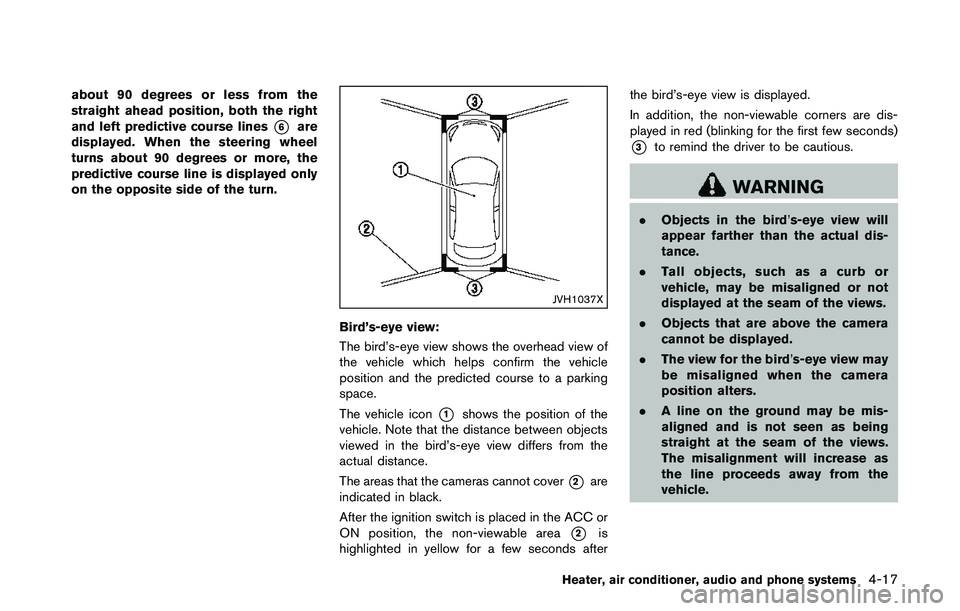
Bird’s-eye view:
The bird’s-eye view shows the overhead view of
the vehicle which helps confirm the vehicle
position and the predicted course to a parking
space.
The vehicle icon
*1shows the position of the
vehicle. Note that the distance between objects
viewed in the bird’s-eye view differs from the
actual distance.
The areas that the cameras cannot cover
*2are
indicated in black.
After the ignition switch is placed in the ACC or
ON position, the non-viewable area
*2is
highlighted in yellow for a few seconds afterthe bird’s-eye view is displayed.
In addition, the non-viewable corners are dis-
played in red (blinking for the first few seconds)
*3to remind the driver to be cautious.
WARNING
.Objects in the bird’s-eye view will
appear farther than the actual dis-
tance.
.Tall objects, such as a curb or
vehicle, may be misaligned or not
displayed at the seam of the views.
.Objects that are above the camera
cannot be displayed.
.The view for the bird’s-eye view may
be misaligned when the camera
position alters.
.A line on the ground may be mis-
aligned and is not seen as being
straight at the seam of the views.
The misalignment will increase as
the line proceeds away from the
vehicle.
Heater, air conditioner, audio and phone systems4-17
Page 199 of 508
4-18Heater, air conditioner, audio and phone systems
SAA3571
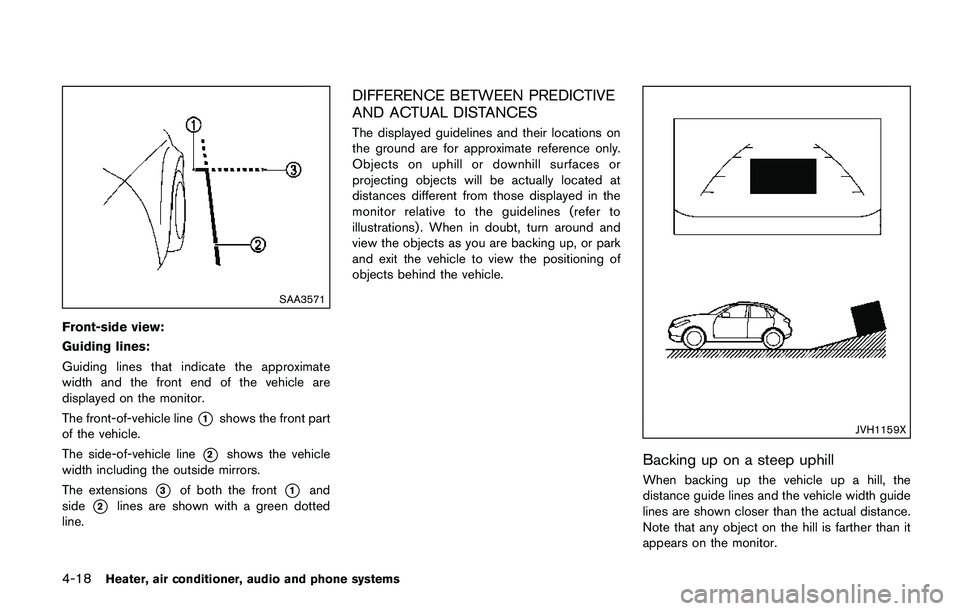
Front-side view:
Guiding lines:
Guiding lines that indicate the approximate
width and the front end of the vehicle are
displayed on the monitor.
The front-of-vehicle line
*1shows the front part
of the vehicle.
The side-of-vehicle line
*2shows the vehicle
width including the outside mirrors.
The extensions
*3of both the front*1and
side
*2lines are shown with a green dotted
line.
DIFFERENCE BETWEEN PREDICTIVE
AND ACTUAL DISTANCES
The displayed guidelines and their locations on
the ground are for approximate reference only.
Objects on uphill or downhill surfaces or
projecting objects will be actually located at
distances different from those displayed in the
monitor relative to the guidelines (refer to
illustrations) . When in doubt, turn around and
view the objects as you are backing up, or park
and exit the vehicle to view the positioning of
objects behind the vehicle.
JVH1159X
Backing up on a steep uphill
When backing up the vehicle up a hill, the
distance guide lines and the vehicle width guide
lines are shown closer than the actual distance.
Note that any object on the hill is farther than it
appears on the monitor.
Page 200 of 508
JVH1160X
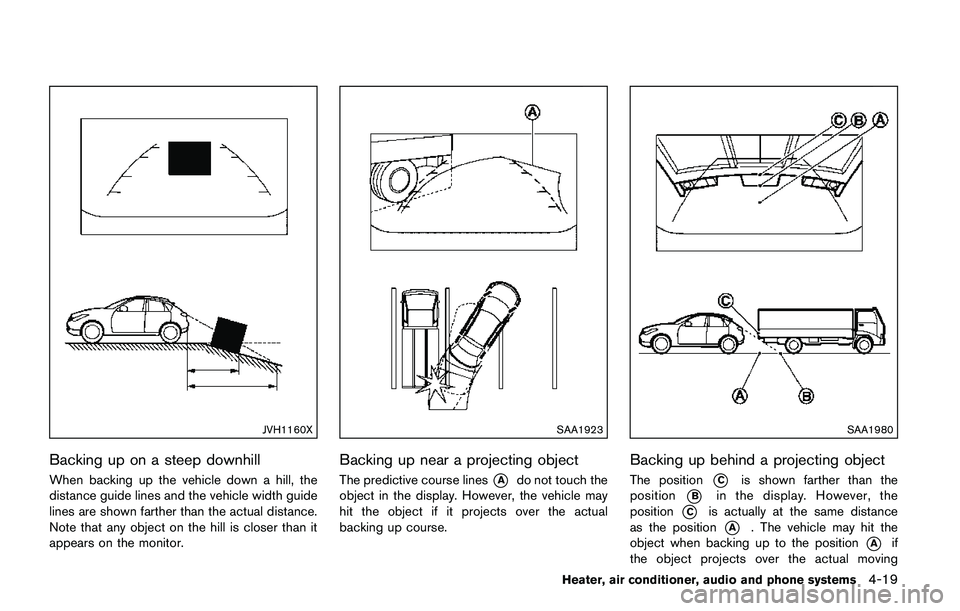
Backing up on a steep downhill
When backing up the vehicle down a hill, the
distance guide lines and the vehicle width guide
lines are shown farther than the actual distance.
Note that any object on the hill is closer than it
appears on the monitor.
SAA1923
Backing up near a projecting object
The predictive course lines*Ado not touch the
object in the display. However, the vehicle may
hit the object if it projects over the actual
backing up course.
SAA1980
Backing up behind a projecting object
The position*Cis shown farther than the
position
*Bin the display. However, the
position
*Cis actually at the same distance
as the position
*A. The vehicle may hit the
object when backing up to the position
*Aif
the object projects over the actual moving
Heater, air conditioner, audio and phone systems4-19
Page 201 of 508
4-20Heater, air conditioner, audio and phone systems
course.
HOW TO PARK WITH PREDICTIVE
COURSE LINES
WARNING
.If the tires are replaced with differ-
ent sized tires, the predictive course
lines may be displayed incorrectly.
.On a snow-covered or slippery road,
there may be a difference between
the predictive course line and the
actual course line.
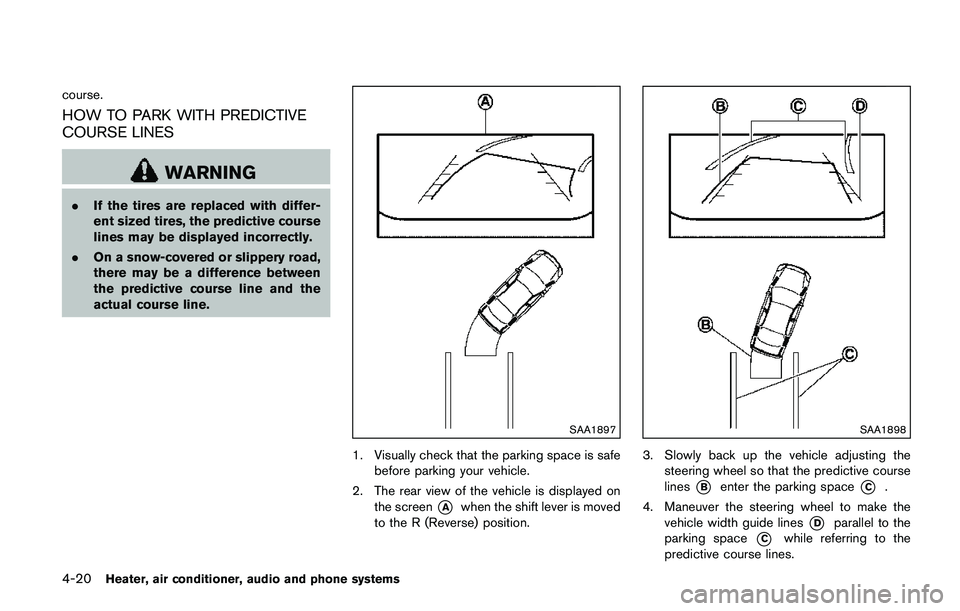
SAA1897
1. Visually check that the parking space is safe
before parking your vehicle.
2. The rear view of the vehicle is displayed on
the screen
*Awhen the shift lever is moved
to the R (Reverse) position.
SAA1898
3. Slowly back up the vehicle adjusting the
steering wheel so that the predictive course
lines
*Benter the parking space*C.
4. Maneuver the steering wheel to make the
vehicle width guide lines
*Dparallel to the
parking space
*Cwhile referring to the
predictive course lines.
Page 202 of 508
5. When the vehicle is parked in the space
completely, move the shift lever to the P
(Park) position and apply the parking brake.
HOW TO SWITCH THE DISPLAY
With the ignition switch placed in the ACC or
ON position, push the CAMERA button or move
the shift lever to the R (Reverse) position to
operate the Around View
ŠMonitor.
The Around ViewŠMonitor displays different
split screen views depending on the position of
the shift lever. Push the CAMERA button to
switch between the available views.
If the shift lever is in the R (Reverse) position, the
available views are:
.Rear view/bird’s-eye view split screen
.Rear view/front-side view split screen
.Rear view
If the shift lever is in the P (Park) position, the
available views are:
.Front view/bird’s-eye view split screen
.Front view/front-side view split screen
The display will switch from the Around View
Š
Monitor screen when:
.The shift lever is in the D (Drive) position and
the vehicle speed increases above approxi-
mately 6 MPH (10 km/h) ..A different screen is selected.
JVH1636X
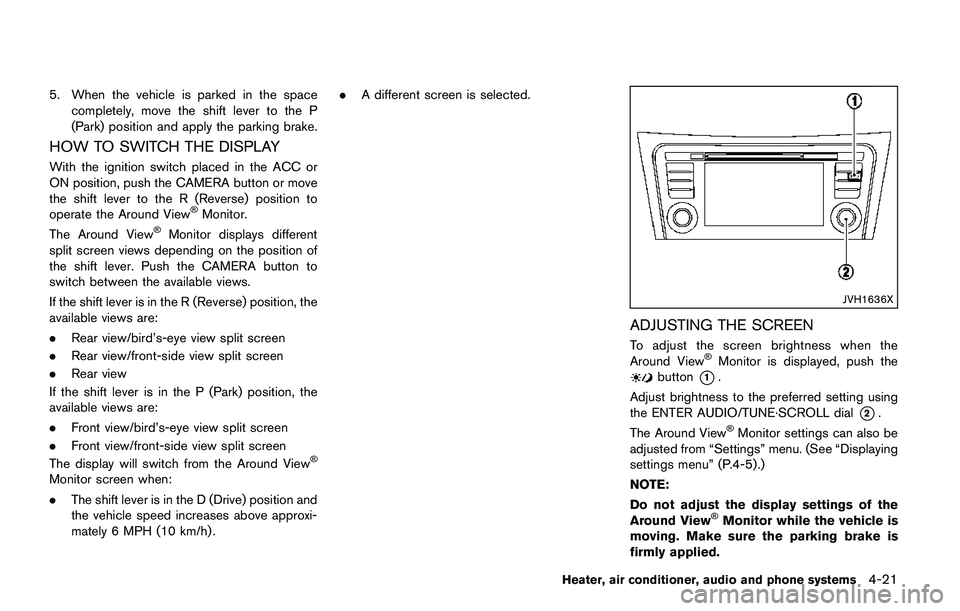
ADJUSTING THE SCREEN
To adjust the screen brightness when the
Around ViewŠMonitor is displayed, push thebutton*1.
Adjust brightness to the preferred setting using
the ENTER AUDIO/TUNE·SCROLL dial
*2.
The Around ViewŠMonitor settings can also be
adjusted from “Settings” menu. (See “Displaying
settings menu” (P.4-5) .)
NOTE:
Do not adjust the display settings of the
Around View
ŠMonitor while the vehicle is
moving. Make sure the parking brake is
firmly applied.
Heater, air conditioner, audio and phone systems4-21
Page 203 of 508
4-22Heater, air conditioner, audio and phone systems
AROUND VIEWŠMONITOR SYSTEM
LIMITATIONS
WARNING
Listed below are the system limitations
for Around ViewŠMonitor. Failure to
operate the vehicle in accordance with
these system limitations could result in
serious injury or death.
.Do not use the Around View
ŠMoni-
tor with the outside mirrors in the
stored position, and make sure that
the liftgate is securely closed when
operating the vehicle using the
Around View
ŠMonitor.
.The distance between objects
viewed on the Around View
ŠMoni-
tor differs from the actual distance.
.The cameras are installed above the
front grille, the outside mirrors and
above the rear license plate. Do not
put anything on the cameras.
.When washing the vehicle with
highpressure water, be sure not to
spray it around the cameras. Other-
wise, water may enter the camera
unit causing water condensation onthe lens, a malfunction, fire or an
electric shock.
.Do not strike the cameras. They are
precision instruments. Doing so
could cause a malfunction or cause
damage resulting in a fire or an
electric shock.
JVH1589X
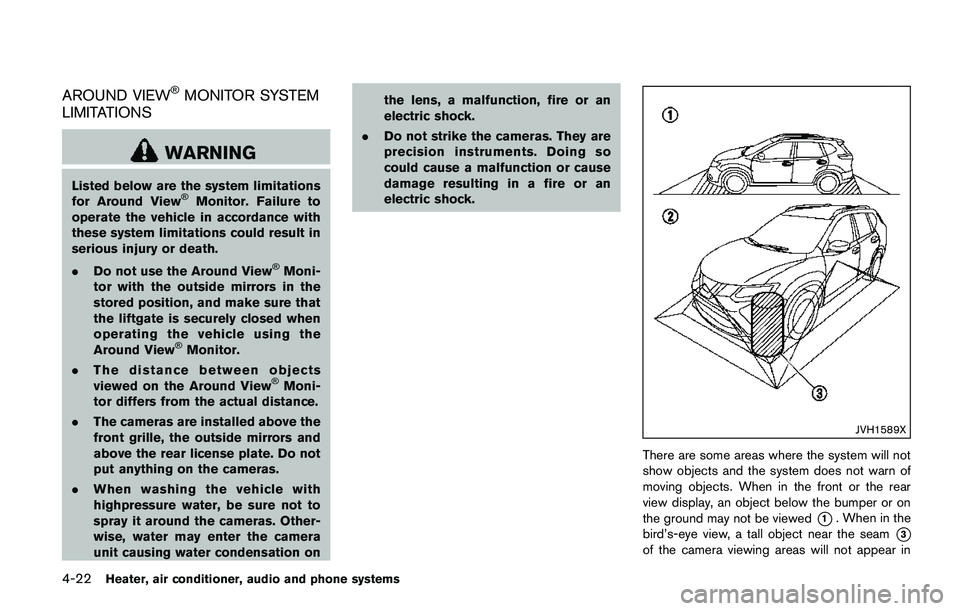
There are some areas where the system will not
show objects and the system does not warn of
moving objects. When in the front or the rear
view display, an object below the bumper or on
the ground may not be viewed
*1. When in the
bird’s-eye view, a tall object near the seam
*3
of the camera viewing areas will not appear in
Page 204 of 508
the monitor*2.
The following are operating limitations and do
not represent a system malfunction:
.When the view is switched, the display
images on the screen may be displayed with
some delay.
.When the temperature is extremely high or
low, the screen may not display objects
clearly.
.When strong light is shining directly on the
camera, objects may not be displayed
clearly.
.The screen may flicker under fluorescent
light.
.The colors of objects on the Around View
Š
Monitor may differ somewhat from the actual
color of objects.
.Objects on the monitor may not be clear and
the color of the object may differ in a dark
environment.
.There may be differences in sharpness
between each camera view of the bird’s-
eye view.
.Do not use wax on the camera lens. Wipe off
any wax with a clean cloth that has been
dampened with a mild detergent diluted with
water.
JVH1053X
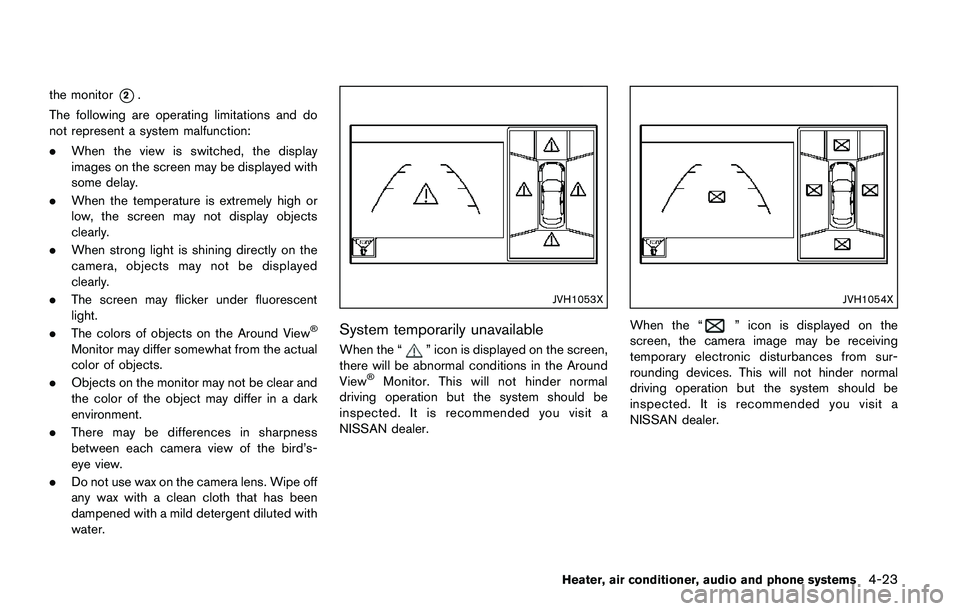
System temporarily unavailable
When the “” icon is displayed on the screen,
there will be abnormal conditions in the Around
View
ŠMonitor. This will not hinder normal
driving operation but the system should be
inspected. It is recommended you visit a
NISSAN dealer.
JVH1054X
When the “” icon is displayed on the
screen, the camera image may be receiving
temporary electronic disturbances from sur-
rounding devices. This will not hinder normal
driving operation but the system should be
inspected. It is recommended you visit a
NISSAN dealer.
Heater, air conditioner, audio and phone systems4-23
Page 205 of 508
4-24Heater, air conditioner, audio and phone systems
JVH1588X
SYSTEM MAINTENANCE
CAUTION
.Do not use alcohol, benzine or
thinner to clean the camera. This
will cause discoloration.
.Do not damage the camera as the
monitor screen may be adversely
affected.
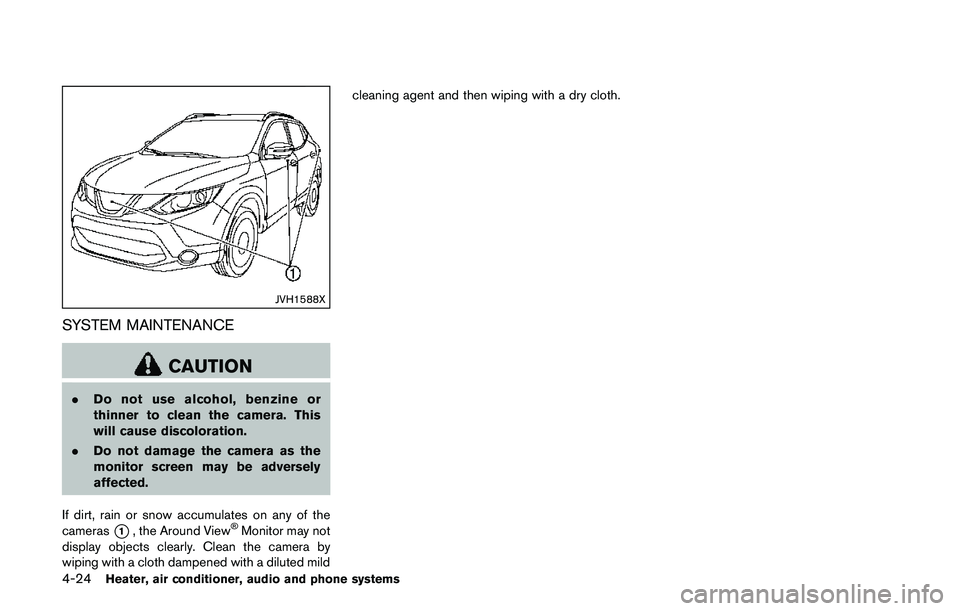
If dirt, rain or snow accumulates on any of the
cameras
*1, the Around ViewŠMonitor may not
display objects clearly. Clean the camera by
wiping with a cloth dampened with a diluted mildcleaning agent and then wiping with a dry cloth.
Page 206 of 508
JVH1587X
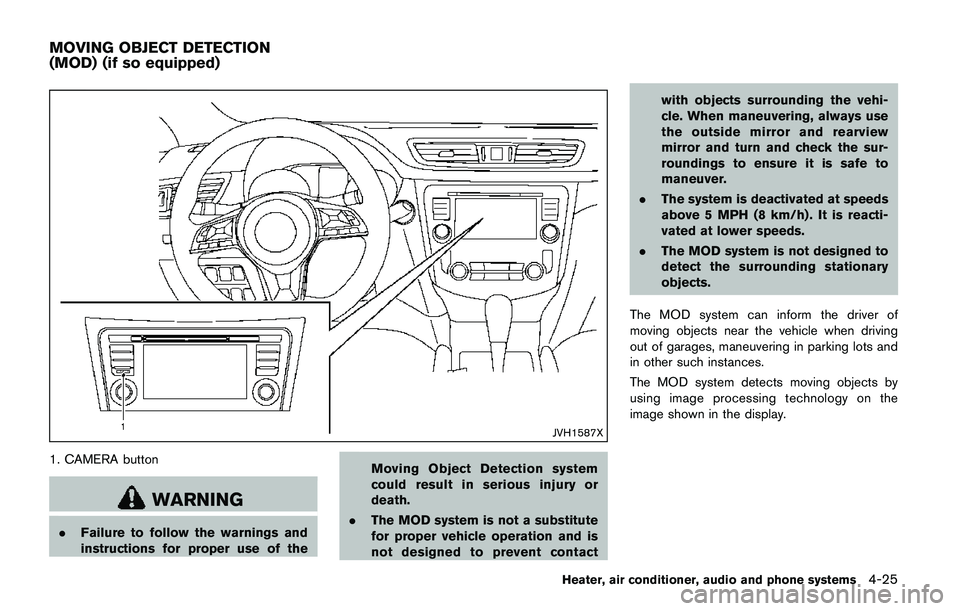
1. CAMERA button
WARNING
.Failure to follow the warnings and
instructions for proper use of theMoving Object Detection system
could result in serious injury or
death.
.The MOD system is not a substitute
for proper vehicle operation and is
not designed to prevent contactwith objects surrounding the vehi-
cle. When maneuvering, always use
the outside mirror and rearview
mirror and turn and check the sur-
roundings to ensure it is safe to
maneuver.
.The system is deactivated at speeds
above 5 MPH (8 km/h) . It is reacti-
vated at lower speeds.
.The MOD system is not designed to
detect the surrounding stationary
objects.
The MOD system can inform the driver of
moving objects near the vehicle when driving
out of garages, maneuvering in parking lots and
in other such instances.
The MOD system detects moving objects by
using image processing technology on the
image shown in the display.
Heater, air conditioner, audio and phone systems4-25
MOVING OBJECT DETECTION
(MOD) (if so equipped)
Page 207 of 508
4-26Heater, air conditioner, audio and phone systems
MOD SYSTEM OPERATION
The MOD system will turn on automatically
under the following conditions:
.When the shift lever is in the R (Reverse)
position.
.When the CAMERA button is pushed to
switch to the camera view on the display.
.When vehicle speed decreases below
approximately 5 MPH (8 km/h) .
The MOD system operates in the following
conditions when the camera view is displayed:
.When the shift lever is in the P (Park) or N
(Neutral) position and the vehicle is
stopped, the MOD system detects the
moving objects in the bird’s-eye view. The
MOD system will not operate if either door is
opened. If outside mirrors are folded, MOD
may not operate properly.
.When the shift lever is in the D (Drive)
position, and the vehicle speed is below
approximately 5 MPH (8 km/h) , the MOD
system detects moving objects in the front
view.
.When the shift lever is in the R (Reverse)
position and the vehicle speed is below
approximately 5 MPH (8 km/h) , the MOD
system detects moving objects in the rear
view. The MOD system will not operate if the
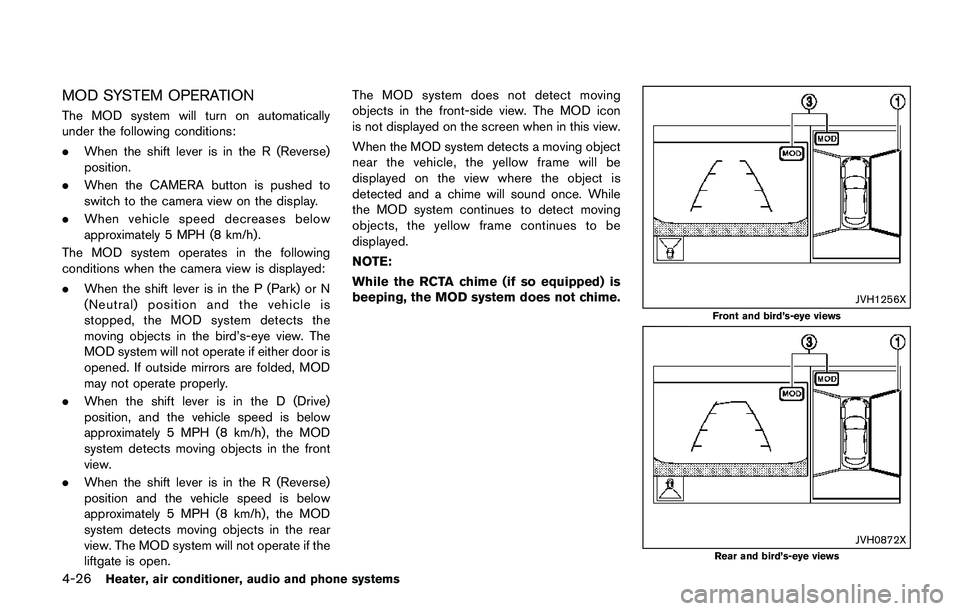
liftgate is open.The MOD system does not detect moving
objects in the front-side view. The MOD icon
is not displayed on the screen when in this view.
When the MOD system detects a moving object
near the vehicle, the yellow frame will be
displayed on the view where the object is
detected and a chime will sound once. While
the MOD system continues to detect moving
objects, the yellow frame continues to be
displayed.
NOTE:
While the RCTA chime (if so equipped) is
beeping, the MOD system does not chime.
JVH1256X
Front and bird’s-eye views
JVH0872XRear and bird’s-eye views