brake NISSAN QASHQAI 2017 Owner´s Manual
[x] Cancel search | Manufacturer: NISSAN, Model Year: 2017, Model line: QASHQAI, Model: NISSAN QASHQAI 2017Pages: 508, PDF Size: 2.68 MB
Page 319 of 508
5-34Starting and driving
3. Use thebuttons to navigate in the menu
and use the “OK” button to select or change
an item:
.Select “Lane” and press the “OK” button.
Use the “OK” button to check/uncheck
the box for “Warning”.
NOTE:
If you disable the LDW system, the system
will remain disabled the next time you start
the vehicle’s engine.
LDW SYSTEM LIMITATIONS
WARNING
Listed below are the system limitations
for the LDW system. Failure to follow
the warnings and instructions for prop-
er use of the LDW system could result in
serious injury or death.
.The system will not operate at
speeds below approximately 37
MPH (60 km/h) or if it cannot detect
lane markers.
.Excessive noise will interfere with
the warning chime sound, and the
chime may not be heard..Do not use the LDW system under
the following conditions as it may
not function properly:
— During bad weather (rain, fog,
snow, etc.) .
— When driving on slippery roads,
such as on ice or snow.
— When driving on winding or
uneven roads.
— When there is a lane closure due
to road repairs.
— When driving in a makeshift or
temporary lane.
— When driving on roads where
the lane width is too narrow.
— When driving without normal
tire conditions (for example, tire
wear, low tire pressure, installa-
tion of spare tire, tire chains,
non-standard wheels) .
— When the vehicle is equipped
with non-original brake parts or
suspension parts.
.The system may not function prop-
erly under the following conditions:— On roads where there are multi-
ple parallel lane markers; lane
markers that are faded or not
painted clearly; yellow painted
lane markers; non-standard lane
markers; or lane markers cov-
ered with water, dirt, snow, etc.
— On roads where discontinued
lane markers are still detect-
able.
— On roads where there are sharp
curves.
— On roads where there are shar-
ply contrasting objects, such as
shadows, snow, water, wheel
ruts, seams or lines remaining
after road repairs. (The LDW
system could detect these items
as lane markers.)
— On roads where the traveling
lane merges or separates.
— When the vehicle’s traveling di-
rection does not align with the
lane marker.
— When traveling close to the
vehicle in front of you, which
obstructs the lane camera unit
Page 322 of 508
JVS1079X
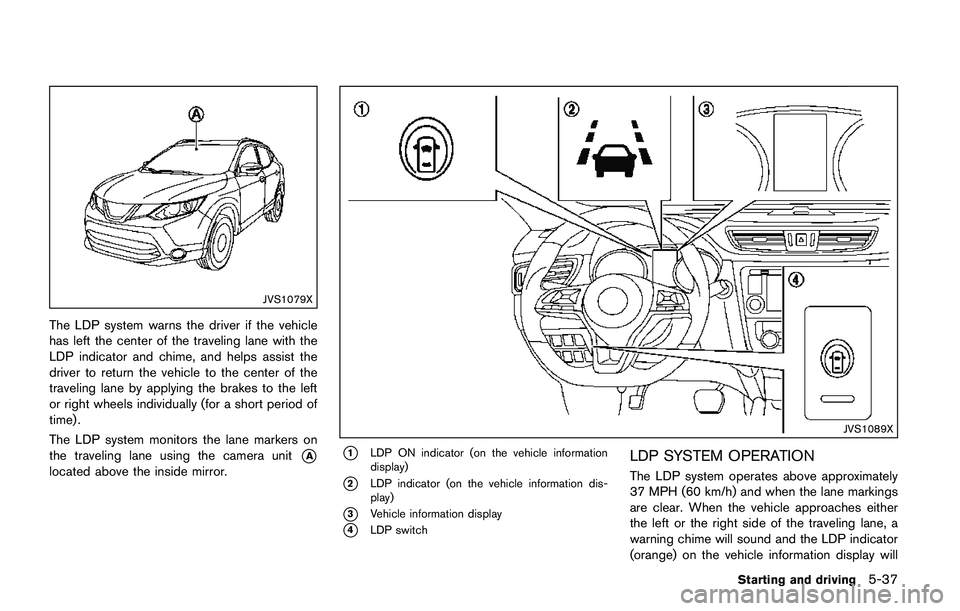
The LDP system warns the driver if the vehicle
has left the center of the traveling lane with the
LDP indicator and chime, and helps assist the
driver to return the vehicle to the center of the
traveling lane by applying the brakes to the left
or right wheels individually (for a short period of
time) .
The LDP system monitors the lane markers on
the traveling lane using the camera unit
*A
located above the inside mirror.
JVS1089X
*1LDP ON indicator (on the vehicle information
display)
*2LDP indicator (on the vehicle information dis-
play)
*3Vehicle information display
*4LDP switch
LDP SYSTEM OPERATION
The LDP system operates above approximately
37 MPH (60 km/h) and when the lane markings
are clear. When the vehicle approaches either
the left or the right side of the traveling lane, a
warning chime will sound and the LDP indicator
(orange) on the vehicle information display will
Starting and driving5-37
Page 323 of 508
5-38Starting and driving
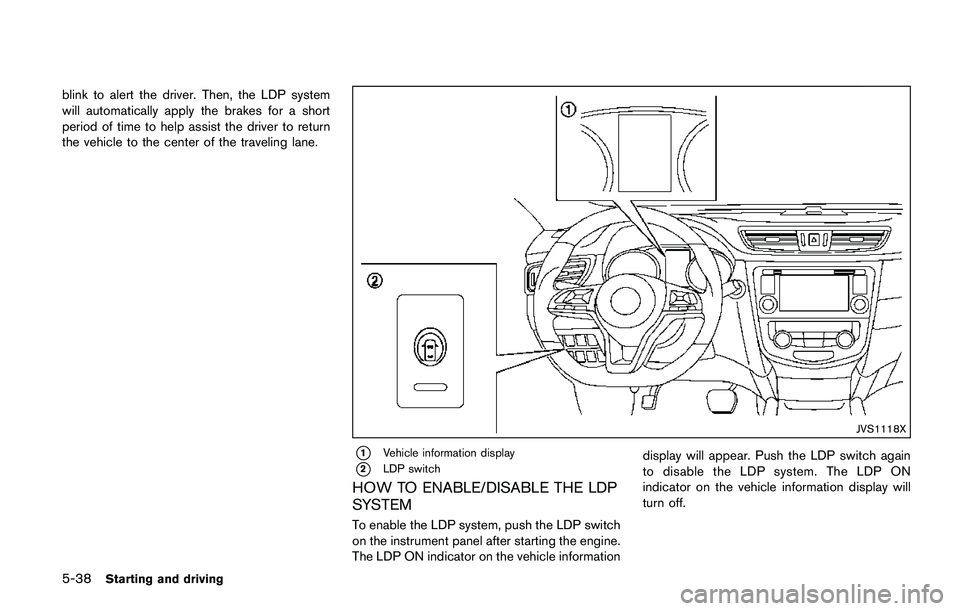
blink to alert the driver. Then, the LDP system
will automatically apply the brakes for a short
period of time to help assist the driver to return
the vehicle to the center of the traveling lane.
JVS1118X
*1Vehicle information display
*2LDP switch
HOW TO ENABLE/DISABLE THE LDP
SYSTEM
To enable the LDP system, push the LDP switch
on the instrument panel after starting the engine.
The LDP ON indicator on the vehicle informationdisplay will appear. Push the LDP switch again
to disable the LDP system. The LDP ON
indicator on the vehicle information display will
turn off.
Page 324 of 508
LDP SYSTEM LIMITATIONS
WARNING
Listed below are the system limitations
for the LDP system. Failure to follow
the warnings and instructions for prop-
er use of the LDP system could result in
serious injury or death.
.The LDP system may activate if you
change lanes without first activating
your turn signal or, for example, if a
construction zone directs traffic to
cross an existing lane marker. If this
occurs you may need to apply cor-
rective steering to complete your
lane change.
.Because the LDP may not activate
under the road, weather, and lane
marker conditions described in this
section, it may not activate every
time your vehicle begins to leave its
lane and you will need to apply
corrective steering.
.The LDP system will not operate at
speeds below approximately 37
MPH (60 km/h) or if it cannot detect
lane markers..Do not use the LDP system under
the following conditions as it may
not function properly:
— During bad weather (rain, fog,
snow, etc.) .
— When driving on slippery roads,
such as on ice or snow.
— When driving on winding or
uneven roads.
— When there is a lane closure due
to road repairs.
— When driving in a makeshift or
temporary lane.
— When driving on roads where
the lane width is too narrow.
— When driving without normal
tire conditions (for example, tire
wear, low tire pressure, installa-
tion of spare tire, tire chains,
non-standard wheels) .
— When the vehicle is equipped
with non-original brake parts or
suspension parts.
.The system may not function prop-
erly under the following conditions:— On roads where there are multi-
ple parallel lane markers; lane
markers that are faded or not
painted clearly; yellow painted
lane markers; non-standard lane
markers; or lane markers cov-
ered with water, dirt, snow, etc.
— On roads where discontinued
lane markers are still detect-
able.
— On roads where there are sharp
curves.
— On roads where there are shar-
ply contrasting objects, such as
shadows, snow, water, wheel
ruts, seams or lines remaining
after road repairs. (The LDP
system could detect these items
as lane markers.)
— On roads where the traveling
lane merges or separates.
— When the vehicle’s traveling di-
rection does not align with the
lane marker.
— When traveling close to the
vehicle in front of you, which
obstructs the lane camera unit
Starting and driving5-39
Page 325 of 508
5-40Starting and driving
detection range.
— When rain, snow or dirt adheres
to the windshield in front of the
lane camera unit.
— When the headlights are not
bright due to dirt on the lens or
if the aiming is not adjusted
properly.
— When strong light enters the
lane camera unit. (For example,
the light directly shines on the
front of the vehicle at sunrise or
sunset.)
— When a sudden change in
brightness occurs. (For example,
when the vehicle enters or exits
a tunnel or under a bridge.)
.Excessive noise will interfere with
the warning chime sound, and the
chime may not be heard.
While the LDP system is operating, you
may hear a sound of brake operation.
This is normal and indicates that the
LDP system is operating properly.SYSTEM TEMPORARILY UNAVAIL-
ABLE
Condition A:
The warning and assist functions of the LDP
system are not designed to work under the
following conditions:
.When you operate the lane change signal
and change the traveling lanes in the
direction of the signal. (The LDP system will
be deactivated for approximately 2 seconds
after the lane change signal is turned off.)
.When the vehicle speed lowers to less than
approximately 37 MPH (60 km/h) .
Action to take:
After the above conditions have finished and the
necessary operating conditions are satisfied, the
warning and assist functions will resume.
Condition B:
The assist function of the LDP system is not
designed to work under the following conditions
(warning is still functional):
.When the brake pedal is depressed.
.When the steering wheel is turned as far as
necessary for the vehicle to change lanes.
.When the vehicle is accelerated during the
LDP system operation..When the Intelligent Cruise Control (ICC)
approach warning occurs (if so equipped) .
.When the hazard warning flashers are
operated.
.When driving on a curve at high speed.
Action to take:
After the above conditions have finished and the
necessary operating conditions are satisfied, the
LDP system application of the brakes will
resume.
Condition C:
If the following messages appear in the vehicle
information display, a chime will sound and the
LDP system will be turned off automatically.
.“Not available: Poor Road Conditions”:
When the VDC system (except Traction
Control System (TCS) function) or ABS
operates.
.“Currently unavailable”:
When the VDC system is turned off.
Action to take:
When the above conditions no longer exist, turn
off the LDP system. Push the LDP switch again
to turn the LDP system back on.
Page 344 of 508
Turning on cruise control
Push the Cruise ON/OFF switch. The CRUISE
indicator in the vehicle information display will
appear.
Setting cruising speed
1. Accelerate to the desired speed.
2. Push the SET/- switch and release it.
3. Take your foot off the accelerator pedal.
The vehicle will maintain the set speed.
Passing another vehicle:
Depress the accelerator pedal to accelerate.
After releasing the accelerator pedal, the vehicle
will return to the previously set speed.
The vehicle may not maintain the set speed
when going up or down steep hills. In such
cases, drive without the cruise control.
Resetting to slower speed:
Use any one of the following methods to reset to
a slower speed.
.Lightly tap the foot brake pedal. When the
vehicle reaches the desired speed, push
and release the SET/- switch.
.Push and hold the SET/- switch. When the
vehicle reaches the desired speed, release
the SET- switch..Quickly push and release the SET/- switch.
This will reduce the vehicle speed by about
1 MPH (1.6 km/h) .
Resetting to faster speed:
Use any one of the following methods to reset to
a faster speed.
.Depress the accelerator pedal. When the
vehicle reaches the desired speed, push
and release the SET/- switch.
.Push and hold the RES/+switch. When the
vehicle reaches the desired speed, release
the RES/+ switch.
.Quickly push and release the RES/+ switch.
This will increase the vehicle speed by about
1 MPH (1.6 km/h) .
Resuming at preset speed:
Push and release the RES/+ switch.
The vehicle will resume the last set cruising
speed when the vehicle speed is over 25 MPH
(40 km/h) .
Cancelling cruising speed
Use any one of the following methods to cancel
the set speed.
.Push the CANCEL switch.
.Tap the foot brake pedal..Push the Cruise ON/OFF switch. The
CRUISE indicator will turn off.
Starting and driving5-59
Page 345 of 508
5-60Starting and driving
WARNING
Failure to follow the warnings and
instructions for proper use of the ICC
system could result in serious injury or
death.
.ICC is not a collision avoidance or
warning device. For highway use
only and it is not intended for
congested areas or city driving. Fail-
ure to apply the brakes could result
in an accident.
.The ICC system is only an aid to
assist the driver. It is the driver’s
responsibility to stay alert, drive
safely, and be in control of the
vehicle at all times.
.Always observe posted speed limits
and do not set the speed over them.
.Always drive carefully and atten-
tively when using either cruise con-
trol mode. Read and understand the
Owner’s Manual thoroughly before
using the cruise control. To avoid
serious injury or death, do not rely
on the system to prevent accidents
or to control the vehicle’s speed inemergency situations. Do not use
cruise control except in appropriate
road and traffic conditions.
.In the conventional (fixed speed)
cruise control mode, a warning
chime will not sound to warn you if
you are too close to the vehicle
ahead. Pay special attention to the
distance between your vehicle and
the vehicle ahead of you or a
collision could occur.
The ICC system maintains a selected distance
from the vehicle in front of you within the speed
range of 0 to 90 MPH (0 to 144 km/h) up to the
set speed.
The set speed can be selected by the driver
between 20 to 90 MPH (32 to 144 km/h) .
The vehicle travels at a set speed when the road
ahead is clear.
The ICC system can be set to one of two cruise
control modes.
.Vehicle-to-vehicle distance control mode:
For maintaining a selected distance be-
tween your vehicle and the vehicle in front
of you up to the preset speed..Conventional (fixed speed) cruise control
mode:
For cruising at a preset speed.
INTELLIGENT CRUISE CONTROL
(ICC) (if so equipped)
Page 347 of 508
5-62Starting and driving
JVS1068X
HOW TO SELECT THE CRUISE CON-
TROL MODE
Selecting the vehicle-to-vehicle distance
control mode
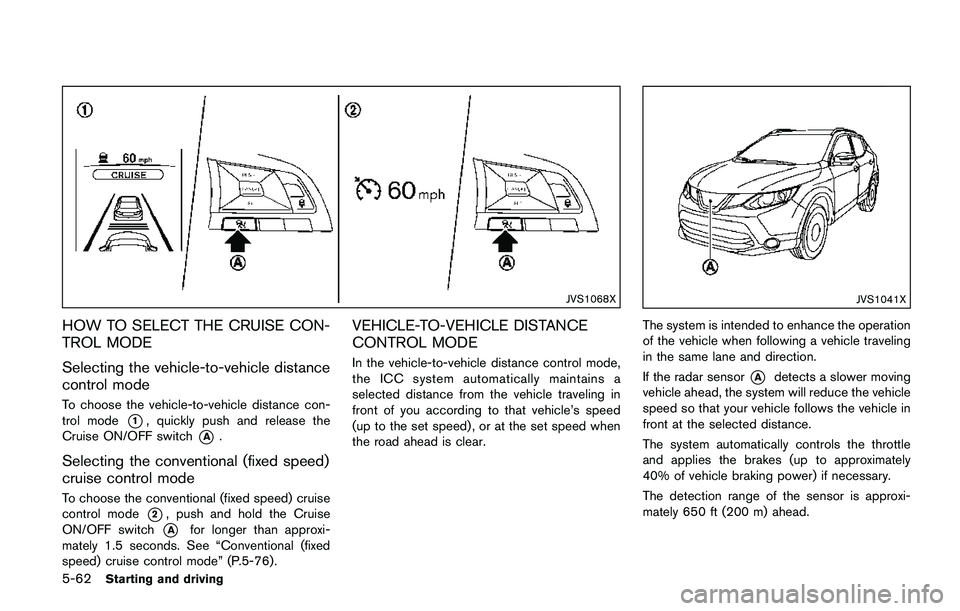
To choose the vehicle-to-vehicle distance con-
trol mode
*1, quickly push and release the
Cruise ON/OFF switch
*A.
Selecting the conventional (fixed speed)
cruise control mode
To choose the conventional (fixed speed) cruise
control mode
*2, push and hold the Cruise
ON/OFF switch
*Afor longer than approxi-
mately 1.5 seconds. See “Conventional (fixed
speed) cruise control mode” (P.5-76) .
VEHICLE-TO-VEHICLE DISTANCE
CONTROL MODE
In the vehicle-to-vehicle distance control mode,
the ICC system automatically maintains a
selected distance from the vehicle traveling in
front of you according to that vehicle’s speed
(up to the set speed) , or at the set speed when
the road ahead is clear.
JVS1041X
The system is intended to enhance the operation
of the vehicle when following a vehicle traveling
in the same lane and direction.
If the radar sensor
*Adetects a slower moving
vehicle ahead, the system will reduce the vehicle
speed so that your vehicle follows the vehicle in
front at the selected distance.
The system automatically controls the throttle
and applies the brakes (up to approximately
40% of vehicle braking power) if necessary.
The detection range of the sensor is approxi-
mately 650 ft (200 m) ahead.
Page 349 of 508
5-64Starting and driving
erates or decelerates your vehicle according to
the speed of the vehicle ahead. Depress the
accelerator to properly accelerate your vehicle
when acceleration is required for a lane change.
Depress the brake pedal when deceleration is
required to maintain a safe distance to the
vehicle ahead due to its sudden braking or if a
vehicle cuts in. Always stay alert when using the
ICC system.
JVS0957X
Vehicle-to-vehicle distance control mode
switches
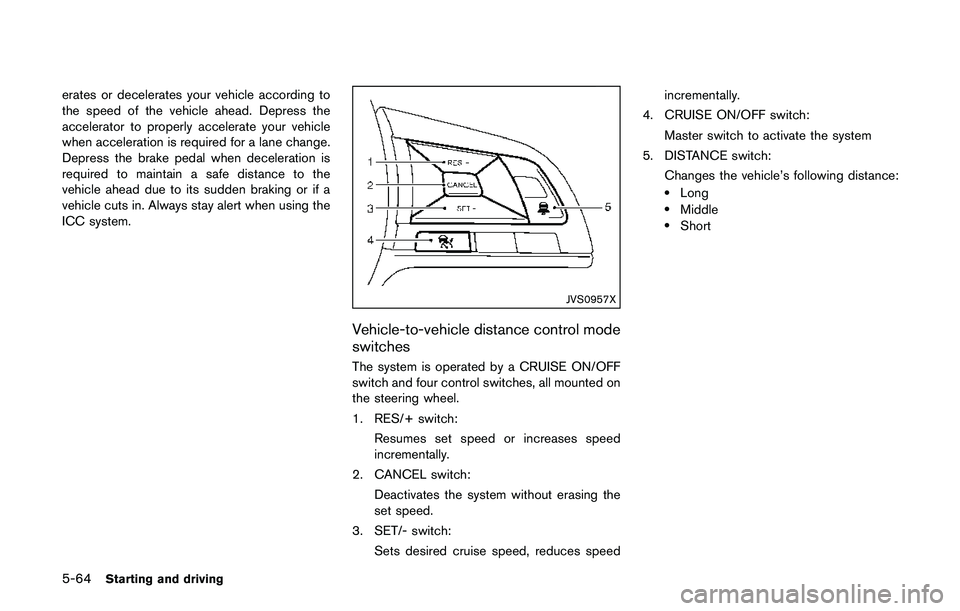
The system is operated by a CRUISE ON/OFF
switch and four control switches, all mounted on
the steering wheel.
1. RES/+ switch:
Resumes set speed or increases speed
incrementally.
2. CANCEL switch:
Deactivates the system without erasing the
set speed.
3. SET/- switch:
Sets desired cruise speed, reduces speedincrementally.
4. CRUISE ON/OFF switch:
Master switch to activate the system
5. DISTANCE switch:
Changes the vehicle’s following distance:
.Long.Middle.Short
Page 351 of 508
5-66Starting and driving
JVS1071X
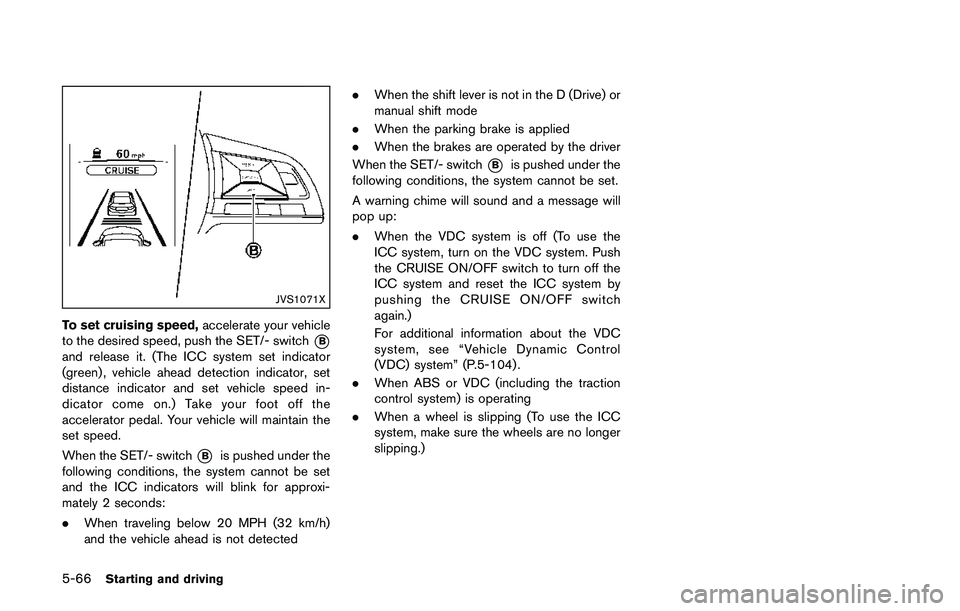
To set cruising speed,accelerate your vehicle
to the desired speed, push the SET/- switch
*B
and release it. (The ICC system set indicator
(green) , vehicle ahead detection indicator, set
distance indicator and set vehicle speed in-
dicator come on.) Take your foot off the
accelerator pedal. Your vehicle will maintain the
set speed.
When the SET/- switch
*Bis pushed under the
following conditions, the system cannot be set
and the ICC indicators will blink for approxi-
mately 2 seconds:
.When traveling below 20 MPH (32 km/h)
and the vehicle ahead is not detected.When the shift lever is not in the D (Drive) or
manual shift mode
.When the parking brake is applied
.When the brakes are operated by the driver
When the SET/- switch
*Bis pushed under the
following conditions, the system cannot be set.
A warning chime will sound and a message will
pop up:
.When the VDC system is off (To use the
ICC system, turn on the VDC system. Push
the CRUISE ON/OFF switch to turn off the
ICC system and reset the ICC system by
pushing the CRUISE ON/OFF switch
again.)
For additional information about the VDC
system, see “Vehicle Dynamic Control
(VDC) system” (P.5-104) .
.When ABS or VDC (including the traction
control system) is operating
.When a wheel is slipping (To use the ICC
system, make sure the wheels are no longer
slipping.)