brake NISSAN QASHQAI 2017 Owner´s Manual
[x] Cancel search | Manufacturer: NISSAN, Model Year: 2017, Model line: QASHQAI, Model: NISSAN QASHQAI 2017Pages: 508, PDF Size: 2.68 MB
Page 368 of 508
3. Use the “OK” button to check/uncheck the
box for “Emergency Brake.”
When the FEB system is turned off, the FEB
system warning light (orange)
*1illuminates.
NOTE:
The FEB system will be automatically
turned ON when the engine is restarted.
FEB SYSTEM LIMITATIONS
WARNING
Listed below are the system limitations
for the FEB system. Failure to operate
the vehicle in accordance with these
system limitations could result in ser-
ious injury or death.
.The FEB system cannot detect all
vehicles under all conditions.
.The radar sensor does not detect
the following objects:
— Pedestrians, animals or obsta-
cles in the roadway
— Oncoming vehicles
— Crossing vehicles
.The radar sensor has some perfor-
mance limitations. If a stationaryvehicle is in the vehicle’s path, the
FEB system will not function when
the vehicle is driven at speeds over
approximately 50 MPH (80 km/h) .
.The radar sensor may not detect a
vehicle ahead in the following con-
ditions:
— Dirt, ice, snow or other material
covering the radar sensor.
— Interference by other radar
sources.
— Snow or road spray from travel-
ing vehicles.
— If the vehicle ahead is narrow
(e.g. motorcycle)
— When driving on a steep down-
hill slope or roads with sharp
curves.
.In some road or traffic conditions,
the FEB system may unexpectedly
apply partial braking. When accel-
eration is necessary, continue to
depress the accelerator pedal to
override the system.
.The FEB system may react to a
roadside object (traffic sign, guard
rail etc.) ..Braking distances increase on slip-
pery surfaces.
.The system is designed to automa-
tically check the sensor’s function-
ality, within certain limitations. The
system may not detect some forms
of obstruction of the sensor area
such as ice, snow, stickers, for
example. In these cases, the system
may not be able to warn the driver
properly. Be sure that you check,
clean and clear the sensor area
regularly.
.Excessive noise will interfere with
the warning chime sound, and the
chime may not be heard.
Starting and driving5-83
Page 370 of 508
warning light (orange) will illuminate and the
“Unavailable: Front Radar Obstruction” warning
message will appear in the vehicle information
display.
.The sensor area on the front of the vehicle is
covered with dirt or is obstructed.
Action to take
If the warning light (orange) comes on, stop the
vehicle in a safe place and turn the engine off.
Clean the radar cover on the front of the vehicle
with a soft cloth, and restart the engine. If the
warning light continues to illuminate, have the
FEB system checked. It is recommended that
you visit a NISSAN dealer for this service.
.When driving on roads with limited road
structures or buildings (for example, long
bridges, deserts, snow fields, driving next to
long walls) .
Action to take
When the above conditions no longer exist, the
FEB system will resume automatically.
Condition C
When the Vehicle Dynamic Control (VDC)
system is OFF, the FEB brake will not operate.
In this case only visible and audible warning
operates. The FEB system warning light (or-
ange) will illuminate.
Action to takeWhen the VDC system is ON, the FEB system
will resume automatically.
SYSTEM MALFUNCTION
If the FEB system malfunctions, it will be turned
off automatically, a chime will sound, the FEB
system warning light (orange) will illuminate and
the “Malfunction” warning message will appear
in the vehicle information display.
Action to take:
If the FEB system warning light (orange) comes
on, stop the vehicle in a safe location. Turn the
engine off and restart the engine. If the warning
light continues to illuminate, have the FEB
system checked. It is recommended that you
visit a NISSAN dealer for this service.
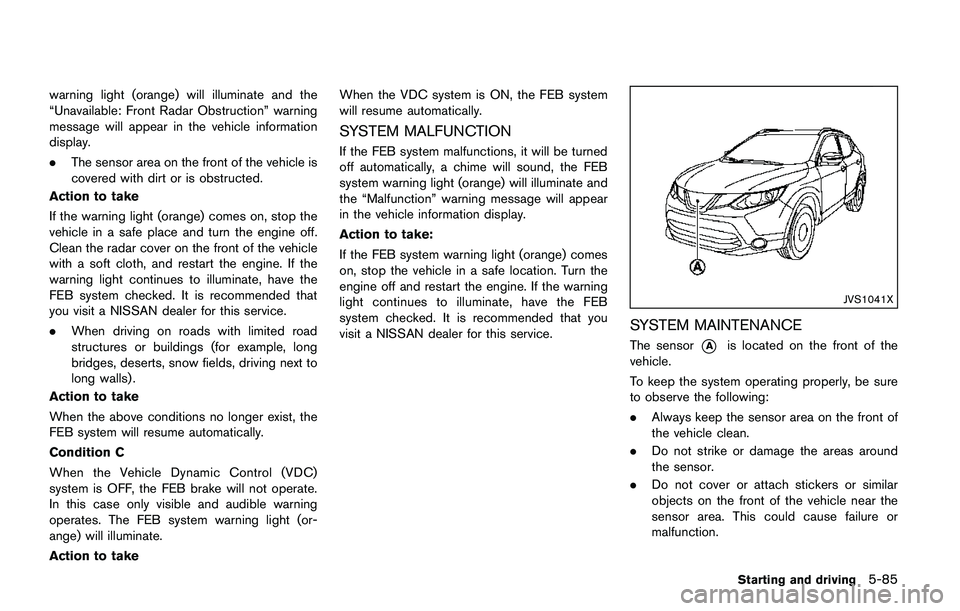
JVS1041X
SYSTEM MAINTENANCE
The sensor*Ais located on the front of the
vehicle.
To keep the system operating properly, be sure
to observe the following:
.Always keep the sensor area on the front of
the vehicle clean.
.Do not strike or damage the areas around
the sensor.
.Do not cover or attach stickers or similar
objects on the front of the vehicle near the
sensor area. This could cause failure or
malfunction.
Starting and driving5-85
Page 373 of 508
5-88Starting and driving
speeds between 6 – 37 MPH (10 – 60 km/h) .
If a risk of a forward collision is detected, the
FEB with pedestrian detection system will firstly
provide the warning to the driver by flashing the
warning (yellow) in the vehicle information dis-
play and providing an audible alert.
If the driver applies the brakes quickly and
forcefully after the warning, and the FEB with
pedestrian detection system detects that there
is still the possibility of a forward collision, the
system will automatically increase the braking
force.
If the driver does not take action, the FEB with
pedestrian detection system issues the second
visual (flashing) (red) and audible warning. If the
driver releases the accelerator pedal, then the
system applies partial braking.
If the risk of a collision becomes imminent, the
FEB with pedestrian detection system applies
harder braking automatically.
While the FEB with pedestrian detection system
is operating, you may hear the sound of brake
operation. This is normal and indicates that the
FEB with pedestrian detection system is oper-
ating properly.
NOTE:
The vehicle’s stop lights come on when
braking is performed by the FEB withpedestrian detection system.
Depending on vehicle speed and distance to the
vehicle or pedestrian ahead, as well as driving
and roadway conditions, the system may help
the driver avoid a forward collision or may help
mitigate the consequences of a collision should
one be unavoidable.
If the driver is handling the steering wheel,
accelerating or braking, the FEB with pedestrian
detection system will function later or will not
function.
The automatic braking will cease under the
following conditions:
.When the steering wheel is turned as far as
necessary to avoid a collision.
.When the accelerator pedal is depressed.
.When there is no longer a vehicle or
pedestrian detected ahead.
If the FEB with pedestrian detection system has
stopped the vehicle, the vehicle will remain at a
standstill for approximately 2 seconds before the
brakes are released.
Page 374 of 508
JVS0971X
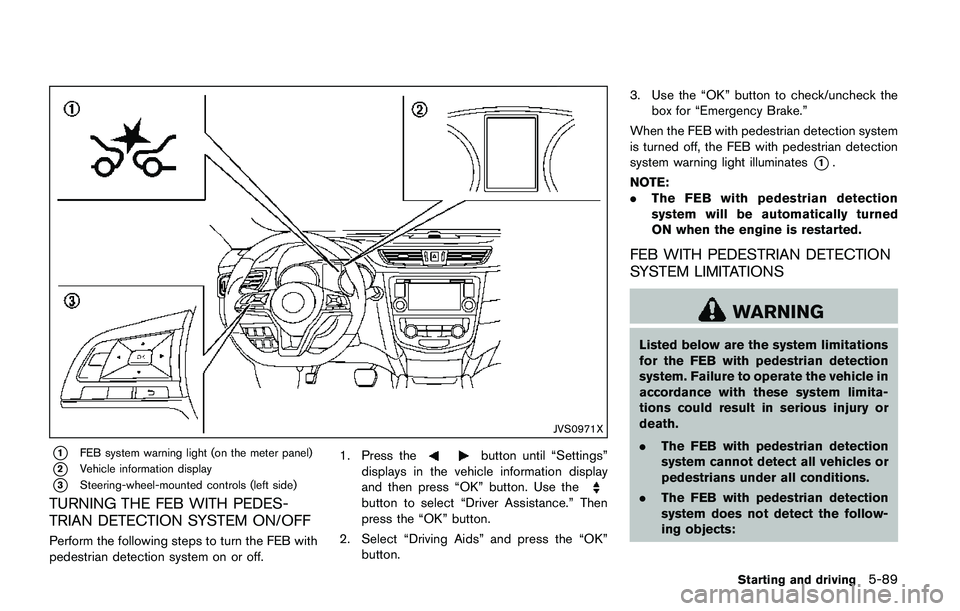
*1FEB system warning light (on the meter panel)
*2Vehicle information display
*3Steering-wheel-mounted controls (left side)
TURNING THE FEB WITH PEDES-
TRIAN DETECTION SYSTEM ON/OFF
Perform the following steps to turn the FEB with
pedestrian detection system on or off.1. Press the
button until “Settings”
displays in the vehicle information display
and then press “OK” button. Use the
button to select “Driver Assistance.” Then
press the “OK” button.
2. Select “Driving Aids” and press the “OK”
button.3. Use the “OK” button to check/uncheck the
box for “Emergency Brake.”
When the FEB with pedestrian detection system
is turned off, the FEB with pedestrian detection
system warning light illuminates
*1.
NOTE:
.The FEB with pedestrian detection
system will be automatically turned
ON when the engine is restarted.
FEB WITH PEDESTRIAN DETECTION
SYSTEM LIMITATIONS
WARNING
Listed below are the system limitations
for the FEB with pedestrian detection
system. Failure to operate the vehicle in
accordance with these system limita-
tions could result in serious injury or
death.
.The FEB with pedestrian detection
system cannot detect all vehicles or
pedestrians under all conditions.
.The FEB with pedestrian detection
system does not detect the follow-
ing objects:
Starting and driving5-89
Page 378 of 508
.The camera area of windshield glass is
continuously covered with dirt, etc.
Action to take:
When the above conditions no longer exist, the
FEB with pedestrian detection system will
resume automatically.
NOTE:
When the inside of the windshield on
camera area is misted or frozen, it will
take a period of time to remove it after air
conditioner turns on. If dirt appears on this
area, it is recommended you visit a
NISSAN dealer.
Condition B
In the following condition, the FEB system
warning light (orange) will illuminate and the
“Unavailable: Front Radar Obstruction” warning
message will appear in the vehicle information
display.
.The sensor area of the front of the vehicle is
covered with dirt or is obstructed
Action to take:
If the warning light (orange) comes on, stop the
vehicle in a safe place and turn the engine off.
Clean the radar cover on the front of the vehicle
with a soft cloth, and restart the engine. If the
warning light continues to illuminate, have the
FEB with pedestrian detection system checked.It is recommended that you visit a NISSAN
dealer for this service.
.When driving on roads with limited road
structures or buildings (for example, long
bridges, deserts, snow fields, driving next to
long walls) .
Action to take:
When the above conditions no longer exist, the
FEB with pedestrian detection system will
resume automatically.
Condition C
When VDC system is OFF, the FEB brake will
not operate. In this case only visible and audible
warning operates. The FEB system warning light
(orange) will illuminate.
Action to take:
When VDC system is ON, the FEB with
pedestrian detection system will resume auto-
matically.
SYSTEM MALFUNCTION
If the FEB with pedestrian detection system
malfunctions, it will be turned off automatically, a
chime will sound, the FEB system warning light
will (orange) will illuminate and the warning
message “Malfunction” will appear in the vehicle
information display.Action to take:
If the warning light (orange) comes on, stop the
vehicle in a safe location. Turn the engine off and
restart the engine. If the warning light continues
to illuminate, have the FEB with pedestrian
detection system checked. It is recommended
that you visit a NISSAN dealer for this service.
Starting and driving5-93
Page 380 of 508
CAUTION
During the first 1,200 miles (2,000 km) ,
follow these recommendations to ob-
tain maximum engine performance and
ensure the future reliability and econo-
my of your new vehicle. Failure to
follow these recommendations may
result in shortened engine life and
reduced engine performance.
.Avoid driving for long periods at constant
speed, either fast or slow. Do not run the
engine over 4,000 rpm.
.Do not accelerate at full throttle in any gear.
.Avoid quick starts.
.Avoid hard braking as much as possible.Follow these easy-to-use Fuel Efficient Driving
Tips to help you achieve the most fuel economy
from your vehicle.
1. Use smooth accelerator and brake pedal
application.
.Avoid rapid starts and stops..Use smooth, gentle accelerator and
brake application whenever possible.
.Maintain constant speed while commut-
ing and coast whenever possible.
2. Maintain constant speed.
.Look ahead to try and anticipate and
minimize stops.
.Synchronizing your speed with traffic
lights allows you to reduce your number
of stops.
.Maintaining a steady speed can minimize
red light stops and improve fuel effi-
ciency.
3. Use air conditioning (A/C) at higher vehicle
speeds.
.Below 40 MPH (64 km/h) , it is more
efficient to open windows to cool the
vehicle due to reduced engine load.
.Above 40 MPH (64 km/h) , it is more
efficient to use A/C to cool the vehicle
due to increased aerodynamic drag.
.Recirculating the cool air in the cabin
when the A/C is on reduces cooling load.
4. Drive at economical speeds and distances.
.Observing the speed limit and not ex-
ceeding 60 MPH (97 km/h) (where
legally allowed) can improve fuel effi-
ciency due to reduced aerodynamic
drag.
.Maintaining a safe following distance
behind other vehicles reduces unneces-
sary braking.
.Safely monitoring traffic to anticipate
changes in speed permits reduced brak-
ing and smooth acceleration changes.
.Select a gear range suitable to road
conditions.
5. Use cruise control.
.Using cruise control during highway
driving helps maintain a steady speed.
.Cruise control is particularly effective in
providing fuel savings when driving on
flat terrains.
6. Plan for the shortest route.
.Utilize a map or navigation system to
determine the best route to save time.
7. Avoid idling.
.Shutting off your engine when safe for
stops exceeding 30-60 seconds saves
Starting and driving5-95
BREAK-IN SCHEDULE FUEL EFFICIENT DRIVING TIPS
Page 385 of 508
5-100Starting and driving
SSD0488
WARNING
.Do not stop or park the vehicle over
flammable materials such as dry
grass, waste paper or rags. They
may ignite and cause a fire.
.Never leave the engine running
while the vehicle is unattended.
.Do not leave children unattended
inside the vehicle. They could un-
knowingly activate switches or con-
trols. Unattended children could
become involved in serious acci-dents.
.To help avoid risk of injury or death
through unintended operation of
the vehicle and/or its systems, do
not leave children, people who re-
quire the assistance of others or
pets unattended in your vehicle.
Additionally, the temperature inside
a closed vehicle on a warm day can
quickly become high enough to
cause a significant risk of injury or
death to people and pets.
.Safe parking procedures require
that both the parking brake beapplied and the transmission placed
into P (Park) for Continuously Vari-
able Transmission (CVT) model or in
an appropriate gear for Manual
Transmission (MT) model. Failure
to do so could cause the vehicle to
move unexpectedly or roll away and
result in an accident.
.Make sure the CVT shift lever has
been pushed as far forward as it can
go and cannot be moved without
depressing the foot brake pedal.
1. Firmly apply the parking brake.
2.Continuously Variable Transmission
(CVT) models:
Move the shift lever to the P (Park) position.
Manual Transmission (MT) models:
Move the shift lever to the R (Reverse) gear.
When parking on an uphill grade, place the
shift lever in the 1st gear.
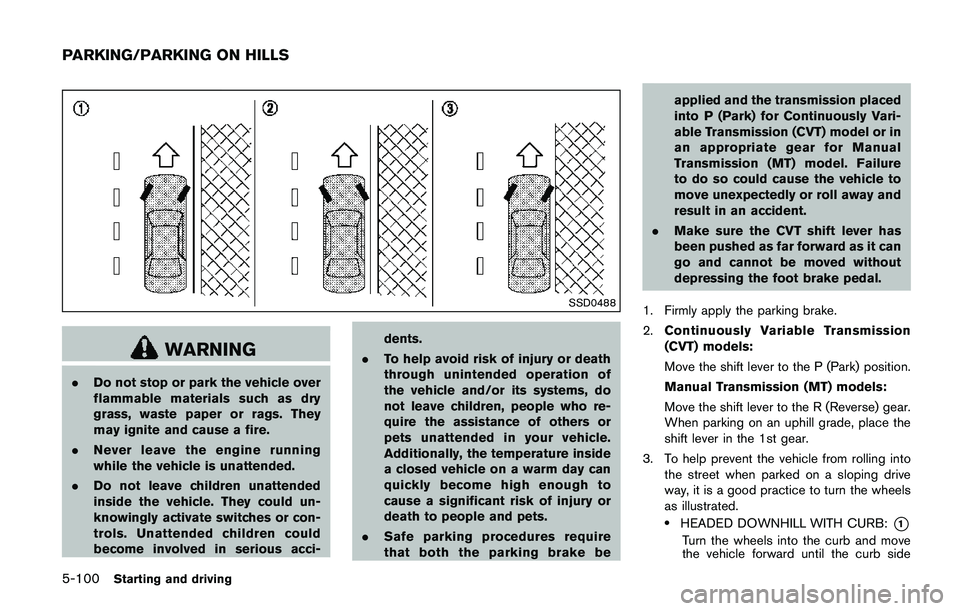
3. To help prevent the vehicle from rolling into
the street when parked on a sloping drive
way, it is a good practice to turn the wheels
as illustrated.
.HEADED DOWNHILL WITH CURB:*1
Turn the wheels into the curb and move
the vehicle forward until the curb side
PARKING/PARKING ON HILLS
Page 387 of 508
5-102Starting and driving
BRAKING PRECAUTIONS
The brake system has two separate hydraulic
circuits. If one circuit malfunctions, you will still
have braking at two wheels.
Vacuum assisted brakes
The brake booster aids braking by using engine
vacuum. If the engine stops, you can stop the
vehicle by depressing the brake pedal. However,
greater foot pressure on the brake pedal will be
required to stop the vehicle and the stopping
distance will be longer.
Using the brakes
Avoid resting your foot on the brake pedal while
driving. This will cause overheating of the
brakes, wearing out the brake pads faster and
reduce gas mileage.
To help reduce brake wear and to prevent the
brakes from overheating, reduce speed and
downshift to a lower gear before going down a
slope or long grade. Overheated brakes may
reduce braking performance and could result in
loss of vehicle control.
WARNING
.While driving on a slippery surface,
be careful when braking, accelerat-ing or downshifting. Abrupt braking
or accelerating could cause the
wheels to skid and result in an
accident.
.If the engine is not running or is
turned off while driving, the power
assist for the brakes will not work.
Braking will be harder.
Wet brakes
When the vehicle is washed or driven through
water, the brakes may get wet. As a result, your
braking distance will be longer and the vehicle
may pull to one side during braking.
To dry brakes, drive the vehicle at a safe speed
while lightly tapping the brake pedal to heat-up
the brakes. Do this until the brakes return to
normal. Avoid driving the vehicle at high speeds
until the brakes function correctly.
Parking brake break-in
Break in the parking brake shoes whenever the
stopping effect of the parking brake is weakened
or whenever the parking brake shoes and/or
drums/rotors are replaced, in order to assure the
best braking performance.
This procedure is described in the vehicle
service manual. It is recommended you visit a
NISSAN dealer for this service.
BRAKE ASSIST
When the force applied to the brake pedal
exceeds a certain level, the Brake Assist is
activated generating greater braking force than a
conventional brake booster even with light pedal
force.
WARNING
The Brake Assist is only an aid to assist
braking operation and is not a collision
warning or avoidance device. It is the
driver’s responsibility to stay alert, drive
safely and be in control of the vehicle at
all times.
ANTI-LOCK BRAKING SYSTEM (ABS)
WARNING
.The Anti-lock Braking System (ABS)
is a sophisticated device, but it
cannot prevent accidents resulting
from careless or dangerous driving
techniques. It can help maintain
vehicle control during braking on
slippery surfaces. Remember that
stopping distances on slippery sur-
faces will be longer than on normal
BRAKE SYSTEM BRAKE ASSIST
Page 388 of 508
surfaces even with ABS. Stopping
distances may also be longer on
rough, gravel or snow covered
roads, or if you are using tire chains.
Always maintain a safe distance
from the vehicle in front of you.
Ultimately, the driver is responsible
for safety.
.Tire type and condition may also
affect braking effectiveness.
— When replacing tires, install the
specified size of tires on all four
wheels.
— When installing a spare tire,
make sure that it is the proper
size and type as specified on the
Tire and Loading Information
label. See“Tire and Loading
Information label”(P.10-10) of
this manual.
— For detailed information, see
“Wheels and tires”(P.8-29) of
this manual.
The Anti-lock Braking System (ABS) controls
the brakes so the wheels do not lock during hard
braking or when braking on slippery surfaces.
The system detects the rotation speed at eachwheel and varies the brake fluid pressure to
prevent each wheel from locking and sliding. By
preventing each wheel from locking, the system
helps the driver maintain steering control and
helps to minimize swerving and spinning on
slippery surfaces.
Using the system
Depress the brake pedal and hold it down.
Depress the brake pedal with firm steady
pressure, but do not pump the brakes. The
ABS will operate to prevent the wheels from
locking up. Steer the vehicle to avoid obstacles.
WARNING
Do not pump the brake pedal. Doing so
may result in increased stopping dis-
tances.
Self-test feature
The ABS includes electronic sensors, electric
pumps, hydraulic solenoids and a computer. The
computer has a built-in diagnostic feature that
tests the system each time you start the engine
and move the vehicle at a low speed in forward
or reverse. When the self-test occurs, you may
hear a “clunk” noise and/or feel a pulsation in the
brake pedal. This is normal and does notindicate a malfunction. If the computer senses
a malfunction, it switches the ABS off and
illuminates the ABS warning light on the
instrument panel. The brake system then oper-
ates normally, but without anti-lock assistance.
If the ABS warning light illuminates during the
self-test or while driving, have the vehicle
checked. It is recommended you visit a NISSAN
dealer for this service.
Normal operation
The ABS operates at speeds above 3 to 6 MPH
(5 to 10 km/h) . The speed varies according to
road conditions.
When the ABS senses that one or more wheels
are close to locking up, the actuator rapidly
applies and releases hydraulic pressure. This
action is similar to pumping the brakes very
quickly. You may feel a pulsation in the brake
pedal and hear a noise from under the hood or
feel a vibration from the actuator when it is
operating. This is normal and indicates that the
ABS is operating properly. However, the pulsa-
tion may indicate that road conditions are
hazardous and extra care is required while
driving.
Starting and driving5-103
Page 389 of 508
5-104Starting and driving
The Vehicle Dynamic Control (VDC) system
uses various sensors to monitor driver inputs
and vehicle motion. Under certain driving con-
ditions, the VDC system helps to perform the
following functions.
.Controls brake pressure to reduce wheel
slip on one slipping drive wheel so power is
transferred to a non slipping drive wheel on
the same axle.
.Controls brake pressure and engine output
to reduce drive wheel slip based on vehicle
speed (traction control function) .
.Controls brake pressure at individual wheels
and engine output to help the driver maintain
control of the vehicle in the following
conditions:
— understeer (vehicle tends to not follow
the steered path despite increased
steering input)
— oversteer (vehicle tends to spin due to
certain road or driving conditions) .
The VDC system can help the driver to maintain
control of the vehicle, but it cannot prevent loss
of vehicle control in all driving situations.
When the VDC system operates, the VDC
warning light
in the instrument panel flashes
so note the following:
.The road may be slippery or the system may
determine some action is required to helpkeep the vehicle on the steered path.
.You may feel a pulsation in the brake pedal
and hear a noise or vibration from under the
hood. This is normal and indicates that the
VDC system is working properly.
.Adjust your speed and driving to the road
conditions.
If a malfunction occurs in the system, the VDC
warning light
illuminates in the instrument
panel. The VDC system automatically turns off.
The VDC OFF switch is used to turn off the VDC
system. The VDC off indicator
illuminates to
indicate the VDC system is off. When the VDC
switch is used to turn off the system, the VDC
system still operates to prevent one drive wheel
from slipping by transferring power to a non
slipping drive wheel. The VDC warning light
flashes if this occurs. All other VDC functions
are off, and the VDC warning lightwill not
flash. The VDC system is automatically reset to
on when the ignition switch is placed in the off
position then back to the on position.
See “Vehicle Dynamic Control (VDC) warning
light” (P.2-15) and “Vehicle Dynamic Control
(VDC) off indicator light” (P.2-17).
The computer has a built-in diagnostic feature
that tests the system each time you start the
engine and move the vehicle forward or in
reverse at a slow speed. When the self-testoccurs, you may hear a “clunk” noise and/or feel
a pulsation in the brake pedal. This is normal and
is not an indication of a malfunction.
WARNING
.The VDC system is designed to help
improve driving stability but does
not prevent accidents due to abrupt
steering operation at high speeds or
by careless or dangerous driving
techniques. Reduce vehicle speed
and be especially careful when driv-
ing and cornering on slippery sur-
faces and always drive carefully.
.Do not modify the vehicle’s suspen-
sion. If suspension parts such as
shock absorbers, struts, springs,
stabilizer bars, bushings and
wheels are not NISSAN recom-
mended for your vehicle or are
extremely deteriorated, the VDC
system may not operate properly.
This could adversely affect vehicle
handling performance, and the VDC
warning light
may illuminate.
.If brake related parts such as brake
pads, rotors and calipers are not
NISSAN recommended or are extre-
VEHICLE DYNAMIC CONTROL (VDC)
SYSTEM