ignition NISSAN QASHQAI 2017 Owner´s Manual
[x] Cancel search | Manufacturer: NISSAN, Model Year: 2017, Model line: QASHQAI, Model: NISSAN QASHQAI 2017Pages: 508, PDF Size: 2.68 MB
Page 273 of 508
4-92Heater, air conditioner, audio and phone systems
.Auto Reply (if so equipped)
Select to turn on or off the Auto Reply
function. When enabled, the vehicle will
automatically send a predefined text
message to the sender when a text
message is received while driving.
.Auto Reply Message (if so equipped)
Select to choose the message that is
sent when the Auto Reply function is
enabled. Choose from “I’m Driving” or
one of the three custom messages
stored in the system.
.Vehicle Signature On/Off (if so equipped)
Select to choose whether or not the
vehicle signature is added to outgoing
text messages from the vehicle. This
message cannot be changed or custo-
mized.
WARNING
.Use a phone after stopping your
vehicle in a safe location. If you
have to use a phone while driving,
exercise extreme caution at all
times so full attention may be given
to vehicle operation.
.If you are unable to devote full
attention to vehicle operation while
talking on the phone, pull off the
road to a safe location and stop
your vehicle.
CAUTION
To avoid discharging the vehicle bat-
tery, use a phone after starting the
engine.
Your vehicle is equipped with the Bluetooth
Š
Hands-Free Phone System. If you have a
compatible BluetoothŠenabled cellular phone,
you can set up the wireless connection between
your cellular phone and the in-vehicle phone
module. With Bluetooth
Šwireless technology,
you can make or receive a hands-free telephonecall with your cellular phone in the vehicle.
Once your cellular phone is connected to the in-
vehicle phone module, no other phone connect-
ing procedure is required. Your phone is
automatically connected with the in-vehicle
phone module when the ignition switch is
placed in the ON position with the connected
cellular phone turned on and carried in the
vehicle.
You can register up to five different Bluetooth
Š
cellular phones to the in-vehicle phone module.
However, you can talk on only one cellular phone
at a time.
NISSAN Voice Recognition system supports the
phone commands, so dialing a phone number
using your voice is possible. For more details,
see “NISSAN Voice Recognition system (mod-
els with navigation system)” (P.4-99).
Before using the Bluetooth
ŠHands-Free Phone
System, refer to the following notes.
.Set up the wireless connection between a
cellular phone and the in-vehicle phone
module before using the Hands-Free Phone
System.
.Some Bluetooth
Šenabled cellular phones
may not be recognized by the in-vehicle
phone module. Please visit www.nissanusa.
com/bluetooth or www.nissan.ca/bluetooth
for a recommended phone list and connect-
BluetoothŠHANDS-FREE PHONE
SYSTEM (models with navigation
system)
Page 274 of 508
ing.
.You will not be able to use a hands-free
phone under the following conditions:
— Your vehicle is outside of the cellular
service area.
— Your vehicle is in an area where it is
difficult to receive cellular signal; such as
in a tunnel, in an underground parking
garage, near a tall building or in a
mountainous area.
— Your cellular phone is locked to prevent it
from being dialed.
.When the radio wave condition is not ideal
or ambient sound is too loud, it may be
difficult to hear the other person’s voice
during a call.
.Immediately after the ignition switch is
placed in the ON position, it may be
impossible to receive a call for a short
period of time.
.Do not place the cellular phone in an area
surrounded by metal or far away from the in-
vehicle phone module to prevent tone quality
degradation and wireless connection dis-
ruption.
.While a cellular phone is connected through
the Bluetooth
Šwireless connection, the
battery power of the cellular phone may
discharge quicker than usual. The Blue-tooth
ŠHands-Free Phone System cannot
charge cellular phones.
.If the Bluetooth
ŠHands-Free Phone System
seems to be malfunctioning, visit www.
nissanusa.com/bluetooth or www.nissan.
ca/bluetooth for troubleshooting help.
.Some cellular phones or other devices may
cause interference or a buzzing noise to
come from the audio system speakers.
Storing the device in a different location
may reduce or eliminate the noise.
.Refer to the cellular phone owner’s manual
regarding the telephone charges, cellular
phone antenna and body, etc.
.The signal strength display on the monitor
will not coincide with the signal strength
display of some cellular phones.
REGULATORY INFORMATION
FCC Regulatory information
.CAUTION: To maintain compliance with
FCC’s RF exposure guidelines, use only
the supplied antenna. Unauthorized antenna,
modification, or attachments could damage
the transmitter and may violate FCC regula-
tions..Operation is subject to the following two
conditions:
1) This device may not cause interference
and
2) This device must accept any interfer-
ence, including interference that may
cause undesired operation of the device.
IC Regulatory information
.Operation is subject to the following two
conditions: (1) this device may not cause
interference, and (2) this device must accept
any interference, including interference that
may cause undesired operation of the
device.
.This Class B digital apparatus meets all
requirements of the Canadian Interference-
Causing Equipment Regulations.
BluetoothŠis a trademark
owned by Bluetooth SIG, Inc.
and licensed to Robert Bosch
GmbH.
Heater, air conditioner, audio and phone systems4-93
Page 280 of 508
cations shown in the vehicle information
display. Touch “Both” to have text notifica-
tions shown in both the vehicle information
display and the touch screen. Touch “OFF”
to turn off all text notifications.
.Auto Reply (if so equipped):
Touch to toggle the auto reply functionality
on or off.
.Auto Reply Message (if so equipped):
Touch to indicate preferred message to be
sent when “Auto Reply” function is acti-
vated.
.Use Vehicle’s Signature (if so equipped):
Touch to toggle on or off the addition of the
vehicle signature to outgoing messages
.Custom Text Messages (if so equipped):
Touch this option to select a custom
message to edit. There are several custom
message slots available.The NISSAN Voice Recognition system allows
hands-free operation of the systems equipped
on this vehicle, such as the phone and naviga-
tion systems.
To operate NISSAN Voice Recognition, push the
button located on the steering wheel.
When prompted, speak the command for the
system you wish to activate. The command given
is picked up by the microphone and performed
when it is properly recognized. NISSAN Voice
Recognition will provide a voice response as
well as a message in the touch screen to inform
you of the command results.
USING THE SYSTEM
Initialization
When the ignition switch is placed in the ACC
or ON position, NISSAN Voice Recognition is
initialized, which takes a few seconds. When
completed, the system is ready to accept voice
commands. If the
button is pushed before
the initialization completes, the system will
announce: “Voice Recognition System not
ready. Please wait.”
Heater, air conditioner, audio and phone systems4-99
NISSAN VOICE RECOGNITION
SYSTEM (models with navigation
system)
Page 286 of 508
5 Starting and driving
Precautions when starting and driving ................................ 5-4
Exhaust gas (carbon monoxide) ...................................... 5-4
Three-way catalyst .............................................................. 5-5
Tire Pressure Monitoring System (TPMS) .................... 5-5
Avoiding collision and rollover ......................................... 5-8
On-pavement and off-road driving precautions .......... 5-8
Off-road recovery ................................................................ 5-9
Rapid air pressure loss ...................................................... 5-9
Drinking alcohol/drugs and driving .............................. 5-10
Driving safety precautions .............................................. 5-10
Ignition switch (models without Intelligent
Key system) ............................................................................. 5-12
Continuously Variable Transmission (CVT) ................ 5-13
Manual Transmission (MT) ............................................. 5-13
Key positions ..................................................................... 5-14
Push-button ignition switch (model with Intelligent
Key system) ............................................................................. 5-14
Operating range for engine start function ................. 5-14
Push-button ignition switch operation ........................ 5-15
Push-button ignition switch positions ......................... 5-16
Emergency engine shut off ............................................ 5-16
Intelligent Key battery discharge .................................. 5-16
Before starting the engine ................................................... 5-17
Starting the engine (model without Intelligent
Key system) ............................................................................. 5-17Starting the engine (model with Intelligent
Key system) ............................................................................ 5-18
Remote engine start (if so equipped) ...................... 5-19
Driving the vehicle ................................................................. 5-20
Continuously Variable Transmission (CVT) ............. 5-20
Manual Transmission (MT) ........................................... 5-25
Parking brake .......................................................................... 5-26
Pedal type ........................................................................ 5-27
Switch type (models with electronic parking
brake system) ................................................................. 5-27
ECO mode system ............................................................... 5-29
ECO Pedal Guide function ......................................... 5-29
Ambient ECO .................................................................. 5-30
ECO Drive Report ......................................................... 5-31
Lane Departure Warning (LDW) (if so equipped) ....... 5-31
LDW system operation ................................................. 5-32
How to enable/disable the LDW system ................. 5-33
LDW system limitations ................................................ 5-34
System temporarily unavailable .................................. 5-35
System malfunction ....................................................... 5-35
System maintenance ..................................................... 5-36
Lane Departure Prevention (LDP) (if so equipped) ..... 5-36
LDP system operation .................................................. 5-37
How to enable/disable the LDP system .................. 5-38
LDP system limitations ................................................. 5-39
Page 290 of 508
THREE-WAY CATALYST
The three-way catalyst is an emission control
device installed in the exhaust system. Exhaust
gases in the three-way catalyst are burned at
high temperatures to help reduce pollutants.
WARNING
.The exhaust gas and the exhaust
system are very hot. Keep people,
animals and flammable materials
away from the exhaust system com-
ponents.
.Do not stop or park the vehicle over
flammable materials such as dry
grass, wastepaper or rags. They
may ignite and cause a fire.
CAUTION
.Do not use leaded gasoline. Depos-
its from leaded gasoline will ser-
iously reduce the three-way
catalyst’s ability to help reduce ex-
haust pollutants.
.Keep your engine tuned up. Mal-
functions in the ignition, fuel injec-tion, or electrical systems can cause
overrich fuel flow into the three-way
catalyst, causing it to overheat. Do
not keep driving if the engine mis-
fires, or if noticeable loss of perfor-
mance or other unusual operating
conditions are detected. Have the
vehicle inspected. It is recom-
mended you visit a NISSAN dealer
for this service.
.Avoid driving with an extremely low
fuel level. Running out of fuel could
cause the engine to misfire, dama-
ging the three-way catalyst.
.Do not race the engine while warm-
ing it up.
.Do not push or tow your vehicle to
start the engine.
TIRE PRESSURE MONITORING SYS-
TEM (TPMS)
Each tire, including the spare (if provided) ,
should be checked monthly when cold and
inflated to the inflation pressure recommended
by the vehicle manufacturer on the vehicle
placard or tire inflation pressure label. (If your
vehicle has tires of a different size than the size
indicated on the vehicle placard or tire inflation
pressure label, you should determine the propertire inflation pressure for those tires.)
As an added safety feature, your vehicle has
been equipped with a Tire Pressure Monitoring
System (TPMS) that illuminates a low tire
pressure telltale when one or more of your tires
is significantly under-inflated. Accordingly, when
the low tire pressure telltale illuminates, you
should stop and check your tires as soon as
possible, and inflate them to the proper pres-
sure. Driving on a significantly under-inflated tire
causes the tire to overheat and can lead to tire
failure. Under-inflation also reduces fuel effi-
ciency and tire tread life, and may affect the
vehicle’s handling and stopping ability.
Please note that the TPMS is not a substitute for
proper tire maintenance, and it is the driver’s
responsibility to maintain correct tire pressure,
even if under-inflation has not reached the level
to trigger illumination of the TPMS low tire
pressure telltale.
Your vehicle has also been equipped with a
TPMS malfunction indicator to indicate when the
system is not operating properly. The TPMS
malfunction indicator is combined with the low
tire pressure telltale. When the system detects a
malfunction, the telltale will flash for approxi-
mately one minute and then remain continuously
illuminated. This sequence will continue upon
subsequent vehicle start-ups as long as the
Starting and driving5-5
Page 293 of 508
5-8Starting and driving
3. Place the ignition switch in the ON position.
Do not start the engine.
Operation:
1. Add air to the tire.
2. After a few seconds, the hazard indicators
will start flashing.
3. When the designated pressure is reached,
the horn beeps once and the hazard
indicators stop flashing.
4. Perform the above steps for each tire.
.If the tire is over-inflated more than approxi-
mately 4 psi (30 kPa), the horn beeps and
the hazard indicators flash 3 times. To
correct the pressure, push the core of the
valve stem on the tire briefly to release
pressure. When the pressure reaches the
designated pressure, the horn beeps once.
.If the hazard indicator does not flash within
approximately 15 seconds after starting to
inflate the tire, it indicates that the TPMS
with Easy Fill Tire Alert is not operating.
.The TPMS will not activate the Easy Fill Tire
Alert under the following conditions:
— If there is interference from an external
device or transmitter
— The air pressure from the inflation device
such as those using a power socket is
not sufficient to inflate the tire— If an electrical equipment is being used in
or near the vehicle
— There is a malfunction in the TPMS
system
— There is a malfunction in the horn or
hazard indicators
.If the TPMS with Easy Fill Tire Alert does not
operate due to TPMS interference, move the
vehicle about 3 ft (1m) backward or forward
and try again.
If the TPMS with Easy Fill Tire Alert is not
working, use a tire pressure gauge.
AVOIDING COLLISION AND ROLL-
OVER
WARNING
Failure to operate this vehicle in a safe
and prudent manner may result in loss
of control or an accident.
Be alert and drive defensively at all times. Obey
all traffic regulations. Avoid excessive speed,
high speed cornering, or sudden steering
maneuvers, because these driving practices
could cause you to lose control of your vehicle.
As with any vehicle, a loss of control could
result in a collision with other vehicles orobjects, or cause the vehicle to rollover,
particularly if the loss of control causes the
vehicle to slide sideways.Be attentive at all
times, and avoid driving when tired. Never drive
when under the influence of alcohol or drugs
(including prescription or over-the-counter
drugs which may cause drowsiness) . Always
wear your seat belt as outlined in “Seat belts”
(P.1-10) of this manual, and also instruct your
passengers to do so.
Seat belts help reduce the risk of injury in
collisions and rollovers.In a rollover crash, an
unbelted or improperly belted person is
significantly more likely to be injured or
killed than a person properly wearing a
seat belt.
ON-PAVEMENT AND OFF-ROAD
DRIVING PRECAUTIONS
Utility vehicles have a significantly higher
rollover rate than other types of vehicles.
They have higher ground clearance than pas-
senger cars to make them capable of performing
in a variety of on-pavement and off-road
applications. This gives them a higher center of
gravity than ordinary cars. An advantage of
higher ground clearance is a better view of the
road, allowing you to anticipate problems.
However, they are not designed for cornering
at the same speeds as conventional passenger
Page 297 of 508
5-12Starting and driving
passenger car. The vehicle is not
designed for cornering at the same
speeds as conventional passenger
cars. Failure to operate this vehicle
correctly could result in loss of
control and/or a rollover accident.
.Always use tires of the same type,
size, brand, construction (bias, bias-
belted or radial) , and tread pattern
on all four wheels. Install traction
devices on the front wheels when
driving on slippery roads and drive
carefully.
.Be sure to check the brakes imme-
diately after driving in mud or water.
See“Brake system”(P.5-102) for wet
brakes.
.Avoid parking your vehicle on steep
hills. If you get out of the vehicle
and it rolls forward, backward or
sideways, you could be injured.
.Whenever you drive off-road
through sand, mud or water as deep
as the wheel hub, more frequent
maintenance may be required. See
the maintenance schedule shown in
the“9. Maintenance and schedules”
section..Spinning the front wheels on slip-
pery surfaces may cause the AWD
warning message to display and the
AWD system to automatically switch
from the AWD mode to the 2WD
mode. This could reduce traction.
(AWD models)WARNING
Never remove the key or place the
ignition switch in the LOCK position
while driving. The steering wheel will
lock and could cause the driver to lose
control of the vehicle. This could result
in serious vehicle damage or personal
injury.
IGNITION SWITCH (models without
Intelligent Key system)
Page 298 of 508
JVS1067X
CONTINUOUSLY VARIABLE TRANS-
MISSION (CVT)
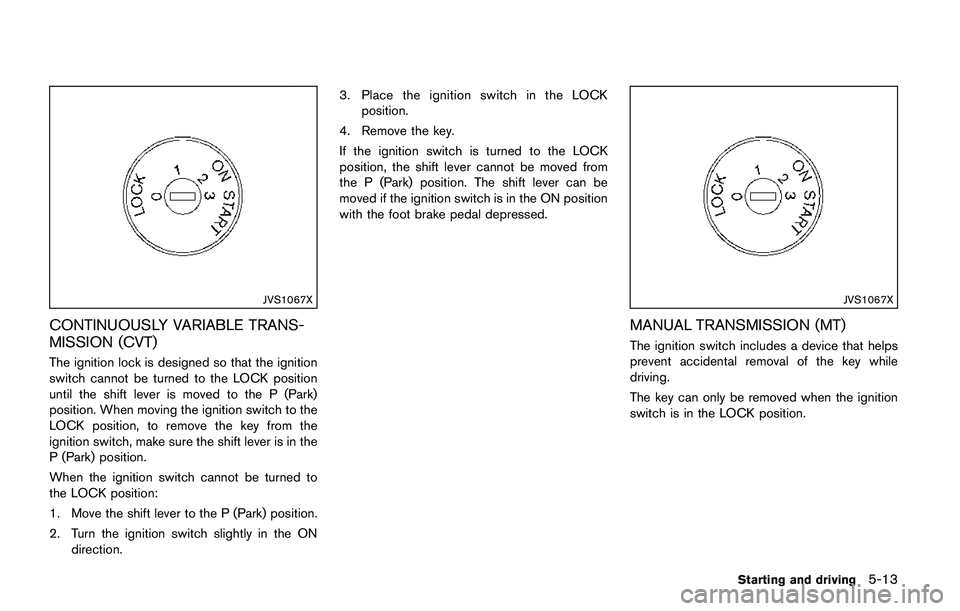
The ignition lock is designed so that the ignition
switch cannot be turned to the LOCK position
until the shift lever is moved to the P (Park)
position. When moving the ignition switch to the
LOCK position, to remove the key from the
ignition switch, make sure the shift lever is in the
P (Park) position.
When the ignition switch cannot be turned to
the LOCK position:
1. Move the shift lever to the P (Park) position.
2. Turn the ignition switch slightly in the ON
direction.3. Place the ignition switch in the LOCK
position.
4. Remove the key.
If the ignition switch is turned to the LOCK
position, the shift lever cannot be moved from
the P (Park) position. The shift lever can be
moved if the ignition switch is in the ON position
with the foot brake pedal depressed.
JVS1067X
MANUAL TRANSMISSION (MT)
The ignition switch includes a device that helps
prevent accidental removal of the key while
driving.
The key can only be removed when the ignition
switch is in the LOCK position.
Starting and driving5-13
Page 299 of 508
5-14Starting and driving
KEY POSITIONS
LOCK: Normal parking position (0)
OFF: (Not used) (1)
This position activates electrical accessories
such as the radio when the engine is not
running.
ON: Normal operating position (2)
This position turns on the ignition system and
the electrical accessories.
START: (3)
This position starts the engine. As soon as the
engine has started, release the key. It auto-
matically returns to the ON position.
WARNING
Do not operate the push-button ignition
switch while driving the vehicle except
in an emergency. (The engine will stop
when the ignition switch is pushed 3
consecutive times or the ignition switch
is pushed and held for more than 2
seconds.) If the engine stops while the
vehicle is being driven, this could lead
to a crash and serious injury.
Before operating the push-button ignition
switch, be sure to move the shift lever to the P
(Park) position (for Continuously Variable Trans-
mission (CVT) models) or the shift lever to the N
(Neutral) position (for Manual Transmission (MT)
models) .
SSD0436
OPERATING RANGE FOR ENGINE
START FUNCTION
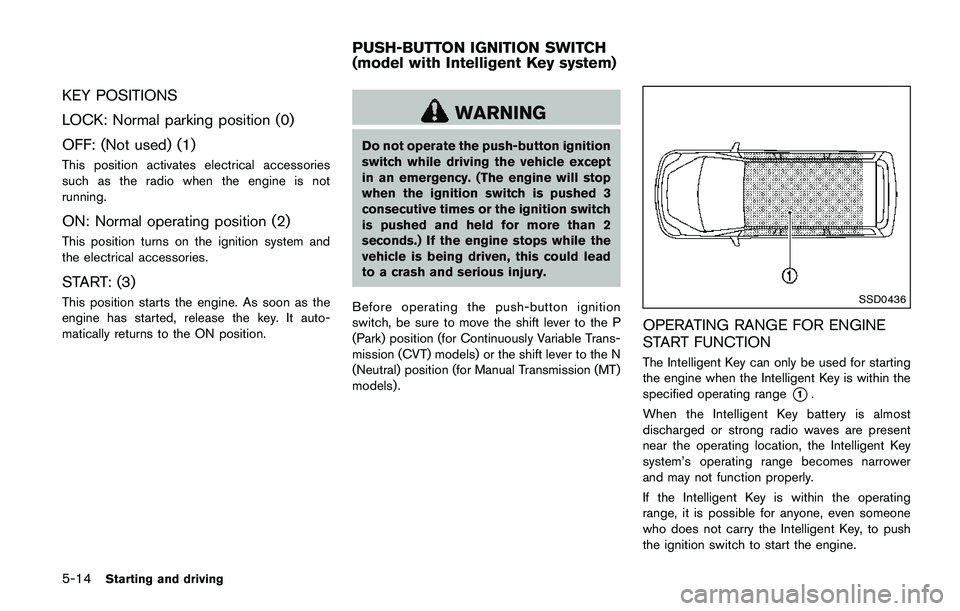
The Intelligent Key can only be used for starting
the engine when the Intelligent Key is within the
specified operating range
*1.
When the Intelligent Key battery is almost
discharged or strong radio waves are present
near the operating location, the Intelligent Key
system’s operating range becomes narrower
and may not function properly.
If the Intelligent Key is within the operating
range, it is possible for anyone, even someone
who does not carry the Intelligent Key, to push
the ignition switch to start the engine.
PUSH-BUTTON IGNITION SWITCH
(model with Intelligent Key system)
Page 300 of 508
.The cargo room area is not included in the
operating range but the Intelligent Key may
function.
.If the Intelligent Key is placed on the
instrument panel, inside the glove box or
door pocket, the Intelligent Key may not
function.
.If the Intelligent Key is placed near the door
or window outside the vehicle, the Intelligent
Key may function.
PUSH-BUTTON IGNITION SWITCH
OPERATION
CAUTION
.Do not leave the vehicle for ex-
tended periods of time when the
ignition switch is in the ON position
and the engine is not running. This
can discharge the battery.
.Use electrical accessories with the
engine running to avoid discharging
the vehicle battery. If you must use
accessories while the engine is not
running, do not use them for ex-
tended periods of time and do not
use multiple electrical accessories
at the same time.
JVS0937X
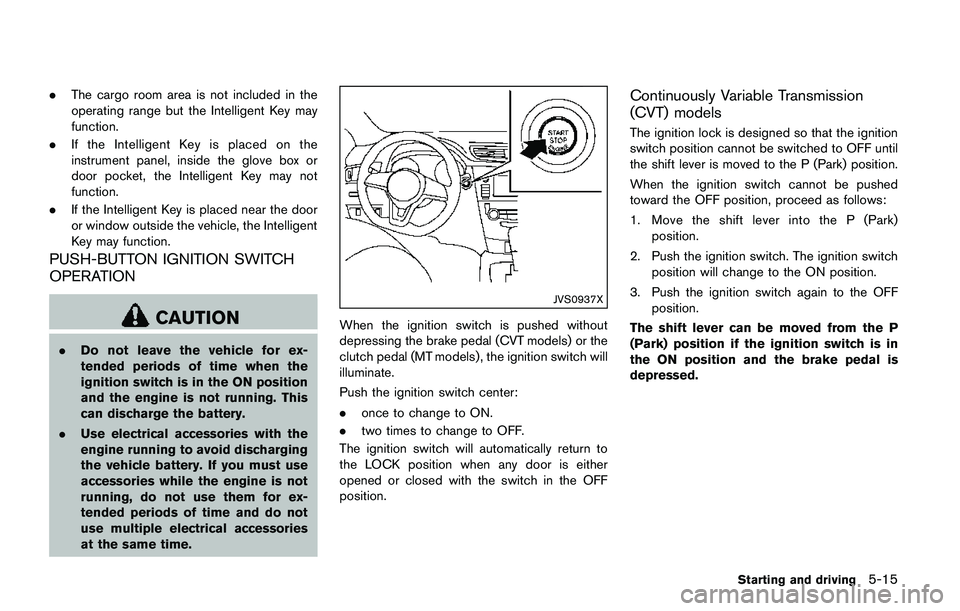
When the ignition switch is pushed without
depressing the brake pedal (CVT models) or the
clutch pedal (MT models) , the ignition switch will
illuminate.
Push the ignition switch center:
.once to change to ON.
.two times to change to OFF.
The ignition switch will automatically return to
the LOCK position when any door is either
opened or closed with the switch in the OFF
position.
Continuously Variable Transmission
(CVT) models
The ignition lock is designed so that the ignition
switch position cannot be switched to OFF until
the shift lever is moved to the P (Park) position.
When the ignition switch cannot be pushed
toward the OFF position, proceed as follows:
1. Move the shift lever into the P (Park)
position.
2. Push the ignition switch. The ignition switch
position will change to the ON position.
3. Push the ignition switch again to the OFF
position.
The shift lever can be moved from the P
(Park) position if the ignition switch is in
the ON position and the brake pedal is
depressed.
Starting and driving5-15